Goldwood Sound TS220 2.1 CH MULTIMEDIA SPEAKER SYSTEM User Manual C258BU VC

Goldwood Sound, Inc. 2.1 CH MULTIMEDIA SPEAKER SYSTEM C258BU VC

15_TS220 UserMan

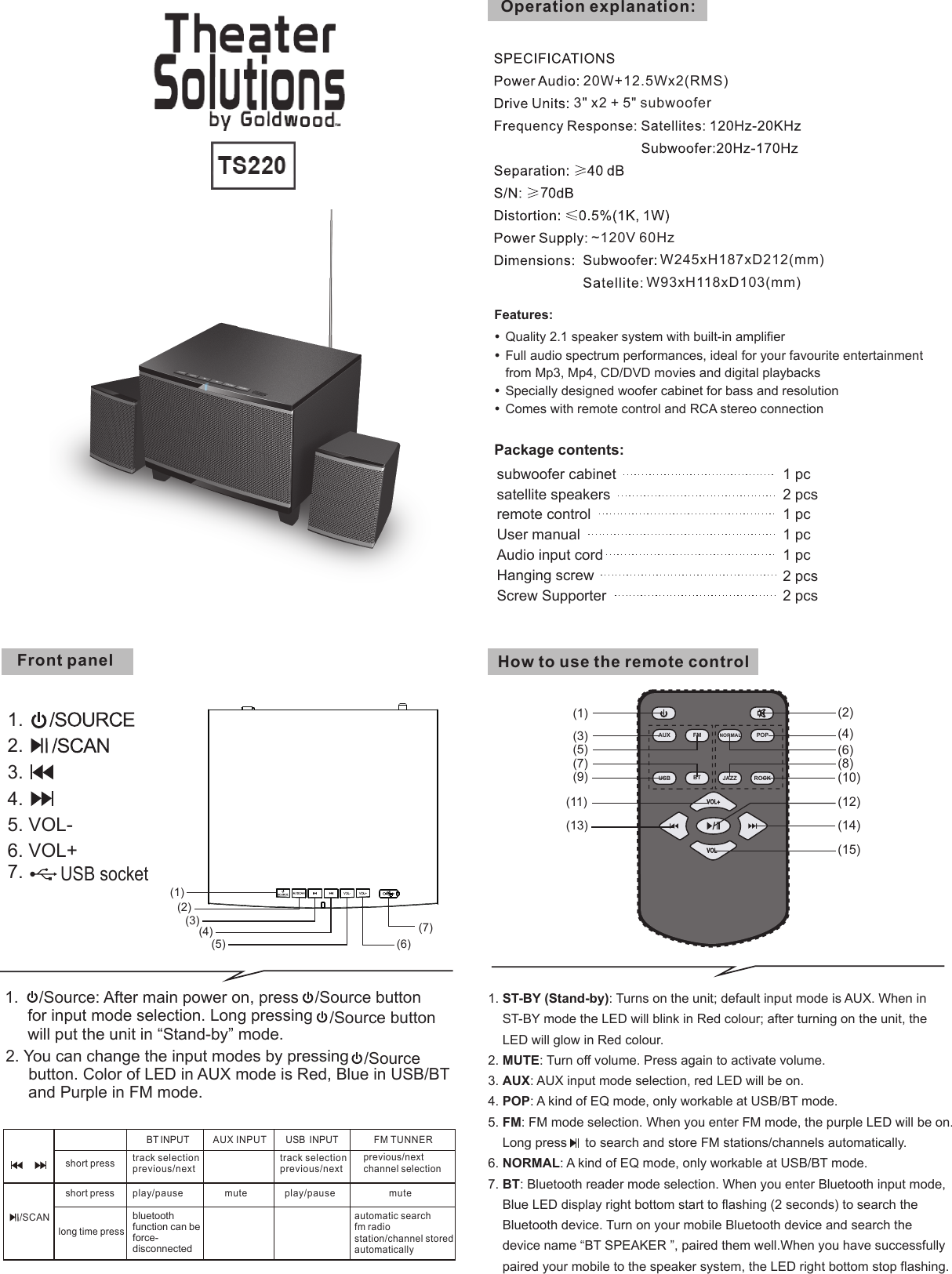
Features:Quality 2.1 speaker system with built-in amplifierFull audio spectrum performances, ideal for your favourite entertainment  from Mp3, Mp4, CD/DVD movies and digital playbacksSpecially designed woofer cabinet for bass and resolutionComes with remote control and RCA stereo connectionPackage contents: subwoofer cabinet 1 pc satellite speakers  2 pcsUser manual 1 pcOperation explanation:Audio input cord 1 pc remote control 1 pcFront panel~120V 60HzW245xH187xD212(mm)W93xH118xD103(mm)3" x2 + 5" subwoofer20W+12.5Wx2(RMS)How to use the remote controlHanging screwScrew Supporter2 pcs2 pcs7(2)(1)(3)(4)(5) (6)(7)1.2.3.4.5. VOL-6. VOL+7. USB socketUSB  INPUTBT INPUT AUX INPUT FM TUNNERshort pressshort presslong time presstrack selectionprevious/nextplay/pausebluetooth function can be force-disconnected/SCANmute play/pausetrack selectionprevious/nextmuteprevious/nextchannel selectionautomatic searchfm radiostation/channel storedautomatically(1)(7)(11)(13)(15)(12)(14)(3)(9)(2)(4)(8)(6)(10)(5)USB BTAUX/FM NORMAL POPROCKJAZZ1. ST-BY (Stand-by): Turns on the unit; default input mode is AUX. When in    ST-BY mode the LED will blink in Red colour; after turning on the unit, the    LED will glow in Red colour.2. MUTE: Turn off volume. Press again to activate volume.3. AUX: AUX input mode selection, red LED will be on.4. POP: A kind of EQ mode, only workable at USB/BT mode.5. FM: FM mode selection. When you enter FM mode, the purple LED will be on.    Long press     to search and store FM stations/channels automatically.6. NORMAL: A kind of EQ mode, only workable at USB/BT mode.7. BT: Bluetooth reader mode selection. When you enter Bluetooth input mode,    Blue LED display right bottom start to flashing (2 seconds) to search the    Bluetooth device. Turn on your mobile Bluetooth device and search thedevice name “BT SPEAKER ”, paired them well.When you have successfullypaired your mobile to the speaker system, the LED right bottom stop flashing.1.   /Source button      for input mode selection. Long pressing  /Source button      will put the unit in “Stand-by” mode./Source: After main power on, press 2. You can change the input modes by pressing  /Source     button. Color of LED in AUX mode is Red, Blue in USB/BT      and Purple in FM mode.
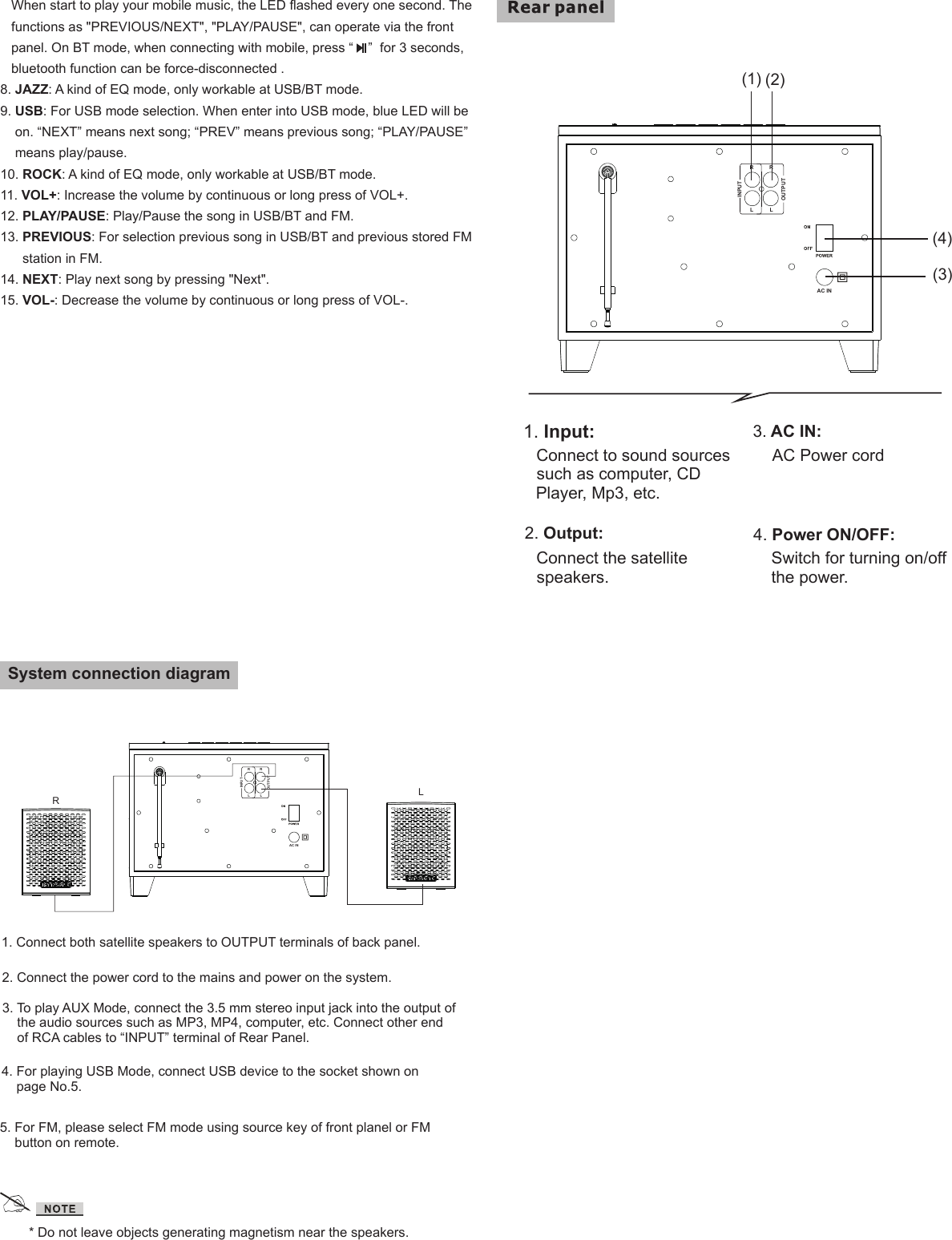
System connection diagram1. Input:Connect to sound sourcessuch as computer, CD Player, Mp3, etc.3. AC IN: AC Power cord2. Output:Connect the satellite speakers.4. Power ON/OFF:Switch for turning on/offthe power.(3)(4)(2)(1)AC ININPUTLROUTPUTLR* Do not leave objects generating magnetism near the speakers.RLAC ININPUTLROUTPUTLR1. Connect both satellite speakers to OUTPUT terminals of back panel.2. Connect the power cord to the mains and power on the system.3. To play AUX Mode, connect the 3.5 mm stereo input jack into the output ofthe audio sources such as MP3, MP4, computer, etc. Connect other endof RCA cables to “INPUT” terminal of Rear Panel.4. For playing USB Mode, connect USB device to the socket shown onpage No.5.5. For FM, please select FM mode using source key of front planel or FMbutton on remote.   When start to play your mobile music, the LED flashed every one second. The   functions as "PREVIOUS/NEXT", "PLAY/PAUSE", can operate via the front   panel. On BT mode, when connecting with mobile, press “    ”  for 3 seconds,   bluetooth function can be force-disconnected .8. JAZZ: A kind of EQ mode, only workable at USB/BT mode.9. USB: For USB mode selection. When enter into USB mode, blue LED will beon. “NEXT” means next song; “PREV” means previous song; “PLAY/PAUSE”means play/pause.10. ROCK: A kind of EQ mode, only workable at USB/BT mode.11. VOL+: Increase the volume by continuous or long press of VOL+.12. PLAY/PAUSE: Play/Pause the song in USB/BT and FM.13. PREVIOUS: For selection previous song in USB/BT and previous stored FMstation in FM.14. NEXT: Play next song by pressing "Next".15. VOL-: Decrease the volume by continuous or long press of VOL-.
FCC Part 15.19 Warning Statement THIS DEVICE COMPLIES WITH PART 15 OF THE FCC RULES. OPERATIONIS SUBJECT TO THE FOLLOWING TWO CONDITIONS: (1) THIS DEVICE MAYNOT CAUSE HARMFUL INTERFERENCE, AND (2) THIS DEVICE MUSTACCEPT ANY INTERFERENCE RECEIVED, INCLUDING INTERFERENCE THATMAY CAUSE UNDESIRED OPERATION.FCC Part 15.21 Warning Statement NOTE:    THE GRANTEE IS NOT RESPONSIBLE FOR ANY CHANGES OR MODIFICATIONS NOT EXPRESSLY APPROVED BY THE PARTY RESPONSIBLE FOR COMPLIANCE. SUCH MODIFICATIONS COULD VOID THE USER’S AUTHORITY TO OPERATE THE EQUIPMENT. FCC Part 15.105 Warning Statement Note: This equipment has been tested and found to comply with the limits for a Class B digital device, pursuant to part 15 of the FCC Rules. These limits are designed to provide reasonable protection against harmful interference in a residential installation. Thisequipment generates, uses and can radiate radio frequency energy and, if not installed andused in accordance with the instructions, may cause harmful interference to radio communications. However, there is no guarantee that interference will not occur in a particular installation. If this equipment does cause harmful interference to radio or television reception, which can be determined by turning the equipment off and on, the user is encouraged to try to correct the interference by one or more of the following measures: —Reorient or relocate the receiving antenna. —Increase the separation between the equipment and receiver. —Connect the equipment into an outlet on a circuit different from that to which the receiver is connected.—Consult the dealer or an experienced radio/TV technician for help. RF warning statement: The device has been evaluated to meet general RF exposure requirement.   To maintain compliance with FCC's RF exposure guidelines, this equipment should be installed and operated with a minimum distance of 20cm between the radiator and your body. 180mm240mm

Navigation menu