Grace Digital GDIEXBM901 EcoBoulder User Manual BT 306 Manual1

Grace Digital Inc. EcoBoulder BT 306 Manual1

User Manual

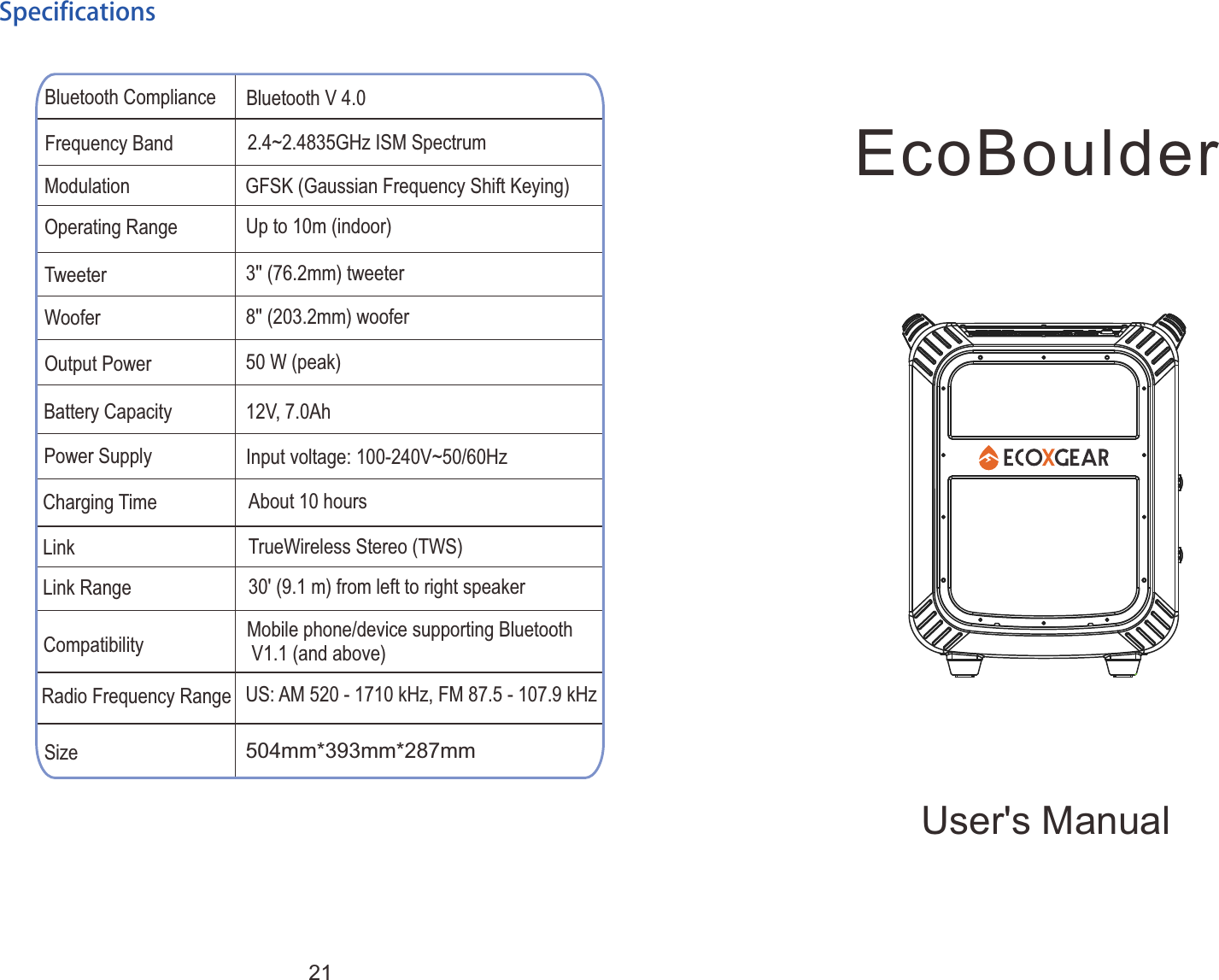
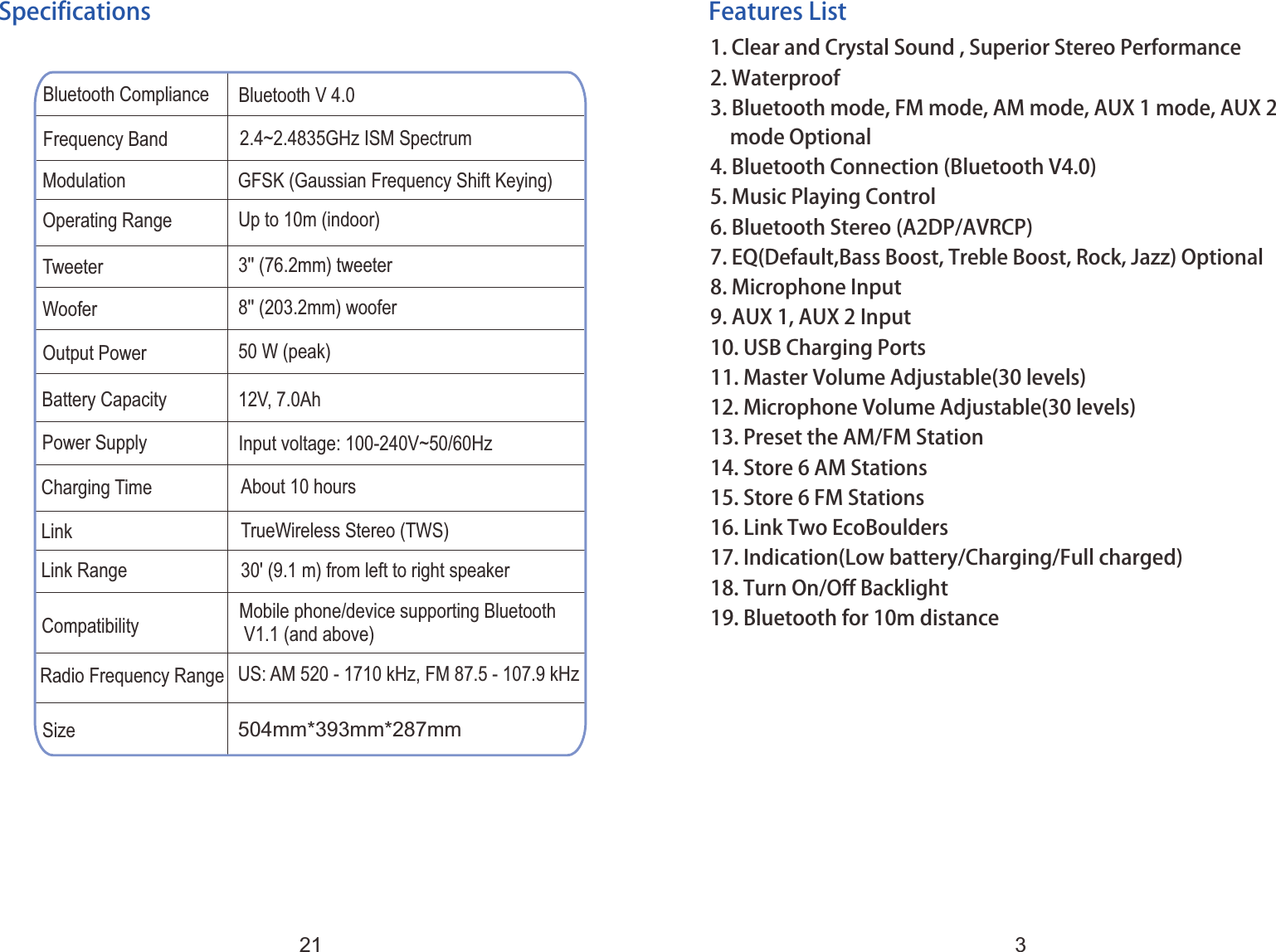
User's ManualEcoBoulderBluetooth Compliance Bluetooth V 4.0Frequency Band 2.4~2.4835GHz ISM SpectrumOperating RangeTweeterWooferOutput PowerModulation GFSK (Gaussian Frequency Shift Keying)Up to 10m (indoor)3 ' (76.2mm) tweeter'8 ' (203.2mm) woofer'50 W (peak)Battery CapacityCharging TimeLinkLink Range12V, 7.0AhAbout 10 hoursTrueWireless Stereo (TWS)30' (9.1 m) from left to right speakerCompatibility Mobile phone/device supporting Bluetooth V1.1 (and above)Power Supply Input voltage: 100-240V~50/60HzSizeRadio Frequency Range504mm*393mm*287mmUS: AM 520 - 1710 kHz, FM 87.5 - 107.9 kHzSpecifications21
FCCThis  device  complies  with  part  15  of  the  FCC  Rules.  Operation  is subject  to  the  condition  that  this  device  does  not  cause  harmful interference (1) this device may not cause harmful interference, and (2)  this  device  must  accept  any  interference  received,  including interference that may cause undesired operation.Changes  or  modifications  not  expressly  approved  by  the  party responsible for compliancecould void the user's authority to operate the equipment.NOTE: This equipment  has  been tested  and found  to comply with the  limits  for  a  Class  B  digital  device,  pursuant  to  Part  15  of  the FCC  Rules.  These  limits  are  designed  to  provide  reasonable protection  against  harmful  interference  in  a  residential  installation. This  equipment  generates,  uses  and  can  radiate  radio  frequency energy  and,  if  not  installed  and  used  in  accordance  with  the instructions,  may  cause  harmful  interference  to  radio communications.  However,  there  is no guarantee  that  interference will not occur in a particular installation.If  this  equipment  does  cause  harmful  interference  to  radio  or television reception,which can be determined by turning the equipment off and on, the user is encouraged to try to correct the interference by one or more of the following measures:-- Reorient or relocate the receiving antenna.-- Increase the separation between the equipment and receiver.-- Connect the equipment into an outlet on a circuit differentfrom that to which the receiver is connected.– Consult the dealer or an experienced radio/TV technician for help.To  maintain  compliance  with  FCC's  RF  Exposure  guidelines,  This equipment should be installed and operated with minimum distance between  20cm  the  radiator  your  body:  Use  only  the  supplied antenna.FCC ID: 2AIF5-EM200FCC
FCCThis  device  complies  with  part  15  of  the  FCC  Rules.  Operation  is subject  to  the  condition  that  this  device  does  not  cause  harmful interference (1) this device may not cause harmful interference, and (2)  this  device  must  accept  any  interference  received,  including interference that may cause undesired operation.Changes  or  modifications  not  expressly  approved  by  the  party responsible for compliancecould void the user's authority to operate the equipment.NOTE: This equipment  has  been tested  and found  to comply with the  limits  for  a  Class  B  digital  device,  pursuant  to  Part  15  of  the FCC  Rules.  These  limits  are  designed  to  provide  reasonable protection  against  harmful  interference  in  a  residential  installation. This  equipment  generates,  uses  and  can  radiate  radio  frequency energy  and,  if  not  installed  and  used  in  accordance  with  the instructions,  may  cause  harmful  interference  to  radio communications.  However,  there  is no guarantee  that  interference will not occur in a particular installation.If  this  equipment  does  cause  harmful  interference  to  radio  or television reception,which can be determined by turning the equipment off and on, the user is encouraged to try to correct the interference by one or more of the following measures:-- Reorient or relocate the receiving antenna.-- Increase the separation between the equipment and receiver.-- Connect the equipment into an outlet on a circuit differentfrom that to which the receiver is connected.– Consult the dealer or an experienced radio/TV technician for help.To  maintain  compliance  with  FCC's  RF  Exposure  guidelines,  This equipment should be installed and operated with minimum distance between  20cm  the  radiator  your  body:  Use  only  the  supplied antenna.FCCFCC ID: 2AAUI-GDIEXBM901
CongratulationsThanks for purchasing the EcoBoulder.  Enjoy  this  smart  product,  please  read  below  instructions  carefully.   It's more than just a Bluetooth speaker!Care and Maintenance1.Read the 2.Do  not  attempt  to  service  the  EcoBoulder  yourself.  Opening  or removing covers may expose you to dangerous voltages or other hazards.  Please  contact  your  local  reseller  before  you  send  the EcoBoulder for repair.3.Make sure that you have completely charged the battery prior to first use for maximum battery life.4.Do  not  use  the  EcoBoulder  in  temperatures  exceeding  the standard.  Extreme  temperature  will  lead  to  damage  of  the EcoBoulder,  decrease  of  battery  capacity  or  the  EcoBoulder durability.5.Place the EcoBoulder in an appropriate position for operation. 6.Use the product in proper volume, extremely high volume can be harmful for your ear.7.Return  the  Master  Volume  to  zero  when  you  are  finished  using the product.8. Switch everying on in the following order:  audio  input  source(i.e.  microphones,  instruments,  CD/MP3 Players)   EcoBoulderUser' s Manual before using the EcoBoulder.1••
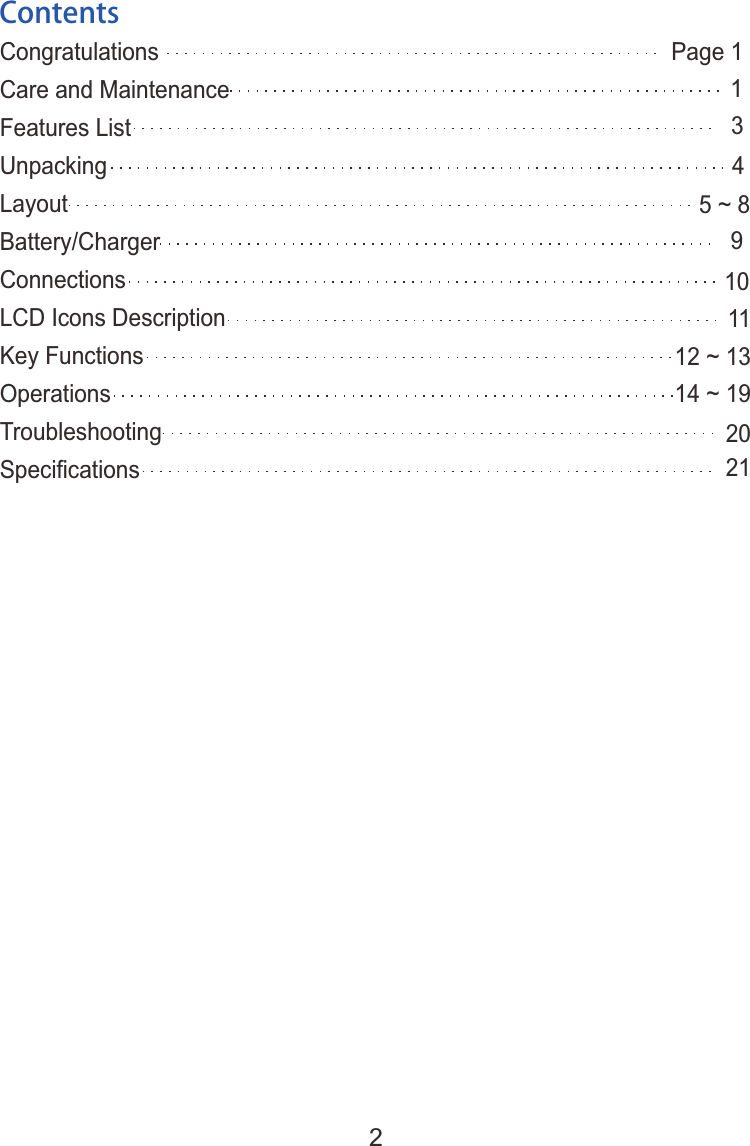
ContentsCongratulationsCare and MaintenanceFeatures ListUnpackingLayoutBattery/ChargerConnectionsLCD Icons DescriptionKey FunctionsOperationsTroubleshootingSpecifications 1345 ~ 89101112 ~ 1314 ~ 192021Page 12
Features List1. 2. Waterproof3. Bluetooth mode, FM mode, AM mode, AUX 1 mode, AUX 2   mode Optional 4. Bluetooth Connection (Bluetooth V4.0)5. Music Playing Control6. Bluetooth Stereo (A2DP/AVRCP)7. EQ(Default,Bass Boost, Treble Boost, Rock, Jazz) Optional8. Microphone Input9. AUX 1, AUX 2 Input10. USB Charging Ports11. Master Volume Adjustable(30 levels)12. Microphone Volume Adjustable(30 levels)13. Preset the AM/FM Station14. Store 6 AM Stations15. Store 6 FM Stations16. Link Two EcoBoulders17. Indication(Low battery/Charging/Full charged)18. Turn On/Off Backlight19. Bluetooth for 10m distanceClear and Crystal Sound , Superior Stereo PerformanceBluetooth Compliance Bluetooth V 4.0Frequency Band 2.4~2.4835GHz ISM SpectrumOperating RangeTweeterWooferOutput PowerModulation GFSK (Gaussian Frequency Shift Keying)Up to 10m (indoor)3 ' (76.2mm) tweeter'8 ' (203.2mm) woofer'50 W (peak)Battery CapacityCharging TimeLinkLink Range12V, 7.0AhAbout 10 hoursTrueWireless Stereo (TWS)30' (9.1 m) from left to right speakerCompatibility Mobile phone/device supporting Bluetooth V1.1 (and above)Power Supply Input voltage: 100-240V~50/60HzSizeRadio Frequency Range504mm*393mm*287mmUS: AM 520 - 1710 kHz, FM 87.5 - 107.9 kHzSpecifications321
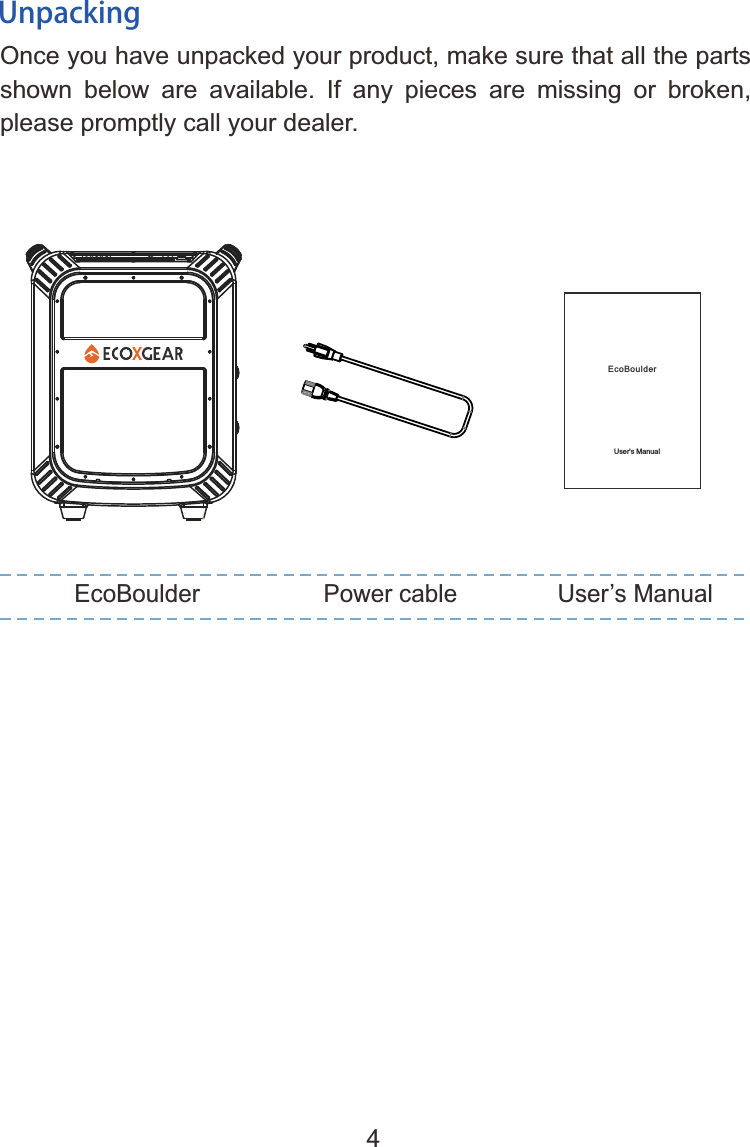
UnpackingOnce you have unpacked your product, make sure that all the parts shown  below  are  available.  If  any  pieces  are  missing  or  broken, please promptly call your dealer.EcoBoulder Power cable User’s ManualUser's ManualEcoBoulder4
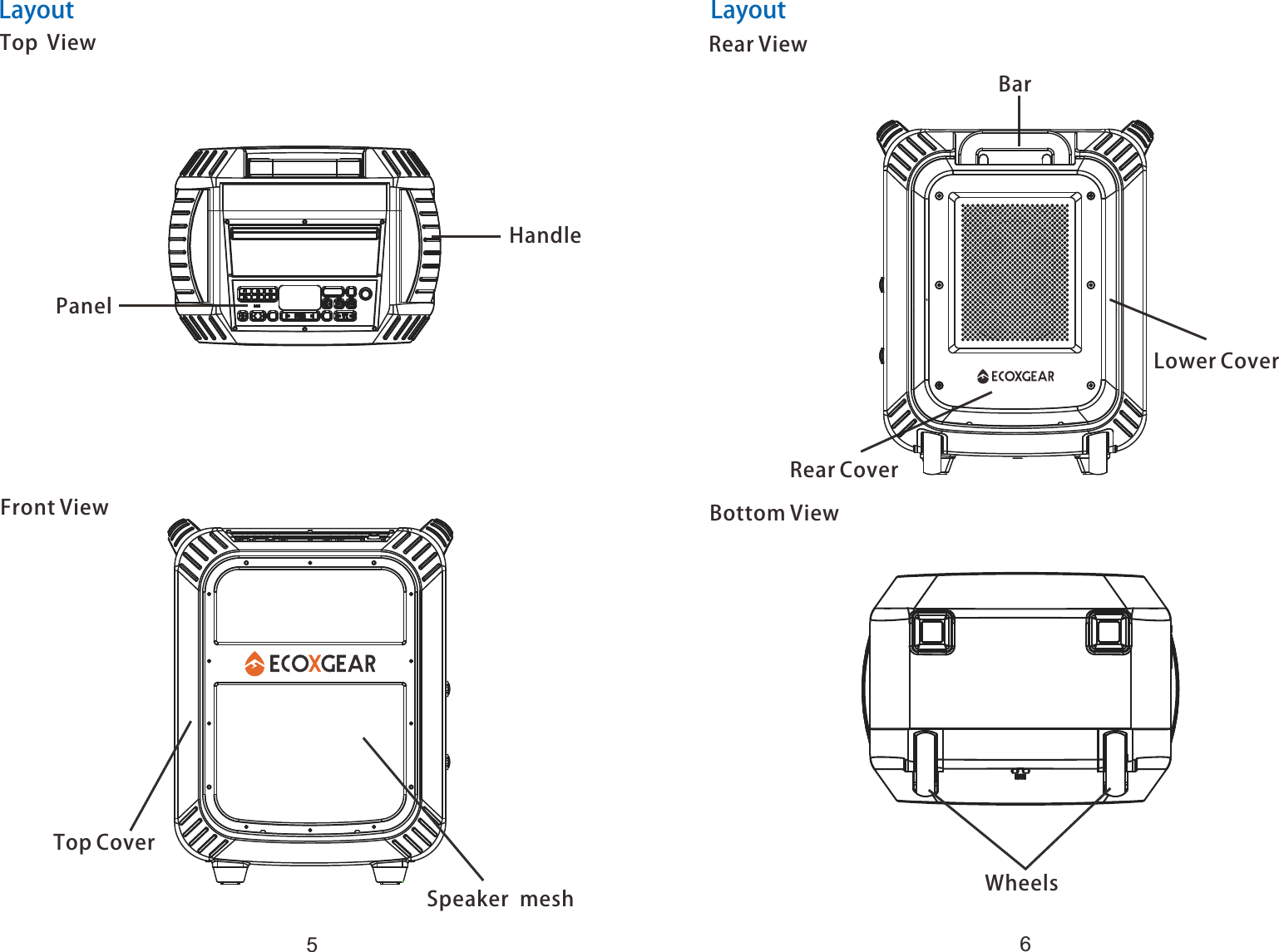
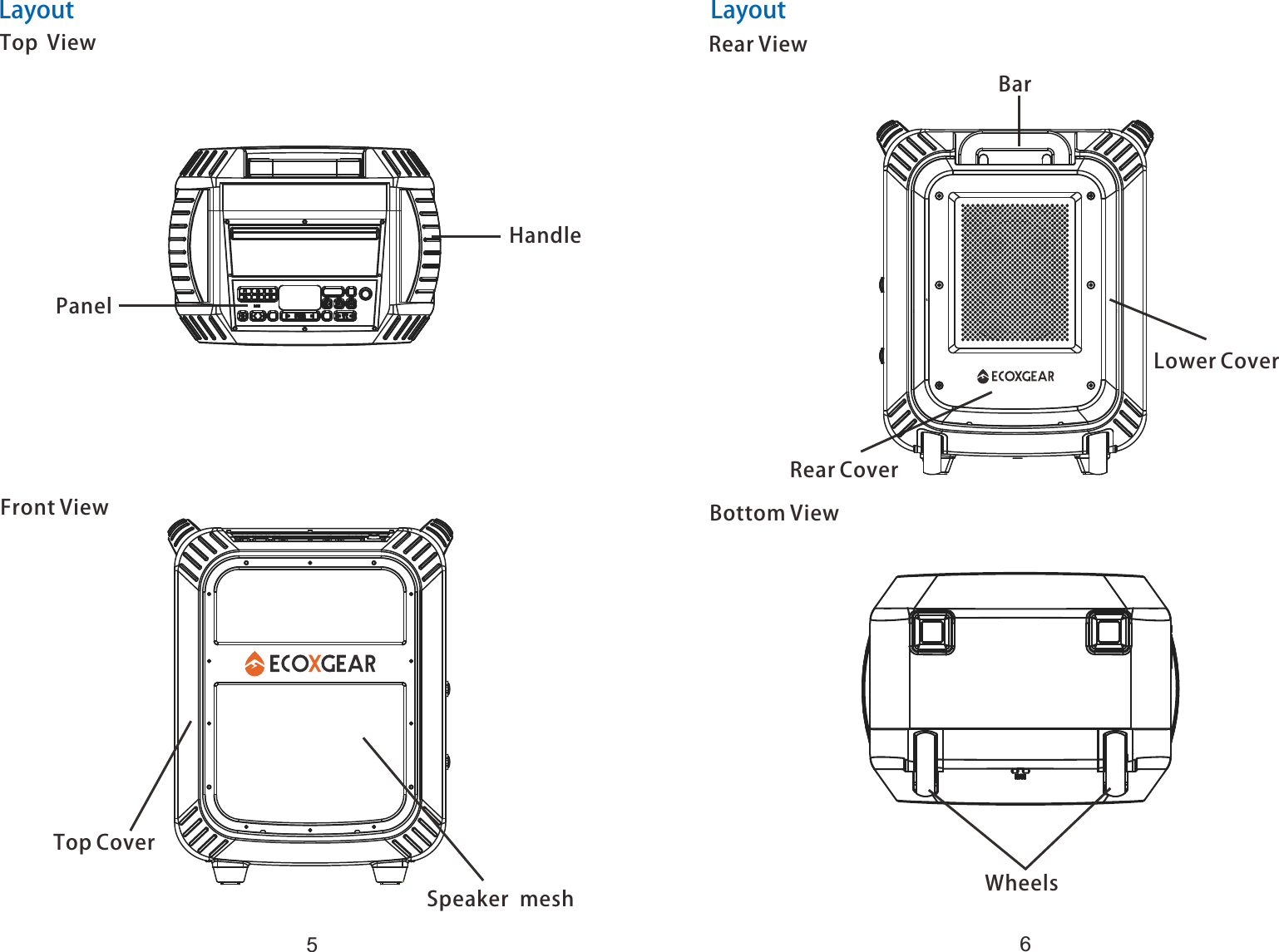
LayoutTop  ViewPanelHandleFront ViewTop CoverSpeaker meshRear CoverLower CoverBarRear ViewBottom ViewWheelsLayout56
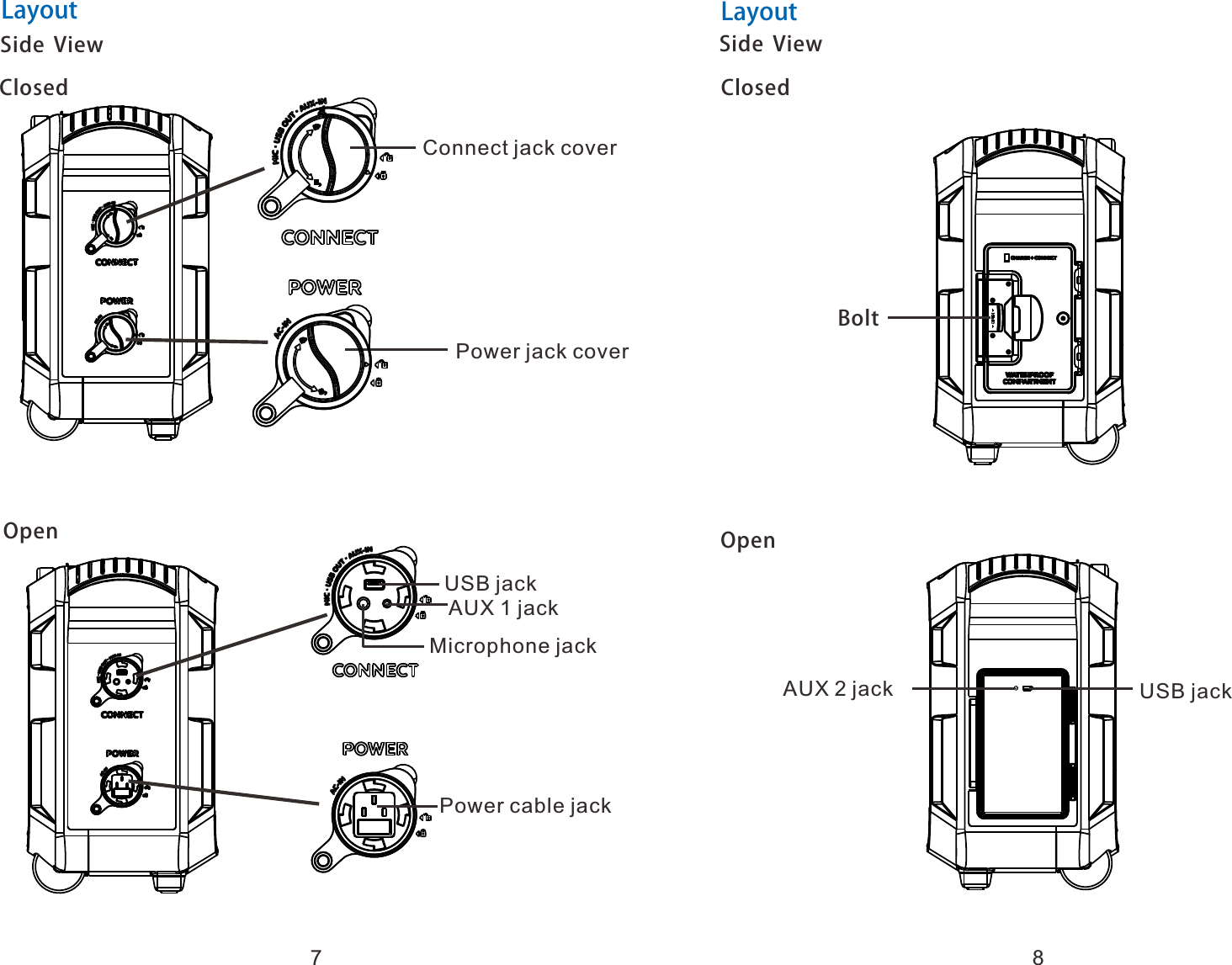
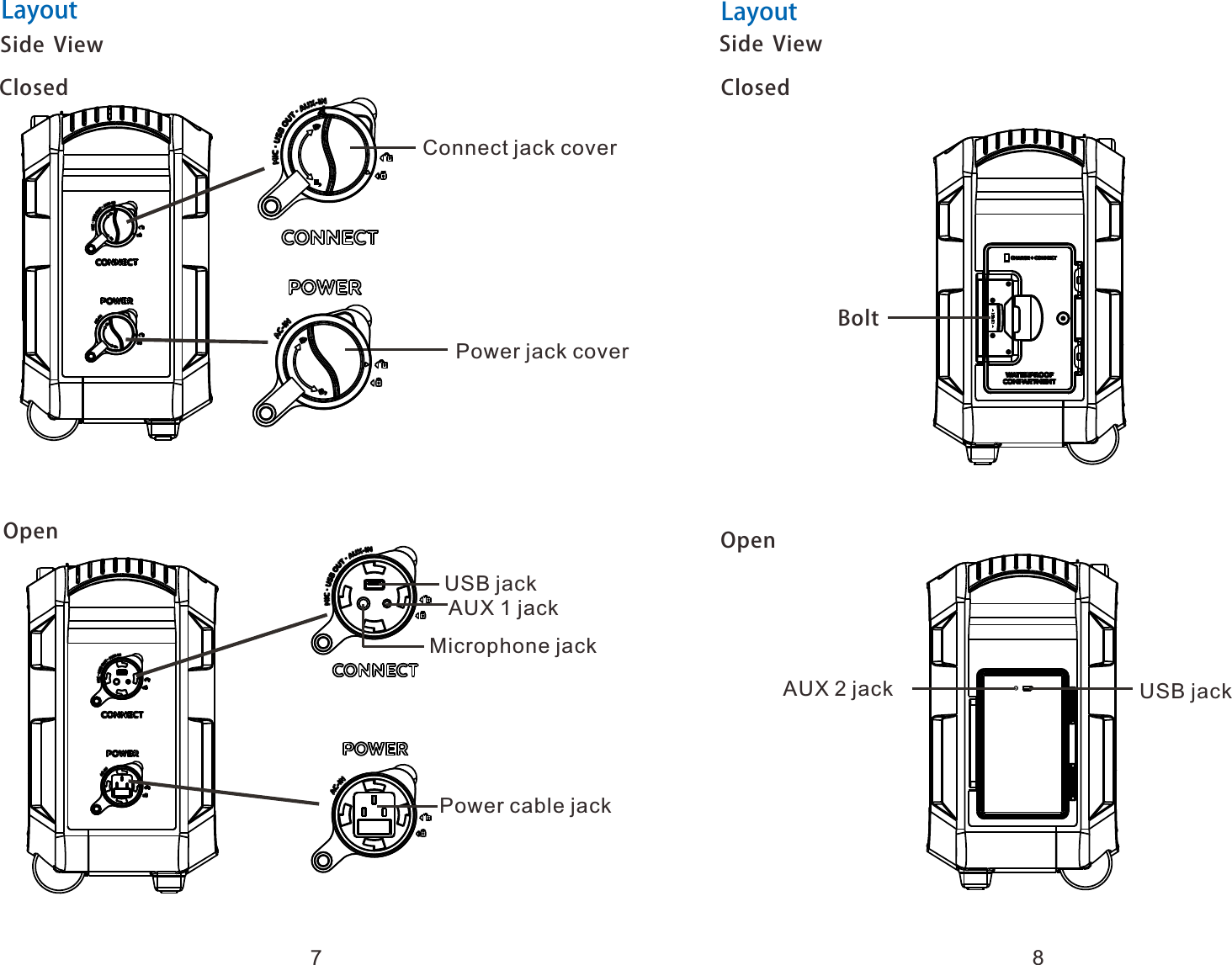
Side  View Power jack cover4  Connect jack coverSide  View4  USB jack AUX 1 jack Microphone jack Power cable jackClosedOpenClosedOpenBolt AUX 2 jack  USB jackLayout Layout78
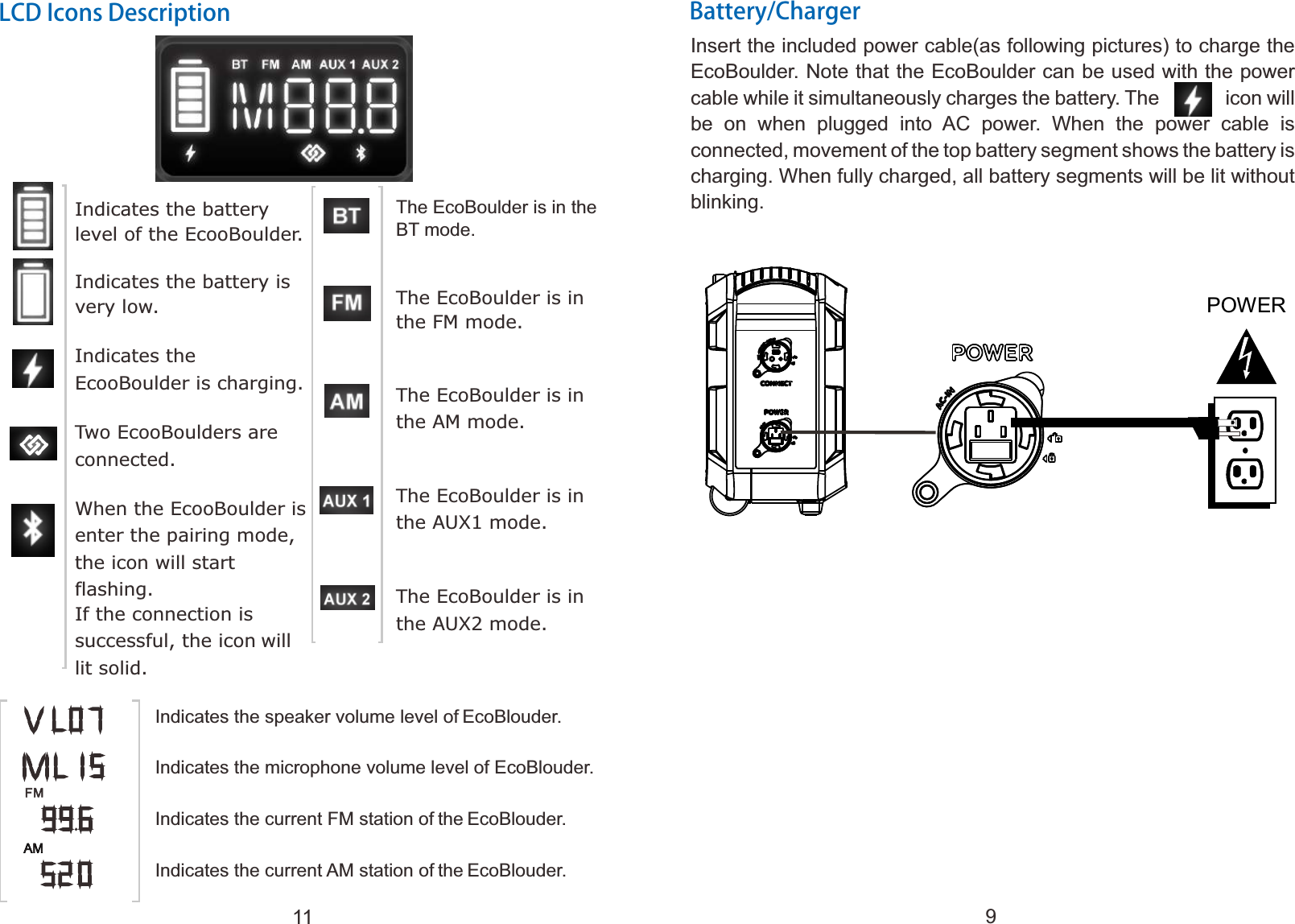
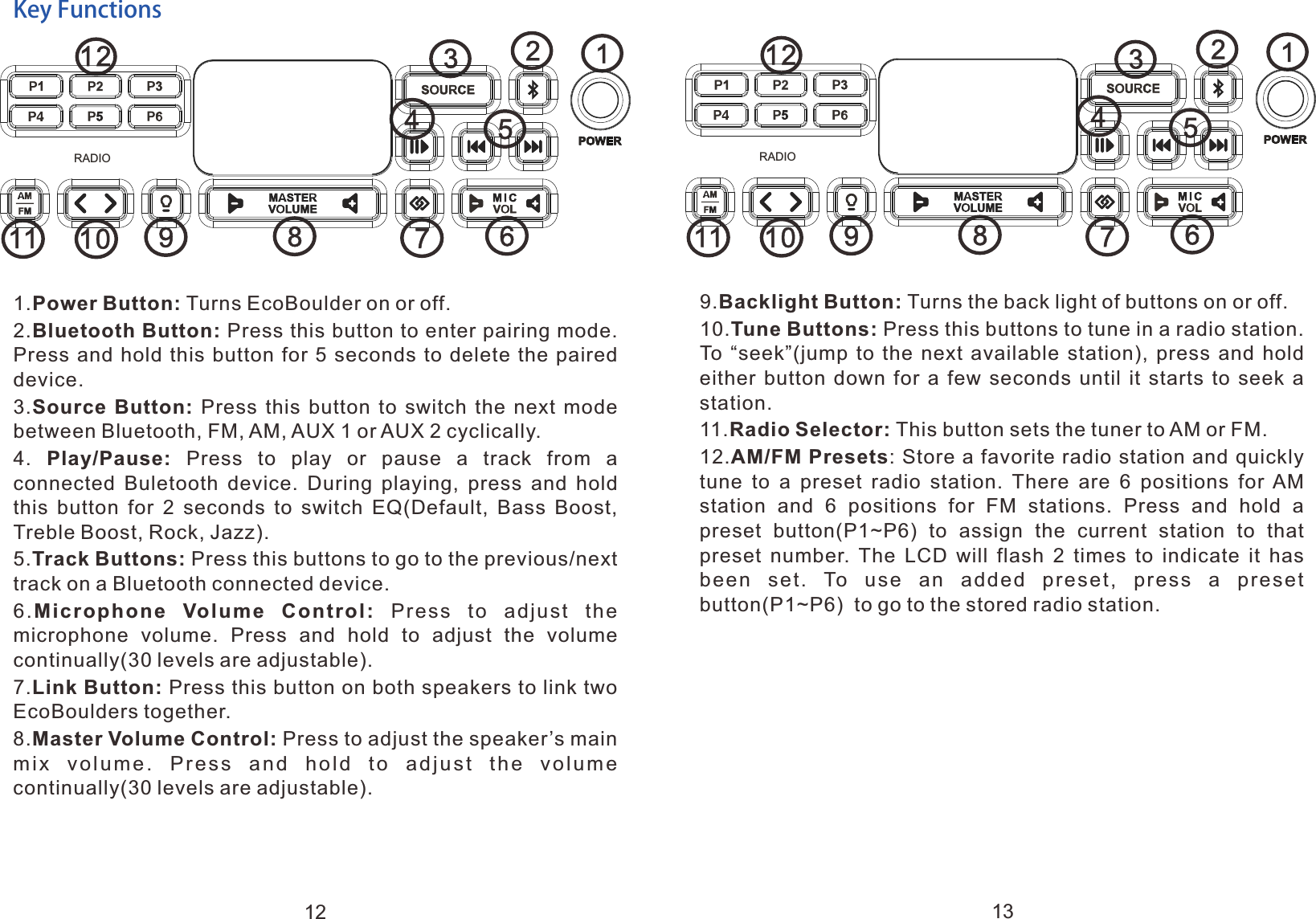
Battery/ChargerInsert the included power cable(as following pictures) to charge the EcoBoulder. Note that the EcoBoulder can be used with the power cable while it simultaneously charges the battery. The          icon will be  on  when  plugged  into  AC  power.  When  the  power  cable  is connected, movement of the top battery segment shows the battery is charging. When fully charged, all battery segments will be lit without blinking.9Key Functions1.Power Button: Turns EcoBoulder on or off.2.Bluetooth Button: Press this button to enter pairing mode. Press and  hold  this button  for  5  seconds to delete  the  paired device.3.Source  Button:  Press  this  button  to  switch  the  next  mode between Bluetooth, FM, AM, AUX 1 or AUX 2 cyclically.4.  Play/Pause:  Press  to  play  or  pause  a  track  from  a connected  Buletooth  device.  During  playing,  press  and  hold this  button  for  2  seconds  to  switch  EQ(Default,  Bass  Boost, Treble Boost, Rock, Jazz).5.Track Buttons: Press this buttons to go to the previous/next track on a Bluetooth connected device.6.Microphone  Volume  Control:  Press  to  adjust  the microphone  volume.  Press  and  hold  to  adjust  the  volume continually(30 levels are adjustable).7.Link Button: Press this button on both speakers to link two EcoBoulders together. 8.Master Volume Control: Press to adjust the speaker’s main mix  volume.  Press  and  hold  to  adjust  the  volume continually(30 levels are adjustable).11291011 8764523RADIO12Note:To avoid the battery leakage, please put the EcoBoulder face down when charging. POWER
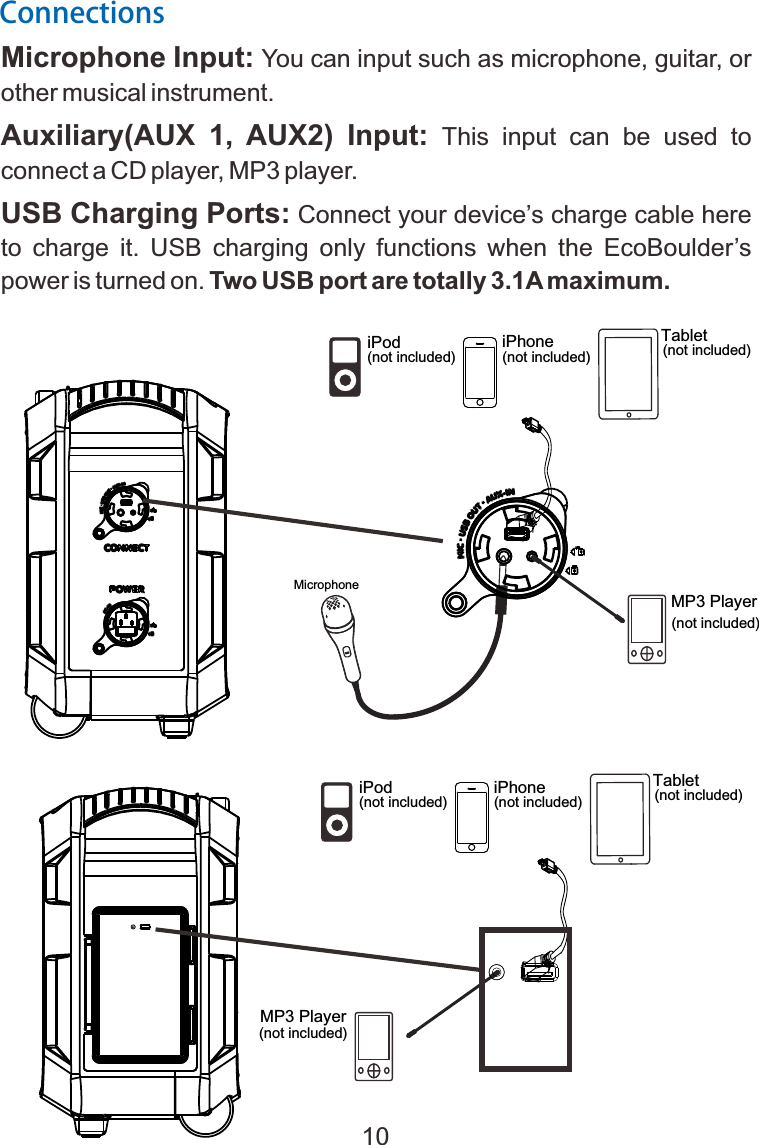
   MicrophoneiPhone(not included) T  ablet(not included) MP3 Player(not included)  iPod (not included) ConnectionsMicrophone Input: You can input such as microphone, guitar, or other musical instrument.Auxiliary(AUX  1,  AUX2)  Input:  This  input  can  be  used  to connect a CD player, MP3 player.USB Charging Ports: Connect your device’s charge cable here to  charge  it.  USB  charging  only  functions  when  the  EcoBoulder’s power is turned on. Two USB port are totally 3.1A maximum.  iPhone(not included) T  ablet(not included)  iPod (not included) MP3 Player(not included) 10
LCD Icons DescriptionThe EcoBoulder is in the BT mode.The EcoBoulder is in the FM mode.The EcoBoulder is in the AM mode.The EcoBoulder is in the AUX1 mode.The EcoBoulder is in the AUX2 mode.Indicates the speaker volume level of EcoBlouder.Indicates the microphone volume level of EcoBlouder.Indicates the current FM station of the EcoBlouder.Indicates the current AM station of the EcoBlouder.Battery/ChargerInsert the included power cable(as following pictures) to charge the EcoBoulder. Note that the EcoBoulder can be used with the power cable while it simultaneously charges the battery. The          icon will be  on  when  plugged  into  AC  power.  When  the  power  cable  is connected, movement of the top battery segment shows the battery is charging. When fully charged, all battery segments will be lit without blinking.Indicates the battery level of the EcooBoulder.Indicates the battery is very low.Indicates the EcooBoulder is charging.Two EcooBoulders are connected.When the EcooBoulder is enter the pairing mode, the icon will start flashing.If the connection is successful, the icon will lit solid. POWER 911
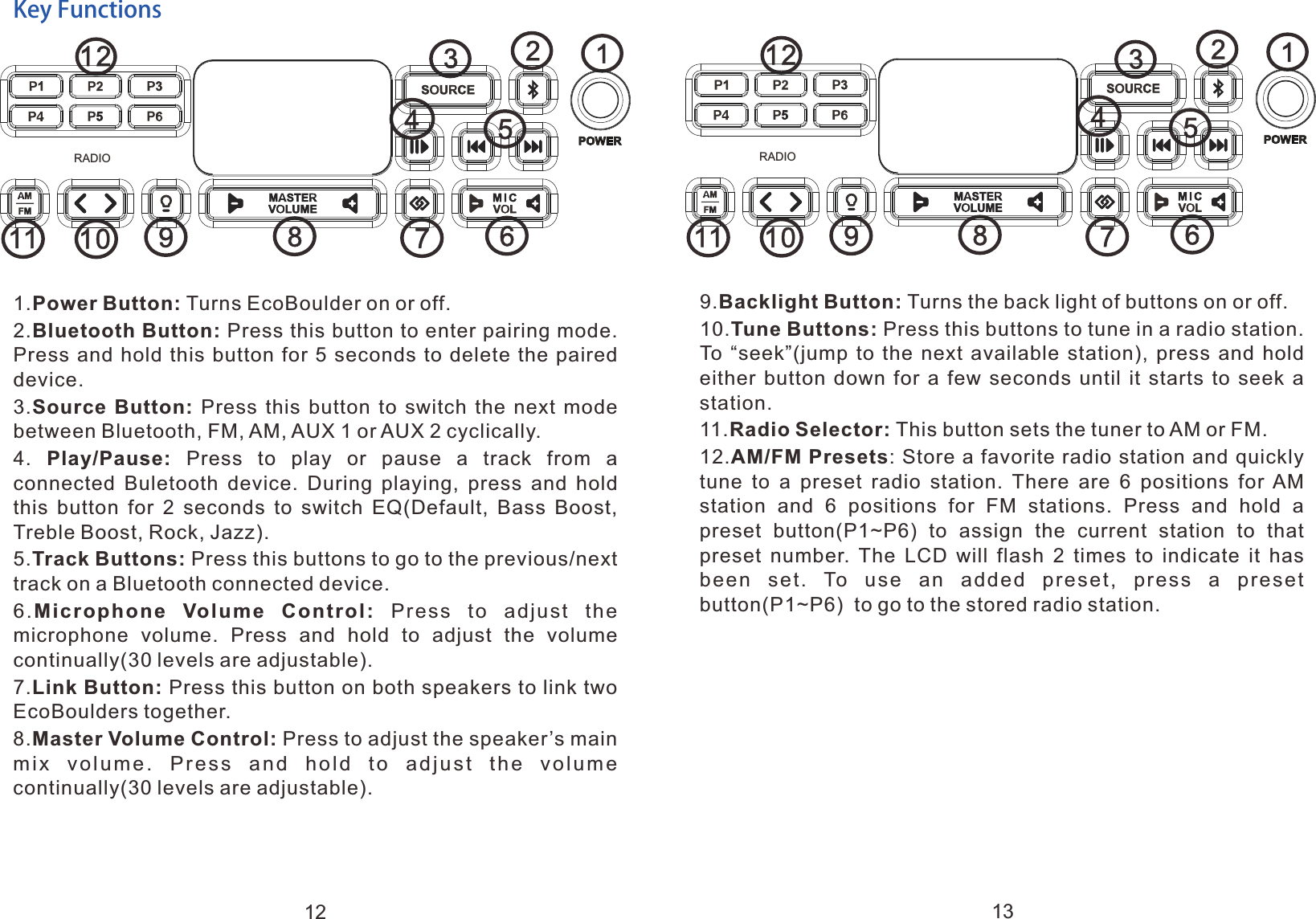
Key Functions1.Power Button: Turns EcoBoulder on or off.2.Bluetooth Button: Press this button to enter pairing mode. Press and  hold  this button  for  5  seconds to delete  the  paired device.3.Source  Button:  Press  this  button  to  switch  the  next  mode between Bluetooth, FM, AM, AUX 1 or AUX 2 cyclically.4.  Play/Pause:  Press  to  play  or  pause  a  track  from  a connected  Buletooth  device.  During  playing,  press  and  hold this  button  for  2  seconds  to  switch  EQ(Default,  Bass  Boost, Treble Boost, Rock, Jazz).5.Track Buttons: Press this buttons to go to the previous/next track on a Bluetooth connected device.6.Microphone  Volume  Control:  Press  to  adjust  the microphone  volume.  Press  and  hold  to  adjust  the  volume continually(30 levels are adjustable).7.Link Button: Press this button on both speakers to link two EcoBoulders together. 8.Master Volume Control: Press to adjust the speaker’s main mix  volume.  Press  and  hold  to  adjust  the  volume continually(30 levels are adjustable).9.Backlight Button: Turns the back light of buttons on or off.10.Tune Buttons: Press this buttons to tune in a radio station. To “seek”(jump to the next available station), press and hold either  button  down  for  a  few  seconds  until  it  starts  to  seek  a station.11.Radio Selector: This button sets the tuner to AM or FM.12.AM/FM Presets: Store a favorite radio station and quickly tune  to  a  preset  radio  station.  There  are  6  positions  for  AM station  and  6  positions  for  FM  stations.  Press  and  hold  a preset  button(P1~P6)  to  assign  the  current  station  to  that preset  number. The  LCD  will  flash  2  times  to  indicate  it  has been  set.  To  use  an  added  preset,  press  a  preset button(P1~P6)  to go to the stored radio station.11291011 8764523RADIO11291011 8764523RADIO12 13
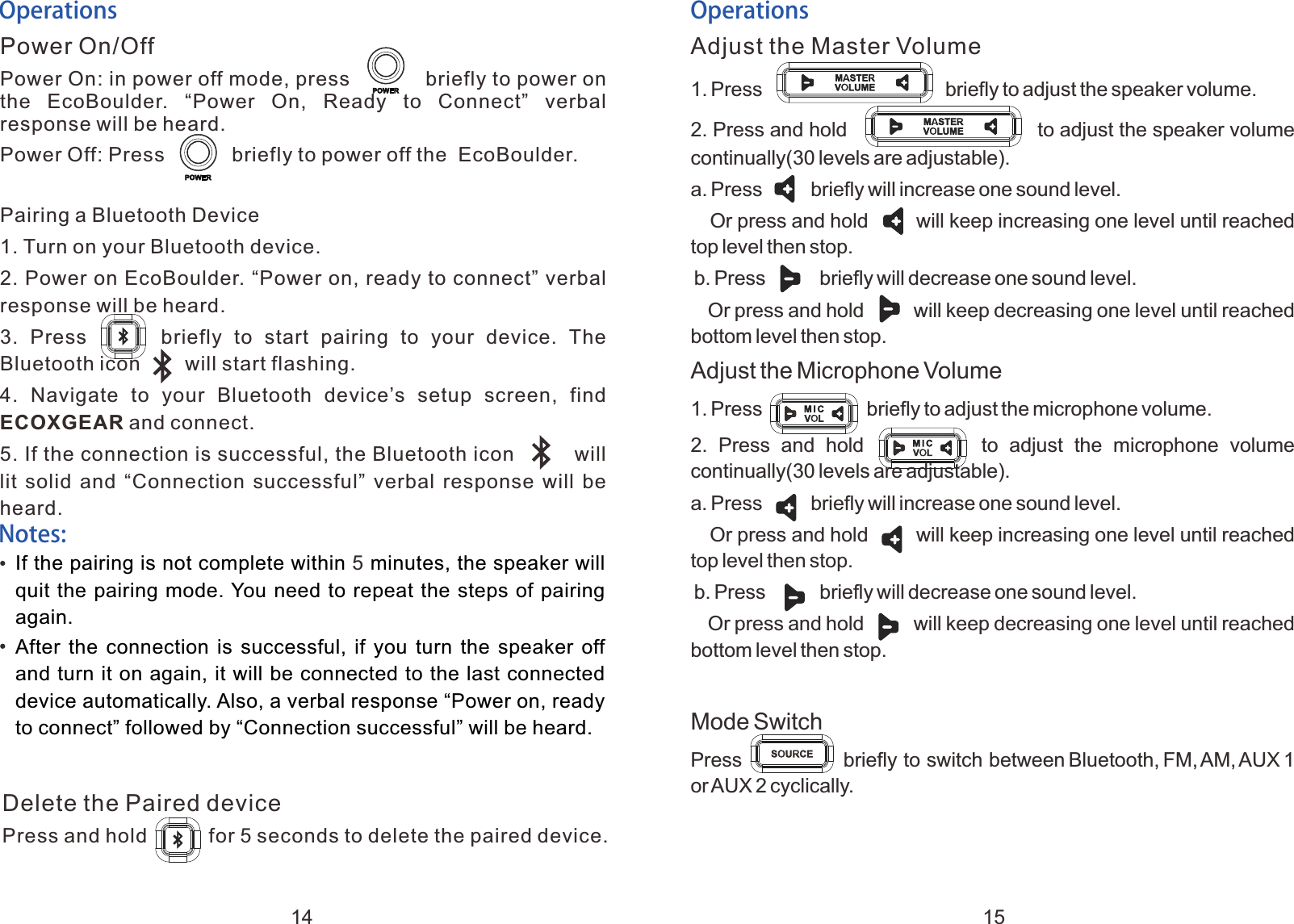
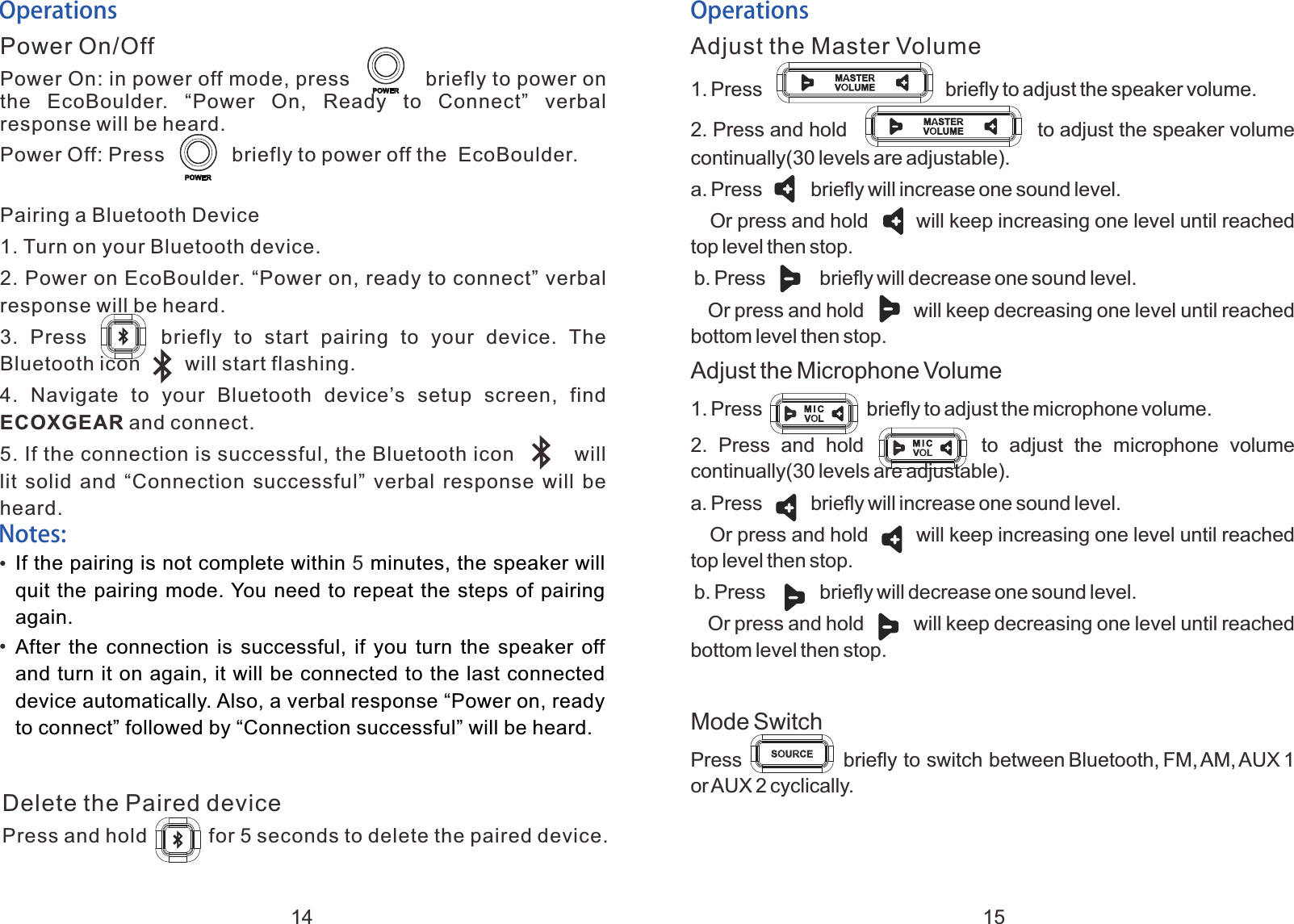
OperationsPower On/OffPower On: in power off mode, press            briefly to power on the  EcoBoulder.  “Power  On,  Ready  to  Connect”  verbal response will be heard.Power Off: Press            briefly to power off the  EcoBoulder.Pairing a Bluetooth Device1. Turn on your Bluetooth device.2. Power on EcoBoulder. “Power on, ready to connect” verbal response will be heard.3.  Press            briefly  to  start  pairing  to  your  device.  The Bluetooth icon        will start flashing.4.  Navigate  to  your  Bluetooth  device’s  setup  screen,  find ECOXGEAR and connect.5. If the connection is successful, the Bluetooth icon         will lit solid and “Connection successful” verbal response will be heard.OperationsAdjust the Master Volume1. Adjust the Microphone Volume1. Press                                 briefly to adjust the speaker volume. 2. Press and hold                to adjust the speaker volume continually(30 levels are adjustable).a. Press         briefly will increase one sound level.   Or press and hold       will keep increasing one level until reached top level then stop. b. Press          briefly will decrease one sound level.   Or press and hold        will keep decreasing one level until reached bottom level then stop.Press                   briefly to adjust the microphone volume. 2.  Press  and  hold                  to  adjust  the  microphone  volume continually(30 levels are adjustable).a. Press         briefly will increase one sound level.   Or press and hold       will keep increasing one level until reached top level then stop. b. Press          briefly will decrease one sound level.   Or press and hold        will keep decreasing one level until reached bottom level then stop.Mode SwitchPress                  briefly to switch between Bluetooth, FM, AM, AUX 1 or AUX 2 cyclically. Notes:If the pairing is not complete within   minutes, the speaker will quit the pairing mode. You need to repeat the steps of pairing again.After  the  connection  is  successful,  if  you  turn  the speaker off and turn it on again, it will be connected to the last connected device automatically. Also, a verbal response “Power on, ready to connect” followed by “Connection successful” will be heard.5Delete the Paired devicePress and hold           for 5 seconds to delete the paired device.14 15
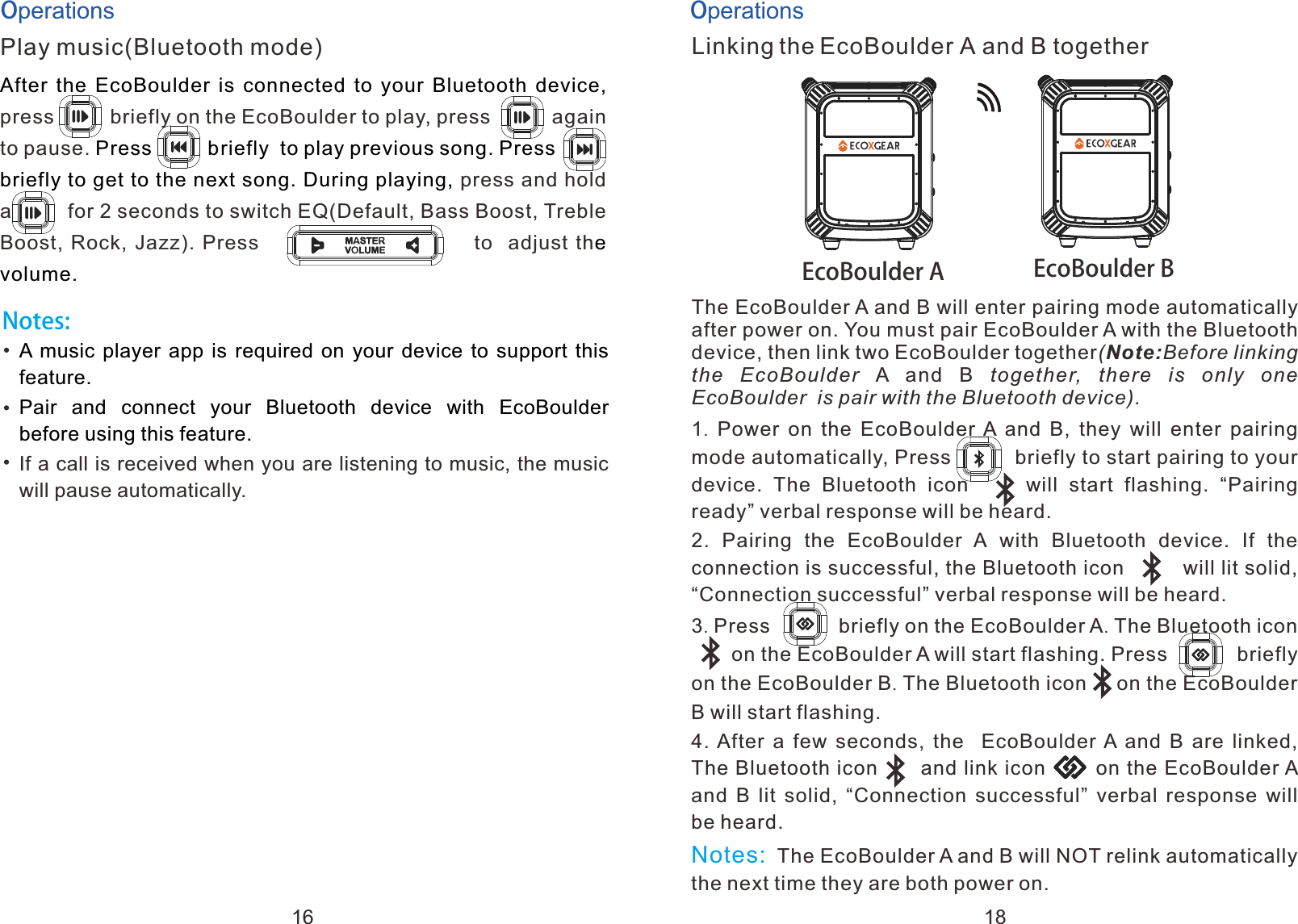
OperationsPlay music(Bluetooth mode)briefly After  the  EcoBoulder is connected to your Bluetooth device,           Press          briefly  to play previous song. Press      briefly to get to the next song. During playing, e volume.press on the EcoBoulder to play, press           again to pause.   a press and hold           a         for 2 seconds to switch EQ(Default, Bass Boost, Treble Boost, Rock, Jazz). Press                           to  adjust thNotes:A music player app is required on your device to support this feature.Pair  and  connect  your  Bluetooth  device  with  EcoBoulder before using this feature.If a call is received when you are listening to music, the music will pause automatically.OperationsLinking the EcoBoulder A and B togetherThe EcoBoulder A and B will enter pairing mode automatically after power on. You must pair EcoBoulder A with the Bluetooth device, then link two EcoBoulder together(Note:Before linking the  EcoBoulder A  and  B  together,  there  is  only  one EcoBoulder  is pair with the Bluetooth device). 1.  Power  on the  EcoBoulder A  and  B,  they  will  enter  pairing mode automatically, Press          briefly to start pairing to your device.  The  Bluetooth  icon          will  start  flashing.  “Pairing ready” verbal response will be heard.2.  Pairing  the  EcoBoulder  A with  Bluetooth  device.  If  the connection is successful, the Bluetooth icon         will lit solid,  “Connection successful” verbal response will be heard.3. Press            briefly on the EcoBoulder A. The Bluetooth icon         on the EcoBoulder A will start flashing. Press            briefly on the EcoBoulder B. The Bluetooth icon     on the EcoBoulder B will start flashing.4. After  a  few  seconds,  the   EcoBoulder A and B are linked, The Bluetooth icon      and link icon       on the EcoBoulder A and  B  lit solid,  “Connection  successful” verbal response  will be heard. The EcoBoulder A and B will NOT relink automatically the next time they are both power on.a         Notes:  EcoBoulder A EcoBoulder B16 18
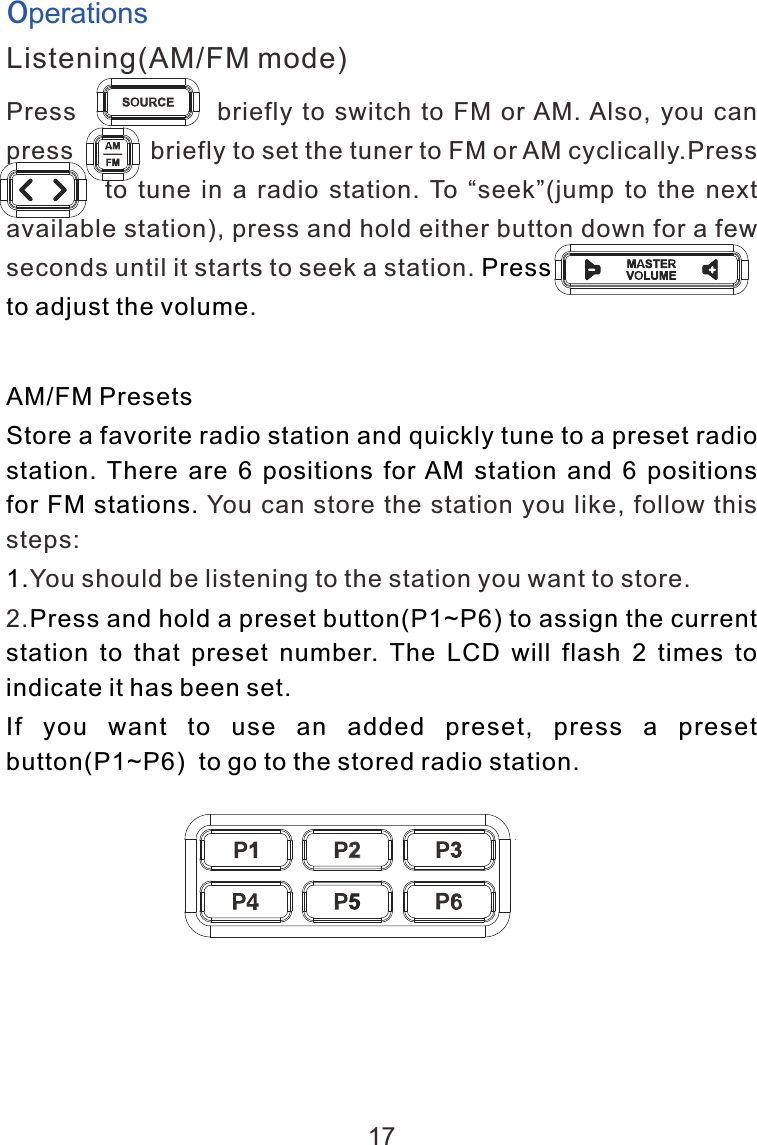
OperationsListening(AM/FM mode)Press                            briefly  to  switch  to  FM  or AM. Also,  you  can press           briefly to set the tuner to FM or AM cyclically.Press                    to  tune  in  a  radio  station.  To  “seek”(jump  to  the  next available station), press and hold either button down for a few seconds until it starts to seek a station. a               a Press                           to adjust the volume.                        AM/FM PresetsStore a favorite radio station and quickly tune to a preset radio station. There are 6 positions for AM station and 6 positions for FM stations. 1.Press and hold a preset button(P1~P6) to assign the current station  to  that  preset  number.  The  LCD  will  flash  2  times  to indicate it has been set.If  you  want  to  use  an  added  preset,  press  a  preset button(P1~P6)  to go to the stored radio station.You can store the station you like, follow this steps:You should be listening to the station you want to store. 2.17
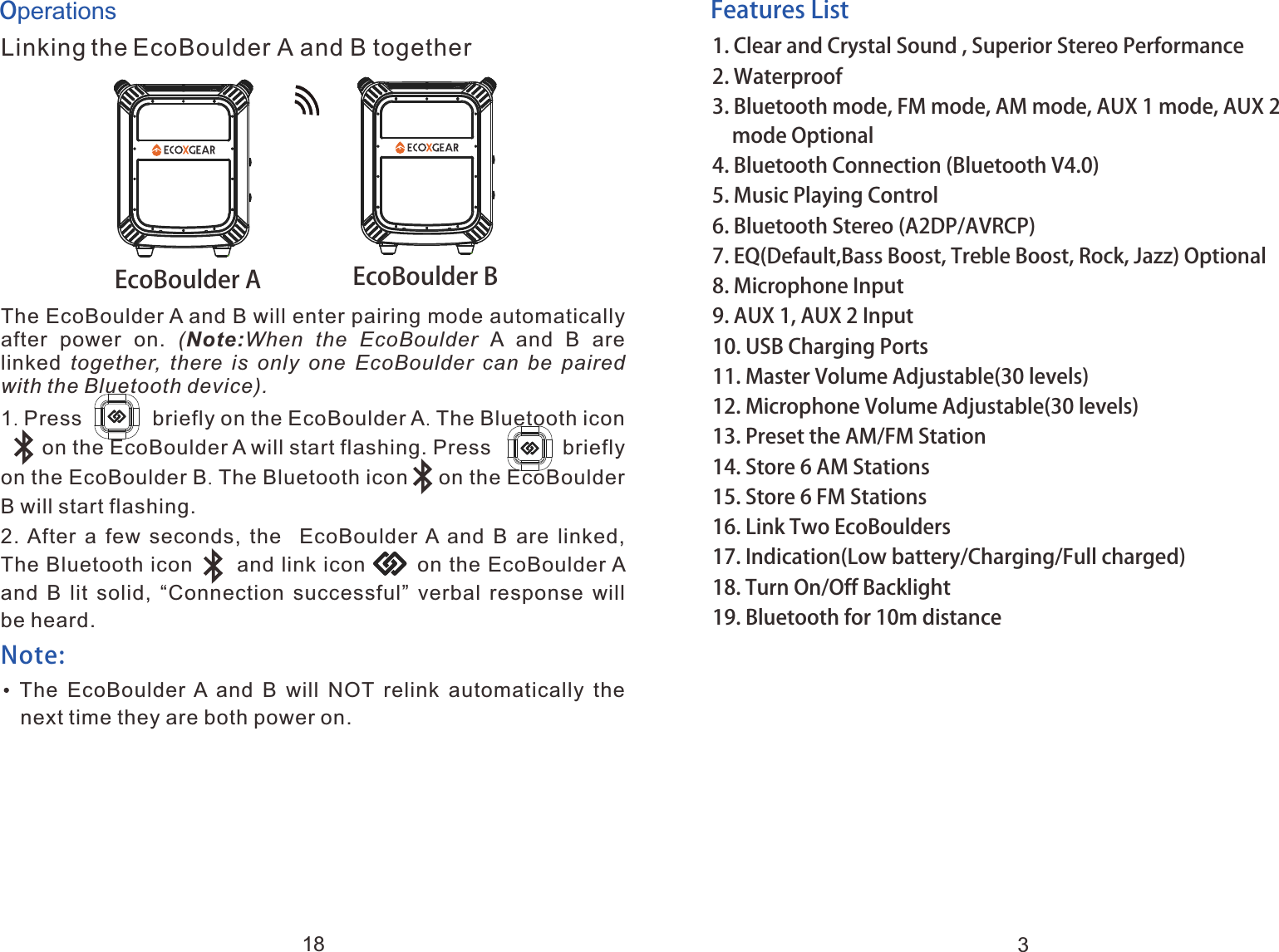
Features List1. 2. Waterproof3. Bluetooth mode, FM mode, AM mode, AUX 1 mode, AUX 2   mode Optional 4. Bluetooth Connection (Bluetooth V4.0)5. Music Playing Control6. Bluetooth Stereo (A2DP/AVRCP)7. EQ(Default,Bass Boost, Treble Boost, Rock, Jazz) Optional8. Microphone Input9. AUX 1, AUX 2 Input10. USB Charging Ports11. Master Volume Adjustable(30 levels)12. Microphone Volume Adjustable(30 levels)13. Preset the AM/FM Station14. Store 6 AM Stations15. Store 6 FM Stations16. Link Two EcoBoulders17. Indication(Low battery/Charging/Full charged)18. Turn On/Off Backlight19. Bluetooth for 10m distanceClear and Crystal Sound , Superior Stereo Performance3OperationsLinking the EcoBoulder A and B togetherThe EcoBoulder A and B will enter pairing mode automatically after  power  on.  (Note:When  the  EcoBoulder A  and  B  are linked together,  there  is  only  one  EcoBoulder  can  be paired with the Bluetooth device). 1. Press            briefly on the EcoBoulder A. The Bluetooth icon         on the EcoBoulder A will start flashing. Press            briefly on the EcoBoulder B. The Bluetooth icon     on the EcoBoulder B will start flashing.2. After  a  few  seconds,  the   EcoBoulder A and B are linked, The Bluetooth icon      and link icon       on the EcoBoulder A and  B  lit solid,  “Connection  successful” verbal response  will be heard.    The  EcoBoulder A  and  B  will  NOT  relink  automatically  the next time they are both power on.a         Note: EcoBoulder A EcoBoulder B18
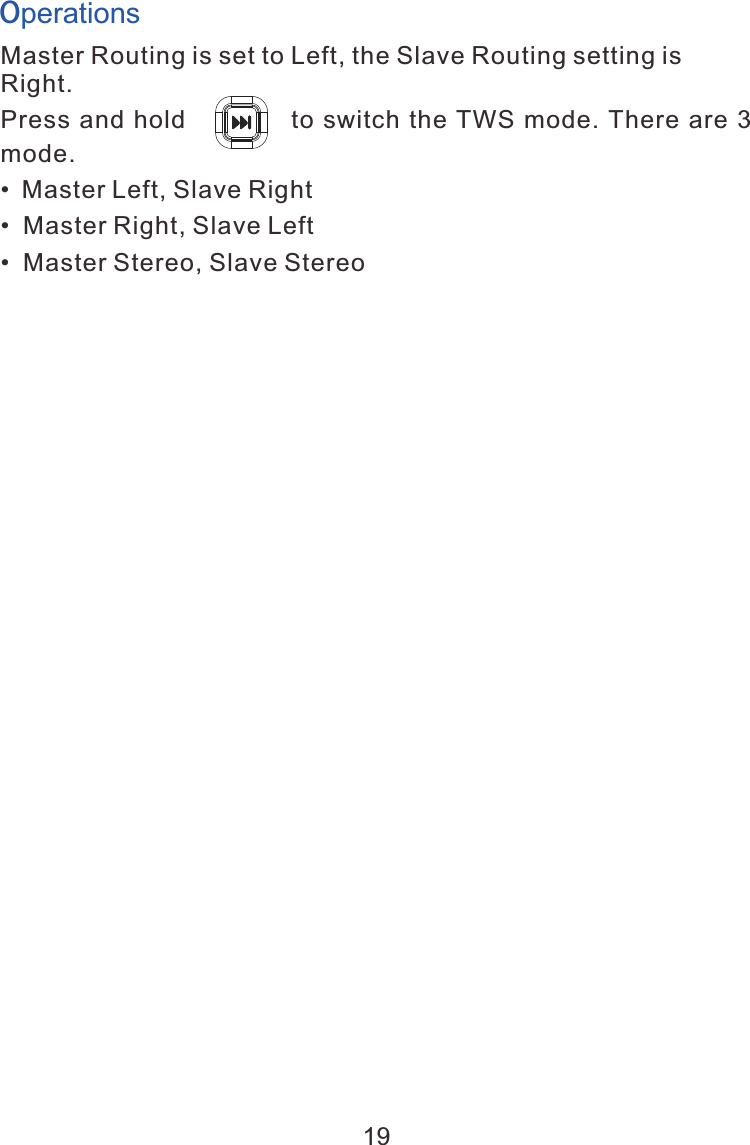
Master Routing is set to Left, the Slave Routing setting is Right. Press and  hold               to switch the TWS mode. There  are  3 mode.• Master Left, Slave Right•  Master Right, Slave Left•  Master Stereo, Slave StereoOperations19
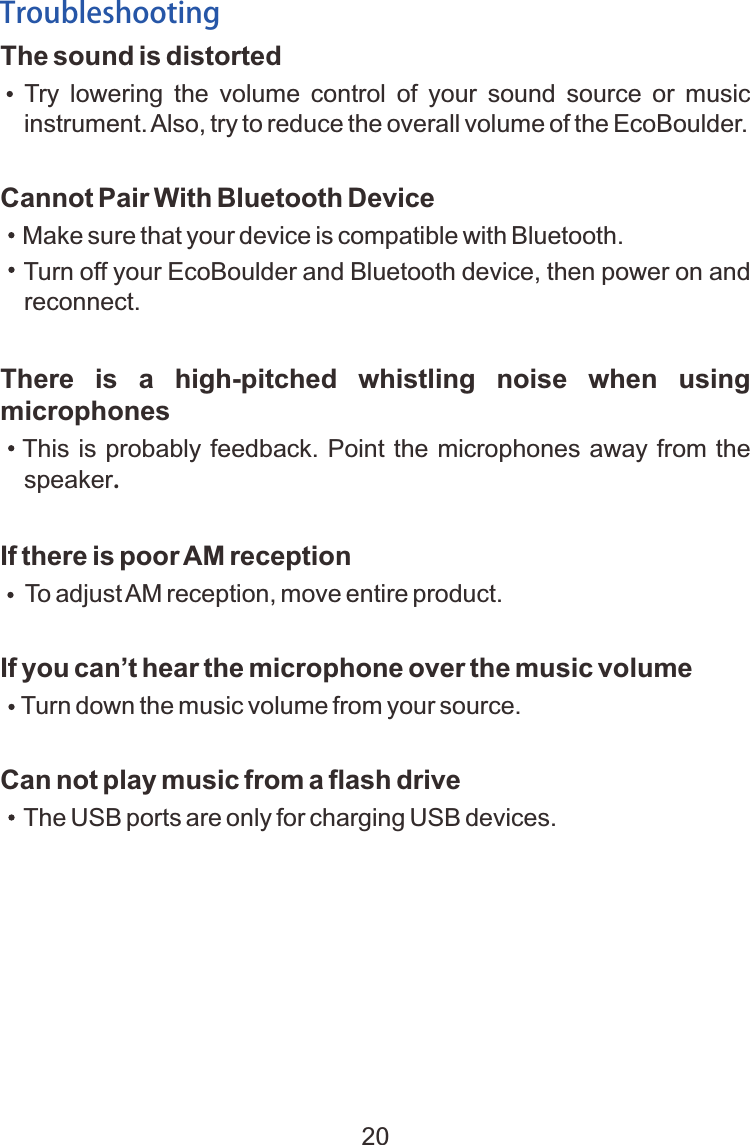
The sound is distorted    Try  lowering  the  volume  control  of  your  sound  source  or  music instrument. Also, try to reduce the overall volume of the EcoBoulder.Cannot Pair With Bluetooth Device Make sure that your device is compatible with Bluetooth. Turn off your EcoBoulder and Bluetooth device, then power on and   reconnect.There  is  a  high-pitched  whistling  noise  when  using microphones   This is probably feedback. Point the microphones away from the speaker.If there is poor AM reception    To adjust AM reception, move entire product.If you can’t hear the microphone over the music volume     Turn down the music volume from your source.Can not play music from a flash drive    The USB ports are only for charging USB devices.Troubleshooting20
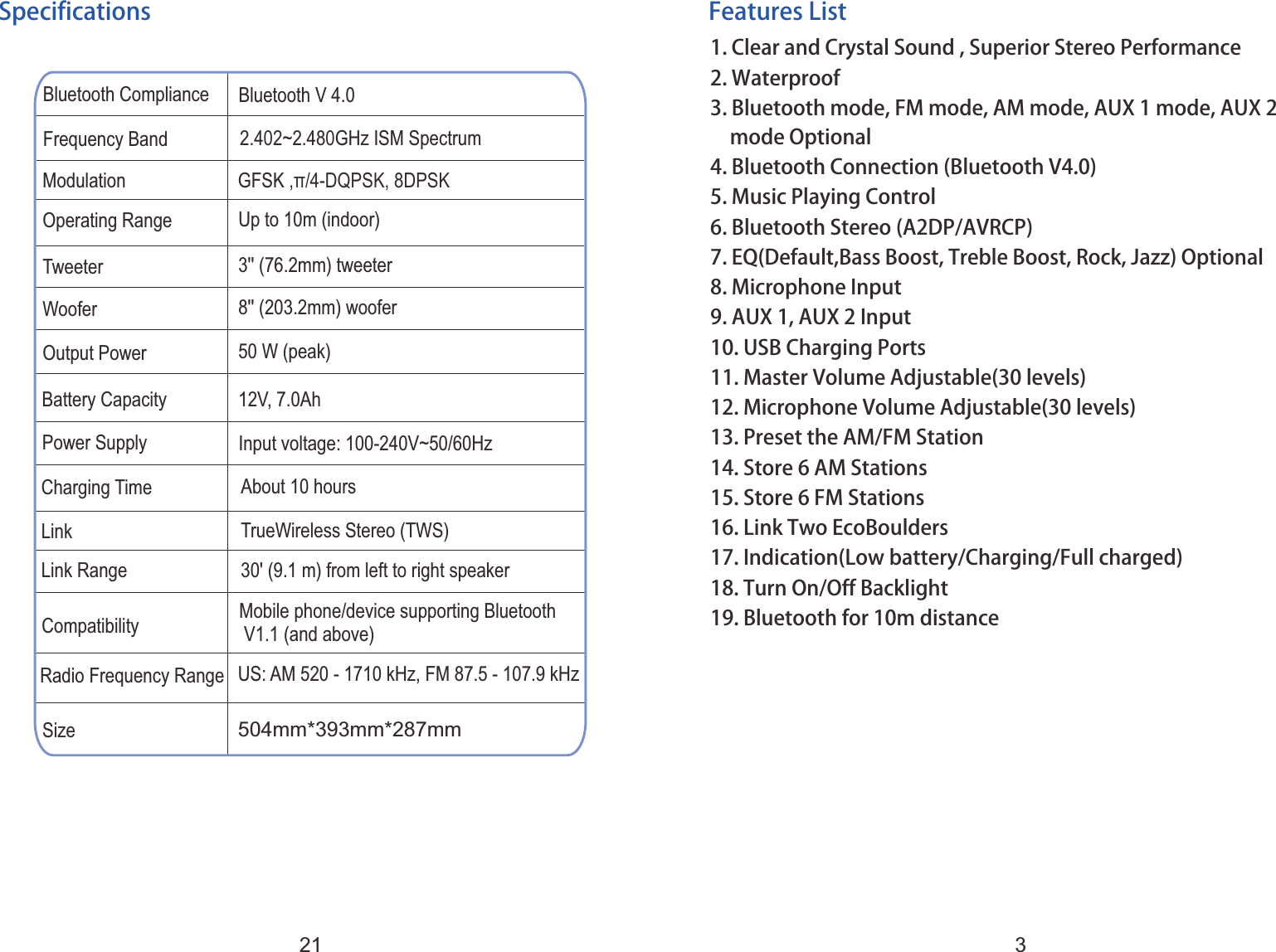
Features List1. 2. Waterproof3. Bluetooth mode, FM mode, AM mode, AUX 1 mode, AUX 2   mode Optional 4. Bluetooth Connection (Bluetooth V4.0)5. Music Playing Control6. Bluetooth Stereo (A2DP/AVRCP)7. EQ(Default,Bass Boost, Treble Boost, Rock, Jazz) Optional8. Microphone Input9. AUX 1, AUX 2 Input10. USB Charging Ports11. Master Volume Adjustable(30 levels)12. Microphone Volume Adjustable(30 levels)13. Preset the AM/FM Station14. Store 6 AM Stations15. Store 6 FM Stations16. Link Two EcoBoulders17. Indication(Low battery/Charging/Full charged)18. Turn On/Off Backlight19. Bluetooth for 10m distanceClear and Crystal Sound , Superior Stereo PerformanceBluetooth Compliance Bluetooth V 4.0Frequency Band 2.402~2.480GHz ISM SpectrumOperating RangeTweeterWooferOutput PowerModulation GFSK ,π/4-DQPSK, 8DPSK Up to 10m (indoor)3 ' (76.2mm) tweeter'8 ' (203.2mm) woofer'50 W (peak)Battery CapacityCharging TimeLinkLink Range12V, 7.0AhAbout 10 hoursTrueWireless Stereo (TWS)30' (9.1 m) from left to right speakerCompatibility Mobile phone/device supporting Bluetooth V1.1 (and above)Power Supply Input voltage: 100-240V~50/60HzSizeRadio Frequency Range504mm*393mm*287mmUS: AM 520 - 1710 kHz, FM 87.5 - 107.9 kHzSpecifications321

Navigation menu