Grace Digital GDIEXPLR ECOXPLORER User Manual EcoXplorer User Guide indd

Grace Digital Inc. ECOXPLORER EcoXplorer User Guide indd

User manual

56Reproductor de sonidoMarca: ECOXGEARModelo: GDI-EXPLR100...120Batería: 12 V --- 2,3 AhSalida USB: 5 V --- 1,0 AEntrada: 100 V~ – 240 V~  50 Hz/60 Hz, 1,0 A  50 WPara uso interiorPaís de origen: CHINAIMPORTADOR: IMPORTADORA PRIMEX, S.A. DE C.V.BLVD. MAGNOCENTRO No. 4 INT. N/A COL. SAN FERNANDO LAHERRADURA DEL.HUIXQUILUCAN C.P. 52765 EDO. DE MÉXICO 1EcoXplorerModels: GDI-EXPLR100User Guide
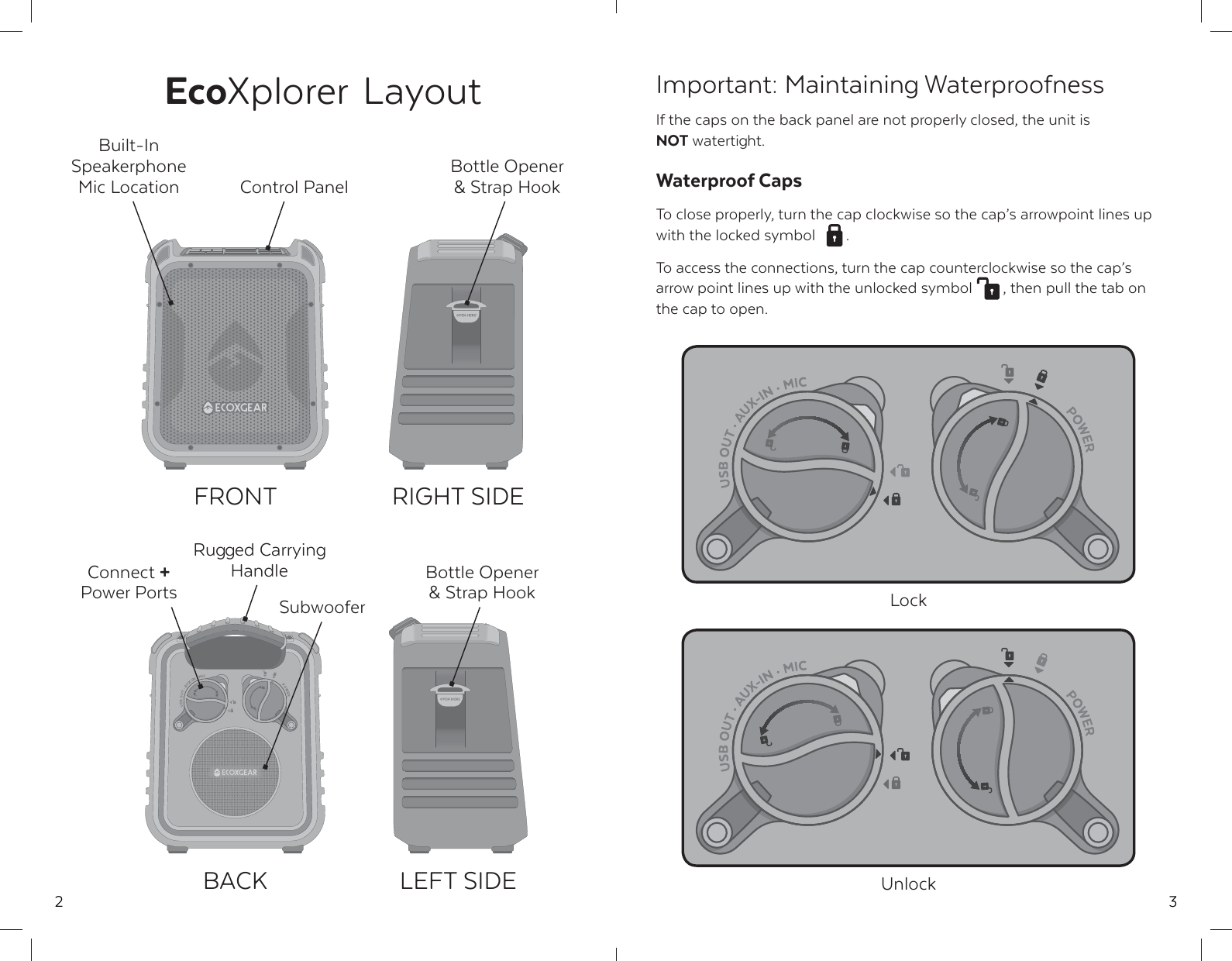
2EcoXplorer LayoutControl PanelRugged Carrying HandleConnect + Power PortsFRONTBACKRIGHT SIDELEFT SIDEBottle Opener & Strap HookBuilt-In Speakerphone Mic LocationSubwooferBottle Opener & Strap Hook3Important: Maintaining WaterproofnessIf the caps on the back panel are not properly closed, the unit is NOT watertight.Waterproof CapsTo close properly, turn the cap clockwise so the cap’s arrowpoint lines up with the locked symbol  .To access the connections, turn the cap counterclockwise so the cap’s arrow point lines up with the unlocked symbol  , then pull the tab on the cap to open.UnlockLock
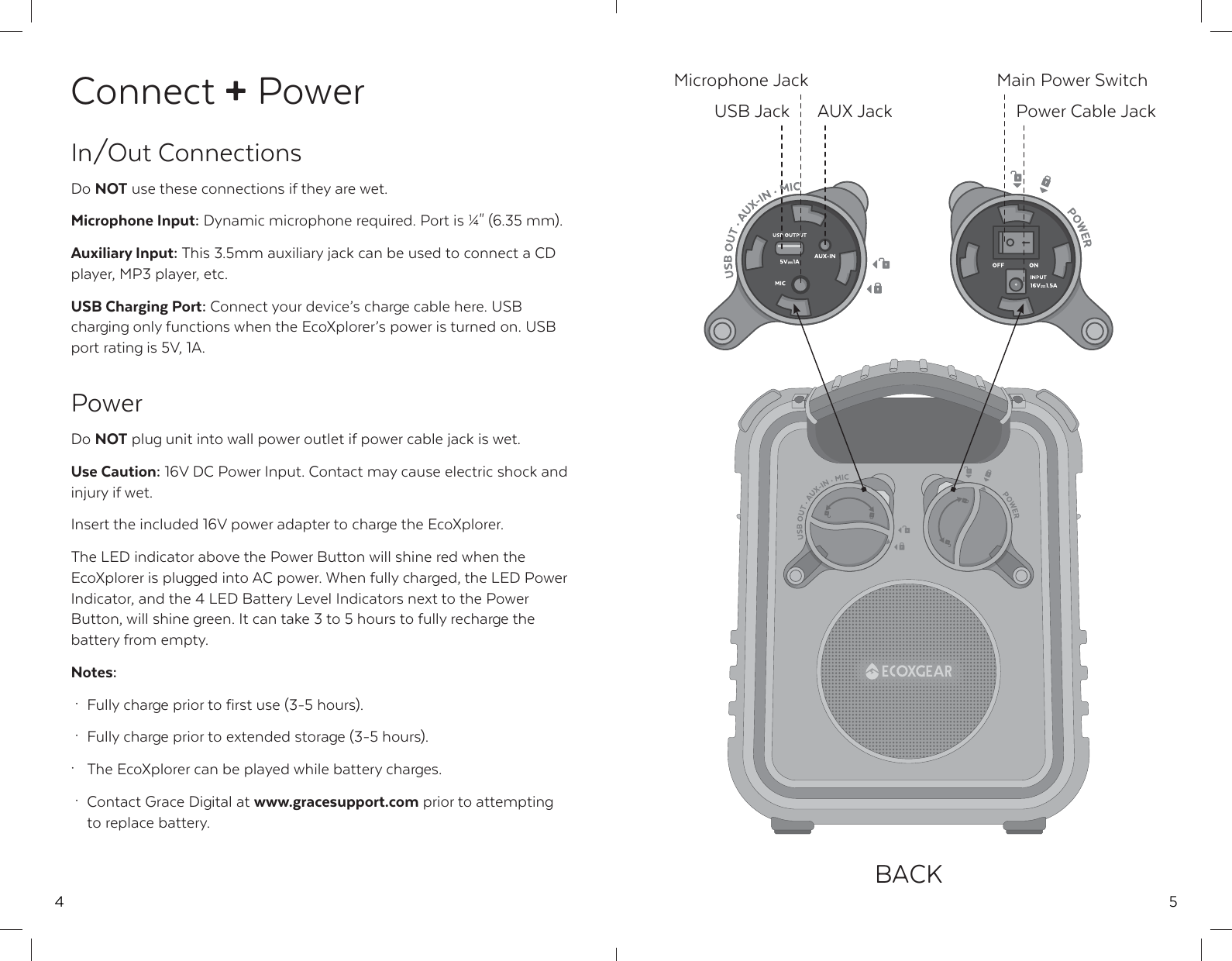
4Connect + PowerIn/Out ConnectionsDo NOT use these connections if they are wet.Microphone Input: Dynamic microphone required. Port is ¼" (6.35 mm).Auxiliary Input: This 3.5mm auxiliary jack can be used to connect a CD player, MP3 player, etc.USB Charging Port: Connect your device’s charge cable here. USB charging only functions when the EcoXplorer’s power is turned on. USB port rating is 5V, 1A.PowerDo NOT plug unit into wall power outlet if power cable jack is wet.Use Caution: 16V DC Power Input. Contact may cause electric shock and injury if wet.Insert the included 16V power adapter to charge the EcoXplorer.The LED indicator above the Power Button will shine red when the EcoXplorer is plugged into AC power. When fully charged, the LED Power Indicator, and the 4 LED Battery Level Indicators next to the Power Button, will shine green. It can take 3 to 5 hours to fully recharge the battery from empty.Notes: ·  Fully charge prior to first use (3-5 hours). ·  Fully charge prior to extended storage (3-5 hours).·  The EcoXplorer can be played while battery charges. ·  Contact Grace Digital at www.gracesupport.com prior to attempting    to replace battery.5BACKAUX JackUSB JackMicrophone Jack Main Power SwitchPower Cable Jack
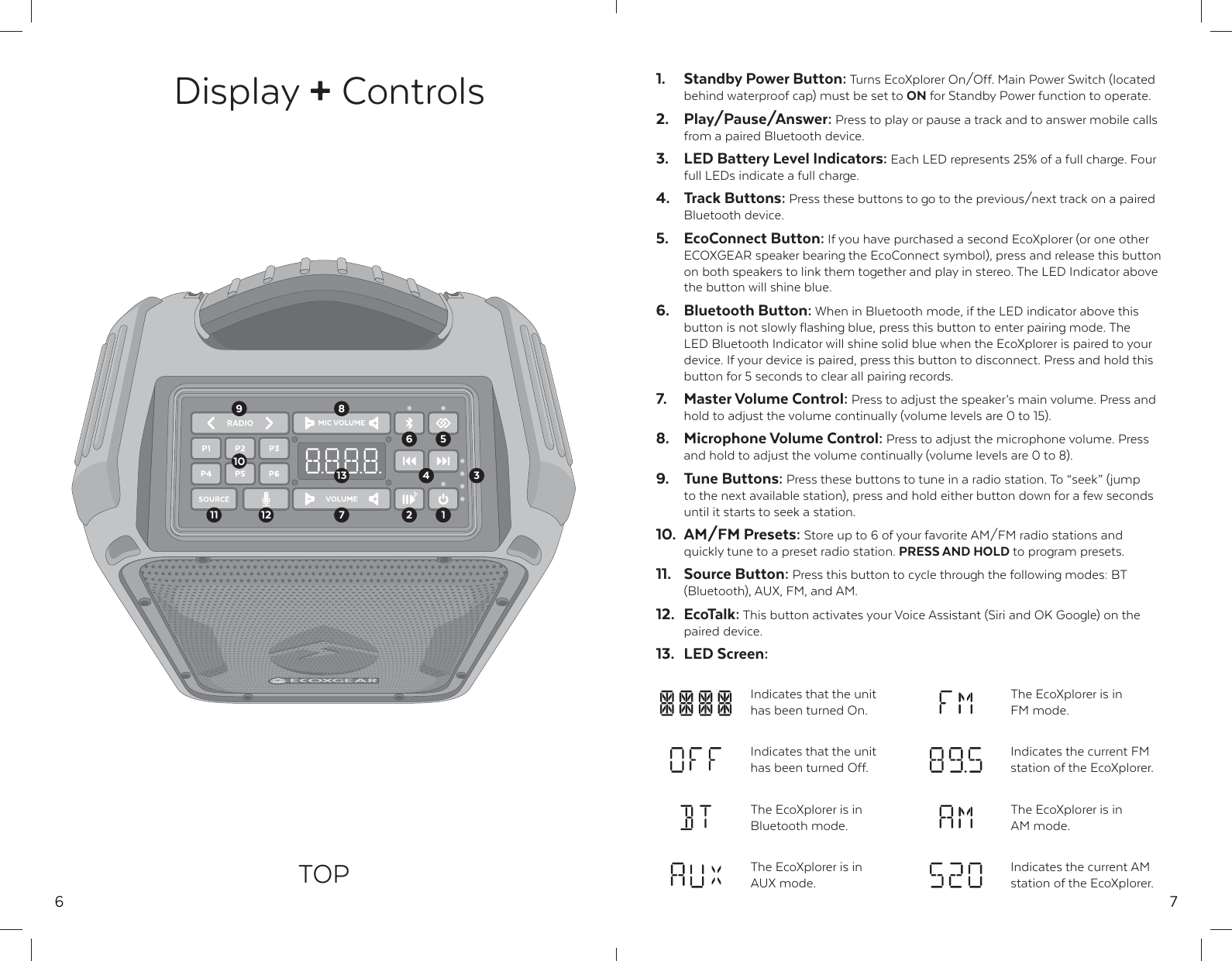
6Display + ControlsTOP10131611 25739128471.  Standby Power Button: Turns EcoXplorer On/Off. Main Power Switch (located behind waterproof cap) must be set to ON for Standby Power function to operate.2. Play/Pause/Answer: Press to play or pause a track and to answer mobile calls from a paired Bluetooth device.3.  LED Battery Level Indicators: Each LED represents 25% of a full charge. Four full LEDs indicate a full charge.4. Track Buttons: Press these buttons to go to the previous/next track on a paired Bluetooth device.5. EcoConnect Button: If you have purchased a second EcoXplorer (or one other ECOXGEAR speaker bearing the EcoConnect symbol), press and release this button on both speakers to link them together and play in stereo. The LED Indicator above the button will shine blue.6. Bluetooth Button: When in Bluetooth mode, if the LED indicator above this button is not slowly flashing blue, press this button to enter pairing mode. The LED Bluetooth Indicator will shine solid blue when the EcoXplorer is paired to your device. If your device is paired, press this button to disconnect. Press and hold this button for 5 seconds to clear all pairing records.7. Master Volume Control: Press to adjust the speaker’s main volume. Press and hold to adjust the volume continually (volume levels are 0 to 15).8. Microphone Volume Control: Press to adjust the microphone volume. Press and hold to adjust the volume continually (volume levels are 0 to 8).9. Tune Buttons: Press these buttons to tune in a radio station. To “seek” (jump to the next available station), press and hold either button down for a few seconds until it starts to seek a station.10. AM/FM Presets: Store up to 6 of your favorite AM/FM radio stations and quickly tune to a preset radio station. PRESS AND HOLD to program presets.11. Source Button: Press this button to cycle through the following modes: BT (Bluetooth), AUX, FM, and AM.12. EcoTalk: This button activates your Voice Assistant (Siri and OK Google) on the paired device.13. LED Screen:Indicates that the unit has been turned On.The EcoXplorer is in FM mode.The EcoXplorer is in Bluetooth mode.The EcoXplorer is in AM mode.The EcoXplorer is in AUX mode.Indicates the current AM station of the EcoXplorer.Indicates that the unit has been turned Off.Indicates the current FM station of the EcoXplorer.
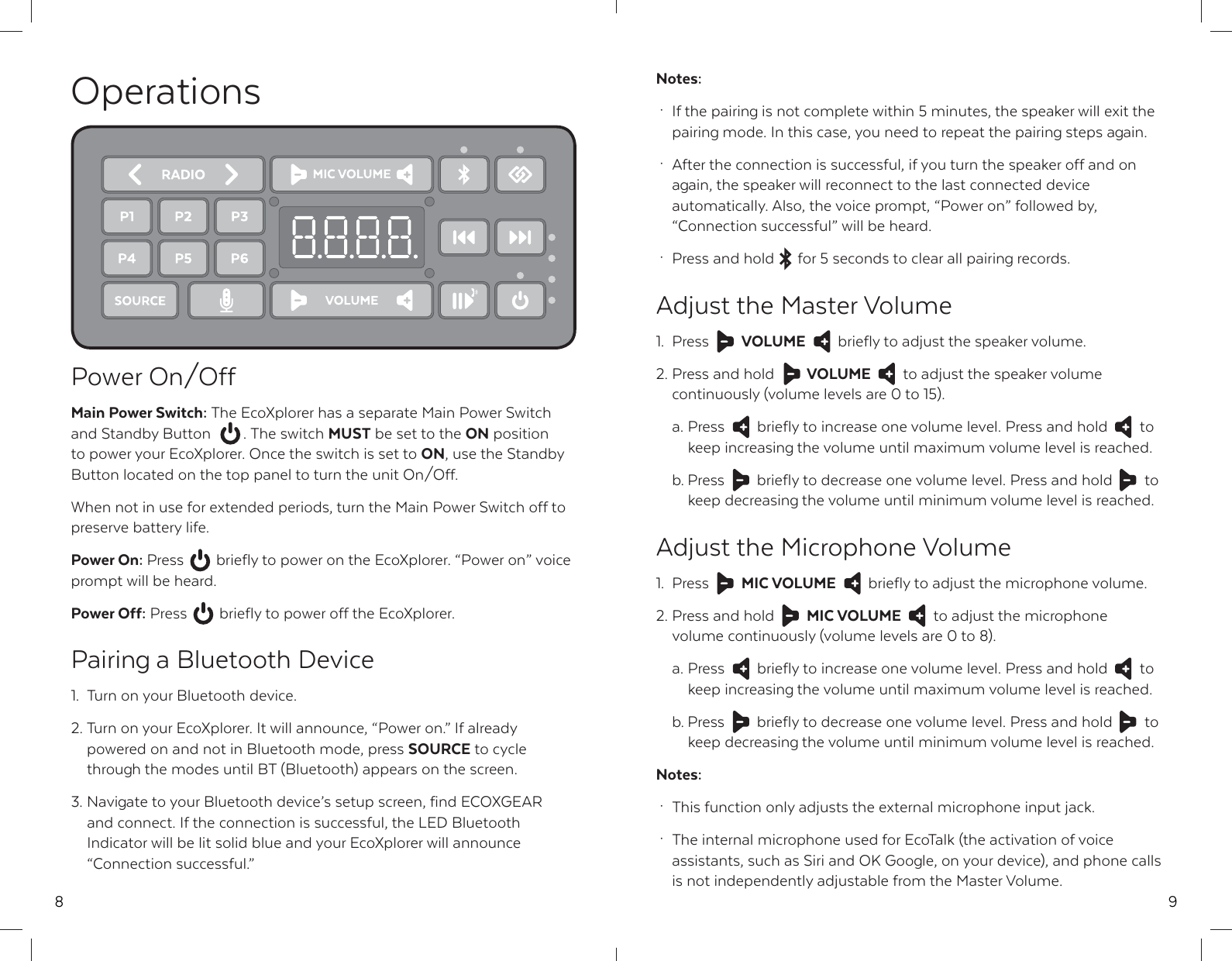
8OperationsPower On/OffMain Power Switch: The EcoXplorer has a separate Main Power Switch and Standby Button  . The switch MUST be set to the ON position to power your EcoXplorer. Once the switch is set to ON, use the Standby Button located on the top panel to turn the unit On/Off.When not in use for extended periods, turn the Main Power Switch off to preserve battery life.Power On: Press  briefly to power on the EcoXplorer. “Power on” voice prompt will be heard.Power Off: Press  briefly to power off the EcoXplorer.Pairing a Bluetooth Device1.  Turn on your Bluetooth device.2. Turn on your EcoXplorer. It will announce, “Power on.” If already   powered on and not in Bluetooth mode, press SOURCE to cycle   through the modes until BT (Bluetooth) appears on the screen.3. Navigate to your Bluetooth device’s setup screen, find ECOXGEAR   and connect. If the connection is successful, the LED Bluetooth   Indicator will be lit solid blue and your EcoXplorer will announce  “Connection successful.”9Notes: ·  If the pairing is not complete within 5 minutes, the speaker will exit the   pairing mode. In this case, you need to repeat the pairing steps again. ·  After the connection is successful, if you turn the speaker off and on   again, the speaker will reconnect to the last connected device   automatically. Also, the voice prompt, “Power on” followed by,   “Connection successful” will be heard. ·  Press and hold  for 5 seconds to clear all pairing records.Adjust the Master Volume1. Press  VOLUME  briefly to adjust the speaker volume.2. Press and hold  VOLUME  to adjust the speaker volume   continuously (volume levels are 0 to 15).  a. Press  briefly to increase one volume level. Press and hold  to   keep increasing the volume until maximum volume level is reached.  b. Press  briefly to decrease one volume level. Press and hold  to   keep decreasing the volume until minimum volume level is reached.Adjust the Microphone Volume1. Press  MIC VOLUME  briefly to adjust the microphone volume.2. Press and hold  MIC VOLUME  to adjust the microphone   volume continuously (volume levels are 0 to 8).  a. Press  briefly to increase one volume level. Press and hold  to   keep increasing the volume until maximum volume level is reached.  b. Press  briefly to decrease one volume level. Press and hold  to   keep decreasing the volume until minimum volume level is reached.Notes: ·  This function only adjusts the external microphone input jack. ·  The internal microphone used for EcoTalk (the activation of voice   assistants, such as Siri and OK Google, on your device), and phone calls   is not independently adjustable from the Master Volume.
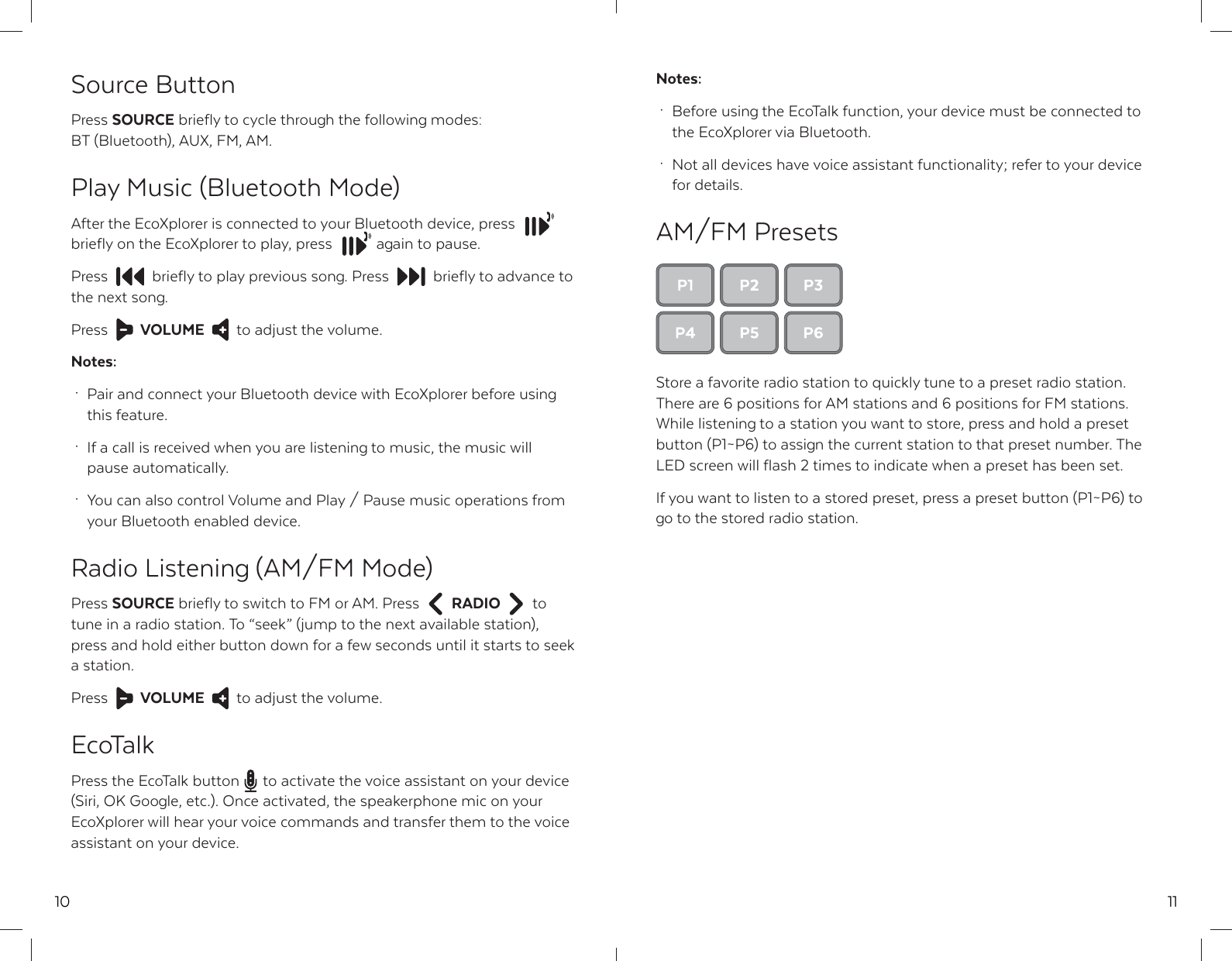
10Source ButtonPress SOURCE briefly to cycle through the following modes: BT (Bluetooth), AUX, FM, AM.Play Music (Bluetooth Mode)After the EcoXplorer is connected to your Bluetooth device, pressbriefly on the EcoXplorer to play, press  again to pause. Press  briefly to play previous song. Press  briefly to advance to  the next song.Press  VOLUME to adjust the volume.Notes: ·  Pair and connect your Bluetooth device with EcoXplorer before using  this feature. ·  If a call is received when you are listening to music, the music will  pause automatically. ·  You can also control Volume and Play / Pause music operations from   your Bluetooth enabled device.Radio Listening (AM/FM Mode)Press SOURCE briefly to switch to FM or AM. Press  RADIO to tune in a radio station. To “seek” (jump to the next available station), press and hold either button down for a few seconds until it starts to seek a station.Press  VOLUME to adjust the volume.EcoTalkPress the EcoTalk button  to activate the voice assistant on your device (Siri, OK Google, etc.). Once activated, the speakerphone mic on your EcoXplorer will hear your voice commands and transfer them to the voice assistant on your device.11Notes: ·  Before using the EcoTalk function, your device must be connected to   the EcoXplorer via Bluetooth. ·  Not all devices have voice assistant functionality; refer to your device  for details.AM/FM PresetsStore a favorite radio station to quickly tune to a preset radio station. There are 6 positions for AM stations and 6 positions for FM stations. While listening to a station you want to store, press and hold a preset button (P1~P6) to assign the current station to that preset number. The LED screen will flash 2 times to indicate when a preset has been set.If you want to listen to a stored preset, press a preset button (P1~P6) to go to the stored radio station.
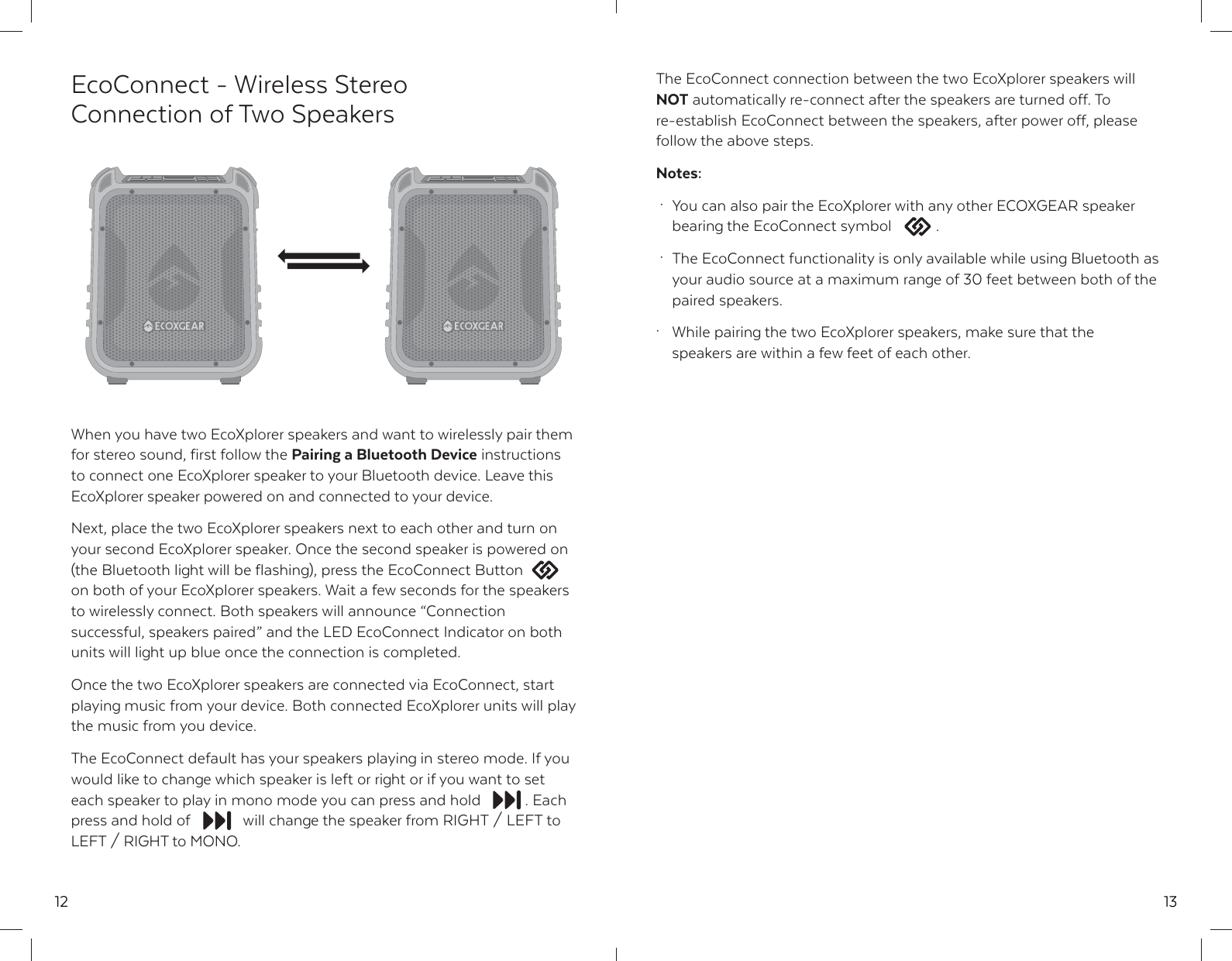
12EcoConnect - Wireless Stereo Connection of Two SpeakersWhen you have two EcoXplorer speakers and want to wirelessly pair them for stereo sound, first follow the Pairing a Bluetooth Device instructions to connect one EcoXplorer speaker to your Bluetooth device. Leave this EcoXplorer speaker powered on and connected to your device.Next, place the two EcoXplorer speakers next to each other and turn on your second EcoXplorer speaker. Once the second speaker is powered on (the Bluetooth light will be flashing), press the EcoConnect Button on both of your EcoXplorer speakers. Wait a few seconds for the speakers to wirelessly connect. Both speakers will announce “Connection successful, speakers paired” and the LED EcoConnect Indicator on both units will light up blue once the connection is completed.Once the two EcoXplorer speakers are connected via EcoConnect, start playing music from your device. Both connected EcoXplorer units will play the music from you device.The EcoConnect default has your speakers playing in stereo mode. If you would like to change which speaker is left or right or if you want to set each speaker to play in mono mode you can press and hold  . Each press and hold of  will change the speaker from RIGHT / LEFT to LEFT / RIGHT to MONO.13The EcoConnect connection between the two EcoXplorer speakers will NOT automatically re-connect after the speakers are turned off. To re-establish EcoConnect between the speakers, after power off, please follow the above steps.Notes: ·  You can also pair the EcoXplorer with any other ECOXGEAR speaker   bearing the EcoConnect symbol  . ·  The EcoConnect functionality is only available while using Bluetooth as  your audio source at a maximum range of 30 feet between both of the  paired speakers.·  While pairing the two EcoXplorer speakers, make sure that the   speakers are within a few feet of each other.
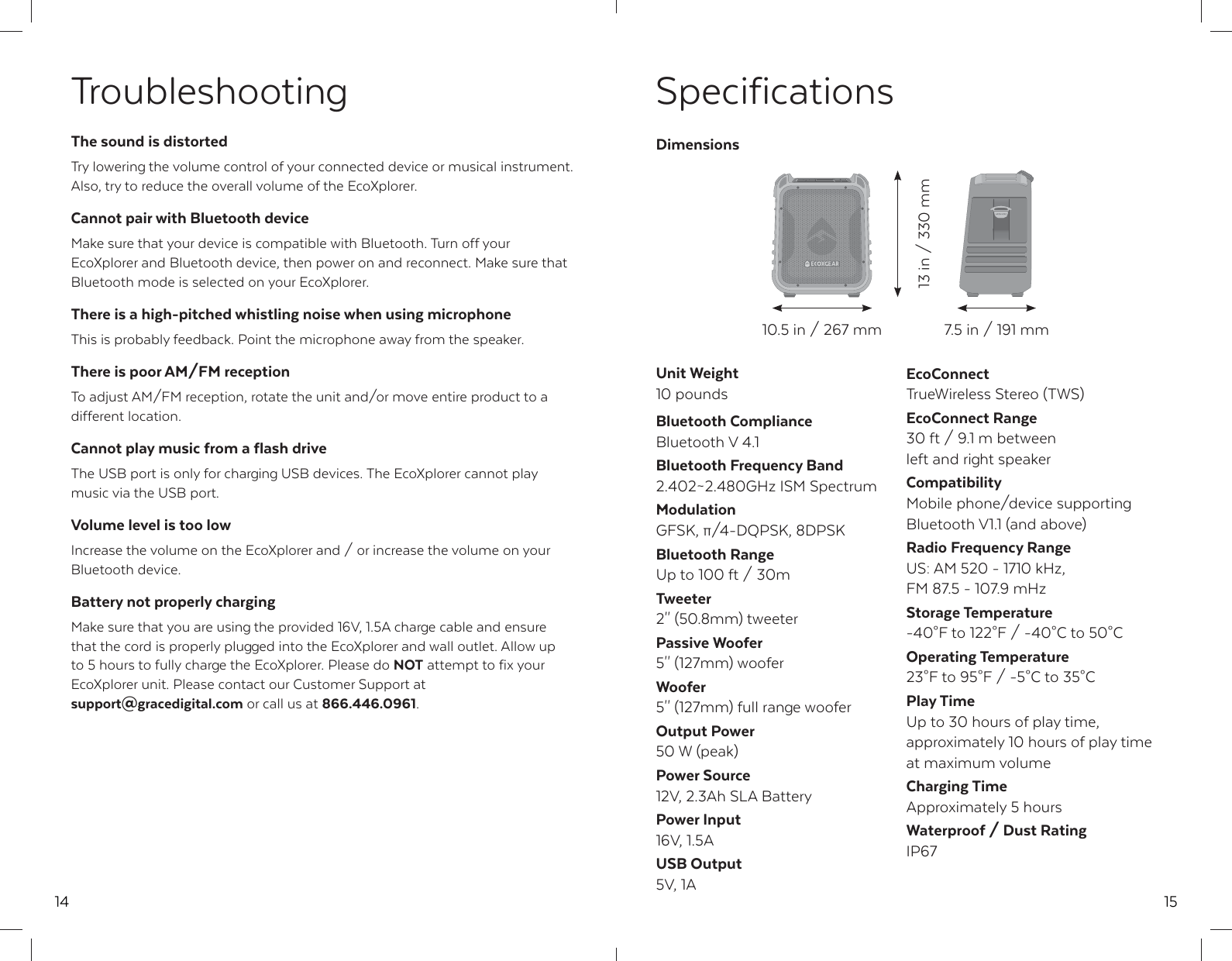
14TroubleshootingThe sound is distortedTry lowering the volume control of your connected device or musical instrument. Also, try to reduce the overall volume of the EcoXplorer.Cannot pair with Bluetooth deviceMake sure that your device is compatible with Bluetooth. Turn off your EcoXplorer and Bluetooth device, then power on and reconnect. Make sure that Bluetooth mode is selected on your EcoXplorer.There is a high-pitched whistling noise when using microphoneThis is probably feedback. Point the microphone away from the speaker.There is poor AM/FM receptionTo adjust AM/FM reception, rotate the unit and/or move entire product to a different location. Cannot play music from a flash driveThe USB port is only for charging USB devices. The EcoXplorer cannot play music via the USB port.Volume level is too lowIncrease the volume on the EcoXplorer and / or increase the volume on your Bluetooth device.Battery not properly chargingMake sure that you are using the provided 16V, 1.5A charge cable and ensure that the cord is properly plugged into the EcoXplorer and wall outlet. Allow up to 5 hours to fully charge the EcoXplorer. Please do NOT attempt to fix your EcoXplorer unit. Please contact our Customer Support at support@gracedigital.com or call us at 866.446.0961.15SpecificationsUnit Weight10 poundsBluetooth ComplianceBluetooth V 4.1Bluetooth Frequency Band2.402~2.480GHz ISM SpectrumModulationGFSK, π/4-DQPSK, 8DPSKBluetooth RangeUp to 100 ft / 30mTweeter2'' (50.8mm) tweeterPassive Woofer5'' (127mm) wooferWoofer5'' (127mm) full range wooferOutput Power50 W (peak)Power Source12V, 2.3Ah SLA BatteryPower Input16V, 1.5AUSB Output5V, 1AEcoConnectTrueWireless Stereo (TWS)EcoConnect Range30 ft / 9.1 m between left and right speakerCompatibilityMobile phone/device supporting Bluetooth V1.1 (and above)Radio Frequency RangeUS: AM 520 - 1710 kHz, FM 87.5 - 107.9 mHzStorage Temperature-40°F to 122°F / -40°C to 50°COperating Temperature23°F to 95°F / -5°C to 35°CPlay TimeUp to 30 hours of play time, approximately 10 hours of play time at maximum volumeCharging TimeApproximately 5 hoursWaterproof / Dust RatingIP67Dimensions10.5 in / 267 mm13 in / 330 mm7.5 in / 191 mm
16FCC STATEMENT:RF WARNING STATEMENT:IC STATEMENT:PRODUCT USE AND PROTECTION:Read and follow all instructions. Use only as intended.The ECOXGEAR Bluetooth speaker is intended to be used indoors or outdoors and in land or water environments. The speaker has been tested to IP67 waterproofing standards, which means the speaker can be submerged in up to 3 feet of water for 30 minutes without any damage. However, the speaker is NOT intended for constant underwater use.Always make sure the cap(s) / cover(s) are clean, free from sand or debris, and correctly fitted. The speaker will only meet IP67 ratings if all rubber seals, gasket(s) and cover(s) / cap(s) are in place. If you notice a muffling of audio after submersion, gently shake the unit to clear excess water. If your speaker is exposed to salt water, clean it thoroughly after use with fresh water.The power cable and the unit with an improperly fitted cap are NOT waterproof.To prevent fire or shock, do NOT attempt to charge this unit if it is wet or you suspect water has entered the unit. In this situation, please return the unit to Grace Digital for a free assessment. If we have found that the unit has carried water, we will repair or replace the unit free of charge.SAFETY ADVISORY & WARNING:Read and follow all instructions. Use only as intended.CAUTION: Do NOT open to repair. A qualified technician must carry out repair work.ATTENTION: Do NOT charge while the unit is wet. Towel dry the unit AND make sure all connections are dry  BEFORE plugging in the charging connector. Failure to do so may result in electrical damage to the unit and   may void the warranty.WARNING:  California Proposition 65 WARNING: This product may contain chemicals known to the State of California to   cause cancer, birth defects and other reproductive harm.  ( www.oehha.ca.gov/prop65/prop65_list/Newlist.html )WARNING:  Danger of explosion if battery is incorrectly replaced.CAUTION:  The unit can be used with the main power cord disconnected, the unit is readily operable with the main power  cord disconnected.ATTENTION: Do NOT dispose of in a landfill. Contact Grace Digital at www.gracesupport.com or a certified recycling agent to   dispose of the unit.SAFETY:This product has a limited life span of use and should be replaced when it shows obvious signs of wear. Do not modify or remove any original component parts of the speaker. Doing so could cause damage to the unit, allowing water to ingress. A unit with water ingress should not be charged due to potential risk of fire or shock.Please exercise care and good judgment when using your ECOXGEAR speaker. Audio levels should be appropriate to your environment, comply with all local regulations, and always ensure that you can hear and be aware of any potential hazards around you.17You should always  1.) Use the ECOXGEAR speaker in accordance with any music or noise rules and regulations.  2.) Properly seal the ECOXGEAR prior and after each use when in humid or water environments to avoid water damage to the   internal components. Salt water / air is particularly corrosive. Always make sure that the gaskets are sealed when in a salt   water environment and that the unit is properly rinsed off after use.  3.) Properly clean the ECOXGEAR and ensure the gaskets have no sand, dirt, or water on them prior to storage. 4.) Store your unit with all caps properly sealed to avoid long term internal moisture damage inside your unit.  5.) Completely dry and clean your ECOXGEAR prior to attempting to charge the unit. 6.) Return the ECOXGEAR to Grace Digital if you suspect water ingress into the unit or if the unit has experienced a severe   impact that may have affected the integrity of the unit to take on water.You should never  1.) Never charge your ECOXGEAR if you suspect water has entered the device. Charging a device with water inside could be   potentially hazardous and cause fire or a spark.  2.) Never use your ECOXGEAR if you have dropped it or thrown it against a hard surface which may have destroyed the   integrity of the speaker, housing, or gaskets. In the event of a severe impact to your unit, please return the unit to Grace    Digital to review for potential damage.  3.) Never open the auxiliary doors in a water environment. This could cause water to ingress into the unit which could   potentially be hazardous and cause a fire or a spark. 4.) Never connect a device to the auxiliary input jacks when in a water environment. The auxiliary jacks should only be used in   a dry environment.  5.) Never attempt to fix, repair your ECOXGEAR unit. Please send it back to Grace Digital for any assessments and repairs.CARE, MAINTENANCE & PRECAUTIONS:  1.) The unit is waterproof only when the caps and door are properly closed.  2.) Close the caps and door properly before use. If the unit is placed in water without the caps or door properly closed, water   may enter into the unit and void your warranty.  3.) Dry unit completely before opening the caps or door. Do NOT open the caps or door if wet or in a wet environment. 4.) Do NOT apply excessive force to any surfaces of the unit when wet or in a wet environment. 5.) Do NOT use or store the unit in places with high temperature. 6.) AVOID prolonged exposure to ultraviolet radiation (UV sunlight) and strong magnetic fields.  7.) Periodically check the rubber seal on the caps and door for premature wear.  8.) Periodically clean the rubber with a soft moist cloth and ensure no objects such as dirt, hair, sand are on the rubber seal  ring. Do NOT use any oily solvent or chemicals for cleaning.  9.) Rinse off the unit with tap water after use in salt water or swimming pool.10.) Power and / or charge the built-in rechargeable battery for portable use by connecting the provided 16V, 1.5A power supply   cable to an AC outlet. 11.) Noise and audio distortion may occur when the batteries are nearing end of charge. 12.)  Do  NOT remove the built-in battery. Do NOT remove the grill covers.LIMITED MANUFACTURER’S WARRANTY:EcoXplorer is covered by a 3 year limited warranty that covers defects in workmanship and / or materials for a period of 3 years from original purchase date. This warranty does not apply to any products which have been abused, neglected, modified or used for a purpose other than the one for which they were manufactured. Please refer to the above care and maintenance instructions for suggested care details. The warranty is valid only for the original owner who purchases the unit from an authorized dealer. Transfers do not qualify for warranty protection. Grace Digital reserves the right to replace any out-of-stock or discontinued product with a comparable product. Discontinued products may not be available for warranty replacement. Any contents are NOT covered by the limited manufacturer’s warranty. Warranty terms may be revised without notification at the discretion of the manufacturer. Please visit www.ecoxgear.com for additional product & warranty information.EcoXplorer by ECOXGEAR, a division of Grace Digital Inc., San Diego, California. Designed in California. Made in China.Patents Pending.This device complies with Part 15 of the FCC rules. Operation is subject to the following two conditions: 1) this device may not cause harmful interference, and 2) this device must accept any interference received, including interference that may cause undesired operation.Note: This equipment has been tested and found to comply with the limits for a ClassB digital device, pursuant to part 15 of the FCC Rules. These limits are designed toprovide reasonable protection against harmful interference in a residential installation.This equipment generates uses and can radiate radio frequency energy and, if not installed and used in accordance with the instructions, may cause harmful interference to radio communications. However, there is no guarantee that interference will not occur in particular installation. If this equipment does cause harmful interference to radio or television reception, which can be determined by turning the equipment off and on, the user is encouraged to try to correct the interference by one or more of the following measures:--Reorient or relocate the receiving antenna.--Increase the separation between the equipment and receiver.--Connect the equipment into an outlet on a circuit different from that to which the receiver is connected.--Consult the dealer or an experienced radio/TV technician for help.Changes or modifications not expressly approved by the party responsible for compliance could void the user’s authority to operate the equipment.This device complies with RF radiation exposure limits set forth for an uncontrolled environment. This transmitter must not be co-located or operating in conjunction with any other antenna or transmitter.This device complies with Industry Canada's licence-exempt RSSs. Operation is subject to the following two conditions:(1) This device may not cause interference; and(2) This device must accept any interference, including interference that may cause undesired operation of the device.Cet appareil est conforme aux CNR exemptes de licence d'Industrie Canada . Son fonctionnement est soumis aux deux conditions suivantes :(1) Ce dispositif ne peut causer d'interférences ; et(2) Ce dispositif doit accepter toute interférence , y compris les interférences qui peuvent causer un mauvais fonctionnement de l'appareil.

Navigation menu