Graco 3A0869J ProMix 2KE, Meter Based Plural Component Proportioner, Operation Manual, English User Manual To The 327a94d8 A482 4cbc B9db E121203b41f3
User Manual: Graco 3A0869J to the manual
Open the PDF directly: View PDF  .
.
Page Count: 80
- Models
- Warnings
- Important Two-Component Material Information
- Glossary of Terms
- Overview
- Installation
- Display Module
- Basic Operation
- Use of Optional USB Module
- Run Mode Details
- Setup Mode Details
- Dosing Options
- System Errors
- Dynamic Dosing Restrictor Selection Graphs
- Schematics
- Dimensions and Mounting
- Technical Data
- Graco Standard Warranty
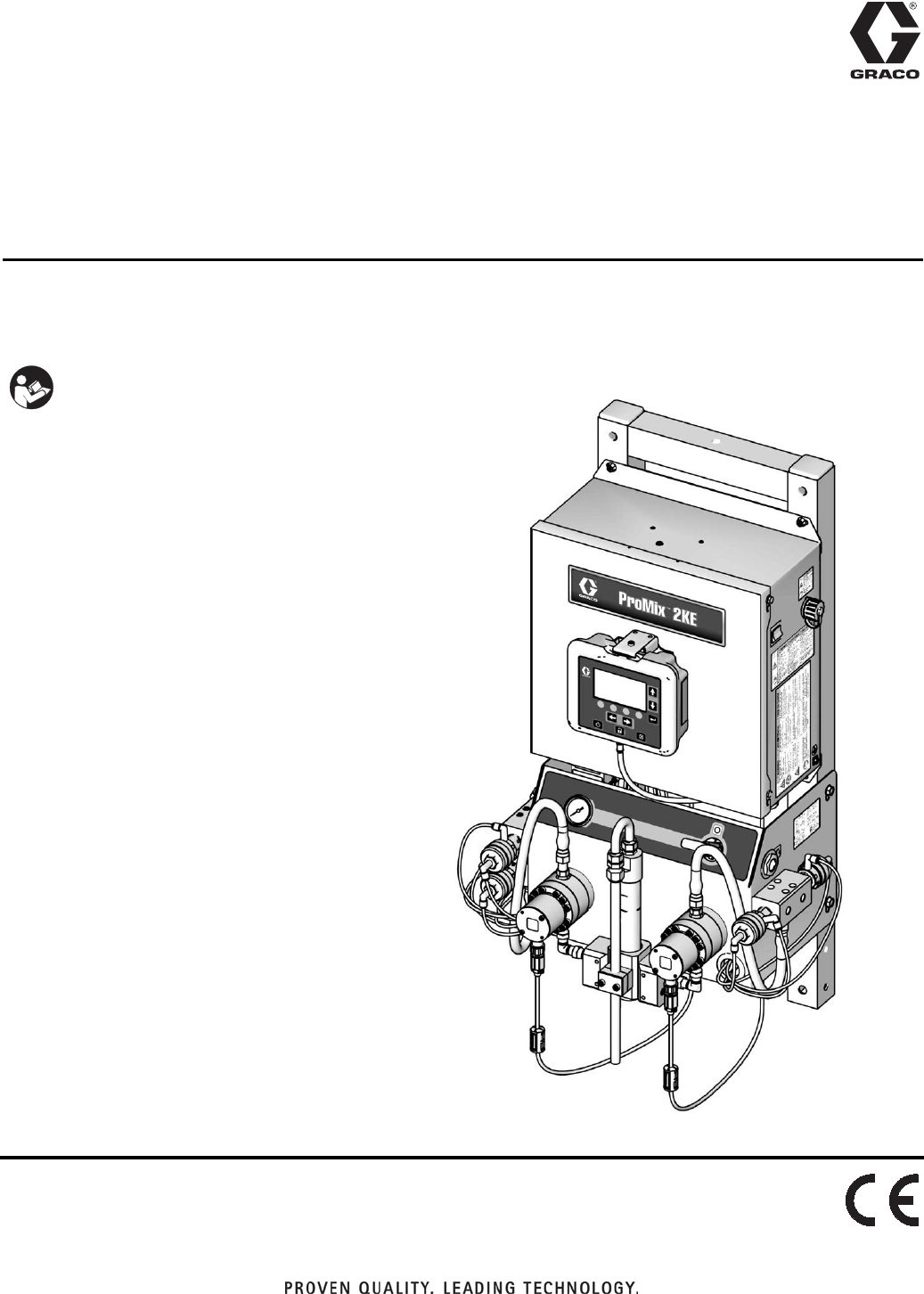
Operation
ProMix® 2KE
Meter-Based Plural Component Proportioner
Self-contained, electronic plural component paint proportioner. For professional use only.
See page 3 for model information, including maximum
working pressure and approvals.
Important Safety Instructions
Read all warnings and instructions in this
manual. Save these instructions.
ti15698a
3A0869J
EN
23A0869J
Contents
Models . . . . . . . . . . . . . . . . . . . . . . . . . . . . . . . . . . . 3
Warnings . . . . . . . . . . . . . . . . . . . . . . . . . . . . . . . . . 4
Important Two-Component Material Information . 7
Isocyanate Conditions . . . . . . . . . . . . . . . . . . . . . 7
Material Self-ignition . . . . . . . . . . . . . . . . . . . . . . 7
Keep Components A and B Separate . . . . . . . . . 7
Moisture Sensitivity of Isocyanates . . . . . . . . . . . 7
Changing Materials . . . . . . . . . . . . . . . . . . . . . . . 7
Glossary of Terms . . . . . . . . . . . . . . . . . . . . . . . . . . 8
Overview . . . . . . . . . . . . . . . . . . . . . . . . . . . . . . . . . . 9
Usage . . . . . . . . . . . . . . . . . . . . . . . . . . . . . . . . . 9
Component Identification and Definition . . . . . . . 9
Installation . . . . . . . . . . . . . . . . . . . . . . . . . . . . . . . . 9
General Information . . . . . . . . . . . . . . . . . . . . . . 9
Intrinsically Safe Installation Requirements . . . 10
Display Module . . . . . . . . . . . . . . . . . . . . . . . . . 12
Air Supply . . . . . . . . . . . . . . . . . . . . . . . . . . . . . 12
Fluid Supply . . . . . . . . . . . . . . . . . . . . . . . . . . . 14
Tubing Chart and Diagrams . . . . . . . . . . . . . . . 18
Electrical . . . . . . . . . . . . . . . . . . . . . . . . . . . . . . 20
Grounding . . . . . . . . . . . . . . . . . . . . . . . . . . . . . 21
Check Resistance . . . . . . . . . . . . . . . . . . . . . . . 21
Display Module . . . . . . . . . . . . . . . . . . . . . . . . . . . 23
Display . . . . . . . . . . . . . . . . . . . . . . . . . . . . . . . 23
Icon Key . . . . . . . . . . . . . . . . . . . . . . . . . . . . . . 24
Screen Summary . . . . . . . . . . . . . . . . . . . . . . . 25
Ranges for User Inputs . . . . . . . . . . . . . . . . . . . 26
Basic Operation . . . . . . . . . . . . . . . . . . . . . . . . . . . 31
Pre-Operation Tasks . . . . . . . . . . . . . . . . . . . . . 31
Power On . . . . . . . . . . . . . . . . . . . . . . . . . . . . . 31
Initial System Setup . . . . . . . . . . . . . . . . . . . . . 31
Prime the System . . . . . . . . . . . . . . . . . . . . . . . 32
Meter Calibration . . . . . . . . . . . . . . . . . . . . . . . . 32
Spraying . . . . . . . . . . . . . . . . . . . . . . . . . . . . . . 33
Purging . . . . . . . . . . . . . . . . . . . . . . . . . . . . . . . 34
Color Change . . . . . . . . . . . . . . . . . . . . . . . . . . 35
Purge/Color Change Detail . . . . . . . . . . . . . . . . 36
Pressure Relief Procedure . . . . . . . . . . . . . . . . 37
Lock Mode . . . . . . . . . . . . . . . . . . . . . . . . . . . . 38
Valve Settings . . . . . . . . . . . . . . . . . . . . . . . . . . 38
Shutdown . . . . . . . . . . . . . . . . . . . . . . . . . . . . . 38
Use of Optional USB Module . . . . . . . . . . . . . . . . 39
USB Logs . . . . . . . . . . . . . . . . . . . . . . . . . . . . . 39
Setup . . . . . . . . . . . . . . . . . . . . . . . . . . . . . . . . . 40
Download Procedure . . . . . . . . . . . . . . . . . . . . . 41
Recommended USB Flash Drives . . . . . . . . . . . 41
Run Mode Details . . . . . . . . . . . . . . . . . . . . . . . . . . 42
Run Mix Spray (Screen 2) . . . . . . . . . . . . . . . . . 42
Run Home (Screen 1) . . . . . . . . . . . . . . . . . . . . 42
Run Mix Batch (Screen 3) . . . . . . . . . . . . . . . . . 42
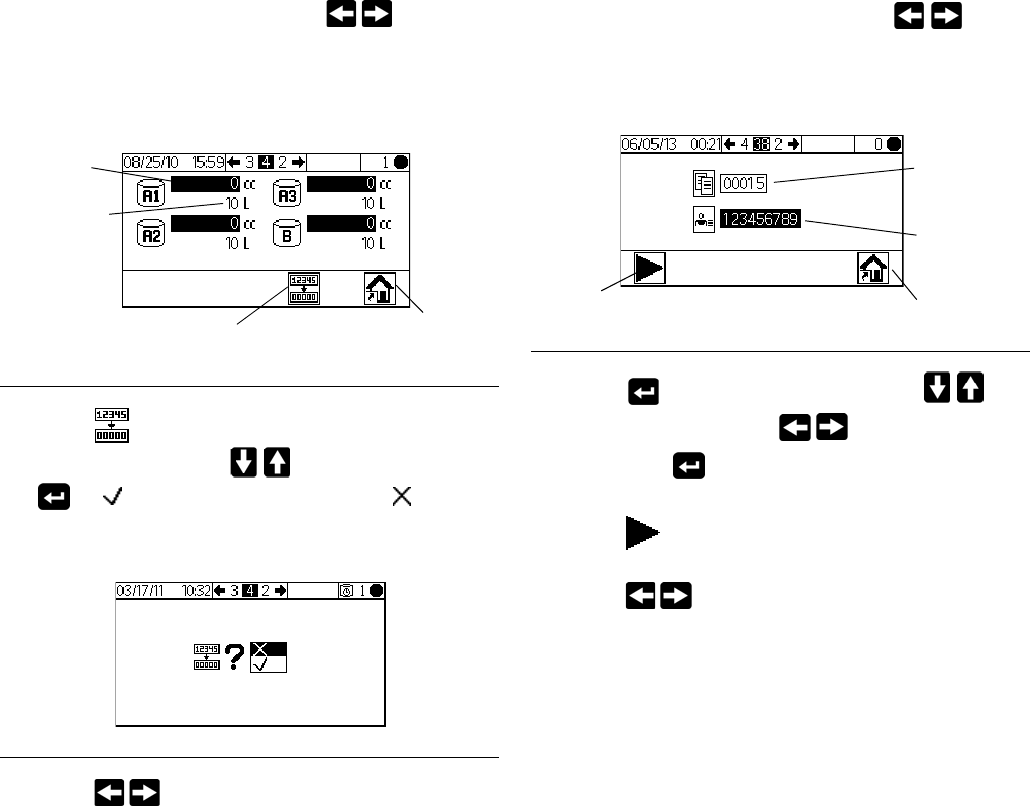
Run Mix Totals (Screen 4) . . . . . . . . . . . . . . . . . 43
Run Job Number (Screen 38) . . . . . . . . . . . . . . 43
Run Log Errors (Screens 5-14) . . . . . . . . . . . . . 44
Setup Mode Details . . . . . . . . . . . . . . . . . . . . . . . . 45
Password (Screen 16) . . . . . . . . . . . . . . . . . . . . 45
Setup Home (Screen 17) . . . . . . . . . . . . . . . . . . 45
Configure 1-4 (Screens 18-21) . . . . . . . . . . . . . 45
Recipe 0 (Screen 27) . . . . . . . . . . . . . . . . . . . . . 47
Recipe 1-1 (Screen 28) . . . . . . . . . . . . . . . . . . . 47
Recipe 1-2 (Screen 29) . . . . . . . . . . . . . . . . . . . 47
Maintenance 1-3 (Screens 24-26) . . . . . . . . . . . 48
Maintenance Recommendations . . . . . . . . . . . . 48
Calibration 1 and 2 (Screens 22 and 23) . . . . . . 49
Troubleshooting (Screens 35-37) . . . . . . . . . . . 49
Dosing Options . . . . . . . . . . . . . . . . . . . . . . . . . . . 51
Sequential Dosing . . . . . . . . . . . . . . . . . . . . . . . 51
Dynamic Dosing . . . . . . . . . . . . . . . . . . . . . . . . 53
System Errors . . . . . . . . . . . . . . . . . . . . . . . . . . . . 55
System Alarms . . . . . . . . . . . . . . . . . . . . . . . . . 55
System Advisory/Record Codes . . . . . . . . . . . . 55
To Clear Error and Restart . . . . . . . . . . . . . . . . 55
Air Flow Switch (AFS) Function . . . . . . . . . . . . . 55
System Idle Notice (IDLE) . . . . . . . . . . . . . . . . . 56
Error Codes . . . . . . . . . . . . . . . . . . . . . . . . . . . . 57
Alarm Troubleshooting . . . . . . . . . . . . . . . . . . . 58
Dynamic Dosing Restrictor Selection Graphs . . 65
Schematics . . . . . . . . . . . . . . . . . . . . . . . . . . . . . . . 72
Dimensions and Mounting . . . . . . . . . . . . . . . . . . 78
Technical Data . . . . . . . . . . . . . . . . . . . . . . . . . . . . 79
Graco Standard Warranty . . . . . . . . . . . . . . . . . . . 80
Models
3A0869J 3
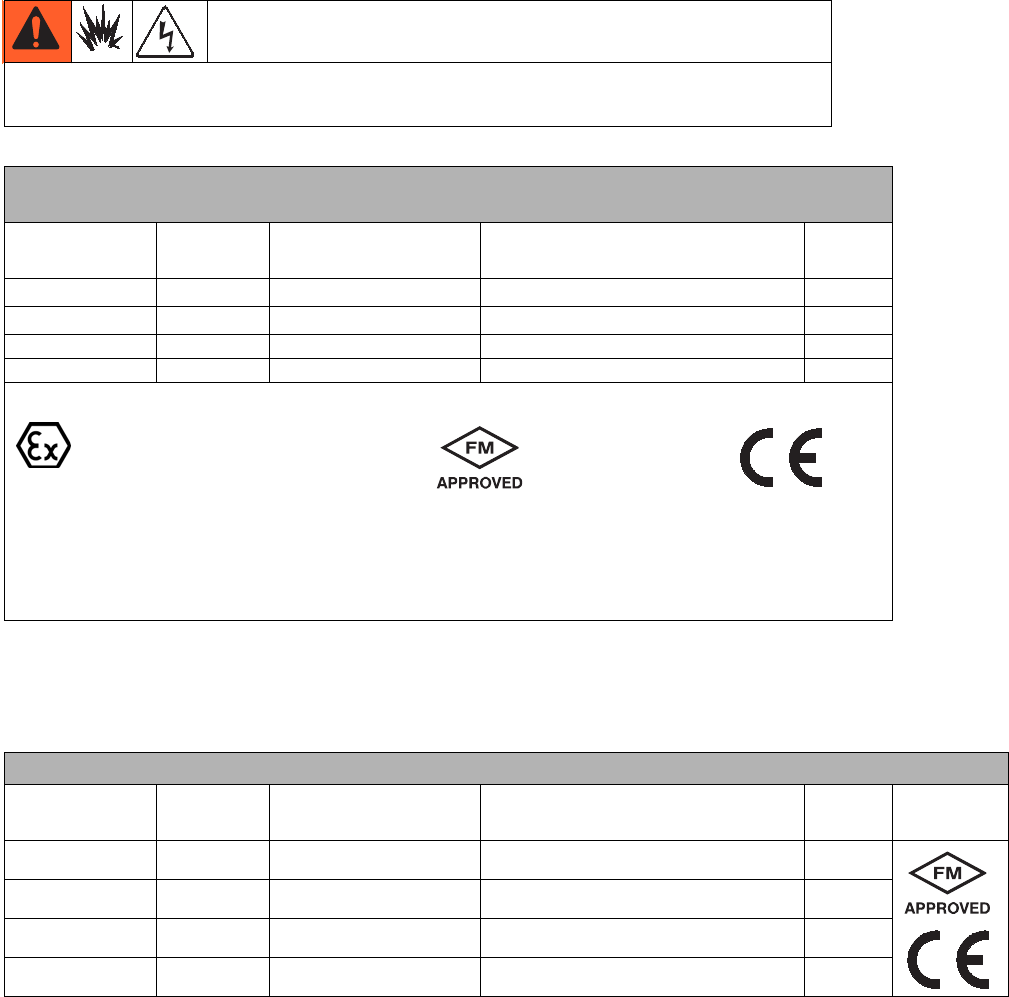
Models
* ProMix 2KE hazardous location equipment manufactured in the United States, with serial number beginning with
A or 01, has ATEX, FM, and CE approvals, as noted. Equipment manufactured in Belgium, with serial number
beginning with M or 38, has ATEX and CE approvals, as noted.
* ProMix 2KE non-hazardous location equipment manufactured in the United States, with serial number beginning
with A or 01, has FM and CE approvals. Equipment manufactured in Belgium, with serial number beginning with
M or 38, has CE approval.
ProMix 2KE systems are not approved for use in hazardous locations unless the base
model, all accessories, all kits, and all wiring meet local, state, and national codes.
Approved for Hazardous Location*
Class 1, Div 1, Group D (North America); Class 1, Zones 1 and 2 (Europe)
Part No. Series Description
Maximum Working Pressure
psi (MPa, bar)
USB
Port
24F084 A 1 color/1 catalyst 3000 (27.58, 275.8)
24F085 A 3 colors/1 catalyst 3000 (27.58, 275.8)
24F086 A 1 color/1 catalyst 3000 (27.58, 275.8)
24F087 A 3 colors/1 catalyst 3000 (27.58, 275.8)
Approvals*
#53
Intrinsically safe and purged
equipment for
Class I, Division 1, Group D, T3
Ta = 0°C to 54°C
0359
Ex ia px IIA T3 Ta = 0°C to 54°C
FM10 ATEX 0025 X
II 2 G
See Special Conditions for Safe Use in Related Manuals, page 4.
Approved for Non-Hazardous Location
Part No. Series Description
Maximum Working Pressure
psi (MPa, bar)
USB
Port Approvals*
24F080 A 1 color/1 catalyst 3000 (27.58, 275.8)
24F081 A 3 colors/1 catalyst 3000 (27.58, 275.8)
24F082 A 1 color/1 catalyst 3000 (27.58, 275.8)
24F083 A 3 colors/1 catalyst 3000 (27.58, 275.8)
#53
Warnings
43A0869J
Related Manuals
Warnings
The following warnings are for the setup, use, grounding, maintenance, and repair of this equipment. The exclama-
tion point symbol alerts you to a general warning and the hazard symbols refer to procedure-specific risks. When
these symbols appear in the body of this manual, refer back to these Warnings. Product-specific hazard symbols and
warnings not covered in this section may appear throughout the body of this manual where applicable.
Manual Description
3A0870 ProMix 2KE, Repair/Parts
313599 Coriolis Meter, Instructions/Parts
308778 G3000 Flow Meter, Instructions/Parts
312781 Fluid Mix Manifold, Instructions/Parts
312782 Dosing Valve, Instructions/Parts
312784 Gun Flush Box Kit 15V826
406714 Rebuild Kit for High Pressure
Dispense Valve
406823 Dispense Valve Seat Kit
3A1244 Graco Control Architecture
Module Programming
3A1323 16G353 Alternator Conversion Kit
3A1324 16G351 Electric Power Conversion Kit
3A1325 ProMix 2KE Stand Kits
3A1332 24H255 3-Color Valve Stack Kit
3A1333 24H253 USB Module Kit
313542 Beacon Tower
Manual Description
WARNING
FIRE AND EXPLOSION HAZARD
Flammable fumes, such as solvent and paint fumes, in work area can ignite or explode. To help prevent
fire and explosion:
• Use equipment only in well ventilated area.
• Eliminate all ignition sources; such as pilot lights, cigarettes, portable electric lamps, and plastic drop
cloths (potential static arc).
• Keep work area free of debris, including solvent, rags and gasoline.
• Do not plug or unplug power cords, or turn power or light switches on or off when flammable fumes are
present.
• Ground all equipment in the work area. See Grounding instructions.
• Use only grounded hoses.
• Hold gun firmly to side of grounded pail when triggering into pail.
• If there is static sparking or you feel a shock, stop operation immediately. Do not use equipment
until you identify and correct the problem.
• Keep a working fire extinguisher in the work area.
SPECIAL CONDITIONS FOR SAFE USE
• To prevent the risk of electrostatic sparking, the equipment’s non-metallic parts should be cleaned only
with a damp cloth.
Warnings
3A0869J 5
ELECTRIC SHOCK HAZARD
This equipment must be grounded. Improper grounding, setup, or usage of the system can cause electric
shock.
• Turn off and disconnect power at main switch before disconnecting any cables and before servicing
equipment.
• Connect only to grounded power source.
• All electrical wiring must be done by a qualified electrician and comply with all local codes and
regulations.
INTRINSIC SAFETY
Intrinsically safe equipment that is installed improperly or connected to non-intrinsically safe equipment
will create a hazardous condition and can cause fire, explosion, or electric shock. Follow local regulations
and the following safety requirements.
• Only models with model numbers 24F084-24F087, utilizing the air-driven alternator, are approved for
installation in a Hazardous (explosive atmosphere) Location. See Models, page 3.
• Be sure your installation complies with national, state, and local codes for the installation of electrical
apparatus in a Class I, Group D, Division 1 (North America) or Class I, Zones 1 and 2 (Europe)
Hazardous Location, including all of the local safety fire codes, NFPA 33, NEC 500 and 516, and
OSHA 1910.107.
• To help prevent fire and explosion:
• Do not install equipment approved only for a non-hazardous location in a hazardous location. See
model ID label for the intrinsic safety rating of your model.
• Do not substitute system components as this may impair intrinsic safety.
• Equipment that comes in contact with the intrinsically safe terminals must be rated for Intrinsic Safety.
This includes DC voltage meters, ohmmeters, cables, and connections. Remove the unit from the
hazardous area when troubleshooting.
• The equipment is intrinsically safe when no external electrical components are connected to it.
• Do not connect, download, or remove USB device unless unit is removed from the hazardous
(explosive atmosphere) location.
SKIN INJECTION HAZARD
High-pressure fluid from gun, hose leaks, or ruptured components will pierce skin. This may look like just
a cut, but it is a serious injury that can result in amputation. Get immediate surgical treatment.
• Do not spray without tip guard and trigger guard installed.
• Engage trigger lock when not spraying.
• Do not point gun at anyone or at any part of the body.
• Do not put your hand over the spray tip.
• Do not stop or deflect leaks with your hand, body, glove, or rag.
• Follow the Pressure Relief Procedure when you stop spraying and before cleaning, checking, or
servicing equipment.
• Tighten all fluid connections before operating the equipment.
• Check hoses and couplings daily. Replace worn or damaged parts immediately.
WARNING
Warnings
63A0869J
EQUIPMENT MISUSE HAZARD
Misuse can cause death or serious injury.
• Do not operate the unit when fatigued or under the influence of drugs or alcohol.
• Do not exceed the maximum working pressure or temperature rating of the lowest rated system
component. See Technical Data in all equipment manuals.
• Use fluids and solvents that are compatible with equipment wetted parts. See Technical Data in all
equipment manuals. Read fluid and solvent manufacturer’s warnings. For complete information about
your material, request MSDS from distributor or retailer.
• Do not leave the work area while equipment is energized or under pressure. Turn off all equipment
and follow the Pressure Relief Procedure when equipment is not in use.
• Check equipment daily. Repair or replace worn or damaged parts immediately with genuine
manufacturer’s replacement parts only.
• Do not alter or modify equipment.
• Use equipment only for its intended purpose. Call your distributor for information.
• Route hoses and cables away from traffic areas, sharp edges, moving parts, and hot surfaces.
• Do not kink or over bend hoses or use hoses to pull equipment.
• Keep children and animals away from work area.
• Comply with all applicable safety regulations.
TOXIC FLUID OR FUMES HAZARD
Toxic fluids or fumes can cause serious injury or death if splashed in the eyes or on skin, inhaled, or
swallowed.
• Read MSDSs to know the specific hazards of the fluids you are using.
• Store hazardous fluid in approved containers, and dispose of it according to applicable guidelines.
• Always wear chemically impermeable gloves when spraying, dispensing, or cleaning equipment.
PERSONAL PROTECTIVE EQUIPMENT
You must wear appropriate protective equipment when operating, servicing, or when in the operating area
of the equipment to help protect you from serious injury, including eye injury, hearing loss, inhalation of
toxic fumes, and burns. This equipment includes but is not limited to:
• Protective eyewear, and hearing protection.
• Respirators, protective clothing, and gloves as recommended by the fluid and solvent manufacturer.
WARNING
Important Two-Component Material Information
3A0869J 7
Important Two-Component Material Information
Isocyanate Conditions
Material Self-ignition
Keep Components A and B
Separate
Moisture Sensitivity of
Isocyanates
Isocyanates (ISO) are catalysts used in two component
coatings. ISO will react with moisture (such as humidity)
to form small, hard, abrasive crystals, which become
suspended in the fluid. Eventually a film will form on the
surface and the ISO will begin to gel, increasing in vis-
cosity. If used, this partially cured ISO will reduce perfor-
mance and the life of all wetted parts.
NOTE: The amount of film formation and rate of crystal-
lization varies depending on the blend of ISO, the
humidity, and the temperature.
To prevent exposing ISO to moisture:
• Always use a sealed container with a desiccant
dryer in the vent, or a nitrogen atmosphere. Never
store ISO in an open container.
• Use moisture-proof hoses specifically designed for
ISO, such as those supplied with your system.
• Never use reclaimed solvents, which may contain
moisture. Always keep solvent containers closed
when not in use.
• Never use solvent on one side if it has been con-
taminated from the other side.
• Always lubricate threaded parts with ISO pump oil
or grease when reassembling.
Changing Materials
• When changing materials, flush the equipment mul-
tiple times to ensure it is thoroughly clean.
• Always clean the fluid inlet strainers after flushing.
• Check with your material manufacturer for chemical
compatibility.
Spraying or dispensing materials containing
isocyanates creates potentially harmful mists,
vapors, and atomized particulates.
Read material manufacturer’s warnings and material
MSDS to know specific hazards and precautions
related to isocyanates.
Prevent inhalation of isocyanate mists, vapors, and
atomized particulates by providing sufficient
ventilation in the work area. If sufficient ventilation is
not available, a supplied-air respirator is required for
everyone in the work area.
To prevent contact with isocyanates, appropriate
personal protective equipment, including chemically
impermeable gloves, boots, aprons, and goggles, is
also required for everyone in the work area.
Some materials may become self-igniting if applied
too thickly. Read material manufacturer’s warnings
and material MSDS.
Cross-contamination can result in cured material in
fluid lines which could cause serious injury or
damage equipment. To prevent cross-contamination
of the equipment’s wetted parts, never interchange
component A (resin) and component B (isocyanate)
parts.
Glossary of Terms
83A0869J
Glossary of Terms
Coriolis Meter - a non-intrusive flow meter often used in
low flow applications or with light viscosity, shear sensi-
tive, or acid catalyzed materials. This meter uses vibra-
tion to measure flow.
Dose Size - the amount of resin (A) and catalyst (B) that
is dispensed into an integrator.
Dose Time Alarm - the amount of time that is allowed
for a dose to occur before an alarm occurs.
Dynamic Dosing - Component A dispenses constantly.
Component B dispenses intermittently in the necessary
volume to attain the mix ratio.
Grand Total - a non-resettable value that shows the
total amount of material dispensed through the system.
Intrinsically Safe (IS) - refers to the ability to locate cer-
tain components in a hazardous location.
Idle - if the gun is not triggered for 2 minutes the system
enters Idle mode. Trigger the gun to resume operation.
Batch Total - a resettable value that shows the amount
of material dispensed through the system for one batch.
A batch is complete when the user resets the batch
counter to zero.
K-factor - an assigned value that refers to the amount
of material per pulse that passes through a meter.
Mix - when cross-linking of the resin (A) and catalyst (B)
occurs.
Overdose Alarm - when either the resin (A) or catalyst
(B) component dispenses too much material and the
system cannot compensate for the additional material.
Potlife Time - the amount of time before a material
becomes unsprayable.
Potlife Volume - the amount of material that is required
to move through the mix manifold, hose and applicator
before the potlife timer is reset.
Purge - when all mixed material is flushed from the sys-
tem.
Purge Time - the amount of time required to flush all
mixed material from the system.
Ratio Tolerance - the settable percent of acceptable
variance that the system will allow before a ratio alarm
occurs.
Sequential Color Change - the process when a color
change is initiated and the system automatically flushes
the old color and loads a new color.
Sequential Dosing - Components A and B dispense
sequentially in the necessary volumes to attain the mix
ratio.
Standby - refers to the status of the system.

Overview
3A0869J 9
Overview
Usage
The ProMix 2KE is an electronic two-component paint
proportioner. It can blend most two-component paints. It
is not for use with quick-setting paints (those with a pot
life of less than 5 minutes).
• Has dynamic dosing capabilities. It dispenses mate-
rial A, monitors fluid flow, and dispenses material B
in doses to cause the mixture to stay on ratio.
• Can proportion at ratios from 0.1:1 to 30.0:1.
• Will display the last 50 errors with date, time, and
event. The optional USB upgrade kit will log 500
errors and up to 2000 jobs.
• For systems with one gun, an optional Gun Flush
Box provides an automated flushing system for a
manual spray gun.
Component Identification and Definition
Installation
General Information
• Reference numbers and letters in parentheses in
the text refer to numbers and letters in the illustra-
tions.
• Be sure all accessories are adequately sized and
pressure-rated to meet system requirements.
• There must be a shutoff valve between each fluid
supply line and the ProMix 2KE system.
• A 100 mesh minimum fluid filter must be installed on
component A and B fluid supply lines.
• To protect the Display Module screens from paints
and solvents, clear-plastic protective shields are
available in packs of 10 (Part No. 24G821). Clean
the screens with a dry cloth if necessary.
Table 1: Component Description
Component Description
Control Box • Advanced Fluid Control Module
• Power supply or alternator
• Solenoid valves
• Air flow switch(es)
• Optional USB Module
• Audible alarm
• Optional pressure switch for gun flush box
Fluid Module • Mix manifold, which includes the fluid integrator and static mixer.
• Color/catalyst valve stacks, includes pneumatically operated dose valves for material A1
and B, additional dose valves A2 and A3 (optional), as well as solvent valves.
•Meters
Display Module Used to set up, display, operate, and monitor the system. Used for daily painting functions
including choosing recipes, reading/clearing alarms, and placing the system in Spray,
Standby, or Purge mode.
Installation
10 3A0869J
Intrinsically Safe Installation Requirements
1. The installation must meet the requirements of the
National Electric Code, NFPA 70, Article 504 Resp.,
Article 505, and ANSI/ISA 12.06.01.
2. Multiple earthing of components is allowed only if
high integrity equipotential system realized between
the points of bonding.
3. For ATEX, install per EN 60079-14 and applicable
local and national codes.
Do not substitute or modify system components as
this may impair intrinsic safety. For installation,
maintenance, or operation instructions, read
instruction manuals. Do not install equipment
approved only for non-hazardous location in a
hazardous location. See the identification label for
the intrinsic safety rating for your model.
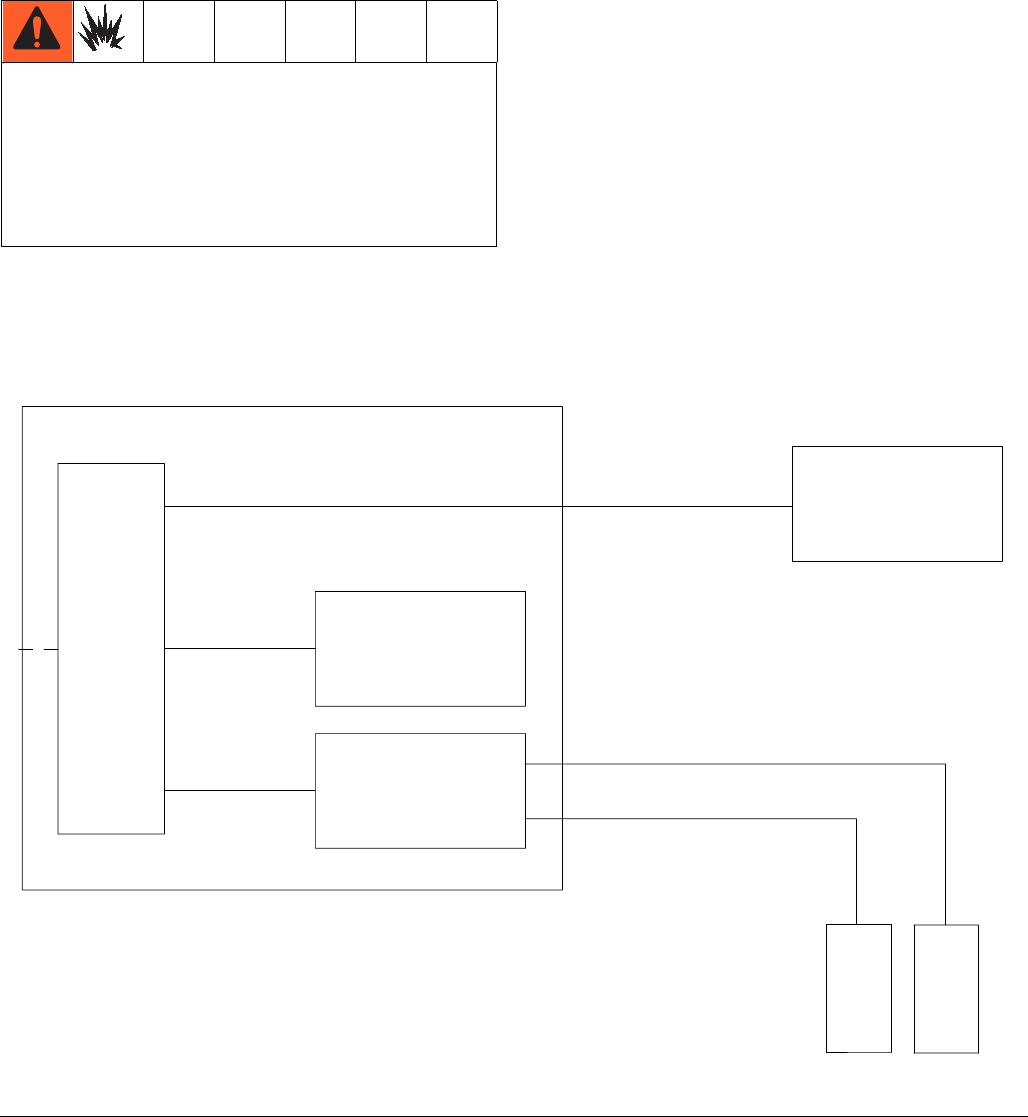
FIG. 1. Hazardous Location Installation
FLUID
CONTROL
MODULE
USB MODULE
USER INTERFACE
MODULE
ALTERNATOR
MODULE
10' CAN CABLE
2' CAN CABLE
20" CAN CABLE
FLOW
METER A
G3000
G3000HR
S3000
FLOW
METER B
G3000
G3000HR
S3000
CABLE ASSEMBLY
CABLE ASSEMBLY
50' OPTION
Hazardous (Classified) Locations
Class 1, Div 1, Group D, T3 (US and Canada)
Class 1, Zone 1, Group IIA, T3 (ATEX only)
Installation
3A0869J 11
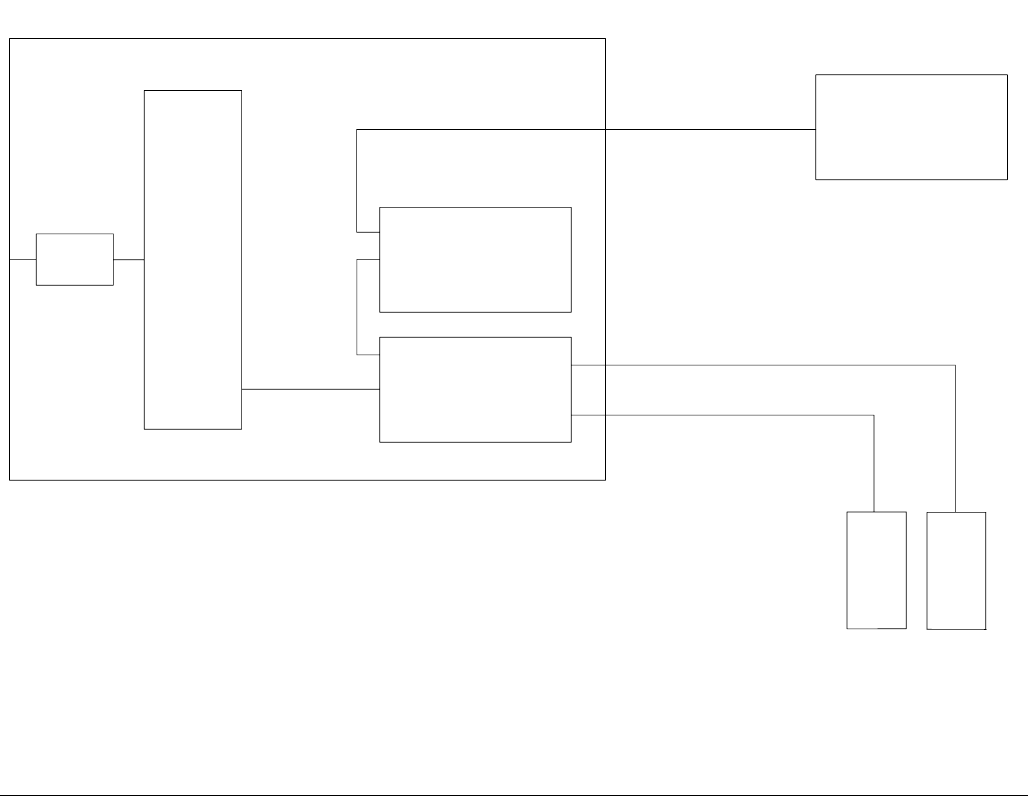
FIG. 2. Non-Hazardous Location Installation
FLUID
CONTROL
MODULE
USB MODULE
USER INTERFACE
MODULE
POWER
SUPPLY
10' CAN CABLE
20" CAN CABLE
CAN CABLE
FLOW
METER A
G3000
G3000HR
S3000
CORIOLIS
FLOW
METER B
G3000
G3000HR
S3000
CORIOLIS
CABLE ASSEMBLY
CABLE ASSEMBLY
LINE POWER
FILTER
50' OPTION
Non-Hazardous Locations
Installation
12 3A0869J
Display Module
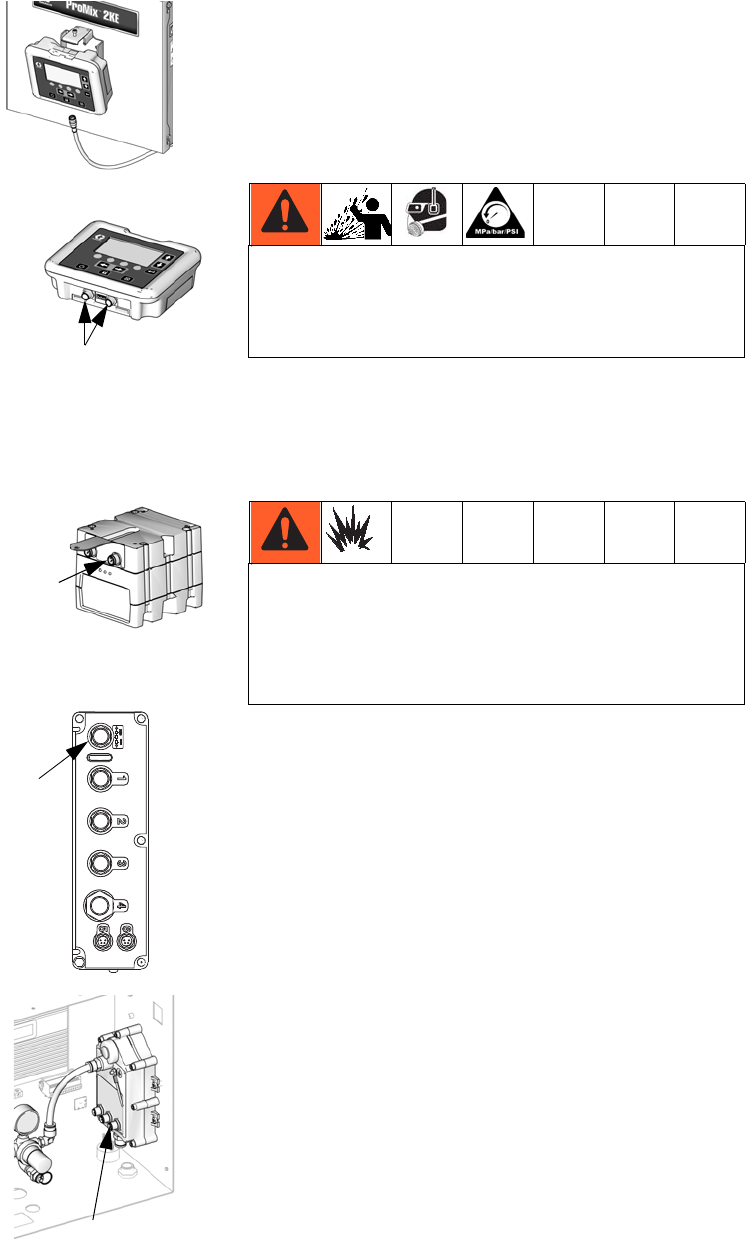
1. Use the screws provided
to mount the bracket for
the Display Module on the
front of the Control Box or
on the wall, as you prefer.
2. Snap the Display Module
into the bracket.
3. Connect one end of the
CAN cable (provided) to J6
on the Display Module (either
port).
4. The other end of the cable comes from the factory
connected as shown, depending on the configura-
tion of your system:
•Wall Power Systems
with USB Module:
Connect the CAN cable
to P3 on the USB Mod-
ule.
•Wall Power Systems
without USB Module:
Connect CAN cable to
J8 on the Advanced
Fluid Control Module.
•Alternator Power Sys-
tems (with or without
USB Module): Connect
CAN cable to J3 on the
alternator.
Air Supply
Requirements
•Compressed air supply pressure: 75-100 psi
(517-700 kPa, 5.2-7 bar).
•Air hoses: use grounded hoses that are correctly
sized for your system.
•Air regulator and bleed-type shutoff valve:
include in each air line to fluid supply equipment.
Install an additional shutoff valve upstream of all air
line accessories to isolate them for servicing.
•Air line filter: a 10 micron or better air filter is rec-
ommended to filter oil and water out of the air supply
and help avoid paint contamination and clogged
solenoids.
ti16672a
J6
ti16604a
P3
ti16580a
J8
ti16579a
J3
ti16456a
Trapped air can cause a pump or dispense valve to
cycle unexpectedly, which could result in serious
injury from splashing or moving parts. Use bleed-type
shutoff valves.
If using a Graco electrostatic PRO™ Gun, a shutoff
valve must be installed in the gun air line to shutoff
the atomizing and turbine air to the gun. Contact your
Graco distributor for information on air shutoff valves
for electrostatic applications.
Installation
3A0869J 13
Air Connections
See the System Pneumatic Schematic on page 72
(hazardous location) or page 73 (non-hazardous loca-
tion).
1. Tighten all ProMix 2KE system air and fluid line con-
nections as they may have loosened during ship-
ment.
2. Connect the main air supply line to the main air inlet.
This air line supplies the solenoids and all pneu-
matic control valves.
3. For each gun in the system, connect a separate
clean air supply line to the air inlet of the air flow
switch. This air line supplies gun atomizing air. The
air flow switch detects air flow to the gun and signals
the controller when the gun is being triggered.
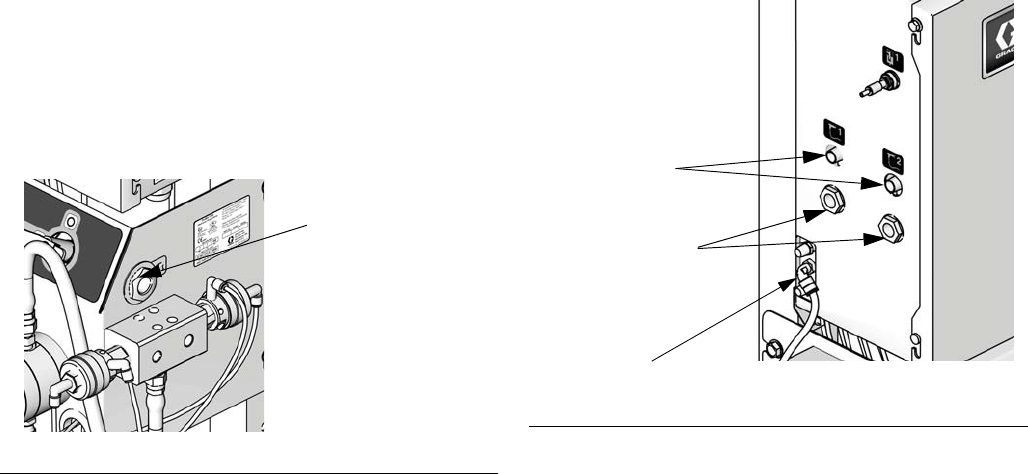
FIG. 3. Main Air Connection
Main Air
Inlet
TI15729a FIG. 4. Atomizing Air Connection
Solenoid
air inlet
Atomizing
air inlets
Atomizing
air outlets
TI15709a
Installation
14 3A0869J
Fluid Supply
Requirements
ProMix 2KE models are available to operate air spray or
air-assisted systems with a capacity of up to 3800
cc/min.
• Fluid supply pressure tanks, feed pumps, or circu-
lating systems can be used.
• Materials can be transferred from their original con-
tainers or from a central paint recirculating line.
• See manual 313599 for Coriolis meter installation
and operation instructions.
NOTE: The Coriolis meter can be used only on non-IS
systems 24F080-24F083. When installed on these sys-
tems, the meter’s hazardous location intrinsically safe
status is voided.
• If you are using dynamic dosing, see Fluid Connec-
tions, this page. See also Set Up the Fluid Mani-
fold for Dynamic Dosing, page 16.
NOTE: The fluid supply must be free of pressure spikes,
which are commonly caused by pump stroke change-
over. If necessary, install pressure regulators or a surge
tank on the ProMix 2KE fluid inlets to reduce pulsation.
Contact your Graco distributor for additional information.
Fluid Connections
1. See FIG. 6. Connect the solvent supply line to the
1/4 npt(f) solvent valve inlets (SVA and SVB).
2. Connect the component A supply line(s).
•Single color system: connect component supply
line to the component A1 dose valve inlet (DVA1).
•Multiple color system: connect supply lines to the
component A2 and A3 dose valve inlets (DVA2,
DVA3). See FIG. 6.
NOTE: Solvent supplied by a single source can cause
cross contamination and damage to the system. Install
check valves or use separate solvent sources.
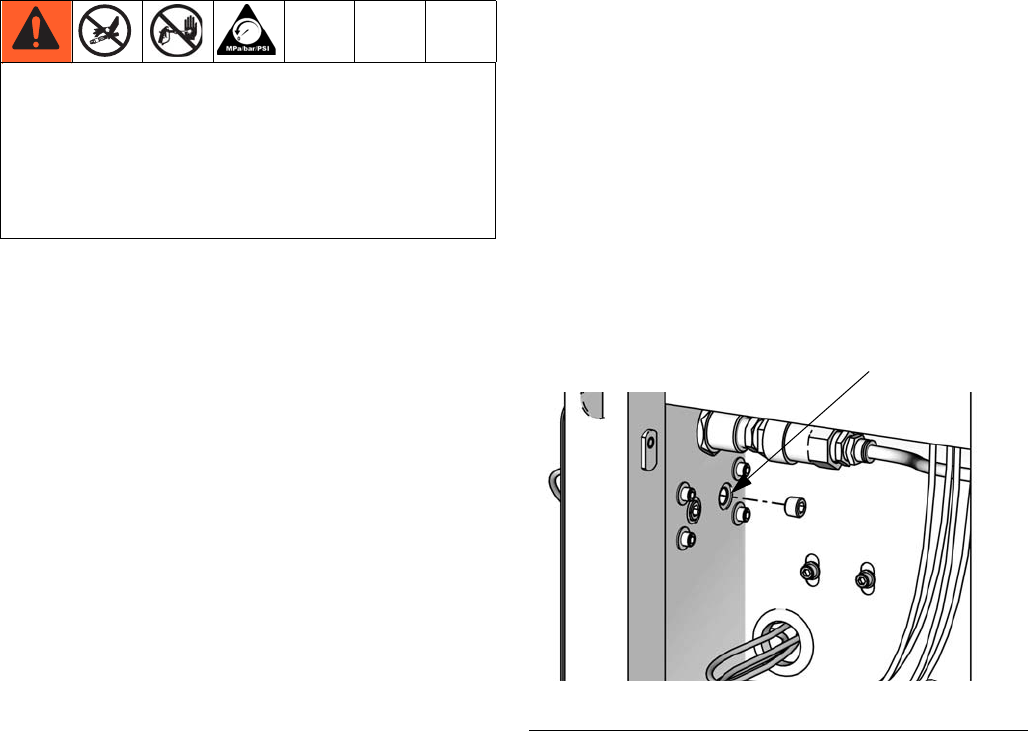
NOTE: Paint Recirculating System Only
• If you are recirculating paint, use the standard inlet
on Dose Valve A1 (A2, A3) or Dose Valve B.
Remove the plug directly opposite it on the dose
valve for the recirculation outlet. The second port is
on the back of the valve and must be reached from
inside the control box.
• Another option is to use a tee fitting to
recirculate.
NOTE: Verify that all unused fluid ports on the color
change valve stack are plugged before operation. An
open port will leak fluid.
3. Connect the component B line to the component B
dose valve inlet (DVB).
NOTE: The component A and B fluid meter inlets have
fluid check valves to prevent backflow from fluid supply
pressure fluctuations. Backflow can cause ratio inaccu-
racies.
4. Connect the gun fluid supply line between the static
mixer (SM) outlet and the gun fluid inlet.
• Do not exceed the pressure rating of the lowest
rated component. See the identification label.
• To reduce the risk of injury, including fluid
injection, you must install a shutoff valve between
each fluid supply line and the mix manifold. Use
the valves to shut off fluid during maintenance
and service.
FIG. 5. Paint Recirculation Port
Second port
ti16338a
Installation
3A0869J 15
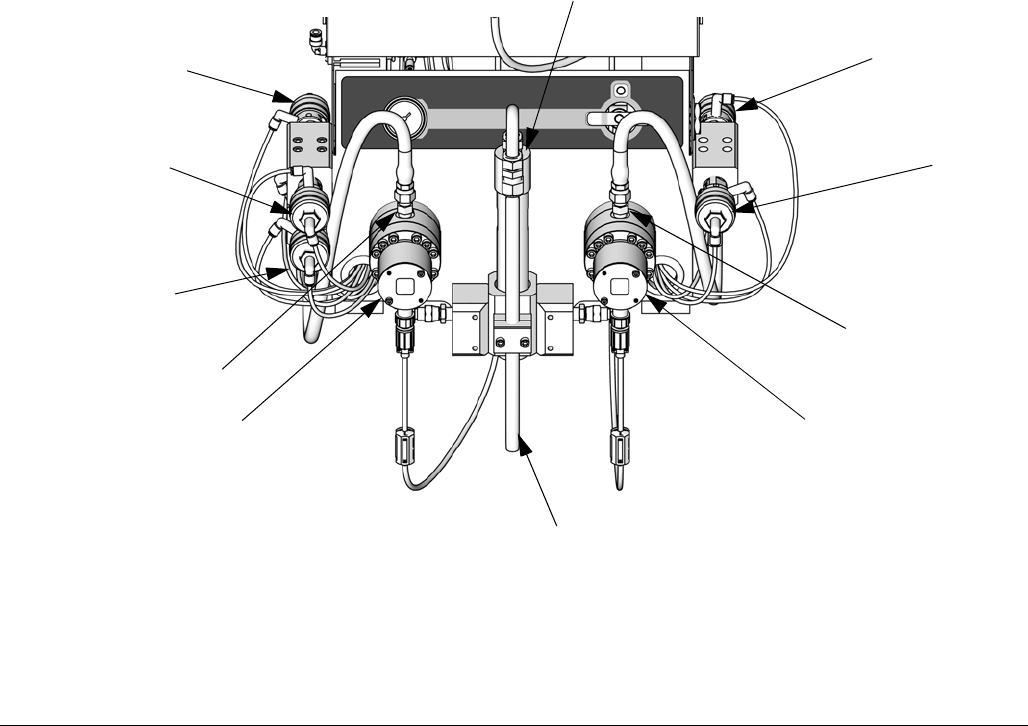
FIG. 6. Fluid Controls, Sequential Dosing
ti15699a
Key:
MA Component A Meter
DVA1 Component A Dose Valve
DVA2 Second Color/Catalyst Valve
DVA3 Third Color/Catalyst Valve
SVA Solvent Valve A
CVA Meter A Check Valve
MB Component B Meter
DVB Component B Dose Valve
SVB Solvent Valve B
CVB Meter B Check Valve
SM Static Mixer
FI Fluid Integrator Assembly
MA MB
DVB
DVA1
SM
FI
DVA2 and
DVA3 (behind)
SVA SVB
CVB
CVA
Installation
16 3A0869J
Set Up the Fluid Manifold for Dynamic
Dosing
NOTE: For more information about Dynamic Dosing,
see page 53.
NOTE: When using dynamic dosing it is very important
to maintain a constant, well-regulated fluid supply. To
obtain proper pressure control and minimize pump pul-
sation, install a fluid regulator on the A and B supply
lines upstream of the meters.
If you will be operating using dynamic dosing, the fluid
manifold must be set up properly for your application.
Order the 15U955 Injection Kit (accessory).
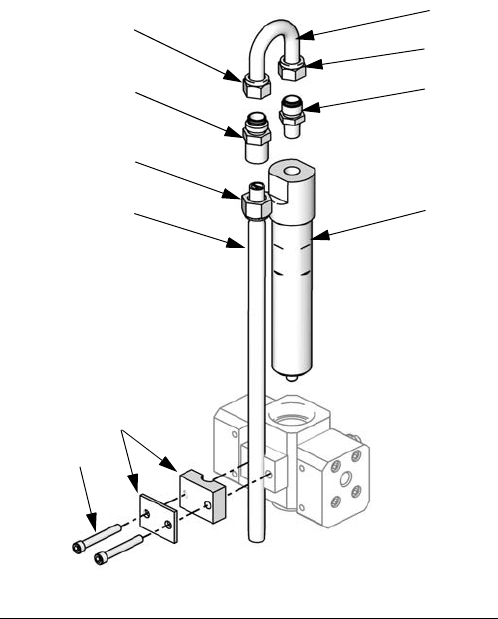
1. See FIG. 7. Remove the screws (A) and static mixer
bracket assembly (B).
2. Loosen the static mixer nut (N1). Remove and retain
the static mixer (SM).
3. Loosen the u-tube nuts (N2 and N3). Discard the
u-tube (C) and the static mixer fitting (D).
4. Remove and retain the 1/4 npt(m) fitting (F).
Remove the integrator (G) and discard
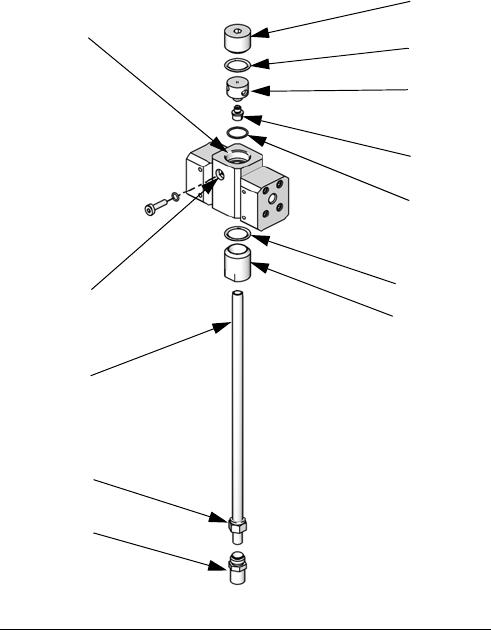
5. See FIG. 8. Remove the remaining parts from the
restrictor housing (H). Retain the plug (J) and base
(K). Discard all the used o-rings.
6. Rotate the restrictor housing (H) 180° so the set-
screw (S) is at top left, as shown in FIG. 8. Remove
and retain the two setscrews (S). The position of
these screws will be reversed when reassembled.
7. Install one larger o-ring (L1*) in the housing (H).
Screw the injection cap (M*) into the housing.
8. Determine the desired flow range for your applica-
tion. Select the appropriate size restrictor for your
selected flow and ratio, using the Dynamic Dosing
Restrictor Selection Graphs on pages 66-70, as a
guide. Install the restrictor (R*) in the base (K).
9. Assemble the smaller o-ring (L2*), restrictor (R*)
and base (K), one larger o-ring (L1*), and plug (J) as
shown.
10. Install the two setscrews. Install the long setscrew
(S) at the front of the housing, for ease of access.
.
FIG. 7. Disassemble Integrator and Static Mixer
N1
A
B
SM
C
D
ti16334a
F
G
N2 N3
Installation
3A0869J 17
11. Screw the static mixer (SM) into the injection cap
(M*). Install the retained fitting (F) on the static
mixer tube and secure with the nut (N1).
12. Follow instructions under Fluid Connections on
page 14.
NOTE: Use a minimum 20 ft (6.1 m) x 1/4 in. (6 mm) ID
gun fluid supply hose when using dynamic dosing. If the
material is harder to integrate, use a longer hose.
13. Tune the fluid pressure and flow.
FIG. 8. Install 15U955 Injection Kit
L1*
L2*
H
K
M*
SM
J
N1
ti16335a
L1*
F
S
R*
* These parts are included in the
15U955 Injection Kit.
Installation
18 3A0869J
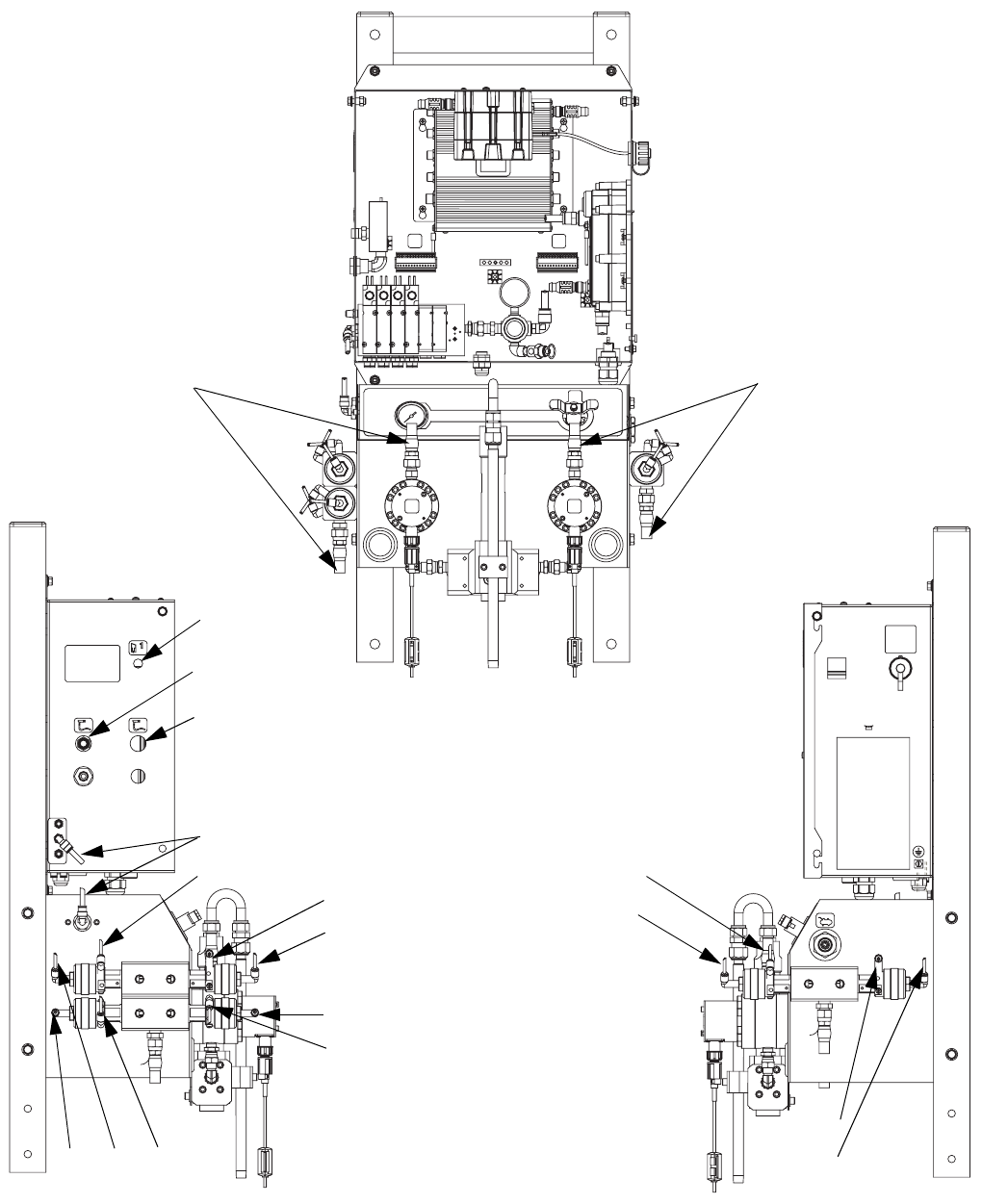
Tubing Chart and Diagrams
* Used only on IS models.
Type Color Description
Starting
Point
Ending
Point
Tube OD
in. (mm)
Air Green Solvent Valve A On 1G 1G 0.156 (4.0)
Air Green Dose Valve A1 On 2G 2G 0.156 (4.0)
Air Green Solvent Valve B On 3G 3G 0.156 (4.0)
Air Green Dose Valve B On 4G 4G 0.156 (4.0)
Air Green Dose Valve A2 On 5G 5G 0.156 (4.0)
Air Green Dose Valve A3 On 6G 6G 0.156 (4.0)
Air Red Solvent Valve A Off 1R 1R 0.156 (4.0)
Air Red Dose Valve A1 Off 2R 2R 0.156 (4.0)
Air Red Solvent Valve B Off 3R 3R 0.156 (4.0)
Air Red Dose Valve B Off 4R 4R 0.156 (4.0)
Air Red Dose Valve A2 Off 5R 5R 0.156 (4.0)
Air Red Dose Valve A3 Off 6R 6R 0.156 (4.0)
Air ----- Main Air to Pressure Gauge A1 A1 0.156 (4.0)
Air Natural Solenoid Air A2 A2 0.25 (6.3)
Air Natural Main Air to Filter A3 A3 0.25 (6.3)
Fluid ----- Valve Stack A to Meter A A4 A4 0.375 (9.5)
Fluid ----- Valve Stack B to Meter B A5 A5 0.375 (9.5)
Air Black Alternator Air Exhaust* A6 A6 0.5 (12.7)
Air Natural Air Regulator to Alternator* A7 A7 0.375 (9.5)
GFB1-A
GFB1-C
GFB1-S
GFB1-S
ATOM-1
1R 2R 3R 4R 5R 6R
1G
2G
3G 4G 5G 6G GFB1-C
A7*
A6*
* IS Models
ti16771a
ti13863a
ti13861a
ti16770a
A1
A3 ti16773a
GFB1-P
(Pressurized air line)
Installation
3A0869J 19
A Side
A Side
B Side
B Side
GFB1-A
ATOM-1
ATOM-2
A2
A5
6R 6G
1G
1R
A4 A5
2R
5R
2G
5G
4R
4G
3R
3G
ti16767a
ti16769a
ti16768a
See Manual 312784 for full
setup instructions for a gun
flush box.
Installation
20 3A0869J
Electrical
Power Connection (non-IS units only)
Enclose all cables routed in the spray booth and high
traffic areas in conduit to prevent damage from paint,
solvent, and traffic.
The ProMix 2KE operates with 85-250 VAC, 50/60 Hz
input power, with a maximum of 2 amp current draw.
The power supply circuit must be protected with a 15
amp maximum circuit breaker.
Not included with system:
• Power supply cord compatible to your local power
configuration. Wire gauge size must be 8-14 AWG.
• The input power access port is 22.4 mm (0.88 in.) in
diameter. It accepts a bulkhead strain relief fitting or
conduit.
1. Verify that electrical power at the main panel is shut
off. Open Control Box cover.
2. Connect electrical cord to the terminal block as
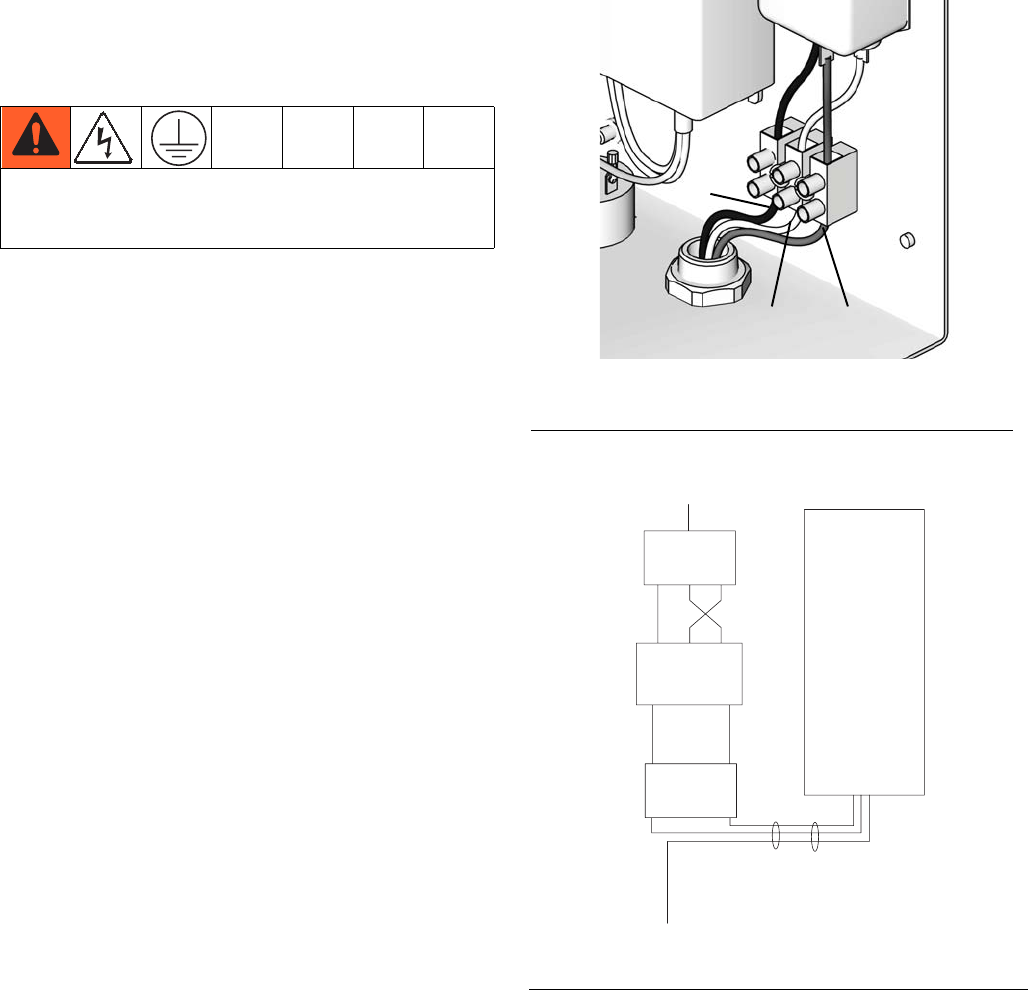
shown in FIG. 10.
3. Close the Control Box. Restore power.
4. Follow instructions in Grounding, page 21.
All electrical wiring must be completed by a qualified
electrician and comply with all local codes and
regulations.
FIG. 9. Control Box Electrical Connection
FIG. 10. Electrical Schematic
Ground
Neutral
Line
ti16391a
LINE POWER
FILTER
POWER
SUPPLY
TERMINAL
BLOCK
SWITCH
ROCKER
1A
1
2A
2
L N GRND
L GRND N
L N
Installation
3A0869J 21
Grounding
Connect the ProMix 2KE ground wire to the ground
screw. Connect the clamp to a true earth ground. If wall
power is used to power controls, ground electrical con-
nection according to local codes.
Gun Flush Box
Connect a ground wire from the Gun Flush Box ground
lug to a true earth ground.
Flow Meters
Verify that the meter cables are connected as shown in
the Hazardous Location Electrical Schematic on
page 74-75. Failure to properly connect the shield may
cause incorrect signals.
NOTE: The Coriolis meter can be used only on non-IS
systems 24F080-24F083. When installed on these sys-
tems, the meter’s hazardous location intrinsically safe
status is voided.
Feed Pumps or Pressure Pots
Connect a ground wire and clamp from a true earth
ground to the pumps or pots. See pump or pressure pot
manual.
Air and Fluid Hoses
Use grounded hoses only.
Spray Gun
•Non-Electrostatic: Ground the spray gun through
connection to a Graco-approved grounded fluid sup-
ply hose.
•Electrostatic: Ground the spray gun through con-
nection to a Graco-approved grounded air supply
hose. Connect the air hose ground wire to a true
earth ground.
Fluid Supply Container
Follow local code.
Object Being Sprayed
Follow local code.
All Solvent Pails Used When Purging
Follow local code. Use only conductive metal pails/con-
tainers placed on a grounded surface. Do not place the
pail/container on a nonconductive surface, such as
paper or cardboard, which interrupts the grounding con-
tinuity.
Check Resistance
The equipment must be grounded. Grounding
reduces the risk of static and electric shock by
providing an escape wire for the electrical current
due to static build up or in the event of a short circuit.
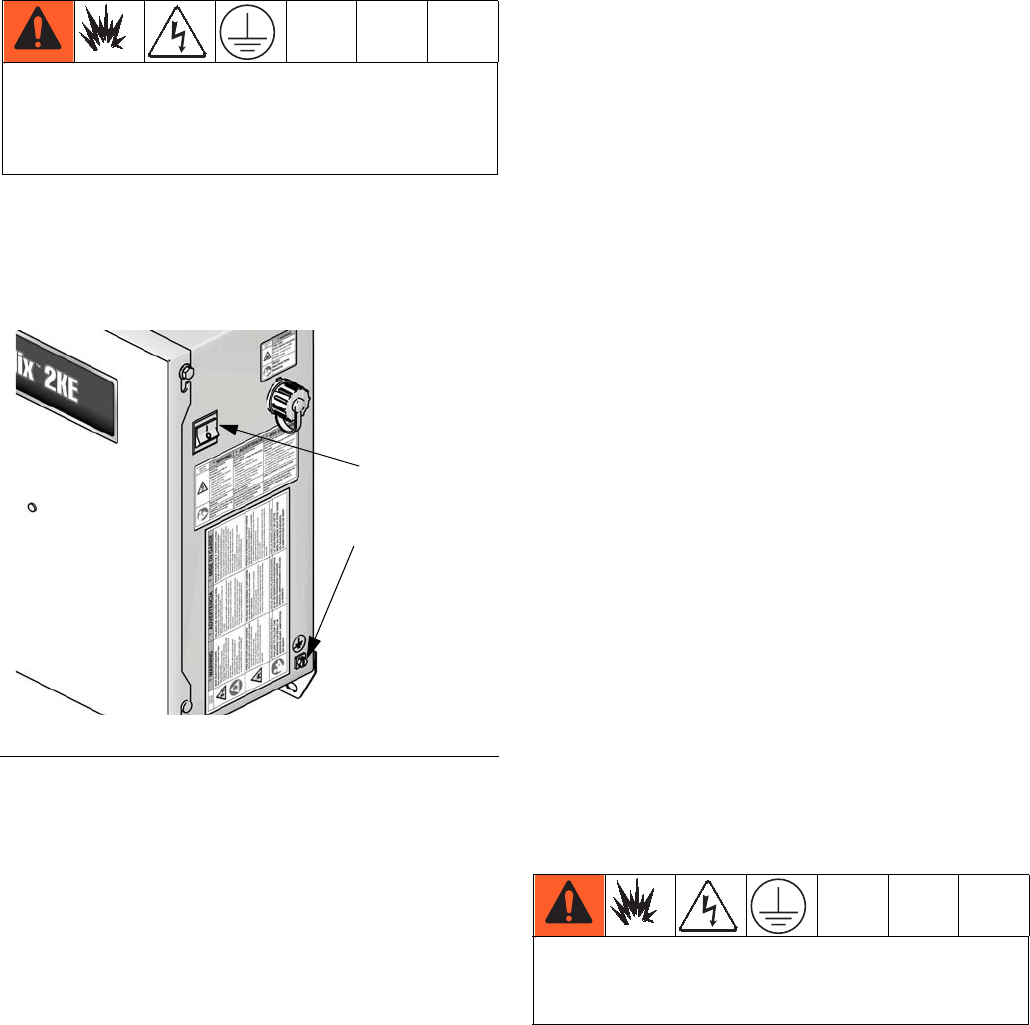
FIG. 11. Ground Screw and Power Switch
AC
Power
TI15712a
Ground
Screw
To ensure proper grounding, resistance between
components and true earth ground must be less than
1 ohm.
Installation
22 3A0869J
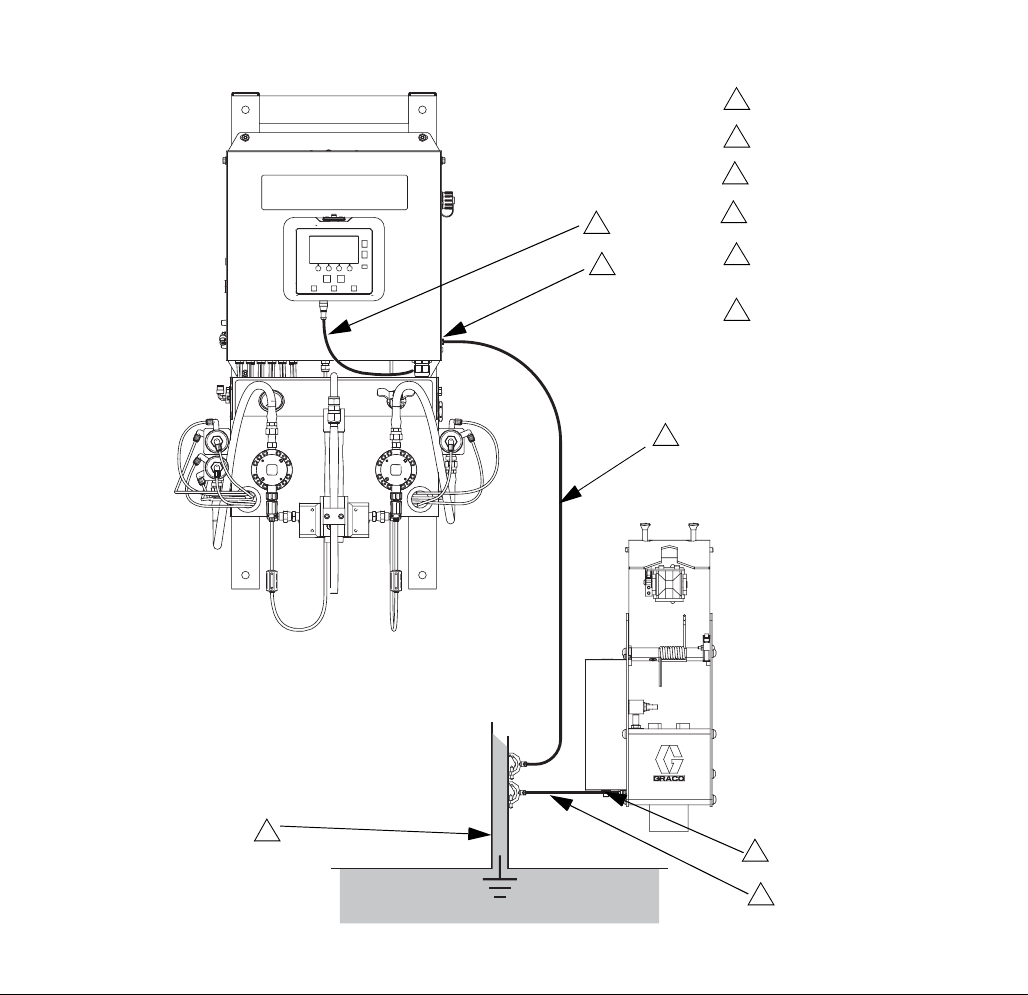
FIG. 12. Grounding
1
Key:
Control Box ground screw
1
Control Box ground wire
2
2
Power cable, Display
Module/Control Box
5
True Earth Ground - check your
local code for requirements.
6
5
Gun Flush Box ground screw
3
Gun Flush Box ground wire
4
3
4
6
ti16466a
Display Module
3A0869J 23
Display Module
Display
Shows graphical and text information related to setup
and spray operations. The screen backlight is factory
set to remain on. The user may set a number of minutes
the screen can be inactive before the backlight dims.
See Configure 3 (Screen 20), page 46. Press any key
to restore.
NOTE: The Display Module and bracket can be
removed from the cover of the electrical box and
mounted remotely, if preferred.
Keys are used to input numerical data, enter setup
screens, navigate within a screen, scroll through
screens, and select setup values.
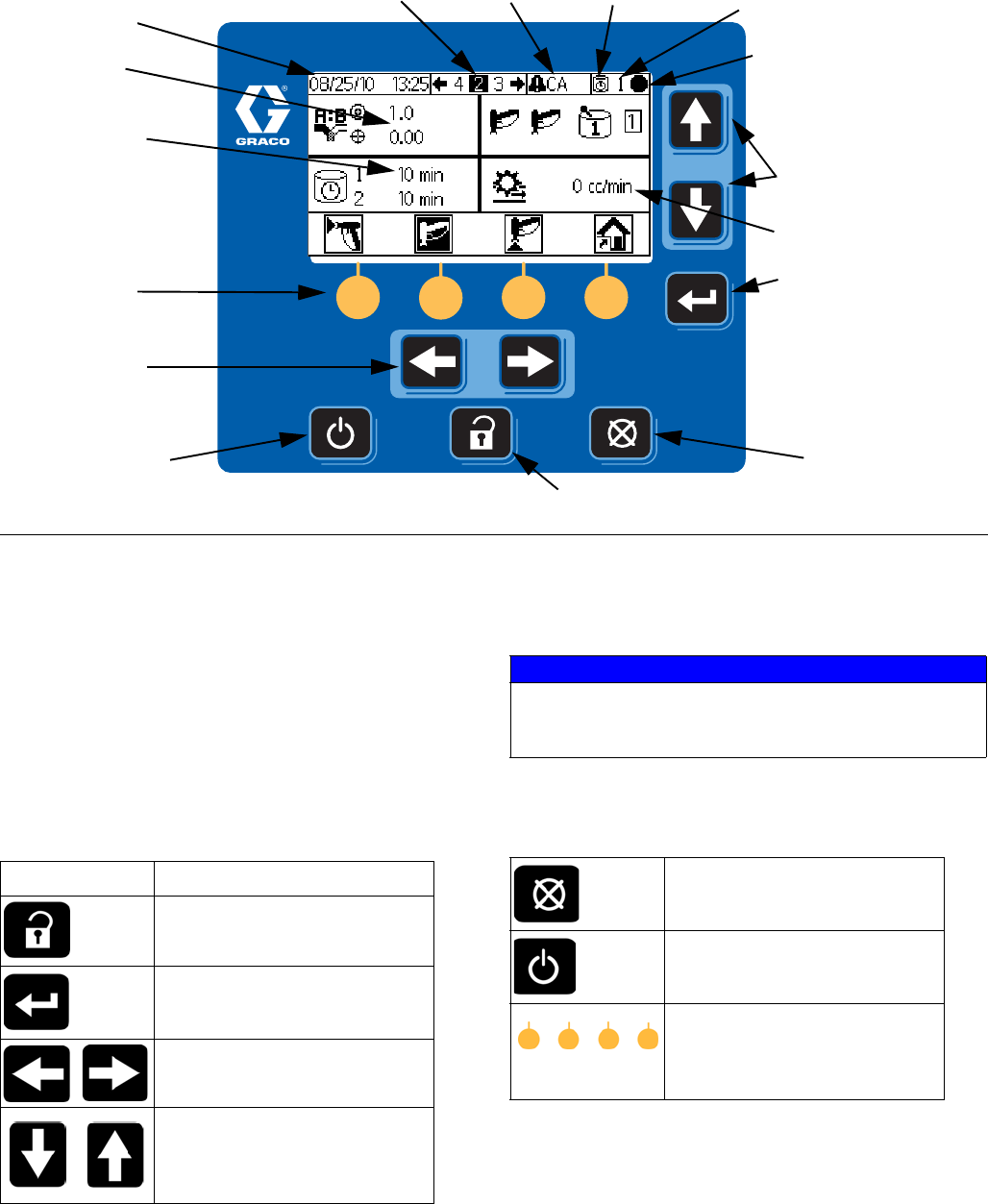
FIG. 13. Display Module
Soft keys
LCD Display
Navigation keys
Error Reset
Key
Navigation Keys
Enter key
Setup Key
Standby Key
Potlife state Active recipe
Operation mode; see
page 24 for key
ti16319a
Screen number Error code
Ratio
Potlife timers
Flow rate
NOTICE
To prevent damage to the soft key buttons, do not
press the buttons with sharp objects such as pens,
plastic cards, or fingernails.
Key Function
Setup: Press to enter or exit
Setup mode.
Enter: Press to choose a field to
update, to make a selection, or
to save a selection or value.
Left/Right Arrows: Use to move
from screen to screen.
Up/Down Arrows: Use to move
among fields on a screen, items
on a dropdown menu, or digits
in a settable field.
Error Reset: Use to clear alarm
so cause can be fixed. Also use
to cancel a data entry field.
Standby: Stops the current
operation and puts the system
into standby.
Soft keys: Press to select the
specific screen or operation
shown on the display directly
above each key.
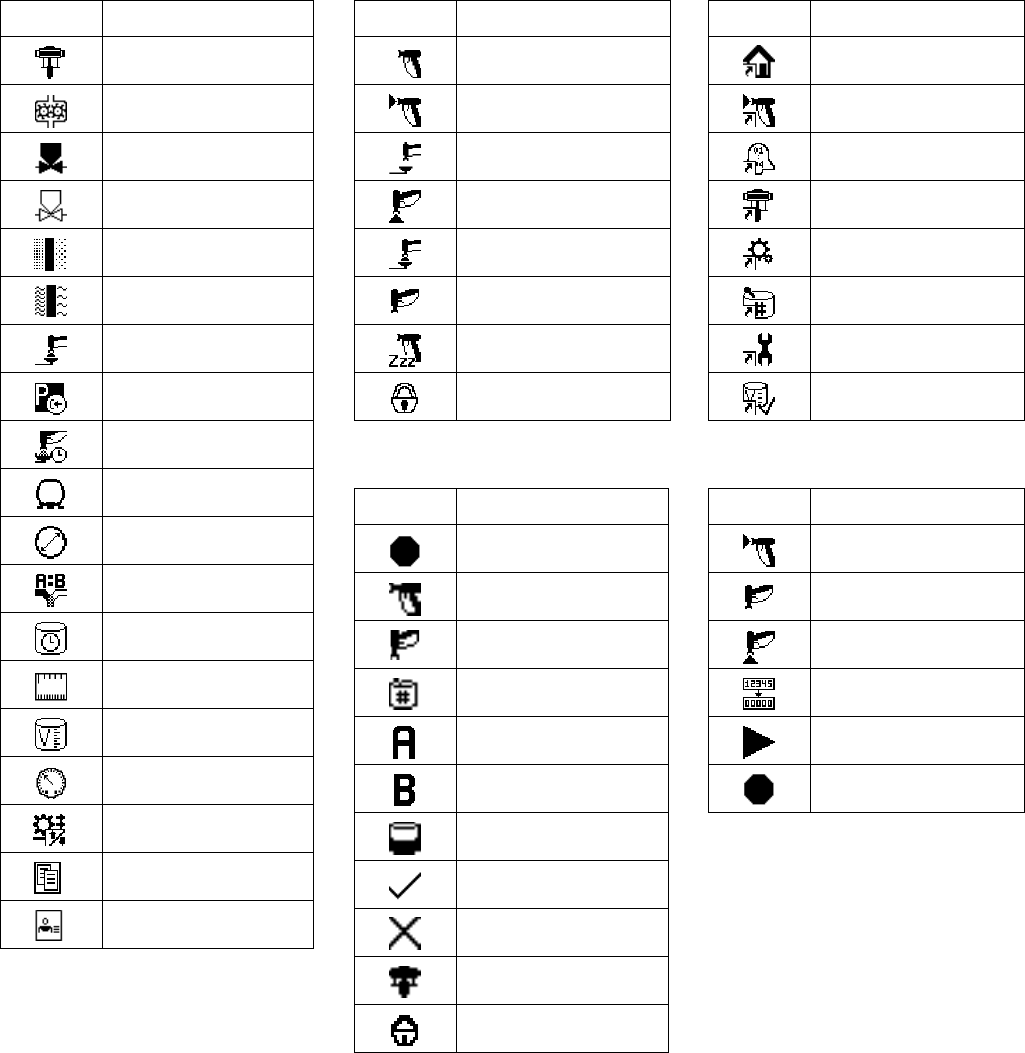
Display Module
24 3A0869J
Icon Key
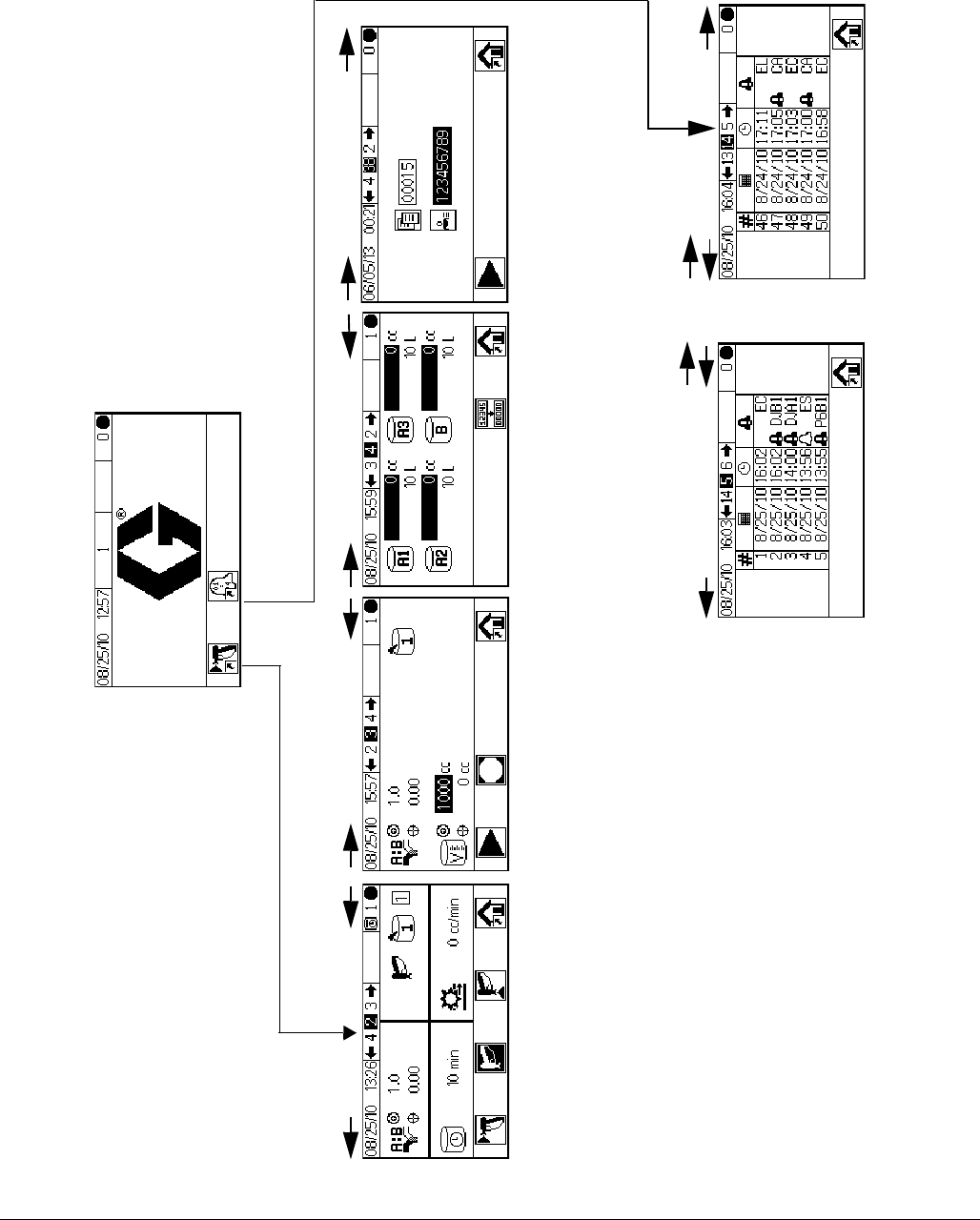
The following tables present a printable version of the information on the ProMix 2KE icon card. See Table 5, page
57, for a printable version of the error code information on the reverse side of the card.
General Icons
I
Spray Gun States
I
Operation Modes
I
Screen Shortcuts
I
Softkeys
I
Icon Description
Pump
Meter
Dose Valve
Solvent Valve
Air Filter
Fluid Filter
Gun Flush Box
Park Pumps
Flush Time
Hose Length
Hose Diameter
Ratio
Potlife
Length
Volume
Pressure
Flow Rate High/Low
Job Number
User Number
Icon Description
Mix
Mix Spray
In Flush Box
Purge
Purge in Flush Box
Standby
Idle
Locked
Icon Description
Standby
Mix
Purge
Color Change
Dispense A
Dispense B
Batch
Calibrate
Forced
Park
Locked
Icon Description
Home
Spray
Alarm Log
Run Pumps
System Configuration
Recipes
Maintenance
Calibrate
Icon Description
Mix/Spray
Standby
Purge
Reset Counter
Start
Stop/Standby
Display Module
3A0869J 25
Screen Summary
NOTE: This summary is a one-page guide to the ProMix 2KE screens, followed by screen maps. For operating
instructions, see Basic Operation, page 31. For further detail on individual screens, see Run Mode Details, page
42, or Setup Mode Details, page 45.
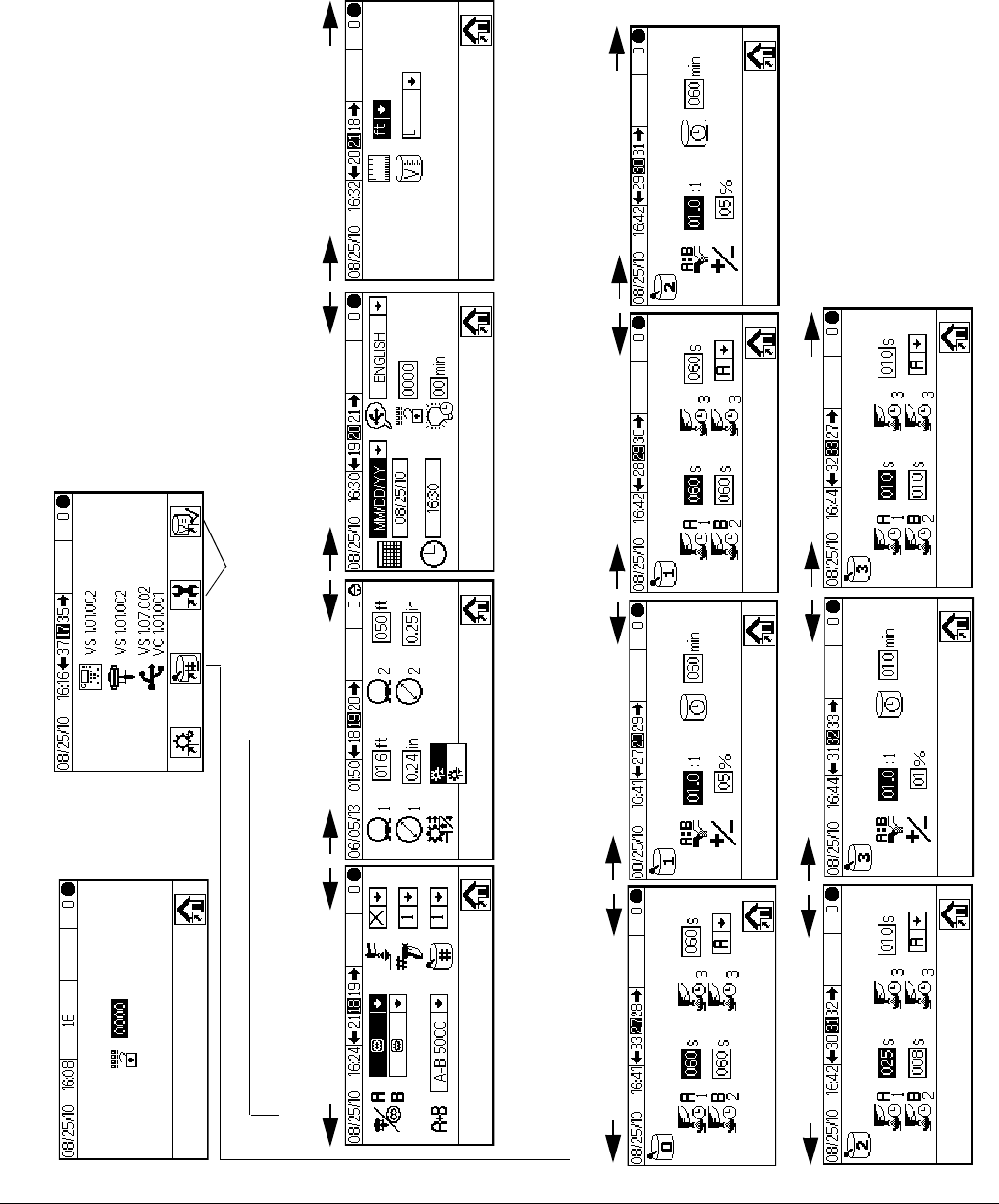
Run Mode
The run mode has two screen sections that control the
mixing operations.
Mix (Screens 2-4, 38)
• Spray (Screen 2) controls most mixing opera-
tions.
• Batch (Screen 3) controls dispense of a set vol-
ume.
• Totals (Screen 4) displays grand and batch
totals for materials A1 (A2, A3) and B.
• Job Number (Screen 38) displays job number
and user number
Error Log (Screens 5-14)
• 10 screens, 5 errors per page
• Displays date, time, and error
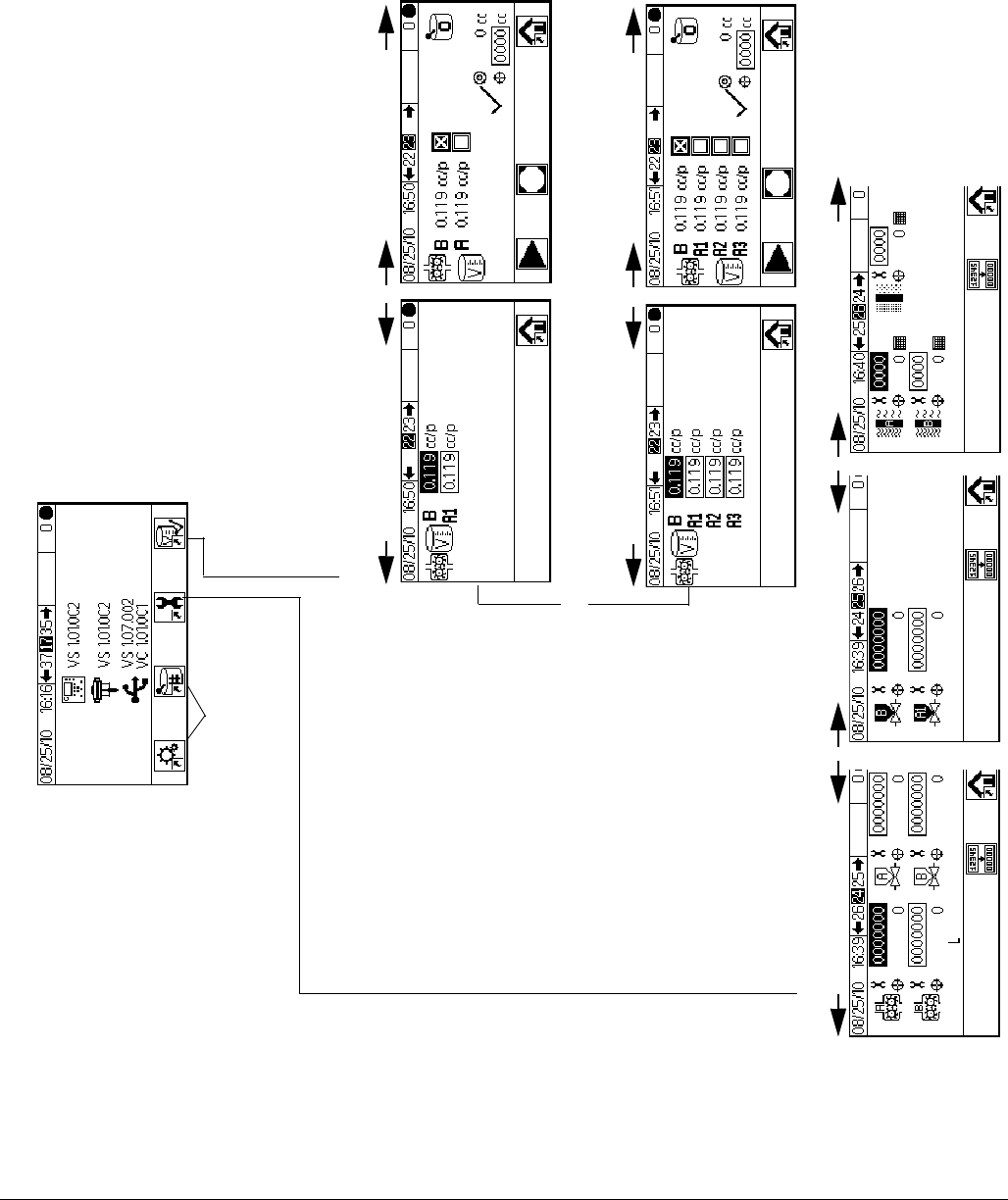
Setup Mode
The setup mode has four screen sections that allow an
authorized user to choose the exact settings needed for
the system:
Configure (Screens 18-21)
• Configure 1 (Screen 18) controls system type
(pump or meter), dosing type (sequential or
dynamic dosing), gun flush box enable, number
of guns (1 or 2), and system color configuration
(1 or 3).
• Configure 2 (Screen 19) controls hose length
and diameter for one or two guns and flow rate
region for dynamic dosing.
• Configure 3 (Screen 20) controls language (for
optional USB Module), date format, date, time,
password setting, and backlight timer.
• Configure 4 (Screen 21) controls units for dis-
tance and volume.
Recipe (Screens 27-33)
• Recipe 0 (Screen 27) includes timers for the
system first, second, and third flush and a third
flush material selection.
• Recipe 1-1 (Screen 28) and 1-2 (Screen 29)
control Material 1/Color 1 parameters and flush.
• Recipe 2-1 (Screen 30) and 2-2 (Screen 31)
control Material 2/Color 2 parameters and flush.
• Recipe 3-1 (Screen 32) and 3-2 (Screen 33)
control Material 3/Color 3 parameters and flush.
Maintenance (Screens 24-26)
• Maintenance 1 (Screen 24) controls mainte-
nance timer actual and target for Meter A, Meter
B, Solvent Valve A, and Solvent Valve B.
• Maintenance 2 (Screen 25) controls dose
valves A1 and B maintenance timer actual and
target. Dose valves A2 and A3 are included if 3
colors are selected on Configure 1 (Screen 18).
• Maintenance 3 (Screen 26) controls fluid and air
filter maintenance timers, actual and target.
Calibration (Screens 22 and 23)
1-Color
• Calibration 1 (Screen 22) controls k factors
(cc/pulse) for Meter A and Meter B.
• Calibration 2 (Screen 23) allows the user to per-
form a calibration.
3-Color
• Calibration 1 (Screen 22) controls k factors
(cc/pulse) for Meter B and for Meter A using col-
ors A1, A2, and A3.
• Calibration 2 (Screen 23) allows the user to per-
form a calibration.
Troubleshooting Mode
The troubleshooting mode has three screen sections
that allow an authorized user to troubleshoot system
operation. See FIG. 17, page 30.
System Inputs (Screen 35)
Membrane Test (Screen 36)
System Outputs and Manual Activation (Screen 37)

Display Module
26 3A0869J
Ranges for User Inputs
This table is a one-sheet reference of the data range accepted for each user input. See the page indicated in the
table for further screen information, if needed.
Page Screen User Input Range/Options Default
42 Run Mix Batch (3) Target Volume 1 to 9999 cc 0 cc
43 Run Job Number User Number 000000000 to 999999999 000000000
45 Password (16) Password 0000 to 9999 0000 (disabled)
46 Configure 1 (18) System Type Meters; 50cc Pump; 75cc Pump; 100cc
Pump; 125cc Pump; 150cc Pump
Meters
46 Configure 1 (18) Dosing Type Dynamic (A B)
50cc Sequential (A-B 50cc)
100cc Sequential (A-B 100cc)
50 cc Sequential
46 Configure 1 (18) Gun Flush Box Enable On or Off Off
46 Configure 1 (18) Number of Guns 1 or 2 guns 1 gun
46 Configure 1 (18) Number of Colors 1 or 3 colors 1 color
46 Configure 2 (19) Gun 1 or Gun 2 hose length 0.1 to 45.7 m / 0.3 to 150 ft 1.53 m / 5.01 ft.
46 Configure 2 (19) Gun 1 or Gun 2 hose diameter 0.1 to 1 inch 0.25 inches
46 Configure 2 (19) Flow Rate Region High (250 cc/min or higher) or
Low (<250 cc/min)
High
46 Configure 3 (20) USB Log Language Chinese; Dutch; English; French; German;
Italian; Japanese; Korean; Portuguese;
Russian; Spanish; Swedish;
English
46 Configure 3 (20) Date Format mm/dd/yy; dd/mm/yy; yy/mm/dd mm/dd/yy
46 Configure 3 (20) Date 01/01/00 to 12/31/99 Set at factory
46 Configure 3 (20) Time 00:00 to 23:59 Set at factory
46 Configure 3 (20) Password 0000 to 9999 0000 (disabled)
46 Configure 3 (20) Backlight Timer 0 to 99 minutes 0 minutes
46 Configure 4 (21) Distance Units Feet/inches or Meters/cm Feet/inches
46 Configure 4 (21) Volume Units Liters; Gallons US; Gallons Imperial Gallons US
47 Recipe 1-1 (28)
Recipe 2-1 (30)
Recipe 3-1 (32)
Ratio 0:1 to 30:1
Note: Enter 0 to dispense A only.
1:1
47 Recipe 1-1 (28)
Recipe 2-1 (30)
Recipe 3-1 (32)
Ratio Tolerance 1 to 99 percent 5 percent
47 Recipe 1-1 (28)
Recipe 2-1 (30)
Recipe 3-1 (32)
Potlife Timer 0 to 240 minutes
Note: If set to 0, potlife alarm is disabled.
60 minutes
47 Recipe 0 (27)
Recipe 1-2 (29)
Recipe 2-2 (31)
Recipe 3-2 (33)
Flush Times - First (A purge),
Second (B purge), or Third
(using A or B, selected by user)
0 to 240 seconds
Note: If set to 0, the valve(s) will not flush.
60 seconds
48 Maintenance 1 (24) Meter A or Meter B 0 to 2,000,000 L / 0 to 528,344 gal 0
48 Maintenance 1 (24) Solvent Valve A or B 0 to 9,999,999 0
48 Maintenance 2 (25) Dose Valve A1, A2, A3, or B 0 to 9,999,999 0
48 Maintenance 3 (26) Fluid Filter A or B, or Air Filter 0 to 9999 days 0 days
49 Calibration 1 (22) Meter A1, A2, A3, or B K-Factor 0 to 0.873 cc/pulse 0.119 cc/pulse
49 Calibration 2 (23) Actual Dispensed Volume 0 to 9999 cc 0 cc
Display Module
3A0869J 27
FIG. 14. Run Mode Screen Map
Mix
Totals
Errors
Spray Batch
Run Home
.
.
.
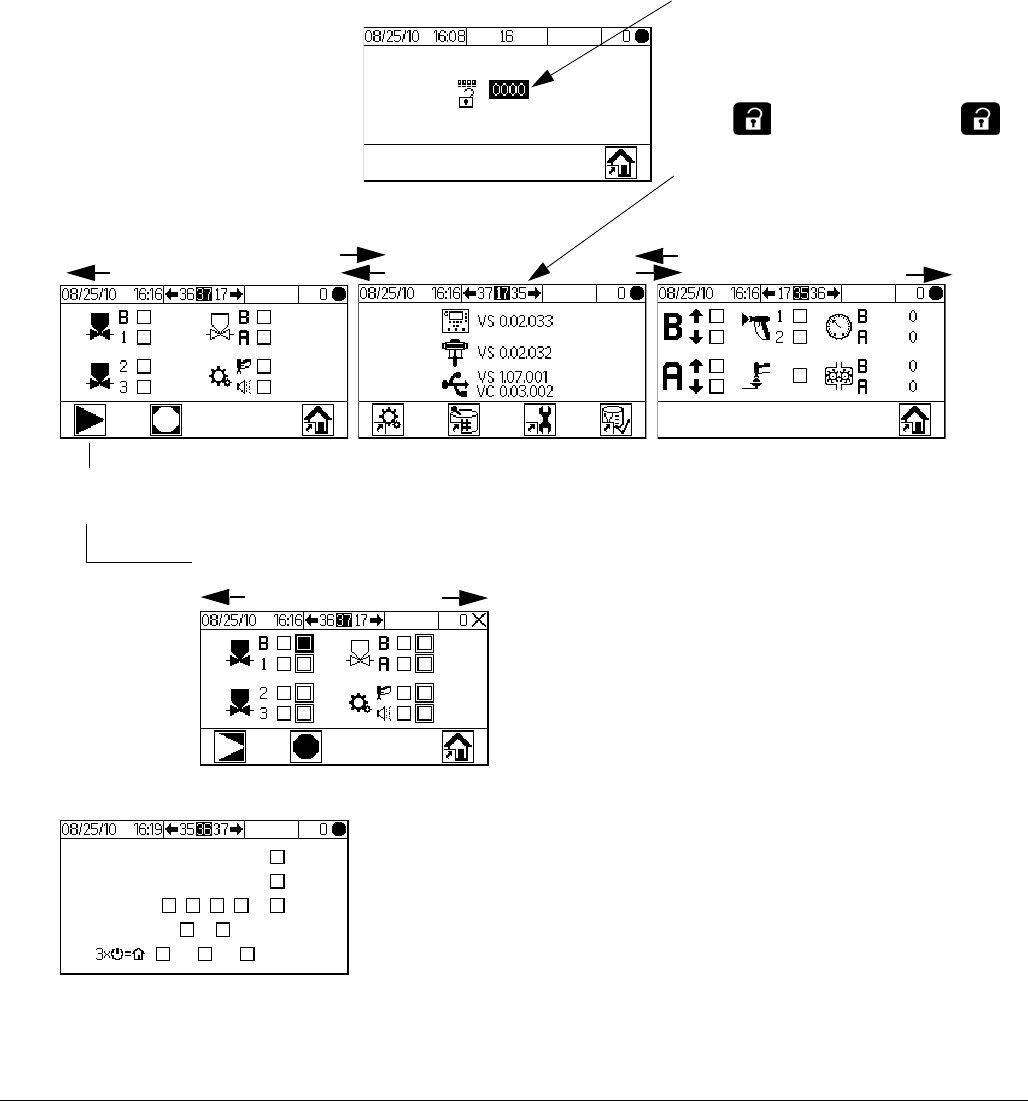
Display Module
30 3A0869J
FIG. 17. Troubleshooting Screen Map
Set Password to 9909 (See Configure
3, Screen 20), then enter it here.
Password
Set-Up Home
Membrane Test
System Inputs
To
Mem-
brane
Test
System Outputs 1
System Outputs 2
To Setup Home
To
Mem-
brane
Test
To Membrane Test
Press to exit Setup. Press to
reenter Setup. Setup Home (Screen 17)
displays, with Troubleshooting options.
Push to enter forced
mode, (System Outputs 2)
Basic Operation
3A0869J 31
Basic Operation
Pre-Operation Tasks
Go through the Pre-Operation Checklist in Table 2.
Power On
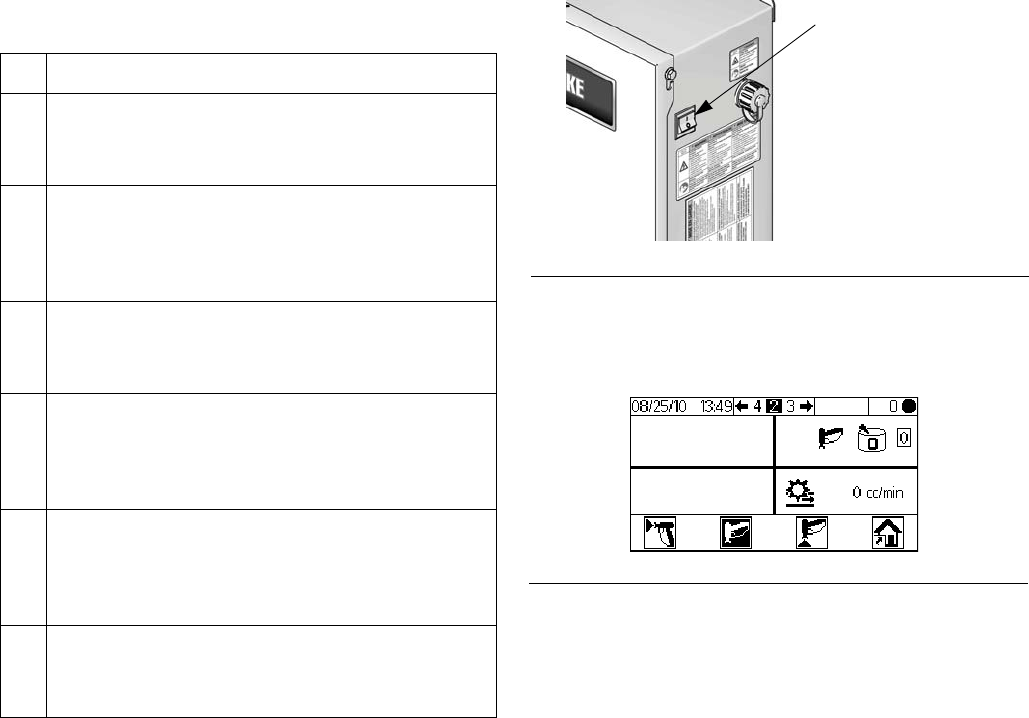
1. IS Systems (Alternator Power Supply): Set pump
air regulators to minimum setting. Open main air
valve to start air-powered alternator. Main air pres-
sure is displayed on gauge. Display Module screen
will display after five seconds.
Non-IS Systems (Wall Power Supplied): Turn the
AC Power Switch ON (I = ON, 0 = OFF).
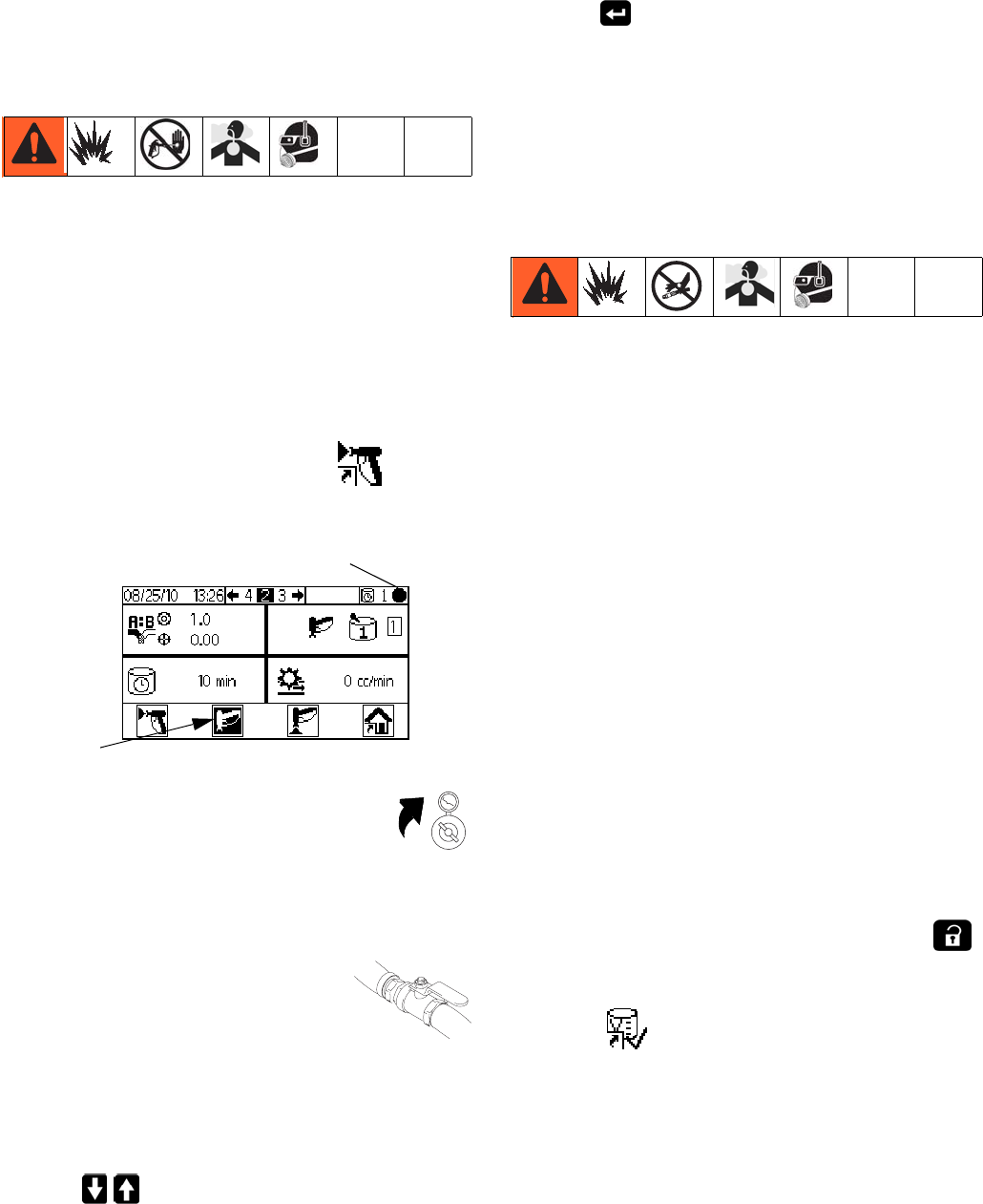
2. Graco logo will display after five seconds, followed
by Run Mix Spray (Screen 2).
Initial System Setup
1. Change optional setup selections to desired param-
eters, as described in Configure 1-4 (Screens
18-21), page 46.
2. Set recipe and flush information as described in
Recipe 0 (Screen 27), Recipe 1-1 (Screen 28),
and Recipe 1-2 (Screen 29), page 47.
3. Set maintenance timers for meters, solvent valves,
dose valves, fluid filters and air filters, as described
in Maintenance 1-3 (Screens 24-26), page 48.
Table 2: Pre-Operation Checklist
Checklist
System grounded
Verify all grounding connections were made. See
Grounding, page 21.
All connections tight and correct
Verify all electrical, fluid, air, and system connec-
tions are tight and installed according to the man-
ual instructions.
Fluid supply containers filled
Check all supply containers - A1 (A2 and A3, if
present), B, and solvent.
Dose valves set
Check that the dose valves are set correctly. Start
with the settings recommended in Valve Set-
tings, page 38, then adjust as needed.
Fluid supply valves open and pressure set
Component A and B fluid supply pressures should
be equal unless one component is more viscous
and requires a higher pressure setting.
Solenoid pressure set
75-100 psi inlet air supply (0.5-0.7 MPa, 5.2-7
bar)
FIG. 18. Power Switch
FIG. 19. Run Mix Spray (Screen 2)
I = ON
ti16336a
Basic Operation
32 3A0869J
Prime the System
NOTE: See Run Mode Details, pages 42-43, for further
screen information, if needed.
1. Adjust the main air pressure. Most applications
require about 80 psi (552 kPa, 5.5 bar) air pressure
to operate properly. Do not use less than 75 psi
(517 kPa, 5.2 bar).
2. If this is the first time starting up the system, or if
lines may contain air, purge as instructed in Purg-
ing, page 34. The equipment was tested with light-
weight oil, which should be flushed out to avoid
contaminating your material.
3. From Run Home (Screen 1), press . Make
sure that the system is in Standby mode.
4. Adjust component A and B fluid supplies
as needed for your application. Use low-
est pressure possible.
NOTE: Do not exceed the maximum rated
working pressure shown on the system identification
label or the lowest rated component in the system.
5. Open the fluid supply valves to the
system.
6. If using an electrostatic gun, shut
off the electrostatics before spray-
ing.
7. If using a gun flush box, place the gun in the box
and close the lid.
8. Use to change to desired color recipe.
9. Press . The system will purge, then load mixed
material to the gun. If the gun flush box is not used,
trigger the gun into a grounded metal pail until the
system returns to Standby.
Meter Calibration
NOTE: See Calibration 1 and 2 (Screens 22 and 23),
page 49, for further screen information, if needed.
Calibrate the meter:
• The first time the system is operated.
• Whenever new materials are used in the system,
especially if the materials have viscosities that differ
significantly.
• As part of regular maintenance to retain meter accu-
racy.
• Whenever a flow meter is serviced or replaced.
NOTE:
• Meter factors on Calibration 1 (Screen 22) are
updated automatically after the calibration pro-
cedure is completed. You also may manually
edit them if desired.
• All values on this screen are in cc or cc/pulse,
regardless of the units set in Configure 4
(Screen 21).
1. Before calibrating Meter A or Meter B, prime the
system with material. See Prime the System, page
32.
2. If the display is on a Run Mode screen, press
to access setup screens.
3. Press to display Calibration 1 (Screen 22).
K-factors are shown for B and A1 (A2, A3 if pres-
ent).
Standby
Standby
Basic Operation
3A0869J 33
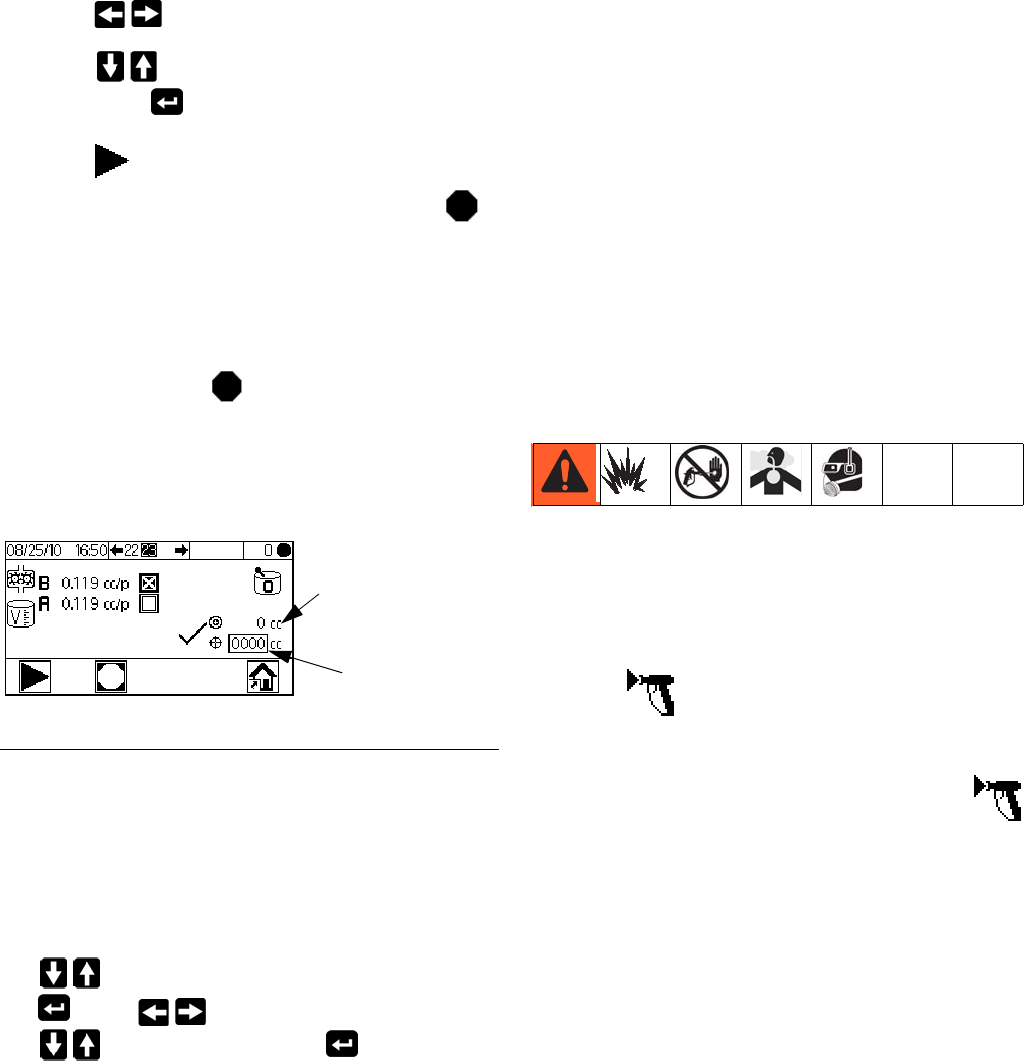
4. Press to move to Calibration 2 (Screen 23).
5. Press to highlight the meter you wish to cali-
brate. Press . An X displays in the box.
6. Press to start the calibration on the checked
meter (A with fluid A1, A2, or A3, or B). Press
to cancel the calibration.
7. Trigger gun into a graduated cylinder. Dispense a
minimum of 200-300cc of material.
NOTE: Stop triggering the gun when desired amount is
reached. Do not press , as it will cancel the calibra-
tion.
8. The volume that the ProMix 2KE measured displays
on the Display Module.
9. Compare the amount on the Display Module to the
amount in the graduated cylinder.
NOTE: For maximum accuracy, use a gravimetric
(mass) method to determine the actual volumes dis-
pensed.
• If the screen and actual volumes are different, press
to highlight the dispense volume field. Press
. Press to move between digits. Press
to change a digit. Press when field is
correct.
NOTE: If the value is substantially different, repeat the
calibration process until the dispensed volume and mea-
sured volume match.
10. After the volume for A1 (A2, A3) or B is entered, the
ProMix 2KE controller calculates the new k-factor
and shows it on Calibration 1 (Screen 22) and Cali-
bration 2 (Screen 23).
11. Before you begin production, clear the system of
solvent and prime it with material.
a. Go to Mix mode.
b. Trigger the gun into a grounded metal pail until
mixed material flows from the gun nozzle.
Spraying
NOTE: See Run Mode Details, pages 42-43, for further
screen information, if needed.
1. Calibrate the meters as described in Meter Calibra-
tion, page 32. Meter k-factors will update automati-
cally based on calibration results. Make additional
manual changes, if desired, as described in Cali-
bration 1 and 2 (Screens 22 and 23), page 49.
2. Press . The system will load the correct potlife
volume based on hose length and diameter entered
on Configure 2 (Screen 19). Once material is
loaded, the system returns to Standby. Press
again to spray the active recipe.
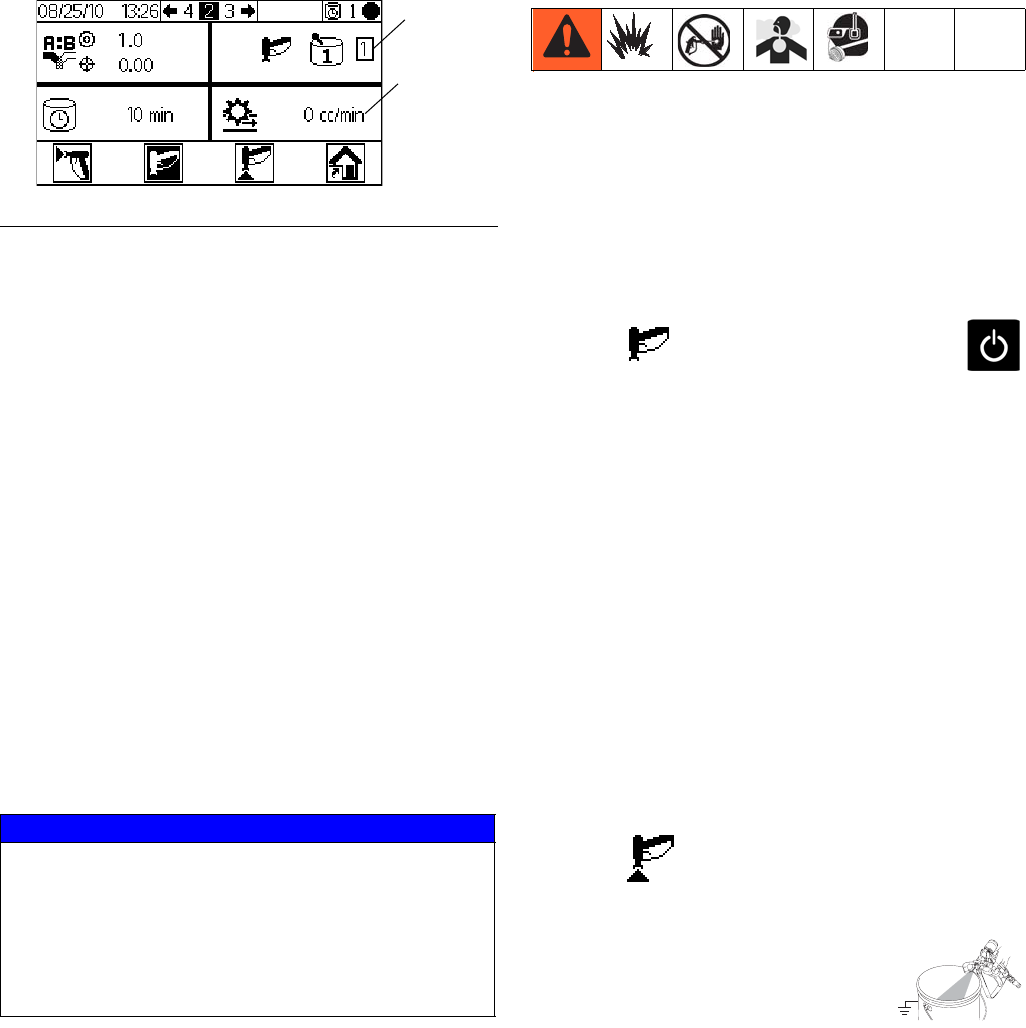
FIG. 20. Dispensed Volume Comparison
Volume measured
by system displays
here.
Enter dispensed
volume here.
Basic Operation
34 3A0869J
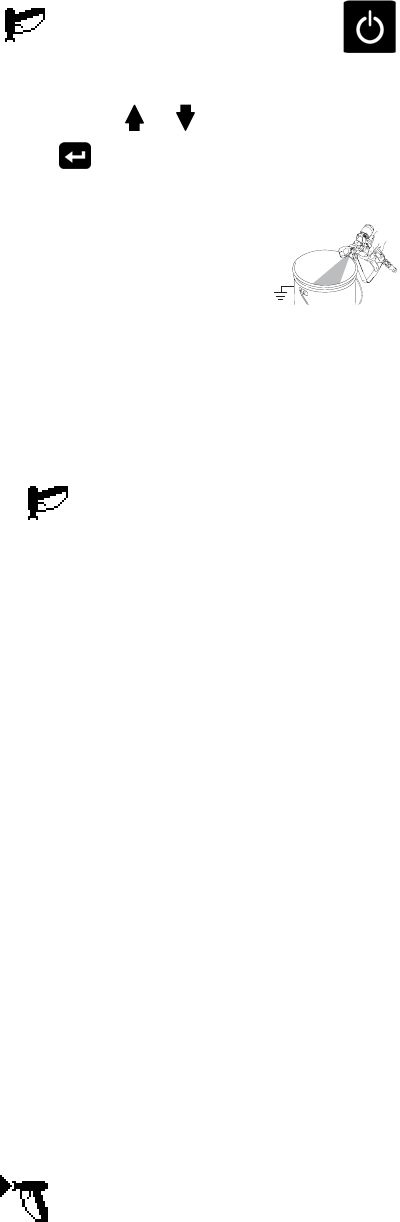
3. Adjust the flow rate. The fluid flow rate shown on the
Display Module screen is for either component A or
B, depending on which dose valve is open.
.
If the fluid flow rate is too low: increase air pres-
sure to component A and B fluid supplies or
increase the regulated fluid pressure of mixed
material.
If the fluid flow rate is too high: reduce the air
pressure to component A and B fluid supplies,
close the dose valves further, or decrease the reg-
ulated fluid pressure of mixed material.
4. Turn on atomizing air to the gun. Check the spray
pattern as instructed in your spray gun manual.
NOTE:
• Pressure adjustments of each component will vary
with fluid viscosity. Start with the same fluid pres-
sure for component A and B, then adjust as needed.
• Do not use the first 4-5 oz. (120-150 cc) of material
as it may not be thoroughly mixed due to errors
while priming the system.
Purging
NOTE: See Run Mode Details, pages 42-43, for further
screen information, if needed.
Purge the system:
• at the end of potlife
• breaks in spraying that exceed the potlife
• overnight shutdown or end of shift
• the first time material is loaded into equipment
• servicing
• shutting down equipment for an extended period of
time
1. Press on Run Mix Spray (Screen 2) or
from any screen to put the system in Standby.
2. Trigger the gun to relieve pressure.
3. If you are using a high pressure gun, engage the
trigger lock. Remove spray tip and clean tip sepa-
rately.
4. If using an electrostatic gun shut off the electrostat-
ics before flushing the gun.
5. Set the solvent supply pressure regulator at a pres-
sure high enough to completely purge the system in
a reasonable amount of time but low enough to
avoid splashing or an injection injury. Generally, a
setting of 100 psi (0.7 MPa, 7 bar) is sufficient.
6. If using a gun flush box, place the gun into the box
and close the lid.
7. Press on Run Mix Spray (Screen 2). The
purge sequence automatically starts.
If the gun flush box is not used, trig-
ger the gun into a grounded metal
pail until the purge sequence is com-
plete.
When done purging, the system automatically
switches to Standby mode.
FIG. 21. Flow Rate Display
NOTICE
Do not allow a fluid supply tank to run empty. It is pos-
sible for air flow in the supply line to turn gear meters
in the same manner as fluid. This can damage the
meters and lead to the proportioning of fluid and air
that meets the ratio and tolerance settings of the
equipment. This can further result in spraying
uncatalyzed or poorly catalyzed material.
Flow
rate
Active
recipe
Basic Operation
3A0869J 35
8. If the system is not completely clean, repeat step 6.
NOTE: If necessary, adjust purge sequence times
so only one cycle is required.
9. Trigger the gun to relieve pressure. Engage trigger
lock.
10. If spray tip was removed, reinstall it.
11. Adjust the solvent supply regulator back to its nor-
mal operating pressure.
NOTE: The system remains full of solvent.
NOTE: If your system uses 2 guns, you must trigger
both guns simultaneously during a purge to purge both
guns and lines. Verify that clean solvent flows from each
gun. If not, repeat purge or clear clog/blockage in sys-
tem.
Color Change
Color Change Sequence
Step 1. Color Purge. The system flushes out the color
with solvent. The selected color change solvent valve
opens during Purge Time and closes when the time
expires.
Step 2. Catalyst Purge. The system flushes out the
catalyst with solvent. The catalyst change solvent valve
opens during Purge Time and closes when the time
expires.
Step 3. Final Purge. The system fills the line with the
selected purge media (usually solvent). The selected
purge valve opens during the Final Purge Time and
closes when the time expires.
Step 4. Catalyst Fill. The system fills the line with new
catalyst. The new catalyst valve opens during the Fill
Time and closes when the fill volume is reached.
Step 5. Color Fill. The system fills the line with new
color. The new color valve opens during the Fill Time
and closes when the fill volume is reached.
Step 6. Mixed Material Fill. The system fills the line
with mixed material. The system begins mixing compo-
nents A and B until the fill volume expires.
Color Change Procedures
1. Place the gun in the gun flush box if used, and close
the lid.
2. Press on Run Mix Spray (Screen 2) or
from any screen to put the system in Standby.
3. Use the scroll keys, or , to select the new
color. Press to begin the color change
sequence.
4. If a gun flush box is not used, trigger
the gun into a grounded metal pail
until the color change sequence is
complete. If your system has two
guns, trigger both guns at the same
time.
NOTE: The color change timer does not start until
the gun is triggered and fluid flow is detected. If no
flow is detected within 2 minutes, the color change
operation aborts. The Display Module enters
Standby mode at the previous color.
Error SG occurs if the gun flush box is open.
Error SAD1 or SAD2 occurs if the AFS is on.
5. Trigger the gun (or guns) while the system flushes
the current color, purges with solvent, and loads the
new color.
NOTE: If your system uses 2 guns, you must trigger
both guns simultaneously during the entire color purge,
solvent purge, and load color sequence.
NOTE: If you do not see clear solvent flow, the system
did not flush successfully. Stop the color change. Look
for a clog in the line or increase the flush time.
6. During color change, the Recipe icon blinks on and
off, and you’ll see the number of the current color
and the new color. When the color change is com-
plete, Standby is highlighted.
7. When you are ready to spray, remove the gun from
the gun flush box if used, and close its door.
NOTE: The gun flush box door must be closed for
the atomizing air valve to open.
8. Press to start spraying.
Basic Operation
36 3A0869J
Purge/Color Change Detail
Purge/Flush
The Purge Sequence flushes the lines from the A & B
color stacks though the mix manifold and out to the
gun(s).
"A" has a pre-assigned (not selectable) valve. "B" has a
pre-assigned (not selectable) valve.
If you choose a third flush option, it can be "A" or "B"
(not "A" and "B"). You do not have an option to select
something other than "A" or "B" valve. For example, if
"A" was water and "B" was solvent. The third flush
options would have to be "A" water or "B" solvent. You
couldn't assign a third option like air.
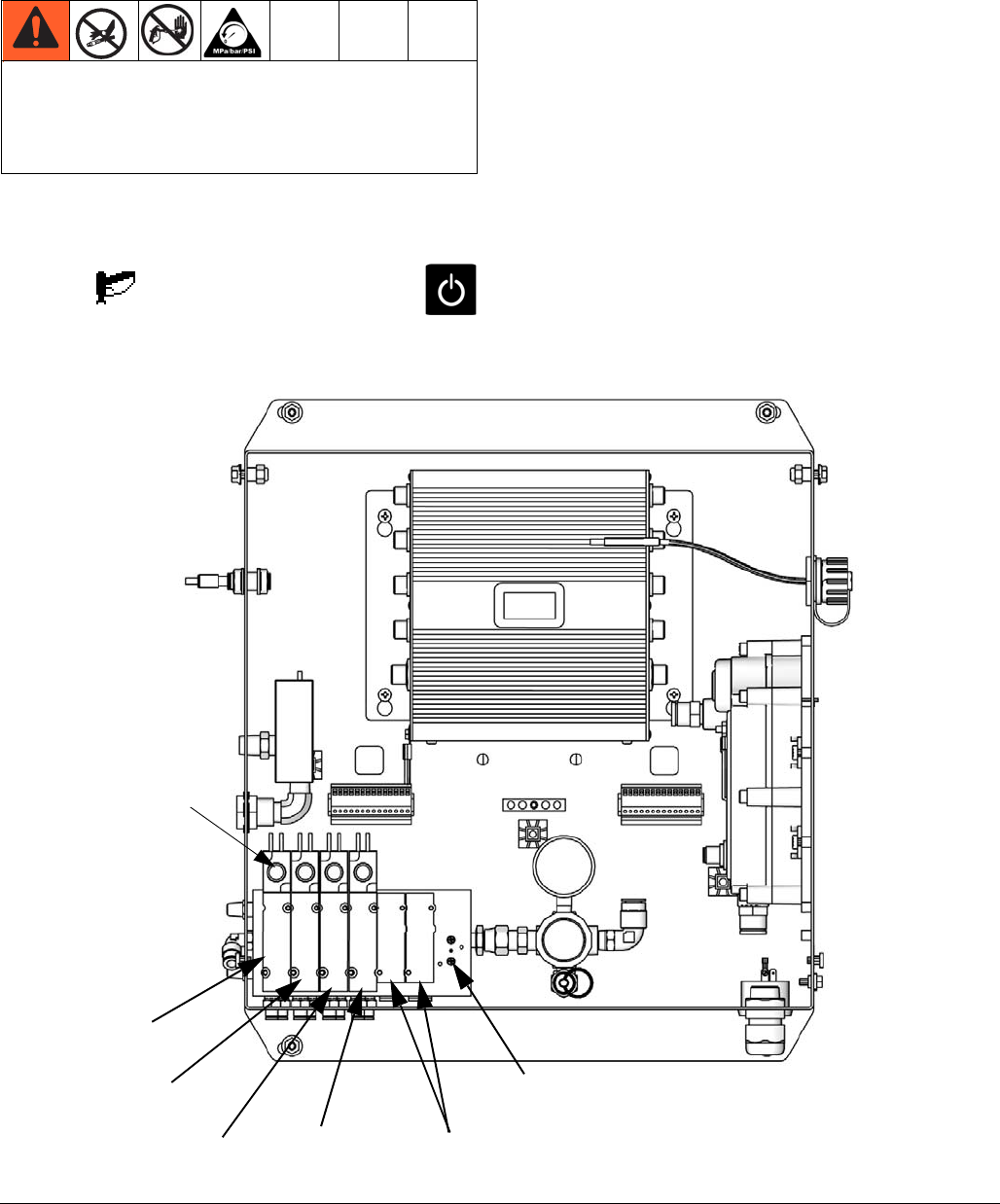
The following should be the only selectable flush
sequence options:
There are 4 basic purge sequences as follows:
1. Selecting the purge button on the pendant. The
purge sequence from the recipe that you are cur-
rently in is used. The system is left full of solvent.
2. Color Change from A1, A2 or A3 to A1, A2 or A3.
The purge sequence from the recipe you are leaving
is used. After the purge sequence completes, the
premix fill, from the recipe that you are going to,
starts (blinking recipe number, etc).
3. Color Change from A1, A2 or A3 to Zero. The recipe
zero purge sequence is used. The system is left full
of solvent.
4. Color change from Zero to Zero. The recipe zero
purge sequence is used. The system is left full of
solvent.
NOTE: Color Change from Zero to A1, A2 or A3. The
system does not do a purge sequence. It immediately
starts the premix fill sequence.
A SPSA/SPSB alarm (Not enough volume during purge)
is generated when the end of a purge phase is reached
(Time specified by user), and the system has not totaled
at least 10cc of material.
Pre-Mix Fill
Premix fill sequence (right after purge sequence) loads
60 cc of the A1, A2, or A3 and B1, from the color stack,
to the mix manifold.
In the premix fill sequence, a SFA1/SFA2/SFA3/SFB1
alarm (Premix fill, low flow) is generated if there are less
than 10 ccs in 60 seconds.
SHA1/SHA2/SHA3/SHB1 alarm (Not enough premix fill
volume) is generated if there are less than 50 ccs in 60
seconds.
NOTE: Premix fill always starts with the “B” side.
Mix Fill
The mix fill sequence (right after premix fill) loads A1,
A2, or A3: B1 mixed material (Ratio specified by user)
out to the gun(s). It loads 110% of the volume of the
hoses plus the volume of the manifold: (hose 1 + hose 2
+ manifold) x 1.1
SM (mix fill low flow) is generated if there are less than
50ccs in 60 seconds during a mix fill sequence.
SN (Not enough mix fill volume) is generated if less than
the mix fill volume is loaded in 5 minutes during a mix fill
sequence.
A, B, 0 A, B, A A, B, B A, 0, A
A, 0, B 0, B, 0 0, B, A 0, B, B
Basic Operation
3A0869J 37
Pressure Relief Procedure
NOTE: The following procedure relieves all fluid and air
pressure in the ProMix 2KE system.
1. Press on Run Mix Spray (Screen 2) or
from any screen to put the system in Standby.
2. Shut off the A1 (plus A2 and A3, if using multiple
colors) and B fluid supply pumps/pressure pots.
3. Remove the Control Box cover.
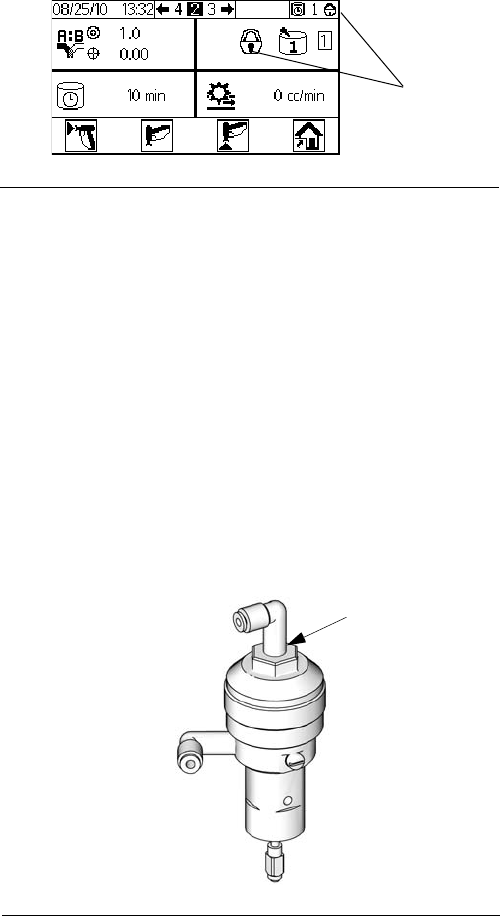
4. With the gun triggered, push the manual override on
the A1 (A2, A3) and B dose valve solenoids to
relieve pressure. See FIG. 22.
5. Follow Purging procedure, page 34.
6. Shut off the fluid supply to solvent valves A and B.
7. With the gun triggered, push the manual override on
the A and B solvent valve solenoids to relieve sol-
vent pressure. See FIG. 22. Verify that solvent pres-
sure is reduced to 0.
8. Reinstall the Control Box cover.
To reduce the risk of skin injection, relieve pressure
when you stop spraying, before changing spray tips,
and before cleaning, checking, or servicing
equipment.
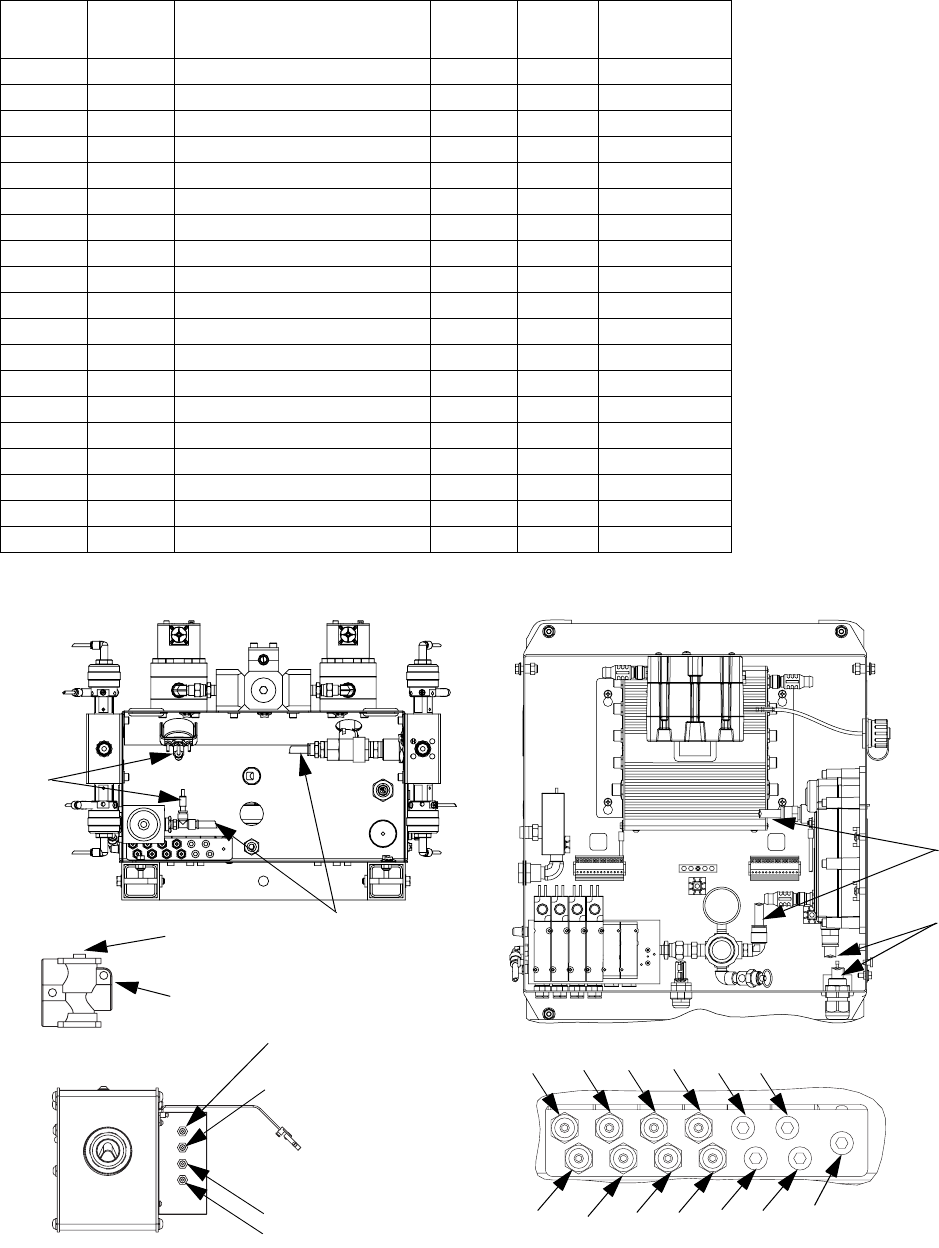
FIG. 22. Solenoid Valves in Control Box
Solvent Valve A
Solenoid
Manual overrides
Dose Valve
A1 Solenoid
Solvent Valve B
Solenoid Dose Valve B
Solenoid
ti15730a
Dose Valve A1 and A2
Solenoid location, if used
Gun Flush Box Solenoid
location, if used.
Basic Operation
38 3A0869J
Lock Mode
NOTE: Do not change system type, number of guns,
hose length, hose diameter, dosing type, or number of
colors when material is loaded in the system. Change
these inputs only if system hardware is changed.
If you change one of these inputs, the system locks so
that you cannot spray or mix. The lock icons display.
Power down and power back up again to clear the lock
and put the new settings into effect. The lock ensures
that the selection was intended and prevents operation
with incorrect settings.
Valve Settings
Dose valves and purge valves are factory set with the
hex nut 1-1/4 turns out from fully closed. This setting
limits maximum fluid flow rate into integrator and mini-
mizes valve response time. To open dose or purge
valves (for high viscosity materials), turn hex nut (E)
counterclockwise. To close dose or purge valves (for
low viscosity materials), turn clockwise. See FIG. 24.
Shutdown
1. Follow Purging, page 34.
2. Close main air shutoff valve on air supply line and
on ProMix 2KE.
3. Non-IS Systems: Shut off ProMix 2KE power
(0 position). NOTE: The system will restart in
Recipe 0.
FIG. 23. System Lock Mode
FIG. 24. Valve Adjustment
Lock
icons
E
TI11581a
Use of Optional USB Module
3A0869J 39
Use of Optional USB Module
USB Logs
Job Log 1
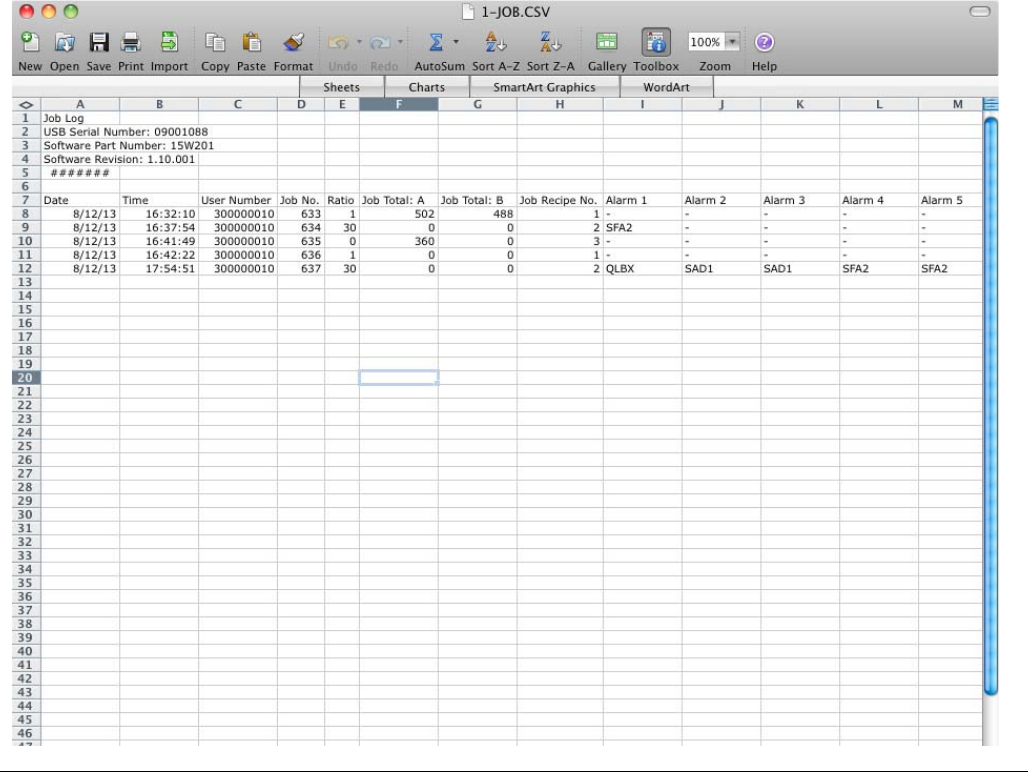
See example in FIG. 25. The job log records total vol-
umes for each job that the system performs, up to 2000.
It records the date, time, user number, job number, total
A volume, total B volume, mix ratio, and the recipe used.
Job total volumes are in cubic centimeters. A log entry is
made whenever a new job is initiated, which occurs
when batch totals are cleared, when the job number is
incremented from Run Job Number (Screen 38), or
when a color change is performed. Job information is
displayed on the Display Module only through use of
the optional USB Module.
NOTE: User Number, Ratio, and Alarm 1-5 are dis-
played as of 2KE System Software version 1.03.001
(USB Cube Software version 1.10.001).
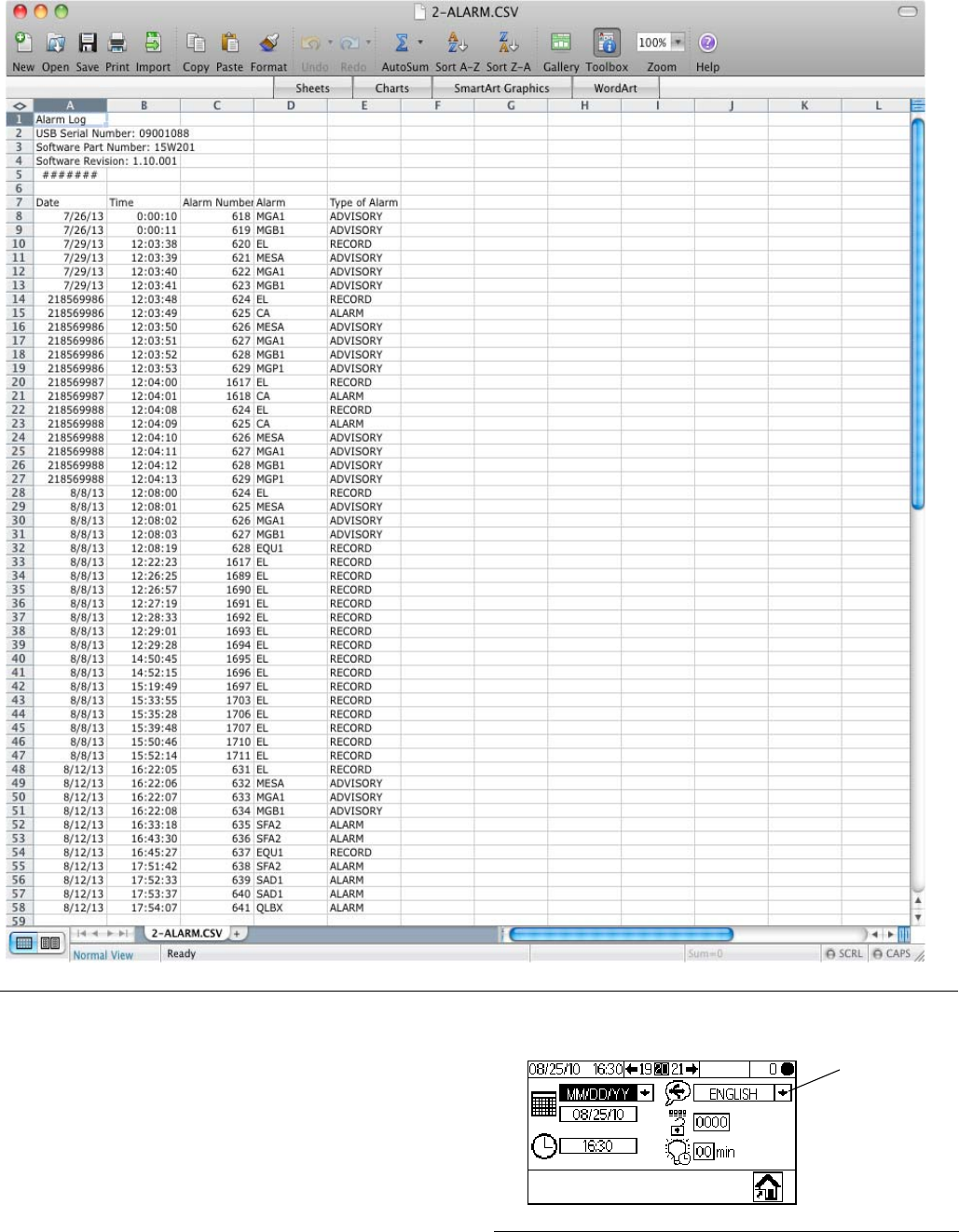
Error Log 2
See example in FIG. 26. The error log records all errors
generated by the system, up to 500. It records the date,
time, error number, error code, and error type for each
error that occurs. Without the USB, the user can access
the 50 most recent errors via the Display Module.
NOTE: For both the Job Log and the Error Log, when
the log is full, new data automatically overwrites old
data. When data in either log is downloaded via the
USB, it remains in the module until it is overwritten.
FIG. 25. Sample Job Log
Use of Optional USB Module
40 3A0869J
Setup
The only setup required is to select the language in
which you want to view the downloaded data. (Screens
are icon-based and do not change.) Navigate to Config-
ure 3 (Screen 20). Select your language from the lan-
guage dropdown.
FIG. 26. Sample Error Log
FIG. 27. Select Language for USB Logs
Language
dropdown
menu
Use of Optional USB Module
3A0869J 41
Download Procedure
1. Press on Run Mix Spray (Screen 2) or
from any screen to place the system in Standby.
NOTE: The system will not operate with a USB flash
drive in the port. If you insert the flash drive while spray-
ing, the system will stop and an alarm error will occur.
2. Insert USB flash drive into USB port. Use only
Graco-recommended USB flash drives; see Rec-
ommended USB Flash Drives, page 41.
3. Data download begins automatically. An LED on the
flash drive blinks until the download is complete.
NOTE: If you use a flash drive that does not have an
LED, open the Control Box. An LED near the USB mod-
ule flashes until the download is complete.
4. Remove flash drive from USB port.
.
5. Insert USB flash drive into USB port of computer.
6. The USB flash drive window automatically opens. If
it does not, open USB flash drive from within Win-
dows® Explorer.
7. Open Graco folder.
8. Open sprayer folder. If downloading data from more
than one sprayer, there will be more than one
sprayer folder. Each sprayer folder is labeled with
the corresponding USB serial number.
9. Open DOWNLOAD folder.
10. Open folder labeled with the highest number. The
highest number indicates the most recent data
download.
11. Open log file. Log files open in Microsoft® Excel® by
default. However, they can also be opened in any
text editor or Microsoft® Word.
NOTE: All USB logs are saved in Unicode (UTF-16) for-
mat. If opening the log file in Microsoft Word, select Uni-
code encoding.
Recommended USB Flash
Drives
It is recommended that users use the 4GB USB flash
drive (16A004) available for purchase separately from
Graco. If preferred, users may use one of the following
4 GB or less USB flash drives (not available from
Graco).
• Crucial Gizmo!™ 4GB USB flash drive (model
JDO4GB-730)
• Transcend JetFlash® V30 4GB USB flash drive
(model TS4GJFV30)
• OCZ Diesel™ 4GB USB flash drive (model
OCZUSBDSL4G)
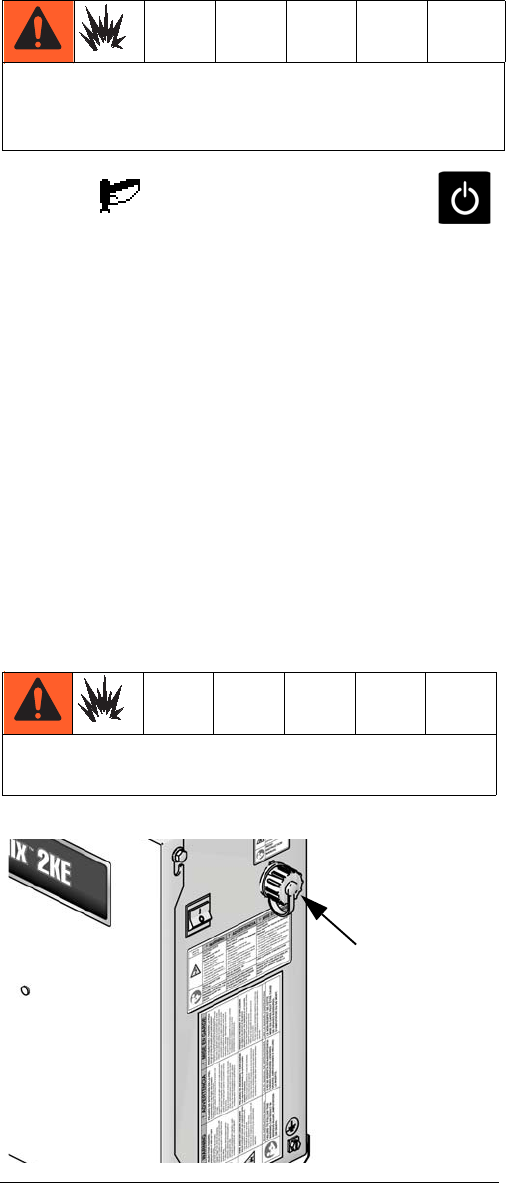
Remove proportioner from hazardous location before
inserting, downloading, or removing the USB flash
drive.
To help prevent fire and explosion, never leave the
USB flash drive in the USB port.
FIG. 28. USB Port
USB Port
Run Mode Details
42 3A0869J
Run Mode Details
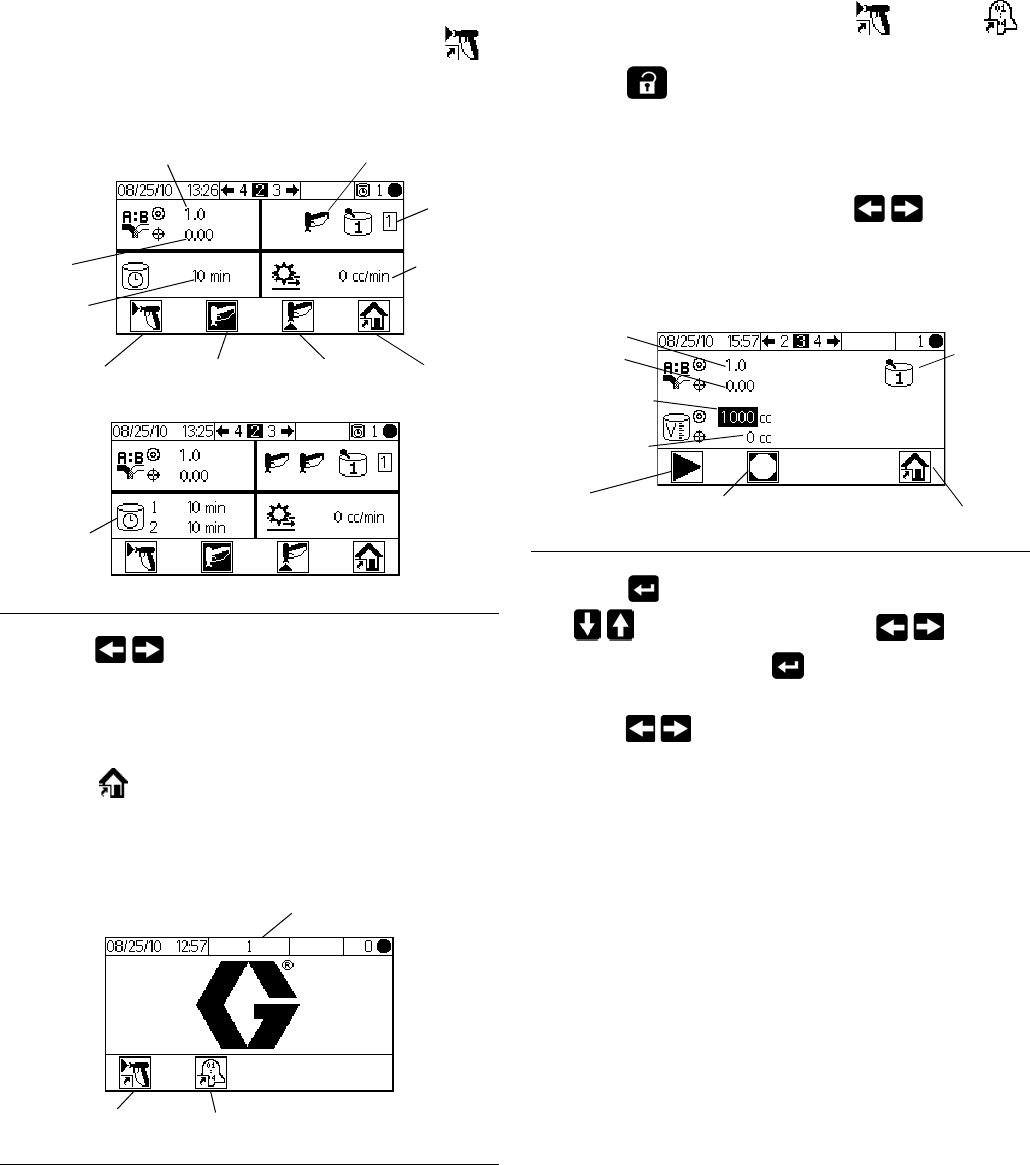
Run Mix Spray (Screen 2)
Run Mix Spray (Screen 2) displays at startup or if
is selected from Run Home (Screen 1). Use the Mix
Spray screen to control most mixing operations.
• Press to toggle between Run Mix Spray
(Screen 2), Run Mix Batch (Screen 3), Run Mix
Totals (Screen 4), and Run Job Number (Screen
38).
• Press to access Run Home (Screen 1).
Run Home (Screen 1)
• Press a soft key button to select one of the main
Run Mode screen sections: Mix or Errors .
• Press to enter the Setup screens.
Run Mix Batch (Screen 3)
Run Mix Batch (Screen 3) displays if is selected
from Run Mix Spray (Screen 2). Use the Mix Batch
screen to dispense set volumes. Target volume can be
set from 1 to 9999 cc.
• Press to set the target dispense volume. Use
to change each digit, then to move
to the next digit. Press when finished.
• Press to toggle between Run Mix Spray
(Screen 2), Run Mix Batch (Screen 3), Run Mix
Totals (Screen 4), and Run Job Number (Screen
38).
FIG. 29. Run Mix Spray (Screen 2)
FIG. 30. Run Home (Screen 1)
Standby PurgeMix
Actual
ratio
Target ratio
Potlife
time
Home
Flow rate
Material
Gun status
1 Gun
2 Guns
Potlife for
each gun
Mix Errors
Screen Number
FIG. 31. Run Mix Batch (Screen 3)
Stop
Start Home
A
ctual ratio
Target ratio
Actual volume
Target volume
Material
Run Mode Details
3A0869J 43
Run Mix Totals (Screen 4)
Run Mix Totals (Screen 4) displays if is selected
from Run Mix Batch (Screen 3). Use this screen to view
grand and batch totals for material A1, A2, A3, and
material B, and to clear batch totals if desired.
• Press to clear all batch totals. A verification
screen appears. Use to highlight and press
on to clear the batch totals, or on to return
to the Run Totals (Screen 4) without clearing.
• Press to toggle between Run Mix Spray
(Screen 2), Run Mix Batch (Screen 3), Run Mix
Totals (Screen 4), and Run Job Number (Screen
38).
Run Job Number (Screen 38)
Run Job Number (Screen 38) displays if is
selected from the Run Mix Totals Screen. Use this
screen to view and increment the job number as well as
view and assign a 9-digit user number to the job.
• Press to set the user number. Use to
change each digit, then to move to the next
digit. Press when finished.
• Press increment the job number.
• Press to toggle between Run Mix Spray
(Screen 2), Run Mix Batch (Screen 3), Run Mix
Totals (Screen 4), and Run Job Number (Screen
38).
FIG. 32. Run Mix Totals (Screen 4)
FIG. 33. Confirm Clear Batch Totals
Batch total
Grand total
Home
Clear batch totals/
increment job FIG. 34. Run Job Number (Screen 38)
Job number
User number
Home
Increment job
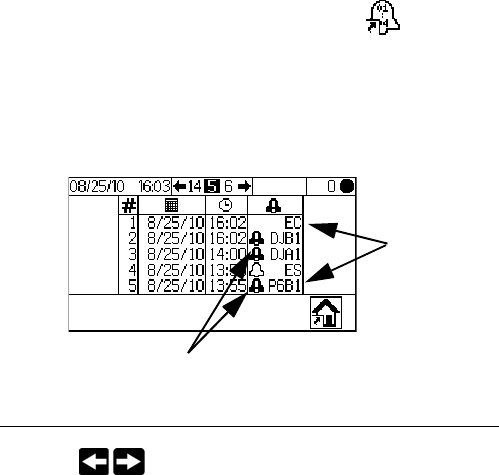
Run Mode Details
44 3A0869J
Run Log Errors (Screens 5-14)
Run Log Errors (Screens 5-14) display if is
selected from Run Home (Screen 1). It displays the last
50 errors in the log. (Screen 5 displays errors 1 to 5;
Screen 6 displays errors 6 to 10, etc.).
• Use to view the next page. See FIG. 57,
page 55, for an explanation of the different error
icons. See Table 5, page 57, for an explanation of
the different error codes.
FIG. 35. Run Log Errors (Screen 5)
Error codes
Error icons
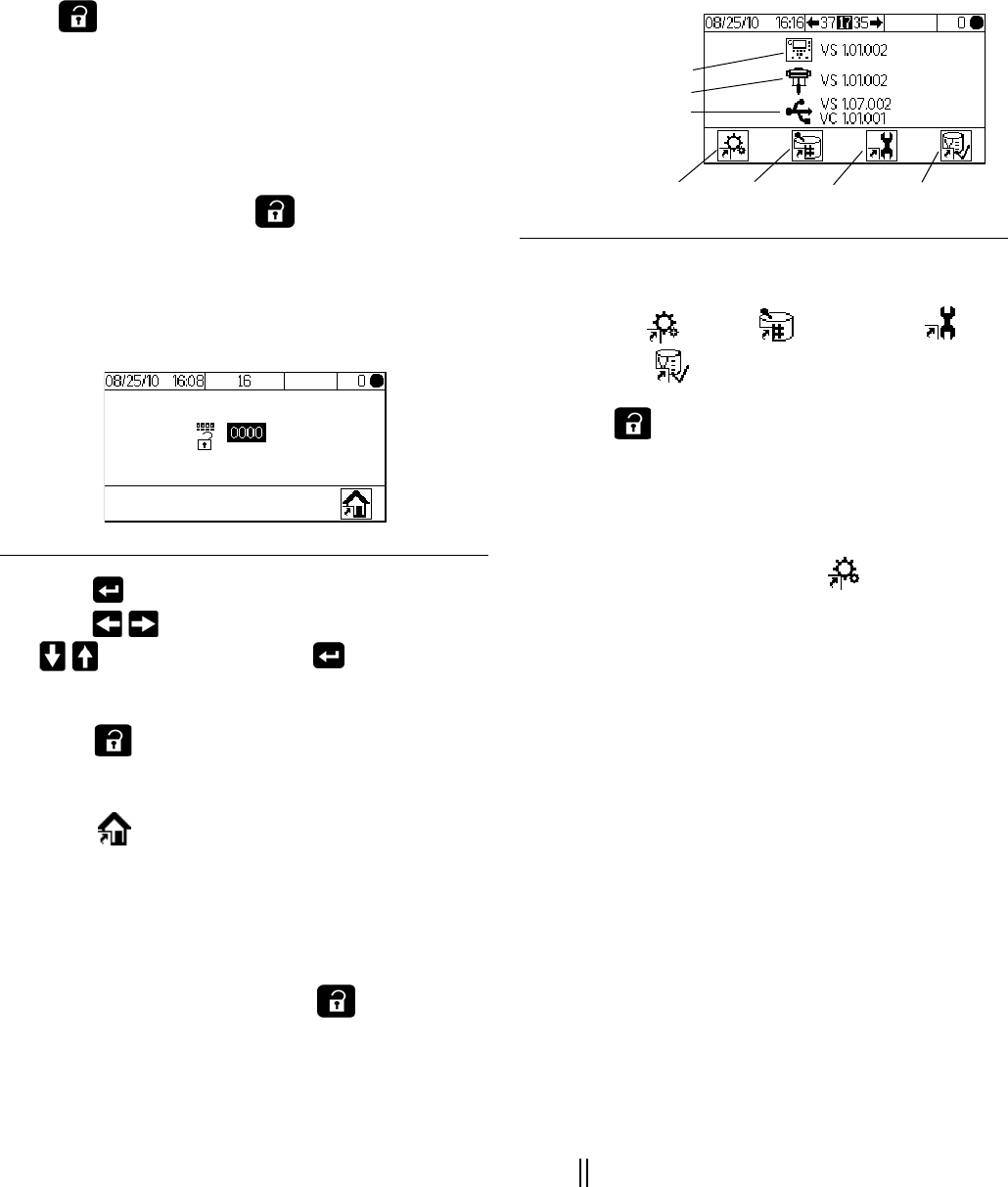
Setup Mode Details
3A0869J 45
Setup Mode Details
Press on any screen to enter the Setup screens. If
the system has a password lock, Password (Screen 16)
displays. If the system is not locked (password is set to
0000), Setup Home (Screen 17) displays.
Password (Screen 16)
From any Run screen, press to access the pass-
word screen. Password (Screen 16) displays if a pass-
word has been set. Set the password to 0000 to prevent
the Password Screen from displaying. See Configure 3
(Screen 20), page 46, to set or change the password.
• Press to enter the password (0000 to 9999).
Press to move between digits. Press
to change a digit. Press when field is
correct. Setup Home (Screen 17) displays.
• Press to toggle between Run Mode and Setup
Mode.
• Select to display Run Home (Screen 1). Enter-
ing an incorrect password also displays Run Home
(Screen 1).
Setup Home (Screen 17)
Setup Home (Screen 17) displays if is selected on
any screen and the system is not locked, or when a cor-
rect password is entered on Password (Screen 16). The
Setup Home screen displays the software versions of
the boards in the Display Module, Advanced Fluid Con-
trol Module, and the USB Module (if applicable).
• Press a soft key button to select one of the four
Setup Mode screen sections:
Configure , Recipe , Maintenance , or
Calibration .
• Press to toggle between Run Mode and Setup
Mode.
Configure 1-4 (Screens 18-21)
Configure 1 (Screen 18) displays if is selected on
Setup Home (Screen 17). This screen allows users to
set up the system type (pump or meter), the type of dos-
ing (sequential or dynamic), number of guns (1 or 2),
and the system color configuration (1 or 3).
NOTE: If 1 gun is selected, users can enable a gun flush
box (=yes; X=no). The gun flush box option is avail-
able only for 1-gun systems.
NOTE: If your application requires only 2 colors, the
system is still configured for 3 colors. Select 3 from the
dropdown menu.
Dynamic vs. Sequential Dosing: See page 51 and fol-
lowing for a description of each type of dosing, to help
you select the best option for your system. The options
are:
•A-B 50cc
(Select for sequential dosing, 50cc dose size.)
•A-B 100cc
(Select for sequential dosing, 100cc dose size.)
•A B
(Select for dynamic dosing.)
FIG. 36. Password (Screen 16)
FIG. 37. Setup Home (Screen 17)
Recipe SettingsConfigure Calibration
Software Version:
Display Module
Fluid Control Module
USB Module
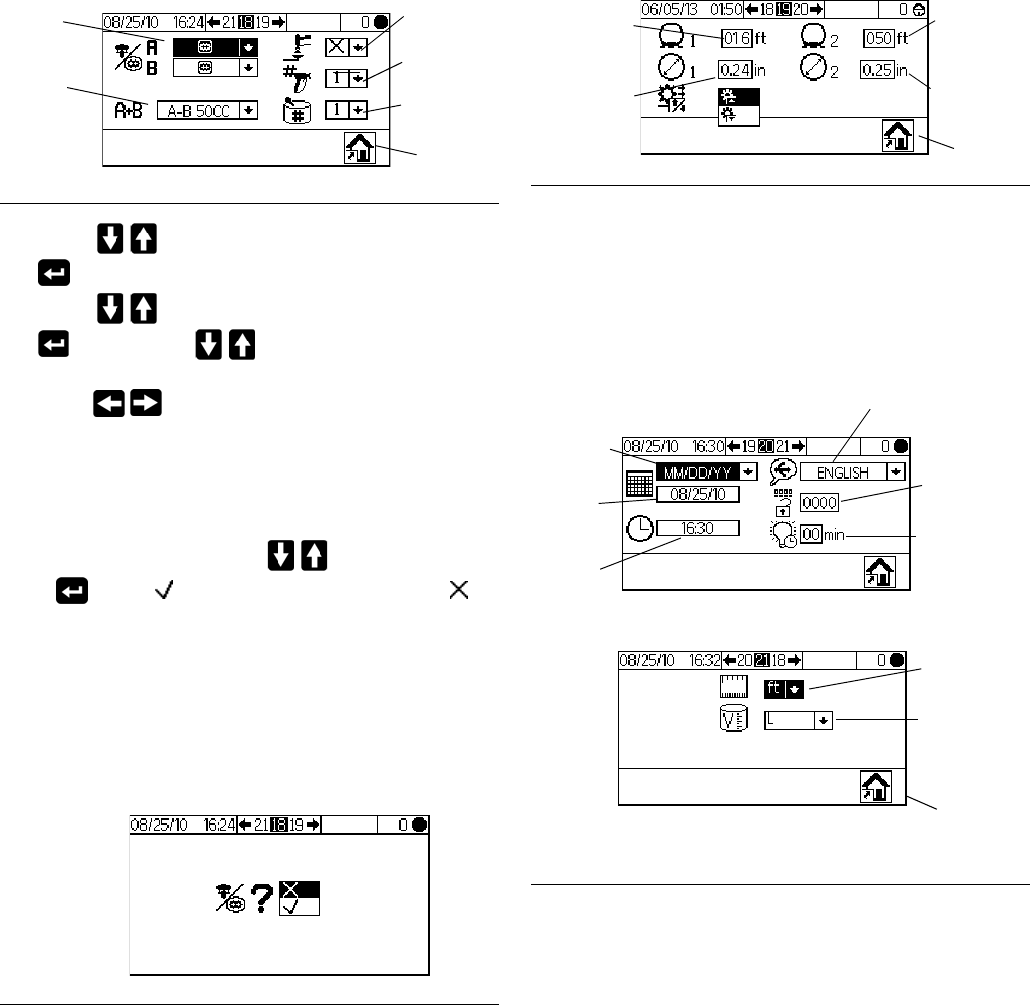
Setup Mode Details
46 3A0869J
• Press to highlight the desired field. Press
to display the dropdown menu for that field.
Press to choose from the menu options and
to set. Press to move to the next field.
• Press to move through Configure 2 (Screen
19), Configure 3 (Screen 20), and Configure 4
(Screen 21).
NOTE: If you change system type (meter to pump),
number of guns, dosing type, or number of colors, a ver-
ification screen appears. Use to highlight and
press on the to make the change, or on the to
return to Configure 1 (Screen 18) without making a
change. If a change is made, the system locks so that
you cannot spray or mix. Power down and power back
up again to clear the lock and put the new settings into
effect. The lock ensures that the selection was intended,
and prevents the user from attempting to operate with
incorrect settings.
Configure 2 (Screen 19) allows users to set for each gun
the hose length (0.1 to 45.7 m, 0.3 to 150 ft) and hose
diameter (0.1 to 1 inch). The system uses this informa-
tion to calculate pot life volume. The pot life volume tells
the system how much material must be moved to trigger
a reset of the pot life timer. It also tells the system the
volume needed to fill during a load sequence. A change
in any of these fields will trigger the lock. See NOTE in
previous paragraph.
Configure 3 (Screen 20) allows users to set preferred
language (for optional USB Module), date format, date,
time, password (0000 to 9999), and number of minutes
(0 to 99) of inactivity required before the backlight turns
off. Configure 4 (Screen 21) allows users to set pre-
ferred units for distance and volume.
FIG. 38. Configure 1 (Screen 18)
FIG. 39. Confirm Change of System Type
Home
System
type
Dosing
type
Number
of guns
Gun flush
box
Number
of colors
FIG. 40. Configure 2 (Screen 19)
FIG. 41. Configure 3 (Screen 20) and Configure 4
(Screen 21)
Gun 1 hose
length
Gun 1 hose
diameter
Gun 2
hose
length
Gun 2 hose
diameter
Home
USB log
language
Password
Date
format
Date
Time
Home
Distance
units
Volume
units
Configure 3
Configure 4
Backlight
timer
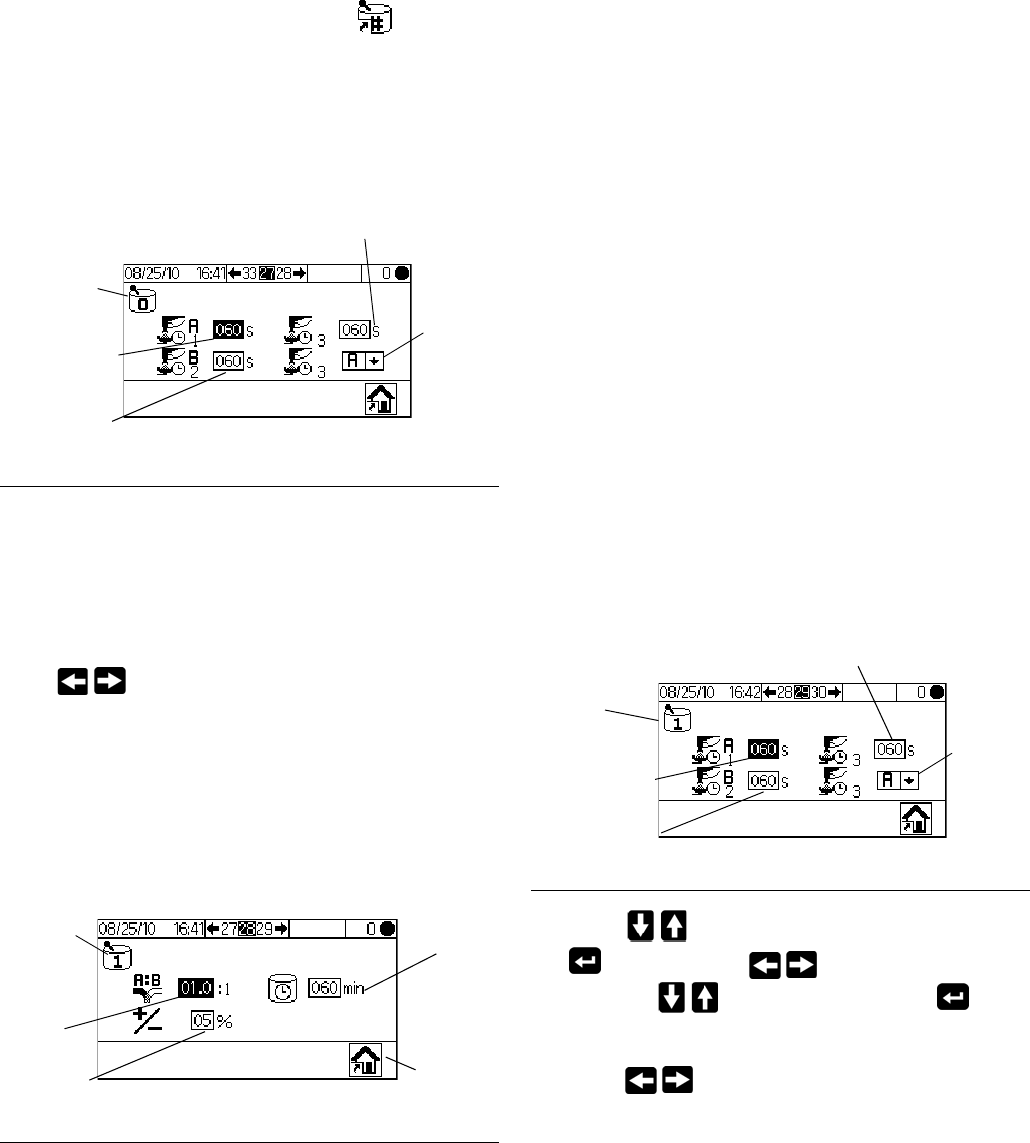
Setup Mode Details
3A0869J 47
Recipe 0 (Screen 27)
The Recipe Screens allow the user to set up the basic
recipes. Recipe 0 (Screen 27) displays if is selected
on Setup Home (Screen 17). Recipe 0 allows users to
set up a full flush, independent of recipe purge timers,
with no material load. It includes timers for first, second
and third flush. See Recipe 1-2 (Screen 29), page 47,
for flush timer details.
Recipe 1-1 (Screen 28)
Note about Settings of 0: If Ratio is set to 0, the sys-
tem will dispense the A material only. If Potlife Time is
set to 0, the potlife alarm is disabled.
Press to move through the Recipe screens. The
Recipe Screens allow the user to set up the basic rec-
ipe: Recipe 1-1 (Screen 28) is for A1 (color 1) and B. In
3-Color systems, Recipe 2-1 (Screen 30) is for A2 (color
2) and B, and Recipe 3-1 (Screen 32) is for A3 (color 3)
and B. These screens include the ratio of Material A1
(A2, A3) to Material B (0 to 30), ratio tolerance (1 to 99
percent), and potlife time (0 to 240 minutes).
Recipe 1-2 (Screen 29)
Note about Settings of 0: If a Flush time is set to 0,
that valve will not flush.
Recipe 1-2 (Screen 29) includes timers for first, second
and third flush for A1 (color 1). In 3-Color systems, Rec-
ipe 2-2 (Screen 31) and Recipe 3-2 (Screen 33) allow
users to set flush timers for the additional materials A2
and A3 (colors 2 and 3).
• First flush: Always an A side purge, using the A side
flush material from the A purge valve.
• Second flush: Always a B side purge, using the B
side flush material from the B purge valve.
• Third flush: User settable to run the A purge valve or
the B purge valve for any required additional flush,
as selected in the dropdown for the third flush
source (A or B).
All flush times are settable from 0 to 240 seconds. Set
flush time to 0 seconds to skip a flush in the sequence.
For example, to skip the first flush (A side purge), enter
0 seconds. The system goes immediately to the second
flush, followed by the third flush as user defined.
• Press to highlight the desired field and press
to select. Press to move between dig-
its. Press to change a digit. Press when
field is correct.
• Press to move through the Recipe screens.
FIG. 42. Recipe 0 (Screen 27)
FIG. 43. Recipe 1-1 (Screen 28)
Recipe
number
Third
flush
source
Second flush
time (B purge)
First flush
time (A purge)
Third flush time
(uses material
set in next field)
Recipe
number
Ratio
Home
Potlife
timer
Ratio
tolerance
FIG. 44. Recipe 1-2 (Screen 29)
Recipe
number
Third
flush
source
First flush
time (A purge)
Second flush
time (B purge)
Third flush time
(uses material
set in next field)
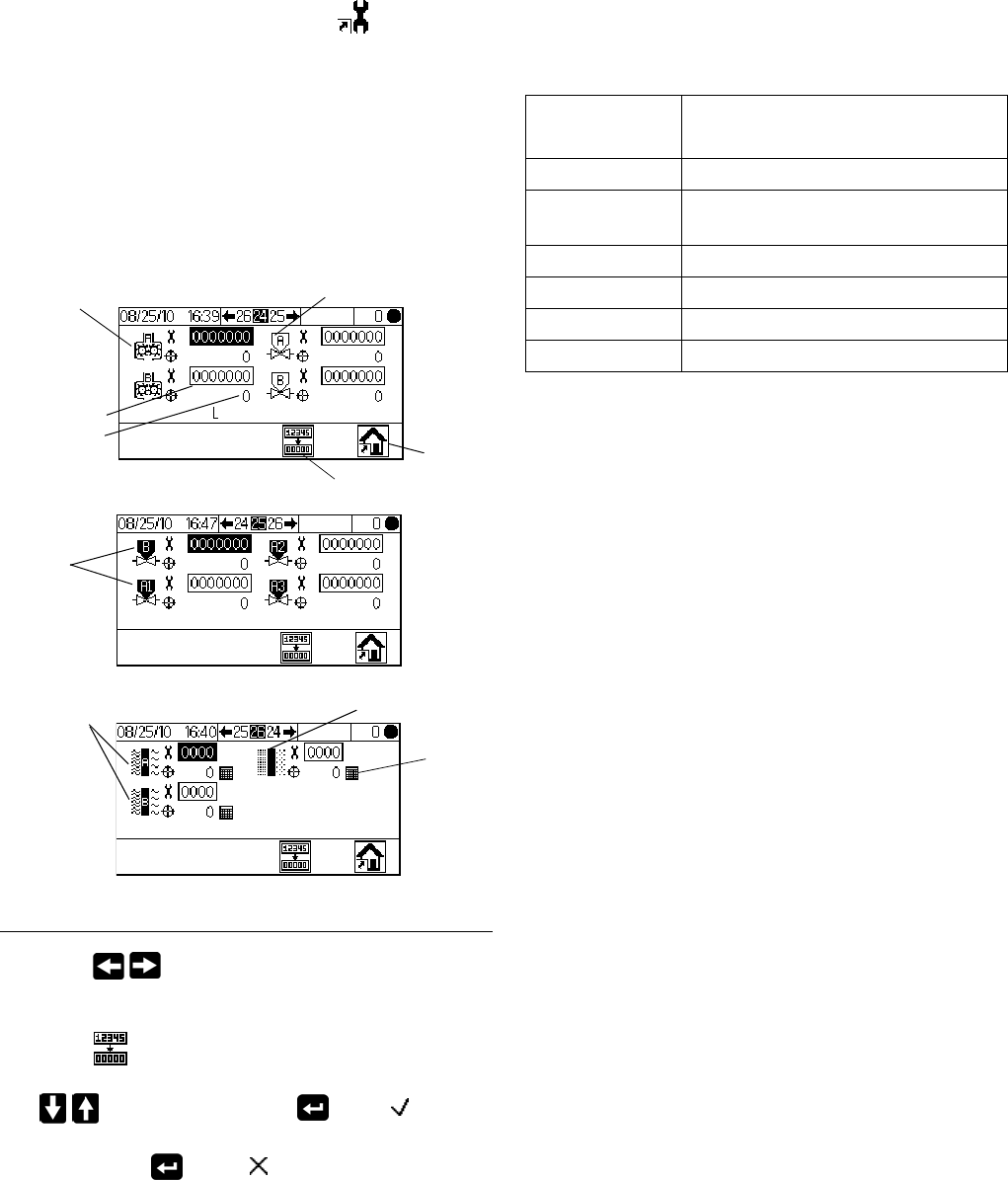
Setup Mode Details
48 3A0869J
Maintenance 1-3 (Screens 24-26)
Maintenance 1 (Screen 24) displays if is selected
on Setup Home (Screen 17). The Maintenance Screens
display actual and target maintenance timers for meters
and solvent valves (Maintenance 1, Screen 24), dose
valves (Maintenance 2, Screen 25), and fluid filters and
air filters (Maintenance 3, Screen 26). Timers for meters
are settable from 0 to 2,000,000 L or 0 to 528,344 gal-
lons. Timers for valves are settable from 0 to 9,999,999
counts. Timers for filters are settable from 0 to 9999
days.
• Press to move through the three mainte-
nance screens.
• Press to clear the maintenance total that is
highlighted. A confirmation screen appears. Use
to highlight and press on the to clear
the batch totals. No other button press will clear the
totals. Press on the to return to the active
Maintenance Screen without clearing.
Maintenance Recommendations
The following table shows recommended starting values
for maintenance. Maintenance needs will vary based on
individual applications and material differences.
FIG. 45. Setup Maintenance 1-3 (Screens 24-26)
Maintenance
actual and
target
Meters Solvent valves
Home
Fluid Filters Air filter
Maintenance 1
Maintenance 2
Maintenance 3
Dose
valves
Days
Clear totals
Component
Recommended Maintenance
Frequency
Solvent Valves 1,000,000 cycles
Fluid Filter 5 days,
daily check is recommended
Air Filter 30 days
Pumps 250,000 cycles
Dose Valves 1,000,000 cycles
Meters 5,000 gallons
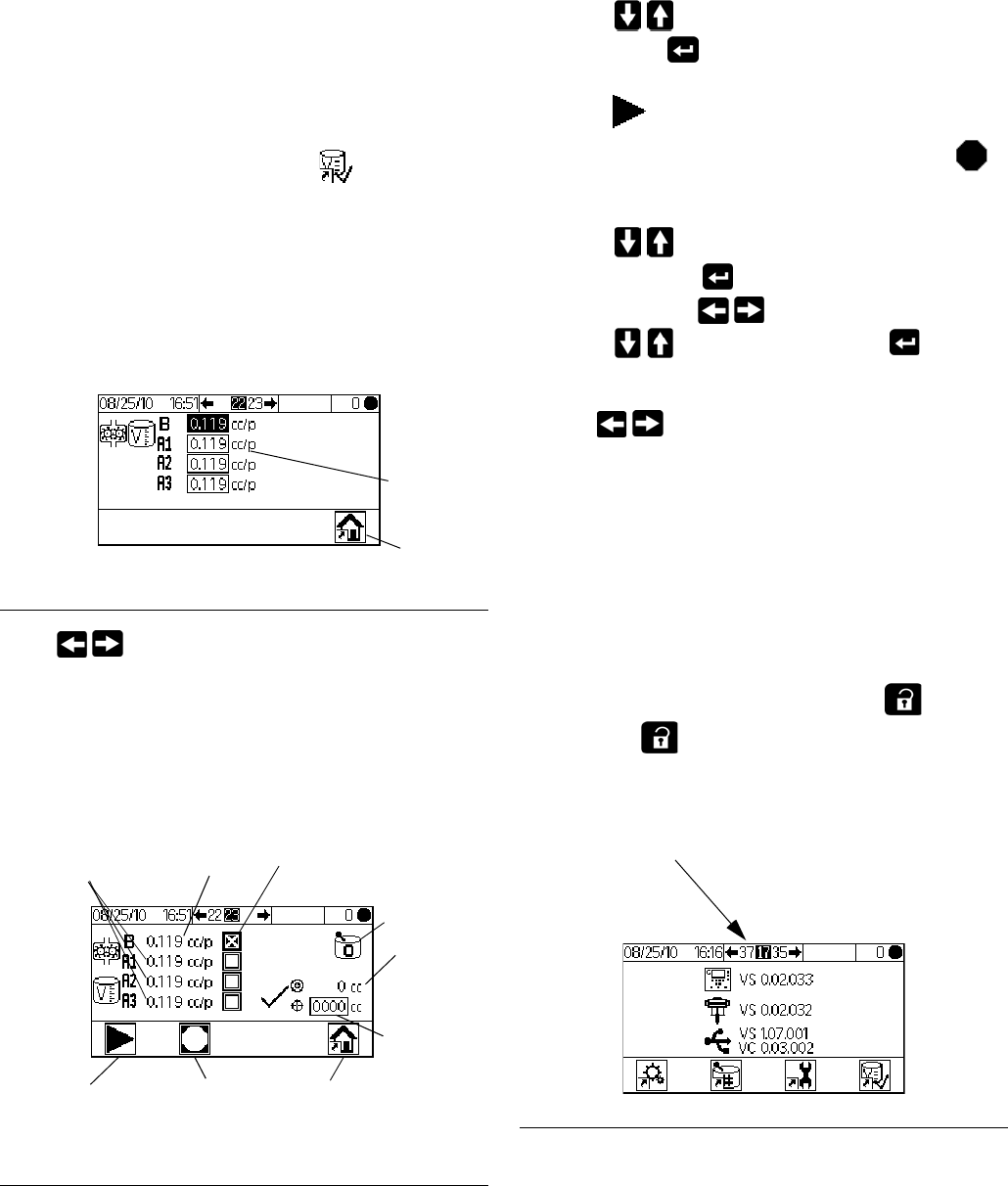
Setup Mode Details
3A0869J 49
Calibration 1 and 2 (Screens 22
and 23)
NOTE: See Meter Calibration, page 32, for detailed
instructions.
Calibration 1 (Screen 22) displays if is selected on
Setup Home (Screen 17). This screen displays the k
factor (cc/pulse) for Meter A with fluid A1 (A2 and A3, if
present) and Meter B. The system starts at the default
factor(s) for the meters. Factor values update automati-
cally as needed based on calibration results from Cali-
bration 2 (Screen 23). Factor values also can be set on
this screen, from 0 to 0.873 cc/pulse.
Press to display Calibration 2 (Screen 23). This
screen allows the user to perform a calibration. It dis-
plays Meter A (with fluid A1, A2, and A3) and Meter B
k-factors, the target dispense volume, the actual dis-
pense volume (settable from 0 to 9999 cc), and the
material to dispense.
• Press to highlight the meter you wish to cali-
brate. Press . An X displays in the box.
• Press to start the calibration on the checked
meter (A with fluid A1, A2, or A3, or B). Press
to cancel the calibration.
• Press to highlight the actual dispense vol-
ume field. Press to set the volume (from 0 to
9999 cc). Press to move between digits.
Press to change a digit. Press when
field is correct.
• Use to toggle between Calibration 1
(Screen 22) and Calibration 2 (Screen 23).
Troubleshooting (Screens
35-37)
Screens for testing system controls can be accessed by
setting the password to 9909. See Configure 3 (Screen
20), page 46, to set or change the password.
After setting the password to 9909, press to exit
Setup. Press to reenter Setup. Setup Home
(Screen 17) displays, with troubleshooting screen
options.
FIG. 46. Calibration 1 (Screen 22)
FIG. 47. Calibration 2 (Screen 23)
Meter k
factors
Home
Meter B
k factor
Meter A
k factors
Active
Recipe
Target
dispense
volume
Actual
dispense
volume
Start Meter A
or Meter B
Calibration
Home
Cancel Meter
Calibration
Selected
material
FIG. 48. Setup Home with Troubleshooting
Troubleshooting
screen options
appear here.
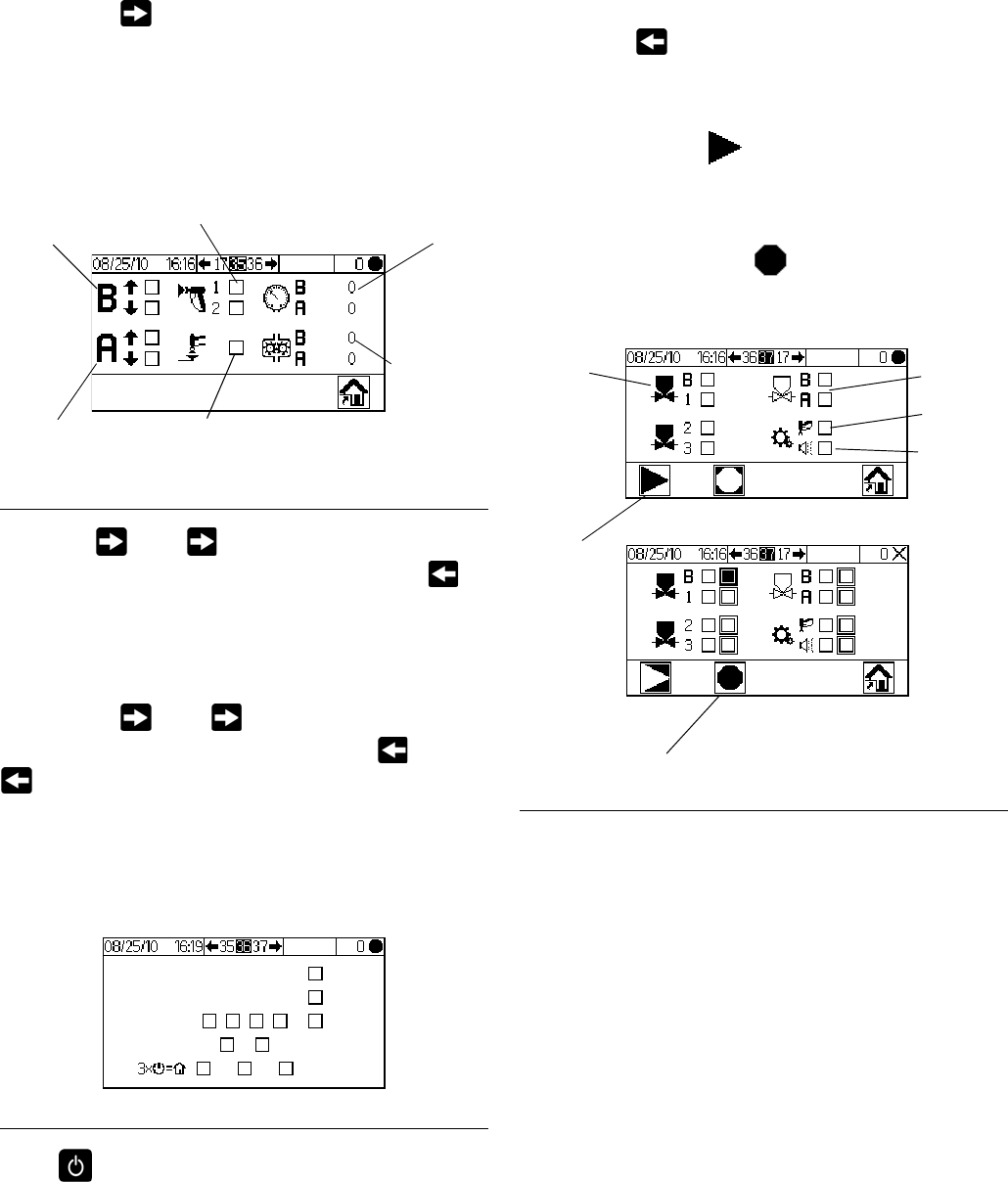
Setup Mode Details
50 3A0869J
Troubleshooting System Inputs (Screen 35)
From Setup Home (Screen 17) with Troubleshooting
active, press to display Troubleshooting System
Inputs (Screen 35). An X displays in the box to indicate if
Air Flow Switch 1 or 2 is on and if the gun is in the Gun
Flush Box. This screen also displays Meter A and Meter
B pulses. The fields relating to pump function can be
ignored.
• Press , then again to move to Trouble-
shooting System Outputs (Screen 37). Press to
move to the Membrane Test (Screen 36).
Membrane Test (Screen 36)
From Setup Home (Screen 17) with Troubleshooting
active, press , then again. Membrane Test
(Screen 36) displays. You could also press , then
again. This screen allows an authorized user to test
the buttons on the Display Module membrane. When in
this screen, all buttons lose their predefined functions,
and the soft keys are not defined. When a properly
working button is pressed, an X appears in the box.
Press three times to return to Setup Home (Screen
17). Direct access to any other screen is not possible.
Troubleshooting System Outputs
(Screen 37)
From Setup Home (Screen 17) with Troubleshooting
active, press to display Troubleshooting System
Outputs (Screen 37). An X displays in the box to show
an electrical state of On for the dose valves (B, and A1,
A2, and A3), solvent valves (B and A), the gun trigger,
and the alarm. Press to start Forced Mode. A sec-
ond set of check boxes displays. Manually actuate the
valves, alarm, or gun trigger. For properly working com-
ponents, an X will display in the corresponding second
box upon actuation. Press to exit Forced Mode.
Moving to any other screen also will exit Forced Mode.
FIG. 49. Troubleshooting System Inputs (Screen 35)
FIG. 50. Membrane Test (Screen 36)
Pump B up
or down
(not used)
Pump A up
or down
(not used)
Gun in Gun
Flush Box
Air Flow
Switch on
Pump
Pressures
(not used)
Meter
Pulses
FIG. 51. Troubleshooting System Outputs (Screen
37)
Start
Forced
Mode
Stop
Forced
Mode
Dose
Valves Solvent
Valves
Gun
Trigger
Alarm
Dosing Options
3A0869J 51
Dosing Options
Sequential Dosing
Components A and B dispense sequentially in the nec-
essary volumes to attain the mix ratio.
1. The operator presses to begin operation.
2. The ProMix 2KE controller sends signals to activate
the solenoid valves. The solenoid valves activate
Dose Valves A1 (A2 or A3, depending on recipe
selection) and B. Fluid flow begins when the gun is
triggered.
3. Components A1 and B are introduced into the fluid
integrator (FI) one at a time as follows.
a. The A side dose valve (DVA1, DAV2, or DVA3)
opens, and fluid flows into the integrator.
b. Flow Meter A (MA) monitors the fluid volume
dispensed and sends electrical pulses to the
ProMix 2KE controller. The controller monitors
these pulses and signals.
c. When the target volume dispenses, Dose Valve
A closes.
NOTE: The dispense volume of component A and B
is based on the mix ratio and dose size set by the
user and calculated by the ProMix 2KE controller.
d. Dose Valve B (DVB) opens, and fluid flows into
the integrator and is aligned proportionately with
component A.
e. Flow Meter B (MB) monitors the fluid volume
dispensed and sends electrical pulses to the
ProMix 2KE controller.
f. When the target volume is dispensed, Dose
Valve B closes.
4. The components are pre-mixed in the integrator,
then uniformly blended in the static mixer (SM).
NOTE: To control output from the static mixer to the
gun, install an optional fluid pressure regulator.
5. Components A and B are alternately fed into the
integrator as long as the gun is triggered.
6. If the gun is not triggered for two minutes, the sys-
tem switches to Idle mode, which closes off the mix
manifold dose valves.
7. When the gun is triggered again, the ProMix 2KE
continues the process where it left off.
NOTE: Operation can be stopped at any time by
pressing or shutting off the main power
switch.
Table 3: Sequential Dosing Operation
Ratio = 2.0:1 Dose 1 Dose 2 Dose 3
A = 2
B = 1
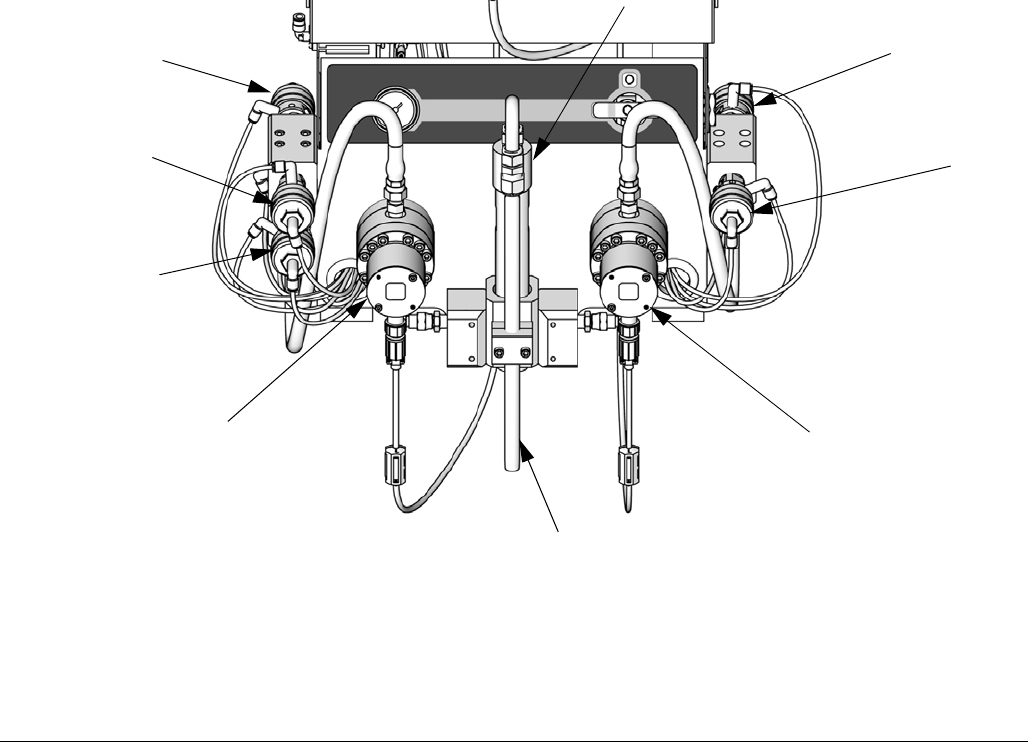
Dosing Options
52 3A0869J
FIG. 52. Fluid Module, Sequential Dosing
ti15699a
Key:
MA Component A Meter
DVA1 Component A Dose Valve
DVA2 Second Color/Catalyst Valve
DVA3 Third Color/Catalyst Valve
SVA Solvent Valve A
MB Component B Meter
DVB Component B Dose Valve
SVB Solvent Valve B
SM Static Mixer
FI Fluid Integrator
MA MB
DVB
DVA1
SM
FI
DVA2 and
DVA3 (behind)
SVA SVB
Dosing Options
3A0869J 53
Dynamic Dosing
Overview
Dynamic Dosing provides on-demand proportioning,
eliminating the need for an integrator and therefore min-
imizing undesired material contact. This feature is espe-
cially useful with shear-sensitive and waterborne
materials.
A restrictor injects component B into a continuous
stream of component A. The software controls the dura-
tion and frequency of each injection. See FIG. 55 for a
schematic diagram of the process.
Dynamic Dosing System Parameters
The following parameters affect dynamic dosing perfor-
mance:
• Component A Flow: Ensure that the supply pump is
sized to provide sufficient and uninterrupted flow.
Note that component A provides majority of system
flow at higher mix ratios.
• Component B Flow: Ensure that the supply pump is
sized to provide sufficient and uninterrupted flow.
• Component A Pressure: Ensure precise pressure
regulation. It is recommended that the component A
pressure be 5-15% lower than the component B
pressure.
• Component B Pressure: Ensure precise pressure
regulation. It is recommended that the component B
pressure be 5-15% higher than the component A
pressure.
NOTE: When using dynamic dosing it is very important
to maintain a constant, well-regulated fluid supply. To
obtain proper pressure control and minimize pump pul-
sation, install a fluid regulator on the A and B supply
lines upstream of the meters. In systems with color
change, install the regulator downstream of the
color/catalyst valve stack.
Select a Component B Restrictor Size
See Set Up the Fluid Manifold for Dynamic Dosing,
page 16. Use the charts on pages 66 to 70 to select an
appropriate restrictor size based on the desired flow and
mix ratio.
Select Dynamic Dosing
1. On the Display Module press to access Setup
Home (Screen 17). Select to display Configure
1 (Screen 18).
2. Select A B from the dosing type drop down menu.
Balancing A/B Pressure
If component B pressure is too high, it will push the com-
ponent A stream aside during B injection. The valve will
not open long enough, causing a Ratio High error.
If component B pressure is too low, it will not be injected
in sufficient volume. The valve will stay open too long,
causing a Ratio Low error.
Selecting the correct component B restrictor size and
balancing the A/B pressures will keep the system in the
proper pressure range, resulting in a consistent mix
ratio.
FIG. 53 shows the A to B pressure balance, read at the
proportioner inlet. It is recommended that the compo-
nent B pressure be 5-15% higher than the component A
pressure to keep the system in the control range, hold
the proper mix ratio, and obtain properly mixed material.
If pressures are not balanced (“B Pressure Too High” or
“B Pressure Too Low”), it may not be possible to hold
the desired mix ratio. The system will generate an off
ratio alarm and stop operation.
NOTE: In multi-flow rate systems, it is recommended
that you set up the system to run properly at the highest
flow rate, to ensure adequate fluid supply across the
flow rate range.
In dynamic dosing, component A dose valve is con-
stantly on. Component B dose valve will cycle on and
off; one cycle every 0.5 – 1.0 seconds indicates proper
balance.
Monitor system performance by watching the Display
Module for warning messages which provide informa-
tion on system performance, and adjust pressures
accordingly. See Table 5 on page 57.
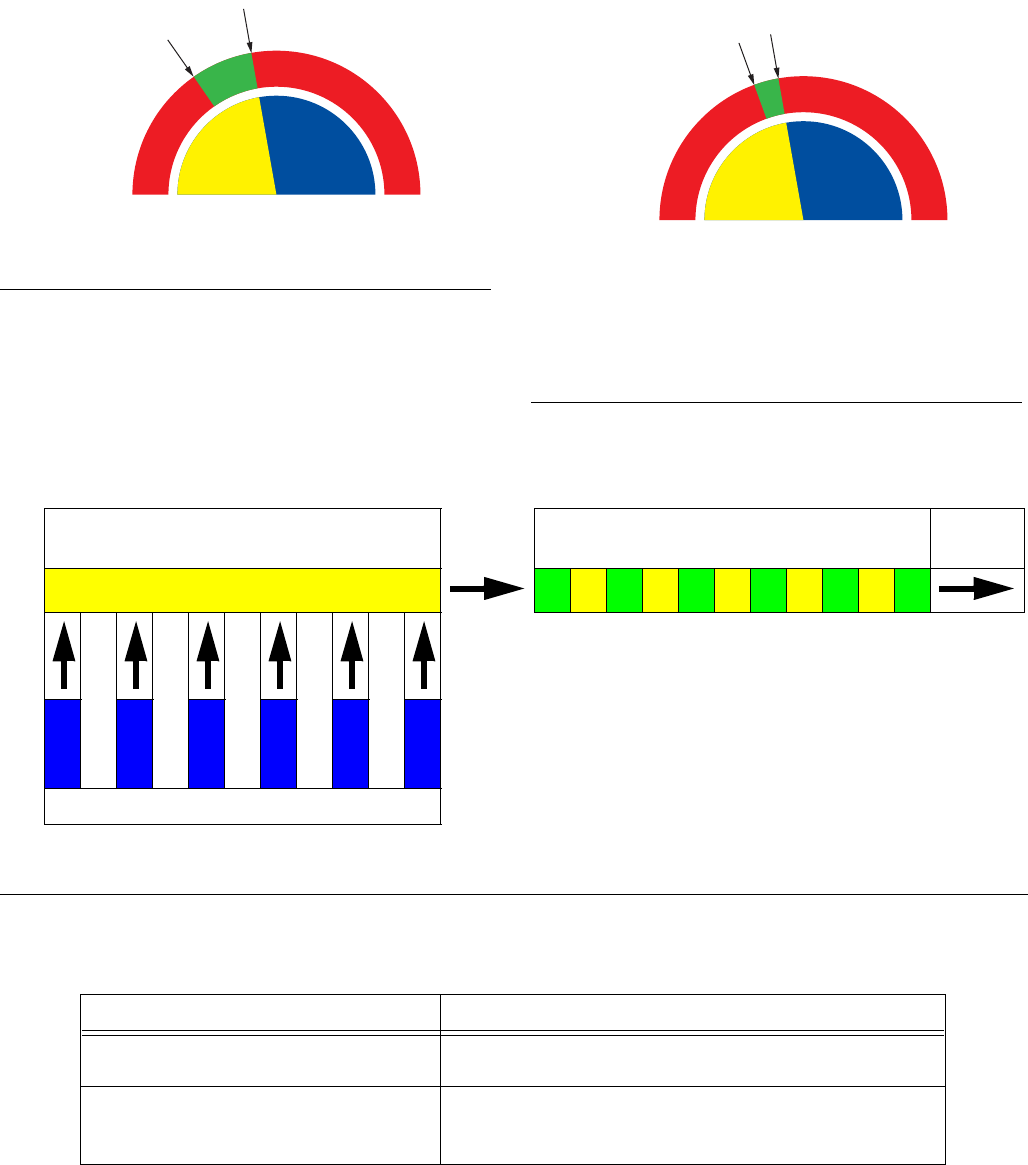
Dosing Options
54 3A0869J
FIG. 53. A/B Control Range with Properly Sized
Restrictor
B Pressure
Too High
B Pressure
Too Low
Control Range
A Pressure B Pressure
FIG. 54. A/B Control Range with Too Large a
Restrictor
B Pressure
Too High
B Pressure
Too Low
Control Range
(too small)
A Pressure B Pressure
NOTE: If the restrictor is too small, it may be
necessary to supply more differential pressure
than is available in your system.
FIG. 55. Schematic Diagram of Dynamic Dosing Operation
Table 4: Dynamic Dosing Troubleshooting Guide
(for complete system troubleshooting, see Alarm Troubleshooting beginning on page 58)
Error Message Solution
Ratio Low Error (R1) • Increase A pressure or decrease B pressure.
• Use a smaller restrictor.
Ratio High Error (R4) • Increase B pressure.
• Clean restrictor or use a larger size.
• Verify B valve is opening properly.
Component A (continuous flow) Proportioned Material
To Static
Mixer
Component B (pulsed injection)
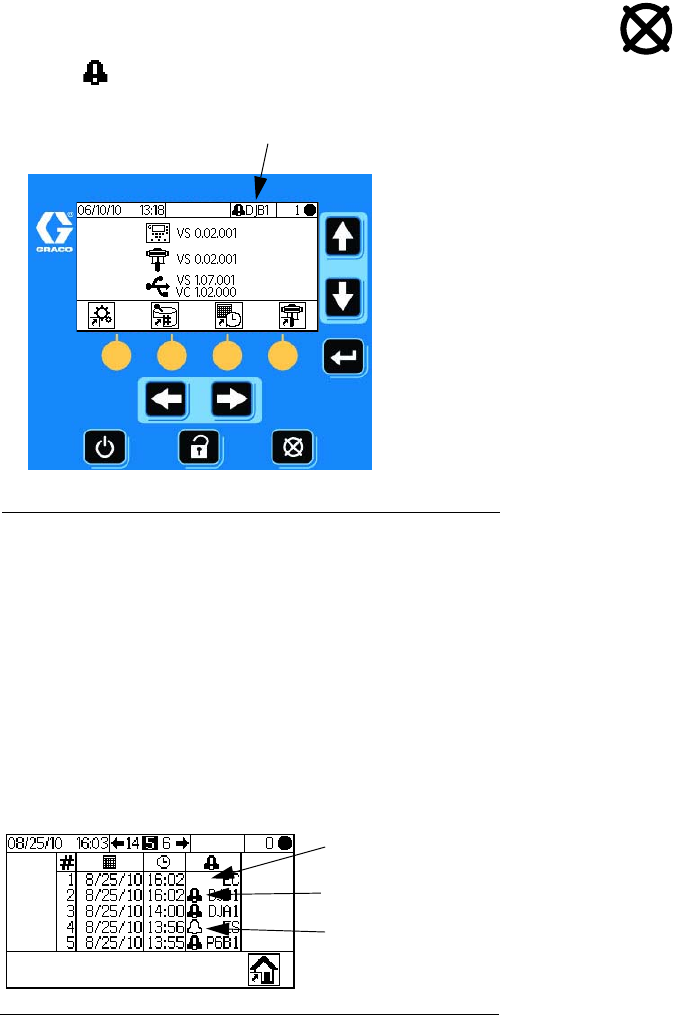
System Errors
3A0869J 55
System Errors
NOTE: Do not use the fluid in the line that was dis-
pensed off ratio as it may not cure properly.
System Alarms
System alarms alert you of a problem to help prevent
off-ratio spraying. If an alarm occurs, operation stops
and the following occurs:
• Alarm buzzer sounds.
• Status bar on the Display Module shows the alarm
icon and code.
• Alarm is saved in the date/time stamped log.
System Advisory/Record Codes
Table 6 lists the advisory and record codes. Advisories
and records do not stop operation or sound an alarm. If
an advisory occurs, the Status bar on the Display Mod-
ule shows the advisory icon and code. System records
do not display on the Status bar. Both advisories and
records are saved in the date/time stamped log, which
can be viewed on the display or saved to a flash drive
using optional USB port.
To Clear Error and Restart
NOTE: When an error occurs be sure to determine the
error code before resetting it. If you forget which code
occurred, use Run Log Errors (Screens 5-14), page
44, to view the last 50 errors, with date and time stamps.
To reset errors, see Table 7 and Alarm Troubleshoot-
ing, page 58. Many errors can be cleared by simply
pressing .
Air Flow Switch (AFS) Function
Air or Air-assisted Guns
The air flow switch (AFS) detects air flow to the gun and
signals the ProMix 2KE controller when the gun is trig-
gered. The AFS functions with the flow meters to ensure
that system components are functioning correctly.
For example, if a flow meter fails or clogs, pure resin or
catalyst could spray indefinitely if the ProMix 2KE does
not detect the condition and intervene, which is why the
AFS is so important.
If the ProMix 2KE detects through the AFS signal that
the gun is triggered, yet there is no fluid flow through the
meter, a Dose Time Alarm (QTA1 or QTB1) occurs after
40 seconds and the system shuts down.
Operating Without Air Flow Switch
It is not recommended to run without an air flow switch.
If a switch fails, replace it as soon as possible.
Airless Gun
It is not recommended to use an airless gun with the
ProMix 2KE. Two issues can arise from operating with-
out an air flow switch:
• Without a gun trigger/air flow switch input the Pro-
Mix 2KE does not know it is spraying and will not
generate a Dose Time Alarm. This means there is
no way to detect a failed meter. You could spray
pure resin or catalyst for 2 minutes without knowing.
FIG. 56. Display Module Alarm Codes
FIG. 57. Error Log Icons
Error Code Indicator
Record - no icon
Alarm icon
Advisory icon
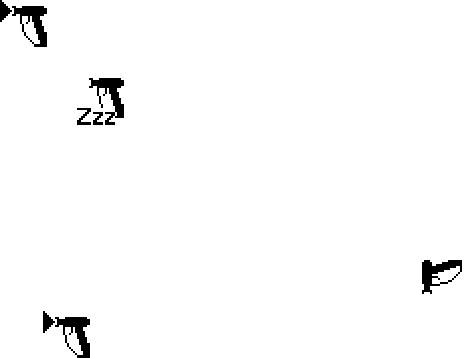
System Errors
56 3A0869J
• Since the ProMix 2KE does not know it is spraying
because there is no gun trigger/air flow switch input,
it will go into System Idle every 2 minutes when in
Mix mode.
System Idle Notice (IDLE)
This warning occurs if the ProMix 2KE is set to Mix
and 2 minutes have elapsed since the system last
received the air flow switch signal (gun trigger). The Gun
Idle icon is displayed.
In applications using the AFS, triggering the gun clears
the warning and you can start spraying again.
Without the AFS, triggering the gun does not clear the
alarm. To start spraying again, you must press ,
then , then trigger the gun.
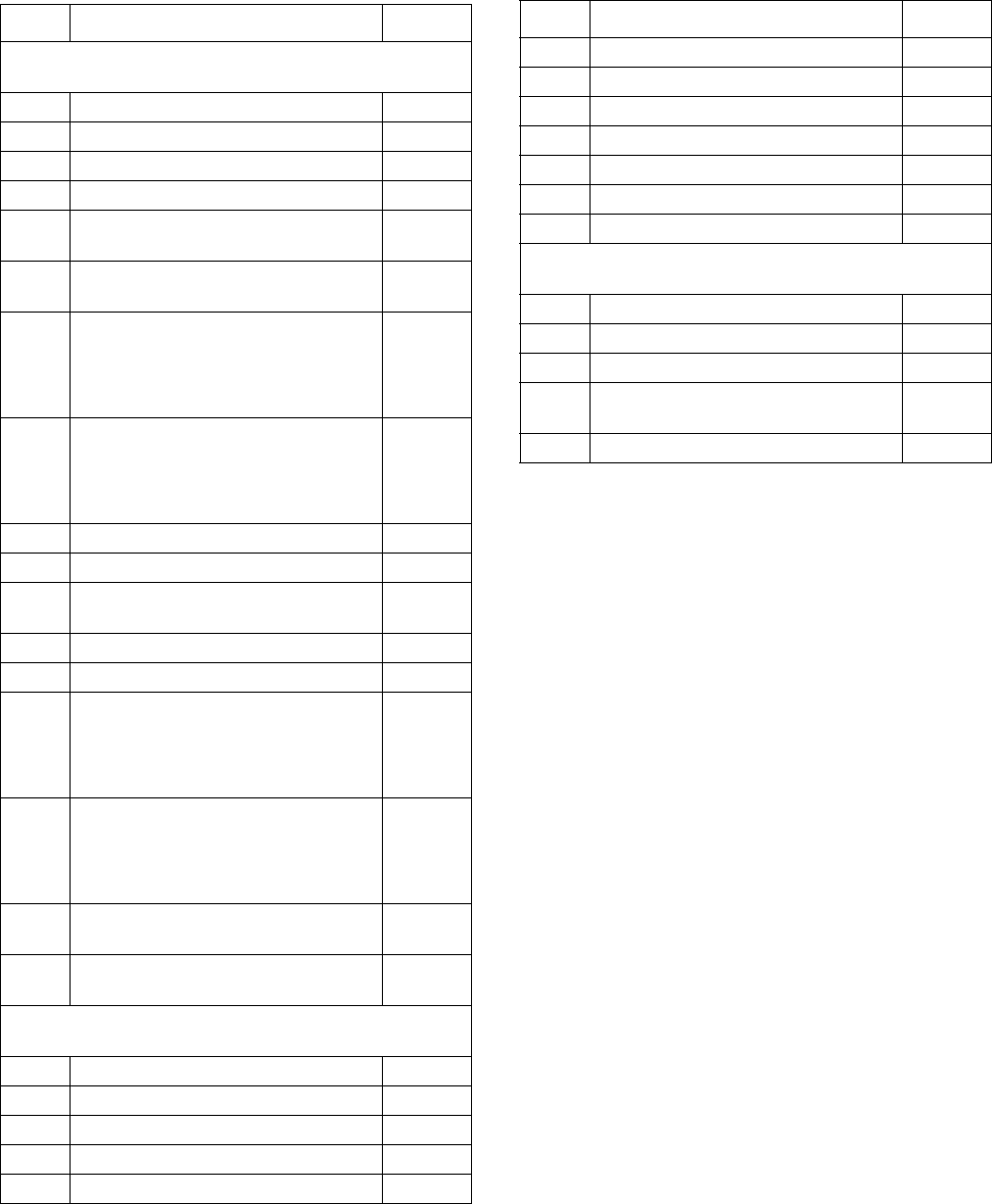
System Errors
3A0869J 57
Error Codes
Table 5: System Alarm/Advisory/Record Codes
Code Description Details
Alarm Codes - Alarm sounds, system stops, icon dis-
plays until problem is solved and alarm is cleared.
CA Communication Error 43
CAU1 USB Communication Error 43
EQU2 USB Installed when not in Standby 43
SG Gun Flush Box Error 43
SAD1
SAD2
Atomizing Air During Purge - Gun 1
Atomizing Air During Purge - Gun 2
43
SPSA
SPSB
Purge Volume Error A
Purge Volume Error B
SFA1
SFA2
SFA3
SFB1
PreMix Error - Color
PreMix Error - Catalyst
43
SHA1
SHA2
SHA3
SHB1
PreFill Error - Color
PreFill Error - Catalyst
43
SM MixFill Start Error 44
SN MixFill Complete Error 44
QPD1
QPD2
Potlife Error - Gun 1
Potlife Error - Gun 2
44
R1 Ratio Low Error 44
R4 Ratio High Error 45
QDA1
QDA2
QDA3
QDB1
Overdose A, B Dose too Short
Overdose B, A Dose too Short
46
QTA1
QTA2
QTA3
QTB1
Dose Time A Error
Dose Time B Error
47
QLAX
QLBX
Leak Error A
Leak Error B
47
P6A1
P6B1
Pressure Transducer Error A
Pressure Transducer Error B
48
Advisory Codes - No alarm, system continues operat-
ing, icon displays on active screen until cleared
MFA1 Meter A maintenance due N/A
MFB1 Meter B maintenance due N/A
MEA1 Mix valve A1 maintenance due N/A
MEA2 Mix valve A2 maintenance due N/A
MEA3 Mix valve A3 maintenance due N/A
MEB1 Mix valve B maintenance due N/A
MESA Solvent valve A maintenance due N/A
MESB Solvent valve B maintenance due N/A
MGA1 Fluid Filter A maintenance due N/A
MGB1 Fluid Filter B maintenance due N/A
MGP1 Air Filter maintenance due N/A
ES System defaults loaded N/A
Record Codes - No alarm, system continues operating,
no icon displays on active screen.
EL System powered on N/A
EC System setup changed N/A
ES System defaults loaded N/A
ET System performed an autodump after
a potlife
N/A
EQU1 USB Drive connected while in Standby N/A
Table 5: System Alarm/Advisory/Record Codes
Code Description Details
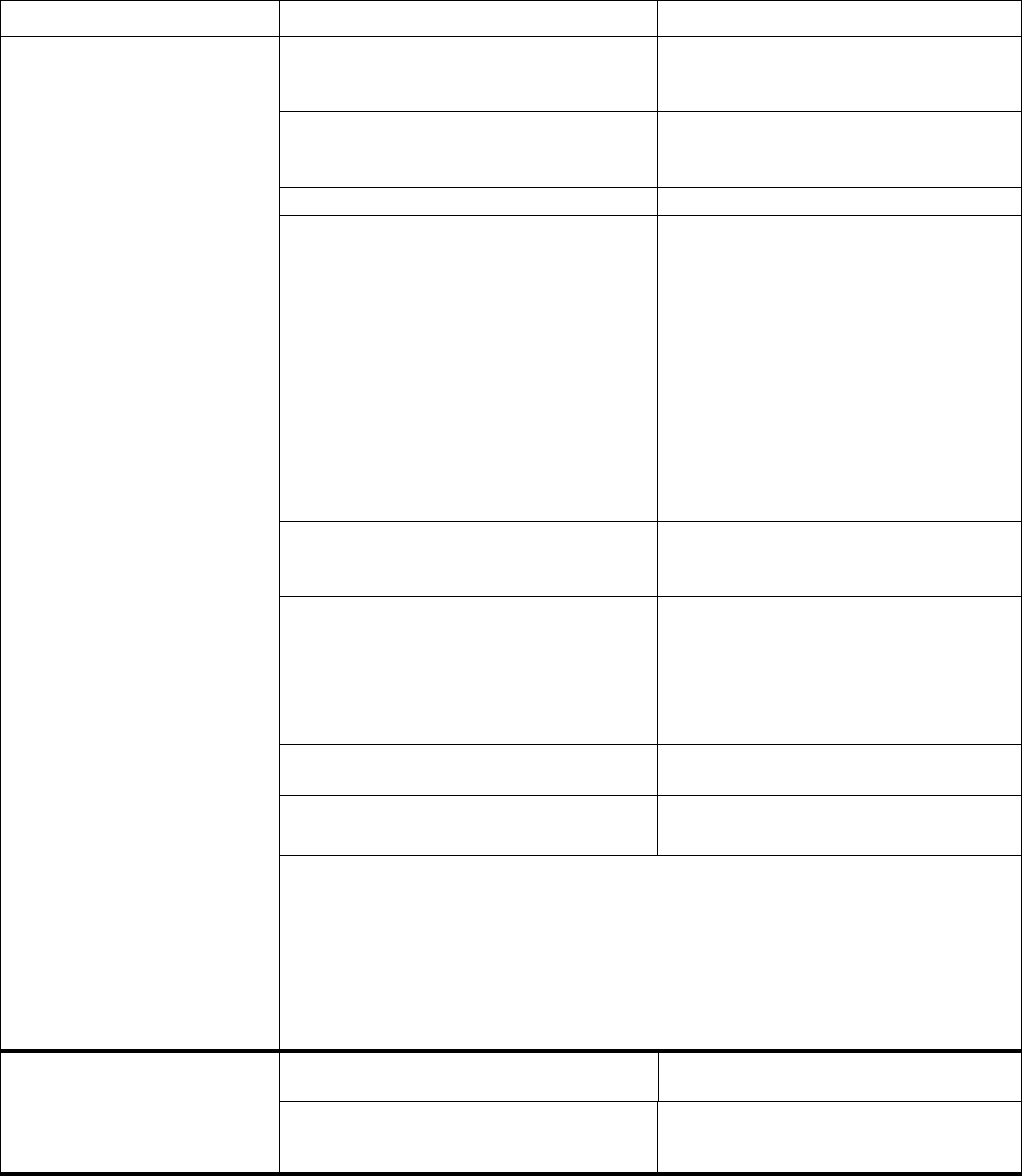
System Errors
58 3A0869J
Alarm Troubleshooting
Alarm and Description Cause Solution
CA
Communication Error
The Display Module is not
communicating with the
Advanced Fluid Control
Module.
The CAN cable between the Display
Module and the Advanced Fluid Control
Module is not connected.
Verify that the cable is correctly con-
nected.
The CAN cable is cut or bent. Verify that the cable has not been cut or
bent at a radius smaller than 1.6 in.
(40 mm).
The cable or connector failed. Replace cable.
Alternator Powered Systems:
Check that the Advance Fluid Control
Module (AFCM), Display Module (DM),
and USB Module have power (green
LED) and are communicating (amber
LED blinking)
1. For any module that does not have
power, disconnect and check the
voltage on the cable produced by
the alternator module (See Alterna-
tor Module Power Output). If the
proper voltage is not detected, trou-
bleshoot the Alternator Module.
2. If the proper voltage is detected,
verify the cable connecting the two
modules is good.
3. If the cable is good, replace the
module.
There may be a short in one of the sole-
noid/meter cables connected to the
AFCM.
Replace the cable (16E890)
The AFCM power supply may be bad, as
indicated by the status LEDs (red, yellow,
green) being off. Verify the power supply
works by disconnecting from the AFCM
and connecting to another module, either
the Display Module or USB Module.
Replace the module.
The DM and the AFCM have different ver-
sions of software installed.
Install the latest software from token kit
16D922 on all modules.
The red LED on the AFCM is on. If on solid, replace module.
If blinking, contact your distributor.
NOTE:
1. If the AFCM loses communication (no flickering amber LED) but then comes
back on the alarm will auto clear and will not log the alarm.
2. If the DM loses communication (no flickering amber LED) but then comes back
on you will have to manually clear the alarm and there will be an alarm log.
3. If the USB module loses communication (no flickering amber LED) but then
comes back on you will not get an alarm.
CAU1
USB Communication Error
The system detected a USB
Module at last power up, but
does not detect it currently.
The module has been removed. Put system in standby and install the
USB Module.
The cable is disconnected or broken. Put system in standby and reconnect or
replace the USB cable.

System Errors
3A0869J 59
EQU2
USB Drive Error
The USB drive has been
inserted when the system is
not in Standby.
Most USB drives do not conform to IS
standards, so it is hazardous to use one
while the system is running.
Put system in Standby. Insert the USB
drive only in a non-hazardous environ-
ment.
SG
Gun Flush Box Error
A gun flush box is enabled,
but the system does not
detect a gun in the gun flush
box during purge, color
change, or auto-dump.
The cover of the gun flush box is not
closed.
For systems with a gun flush box, the gun
is not in the box when purge is active.
Close the cover and clear the alarm.
Purge the system with solvent or fresh
mixed material:
•Solvent Purge - See Purging on
page 34. The system purges until
the preset purge time is complete.
•New Mixed Material Purge - Go to
Mix mode and spray the required
volume to restart the potlife timer.
SPSA or SPSB
Purge Volume Error
Insufficient volume during first
10 seconds of A or B purge
sequence.
Solvent line, valve, or meter is plugged
or stuck.
Check components and clean, repair, or
replace as necessary.
Solvent pump is not working. Check and repair pump. See pump
manual for repair procedures and
replacement parts.
SAD1 or SAD2
Atomizing Air During Purge
Atomizing air to Gun 1 (SAD1)
or Gun 2 (SAD2) is detected
when purge is selected or
during purge sequence.
Atomizing air is stuck on. Replace air flow switch.
Gun is not in Gun Flush Box. Insert the gun into the Gun Flush Box.
Gun Flush Box air shutoff is not working. Test using Troubleshooting Screens.
See page 49. Repair/replace air shutoff
valve as needed.
Air leak in atomizing air line. Inspect air line for kinks, damage, or
loose connections. Repair or replace as
needed.
SFA1, SFA2, SFA3 or SFB1
PreMix Error
In systems with a gun flush
box, insufficient quantity of
resin/color (SFA1, SFA2, or
SFA3) or catalyst (SFB1) is
detected during the 10-second
PreMix sequence.
SHA1, SHA2, SHA3 or SHB1
PreFill Error
Total PreFill sequence volume
is not reached for color
(SHA1, SHA2, or SHA3) or
catalyst (SHB1) during the
5-minute PreFill sequence.
Gun, line, valve, or meter is plugged or
stuck.
Check components and clean, repair, or
replace as necessary.
Feeder pump or solvent pump is not
turned on or is not working.
Check and repair pump. See pump
manual for repair procedures and
replacement parts.
Air lines or solenoids are plumbed incor-
rectly or solenoids are not working.
Check air line path. See System Pneu-
matic Schematic, page 72 or 73. Verify
that solenoid is working.
Flow rate is too low. Increase fluid pressure.
Alarm and Description Cause Solution
NOTICE
To prevent mixed material from
curing in the equipment, do not
shut off power. Follow one of
the solutions at right.

System Errors
60 3A0869J
SM
MixFill Start Error
In systems with a gun flush
box, insufficient volume of
mixed material is detected
during the 10-second mixed fill
sequence.
SN
MixFill Complete Error
Insufficient volume of mixed
material is detected during the
5-minute mixed fill sequence.
Gun Flush Box is not triggering gun. Verify trigger is being pulled. Adjust as
needed.
Line or gun is plugged or restricted. Clean line, tip, or filter.
Flow rate is too low. Increase fluid pressure or decrease
restriction.
Valve is stuck. Clean valve or verify that solenoid is
triggering valve properly.
QPD1 or QPD2
Potlife Error
Potlife has been exceeded for
the mixed material for Gun 1
(QPD1) or Gun 2 (QPD2).
Have not sprayed enough volume to
keep fresh mixed fluid in the mix mani-
fold, hose, and gun.
Purge the mixed material line. See page
34.
Check that hose length and diameter
have been entered correctly. See Con-
figure 2 (Screen 19), page 46.
Spray the required volume to restart the
potlife timer.
Alarm and Description Cause Solution

System Errors
3A0869J 61
R1
Ratio Low Error
The mix ratio is lower than the
set tolerance for an A to B
component volume compari-
son.
There is too much restriction in the
system.
• Check that the system is fully
loaded with material.
• Check that the supply pump’s cycle
rate is set properly.
• Check that the spray tip/nozzle is
properly sized for the flow and
application, and that it is not
clogged.
• Check that the fluid regulator is set
properly.
If the alarm occurs during start up, after
purging, the flow rate was probably too
high.
Restrict gun needle travel to slow down
the initial fluid delivery rate until fluid
hoses are loaded with material.
If the alarm occurred after you were
spraying for some time, the pressures
from the fluid supplies could be unbal-
anced.
Adjust component A and B fluid supply
regulator pressures until they are about
equal. If the pressures are already
about equal, verify that component A
and B dose valves are operating prop-
erly.
Slow actuation of the component A or B
valves. This can be caused by:
Manually operate the Dose Valve A1
(A2, A3) and B solenoid valves by
pressing and releasing solenoid valve
override buttons. Valves should snap
open and shut quickly.
• Air pressure to the valve actuators is
too low.
• Increase air pressure. Air pressure
must be 75-120 psi (0.52-0.84 MPa,
5.2-8.4 bar); 120 psi is recom-
mended.
• Something is restricting the solenoid
or tubing and interrupting valve actu-
ation air.
• There may be dirt or moisture in the
air supply. Filter appropriately.
• Dose Valve A1 (A2, A3) is turned in
too far.
Dose Valve B is open too far.
• Refer to Valve Settings, page 38,
for adjustment guidelines.
• Fluid pressure is high and air pres-
sure is low.
• Adjust air and fluid pressure. See
recommended air pressure above.
• Fluid Seal in valve has failed. • See corresponding valve manual
for repair instructions.
Alarm and Description Cause Solution

System Errors
62 3A0869J
R4
Ratio High Error
The mix ratio is higher than
the set tolerance for an A to B
component volume compari-
son.
There is too little restriction in the system. • Check that the system is fully
loaded with material.
• Check that the supply pump’s cycle
rate is set properly.
• Check that the spray tip/nozzle is
properly sized for the flow and
application, and that it is not worn.
• Check that the fluid regulator is set
properly.
If the alarm occurs during start up, after
purging, the flow rate was probably too
high.
Restrict gun needle travel to slow down
the initial fluid delivery rate until fluid
hoses are loaded with material.
If the alarm occurred after you were
spraying for some time, the pressures
from the fluid supplies could be unbal-
anced.
Adjust component A and B fluid supply
regulator pressures until they are about
equal. If the pressures are already
about equal, verify that component A
and B dose valves are operating prop-
erly.
Slow actuation of the component A or B
valves. This can be caused by:
Manually operate the Dose Valve A1
(A2, A3) and B solenoid valves to check
operation.
• Air pressure to the valve actuators is
too low.
• Increase air pressure. Air pressure
must be 75-120 psi (0.52-0.84 MPa,
5.2-8.4 bar); 120 psi is recom-
mended.
• Something is restricting the solenoid
or tubing and interrupting valve actu-
ation air.
• There may be dirt or moisture in the
air supply. Filter appropriately.
• Dose Valve B is turned in too far.
Dose Valve A1 (A2, A3) is open too
far.
• Refer to Valve Settings, page 38,
for adjustment guidelines.
• Fluid pressure is high and air pres-
sure is low.
• Adjust air and fluid pressure. See
recommended air pressure above.
Alarm and Description Cause Solution

System Errors
3A0869J 63
QDA1, QDA2, QDA3
Overdose A
The A dose has overshot and,
when combined with B, is too
large for the mix manifold
capacity.
QDB1
Overdose B
The B dose has overshot,
forcing an A dose that, when
combined with B, is too large
for the mix manifold capacity.
Valve seal or needle/seat are leaking. Repair the valve.
Flow meter fluctuations caused by pres-
sure pulsations.
Check for pressure pulsations:
1. Close all the manifold valves.
2. Turn on the circulating pumps and
all the booth equipment (such as
fans and conveyors).
3. Check if the ProMix 2KE is reading
any fluid flow.
4. If the ProMix 2KE shows there is
fluid flow and there are no leaks
from the gun or any other seals or
fittings, the flow meters are proba-
bly being affected by pressure pul-
sations.
5. Close the fluid shutoff valve
between the fluid supply system
and the flow meter. The flow indica-
tion should stop.
6. If necessary, install pressure regu-
lators or a surge tank on the fluid
inlets to the ProMix 2KE to reduce
the fluid supply pressure. Contact
your Graco distributor for informa-
tion.
Slow actuation of component A or B
valves.
See Ratio Low Error and Ratio High
Error, pages 61-62.
Running a high mix ratio and a high flow
rate.
It may be necessary to restrict the flow
rate through the component B dose
valve by adjusting its hex nut.
Alarm and Description Cause Solution
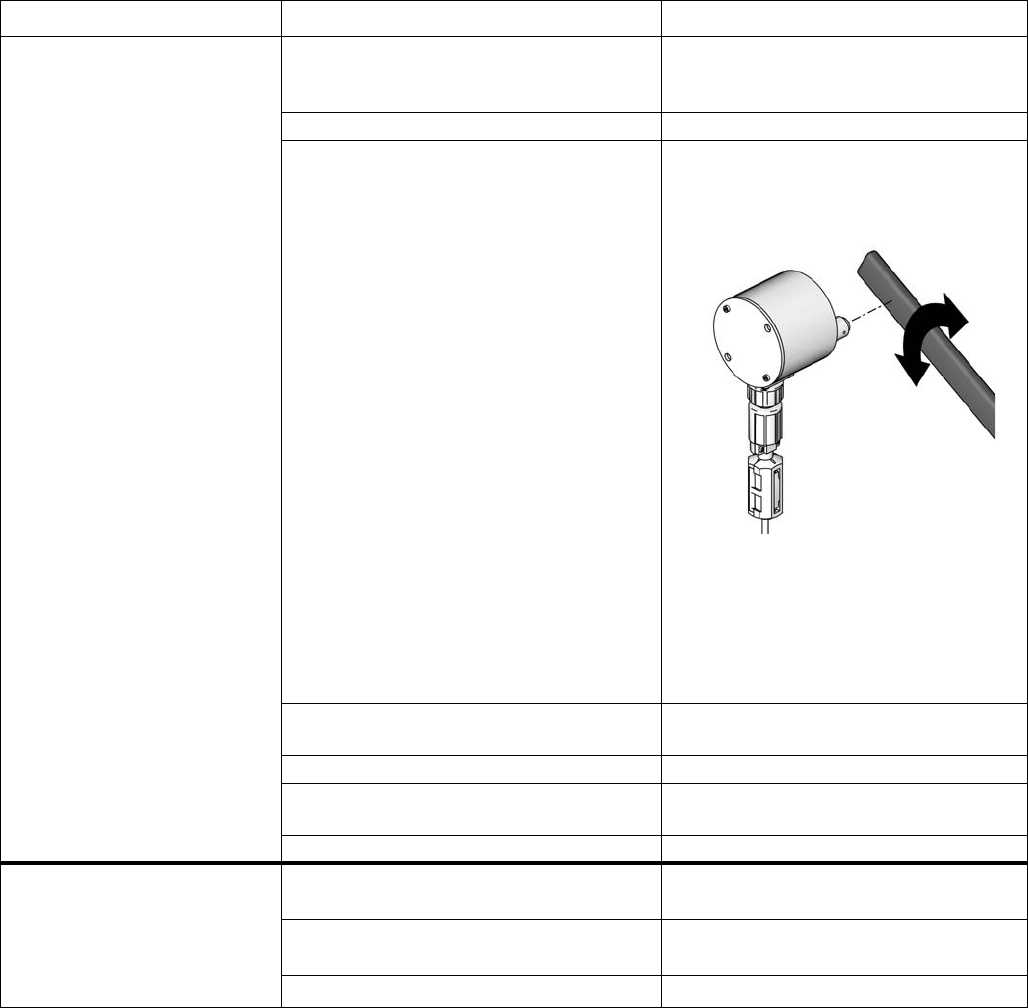
System Errors
64 3A0869J
QTA1, QTA2, QTA3, or
QTB1
Dose Time Error
The gun trigger is active, but
no A pulses (QTA1, QTA2,
QTA3) or no B pulses (QTB1)
are detected during the dose
time selected.
System is in Mix mode and gun is only
partially triggered, allowing air but no fluid
to pass through gun.
Fully trigger the gun.
Fluid flow rate is too low. Increase flow rate.
Flow meter or cable failed or flow meter
clogged.
To check meter sensor operation,
remove meter cap to expose sensor.
Pass a ferrous metal tool in front of the
sensor.
If there is a meter or cable failure, you
will see a large difference between the
amount of fluid dispensed and the flow
meter volume displayed by the Display
Module. Clean or repair meter as nec-
essary.
Slow actuation of component A or B
valves.
See Ratio Low Error and Ratio High
Error, pages 61-62.
The supply pump is not turned on. Turn on the supply pump.
There is an air leak downstream from the
air flow switch.
Check the air lines for leaks and repair.
The air flow switch is stuck open. Clean or replace air flow switch.
QLAX or QLBX
Leak Error
Meter A (QLAX) or Meter B
(QLBX) measures fluid with all
valves closed.
Pressure on circulation system is fluctu-
ating and generating meter pulses.
Replace check valve in front of meter.
Valve is leaking. Replace valve seat, valve, or valve
seal.
Gun, manifold, or line is leaking. Repair leak downstream of meters.
Alarm and Description Cause Solution
TI12792a

Dynamic Dosing Restrictor Selection Graphs
3A0869J 65
Dynamic Dosing Restrictor Selection Graphs
Use the graphs on pages 66- 70 as a guide to determine
the correct restrictor size for your desired flow and mate-
rial viscosity. Table 6 lists the available restrictor sizes.
Example:
Application: air spray system with a 5:1 mix ratio
Fluid Supply: 1:1 pumps at 100 psi (7 bar, 0.7 MPa)
Flow Rate: 300 cc/min at the gun
Select the Restrictor Size: choose either the 0.040
or 0.070 orifice, to ensure that the pressure differen-
tial is not more than 10-20 psi (0.7-1.4 bar,
0.07-0.14 MPa), provided the fluid viscosities are
similar to those tested.
• If the viscosity of component B is lower than the vis-
cosity of the chart used for selection you may need
to use a smaller restrictor or decrease the pressure
differential.
• If the viscosity of component B is higher than the
viscosity of the chart used for selection you may
need to use a larger restrictor or increase the pres-
sure differential.
• In systems using an air-assisted gun, if the fluid
pressure of component A is higher than the compo-
nent A pressure from the charts you may need to
use a larger restrictor or increase the pressure dif-
ferential.
* These restrictors are included in Injection Kit
15U955.
These restrictors are optional sizes, not included in
the Injection Kit.
Table 6: Restrictor Sizes
Size Code Orifice Size Part No.
2* 0.020 15U936
3* 0.030 15U937
4* 0.040 15U938
50.050 15U939
60.060 15U940
7* 0.070 15U941
80.080 16D554
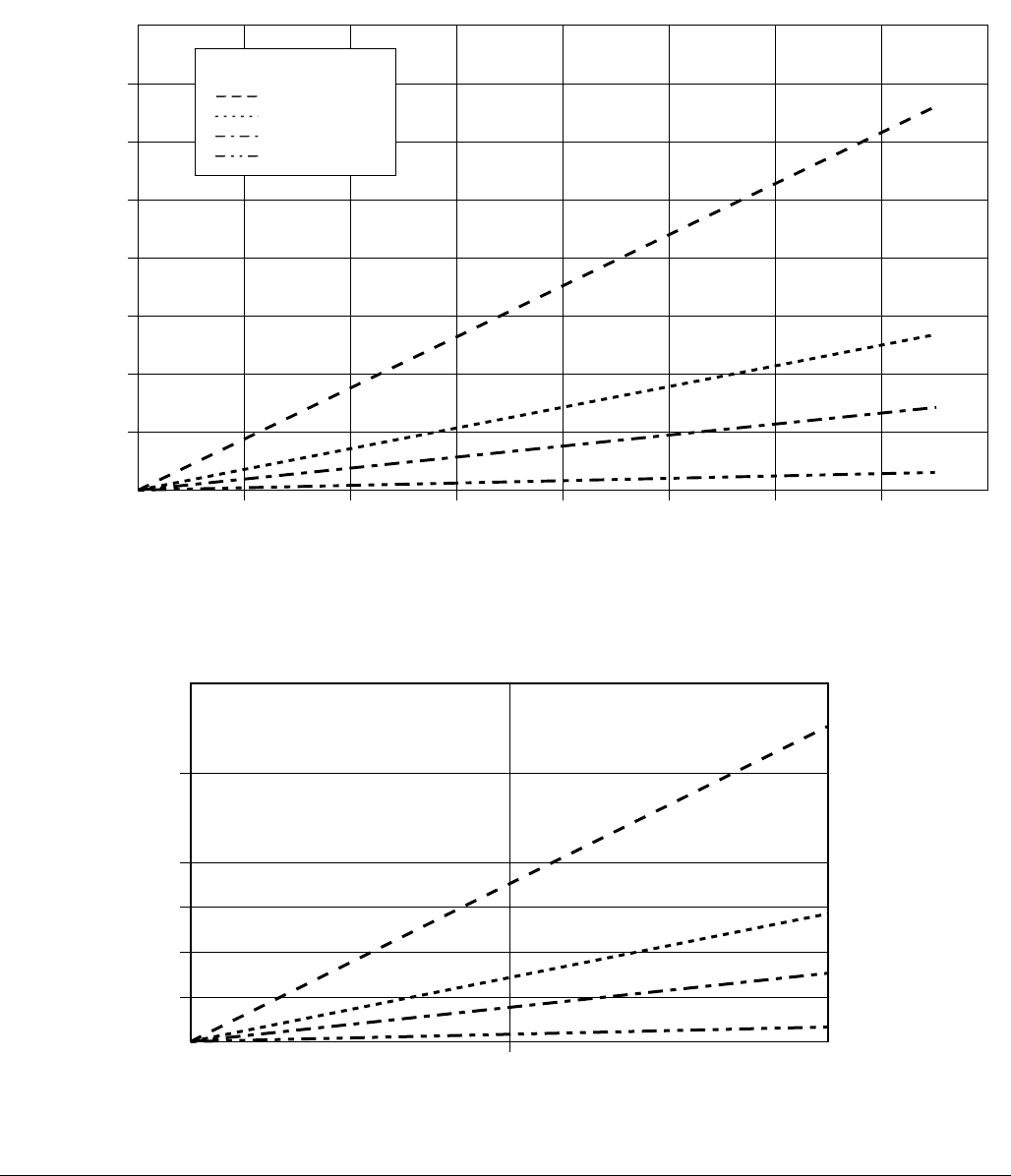
Dynamic Dosing Restrictor Selection Graphs
66 3A0869J
FIG. 58. Dynamic Dosing Performance (1:1 Ratio, 90 centipoise fluid, 100 psi A side pressure)
0
500 1000 1500 2000 30002500 35000
Flow Rate (cc/min)
Differential Pressure between A and B
psi
(bar, MPa)
4000
(276, 27.6)
3500
(241, 24.1)
3000
(207, 20.7)
2500
(172, 17.2)
2000
(138, 13.8)
1500
(103, 10.3)
1000
(69, 6.9)
4000
500
(34, 3.4)
Detail View
500
(34, 3.4)
500
#2 Restrictor
#3 Restrictor
#4 Restrictor
#7 Restrictor
Key
1000
250
(17, 1.7)
125
(8.6, 0.86)
750
(52, 5.2)
1000
(69, 6.9)
375
(26 2.6)
0
0
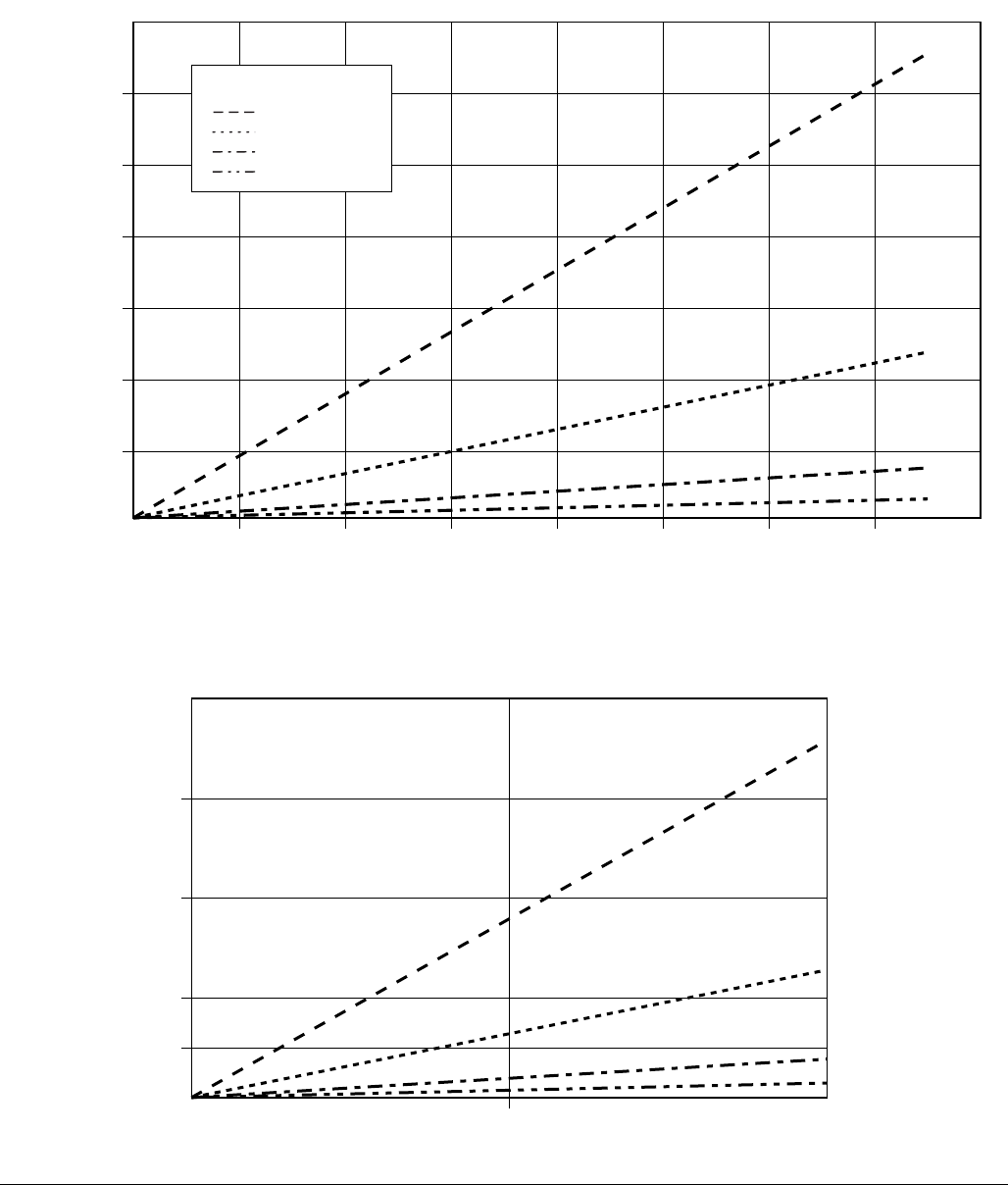
Dynamic Dosing Restrictor Selection Graphs
3A0869J 67
FIG. 59. Dynamic Dosing Performance (5:1 Ratio, 90 centipoise fluid, 100 psi A side pressure)
0
500 1000 1500 2000 30002500 35000
Flow Rate (cc/min)
Differential Pressure between A and B
psi
(bar, MPa)
1400
(97, 9.7)
1200
(83, 8.3)
1000
(69, 6.9)
800
(55, 5.5)
600
(41, 4.1)
400
(28, 2.8)
4000
200
14, 1.4)
#2 Restrictor
#3 Restrictor
#4 Restrictor
#7 Restrictor
Key
Detail View
200
(14, 1.4)
500 1000
100
(7, 0.7)
50
(3.4, 0.34)
300
(21, 2.1)
400
(28, 2.8)
0
0
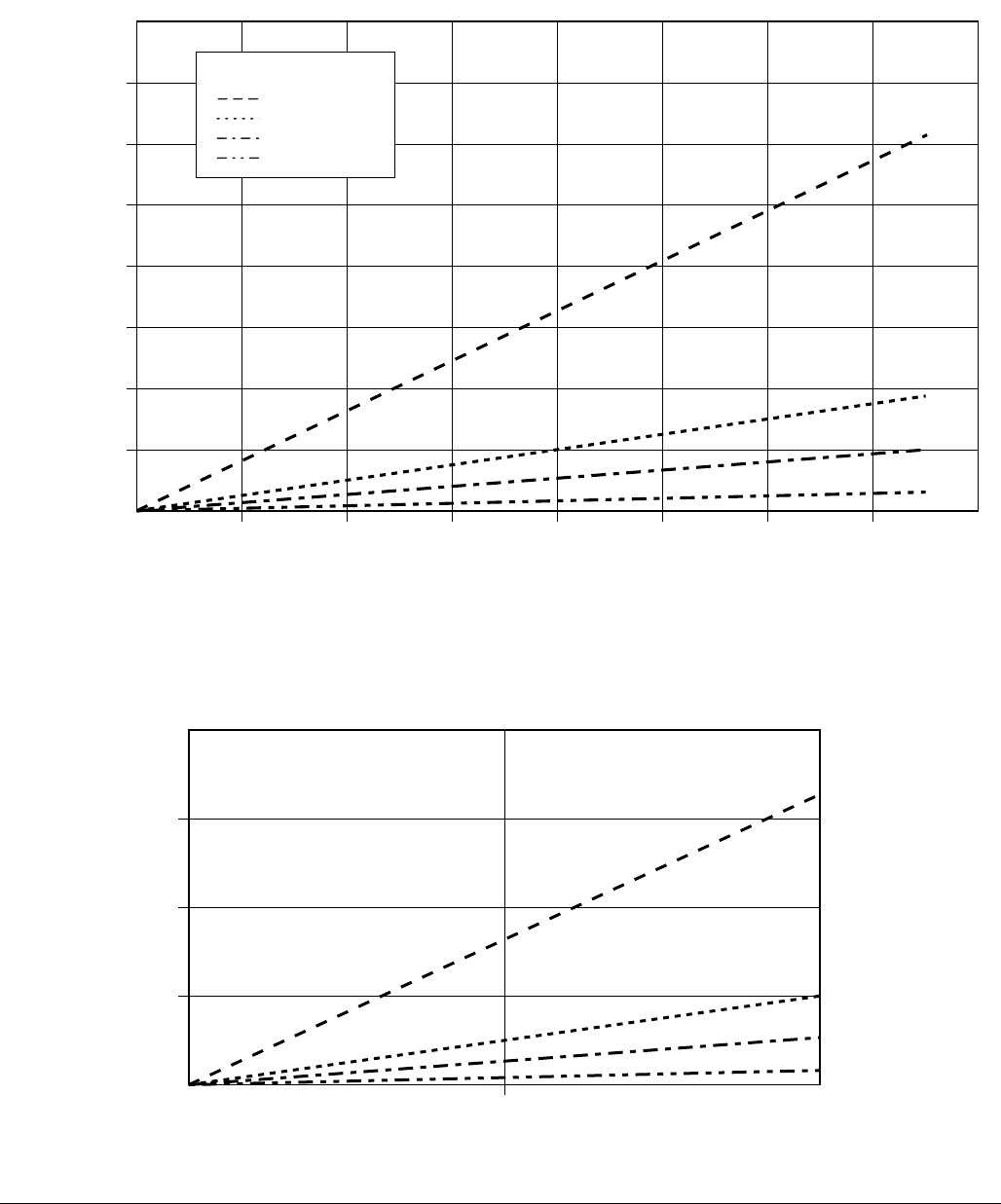
Dynamic Dosing Restrictor Selection Graphs
68 3A0869J
FIG. 60. Dynamic Dosing Performance (10:1 Ratio, 90 centipoise fluid, 100 psi A side pressure)
0
500 1000 1500 2000 30002500 35000
Flow Rate (cc/min)
Differential Pressure between A and B
psi
(bar, MPa)
800
(55, 5.5)
700
(48, 4.8)
600
(41, 4.1)
500
(34, 3.4)
400
(28, 2.8)
300
(21, 2.1)
200
(14, 1.4)
4000
100
(7, 0.7)
#2 Restrictor
#3 Restrictor
#4 Restrictor
#7 Restrictor
Key
Detail View
200
(14, 1.4)
500 1000
100
(7, 0.7)
50
(3.4, 0.34)
150
(10, 1.0)
0
0
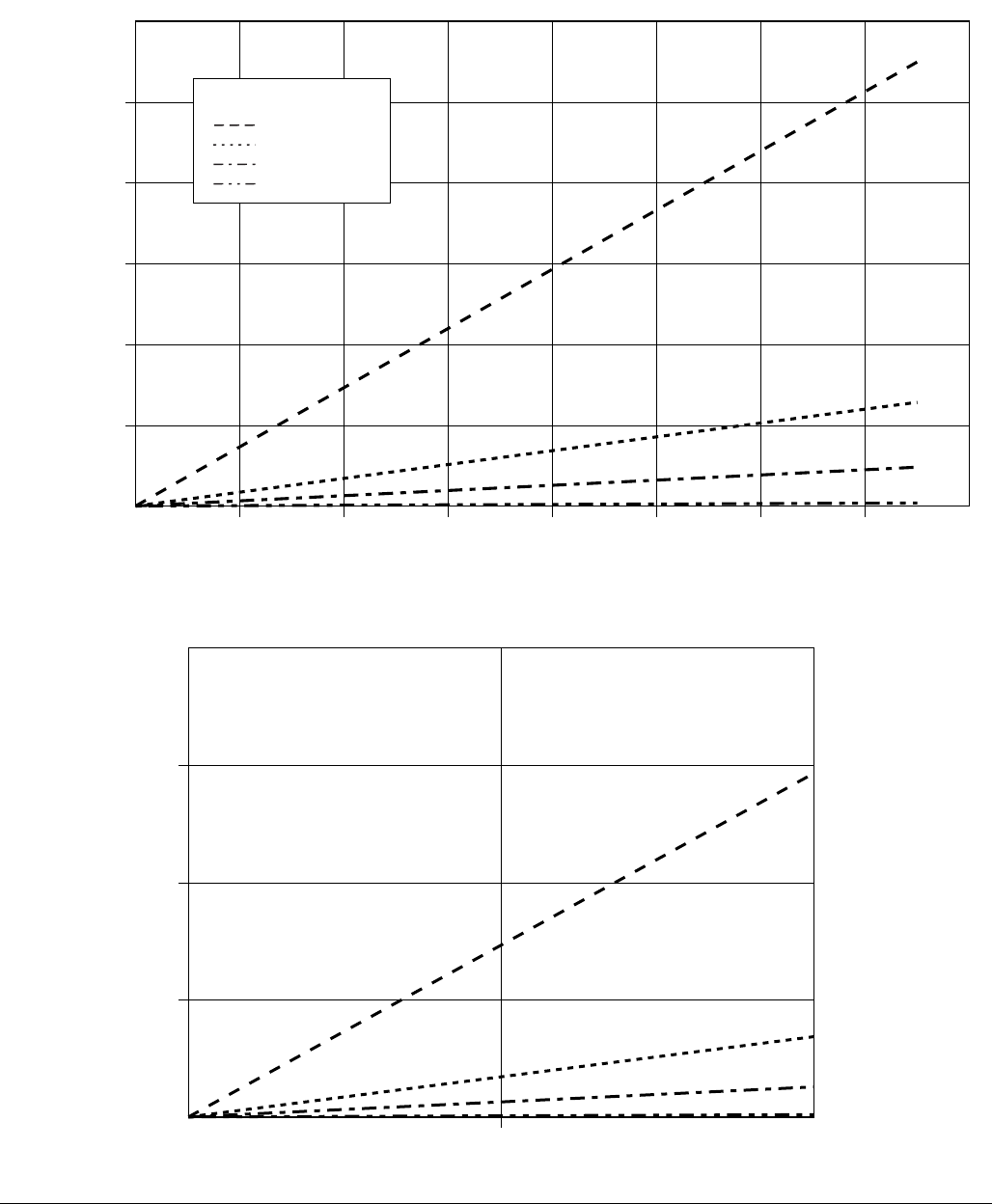
Dynamic Dosing Restrictor Selection Graphs
3A0869J 69
FIG. 61. Dynamic Dosing Performance (20:1 Ratio, 90 centipoise fluid, 100 psi A side pressure)
0
500 1000 1500 2000 30002500 35000
Flow Rate (cc/min)
Differential Pressure between A and B
psi
(bar, MPa)
300
(21, 2.1)
250
(17.2, 1.72)
200
(14, 1.4)
150
10.3, 1.03)
100
(7.0, 0.7)
4000
50
(3.4, 0.34)
#2 Restrictor
#3 Restrictor
#4 Restrictor
#7 Restrictor
Key
Detail View
75
(5.2, 0.52)
500 1000
100
(7, 0.7)
50
(3.4, 0.34)
25
(1.7, 0.17)
0
0
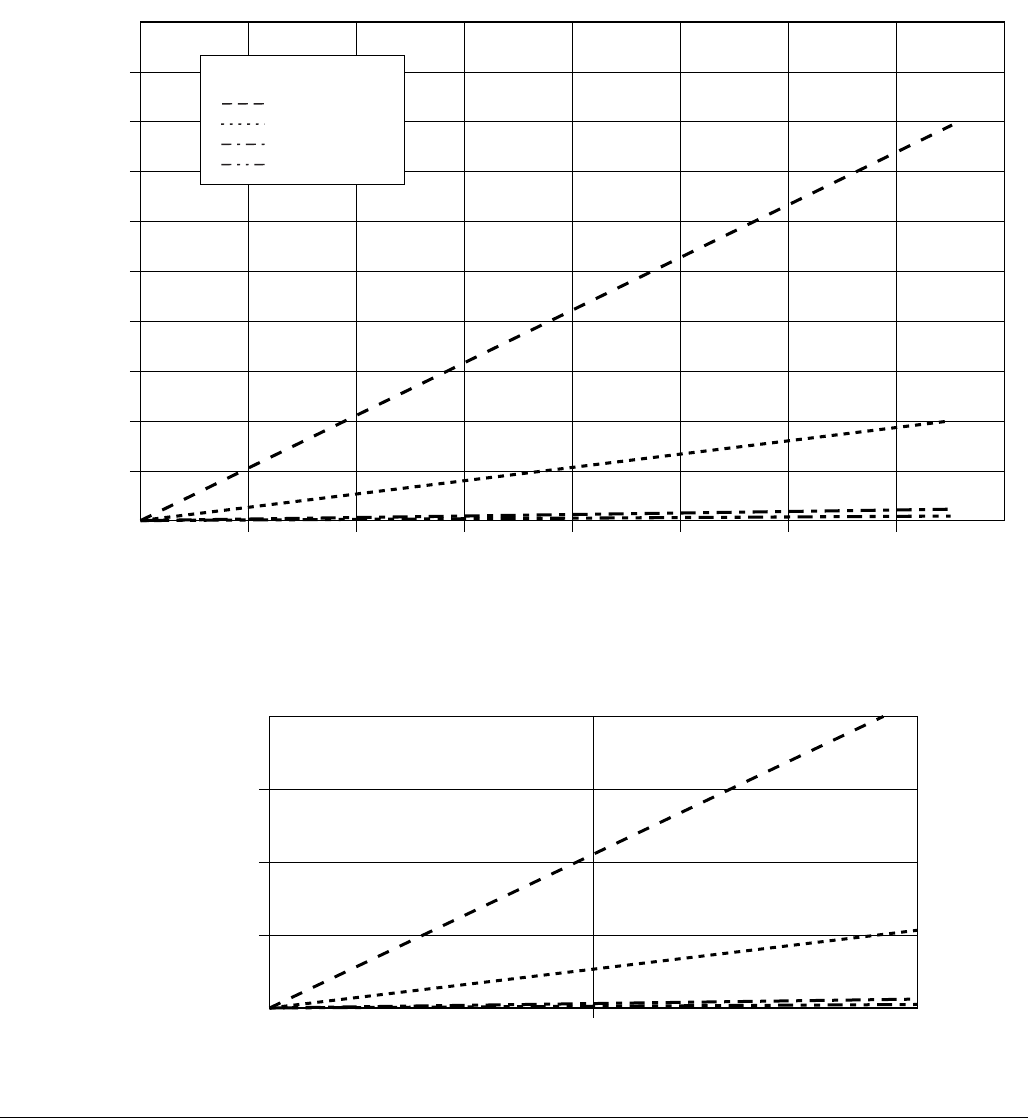
Dynamic Dosing Restrictor Selection Graphs
70 3A0869J
FIG. 62. Dynamic Dosing Performance (30:1 Ratio, 90 centipoise fluid, 100 psi A side pressure)
0
500 1000 1500 2000 30002500 35000
Flow Rate (cc/min)
Differential Pressure between A and B
psi
(bar, MPa)
160
(11, 1.1)
140
9.7, 0.9)
120
8.3, 0.8)
100
(7, 0.7)
80
(5.5, 0.55)
60
(4.1, 0.41)
40
(2.8, 0.28)
4000
20
(1.4, 0.14)
180
(12.4, 1.2
200
(14, 1.4
#2 Restrictor
#3 Restrictor
#4 Restrictor
#7 Restrictor
Key
Detail View
30
(2.1, 0.21)
500 1000
40
(2.8, 0.28)
20
(1.4, 0.14)
10
(0.7, 0.07)
0
0

Dynamic Dosing Restrictor Selection Graphs
3A0869J 71
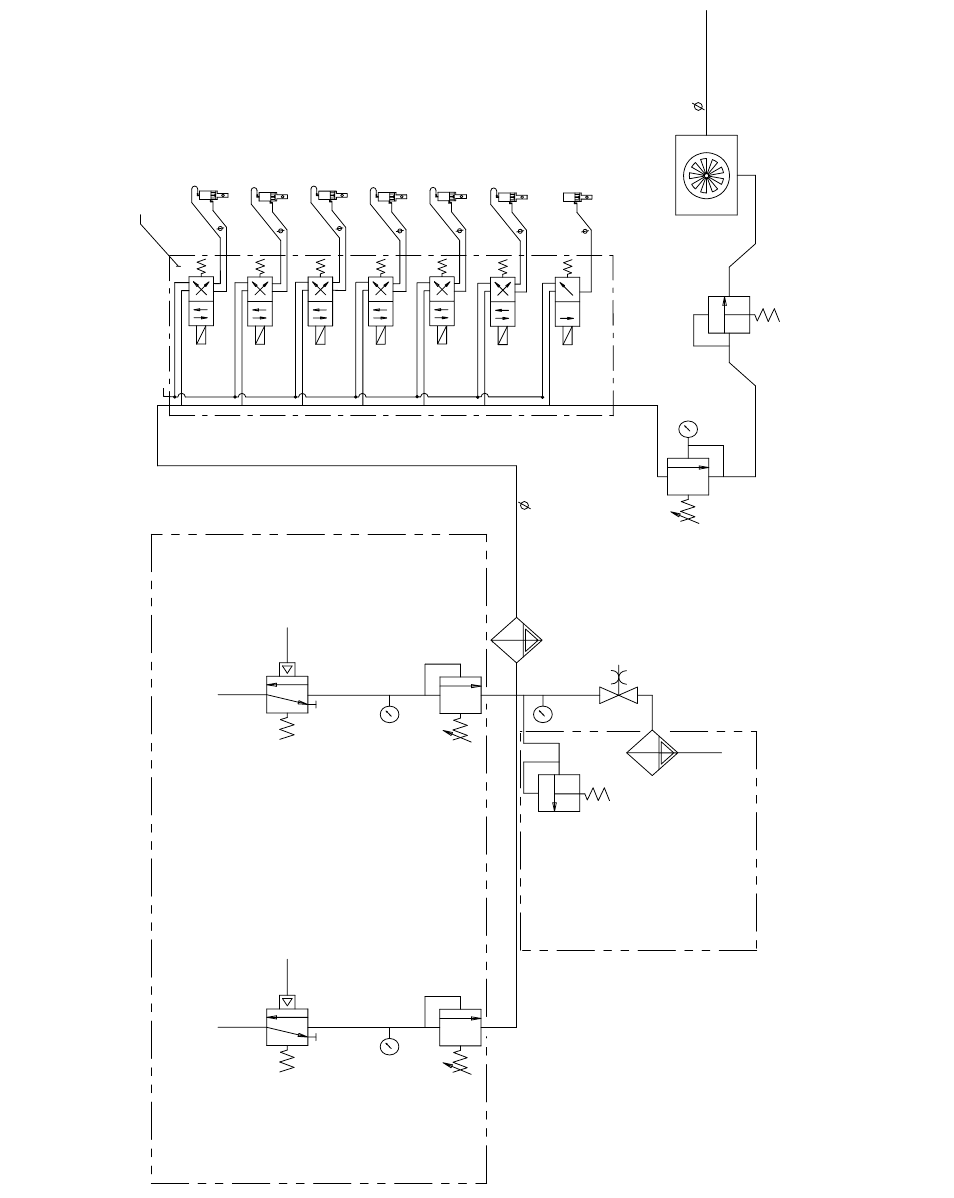
Schematics
72 3A0869J
Schematics
Hazardous Location System Pneumatic Schematic
MERKUR
MOTOR A
4-WAY SOLENOID
12 VDC
DOSE A2
VALV E
(OPTIONAL)
4-WAY SOLENOID
12 VDC
MANIFOLD
AIR EXHAUST MUFFLER
CLOSE
OPEN
5/32 TUBE
DOSE A3
VALV E
(OPTIONAL)
4-WAY SOLENOID
12 VDC
CLOSE
OPEN
5/32 TUBE
4-WAY SOLENOID
12 VDC
AB
AB
AB
AB
PURGE A
VALV E
CLOSE
OPEN
5/32 TUBE
DOSE A1
VALV E
CLOSE
OPEN
5/32 TUBE
DOSE B
VALV E
4-WAY SOLENOID
12 VDC
CLOSE
OPEN
5/32 TUBE
AB
PURGE B
VALV E
4-WAY SOLENOID
12 VDC
CLOSE
OPEN
5/32 TUBE
AB
GFB #1
VALV E
(OPTIONAL)
3-WAY SOLENOID
12 VDC
OPEN
5/32 TUBE
A
PUMP A PILOT
GAUGE
AIR REGULATOR
MERKUR
MOTOR B
PUMP B PILOT
GAUGE
AIR REGULATOR
GAUGE
3/4" AIR FILTER
AUTO DRAIN
20 MICRON
AIR
INPUT
3/4" BALL VALVE
BLEED TYPE
3/8" AIR FILTER
AUTO DRAIN
5 MICRON
100 PSI (.7 MPa, 7 BAR)
ALTERNATOR
AIR REG.
18 PSI (.12 MPa,
1.2 BAR)
RELIEF VALVE
20 PSI (.12 MPa,
1.2 BAR)
AIR SUPPLY
3/8" TUBE
TO MANIFOLD
TURBINE/POWER SUPPLY
1/2" O.D. x 60" LONG TUBE
PUMPS SYSTEMS ONLY
RELIEF VALVE
85/110 PSI (.58/.76
MPa, 5.8/7.6 BAR)
PUMPS SYSTEMS ONLY
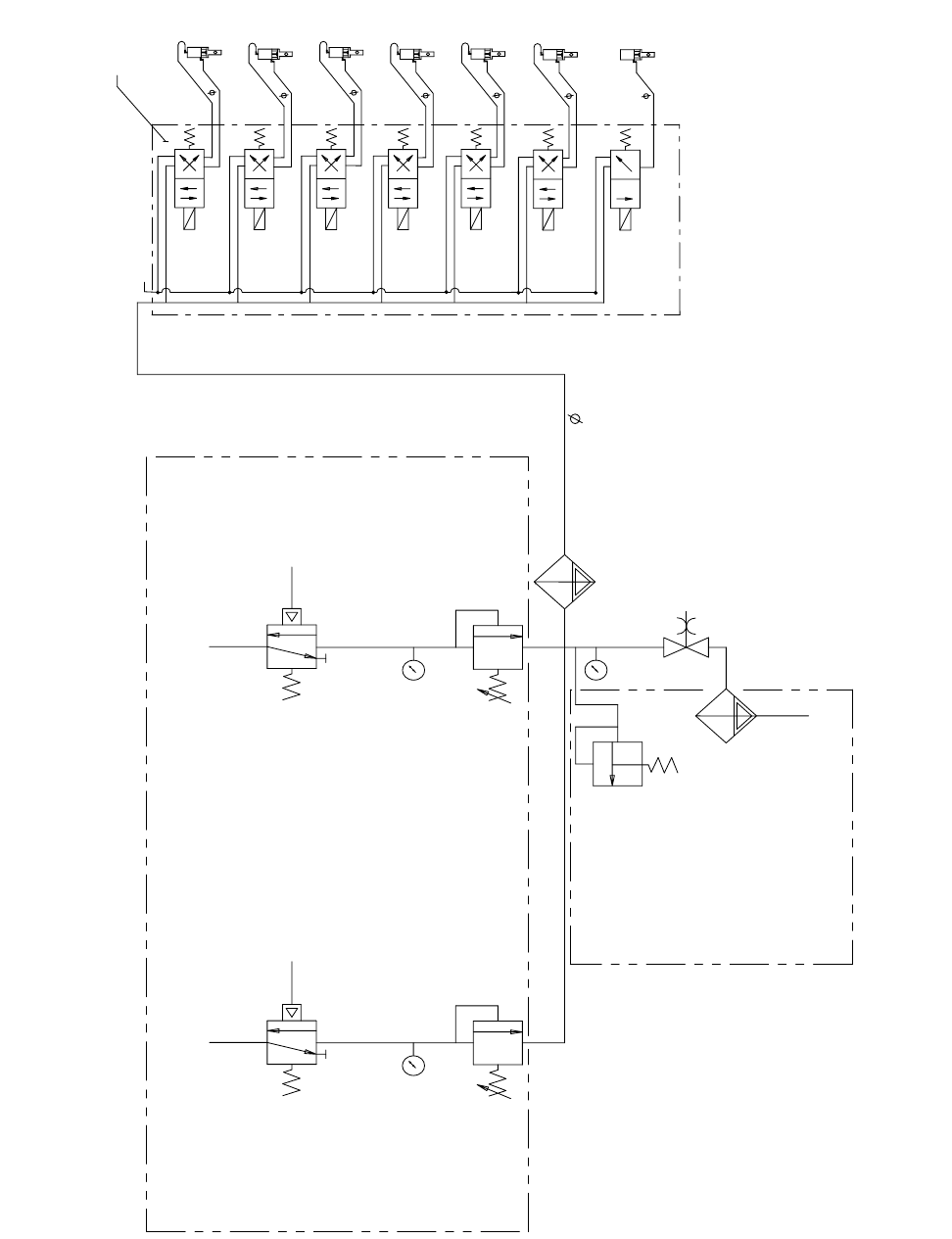
Schematics
3A0869J 73
Non-Hazardous Location Pneumatic Schematic
MANIFOLD
MERKUR
MOTOR A
PUMP A PILOT
GAUGE
AIR REGULATOR
MERKUR
MOTOR B
PUMP B PILOT
GAUGE
AIR REGULATOR
RELIEF VALVE
85/110 PSI (.58/.76
MPa, 5.8/7.6 BAR)
GAUGE
3/4" AIR FILTER
AUTO DRAIN
20 MICRON
AIR
INPUT
3/4" BALL VALVE
BLEED TYPE
3/8" AIR REG.
AUTO DRAIN
5 MICRON
100 PSI (.7 MPa, 7 BAR)
3/8" TUBE
TO MANIFOLD
4-WAY SOLENOID
24 VDC
DOSE A2
VALV E
(OPTIONAL)
4-WAY SOLENOID
24 VDC
AIR EXHAUST MUFFLER
CLOSE
OPEN
5/32 TUBE
DOSE A3
VALV E
(OPTIONAL)
4-WAY SOLENOID
24 VDC
CLOSE
OPEN
5/32 TUBE
4-WAY SOLENOID
24 VDC
AB
AB
AB
AB
PURGE A
VALV E
CLOSE
OPEN
5/32 TUBE
DOSE A1
VALV E
CLOSE
OPEN
5/32 TUBE
DOSE B
VALV E
4-WAY SOLENOID
24 VDC
CLOSE
OPEN
5/32 TUBE
AB
PURGE B
VALV E
4-WAY SOLENOID
24 VDC
CLOSE
OPEN
5/32 TUBE
AB
GFB #1
VALV E
(OPTIONAL)
3-WAY SOLENOID
24 VDC
OPEN
5/32 TUBE
A
PUMPS SYSTEMS ONLY
PUMPS SYSTEMS ONLY
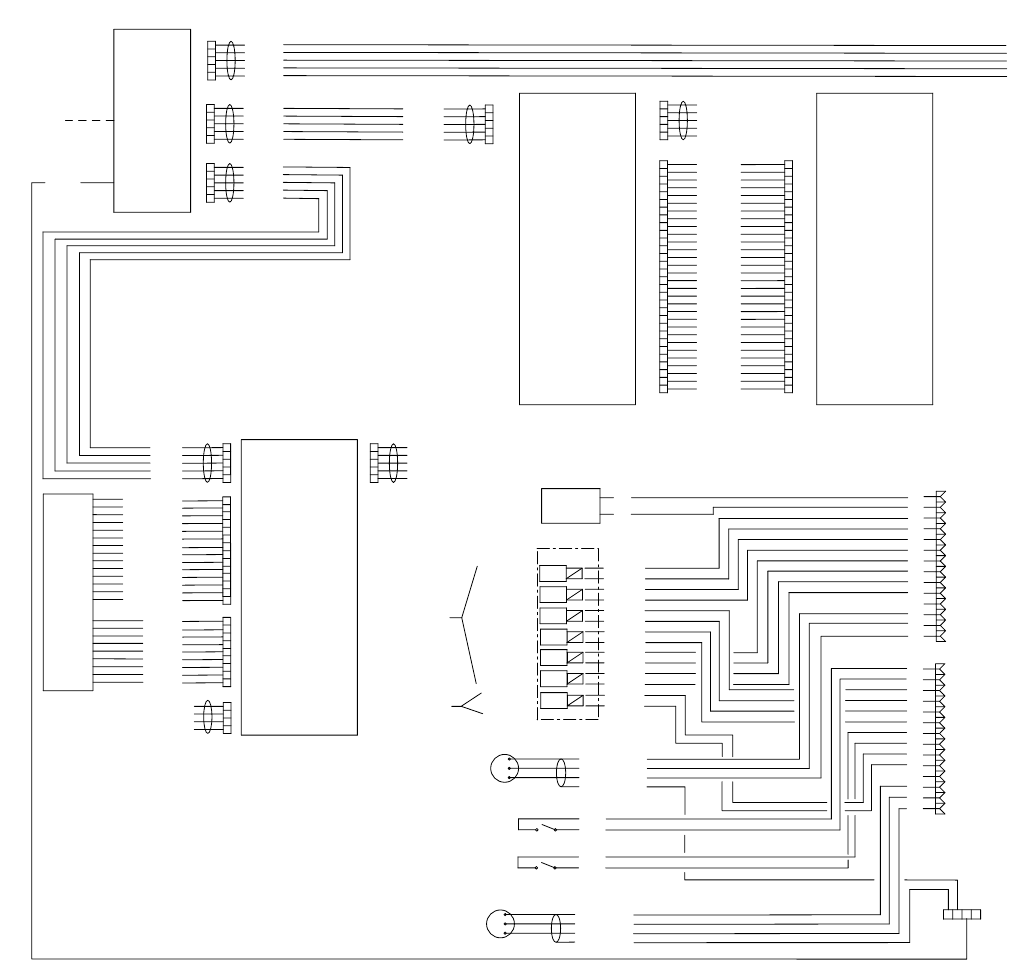
Schematics
74 3A0869J
Hazardous Location Electrical Schematic
USER INTERFACE
MODULE
PWR (RED)
COM (BLACK)
SIG (WHITE)
SHIELD/GRN
FLOW METER A
FLOW METER B
3X CABLE
BLACK
RED
BLACK
RED
BLACK
RED
BLACK
RED
BLACK
RED
BLACK
RED
BLACK
RED
PURGE A
DOSE A1
PURGE B
DOSE B
DOSE A2
DOSE A3
GFB #1
MANIFOLD
12 VDC
4-WAY
SOLENOID
12 VDC
3-WAY
SOLENOID
ALARM
SIG
COM
GFB 1 PRESSURE SWITCH/
AIR FLOW SWITCH 2
+
-
GROUND
TERMINAL
1
2
3
4
5
6
7
8
9
10
11
12
13
14
MEMBRANE
18 PSI
1.5 FCM
(MIN)
ALTE RNATOR
MODULE
1
2
3
4
5
1
2
3
4
5
1
2
3
4
5
CAN_L
+V_CAN
V_CAN_RTN
CAN_H
SHIELD
CAN_L
+V_CAN
V_CAN_RTN
CAN_H
SHIELD
CAN_L
+V_CAN
V_CAN_RTN
CAN_H
SHIELD
CAN_L
+V_CAN
V_CAN_RTN
CAN_H
SHIELD
J1
J2
J3
P3 P4
USB BASE
MODULE
1
2
3
4
5
1
2
3
4
5
P1J2
USB COMPONENT
MODULE
CAN_L
+V_CAN
V_CAN_RTN
CAN_H
SHIELD
J6 J7
1
2
3
4
5
1
2
3
4
5
UNUSED
UNUSED
UNUSED
UNUSED
UNUSED
J2
1
2
3
4
UNUSED
UNUSED
UNUSED
UNUSED
1
2
3
4
5
6
7
8
9
10
11
12
13
14
J1
1
2
3
4
5
6
7
8
9
J4
BUTTON_DOWNARW
BUTTON_UPARW
BUTTON_CLEAR
BUTTON_STOP
BUTTON_FUNC4
BUTTON_FUNC1
BUTTON_START
BUTTON_RIGHTARW
BUTTON_LEFTARW
BUTTON_ENTER
BUTTON_FUNC3
BUTTON_FUNC2
COM(BUTTONS)
SHIELD
LED_YELLOW
LED_BLUEA
LED_GREEN
UNUSED
LED_BLUEB
UNUSED
LED_RED
UNUSED
COM(LEDS)
1
2
3
4
5
6
7
8
9
10
11
12
13
14
15
16
17
18
19
20
21
22
23
24
25
26
27
28
29
30
1
2
3
4
5
6
7
8
9
10
11
12
13
14
15
16
17
18
19
20
21
22
23
24
25
26
27
28
29
30
V CAN
V CAN
V CAN
V CAN RTN
V CAN RTN
CHASSIS GND
CHASSIS GND
V CAN RTN
V CAN RTN
BIT 3
BIT 2
GND
SCK
SO
SI
V CAN
V CAN
V CAN
V CAN RTN
V CAN RTN
CAN L
CAN H
V CAN RTN
V CAN RTN
BIT 0
BIT 1
VTOKEN
LOFO
/HOLD
/CS
UNUSED
UNUSED
UNUSED
UNUSED
UNUSED
PWR (RED)
COM (BLACK)
SIG (WHITE)
SHIELD/GRN
3X CABLE
SIG
COM
AIR FLOW SWITCH 1
1
2
3
4
5
6
7
8
9
10
11
12
13
14
GRND
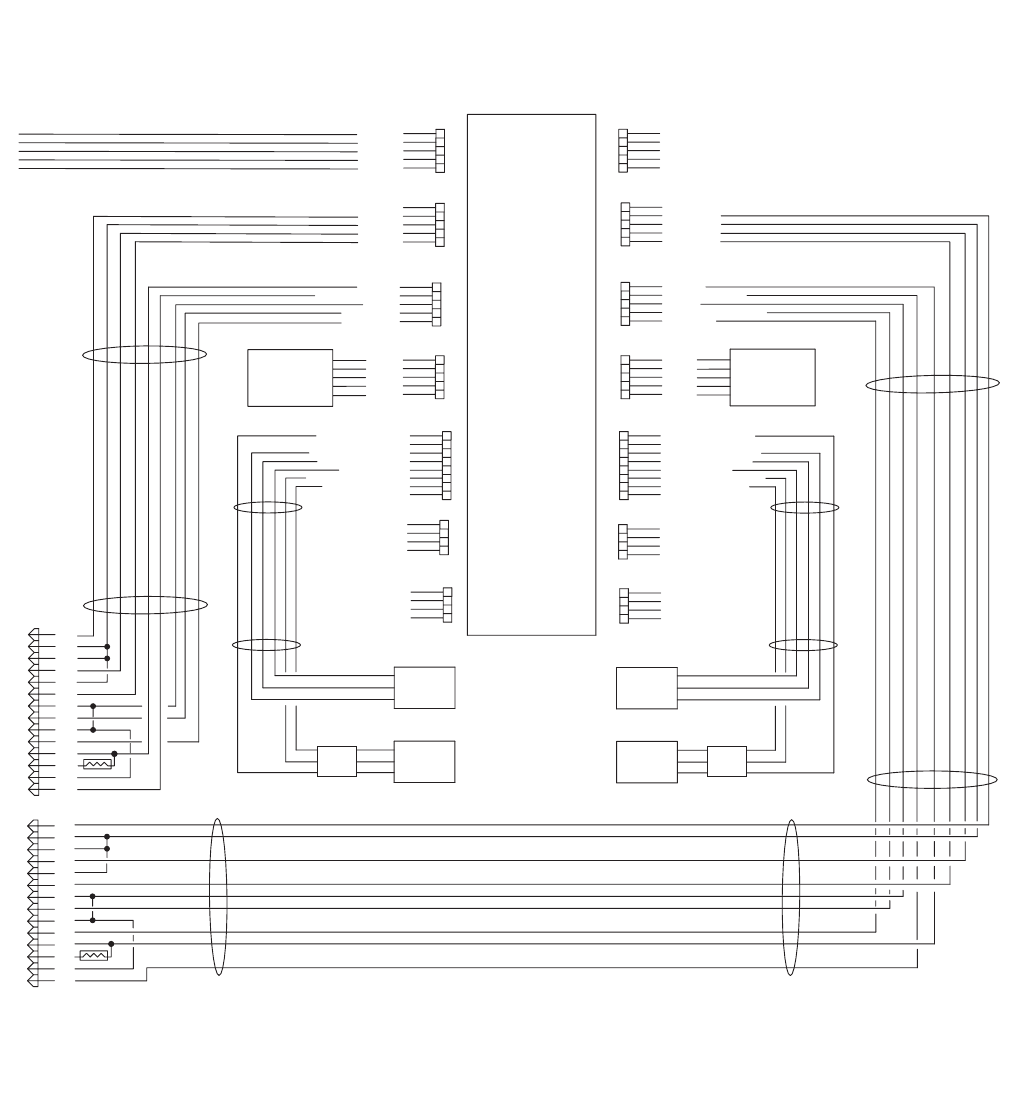
Schematics
3A0869J 75
Hazardous Location Electrical Schematic (continued)
UNUSED
ALARM (+)
COMMON
PURGE A (+)
DOSE A1 (+)
+12 VDC
FLOW METER A SIG
COMMON
DOSE A2 (+)
DOSE A3 (+)
+5 VDC
AI (-)
COMMON
AI (+)
SHIELD
LINEAR SENS "A" SIG.
UNUSED
REED SWITCH_BTM (DOWN)
REED SWITCH_TOP (UP)
REED SWITCH_COM
LINEAR SENS "A" +5 VDC
LINEAR SENS "A" COM
UNUSED
UNUSED
UNUSED
UNUSED
UNUSED
UNUSED
UNUSED
UNUSED
UNUSED
UNUSED
UNUSED
UNUSED
UNUSED
UNUSED
UNUSED
UNUSED
UNUSED
UNUSED
AFS #1 (+)
COMMON
PURGE B (+)
DOSE B (+)
+12 VDC
FLOW METER B SIG
COMMON
GFB INPUT/AFS #2 (+)
GFB OUTPUT
+5 VDC
AI (-)
COMMON
AI (+)
SHIELD
LINEAR SENS "B" SIG.
UNUSED
REED SWITCH_BTM (DOWN)
REED SWITCH_TOP (UP)
REED SWITCH_COM
LINEAR SENS "B" +5 VDC
LINEAR SENS "B" COM
UNUSED
FLUID
CONTROL
MODULE
1
2
3
4
5
6
7
8
9
10
11
12
13
14
"A" PRESSURE
TRANSDUCER
"B" REED
SWITCH
"B" LINEAR
SENSOR
"A" REED
SWITCH
"A" LINEAR
SENSOR
"B" PRESSURE
TRANSDUCER
CAN_L
+V_CAN
V_CAN_RTN
CAN_H
SHIELD
J8
1
2
3
4
5
J4
1
2
3
4
5
J12
1
2
3
4
5
J2
1
2
3
4
5
J14
1
2
3
4
5
6
7
8
J25
1
2
3
4
J25
1
2
3
4
1
2
3
4
5
J7
1
2
3
4
5
J5
UNUSED
UNUSED
UNUSED
UNUSED
UNUSED
1
2
3
4
5
J13
1
2
3
4
5
J3
J15
1
2
3
4
5
6
7
8
1
2
3
4
J11
1
2
3
4
J11
SOLENOID/METER CABLE HARNESS
SOLENOID/METER CABLE HARNESS
LINEAR SENSOR/
REED SWITCH CABLE
LINEAR SENSOR/
REED SWITCH CABLE
1
2
3
4
5
6
7
8
9
10
11
12
13
14
FERRITE FERRITE
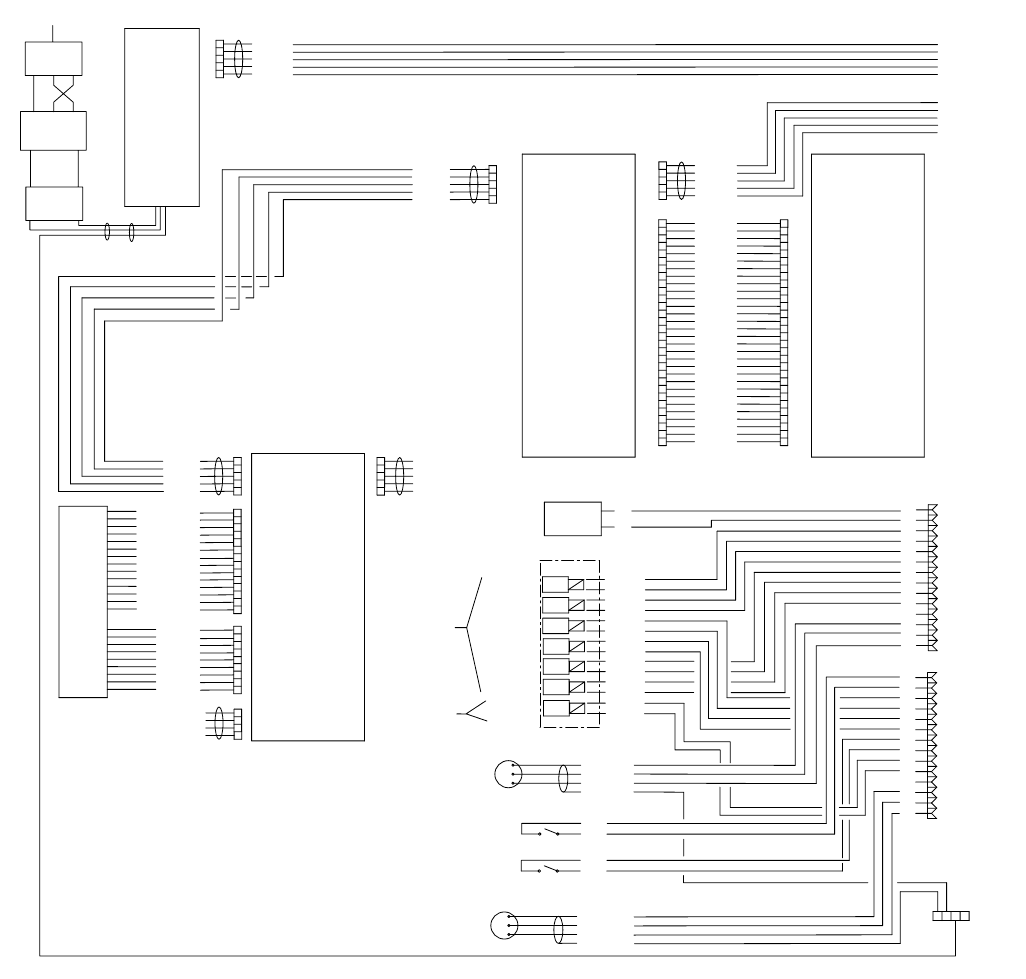
Schematics
76 3A0869J
Non-Hazardous Location Electrical Schematic
USER INTERFACE
MODULE
MEMBRANE
POWER
SUPPLY
1
2
3
4
5
CAN_L
+V_CAN
V_CAN_RTN
CAN_H
SHIELD
CAN_L
+V_CAN
V_CAN_RTN
CAN_H
SHIELD
J1
P3 P4
USB BASE
MODULE
1
2
3
4
5
1
2
3
4
5
CAN_L
+V_CAN
V_CAN_RTN
CAN_H
SHIELD
P1 J2
USB COMPONENT
MODULE
CAN_L
+V_CAN
V_CAN_RTN
CAN_H
SHIELD
J6 J7
1
2
3
4
5
1
2
3
4
5
UNUSED
UNUSED
UNUSED
UNUSED
UNUSED
J2
1
2
3
4
UNUSED
UNUSED
UNUSED
UNUSED
1
2
3
4
5
6
7
8
9
10
11
12
13
14
J1
1
2
3
4
5
6
7
8
9
J4
BUTTON_DOWNARW
BUTTON_UPARW
BUTTON_CLEAR
BUTTON_STOP
BUTTON_FUNC4
BUTTON_FUNC1
BUTTON_START
BUTTON_RIGHTARW
BUTTON_LEFTARW
BUTTON_ENTER
BUTTON_FUNC3
BUTTON_FUNC2
COM(BUTTONS)
SHIELD
LED_YELLOW
LED_BLUEA
LED_GREEN
UNUSED
LED_BLUEB
UNUSED
LED_RED
UNUSED
COM(LEDS)
1
2
3
4
5
6
7
8
9
10
11
12
13
14
15
16
17
18
19
20
21
22
23
24
25
26
27
28
29
30
1
2
3
4
5
6
7
8
9
10
11
12
13
14
15
16
17
18
19
20
21
22
23
24
25
26
27
28
29
30
V CAN
V CAN
V CAN
V CAN RTN
V CAN RTN
CHASSIS GND
CHASSIS GND
V CAN RTN
V CAN RTN
BIT 3
BIT 2
GND
SCK
SO
SI
V CAN
V CAN
V CAN
V CAN RTN
V CAN RTN
CAN L
CAN H
V CAN RTN
V CAN RTN
BIT 0
BIT 1
VTOKEN
LOFO
/HOLD
/CS
PWR (RED)
COM (BLACK)
SIG (WHITE)
SHIELD/GRN
FLOW METER A
FLOW METER B
3X CABLE
BLACK
RED
BLACK
RED
BLACK
RED
BLACK
RED
BLACK
RED
BLACK
RED
BLACK
RED
PURGE A
DOSE A1
PURGE B
DOSE B
DOSE A2
DOSE A3
GFB #1
MANIFOLD
24 VDC
4-WAY
SOLENOID
24 VDC
3-WAY
SOLENOID
ALARM
SIG
COM
GFB 1 PRESSURE SWITCH/
AIR FLOW SWITCH 2
+
-
GROUND
TERMINAL
1
2
3
4
5
6
7
8
9
10
11
12
13
14
PWR (RED)
COM (BLACK)
SIG (WHITE)
SHIELD/GRN
3X CABLE
SIG
COM
AIR FLOW SWITCH 1
1
2
3
4
5
6
7
8
9
10
11
12
13
14
LINE POWER
FILTER
TERMINAL
BLOCK
SWITCH
ROCKER
1A
1
2A
2
L N GRND
L GRND N
L N
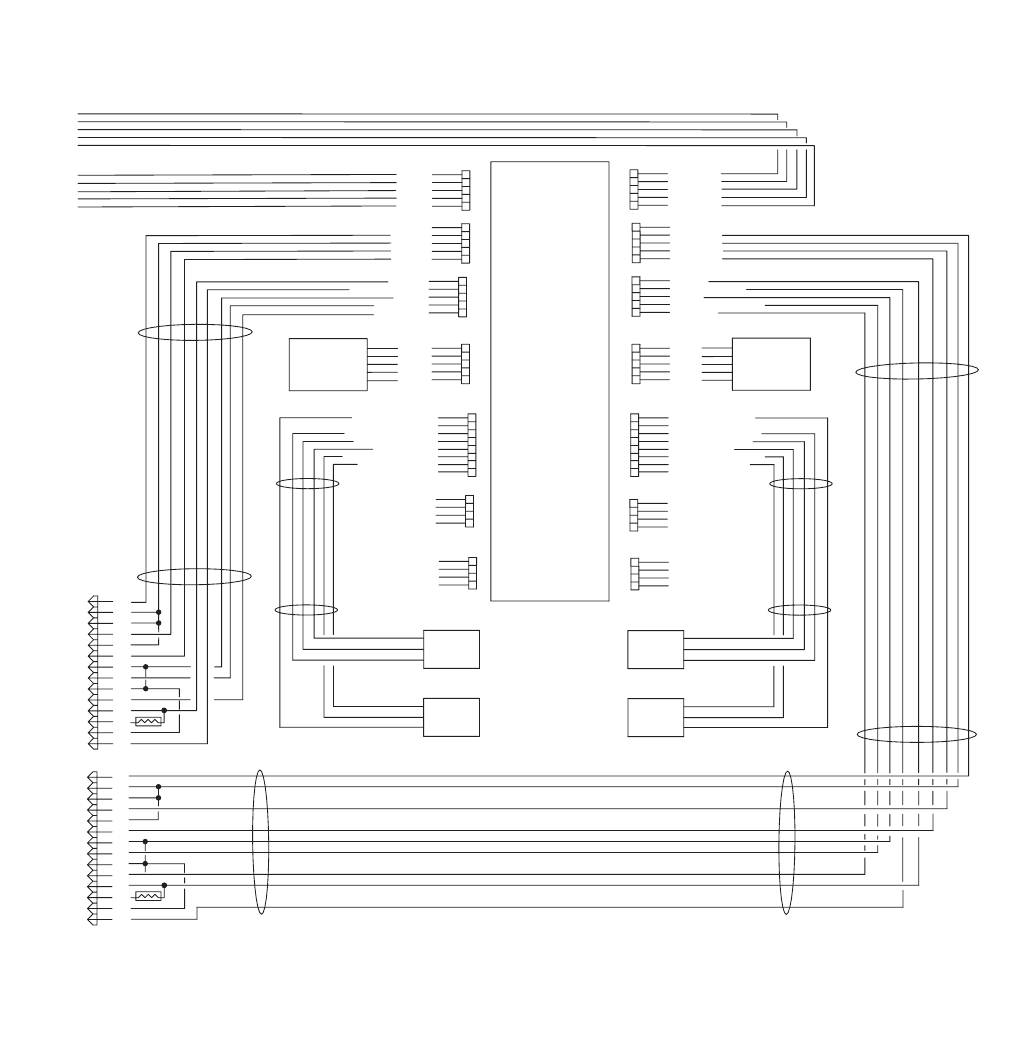
Schematics
3A0869J 77
Non-Hazardous Location Electrical Schematic (continued)
UNUSED
ALARM (+)
COMMON
PURGE A (+)
DOSE A1 (+)
+12 VDC
FLOW METER A SIG
COMMON
DOSE A2 (+)
DOSE A3 (+)
+5 VDC
AI (-)
COMMON
AI (+)
SHIELD
LINEAR SENS "A" SIG.
UNUSED
REED SWITCH_BTM (DOWN)
REED SWITCH_TOP (UP)
REED SWITCH_COM
LINEAR SENS "A" +5 VDC
LINEAR SENS "A" COM
UNUSED
UNUSED
UNUSED
UNUSED
UNUSED
UNUSED
UNUSED
UNUSED
UNUSED
UNUSED
UNUSED
UNUSED
UNUSED
UNUSED
UNUSED
UNUSED
UNUSED
UNUSED
AFS #1 (+)
COMMON
PURGE B (+)
DOSE B (+)
+12 VDC
FLOW METER B SIG
COMMON
GFB INPUT/AFS #2 (+)
GFB OUTPUT
+5 VDC
AI (-)
COMMON
AI (+)
SHIELD
LINEAR SENS "B" SIG.
UNUSED
REED SWITCH_BTM (DOWN)
REED SWITCH_TOP (UP)
REED SWITCH_COM
LINEAR SENS "B" +5 VDC
LINEAR SENS "B" COM
UNUSED
FLUID
CONTROL
MODULE
"A" PRESSURE
TRANSDUCER
"B" REED
SWITCH
"B" LINEAR
SENSOR
"A" REED
SWITCH
"A" LINEAR
SENSOR
"B" PRESSURE
TRANSDUCER
CAN_L
+V_CAN
V_CAN_RTN
CAN_H
SHIELD
J8
1
2
3
4
5
J4
1
2
3
4
5
J12
1
2
3
4
5
J2
1
2
3
4
5
J14
1
2
3
4
5
6
7
8
J25
1
2
3
4
J25
1
2
3
4
1
2
3
4
5
J7
1
2
3
4
5
J5
CAN_L
+V_CAN
V_CAN_RTN
CAN_H
SHIELD
1
2
3
4
5
J13
1
2
3
4
5
J3
J15
1
2
3
4
5
6
7
8
1
2
3
4
J11
1
2
3
4
J11
SOLENOID/METER CABLE HARNESS
SOLENOID/METER CABLE HARNESS
LINEAR SENSOR/
REED SWITCH CABLE
LINEAR SENSOR/
REED SWITCH CABLE
1
2
3
4
5
6
7
8
9
10
11
12
13
14
1
2
3
4
5
6
7
8
9
10
11
12
13
14
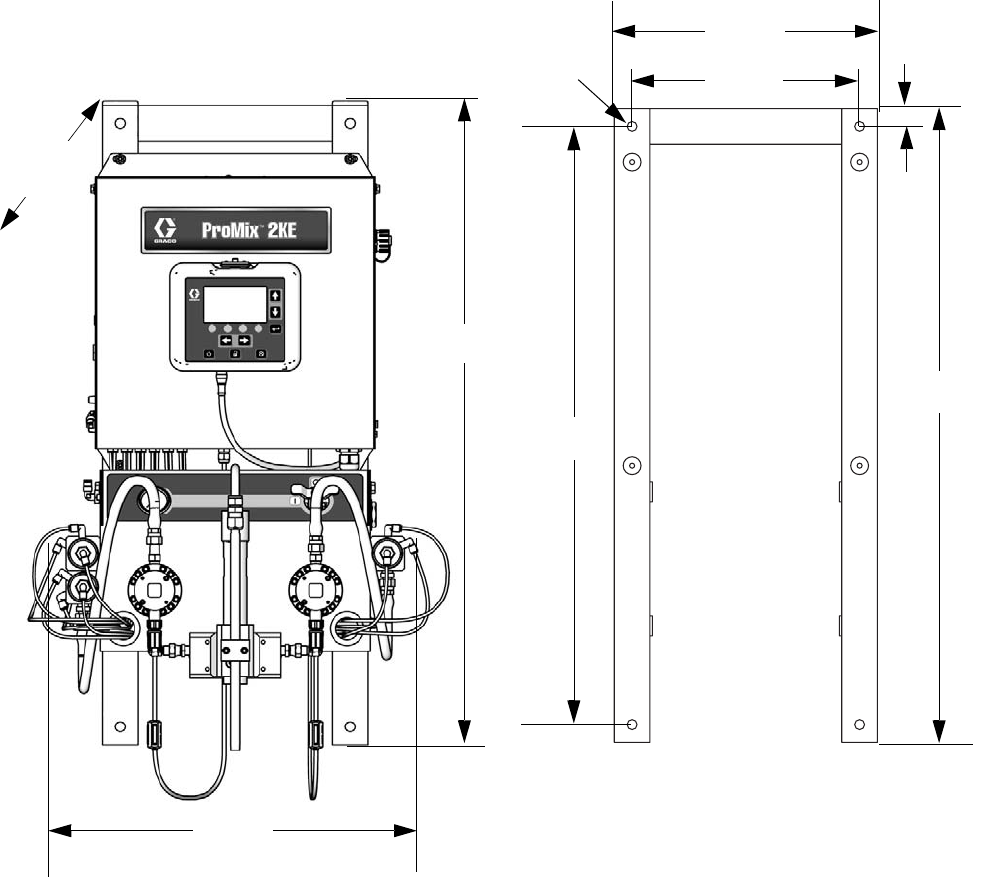
Dimensions and Mounting
78 3A0869J
Dimensions and Mounting
14.74 in.
(37 cm)
12.74 in.
(32 cm)
0.55 in
(1.4 cm)
1.0 in
(2.5 cm)
35.5 in.
(90 cm)
36.1 in.
(92 cm)
20.1 in.
(51 cm)
Depth:
14.8 in.
(38 cm)
33.5 in.
(85 cm)
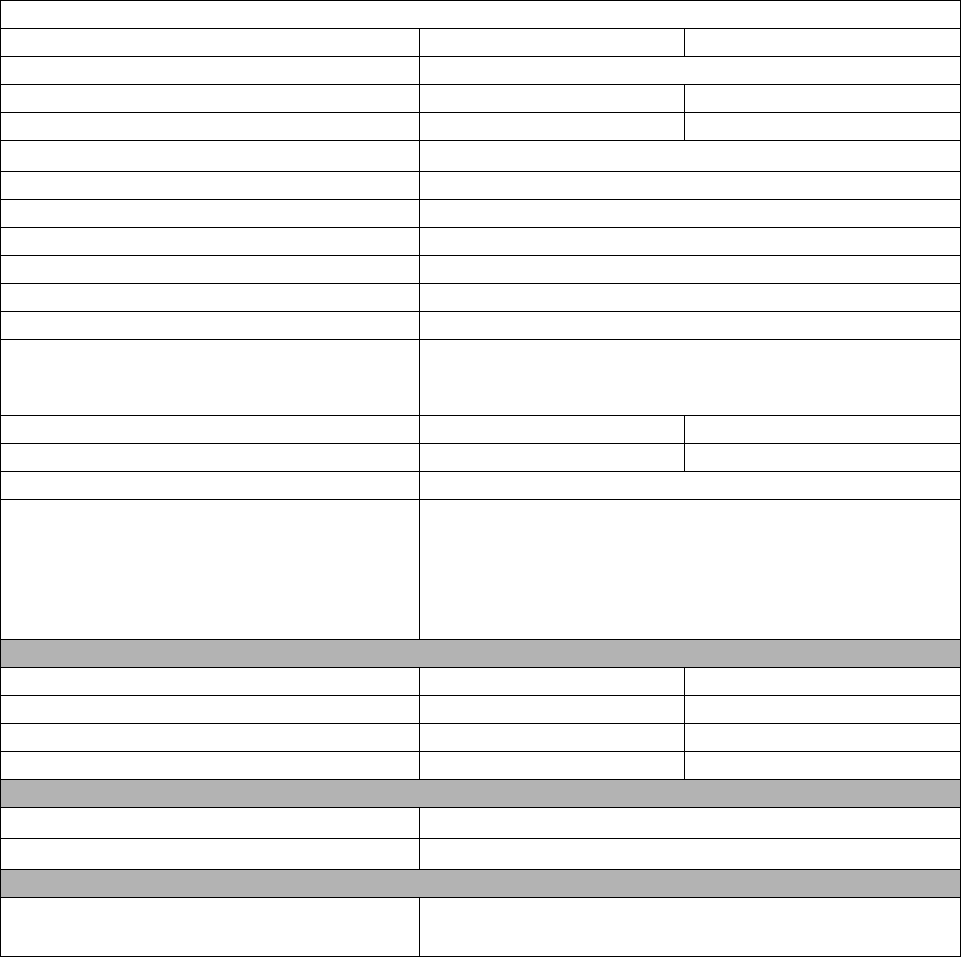
Technical Data
3A0869J 79
Technical Data
ProMix 2KE, Meter-Based Systems
US Metric
Maximum fluid working pressure See Models, page 3.
Maximum working air pressure 100 psi 0.7 MPa, 7 bar
Air supply 75 to 100 psi 0.5 to 0.7 MPa, 5.2 to 7 bar
Air filter inlet size 3/8 npt(f)
Air filtration for air logic (Graco-supplied) 5 micron (minimum) filtration required; clean and dry air
Air filtration for atomizing air (user-supplied) 30 micron (minimum) filtration required; clean and dry air
Mixing ratio range 0.1:1 to 30:1
On-ratio accuracy up to ± 1%, user selectable
Fluid inlet sizes 1/4 npt(f)
Fluid outlet size (static mixer) 1/4 npt(f)
External power supply requirements 85 - 250 Vac, 50/60 Hz, 2 amps maximum draw
15 amp maximum circuit breaker required
8 to 14 AWG power supply wire gauge
Operating temperature range 41° to 122°F 5° to 50°C
Approximate weight 200 lb 91 kg
Environmental conditions rating indoor use, pollution degree (2), installation category II
Fluids handled one or two component:
• solvent and waterborne paints
• polyurethanes
• epoxies
• acid catalyzed varnishes
Fluid flow rate range
G3000, G250 Meter 0.02 to 1.00 gal/min 75 to 3800 cc/min
G3000HR, G250HR Meter 0.01 to 0.50 gal/min 38 to 1900 cc/min
Coriolis Meter 0.005 to 1.00 gal/min 20 to 3800 cc/min
S3000 Solvent Meter (accessory) 0.01 to 0.50 gal/min 38 to 1900 cc/min
Noise level
Sound pressure level below 70 dBA
Sound power level Below 85 dBA
Materials of construction
Wetted materials on all models 303, 304 SST; Tungsten carbide (with nickel binder);
perfluoroelastomer; PTFE

All written and visual data contained in this document reflects the latest product information available at the time of publication.
Graco reserves the right to make changes at any time without notice.
This manual contains English. MM 3A0869
Graco Headquarters: Minneapolis
International Offices: Belgium, China, Japan, Korea
GRACO INC. AND SUBSIDIARIES • P.O. BOX 1441 • MINNEAPOLIS MN 55440-1441 • USA
Copyright 2010, Graco Inc. All Graco manufacturing locations are registered to ISO 9001.
www.graco.com
Revision J, June 2015
Graco Standard Warranty
Graco warrants all equipment referenced in this document which is manufactured by Graco and bearing its name to be free from defects in
material and workmanship on the date of sale to the original purchaser for use. With the exception of any special, extended, or limited warranty
published by Graco, Graco will, for a period of twelve months from the date of sale, repair or replace any part of the equipment determined by
Graco to be defective. This warranty applies only when the equipment is installed, operated and maintained in accordance with Graco’s written
recommendations.
This warranty does not cover, and Graco shall not be liable for general wear and tear, or any malfunction, damage or wear caused by faulty
installation, misapplication, abrasion, corrosion, inadequate or improper maintenance, negligence, accident, tampering, or substitution of
non-Graco component parts. Nor shall Graco be liable for malfunction, damage or wear caused by the incompatibility of Graco equipment with
structures, accessories, equipment or materials not supplied by Graco, or the improper design, manufacture, installation, operation or
maintenance of structures, accessories, equipment or materials not supplied by Graco.
This warranty is conditioned upon the prepaid return of the equipment claimed to be defective to an authorized Graco distributor for verification of
the claimed defect. If the claimed defect is verified, Graco will repair or replace free of charge any defective parts. The equipment will be returned
to the original purchaser transportation prepaid. If inspection of the equipment does not disclose any defect in material or workmanship, repairs
will be made at a reasonable charge, which charges may include the costs of parts, labor, and transportation.
THIS WARRANTY IS EXCLUSIVE, AND IS IN LIEU OF ANY OTHER WARRANTIES, EXPRESS OR IMPLIED, INCLUDING BUT NOT
LIMITED TO WARRANTY OF MERCHANTABILITY OR WARRANTY OF FITNESS FOR A PARTICULAR PURPOSE.
Graco’s sole obligation and buyer’s sole remedy for any breach of warranty shall be as set forth above. The buyer agrees that no other remedy
(including, but not limited to, incidental or consequential damages for lost profits, lost sales, injury to person or property, or any other incidental or
consequential loss) shall be available. Any action for breach of warranty must be brought within two (2) years of the date of sale.
GRACO MAKES NO WARRANTY, AND DISCLAIMS ALL IMPLIED WARRANTIES OF MERCHANTABILITY AND FITNESS FOR A
PARTICULAR PURPOSE, IN CONNECTION WITH ACCESSORIES, EQUIPMENT, MATERIALS OR COMPONENTS SOLD BUT NOT
MANUFACTURED BY GRACO. These items sold, but not manufactured by Graco (such as electric motors, switches, hose, etc.), are subject to
the warranty, if any, of their manufacturer. Graco will provide purchaser with reasonable assistance in making any claim for breach of these
warranties.
In no event will Graco be liable for indirect, incidental, special or consequential damages resulting from Graco supplying equipment hereunder, or
the furnishing, performance, or use of any products or other goods sold hereto, whether due to a breach of contract, breach of warranty, the
negligence of Graco, or otherwise.
FOR GRACO CANADA CUSTOMERS
The Parties acknowledge that they have required that the present document, as well as all documents, notices and legal proceedings entered into,
given or instituted pursuant hereto or relating directly or indirectly hereto, be drawn up in English. Les parties reconnaissent avoir convenu que la
rédaction du présente document sera en Anglais, ainsi que tous documents, avis et procédures judiciaires exécutés, donnés ou intentés, à la suite
de ou en rapport, directement ou indirectement, avec les procédures concernées.
Graco Information
For the latest information about Graco products, visit www.graco.com.
For patent information, see www.graco.com/patents.
TO PLACE AN ORDER, contact your Graco distributor or call to identify the nearest distributor.
Phone: 612-623-6921 or Toll Free: 1-800-328-0211 Fax: 612-378-3505
