Graco 332317C G1 Plus Control Lubrication Pump Users Manual Pump, Instructions, English
332317C to the manual 0e916865-08bf-48c0-915a-7d0a33138723
2015-04-02
: Graco Graco-332317C-G1-Plus-Control-Lubrication-Pump-Users-Manual-685755 graco-332317c-g1-plus-control-lubrication-pump-users-manual-685755 graco pdf
Open the PDF directly: View PDF  .
.
Page Count: 34
Instructions
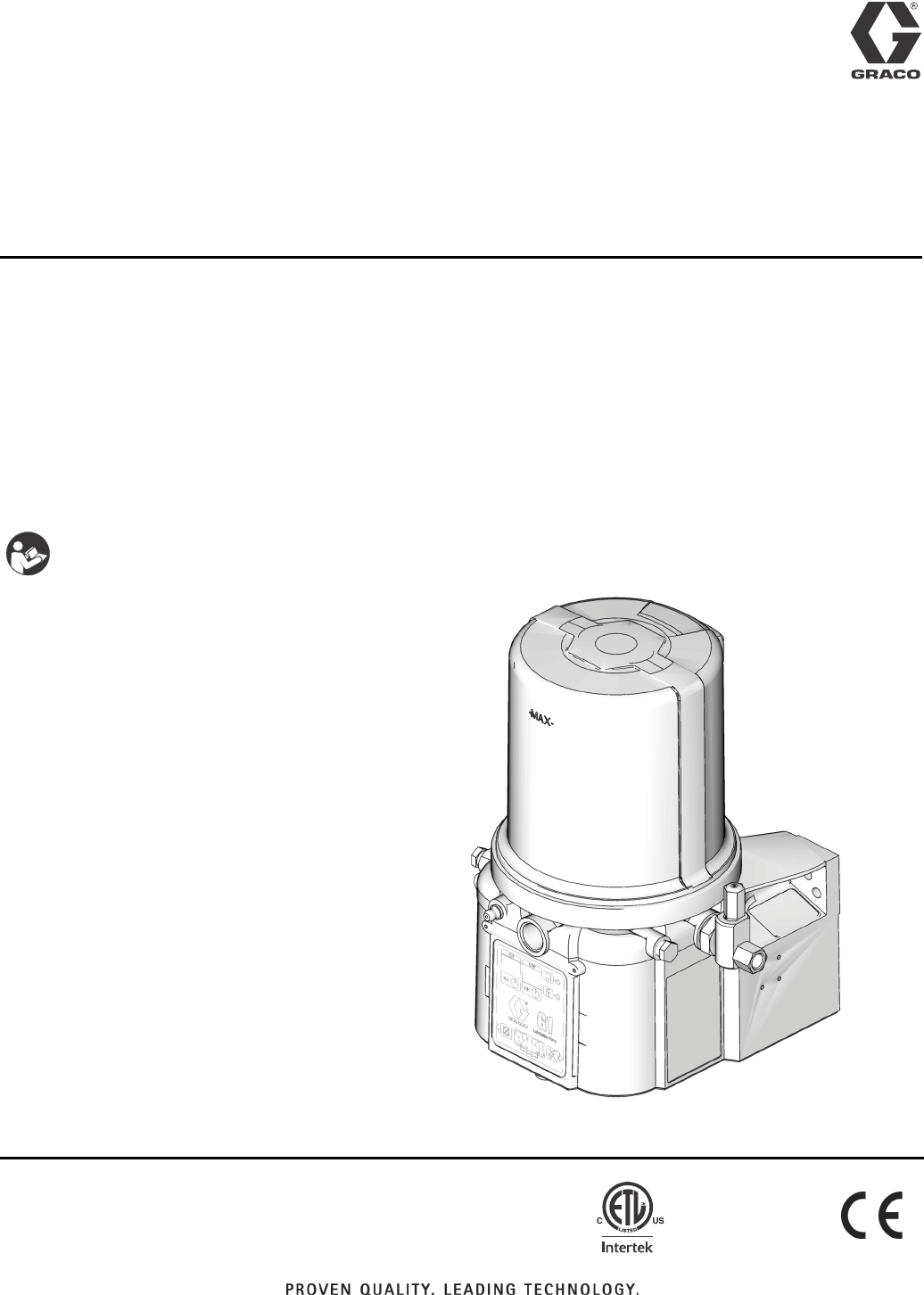
G1™ Plus
Lubrication Pump 332317C
For dispensing of NLGI Grades #000 to #2 greases and oil with at least 40cSt. For
Professional Use Only.
Not approved for use in explosive atmospheres or hazardous locations.
Part Nos., page 3
5100 psi (35.1 MPa, 351.6 bar) Maximum Working Pressure
Important Safety Instructions
Read all warnings and instructions in this
manual. Save these instructions.
EN
3132066
conforms to
ANSI/UL 73
certified to
CAN/CSA
Std. 22.2 No 68-09
Table of Contents
2332317C
Table of Contents
Grease Models . . . . . . . . . . . . . . . . . . . . . . . . . . . . . 3
Oil Models . . . . . . . . . . . . . . . . . . . . . . . . . . . . . . . . 4
Warnings . . . . . . . . . . . . . . . . . . . . . . . . . . . . . . . . . 5
Installation . . . . . . . . . . . . . . . . . . . . . . . . . . . . . . . . 7
Grounding . . . . . . . . . . . . . . . . . . . . . . . . . . . 7
Component Identification . . . . . . . . . . . . . . . 7
Typical Installation . . . . . . . . . . . . . . . . . . . . . . . . 8
Choosing an Installation Location . . . . . . . . . . . . 8
System Configuration and Wiring . . . . . . . . . . . . 9
Setup . . . . . . . . . . . . . . . . . . . . . . . . . . . . . . . . . . . . 18
Pressure Relief . . . . . . . . . . . . . . . . . . . . . . . . . 18
Connecting to Auxiliary Fittings . . . . . . . . . . . . . 18
Loading Grease . . . . . . . . . . . . . . . . . . . . . . . . 19
Changing Greases . . . . . . . . . . . . . . . . . . . 20
Filling Oil Unit . . . . . . . . . . . . . . . . . . . . . . . . . . 20
Priming . . . . . . . . . . . . . . . . . . . . . . . . . . . . . . . 20
Plus Model Control Setup . . . . . . . . . . . . . . . . . . . 21
Control Panel Overview (FIG. 13) . . . . . . . . . . . 21
Instructions . . . . . . . . . . . . . . . . . . . . . . . . . . . . 22
Powering Units With Controllers . . . . . . . . . 22
Entering Setup Mode . . . . . . . . . . . . . . . . . 22
Entering a PIN Code to Access Setup Mode 22
ON Time . . . . . . . . . . . . . . . . . . . . . . . . . . . 23
OFF Time . . . . . . . . . . . . . . . . . . . . . . . . . . 23
Advanced Programming . . . . . . . . . . . . . . . . . . . . 24
Entering a PIN Code for the First Time . . . 24
Entering Advanced Setup . . . . . . . . . . . . . . 24
Run Mode . . . . . . . . . . . . . . . . . . . . . . . . . . . . . . . . 25
Time Control . . . . . . . . . . . . . . . . . . . . . . . . . . . 25
Low Level . . . . . . . . . . . . . . . . . . . . . . . . . . 25
Manual Run Cycle . . . . . . . . . . . . . . . . . . . 25
Troubleshooting . . . . . . . . . . . . . . . . . . . . . . . . . . . 26
Maintenance . . . . . . . . . . . . . . . . . . . . . . . . . . . . . . 27
Parts: 2 Liter Models . . . . . . . . . . . . . . . . . . . . . . . 28
Parts: 4 and 8 Liter Models . . . . . . . . . . . . . . . . . . 29
Parts . . . . . . . . . . . . . . . . . . . . . . . . . . . . . . . . . . . . 30
Pressure Relief Valves . . . . . . . . . . . . . . . . 31
Fuses . . . . . . . . . . . . . . . . . . . . . . . . . . . . . 31
Installation and Repair Kits . . . . . . . . . . . . . 31
Technical Data . . . . . . . . . . . . . . . . . . . . . . . . . . . . 32
Dimensions . . . . . . . . . . . . . . . . . . . . . . . . . . . . 32
Mounting Pattern . . . . . . . . . . . . . . . . . . . . . . . . 33
Graco Standard Warranty . . . . . . . . . . . . . . . . . . . 34
Grease Models
332317C 3
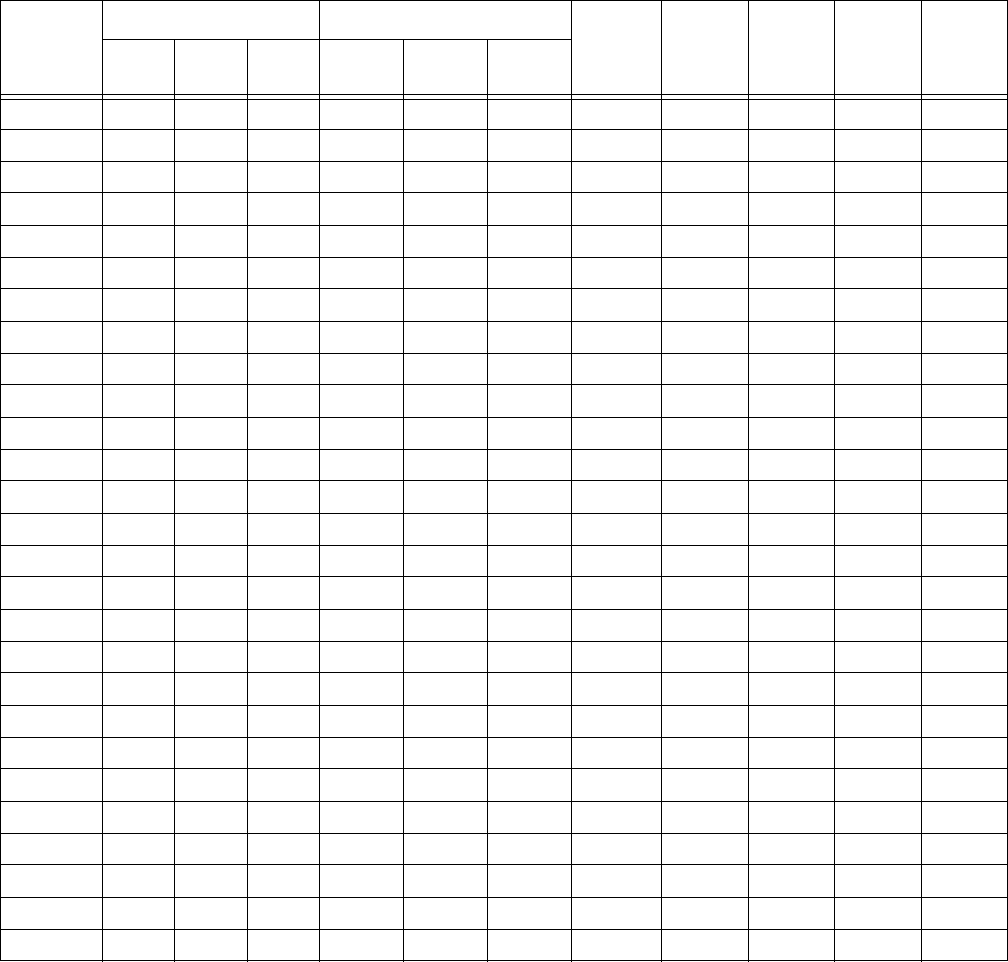
Grease Models
Model
Reservoir Size Voltage
CPC DIN Wiper Follower Low
Level
2 Liter 4 Liter 8 Liter 12V DC 24V DC 100-240
VAC
94G000 X X X X
94G001 X X X X
94G002 X X X X
94G003 X X X X X
94G004 X X X X X
94G005 X X X X X
94G012 X X X X
94G013 X X X X
94G014 X X X X
94G015 X X X X X
94G016 X X X X X
94G017 X X X X X
94G024 X X X X
94G025 X X X X
94G026 X X X X
94G027 X X X X X
94G028 X X X X X
94G029 X X X X X
94G048 X X X X
94G049 X X X X
94G050 X X X X
94G051 X X X X X
94G052 X X X X X
94G053 X X X X X
94G054 X X X X X
94G055 X X X X X
94G056 X X X X X
Oil Models
4332317C
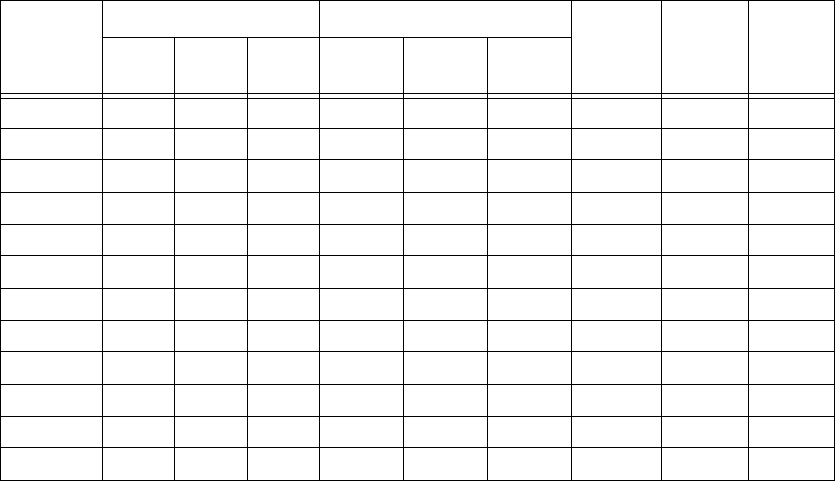
Oil Models
Model
Reservoir Size Voltage
CPC DIN Low
Level
2 Liter 4 Liter 8 Liter 12V DC 24V DC 100-240
VAC
94G030 X X X
94G031 X X X
94G032 X X X
94G033 X X X X
94G034 X X X X
94G035 X X X X
94G057 X X X
94G058 X X X
94G059 X X X
94G060 X X X X
94G061 X X X X
94G062 X X X X
Warnings
332317C 5
Warnings
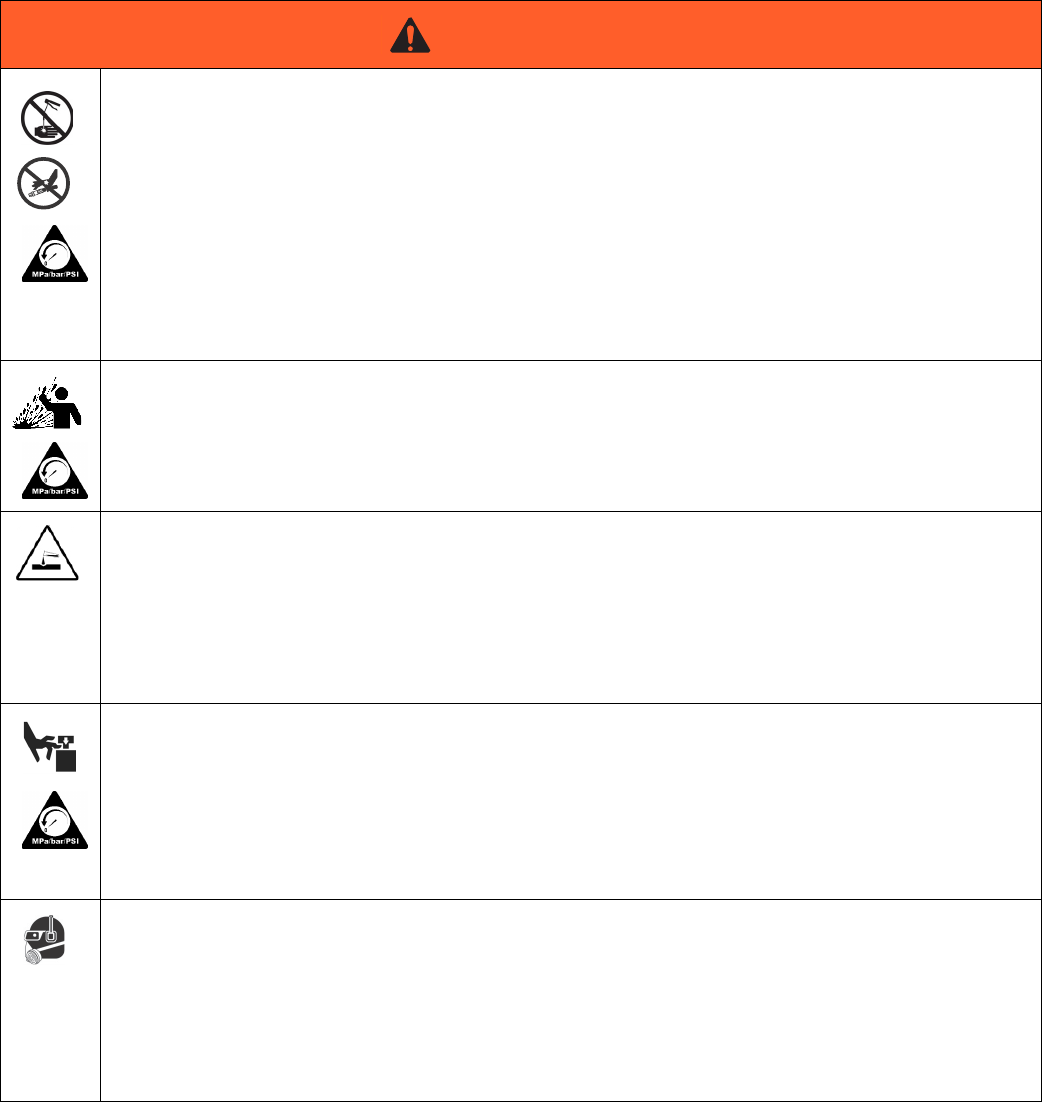
The following warnings are for the setup, use, grounding, maintenance, and repair of this equipment. The exclama-
tion point symbol alerts you to a general warning and the hazard symbols refer to procedure-specific risks. When
these symbols appear in the body of this manual or on warning labels, refer back to these Warnings. Product-specific
hazard symbols and warnings not covered in this section may appear throughout the body of this manual where
applicable.
WARNING
ELECTRIC SHOCK HAZARD
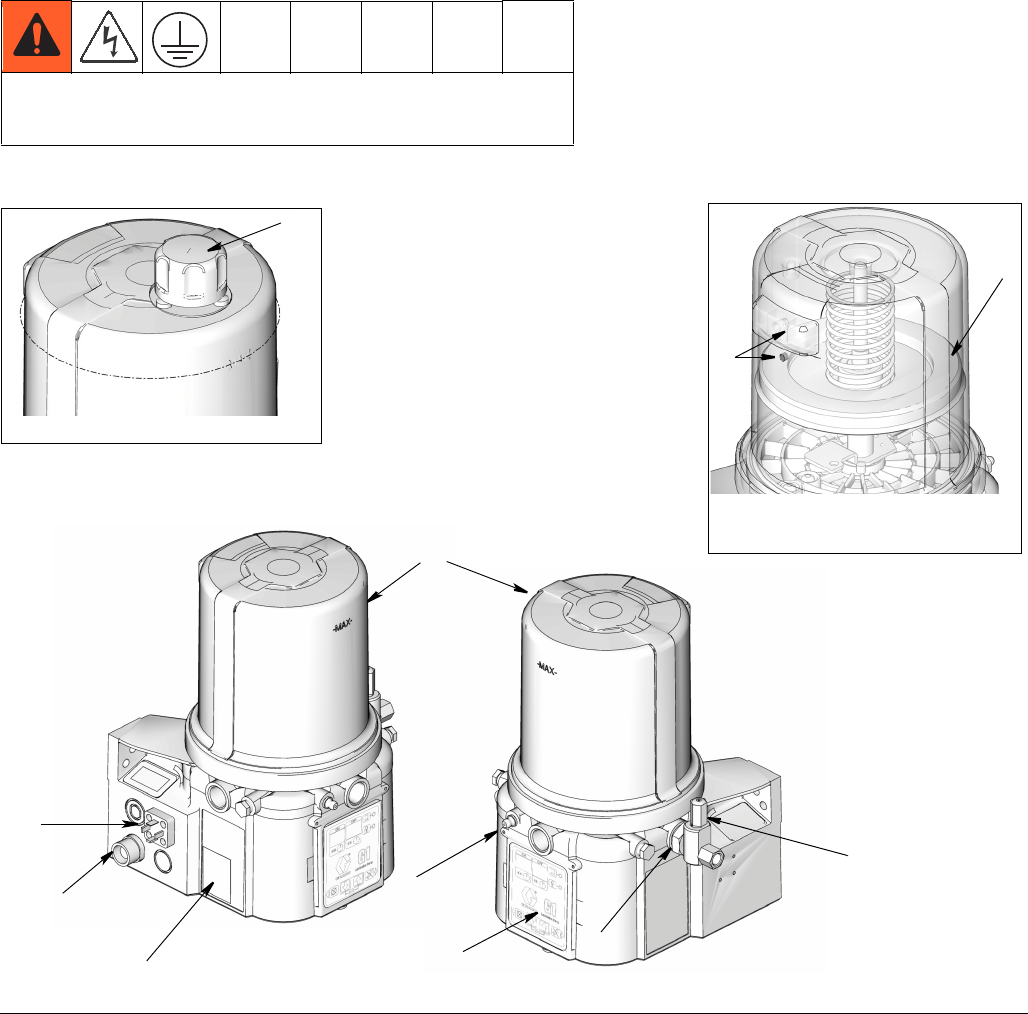
This equipment must be grounded. Improper grounding, setup, or usage of the system can cause electric shock.
•Turn off and disconnect power at main switch before disconnecting any cables and before servicing or installing
equipment.
•Connect only to grounded power source.
•All electrical wiring must be done by a qualified electrician and comply with all local codes and regulations.
EQUIPMENT MISUSE HAZARD
Misuse can cause death or serious injury.
•Do not operate the unit when fatigued or under the influence of drugs or alcohol.
•Do not exceed the maximum working pressure or temperature rating of the lowest rated system component.
See Technical Data in all equipment manuals.
•Use fluids and solvents that are compatible with equipment wetted parts. See Technical Data in all equipment
manuals. Read fluid and solvent manufacturer’s warnings. For complete information about your material,
request MSDS from distributor or retailer.
•Do not leave the work area while equipment is energized or under pressure.
•Turn off all equipment and follow the Pressure Relief Procedure when equipment is not in use.
•Check equipment daily. Repair or replace worn or damaged parts immediately with genuine manufacturer’s
replacement parts only.
•Do not alter or modify equipment. Alterations or modifications may void agency approvals and create safety
hazards.
•Make sure all equipment is rated and approved for the environment in which you are using it.
•Use equipment only for its intended purpose. Call your distributor for information.
•Route hoses and cables away from traffic areas, sharp edges, moving parts, and hot surfaces.
•Do not kink or over bend hoses or use hoses to pull equipment.
•Keep children and animals away from work area.
•Comply with all applicable safety regulations.
Warnings
6332317C
SKIN INJECTION HAZARD
High-pressure fluid from dispensing device, hose leaks, or ruptured components will pierce skin. This may look like
just a cut, but it is a serious injury that can result in amputation. Get immediate surgical treatment.
•Do not point dispensing device at anyone or at any part of the body.
•Do not put your hand over the fluid outlet.
•Do not stop or deflect leaks with your hand, body, glove, or rag.
•Follow the Pressure Relief Procedure when you stop dispensing and before cleaning, checking, or servicing
equipment.
•Tighten all fluid connections before operating the equipment.
•Check hoses and couplings daily. Replace worn or damaged parts immediately.
PRESSURIZED EQUIPMENT HAZARD
Over-pressurization can result in equipment rupture and serious injury.
•A pressure relief valve is required at each pump outlet.
Follow Pressure Relief Procedure in this manual before servicing.
PLASTIC PARTS CLEANING SOLVENT HAZARD
Many solvents can degrade plastic parts and cause them to fail, which could cause serious injury or
property damage.
• Use only compatible water-based solvents to clean plastic structural or pressure-containing parts.
• See Technical Data in this and all other equipment instruction manuals. Read fluid and solvent
manufacturer’s MSDSs and recommendations.
MOVING PARTS HAZARD
Moving parts can pinch or amputate fingers and other body parts.
•Keep clear of moving parts.
•Do not operate equipment with protective guards or covers removed.
•Pressurized equipment can start without warning. Before checking, moving, or servicing equipment, follow the
Pressure Relief Procedure in this manual. Disconnect power or air supply.
PERSONAL PROTECTIVE EQUIPMENT
You must wear appropriate protective equipment when operating, servicing, or when in the operating area of the
equipment to help protect you from serious injury, including eye injury, hearing loss, inhalation of toxic fumes, and
burns. This equipment includes but is not limited to:
•Protective eyewear, and hearing protection.
•Respirators, protective clothing, and gloves as recommended by the fluid and solvent manufacturer.
WARNING
Installation
332317C 7
Installation
Grounding
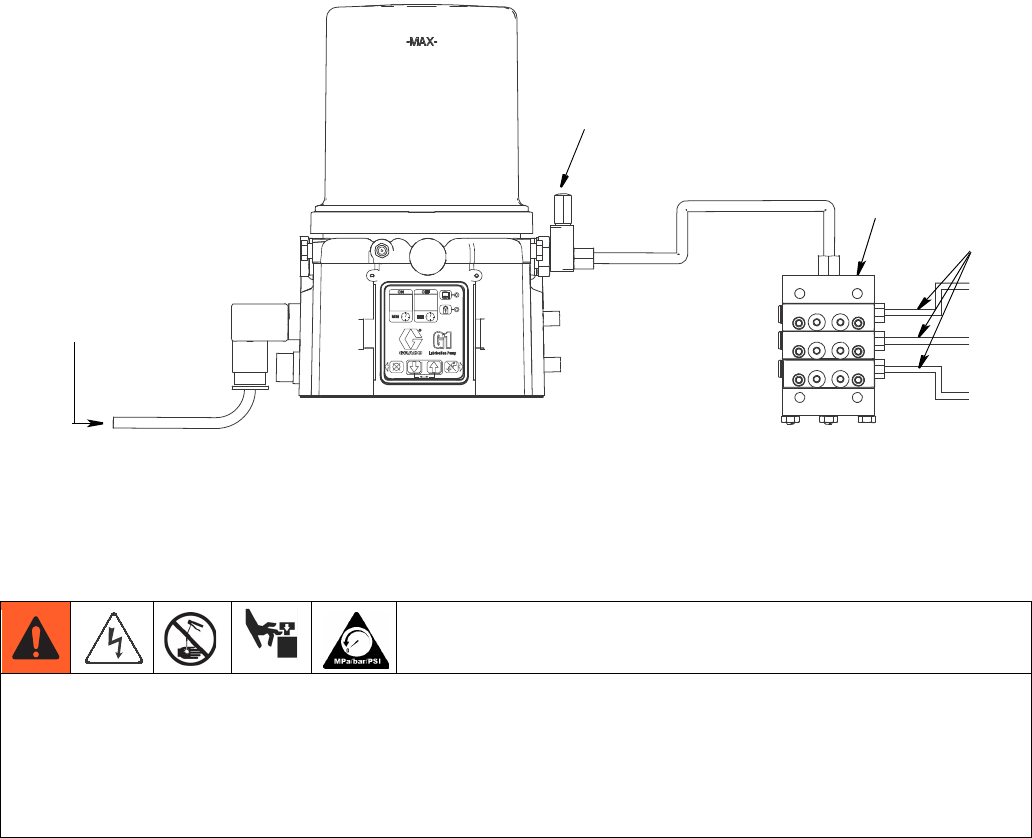
Component Identification
Key:
A Reservoir
B Pump Element
C Pressure Relief Valve (Not included / required)
D Zerk Inlet Fill Fitting (1 included / grease models only)
E Power, DIN (if equipped)
F Power, CPC (if equipped)
G Model Number/ Serial Number
H Follower Plate (grease models only / not available on all
grease models)
J Vent Hole
K Fill cap (oil models only)
L Control Panel
The equipment must be grounded. Grounding reduces the risk
of electric shock by providing an escape wire for the electrical
current in the event of malfunction or breakdown.
FIG. 1:
A
D
G
Grease Models with Follower
Plate
H
Oil Models
K
Grease Models
E
C
J
B
F
L
Installation
8332317C
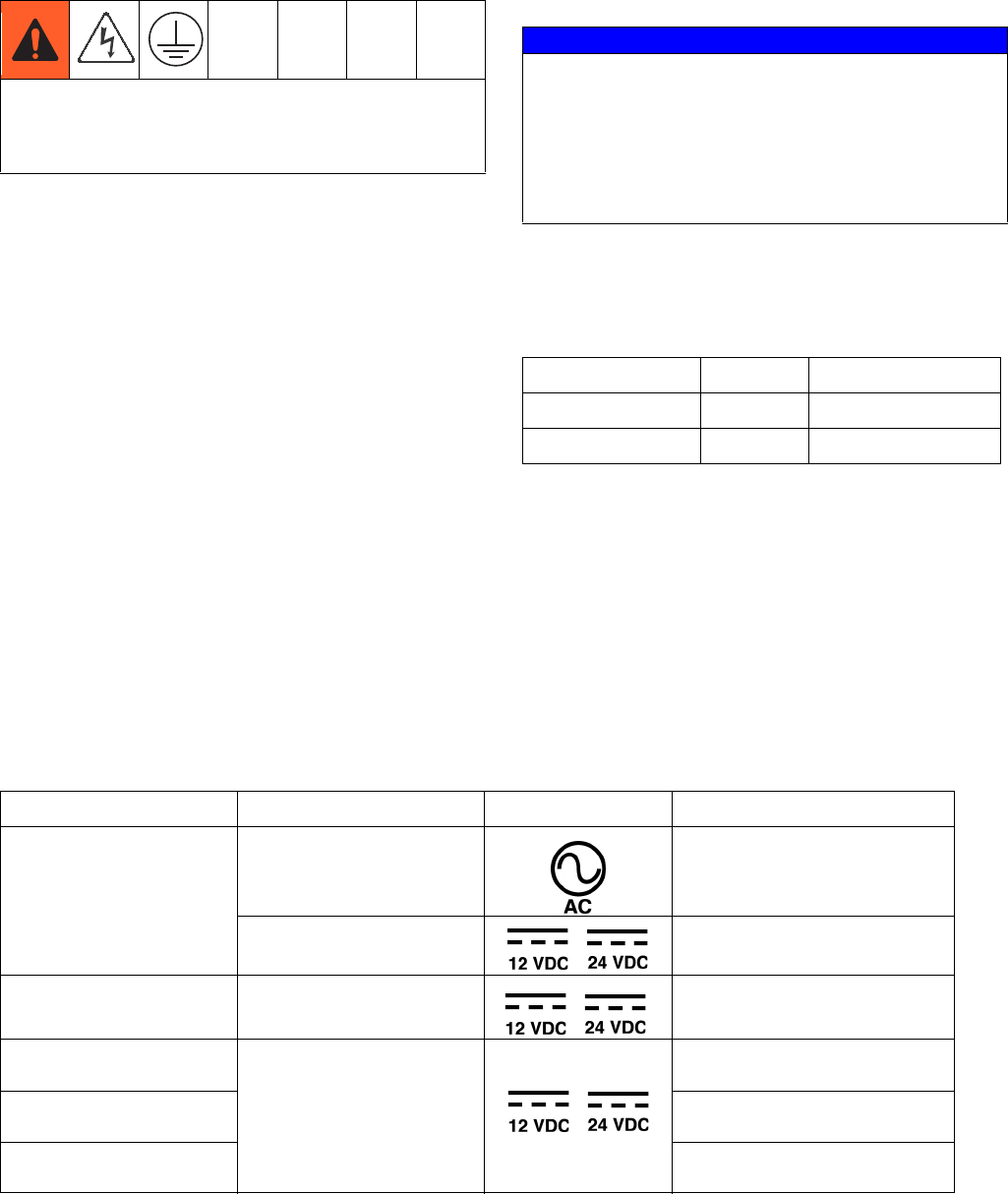
Typical Installation
A Connected to fuse / power
B Pressure relief valve (required, user supplied)
C Series progressive divider valves
D To lube points
Choosing an Installation Location
•Select a location that will adequately support the
weight of the G1 Pump and lubricant, as well as all
plumbing and electrical connections.
•Refer to the two mounting hole layouts provided in
the Mounting Pattern section of this manual, page 33.
NOTE: The two mounting hole layouts provided in the
Technical Data section show the only correct installa-
tion patterns to use for mounting the G1. No other
installation configurations should be used.
•Use designated mounting holes and provided config-
urations only.
•Always mount the G1 oil models upright.
•If the G1 grease model is going to be operated in a
tilted or inverted position for any period of time, you
must use a model that includes a follower plate, oth-
erwise the G1 must be mounted upright.
•Use the three fasteners (included) to secure the G1
to the mounting surface.
A
B
D
C
AUTOMATIC SYSTEM ACTIVATION HAZARD
Unexpected activation of the system could result in serious injury, including skin injection and amputation.
This device has an automatic timer that activates the pump lubrication system when power is connected or when exit-
ing the programming function. Before you install or remove the lubrication pump from the system, disconnect and iso-
late all power supplies and relieve all pressure.
Installation
332317C 9
System Configuration and
Wiring
If the product is permanently connected:
• it must be installed by a qualified electrician or ser-
viceman.
• it must be connected to a grounded, permanent wir-
ing system.
If an attachment plug is required in the end use
application:
• it must be rated for the product electrical specifica-
tions.
• it must be an approved, 3-wire grounding type
attachment plug.
• it must be plugged into an outlet that is properly
installed and grounded in accordance with all local
codes and ordinances.
• when repair or replacement of the power cord or
plug is required, do not connect the grounding wire
to either flat blade terminal.
Fuses
Fuse Kits are available from Graco. The following Table
identifies the correct fuse to use for your input voltage
and the corresponding Graco Kit number.
Recommendations for Using Pump in
Harsh Environments
• Use pump with CPC style power cable.
Wiring and Installation Diagrams
NOTE: Graco does not provide a power cable with the G1. Power cables are available for purchase from Graco or the
user may provide their own. See Table 1 for reference pages containing additional information related to Graco power
cables.
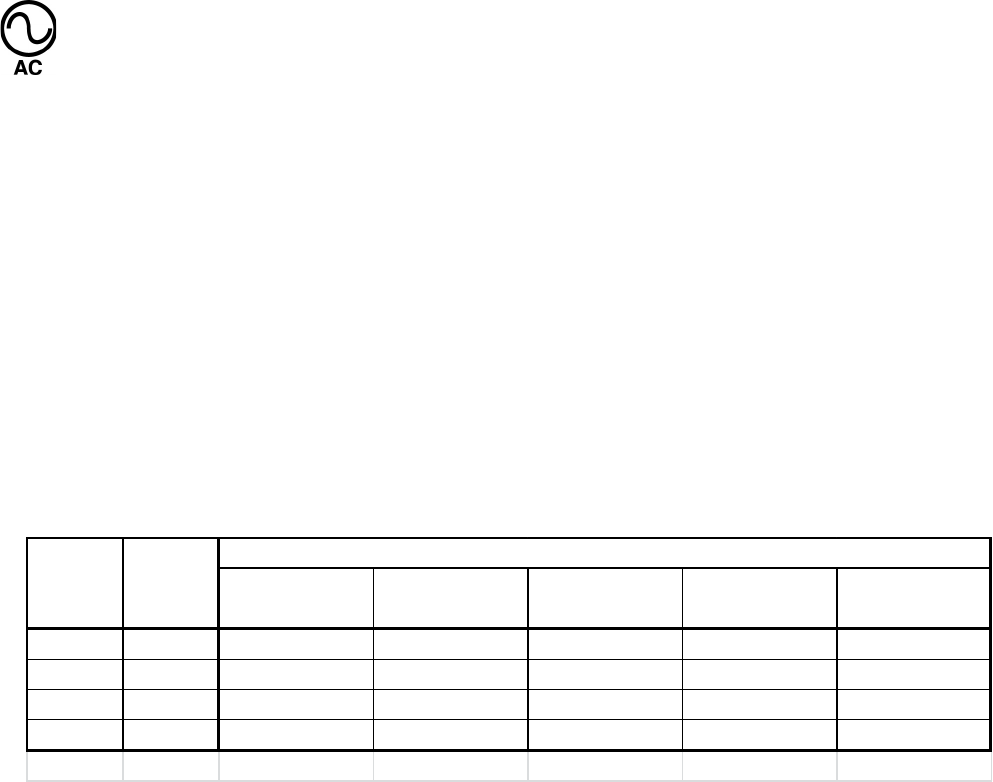
Table 1: Graco Power Cables
.
Improper installation of the grounding conductor may
result in a risk of electric shock. This product must be
installed by a qualified electrician in compliance with
all state and local codes and regulations.
NOTICE
Fuses (user supplied) are required on all DC models.
To avoid equipment damage:
• Never operate G1 Pump DC models without a fuse
installed.
• A fuse of the correct voltage must be installed in
line with the power entry to the system.
Input Voltage Fuse Value Graco Kit No.
12 VDC 7.5 A 571039
24 VDC 4 A 571040
Cable Part No. Diagram Symbol Page #
123358
DIN 15 ft.
Power DIN AC 10
Power DIN DC 12
126217
CPC 15 ft., 3-wire Power CPC DC 14
123750
CPC 15 ft., 5-wire
Power CPC DC
16
126219
CPC 20 ft., 5-wire 16
126220
CPC 30 ft., 5-wire 16
Installation
10 332317C
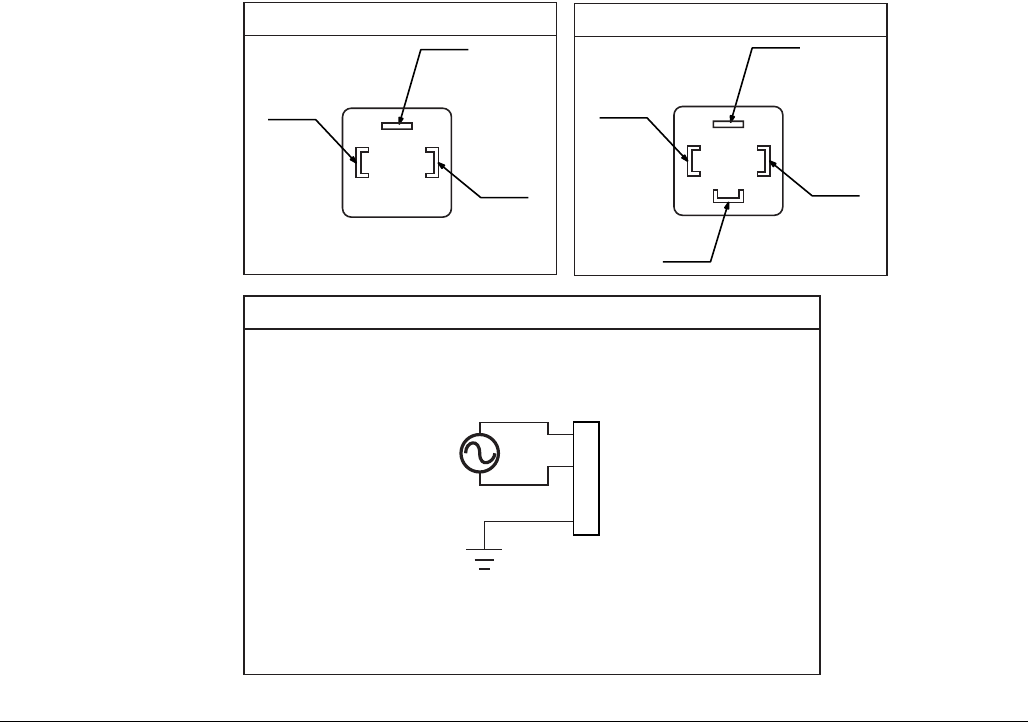
Power DIN AC - 15 foot: Part No. 123358
Din Connector Specifications
• DIN 43650 Form A, 18 mm, assembled to power cable manufacturer’s instructions
• Rated to 6 Amps minimum at 250V AC
Cable Specifications
•United States/Canada: 3 conductor 16 AWG UL62 and CSA 22.2 No. 49 listed SOOW cable with black, white,
green insulation
•Europe: 3 Class-5 conductor, 1.5 mm2 Agency Listed H07RN-F cable with blue, brown, green/yellow insulation
•Japan/Taiwan: 3 conductor, 1.25 mm2 Agency Listed 2 PNCT cable with black, white, red insulation
•SEA/India/Australia: 3 conductor, 1.5 mm2 Agency Listed H07RN-F blue, brown, green/yellow insulation
•China: 3 conductor, 1.5 mm2 Agency Listed YZW cable with blue, brown, green/yellow insulation
Pin and Related Wire Color (FIG. 2, page 11)
UnitedStates/
Canada Europe Japan/Taiwan SEA/India/
Australia China
1 LINE Black Brown Black Brown Brown
2 NEUTRAL White Blue White Blue Blue
3NotUsed NotUsed NotUsed NotUsed NotUsed NotUsed
4 GROUND Green Green/Yellow Red Green/Yellow Green/Yellow
Color
Pin PinName
Installation
332317C 11
FIG. 2
(4)
(2)
(1)
1
2
3
4
Example Wiring Diagram
Connector on Housing
Connector on Cable
(4)
(1)
(3)
(2)
Installation
12 332317C
Power DIN DC - 15 foot: Part No. 123358
Din Connector Specifications
• DIN 43650 Form A, 18 mm assembled to power cable manufacturer’s instructions
• Rated to 6 Amps minimum at 250V AC
Cable Specifications
•United States/Canada: 3 conductor 16 AWG UL62 and CSA 22.2 No. 49 listed SOOW cable with black, white,
green insulation
•Europe: 3 Class-5 conductor, 1.5 mm2 Agency Listed H07RN-F cable with blue, brown, green/yellow insulation
•Japan/Taiwan: 3 conductor, 1/25 mm2 Agency Listed 2 PNCT cable with black, white, red insulation
•SEA/India/Australia: 3 conductor, 1.5 mm2 Agency Listed H07RN-F blue, brown, green/yellow insulation
•China: 3 conductor, 1.5 mm2 Agency Listed YZW cable with blue, brown, green/yellow insulation
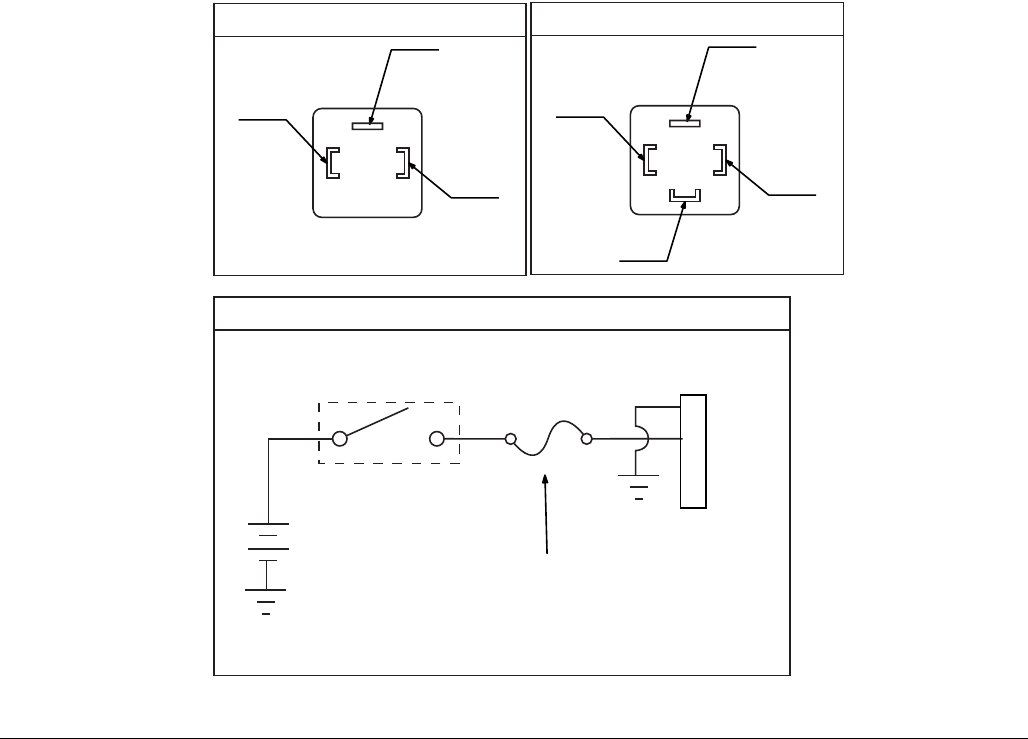
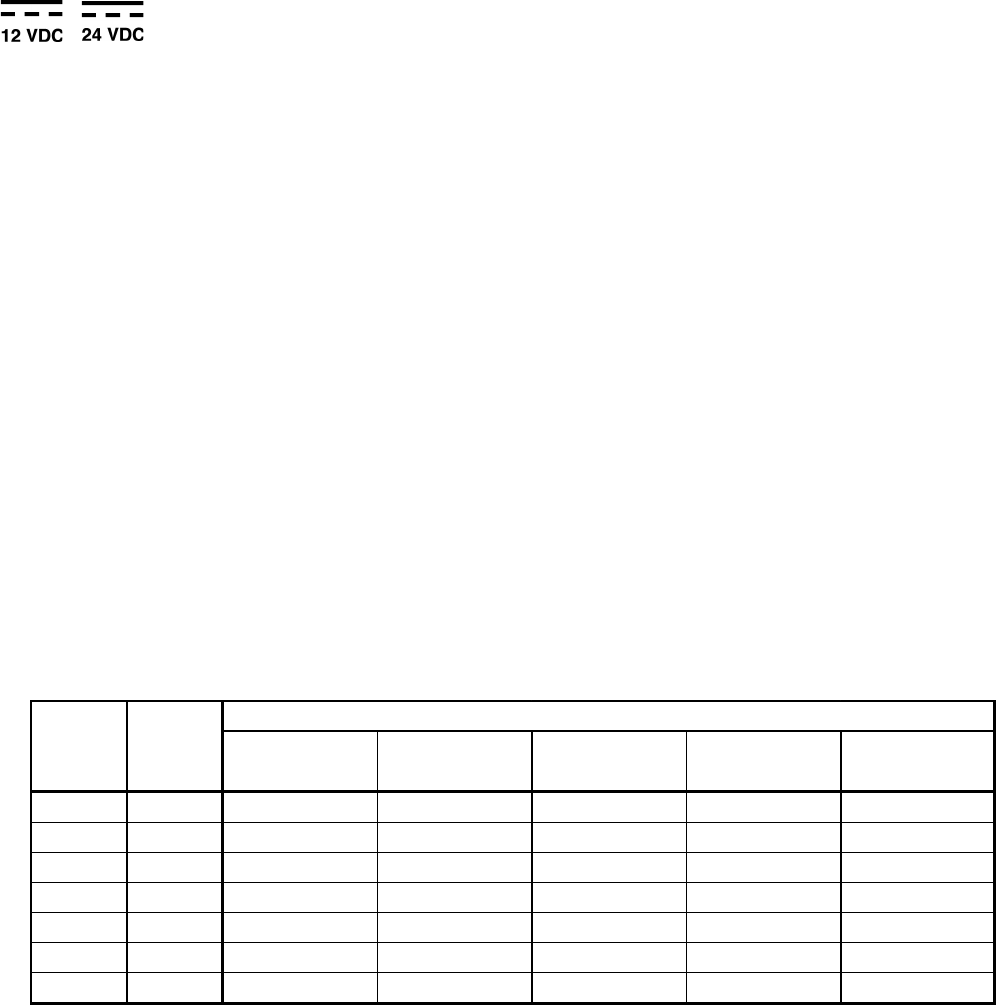
Pin and Related Wire Color (FIG. 3, page 13)
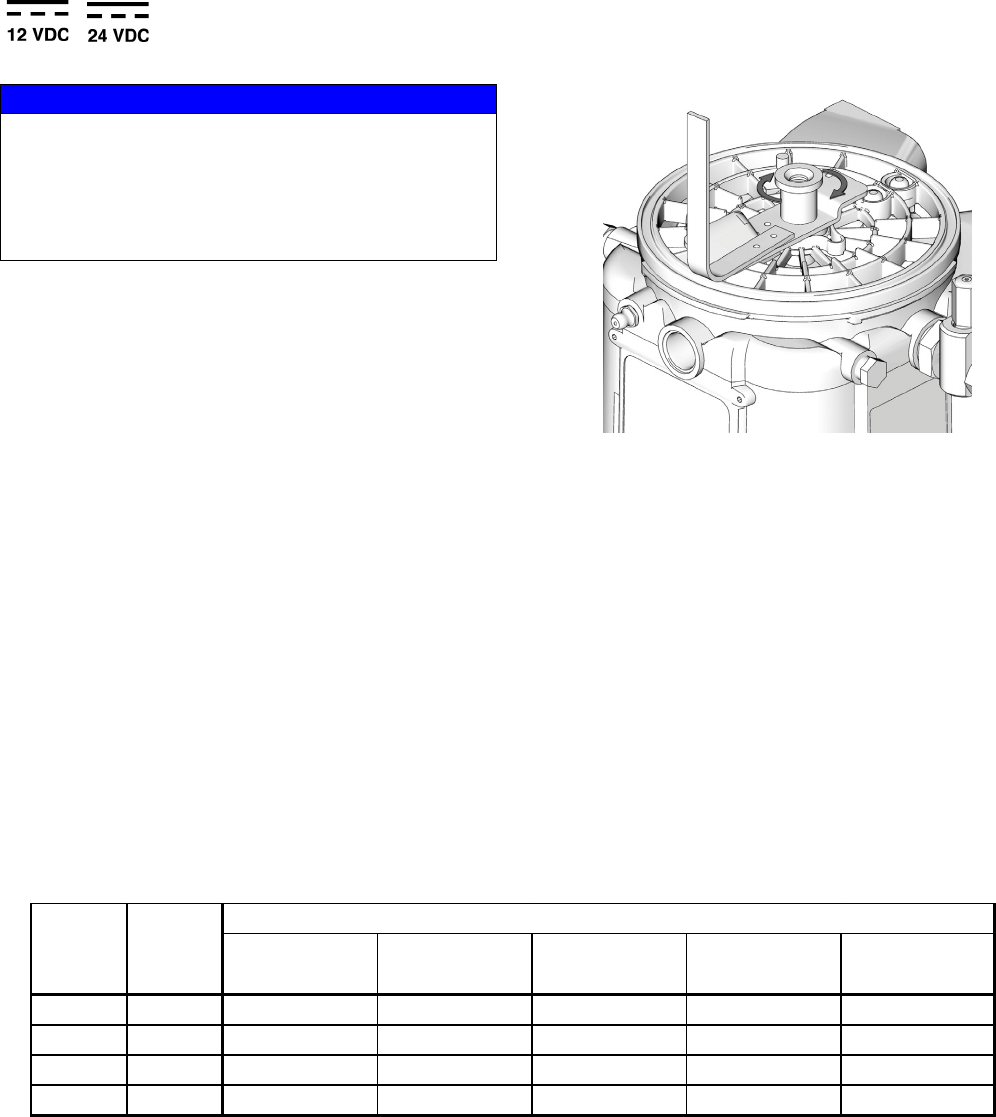
NOTICE
Be sure when power is applied that stirring paddle
rotates clockwise (when viewed from the top). If it is
wired incorrectly paddle could rotate counter-clockwise
which will damage the pump’s internal components. If
this happens, stop the pump immediately and wire unit
correctly.
UnitedStates/
Canada Europe Japan/Taiwan SEA/India/
Australia China
1‐VDC Black Brown Black Brown Brown
2 +VDC White Blue White Blue Blue
3NotUsed NotUsed NotUsed NotUsed NotUsed NotUsed
4NotUsed Green Green/Yellow Red Green/Yellow Green/Yellow
Pin PinName
Color
Installation
332317C 13
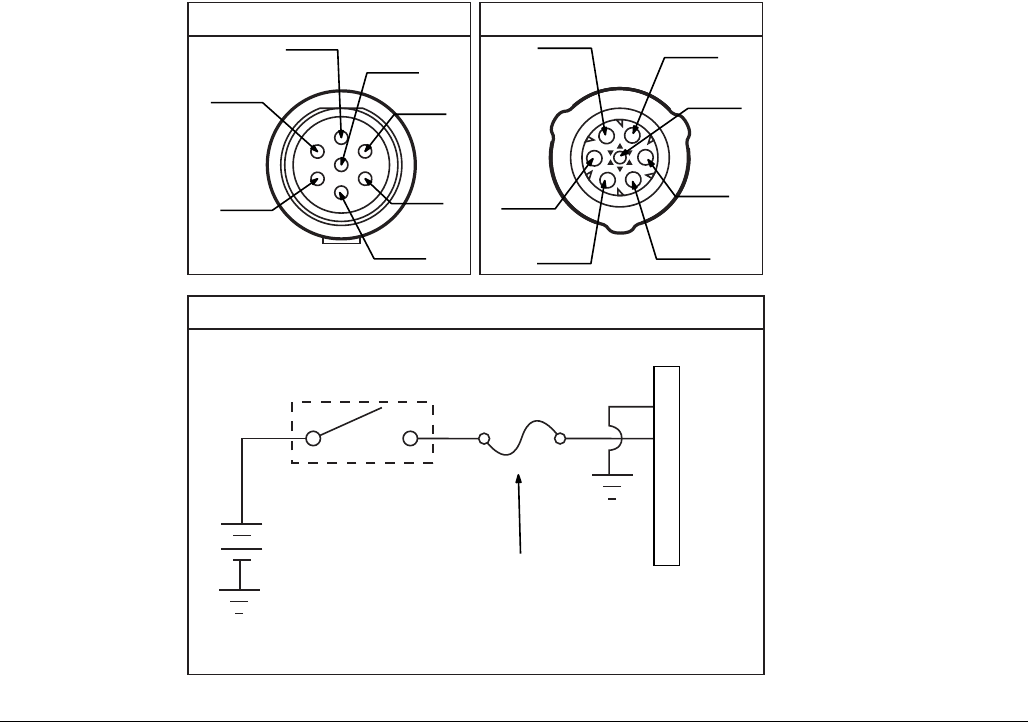
FIG. 3
Ignition Switch
Fuse
1
2
3
4
Example Wiring Diagram
Connector on Housing
12V-pump - 7.5A - Graco kit #571039
24V pump - 4A - Graco kit #571040
(4)
(2)
(1)
Connector on Cable
(4)
(1)
(3)
(2)
Installation
14 332317C
Power CPC DC - 3-Wire, 15 foot: Part No. 126217
CPC Connector Specifications
• One, 7-position, 1.5 mm socket connector AMP 967650-1
• Three, 16 - 14 gauge female pins AMP 962999-1
• One, 180-degree strain relief or one, 90-degree strain relief AMP 965576-1 (determined by cable exit for cable
configuration)
Installation Notes
• Crimp pins to wire and install in socket connector per manufacturer’s instructions.
• See Pin Layout shown in FIG. 4 for proper location in the connector.
• Secure socket connector to the cable per the desired strain relief configuration.
Cable Specifications
•United States/Canada: 3 conductor 16 AWG UL62 and CSA 22.2 No. 49 listed SOOW cable with black, white,
green insulation
•Europe: 3 Class-5 conductor, 1.5 mm2 Agency Listed H07RN-F cable with blue, brown, green/yellow insulation
•Japan/Taiwan: 3 conductor, 1/25 mm2 Agency Listed 2 PNCT cable with black, white, red insulation
•SEA/India/Australia: 3 conductor, 1.5 mm2 Agency Listed H07RN-F blue, brown, green/yellow insulation
•China: 3 conductor, 1.5 mm2 Agency Listed YZW cable with blue, brown, green/yellow insulation
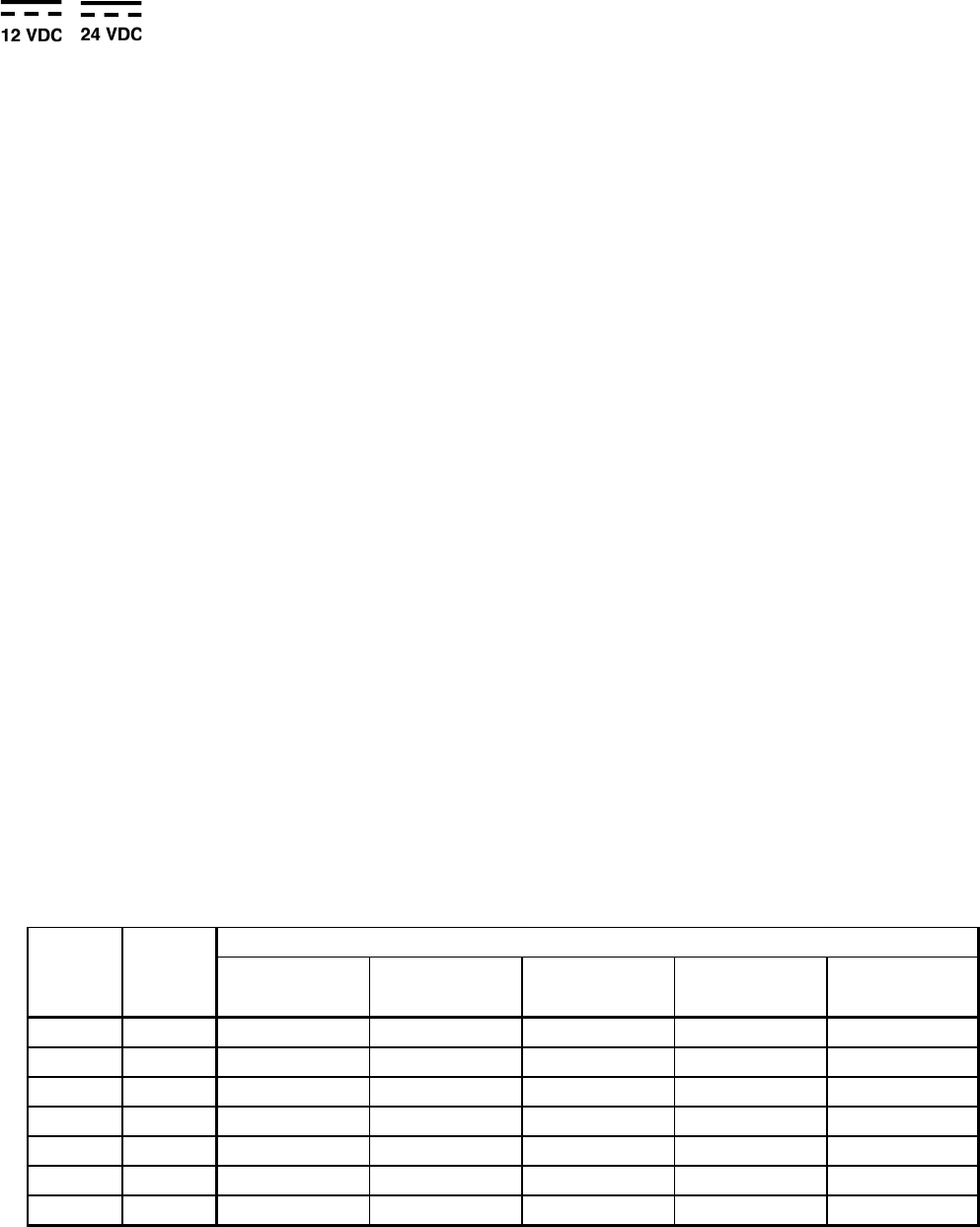
Pin and Related Wire Color (FIG. 4, page 15)
UnitedStates/
Canada Europe Japan/Taiwan SEA/India/
Australia China
1NotUsed NotUsed NotUsed NotUsed NotUsed NotUsed
2‐VDC Black Brown Black Brown Brown
3 +VDC White Blue White Blue Blue
4NotUsed NotUsed NotUsed NotUsed NotUsed NotUsed
5NotUsed NotUsed NotUsed NotUsed NotUsed NotUsed
6NotUsed NotUsed NotUsed NotUsed NotUsed NotUsed
7NotUsed Green Green/Yellow Red Green/Yellow Green/Yellow
Pin PinName
Color
Installation
332317C 15
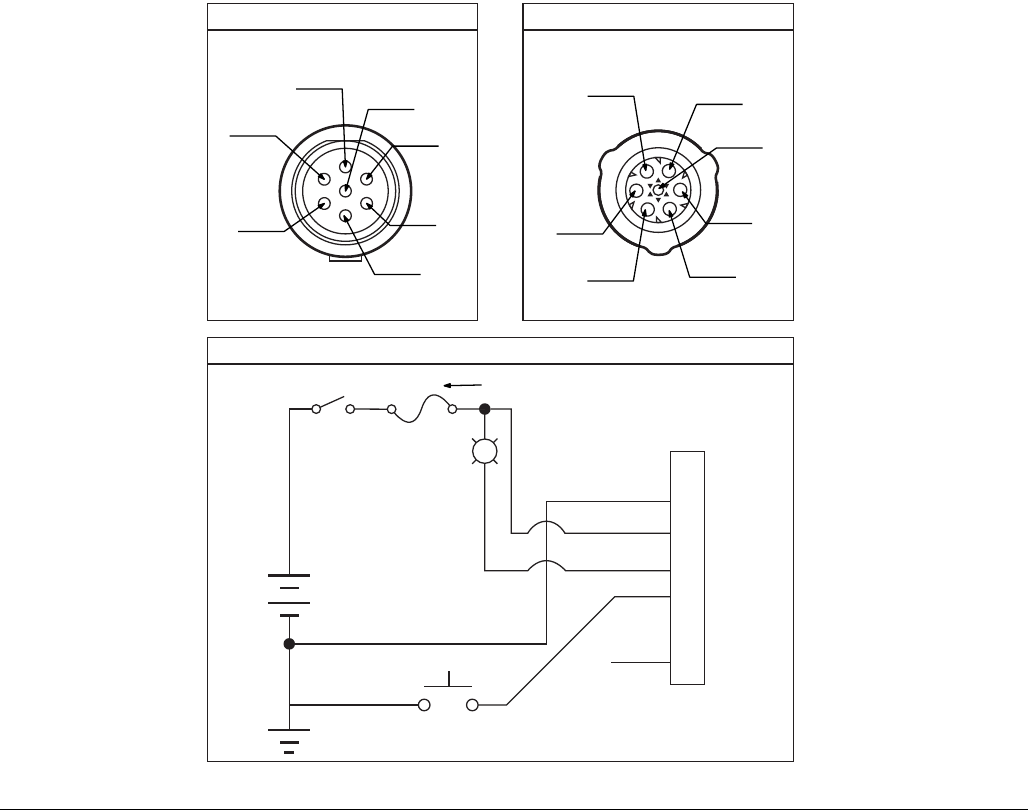
FIG. 4
(1)
(2)
(3)
(4)
(5)
(6)
(7)
Example Wiring Diagram
Connector on Housing Connector on Cable
Ignition Switch
Fuse
1
2
3
4
5
6
7
12V-pump - 7.5A - Graco kit #571039
24V pump - 4A - Graco kit #571040
(1)
(3)
(2)
(7)
(6) (5)
(4)
Installation
16 332317C
Power CPC DC - 5 wire
Part No.: 123750: 15 ft (4.5 m)
Part No.: 126219: 20 ft (6.1 m)
Part No.: 126220: 30 ft (9.1 m)
NOTE: An Illuminated Remote Run Button Kit: 571030, 571031 for starting a manual run cycle remotely if used in
conjunction with a 5-wire CPC cable, is available from Graco. Contact your local Graco distributor or Graco Customer
Service for additional information about these kits.
CPC Connector Specifications
• One, 7-position, 1.5 mm socket connector AMP 967650-1
• Five, 16 - 14 gauge female pins AMP 962999-1
• One, 180-degree strain relief or one, 90-degree strain relief AMP 965576-1 (determined by cable exit for cable
configuration)
Installation Notes
• Crimp pins to wire and install in socket connector per manufacturer’s instructions.
• See Pin Layout shown in FIG. 5 for proper location in the connector.
• Secure socket connector to the cable per the desired strain relief configuration.
Cable Specifications
•United States/Canada: 5 conductor 16 AWG UL62 and CSA 22.2 No. 49 listed SOOW cable with black, white,
red, orange, green/yellow insulation
•Europe: 5 Class-5 conductor, 1.5 mm2 Agency Listed H07RN-F cable with blue, brown, black, grey, green/yellow
insulation
•Japan/Taiwan: 5 conductor, 1/25 mm2 Agency Listed 2 PNCT cable with black, white, red insulation, green,
black
•SEA/India/Australia: 5 conductor, 1.5 mm2 Agency Listed H07RN-F black, white, red insulation, green, black
•China:5 conductor, 1.5 mm2 Agency Listed YZW cable with black, white, red insulation, green, black
Pin and Related Wire Color (FIG. 5, page 17)
UnitedStates/
Canada Europe Japan/Taiwan SEA/India/
Australia China
1NotUsed NotUsed NotUsed NotUsed NotUsed NotUsed
2‐VDC Black Brown Black Brown Brown
3 +VDC Red Blue White Blue Blue
4 LIGHT White Black Green Black Black
5 MANUAL Orange Grey NotUsed Grey Grey
6NotUsed NotUsed NotUsed NotUsed NotUsed NotUsed
7NotUsed Green Green/Yellow Black Green/Yellow Green/Yellow
Pin PinName
Color
Installation
332317C 17
FIG. 5
(1)
(2)
(3)
(4)
(5)
(6)
(7)
1
2
3
4
5
6
7
L
Fuse 12V-pump - 7.5A - Graco kit #571039
24V pump - 4A - Graco kit #571040
Example Wiring Diagram
Connector on Housing Connector on Cable
(1)
(3)
(2)
(7)
(6) (5)
(4)
Setup
18 332317C
Setup
Pressure Relief
Follow the Pressure Relief Procedure when-
ever you see this symbol.
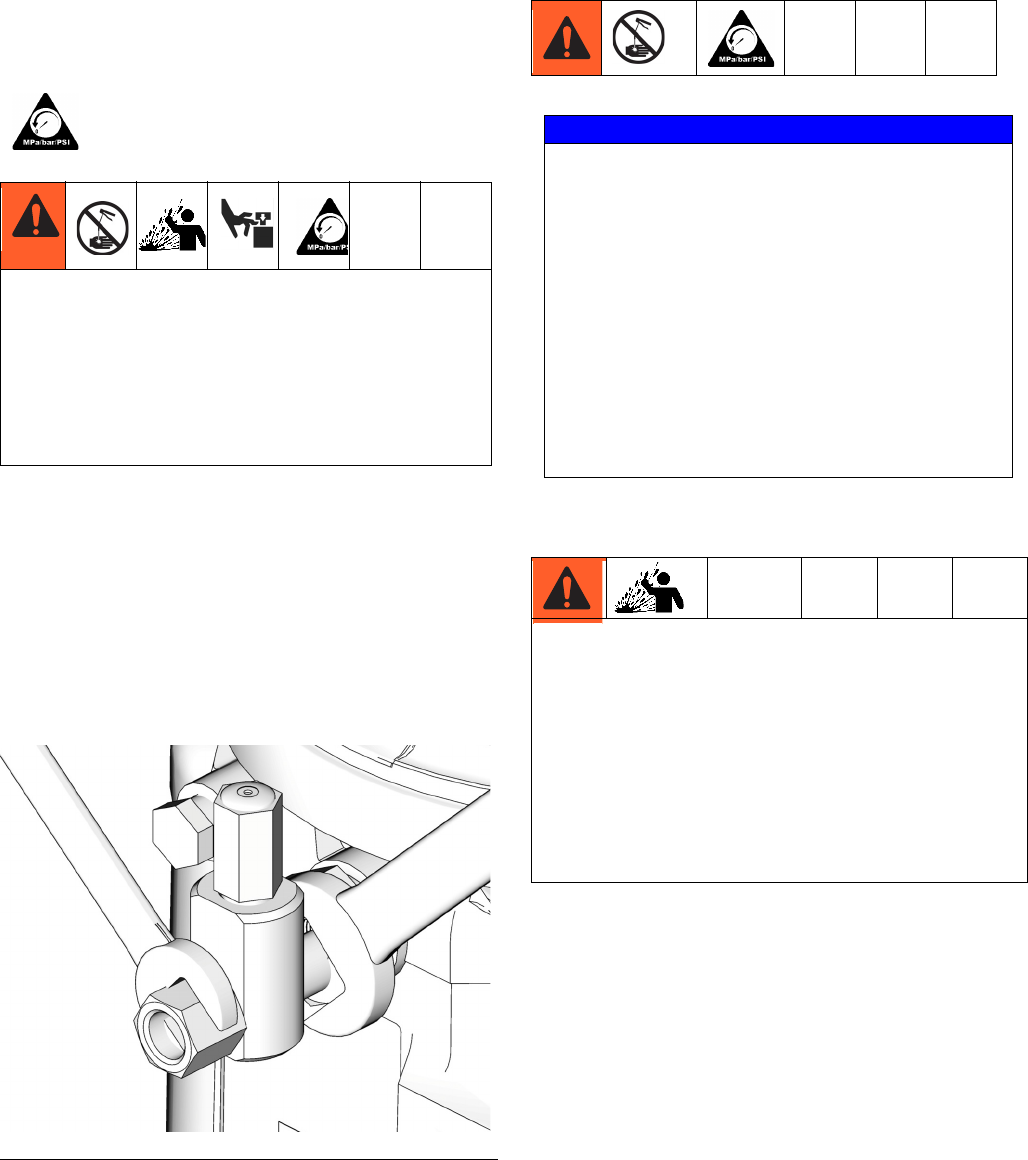
Relieve pressure in system using two wrenches work-
ing in opposite directions on pump element and pump
element fitting to slowly loosen fitting only until fitting
is loose and no more lubricant or air is leaking from fit-
ting.
NOTE: When loosening pump element fitting, do NOT
loosen pump element. Loosening pump element will
change the output volume.
Connecting to Auxiliary Fittings
Pressure Relief Valves
This equipment stays pressurized until pressure is
manually relieved. To help prevent serious injury
from pressurized fluid, such as skin injection,
splashing fluid and moving parts, follow the
Pressure Relief Procedure when you stop spraying
and before cleaning, checking, or servicing the
equipment.
FIG. 6
NOTICE
Do not attach unsupported equipment to auxiliary
fittings such as fill ports and pump element. Attach-
ing unsupported equipment to these fitting can
result in irreparable housing damage.
• Always use two wrenches working in opposite
directions when connecting anything to pump
element or auxiliary fittings. See FIG. 6 for an
example.
• Torque pump element fittings to 50 in. lbs (5.6
N•m).
• When connecting pump element into housing
torque to 50 in. lbs (5.6 N•m).
A pressure relief valve appropriate for the lubrication
system must be installed close to the pump outlet to
alleviate unintended pressure rises in the system and
protect the G1 pump from damage.
• Only use a pressure relief valve that is rated for no
more than the working pressure of the G1 pump it
is installed on. See Technical Data, page 26.
• Install a pressure relief valve before any auxiliary
fitting.
Setup
332317C 19
Loading Grease
To ensure optimal performance from the G1:
• Only use NLGI #000 - #2 greases appropriate for
your application, automatic dispensing, and the
equipment’s operating temperature. Consult with
machine and lube manufacturer for details.
• The reservoir can be filled using a hand operated
pump, pneumatic pump or electric transfer pump.
• Do not overfill (FIG. 8).
• Do not operate G1 without reservoir attached.
Models without a follower plate:
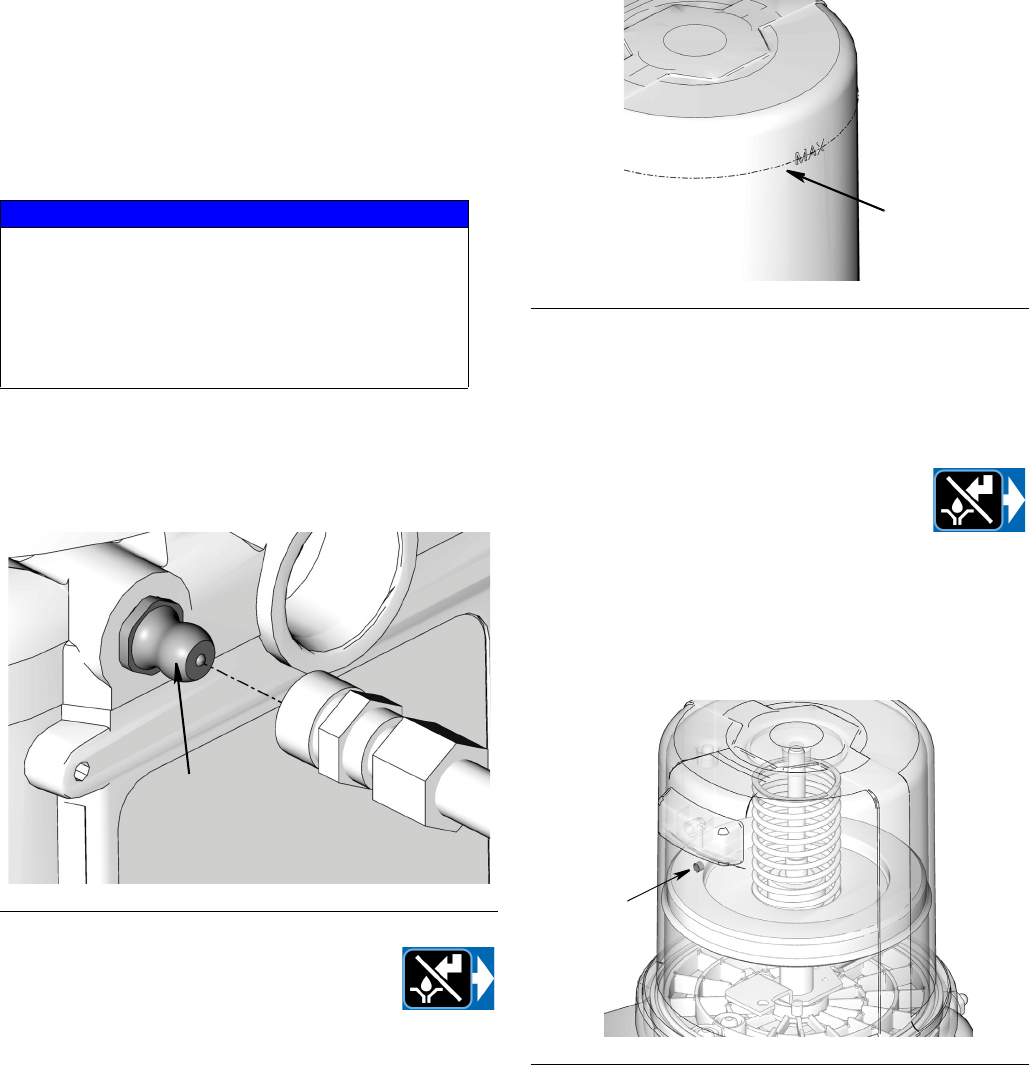
1. Connect fill hose to inlet fitting (37) (FIG. 7).
2. For higher viscosity fluids, press the
manual run button to start the pump
during fill to rotate the stirring paddle
and prevent air pockets from forming in
grease.
3. Fill reservoir with NLGI grease to max fill line.
NOTE: Vent port, located in rear of reservoir, should not
be used as an overfill port/indicator.
4. Remove fill hose.
Models with a follower plate:
1. Connect fill hose to inlet fitting (FIG. 7).
2. For higher viscosity fluids, press the
manual run button to start the pump
during fill to rotate the stirring paddle
and prevent air pockets from forming in
grease.
3. Fill reservoir with grease until seal of follower plate
breaches the vent hole (FIG. 9) and the majority of
air is expelled from the reservoir.
NOTE: Vent port, located in rear of reservoir, should not
be used as an overfill port/indicator.
4. Remove fill hose.
NOTICE
• Always clean fitting (37) with a clean dry cloth
prior to filling reservoir. Dirt and/or debris can
damage pump and/or lubrication system.
• Care must be used when filling the reservoir
using a pneumatic or electric transfer pump to
not pressurize and break the reservoir.
FIG. 7
37
FIG. 8
FIG. 9
max fill line
vent hole
Setup
20 332317C
Changing Greases
When changing greases, always use compatible fluids
or greases.
Filling Oil Unit
• Only use oil appropriate for your application, auto-
matic dispensing, and the equipment’s operating
temperature. Consult with machine and lube manu-
facturer for details.
• The reservoir can be filled using a hand operated
pump, pneumatic pump or electric transfer pump.
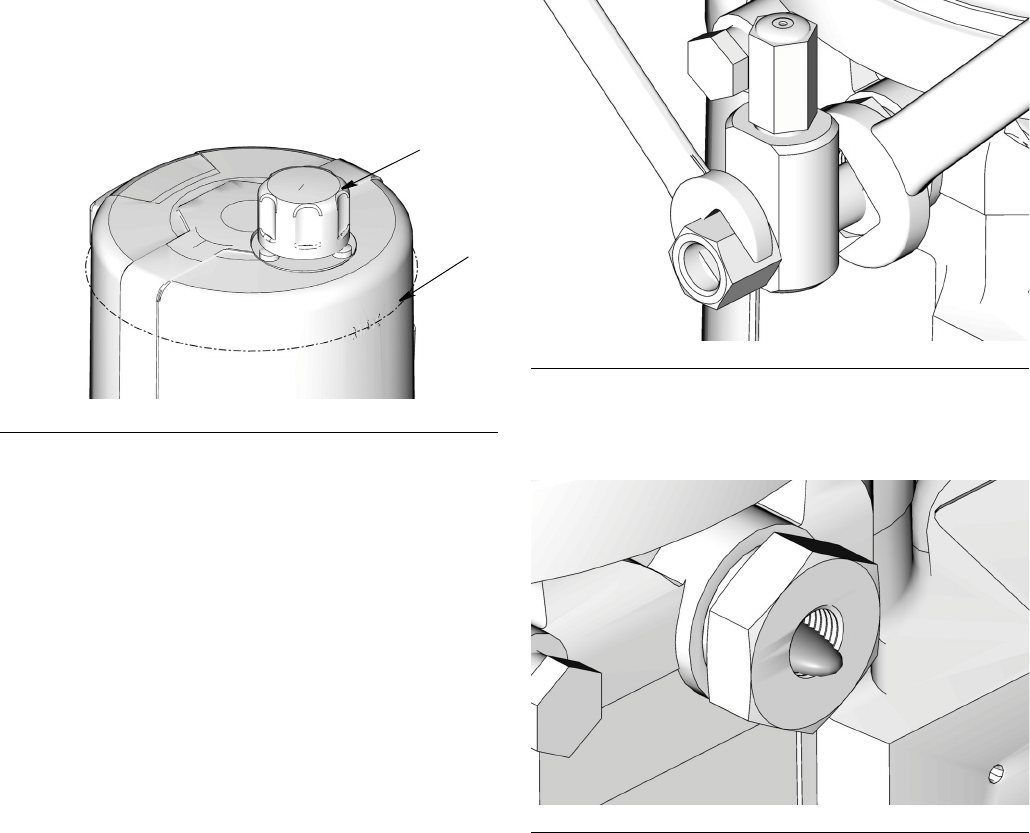
• Do not overfill (FIG. 10).
• Do not operate G1 without reservoir attached.
• Only use oils with viscosity at least 40 cSt.
1. Remove fill cap (a).
2. Pour oil into reservoir to fill line (b).
3. Replace fill cap. Hand tighten cap, securely.
Priming
NOTE: It is not necessary to prime pump every time
pump is filled with lubricant.
Pump only requires priming the first time it is used or if it
is allowed to run dry.
1. Loosen pump element fitting (FIG. 11).
NOTE: When loosening pump element fitting, do NOT
loosen pump element. Loosening pump element will
change the output volume
2. Only run pump until air is no longer dispensed with
the lubricant coming out of element fitting (FIG. 12).
3. Tighten pump element fitting using two wrenches
working in opposite directions (FIG. 11).
FIG. 10
a
b
FIG. 11
FIG. 12
Plus Model Control Setup
332317C 21
Plus Model Control Setup
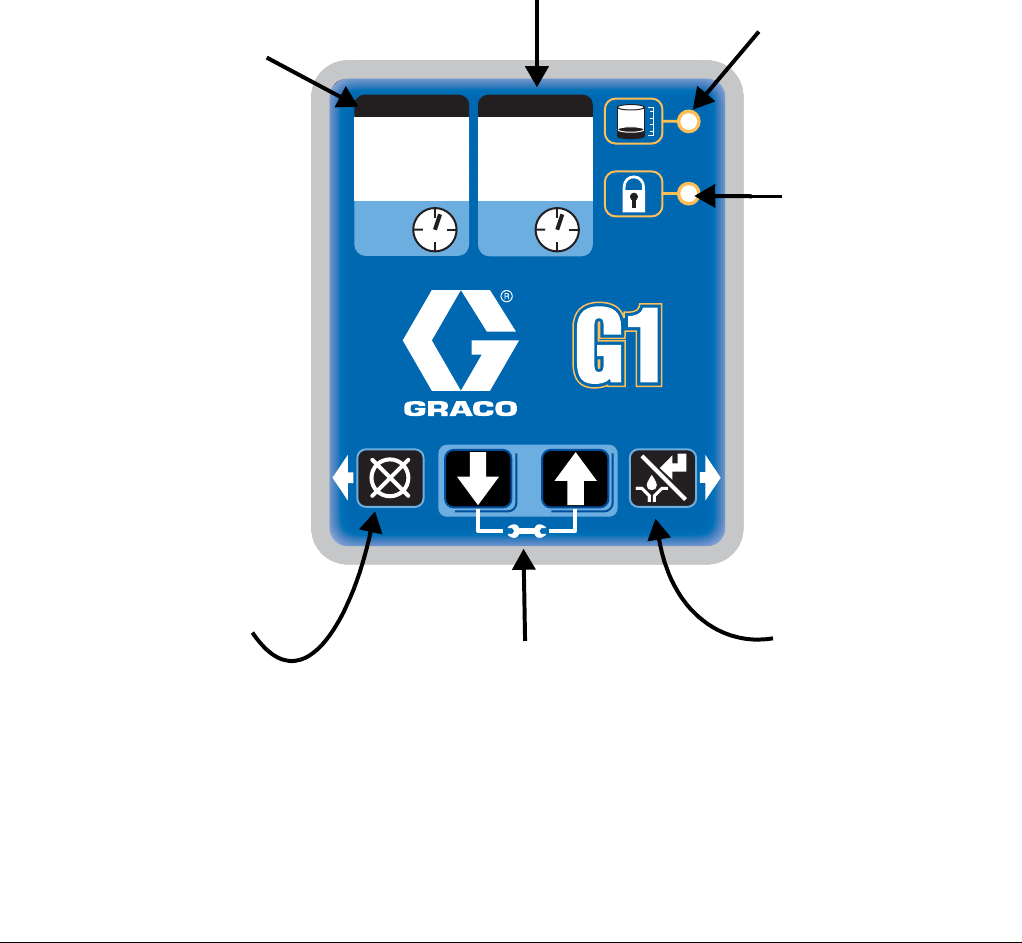
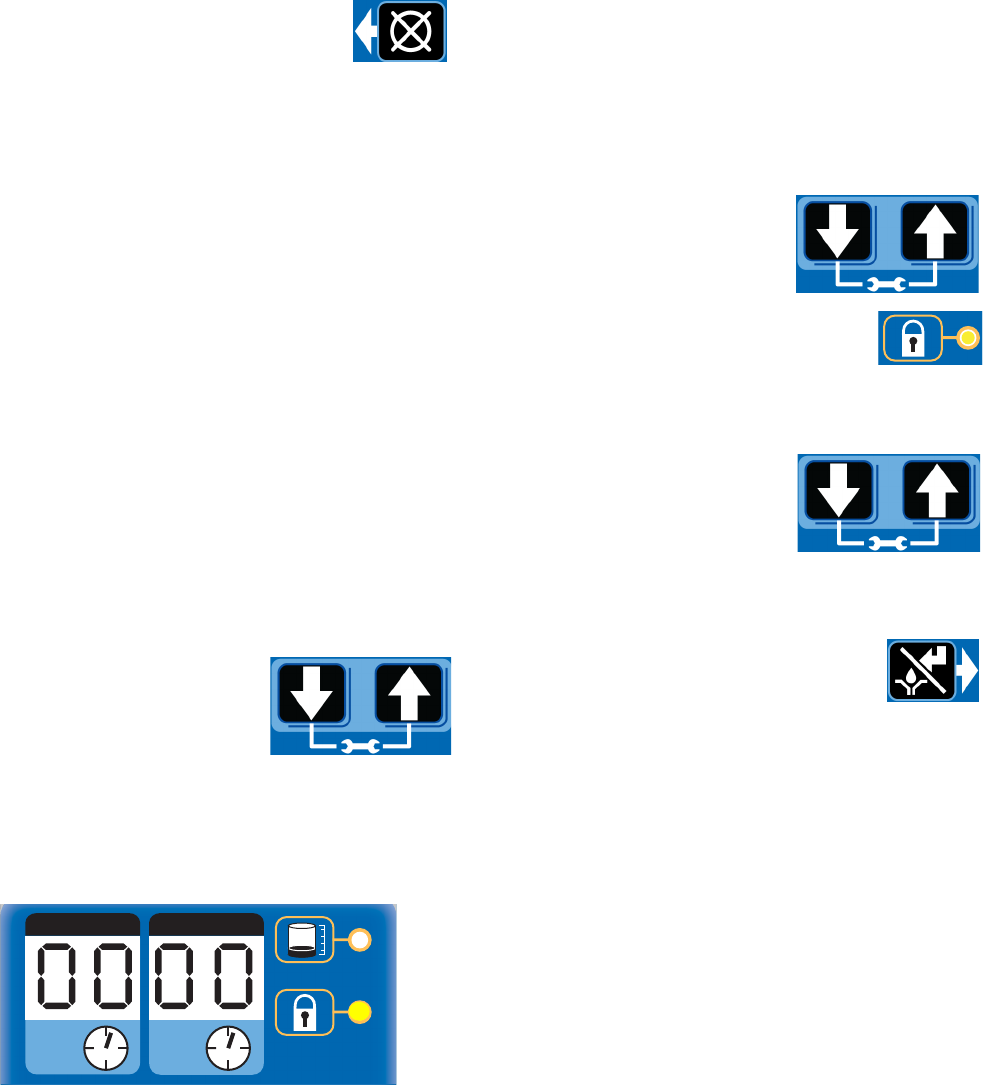
Control Panel Overview (FIG. 13)
NOTE: Programming instructions begin on page 22.
FIG. 13
ON OFF
MM HH
Lubrication Pump
ON TIME
•The blinking LED below ON
indicates the ON Time
sequence is running.
•Display shows time as MM
(minutes).
i.e., 02 is 2 minutes.
•Times lubrication cycle.
•Counts down from a set time to
zero.
OFF TIME
•The blinking LED below OFF indicates the
OFF Time sequence is running.
•Value is entered in HH.
•Displays in HH.
•Times pump rest between cycles.
•Counts down from a set time to zero.
LOW LEVEL FAULT
LED next to icon lights when
pump is out of lubricant. Pump
run cycle stops.
LOCK ICON
•LED next to icon lights indi-
cating PIN is required to
enter setup.
•In SETUP MODE LED
lights when setting up the
PIN.
LEFT DIRECTION ARROW /
RESET
•In SETUP MODE, moves cur-
sor in display one field to the
left.
•In Low Level Fault Mode: press-
ing and holding for 3 seconds
clears fault and switches cycle
to OFF MODE.
RIGHT DIRECTION ARROW /
MANUAL RUN / ENTER:
•In SETUP MODE, saves
entry, moves cursor in display
one field to the right or to the
next setup step.
•In RUN MODE starts a man-
ual run cycle.
UP and DOWN ARROW
•Hold both the UP and DOWN ARROW but-
tons down together for 3 seconds to enter
SETUP MODE.
•In SETUP MODE, increases or decreases
number values shown in display.
Plus Model Control Setup
22 332317C
Instructions
Powering Units With Controllers
By default, units with controllers are set to
operate in a timed mode with 1 minute of
ON time and 8 hours of OFF time. The unit
should be powered up in OFF mode,
counting down from the 8 hours. If the unit powers up in
ON mode and has not been primed, hold the reset but-
ton located on the control panel (example shown on the
right) for 1 second to move to the OFF mode.
The G1 Plus model uses a timer to regulate how long a
pump cycle runs and the length of time the pump rests
between cycles.
NOTE:
• A blinking number on the display indicates the G1 is
in SETUP MODE.
• In RUN MODE numbers on the display do not blink.
• After 60 seconds of no activity, the device returns to
RUN MODE in the OFF Time cycle and the OFF
Time restarts counting down the total programmed
amount of time. It does not resume the countdown
from the point where the cycle was interrupted when
you entered SETUP MODE.
Entering Setup Mode
Press both the UP and DOWN
ARROW buttons together for 3
seconds to enter the SETUP
MODE.
NOTE: If the lock LED is lit after entering Setup Mode
and four 0000’s are displayed, the unit has a PIN Code
lock out enabled. See Entering a PIN Code to Access
Setup Mode for instructions on entering a value.
Entering a PIN Code to Access Setup Mode
The G1 controller does not require a user to provide a
PIN code to access the programming features of the
unit. However, Graco understands that some users may
want to protect the program settings and therefore, an
option for adding PIN Code authorization is available.
The instructions for setting a PIN Code are provided in
the Advanced Programming section of this manual. See
page 24.
To enter the PIN Code:
1. Press both the UP and
DOWN ARROW buttons for 3
seconds.
2. The LED next to the LOCK ICON on
the display lights and the 4 zeros
appear on the display indicating the
system requires a PIN Code entry to access the G1
in SETUP MODE.
3. The cursor is automatically
positioned to enter the first
character of the PIN Code.
Use the UP and DOWN
ARROW buttons to move up
and down through the numbers 0-9 until the first
number in the PIN code is displayed in the field.
4. Press the ENTER button to set the num-
ber. The cursor automatically moves to
the next number field.
5. Repeat steps 3 and 4 for each PIN Code prompt
field.
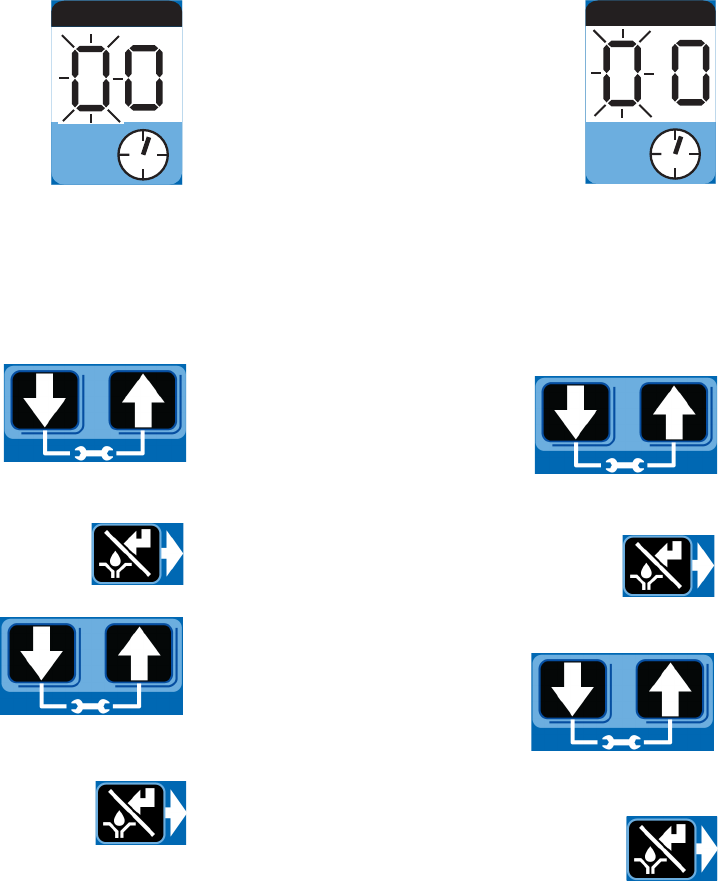
If the PIN Code you entered is correct, the first editable
character on the display will flash.
NOTE: A blinking field on the display indicates the G1 is
in SETUP MODE. In RUN MODE numbers on the dis-
play will not blink.
ON OFF
MM HH
Plus Model Control Setup
332317C 23
ON Time
• ON Time is set in Minutes (MM).
• In SETUP MODE, the number dis-
played in the first field, on the left
side of display blinks, indicating the
device is ready to program the ON
Time minutes.
• The total amount of ON Time can-
not exceed 30 minutes.
Programming ON Time
NOTE: When programming a time of less than 10 min-
utes you must program a leading zero in the first num-
ber field and press the ENTER button to save the zero
selection.
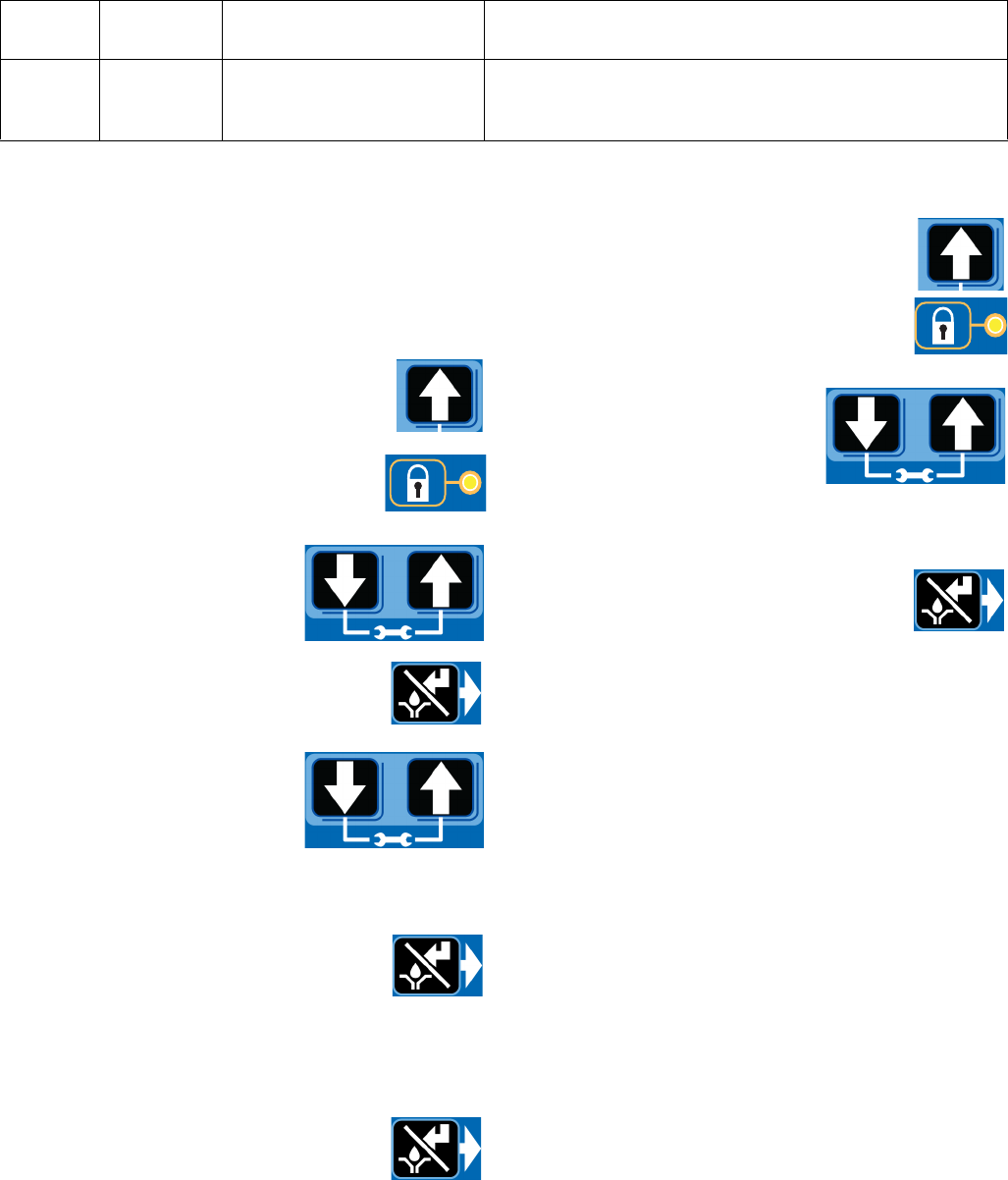
1. To set the ON Time use the
UP or DOWN ARROW button
to scroll through numerals 0
to 3 until the desired number
appears in the first MM (min-
utes) field.
2. Press the ENTER button. The next MM
number field to the right flashes indicat-
ing it is ready for programming.
3. Use the UP or DOWN
ARROW button to scroll
through numerals 0 to 9 until
the desired number appears
in the second MM number
field.
4. After pressing the ENTER button to set
the last MM field, all the programmed
ON Time information is saved.
The G1 automatically switches to the OFF Time
SETUP MODE.
OFF Time
• OFF Time is set in Hours (HH).
• In SETUP MODE the number dis-
played in the first field, on the left
side of display blinks, indicating the
device is ready to program the OFF
Time hours.
• Total amount of OFF time cannot
exceed 24 hours.
Programming OFF Time
NOTE: When programming a time of less than 10
hours you must program a leading zero in the first num-
ber field and press the ENTER button to save the zero
selection.
1. To set the OFF Time use the
UP or DOWN ARROW button
to scroll through numerals 0
to 9 until the desired number
appears in the first HH (hour)
field.
2. Press the ENTER button to lock in the
selection. The next HH number field to
the right flashes indicating it is ready for
programming.
3. Use the UP or DOWN
ARROW button to scroll
through numerals 0 to 2 until
the desired number appears
in the second HH number
field.
4. After pressing the ENTER button to set
the last HH field, the OFF Time infor-
mation is saved.
ON
MM
OFF
HH
Advanced Programming
24 332317C
Advanced Programming
Entering a PIN Code for the First Time
Setting Up PIN Code
A PIN Code can be programmed into the G1 to protect
the settings from inadvertently being changed by unau-
thorized users.
1. Press the UP ARROW button for 10
seconds.
The LED next to the LOCK ICON on the dis-
play lights, indicating you have entered the
PIN Mode.
2. The word OFF appears in the
display. Press the UP or
DOWN ARROW button to
change this to ON.
3. Press the ENTER button to enter the
PIN Code.
4. The cursor automatically is
positioned to entered the first
character of the PIN Code.
Use the UP and DOWN
ARROW buttons to move up
and down through the numbers 0-9 until the first
number in the PIN code is displayed in the field.
5. Press the ENTER button to set the num-
ber. The cursor automatically moves to
the next number field.
6. Repeat steps 4 and 5 for each PIN Code prompt
field.
7. Press the ENTER button to save the
PIN Code and exit Advanced Setup.
Entering Advanced Setup
Press the UP ARROW button for 10 sec-
onds.
If the G1 was previously set up to require a
PIN Code, the LED next to the LOCK ICON
lights, indicating a PIN Code is required.
1. The cursor is automatically
positioned to enter the first
character of the PIN Code.
Use the UP and DOWN
ARROW buttons to move up
and down through the numbers 0-9 until the first
number in the PIN code is displayed in the field.
2. Press the ENTER button to set the num-
ber. The cursor automatically moves to
the next number field.
3. Repeat steps 1 and 2 for each PIN Code prompt
field.
If the PIN Code you entered is correct, the G1 will be in
the Advanced Setup option used to change the PIN
Code.
A1 - Changing PIN Code .
To change a PIN Code, follow instructions for Entering a
PIN Code for the first time.
Advanced
Option Setting Format/ Description Why Use This?
A1
Lockout
Code
(Optional)
Secures setup modes with
PIN Prevents unauthorized users to adjusting settings.
Run Mode
332317C 25
Run Mode
Time Control
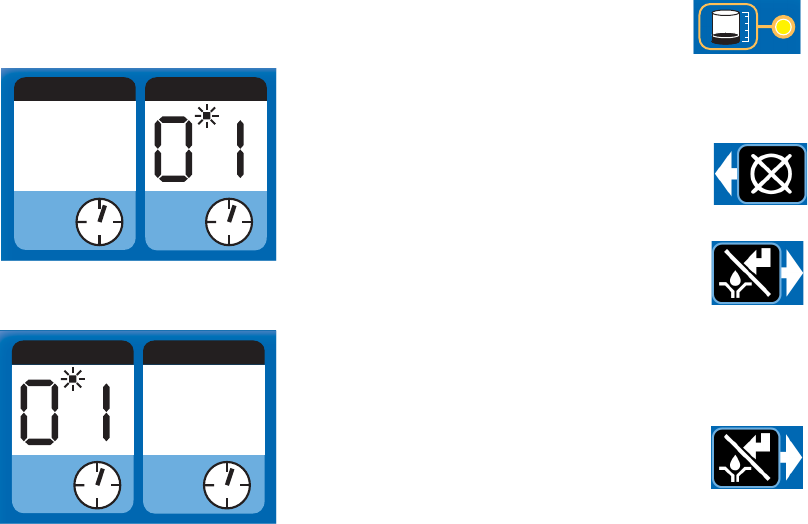
After setup is complete, the G1 automatically begins to
run the OFF Time sequence.
• The G1 runs the
programmed OFF
sequence.
(Notice the dot
below OFF flashes
on the display
while the OFF
Time counts down.
This count down is in hours.)
• When the OFF
Time count
reaches zero, the
G1 Automatic
Lubrication Pump
turns the pump on
and it runs for the
programmed ON
Time cycle.
(Notice the dot below ON flashes on the display.)
• When the ON Time count reaches zero, the pump
shuts off again and the system again runs OFF
Time cycle and the OFF Time LED flashes again.
This sequence repeats itself until the device is
reprogrammed or a Low Level Fault occurs.
• If power to the pump is lost during a lubrication
cycle, when power is restored the pump will resume
the cycle with the same amount of time remaining in
the cycle as when the power was lost.
Low Level
Pumps equipped with low level detection will stop when
the fluid level is sufficiently low to trigger the low level
fault.
• The LED next to the LOW LEVEL
ICON on the display flashes.
Add lubricant to the pump. See Loading Grease
instructions, page 19 or Filling Oil Unit, page 20.
• After lubricant is added, press the
RESET button to clear the fault.
NOTE: For higher viscosity fluids it may be
necessary to clear the low level fault prior to
filling the pump. You can then press the
Manual Start button to start the pump during
the fill.
Manual Run Cycle
To run an extra (non-programmed) lubrica-
tion cycle, push the Manual Start button.
NOTE: An Illuminated Remote Run Button
Kit: 571030, 571031 for starting a manual run cycle
remotely if used in conjunction with a 5-wire CPC cable,
is available from Graco. Contact your local Graco distrib-
utor or Graco Customer Service for additional informa-
tion about these kits.
ON OFF
MM HH
ON OFF
MM HH
Troubleshooting
26 332317C
Troubleshooting
Problem Cause Solution
Unit does not power on Incorrect/loose wiring Refer to Installation instructions, page 7.
Unit does not power on (DC models only)
Tripped external fuse due to internal
component failure Contact Graco Customer Service.
Tripped external fuse due to pumping
non-cold weather lubricant in cold
weather -13°F (-25°C)
Replace lubricant with pumpable lubri-
cant, rated for environmental conditions
and application.
Replace fuse.
Unit does not power on (AC models only) Tripped internal power supply fuse due to
power supply failure Contact Graco Customer Service.
Can’t set desired ON/OFF times
Allowable ON time: 1-30 minutes
Allowable OFF time: 1-24 hours
(in full minute or hour increments)
Adhere to allowable duty cycle. Contact
Graco Customer Support if other duty
cycles are required for application.
Unit is not operating based on the time
that was programmed
Time entered was misinterpreted as MM
instead of HH (or visa versa)
Verify the unit was programmed as
intended, referencing programming
instructions.
Lubricant leaks past seal located on the
bottom of the reservoir
Reservoir retaining tabs are cracked or
broken Replace reservoir.
Reservoir is being pressurized during fill-
ing
Ensure vent hole is not plugged.
If problem persists, contact Graco Cus-
tomer Service or your local Graco distrib-
utor for assistance.
Unit not pumping during ON cycle, but
controller lights and functions Failed motor Replace unit.
Follower plate is not going down Air is trapped in the reservoir between
the follower plate and lubricant
Add grease following Loading Grease
instructions, page 19. Ensure air is
purged.
Pump takes several minutes before it
begins pumping
Pumping non-cold weather lubricant in
cold weather -13°F (-25°C)
Increase pump on time.
Use grease suitable for temperature and
conditions.
Dim display, unit is not operating
Tripped internal, resettable fuse due to
internal component failure or short circuit
condition
Verify manual run inputs have not cre-
ated a short circuit condition. Cycle
power.
Unit indicates a cycle or pressure alarm
before the lubrication cycle could com-
plete
The ON Time was not entered correctly Refer to programming ON Time, page
23.
Maintenance
332317C 27
Maintenance
Frequency Component Required Maintenance
Daily and at refill Zerk Fittings
Keep all fittings clean using a clean
dry cloth. Dirt and/or debris can dam-
age pump and/or lubrication system.
Daily G1 Pump Unit and Reservoir Keep pump unit and reservoir clean
using a clean dry cloth.
Daily Display Keep display clean using a clean dry
cloth.
Monthly External Wiring Harness Verify external harnesses are
secure.
Parts: 2 Liter Models
28 332317C
Parts: 2 Liter Models
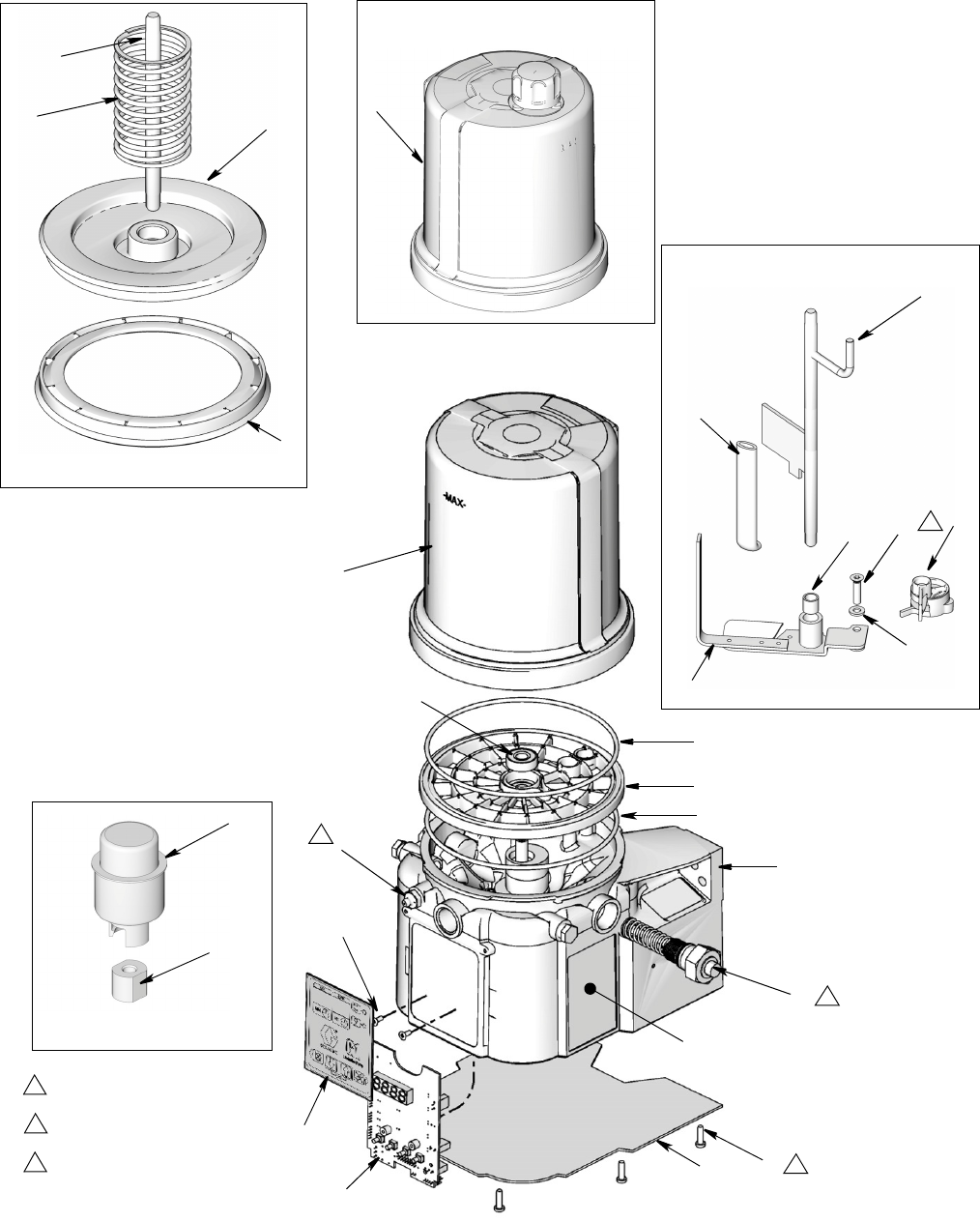
1
34
13
14
17
41
43
44 42
13
40b
40a
45
35
57 27
60
23
1615
37
67
66
Oil Reservoir
Follower Plate Models Only
Low Level Grease Models Only
Low Level Oil Models Only
Torque to 4 in. lbs (0.45 N.m)
1
Torque to 30 in. lbs (3.4 N.m)
2
Torque to 50 in. lbs (5.6 N.m)
3
3
2
1
3
34
30
31
33
Parts: 4 and 8 Liter Models
332317C 29
Parts: 4 and 8 Liter Models
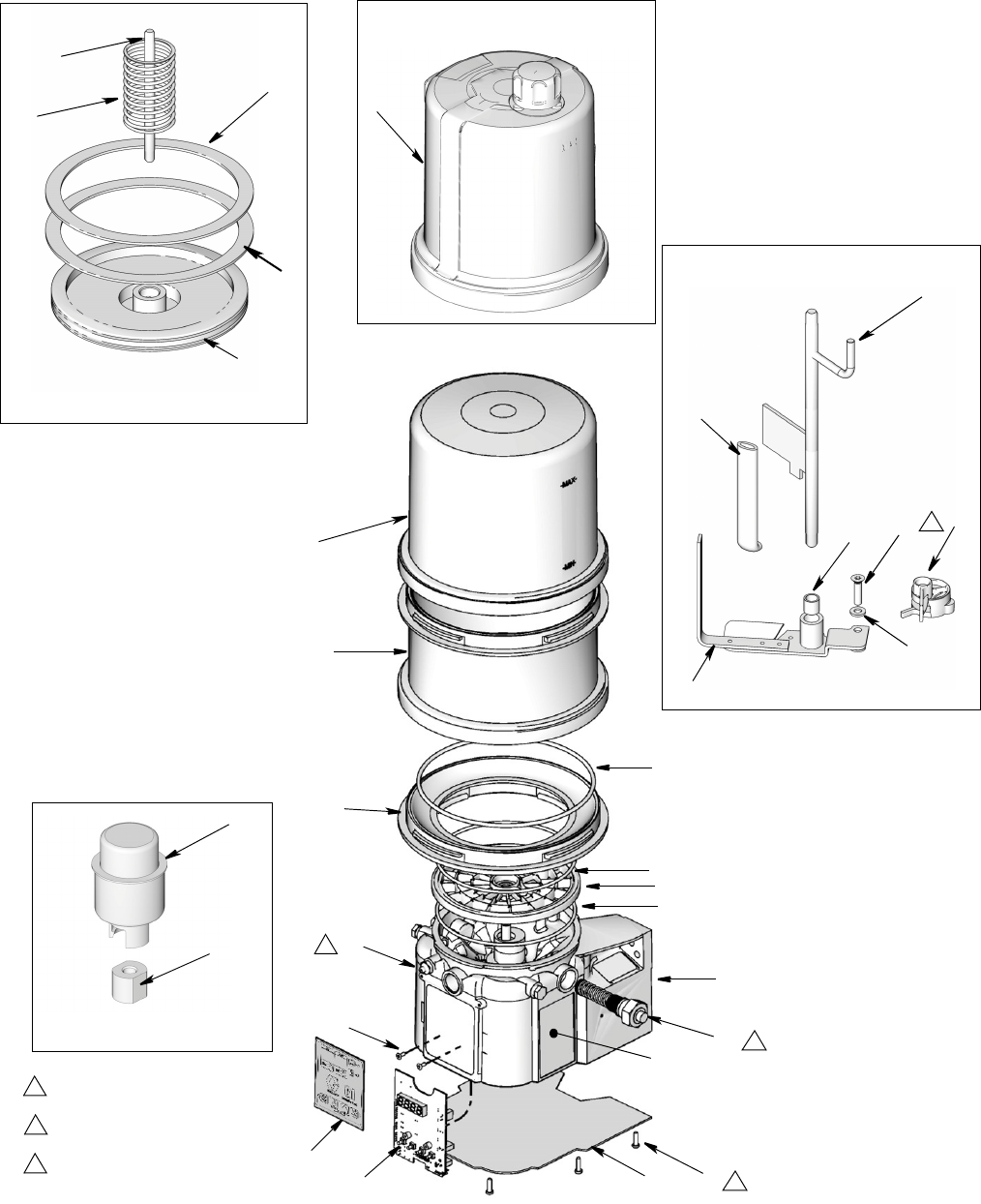
1
34
13
14
17
41
43
44
42
13
40b
40a
45
35
57 27
60
23
16
62
37
67
66
Oil Reservoir
Follower Plate Models Only
Low Level Grease Models Only
Low Level Oil Models Only
Torque to 4 in. lbs (0.45 N.m)
1
Torque to 30 in. lbs (3.4 N.m)
2
Torque to 50 in. lbs (5.6 N.m)
3
3
2
1
61
13
30
34
31
33
3
41
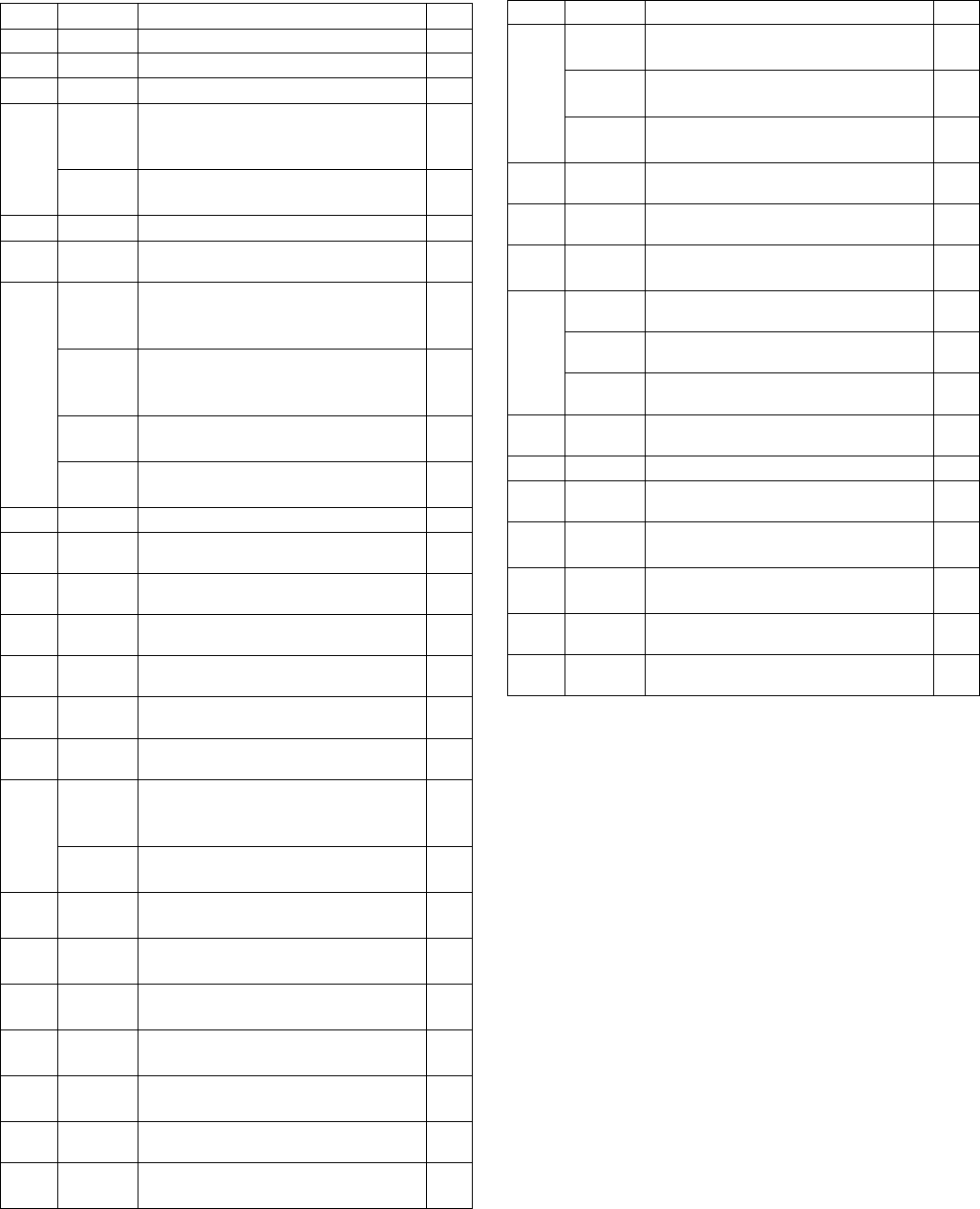
Parts
30 332317C
Parts
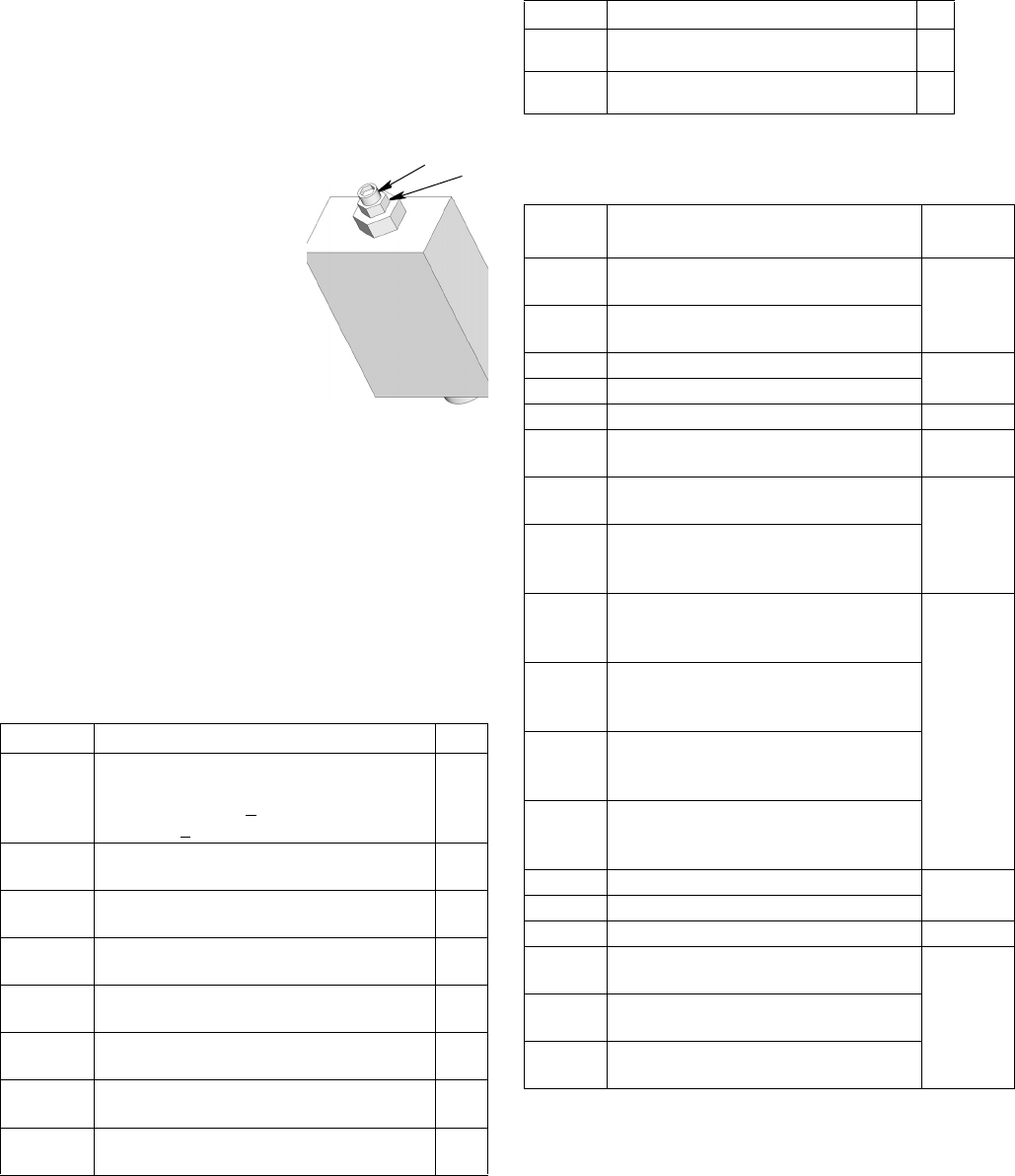
Replacement Danger and Warning labels, tags and cards
are available at no cost.
‡ Also order Ref 31 and Ref 34.
† Also order Ref. 57 when ordering this part.
FN Part No. Description Qty.
1 BASE, molded 1
3 278142 BOTTOM, cover 1
4 115477 SCREW, bottom cover 9
13
124396
O-RING, 258 (green), included in Kit
571042, 571043, 571044, 571045,
571069, 571179
2
124510 O-RING, included in Kit 571069,
571179, 571182, 571183 1
14 PLATE, ricer 1
15 BEARING, ball 1
16
PADDLE, stirring, 2 liter models with-
out follower plate, included in Kit
571044
1
PADDLE, stirring, 4 and 8 liter mod-
els without follower plate, included in
Kit 571046
1
PADDLE, stirring, 2 liter models with
follower plate, included in Kit 571045 1
PADDLE, stirring, 4 liter models with
follower plate, included in Kit 571047 1
17 ELEMENT, pump 1
23‡ 278136 PADDLE, low level models 1
27 123025 SCREW, M6 1
30‡ 262912 BOARD, circuit 1
31 119228 SCREW, machine, flat head 2
3316A579 LABEL, safety 1
34 16T912 LABEL, overlay 1
35
WIPER, stirring, models without fol-
lower plate, included in Kit 571044,
571046
1
WIPER, stirring, models with follower
plate, included in Kit 571045, 571047 1
37 123741 FITTING, zerk, grease models (not
included on oil models) 1
40a RESERVOIR, 2 liter, grease,
included in Kit 571042, 571069 1
40b RESERVOIR, 2 liter, oil, included in
Kit 571179 1
40a RESERVOIR, 4 liter, grease,
included in Kit 571183 1
40b RESERVOIR, 4 liter, oil, included in
Kit 571182 1
40a RESERVOIR, 8 liter grease 1
40b RESERVOIR, 8 liter, oil, included in
Kit 571182 1
41
278139 SEAL, follower plate, 2 liter grease
models 1
16F472 SEAL, follower plate, 4 liter grease
models 2
16V763 SEAL, follower plate, 8 liter grease
models 2
42 PLATE, follower, grease models 1
43 ROD, follower plate, grease models 1
44 SPRING, compression, grease mod-
els 1
45†
24D838 BAFFLE, low level, 2 liter models 1
24E246 BAFFLE, low level, 4 liter models 1
24F836 BAFFLE, low level, 8 liter models 1
57 117156 BEARING, sleeve 1
58196548 LABEL, shock warning 1
60 16D984 WASHER, low level models 2
61 RESERVOIR, mid-section, 8 liter
models 1
62 ADAPTER, reservoir 4 and 8 liter
models 1
66 126417 NUT 1
67 24N806 FLOAT, oil models 1
FN Part No. Description Qty.
Parts
332317C 31
Pressure Relief Valves
Important Information regarding Pressure Relief
Valve 16C807.
Pressure Relief Valve 16C807 can only be used on
the G1 and G3 Pumps. It is not intended for use with
any other products.
The pressure relief valve uses a
pressure adjustment screw (a) to
set the pressure release point. It
is not intended as a way to
relieve pressure during normal
operation, but as a protective
measure in the event there is an
unintended pressure increase in
the system. Do not use this pres-
sure relief valve a means of
relieving pressure in day-to-day,
normal cycle operation.
The pressure adjustment screw
will require periodic adjustments.
Whenever the valve is set/adjusted (after the set point is
found) it is important to ensure that the valve is not bot-
tomed out and there is at least 1/2 turn of adjustment
remaining. This is determined by turning the screw (a)
1/2 turn and then back turning it out again.
NOTE: Turning adjustment screw (a) clockwise
increases pressure.
Fuses
Installation and Repair Kits
Part Description Qty
16C807
VALVE, pressure relief, 500-3500 psi (3.44
MPa, 34.4 bar - 24.1 MPa, 241 bar), Set
pressure 3000 psi + 10% (20.68 MPa,
206.8 bar + 10%) Included in Kit 571028
1
563156 VALVE, pressure relief, 750 psi (5.17 MPa,
51.71 bar) 1
563157 VALVE, pressure relief, 1000 psi (6.89
MPa, 68.95 bar) 1
563158 VALVE, pressure relief, 1500 psi (10.34
MPa, 103.42 bar) 1
563159 VALVE, pressure relief, 2000 psi (13.78
MPa, 137.89 bar) 1
563160 VALVE, pressure relief, 2500 psi (17.23
MPa, 172.36 bar) 1
563161 VALVE, pressure relief, 3000 psi (20.68
MPa, 206.84 bar) 1
563190 VALVE, pressure relief, 5500 psi (37.92
MPa, 379.21 bar) 1
a
ti15644
b
a = adjustment screw
b = locking nut
Part Description Qty
571039 FUSE, 12 volt DC 1
571040 FUSE, 24 volt DC 1
Kit No. Description
Manual
Number
571028 KIT, return to reservoir NPT, includes
pressure relief valve 16C807 3A0525
571071 KIT, return to reservoir BSPP, includes
pressure relief valve 16C807
571030 KIT, remote manual run, 12 volt DC 3A0528
571031 KIT, remote manual run, 24 Volt DC
571036 KIT, cover with “G” label NA
571041 KIT, pump element, includes Ref 17,
18, 33 3A0533
571042 KIT, repair, 2 liter reservoir, includes
Ref 13, 36, 40
3A0534
571069
KIT, repair, 2 liter reservoir, for models
with follower plate, includes Ref 13, 36,
40
571044
KIT, replacement, paddle, 2 liter, for
models without follower plate, includes
Ref 13, 16, 35, 57
3A0535
571045
KIT, replacement, paddle, 2 liter, for
models with follower plate, includes Ref
13, 16, 35,40a, 42, 57
571046
KIT, replacement, paddle, 4-8 liter, for
models without follower plate, includes
Ref 13, 16, 35, 57
571047
KIT, replacement, paddle, 4 liter, for
models with follower plate, includes Ref
13, 16, 35, 57
571058 KIT, output adapter, NPT 3A0522
571070 KIT, output, adapter, BSPP
571060 KIT, fill, zerk, leakproof NA
571179 KIT, repair, reservoir oil, 2 liter models,
includes Ref 13, 36, 40b
3A0534571182 KIT, repair, reservoir, oil 4 liter models,
includes Ref 13, 36, 40b
571183 KIT, repair, reservoir, grease, 4 liter
models, includes Ref 13, 36, 40b

Technical Data
32 332317C
Technical Data
A
Dimensions
Maximum Working Pressure 5100 psi (35.1 MPa, 351.6 bar)
Power
100-240 VAC 88 - 264 VAC; 0.8 A current, 90 VA Power, 47/63 Hz,
Single phase, inrush/locked rotor, max 40A (1ms)
12 VDC 9 - 16 VDC; 5 A current, 60 W, inrush/locked rotor 12 A
24 VDC 18 - 32 VDC; 2.5 A current, 60 W, inrush/locked rotor 6 A
Fluid
Grease Models Grease NLGI 000 - #2
Oil Models At least 40 cSt oil.
Pumps 1
Pump Output 0.25 in.3 (4 cm3) / minute
Pump Outlet 1/4-18 NPSF. Mates with 1/4-18 NPT male fittings
Reservoir Size 2 Liters, 4 Liters, 8 Liters
IP Rating IP69K
Ambient Temps -40°F - 158°F (-40°C to 70°C)
Weight (Dry)
Without follower plate 13.3 lbs (6.03 kg)
With follower plate 14.2 lbs (6.44 kg)
Wetted Parts nylon 6/6 (PA), trogamid T5004-060, zinc plated steel,
carbon steel, alloy steel, stainless steel, nitrile rubber (buna-N),
bronze, nickel plated alnico, chemically lubricated acetal, alumi-
num, PTFE, Grillamid
Sound Data <60 dB
Model Height Width Depth
Inches cm Inches cm Inches cm
2L 13.25 33.65 8.00 20.32 9.00 22.86
4L 14.50 36.83 9.25 23.50 10.00 25.40
8L 18.50 47.00 9.25 23.50 10.00 25.40
Technical Data
332317C 33
Mounting Pattern
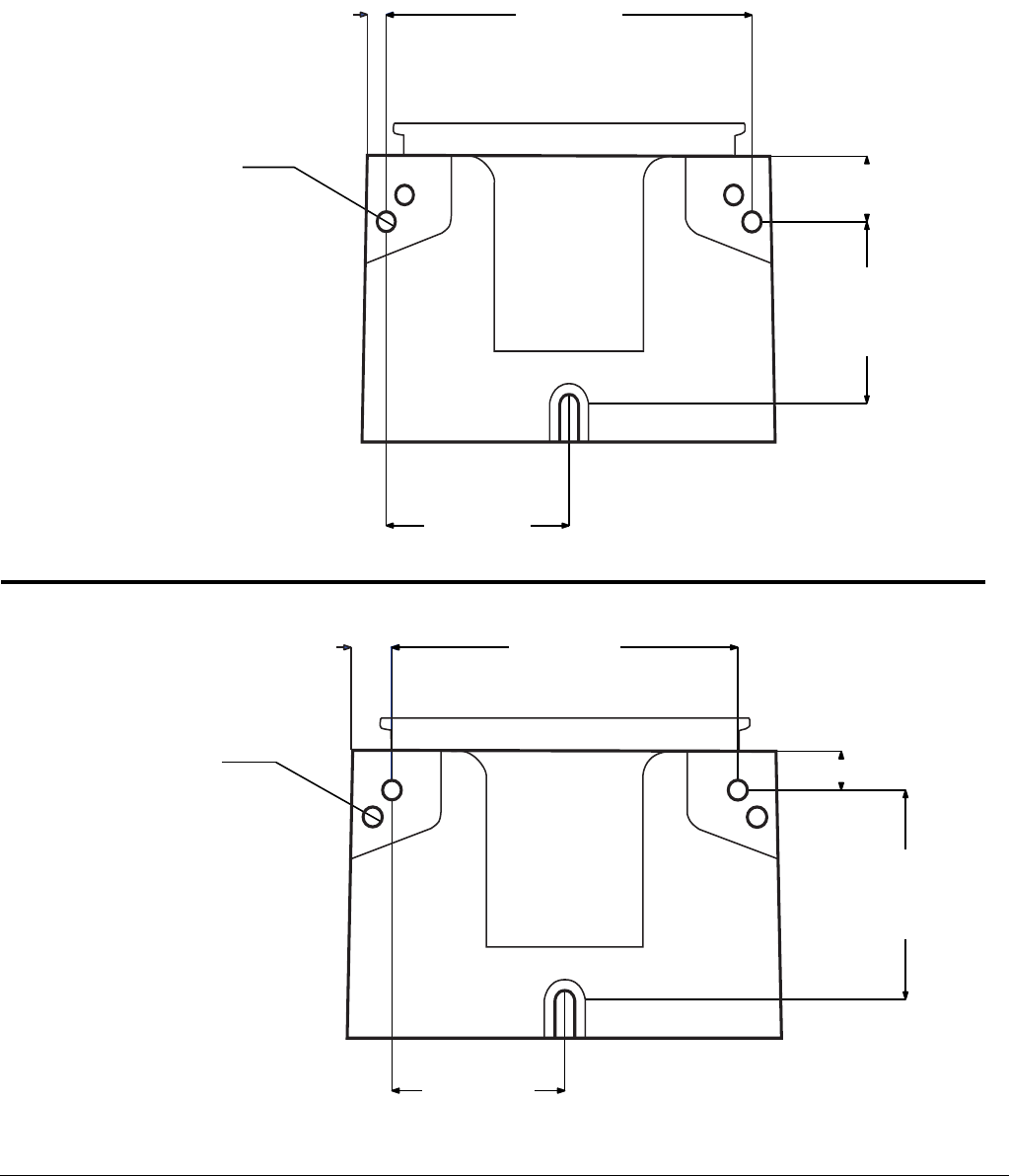
For correct mounting configuration, choose either Option 1 or Option 2. See P/N 126916 template.
FIG. 14
0.367inch
9.3 mm
2x Ø 0.366 inch
9.3 mm
3.544 inch
90.0 mm
7.087 inch
180.0 mm
1.180 inch
30.0 mm
3.268 inch
83.0 mm
0.722 inch
18.3 mm
2x Ø 0.366 inch
9.3 mm
3.189 inch
81.0 mm
6.378 inch
162.0 mm
3.740 inch
95.0 mm
0.708 inch
18.0 mm
Option 1
Option 2
All written and visual data contained in this document reflects the latest product information available at the time of publication.
Graco reserves the right to make changes at any time without notice.
For patent information, see www.graco.com/patents.
Original instructions. This manual contains English. MM 332317
Graco Headquarters: Minneapolis
International Offices: Belgium, China, Japan, Korea
GRACO INC. AND SUBSIDIARIES • P.O. BOX 1441 • MINNEAPOLIS MN 55440-1441 • USA
Copyright 2013, Graco Inc. All Graco manufacturing locations are registered to ISO 9001.
www.graco.com
March 2013, revised June 2013
Graco Standard Warranty
Graco warrants all equipment referenced in this document which is manufactured by Graco and bearing its name to be free from defects in
material and workmanship on the date of sale to the original purchaser for use. With the exception of any special, extended, or limited warranty
published by Graco, Graco will, for a period of twelve months from the date of sale, repair or replace any part of the equipment determined by
Graco to be defective. This warranty applies only when the equipment is installed, operated and maintained in accordance with Graco’s written
recommendations.
This warranty does not cover, and Graco shall not be liable for general wear and tear, or any malfunction, damage or wear caused by faulty
installation, misapplication, abrasion, corrosion, inadequate or improper maintenance, negligence, accident, tampering, or substitution of
non-Graco component parts. Nor shall Graco be liable for malfunction, damage or wear caused by the incompatibility of Graco equipment with
structures, accessories, equipment or materials not supplied by Graco, or the improper design, manufacture, installation, operation or
maintenance of structures, accessories, equipment or materials not supplied by Graco.
This warranty is conditioned upon the prepaid return of the equipment claimed to be defective to an authorized Graco distributor for verification of
the claimed defect. If the claimed defect is verified, Graco will repair or replace free of charge any defective parts. The equipment will be returned
to the original purchaser transportation prepaid. If inspection of the equipment does not disclose any defect in material or workmanship, repairs will
be made at a reasonable charge, which charges may include the costs of parts, labor, and transportation.
THIS WARRANTY IS EXCLUSIVE, AND IS IN LIEU OF ANY OTHER WARRANTIES, EXPRESS OR IMPLIED, INCLUDING BUT NOT LIMITED
TO WARRANTY OF MERCHANTABILITY OR WARRANTY OF FITNESS FOR A PARTICULAR PURPOSE.
Graco’s sole obligation and buyer’s sole remedy for any breach of warranty shall be as set forth above. The buyer agrees that no other remedy
(including, but not limited to, incidental or consequential damages for lost profits, lost sales, injury to person or property, or any other incidental or
consequential loss) shall be available. Any action for breach of warranty must be brought within two (2) years of the date of sale.
GRACO MAKES NO WARRANTY, AND DISCLAIMS ALL IMPLIED WARRANTIES OF MERCHANTABILITY AND FITNESS FOR A
PARTICULAR PURPOSE, IN CONNECTION WITH ACCESSORIES, EQUIPMENT, MATERIALS OR COMPONENTS SOLD BUT NOT
MANUFACTURED BY GRACO. These items sold, but not manufactured by Graco (such as electric motors, switches, hose, etc.), are subject to
the warranty, if any, of their manufacturer. Graco will provide purchaser with reasonable assistance in making any claim for breach of these
warranties.
In no event will Graco be liable for indirect, incidental, special or consequential damages resulting from Graco supplying equipment hereunder, or
the furnishing, performance, or use of any products or other goods sold hereto, whether due to a breach of contract, breach of warranty, the
negligence of Graco, or otherwise.
FOR GRACO CANADA CUSTOMERS
The Parties acknowledge that they have required that the present document, as well as all documents, notices and legal proceedings entered into,
given or instituted pursuant hereto or relating directly or indirectly hereto, be drawn up in English. Les parties reconnaissent avoir convenu que la
rédaction du présente document sera en Anglais, ainsi que tous documents, avis et procédures judiciaires exécutés, donnés ou intentés, à la suite
de ou en rapport, directement ou indirectement, avec les procédures concernées.
Graco Information
For the latest information about Graco products, visit www.graco.com.
TO PLACE AN ORDER, contact your Graco distributor or call to identify the nearest distributor.
Phone: 612-623-6928 or Toll Free: 1-800-533-9655, Fax: 612-378-3590
