Guangzhou EHang Intelligent Technology GIM-200 3D GIMBAL WITH SPHERICAL CAMERA User Manual

Guangzhou EHang Intelligent Technology Co., Ltd. 3D GIMBAL WITH SPHERICAL CAMERA

User manual

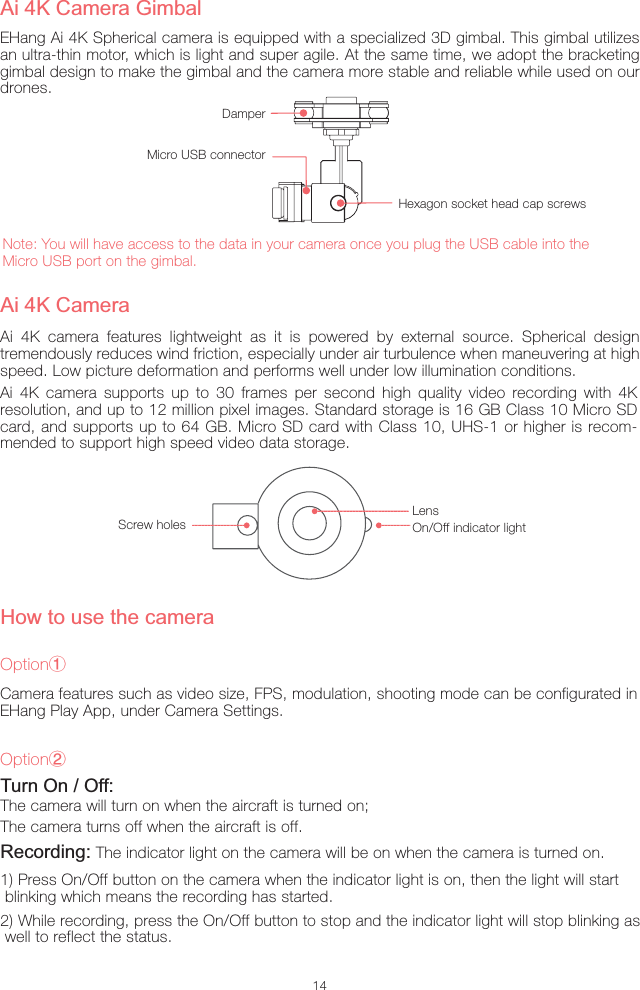
14Ai 4K camera features lightweight as it is powered by external source. Spherical design tremendously reduces wind friction, especially under air turbulence when maneuvering at high speed. Low picture deformation and performs well under low illumination conditions.Ai 4K CameraScrew holesLensOn/Off indicator lightAi 4K Camera GimbalEHang Ai 4K Spherical camera is equipped with a specialized 3D gimbal. This gimbal utilizes an ultra-thin motor, which is light and super agile. At the same time, we adopt the bracketing gimbal design to make the gimbal and the camera more stable and reliable while used on our drones.Note: You will have access to the data in your camera once you plug the USB cable into the Micro USB port on the gimbal.Hexagon socket head cap screwsDamperMicro USB connectorTurn On / Off:The camera will turn on when the aircraft is turned on;The camera turns off when the aircraft is off.Recording: The indicator light on the camera will be on when the camera is turned on.1) Press On/Off button on the camera when the indicator light is on, then the light will start  blinking which means the recording has started.2) While recording, press the On/Off button to stop and the indicator light will stop blinking as well to reflect the status.Ai 4K camera supports up to 30 frames per second high quality video recording with 4K resolution, and up to 12 million pixel images. Standard storage is 16 GB Class 10 Micro SD card, and supports up to 64 GB. Micro SD card with Class 10, UHS-1 or higher is recom-mended to support high speed video data storage.How to use the cameraOptionŗCamera features such as video size, FPS, modulation, shooting mode can be configurated in EHang Play App, under Camera Settings.OptionŘ
This device complies with Part 15 of the FCC Rules. Operation is subject to the following two conditions:(1) (2)This device must accept any interference receivedincluding interference that may cause undesired operation.Warning: Changes or modifications to this unit not expressly approved by the party responsible for compliance could void the user's authority to operate the equipment.Note: This equipment has been tested and found to comply with the limits for a Class B digital device, pursuant to Part 15 of the FCC Rules.These limits are designed to provide reasonable protection against harmful interference in a residential installation. This equipment generates, uses and can radiate radiofrequency energy and, if not installed and used in accordance with the instructions, may cause harmfulinterference to radio communications. However, there is no guarantee that interference will not occur ina particular installation. If this equipment does cause harmful interference to radio or television reception, which can be determined by turning the equipment off and on, the user is encouraged to try to correct theinterference by one or more of the following measures: Reorient or relocate the receiving antenna. Increase the separation between the equipment and receiver. Connect the equipment into an outlet on a circuit different from that to which the receiver is connected.Consult the dealer or an experienced radio/TV technician for help."This equipment complies with FCC RF radiation exposure limits set forth for an uncontrolled environment. This equipment should be installed and operated with a minimum distance of 20 centimeters between the radiator and your body."(1)This device may not cause harmful interference, andCE 0560

Navigation menu