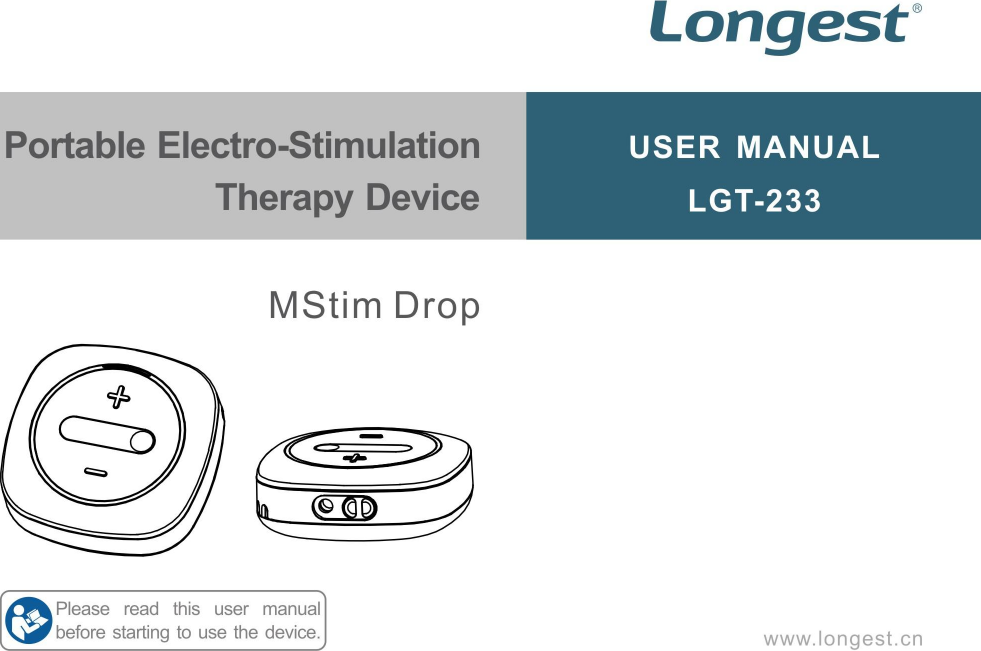
Guangzhou Longest Science and Technology LGT-233 Portable Electro-Stimulation Therapy Device User Manual

Guangzhou Longest Science & Technology Co., Ltd. Portable Electro-Stimulation Therapy Device Users Manual

Users Manual

1TABLE OF CONTENTSForeword.................................................................................................................................................................. 2Safety Instructions.................................................................................................................................................. 4EMC Guidance......................................................................................................................................................15Clinical Instructions...............................................................................................................................................23Working Principle.................................................................................................................................................. 25Inspection of the Goods....................................................................................................................................... 26Overview of the Unit............................................................................................................................................. 28MStim Drop Application........................................................................................................................................33Operation Guidance............................................................................................................................................. 55Care and Maintenance.........................................................................................................................................60Troubleshooting.....................................................................................................................................................64Technical Specifications.......................................................................................................................................67Assistance..............................................................................................................................................................70Warranty.................................................................................................................................................................71
2ForewordThank you for purchasing the MStim Drop LGT-233 from our company.This manual has been written for the owners and operators of the MStim Drop LGT-233. Itcontains general information on the instructions for safety, intended use, working principle, operation,maintenance, troubleshooting, and warranty. In order to maximize the use, efficiency, and working lifeof your unit, please read this manual thoroughly and become familiar with the controls, as well as theaccessories, before operating the unit.Specifications put fifth in this manual were in effect at the time of publication. However, owing topolicy of continual improvement by Guangzhou Longest Science & Technology Co., Ltd., any changesto these specifications may be made at any time without obligation on the part of Guangzhou LongestScience & Technology Co., Ltd.Before administering any treatment to a patient, the user of this equipment should read,understand, and follow the information contained in this manual for each mode of treatment available,as well as the indications, contraindications, warnings, and precautions.
3Product DescriptionThe MStim Drop LGT-233 is a wearable foot drop device, which is mainly consists of stimulatorunit, MStim Drop APP, electrode lead hose, electrodes and leg bandage. It can control the timing andduration of the stimulation by tracing the angle during walking, using FES (Functional ElectricalStimulation) to treat and improve the patient’s foot drop and help to improve walking ability.It has three modes: Training mode, Walk mode and Evaluation mode. Training mode is suitable formuscle training when the patient is seated or lying down (patient lacking active training), which canpromote muscle recover, prevent muscle atrophy, improve joint range of motion, and increase localblood flow. Walk mode is walking with the electrical stimulation. It is suitable for patients to walk torestore the correct gait, while walking stimulation, to provide the correct mode of motion, to rebuild themotor function of the brain to restore limb walking function. Evaluation mode is walking without theelectric stimulation. It is suitable for recording the calf, thigh bending angle when patient walks. Thedata recorded can compare with walking mode.
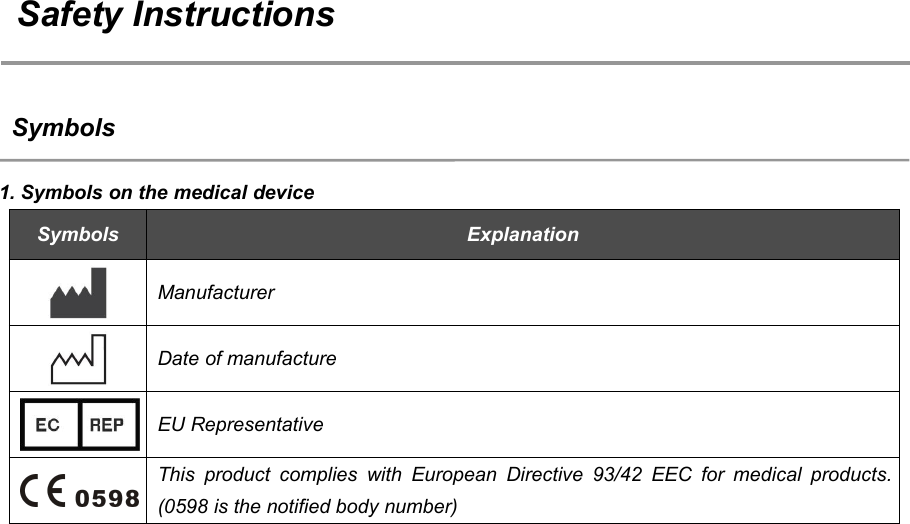
4Safety InstructionsSymbols1. Symbols on the medical deviceSymbolsExplanationManufacturerDate of manufactureEU RepresentativeThis product complies with European Directive 93/42 EEC for medical products.(0598 is the notified body number)
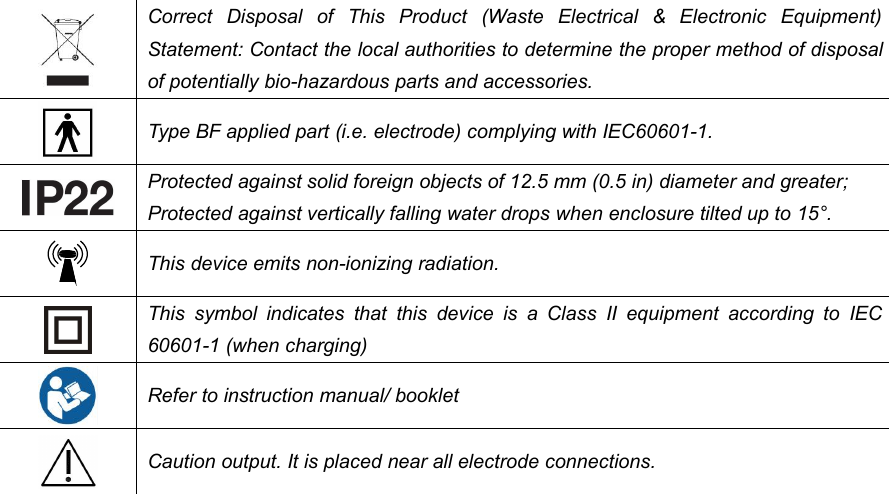
5Correct Disposal of This Product (Waste Electrical & Electronic Equipment)Statement: Contact the local authorities to determine the proper method of disposalof potentially bio-hazardous parts and accessories.Type BF applied part (i.e. electrode) complying with IEC60601-1.Protected against solid foreign objects of 12.5 mm (0.5 in) diameter and greater;Protected against vertically falling water drops when enclosure tilted up to 15°.This device emits non-ionizing radiation.This symbol indicates that this device is a Class II equipment according to IEC60601-1 (when charging)Refer to instruction manual/ bookletCaution output. It is placed near all electrode connections.
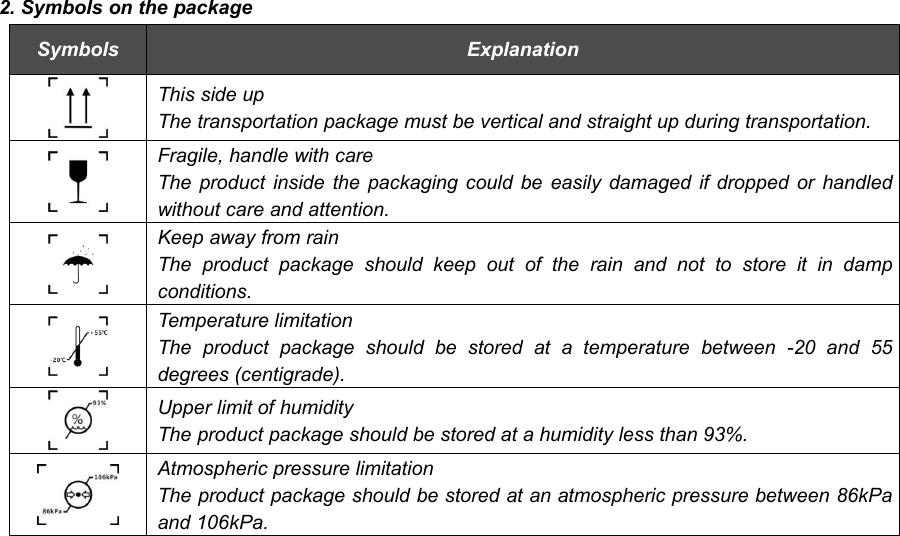
62. Symbols on the packageSymbolsExplanationThis side upThe transportation package must be vertical and straight up during transportation.Fragile, handle with careThe product inside the packaging could be easily damaged if dropped or handledwithout care and attention.Keep away from rainThe product package should keep out of the rain and not to store it in dampconditions.Temperature limitationThe product package should be stored at a temperature between -20 and 55degrees (centigrade).Upper limit of humidityThe product package should be stored at a humidity less than 93%.Atmospheric pressure limitationThe product package should be stored at an atmospheric pressure between 86kPaand 106kPa.
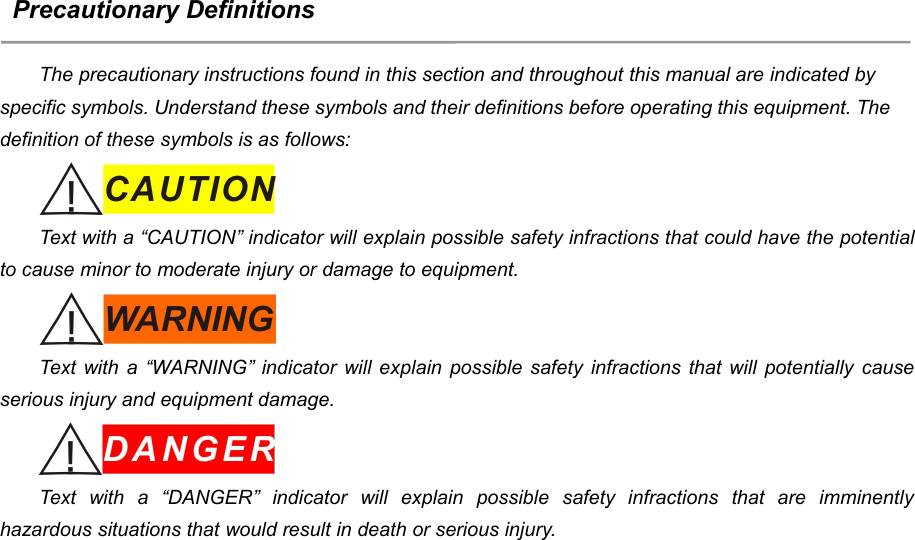
7Precautionary DefinitionsThe precautionary instructions found in this section and throughout this manual are indicated byspecific symbols. Understand these symbols and their definitions before operating this equipment. Thedefinition of these symbols is as follows:Text with a “CAUTION” indicator will explain possible safety infractions that could have the potentialto cause minor to moderate injury or damage to equipment.Text with a “WARNING” indicator will explain possible safety infractions that will potentially causeserious injury and equipment damage.Text with a “DANGER” indicator will explain possible safety infractions that are imminentlyhazardous situations that would result in death or serious injury.
8Refer to Instruction Manual/BookletNOTE: Throughout this manual, “NOTE” may be found. These Notes are helpful information to aidin the particular area or function being described.Type BF applied part (i.e. electrode) complying with IEC60601-1.
9Warnings and cautionsPlease carefully read and understand the following warnings and cautions to ensure the safe andcorrect use of the MStim Drop LGT-233 and to prevent injury.Read, understand, and practice the precautionary operating instructions. Know the limitations andhazards associated with using the MStim Drop LGT-233. Observe the precautionary andoperational decals placed on the unit.Before using MStim Drop LGT-233 make sure you have read and understood all informationprovided in this manual. Familiarity with the information included in this manual is an essentialrequirement to ensure efficient and optimal use of the system, to avoid dangers to persons and tothe equipment, and to obtain good treatment results.Improper installation, operation, or maintenance of the MStim Drop LGT-233 may result inmalfunctions of this unit or other devices.In case of display failure or other obvious defects, switch the unit off immediately, and notify acertified service technician.Adjustments or replacement of components may result in the equipment failing to meet the
10requirements for interference suppression.This MStim Drop LGT-233 should be kept out of the reach of children.Do not use this unit near the heart or chest, above the neck, on the head, around the mouth or ondiseased skin.The placement of the electrodes can be referenced to the reference schematic provided by APP,note that the following parts cannot be placed:a) carotid sinus (current may affect blood pressure and cardiac contraction, causing arrhythmia);b) infection site (which may aggravate the infection);c) pregnant women's abdomen and lumbosacral (may cause uterine contractions);d) surgical site (muscle contraction may cause wound dehiscence);e) malignant neoplasms;f) sensory defects or parts that are allergic to the electrodes;g) eye.Do not use this unit for purposes other than treatment indicated in this manual;Do not use the MStim Drop LGT-233 with high frequency surgical equipments on the patient. It willcause unstable output when the unit is close to the high frequency equipments (in the same roomand without shield).Do not use electrodes with an active area of less than 25 cm² due to the risk of associated burning.
11Proceed systematically with caution when the density of the current is over 2 mA /cm².Do not modify this device without authorization of the manufacturer.Only use this device with the charger, cables, electrodes and accessories recommended by themanufacturer.The MStim Drop LGT-233 contains built-in batteries that cannot be removed by the user. Do notreplace it by yourself to avoid damage the batteries or device. If necessary, please contact thecompany or the company authorized maintenance personnel to replace.Do not use this device simultaneously with other therapeutic device (such as microwave), to avoidmis-operation.Please dispose of the equipment and other accessories according to local regulations. Do not treatthem as household waste. Do not put the device in fire or water. If the batteries are not properlydisposed, it may cause a battery explosion.Do not use when the unit is charging.Always check the device and the electrodes for damage before use.If the unit is not functioning properly or you feel discomfort, immediately stop using the unit. If youfeel any trouble with your body or skin, consult the doctor and follow his/her instructions.
12The self-adhesive electrode limited to the same person to use, do not use in another patients toprevent infection.If the electrode loses viscosity, please replace the electrode in order to maintain good electricalproperties.Do not use this unit in places with high humidity such as the bathrooms or while taking a bath orshower.Do not use this unit while sleeping. The main unit may develop trouble, or the pad may move to anunexpected region and cause ill health.Clean the device using a dry soft cloth. Do not use cleaning solvents or other chemical substancesin order to avoid any damage.Make sure that you end the treatment by switching off the units or by setting the intensity to 0mAbefore you remove the units or the electrodes. If you do not end the treatment, you mayexperience an unpleasant sensation in your fingers. This sensation is not harmful, but can beunpleasant.Handle the unit with care. Do not drop, knock, or shake the unit. Rough handling can damageinternal circuit boards.Do not apply stimulation while driving, operating machines or while performing any other activityin which electrical stimulation can put you at risk of injury.
13Always disconnect the power charger from the mains after use.FCCChanges or modifications not expressly approved by the party responsible for compliance couldvoid the user’s authority to operate the equipment.This equipment has been tested and found to comply with the limits for a Class B digital device,pursuant to Part 15 of the FCC Rules. These limits are designed to provide reasonable protectionagainst harmful interference in a residential installation. This equipment generates, uses and canradiate radio frequency energy and, if not installed and used in accordance with the instructions, maycause harmful interference to radio communications. However, there is no guarantee that interferencewill not occur in a particular installation.If this equipment does cause harmful interference to radio or television reception, which can bedetermined by turning the equipment off and on, the user is encouraged to try to correct theinterference by one or more of the following measures:-- Reorient or relocate the receiving antenna.-- Increase the separation between the equipment and receiver.
14-- Connect the equipment into an outlet on a circuit different from that to which the receiver isconnected.-- Consult the dealer or an experienced radio/TV technician for help.This device complies with Part 15 of the FCC Rules. Operation is subject to the following twoconditions:1) this device may not cause harmful interference, and2) this device must accept any interference received, including interference that may causeundesired operation.This device complies with FCC radiation exposure limits set forth for an uncontrolled environment.This transmitter must not be co-located or operating in conjunction with any other antenna ortransmitter.FCC ID: 2ANHPLGT-233
15EMC GuidanceThis product needs special precautions regarding EMC and needs to be installed and put intoservice according to the EMC information provided, and this unit can be affected by portable andmobile RF communications equipment.Do not use a mobile phone or other devices that emit electromagnetic fields, near the unit. Thismay result in incorrect operation of the unit.This unit has been thoroughly tested and inspected to assure proper performance and operation!This machine should not be used adjacent to or stacked with other equipment and that if adjacentor stacked use is necessary, this machine should be observed to verify normal operation in theconfiguration in which it will be used.
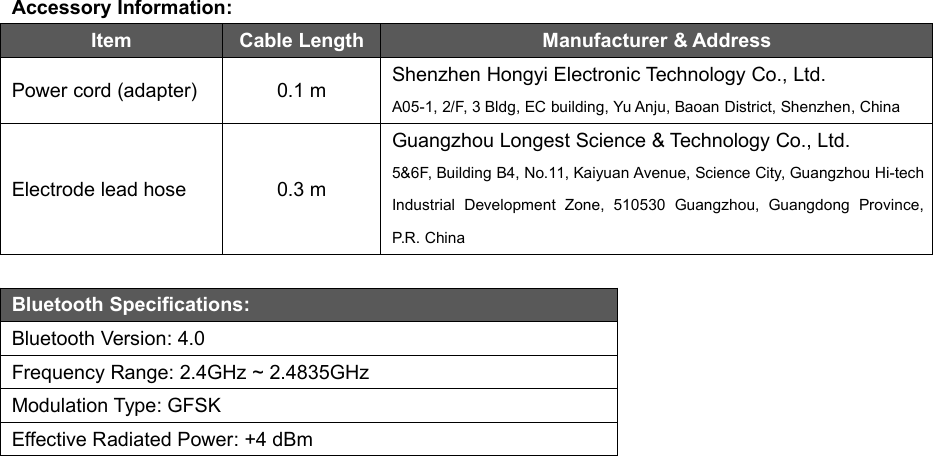
16Accessory Information:ItemCable LengthManufacturer & AddressPower cord (adapter)0.1 mShenzhen Hongyi Electronic Technology Co., Ltd.A05-1, 2/F, 3 Bldg, EC building, Yu Anju, Baoan District, Shenzhen, ChinaElectrode lead hose0.3 mGuangzhou Longest Science & Technology Co., Ltd.5&6F, Building B4, No.11, Kaiyuan Avenue, Science City, Guangzhou Hi-techIndustrial Development Zone, 510530 Guangzhou, Guangdong Province,P.R. ChinaBluetooth Specifications:Bluetooth Version: 4.0Frequency Range: 2.4GHz ~ 2.4835GHzModulation Type: GFSKEffective Radiated Power: +4 dBm
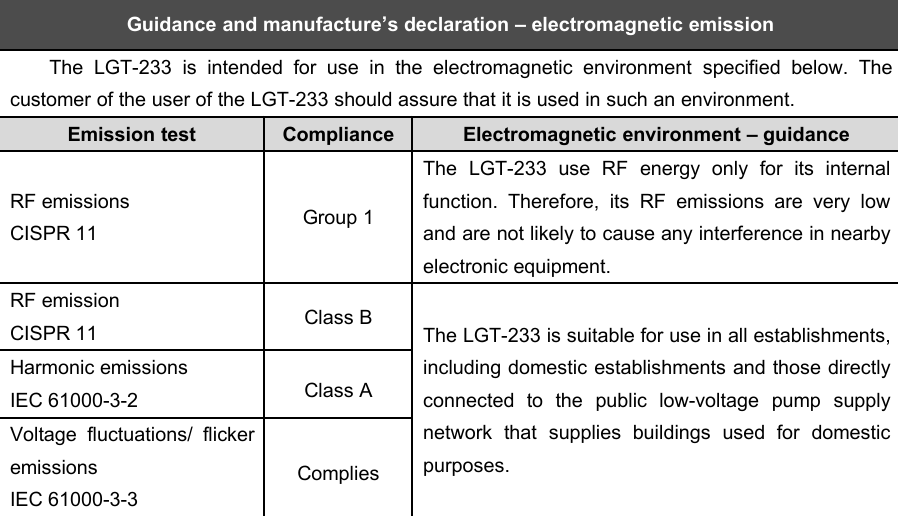
17Guidance and manufacture’s declaration – electromagnetic emissionThe LGT-233 is intended for use in the electromagnetic environment specified below. Thecustomer of the user of the LGT-233 should assure that it is used in such an environment.Emission testComplianceElectromagnetic environment – guidanceRF emissionsCISPR 11Group 1The LGT-233 use RF energy only for its internalfunction. Therefore, its RF emissions are very lowand are not likely to cause any interference in nearbyelectronic equipment.RF emissionCISPR 11Class BThe LGT-233 is suitable for use in all establishments,including domestic establishments and those directlyconnected to the public low-voltage pump supplynetwork that supplies buildings used for domesticpurposes.Harmonic emissionsIEC 61000-3-2Class AVoltage fluctuations/ flickeremissionsIEC 61000-3-3Complies
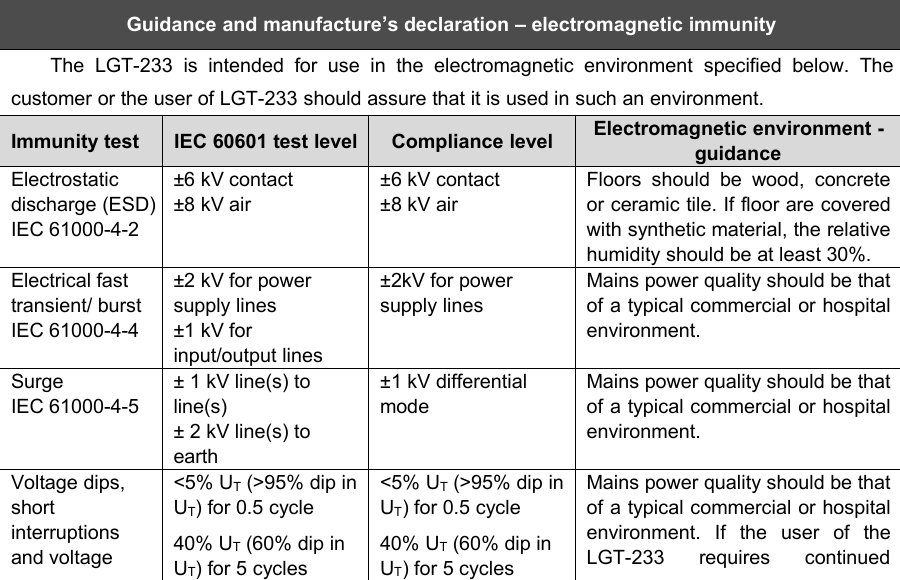
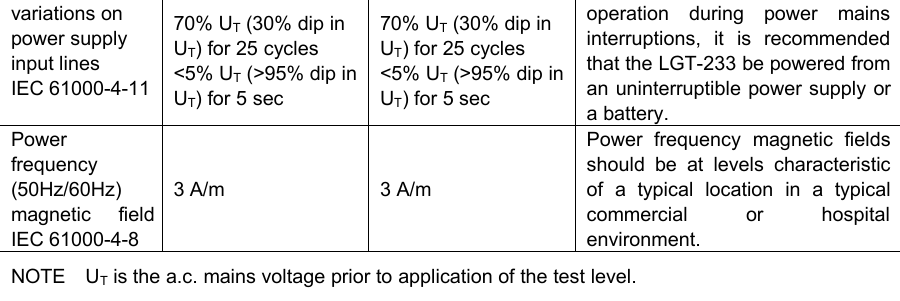
18Guidance and manufacture’s declaration – electromagnetic immunityThe LGT-233 is intended for use in the electromagnetic environment specified below. Thecustomer or the user of LGT-233 should assure that it is used in such an environment.Immunity testIEC 60601 test levelCompliance levelElectromagnetic environment -guidanceElectrostaticdischarge (ESD)IEC 61000-4-2±6 kV contact±8 kV air±6 kV contact±8 kV airFloors should be wood, concreteor ceramic tile. If floor are coveredwith synthetic material, the relativehumidity should be at least 30%.Electrical fasttransient/ burstIEC 61000-4-4±2 kV for powersupply lines±1 kV forinput/output lines±2kV for powersupply linesMains power quality should be thatof a typical commercial or hospitalenvironment.SurgeIEC 61000-4-5± 1 kV line(s) toline(s)± 2 kV line(s) toearth±1 kV differentialmodeMains power quality should be thatof a typical commercial or hospitalenvironment.Voltage dips,shortinterruptionsand voltage<5% UT(>95% dip inUT) for 0.5 cycle40% UT(60% dip inUT) for 5 cycles<5% UT(>95% dip inUT) for 0.5 cycle40% UT(60% dip inUT) for 5 cyclesMains power quality should be thatof a typical commercial or hospitalenvironment. If the user of theLGT-233 requires continued
19variations onpower supplyinput linesIEC 61000-4-1170% UT(30% dip inUT) for 25 cycles<5% UT(>95% dip inUT) for 5 sec70% UT(30% dip inUT) for 25 cycles<5% UT(>95% dip inUT) for 5 secoperation during power mainsinterruptions, it is recommendedthat the LGT-233 be powered froman uninterruptible power supply ora battery.Powerfrequency(50Hz/60Hz)magnetic fieldIEC 61000-4-83 A/m3 A/mPower frequency magnetic fieldsshould be at levels characteristicof a typical location in a typicalcommercial or hospitalenvironment.NOTE UTis the a.c. mains voltage prior to application of the test level.
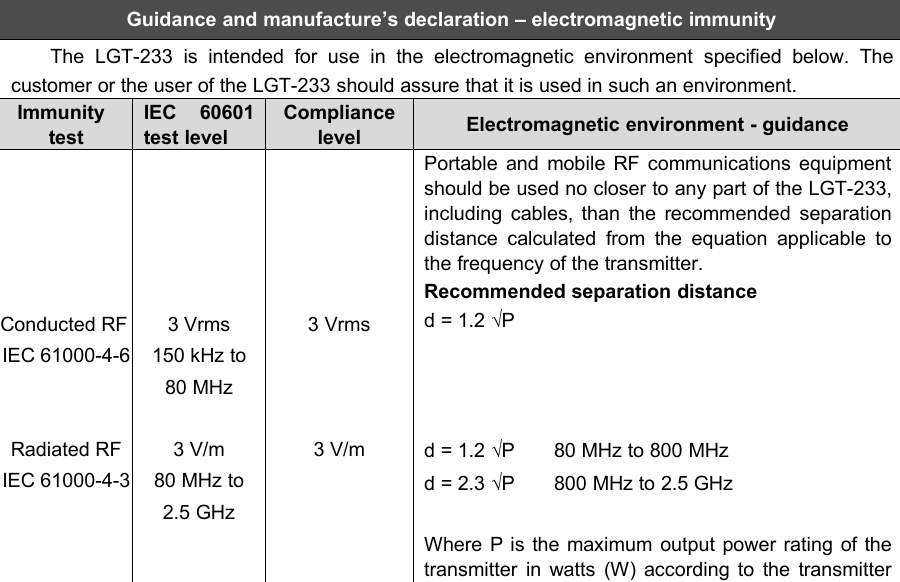
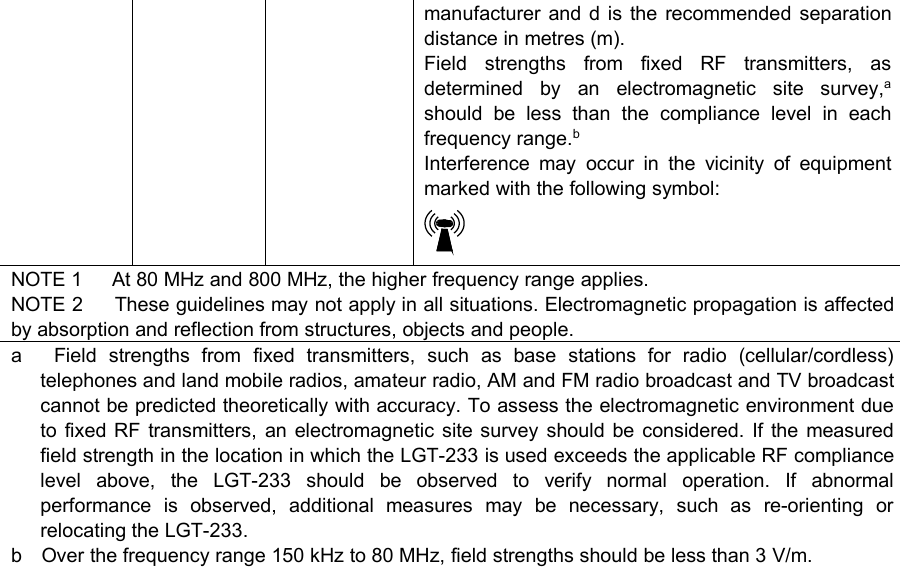
20Guidance and manufacture’s declaration – electromagnetic immunityThe LGT-233 is intended for use in the electromagnetic environment specified below. Thecustomer or the user of the LGT-233 should assure that it is used in such an environment.ImmunitytestIEC 60601test levelCompliancelevelElectromagnetic environment - guidanceConducted RFIEC 61000-4-6Radiated RFIEC 61000-4-33 Vrms150 kHz to80 MHz3 V/m80 MHz to2.5 GHz3 Vrms3 V/mPortable and mobile RF communications equipmentshould be used no closer to any part of the LGT-233,including cables, than the recommended separationdistance calculated from the equation applicable tothe frequency of the transmitter.Recommended separation distanced = 1.2 √Pd = 1.2 √P 80 MHz to 800 MHzd = 2.3 √P 800 MHz to 2.5 GHzWhere P is the maximum output power rating of thetransmitter in watts (W) according to the transmitter
21manufacturer and d is the recommended separationdistance in metres (m).Field strengths from fixed RF transmitters, asdetermined by an electromagnetic site survey,ashould be less than the compliance level in eachfrequency range.bInterference may occur in the vicinity of equipmentmarked with the following symbol:NOTE 1 At 80 MHz and 800 MHz, the higher frequency range applies.NOTE 2 These guidelines may not apply in all situations. Electromagnetic propagation is affectedby absorption and reflection from structures, objects and people.a Field strengths from fixed transmitters, such as base stations for radio (cellular/cordless)telephones and land mobile radios, amateur radio, AM and FM radio broadcast and TV broadcastcannot be predicted theoretically with accuracy. To assess the electromagnetic environment dueto fixed RF transmitters, an electromagnetic site survey should be considered. If the measuredfield strength in the location in which the LGT-233 is used exceeds the applicable RF compliancelevel above, the LGT-233 should be observed to verify normal operation. If abnormalperformance is observed, additional measures may be necessary, such as re-orienting orrelocating the LGT-233.b Over the frequency range 150 kHz to 80 MHz, field strengths should be less than 3 V/m.
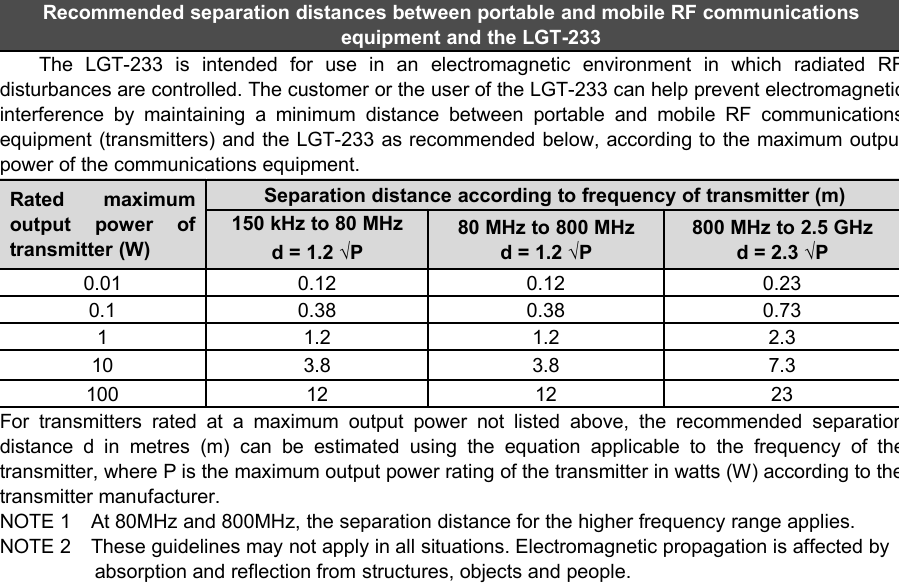
22Recommended separation distances between portable and mobile RF communicationsequipment and the LGT-233The LGT-233 is intended for use in an electromagnetic environment in which radiated RFdisturbances are controlled. The customer or the user of the LGT-233 can help prevent electromagneticinterference by maintaining a minimum distance between portable and mobile RF communicationsequipment (transmitters) and the LGT-233 as recommended below, according to the maximum outputpower of the communications equipment.Rated maximumoutput power oftransmitter (W)Separation distance according to frequency of transmitter (m)150 kHz to 80 MHzd = 1.2 √P80 MHz to 800 MHzd = 1.2 √P800 MHz to 2.5 GHzd = 2.3 √P0.010.120.120.230.10.380.380.7311.21.22.3103.83.87.3100121223For transmitters rated at a maximum output power not listed above, the recommended separationdistance d in metres (m) can be estimated using the equation applicable to the frequency of thetransmitter, where P is the maximum output power rating of the transmitter in watts (W) according to thetransmitter manufacturer.NOTE 1 At 80MHz and 800MHz, the separation distance for the higher frequency range applies.NOTE 2 These guidelines may not apply in all situations. Electromagnetic propagation is affected byabsorption and reflection from structures, objects and people.
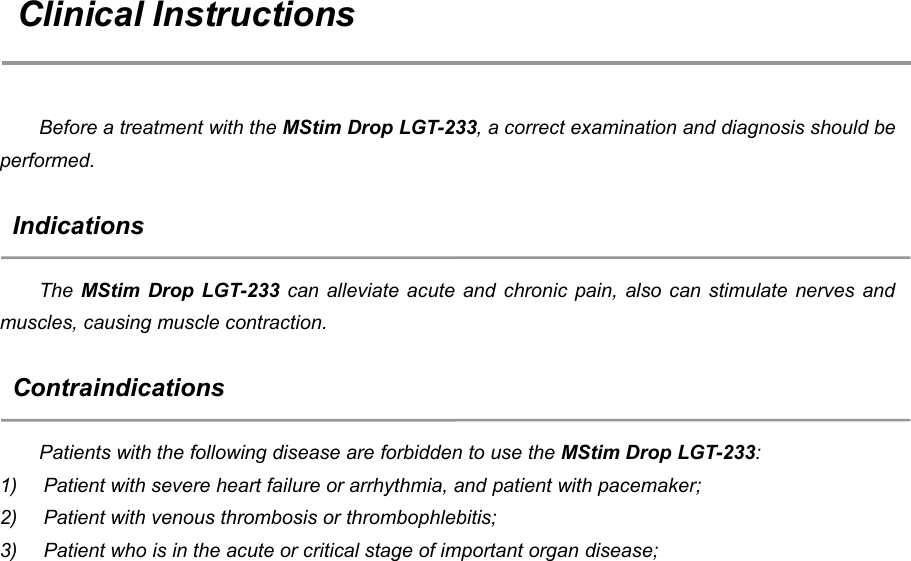
23Clinical InstructionsBefore a treatment with the MStim Drop LGT-233, a correct examination and diagnosis should beperformed.IndicationsThe MStim Drop LGT-233 can alleviate acute and chronic pain, also can stimulate nerves andmuscles, causing muscle contraction.ContraindicationsPatients with the following disease are forbidden to use the MStim Drop LGT-233:1) Patient with severe heart failure or arrhythmia, and patient with pacemaker;2) Patient with venous thrombosis or thrombophlebitis;3) Patient who is in the acute or critical stage of important organ disease;
244) Patient whose treatment area with bleeding tendency,metal matter or tuberculous lesions;5) Patients who cannot provide sensory feedback for stimulation (unable to express or havedifficulty in communication), such as mental disease.Adverse EffectsYou should stop using the device and consult your doctor if you experience adverse reactionsfrom the device. Possible adverse reactions may include the following:skin irritation beneath the electrodes;burns beneath the electrodes;headaches or other painful sensations.
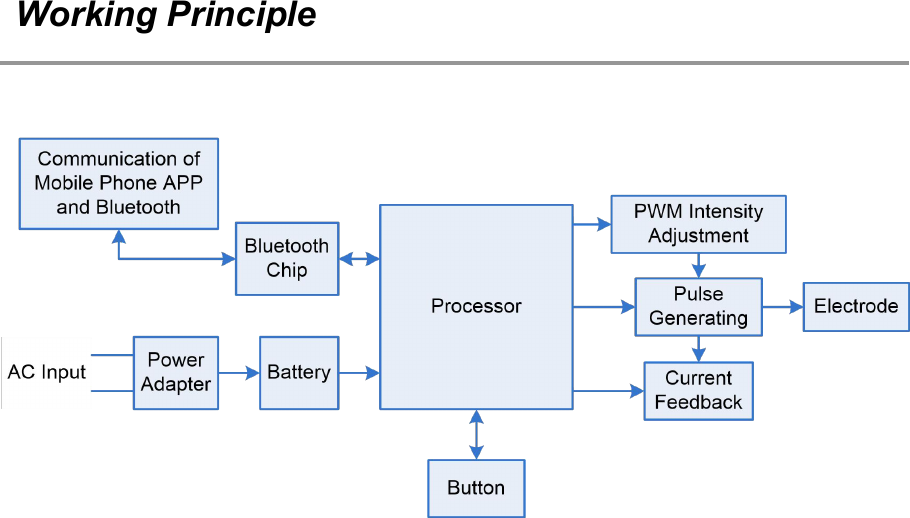
25Working Principle
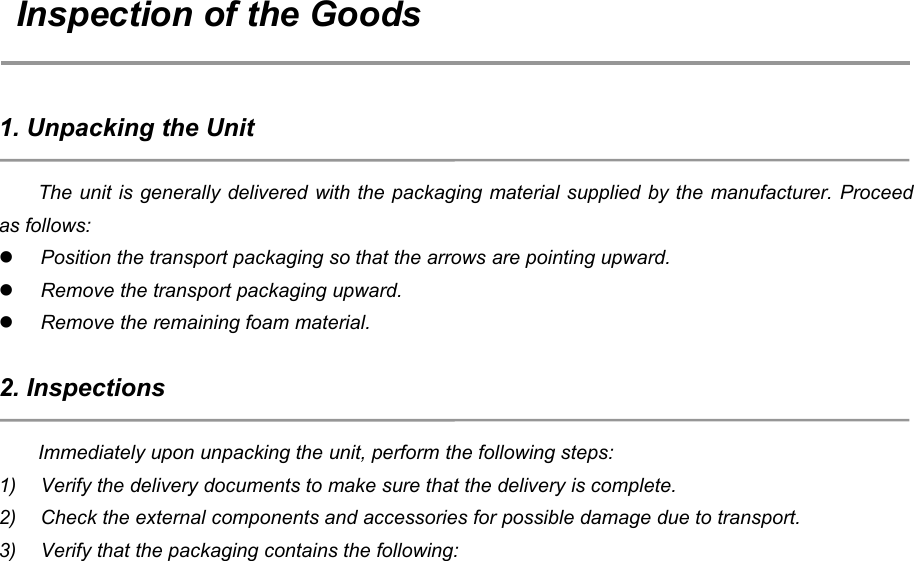
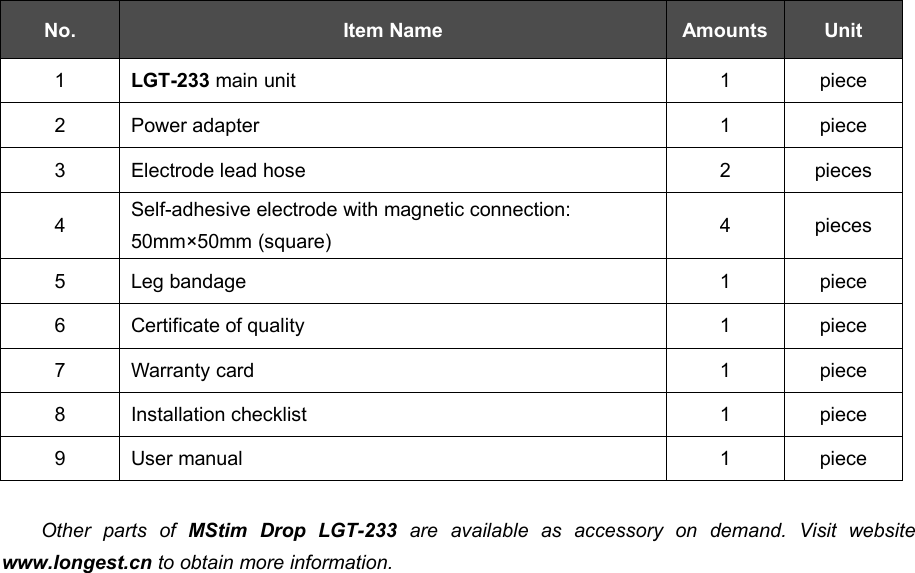
26Inspection of the Goods1. Unpacking the UnitThe unit is generally delivered with the packaging material supplied by the manufacturer. Proceedas follows:Position the transport packaging so that the arrows are pointing upward.Remove the transport packaging upward.Remove the remaining foam material.2. InspectionsImmediately upon unpacking the unit, perform the following steps:1) Verify the delivery documents to make sure that the delivery is complete.2) Check the external components and accessories for possible damage due to transport.3) Verify that the packaging contains the following:
27No.Item NameAmountsUnit1LGT-233 main unit1piece2Power adapter1piece3Electrode lead hose2pieces4Self-adhesive electrode with magnetic connection:50mm×50mm (square)4pieces5Leg bandage1piece6Certificate of quality1piece7Warranty card1piece8Installation checklist1piece9User manual1pieceOther parts of MStim Drop LGT-233 are available as accessory on demand. Visit websitewww.longest.cn to obtain more information.
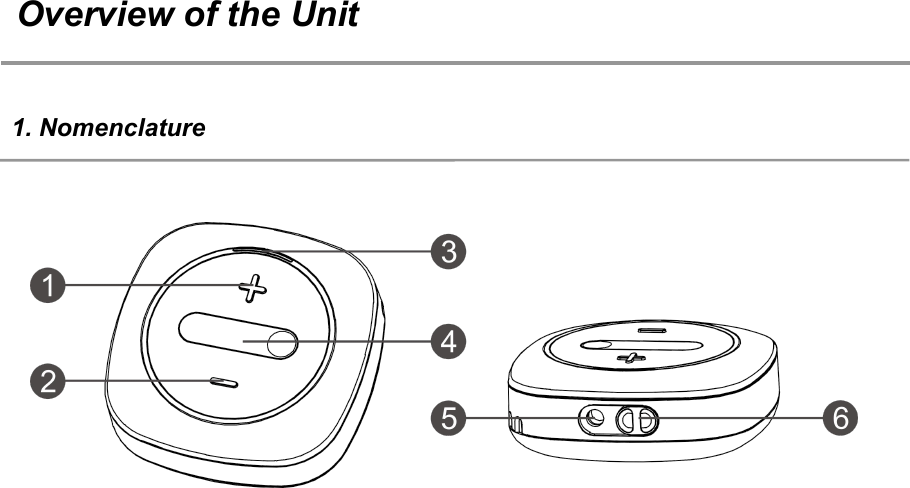
28Overview of the Unit1. Nomenclature
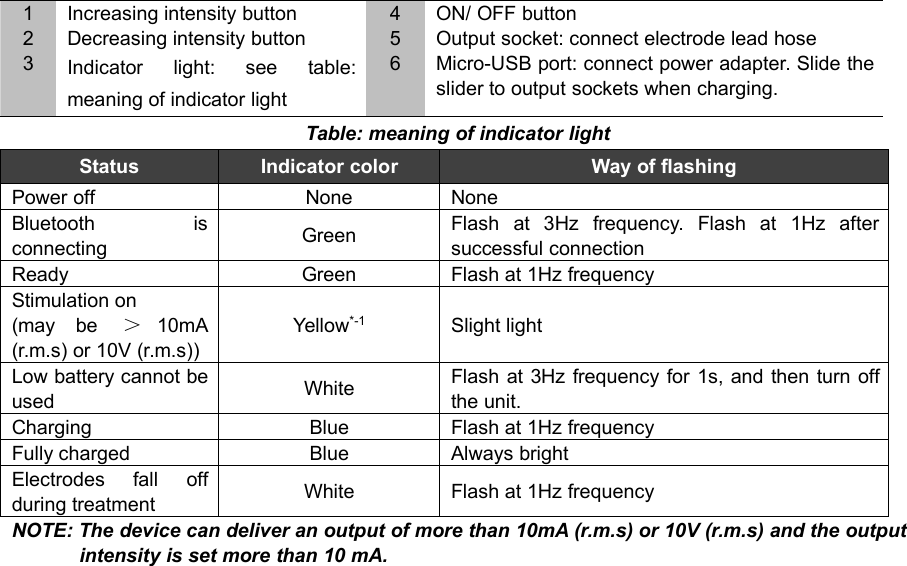
291Increasing intensity button4ON/ OFF button2Decreasing intensity button5Output socket: connect electrode lead hose3Indicator light: see table:meaning of indicator light6Micro-USB port: connect power adapter. Slide theslider to output sockets when charging.Table: meaning of indicator lightStatusIndicator colorWay of flashingPower offNoneNoneBluetooth isconnectingGreenFlash at 3Hz frequency. Flash at 1Hz aftersuccessful connectionReadyGreenFlash at 1Hz frequencyStimulation on(may be >10mA(r.m.s) or 10V (r.m.s))Yellow*-1Slight lightLow battery cannot beusedWhiteFlash at 3Hz frequency for 1s, and then turn offthe unit.ChargingBlueFlash at 1Hz frequencyFully chargedBlueAlways brightElectrodes fall offduring treatmentWhiteFlash at 1Hz frequencyNOTE: The device can deliver an output of more than 10mA (r.m.s) or 10V (r.m.s) and the outputintensity is set more than 10 mA.
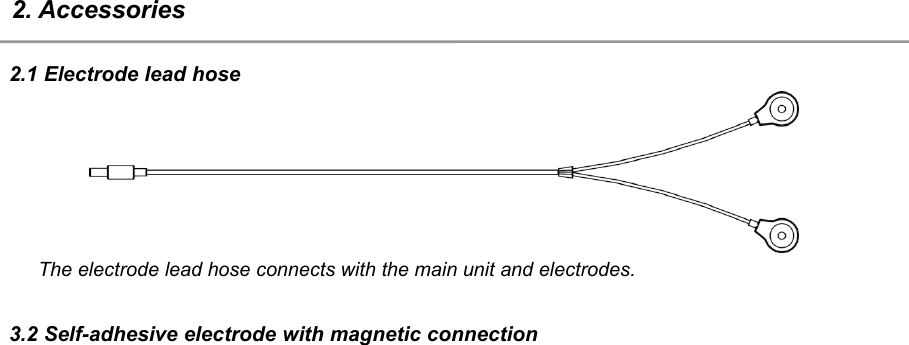
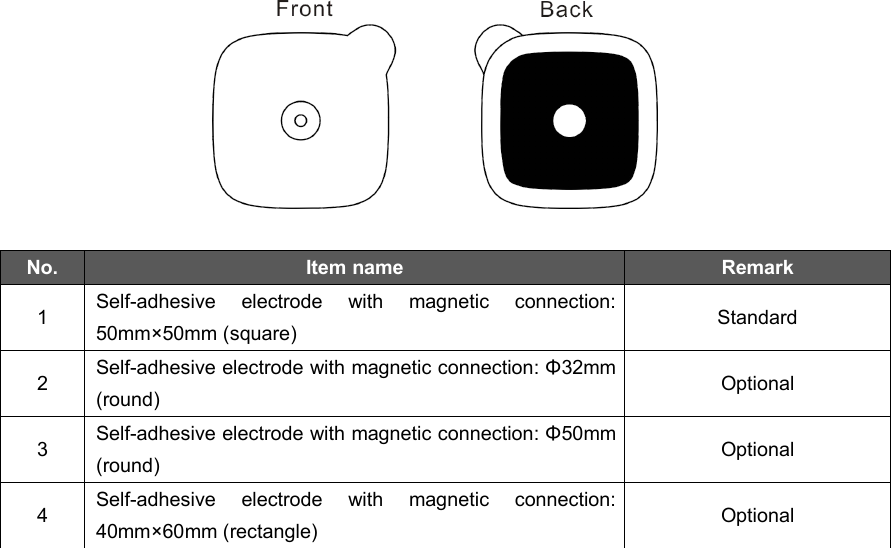
302. Accessories2.1 Electrode lead hoseThe electrode lead hose connects with the main unit and electrodes.3.2 Self-adhesive electrode with magnetic connection
31No.Item nameRemark1Self-adhesive electrode with magnetic connection:50mm×50mm (square)Standard2Self-adhesive electrode with magnetic connection: Φ32mm(round)Optional3Self-adhesive electrode with magnetic connection: Φ50mm(round)Optional4Self-adhesive electrode with magnetic connection:40mm×60mm (rectangle)Optional
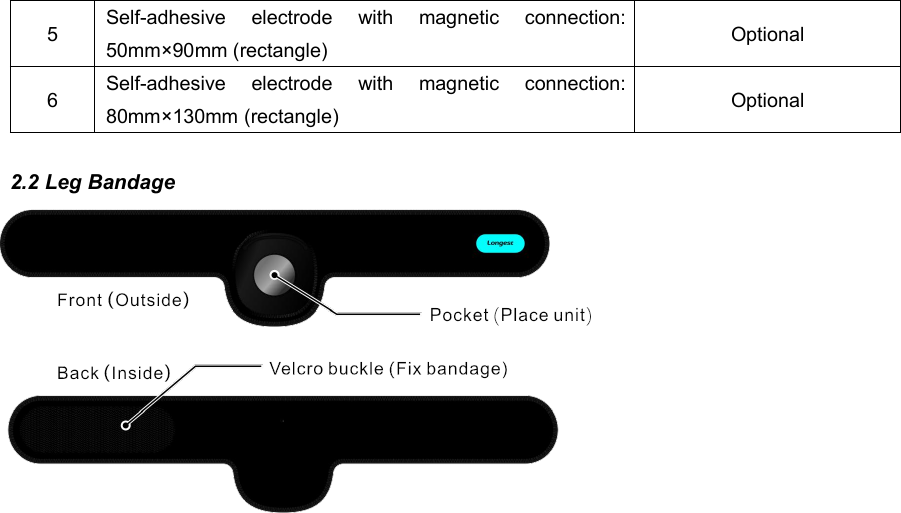
325Self-adhesive electrode with magnetic connection:50mm×90mm (rectangle)Optional6Self-adhesive electrode with magnetic connection:80mm×130mm (rectangle)Optional2.2 Leg Bandage
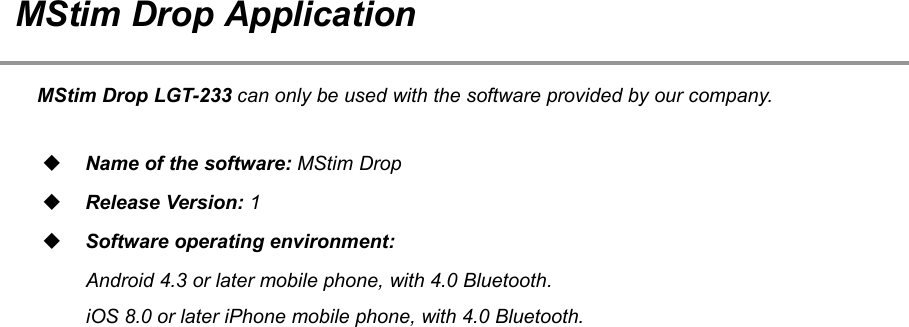
33MStim Drop ApplicationMStim Drop LGT-233 can only be used with the software provided by our company.Name of the software: MStim DropRelease Version: 1Software operating environment:Android 4.3 or later mobile phone, with 4.0 Bluetooth.iOS 8.0 or later iPhone mobile phone, with 4.0 Bluetooth.
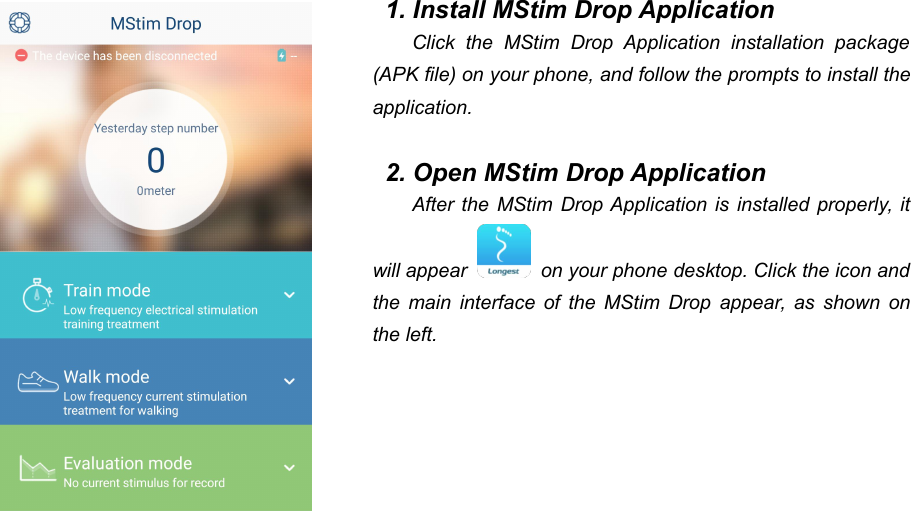
341. Install MStim Drop ApplicationClick the MStim Drop Application installation package(APK file) on your phone, and follow the prompts to install theapplication.2. Open MStim Drop ApplicationAfter the MStim Drop Application is installed properly, itwill appear on your phone desktop. Click the icon andthe main interface of the MStim Drop appear, as shown onthe left.
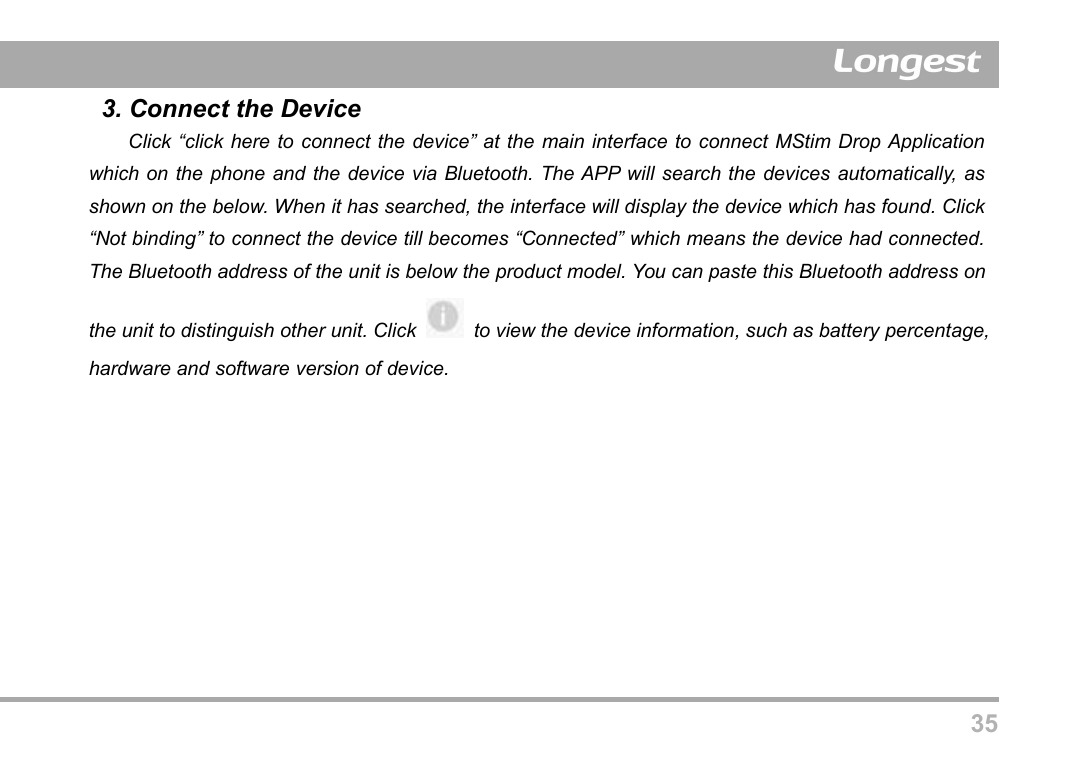
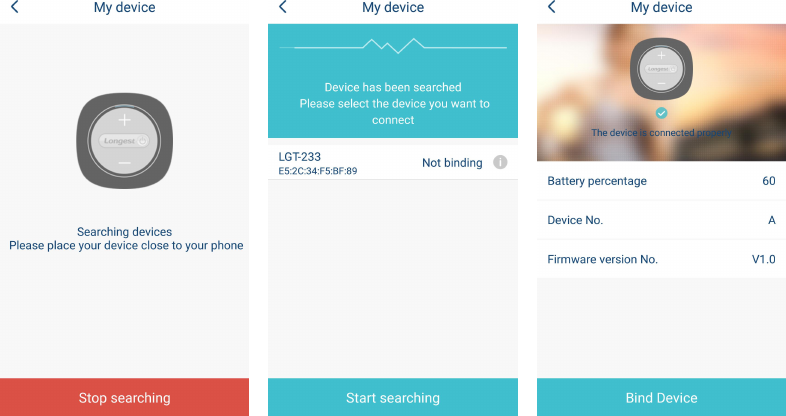
353. Connect the DeviceClick “click here to connect the device” at the main interface to connect MStim Drop Applicationwhich on the phone and the device via Bluetooth. The APP will search the devices automatically, asshown on the below. When it has searched, the interface will display the device which has found. Click“Not binding” to connect the device till becomes “Connected” which means the device had connected.The Bluetooth address of the unit is below the product model. You can paste this Bluetooth address onthe unit to distinguish other unit. Click to view the device information, such as battery percentage,hardware and software version of device.
36
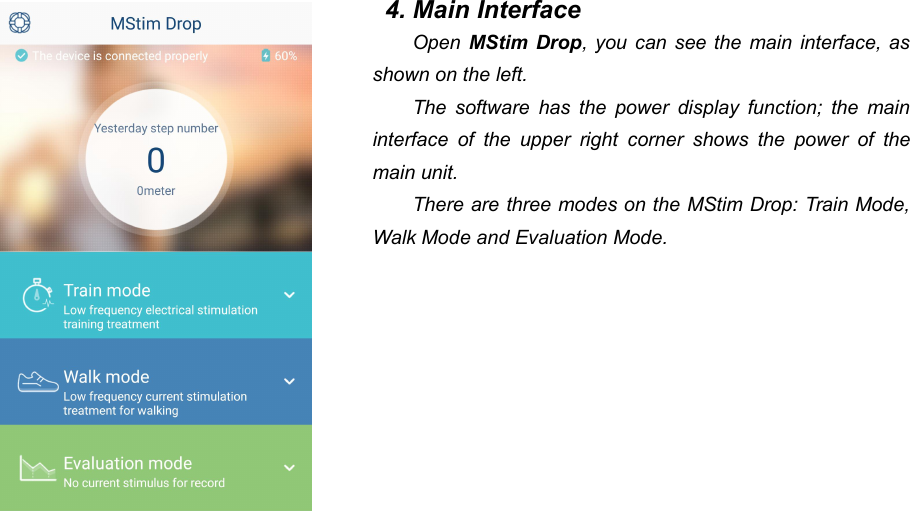
374. Main InterfaceOpen MStim Drop, you can see the main interface, asshown on the left.The software has the power display function; the maininterface of the upper right corner shows the power of themain unit.There are three modes on the MStim Drop: Train Mode,Walk Mode and Evaluation Mode.
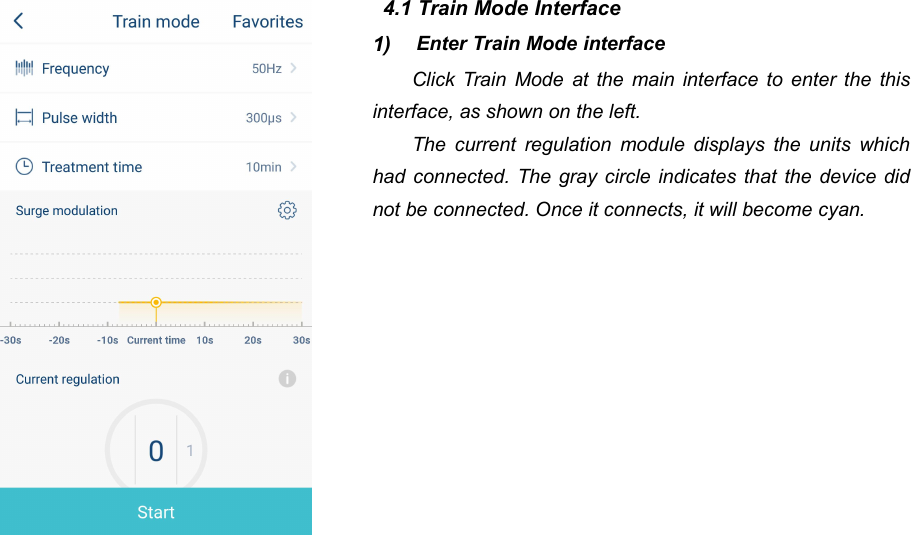
384.1 Train Mode Interface1) Enter Train Mode interfaceClick Train Mode at the main interface to enter the thisinterface, as shown on the left.The current regulation module displays the units whichhad connected. The gray circle indicates that the device didnot be connected. Once it connects, it will become cyan.
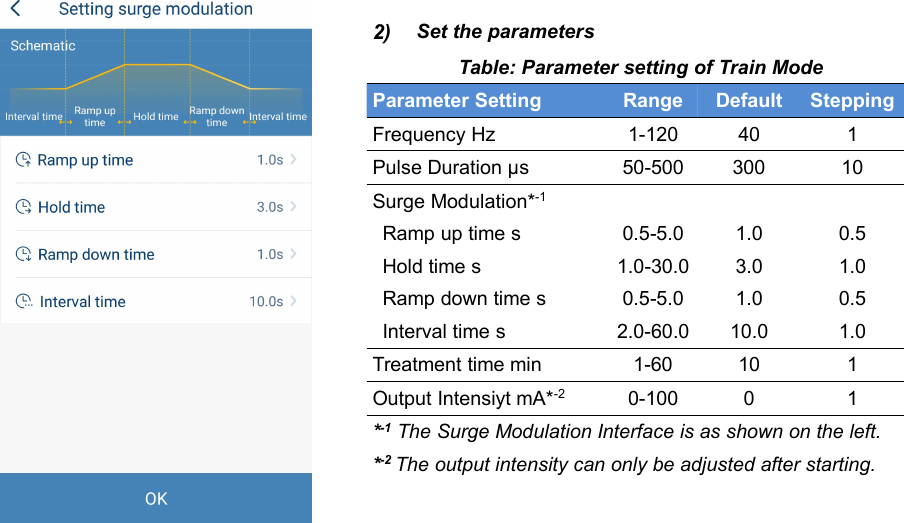
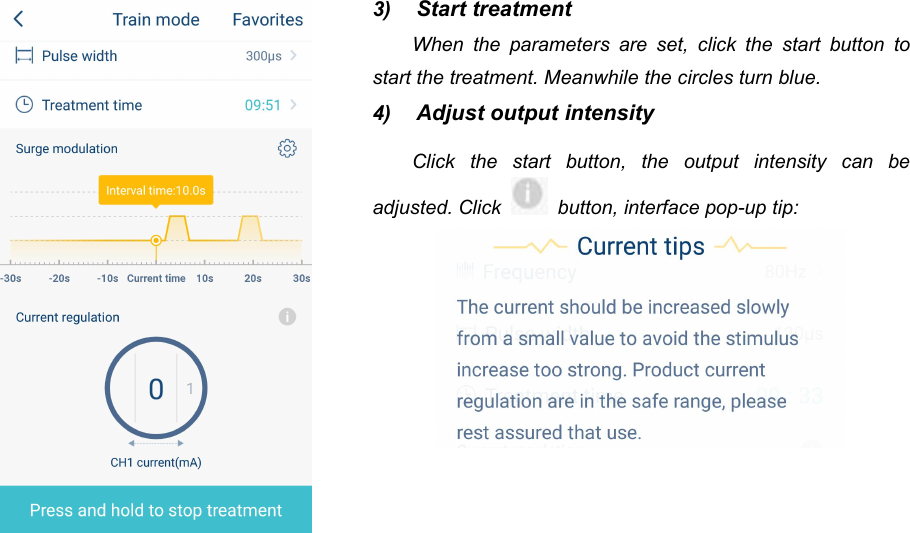
392) Set the parametersTable: Parameter setting of Train ModeParameter SettingRangeDefaultSteppingFrequency Hz1-120401Pulse Duration μs50-50030010Surge Modulation*-1Ramp up time s0.5-5.01.00.5Hold time s1.0-30.03.01.0Ramp down time s0.5-5.01.00.5Interval time s2.0-60.010.01.0Treatment time min1-60101Output Intensiyt mA*-20-10001*-1 The Surge Modulation Interface is as shown on the left.*-2 The output intensity can only be adjusted after starting.
403) Start treatmentWhen the parameters are set, click the start button tostart the treatment. Meanwhile the circles turn blue.4) Adjust output intensityClick the start button, the output intensity can beadjusted. Click button, interface pop-up tip:
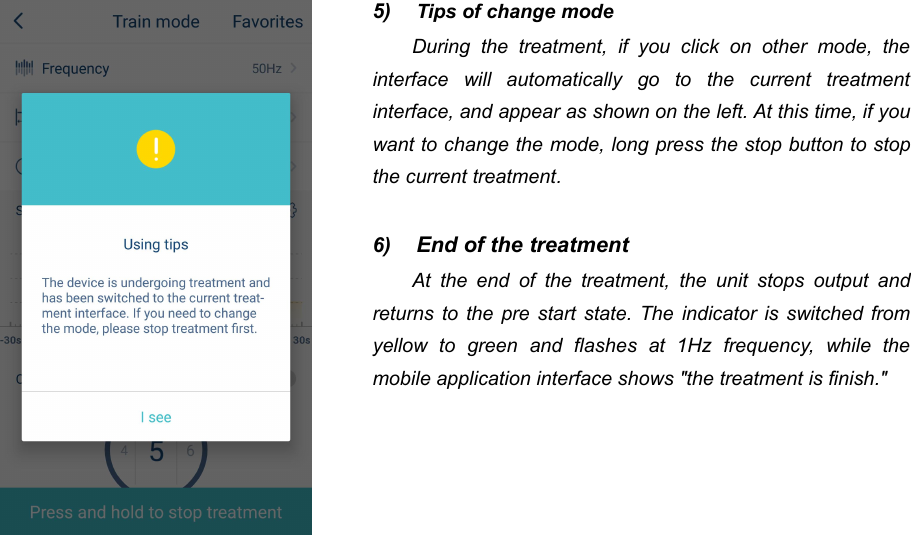
415) Tips of change modeDuring the treatment, if you click on other mode, theinterface will automatically go to the current treatmentinterface, and appear as shown on the left. At this time, if youwant to change the mode, long press the stop button to stopthe current treatment.6) End of the treatmentAt the end of the treatment, the unit stops output andreturns to the pre start state. The indicator is switched fromyellow to green and flashes at 1Hz frequency, while themobile application interface shows "the treatment is finish."
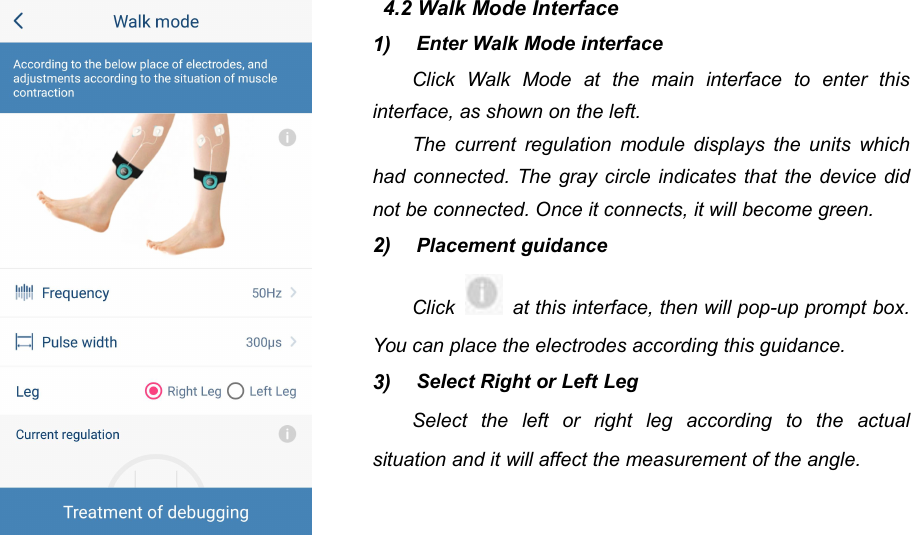
424.2 Walk Mode Interface1) Enter Walk Mode interfaceClick Walk Mode at the main interface to enter thisinterface, as shown on the left.The current regulation module displays the units whichhad connected. The gray circle indicates that the device didnot be connected. Once it connects, it will become green.2) Placement guidanceClick at this interface, then will pop-up prompt box.You can place the electrodes according this guidance.3) Select Right or Left LegSelect the left or right leg according to the actualsituation and it will affect the measurement of the angle.
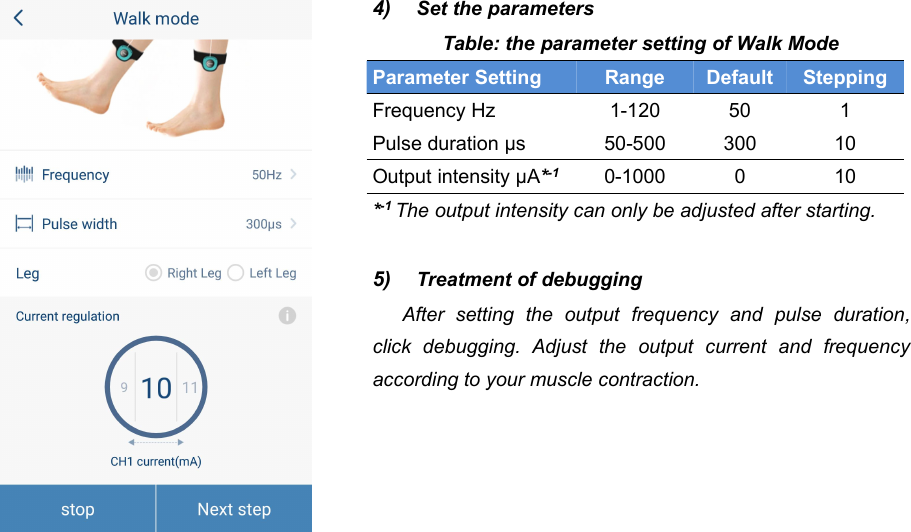
434) Set the parametersTable: the parameter setting of Walk ModeParameter SettingRangeDefaultSteppingFrequency Hz1-120501Pulse duration μs50-50030010Output intensity μA*-10-1000010*-1 The output intensity can only be adjusted after starting.5) Treatment of debuggingAfter setting the output frequency and pulse duration,click debugging. Adjust the output current and frequencyaccording to your muscle contraction.
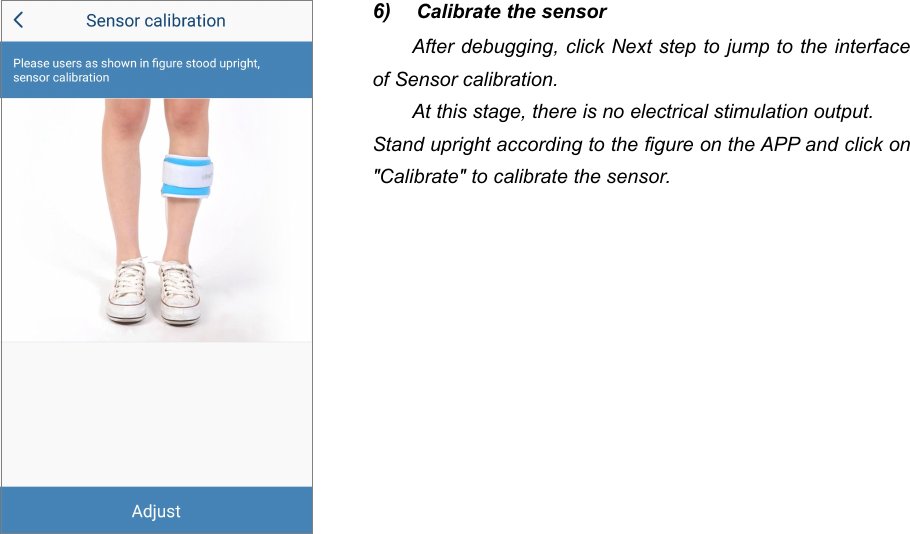
446) Calibrate the sensorAfter debugging, click Next step to jump to the interfaceof Sensor calibration.At this stage, there is no electrical stimulation output.Stand upright according to the figure on the APP and click on"Calibrate" to calibrate the sensor.
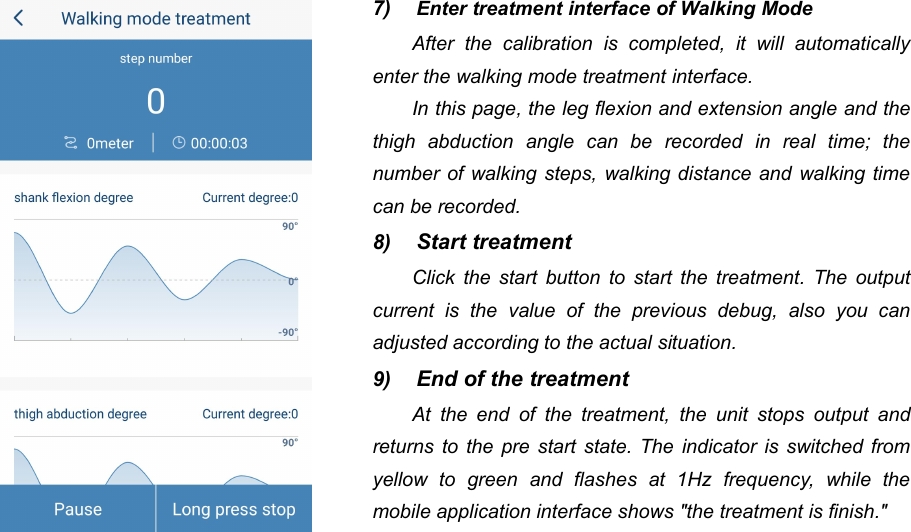
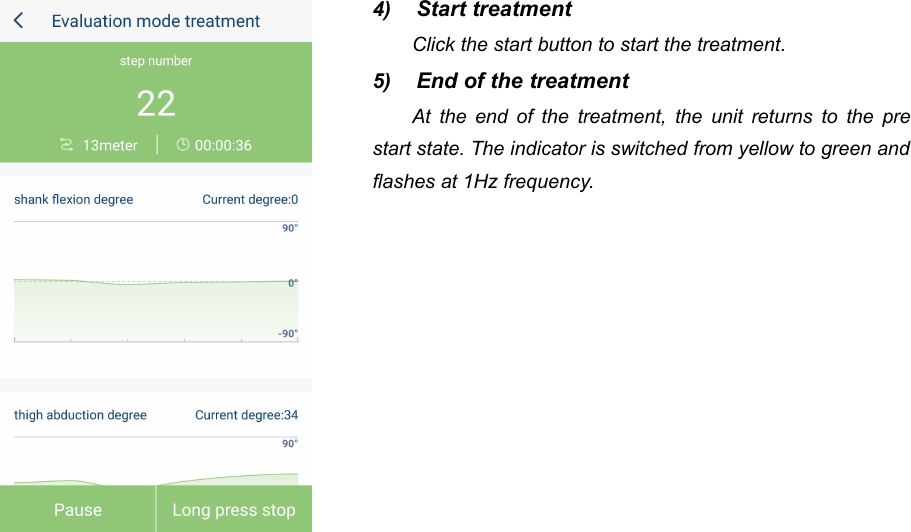
457) Enter treatment interface of Walking ModeAfter the calibration is completed, it will automaticallyenter the walking mode treatment interface.In this page, the leg flexion and extension angle and thethigh abduction angle can be recorded in real time; thenumber of walking steps, walking distance and walking timecan be recorded.8) Start treatmentClick the start button to start the treatment. The outputcurrent is the value of the previous debug, also you canadjusted according to the actual situation.9) End of the treatmentAt the end of the treatment, the unit stops output andreturns to the pre start state. The indicator is switched fromyellow to green and flashes at 1Hz frequency, while themobile application interface shows "the treatment is finish."
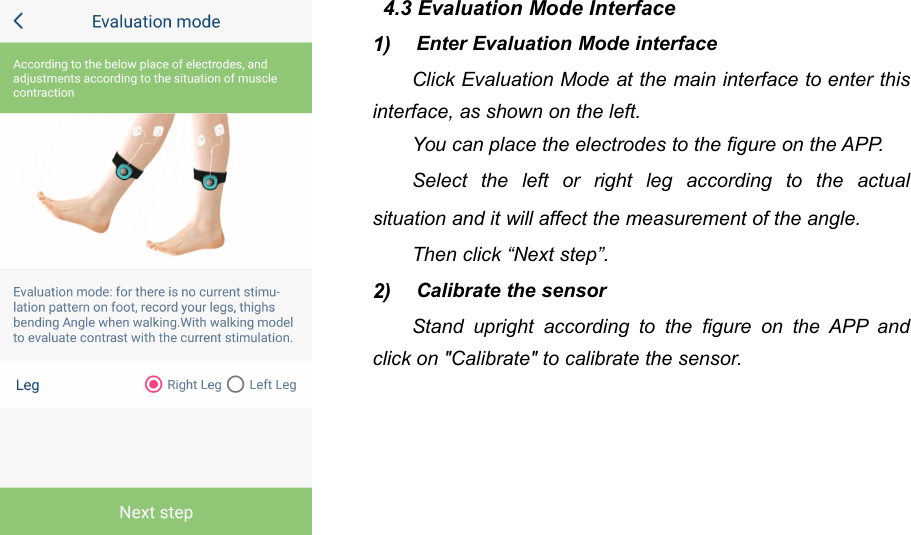
464.3 Evaluation Mode Interface1) Enter Evaluation Mode interfaceClick Evaluation Mode at the main interface to enter thisinterface, as shown on the left.You can place the electrodes to the figure on the APP.Select the left or right leg according to the actualsituation and it will affect the measurement of the angle.Then click “Next step”.2) Calibrate the sensorStand upright according to the figure on the APP andclick on "Calibrate" to calibrate the sensor.
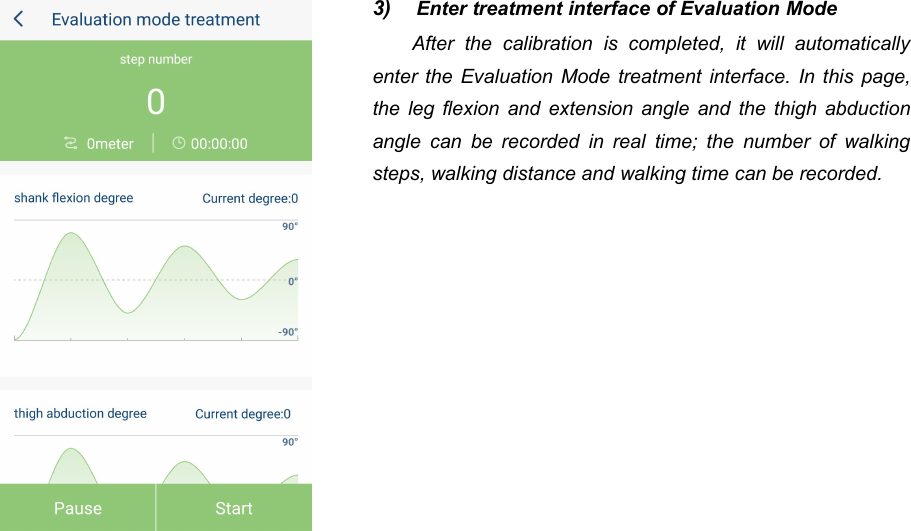
473) Enter treatment interface of Evaluation ModeAfter the calibration is completed, it will automaticallyenter the Evaluation Mode treatment interface. In this page,the leg flexion and extension angle and the thigh abductionangle can be recorded in real time; the number of walkingsteps, walking distance and walking time can be recorded.
484) Start treatmentClick the start button to start the treatment.5) End of the treatmentAt the end of the treatment, the unit returns to the prestart state. The indicator is switched from yellow to green andflashes at 1Hz frequency.
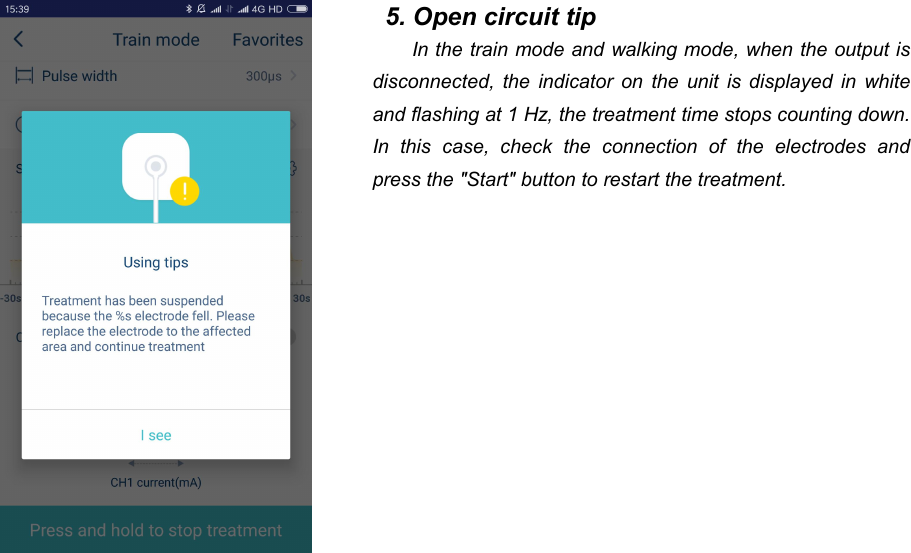
495. Open circuit tipIn the train mode and walking mode, when the output isdisconnected, the indicator on the unit is displayed in whiteand flashing at 1 Hz, the treatment time stops counting down.In this case, check the connection of the electrodes andpress the "Start" button to restart the treatment.
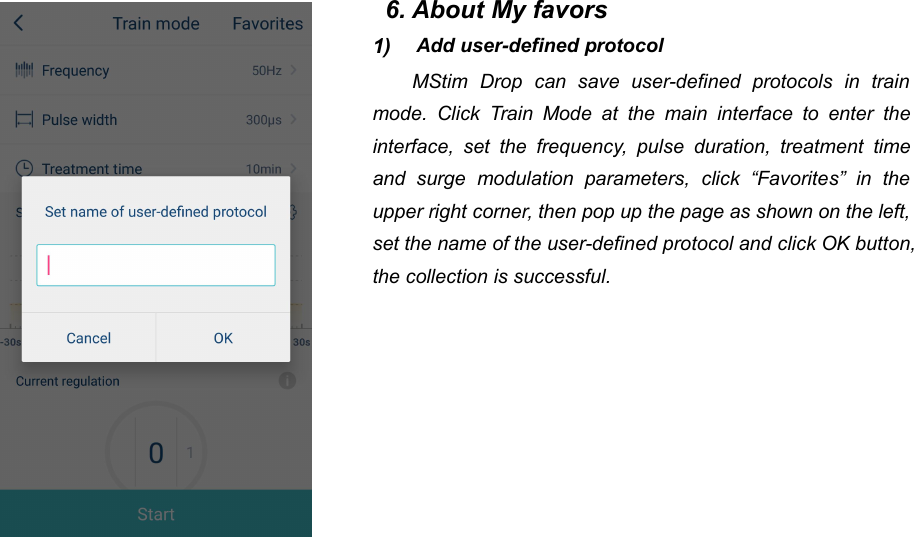
506. About My favors1) Add user-defined protocolMStim Drop can save user-defined protocols in trainmode. Click Train Mode at the main interface to enter theinterface, set the frequency, pulse duration, treatment timeand surge modulation parameters, click “Favorites” in theupper right corner, then pop up the page as shown on the left,set the name of the user-defined protocol and click OK button,the collection is successful.
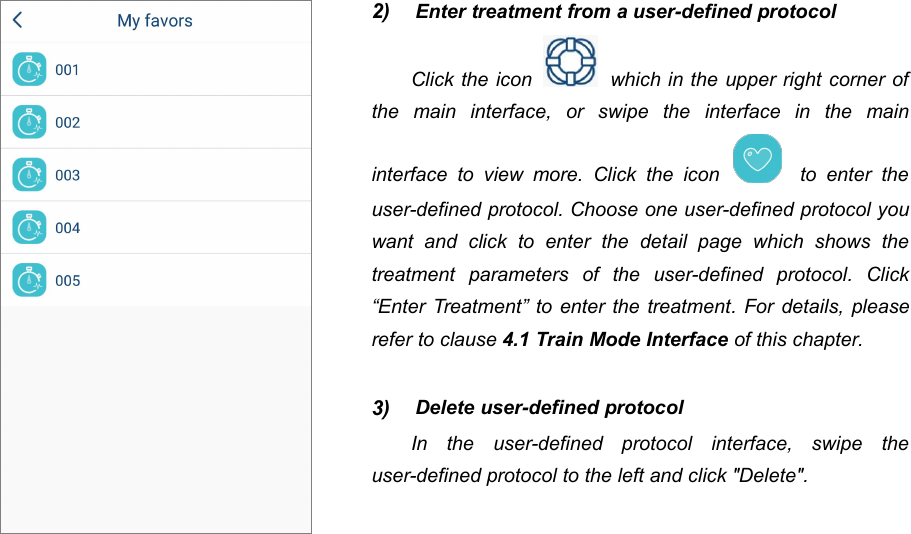
512) Enter treatment from a user-defined protocolClick the icon which in the upper right corner ofthe main interface, or swipe the interface in the maininterface to view more. Click the icon to enter theuser-defined protocol. Choose one user-defined protocol youwant and click to enter the detail page which shows thetreatment parameters of the user-defined protocol. Click“Enter Treatment” to enter the treatment. For details, pleaserefer to clause 4.1 Train Mode Interface of this chapter.3) Delete user-defined protocolIn the user-defined protocol interface, swipe theuser-defined protocol to the left and click "Delete".
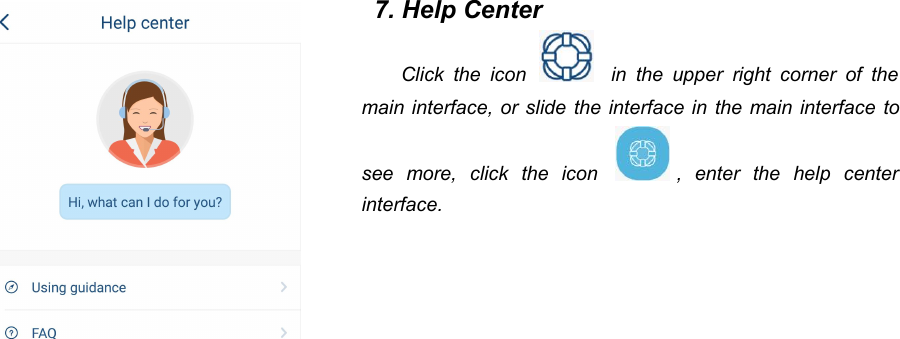
527. Help CenterClick the icon in the upper right corner of themain interface, or slide the interface in the main interface tosee more, click the icon , enter the help centerinterface.
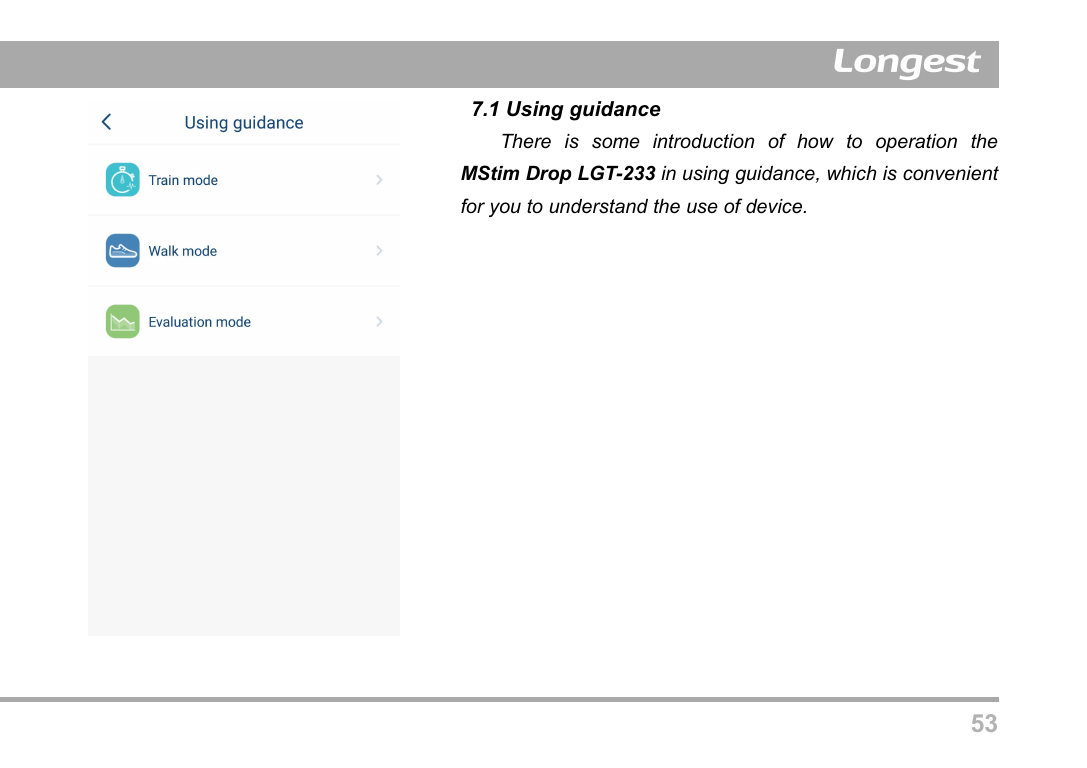
537.1 Using guidanceThere is some introduction of how to operation theMStim Drop LGT-233 in using guidance, which is convenientfor you to understand the use of device.
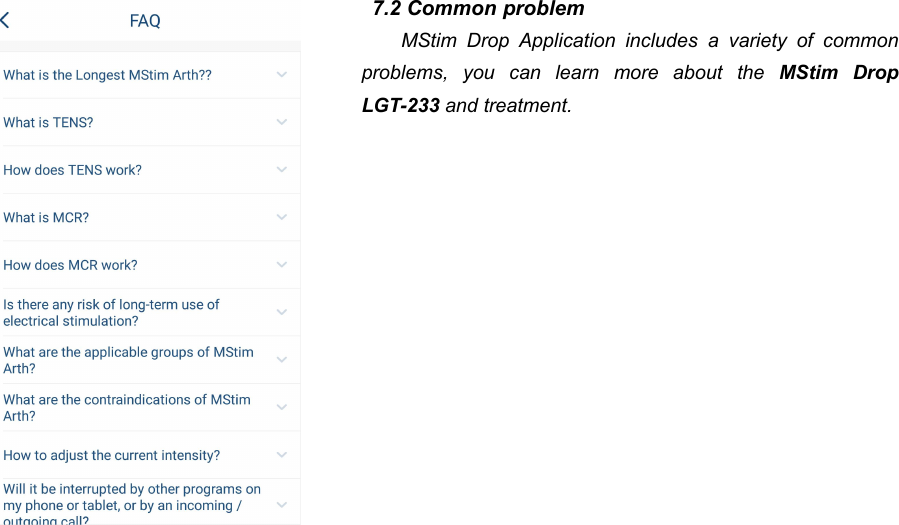
547.2 Common problemMStim Drop Application includes a variety of commonproblems, you can learn more about the MStim DropLGT-233 and treatment.
55Operation Guidance1. Preparing for use1.1 Charging the unitTo be able to use the device, you first have to charge the unit. Put one side of power adapterconnects with the unit; another side connects with the power socket. The status indicator on the unitflashes blue during charging. The status indicator stops flashing when the battery is fully charged.NOTE: If the rechargeable battery of the units is not fully charged when you start a treatment, thebatteries may run out during the treatment. We advise you to always fully charge the unitbefore you start a treatment.NOTE: Always disconnect the power charger from the mains after use.Do not use when the unit is charging.
561.2 Turn on the unitPress the ON/OFF button to turn on the unit to standby.1.3 Open the MStim Drop and ConnectingTurn on the MStim Drop Application on your phone and connect the unit to your phone via Bluetooth.Two main units can be connected at the same time, and two units can perform electrical stimulationsimultaneously.2. Starting a TreatmentTrain Mode1) Clean the skin and pace the electrodes: Use alcohol or soapy water to clean the skin, removethe grease of skin. After skin drying, place electrodes according the schematic of MStim DropAPP.2) Connect the unit: Connect one end of electrode lead hose to the electrodes, the other end tothe unit.3) Select Train Mode and set parameters: Click Train Mode at the main interface to enter theTrain Mode interface, set parameters such as frequency, pulse duration and treatment timeaccording to the actual situation (see the 4.4.1 clause in fourth chapter MStim Drop
57Application).4) Start Treatment: Click the start button and the treatment begins.5) Adjust output intensity: You can adjust the output intensity in the MStim Drop interface, orthrough “+/-" button on the unit. The output intensity should be increased slowly from smallvalues to avoid excessive stimulation. Since your body initially adapts to the intensity of thestimulation, you may have to adjust the intensity level after some time to ensure optimalstimulation.Walk Mode1) Clean the skin and pace the electrodes: Use alcohol or soapy water to clean the skin, removethe grease of skin. After skin drying, place electrodes according the schematic of MStim DropAPP.2) Connect the unit: Connect one end of electrode lead hose to the electrodes, the other end tothe unit.3) Select Walk Mode and debug: Click Walk Mode at the main interface to enter the interface,click treatment of debugging, and adjust output intensity.4) Fix Leg Bandage: After finish debug, fix the strap on the calf according to the schematic ofMStim Drop APP, and place the unit into the pocket of Leg Bandage.
585) Calibrate the sensor: click “next step” at MStim Drop APP, Stand according to the schematic ofAPP, click “Adjust”.6) Start treatment: After calibration is completed, it is automatically transferred to the treatmentinterface. Click start button, then you can start your walking training.7) Adjust output intensity: You can adjust the output intensity in the MStim Drop interface, orthrough “+/-" button on the unit. The output intensity should be increased slowly from smallvalues to avoid excessive stimulation. Since your body initially adapts to the intensity of thestimulation, you may have to adjust the intensity level after some time to ensure optimalstimulation.Evaluation Mode1) Fix Leg Bandage: After finish debug, fix the strap on the calf according to the schematic ofMStim Drop APP, and place the unit into the pocket of Leg Bandage.2) Select Evaluation Mode and calibrate: Click Evaluation Mode at the main interface to enter theinterface, Stand according to the schematic of APP, then click “next step” to enter the Sensorcalibration interface, click “Adjust”.3) Start Training: After calibration is completed, it is automatically transferred to the treatmentinterface. You can press the start button to start evaluation.
593. The End of TreatmentAt the end of the treatment, the unit stops output and returns to the pre start state. The indicator isswitched from yellow to green and flashes at 1Hz frequency, while the mobile application interface shows“the treatment is finish.”Remove the leg bandage and electrode lead hose after treatment. The main unit, electrode leadhose and the leg bandage are put into the box, placed in a cool and ventilated place, ready for the nextuse.
60Care and Maintenance1. Cleaning1) Please turn off the device before the cleaning and disinfection operation;2) For the main unit cleaning, what recommended are a clean, soft damp cloth for stains, and a clean,soft dry cloth for dust in the surface of the main unit;3) Clean the Leg Bandage: Wipe the surface with a damp cloth or antiseptic wipe after use. It can bewashed if necessary: moderate amount of neutral detergent, soak for a short time, be careful,gently rinse and dry naturally. Not machine washable, rubbed and bleached.Do not clean the main unit with organic solvent such as gasoline or diluents, otherwisedamage will be happened to the main unit such as deformation and falling off of the paint.
612. Routine MaintenanceIf it is used in accordance with the instructions of the user manual, the device does not need aparticular regular maintenance.Manufacturer will provide circuit diagrams, component part lists, descriptions, calibrationinstructions to assist to service personnel in parts repair.The unit and accessories must be checked at regular intervals.1) Check the power line to ensure if there is no distortion, fracture, etc. These circumstances maycause fire hazard. Please replace a new power line immediately.2) Replace the electrodes if:-- they are damaged or torn.-- they are past the use-by date.-- they have lost their adhesive power. Never use plaster or tape to attach them to your skin.-- stimulation feels less strong.-- when the stimulation is uncomfortable, i.e. when you experience an unpleasant stinging or bitingsensation.NOTE: Always replace the electrodes with electrodes recommended for this device by themanufacturer.
62Never perform unauthorized service work. All service work must be performed only byservice technicians who have been authorized by the manufacturer.3. DisposalFor environmental reasons, do not dispose of the device in the household waste at the end of itsuseful life. Dispose of the unit at a suitable local collection or recycling point. Dispose of the device inaccordance with EC Directive – WEEE (Waste Electrical and Electronic Equipment). If you have anyquestions, please contact the local authorities responsible for waste disposal.This symbol indicates that batteries contain substances that may be harmful to human health and
63the environment. Never dispose of batteries with normal household waste. Follow the local rules forseparate collection of batteries. Correct disposal of batteries helps prevent potentially negativeconsequences for the environment and human health. The MStim Drop LGT-233 contains a built-inrechargeable battery that cannot be removed by the user. Take them to an official collection point or aservice centre to have the rechargeable battery removed.
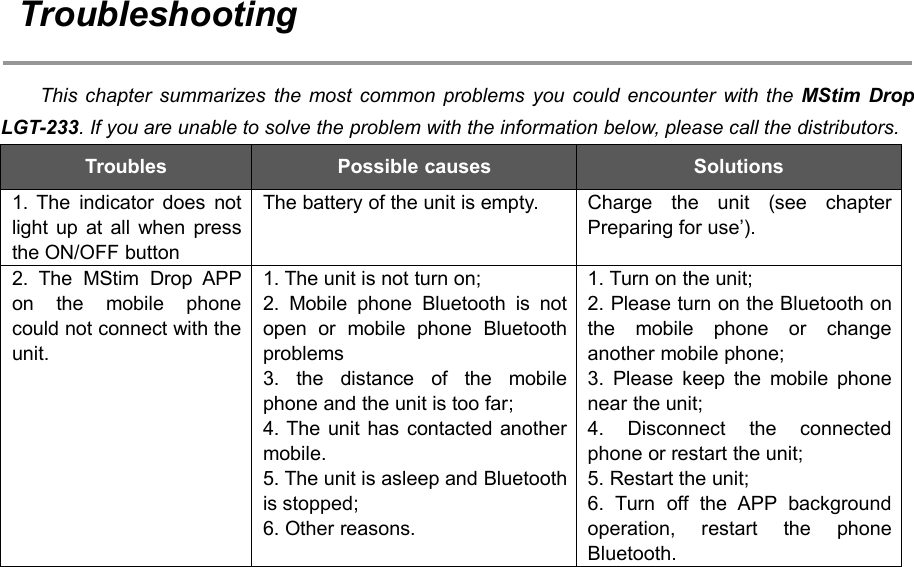
64TroubleshootingThis chapter summarizes the most common problems you could encounter with the MStim DropLGT-233. If you are unable to solve the problem with the information below, please call the distributors.TroublesPossible causesSolutions1. The indicator does notlight up at all when pressthe ON/OFF buttonThe battery of the unit is empty.Charge the unit (see chapterPreparing for use’).2. The MStim Drop APPon the mobile phonecould not connect with theunit.1. The unit is not turn on;2. Mobile phone Bluetooth is notopen or mobile phone Bluetoothproblems3. the distance of the mobilephone and the unit is too far;4. The unit has contacted anothermobile.5. The unit is asleep and Bluetoothis stopped;6. Other reasons.1. Turn on the unit;2. Please turn on the Bluetooth onthe mobile phone or changeanother mobile phone;3. Please keep the mobile phonenear the unit;4. Disconnect the connectedphone or restart the unit;5. Restart the unit;6. Turn off the APP backgroundoperation, restart the phoneBluetooth.
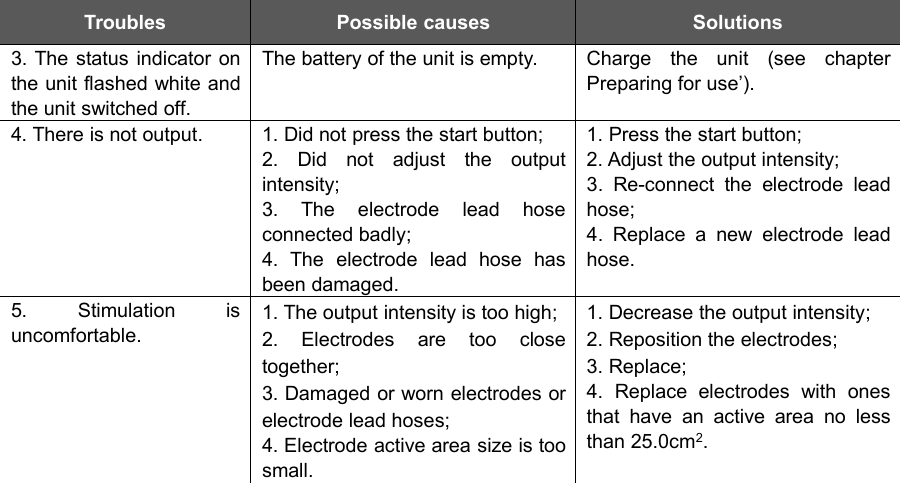
65TroublesPossible causesSolutions3. The status indicator onthe unit flashed white andthe unit switched off.The battery of the unit is empty.Charge the unit (see chapterPreparing for use’).4. There is not output.1. Did not press the start button;2. Did not adjust the outputintensity;3. The electrode lead hoseconnected badly;4. The electrode lead hose hasbeen damaged.1. Press the start button;2. Adjust the output intensity;3. Re-connect the electrode leadhose;4. Replace a new electrode leadhose.5. Stimulation isuncomfortable.1. The output intensity is too high;2. Electrodes are too closetogether;3. Damaged or worn electrodes orelectrode lead hoses;4. Electrode active area size is toosmall.1. Decrease the output intensity;2. Reposition the electrodes;3. Replace;4. Replace electrodes with onesthat have an active area no lessthan 25.0cm2.
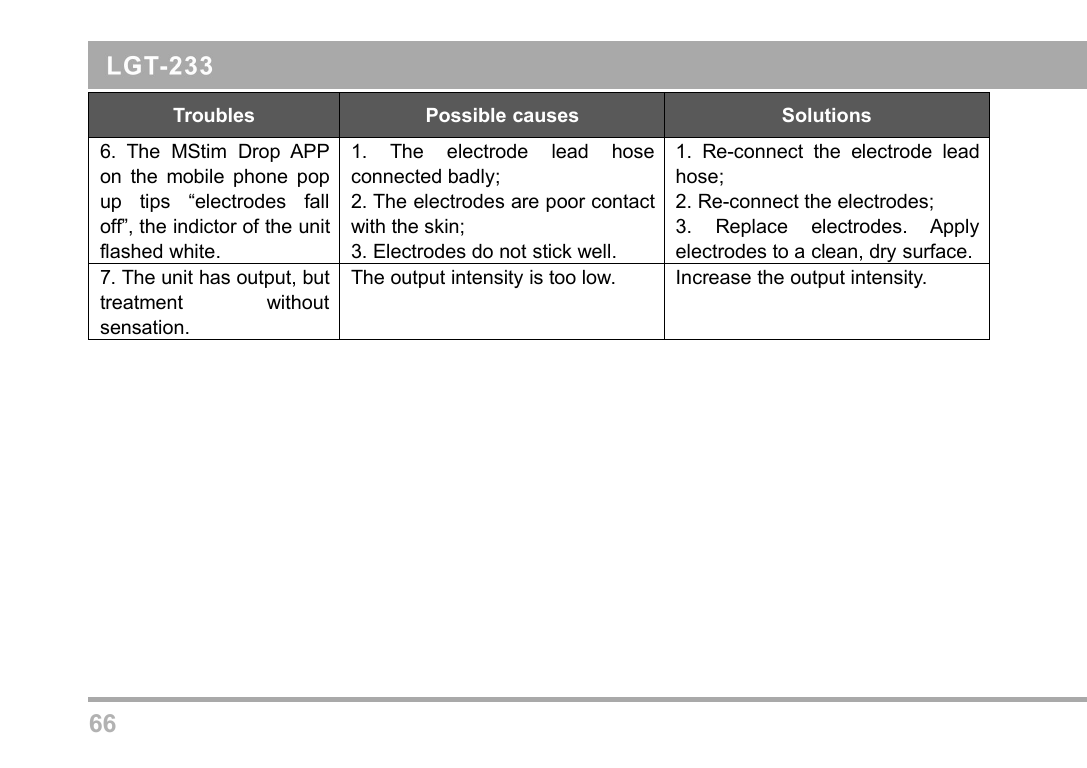
66TroublesPossible causesSolutions6. The MStim Drop APPon the mobile phone popup tips “electrodes falloff”, the indictor of the unitflashed white.1. The electrode lead hoseconnected badly;2. The electrodes are poor contactwith the skin;3. Electrodes do not stick well.1. Re-connect the electrode leadhose;2. Re-connect the electrodes;3. Replace electrodes. Applyelectrodes to a clean, dry surface.7. The unit has output, buttreatment withoutsensation.The output intensity is too low.Increase the output intensity.
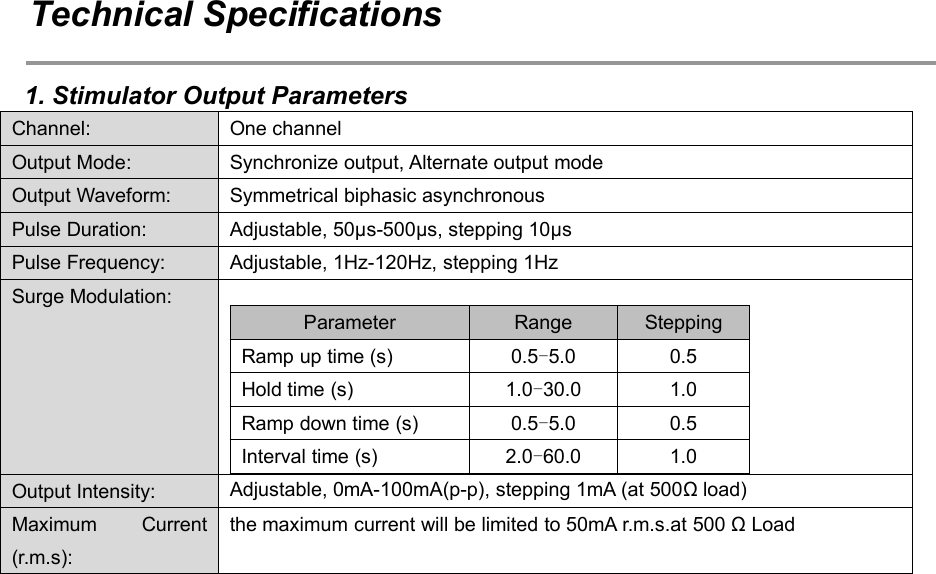
67Technical Specifications1. Stimulator Output ParametersChannel:One channelOutput Mode:Synchronize output, Alternate output modeOutput Waveform:Symmetrical biphasic asynchronousPulse Duration:Adjustable, 50μs-500μs, stepping 10μsPulse Frequency:Adjustable, 1Hz-120Hz, stepping 1HzSurge Modulation:ParameterRangeSteppingRamp up time (s)0.5-5.00.5Hold time (s)1.0-30.01.0Ramp down time (s)0.5-5.00.5Interval time (s)2.0-60.01.0Output Intensity:Adjustable, 0mA-100mA(p-p), stepping 1mA (at 500Ω load)Maximum Current(r.m.s):the maximum current will be limited to 50mA r.m.s.at 500 Ω Load
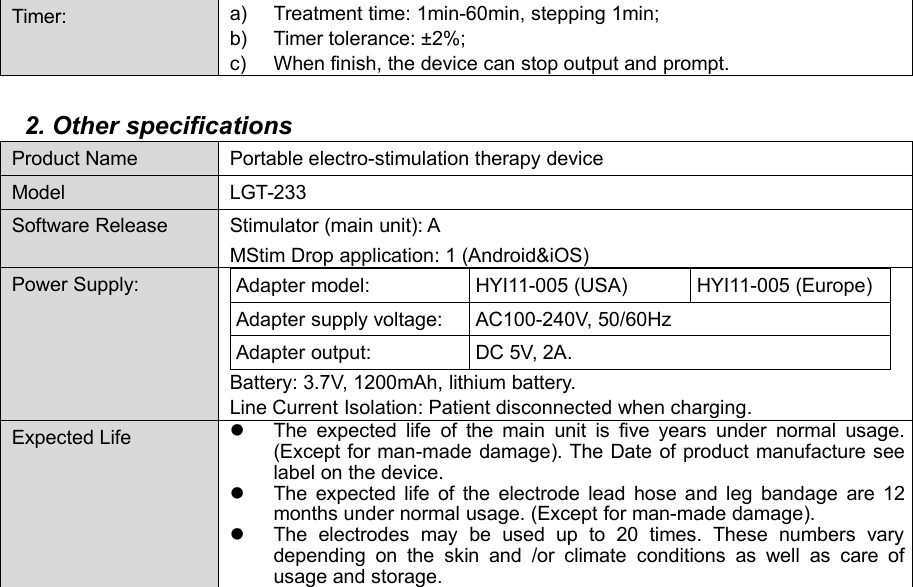
68Timer:a) Treatment time: 1min-60min, stepping 1min;b) Timer tolerance: ±2%;c) When finish, the device can stop output and prompt.2. Other specificationsProduct NamePortable electro-stimulation therapy deviceModelLGT-233Software ReleaseStimulator (main unit): AMStim Drop application: 1 (Android&iOS)Power Supply:Adapter model:HYI11-005 (USA)HYI11-005 (Europe)Adapter supply voltage:AC100-240V, 50/60HzAdapter output:DC 5V, 2A.Battery: 3.7V, 1200mAh, lithium battery.Line Current Isolation: Patient disconnected when charging.Expected LifeThe expected life of the main unit is five years under normal usage.(Except for man-made damage). The Date of product manufacture seelabel on the device.The expected life of the electrode lead hose and leg bandage are 12months under normal usage. (Except for man-made damage).The electrodes may be used up to 20 times. These numbers varydepending on the skin and /or climate conditions as well as care ofusage and storage.
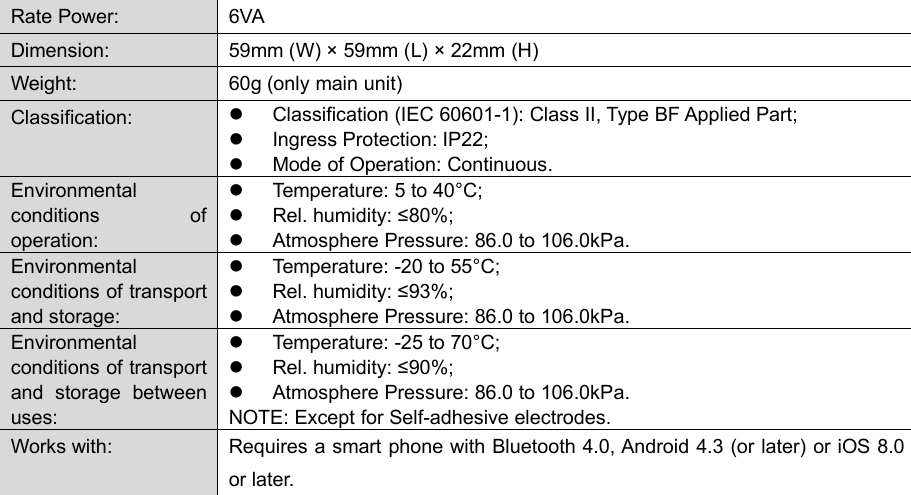
69Rate Power:6VADimension:59mm (W) × 59mm (L) × 22mm (H)Weight:60g (only main unit)Classification:Classification (IEC 60601-1): Class II, Type BF Applied Part;Ingress Protection: IP22;Mode of Operation: Continuous.Environmentalconditions ofoperation:Temperature: 5 to 40°C;Rel. humidity: ≤80%;Atmosphere Pressure: 86.0 to 106.0kPa.Environmentalconditions of transportand storage:Temperature: -20 to 55°C;Rel. humidity: ≤93%;Atmosphere Pressure: 86.0 to 106.0kPa.Environmentalconditions of transportand storage betweenuses:Temperature: -25 to 70°C;Rel. humidity: ≤90%;Atmosphere Pressure: 86.0 to 106.0kPa.NOTE: Except for Self-adhesive electrodes.Works with:Requires a smart phone with Bluetooth 4.0, Android 4.3 (or later) or iOS 8.0or later.
70AssistanceEvery intervention on device must be performed by manufacturer. For any assistance interventionand original spare parts please contact the manufacturer at following address:GUANGZHOU LONGEST SCIENCE & TECHNOLOGY CO., LTD.Add: 5&6F, Building B4, No.11, Kaiyuan Avenue, Science City, Guangzhou Hi-tech IndustrialDevelopment Zone, 510530 Guangzhou, Guangdong Province, P.R. ChinaTel: +86 20 6635 3999 Fax: +86 20 6635 3920Email: service@longest.cn Website: www.longest.cnEU Representatives InformationLotus Global Co., LtdCompany address: 1 Four Seasons Terrace West Drayton, Middlesex London, UB7 9GG, UnitedKingdomTel: +44 20 75868010, 70961611 Fax: +44 20 79006187
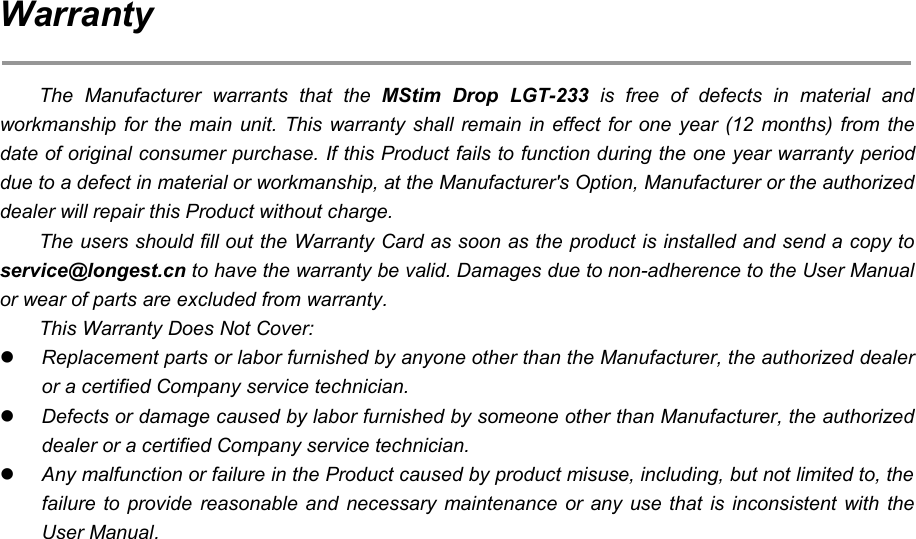
71WarrantyThe Manufacturer warrants that the MStim Drop LGT-233 is free of defects in material andworkmanship for the main unit. This warranty shall remain in effect for one year (12 months) from thedate of original consumer purchase. If this Product fails to function during the one year warranty perioddue to a defect in material or workmanship, at the Manufacturer's Option, Manufacturer or the authorizeddealer will repair this Product without charge.The users should fill out the Warranty Card as soon as the product is installed and send a copy toservice@longest.cn to have the warranty be valid. Damages due to non-adherence to the User Manualor wear of parts are excluded from warranty.This Warranty Does Not Cover:Replacement parts or labor furnished by anyone other than the Manufacturer, the authorized dealeror a certified Company service technician.Defects or damage caused by labor furnished by someone other than Manufacturer, the authorizeddealer or a certified Company service technician.Any malfunction or failure in the Product caused by product misuse, including, but not limited to, thefailure to provide reasonable and necessary maintenance or any use that is inconsistent with theUser Manual.

Navigation menu