Guangzhou Rayer Acoustic Technology CAPRI125P BT Speaker/Internet Radio User Manual

Guangzhou Rayer Acoustic Technology Co., Ltd BT Speaker/Internet Radio Users Manual

Users Manual

备注:此页不在印刷范围内!(本页内容工程师不需要填写)广州睿耳声学科技有限公司Guangzhou Rayer Acoustic Technology Co.,Ltd文件图号 本页内容设 计 审 核规格:74×105 mm(A7) 材质: 封面100g双胶纸印哑油+内页80g双胶纸印刷: 黑色印刷成型方式:骑马钉装-36P比例:1B1Kapsch-H说明书(Kapsch 125 PLUS)Kapsch-H说明书印刷档Nikki Guo 20170816Kapsch-H-A06-J33303-V1.0
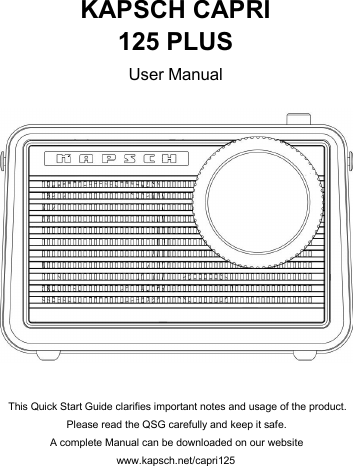
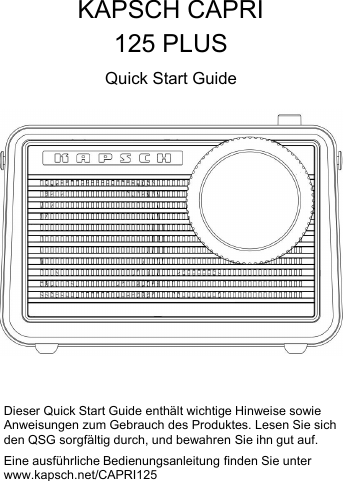
KAPSCH CAPRI125 PLUSUser ManualThis Quick Start Guide clarifies important notes and usage of the product.Please read the QSG carefully and keep it safe.A complete Manual can be downloaded on our websitewww.kapsch.net/capri125
1Important informationPlease read and understand all the instructions before using theproduct.Damage caused by failure to comply with the instructions does notbe covered under warrant.WarningRisk of electric shock or fireDo not let the product and accessories contact rain or water. Donot put liquid container (such as vases) on the product side. If theliquid flows inside the product, please immediately shut down theproduct and contact customer service center.Do not place the products and accessories near fire or other heatsources, including direct sunlight.In the lightning weather, the product should be shut down.Beware of short-circuited or fire!Before the product is connected to a power supply socket, pleaseensure that the voltage of power supply and products on theback or bottom printing values match. If the voltage is different, donot connect the product to the power socket.Beware of damage to the product!Do not put this product or any objects on the power line or otherelectronic devices.If the delivery of the products at temperature that below 5°C,please open the product packaging and waiting for it to reachroom temperature, and then connect it to the power socket forcharging.This part of the product may be made of glass. Please handle withcare, so as not to hurt or damage.
2Be careful of overheating!Do not install the production in enclosed spaces. Be sure to setaside at least 4inches around the product space for ventilation.Cleaning productsTurn off machine before cleaning it.Do not use volatile solvents (such as ethanol, rosin, toluenesolvent) to clean the machine. This type of chemicals may damagethe machine.Use cotton or microfiber cleaning cloth.In the cleaning process, do not water droplets into the productpanels and speakers causing malfunction.Environmental protectionThe product is made by recyclable and high quality materials. Donot put together the product with other livinggarbage. Please understand the local classificationabout collecting electronic, electrical products and battery set. Thecorrect disposal of these products will help to avoid the potentiallynegative impact on the environment and human health. Thisproduct contains the battery cannot be discarded as thegeneral living garbage. Please understand the local classificationabout collecting the provisions of battery. The correct disposalof the battery helps to avoid the potentially negative impact on theenvironment and human health.BatteryDanger of explosion if battery is incorrectly replaced. Replace onlywith the same or equivalent type.Batteries (battery pack or batteries installed) shall not be exposedto excessive heat such as sunshine,fire or the like.
3AdapterUse only power supplies listed in the user instructions:<BRAND:Flypower>,< <Model: PS30D180K1000UD>Model: PS30D180K1000ED>,<Input: AC 100-240V 50/60Hz>,<Output:DC 18.0V,1000mA >.Only use the attachments / accessories specified by manufacturerThe MAINS plug or an appliance coupler is used as the disconnectdevice, the disconnect device shall remain readily operablePacking listKAPSCH CAPRI 125 PLUS x 1Quick Start Guide x 1Adapter (DC18V,1A) x 1
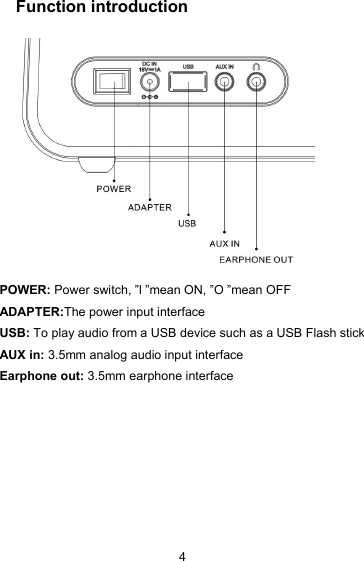
4Function introductionPOWER: Power switch, ”l ”mean ON, ”O ”mean OFFADAPTER:The power input interfaceUSB: To play audio from a USB device such as a USB Flash stickAUX in: 3.5mm analog audio input interfaceEarphone out: 3.5mm earphone interface
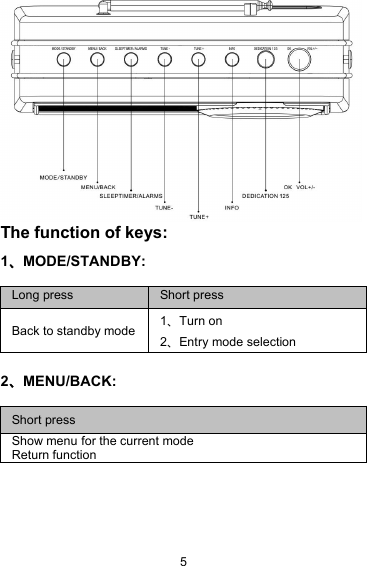
5The function of keys:1、MODE/STANDBY:2、MENU/BACK:Long pressShort pressBack to standby mode1、Turn on2、Entry mode selectionShort pressShow menu for the current modeReturn function
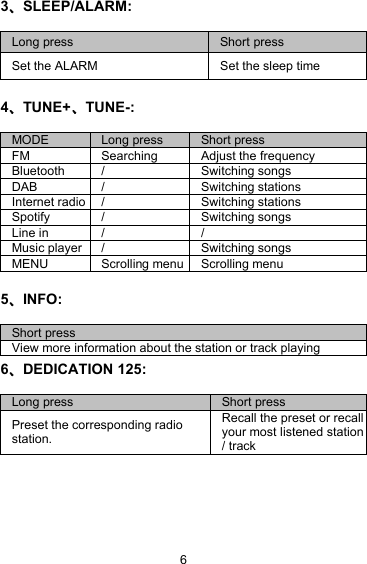
63、SLEEP/ALARM:4、TUNE+、TUNE-:5、INFO:6、DEDICATION 125:Long pressShort pressSet the ALARMSet the sleep timeMODELong pressShort pressFMSearchingAdjust the frequencyBluetooth/Switching songsDAB/Switching stationsInternet radio/Switching stationsSpotify/Switching songsLine in//Music player/Switching songsMENUScrolling menuScrolling menuShort pressView more information about the station or track playingLong pressShort pressPreset the corresponding radiostation.Recall the preset or recallyour most listened station/ track
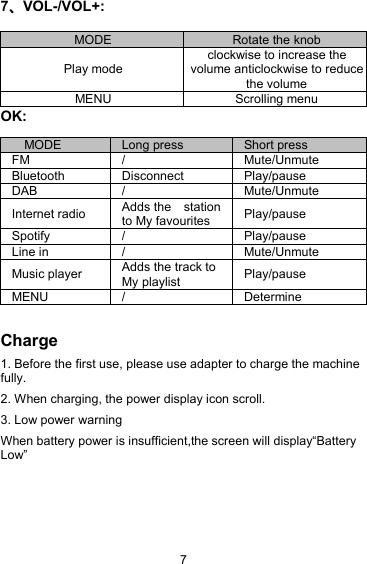
77、VOL-/VOL+:OK:Charge1. Before the first use, please use adapter to charge the machinefully.2. When charging, the power display icon scroll.3. Low power warningWhen battery power is insufficient,the screen will display“BatteryLow”MODERotate the knobPlay modeclockwise to increase thevolume anticlockwise to reducethe volumeMENUScrolling menuMODELong pressShort pressFM/Mute/UnmuteBluetoothDisconnectPlay/pauseDAB/Mute/UnmuteInternet radioAdds the stationto My favouritesPlay/pauseSpotify/Play/pauseLine in/Mute/UnmuteMusic playerAdds the track toMy playlistPlay/pauseMENU/Determine
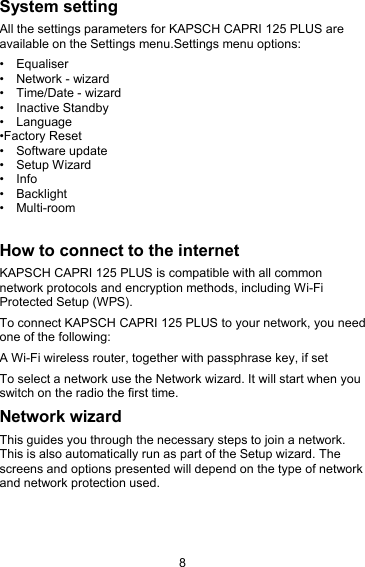
8System settingAll the settings parameters for KAPSCH CAPRI 125 PLUS areavailable on the Settings menu.Settings menu options:• Equaliser• Network - wizard• Time/Date - wizard• Inactive Standby• Language•Factory Reset• Software update• Setup Wizard• Info• Backlight• Multi-roomHow to connect to the internetKAPSCH CAPRI 125 PLUS is compatible with all commonnetwork protocols and encryption methods, including Wi-FiProtected Setup (WPS).To connect KAPSCH CAPRI 125 PLUS to your network, you needone of the following:A Wi-Fi wireless router, together with passphrase key, if setTo select a network use the Network wizard. It will start when youswitch on the radio the first time.Network wizardThis guides you through the necessary steps to join a network.This is also automatically run as part of the Setup wizard. Thescreens and options presented will depend on the type of networkand network protection used.
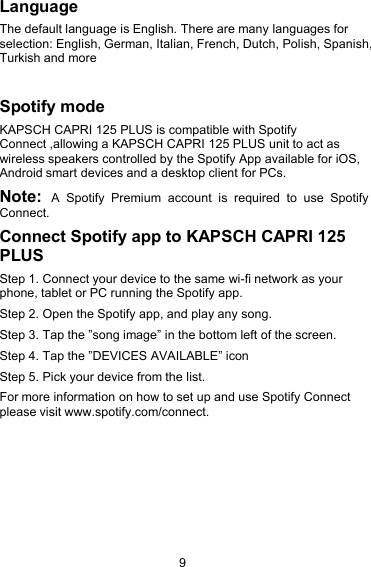
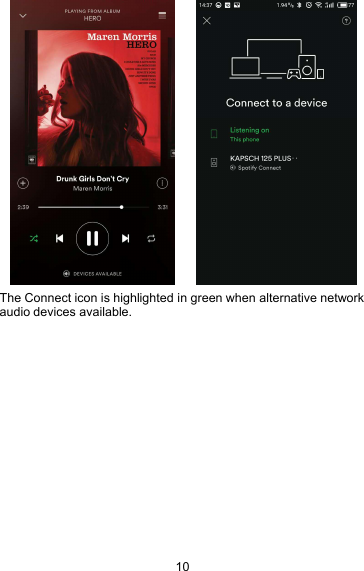
9LanguageThe default language is English. There are many languages forselection: English, German, Italian, French, Dutch, Polish, Spanish,Turkish and moreSpotify modeKAPSCH CAPRI 125 PLUS is compatible with SpotifyConnect ,allowing a KAPSCH CAPRI 125 PLUS unit to act aswireless speakers controlled by the Spotify App available for iOS,Android smart devices and a desktop client for PCs.Note: A Spotify Premium account is required to use SpotifyConnect.Connect Spotify app to KAPSCH CAPRI 125PLUSStep 1. Connect your device to the same wi-fi network as yourphone, tablet or PC running the Spotify app.Step 2. Open the Spotify app, and play any song.Step 3. Tap the ”song image” in the bottom left of the screen.Step 4. Tap the ”DEVICES AVAILABLE” iconStep 5. Pick your device from the list.For more information on how to set up and use Spotify Connectplease visit www.spotify.com/connect.
10The Connect icon is highlighted in green when alternative networkaudio devices available.
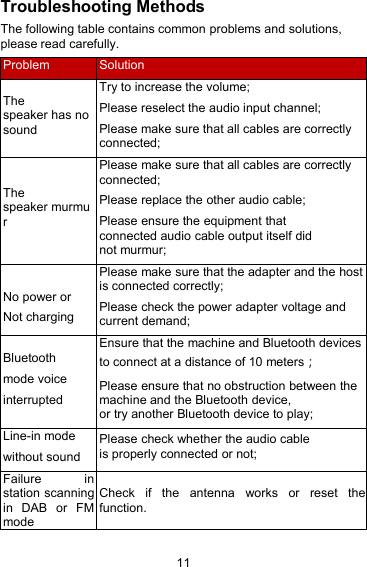
11Troubleshooting MethodsThe following table contains common problems and solutions,please read carefully.ProblemSolutionThespeaker has nosoundTry to increase the volume;Please reselect the audio input channel;Please make sure that all cables are correctlyconnected;Thespeaker murmurPlease make sure that all cables are correctlyconnected;Please replace the other audio cable;Please ensure the equipment thatconnected audio cable output itself didnot murmur;No power orNot chargingPlease make sure that the adapter and the hostis connected correctly;Please check the power adapter voltage andcurrent demand;Bluetoothmode voiceinterruptedEnsure that the machine and Bluetooth devicesto connect at a distance of 10 meters;Please ensure that no obstruction between themachine and the Bluetooth device,or try another Bluetooth device to play;Line-in modewithout soundPlease check whether the audio cableis properly connected or not;Failure instation scanningin DAB or FMmodeCheck if the antenna works or reset thefunction.
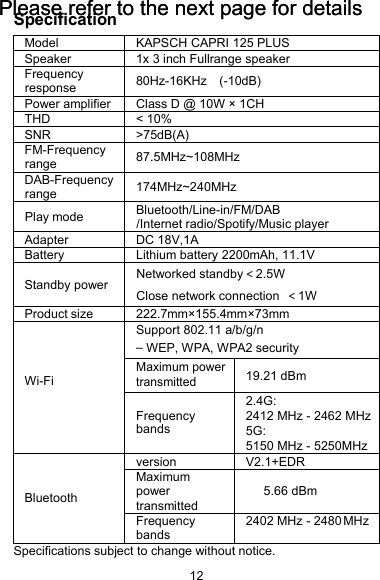
12SpecificationModel KAPSCH CAPRI 125 PLUSSpeaker 1x 3 inch Fullrange speakerFrequencyresponse 80Hz-16KHz (-10dB)Power amplifier Class D@10W × 1CHTHD < 10%SNR >75dB(A)FM-Frequencyrange 87.5MHz~108MHzDAB-Frequencyrange 174MHz~240MHzPlay mode Bluetooth/Line-in/FM/DAB/Internet radio/Spotify/Music playerAdapter DC 18V,1ABatteryLithium battery2200mAh, 11.1VStandby power Networked standby<2.5WClose network connection <1WProduct size 222.7mm×155.4mm×73mmWi-FiSupport 802.11 a/b/g/n–WEP, WPA, WPA2 securityMaximum power transmitted19.21 dBmFrequencybands2.4G:2412 MHz - 2462 MHz 5G:5150 MHz - 5250MHzBluetoothversion V2.1+EDRMaximumpowertransmitted5.66 dBmFrequencybands2402 MHz - 2480MHzSpecifications subject to change without notice.Please refer to the next page for detailsPlease refer to the next page for details
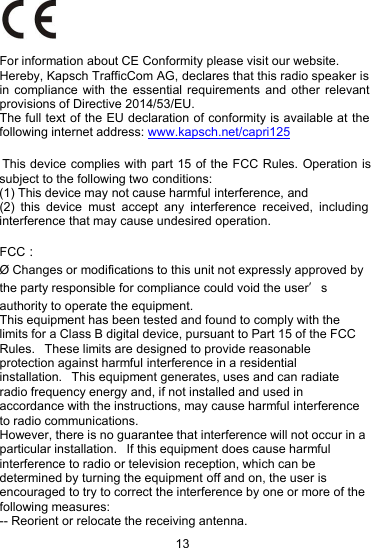
13For information about CE Conformity please visit our website. Hereby, Kapsch TrafficCom AG, declares that this radio speaker is in compliance with the essential requirements and other relevant provisions of Directive 2014/53/EU.The full text of the EU declaration of conformity is available at the following internet address: www.kapsch.net/capri125 This device complies with part 15 of the FCC Rules. Operation is subject to the following two conditions:(1) This device may not cause harmful interference, and(2) this device must accept any interference received, including interference that may cause undesired operation.FCC:Ø Changes or modifications to this unit not expressly approved bythe party responsible for compliance could void the user’sauthority to operate the equipment.This equipment has been tested and found to comply with thelimits for a Class B digital device, pursuant to Part 15 of the FCCRules. These limits are designed to provide reasonableprotection against harmful interference in a residentialinstallation. This equipment generates, uses and can radiateradio frequency energy and, if not installed and used inaccordance with the instructions, may cause harmful interferenceto radio communications.However, there is no guarantee that interference will not occur in aparticular installation. If this equipment does cause harmfulinterference to radio or television reception, which can bedetermined by turning the equipment off and on, the user isencouraged to try to correct the interference by one or more of thefollowing measures:-- Reorient or relocate the receiving antenna.
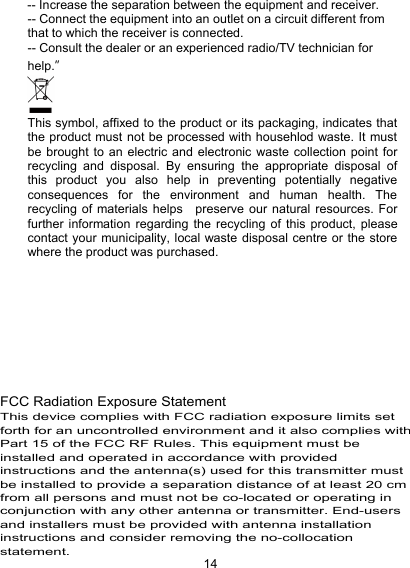
14-- Increase the separation between the equipment and receiver.-- Connect the equipment into an outlet on a circuit different fromthat to which the receiver is connected.-- Consult the dealer or an experienced radio/TV technician forhelp.”This symbol, affixed to the product or its packaging, indicates thatthe product must not be processed with househlod waste. It mustbe brought to an electric and electronic waste collection point forrecycling and disposal. By ensuring the appropriate disposal ofthis product you also help in preventing potentially negativeconsequences for the environment and human health. Therecycling of materials helps preserve our natural resources. Forfurther information regarding the recycling of this product, pleasecontact your municipality, local waste disposal centre or the storewhere the product was purchased.BAND I:5150-5250MHz BAND II:5250-5350MHz FCC Radiation Exposure StatementThis device complies with FCC radiation exposure limits set forth for an uncontrolled environment and it also complies with Part 15 of the FCC RF Rules. This equipment must be installed and operated in accordance with provided instructions and the antenna(s) used for this transmitter must be installed to provide a separation distance of at least 20 cm from all persons and must not be co-located or operating in conjunction with any other antenna or transmitter. End-users and installers must be provided with antenna installation instructions and consider removing the no-collocation statement. no-
15Warranty termsThe warranty period shall start when you start the radio the firsttime.If a material or production fault occurs in this product within 24months of this date, we shall – at our discretion – repair or replacethe product free of charge.This warranty requires that the defective device has to be sent toour service centre together with a short description of the fault.If the fault is covered by our warranty, you will receive the repairedproduct or a replacement device.The warranty period shall not begin again if the product is repairedor replaced.Processing of warranty claimsContact our support (see our website). Our support may alreadybe able to solve the problem. If the problem cannot be solved,you will receive instructions on where to send the device to.Support: ( german / english )capri125@kapsch.netImporter:Kapsch TrafficCom AGAm Europlatz 21120 Vienna, AustriaMade in China
KAPSCH CAPRI125 PLUSQuick Start GuideDieser Quick Start Guide enthält wichtige Hinweise sowieAnweisungen zum Gebrauch des Produktes. Lesen Sie sichden QSG sorgfältig durch, und bewahren Sie ihn gut auf.Eine ausführliche Bedienungsanleitung finden Sie unterwww.kapsch.net/CAPRI125
1Wichtige HinweiseLesen und beachten Sie alle Warnhinweise und Erklärungen,bevor Sie dieses Radio einschalten.Schäden, die aufgrund eines unsachgemäßen Gebrauchsentstehen, werden nicht durch die Garantie abgedeckt.AchtungStromschlag- und BrandgefahrHalten Sie das Produkt und sein Zubehör von Regen und Wasserfern. Stellen Sie keine Behälter mit Flüssigkeiten (zum BeispielVasen) auf oder neben das Produkt. Falls Flüssigkeit insProduktinnere gelangt, schalten Sie das Gerät sofort aus undwenden sich an den Kundendienst.Halten Sie das Produkt und sein Zubehör von Feuer undWärmequellen sowie von extremer Sonneneinstrahlung fern.Bei Gewitter schalten Sie das Gerät aus und trennen es vomStromnetz.Kurzschluss- und BrandgefahrBevor Sie das Gerät mit dem Stromnetz verbinden, müssen Siesicherstellen, dass die Stromversorgung den angegebenenWerten entspricht. Wenn die Spannungsversorgung hiervonabweicht, dürfen Sie das Produkt nicht an die Steckdoseanschließen.Gefahr von SachschädenStellen Sie weder das Produkt noch andere Gegenstände auf dasNetzkabel oder auf andere elektronische Geräte.Liegt bei Erhalt des Produktes die Außentemperatur unter 5 °C,packen Sie es aus und warten, bis es die Umgebungstemperatur
2erreicht hat. Erst danach dürfen Sie es an die Steckdoseanschließen.Einige Bauelemente des Produktes bestehen aus Glas.Handhaben Sie es deshalb mit Vorsicht, damit das Glas nichtzerbricht und Verletzungen oder Sachschäden verursacht.Gefahr von ÜberhitzungAchten Sie darauf, dass rund um das Gerät mindestens 10 cmPlatz zur Belüftung frei bleiben.ReinigungSchalten Sie das Gerät vor der Reinigung aus.Verwenden Sie zur Reinigung keine organischen Lösungsmittelwie Spiritus oder Verdünner. Anderenfalls wird das Gerätbeschädigt.Verwenden Sie nur Reinigungstücher aus Baumwolle oderMikrofaser.Sprühen oder tropfen Sie kein Wasser oder Reiniger auf dasGehäuse oder die Lautsprecher. Anderenfalls kann das Gerätbeschädigt werden.Das Gehäuse ist mit echtem Leder überzogen und muss sorgsamgepflegt und gereinigt werden.UmweltschutzDieses Produkt wurde aus hochwertigen und wiederverwertbarenMaterialien hergestellt. Sie dürfen es nicht über den Hausmüllentsorgen. Informieren Sie sich über die Verordnungen zurEntsorgung elektronischer und elektrischer Geräte sowie Batterien.Die richtige Entsorgung Ihres Altgerätes schützt die Umwelt unddie Gesundheit. Dieses Produkt enthält einen Akku, der nicht überden Hausmüll entsorgt werden darf. Informieren Sie sich über die
3Verordnungen zur Entsorgung von Altbatterien. Die richtigeEntsorgung des Akkus schützt die Umwelt und die Gesundheit.AkkuExplosionsgefahr des Akkus bei unsachgemäßer Handhabung.Ersetzen Sie den Akku nur durch denselben oder einenäquivalenten Typ.Batterien bzw. Akkus dürfen keiner übermäßigen Hitze, wie siedurch direktes Sonnenlicht, Feuer oder ähnlichem verursacht wird,ausgesetzt werden.NetzteilVerwenden Sie nur das Netzteil, das in derBedienungsanleitung aufgeführt ist.<MARKE: Flypower>,< <Model: PS30D180K1000UD>Modell: PS30D180K1000ED>,<Eingang: 100-240 V~, 50/60 Hz><Ausgang: 18,0 V=, 1000 mA>Benutzen Sie nur das vom Hersteller angegebene Zubehör.Um das Gerät vom Stromnetz zu trennen, muss der Netzsteckergezogen werden. Zu diesem Zweck muss die Steckdose inReichweite und frei zugänglich sein.LieferumfangKAPSCH CAPRI 125 PLUS x 1Quick Start Guide x 1Adapter (DC18V,1A) x 1
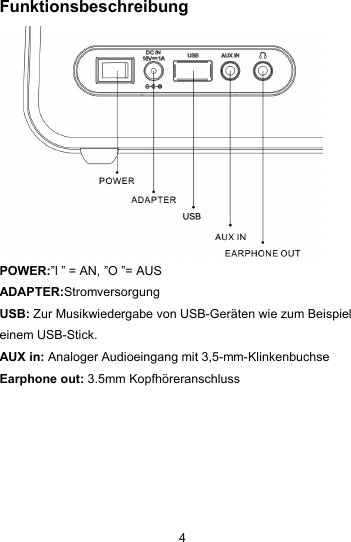
4FunktionsbeschreibungPOWER:”l ” = AN, ”O ”= AUSADAPTER:StromversorgungUSB: Zur Musikwiedergabe von USB-Geräten wie zum Beispieleinem USB-Stick.AUX in: Analoger Audioeingang mit 3,5-mm-KlinkenbuchseEarphone out: 3.5mm Kopfhöreranschluss
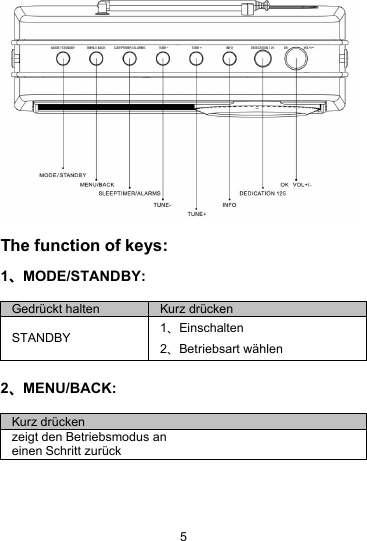
5The function of keys:1、MODE/STANDBY:2、MENU/BACK:Gedrückt haltenKurz drückenSTANDBY1、Einschalten2、Betriebsart wählenKurz drückenzeigt den Betriebsmodus aneinen Schritt zurück
63、SLEEP/ALARM:4、TUNE+、TUNE-:5、INFO:6、DEDICATION 125:Gedrückt haltenKurz drückenWecker stellenSleeptimer stellenMODUSGedrückthaltenKurz drückenFMSuchenFrequenz einstellenBluetooth/Wechsel des TitelsDAB/Wechsel des SendersInternet radio/Wechsel des SendersSpotify/Wechsel des TitelsLine in//Musicplayer/Wechsel des TitelsMENUblätternblätternKurz drückenInformationen zum Sender oder zum Titel der gerade läuft.Gedrückt haltenKurz drückenDen aktuellen Sender abspeichernDen abgespeichertenSender aufrufen / denbeliebtesten Senderaufrufen
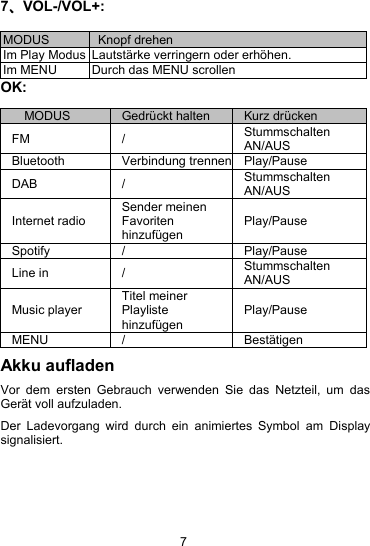
77、VOL-/VOL+:OK:Akku aufladenVor dem ersten Gebrauch verwenden Sie das Netzteil, um dasGerät voll aufzuladen.Der Ladevorgang wird durch ein animiertes Symbol am Displaysignalisiert.MODUSKnopf drehenIm Play ModusLautstärke verringern oder erhöhen.Im MENUDurch das MENU scrollenMODUSGedrückt haltenKurz drückenFM/StummschaltenAN/AUSBluetoothVerbindung trennenPlay/PauseDAB/StummschaltenAN/AUSInternet radioSender meinenFavoritenhinzufügenPlay/PauseSpotify/Play/PauseLine in/StummschaltenAN/AUSMusic playerTitel meinerPlaylistehinzufügenPlay/PauseMENU/Bestätigen
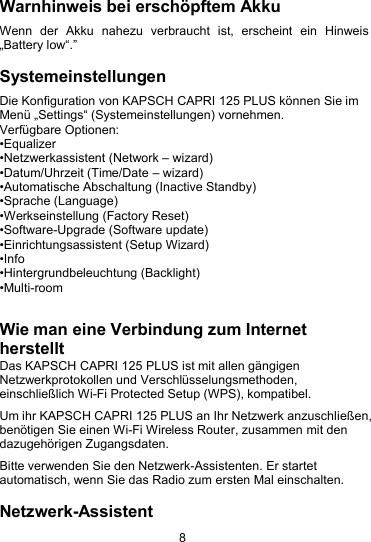
8Warnhinweis bei erschöpftem AkkuWenn der Akku nahezu verbraucht ist, erscheint ein Hinweis„Battery low“.”SystemeinstellungenDie Konfiguration von KAPSCH CAPRI 125 PLUS können Sie imMenü „Settings“ (Systemeinstellungen) vornehmen.Verfügbare Optionen:•Equalizer•Netzwerkassistent (Network – wizard)•Datum/Uhrzeit (Time/Date – wizard)•Automatische Abschaltung (Inactive Standby)•Sprache (Language)•Werkseinstellung (Factory Reset)•Software-Upgrade (Software update)•Einrichtungsassistent (Setup Wizard)•Info•Hintergrundbeleuchtung (Backlight)•Multi-roomWie man eine Verbindung zum InternetherstelltDas KAPSCH CAPRI 125 PLUS ist mit allen gängigenNetzwerkprotokollen und Verschlüsselungsmethoden,einschließlich Wi-Fi Protected Setup (WPS), kompatibel.Um ihr KAPSCH CAPRI 125 PLUS an Ihr Netzwerk anzuschließen,benötigen Sie einen Wi-Fi Wireless Router, zusammen mit dendazugehörigen Zugangsdaten.Bitte verwenden Sie den Netzwerk-Assistenten. Er startetautomatisch, wenn Sie das Radio zum ersten Mal einschalten.Netzwerk-Assistent
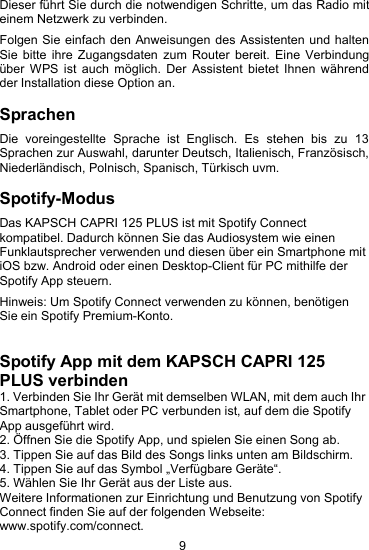
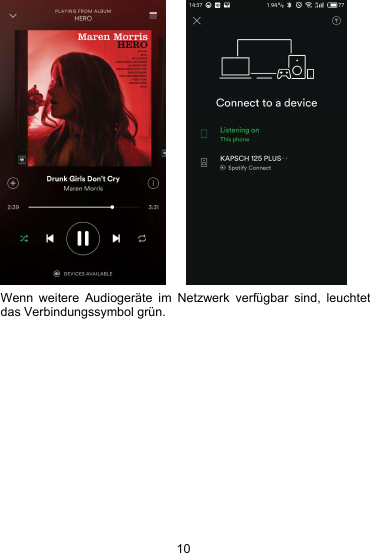
9Dieser führt Sie durch die notwendigen Schritte, um das Radio miteinem Netzwerk zu verbinden.Folgen Sie einfach den Anweisungen des Assistenten und haltenSie bitte ihre Zugangsdaten zum Router bereit. Eine Verbindungüber WPS ist auch möglich. Der Assistent bietet Ihnen währendder Installation diese Option an.SprachenDie voreingestellte Sprache ist Englisch. Es stehen bis zu 13Sprachen zur Auswahl, darunter Deutsch, Italienisch, Französisch,Niederländisch, Polnisch, Spanisch, Türkisch uvm.Spotify-ModusDas KAPSCH CAPRI 125 PLUS ist mit Spotify Connectkompatibel. Dadurch können Sie das Audiosystem wie einenFunklautsprecher verwenden und diesen über ein Smartphone mitiOS bzw. Android oder einen Desktop-Client für PC mithilfe derSpotify App steuern.Hinweis: Um Spotify Connect verwenden zu können, benötigenSie ein Spotify Premium-Konto.Spotify App mit dem KAPSCH CAPRI 125PLUS verbinden1. Verbinden Sie Ihr Gerät mit demselben WLAN, mit dem auch IhrSmartphone, Tablet oder PC verbunden ist, auf dem die SpotifyApp ausgeführt wird.2. Öffnen Sie die Spotify App, und spielen Sie einen Song ab.3. Tippen Sie auf das Bild des Songs links unten am Bildschirm.4. Tippen Sie auf das Symbol „Verfügbare Geräte“.5. Wählen Sie Ihr Gerät aus der Liste aus.Weitere Informationen zur Einrichtung und Benutzung von SpotifyConnect finden Sie auf der folgenden Webseite:www.spotify.com/connect.
10Wenn weitere Audiogeräte im Netzwerk verfügbar sind, leuchtetdas Verbindungssymbol grün.
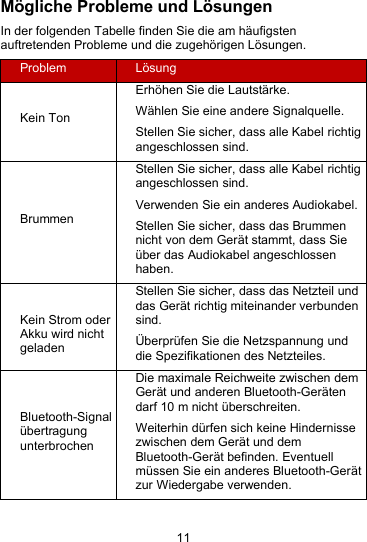
11Mögliche Probleme und LösungenIn der folgenden Tabelle finden Sie die am häufigstenauftretenden Probleme und die zugehörigen Lösungen.ProblemLösungKein TonErhöhen Sie die Lautstärke.Wählen Sie eine andere Signalquelle.Stellen Sie sicher, dass alle Kabel richtigangeschlossen sind.BrummenStellen Sie sicher, dass alle Kabel richtigangeschlossen sind.Verwenden Sie ein anderes Audiokabel.Stellen Sie sicher, dass das Brummennicht von dem Gerät stammt, dass Sieüber das Audiokabel angeschlossenhaben.Kein Strom oderAkku wird nichtgeladenStellen Sie sicher, dass das Netzteil unddas Gerät richtig miteinander verbundensind.Überprüfen Sie die Netzspannung unddie Spezifikationen des Netzteiles.Bluetooth-SignalübertragungunterbrochenDie maximale Reichweite zwischen demGerät und anderen Bluetooth-Gerätendarf 10 m nicht überschreiten.Weiterhin dürfen sich keine Hindernissezwischen dem Gerät und demBluetooth-Gerät befinden. Eventuellmüssen Sie ein anderes Bluetooth-Gerätzur Wiedergabe verwenden.
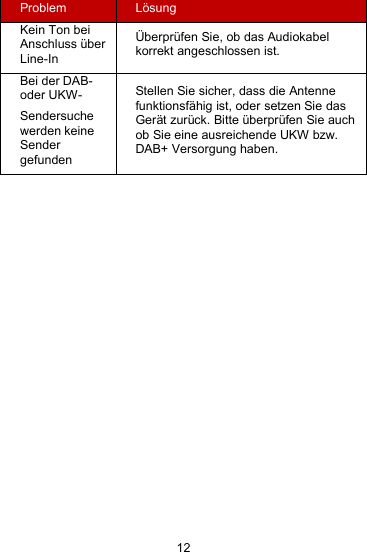
12ProblemLösungKein Ton beiAnschluss überLine-InÜberprüfen Sie, ob das Audiokabelkorrekt angeschlossen ist.Bei der DAB-oder UKW-Sendersuchewerden keineSendergefundenStellen Sie sicher, dass die Antennefunktionsfähig ist, oder setzen Sie dasGerät zurück. Bitte überprüfen Sie auchob Sie eine ausreichende UKW bzw.DAB+ Versorgung haben.
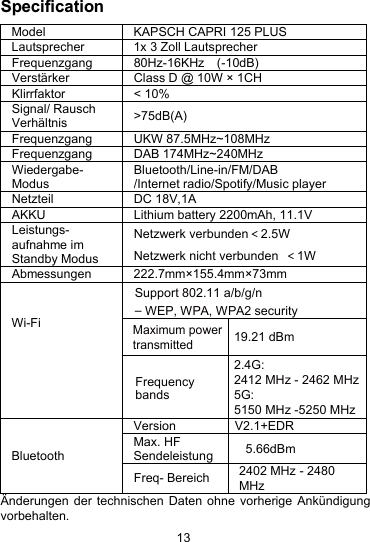
13SpecificationModel KAPSCH CAPRI 125 PLUSLautsprecher 1x 3 Zoll LautsprecherFrequenzgang 80Hz-16KHz (-10dB)Verstärker Class D@10W × 1CHKlirrfaktor < 10%Signal/ RauschVerhältnis >75dB(A)FrequenzgangUKW 87.5MHz~108MHzFrequenzgangDAB 174MHz~240MHzWiedergabe-ModusBluetooth/Line-in/FM/DAB/Internet radio/Spotify/Music playerNetzteil DC 18V,1AAKKU Lithium battery2200mAh, 11.1VLeistungs-aufnahme imStandby ModusNetzwerk verbunden<2.5WNetzwerk nicht verbunden <1WAbmessungen 222.7mm×155.4mm×73mmWi-FiBluetoothVersion V2.1+EDRMax. HFSendeleistung5.66dBmFreq- Bereich 2402 MHz - 2480MHzÄnderungen der technischen Daten ohne vorherige Ankündigungvorbehalten.Support 802.11 a/b/g/n–WEP, WPA, WPA2 securityMaximum power transmitted19.21 dBmFrequencybands2.4G:2412 MHz - 2462 MHz 5G:5150 MHz -5250 MHz
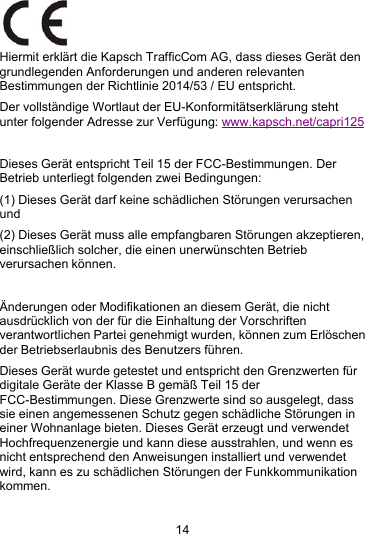
14Hiermit erklärt die Kapsch TrafficCom AG, dass dieses Gerät dengrundlegenden Anforderungen und anderen relevantenBestimmungen der Richtlinie 2014/53 / EU entspricht.Der vollständige Wortlaut der EU-Konformitätserklärung stehtunter folgender Adresse zur Verfügung: www.kapsch.net/capri125Dieses Gerät entspricht Teil 15 der FCC-Bestimmungen. DerBetrieb unterliegt folgenden zwei Bedingungen:(1) Dieses Gerät darf keine schädlichen Störungen verursachenund(2) Dieses Gerät muss alle empfangbaren Störungen akzeptieren,einschließlich solcher, die einen unerwünschten Betriebverursachen können.Änderungen oder Modifikationen an diesem Gerät, die nichtausdrücklich von der für die Einhaltung der Vorschriftenverantwortlichen Partei genehmigt wurden, können zum Erlöschender Betriebserlaubnis des Benutzers führen.Dieses Gerät wurde getestet und entspricht den Grenzwerten fürdigitale Geräte der Klasse B gemäß Teil 15 derFCC-Bestimmungen. Diese Grenzwerte sind so ausgelegt, dasssie einen angemessenen Schutz gegen schädliche Störungen ineiner Wohnanlage bieten. Dieses Gerät erzeugt und verwendetHochfrequenzenergie und kann diese ausstrahlen, und wenn esnicht entsprechend den Anweisungen installiert und verwendetwird, kann es zu schädlichen Störungen der Funkkommunikationkommen.
15Es besteht jedoch keine Garantie, dass bei einer bestimmtenInstallation keine Störungen auftreten. Wenn dieses Gerätschädliche Störungen des Radio- oder Fernsehempfangsverursacht, die durch Ein- und Ausschalten des Gerätesfestgestellt werden können, wird der Benutzer aufgefordert, dieStörung durch eine oder mehrere der folgenden Maßnahmen zubeheben:- Empfangsantenne neu ausrichten oder verlegen.- Verringerung der Distanz zwischen Gerät und Empfänger.- Schließen Sie das Gerät an eine Steckdose an, die nicht mit demStromkreis des Empfängers verbunden ist.- Konsultieren Sie den Händler oder einen erfahrenen Radio- /Fernsehtechniker um Hilfe. "Dieses Symbol, das an dem Produkt oder seiner Verpackungangebracht ist, weist darauf hin, dass das Produkt nicht mitHausmüll entsorgt werden darf. Es muss in eine elektrische undelektronische Abfallsammlung für Recycling und Entsorgunggebracht werden. Durch die Sicherstellung einer angemessenenEntsorgung dieses Produktes helfen Sie auch bei der Vermeidungvon potenziell negativen Folgen für die Umwelt und diemenschliche Gesundheit. Das Recycling von Materialien hilft,unsere natürlichen Ressourcen zu erhalten. Für weitereInformationen über das Recycling dieses Produkts wenden Siesich bitte an Ihre Gemeinde, das örtliche Entsorgungszentrumoder den Verkäufer des Produktes.
16GarantiebedingungenDie Garantiefrist beginnt mit dem Datum an dem Sie das Gerätzum ersten Mal einschalten.Tritt innerhalb von 24 Monaten ab diesem Datum an diesem Gerätein Material- oder Fabrikationsfehler auf, wird das Produkt von uns- nach unserer Wahl – für Sie kostenlos repariert oder ersetzt.Wenn der Defekt von unserer Garantie gedeckt ist, erhalten Siedas reparierte oder ein neues Produkt zurück.Mit Reparatur oder Austausch des Produkts beginnt kein neuerGarantiezeitraum.Abwicklung im GarantiefallKontaktieren Sie bitte unseren Support ( siehe Internetseite ).Unser Support kann vielleicht schon bei einer Problemlösunghelfen. Falls nicht erhalten Sie weitere Anweisungen wohin Siedas Gerät übersenden.Support: ( Deutsch / English )CAPRI125@kapsch.netImporter:Kapsch TrafficCom AGAm Europlatz 21120 Vienna, AustriaMade in China250-5350MHz FCC Radiation Exposure StatementThis device complies with FCC radiation exposure limits set forth for an uncontrolled environment and it also complies with Part 15 of the FCC RF Rules. This equipment must be installed and operated in accordance with provided instructions and the antenna(s) used for this transmitter must be installed to provide a separation distance of at least 20 cm from all persons and must not be co-located or operating in conjunction with any other antenna or transmitter. End-users and installers must be provided with antenna installation instructions and consider removing the no-collocation statement. Part 15 of the FCC RF Rules. This equipment must not be co-located or operating in conjunction with any other antenna or transmitter. End-users and installers must be provide with antenna installation instructions and consider removing the no-collocation statement.

Navigation menu