Guangzhou Yatour Electronics YT-BTA Bluetooth Car Adapter User Manual
Guangzhou Yatour Electronics CO., LTD Bluetooth Car Adapter Users Manual
User manual
Bluetooth Car Adapter(YT-BTA)
1 Product Introduction
1.1 Description
Nowadays, using mobile phone during driving is widely considered dangerous ,and hands free car
kit ensures driving safety. As the using of smart phone is widespread, it is urgent need for most of drivers
to enjoy huge music sources and other Apps of their smart phone via car stereo.
For above demands, Yatour Bluetooth car adapter YT-BTA is released. Developed according to
original protocol of OEM car stereo, YT-BTA is a high-tech product innovatively integrated with latest
standard Bluetooth technology. YT-BTA is installed to original CD changer port via its harness. It uses
bluetooth AVRCP control technology to achieve double way controlling mobile phone and other bluetooth
devices via car stereo and steering wheel control.. It supports hands free phone call (HFP) and Bluetooth
music play (A2DP) via car stereo. YT-BTA also offers 3.5mm auxiliary input to support other external
sound sources and standard 5V USB charging port.
YT-BTA is easy to install and control, with anti-seismic and anti-interference, with Hi-fi quality sound
rivaling original CD. It could be called as quasi OEM car kit.
Main Features:
1. Plug & play: installed via original CD changer port, easy and fast, perfectly integrated with the car.
2. Hands free phone call (HFP): supports Answer/Hang up etc., via car radio buttons and steering
wheel buttons.
3. Wireless A2DP playback: easily streaming music of Bluetooth devices into factory car stereo
system.
4. Bluetooth AVRCP Control: controls Prev/Next Track, Pause/Play, Fast forward/backward via car
radio buttons or steering wheel buttons easily and safely.
5. AUX input: supports 3.5mm auxiliary input, able to connect any external audio sources
6. Easy Charge: offers 5V/1A standard USB charging port, no need to worry about phone battery.
7. Hi-fi sound quality: Connected to car stereo via wire harness, no interference and no loss of sound
quality, rivaling original CD sound.
YT-BTA allows you to easily have popular configuration of advanced car stereo, is the best choice
for safe driving and enjoying digital music.
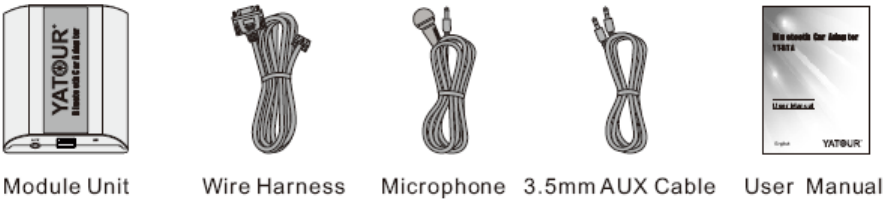
1.2 Included parts:
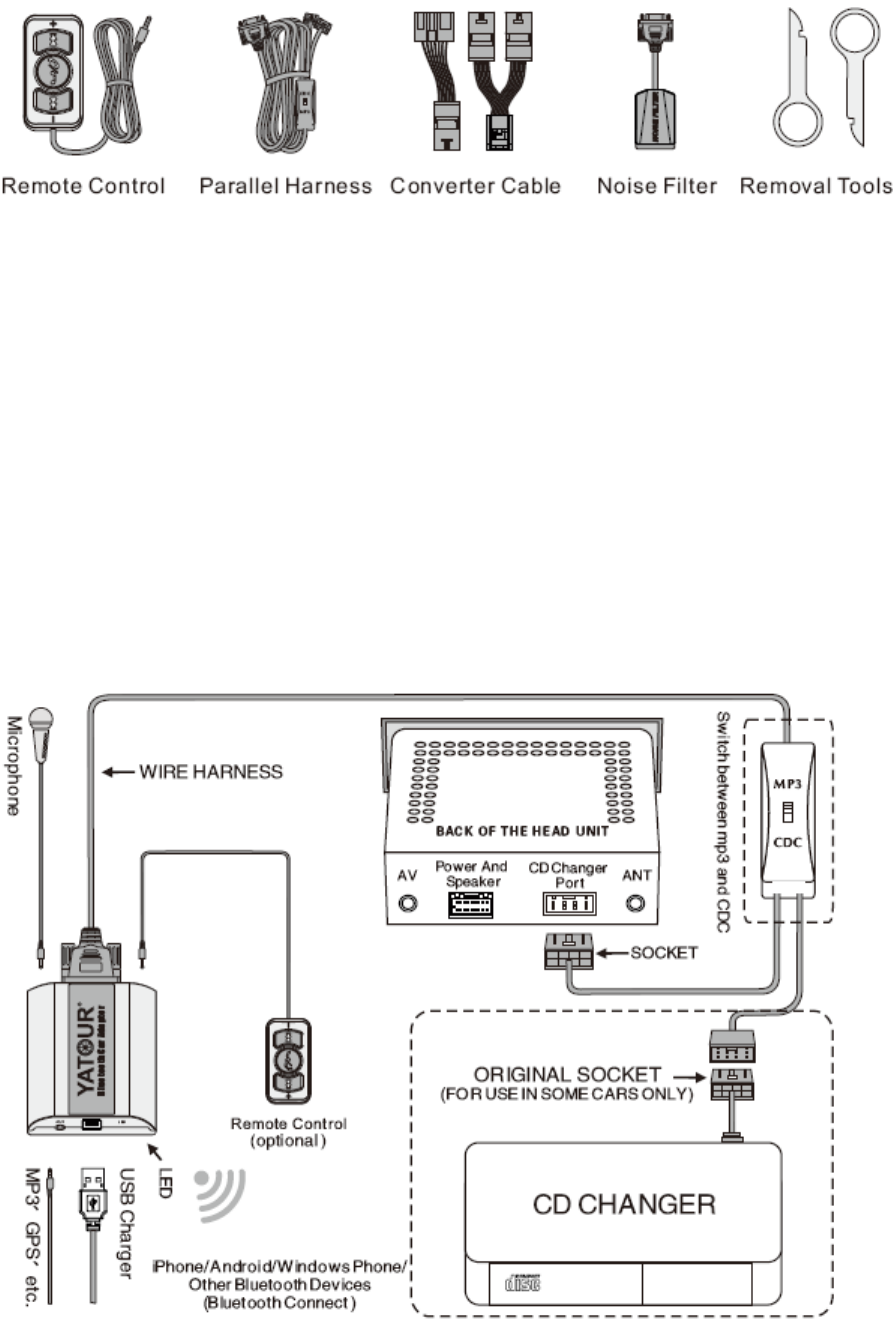
1.3 optional accessories
:
( Additional purchase)
2- Installation guide
2.1 Installation preparation
1. Before installation, please read the User Manual carefully.
2. The product only operates on a vehicle with 12 Volt DC negative ground system. Do not use it on other
voltage system.
3. This product only fits OEM or aftermarket car stereo with CD changer port, and different solutions of
Bluetooth adapter would be adopted according to different brands of vehicles or different car radios.
4. Make sure car stereo is powered off before installation, to avoid the car stereo may be damaged. It is
suggested to install it at car dealer shop or professional car stereo store.
5. Usually, the car stereo needs to be removed so as to plug YT-BTA’s main connector into CD changer
port on radio back. For some car models, YT-BTA can be installed in glove box or trunk where external
CD changer port is located (Requires special splitter cable).
2.2 Installation Diagram

2.3 Installation steps
1. Turn off car engine and remove key from ignition, if car radio uses a security code, make sure that you
have the code before unplugging the radio.
2. Unmount the radio from the dash in order to get access to the back side of the radio, and find CD
Changer port at the back of the radio. For details of unmount, please refer to car user manual or car
stereo manual, or ask professional staff to unmount the radio.
3. Connect wire harness to YT-BTA module unit in advance. Be sure to make a firm connection. Then
attach the wire harness connector to the back of stereo to the CD changer port. And attach the ground
wire (for some models) to metal part of the car stereo body. For some models requiring extra connection
of ACC or 12V battery, please connect related wires to correct ACC power or 12V battery power.
4. Connect our microphone to microphone port of YT-BTA module unit. Choose a proper mounting
location for the microphone either on the upper part of A-pillar on driver side or near centre rear view
mirror or head liner console control panels region. Carefully arrange plugs .To guarantee the voice
quality,please mount the microphone next to driver as close as possible.If a user already has remote
control unit , please mount remote control unit on dash board or any position easily touched by driver,
and carefully arrange plugs at last.
5.Turn on the car and power on car Head Unit, press CD (or Disc / Mode / CDC / SOURCE / AUX) button
for once or twice to switch to playback mode of YT-BTA, with the symbol of red LED light being on.
6. Turn on the Bluetooth function of mobile phone, search and pair with Bluetooth device named “BTA”,
Mobile phone will be able to connect to BTA after paired successfully. Test with mobile phone to confirm
whether Bluetooth phone call and Bluetooth music work normally.
7. After successful test, re-assemble the radio, and put wire harness and module unit box in proper
place(glove box,storage box, etc.),fasten screws between module unit and wire harness. Put back car
head unit into original position. Now the installation is finished.
2.4 Important Note:
1. As to some vehicles with external CD Changer, which occupies original CD changer port, Parallel
Harness is needed to keep the use of original CD changer (For some models only). Installation refers to
former diagram.
2. As for Audi factory radio of mini ISO 8 pin, its CDC connector is 20-pin block connector, in order to
install YT-BTA, it requires to cut the 8-pin part or connect with our special Audi 20-pin adapter cable.
3. As for Clarion protocol radios, such as some BUICK radio and SUZUKI radio, it requires to totally
unplug the wire harness from car power before installation. Moreover, it is easy to plug connector in the
opposite direction on Clarion radios, which causes short circuit. Make sure the connector is plugged in
correct direction.
4. As for installation on CAN-Bus radios of Peugeot/Citroen, Renault, Ford (new) and Mazda (new) and
Opel, it is required to unplug the radio from the power before installation. Otherwise, YT-BTA might not
work improperly or the radio might be caused damage. Regarding Peugeot/Citroen without pre-installed
CD Changer, to enable YT-BTA to work, the CD Changer function must be activated by professional
tools. Please enquire the Peugeot/Citroen dealer on how to activate the CD Changer function.
5.As per BMW radios with CD Changer, the CD Changer must be completely disconnected before
installation (The 3-pin and the 6-pin connector, both are located in the trunk, must be
disconnected),otherwise YT-BTA will not be recognized. Besides, if the BMW radios are with DSP, extra
DSP kit and specific YT-BTA would be used.
3- Functions Introduction and Usage Preparation
3.1 Connect Bluetooth mobile phone to YT-BTA.
Initial Connection
After YT-BTA being installed, it will automatically direct to the Bluetooth Pairing Status, this status keeps
3 minutes, during which YT-BTA can be found and connected by other Bluetooth devices.
1. Turn on Bluetooth of mobile phone, starts to search Bluetooth device (Detail instruction is showed on
mobile phone manual).
2. Turn on the car stereo and switch to YT-BTA playback mode, YT-BTA red LED indicator will keep
lighting, which means YT-BTA starts to work.
3. Search BTA on your mobile phone via Bluetooth. If in 3 minutes YT-BTA is still not paired successfully,
YT-BTA will enter standby status; it can not be found or connected by other Bluetooth devices. Need to
hold【>>】 fast forward button on car radio for 5 seconds, then YT-BTA will enter pairing status and keep
this status for 3 minutes.
4. Connect with YT-BTA, if pairing code is asked, please enter”0000”.Smart phones usually do not need
to enter any pairing code.
5. After successful paring, some mobile phones may need setting YT-BTA as a default Bluetooth
connection. This depends on mobile phone’s function and setting.
6.YT-BTA allows connected to up to 2 Bluetooth devices,such as 2 mobile phones. The two mobile
phones need to be paired and connected to YT-BTA according to above ways, so that they can be used
with YT-BTA. When connected with two Bluetooth devices, some functions of YT-BTA can not be used
without optional remote control unit.
Non-initial connection
If YT-BTA has already been paired by mobile phones before, when the car stereo turns on YT-BTA will
automatically try to connect the last-connected mobile phone. Please make sure mobile phone’s
Bluetooth is turned on.
1. Turn on car stereo, YT-BTA will automatically try to connect mobile phone. After successful connect to
car stereo, beep tone will come out from car speaker.
Notice: some mobile phones may ask whether connect to YT-BTA, please set the mobile phone to
authorize connection of YT-BTA, so that YT-BTA is able to connect mobile phone automatically.
2. If YT-BTA is not able to automatically connect to mobile phone when car stereo turns on, YT-BTA will
automatically enter into pairing status and keep pairing status for 3 minutes, during which YT-BTA will not
automatically connect to mobile phone.
3.If YT-BTA is not connected to mobile phone, Press 【>>】fast forward button once or switch between
FM/AM mode and CDC mode, then YT-BTA will automatically try to connect mobile phone. Also user can
operate on mobile phone menu to connect mobile phone with YT-BTA .If many times of connections are
failed, users may need to pair again. Please refer to instruction of Initial connection.
4. If there are two Bluetooth devices paired with YT-BTA before, the two Bluetooth devices will connect to
YT-BTA in order of final connections sequence. The first connected device is named main device,
second connected device is named secondary device.
Disconnect existing connection.
If YT-BTA has already been paired by mobile phones before and users need to connect to other new
mobile phones, current connected mobile phones need to be disconnected, and force YT-BTA to enter
pairing status. Following are several ways:
1.When YT-BTA is under non-conversation status or A2DP status, hold radio fast forward button【>>】for
5 seconds, YT-BTA will disconnect existing connection and enter pairing status.
2. If user already has a remote control Unit, hold the Answer/Hang up button on remote control unit for 5
seconds, YT-BTA will disconnect existing connection and enter pairing status.
3. User can also turn off or disconnect Bluetooth on mobile phone menu, and then hold radio fast forward
button【>>】for 5 seconds, YT-BTA will disconnect existing connection and enter pairing status.
3.2 Making calls
Make sure car stereo is turned on and mobile phone is connected with YT-BTA.
1.Press CDC source button to switch to YT-BTA mode.
2.Making phone calls on mobile phone.
3. If car stereo is turned off or car stereo is under FM/AM or other non BTA mode, user can turn on car
stereo and switch to CDC mode; it will automatically turn to Bluetooth hands free phone call. But some
mobile phones may need manually turning to Bluetooth phone call.
4. During making a call or conversation, user can press radio fast forward button【>>】 to hang up the call.
Switching to FM/AM or other non BTA mode will automatically hang up the phone call too.
3.3 Answer calls
Under YT-BTA Bluetooth working status
When car stereo is turned on and switched to YT-BTA mode, and mobile phone is connected with
YT-BTA.
1. An incoming call will mute A2DP music play automatically, and rings will come out from car speaker.
Some text capable radios will display info call coming in.
2. To reject the coming call, please hold radio fast forward button 【>>】 till the call is rejected. Then
YT-BTA will resume playing the last song. User also can turn to non BTA mode (FM/AM modes etc.) to
reject a coming call.
3.To answer a call, user just needs to press the radio fast forward button【>>】.
4.To end a call during conversation, press radio fast forward button 【>>】.Then the call is ended and
YT-BTA will continue the former music playback. User can also turn to FM/AM modes etc. to end a call
too.
Under other working status (Car radio turned off, FM/AM modes etc.)
When car stereo is turned off, or the car stereo is under FM/AM or original CD changer or other non-BTA
modes.
1. When a phone call is coming in, the phone rings. Some car stereos can automatically mute and make
the FM/AM, CDC and other sound sources automatically stop or mute. This function requires help of
special wire harness. For detail car radio types that supports mute function, please refer to application list
of YT-BTA.
Notice: Under phone call mode (mute mode), some car stereos’ buttons will be locked till YT-BTA cancel
mute for car stereo after 5 seconds. Please operate car radio buttons after mute mode is cancelled.
2. Turn on car stereo (if it is off), press CDC source button to switch to YT-BTA mode, the phone call will
be automatically answered. If user already answered the call on mobile phone before, the former
operation will automatically switch the car stereo to YT-BTA Bluetooth hands free phone call. But some
mobile phones may need manually switching to Bluetooth phone call status.
3. To end a call during conversation, press radio fast forward button 【>>】,then the call is over. User can
also turn to FM/AM modes etc. to end a call automatically.
4. Under non-BTA mode, it is not able to reject a coming call via car radio button. If necessary, it is
advised to set automatically rejecting a call if the call is not answered for some time on mobile phone. Or
directly reject the call on mobile phone. If users already have a remote control unit, under this status,
users can hold the hang up button on remote control unit to reject a call.
3.4 Private phone call
Hold radio fast forward button 【>>】for 2 seconds during conversation, and the call transfers from
Bluetooth hands free to mobile phone private status. Hold radio button 【>>】for 2 seconds again, the call
turns back to Bluetooth hands free again. Turning off car stereo during conversation can also transfer the
call to mobile phone. If users already have a remote control button, during conversation, users can hold
the hang up button for 2 seconds and the call transfers from Bluetooth hands free to private mobile phone
conversation.
3.5 Other functions of Bluetooth hands free
1. Only when Bluetooth hands free is under CD1 mode, Pressing CD02 button or Disc+ button during
conversation will end a call .
Do not press radio buttons other than 【>>】button and source buttons once the call is coming in and
till the conversation is over. Otherwise, the former A2DP music playback may be disturbed or other
uncertain status will appear.
2. If there is another call coming during conversation of same mobile phone, the call tone will come out
from car speakers(If the mobile phone and operator supports ), user can press radio button 【>>】 to
hang up current call and answer the coming call.
3.If there are two mobile phones both connected with YT-BTA at same time, when the mobile A is under
conversation and a call coming from mobile B, user can press radio button 【>>】 to hang up current call
and answer the coming call.
3.6 Streaming mobile phone music into stereo (A2DP)
Make sure the mobile phone has already been connected with YT-BTA via Bluetooth, the mobile phone
must support Bluetooth music playback function (A2DP) and must be under Bluetooth music transfer
mode (Refers to mobile phone user manual). During A2DP music playback, YT-BTA must be under CD1
mode. When pressing CD02 or Disc+ buttons, YT-BTA will automatically stop A2DP music playback, and
now YT-BTA’s AUX input is valid. Pressing CD01 or Disc- buttons will automatically resume A2DP music
playback.
When YT-BTA is under A2DP music playback, the car head unit screen usually displays CD 1-1(Different
car radios may displays different info), track numbers display will not be changed as the change of
playback songs. If pressing Prev/Next Track buttons, the radio screen display info may be changed, but
this display info can not express the real exact track info.
Manually playback
1. Switch to YT-BTA Bluetooth mode on car stereo.
2. Open music App on mobile phone and play, the music will automatically come out from car stereo
system.
Smart playback
When the music App of mobile is paused
1. Press CD source button to switch to YT-BTA Bluetooth working status, the music App of mobile will
automatically start to play.
2.Turn off car stereo or switch to FM/AM/original CD changer and other non-BTA mode, the music App of
mobile will automatically be paused.
Playback operation(AVRCP)
When mobile phone is under status of A2DP music playback, YT-BTA is able to control music of mobile
phone, to achieve Pause/Play, Prev/Next Track, and Fast forward/backward functions.
1.When mobile music is paused, press radio button【>>】 and the music will start to play.(Notice: On
Apple IOS system music App needs to wait for 10 seconds to start to play after it was paused)
2. Prev/Next Track: Pressing radio buttons【|<】 and 【>|】 to switch tracks of mobile phone music.
3. Fast forward/backward: Press radio buttons【<<】and【>>】to fast backward and fast forward the song
being played. Notice: Some mobile phone or music Apps do not support A2DP music fast forward and
fast backward functions. If the former buttons do not work, that means the mobile phone does not support
such functions, not means YT-BTA error or functional defect.
4. When two Bluetooth devices are connected with YT-BTA at same time, YT-BTA can only allow one of
them to play music. For example, if device A is playing, sound of device B can not be played via
Bluetooth .To play device B, user needs to pause device A playback.
5.Pause/Play: Press radio button【||】 once, mobile phone music is paused; Press button【||】again, music
will play again. Turn off car stereo or switch to FM/AM mode or original CD changer mode(out of YT-BTA
mode),mobile phone music will be paused automatically. Switch back to YT-BTA mode, music playback
will continue.
3.7 AUX audio input
AUX IN function can provide an external audio input to the car audio for your convenience. Any portable
devices with 3.5mm auxiliary input can use it, such as MP3,PSP,GPS and smart phones(some of them
requires special cables) etc., able to achieve popular function like listening to internet radios.
When you need to use AUX IN function, press radio button CD2 or Disc+ to switch to AUX input mode.
Now YT-BTA automatically stop Bluetooth A2DP playback, AUX input audio is able to play normally.
3.8 USB charging function
YT-BTA module offers a standard USB charging slot, providing maximum charge current of 5V 1A.
Improper use of high current devices via this USB port will cause overload risk, this may reduce YT-BTA
sound quality or stop YT-BTA working or even damage it. This USB slot is for charging only, not for data
reading or data transfer.
3.9 Remote Control Unit(optional)function introduction
YT-BTA provides an extension slot for remote control, allows users to add a special remote control
device(not standard part, needs to be purchased separately ). The remote control device is integrated
with Answer/Hang up button, previous track button and next track button, able to achieve some functions
that OEM car stereo can not do. Its operation is more intuitive and convenient. The appearance and
buttons function setting are as follows:
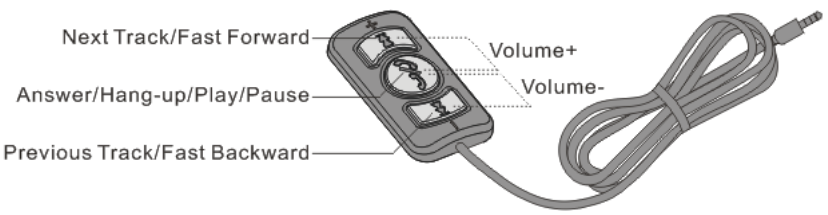
As above picture, the buttons from left to right are Previous Track, Answer/Hang up, Next Track.
The remote control unit is small , flexible to install and layout in car. Directly plug it into remote control slot
of YT-BTA module, and then put it on a proper position in car.
Answer/Make a call
1. When there is an incoming call, click Remote Control button Answer/Hang up to answer it or hold the
Remote Control button Answer/Hang up to reject it. Clicking remote button Answer/Hang up during
conversation will hang up current call.
2. When Bluetooth connection is off, click Remote Control button Answer/Hang up and YT-BTA will
automatically connect to last-connected device.
3. When YT-BTA and mobile phone are connected via Bluetooth, Double clicking Remote Control unit
Answer/Hang up button will achieve redialing last called phone number. When two mobile phones are
connected to YT-BTA via Bluetooth at same time, only the mobile phone as main device is able to
response to the command of redialing last called number.
4. No matter current Bluetooth device is connected successfully or not, hold Remote Control button
Answer/Hang up for 5 seconds, YT-BTA will enter pairing status, at this time YT-BTA is discoverable for
other Bluetooth devices. If Bluetooth connection is already successful, the former operation will
disconnect current connection and YT-BTA enters pairing status.
5. During conversation,if there is an incoming call from same mobile phone, the call tone will come out
from car speakers (If the mobile phone and operator supports), user can press Next Track button to hang
up current call and answer the coming call. If press Previous Track button, the first call can be reserved
and the coming call will be answered. If you want to switch back to the first call and reserve the second
call, you can press again Previous Track button on remote control unit;If you want to switch back to the
first call and do not reserve the second call, you can press Next track button.
6. If there are two mobile phones both connected with YT-BTA at same time, when the mobile A is under
conversation and a call coming from mobile B, user can press remote button Next Track to hang up
current call and answer the coming call.
7. Hold Answer/Hang up button on remote control unit for 2 seconds during conversation, the call
transfers from Bluetooth hands free to mobile phone private status. Hold Answer/Hang up button on
remote control unit for 2 seconds again, the call turns back to Bluetooth hands free again. Turning off car
stereo during conversation can also transfer the call to mobile phone. If users already have a remote
control button, during conversation, users can hold the Answer/Hang up button for 2 seconds and the call
transfers from Bluetooth hands free to private mobile phone conversation.
A2DP music playback
When mobile phone is under status of A2DP music playback, users can also operate mobile phone
music via remote control unit, to achieve Pause/Play, Prev/Next Track, Fast forward/backward functions.
The detail functions are same as on original car stereo
1. Under A2DP music playback status, Press Answer/Hang up button on remote control unit achieves
Pause/Play function.
2.Press Previous track button【|<<】 and Next track button【>>|】 achieves Previous Track and Next Track
functions on mobile phone.
3.Holding Previous track button【|<<】 and Next track button【>>|】achieves Fast forward/backward
functions on mobile phone.
3.10 Voice dialing
Under non-conversation status, hold Remote Control button Answer/Hang up for 2 seconds and release,
you can hear two beeps tone for voice dialing, that means it already enters voice dialing status, at this
time mobile phone also reminds entering voice dialing status. Only the mobile phone as main device is
able to response to command of voice dialing. Notice: Voice dialing command can be responded only
after Answer/Hang up button is released. Do not hold for over 5 seconds, or it will lead to command of
disconnect current connected device. Voice dialing function can not be achieved unless you have remote
control, and some Android phones do not support voice dialing.
3.11 Sound volume adjusting on YT-BTA
Only if YT-BTA with Remote control unit, BTA could achieve volume adjusting function. Sound volume
adjusting of HFP Bluetooth phone call and sound volume adjusting of A2DP music play, they are
independent of each other. Sound volume setting will be saved automatically after adjusted, which is only
valid for current mobile phone. If changing another mobile phone, sound volume setting has to be
adjusted again. Detail setting methods as follows:
HFP Bluetooth hands free sound volume adjusting: When YT-BTA is under HFP Bluetooth hands
free phone call status, Press both Previous Track button and Answer/Hang up button on remote control
Unit for once, and the sound volume of HFP Bluetooth phone call will decrease a level with warning tone
on some mobile phones. When the sound volume is adjusted to lowest level, there will also be warning
tone of lowest sound level. Press both Next Track button and Answer/Hang up button on remote control
handle for once, and the sound volume of HFP Bluetooth phone call will increase a level with warning
tone on some mobile phones. When the sound volume is adjusted to highest level, there will also be
warning tone of highest sound level.
A2DP music playback sound volume adjusting: When YT-BTA is under A2DP music playback status,
Press both Prev Track button and Answer/Hang up button on remote control unit for once, and the sound
volume of HFP Bluetooth phone call will decrease a level with warning tone on some mobile phones.
When the sound volume is adjusted to lowest level, there will also be warning tone of lowest sound level.
Press both Next Track button and Answer/Hang up button on remote control handle for once, and the
sound volume of A2DP music playback will increase a level with warning tone on some mobile phones.
When the sound volume is adjusted to highest level, there will also be warning tone of highest sound
level.
Generally, we do not advice that you adjust the sound volume to highest level, which will cause volume
distortion.
3.12 Paired devices list clearing.
YT-BTA can support up to two mobile phones or other devices, and recently paired devices will be saved
on YT-BTA’s pairing list. When turned on, YT-BTA will automatically try to connect the last two connected
Bluetooth devices for your use convenience. Clearing unwanted devices from list speeds up connecting
of YT-BTA and avoids music stuck when YT-BTA turns on.
Hold both Previous Track button and Next Track button on remote control handle for 5 seconds, all the
paired devices on YT-BTA’s list will be cleared, and now YT-BTA enters pairing status. Once Pairing list
is cleared, it can not be resumed; you need to pair with device again before using it. Pairing list can only
be cleared by Remote Control buttons.
3.13 LED indicator status instruction
When YT-BTA works normally, red LED indicator will keeps lighting on YT-BTA module. If you are not
able to switch to YT-BTA mode and red LED indicator is not on, that means YT-BTA is not compatible or
is not correctly installed.
When Turning to FM/AM mode or other sources mode on car stereo, YT-BTA will automatically stop
working, Red LED indicator is off. When turning off the car, red LED indicator will flash for seconds and
go off,meaning YT-BTA is cut off from power.
The blue LED indicator is Bluetooth working indicator, changing with Bluetooth working status.
4- Important compatibility tips
1. On most car models, to switch between built-in CD changer and YT-BTA, you only need to press CD
source button for once or twice, same as original car stereo operation.
2. On some car models YT-BTA is with MP3/CDC switch cable, when needing to use original CD
changer, you just have to switch to CDC end;Conversely, switch to MP3 end to play YT-BTA. Such
switching is advised to be operated when car stereo is turned off or the car is turned off. Some car
models may require turning off and restarting car stereo for once after switching so that it can work
normally.
3. On some car models with pre-installed CD changer, you need to disconnect original CD changer to
install YT-BTA.
4. Yatour YT-BTA Bluetooth car adapter operations, such as Track up/down, Disc+/Disc-,Fast/Reverse
forward are almost equal to operations of original built-in CD changer or external CD changer.
Some buttons of some car stereos may be changed, but such changes will not affects functions of
original built-in CD changer and external CD changer. Functions not mentioned in original car stereo
manual can not be achieved on YT-BTA either. There may be a little difference on functions of different
car models and different car stereo brands.
5. On some car stereos, too frequently pressing buttons during operation may cause track info displays
incorrectly or playback stuck. And you can turn off car stereo and restart it.
5- Common Troubleshooting.
1. YT-BTA doesn't work after installation.
Please check whether the wire harness is correctly connected. And if there is GND wire(for som
e car models), please check whether it connects well with metal parts of car radio.
2.Frequently switching or other unknown reasons cause playback stuck.
Music playback is from function of mobile phone, you just need to start the playback from mobile
phone menu.
3.External audio input(AUX IN) sounds too low or too much noise.
Adjust volume of earphone output of your external audio device;
It is not proper for external audio devices to use car power, because common ground noise will
occur in this case. External audio device should use its own battery to play.
4. Why I can still hear the former mobile phone Bluetooth A2DP music when I plug in AUX devi
ce?
When AUX IN function is used, you need to press CD2 button or Disc+ button so as to switch
YT-BTA to AUX input mode, then AUX input audio can be played.
5. My car has a CD changer already, and can I still add an YT-BTA?
For some cars models equipped with existing CD Changer, we can offer Parallel Harness, which
allows YT-BTA to hook up with the existing CD Changer. On Some car models you only need t
o press CD switching buttons once or twice so as to switch between the two devices. But on so
me other car models you need MP3/CDC switch to change between them. However, please note
Parallel Harness is not available for all cars.
6.YT-BTA is universal for all kinds of car models?
No, since all kinds of car brands have different CD changer port types, YT-BTA have different co
nnectors for different car brands; the hardware and software of YT-BTA are different too.
6- FCC Statement
This equipment has been tested and found to comply with the limits for a Class
B digital device, pursuant to part 15 of the FCC rules. These limits are
designed to provide reasonable protection against harmful interference in a
residential installation. This equipment generates, uses and can radiate radio
frequency energy and, if not installed and used in accordance with the
instructions, may cause harmful interference to radio communications.
However, there is no guarantee that interference will not occur in a particular
installation. If this equipment does cause harmful interference to radio or
television reception, which can be determined by turning the equipment off and
on, the user is encouraged to try to correct the interference by one or more of
the following measures:
-Reorient or relocate the receiving antenna.
-Increase the separation between the equipment and receiver.
-Connect the equipment into an outlet on a circuit different from that to which
the receiver is connected.
-Consult the dealer or an experienced radio/TV technician for help.
To assure continued compliance, any changes or modifications not expressly
approved by the party.
Responsible for compliance could void the user’s authority to operate this
equipment. (Example- use only shielded interface cables when connecting to
computer or peripheral devices).
This equipment complies with Part 15 of the FCC Rules. Operation is subject
to the following two conditions:
(1) This device may not cause harmful interference, and
(2) This device must accept any interference received, including interference
that may cause undesired operation.
FCC Radiation Exposure Statement:
The equipment complies with FCC Radiation exposure limits set forth for
uncontrolled enviroment. This equipment should be installed and operated with
minimum distance 20cm between the radiator and your body.