Civil 3D 2009 082008 Drawing S
2016-06-08
: Guides 082008 Drawings 082008_Drawings tips pdf asi
Open the PDF directly: View PDF  .
.
Page Count: 2
www.advsolinc.com
ASI Client Center
1-877-438-2741
Autodesk Products Tip & Tricks
Copyright 2008 – Advanced Solutions, Inc.
Product:
Civil 3D 2009
Topic:
Drawing Templates
Written by:
Jeff Haney, ASI Support Specialist
Date:
August 20, 2008
Several AutoCAD Civil 3D templates are included out-of-the-box.
AutoCAD Civil 3D includes drawing templates based on the National CAD Standard (NCS) version 3.1. The
following templates are included:
_AutoCAD Civil 3D (Imperial) NCS Base
_AutoCAD Civil 3D (Imperial) NCS LDT
_AutoCAD Civil 3D (Imperial) NCS Extended
_AutoCAD Civil 3D (Metric) NCS Base
_AutoCAD Civil 3D (Metric) NCS LDT
_AutoCAD Civil 3D (Metric) NCS Extended
The names of these templates indicate some of their settings.
The metric or imperial label indicates the main unit of measure.
The ‘Base’ templates contain a Basic style for each object.
The ‘Extended’ templates contain an extended set of styles and settings.
The ‘LDT’ templates replicate the look of AutoCAD Land Desktop profiles, sections, points, and label
styles.
Note:
These templates do not contain styles named ‘Standard.’ If you base a new drawing on a non-Civil 3D drawing
template, such as acad.dwt, then styles named ‘Standard’ are created by default in the new drawing.
www.advsolinc.com
ASI Client Center
1-877-438-2741
Autodesk Products Tip & Tricks
Copyright 2008 – Advanced Solutions, Inc.
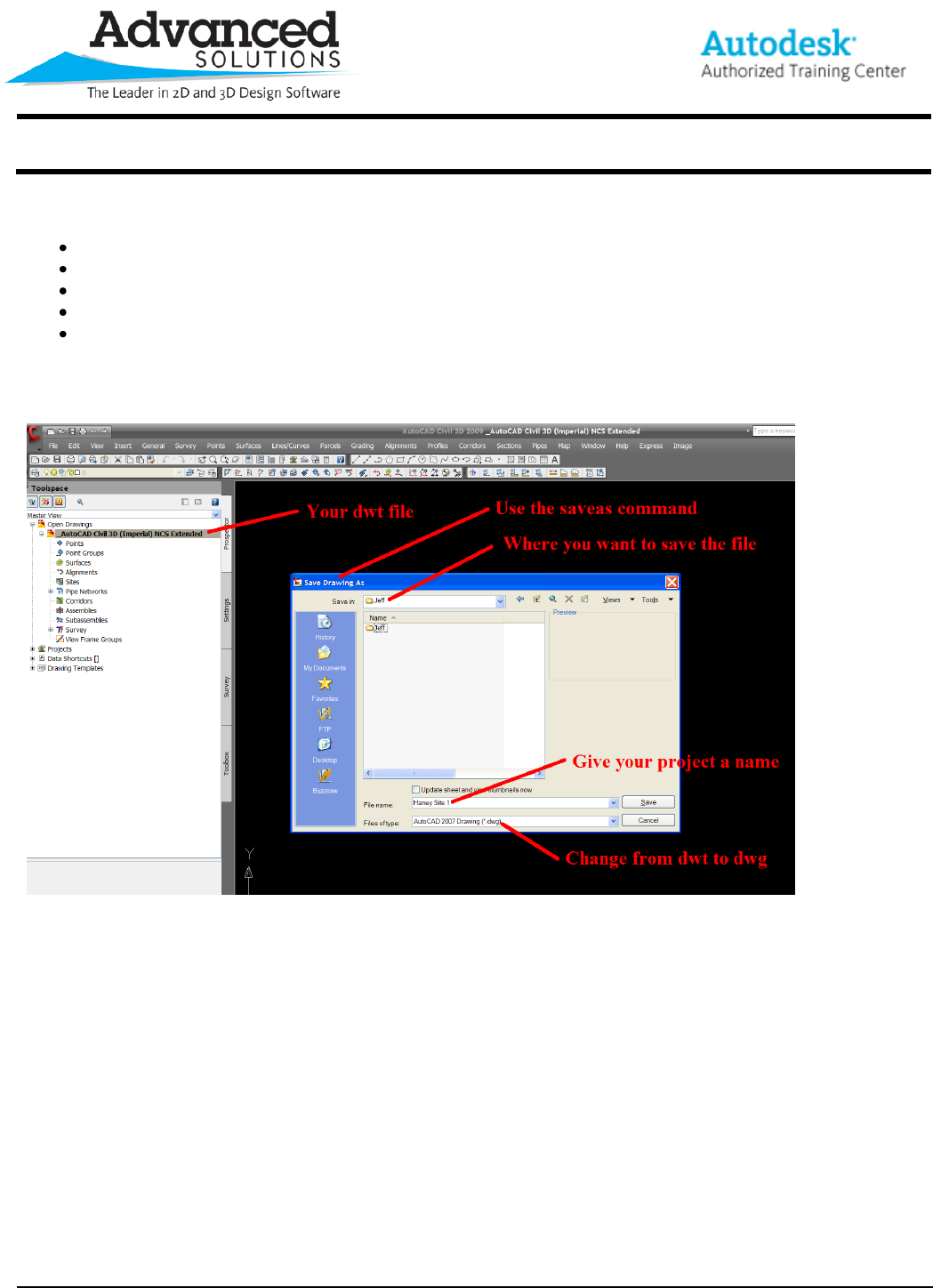
Rule of Thumb:
After opening you drawing template be sure to:
Use the Save As… command
Browse to where you want to save your project
Give your project a name
Change your drawing template (dwt) to a working drawing (dwg)
See example below:
