Autodesk Plm360 Supply And Procurement V2
2016-06-15
: Guides Autodesk-Plm360-Supply-And-Procurement-V2 autodesk-plm360-supply-and-procurement-v2 pdf plm
Open the PDF directly: View PDF  .
.
Page Count: 2
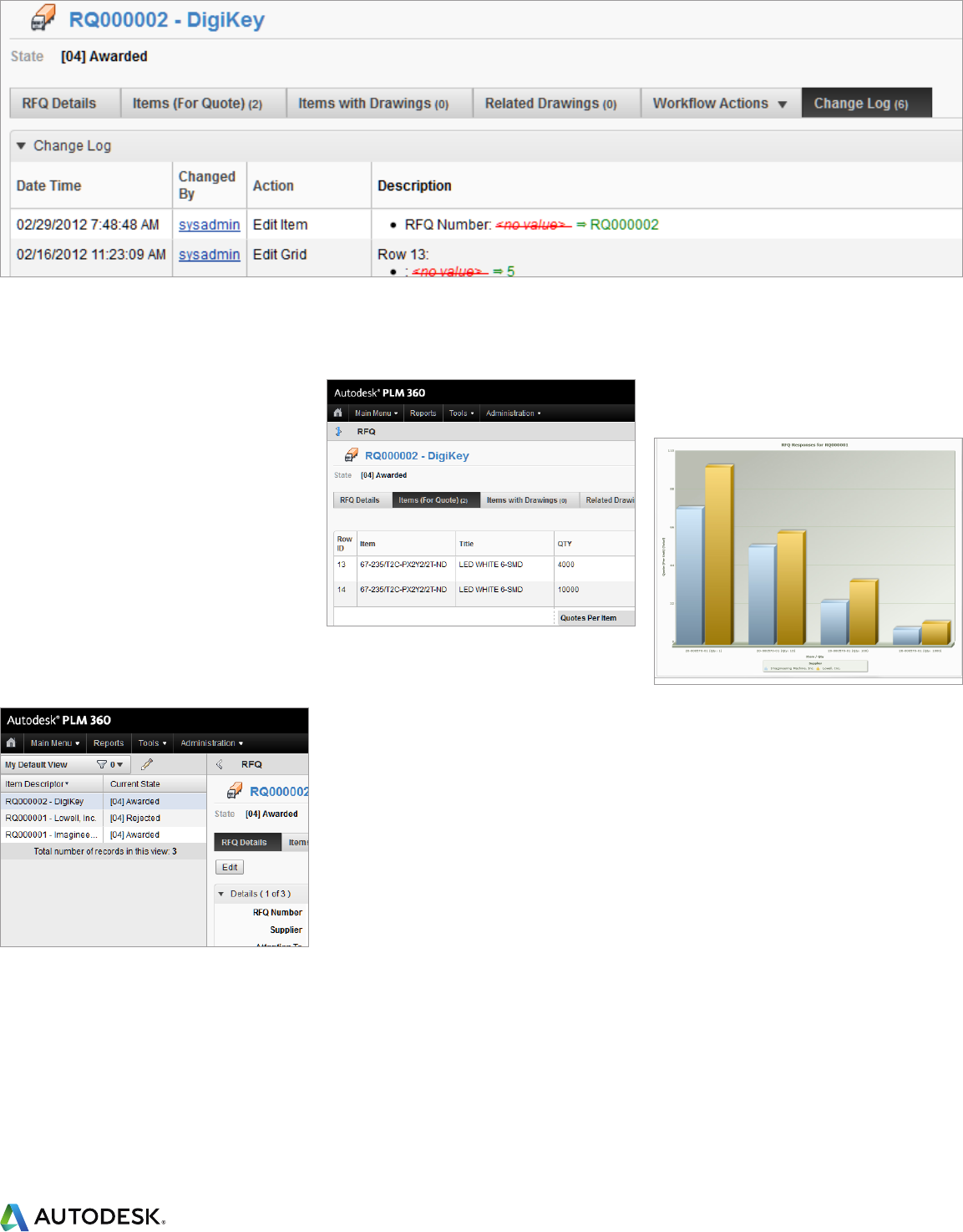
RFQ Change Log
Apps for Supply and Procurement
Work strategically with partners to keep production steady
and ecient.
The Autodesk® PLM 360 cloud-based platform is a
next-generation alternative to traditional product
lifecycle management that makes the benefits of
PLM accessible anytime, anywhere, to companies
of all sizes.
Autodesk PLM 360 Apps for Supply and
Procurement
Supply and Procurement applications in Autodesk
PLM 360 help everyone in the organization involved
with the negotiation, purchase, and receipt of
goods and services work from Supplier information.
Request for Quote helps organize incoming offer
information to facilitate accurate comparisons
before making final purchase decisions. Warranty
Recovery helps minimize the financial impact
of lost or damaged goods shipped by suppliers.
Autodesk PLM 360 Supply and Procurement
applications give senior management clear visibility
into the performance of the entire supply chain
with personalized reports and dashboards that
graphically display trends as they develop.
Autodesk PLM 360 runs on the cloud – where
everything is stored in one central location and
updates are instant – so everyone’s on the same
page inside and outside the organization.
Build sourcing plans aligned with existing
market dynamics
Consumers today demand quality products that
delight and inspire them at an affordable price.
Yet their tastes and attitudes seem to change
almost overnight. In this environment, supply chain
management requires balancing quality, innovation,
and dependability, while constantly struggling to
keep costs low and responding rapidly to changing
consumer preferences. Successful procurement
strategies minimize costs and risks with multi-
sourced components, approved lists of global
suppliers, just-in-time delivery, and zero acceptance
of lost or damaged goods to keep production lines
rolling. Autodesk PLM 360 delivers the supply and
procurement applications manufacturers need to
build strategic sourcing plans and optimize material
flows. Autodesk PLM 360 helps manufacturers stay
connected to all suppliers, wherever they are, using
any device, to monitor changes and react quickly to
avoid inventory disruptions and costly delays.
Supply and Procurement applications within Autodesk
PLM 360 make it easier for companies to monitor vendor
performance at every stage of the buying cycle.
Pre-Configured Apps:
Suppliers
Request for Quote
Warranty Recovery
For more information about Autodesk PLM 360, visit www.autodeskplm360.com
Overview of Applications
The supply and procurement applications delivered
with Autodesk PLM 360 comprise Suppliers,
Request for Quote (RFQ), and Warranty Recovery,
plus Navigation and Reporting.
The next section highlights some of the important
features and benefits these applications deliver.
Suppliers
An online source of accurate information vital to
conducting day-to-day business with partners
• Keep contact information at your fingertips
and up-to-date with item details everyone
can update
• Stay abreast of recent developments by
referencing notable events and details of all
items supplied
• Assemble a detailed record of agreements
that includes final contracts, item definitions,
and costs
Request for Quote (RFQ)
Collect and compare supplier offers to maximize the
value of purchased goods and services
• Speed offer negotiations by designating specific
buyer and technical supplier contacts
• Clearly understand each offer by reviewing a
complete listing of all items and drawings
for quote
• Quickly learn the history of each offer by
browsing a change log that records all
system changes
Warranty Recovery
Open claims on failed items to notify those affected,
organize replacement, and collect refunds
• Record claims immediately upon discovery
of loss or damage from anywhere, using
any device
• Easily monitor vendor performance by reviewing
the warranty history of all items received
• Collect every reimbursement due by following
up on open claims until processed to completion
Navigation and Reporting
Build links, reports, graphs, and dashboards that
present key information at login
• Access items in one-click using favorites, pop-up
menus and links to recently accessed items
• Point-and-click to uncover deep item
relationships inside the relationship browser
• Quickly build custom reports by manipulating
attribute lists that group, sort and filter data
• Assess initiatives at-a-glance by viewing 3D
graphical reports that update automatically
As new business needs arise, customers may
enhance the applications within the Supply and
Procurement portfolio by adding or configuring
new, tailored applications as necessary
Learn more at www.autodeskplm360.com.
About Autodesk
Autodesk, Inc., is a leader in 3D design,
engineering, and entertainment software.
Customers across the manufacturing, architecture,
building, construction, and media and
entertainment industries—including the last 17
Academy Award winners for Best Visual Effects—
use Autodesk® software to design, visualize and
simulate their ideas. Since its introduction of
AutoCAD® software in 1982, Autodesk continues
to develop the broadest portfolio of innovative
software for global markets.
For additional information about Autodesk,
visit www.autodesk.com.
RFQ Item Details
RFQ Items for Quote
RFQ Resonses
Autodesk and AutoCAD are registered trademarks or trademarks of Autodesk, Inc., and/or its subsidiaries and/or aliates in the USA and/or other
countries. All other brand names, product names, or trademarks belong to their respective holders. Academy Award is a registered trademark
of the Academy of Motion Picture Arts and Sciences. Autodesk reserves the right to alter product and services offerings, and specifications and
pricing at any time without notice, and is not responsible for typographical or graphical errors that may appear in this document.
© 2013 Autodesk, Inc. All rights reserved.
Autodesk PLM 360
