Gea Process Technologies
2016-06-08
: Guides Gea Process Technologies gea_process_technologies success pdf asi
Open the PDF directly: View PDF  .
.
Page Count: 2

Improve the process.
GEA Process Technologies uses
AutoCAD® P&ID software to improve
design and operating eciencies
of processing plants.
GEA Process Technologies
Customer Success Story
AutoCAD® P&ID
AutoCAD®
AutoCAD® Electrical
With AutoCAD P&ID,
process engineers no
longer have to manually
produce valve, instrument
or equipment lists,
resulting in a worthwhile
time and cost savings.
—J.P. Brady
Process Engineer & Design
Team Leader
GEA Process Technologies
The Firm
With revenues approaching EUR 4.5 billion and
oces in 50 countries, GEA Group is one of the
global leaders in the process engineering and
specialist equipment industry. GEA operates in
a wide range of markets, from dairy to brewing to
personal care. Through constant innovation, GEA is
recognized as one of the technological leaders, with
much of the technology and techniques it brings to
its target markets being less than three years old.
The task of incorporating specialist process
components and concomitant mechanical,
electrical, and maintenance systems into both
new and existing client production facilities falls
to the process integration divisions. GEA Process
Technologies (GEAPT), based in Naas, Southern
Ireland, is one such division. A relatively small
division in the scheme of the overall group, it
plays a huge part in determining the appearance,
size, and ultimately the operating eciencies of
processing plants.
Beyond AutoCAD Software
Its core design team recently turned to AutoCAD
P&ID software to streamline the part it plays in
this crucial role.
The team has successfully used AutoCAD®
software for some time but realized that the
demands it was placing on the software as a process
and instrumentation diagram (P&ID) tool were
beginning to stretch its capabilities, and so began
enquiries into a more customized solution. Process
engineer and design team leader J. P. Brady recalled
the dicult experiences he and colleagues had in
the past with more specific plant design systems
and so was reluctant to introduce new software.
“We were already heavy AutoCAD users,” says
Brady. “Another supplier relationship, another
support contract, and training from scratch
would not have been that helpful to the business.
Sticking with an AutoCAD-based product also
gives us access to a huge recruitment pool.”
Make a Smooth Transition
When GEAPT’s reseller introduced AutoCAD
P&ID, it was a natural contender. After GEAPT’s
initial investigation, it quickly became clear that
the move from AutoCAD to AutoCAD P&ID
would be as seamless as they could have expected.
Early demonstrations indicated that there would
be considerable savings in design time, but
Brady was looking for more than that. “A major
consideration was what we would be able to
do with the graphical legacy information created
in previous versions of AutoCAD,” he explains.
“We had about 350 standard blocks relating to
the components we use. Fortunately, importing
them into AutoCAD P&ID and attaching relevant
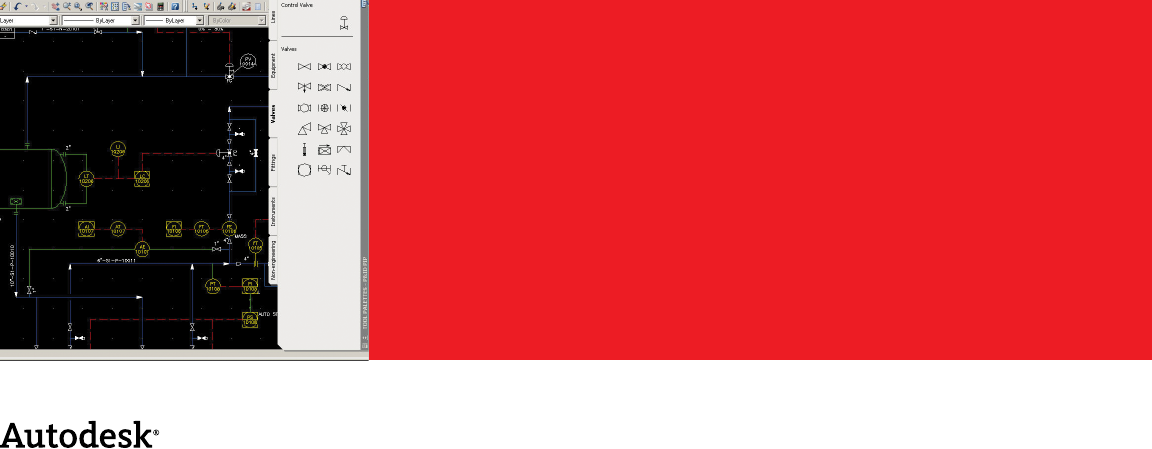
We had about 350 standard blocks relating to the
components we use. Fortunately, importing them
into AutoCAD P&ID and attaching relevant information
to them was really simple.
—J.P. Brady
Process Engineer & Design Team Leader
GEA Process Technologies
Autodesk, AutoCAD, and DWF are registered trademarks or trademarks of Autodesk, Inc., in the USA and/or other countries. All other brand names,
product names, or trademarks belong to their respective holders. Autodesk reserves the right to alter product oerings and specifications at any time
without notice, and is not responsible for typographical or graphical errors that may appear in this document.
© 2008 Autodesk, Inc. All rights reserved.
information to them was really simple. This
highlighted another advantage too: we can
change the graphical data slightly but leave
the attached information labels unchanged if
we choose. That means we can create component
profiles or tool palettes specific to individual
clients. It saves a huge amount of redrawing time
when we’re dealing with American or Asian clients
who use dierent sizing conventions, for example.”
Gain Design Time Eciencies
To minimize any productivity downturn during
implementation, Brady planned for his first three
users to be trained one day per week, over three
weeks. “Those guys are now trained and are
developing their use of the system. The other
guys in the team have been given the product to
delve into before training. This way we’ve got six
guys comparing notes and bouncing ideas around,
and because the product is logical, setting it up is
almost enjoyable, which encourages more digging
around. We do get ‘Eureka’ moments.” He points
out that it’s from the smallest tasks that the big
savings are made. “Automatic line numbering, line
breaks, tagging, and nozzle numbering all save time.
The page flow arrows are brilliant; we can have 20
or 30 P&IDs open and track through each one,
which is really dicult in AutoCAD alone. And the
Data Manager allows the user to quickly zoom to
one particular component in what could be a really
busy P&ID. Being able to make subtle changes this
quickly is invaluable to us.”
Maximize Engineering Productivity
Although appreciating design time eciencies,
Brady points out other valuable benefits. “Process
engineers are expensive. With AutoCAD P&ID,
process engineers no longer have to manually pro-
duce valve, instrument or equipment lists, resulting
in a worthwhile time and cost savings. The current
process for updating even a couple of lines of text
on a P&ID involves a process engineer, a draftsman,
and at least one cycle of checking between the two.
If we can give the process engineer access to the
P&IDs through, say, a network front end, he can
make those changes via a database, immediately.
It makes much more sense.”
Strengthen Client Relationships
A significant part of GEAPT’s work comes from
the maintenance contracts it has with clients
around the world. GEAPT controls the master
P&ID documents on behalf of many clients’
processing and production facilities. Brady’s idea
is to slowly migrate these drawings to AutoCAD
P&ID, in consultation with the clients, over the next
few years. Graphically, the drawings will look almost
identical to the current ones, which is what he
knows clients will want, but information intelligently
linked to the drawings will be the real value.
The benefits of the move will be wide ranging, as he
explains. “Just being able to give the client updated
P&IDs, valve lists, maintenance documentation,
or reports more quickly will improve the service
levels we oer. But from our point of view it opens
up more possibilities. Our maintenance engineers
around the world can turn up on site with a laptop
and have access via the web or email to absolutely
current P&IDs, rather than having to lug loads of
paper drawings around. We’ve already tried this
with smart DWF files and even gone as far as
reviewing live drawings online. It helps us get
the drawings right the first time.”
The Result
Further expansion of the number of licenses of
AutoCAD P&ID and AutoCAD® Electrical software,
along with customization training, is expected
across the design team. Longer term, Brady’s
plan is to gradually create a database of all the
components the company works with, even
incorporating costing information relating to the
component and any mechanical or electrical work
linked to it. This capability will enable the sales
teams, for example, to use the database to create
proposals and quotes from verifiable, current
information, and if necessary historical data where
a component, or perhaps an entire process line,
has been used before. He sees no reason why
the benefits AutoCAD P&ID has oered the
design operation should not be felt across the
entire company.
Learn More
To learn more about AutoCAD P&ID software,
visit www.autodesk.com/autocadpid.
Process, integrated.
