Guoguang Electric VIFANORDIC Bluetooth Speaker User Manual

Guoguang Electric Co.,Ltd Bluetooth Speaker

User Manual

HELSINKI  owner’s  manual
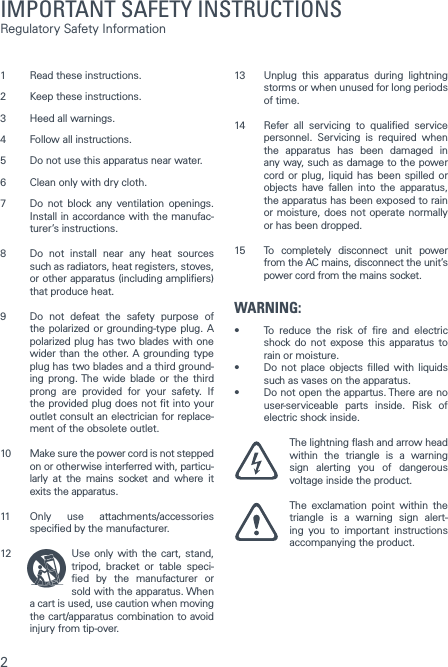
21  Read these instructions.2  Keep these instructions. 3  Heed all warnings. 4  Follow all instructions. 5  Do not use this apparatus near water. 6  Clean only with dry cloth. 7  Do not block any ventilation openings. Install in accordance with the manufac-turer’s instructions. 8  Do not install near any heat sources such as radiators, heat registers, stoves, or other apparatus (including ampliers) that produce heat. 9  Do not defeat the safety purpose of the polarized or grounding-type plug. A polarized plug has two blades with one wider than the other. A grounding type plug has two blades and a third ground-ing prong. The wide blade or the third prong are provided for your safety. If the provided plug does not t into your outlet consult an electrician for replace-ment of the obsolete outlet. 10  Make sure the power cord is not stepped on or otherwise interferred with, particu-larly at the mains socket and where it exits the apparatus. 11  Only use attachments/accessories specied by the manufacturer. 12  Use only with the cart, stand, tripod, bracket or table speci-ed by the manufacturer or sold with the apparatus. When a cart is used, use caution when moving the cart/apparatus combination to avoid injury from tip-over. 13  Unplug this apparatus during lightning storms or when unused for long periods of time.14  Refer all servicing to qualied service personnel. Servicing is required when the apparatus has been damaged in any way, such as damage to the power cord or plug, liquid has been spilled or objects have fallen into the apparatus, the apparatus has been exposed to rain or moisture, does not operate normally or has been dropped. 15  To completely disconnect unit power from the AC mains, disconnect the unit’s power cord from the mains socket.WARNING:• To reduce the risk of re and electricshock do not expose this apparatus to rain or moisture.• Do not place objects lled with liquidssuch as vases on the apparatus.• Donotopentheappartus.Therearenouser-serviceable parts inside. Risk of electric shock inside. The lightning ash and arrow head within the triangle is a warning sign alerting you of dangerous voltage inside the product. The exclamation point within the triangle is a warning sign alert-ing you to important instructions  accompanying the product.  IMPORTANT SAFETY INSTRUCTIONS Regulatory Safety Information
3This device complies with Part 15 of the FCC Rules. Its operation is subject to the following two conditions:1.   This device may not cause harmful interfer-ence, and2.   This device must accept any interference received, including interference that may cause undesired operation.Cet appareil est conforme à la section 15 des ré-glementations de la FCC. Le fonctionnement de l’appareil est sujetaux deux conditions suivantes:1.  Cet appareil ne doit pas provoquer d’interférences néfastes, et 2. Cet appar-eil doit tolérer les interférences reçues, y compris celles qui risquent de provoquer un fonctionnement indésirable.Note: This product has been tested and found to comply with the limits for a Class B digital device, pursuant to Part 15 of the FCC Rules. These limits are designed to provide reason-able protection against harmful interference in a residential installation. This product gen-erates, uses, and can radiate radio frequency energy and, if not installed and used in accord-ance with the instructions, may cause harmful interference to radio communications.However, there is no guarantee that interfer-ence will not occur in a particular installation. If this product does cause harmful interference to radio or television reception, which can be determined by turning the equipment off and on, the user is encouraged to try to correct the interference by one or more of the followingmeasures:·   Reorient or relocate the receiving antenna.·   Increase the separation between the equipment and receiver.·   Connect the equipment into an outlet on a circuit different from that to which the receiver is connected.·   Consult the dealer or an experienced radio/TV technician for help.Changes or modications not expressly ap-proved by the party responsible for compliance could void the user’s authority to operate the equipment.This device complies with Industry Canada licence-exempt RSS standard(s).Operation is subject to the following two con-ditions:1.  This device may not cause interference, and2.   This device must accept any interference, including interference that may cause un-desired operation of the device.Le présent appareil est conforme aux CNR d’Industrie Canada applicables aux appareils radioexempts de licence. L’exploitation est au-torisée aux deux conditions suivantes :1.   l’appareil ne doit pas produire de brouil-lage, et2.   l’utilisateur de l’appareil doit accepter tout brouillage radioélectrique subi, même si le brouillage est susceptible d’en comprom-ettre le fonctionnement.Vifa Denmark A/SMariendalsvej 2ADK-8800 - Denmark www.vifa.dkIMPORTANT STATEMENTS:
4You’ve chosen wellThe Vifa Helsinki. A loudspeaker for anyone who values exclusive Nordic design and authentic sound.It’s designed to be intuitive for you to use. Thismanual just spells out the details - for instance, howto connect wirelessly in a ash.Enjoy!
5Product care .................................................................................. 6Connecting to HelsinkiConnecting with Bluetooth ............................................................. 8 Connecting with Bluetooth - NFC  ................................................... 9 Wired connection  ........................................................................10Product functionsButtons and indicators on Helsinki ...............................................12 Status indicator .............................................................................13Battery charge ..............................................................................14 Reset and set to factory default ...................................................15Vifa app  ........................................................................................16 Troubleshooting ............................................................................17 Specications ...............................................................................18 Register and Trademarks ..............................................................19 For manuals in other languages, please visit: www.vifa.dk/support
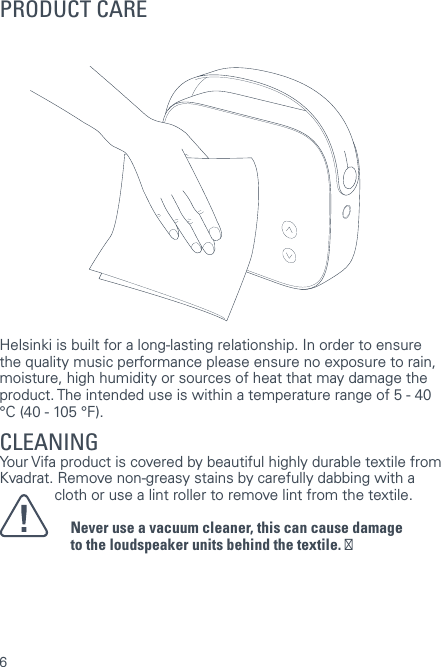
6Helsinki is built for a long-lasting relationship. In order to ensure the quality music performance please ensure no exposure to rain, moisture, high humidity or sources of heat that may damage the product. The intended use is within a temperature range of 5 - 40 °C (40 - 105 °F).CLEANING Your Vifa product is covered by beautiful highly durable textile from Kvadrat. Remove non-greasy stains by carefully dabbing with a  lint-free cloth or use a lint roller to remove lint from the textile.Never use a vacuum cleaner, this can cause damageto the loudspeaker units behind the textile. ĀPRODUCT CARE
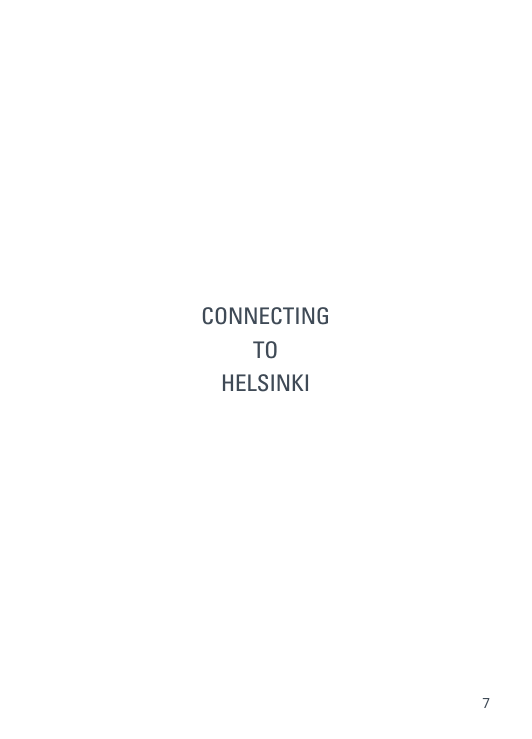
7CONNECTINGTO HELSINKI
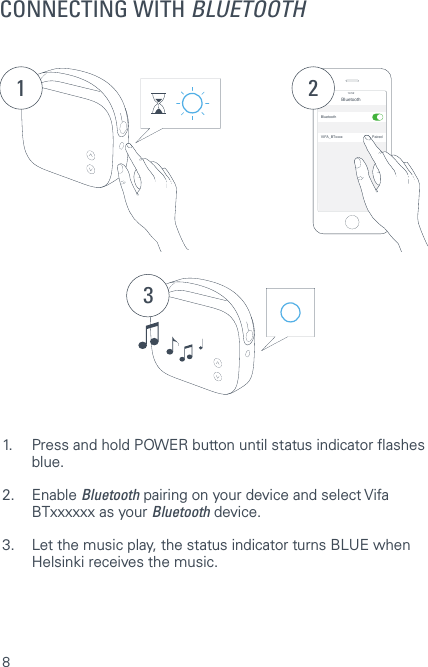
8CONNECTING WITH BLUETOOTH1Bluetooth14:52BluetoothVIFA_BTxxxx Paired231.  Press and hold POWER button until status indicator ashes   blue.2. Enable Bluetooth pairing on your device and select Vifa    BTxxxxxx as your Bluetooth device.3.  Let the music play, the status indicator turns BLUE when    Helsinki receives the music.
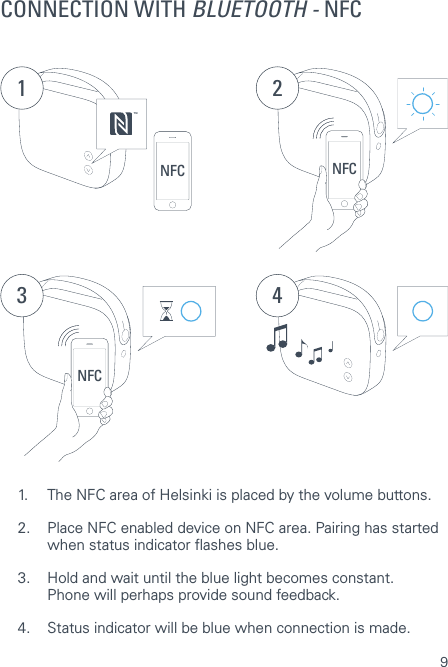
9NFC 2NFC 3 4NFC TM11.  The NFC area of Helsinki is placed by the volume buttons.2.  Place NFC enabled device on NFC area. Pairing has started    when status indicator ashes blue.3.  Hold and wait until the blue light becomes constant.   Phone will perhaps provide sound feedback.4.  Status indicator will be blue when connection is made.CONNECTION WITH BLUETOOTH - NFC
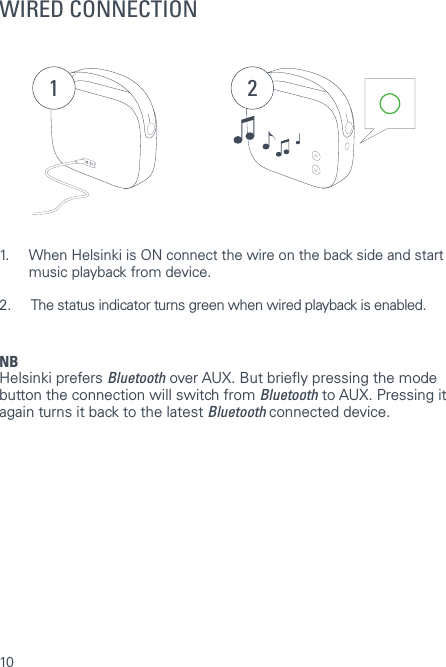
10WIRED CONNECTION1 21.  When Helsinki is ON connect the wire on the back side and start    music playback from device. 2.   The status indicator turns green when wired playback is enabled.NBHelsinki prefers Bluetooth over AUX. But briey pressing the mode button the connection will switch from Bluetooth to AUX. Pressing it again turns it back to the latest Bluetooth connected device.
11PRODUCT FUNCTIONS
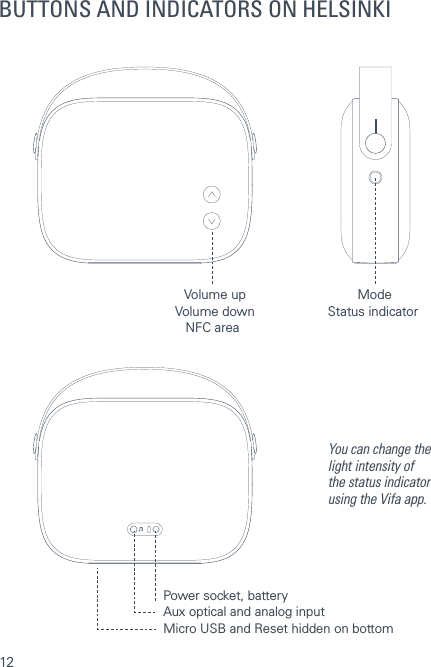
12BUTTONS AND INDICATORS ON HELSINKIVolume downNFC areaStatus indicatorVolume up ModeAux optical and analog inputPower socket, batteryYou can change the light intensity of the status indicator using the Vifa app.Micro USB and Reset hidden on bottom
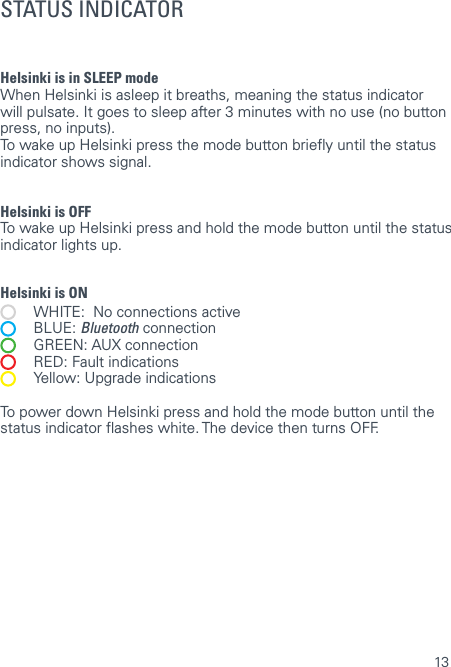
13Helsinki is in SLEEP mode  When Helsinki is asleep it breaths, meaning the status indicator will pulsate. It goes to sleep after 3 minutes with no use (no button press, no inputs).To wake up Helsinki press the mode button briey until the status indicator shows signal.Helsinki is OFF  To wake up Helsinki press and hold the mode button until the status indicator lights up.Helsinki is ON   WHITE:  No connections active BLUE: Bluetooth connection   GREEN: AUX connection   RED: Fault indications  Yellow: Upgrade indicationsTo power down Helsinki press and hold the mode button until the status indicator ashes white. The device then turns OFF. STATUS INDICATOR
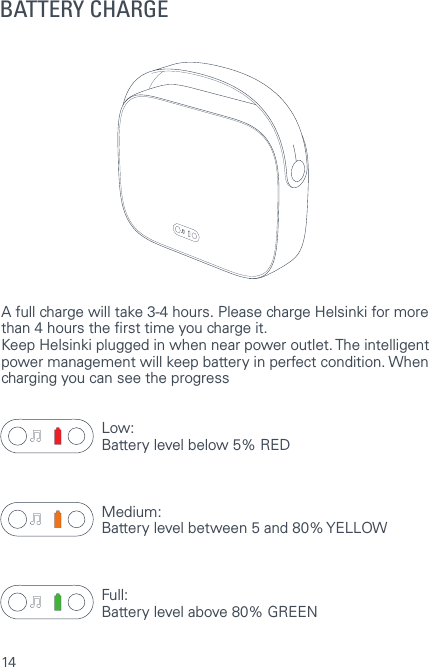
14BATTERY CHARGEA full charge will take 3-4 hours. Please charge Helsinki for more than 4 hours the rst time you charge it. Keep Helsinki plugged in when near power outlet. The intelligent power management will keep battery in perfect condition. When charging you can see the progressLow: Battery level below 5% REDMedium: Battery level between 5 and 80% YELLOWFull: Battery level above 80% GREEN
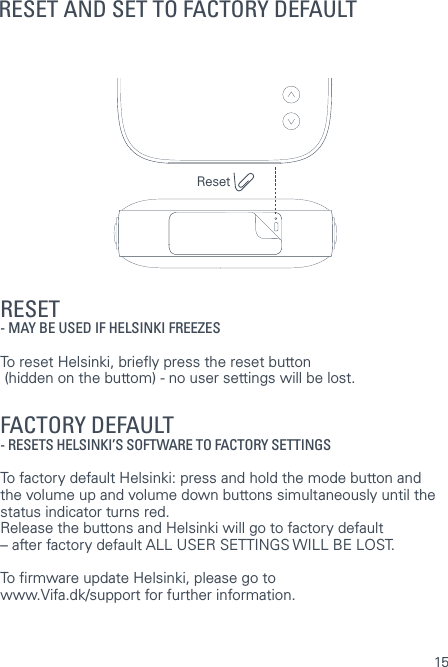
15RESET AND SET TO FACTORY DEFAULTRESET - MAY BE USED IF HELSINKI FREEZES  To reset Helsinki, briey press the reset button    (hidden on the buttom) - no user settings will be lost.  FACTORY DEFAULT   - RESETS HELSINKI’S SOFTWARE TO FACTORY SETTINGS  To factory default Helsinki: press and hold the mode button and the volume up and volume down buttons simultaneously until the status indicator turns red.  Release the buttons and Helsinki will go to factory default – after factory default ALL USER SETTINGS WILL BE LOST.To rmware update Helsinki, please go to  www.Vifa.dk/support for further information.Reset
16TROUBLESHOOTINGFor further support, if you experience issues that are not described in this manual please refer to: www.vifa.dk/support
17THE VIFA APPAn app will be available for your Vifa Helsinki.   More info will be announced on:www.vifa.dk/support
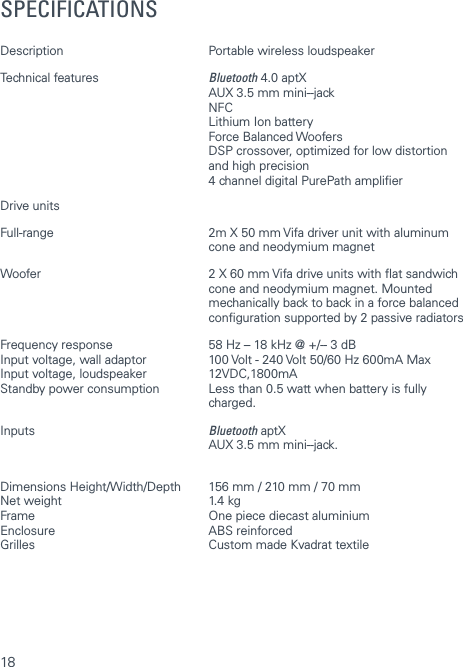
18SPECIFICATIONSDescription  Portable wireless loudspeaker Technical features  Bluetooth 4.0 aptX   AUX 3.5 mm mini- ‐jack NFC  Lithium Ion battery   Force Balanced Woofers   DSP crossover, optimized for low distortion   and high precision  4 channel digital PurePath amplierDrive units Full-range  2m X 50 mm Vifa driver unit with aluminum   cone and neodymium magnetWoofer  2 X 60 mm Vifa drive units with at sandwich    cone and neodymium magnet. Mounted    mechanically back to back in a force balanced   conguration supported by 2 passive radiatorsFrequency response  58 Hz – 18 kHz @ +/- ‐ 3 dBInput voltage, wall adaptor  100 Volt - 240 Volt 50/60 Hz 600mA MaxInput voltage, loudspeaker  12VDC,1800mAStandby power consumption  Less than 0.5 watt when battery is fully   charged. Inputs  Bluetooth aptX    AUX 3.5 mm mini- ‐jack. Dimensions Height/Width/Depth  156 mm / 210 mm / 70 mmNet weight  1.4 kgFrame  One piece diecast aluminiumEnclosure   ABS reinforcedGrilles  Custom made Kvadrat textile
19REGISTER AND TRADEMARKSWe encourage you to register your  product at: www.vifa.dk/registerMade for iPhone 5s, iPhone 5c, iPhone 5, iPhone 4s, iPhone 4, iPhone 3GS, iPhone 3, iPad AIR, iPad (3rd and  4th generation), iPad 2, iPad, iPad mini with Retina display, iPad mini, iPod touch (1st through 5th generation), iPod classic, and iPod nano (1st through 7th generation).”Made for iPod”, ”Made for iPhone” and ”Made for iPad” mean that an electronic accessory has been designed to connect specically to iPod, iPhone, or iPad, re-spectively, and has been certied by the developer to meet Apple performance standards. Apple is not responsible for the operation of this device or its compliance with safety and regulatory standards. Please note that the use of this accessory with iPod, iPhone, or iPad may affect wireless performance.The NFC Forum has developed the “N-mark” trademark as a univer-sal symbol for Near eld communication.The Bluetooth logo, the Bluetooth name and the combination are trademarks owned by Bluetooth SIG Inc.© 2013 CSR pic and its group companies. The aptX® mark and the aptX logo are trade marks of CSR pic or one of its group companies and may be registered in one or more jurisdictions.A Vifa product is in compliance with   directives of relevance, including RoHS directive  – see product label for more regional regulatory approvals.TM
For more information please visit our website at www.vifa.dk2015 02 REV.1

Navigation menu