HANK ELECTRONICS SO03W Smart Plug User Manual
HANK ELECTRONICS CO., LTD. Smart Plug Users Manual
Users Manual
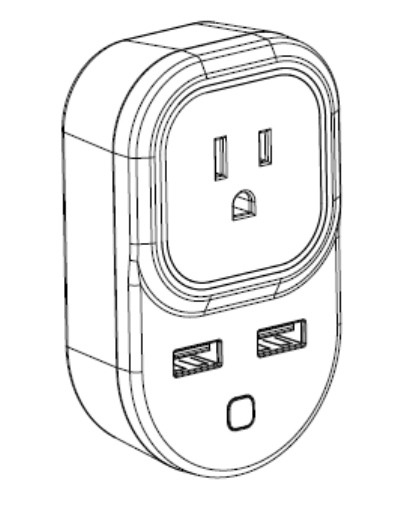
SmartPlugUserManual
HKWL‐SO03W/HKWL‐SO03WP
1. PRODUCT OVERVIEW
SmartPlug(HKWL‐SO03W/HKWL-SO03WP)isaWi‐Fiswitchwhichcanbeusedto
remotelyon/offcontrol the plugged devices after paired to the Wi‐Fi network.
Users can also monitortheon/offstatusofthepluggeddevicesonmobilesdevices
fromanywhere.TwoextraUSBchargingoutletsisanexclusiveplusforthesmartplug.
2. PRODUCT FEATURES
AmazonAlexaandGoogleAssistantcompatible
Wi‐Ficonnectionsupported
Timingsettingavailable
FirmwareOTAupgradesupported
Supporting1xACoutputand2xUSBoutputs;
Over‐currentprotectionsupported(availableforHKWL‐SO03WPONLY)
ETL,FCCcertified
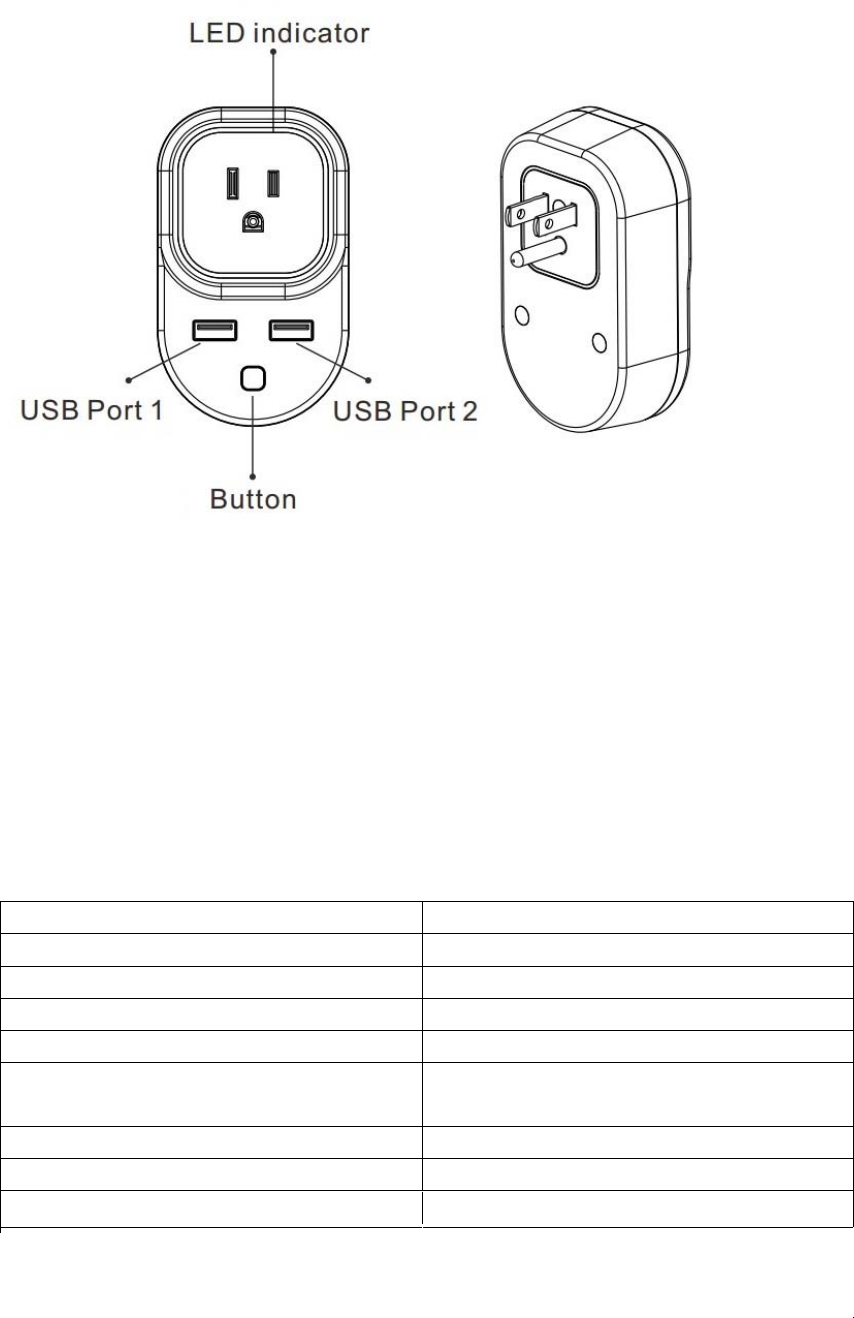
3. PRODUCT STRUCTURE
ButtonactivitiesandLEDindicator:
1) Pressandholdthebuttonfor5secondstoenterintoWi‐Ficonnection(or
configuration).TheblueLEDindicatorwillblinkrapidly(EZmode)orslowly(AP
mode).EZmodeconnectionissetasdefaultinWi‐Ficonfiguration.Pressand
holdthebuttonfor5secondswillenablethedeviceswitchbetweenEZmode
andAPmode.
2) Shortpressthebuttontomanuallyon/offcontrolthedevice.TheblueLED
indicatorwilllighton/offwhenplugison/off.
4. SPECIFICATIONS
NominalinputvoltageAC120V
Ratedcurrent15AMax
USB1&USB2DC5V3.4AMax
StandbyPowerLoss≤1.5W
Wirelesstransmittingandreceiving
frequency
2.412GHz—2.462GHz
NetworkprotocolsupportedIEEE802.11b/g/n
EncryptiontypeWEP/TKIP/AES,WPS
Receivingsensitivity802.11b:‐91dBm@11Mbps8%PER
802.11g:‐75dBm@54Mbps10%PER
802.11n:‐72dBm@MCS7_HT2010%PER
Vectorerror
EVM
802.11b:≤35%
802.11g:‐28dBmmax.
802.11n:‐28dBmmax.@MCS7_HT20
Workingtemperature‐10-+40℃
Storagetemperature‐20-+60℃
Relativehumidity8%-80%RH
Note:USBoutput:2.4Aeach,maximum3.4Asharedoutput.
5. APP download and Account binding
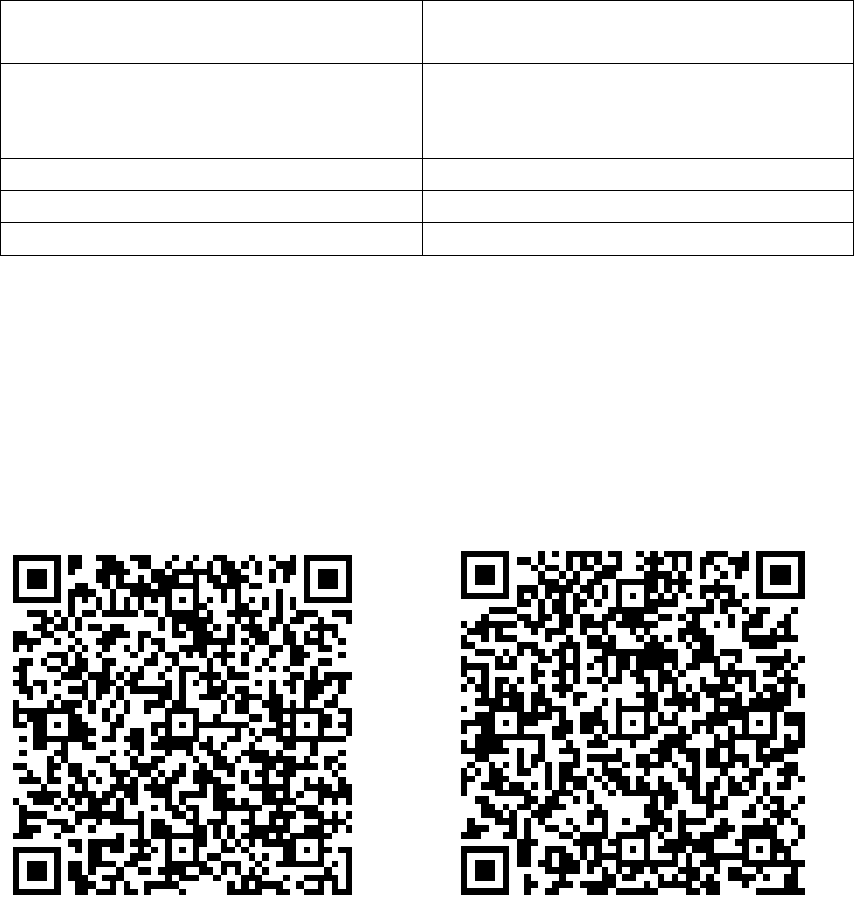
5.1ScantheQRcodebelowtodownloadAPPforAndroidandiOSsystem.Oryoucan
downloadthe“SimpleHomeConnect”APPonAppleStoreandGooglePlay.
Android IOS
5.2StarttheAPPandregisteranaccountwithyouremailaddress/mobilenumber
(mobilenumberregistrationavailableforChinamainlandusersONLY),andthenlog
inAPPwiththeregisteredaccount.
6. Add Device
6.1Click“ADDDevices”andselecttheDeviceType“SmartPlugPlus”.
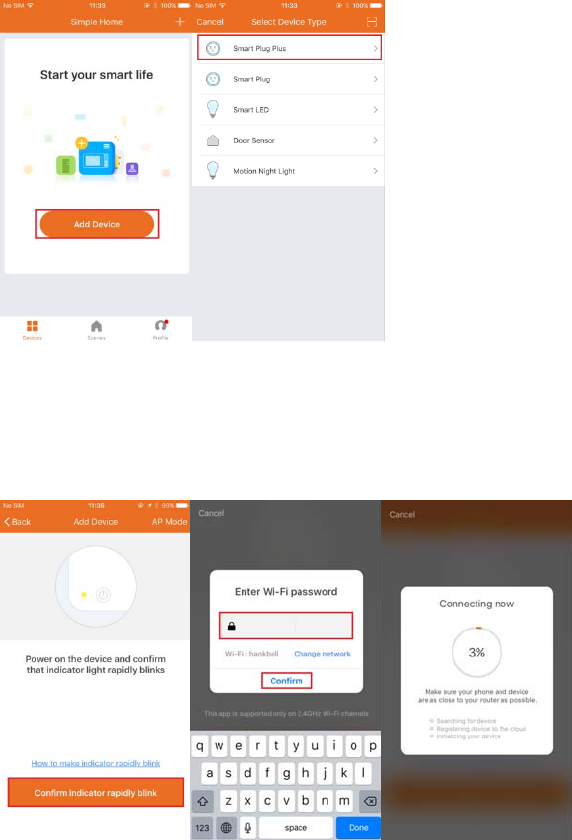
EZmode
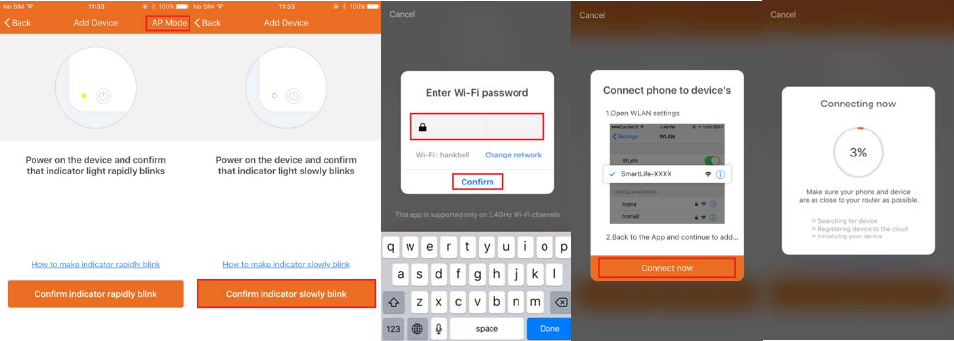
PlugwillblinkfastinbluewhenpoweredoninEZmode.Inputthepasswordofthe
designatedWi‐FinetworktoincludethedevicetoCloud.Waitingforaround30
secondsbeforethedeviceinclusionprocessiscomplete.
APmode
Plugwillblinkfastinbluewhenpoweredon.Pressandholdthebuttonfor5seconds
andthenrelease.TheLEDindicatorwillblinkslowlyinblue.ChooseAPMode,select
theWi‐FinetworkyourmobileisconnectedtoandentertheWi‐Fipassword.Select
thedeviceAPnameinWi‐Filist“SmartLife‐xxxx”tofinishtheWi‐Ficonnection.APP
willjumpto“connectionsuccessful”pagewhentheWi‐Ficonnectionprocessis
complete.
6.2Userscanre‐nameorsharethedeviceafterWi‐Ficonnectionisfinished.
MakesurethedeviceisworkinginEZ/APmode,iftheAPPworksinEZ/APmode.
NOTE:
Thisproductisintendedforindooruseonlyindrylocations.
Pleaseensurethesecurityofelectricity:Max.currentloadcannotbehigherthan
15A;Max.powerloadcannotbehigherthan1800W.
TheLEDindicatorwillblinkinblueandshutoffin10secondswhencurrentload
ishigherthan16.5Ain120Vratedworkingvoltage.(ApplicableonlytoSO03WP)
7. FCCNOTICE
Thisdevicecomplieswithpart15oftheFCCRules.Operationissubjecttothe
followingtwoconditions:
(1)Thisdevicemaynotcauseharmfulinterference
(2)Thisdevicemustacceptanyinterferencereceived,includinginterferencethat
maycauseundesiredoperation.
Themanufacturerisnotresponsibleforanyradioortvinterferencecausedby
unauthorizedmodificationsorchangetothisequipment.Suchmodificationsor
changecouldvoidtheuser’sauthoritytooperatetheequipment.
ThisequipmenthasbeentestedandfoundtocomplywiththelimitsforaClassB
digitaldevice,pursuanttopart15oftheFCCRules.Theselimitsaredesignedto
providereasonableprotectionagainstharmfulinterferenceinaresidential
installation.Thisequipmentgenerates,usesandcanradiateradiofrequencyenergy
and,ifnotinstalledandusedinaccordancewiththeinstructions,maycauseharmful
interferencetoradiocommunications.However,thereisnoguaranteethat
interferencewillnotoccurinaparticularinstallation.Ifthisequipmentdoescause
harmfulinterferencetoradioortelevisionreception,whichcanbedeterminedby
turningtheequipmentoffandon,theuserisencouragedtotrytocorrectthe
interferencebyoneormoreofthefollowingmeasures:
‐‐Reorientorrelocatethereceivingantenna.
‐‐Increasetheseparationbetweentheequipmentandreceiver.
‐‐Connecttheequipmentintoanoutletonacircuitdifferentfromthattowhichthe
receiverisconnected.
‐‐Consultthedealeroranexperiencedradio/TVtechnicianforhelp.
8. QUICK GUIDE OF USING AMAZON ECHO TO CONTROL SMART
DEVICES
8.1Whatyouneedtogetstarted
BeforeusingEchotocontrolyoursmartdevices,pleasemakesurethatthefollowing
conditionsaremet:
StableWi‐FinetworkwhichcouldaccesstoAmazonserver.
AnEchodevice,suchasEcho,EchoTap,orEchoDot.
AvalidAmazonAlexaaccount.
SimpleHomeConnectAPPandaregisteredaccount.
AtleastonedeviceunderyourSimpleHomeConnectaccount.
8.2AdddevicesinSimpleHomeConnectapp(RefertoAppInstruction)
Youcanskipthispartifyou'vealreadyaddedsomedevicestoyourSimpleHome
Connectaccount.
DownloadSimpleHomeConnectapp(RefertoAppInstruction)
Search"SimpleHomeConnect"inAppStoreorGooglePlaytoinstalltheapp.
iOSversiondownload:AppStore
Androidversiondownload:GooglePlay
RegisteraSimpleHomeConnectaccountandsignintheapp(RefertoApp
Instruction)
Adddeviceandre‐namethedevice(RefertoAppInstruction)
The device has been evaluated to meet general RF exposure requirement.
To maintain compliance with FCC's RF exposure guidelines, the distance must be at
least 20 cm between the radiator and your body, and fully supported by the
operating and installation configurations of transmitter and its antenna(s).
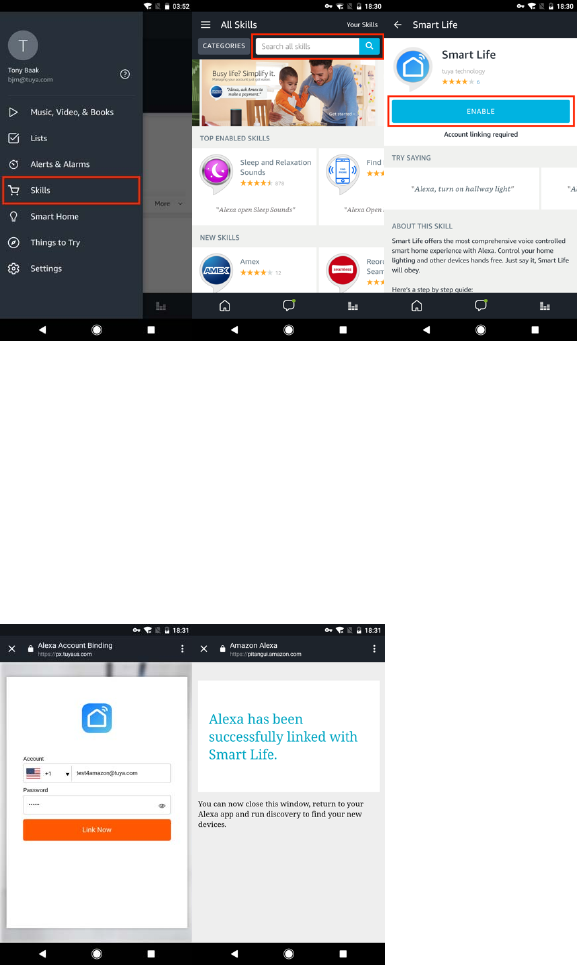
8.3LinkSimpleHomeConnectaccounttoEcho
1)Tap"Skills"inthehamburgermenu,thensearch"SmartLife".Select"SmartLife"
andtap"ENABLE"toenabletheSkill.
2)Youwillbere‐directedtotheaccountlinkpage.TypeinyourSimpleHome
Connectaccountandpassword,don'tforgettoselectthecountry/regionwhereyour
accountbelongsto.Thentap"LinkNow"tolinkyourSimpleHomeConnectaccount.
Thecountry/region,theaccount,andthepasswordmustMatchexactly/bethesame
withtheSimpleHomeConnectaccount.Closethewindowwhen“Alexahasbeen
successfullylinkedwithSmartLife”noticeispromptedout.
8.4ControlyoursmartdevicesthroughEcho
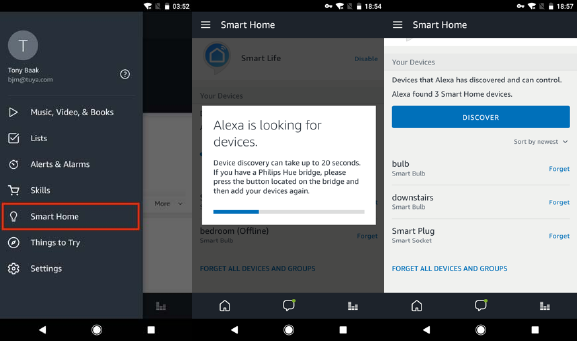
Discoverdevices
Echoneedstodiscoveryoursmartdevicesforvoicecontrol.Youcansay"Alexa,
discoverdevices"toEcho.Echowilldiscoverdeviceswhichhavealreadybeenadded
intheSimpleHomeConnectapp.
Youcanalsotap"DISCOVER"todiscoverthesmartdevices.Discovereddeviceswill
beshowninthelist.
Note:
Echoneedstogothrough“Discover” againafterthedeviceisre‐namedon
SimpleHomeConnectAPP.
IftheEchocannotfindthedevicesaddedinSimpleHomeConnectAPP,please
disabletheSmartLifeskillfirstandgothroughtheSmartLifeskill“ENABLE”,APP
accountloginanddevicediscoveragaintomakeEchovoicecontrolwork.
Voicecontrolyourdevices
NowyoucancontrolyoursmartdevicesthroughEcho.Herebelowisanexampleof
howtovoicecontrolthedevice“bedroomplug” withEcho:
Alexa,turnonbedroomplug
Alexa,turnoffbedroomplug
9. QUICK GUIDE OF USING GOOGLE HOME TO CONTROL SMART
DEVICES
9.1ControlyoursmartdevicesthroughGoogleHome
BeforeusingGoogleHometocontrolyourdevices,makesurethefollowing
conditionsaremet:
AGoogleHomedevice,orAndroidphonewithGoogleAssistant.
LatestGoogleHomeapp.
LatestGoogleapp(Androidonly)
AGoogleaccount.
ThedevicedisplaylanguagemustbesettoEnglishUS.
SimpleHomeConnectappandarelatedaccount.
Smartdevices.
9.2AdddevicesinSimpleHomeConnectapp(RefertoAppInstruction)
Youcanskipthispartifyou'vealreadyaddedsomedevicestoyourSimpleHome
Connectaccount.Andreferto8.2AdddevicesinSimpleHomeConnectappfor
addingdevicesinSimpleHomeConnectAPP.
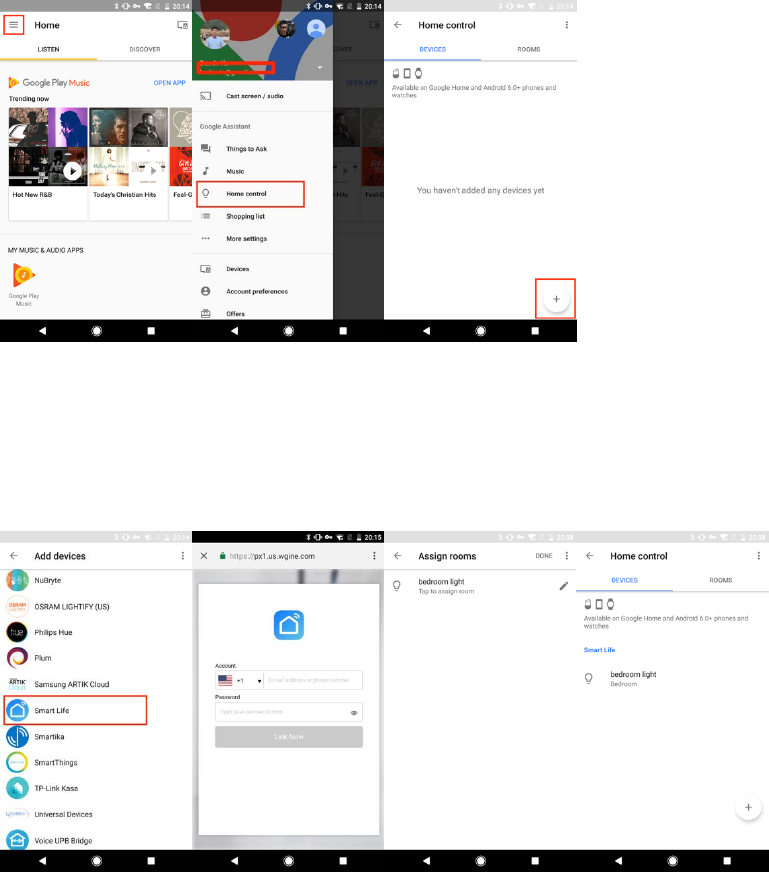
9.3LinkSimpleHomeConnectaccountinHomeControl
1) Tap"HomeControl"inthehamburgermenuontheGoogleHomeapp'shome
page,thentap"+".
2) Find"SmartLife"inthelist.Inthenewwindow,selectyourSimpleHomeConnect
account’sregion,typeyourSimpleHomeConnectaccountandpassword,thentap
"LinkNow".Afteryouassignroomsfordevices,yourdeviceswillbelistedinthe
HomeControlpage.
9.4ControlyoursmartdevicesthroughGoogleHome
NowyoucancontrolyoursmartdevicesthroughGoogleHome.Herebelowisan
exampleofhowtovoicecontrolthedevice“bedroomplug” withGoogleAssistant:
OkGoogle,turnonbedroomplug
OkGoogle,turnoffbedroomplug