HEADWATERS BST-400 BLUETOOTH SOUND THERAPY User Manual 15 BST 400 UserMan

HEADWATERS INC. BLUETOOTH SOUND THERAPY 15 BST 400 UserMan

15_BST-400 UserMan

Instruction ManualStereo Bluetooth® Sound Therapy SystemModel: BST-400www.soundoasis.com
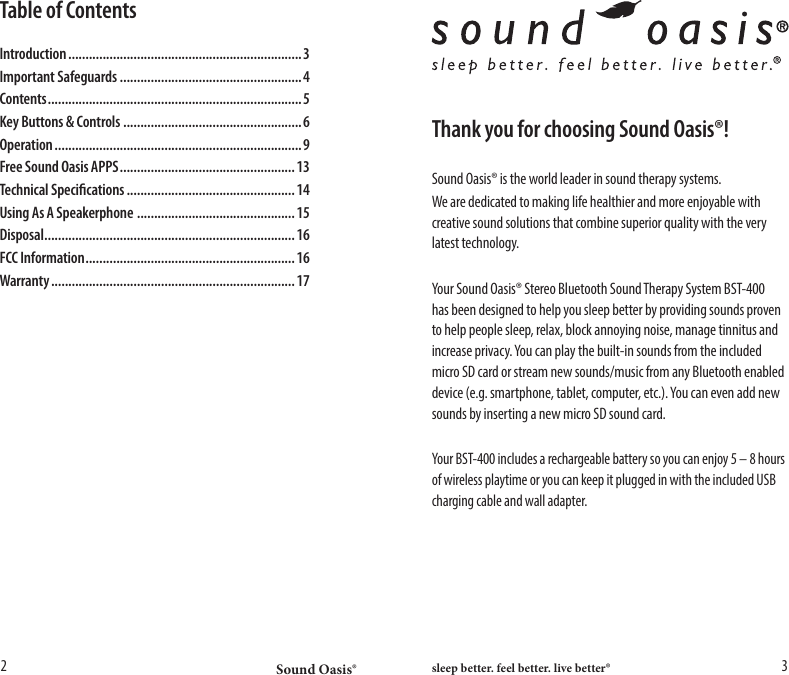
Sound Oasis® sleep better. feel better. live better®2 3Thank you for choosing Sound Oasis®!Sound Oasis® is the world leader in sound therapy systems.We are dedicated to making life healthier and more enjoyable with creative sound solutions that combine superior quality with the very latest technology.Your Sound Oasis® Stereo Bluetooth Sound Therapy System BST-400 has been designed to help you sleep better by providing sounds proven to help people sleep, relax, block annoying noise, manage tinnitus and increase privacy. You can play the built-in sounds from the included micro SD card or stream new sounds/music from any Bluetooth enabled device (e.g. smartphone, tablet, computer, etc.). You can even add new sounds by inserting a new micro SD sound card. Your BST-400 includes a rechargeable battery so you can enjoy 5 – 8 hours of wireless playtime or you can keep it plugged in with the included USB charging cable and wall adapter.Table of ContentsIntroduction .................................................................... 3Important Safeguards .....................................................4Contents .......................................................................... 5Key Buttons & Controls ....................................................6Operation ........................................................................ 9Free Sound Oasis APPS ................................................... 13Technical Specications ................................................. 14Using As A Speakerphone  ..............................................15Disposal .........................................................................16FCC Information ............................................................. 16Warranty ....................................................................... 17
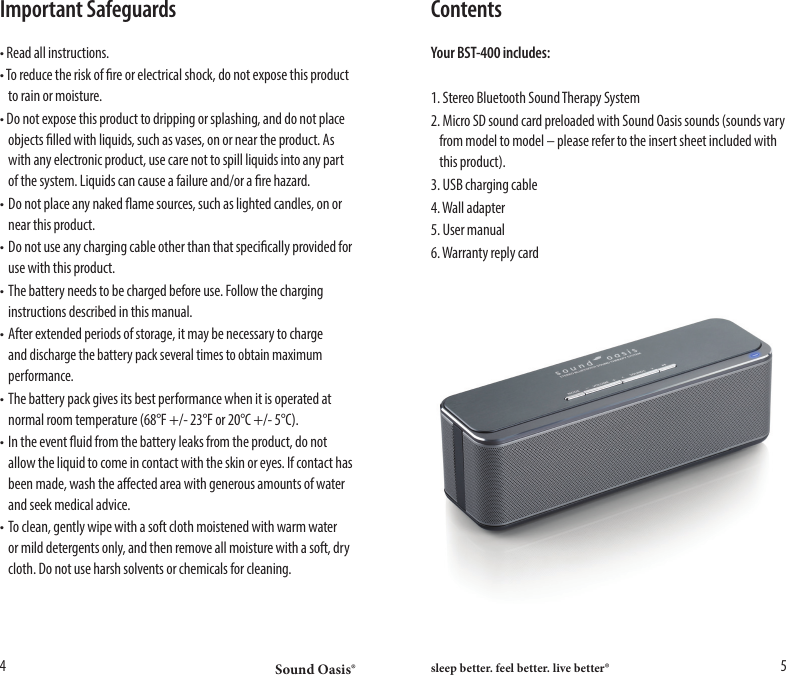
Sound Oasis® sleep better. feel better. live better®4 5Important Safeguards• Read all instructions. • To reduce the risk of re or electrical shock, do not expose this product    to rain or moisture.• Do not expose this product to dripping or splashing, and do not place    objects lled with liquids, such as vases, on or near the product. As    with any electronic product, use care not to spill liquids into any part    of the system. Liquids can cause a failure and/or a re hazard.• Do not place any naked ame sources, such as lighted candles, on or    near this product. • Do not use any charging cable other than that specically provided for    use with this product. • The battery needs to be charged before use. Follow the charging    instructions described in this manual. • After extended periods of storage, it may be necessary to charge   and discharge the battery pack several times to obtain maximum   performance. • The battery pack gives its best performance when it is operated at    normal room temperature (68°F +/- 23°F or 20°C +/- 5°C). • In the event uid from the battery leaks from the product, do not    allow the liquid to come in contact with the skin or eyes. If contact has    been made, wash the aected area with generous amounts of water    and seek medical advice.• To clean, gently wipe with a soft cloth moistened with warm water    or mild detergents only, and then remove all moisture with a soft, dry    cloth. Do not use harsh solvents or chemicals for cleaning. ContentsYour BST-400 includes:1. Stereo Bluetooth Sound Therapy System 2. Micro SD sound card preloaded with Sound Oasis sounds (sounds vary    from model to model – please refer to the insert sheet included with    this product).3. USB charging cable4. Wall adapter5. User manual6. Warranty reply card
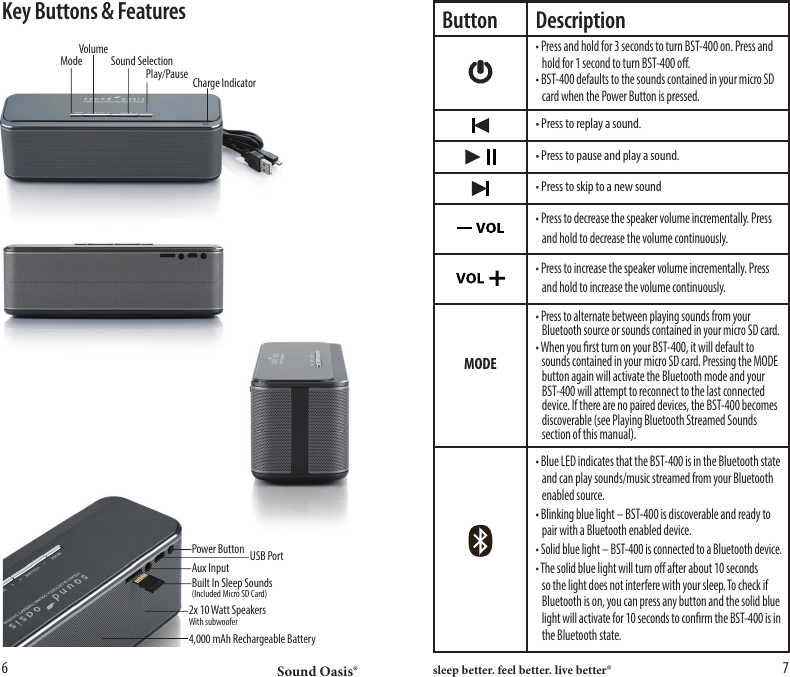
Sound Oasis® sleep better. feel better. live better®6 7Key Buttons & FeaturesButton Description• Press to replay a sound.• Press to pause and play a sound.• Press to skip to a new soundMODE• Blue LED indicates that the BST-400 is in the Bluetooth state    and can play sounds/music streamed from your Bluetooth    enabled source.• Blinking blue light – BST-400 is discoverable and ready to    pair with a Bluetooth enabled device.• Solid blue light – BST-400 is connected to a Bluetooth device.• The solid blue light will turn o after about 10 seconds     so the light does not interfere with your sleep. To check if    Bluetooth is on, you can press any button and the solid blue    light will activate for 10 seconds to conrm the BST-400 is in    the Bluetooth state.• Press and hold for 3 seconds to turn BST-400 on. Press and    hold for 1 second to turn BST-400 o.• BST-400 defaults to the sounds contained in your micro SD    card when the Power Button is pressed.• Press to decrease the speaker volume incrementally. Press    and hold to decrease the volume continuously.• Press to increase the speaker volume incrementally. Press    and hold to increase the volume continuously.• Press to alternate between playing sounds from your      Bluetooth source or sounds contained in your micro SD card.• When you rst turn on your BST-400, it will default to     sounds contained in your micro SD card. Pressing the MODE    button again will activate the Bluetooth mode and your    BST-400 will attempt to reconnect to the last connected    device. If there are no paired devices, the BST-400 becomes    discoverable (see Playing Bluetooth Streamed Sounds     section of this manual).Mode Sound SelectionPlay/Pause Charge IndicatorVolumePower ButtonAux InputBuilt In Sleep Sounds(Included Micro SD Card)2x 10 Watt SpeakersWith subwoofer4,000 mAh Rechargeable BatteryUSB Port
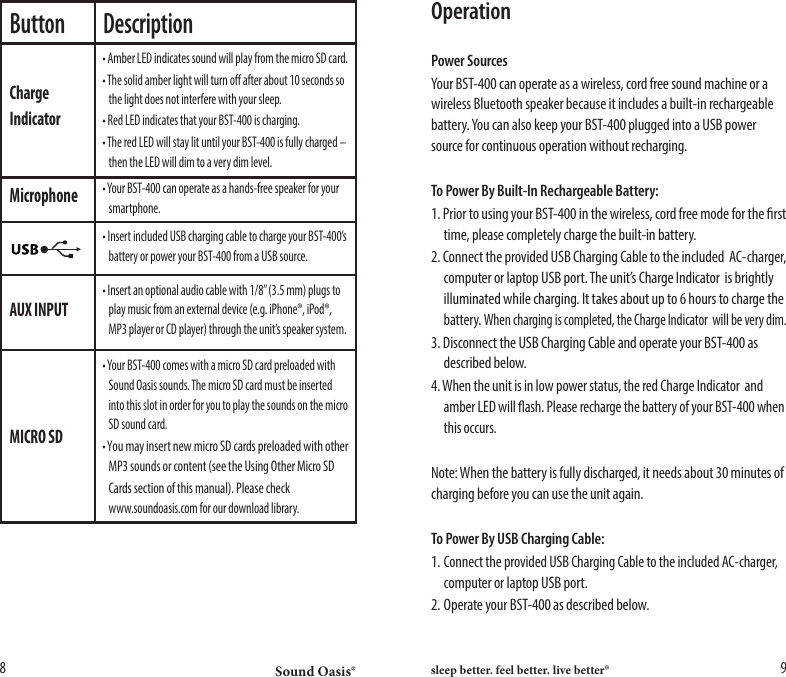
Sound Oasis® sleep better. feel better. live better®8 9Button DescriptionChargeIndicatorMicrophoneAUX INPUTMICRO SD• Amber LED indicates sound will play from the micro SD card.• The solid amber light will turn o after about 10 seconds so    the light does not interfere with your sleep.• Red LED indicates that your BST-400 is charging.• The red LED will stay lit until your BST-400 is fully charged –    then the LED will dim to a very dim level.• Insert an optional audio cable with 1/8” (3.5 mm) plugs to    play music from an external device (e.g. iPhone®, iPod®,    MP3 player or CD player) through the unit’s speaker system. • Your BST-400 comes with a micro SD card preloaded with    Sound Oasis sounds. The micro SD card must be inserted    into this slot in order for you to play the sounds on the micro    SD sound card.• You may insert new micro SD cards preloaded with other    MP3 sounds or content (see the Using Other Micro SD  Cards section of this manual). Please check      www.soundoasis.com for our download library.• Your BST-400 can operate as a hands-free speaker for your   smartphone.• Insert included USB charging cable to charge your BST-400’s    battery or power your BST-400 from a USB source.OperationPower SourcesYour BST-400 can operate as a wireless, cord free sound machine or a wireless Bluetooth speaker because it includes a built-in rechargeable battery. You can also keep your BST-400 plugged into a USB power source for continuous operation without recharging.To Power By Built-In Rechargeable Battery:1. Prior to using your BST-400 in the wireless, cord free mode for the rst    time, please completely charge the built-in battery.2. Connect the provided USB Charging Cable to the included  AC-charger,    computer or laptop USB port. The unit’s Charge Indicator  is brightly    illuminated while charging. It takes about up to 6 hours to charge the   battery. When charging is completed, the Charge Indicator  will be very dim.3. Disconnect the USB Charging Cable and operate your BST-400 as    described below.4. When the unit is in low power status, the red Charge Indicator  and    amber LED will ash. Please recharge the battery of your BST-400 when    this occurs.Note: When the battery is fully discharged, it needs about 30 minutes of charging before you can use the unit again.To Power By USB Charging Cable:1. Connect the provided USB Charging Cable to the included AC-charger,    computer or laptop USB port. 2. Operate your BST-400 as described below.
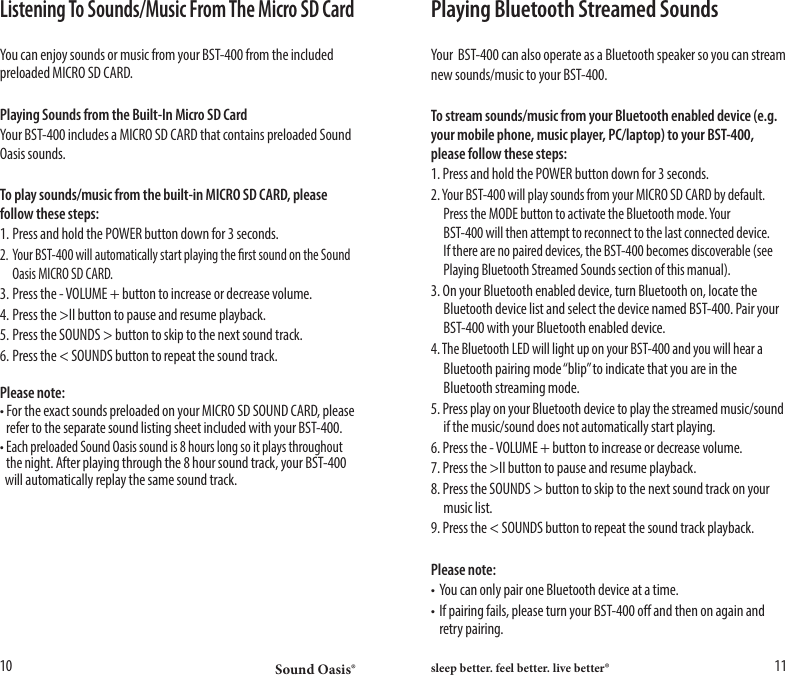
Sound Oasis® sleep better. feel better. live better®10 11Listening To Sounds/Music From The Micro SD CardYou can enjoy sounds or music from your BST-400 from the included preloaded MICRO SD CARD.Playing Sounds from the Built-In Micro SD CardYour BST-400 includes a MICRO SD CARD that contains preloaded Sound Oasis sounds. To play sounds/music from the built-in MICRO SD CARD, please follow these steps:1. Press and hold the POWER button down for 3 seconds.2. Your BST-400 will automatically start playing the rst sound on the Sound    Oasis MICRO SD CARD.3. Press the - VOLUME + button to increase or decrease volume.4. Press the >II button to pause and resume playback.5. Press the SOUNDS > button to skip to the next sound track.6. Press the < SOUNDS button to repeat the sound track.Please note:• For the exact sounds preloaded on your MICRO SD SOUND CARD, please    refer to the separate sound listing sheet included with your BST-400.• Each preloaded Sound Oasis sound is 8 hours long so it plays throughout   the night. After playing through the 8 hour sound track, your BST-400    will automatically replay the same sound track.Playing Bluetooth Streamed SoundsYour  BST-400 can also operate as a Bluetooth speaker so you can streamnew sounds/music to your BST-400.To stream sounds/music from your Bluetooth enabled device (e.g. your mobile phone, music player, PC/laptop) to your BST-400, please follow these steps:1. Press and hold the POWER button down for 3 seconds.2. Your BST-400 will play sounds from your MICRO SD CARD by default.    Press the MODE button to activate the Bluetooth mode. Your      BST-400 will then attempt to reconnect to the last connected device.    If there are no paired devices, the BST-400 becomes discoverable (see    Playing Bluetooth Streamed Sounds section of this manual).3. On your Bluetooth enabled device, turn Bluetooth on, locate the    Bluetooth device list and select the device named BST-400. Pair your    BST-400 with your Bluetooth enabled device. 4. The Bluetooth LED will light up on your BST-400 and you will hear a  Bluetooth pairing mode “blip” to indicate that you are in the    Bluetooth streaming mode.5. Press play on your Bluetooth device to play the streamed music/sound    if the music/sound does not automatically start playing.6. Press the - VOLUME + button to increase or decrease volume.7. Press the >II button to pause and resume playback.8. Press the SOUNDS > button to skip to the next sound track on your    music list.9. Press the < SOUNDS button to repeat the sound track playback.Please note:• You can only pair one Bluetooth device at a time.• If pairing fails, please turn your BST-400 o and then on again and    retry pairing.
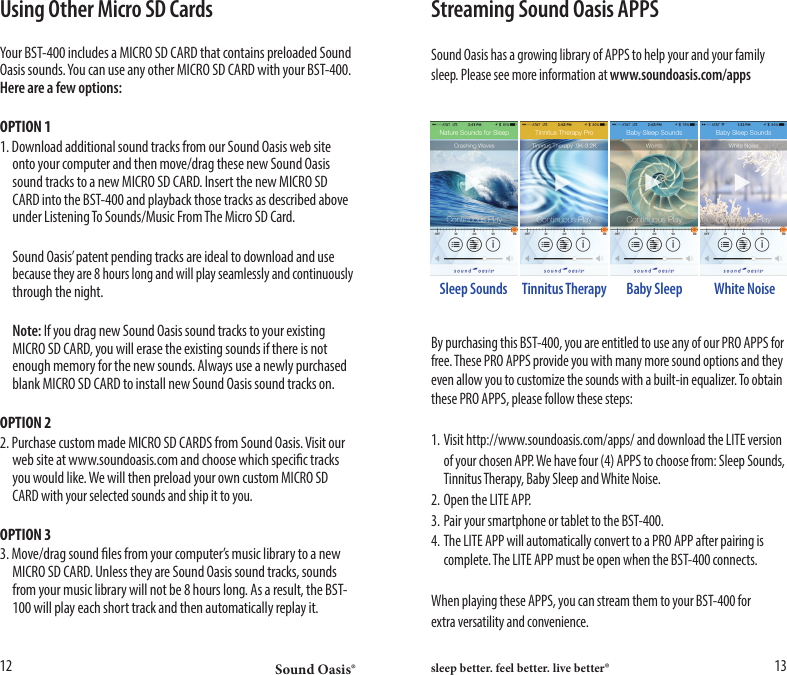
Sound Oasis® sleep better. feel better. live better®12 13Using Other Micro SD CardsYour BST-400 includes a MICRO SD CARD that contains preloaded Sound Oasis sounds. You can use any other MICRO SD CARD with your BST-400. Here are a few options:OPTION 11. Download additional sound tracks from our Sound Oasis web site    onto your computer and then move/drag these new Sound Oasis    sound tracks to a new MICRO SD CARD. Insert the new MICRO SD    CARD into the BST-400 and playback those tracks as described above    under Listening To Sounds/Music From The Micro SD Card.  Sound Oasis’ patent pending tracks are ideal to download and use   because they are 8 hours long and will play seamlessly and continuously    through the night. Note: If you drag new Sound Oasis sound tracks to your existing    MICRO SD CARD, you will erase the existing sounds if there is not    enough memory for the new sounds. Always use a newly purchased    blank MICRO SD CARD to install new Sound Oasis sound tracks on.OPTION 22. Purchase custom made MICRO SD CARDS from Sound Oasis. Visit our    web site at www.soundoasis.com and choose which specic tracks    you would like. We will then preload your own custom MICRO SD    CARD with your selected sounds and ship it to you.OPTION 33. Move/drag sound les from your computer’s music library to a new    MICRO SD CARD. Unless they are Sound Oasis sound tracks, sounds    from your music library will not be 8 hours long. As a result, the BST-   100 will play each short track and then automatically replay it.Streaming Sound Oasis APPSSound Oasis has a growing library of APPS to help your and your familysleep. Please see more information at www.soundoasis.com/appsBy purchasing this BST-400, you are entitled to use any of our PRO APPS for free. These PRO APPS provide you with many more sound options and they even allow you to customize the sounds with a built-in equalizer. To obtain these PRO APPS, please follow these steps:1. Visit http://www.soundoasis.com/apps/ and download the LITE version  of your chosen APP. We have four (4) APPS to choose from: Sleep Sounds,    Tinnitus Therapy, Baby Sleep and White Noise.2. Open the LITE APP.3. Pair your smartphone or tablet to the BST-400.4. The LITE APP will automatically convert to a PRO APP after pairing is    complete. The LITE APP must be open when the BST-400 connects.When playing these APPS, you can stream them to your BST-400 forextra versatility and convenience.Sleep Sounds Baby Sleep White NoiseTinnitus Therapy
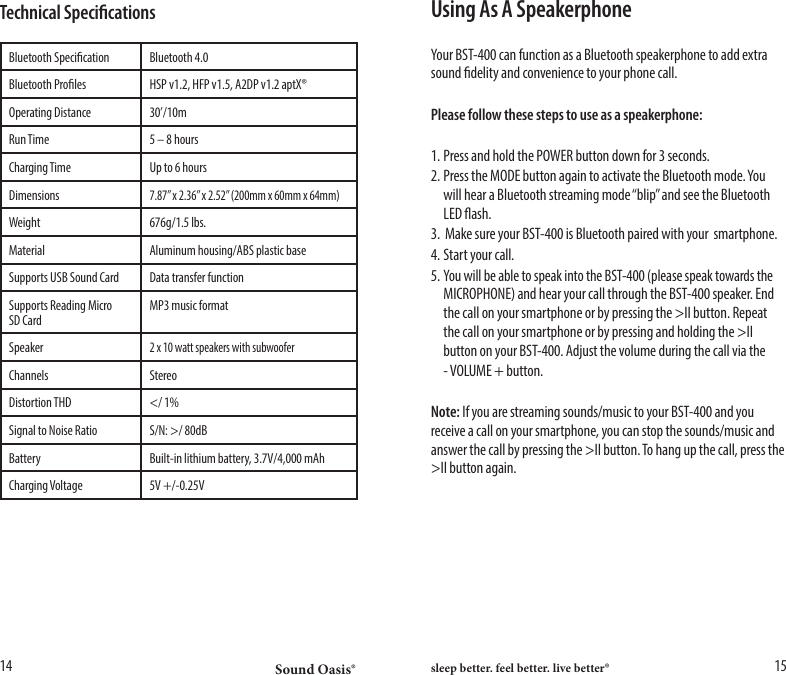
Sound Oasis® sleep better. feel better. live better®14 15Using As A SpeakerphoneYour BST-400 can function as a Bluetooth speakerphone to add extra sound delity and convenience to your phone call.Please follow these steps to use as a speakerphone:1. Press and hold the POWER button down for 3 seconds.2. Press the MODE button again to activate the Bluetooth mode. You    will hear a Bluetooth streaming mode “blip” and see the Bluetooth    LED ash.3.  Make sure your BST-400 is Bluetooth paired with your  smartphone.4. Start your call.5. You will be able to speak into the BST-400 (please speak towards the    MICROPHONE) and hear your call through the BST-400 speaker. End    the call on your smartphone or by pressing the >II button. Repeat    the call on your smartphone or by pressing and holding the >II    button on your BST-400. Adjust the volume during the call via the  - VOLUME + button. Note: If you are streaming sounds/music to your BST-400 and you receive a call on your smartphone, you can stop the sounds/music and answer the call by pressing the >II button. To hang up the call, press the >II button again.Technical SpecicationsBluetooth Specication Bluetooth 4.0Bluetooth Proles HSP v1.2, HFP v1.5, A2DP v1.2 aptX®Operating Distance 30’/10mRun Time 5 – 8 hoursCharging Time Up to 6 hoursDimensions7.87” x 2.36” x 2.52” (200mm x 60mm x 64mm)Weight 676g/1.5 lbs.Material Aluminum housing/ABS plastic baseSupports USB Sound Card Data transfer functionSupports Reading Micro SD CardMP3 music formatSpeaker2 x 10 watt speakers with subwooferChannels StereoDistortion THD </ 1%Signal to Noise Ratio S/N: >/ 80dBBattery Built-in lithium battery, 3.7V/4,000 mAhCharging Voltage 5V +/-0.25V
Sound Oasis® sleep better. feel better. live better®16 17Disposal  Dispose of all product parts in accordance with local regulations. If    in doubt, please consult your local authorities.   The battery in the BST-400 needs to be recycled. Do not    attempt to replace the built-in battery yourself.The crossed-out wheeled bin means that within the European Union the product must be taken to separate collection at the product end-of-life. Do not dispose of these products as unsorted municipal waste.FCC InformationThis equipment has been tested and found to comply with the limits for a class B digital Device, pursuant to part 15 of the FCC Rules. These limits are designed to provide reasonable protection against harmful interference in a residential installation. This equipment generates, uses, and can radiate radio frequency energy, and if not installed and used in accordance with the instructions, may cause harmful interference to radio communications. However, there is no guarantee that interference will not occur in a particular installation. If this equipment does cause harmful interference to radio or television reception, which can be determined by turning the equipment o and on, the user is encouraged to try to correct the interference by one or more of the following measures:• Reorient or relocate the receiving antenna.• Increase the separation between the equipment and receiver.• Connect the equipment to an outlet on a circuit dierent from which the receiver    is connected.• Consult the dealer or an experienced radio/TV technician for help.This device complies with Part 15 of the FCC Rules. Operation is subjectto the following two conditions:1. This device may not cause harmful interference.2. This device must accept any interference received, including    interference that may cause undesired operation. 1 Year Limited WarrantySound Oasis Company Warrants that this product is free from defects in materials or workmanship for a period of one (1) year from the date of original purchase. If the Product fails to operate in accordance with the manufacturer’s specications, simply return the product to the retail location where you purchased it or call our toll free number below within one (1) year of the date of purchase. Proof of date of purchase is required. Sound Oasis Company will, as its option, repair or replace the product at no charge to you.This warranty does not cover damage resulting from accident, misuse or abuse, lack of reasonable care, the axing of any attachment not provided with the product, or loss of parts , or subjecting the product to anything but the specied voltage or batteries.This warranty is in lieu of any other warranty, express or implied. All implied warranties, including any implied warranty of merchantability or tness for any particular purpose, are limited in duration to one (1) year from the date of original purchase. In no event will Sound Oasis Company be responsible for incidental, consequential, or special damages resulting from the use of this product.Some states do not allow limitation on how long an implied warranty lasts and /or the exclusion or limitation of incidental or consequential damages, so the above limitation may not apply to you. This warranty gives you specic legal rights, which vary from state to state.To Speak with a Sound Oasis Customer Service Representative,                                       Please call: 1-866-625-3218 or email us at info@soundoasis.comChanges or modifications not expressly approved by the party responsible for compliance could void the user's authority to operate the equipment.
Thank you for choosing Sound Oasis®!

Navigation menu