HIT orporated HBM004 Bluetooth Headset User Manual
HIT Incorporated Bluetooth Headset
User Manual
HBM-004
User’s Manual
The Wireless Headset is using standard Bluetooth technology. It is compatible with any Bluetooth
enabled audio gateway devices. Its unique state-of-the-art design and user-friendly interface can
bring you the most convenient way of life.
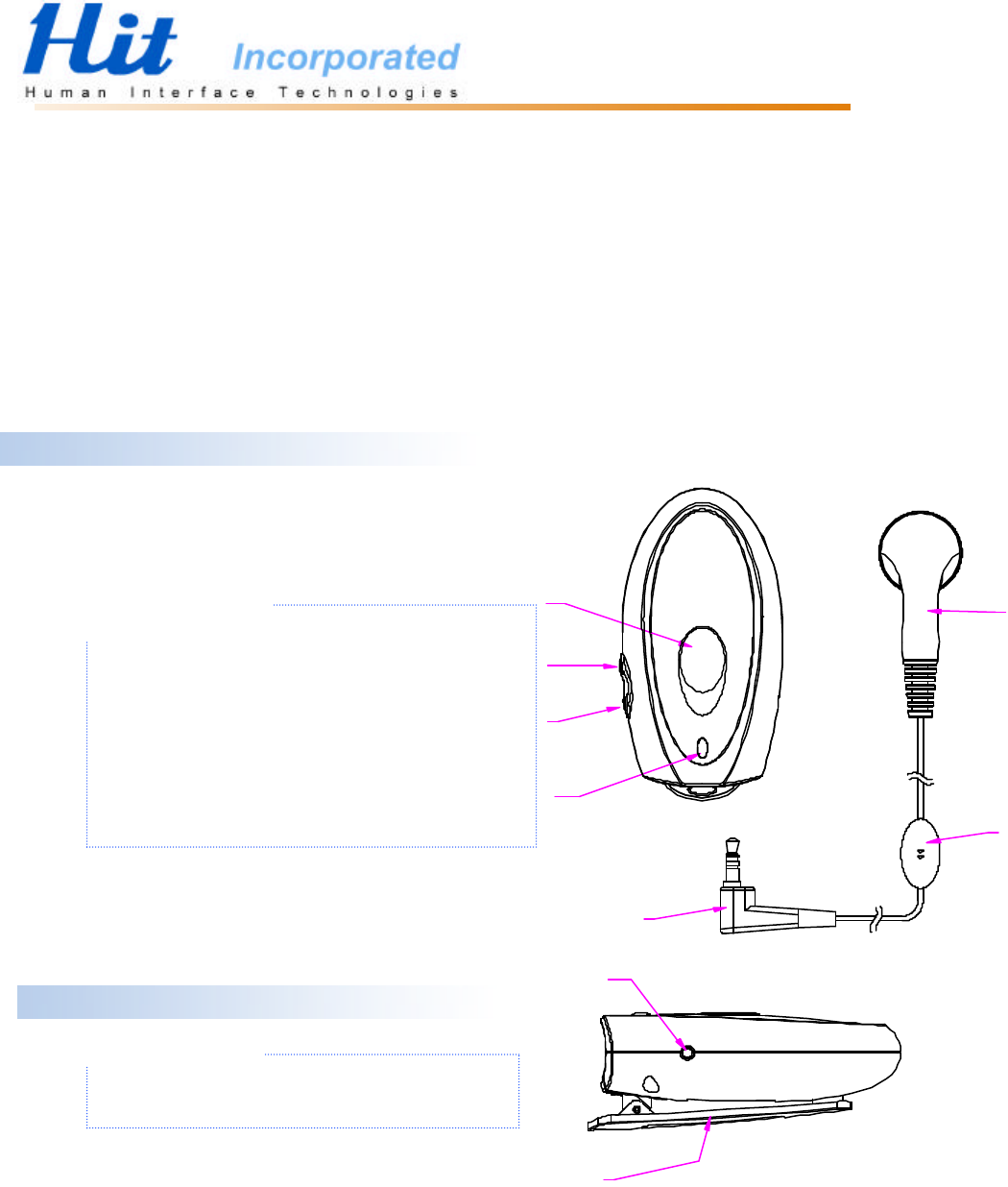
Front
1. Power Key/Talking Button
2. Volume up Key
3. Volume down Key
4. Status Indicator
Standby:Green light flashing once in 4 seconds
Pairing: Green & Red light alternately flashes once / second
Talking:Green light flashing 3 times / second
Low Battery Standby:Red light flashing once in 4 seconds
Low Battery talking:Red light flashing 3 times / second
Charging:Red light on
Charging complete:Red light off
5. Earpiece receiver
6. Earpiece microphone
7. Earpiece audio jack
Side
8. Re-set Key
Headset’s safety installation, which can enable
the headset to be back to the original status.
9. Headset clip
4
3
2
15
6
7
8
9
Charge
When first use this Bluetooth headset, the build-in battery is not fully charged. It is highly
recommended to fully charge the battery before first use.
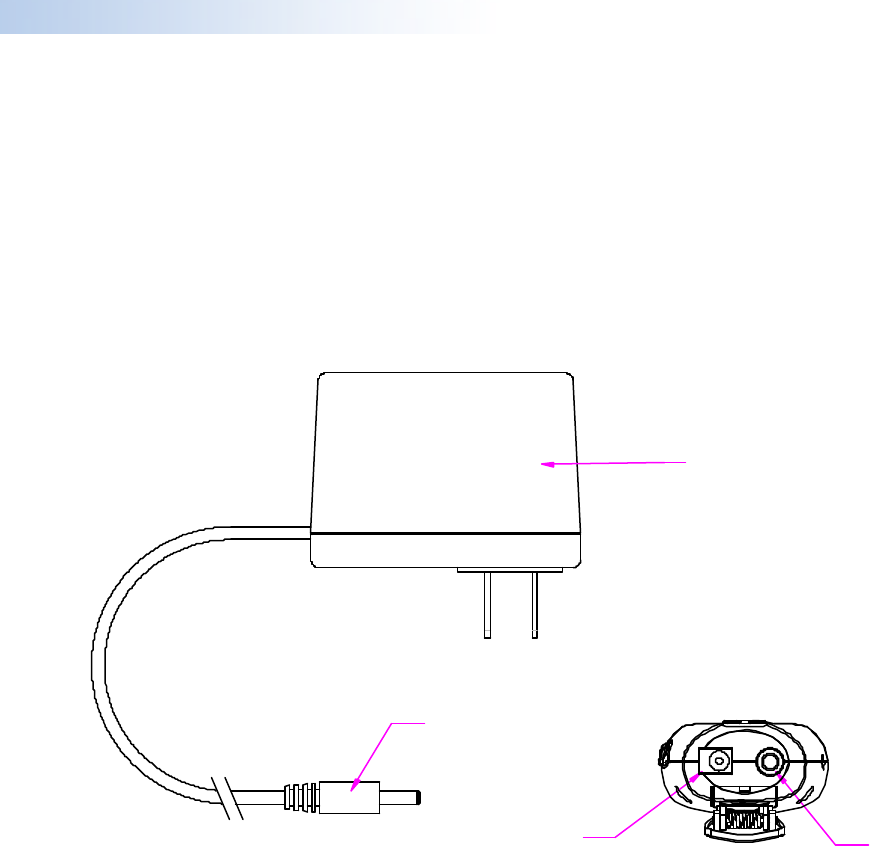
When charging the battery, please see the below diagram followed by the instruction. First, please
plug in the transformer (13) into an AC wall plug, then connect the transformer output connector
(12) with headset charger jack (11), the status indicator (4) will turn on and it will be red by now,
meaning that the headset is being charged at the moment. The charger takes about 2 hours to be
fully charged; when the red light of the status indicator (4) turns off, the charging process is
completed.
11 10
12
13
10. Headset audio jack
11. Headset charging jack
12. Transformer output connector
13. Transformer
Pairing Instruction
When first use this Bluetooth headset, please go through the pairing process with a Bluetooth
supported mobile phone. The pairing process only needs to go through once when first use.
Headset:
1. With the headset turned off (the headset status indicator light is switched off).
2. Press & hold the power key for over 10 seconds (you can hear beeper tones from earpiece
receiver at the 5th seconds), the green & red light will be flashing alternately once/second,
meaning that the headset is already in pairing process.
Mobile phone:
When pairing with Bluetooth supported mobile phone, different brands may have different
pairing instructions, please read the user manual carefully before start. The following operation
instructions are based on Nokia 8910 &Ericsson T68:
Nokia 8910
Scroll to Menu- Bluetooth - On
The screen will show “Bluetooth switched on”
Choose “Search for audio accessories”
When the screen shows”HBM-004”, press Select
Enter passcode: press 0000, then press OK
When the screen shows “connected to HBM-004” & the headset status indicator changes to
green light flashing once in 4 seconds from the green & red light flashing alternately once/
second, meaning that the pairing process succeeds.
Press “ˇ”key on mobile phone to enter “View paired devices” press Select
Press ”HBM-004” Options, Press “ˇ”key to enter “Request conn. Authorization”
press Select, Select No
The screen will show “No author. Required”
Press Back、Exit return to Main Screen
Attention
:
1. For power saving consideration, the headset will disconnect mobile phone
after pairing completing 15 seconds without pressing mobile phone any keys.
And mobile phone screen will show “Disconnected: HBM-004” at the same
time.
2. If pairing process fails, please go through the process again. Finish the
pairing process within 2 minutes if possible.

Sony Ericsson T68
Scroll to Menu, Connect – Bluetooth – Discover
When the screen shows HBM-004 press YES
Add to paired,press YES
A headset is already paired with the phone. Replaced? Press YES
Passkey:Press 0000,and then press YES
Pairing succeeded,Name tag Press NO
Add device,Press NO
Operation mode can be set to On or Automatic
However, if you wish to use the voice control function, you will need to set the Operation
mode to On.
Attention
:
If pairing process fails, please go through the process again. Finish the pairing process
within 2 minutes if possible.
Turn the headset on
Press and hold Power Key over 5 seconds, you can hear beeper tones from earpiece receiver also
the headset status indicator light flashes green. If the battery is low, the light flashes red.
Turn the headset off
Press and hold Power Key over 5 seconds, you can hear beeper tones from earpiece receiver also
the headset status indicator light is switched off.
Answering
When the headset is on, the green light will be flashing once in 4 seconds, meaning that the
headset is on standby mode. When call comes in, please press the talking button to answer the
call. To hang up, press the same button or operate from the phone.
※
Outgoing call
Nokia 8910
Let headset establish connection with mobile phone at first: press headset talking button one
time, you will hear beeper tone from headset & mobile phone screen will show ”Connected to
HBM-004”
Then directly dial numbers from mobile phone, the call will transfer automatically from the
phone to headset.
Attention:
Please complete to dial numbers within 15 seconds after establishing connection between headset

& mobile phone. Otherwise mobile phone will disconnect headset (mobile phone screen will
show “Disconnected to: HBM-004”), you must need to connect headset & mobile phone again.
Sony Ericsson T68
When headset is on standby mode, directly dial numbers from the mobile phone, the call will
transfer automatically from the phone to headset.
Voice Control
If your mobile phone supports voice control function, then press headset talking button 2 times,
you can hear beeper tones from your headset, you can operate the voice control function as usual
way.
Switching
When call comes in, if you answered from your mobile phone, you can switch the call to the
headset during conversation. Press the talking button, and then the call will be transferred.
Volume
During conversation, you can adjust the volume by pressing the volume up/down key.
FCC Statement
1.THIS DEVICE COMPLIES WITH PART 15 OF THE FCC RULES. OPERATION IS SUBJECT TO THE
FOLLOWING TWO CONDITIONS: (1) THIS DEVICE MAY NOT CAUSE HARMFUL INTERFERENCE AND
(2) THIS DEVICE MUST ACCEPT ANY INTERFERENCE RECEIVED, INCLUDING INTERFERENCE THAT
MAY CAUSE UNDESIRED OPERATION.
2. Notice: The changes or modifications not expressly approved by the party responsible
for compliance could void the user’s authority to operate the equipment.
3. IMPORTANT NOTE: To comply with the FCC RF exposure compliance requirements, no change
to the antenna or the device is permitted. Any change to the antenna
or the device could result in the device exceeding the RF exposure
requirements and void user’s authority to operate the device.