HP Compaq Business Desktop Dc7100 Software Overview C00208240
User Manual: HP HP Compaq Business Desktop dc7100 Software Overview
Open the PDF directly: View PDF  .
.
Page Count: 21

HP Compaq Business Desktop dc7100 Software Overview
June 2004
Abstract .......................................................................................................................................2
Definition of Terms..........................................................................................................................2
Op erating S yste m Sup port ................................................................................................................3
ROM BIOS Information....................................................................................................................8
Additional BIOS Highlighted Features .........................................................................................8
Common Image Considerations.......................................... ...............................................................8
Software Image Development on dc7100 Stable Products......................................................................9
Software delivery............................................................................................................................9
Software enhancements.................................................................................................................10
User manuals...............................................................................................................................11
General Software Image Contents................................................................................................... 12
Additional Software......................................................................................................................18
Frequ ently asked question s.............................................................................................................20
For more information.....................................................................................................................20
HP Compaq dc7100 Software Overview Whitepaper
2
Abstract
The purpose of this white paper is to present both an overview of the preinstalled software operating system support
along with a brief description of major software components and features. This white paper covers the new HP
Compaq Business Desktop dc7100 models, along with a comparison to HP Compaq Business Desktop d530 and
Compaq Evo d510.
Definition of Terms
Preinstalled applications – Applications that are installed in the factory and are ready to use immediately.
Preloaded applications – Some applications from HP are loaded on the hard drive in an uninstalled state; the
user must install the application manually before it can be used. The HP Software Setup application provides a
simple interface to access the uninstalled applications.
Software Setup –An application provided by HP that makes it easier to locate and install software that is
preloaded (not preinstalled) on the hard drive.
Product family – A set of form-factor types within a numerically-defined series. For example, the HP Compaq
Business Desktop dc7100 Series consists of the dc7100 convertible minitower, dc7100 small form factor, and
dc7100 ultra-slim desktop.
QFE – Often referred as QFE’s or quick fixes, Microsoft calls them Quick Fix Engineering Software Updates. The
QFE’s are important software updates are provided by Microsoft and many are included in operating system
images provided by HP.
Restore Plus! CD –The dc7100 series hard drive recovery media provided by HP on CD and allows a user to re-
image the system back to its factory state.
Standalone service packs – A large collection of QFEs from Microsoft that are grouped together to provide a
significant update to an existing Microsoft operating system.
Sysprep (System preparation tool)—This is a Microsoft tool that prepares the operating system for imaging. This
tool must be run before imaging a system and then deploying that image. Sysprep.exe can be found on your
operating system CD obtained either from HP or Microsoft. Sysprep, as well as other useful documentation and
tools, is contained in the named deploy.cab, located in the support\tools directory.

HP Compaq dc7100 Software Overview Whitepaper
3
–
Operating System Support
Operating systems preinstalled1 with the dc7100 series include one of the following:
•Microsoft Windows© XP Professional with Service Pack 1a (Service Pack 2 when available)
•Microsoft Windows XP Home with Service Pack 1a (Service Pack 2 when available)
•
Operating systems supported2 for the dc7100 series include:
•Windows 2000 with Service Pack 4
Operating systems NOT supported but have been tested and documented3 for the dc7100 series include:
•Microsoft Windows NT (additional information provided later in this document)
•Microsoft Windows 98SE
Operating systems NOT supported4 (not a complete list) by HP for the dc7100 series include:
•IBM OS/2
•Windows 95
•Windows Me
Operating systems certified5 for the dc7100 series include:
•Red Hat Enterprise Workstation 3.0 (post launch availability)
•SUSE Linux Desktop (post launch availability)
•Novell Netware client (post launch availability)
Microsoft Windows XP Professional
The dc7100 series will launch with a choice of Microsoft Windows XP Professional with Service Pack 1a or
Windows XP Home Edition Service Pack 1a preinstalled. The preinstall image will transition to Windows XP SP2
when it becomes available.
Below is a table highlighting software components added to the dc7100 compared to previous generation product
and can be used by IT Professionals as a guide to note driver changes within the Windows XP operating system.
1 Pre-installed support is defined as follows: 1) operating system offered for sale pre-installed on system, 2) drivers fully WHQL certified, and 3) drivers posted to WEB
(www.hp.com) at product announcement.
2 Supported is defined as follows: 1) Full HP testing, 2) all drivers are available on web/CD within 30 days of product announcement.
3 Test & Document Support is defined as follows: 1) OS is loaded and tested in a “will it run criteria”, 2) no driver development, 3) problems are documented, 4) no
integration testing and 5) not support provided by HP.
4 Not Supported is defined as follows: 1) No loading of operating system, 2) no testing and 3) no issue documentation.
5 Certified is defined as follows: 1) Hardware is provided to vendor for testing and certification, 2) all drivers are OS vendor dependant, no support provided by HP,
and 3) certification is posted to vendor Web site.

HP Compaq dc7100 Software Overview Whitepaper
4
Table 1 Windows XP Software Component Version Comparison
Windows XP Driver Comparison dc7100 d530 D510
Name Version Version Version
ROM BIOS
ROM Firmware for Intel 845G - - 68602
ROM Firmware for Intel 865 (CMT/SFF) -786B2 -
ROM Firmware for Intel 865 (USDT) -786B1 -
ROM Firmware for dc7100 786C1 - -
Audio Drivers
ADI AC97 Integrated Digital Audio 5.12.1.4070 5.12.01.3570 B 5.12.01.3620 D
ATI Radeon Graphics Driver PCI Express
(post launch availability) 8.01 - -
Communications Drivers
3COM 3C905C Drivers for Microsoft Windows
XP - - 5.40 A
Agere Systems PCI Soft Modem 2.1.37.8 - -
Broadcomm Drivers for Windows XP and 2000 7.73 6.34 A 5.5.13
HP WLAN 802.11a-b-g PCI WL500
(post launch availability) 2.4.225 - -
HP WLAN 802.11b WL220 -1.1.5.0 A -
Intel(R) PRO/1000 MT Drivers for Windows XP 6.4.16.1 6.4.16.1 A 6.4.16.1 A
Lucent 56K v.90 Win Modem Driver -8.22 E 8.28 F
O2 Micro Basic Smartcard Keyboard Drivers -1.3.5.3 D -
PSeries Drivers for PCMCIA -5.07.04 A (CMT/SFF
only) -
Graphics Drivers
Intel 845G ADD Driver - - 6.14.10.3732 A
Intel 845G Graphics Driver (both DVI support and
SCSI issue addressed) - - 6.14.10.3732 A
Intel BDG 2K/XP GRPH DVR (no DVI support) - - 6.14.10.3732 A
Intel(R) 915G Express Chipset Family 6.14.10.3829 - -
Intel 865 Graphics Driver -6.13.01.3485 A -
nVidia Graphics Drivers - - 45.23 A
nVidia Graphics Drivers -43.03 B -
Input Drivers
Wireless Keyboard and Mouse Applet -1.14 B -
Wireless Mouse (Only) Applet -1.09 B -
Easy Access Keyboard support software -8.0.0.678C E 8.0.0.683
OS Support / Microsoft QFEs
Microsoft DirectX 9.0b 1.00 A 1.00 A -
Microsoft Explorer Hang during PnP fix -
KB314405 1.00 - -
Microsoft HTML Help Topics fix - Q811630 1.00 - -
Microsoft IE6 SP1 November 03 Cumulative patch
- Q824145 1.00 - -
Microsoft Messenger Vulnerability fix - Q828035 1.00 - -
Microsoft Windows DMA Downshift Fix 1.00 1.00 A -
Microsoft Windows XP Service Pack 1 Hotfixes 1.00 - -
Monitor INF and ICM Files 1.2 1.10 A -
Multiple Fixes In RPC - Q824146 1.00 - -
Chinese Quad Byte Support 2.00 A 2.00 A 1.00 A
Chinese Quad Byte Support 2.00 A (integrated into SP1) 1.00 A
Dot Net for WinXP 1.1 1.00 A -
Enable 48 Bit LBA QFE Q306583 (integrated into SP1) (integrated into SP1) 1.00 A
Intel Chipset Support for Windows 6.00 5.00 A (Intel 865) 5.1.0.1008 A
Microsoft DirectX 9.0 1.00 A 1.00 A -
NTFS Security Update 1.02 1.02 1.00 B

HP Compaq dc7100 Software Overview Whitepaper
5
Windows XP Driver Comparison dc7100 d530 D510
Name Version Version Version
Q828028 Microsoft Vulnerability within ASN fix 1.00 - -
Q828741_Cumulative Update_Vulnerability within
RPC_DCOM fix 1.00 - -
Security Update_Vulnerability within Microsoft
Windows fix_Q835732 1.00 - -
Set Video Refresh rate. 1.2.1.3 - -
Sun Java 1.4.2_03 - -
USB 2.0 for Windows XP - - 4.08 B
USB 2.0 Upgrade for Windows XP (Q810090) -1.00 A -
USB 2.0 Upgrades for Windows XP 1.00 - -
Windows XP MUI Pack - BULGARIAN 1.00 A (XP Pro only) 1.00 A (XP Pro only) 1.00 A (XP Pro only)
Windows XP MUI Pack - CROATIAN 1.00 A (XP Pro only) 1.00 A (XP Pro only) 1.00 A (XP Pro only)
Windows XP MUI Pack - ESTONIAN 1.00 A (XP Pro only) 1.00 A (XP Pro only) 1.00 A (XP Pro only)
Windows XP MUI Pack - LATVIAN 1.00 A (XP Pro only) 1.00 A (XP Pro only) 1.00 A (XP Pro only)
Windows XP MUI Pack - LITHUANIAN 1.00 A (XP Pro only) 1.00 A (XP Pro only) 1.00 A (XP Pro only)
Windows XP MUI Pack - ROMANIAN 1.00 A (XP Pro only) 1.00 A (XP Pro only) 1.00 A (XP Pro only)
Windows XP MUI Pack - SLOVAKIAN 1.00 A (XP Pro only) 1.00 A (XP Pro only) 1.00 A (XP Pro only)
Windows XP MUI Pack - SLOVENIAN 1.00 A (XP Pro only) 1.00 A (XP Pro only) 1.00 A (XP Pro only)
Windows XP MUI Pack - THAI 1.00 A (XP Pro only) 1.00 A (XP Pro only) 1.00 A (XP Pro only)
Windows XP SATA Fix Q812415 1.00 1.00 A -
Windows XP Unchecked Buffer in Windows Shell
Fix Q329390 1.00 1.00 A -
Windows XP1 for Application Installer (integrated into image) (integrated into image) 1.00 A (Preloaded)
WinXP Hibernation Fix (q312372) (integrated into SP1) (integrated into SP1) 1.00 A
WinXP Home and Pro ICH4IDE Fix - - 1.00 A
WinXP Home User Account QFE Q314412 (integrated into SP1) (integrated into SP1) 1.00 B (XP Home only)
WinXP ICH5 Intelide.sys Fix -1.00 A -
WinXP OOBE DLL Fix Q308678 (integrated into SP1) (integrated into SP1) 1.00 D
WinXP Recovery Console Fix (integrated into SP1) (integrated into SP1) 1.00 A
WinXP Remote Assistance SLP Fix Q311889 (integrated into SP1) (integrated into SP1) 1.00 E
WinXP Unmountable Boot Volume Q315403 (integrated into SP1) (integrated into SP1) 1.00 B
WinXP UPNP Buffer Update Q315000 (integrated into SP1) (integrated into SP1) 1.00 C
Preinstalled Applications
Adobe Acrobat Reader 6.00 Preload for this product
line. -
Application Installer 2.00 2.00 B 2.00 A
Compaq branded Help and Support Center - - 2.21 E
HP branded Help Support Center 3.100.6.1 2.0.9.3 C -
HP ProtectTools Embedded Security 3.00 (XP Pro Only) * 1.50.61.3 A (XP Pro
Only) -
HP ProtectTools Security Manager 1.00 - -
Intervideo WinDVD Software 5.0.11.285 4.0.11.268 K 4.0.11.300 A
PDF Complete 2.5.15 - -
Safety and Comfort Guide - Desktop 3.00.3.2 1.00 B -
ZIM SMS Mail 1.00 - -
Preloaded Applications
Adobe Acrobat Reader Preinstall for this product Preload for this product -
Altiris Deployment Agent for Windows- Preload 5.5 5.50 A4 5.50 A2
Altiris Local Recovery 6.00.381 - -
Diagnostics for Windows - Commercial Available on HP.com 4.06 A 4.12
Insight Management Agent for Clients -5.01 B 5.01 B
Norton AntiVirus 2002 - - 2002 E
Norton AntiVirus 2003 -2003 A -
Norton AntiVirus 2004 2004 A - -

HP Compaq dc7100 Software Overview Whitepaper
6
Windows XP Driver Comparison dc7100 d530 D510
Name Version Version Version
Remote Diags Enabling Agent -3.02 N 2.14 H
CD Delivered Applications
Roxio Easy CD Creator 6.1.1.48 5.3.4.21 SP19a B2F 5.3.4.21 SP19A A
Web Delivered Applications
HP Client Manager Software hp.com/go/easy deploy hp.com/go/easy deploy hp.com/go/easy deploy
System Software Manager (SSM) hp.com/go/ssm hp.com/go/ssm hp.com/go/ssm
Table 3 Windows XP Software Drivers available for dc7100
Windows XP dc7100 Softpaqs dc7100
Name Version
ROM BIOS
ROM Firmware for dc71000 (786C1) In development
Audio Drivers
ADI AC97 Integrated Digital Audio 5.12.1.4070
ATI Radeon Graphics Driver PCI Express
(post launch availability) 8.01
Communications Drivers
Agere Systems PCI Soft Modem 2.1.37.8
Broadcom Drivers for Windows XP and 2000 7.73
HP WLAN 802.11a-b-g PCI WL500
(post launch availability) 2.4.225
Intel(R) PRO/1000 MT Drivers for Windows XP 6.4.16.1
Graphics Drivers
Intel(R) 82915G Express Chipset Family 6.14.10.3829
OS Support / Microsoft QFEs
Microsoft Explorer Hang during PnP fix - KB314405 1
Microsoft HTML Help Topics fix - Q811630 1
Microsoft IE6 SP1 November 03 Cumulative patch - Q824145 1
Microsoft Messenger Vulnerability fix - Q828035 1
Microsoft Windows DMA Downshift Fix 1
Monitor INF and ICM Files 1.2
Multiple Fixes In RPC - Q824146 1
Intel Chipset Support for Windows 6.00
NTFS Security Update 1.02
Q828028 Microsoft Vulnerability within ASN fix 1.00
Q828741_Cumulative Update_Vulnerability within
RPC_DCOM fix 1.00
Security Update_Vulnerability within Microsoft Windows
fix_Q835732 1.00
Set Video Refresh rate. 1.2.1.3
Sun Java 1.4.2_03
USB 2.0 Upgrades for Windows XP 1.00
Windows XP SATA Fix Q812415 1
Windows XP Unchecked Buffer in Windows Shell Fix
Q329390 1
Preinstalled Applications
HP branded Help Support Center 3.100.6.1
HP ProtectTools Embedded Security 3.00 (XP Pro Only) *
HP ProtectTools Security Manager 1.00
Intervideo WinDVD Software 5.0.11.285

HP Compaq dc7100 Software Overview Whitepaper
7
Windows XP dc7100 Softpaqs dc7100
Name Version
PDF Complete 2.5.15
Safety and Comfort Guide - Desktop 3.00.3.2
ZIM SMS Mail 1.00
Preloaded Applications
Altiris Deployment Agent for Windows (A Client) - Preload 5.5
Altiris Local Recovery 6.00.381
Diagnostics for Windows - Commercial Available at HP.com
Norton AntiVirus 2004 2004 A
Microsoft Windows 2000
PC OEMs are no longer allowed to ship personal computers with Windows 2000 licenses, thus HP will not be
providing this operating system preinstalled on the dc7100 series. HP will continue to provide software support for
Windows 2000 Professional with Service Pack 3 and Service Pack 4. Software drivers to support the dc7100 series
for Windows 2000 are available for download from www.hp.com usually within 30 days of product launch. As a
service, HP can install Windows 2000 on new PCs using customer provided Windows 2000 image via the HP PC
Customization Services (PCCS) process. Interested customers should contact their HP account manger. Below is a list
of Windows 2000 compatible drivers available usually within 30 days of the launch of the dc7100 product line:
Table 4 Windows 2000 Software Drivers available for dc7100
Windows 2000 dc7100 Softpaqs dc7100
Name Version
ROM BIOS
ROM Firmware for dc71000 (786C1) In development Release TBD
Audio Drivers
ADI AC97 Integrated Digital Audio 5.12.1.4070
Communications Drivers
Agere Systems PCI Soft Modem 2.1.37.8
ATI Radeon Graphics Driver PCI Express 8.01
Broadcom Drivers for Windows XP and 2000 7.73
HP WLAN 802.11a-b-g PCI WL500 2.4.225
Intel(R) PRO/1000 MT Drivers for Windows 2000 6.4.16.1
Graphics Drivers
Intel(R) 82915G Express Chipset Family 6.14.10.3829
OS Support / Microsoft QFEs
Monitor INF and ICM Files 1.2
Intel Chipset Support for Windows 6.00
Set Video Refresh rate. 1.2.1.3
Sun Java 1.4.2_03
Preinstalled Applications
HP ProtectTools Embedded Security 3.00 (XP Pro Only) *
HP ProtectTools Security Manager 1.00
Preloaded Applications
Altiris Deployment Agent for Windows (A Client) 5.5
Microsoft Windows NT
Microsoft NT is not supported for the dc7100 series. Customers may experience some success with running
Windows NT on the dc7100 but there will be limitations. Windows NT was retired by Microsoft from the PC OEM
channel on 30 June 2002 with all maintenance support dropped on 30 June 2003. Most hardware technology
introduced after 30 June 2003 is not supported by Microsoft or Intel. They will no longer provide the required
HP Compaq dc7100 Software Overview Whitepaper
8
software updates to make this operating system function. Please refer to the HP white paper Operating System and
Device Driver Support for HP Business Desktop Computers, part number 372899-001.
ROM BIOS Information
Key features of the dc7100 BIOS include:
Deployment and manageability - HP BIOS provides several technologies that help integrate the HP Business
desktop computer into the enterprise such as PXE, remote configuration, remote control, and F10 Setup support for
12 languages.
Stability - HP BIOS supports the HP stable product roadmap by releasing only critical BIOS changes to the factory
and advanced change notification.
Security - HP BIOS offers a robust and flexible set of security features to help the system administrator secure their
systems from removal of sensitive data, and help prevent access by unauthorized users, subversion of OS security
policies, removal of hardware, flash of rogue BIOS images, master boot record viruses, and attacks on BIOS
settings.
Thermal and power management - The HP BIOS provides and enables thermal and power management
technologies to assist in operating the HP Business Desktop computer in any enterprise environment.
Serviceability - HP BIOS provides diagnostic and detailed service information.
Upgrades and recovery - HP BIOS provides numerous ways to upgrade HP Business Desktop computers
including BIOS updates from within DOS (ROMPAQ, Flashlite), BIOS updates from within Windows (CPQFlash,
SSM), and fail-safe recovery.
Additional BIOS Highlighted Features
Power-On password -The power-on password helps prevent an unauthorized user from powering on the
system. After a power-on password is established, the user is required to type the password during the power-on
process.
Administrator password - The administrator password, also known as the setup password, helps prevent
unauthorized changes to the system configuration. If the administrator password is not known, the BIOS version
cannot be changed and changes cannot be made to BIOS settings using F10 setup or under the OS.
Advanced Configuration and Power Interface (ACPI) - Advanced Configuration and Power Interface
(ACPI) represents a significant innovation in power and configuration management, allowing operating systems and
applications to manage power based on activity and usage. HP Compaq dc7100 models use ACPI to provide
power conservation features under Windows XP and Windows 2000.
The ROM BIOS version that will initially ship on the dc7100 is version 1.xx. For more information related to the
dc7100 BIOS please refer to the white paper HP Desktop BIOS, part number 371246-001.
Common Image Considerations
One of the design benefits of the dc7100 product family is that HP carefully engineers the software image to be
compatible across the various hardware form factors within the family. An important ingredient is delivering
HP Compaq dc7100 Software Overview Whitepaper
9
common hardware architecture as this reduces image compatibility issues. HP realizes that its customers create their
own OS images to incorporate applications and standards for their business.
For customers who create their own images it is recommended by HP to begin with the factory preinstalled image as
a “base” for the common image. If the file system type or the partition structure is not desirable, HP recommends
that you still use the factory preinstalled image to build the common image. File system and partitioning can be
customized during the image load phase of the deployment process.
If the factory preinstalled image has already been removed from the hard drive, you may restore that image using
the Restore Plus! CD and the Restore Plus! documentation included with the computer. For more information on
building a common image please refer to HP document, Building a Common Image, Developing a Common Image
across HP Desktops, part number 339083-002.
Software Image Development on dc7100 Stable Products
At the product launch of the dc7100 product family, the dc7100 small form factor (SFF) and convertible mini-tower
(CMT) designs will utilize the Intel 915G chipset. In September 2004 timeframe, HP will introduce the dc7100 ultra-
slim desktop (USDT) based on an upcoming Intel chipset. It is important to point out that HP will deliver a common
software OS image that is fully compatible between the dc7100 CMT/SFF and USDT architectures.
•To prevent visible hardware re-enumeration between the SFF/CMT and USDT systems, HP
recommends that customers follow recommended procedures to prepare their system image using
Microsoft’s Sysprep tool. For guidelines on how to develop a sysprep image refer to HP whitepaper,
“Building a Common Image” part number 339083-002.
•If the software image is captured without first using Sysprep but instead copied to new systems using
a disk duplication tool, the operating system will require discovery of new hardware causing visible
re-enumeration, even on identical chipset hardware.
Visible re-enumeration is common function of the operating system (to enable hardware support) and should not be
a cause for concern as long as the appropriate drivers are available for the operation system to locate and install. If
during re-enumeration a software driver is not found during the discovery process the affected hardware will not be
properly installed and the hardware device will be unavailable to the user. The hardware devices can be viewed
using Windows Device Manager and each unavailable hardware device will display a yellow exclamation mark
“!” commonly referred to as bang. At this point, proper loading of the appropriate software driver for the hardware
device will enable the unsupported device to function.
Important Note: When creating a master image it is very important to keep the hardware device drivers in their
original directory locations. Moving them can cause Windows to not properly locate the software drivers for
installation during the hardware discovery process and fail. If it is deemed necessary to move drivers to another
location within the image, it is important to update the path directory requirement for the Sysprep process. For
more about driver directory path structures see “Pooling Drivers on the Reference Machine” in the HP whitepaper,
“Building a Common Image” part number 339083-002.
Software delivery
Delivery methods for software updates available for HP commercial computers include:
•HP Worldwide Web site and Download Facility (http://www.hp.com)
•HP Support Software CD
•HP Restore Plus! CD

HP Compaq dc7100 Software Overview Whitepaper
10
HP Worldwide Web site and download facility
Individual drivers and utilities can be downloaded, in the form of SoftPaqs, from the HP Download Facility or from
the Web site at http://h18000.www1.hp.com/support/files/ or ftp://ftp.compaq.com/pub/softpaq/. SoftPaqs
provide a distribution method for driver and ROM updates and product software enhancements.
HP Support Software CD
The Support Software CD (SSCD) includes updated drivers and utilities for HP commercial notebook, desktop, and
workstation computers. Key drivers and utilities for HP computers are included on the SSCD. The user interface is in
English, French, Italian, German, Spanish, and Japanese. The SSCD is updated regularly and is available either
through an annual subscription or as a one-time purchase. Subscriptions can be purchased through customer
support or from an authorized dealer.
HP Restore Plus! CD
HP Restore Plus! CDs are shipped with each HP Compaq desktop system. The CDs provide an easy-to-use complete
restore solution for preinstalled operating systems. This restore solution allows users to return the operating system to
near factory state. Please refer to the Restore Plus! installation manual for instructions on restore options.
Software enhancements
This section discusses the following software enhancements:
•HP Client Manager Software
•Video
•Audio
•Quick Launch Button Software
•User Manuals
HP Client Manager Software
HP Client Management Solutions, part of the HP Adaptive Management initiative, respond to customer needs for
easy-to-manage computers in stand-alone and networked environments. HP, in partnership with Altiris, a recognized
leader in delivering cost-reducing lifecycle management technologies, offers a cohesive set of solutions that span the
entire IT lifecycle. The combination of HP Client Manager Software and Altiris solutions helps enables customers to
lower total ownership costs on HP systems. HP and Altiris solutions focus on business needs in the following critical
lifecycle areas:
•HP platform management – Proactively respond to hardware changes, alerts, and manage mass
updates to system software.
•Deployment & Migration – Manage the end-to-end software deployment and migration process.
•Inventory & Asset management – Keep track of hardware and software within the business
environment.
•Help desk & problem resolution – Help resolve customer issues and streamline the help desk.
•Connectors – Integrate with enterprise technology and systems management solutions.
•With both stand-alone solutions and integrated suites, customers can manage hardware and software
from a single Web-based console to address the complete IT lifecycle. For more information, see the
brochure, HP and Altiris Client Management Solutions (5981-4665EN), or visit the HP Web site at
www.hp.com/go/easydeploy.
Video
HP Compaq dc7100 Software Overview Whitepaper
11
HP dc7100 PCs feature the Integrated Intel Graphics Media Accelerator 900. Intel software drivers enable all
functionality of the video hardware. Driver support is complemented by a display utility that provides easy access to
video settings through the Windows Control Panel.
Audio
AC97 Audio drivers from Analog Devices are included on the dc7100 enable the sound subsystem to run
multimedia applications using Microsoft DirectSound audio capability.
Modular Keyboard Quick Launch button support
HP includes a software based programmable keyboard utility that is provided with the new HP Modular Keyboard
option kit. All keys are reprogrammable under Windows XP through the Modular Access keyboard software applet
supplied on the IO and Security CD within the kit. This software is a simpler version of the previous Easy Access
Keyboard software and is supported in 6 major languages (English, French, Italian, German, Spanish, and
Japanese)-when available.
DMI Transition
The Desktop Management Task Force (DMTF) introduced the DMI standard almost ten years ago. Due to new
standards adoption such as the Common Information Model (CIM), the DMTF has initiated end-of-life for DMI.
Given other advancements in HP Client Management Solutions, HP Systems Insight Manager, and Microsoft’s
implementation of CIM, known as Windows Management Instrumentation (WMI), the HP Insight Management
Agent is no longer being provided on new HP commercial desktop, workstation, and notebook models introduced
after January 1, 2004.
Microsoft Windows Management Instrumentation (WMI) is standard with Windows 2000 and Windows XP. WMI
provides hardware inventory and alert information directly through the Windows OS to a system management
application.
HP Client Manager Software (HP CMS) developed with Altiris, is a free hardware management solution for HP
commercial desktop, notebook and workstation models. It tracks detailed inventory information, monitors hardware
faults, and can update drivers and BIOS on client PCs. HP CMS can also integrate with HP Systems Insight
Manager to provide consolidated deployment and management of HP clients and servers from a single HP Systems
Insight Manager console.
User manuals
Numerous manuals are available on the Documentation CD included with the dc7100 desktop:
•Quick Setup - Provides information needed to connect your computer and peripheral devices.
•Getting Started - Provides information needed to set up factory-provided software. Basic
troubleshooting is also provided should you have problems during initial startup.
•Hardware Reference - Provides basic information for upgrading this series of computers.
•Computer Setup (F10) Utility - Provides instructions on how to use Computer Setup. This tool is
used to reconfigure and modify computer default settings when new hardware is installed and for
maintenance purposes.
•Desktop Management Guide - Provides definitions and instructions for using security and
manageability features that are preinstalled on select models.
•HP ProtectTools Embedded Security - Provides instructions for using the software that allows
you to configure settings for the HP ProtectTools Embedded Security chip.

HP Compaq dc7100 Software Overview Whitepaper
12
•Network and Internet Connections - Provides definitions and instructions for using network
interface controller (NIC) features that are preinstalled on select desktop models.
•Troubleshooting - Provides helpful hints and solutions for troubleshooting this series of computers
as well as scenarios for possible hardware and software problems.
•Safety and Regulatory Information - Provides safety and regulatory information that is
compliant with U.S., Canadian, and International regulations.
•Warranty* - Provides the warranty terms and conditions, warranty period, and types of warranty
service available for the product
•* This document is provided in print and on the Web only, and is not included on the Documentation
CD.
General Software Image Contents
HP Compaq Business Desktops come standard with a factory-installed software image. The image consists of a
number of separate software components including the operating system (such as Microsoft Windows XP
Professional Edition), drivers for the specific hardware devices included with your system (such as graphics, network
interface cards, modems, etc.) and a small number of additional applications. See the Additional Software section
for possible list of applications.
Quick fixes (QFEs) are also included with the image for any Microsoft operating system issues that HP identified as
problems that might affect its customers. These QFEs will show up under the Add/Remove Programs applet in the
Control Panel. Since most of these fixes are critical in nature, they will appear grayed out by design so they cannot
be removed.
Standalone service packs may also be preloaded on some systems depending on the version of the integrated
operating system and the timing and nature of the HP Compaq Business Desktop product introduction. Other
software applications that are preloaded include optional business software. Examples of these types of
applications include Norton Anti-Virus, and Altiris Deployment Agent for Windows (A Client). An HP developed
application called Software Setup provides a user interface to allow installation of these optional preloaded
programs.
Following is a more detailed list of general software that may comprise the factory image:
Microsoft Windows Operating System Software:
•Windows XP Professional or Windows XP Home Edition
•Step By Step Interactive for Windows XP Home and Pro (For locales supported by Microsoft)
•Microsoft Direct X
•.Net (pronounced dot net) Framework for Windows XP
•Microsoft-provided QFE’s
•Quad Byte Supplement (for Simplified Chinese language only)
•Windows XP Professional Multilingual User Interface (MUI) Pack (for Eastern European and Thai
regions)
•Standalone Service Packs
Hardware/OEM specific drivers and files:
•Graphics
•Network Interface Card
HP Compaq dc7100 Software Overview Whitepaper
13
•Audio
•Modem
•Wireless LAN
•HP Monitor INF
•Chipset INF
•HP SLP Driver files for Windows XP – Allows a user to immediately use Windows XP without having
to activate the operating system with Microsoft
•HP Online Crash Analysis File
•HP Security Guest account fix
HP Specific Applications
•HP Help and Support Center for Windows XP
•HP Application Installer (for preloaded components)
•HP Online EULA for Windows XP
•HP Safety and Comfort Guide
•HP Technical Support Phonebook
Other typically preinstalled applications
•Altiris Deployment Agent for Windows – A Client (preloaded)
•Adobe Acrobat Reader (preinstalled)
•Microsoft Word (optional)
•Microsoft Works (optional)
•Microsoft Office XP (optional)
•Norton Anti Virus (optional)
In addition to the above list, some HP specific tools will temporarily reside on the hard drive during factory
installation. These are later deleted from the drive but will show up if you examine the hard drive contents using one
of the methods in the next section of this document. Some examples of these tools are:
•HP File Based installer
•HP FBI Toolbox
•HP Marketing Tweak Scripts
•HP Marketing Tweak Bitmaps & URLs
•Multiple OS Processing Module
•WinPE with Network Support
•Device Checking Utility
•Windows XP Unbundle Processing Tweaks
•Windows XP 2000 OS Tweaks
•CDC Flag Check Utility
•Extend MSC
•SDV ghost load high flag
•System corruption checker
HP Compaq dc7100 Software Overview Whitepaper
14
•Set Video Refresh rate
•Preinstall Image tag
•Run CDC flag for USB devices
•Enable MSI extended debug
•Power management settings
•CVA Reader
•INFO.BOM Generator
•Online Crash Analysis Utility
Examining the Image Contents
Begin with the preinstalled image as a base for determining what is installed. If the preinstalled image has already
been removed from the hard drive, you may restore using the Restore Plus! CD.
This white paper describes three methods of examining the factory-preinstalled image:
Examining the INFO.BOM file (OS-independent)
The preinstalled image on an HP Compaq Business Desktop contains a file called INFO.BOM located in the
c:\system.sav folder on the hard drive. This is a plain text file that contains a list of preinstalled software. The
following shows a sample INFO.BOM file:
-----------------------------------------------------------------------------
ID#, P/N, PrismRev, Description, Version, Revision, Pass
-----------------------------------------------------------------------------
(01) 000000-00A, 100, POGEN PLACEHOLDER
(02) 218154-B2R, 100, MARKETING TWEAK SCRIPTS, VER 1.00, REV C, PASS 9
(03) 218155-B2T, 101, MARKETING BITMAPS AND URLS, VER 1.10, REV G, PASS 2
(04) 226623-B2H, 100, APPLICATION INSTALLER, VER 2.00, REV H, PASS 1
(05) 257956-B2C, 101, WINDOWS XP SLP FILES, VER 2.00, REV A, PASS 2
(06) 267992-B2D, 100, SYSTEM CORRUPTION CHECKER, VER 1.00, REV D, PASS 1
(07) 274432-B2H, 100, SET VIDEO REFRESH RATE., VER 1.2.1.3, REV H, PASS 1
(08) 284840-B2B, 100, BRAND.INI - COM DESK SRP, VER 1.00, REV B, PASS 1
(09) 291529-B2D, 100, TECH SUPPORT PHONEBOOK, VER 1.00, REV A, PASS 8
(10) 303647-B2C, 100, POWER MANAGEMENT SETTINGS, VER 1.00, REV A, PASS 4
(11) 303730-B2D, 100, MONITOR INF AND ICM FILES, VER 1.20, REV D, PASS 1
(12) 305407-B2A, 106, WINDOWS XP SP1 PRO AND HOME OS TWEAKS, VER 2.00, REV A, PASS 6
(13) 305408-B2B, 102, WINDOWS XP SP1 PRO AND HOME UNBUNDLE PROCESS TWEAKS, VER 3.00, REV A, PASS 2
(14) 306153-B2C, 100, ONLINE CRASH ANALYSIS FILE, VER 4.2, REV C, PASS 1
(15) 307374-B2B, 100, EXTEND NTFS MSC, VER 1.00, REV A, PASS 5
(16) 316762-B21, 100, ASSEMBLY
(16.01) 306733-B2A, 100, SDV GHOST LOAD HIGH FLAG, VER 1.00, REV A, PASS 1
(16.02) 322276-B2A, 100
(17) 316856-B2E, 107, ADI AC97 INTEGRATED DIGITAL AUDIO, VER 5.12.1.4070, REV E, PASS 9
* VEN_8086&DEV_266E&SUBSYS_3005103C, VEN_8086&DEV_266E&SUBSYS_3006103C, VEN_8086&DEV_266E&SUBSYS_3007103C
(18) 318044-B2E, 101, ADOBE ACROBAT READER, VER 6.00, REV E, PASS 2
(19) 323301-B2B, 100, HYPERTHREADING DEFAULTS, VER 1.00, REV A, PASS 3
(20) 323740-B2D, 106, HP PROTECTTOOLS EMBEDDED SECURITY, VER 3.00, REV D, PASS 7
* ACPI\IFX0101
(21) 325642-B2E, 100, NTFS SECURITY UPDATE, VER E, REV 1.02, PASS 1
(22) 325643-B2B, 101, ALTIRIS EXPRESS AGENT - PRELOAD, VER 5.50, REV B, PASS 2
(23) 325740-B2A, 100, WINDOWS XP UNCHECKED BUFFER IN WINDOWS SHELL FIX Q329390, VER 1.00, REV A, PASS 1
(24) 325755-B2A, 102, MICROSOFT DIRECTX 9.0, VER 1.00, REV A, PASS 4
(25) 325939-B2B, 100, IT DEPT INFO README FILE, VER 1.00, REV B, PASS 1
(26) 326094-B2A, 100, PREINSTALL IMAGE TAG, VER 1.00, REV A, PASS 1
(27) 330899-B2A, 102, DRIVER REPAIR TEXT ADD ON, VER 1.00, REV A, PASS 3
(28) 333095-B2A, 100, INSTALL SHIELD FIX, VER 1, REV A, PASS 1
(29) 335591-B2B, 100, WINDOWS XP SATA FIX Q812415, VER 1.00, REV B, PASS 1
(30) 336614-B2D, 100, USB 2.0 UPGRADES FOR WINDOWS XP, VER 1.00, REV D, PASS 1
(31) 339254-B2A, 101, MICROSOFT WINDOWS DMA DOWNSHIFT FIX, VER 1.00, REV A, PASS 2
(32) 342538-B2A, 100, DOT NET 1.1 FOR WINXP INSTALL SCRIPT, VER 1.10, REV A, PASS 1
(33) 343140-B2E, 100, SUN JAVA, VER 1.4.2_03, REV E, PASS 1
(34) 347963-B2B, 100, MULTIPLE FIXES IN RPC - Q824146, VER 1.00, REV B, PASS 2
(35) 347966-B2A, 100, MICROSOFT DIRECTX 9.0B, VER 1.00, REV A, PASS 2
(36) 348293-B2A, 100, MICROSOFT EXPLORER HANG DURING PNP FIX - KB314405, VER 1.00, REV A, PASS 1
HP Compaq dc7100 Software Overview Whitepaper
15
(37) 352304-B2A, 100, MICROSOFT HTML HELP TOPICS FIX - Q811630, VER 1.00, REV A, PASS 1
(38) 352601-006, 100, ASSEMBLY
(38.01) 303650-00E, 100, COMMERCIAL EULA, VER 1.00, REV A, PASS 6
(38.02) 307970-00B, 100, WINXP PROFESSIONAL SP1 SBSI, VER 2.00, REV A, PASS 1
(38.03) 317498-00B, 100, DOT NET FOR WINXP, VER 1.10, REV A, PASS 1
(38.04) 340314-00A, 101, WINDOWS XP PROFESSIONAL SP1A INTEGRATED I386, VER 1.00, REV A, PASS 2
(38.05) 340322-00A, 102, WINDOWS XP SP1A PROFESSIONAL OS IMAGE APIC, VER 1.00, REV A, PASS 2
(39) 355084-B2A, 100, MICROSOFT MESSENGER VULNERABILITY FIX - Q828035, VER 1.00, REV A, PASS 1
(40) 356854-B2A, 100, MICROSOFT IE6 SP1 NOVEMBER 03 CUMULATIVE PATCH - Q824145, VER 1.00, REV A, PASS 1
(41) 357826-B2A, 101, WINDOWS XP SBSI GLOBAL INSTALL SCRIPT, VER 1.00, REV A, PASS 2
(42) 359229-B21, 109, ASSEMBLY
(42.01) 153574-B2K, 100, FBI INSTALLATION TOOL BOX, VER 2.50, REV C, PASS 4
(42.02) 228570-B2W, 101, MULTIPLE OS PROCESSING MODULE, VER 1.40, REV A, PASS 5
* USR_FACTORY
(42.03) 279843-B2D, 100, DMI UIA TOOL, VER 1.00, REV D, PASS 1
(42.04) 288252-B2C, 107, WINPE WITH NETWORK SUPPORT, VER 1.00, REV C, PASS 6
(42.05) 291900-B2F, 100, DEVICE CHECKING UTIL 32-BIT, VER 1.00, REV F, PASS 1
(42.06) 300593-B2B, 100, INFO.BOM GENERATOR, VER 1.00, REV B, PASS 1
(42.07) 325670-B2C, 101, HP FILE BASED INSTALLER, VER 1.60, REV E, PASS 4
(42.08) 333746-B2C, 100, CDC FLAG CHECK UTILITY, VER 1.05, REV C, PASS 1
(42.09) 346573-B2E, 102, DEVICE CHECKING UTIL 32-BIT CONFIG, VER 2.00, REV E, PASS 3
(42.10) 367180-B2A, 100, CHECK FOR CERTAIN FILES, VER 1.00, REV A, PASS 1
(43) 359674-B2A, 108, HP PROTECTTOOLS SECURITY MANAGER, VER 1.0, REV A, PASS 9
(44) 359678-B2A, 107, BROADCOM DRIVERS FOR WINDOWS XP AND 2000, VER 7.73.0.0, REV A, PASS 9
* VEN_14E4&DEV_1676, VEN_14E4&DEV_1677, VEN_14E4&DEV_1696, VEN_14E4&DEV_16A6, VEN_14E4&DEV_1653, VEN_14E4&DEV_166E
(45) 360182-B2B, 101, MICROSOFT WINDOWS XP SERVICE PACK 1 HOTFIXES, VER 1.00, REV B, PASS 2
(46) 360426-B2A, 114, INTEL GRANTSDALE GRAPHICS DRIVER, VER 6.14.10.3829, REV A, PASS 14
* VEN_8086&DEV_2582, VEN_8086&DEV_2782
(47) 360458-B2B, 100, PROTECT YOUR PC OOBE SCREEN, VER 1.00, REV A, PASS 2
(48) 361874-B2A, 102, INTEL CHIPSET SUPPORT FOR WINDOWS XP (ICH6), VER 6.00, REV A, PASS 3
* VEN_8086&DEV_2580, VEN_8086&DEV_2581, VEN_8086&DEV_2584, VEN_8086&DEV_2585, VEN_8086&DEV_2640,
VEN_8086&DEV_2641, VEN_8086&DEV_2642, VEN_8086&DEV_266A, VEN_8086&DEV_244E, VEN_8086&DEV_2448, VEN_8086&DEV_2660,
VEN_8086&DEV_2662, VEN_8086&DEV_2664, VEN_8086&DEV_2666, VEN_8086&DEV_2651, VEN_8086&DEV_2652, VEN_8086&DEV_266F,
VEN_8086&DEV_2658, VEN_8086&DEV_2659, VEN_8086&DEV_265A, VEN_8086&DEV_265B, VEN_8086&DEV_265C
(49) 364887-B2B, 100, Q828028 MICROSOFT VULNERABILITY WITHIN ASN FIX, VER 1, REV B, PASS 1
(50) 370917-B2A, 101, SECURITY UPDATE_VULNERABILITY WITHIN MICROSOFT WINDOWS FIX_Q835732, VER 1.00, REV A, PASS 2
(51) 370918-B2A, 100, Q828741_CUMULATIVE UPDATE_VULNERABILITY WITHIN RPC_DCOM FIX, VER 1, REV A, PASS 1
The previous list includes the HP software part number, database revision, name of the software, version, revision,
pass, and a list of hardware Plug-and-Play ID’s that are supported (if applicable). You can use Notepad or any
other application that displays text files to examine the contents of this file.
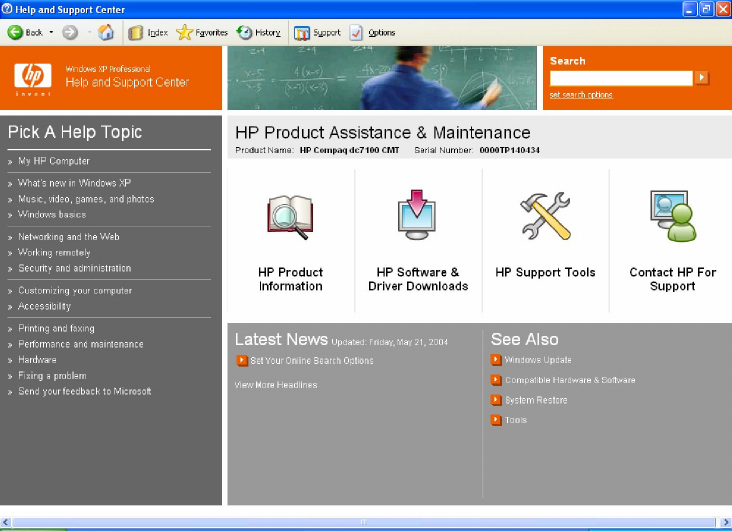
HP Branded XP Help and Support Module
The HP dc7100 series desktop ships with an HP modified Windows XP Help and Support module. This module
includes many new customer support enhancement as well as a revised new look.
Feature Overview
•My HP Computer: Access general information about your HP PC in addition to installed hardware
and software.
•Display of Product name and Serial number: Easy identification of product model and serial
number. Information extracted from the system BIOS.
•HP Product Information: Web link to model specific product information (Internet connection
required).
•HP Software and Drivers Downloads: Web link to model specific software and driver
downloads (Internet connection required).
•HP Support Tools: Web link to HP Instant Support chat service (Internet connection required).
•Contact HP for Support: Access to HP Customer Support phone numbers and Web link to HP
Instant Support chat service (Internet connection required for HP Instant Support chat service).
HP Compaq dc7100 Software Overview Whitepaper
16
Figure 1 - Windows XP Help and Support – HP Version
Preloaded Components
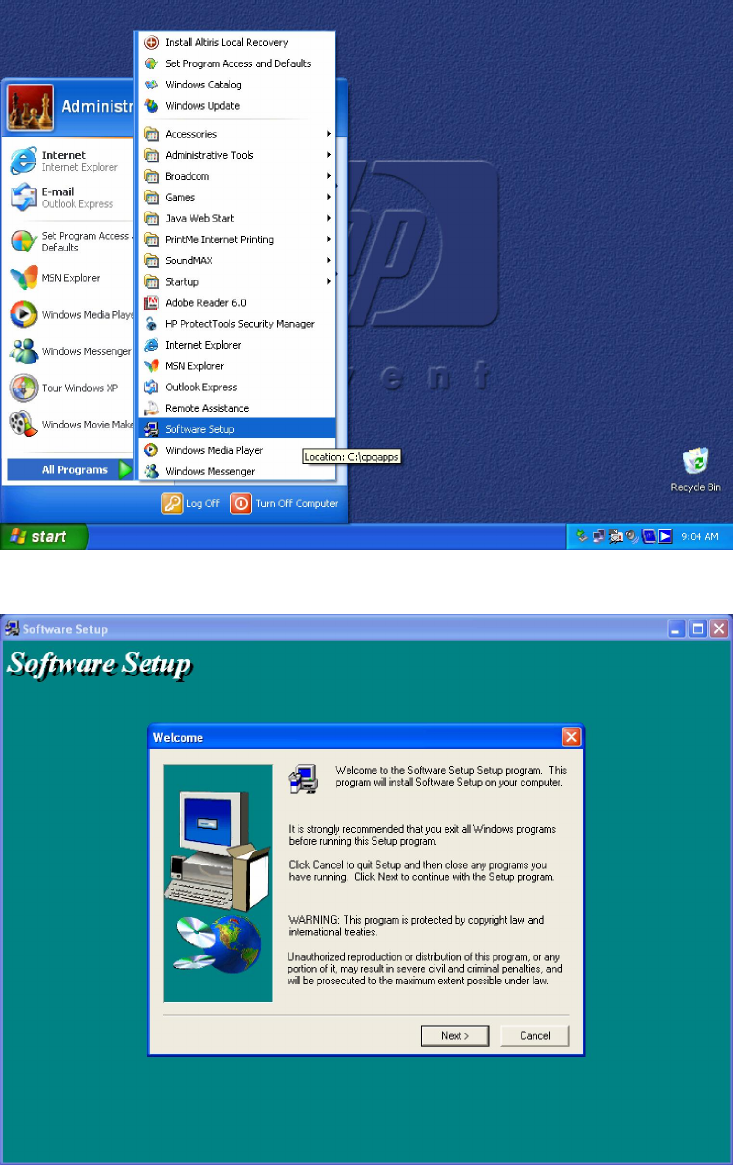
Some software may be preloaded (versus preinstalled). To view a list of preloaded components, you can run HP
Software Setup. To run Software Setup, click Start > All Programs > Software Setup. A welcome screen will
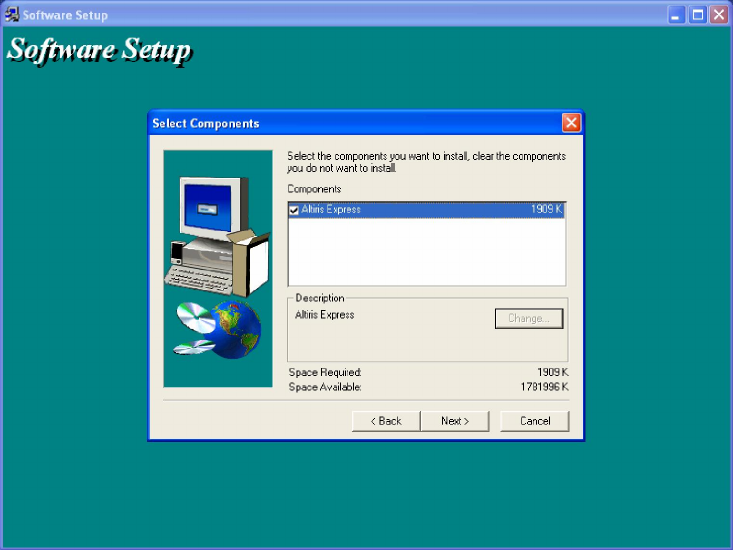
be displayed followed by a list of preloaded components. From Software Setup, you can select the programs you
want to install. The Software Setup application will launch the setup program for any of the components selected.
HP Compaq dc7100 Software Overview Whitepaper
17
Figure 2 -Access to HP Software Setup
Figure 3 – HP Software Setup Welcome Screen
HP Compaq dc7100 Software Overview Whitepaper
18
Figure 4 – HP Software Setup Screen
Additional Software
HP provides additional software on its PCs which can vary depending on the hardware configuration ordered. The
additional software may be pre-loaded, preinstalled or provided on CD with the PC when shipped. Below is a list of
additional software that may have shipped on your dc7100 system:
•Adobe Acrobat Reader – Adobe® Reader® 6.0 is an application that lets you view and print Adobe
Portable Document Format (PDF) files on a variety of hardware and operating system platforms (ships
preinstalled).
•Altris Local Recovery – With Local Recovery, file restoration is just a mouse click or keystroke away. To
recover a deleted file, simply drag and drop using Windows Explorer. For a full system restoration, press
the F11 key when the computer is booting and then select Full Restore from the menu (ships preloaded).
•Dantz Retrospect Express Backup for Windows – Retrospect Express Backup takes the drudgery
out of backing up while providing a safe environment for important files. Instead of manually dragging files
from a hard drive to storage media, Retrospect Express provides intelligent personal backup based on a
user-defined schedule. Retrospect is simple to set up and run—the EasyScript setup wizard creates a
complete backup strategy and begins your first backup in only minutes (ships on CD with HP CDRW,
Combo CDRW/DVD and DVD+RW drives).
•HP ProtectTools –HP ProtectTools Embedded Security Solution Software is a comprehensive set of tools
that enables use of the HP ProtectTools Embedded Security Chip available on select desktop and notebook
computers from HP. This solution provides a range of security features and application support including
local file/folder encryption, protected digital certificate operations and support for the RSA SecurID
software token authentication solution. Designed to the Trusted Computing Group (TCG) standard, HP
ProtectTools Embedded Security is ready for future applications designed to use the TCG standard, as well

HP Compaq dc7100 Software Overview Whitepaper
19
as those available today. HP ProtectTools Embedded Security is a hardware security chip, called the Trusted
Platform Module (TPM) that integrates the core elements of trust into the subsystem (ships with the HP TPM).
HP ProtectTools Smart Card Security Manager helps prevent unauthorized users from accessing business or
personal data on your notebook, with added Smart Card BIOS preboot capabilities advantage of industry
standards like CAPI and PKCS#11
•Intervideo WinDVD - Get the most out of your DVDs with InterVideo WinDVD 3, a PC Magazine Editor's
Choice Award winner. WinDVD combines the picture and sound features of a PC to bring your DVDs to
life. Features include time stretching to let you watch movies faster with natural audio, thumbnail bookmarks
to instantly find your favorite scenes, fully-adjustable zoom and pan, and more. With comprehensive audio
support, including Dolby Digital decoding for 2 to 5.1 channels, S/PDIF digital outputs for home theater
integration, WinDVD lets you enjoy an unmatched theater experience anytime, anywhere (ships on CD with
HP DVD drives).
•Roxio EZ CD Creator - Burn and share anything on CD - music just the way you like it, your photos, your
videos - even backup your critical data - faster and easier than ever. Roxio Easy CD Creator allows you to
record from CDs, LPs, MP3s and more as well as create your own high quality music CDs. Make collections
of your photos and create powerful slide shows and video presentations to share with family or for
business. Keep your important data secure by storing it on CD. The sleek new interface makes simple work
of the most creative task (ships on CD with HP CDRW, Combo CDRW/DVD and DVD+RW drives).
•PDF Complete Special Edition- Generate PDF files from any Windows application with the click of a
button. The PDF format is a de-facto standard for the distribution of “read-only” company to company
document interchange. Output created by PDF Complete SE are 100% compatible with Adobe Acrobat
reader. After PDF Complete Special Edition has created 500 pages, it begins to place a small PDF
Complete watermark on the each page. A user may remove this watermark and receive additional features
and benefits by upgrading to other PDF Complete products. However, even if a user does not choose to
upgrade, PDF Complete Special Edition will continue to produce high quality PDF documents (ships
preinstalled).
•Sonic DVD-It! - DVDit! is a revolutionary new software application from Sonic Solutions, the leader in
DVD publishing systems. Sonic DVDit! is designed to work in your multimedia desktop environment and is
compatible with a broad selection of software and hardware components; DVDit! is the center of your DVD
production universe! It enables video professionals, graphic artists, and video enthusiasts to create stunning
interactive Video content on their PC and publish it on DVD (ships on CD with HP DVD+RW drives).
•ZIM SMS Mail - ZIM SMS Mail is a unique new two-way wireless e-mail extension tool from ZIM
Technologies, designed to leverage the immense popularity of SMS (Short Message Service) text messaging
and any POP 3 e-mail in order to keep your wireless customers connected to their e-mail while on the go.
ZIM SMS Mail is the ideal tool linking the power of e-mail and SMS text messaging to keep your customers
in the loop and productive when and where they need to be (ships preinstalled).
Thank you for your purchase of and interest in HP business PC products. HP hopes that this white paper was useful
in helping you understand the contents of your factory installed Business PC software image.

HP Compaq dc7100 Software Overview Whitepaper
20
Frequently asked questions
Q: How can DVD movies be viewed on Business Desktop dc7100 models?
A: Intervideo WinDVD is provided on CD with dc7100 family products equipped with DVD hardware. A software-
based DVD decoder/player features an easy-to-use interface and allows customers to view DVD video releases. The
DVD player is installed from the Setup Software shortcut off of the Windows Start Menu. This application is
designed for use with Windows XP and Windows 2000.
Q: Is the dc7100 preinstall image also compatible with other dc7100 models?
A: Yes, the dc7100 preinstalled software image has been tested with the CMT, USDT and SFF form factors.
Q: How do I obtain updated software components?
A: The latest software updates are available from the HP Web site at http://www.hp.com. For customers without
Web access, the HP Software Support CD Kit is available.
Q: Will the current image change significantly if new models are introduced?
A: Changes made to the preinstall images will be limited to critical fixes, modifications that support new hardware
features, and Microsoft related security issues or enhancements that will significantly improve overall system
performance. Customers concerned about image changes should sign up for the HP Product Change Notification
(PCN) process. See next question.
Q: How will I know what has changed?
A: Updated HP desktop family software white papers describe updates or differences in software versions that are
introduced with new products. HP Product Change Notification (PCN) is another method of communication to
inform customers of changes to shipping models. For more information, go to http://www.hp.com/go/pcn.
Q: What is the difference between preloaded and preinstalled software?
A: Preinstalled software refers to drivers, hardware enabling utilities, and applications that are ready to use as soon
as your system has completed setup after initial power-on (unbundling). Preloaded software refers to applications
and utilities that provide additional features on applicable models, such as management, DVD playback or CD-RW
burning and must be installed prior to use.
Q: Why is some software preloaded?
A: Select software is preloaded to provide flexibility for our customers. It’s loaded onto the hard drive but in an
uninstalled state.
Q: How do I install preloaded software?
A: HP has made installation of preloaded software easy by including an Software Setup application. Simply launch
Setup Software by clicking Start > Programs > Software Setup, select the desired applications, and follow the
easy-to-use menus.
For more information
•To learn more about preinstalled software with OS support, contact your local HP sales representative or
visit our Web site at http://www.hp.com.

HP Compaq dc7100 Software Overview Whitepaper
21
© 2004 Hewlett-Packard Development Company, L.P. The information
contained herein is subject to change without notice. The only warranties for
HP products and services are set forth in the express warranty statements
accompanying such products and services. Nothing herein should be construed
as constituting an additional warranty. HP shall not be liable for technical or
editorial errors or omissions contained herein.
Microsoft, Windows, and Windows NT are U.S. registered trademarks of
Microsoft Corporation
Intel is a registered trademark of Intel Corporation or its subsidiaries in the
United States and other countries.
Printed in the U.S.A.
372898-001, 06/2004
