HP PA RISC Workstation USB Visualize Universal Serial Bus Lpv37815
User Manual: HP PA-RISC Visualize Workstation Universal Serial Bus
Open the PDF directly: View PDF  .
.
Page Count: 25
!""###

Do You Need to Know About USB?
Several PA-RISC workstations to be intro-
duced during 1999 require a USB keyboard
and mouse. Apart from the addition of three
PC-style keys to the keyboard and a scroll
wheel to the mouse, most users won’t notice
the difference once the system is set up. And
the person setting up the system is likely to
notice only a different connector shape.
However, you need to absorb this presentation:
• if you plan to supply your own keyboard or mouse, or
• if you have been using other PS/2 devices, or
• if you have been considering a port of a PC or iMac USB device, or
• if you need a keyboard and mouse cable longer than 2.5m, or
• if you simply lament the passing of HP-HIL.
This presentation does not apply to Intel-based VISUALIZE workstations, as they
have had USB ports for some time (as have most PCs), and like all NT Worksta-
tions, are awaiting Windows 2000 (aka NT 5) for full USB support.
What You Will Learn Here
• What is it? USB in a nutshell.
• Some history - how USB got to where it is today.
• The state of the USB standard and Unix API efforts.
• Key technical details for users and the merely curious.
• The capabilities, limitations and applications for USB.
• How USB compares to legacy and contemporary alternatives.
• How USB will roll out on PA-RISC platforms.
• How USB is supported in PA-RISC hardware, firmware and HP-UX.
• The initial USB devices.
• Considerations for buyers and users at the transition.
• Considerations for developers.

What is USB?
• U.S.B. stands for Universal Serial Bus (Logo: Icon: )
• Moderate speed 12 Mbps/sec. or 1.5 Mbytes/sec.
• Multiple devices up to 126 - on a single resource set.
• Cubicle span cabling 5m per segment, 30m max. with hubs
• Flexible topology tiered star
• Flexible power devices bus- or locally-powered, w/suspend-resume APM
• Robust PnP, hot attach-detach1
• Low-cost 4 wire
• Idiot-proof Unique modular connectors:
Style A (upstream, to hub/host):
Style B (downstream, detach at device):
Although USB ports have been shipping on PCs for over two years,
widespread acceptance has been delayed by lack of
devices, which, in turn, have been awaiting:
• O.S. support: Still waiting for “NT”. Win95 support is problematic.
• BIOS support: Most “USB” PCs have no USB console capability in BIOS.
• Economics: Some PS/2 devices are still cheaper than USB during 1999.
1. Hot attach-detach is planned, but not fully implemented in the first HP-UX USB support.
A
B

How USB Got Here
As with PCI, USB is sponsored by an independent consortium that was initiated by
Intel. Work began on the standard in 1993.
USB was a response to several issues:
1. PS/2, RS-232C serial and parallel (Centronics, ECP, EPP, IEEE-1284) have seri-
ous deficiencies, and occupy too much panel space in a shrinking world.
2. Dedicated ISA cards are vanishing. SCSI and dedicated PCI cards are overkill
for many desktop applications. FDD and IDE are too resource-limited for many
devices that might otherwise use them.
3. It was getting increasingly expensive for suppliers to maintain proprietary desk-
top connectivity solutions such as ADB (Apple Desktop Bus), Access.Bus,
AT&T CHI (Concentration Highway Interface), Apple GeoPort and HP-HIL.
4. The IRQ shortage in the Intel architecture isn’t going to be solved by adding
more IRQs.
5. An intelligently implemented new interface could revolutionize the desktop,
enabling new capabilities, lower development cost, lower prices, and dramatic
improvements in supportability and ease of use.

$
USB Standards Report
There are two hardware Host Controller Interface architectures:
UHCI (Universal), and OHCI (Open). UHCI appears on Intel motherboards.
OHCI is predominant elsewhere - and is what PA-RISC workstations will use.
The underlying USB Standard is presently at release 1.1. {http://www.usb/org}
Driver Classes have been defined by Working Groups for ( - release level)
MS Windows API Status:
Windows provides legacy thunking code for well-behaved drivers.
The status of open Win32 USB APIs is not clear.
Unix API Status (USBDI) is at 0.8. {URL pending}
As is traditionally the case in the Unix community, standards development is well
behind implementations. USBDI APIs rely on UDI Meta Language. We’ll all need to re-
write or thunk new libraries later (and implement UDI).
Common - 1.0 Hub - 1.0 Physical I/F - 1.0
Audio - 1.0 Imaging - 1.0 Power - 1.0
HID (Human I/F Device) - 1.0 InfraRed - 0.9 Printing - 1.0
Communications - 1.09 Monitor Control - 1.0 Vendor-Specific - N/A

%
A Closer Look
• Devices may be compound (have multiple
functions) or contain hubs.
• Devices are high-speed (12 Mbps) or low-
speed (1.5 Mbps) only. Hubs are high only.
• Differential Data Signalling (3.3V NRZI)
• +Vcc is 500mA @ 5 Vdc
• Devices may supply own power.
• Vcc and Ground make contact before Data lines.
• Maximum length of any single Hub-Device segment:
• Maximum length to any (high speed) device (5 external hub tiers):
• Connectors are friction/detent capture only, and may not be suitable for moderate or
high shock/vibration environments (without user-designed capture).
+Vcc
-Data
+Data
Ground
Hub Device
5m
3m for low-speed devices
Root Hub Hub DeviceHub HubHub Hub
30m

"
USB Topology - “Tiered Star”
• Only devices (not other hubs) may be connected to an un-powered hub.
Root Hub
Hub
Hub Hub
Hub
Hub
Hub
Device
Device
Device
Device
Device
Device
Hub
Device
Hub
Device
Device
Device
Device
Device
Device
Device
Device
Device
1
2a
3a
4
5 (max. powered
Max. device depth
hub depth)
2b
3b
3c

#
USB at the Limits
Disallowed:
• Host-to-host direct cabling. Host-to-host solutions exist, but presently require
LAN adaptors, modems or null modems in the cabling path, none of which are
transparent extensions of the USB. It is not yet clear if any true bridges or
remote-repeaters for USB will appear (the equivalent of LAN bridges, the HP
46082A/B HIL extensions or the HP 37204A HP-IB extender).
Strongly Discouraged:
• Style A (receptacle) to Style A (plug) passive extension cables. Notwithstanding,
they do exist, and can lead to specification violations and unreliable operation.
Exception: active cables (5m single-port bus-powered hubs also exist - and
they’re legal, as long as they aren’t used to interconnect hubs).
Performance:
• Of the theoretical “1.5 MByte/sec.” available, in practice, typical sustained
throughput is more like 600 KBytes/sec., about 33% lower than asynchronous
SCSI (which doesn’t provide its theoretical 1.5 MB/s either). The fastest USB
device reported to date is a Belkin host-to-host LAN emulator, at 700 KBytes/sec.
The Uses of USB
Ideal Uses
• Most human input devices: bar code, buttons, digitizers, gaming, gloves, joy-
sticks, keyboards, knobs, light-pens, mice, 6-axis, tablets, trackballs, touch-pads
• Modem & telephony: POTS, FAX, ISDN, T1, ADSL, low-end cable modem
• Printers, up through 40 ppm or so
• Simple audio: MIDI, speakers, mono&stereo I/O, 5.1 compressed surround out-
put (moving the audio codec outside the box has benefits but overhead hazards)
• Low-demand imaging: digital still cameras, low-rate and/or low-resolution
motion video (e.g. conferencing), monitor calibrators, custom displays, monitor
control
• External floppy drives (FDD, LS-120, HiFD, ZIP)
• Legacy adaptors (USB-IR, USB-serial, USB-parallel, USB-PS/2)
• Security authentication: biometric input, dongles, intrusion detection
• Power management: UPS, cryo-cooler control
Hot-attach/detach permits simple (albeit break-before-make) console switching,
and the 5m segment length can handle most server rack situations.
The Non-Uses of USB
Marginal Uses
• Scanners (USB max’d out for color above FAX resolution [200 dpi])
• LAN and high-end cable modems (USB is max’d-out for 10Mbit LAN)
• CD-ROM, CDR, DVD (USB max’d-out at a mere “4x” CD-ROM)
• MO, tape (USB already too slow for DAT, DLT and other streaming formats)
• Instrumentation (USB no faster than HP-IB), PCMCIA (PC Card) adaptors
• Character-mode terminals, home appliance control (cable length)
Despite this, the industry is leaping to USB from Parallel, SCSI and dedicated ISA or PCI
cards, purely based on the lower cost and ease of support. If IEEE-1394 (Apple
“FireWire”) becomes established on the PC, they’ll jump again.
Contra indicated Uses
• Hard disks, external or internal
• Broadcast-quality video, HD video of any kind
• Studio-quality multi-track audio
IEEE-1394 had been capturing some of these applications and we were unlikely to see
USB used (rationally) for any of them. Unfortunately, since the iMac lacks external
ports faster than USB, irrational USB devices are already appearing.
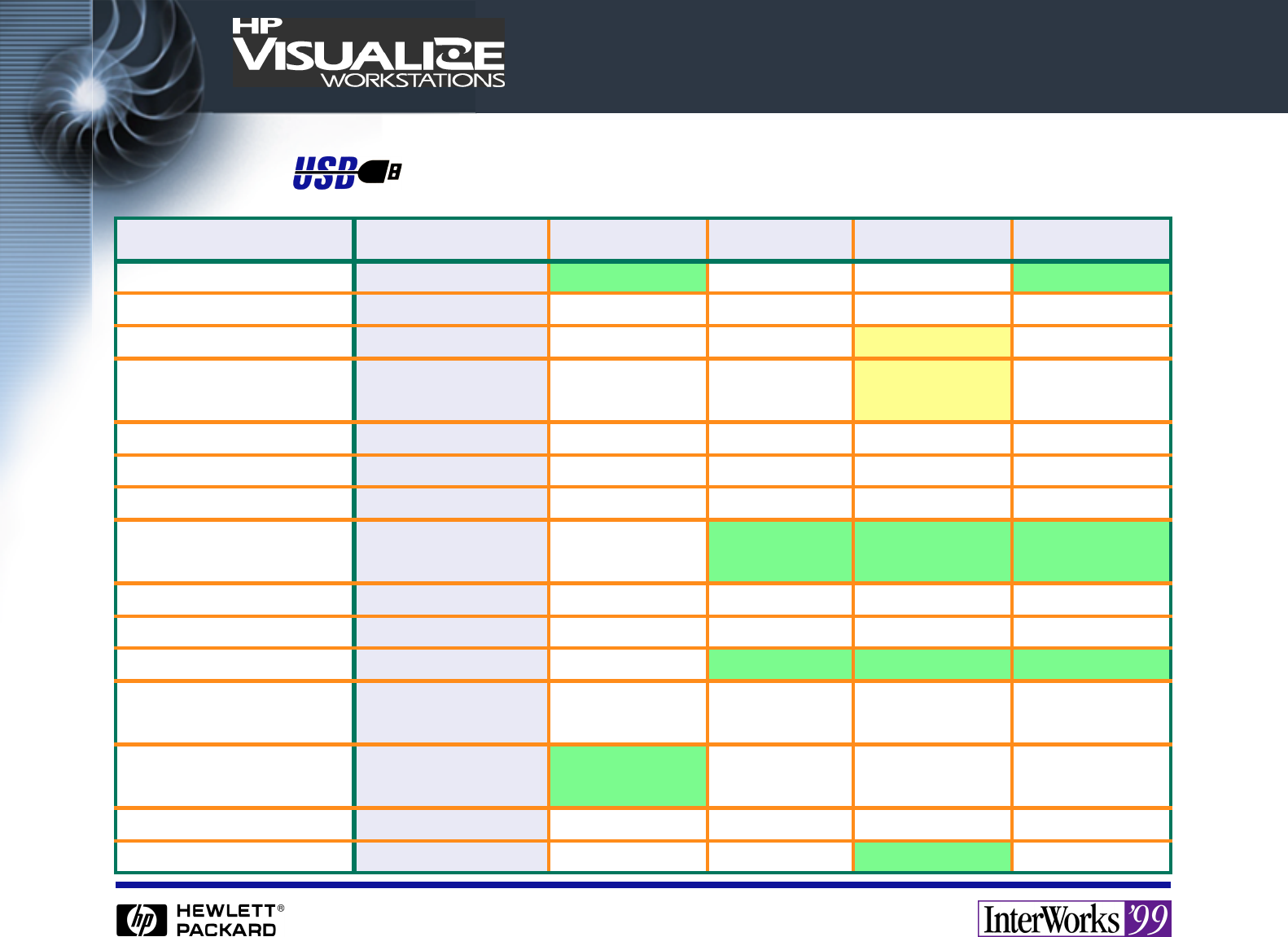
Comparing USB to Legacy
Attribute USB PS/2 HP-HIL Serial Parallel
Ports per host Open (2 typ.) 2 1 Open (2 typ.) 1…3 (1 Typ.)
Pin count 4 6 (4 used) 4 3…25 (9 typ.) 34
Cable segment length 5m ~4m 3m 50 ft., however 3m
Max. transparent
distance
30m ~4m ~45m Unlimited
w/repeaters
Unlimited
w/repeaters
Topology Tiered Star Point-to-Point Daisy-Chain Point-to-Point Point-to-Point
Device-to-Device I/O? No N/A No No No
Hot attach/detach Yes NoNoNo No
Device power Bus or Local Host or Local Host only Local or
Parasitic
Local or
Parasitic
Power available 100-500mA / port 1 A / port 1 A / system Pull-up Trickle Pull-up Trickle
Power management Yes NoNoNo No
Devices/port controller 127 2 + eavesdrops 71 + eavesdrops 1 + eavesdrops
Device enumeration All Keyboard and
Mouse only
Yes Rarely Sometimes
Peak transfer rate 12 Mbps ~12.5 Kbps 60 Kbps ~115 Kbps ~3 MB/s
(typ. < 1 MB)
Error control CRC None None Per device None
Flow control Packet re-try Clocked I/O Clocked I/O Unreliable Handshake

USB Alternatives
Attribute USB IEEE-1394 async SCSI sync SCSI
Ports per host Open (2 typ.) Typ. 1…4 Open (1 typ.) Open (1 typ.)
Pin count 4 6 50 50 or 68
Cable segment
length
5m 4.5m 6m
(single-ended)
varies
Max. transparent distance 30m 72m Unlimited w/repeaters Unlimited w/repeaters
Topology Tiered-Star Tiered-Star Parallel Bus Parallel Bus
Device-to-Device I/O? No Yes Theoretically Theoretically
Hot attach/detach Yes Yes No No
Device power Bus or Local Bus or Local Local only Local only
Power available 100 to 500 mA
per port
1.5 A / port N/A N/A
Power management Yes Yes Only recently Recently
Devices/port controller 127 63a
a. Bus-to-bus bridges permit transparent access to over 60,000 nodes.
77 or 15
Device enumeration All All Mostly Usually
Peak transfer rate 1.5 MB/s 50+ MB/s 1.5 MB/s 80 MB/s
Error control CRC CRC Parity Parity
Flow control Packet re-send Packet re-send Handshake Handshake

USB Port Roll-Out on PA-RISC SPUs
• USB is the standard human interface port for all-new processors in the future.
• Performance upgrades of existing processors may integrate USB.
• Existing processors with PCI may use a USB PCI card (and require an upgrade
to at least the USB release of HP-UX 10.20 or 11.x).
1998 1999 2000
All other all-new SPU designs
Referenced PCI card for existing SPUs
New SPUs

Port Evolution on all-new PA-RISC SPUs
• PS/2 is not present on SPUs with built-in USB, and is not expected to re-appear
on any future all-new processor design prior to IA-64.
• Parallel may be replaced by a USB-parallel adaptor in the next generation.
• RS-232C remains available. Next generation may have only one port (a PC trend
already in progress).
1998 1999 2000
PS/2
USB
Serial
Parallel
$
USB Support: PA-RISC Hardware
• Root hub is based on a National PC87560 Super I/O chip.
• This is an OHCI controller.
• There are two ports, both located on the rear panel. There is no provision for
enabling the USB pins on any EVC connectors present in the SPU.
• No USB hub is required for the keyboard and mouse in the USB User Interface Kit.
Future monitors may include or support a built-in hub.
• Full 500 mA Vcc+ per port is available.
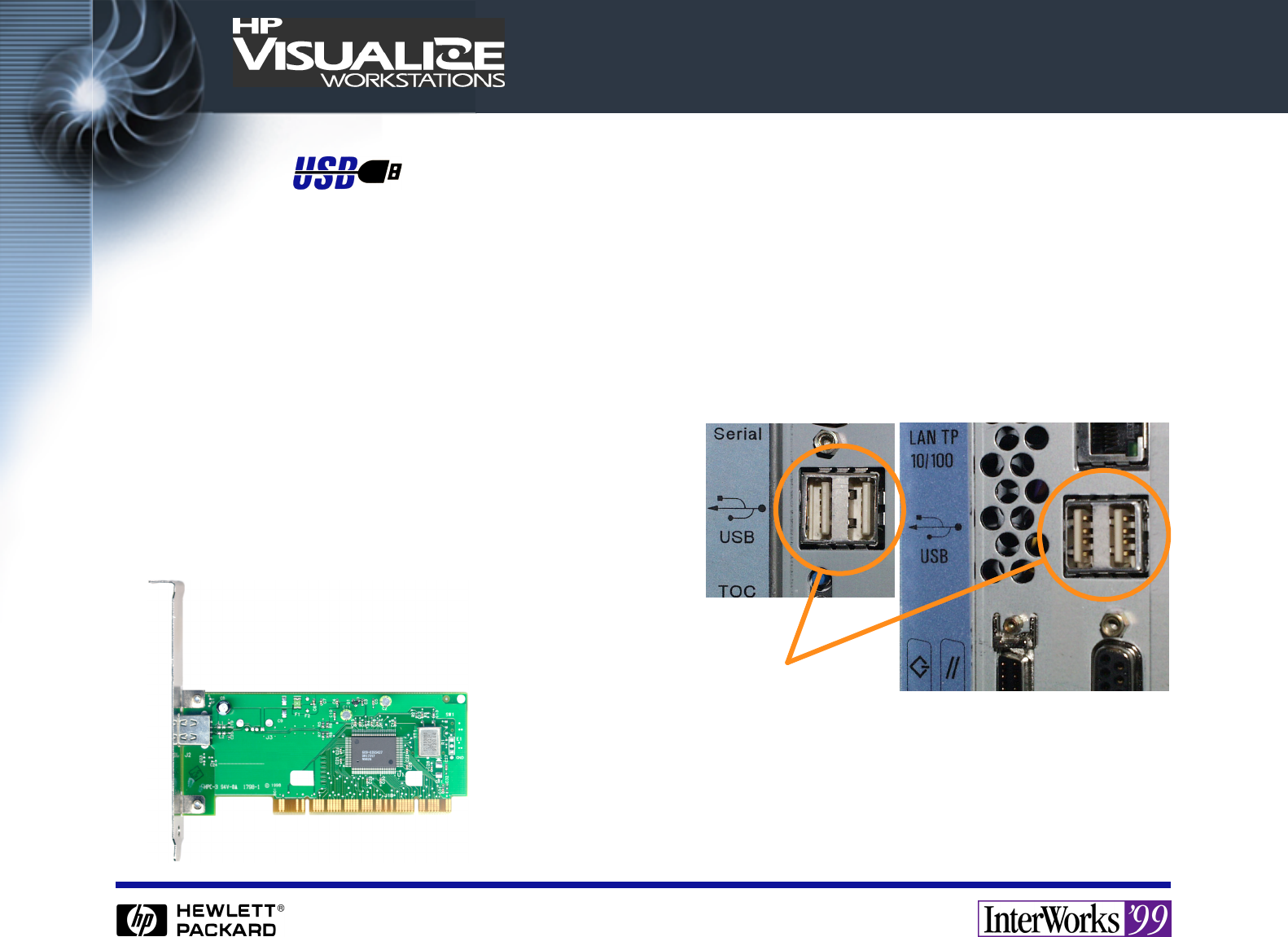
• One or more USB PCI cards (similar to that
pictured below) may be used in addition to
the internal USB ports. {A supported card list
was unavailable at publication.}
SPU USB Ports
Style A receptacles
Typical PCI-USB card

%
USB Support: PA-RISC Firmware
• PDC/IODC has been updated only for SPUs with built-in USB.
• Firmware searches for a keyboard on the USB controller path specified (by
default, the built-in controller, but PCI-USB cards are addressable).
• At initial release, the console keyboard must be one of the first seven devices
found. If it is connected directly to the host, or there is only one 4-port or 7-port
hub in use, it will be.
• Firmware accepts input from the first keyboard found, in a breadth-first search
for the keyboard topologically closest to the processor.
• Only “HID Boot” devices are eligible for boot console. Any device, such as a USB
numeric pad, that identifies as “HID boot”, but is not a full keyboard, needs to be
located beyond the console keyboard in the topology.
• Hot detach-reattach is not supported. The SPU must be rebooted if the keyboard
is disconnected during boot.
• If no keyboard is found, firmware seeks console on the first serial port.

"
USB Support: HP-UX ITE1
• Requires 10.20 ACE-4, or
• Requires 11.x (exact release nomenclature unknown at publication)
• Supports all WSY-supplied localized layouts.
• Does not support Euro (€), since the ITE emulates HP term0, which defines only
the HP-Roman8 character set, which has no available code position for Euro.
Euro is supported in Xserver.
• Does not support the “logo” or “menu” keys (may later).
These keys are supported in Xserver.
• Responds to first keyboard found (same search algorithm as firmware).
• Permits detach / re-attach (console switch) if only one keyboard is present. If
two or more are present, console will move to the next available keyboard when
the first disappears.
1. ITE: Internal Terminal Emulator - the pre-windows HP term0 console mode.

#
USB Support: HP-UX Kernel (Apps & Admin)
User Code
USB Class Driver
USB Hardware Interface
USB Services
Host Controller Driver
Function
USB Device
USB Hardware Interface
Host Interconnect Device
Packet
Protocol
pipe0
interface
pipe bundle
dev_t, data buffer
pipe, data buffer
endpoint, data buffer

USB Support: HP-UX Kernel (cont.)
• Only OCHI controllers are supported, and all tested to date work (although some
will appear in ioscan as “unsupported”). HP-UX support for UHCI, although not
currently scheduled, will be necessary at or before IA-64.
• USB drivers are implemented as WSIO drivers. Big-little endian conversion is
handled transparently. Code is multi-thread and multi-processor safe.
• Although libraries have been added for USB support, the drivers are imple-
mented such that standard commands required essentially no modification.
• Standard user-space I/O calls: open( ), close( ), ioctl( ), read( ), select( ), but not
write( ) (yet, because Hub and HID Class require no “write”). These calls only
access Class drivers. User-space I/O to the raw bus is not supported.
• USB-specific Class developer calls: pipe management (13), data transfer (8),
device management (13), device enumeration (2)
• Include files: kernel - hid.h, usb.h, usbio.h, user-space - hidio.h
• Minor number format is based on logical device enumeration (and not topologi-
cal location).

USB Support: HP-UX Kernel (cont.)
USB Class Drivers supplied at initial release:
• Hub: Root and external
• HID: Human Interface Device
Note that thunking makes USB “boot” devices appear to be PS/2.
Class Drivers under investigation (but not yet committed):
• Communication: For serial adaptors primarily. WAN attach might be addressed,
but LAN is a non-objective, given that USB is slower than 10BaseT.
• Printer: However, it may be trivial, mainly because Unix has no GDI. Further, at
the I/O port level, HP-UX presumes only a raw data stream (lprpp(1M) handles
EOL mapping, and the app or spooler is responsible for the PDL). The USB-par-
allel adaptors tested so far simply work, once the device file is created.
Class Drivers under consideration:
• Audio: For external speakers primarily.
• Imaging
• Mass Storage
• Monitor Control (in HID Class)

USB Support: Xserver
• Whether a device is USB, PS/2, or serial is generally (and deliberately) invisible.
• Consequently, the Euro (€), “logo” and “menu” keys are supportable on all
interfaces. Euro support is a retrofit to the current PS/2 keyboards (in work now
as User Interface Kit A4030G).
• Hot attach/detach does not ship in the first release.
• HP-UX will implement X-USB APIs as standards emerge.
• See next page for feature support on the USB keyboard and mouse.
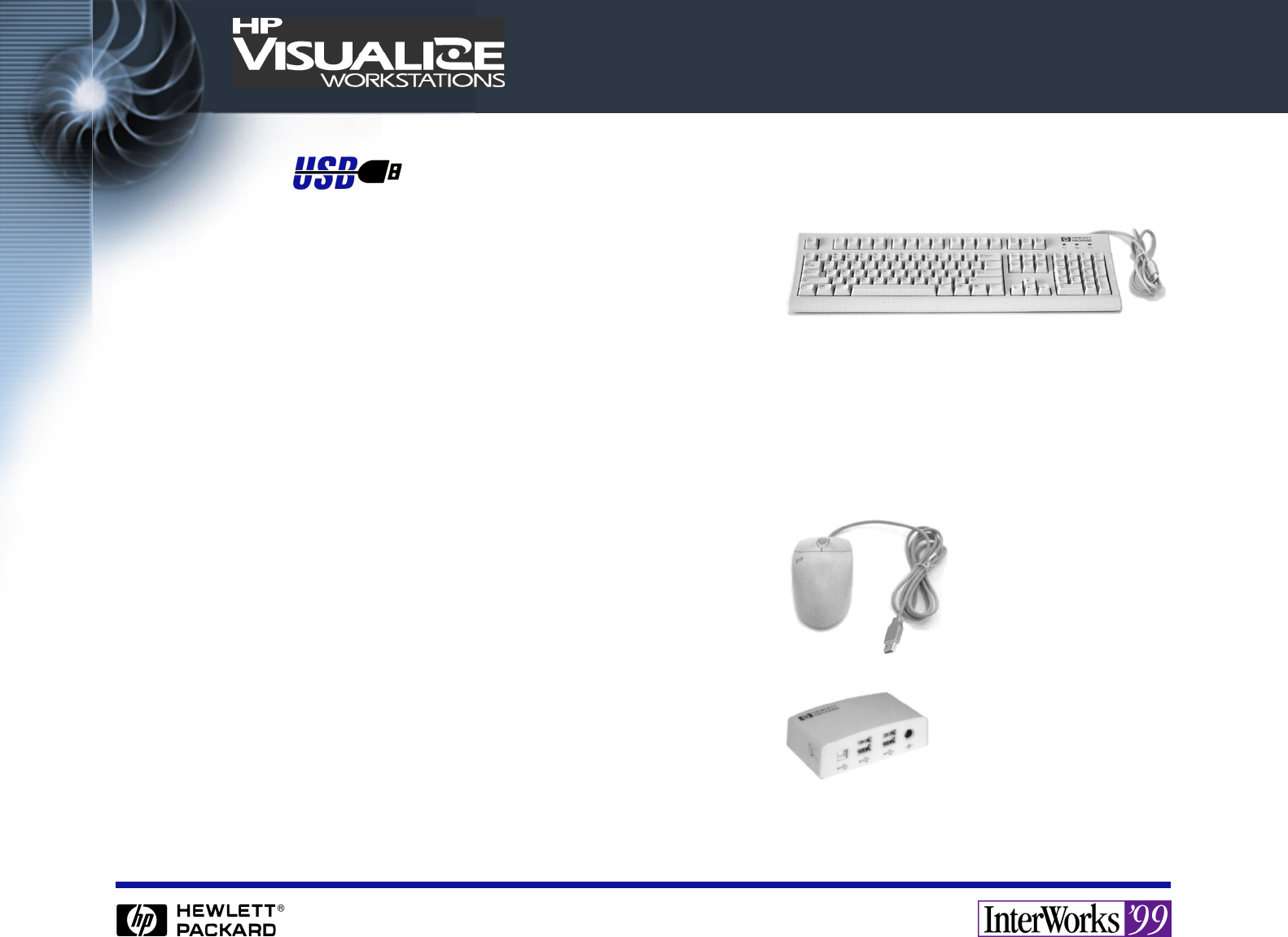
The Initial USB Device List
• Localized A4983-604xx USB Keyboards
Coincident PC-104/105 layout transition
Coincident JIS-109 layout transition
The logo key is Meta-left and Meta-right. Menu is X “menu”.
Coincident Euro support (on Euro keyboards - the EC “forgot” the US and Asia)
13 localized layouts (Japan and Korea were modified to meet local demand).
2.5 meter cable.
• USB 3-Button Scroll Mouse
Scroll-wheel has separate motion & button
Forward is X-button4, reverse button5.
2.5 meter cable.
• HP D6804A USB Hub (already on CPL)
4-port, powered
Docks with emerging HP monitors
Not officially supported, but if you must have a hub, use this one.

USB Buyer/End-User Considerations
• Depending on development schedules, and what major appli-
cations you run, the next USB device you need to connect
may be one or more software security dongles. Several
already exist, and they are very appealing to ISVs, as they
provide even more capability, at lower cost, than was avail-
able in the days of the HP 46084A HP-HIL ID Module.
• The new SPUs have two USB ports. Both ports are used by the required input
devices. If you add any USB devices, you will need a hub. None are officially sup-
ported yet, but so far, every hub we’ve tested has worked.
• Some random USB devices simply work. HP-UX does not strictly reject
unknown/unsupported devices. However, do not assume that any random
“plug&play” USB device from a PC reseller will work - many will not - for exam-
ple, HP USB scanners don’t (no Class driver, no application port).
• At time of publication, WSY had not located a USB console switch (or even a
simple USB mechanical switch) to test.

USB Developer Considerations
• The HP-UX DDK has not yet been updated for USB. If you know how to write a
WSIO driver, you are qualified to write a USB Class driver. A “CDDK” (Class
Driver Developer’s Kit) is under investigation.
• Many non-HID devices so far introduced for Windows PCs are using the Vendor-
Specific Class (not an encouraging development, compared to iMac, where
devices by and large are using standard Classes). Getting documentation on V-S
command sets is often difficult or impossible.
• Caution: the current National Super I/O chip used for the built-in USB does not
support isochronous USB protocol. If your device can’t be operated correctly
using USB bulk or USB interrupt I/O, you’ll need to rely on a PCI-USB card to
support isochronous.
• Not all audio devices require isochronous, but many of them feature multiple
devices, often of the HID Class (knobs, buttons, etc.).
