HUBSAN INTELLIGENT 001TX REMOTE CONTROLLER User Manual

SHENZHEN HUBSAN INTELLIGENT COMPANY LIMITED REMOTE CONTROLLER Users Manual

Users Manual

1.1 Important Notes  This multi-functional RC model is not a toy.     In case of any injuries caused by improper operations, please read the instructions carefully before use. Be aware of your personal safety, safety of others and your surrounding environment. It is advised that beginners learn to fly the qudcopter under the guidance of professional.  1.2 Caution    Propellers work in high speed, which may cause dangerous. User will be responsible for any damages caused by improper operations.Do not operate the quadcopter in crowds, buildings, airports or nearby high voltage cables.   1.3 Li-Po Battery Safety Notes    The quadcopter is powered by a Lithium-Polymer battery.If you do not plan to use the products for a long time, store the battery approximately 50% charged to maintain battery performance and life.● Before flight, check the batteries of quadcopter and controller are fully charged● Before power on the remote controller, check the throttle stick is fully down● Check the quadcopter is in good condition, broken parts will casue a risk of injury● Always power on the remote controller first, then quadcopter. After using, always power off the quadcopter first, then remote controller. Improper procedure maycause the quadcopter lose of control.Connect the battery to the Hubsan USB charger, then connect the USB charger to USB devices, such as a computer or mobile power charger.It takes around 30 minutes to fully charge the battery. The USB LED indicator is in red  when charging and light off when the battery is fully charged. Please unplug the charger and battery when the charging is completed.Flight time is around 5 minutes.®ITEM NO: H001THE HUBSAN NANOQ4 SEPLEASE READ THE MANUAL CAREFULLY BERORE USE.14+INTRODUCTIONThank you for buying the HUBSAN products. It is designed as an easy-to-use, multi-functional RC model, capable of hovering, fast forward and acrobatic flight maneuvers. Please read the manual carefully and follow all the instructions. Be sure to keep the manual for future reference. 1. Safety Notes● Risk of explosion if battery is replaced by an incorrect type.● Dispose of used batteries according to the local regulations.Important3. Safety Check Before Flying4. Charge the Li-Po Battery2. Items in the BoxCheck all the items in the box before use.1Quadcopter 1PC Equipped with1pc of Li-Po Battery4USB Charger 1pc For recharging the Li-Po Battery5Manual 1PC2Propellers 8PCS Propeller A: 4pcsPropeller B: 4pcs3Remote Controller1pc Equipped with 2 X  AAA (Not Included)S/N Part Name Photos Quantity RemarksQuick Guide InstructionThe battery should only be charged with the HUBSAN charger to avoid overcharge.6. Remote Controller5 LED Indicator4 Aileron Trim 3 Elevator Trim(1) Throttle/ Aileron StickMode 1(2)Elevator/ Rudder Stick7.1 Power-On  The quadcopter is designed with Power-On safety system, it ensures the motors will not start undelss safety signals detected.  7.1.1 Turn on/off the remote controller by pushing power switch to left/right. Make sure the Throttle stick is in the full down position, power on the remote controller, then quadcopter. Do not push any sticks or trims before pairing is succeeded, or the quadcopter will drift.7. Start to Fly6.1 Input Key Function6.2  Quadcopter CalibrationPush the stick forward or backward and the quadcopter will fly forward or backward; Push the stick left or right and the quadcopter will rotate left or right.Adjusts for forward and backward drift.Adjusts for left and right drift.Blink in red before binding;Remain lighted in red after binding.Turn on/off the remote controller.S/N Mode/ Control Function(1) (2) 12 3 45 6 Mode 2Throttle/ Rudder StickMode 2Elevator/ Aileron StickMode 1Throttle/ Aileron StickMode 1Elevator/ Rudder StickElevator TrimAileron TrimLED IndicatorPower SwitchPush the stick forward or backward and the quadcopter will fly forward or backward;Push the stick left or right and the quadcopter will fly left or right.Push the stick forward or backward and the quadcopter willascend or decend; Push the stick left or right  and the quadcopter will fly left or right.The throttle stick controls the ascent and descent . Push up the stick and the X4 will ascend. Pull down the stick and the X4 will descend. Move the throttle stick above the center position to take off. (Move the stick gradually to prevent the X4 from ascending too quickly.)The Rudder stick controls the rotate direction Push the stick to the left and the X4 will rotate counter-clockwise Push the stick to the right and the X4 will rotate clockwise. Pushing harder will cause the X4 to rotate faster in the corresponding directions.     4 Power Switch2 Elevator/Aileron Stick5 LED Indicator4 Throttle/ Rudder Trim 3 Elevator/ Aileron Trim1 Throttle/ Rudder StickMode 2Mode 2 Mode 17.2 Basic FlightThe manual will use Mode 2 as an example to illustrate the transmitter’s operation.Transmitter (Model 2) Quadcopter OperationUpDownRight RotationLeft RotationForwardBackwardRight LeftThe Elevator stick moves the X4  forward and backward. Push the stick up the and the X4 will fly forward.Pull the stick down and the  X4 will fly backward. The angle of stick movement corresponds to the angle of tilt and flight speed. The Aileron stick controls left and right flight. Push the stick to the left and the X4 will fly to the left. Push the stick to the right and the X4 will fly to the right. The angle of stick movement corresponds to the angle of tilt and flight speed. 5. Propellers● Make sure that the A and B propellers are installed correctly. The quadcopter will not fly if propellers are improperly installed.(1) Attach the propellers to the corresponding motors thatare marked A and B;A=A B=B(2) Tighten the propellers to the motor shaft.Quadcopter calibration is required when the quadcopter drifts during flight.Land the quadcopter and place it on a horizontal surface for calibration.Calibrating Procedures:Mode 2: Push the left stick to the bottom right, and move the right stick left to right quickly, the 4 LED indicators on quadcopter will blink alternately, calibration succeeded when the indicators stop blinking. Mode 1: Push the left stick to the bottom right, put the right stick to the lowest and move left to right quickly, the 4 LED indicators on quadcopter will blink alternately, calibration succeeded when the indicators stop blinking.   1.6 Always Be Aware of the Rotating Propellers  Be careful to keep your body away from the working propellers. Always keep the quadcopter fly in sight. If above mentioned happens, pwer off the quadcopterand the remote controller immediately.  1.7 Avoid Flying Alone  Beginners should avoid flying alone when learning flight skills. Push the stick forward or backward and the quadcopter will ascend or decend; Push the stick left or right  and the quadcopter will rotate left or right.● Do not mix old and new batteries                ● Do not mix different types of batteries● Do not charge non-rechargeable battery.1.4 Prevent Moisture   The quadcopter contains many precision electrical componets.Store the battery and the quadcopter in a dry area at room temperature. Exposure to water or moisture may cause malfunction resulting in loss of control.1.5 Proper OperationFor safety, pnly use Hubsan spare parts for replacement.
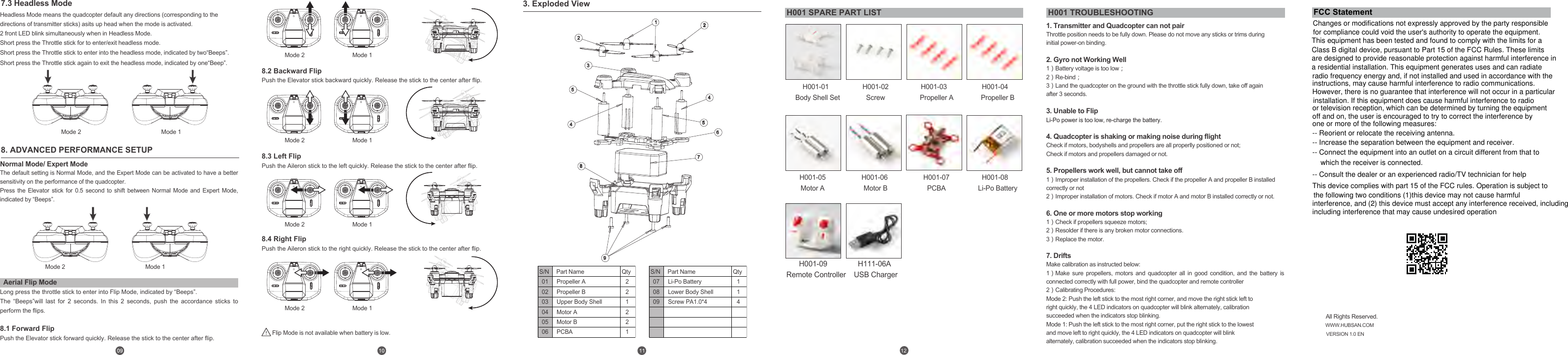
1. Transmitter and Quadcopter can not pairThrottle position needs to be fully down. Please do not move any sticks or trims during initial power-on binding.  2. Gyro not Working Well1)Battery voltage is too low;  2)Re-bind;  3)Land the quadcopter on the ground with the throttle stick fully down, take off again after 3 seconds.  3. Unable to FlipLi-Po power is too low, re-charge the battery.  4. Quadcopter is shaking or making noise during flightCheck if motors, bodyshells and propellers are all properlly positioned or not;Check if motors and propellers damaged or not.5. Propellers work well, but cannot take off1)Improper installation of the propellers. Check if the propeller A and propeller B installed correctly or not2)Improper installation of motors. Check if motor A and motor B installed correctly or not.  6. One or more motors stop working  1)Check if propellers squeeze motors;2)Resolder if there is any broken motor connections.3)Replace the motor.   7. Drifts  Make calibration as instructed below:   1)Make sure propellers, motors and quadcopter all in good condition, and the battery is connected correctly with full power, bind the quadcopter and remote controller2)Calibrating Procedures: Mode 2: Push the left stick to the most right corner, and move the right stick left to right quickly, the 4 LED indicators on quadcopter will blink alternately, calibration succeeded when the indicators stop blinking. Mode 1: Push the left stick to the most right corner, put the right stick to the lowest and move left to right quickly, the 4 LED indicators on quadcopter will blink alternately, calibration succeeded when the indicators stop blinking.  3. Exploded ViewMode 1Mode 2Mode 1Mode 2Mode 1Mode 2Mode 1Mode 2Mode 1Mode 2Mode 1Mode 2Normal Mode/ Expert Mode  The default setting is Normal Mode, and the Expert Mode can be activated to have a better sensitivity on the performance of the quadcopter. Press  the  Elevator  stick  for  0.5  second  to  shift  between  Normal  Mode  and  Expert  Mode, indicated by “Beeps”.Long press the throttle stick to enter into Flip Mode, indicated by “Beeps”.The “Beeps”will last for 2 seconds. In this 2 seconds, push the accordance sticks to perform the flips.   8.1 Forward Flip  Push the Elevator stick forward quickly. Release the stick to the center after flip.8. ADVANCED PERFORMANCE SETUP7.3 Headless ModeAerial Flip ModeHeadless Mode means the quadcopter default any directions (corresponding to thedirections of transmitter sticks) asits up head when the mode is activated.2 front LED blink simultaneously when in Headless Mode.Short press the Throttle stick for to enter/exit headless mode. Short press the Throttle stick to enter into the headless mode, indicated by two“Beeps”. Short press the Throttle stick again to exit the headless mode, indicated by one“Beep”.8.2 Backward Flip  Push the Elevator stick backward quickly. Release the stick to the center after flip.Flip Mode is not available when battery is low.H001-01  Body Shell SetH001-02ScrewH001-03   Propeller AH001-04   Propeller BH001-05Motor A8.3 Left Flip Push the Aileron stick to the left quickly. Release the stick to the center after flip.8.4 Right Flip Push the Aileron stick to the right quickly. Release the stick to the center after flip.123456789452All Rights Reserved.WWW.HUBSAN.COMVERSION 1.0 EN010203040506221221S/N Part Name QtyPropeller APropeller BUpper Body ShellMotor AMotor BPCBA070809114S/N Part Name QtyLi-Po BatteryLower Body ShellScrew PA1.0*4H001 SPARE PART LIST H001 TROUBLESHOOTING12H001-06 Motor BH001-07PCBAH001-08   Li-Po BatteryH001-09   Remote Controller  H111-06AUSB ChargerFCC StatementChanges or modifications not expressly approved by the party responsiblefor compliance could void the user's authority to operate the equipment.This equipment has been tested and found to comply with the limits for a Class B digital device, pursuant to Part 15 of the FCC Rules. These limitsare designed to provide reasonable protection against harmful interference in a residential installation. This equipment generates uses and can radiateradio frequency energy and, if not installed and used in accordance with theinstructions, may cause harmful interference to radio communications. However, there is no guarantee that interference will not occur in a particular  installation. If this equipment does cause harmful interference to radio or television reception, which can be determined by turning the equipmentoff and on, the user is encouraged to try to correct the interference by one or more of the following measures:-- Reorient or relocate the receiving antenna.-- Increase the separation between the equipment and receiver.-- Connect the equipment into an outlet on a circuit different from that towhich the receiver is connected.-- Consult the dealer or an experienced radio/TV technician for helpThis device complies with part 15 of the FCC rules. Operation is subject to the following two conditions (1)this device may not cause harmfulinterference, and (2) this device must accept any interference received, includingincluding interference that may cause undesired operation

Navigation menu