HUBSAN INTELLIGENT 005TX HT005 Repeater User Manual
SHENZHEN HUBSAN INTELLIGENT COMPANY LIMITED HT005 Repeater
Users manual
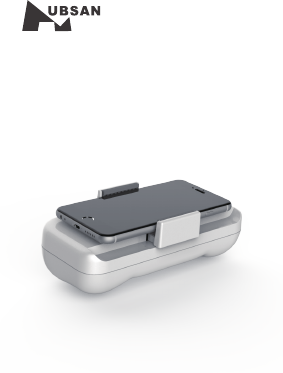
Repeater
V1.0
®
HT005
User Manual
www.hubsan.com
SHENZHEN HUBSAN INTELLIGENT COMPANY LIMITED
high-quality image signals and stable
operations.
Using HT005 with X-Hubsan APP, can receive
Introduction
HT005
HUBSAN HT005 is a wireless signal amplifier
specially designed for Hubsan WIFI models.
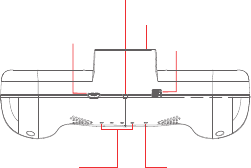
Mobile Holder
Power Switch
Reset
Mirco USB Port
Status IndicatorBattery level
Indicator
1
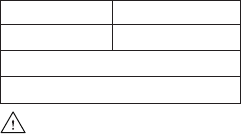
LED Indicator Descriptions:
Status Indicator:
LED will remain red during startup and turn
green after startup is completed.
Battery Level Indicator:
When charging, the LED indicators will blink in
blue and remain solid when fully charged.
Each LED indicator represents 25% of battery
level.
Battery
Battery Specification
Type LiPo Capacity 2600mAh
Voltage 3.7V Energy 9.62Wh
Charging Temperature Environment:0℃~+35℃
Operating Temperature Environment:20℃~+60℃
HT005 has a built-in Li-Po battery.
The battery has a capacity of 2600mAh with
functions of overcharge protection,over
discharge protection and low voltage protection.
The battery must be fully charged before
using it for the first time.
2
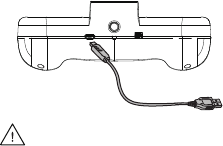
Connect the repeater to a Micro USB charger.
Linking the HT005 Repeater
Free download X-Hubsan APP in App Store or
in Google Play.
Charging the Battery
battery level indicators will blink when charging,
and remain solid after charged completely.
The power source can be a 5V adapter or a
PC.
If the charge current is 1A,the charging time
will be approximately 3 hours.A fully charged
battery will last for 2 hours before it needs to
be charged again.
Adapter is not included in the package and
the maximum charging current is 2.6A.
3
5. Tap the Settings in APP, choose “Repeater”,
1.Power on the Repeater;
Important Notice:
For safety, please complete the binding
procedure in the APP as instructed below,
otherwise the quad cannot take off.
Settings→Others→Plane Setting
Disconnect the quad and relay to unbind.
4
2.Search for WI-FI on devices:
For iPhone or iPad, please select【Settings】
>Wi-Fi;
For Android system,please select【Settings】
>WLAN> WI-FI.
3.Click HUBSAN_HT005_XXXXXX, and
password is 12345678. The password cannot
be changed by user.
4. After connection completed, open X-Hubsan
APP, choose the quad model (for example
Hubsan H507A) to enter into the user interface.
click “Connection Settings”
to link the relay with quad.
5
FCC INFORMATION
This equipment has been tested and found to
comply with the limits for a Class B digital device,
pursuant to Part 15 of the FCC Rules. These limits
are designed to provide reasonable protection
against harmful interference in a residential
installation. This equipment generates, uses, and
can radiate radio frequency energy and, if not
installed and used in accordance with the
instructions, may cause harmful interference to
radio communications. However, there is no
guarantee that interference will not occur in a
particular installation. If this equipment does cause
harmful interference to radio or television reception,
which can be determined by turning the equipment
off and on, the user is encouraged to try to correct
the interference by one or more of the following
measures:
• Reorient or relocate the receiving antenna.
• Increase the separation between the equipment
and receiver.
• Connect the equipment into an outlet on a circuit
different from that to which the receiver is
connected.
• Consult the local dealer or an experienced
radio/TV technician for help.
Changes or modifications not expressly approved
by the party responsible for compliance could void
the user’s authority to operate the equipment.
This device complies with Part 15 of the FCC Rules.
6
CAUTION
RISK OF EXPLOSION IF BATTERY IS REPLACED
BY AN INCORRECT TYPE,
DISPOSE OF USED BATTERIES ACCORDING
TO THE INSTRUCTIONS
Environmentally friendly disposal
Old electrical appliances must not be disposed
of together with the residual waste, but have to
be disposed of separately. The disposal at the
communal collecting point via private persons is
for free.
The owner of old appliances is responsible to
bring the appliances to thise collecting points or
to similar collection points. With this
little personal effort, you contribute to
recycle valuable raw materials
and the treatment of toxic
substances.
Operation is subject to the following two conditions:
(1) this device may not cause harmful interference,
and (2) this device must accept any interference
received, including interference that may cause
undesired operation.

7