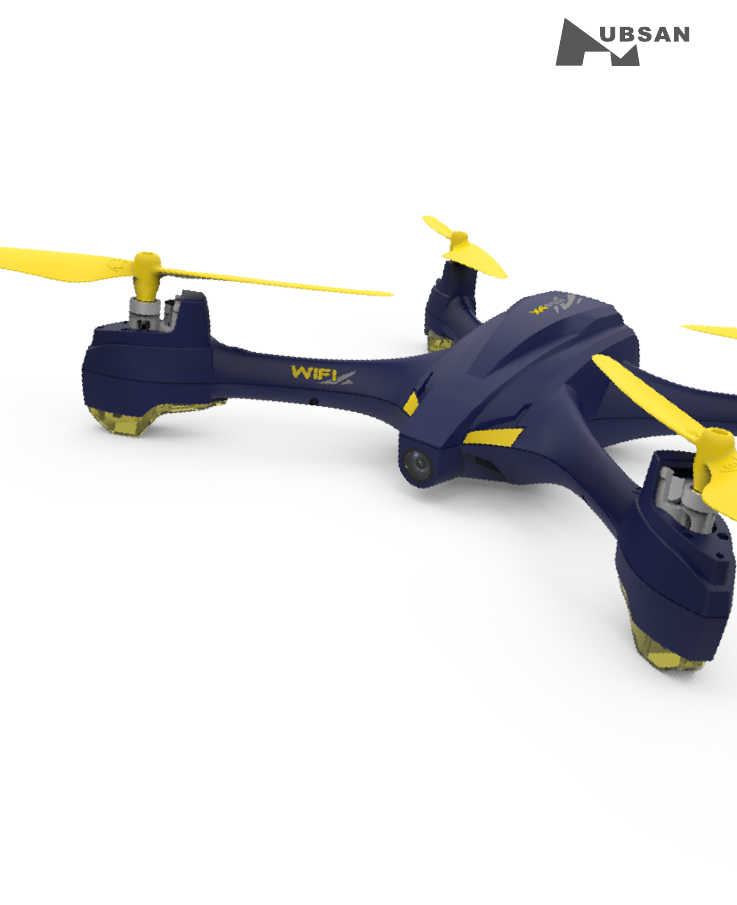
HUBSAN INTELLIGENT 507ARX X4 STAR WIFI User Manual
SHENZHEN HUBSAN INTELLIGENT COMPANY LIMITED X4 STAR WIFI
User Manual
®
GPS WAYPOINT
X4 STAR WITH APP
H507A
PLEASE READ THE INSTRUCTION MANUAL CAREFULLY

IMPORTANT SAFETY NOTES
OPERATION: Be extremely careful and responsible when using the Quad.
Small electronic components can be damaged by crashes or by dropping
into water. To avoid any injuries, do not use the quad with broken or
damaged components.
Maintenance: Do not try to fix the quad by yourself, please contact Hubsan directly or
distributors authorized by Hubsan for customer services.
For more information, please visit official website at www.hubsan.com
Battery: Do not put the battery in high temperature area above 60 degrees.
Using a Hubsan dedicated charger for recharging.
Keep the batteries away from children.
Keep the batteries dry.
·Do not fly the quad in crowded places, always be aware of the safety of yourself and others.
·Do not fly in bad weather.
·Never try to catch the quad while it is in flight.
·This quad is intended for experienced pilots age 14+.
USAGE ADVICE
Hubsan provides you with two files for your quad:
1.《Disclaimer》
2.《Quick Start Guide》
Watch the tutorial video and read the Disclaimer first,.
For detail information, please download User Manual at www.hubsan.com.
·Take off the battery if it is not in use, to avoid accidentally injuries.
·Keep your body away from propellers after power on, High speed propellers are very dangerous.
Read the Disclaimer first before use.
※SYMBOL EXPLANATION
1
No operating Important Notice Instruction Explanation, reference
Safety Advisory Notice for Lithium-Polymer (LIPO) Batteries
LiPo batteries are different from conventional batteries in that their chemical contents
are encased in a relatively lightweight foil packaging. This has the advantage of
significantly reducing their weight but it does make them more susceptible to damage
if roughly or inappropriately handled. As with all batteries, there is a risk of fire or
explosion if safety practices are ignored:
● If you do not plan to fly the quad for a long time, store the battery approximately 50%
charged to maintain battery performance and battery life.
● Please use Hubsan chargers for battery charging.
● Discharging the battery within 5C current , do not over-discharging.
● Do not charge on carpet to avoid fire. 切
● Batteried need to be recharged if not in use for over 3 months.
1.Charge and store LiPo batteries in a location where a battery fire or explosion
(including smoke hazard) will not endanger life or property.
2.Keep LiPo batteries away from children and animals.
3.Never charge the LiPo battery that has ballooned or swelled.
4.Never charge the LiPo battery that has been punctured or damaged.
5.After a crash, inspect the battery pack for signs of damage. Discard in accordance
with your country’s recycling laws.
6.Never charge the LiPo battery in a moving vehicle.
7.Never overcharge the LiPo battery.
8.Never leave the LiPo battery unattended during recharging
9.Do not charge LiPo batteries near flammable materials or liquids.
10.Ensure that charging leads are connected correctly. Reverse polarity charging can
lead to battery damage or a fire or explosion.
11.Have a suitable fire extinguisher (electrical type) OR a large bucket of dry sand near
the charging area . Do not try to extinguish electrical (LiPo) battery fires with water.
12.Reduce risks from fire/explosion by storing and charging LiPo batteries inside a
suitable container.
13.Protect your LiPo battery from accidental damage during storage and
transportation. (Do not put battery packs in pockets or bags where they can short
circuit or can come into contact with sharp or metallic objects.).
14.If your LiPo battery is subjected to a shock (such as a crash), place it in a metal
container and observe for signs of swelling or heating for at least 30 minutes.
15.Do not attempt to disassemble or modify or repair the LiPo battery.
2

3
CATALOGUE
SAFETY NOTES 1
4
4
5
5
5
5
5
5
5
6
6
7
7
7
7
7
9
11
12
8
8
8
1.Item List
2.LED Indicator Status
3.Quad Battery
3.1 Introduction
7.4Basic Flight
EXPLODED VIEW
H507A TROUBLESHOOTING
H507ASPARE PART CHART
4.Propeller
3.2 Installation
4.1Introduction
3.3Charging
4.2Installation
6.Start to Fly
5.X-Hubsan APP
6.1Flight Environment
6.2Safety Checks before flying
7.APP Flight
7.1 Connect with APP
7.2Compass Calibration
7.3Map Mode
INTRODUCTION
INTRODUCTION
Thank you for buying the HUBSAN product. It is designed as an easy-to-use,multi-functional RC
model, capable of hovering and acrobatic flight maneuvers. Please read the manual carefully and
follow all the instructions. Be sure to keep the manual for future reference.
Quadcopter Weight: 162g(including protection)
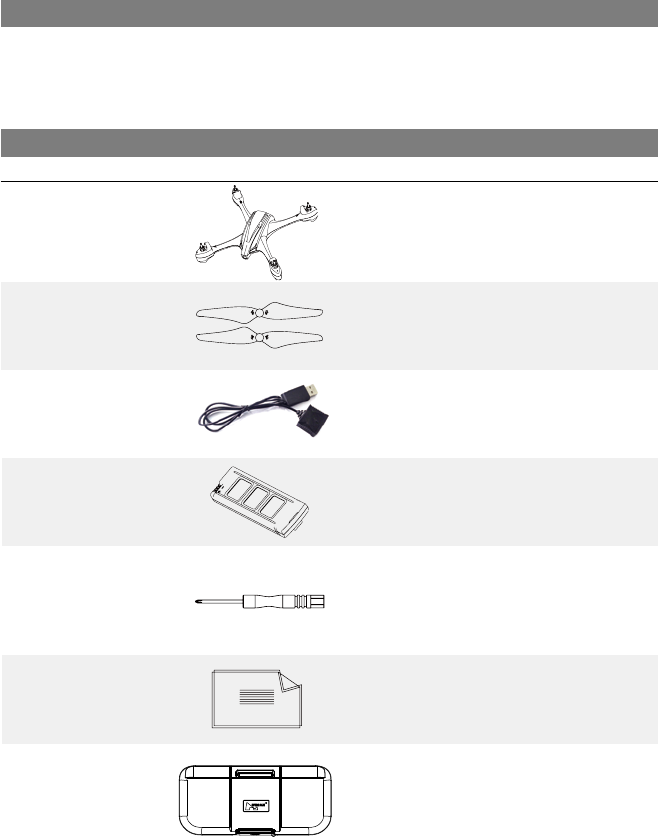
1.ITEMS INCLUDED IN THE BOX (Check all the items in the box before using.)
S/N
1
2
3
4
5
7
6
1PC
8PCS
1PC
1PC
1PC
1PC
2PCS
Quad
Propellers
USB Charger
7.6V Li-Po battery
Screw-driver
Repeater
User Manual
Propeller A 4pcs
Propeller B 4pcs
For Li-Po battery charging
For quad copter
For removing propellers
《Disclaimer》
《Quick Start Guide》
Part Name Qty RemarksPhotos
4
Use with X-Hubsan
APP
2. QUAD COPTER MOTOR LED INDICATOR
3. QUAD COPTER BATTERY
Indicator Status:
Front LED: is blue; Back LED: is red.
1.Power on: 4 LED indicators blink simultaneously
2.Compass Calibration:
1)Horizontal calibration: 4 LED indicators blink circularly.
2)Vertical calibration: 4 LED indicators blink alternately.
3.Quadcopter Calibration:4 LED indicators blink slowly.
4.GPS Flight: 4 LED indicators remain lighted.
5.GPS Return : 2 front LED remain lighted, and 2 back LED blink slowly.
6.Low Voltage: 2 front LED remain lighted, and 2 back LED blink quickly.
7.Disconnection: When the quad is out of control, 2 front LED blink alternately, and
2 back LED remain lighted.
3.1 INTRODUCTION
The quad copter battery is a rechargeable Li-Po battery with 550mAh
capacity and 7.6V voltage.
The battery should only be charged with the HUBSAN charger to avoid
overcharge.
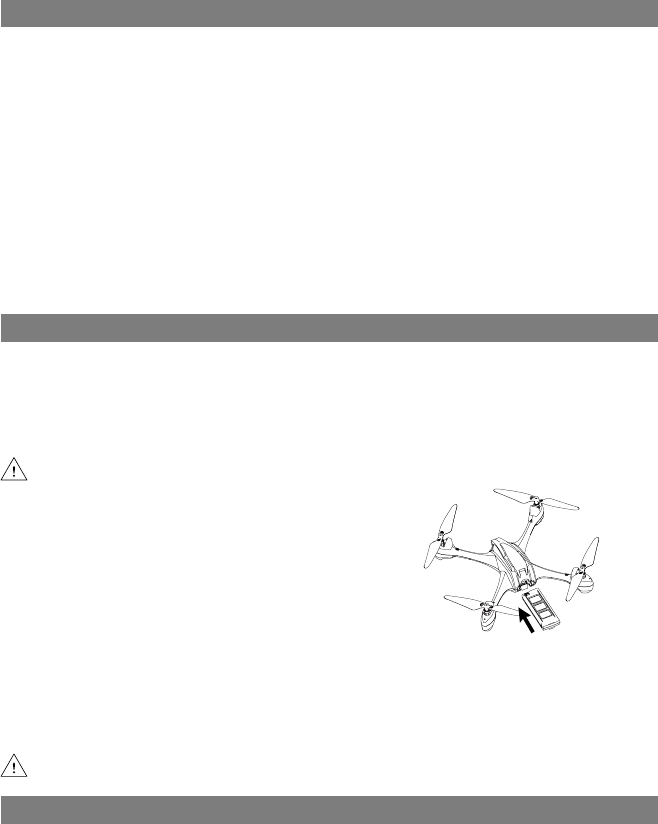
3.2 INSTALL THE BATTERY
Push the battery into the battery
compartment correctly.
3.3 CHARGING
Connect the battery to the USB charger, then connect the USB charger to
USB devices, such as a computer or mobile power charger (5V,1A).
The USB LED indicator blinks in red when charging, and remain lighted after the
battery is fully charged, then please unplug the charger and battery
Charging time: around 200 mins.
Please make sure the battery is fully charged before first time use.
Please fully charge the batteries to avoid loss of control due to low voltage.
5
4 PROPELLER
4.1 Introduction
The quad is equipped with 6.95" propellers that are marked with A and B.
Propellers are consumables, please replace with new ones if there is any damage.
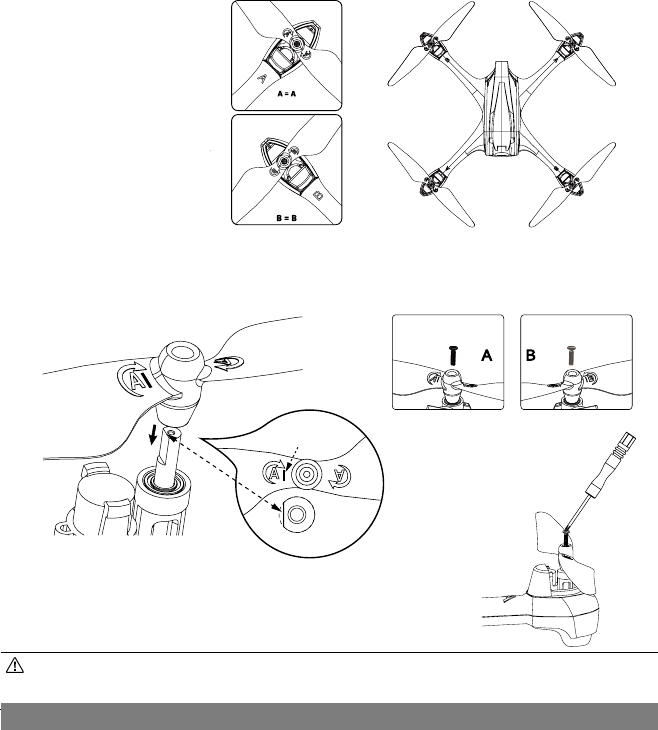
Attach the propellers to the corresponding motors that are marked A and
B,tighten the propellers and keep the motors deadlocked with the screw-
driver.
Match the “I” mark on propellers to the “D” gap on
motor shafts when assembling, as figure 1 shows.
4.2 Installation
<Figure 1>
●
●
Make sure that the A and B propellers are installed correctly. The X4 will not fly if
propellers are improperly installed.
Keep fingers and other body part away from hazardous moving parts
Tighten the propeller A
with black screw;
Tighten the propeller B
with sliver screw.
A B
黑色螺丝 银色螺丝
6
5 X-Hubsan App
Download X-Hubsan APP in App Store or in Google Play.
X-Hubsan is an APP designed for Hubsan products. Users can control the quad,
take pictures/videos and set parameters of quad on the APP.It is advised to control
the quad within 50 meters and use the smart devices with large screen for the best
visual experience.And you can also buy Hubsan repeater (HT005) to get longer
distances (400m).
“I”Mark
“D”Gap
Black Screw Silver Screw
7.APP Flight
6 START TO FLY
In case of any injuries caused by improper operations, it is advised that
beginners learn to operare the quad under the guidance of professional.
It is very improtant to choose the right flight environment.
6.1 FLIGHT ENVIRONMENT
(1) The flying area should be open and is without tall buildings, otherwise the GPS
may not work.
(2) Do not fly in bad weather like windy, snowy, rainy or foggy days.
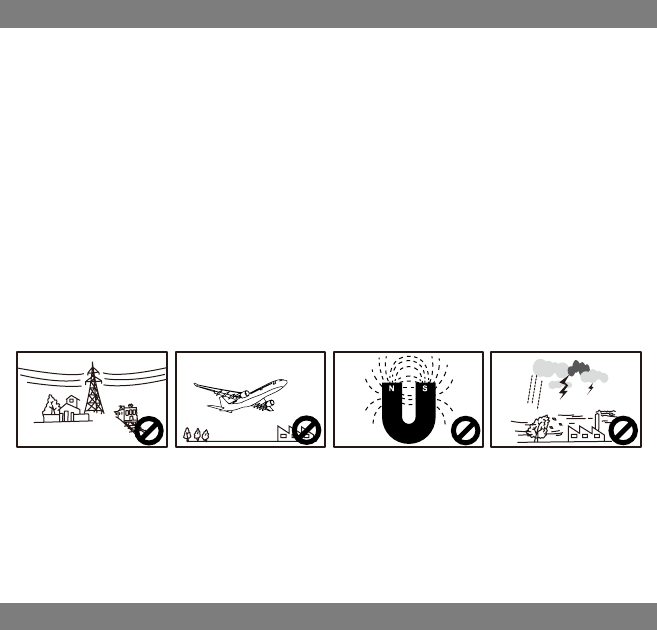
(3) Stay away from obstacles, crowds, power cables, trees and water etc.
(4) Do not fly near the radio towers or airports.
(5) The quad will not work in the Antarctic Circle or the Arctic Circle.
(6) Obey the local laws and regulations, do not fly in restricted areas.
(7) Only fly in good weather conditions and air temperatures between 0-40℃
(not including rain, wind or other extreme weather.)
6.2 Safety check before flight
(1) Keep batteries fully charged
(2) Install propellers properly
(3) Insert Micro-SD card for pictures and videos
(4) Check if motors work well after binding.
7.1 Connect the quadcopter with App
(1).Power on the quad;
(2).Search for WI-FI on devices:
For iPhone or iPad, please select【 Settings 】>Wi-Fi;
For Android system,please select【 Settings 】>WLAN> WI-FI.
(3).Click Hubsan_h507a_XXXXXX,and password is 12345678.The passwordcan’t
be changed by user.
(4).Connection completed
(5).Open X-Hubsan APP, choose Hubsan H507A to enter into the user interface
for flight.
7
High Tension Line Airport Interference Rain

7.2 Compass Calibration
Compass calibration is required for the first use, otherwise the quad can't work
properly.
Do not calibrate the compass in a strong magnetic field to avoid interference.
Keep calibrating the compass regularly to make sure the quad fly in good
condition.
(1).Please follow the instrucitons on APP;
(2). Calibration is completed when the calibration instructions disappear
and the APP shows the Operation interface.
7.4 Basic Flight
Please check the help tips on APP for more details.
7.3 Map Mode
Click to shift between Camera mode and Map mode.
8
NOTICE:
For safety,please don't use the smart device for other purposes while it is connecting with
Hubsan App.
If you want to control the quad with other devices, please restart the quad.
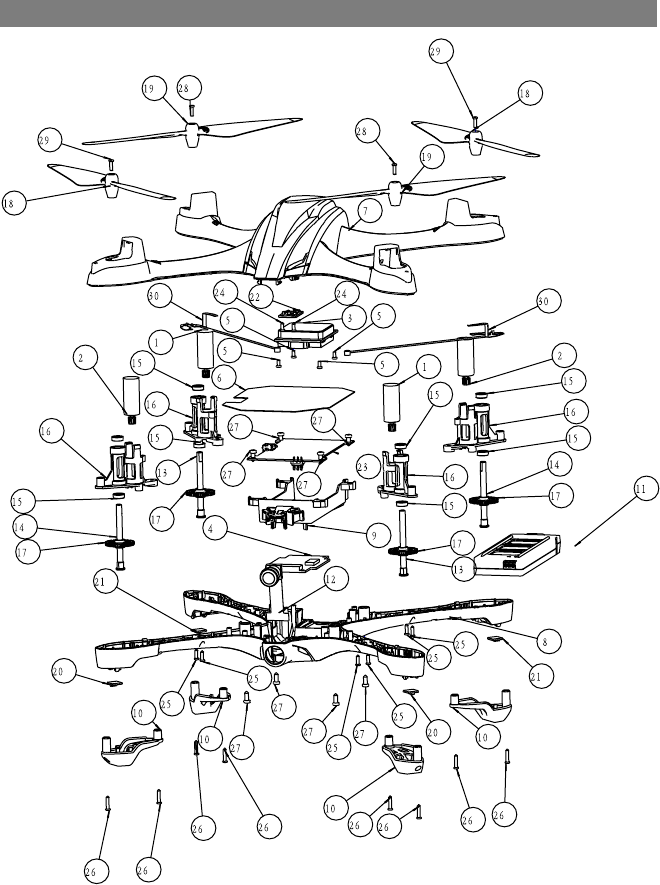
EXPLODED VIEW
9
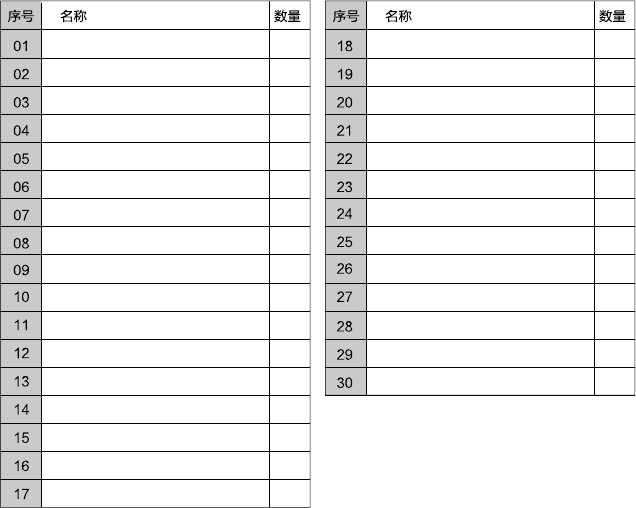
H502S Motor B Propeller A
Propeller B
Blue LED
Red Led
Compass Module
Main Control Board
Screw
Screw
Screw
Screw
Screw
Screw
wifi Antenna
H502SMotor A
GPS
5.8 GHz Transmission Module
Screw
Signal Isolation Membrane
Upper Body Shell
Lower Body Shell
Battery Compartment
Lampshade
Li-Po Battery
Camera Module
Motor Shaft B
Motor Shaft A
Shaft Sleeve
Motor Holder
Rotary Gear
2 2
2
2
2
1
1
2
8
8
8
2
2
2
2
1
1
4
1
1
1
1
4
1
1
2
2
2
4
4
10

H507A TROUBLESHOOTING
1. No GPS Signal !
Be sure it's for outdoors flight, and the flight environment should be open
without tall buildings.
2. Altitude Hold & Positioning not work!
Check if the quad is with more than 6 GPS satellites or not.
3. Can't take pictures and videos!
① Check if the Micro-SD card is inserted or not;
② Check if the Micro-SD card is formatted correctly or not (Format the Mirco-
SD card before use, if the Micro-SD card is with FAT32, the card should be Class
4 or Class 4+)
4. Can't fly back to Home Point!
Be sure the GPS satellites are more than 6 before flying.
5. GPS signal lost!
Check if there is any interference to quad or not, for example: high-tension
cables, radio tower.
6. The quad or video shakes while flying
① Check the propellers, replace propellers if there is any broken or deformed;
② Check the screws on quadcopter are fixed in place or not;
③ Check the motor shaft is broken or not.
7. No Wi-Fi Connection
Restart the quad.
11
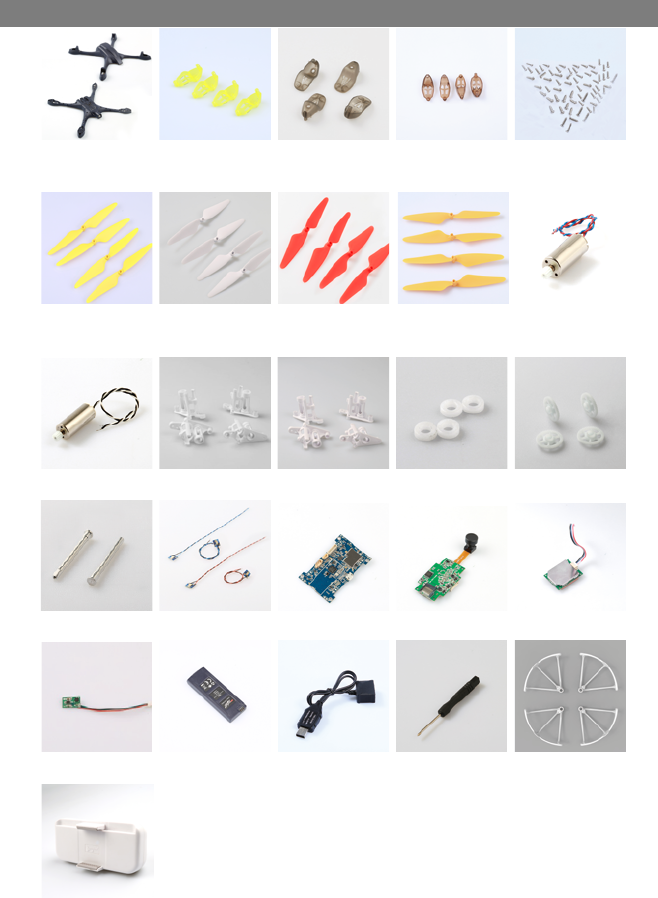
H507A SPARE PART CHART
H507A-01
Body Shell
H507A-02
Lamp Base A/B
Transparent yellow
H507D-02
Lamp Base A/B
Brown
H502S-03
Propeller A/B
White
H507A-04
Motor Holder Grey
H502-12
LED Kit
H507A
Li-Po Battery
H502C-02
Lamp Base A/B
Grey
H502E-03
Propeller A/B
Red
H502-07
Motor Holder
H507A-05
2.4G RX
H502C-08
USB Charger
H507A-03
Propeller A/B
Yellow
H502-06
Motor B
H502-11
Motor Shaft
H501S-13
Compass Module
H501A-04
HT005 Repeater
H507D-03
Propeller A/B
Orange
H502-08
Shaft Sleeve
H507A-06
Camera Module
H502-19
Screwdriver
H502C-03
Screw
H502-05
Motor A
H502-10
Motor Gear B
H501A-05
GPS Module
H502-20
Protection
12

FCC INFORMATION
This equipment has been tested and found to comply with the limits for a Class B digital device,
pursuant to Part 15 of the FCC Rules. These limits are designed to provide reasonable protection
against harmful interference in a residential installation. This equipment generates, uses, and can
radiate radio frequency energy and, if not installed and used in accordance with the instructions, may
cause harmful interference to radio communications. However, there is no guarantee that interference
will not occur in a particular installation. If this equipment does cause harmful interference to radio or
television reception, which can be determined by turning the equipment off and on, the user is
encouraged to try to correct the interference by one or more of the following measures:
• Reorient or relocate the receiving antenna.
• Increase the separation between the equipment and receiver.
• Connect the equipment into an outlet on a circuit different from that to which the receiver is
connected.
• Consult the local dealer or an experienced radio/TV technician for help.
Changes or modifications not expressly approved by the party responsible for compliance could void
the user’s authority to operate the equipment.
This device complies with Part 15 of the FCC Rules. Operation is subject to the following two
conditions: (1) this device may not cause harmful interference, and (2) this device must accept any
interference received, including interference that may cause undesired operation.
This device complies with part 15 of the FCC Rules.
Operation is subject to the following two conditions:
(1) This device may not cause harmful interference,and
(2) this device must accept any interference received, including interference that may cause undesired
operation.
Made in China
CAUTION
RISK OF EXPLOSION IF BATTERY IS REPLACED BY AN INCORRECT TYPE.
DISPOSE OF USED BATTERIES ACCORDING TO THE INSTRUCTIONS.
WARNING
HAZARDOUS MOVING PARTS KEEP FINGERS AND OTHER BODY PARTS AWAY.

®
www.HUBSAN.com
SHENZHEN HUBSAN INTELLIGENT COMPANY LIMITED