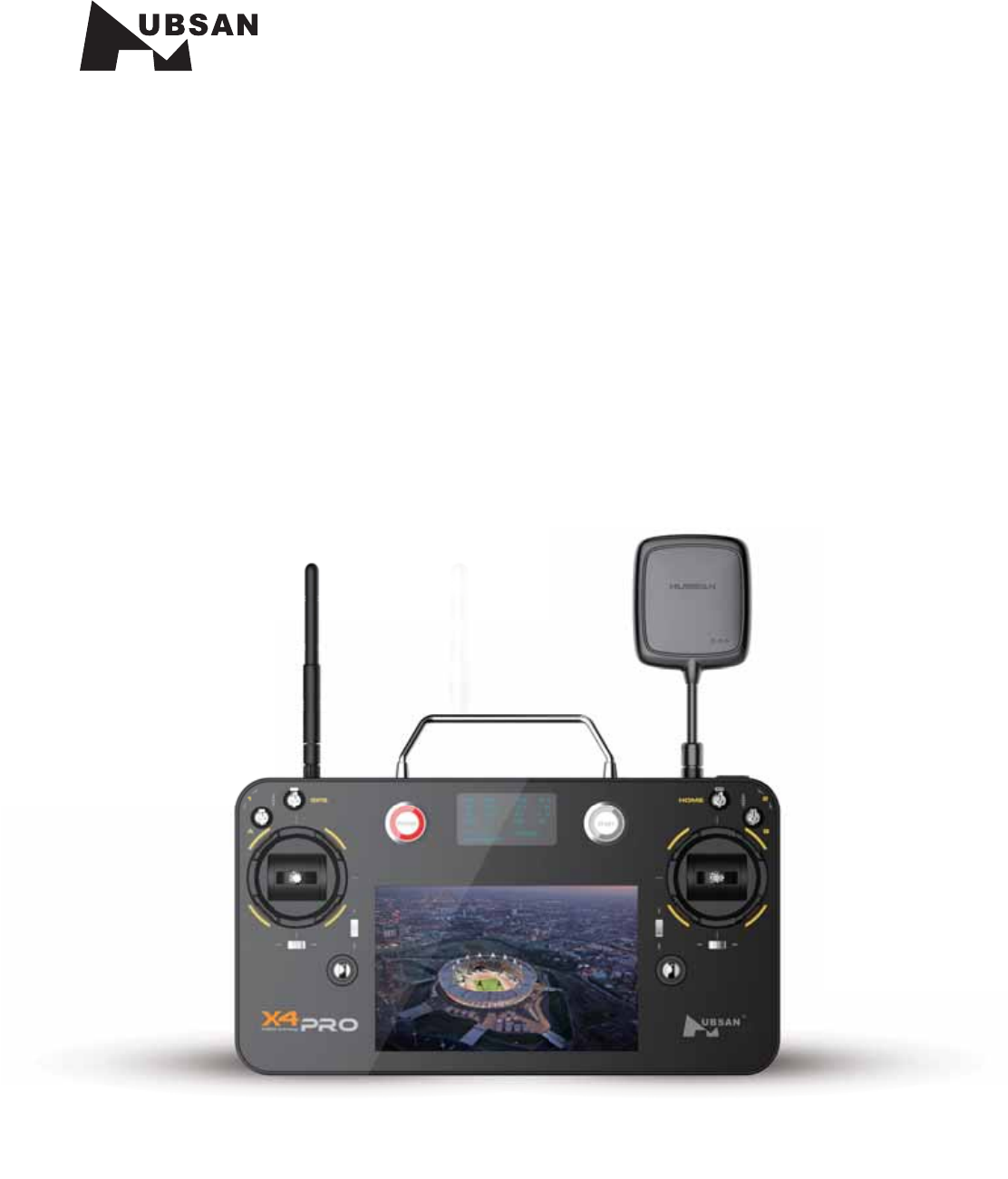
HUBSAN INTELLIGENT 7000TX FPV Smart Transmitter User Manual
SHENZHEN HUBSAN INTELLIGENT COMPANY LIMITED FPV Smart Transmitter Users Manual
User Manual
®
GROUND STATION
INSTRUCTION MANUAL
Ages 14+
Read the instruction manual carefully
ITEM NO.:H7000
)VCTBO
ֻӰ೨ሙNjྠిਫ਼ద
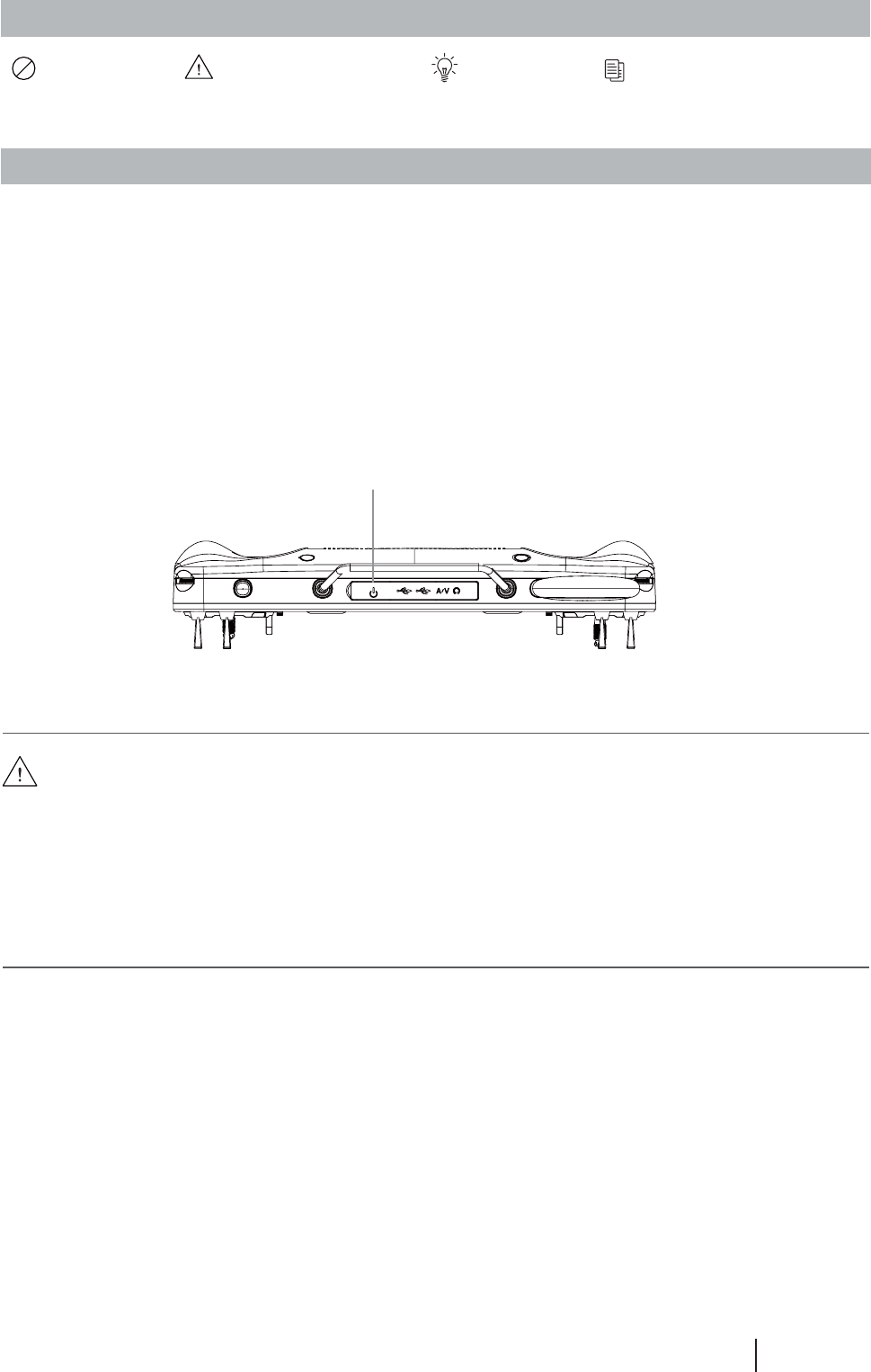
<>"OESPJETZTUFNQPXFSCVUUPO
1 GENERAL INTRODUCTION
The software of the ground station in H7000 FPV transmitter named Sunbird. It can operate in
the Hubsan's newest smart FPV transmitter--H7000(it can operate in other Android system
theoretically, while a part of the function may be limited), and easily realize the operation of
Hubsan X4 Pro cooperate with the H7000's other hardware.
The program interface of Sunbird includes: master-control interface, waypoints compile
interface and system setup interface. The following instruction will separately introduce the
three interfaces.
Ɣ7KLVLQVWUXFWLRQ0DQXDORQO\H[SODLQKRZWRUHDOL]HDXWRIOLJKWVHPLDXWRIOLJKWZLWKWKH
Android system, for more operation instruction, please refer to the Hubsan X4 Pro
Instruction Manual.
Ɣ%\GHIDXOWWKH$QGURLGV\VWHPZLOOVWDUWRQFHWKH+)39WUDQVPLWWHUSRZHUHGRQ,I
RQO\QHHGUHVWDUWSRZHURIIWKH$QGURLGV\VWHPZKLOHNHHSWKHWUDQVPLWWHUSRZHURQ
XVHUVFDQSUHVV>@$QGURLGV\VWHPSRZHUEXWWRQWRUHVWDUWSRZHURIIWKH$QGURLGV\VWHP
SYMBOL EXPLANATION
No operating Important Notice Instruction ([SODQDWLRQUHIHUHQFH
READING INSTRUCTION
)VCTBO
ֻӰ೨ሙNjྠిਫ਼ద
2 INTERFACE INTRODUCTION
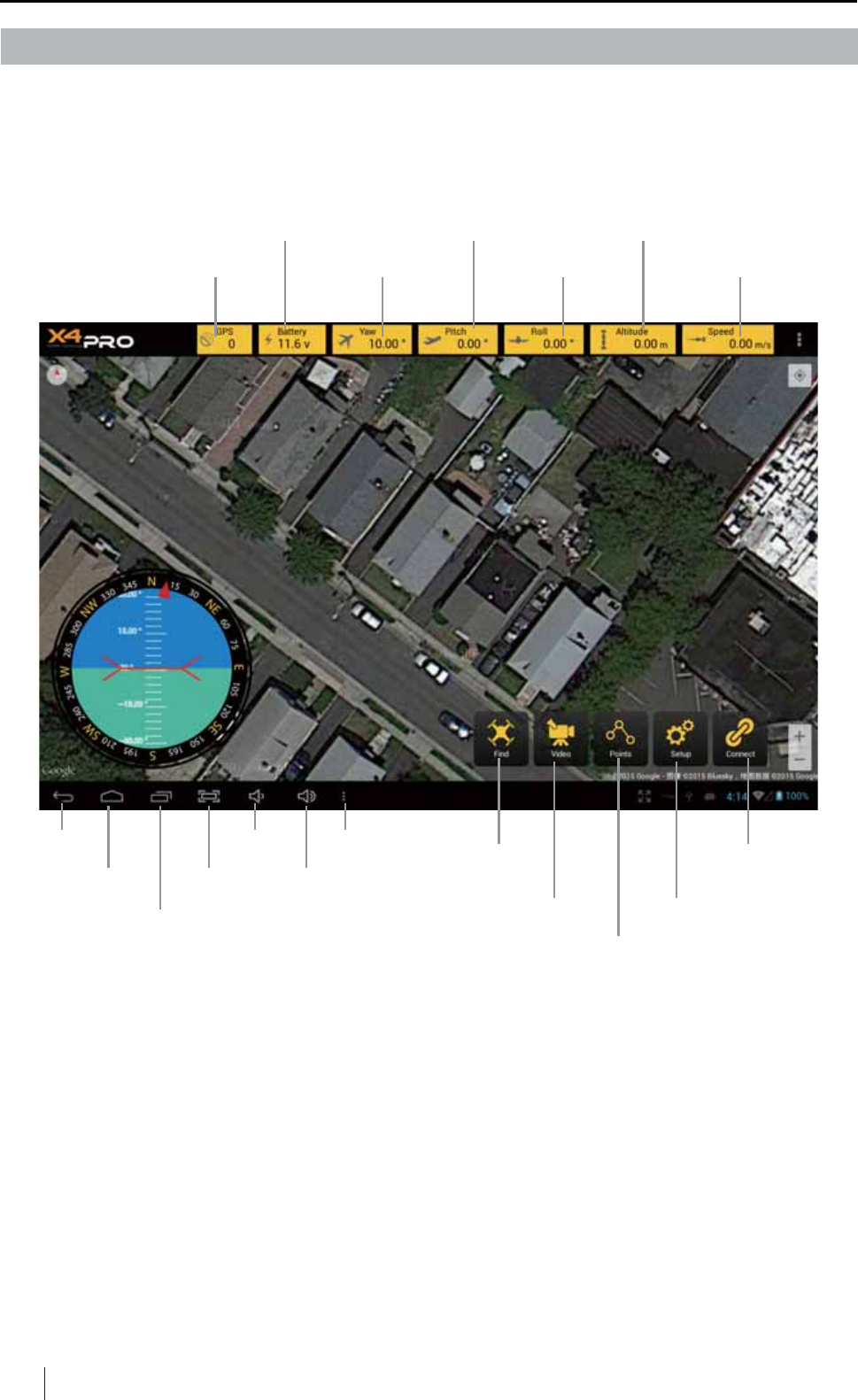
2.1 MASTER-CONTROL INTERFACE
[flight Speed]
[Flight Altitude]
[connect]
[Waypoints set]
[FIND]
[Return] [VOL-] [More]
[Homepage] [Screenshot] [VOL+]
>7DVNPJU@ [Setup][Video]
[Flight Yaw]
[X4 Pro battery power]
[Flight Roll][GPS]
[Flight Pitch]
[FIND]: Search the X4 Pro automatically, display the X4 Pro in the middle of the screen.
[VIDEO]: Open a floating window, it can display the live video from the X4 Pro's camera.
The window can move, amplifyVKULQNDQGFORVH
[Waypoints set]: Enter into the waypoints setup interface.
[Setup]: Enter into the setup interface, set up some user's preferred points.
[Connect]: Connect to the X4 Pro. Need connect to the X4 Pro to operate it and display values
and videos.
&OLFNWKH;ORJRRQWKHVFUHHQWRHQWHULQWRWKHV\VWHPWKHILUVWLQWHUIDFHLVWKHPDVWHUFRQWURO
LQWHUIDFH%HORZLVWKHSLFWXUHRILW
)VCTBO
ֻӰ೨ሙNjྠిਫ਼ద
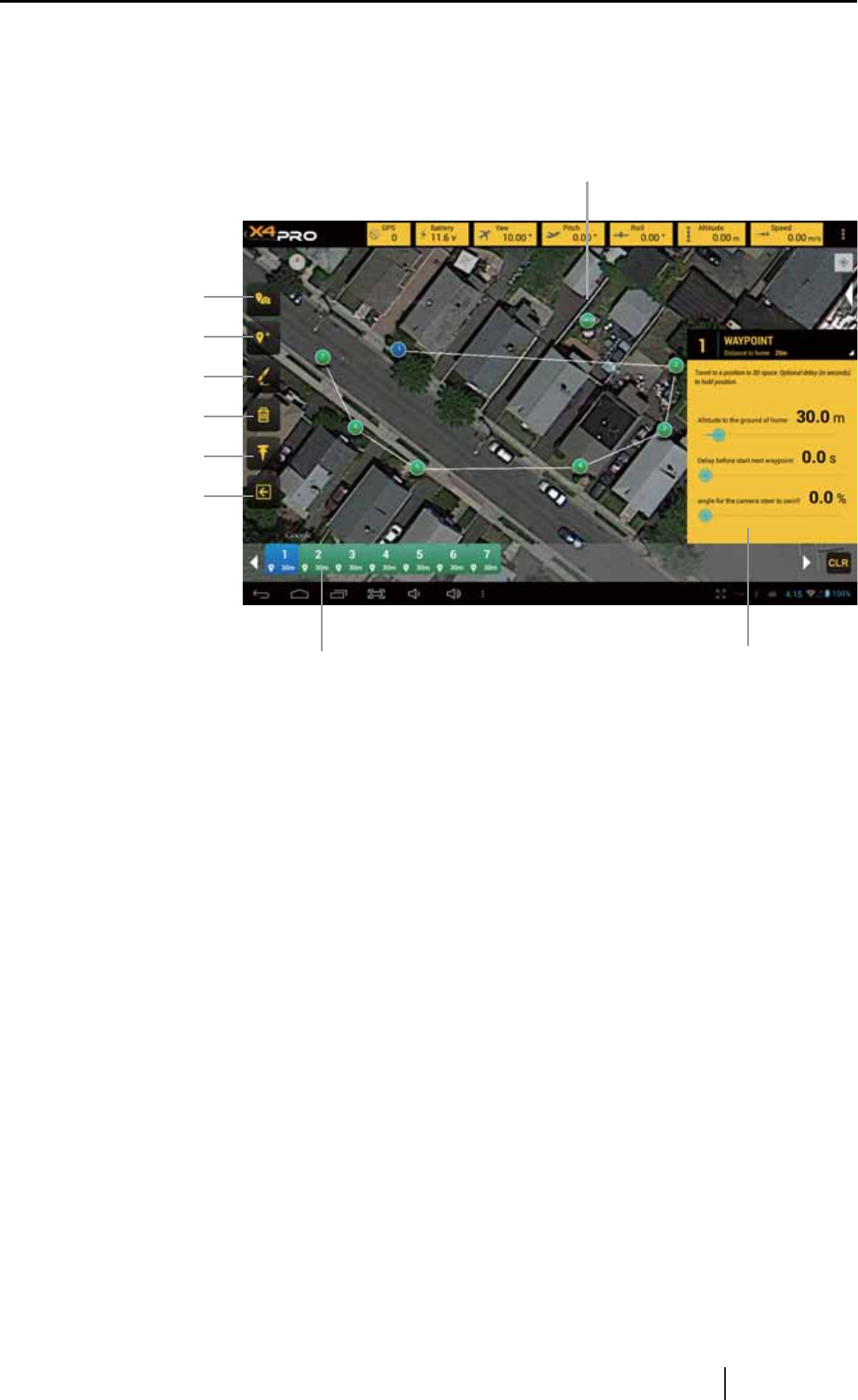
2.2 WAYPOINTS COMPILE INTERFACE
[Preferred points set tool]:6HWWKHSUHIHUUHGSRLQWVRQWKHPDS$IWHUWKH;3URWDNHRIILW
can fly towards the direct under the automatic cruise.
[Waypoints set tool]: Set separate waypoint on the map.
[Flight course set tool]: Slip your fingers to set up a flight course on the map, the flight course
LVFRQVLVWRIVHYHUDONH\ZD\SRLQWV
[Data transmit]:$IWHUWKHZD\SRLQWVVHWXSQHHGFOLFNWKLVORJRWRWUDQVPLWWKHGDWDWR;3UR
[Return back]: Return to the Master-control interface.
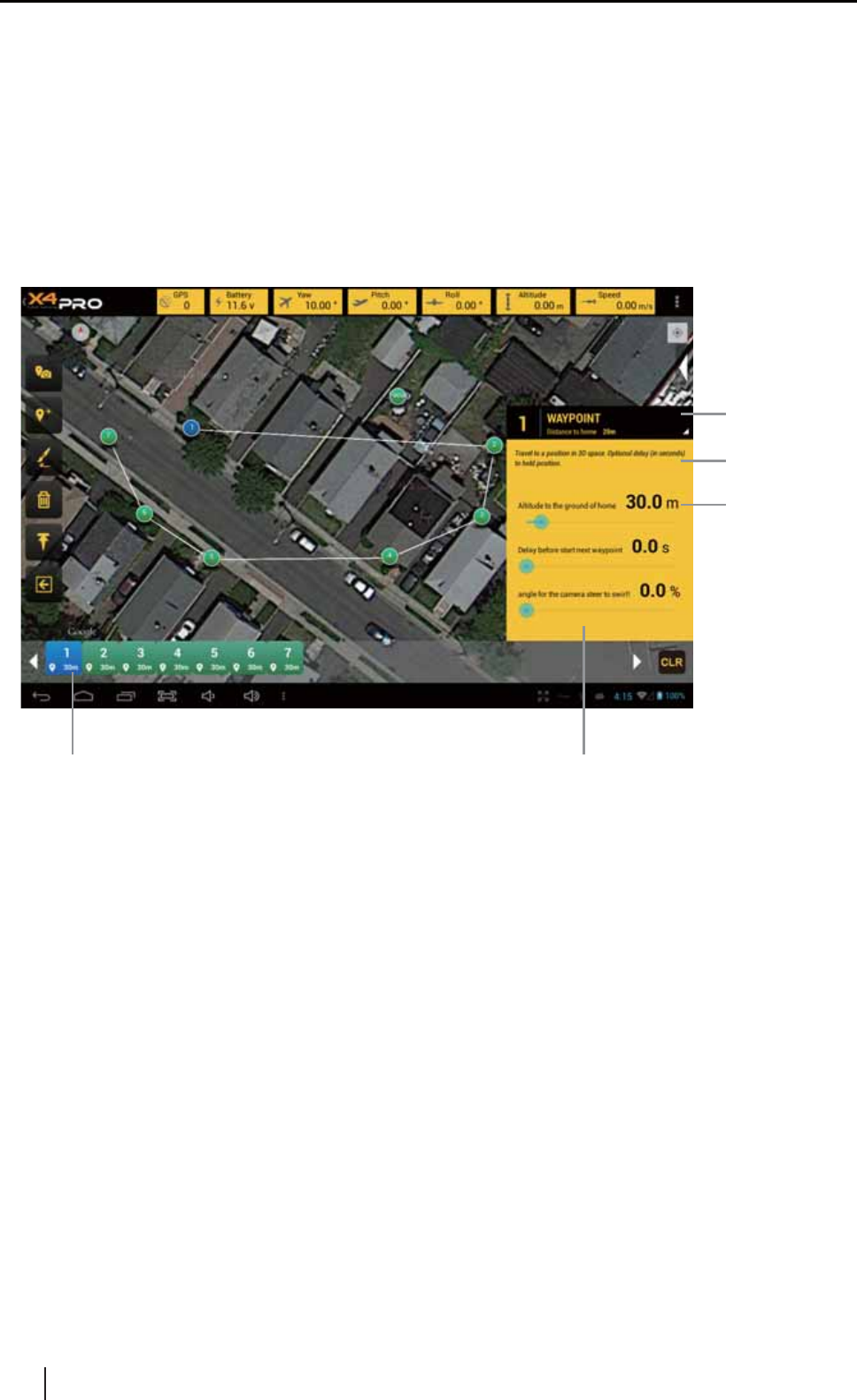
[Waypoints serial number]: The waypoints will display on the screen with serial numbers,
FOLFNWKHVHULDOQXPEHUWKHDFFRUGDQFHLQIRUPDWLRQZLOOVKRZ
[Chosen waypoint's information]: &KHFNWKHZD\SRLQWVGHWDLOLQIRUPDWLRQDQGVHWWKH
altitude of this waypoint.
[Preferred points set tool]
[Waypoints set tool]
[Flight course set tool]
[Delete tool]
[Data transmit]
[Waypoints serial number] [Chosen waypoints' information]
[The set preferred points]
>5HWXUQEDFN@
&OLFNWKH:D\SRLQWVVHWORJRWRHQWHULQWRWKH:D\SRLQWVFRPSLOHLQWHUIDFHLWXVHGIRUVHWWLQJ
the flight course of the X4 Pro. See below pictures:
)VCTBO
ֻӰ೨ሙNjྠిਫ਼ద
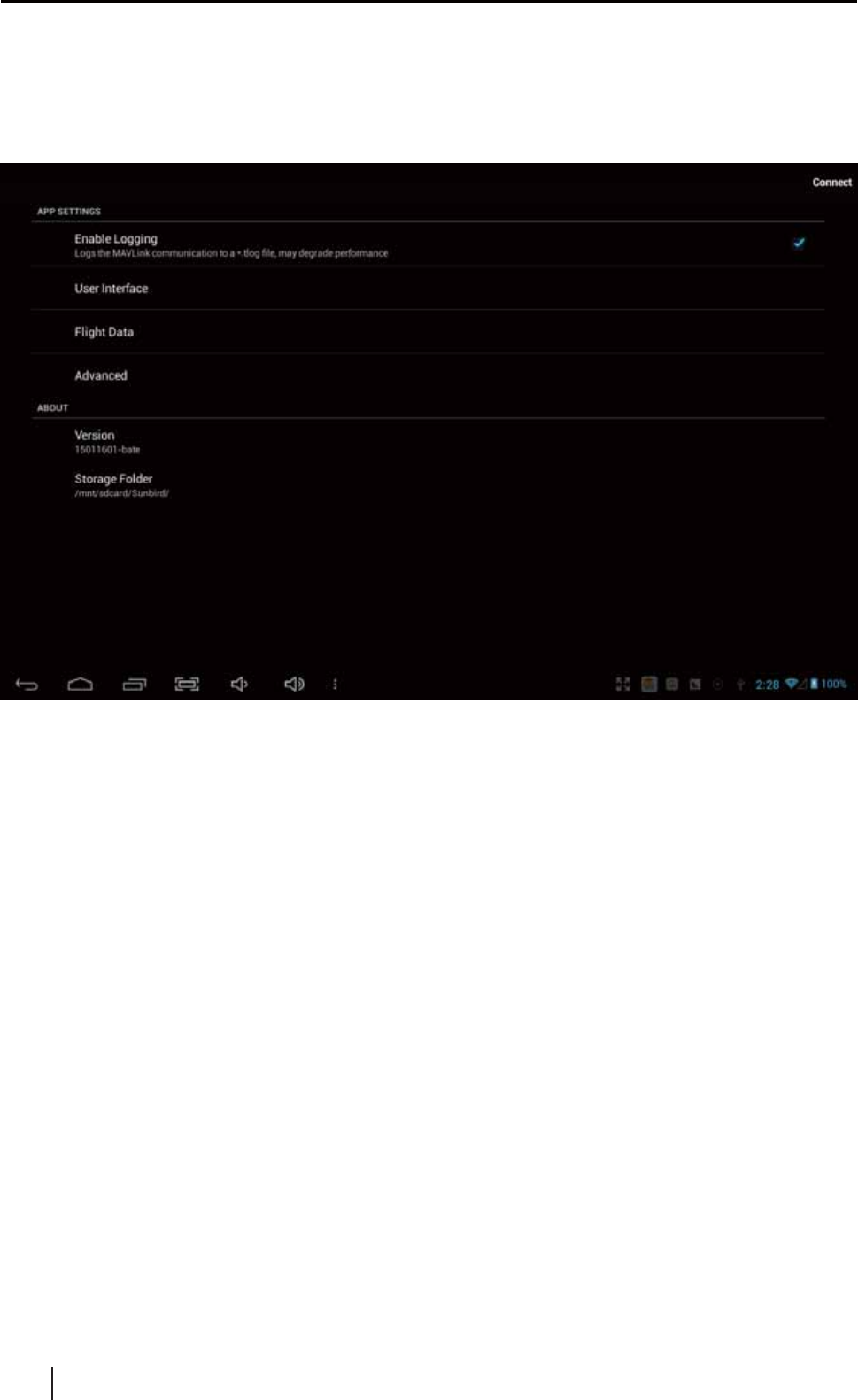
2.3 SYSTEM SETUP INTERFACE
&OLFNWKH6HWXSORJRWRHQWHULQWRWKHV\VWHPVHWXSLQWHUIDFHLWXVHGIRUVHWWLQJVRPHYDOXHV
of the software.
)VCTBO
ֻӰ೨ሙNjྠిਫ਼ద
7ZRZRUN0RGHRIWKH$33
APP need connect to Wi-Fi to get the local Google map service
App need updated the Google map and had recorded it
35(3$5$7,21%()25(86(
Ɣ7KH*RRJOHPDSPD\UHVWULFWHGLQVRPHDUHD\RXFDQREWDLQWKHQRUPDO*RRJOHVHUYLFH
WKURXJK9319LUWXDO3ULYDWH1HWZRUN
3 QUICK START FOR NEW USERS
Online Mode
Offline Mode
Description
%HIRUHXVHWKH$33$QGURLG$SSOLFDWLRQ3DFNDJHQHHGFRQQHFWWRWKHLQWHUQHW:L)LWRXSGDWH
the local map inside the H7000 FPV transmitter.
3.2 CONNECT TO X4 PRO
The APP can only display the X4 Pro's flying data and control the X4 Pro after it connected to
the X4 Pro.
Method:&OLFNWKH>&RQQHFW@LQ0DVWHUFRQWUROLQWHUIDFH
3.3 SETUP THE FLIGHT VALUES
3.3.1 SETUP THE PREFERRED POINTS
3.3.2 SETUP FLIGHT COURSE(AUTOMATIC FLIGHT)
Method:&OLFN6HWXSORJRWKHQ:L)LORJRILOOLQWKHDFFRXQWQRDQGSDVVZRUG
3.1.1 SETUP WI-FI
Setup a single waypoint:Setup the single waypoint on the map. The separate waypoint will
numbered in serial number and connect automatically to form a
flight course.
Draw a flight course:Slip your fingers on the map to draw a flight course. This flight course is
DOVRFRQVLVWRIVRPHNH\ZD\SRLQWV7KRVHNH\ZD\SRLQWVLVFDOFXODWHG
from a certain Algorithm that gain from the flight course, so it may vary
from the line you drew.
6HWWKHSUHIHUUHGSRLQWVRQWKHPDS$IWHUWKH;3URWDNHRIILWFDQIO\WRZDUGVWKHGLUHFWXQGHU
the automatic cruise.
0HWKRG&OLFN>3UHIHUUHGSRLQWVVHWWRRO@WKHQ>'DWDWUDQVPLW@LQWKH:D\SRLQWVFRPSLOH
interface.
The flight course is consist of several scatter waypoints. The X4 Pro will fly according to this
flight course in a permitted Deviation.
)VCTBO
ֻӰ೨ሙNjྠిਫ਼ద
[Waypoints serial number ] [Chosen waypoints' information]
3.3.4 DELETE THE WAYPOINTS
&OLFNWKH>'HOHWH@ORJRDFWLYDWHLWDQGWKHQFOLFNDQ\ZD\SRLQWWRGHOHWHLW
3.3.5 DELETE THE FLIGHT COURSE
0HWKRG3UHVVWKHOHIW>'HOHWH@ORJRWKHQDZLQGRZER[ZLOOGLVSOD\FRQILUPWRGHOHWHWKH
whole flight course.
0HWKRG&OLFNWKHULJKWVLGH&/5ORJRDOOWKHZD\SRLQWVZLOOEHGHOHWHGLQWKHZKROHIOLJKW
course.
3.3.3 SETUP THE VALUE OF THE WAYPOINTS
&OLFNWKHZD\SRLQWVVHULDOQXPEHUWKHDFFRUGDQFHLQIRUPDWLRQZLOOVKRZRQWKHULJKWVLGH<RX
can edit value of the altitude, the latency time, and the camera direction(only the camera has
WKLVIXQFWLRQ$IWHUHGLWGRQHFOLFNDQ\ZKHUHEHVLGHWKHLQIRUPDWLRQWKHYDOXHVZLOOEH
effected.
[Altitude]
[Latency time]
[Camera direction]
Method: &OLFN>:D\SRLQWVVHWWRRO@>)OLJKWFRXUVHVHWWRRO@WKHQ>'DWDWUDQVPLW@LQWKH:D\SRLQWV
compile interface.

)VCTBO
ֻӰ೨ሙNjྠిਫ਼ద
*NQPSUBOU/PUJDF
1. For safety reason, the data transmit should be done before the X4 Pro fly, if the X4 Pro is in
flight, it will refuse to receive any data transmit.
2. The preferred point should only be one, and it can only be effective in Automatic Mode, it
will lose efficacy in Manual Mode.
3. The altitude of a waypoint can be updated in the setup interface, please refer to the
instruction in Setup.
4. The length of the flight course can be updated in the setup interface, please do not set the
OHQJWKEH\RQGWKHPD[RIWKHFRQWUROGLVWDQFHIRUVDIHW\UHDVRQV
7KH*36FRRUGLQDWHRIWKHPRPHQWZKHQWKH;3URWDNHRIIZLOOEHGHIDXOWHGDVWKH+RPH
coordinate in this flight mission.

)VCTBO
ֻӰ೨ሙNjྠిਫ਼ద

6TFSNBOVBMJTTVCKFDUUPDIBOHFXJUIPVUQSJPSOPUJDF
%PXOMPBEUIFMBUFTUVTFSNBOVBMGSPN
888)6#4"/$0.
FCCStatement
ThisequipmenthasbeentestedandfoundtocomplywiththelimitsforaClassBdigitaldevice,
pursuanttopart15ofFCCRules.Theselimitsaredesignedtoprovidereasonableprotection
againstharmfulinterferenceinaresidentialinstallation.Thisequipmentgeneratesandcan
radiateradiofrequencyenergyand,ifnotinstalledandusedinaccordancewiththeinstructions,
maycauseharmfulinterferencetoradiocommunications.However,thereisnoguaranteethat
interferencewillnotoccurinaparticularinstallation.Ifthisequipmentdoescauseharmful
interferencetoradioortelevisionreception,whichcanbedeterminedbyturningtheequipment
offandon,theuserisencouragedtotrytocorrect
Theinterferencebyoneormoreofthefollowingmeasures:
Reorientorrelocatethereceivingantenna.
Increasetheseparationbetweentheequipmentandreceiver.
Connecttheequipmentintoanoutletonacircuitdifferentfromthattowhichthereceiveris
connected.
Consultthedealeroranexperiencedradio/TVtechnicianforhelp.
ThisdevicecomplieswithPart15ofFCCRules.
Operationissubjecttothefollowingtwoconditions:
Thisdevicemaynotcauseharmfulinterference,andthisdevicemustacceptanyinterference
received,includinginterferencethatmaycauseundesiredoperation.
Note:ThemanufacturerisnotresponsibleforanyradioorTVinterferencecausedby
unauthorizedmodificationstothisequipment.Suchmodificationscouldvoidtheuser’sauthority
tooperatethisequipment.
FCCRFRadiationExposureStatement
ThisequipmentcomplieswithFCCRFradiationexposurelimitssetforthforanuncontrolled
environment(Extremityexposureconditions).