HUBSAN INTELLIGENT FPV1TX FPV Transmitter User Manual

SHENZHEN HUBSAN INTELLIGENT COMPANY LIMITED FPV Transmitter Users Manual

Contents

User manual part 1

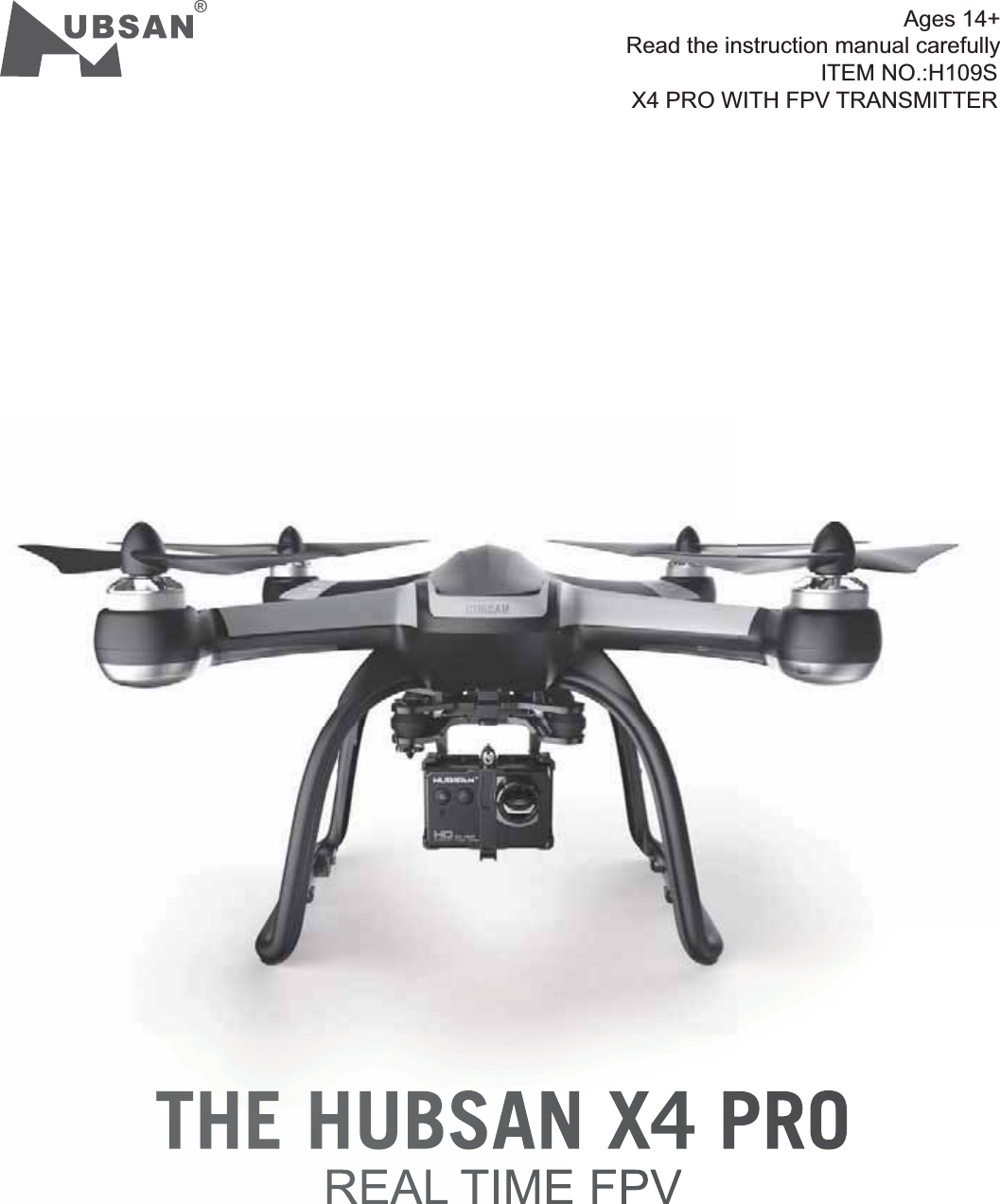
REAL TIME FPVTHE HUBSAN X4 PRO®ITEM NO.:H109SX4 PRO WITH FPV TRANSMITTERAges 14+Read the instruction manual carefully
02 ©2015  HubsanֻӰ೨ሙ੿Njྠిਫ਼దIMPORTANT SAFETY NOTESOPERATION:Flight:Be responsible for your safety and the safety of others when you fly X4 Pro!Do not fly the X4 Pro in a crowded place, it needs plenty of space to operate.Do not fly it in bad weather.Never try to catch the X4 Pro while it is in flight.Only recommended for ages 14+.Power off X4 Pro after flight, to prevent the propellers from causing injuries.Always remove the battery after you stop flying to avoid injuries from accidentally powering on the motors.Always use great caution to protect yourself when near the propellers. The flight system can automaticallyoperate after power on with the transmitter is power on/ off. The high speed rotating propellers are very dangerous.Hubsan X4 PRO2015.01Read the instruction manual carefully!V1.0SYMBOL EXPLANATIONNo operating Important Notice Instruction Explanation, referenceUSAGE ADVICEHubsan provides you three files for X4 Pro:1. Disclaimer”2. Hubsan X4 Pro Instruction Manual”View the instruction videos and Disclaimer first, then read the manuals.READING INSTRUCTIONBe extremely careful and responsible when use the X4 Pro. There are delicate electronic components, which can be damaged if you crash the X4 Pro or submerge it in water. Do not attempt to fly a damaged X4 Pro. Always inspect propellers for damage and proper tightness. Do not fly with damaged propellers!
03 ©2015  HubsanֻӰ೨ሙ੿Njྠిਫ਼దCATALOGIMPORTANT SAFETY NOTESREADING INSTRUCTION   symbol explanation   usage adviceCATALOGGENERAL INTRODUCTION  1 ACCESSORIES INCLUDED  2 INTRODUCTIONPREPAR FOR USE  1 PREPARE THE LI-PO BATTERY1.1 Li-Po battery in the X4 Pro1.2 Charging1.3 Power on/ off the X4 Pro  Li-Po battery              1.4 Check The  Li-po Battery Power   2 SAFETY NOTES2.1 Important Notes2.2 Li-Po battery Safety Notes  3 PREPARE THE X4 PRO 3.1 Introduction the X4 Pro3.2 Prepare the Camera3.3 Prepare the 3 Axis Stable Gimbal3.4 Prepare the Parachute   3.5 Prepare the Propeller set 4 PREPARATION FOR THE SMART TX           4.1 Introduction           4.2 The installation of TX Battery      4.3 Start the transmitter.      4.4 Method to bind the Transmitter                  and x4 pro      4.5 Introduction of the LCD            4.6 Introduction of AntennaPREPARATION FOR FLY1.COMPASS CALIBRATION          1.1 calibration          1.2 Check the GPS2 POWER ON/OFF THE X4 PRO     3 BASIC FLIGHT4 LOSE CONTROL PROTECTION FUNCTION          --RTH MODE           4.1 The condition which can enter into                    the RTH Mode           4.2 Exit the RTH Mode5 INTELLIGENT BATTERY ALARM FUNCTIONFAQ16171818191919202121212223242424250202    030404050606070708080909121315CATALOG
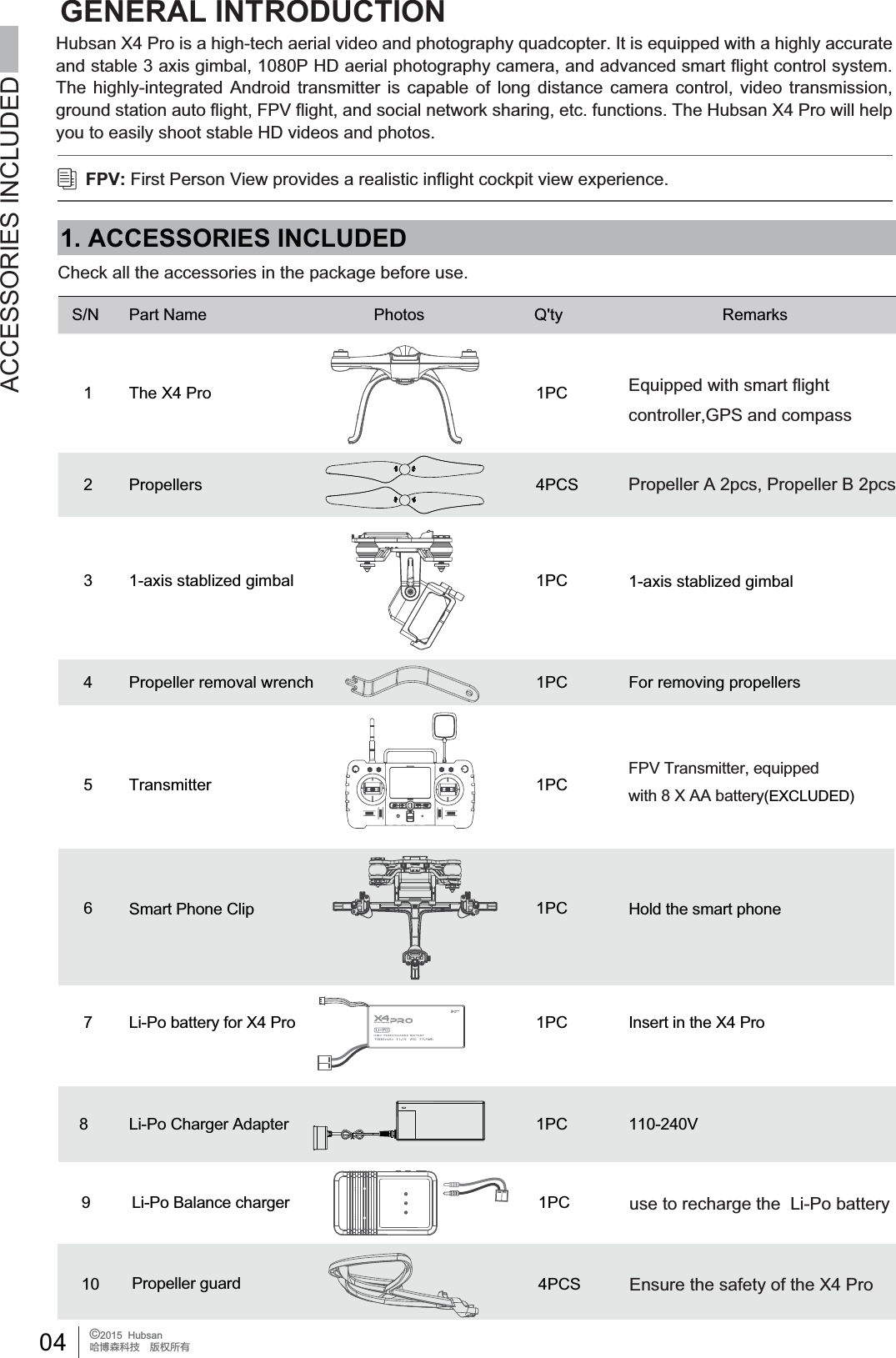
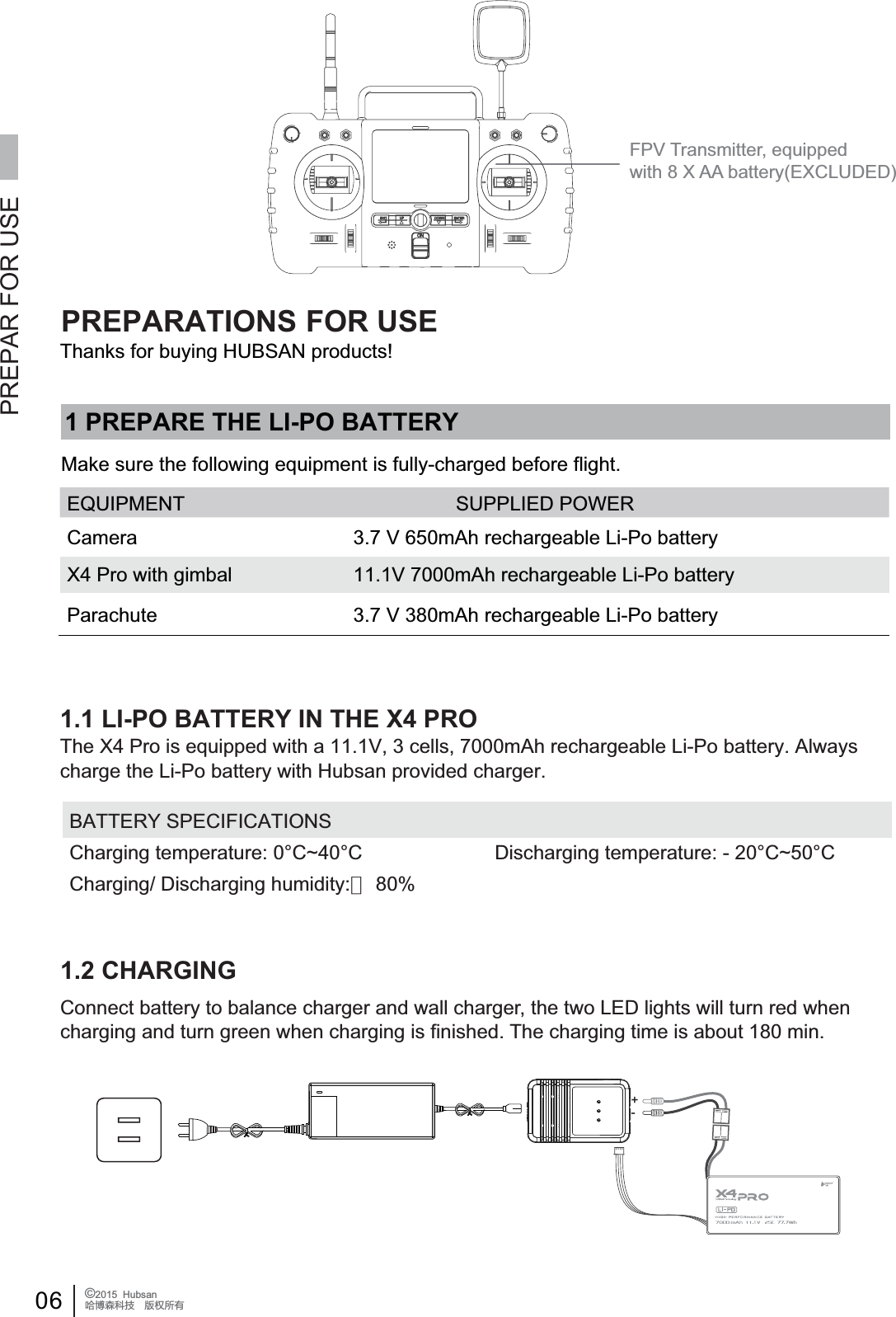
04 ©2015  HubsanֻӰ೨ሙ੿Njྠిਫ਼దFPV Transmitter, equipped with 8 X AA battery(EXCLUDED)9 Li-Po Balance charger 1PC10 4PCSPropeller guard Ensure the safety of the X4 Prouse to recharge the  Li-Po batteryGENERAL INTRODUCTION1. ACCESSORIES INCLUDED ACCESSORIES INCLUDEDCheck all the accessories in the package before use.S/N Part Name Photos Q'ty Remarks1 The X4 Pro 1PC Equipped with smart flightcontroller,GPS and compassPropeller A 2pcs, Propeller B 2pcs2 Propellers1-axis stablized gimbal4PCS3 1PC4 Propeller removal wrench 1PC5 Transmitter 1PC1-axis stablized gimbalFor removing propellers6Smart Phone Clip 1PC Hold the smart phone7 Li-Po battery for X4 Pro 1PC Insert in the X4 Pro8 Li-Po Charger Adapter 1PC 110-240VHubsan X4 Pro is a high-tech aerial video and photography quadcopter. It is equipped with a highly accurate and stable 3 axis gimbal, 1080P HD aerial photography camera, and advanced smart flight control system. The highly-integrated Android transmitter is capable of long distance camera control, video transmission, ground station auto flight, FPV flight, and social network sharing, etc. functions. The Hubsan X4 Pro will help you to easily shoot stable HD videos and photos.FPV: First Person View provides a realistic inflight cockpit view experience.
05 ©2015  HubsanֻӰ೨ሙ੿Njྠిਫ਼దACCESSORIES INCLUDED[Propeller][Brushless motor][1 axis gimbal][1080P camera][Parachute][Battery compartment][Undercarriage][Terrestrial magnetism][non-slip mat][LED light]11 Micro-USB cable 1PC12 4PCS2. INTRODUCTION13 1PC1080P camera HD camera moduleTo read the camera dataDisclaimerHubsan X4 Pro Instruction ManualCamera Instruction ManualParachute Instruction ManualUser Manuals The Hubsan X4 Pro system consists of the quadcopter, camera, gimbal, parachute, propellerguard, power system, flight control system, and radio transmission system.Transmitter equipment: dual data transmission, map and track display, waypoints set/auto-flight,                                           FPV transmitter operates video and picture shootingX4 Pro equipment: 3-axis gimbal, camera, power system(brushless motors and propellers),                                  parachute, propeller guardX4 Pro working Mode:  Altitude Hold Mode, Position-hold Mode, Waypoint Mode, RTH Mode,                                         Headless Mode14 1PCTransmitter Antenna 5.8 GHz Transmitter Antenna15 1PCVideo glassesVideo glasses (Not included. Purchase this optional accessory from Hubsan)16 Parachute 1PCStand-alone system, can helpprovide some safety after a loss ofcontrol. (Not included. Purchase thisoptional accessory from Hubsan)
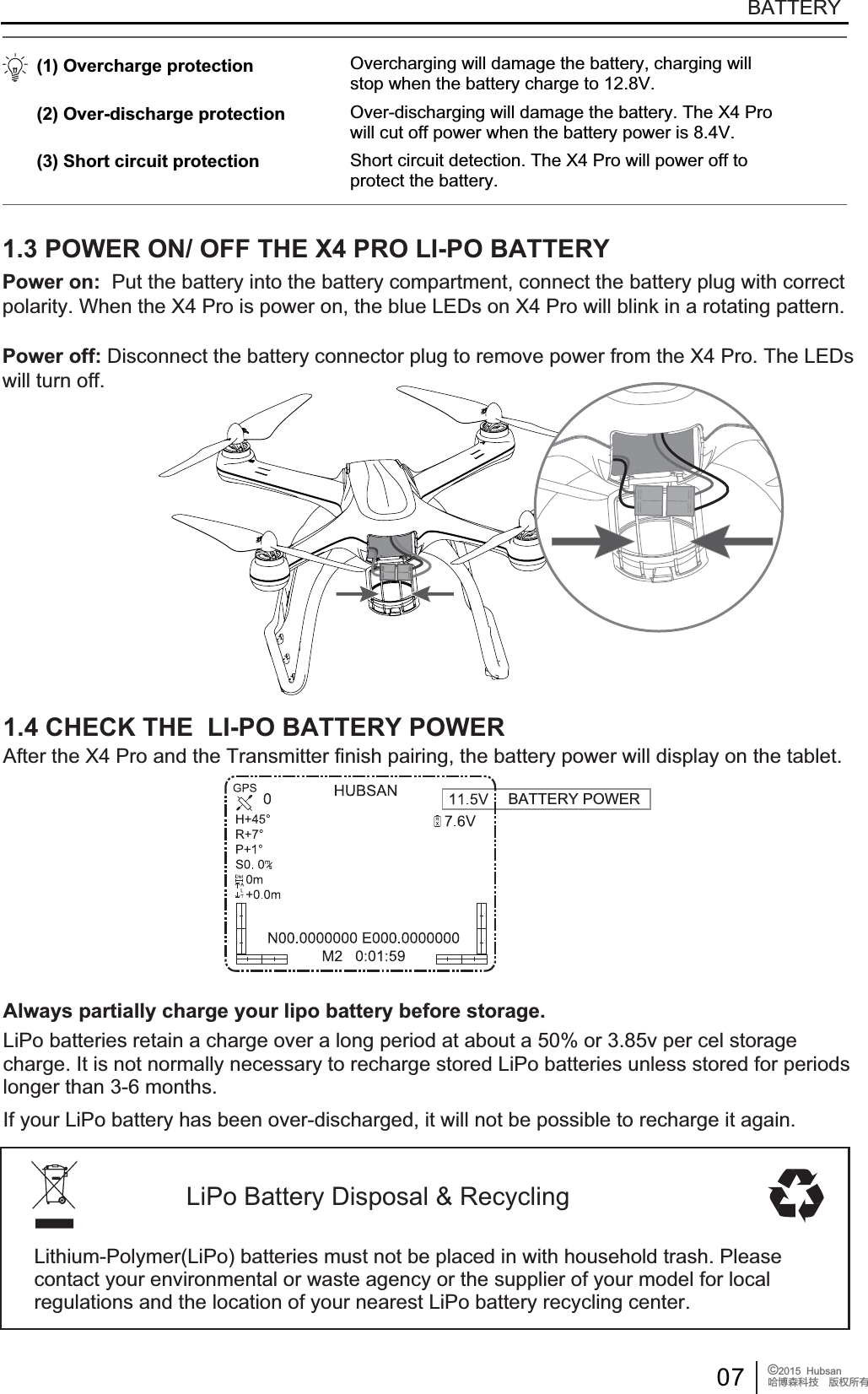
06 ©2015  HubsanֻӰ೨ሙ੿Njྠిਫ਼దFPV Transmitter, equipped with 8 X AA battery(EXCLUDED)PREPAR FOR USEEQUIPMENT SUPPLIED POWER3.7 V 650mAh rechargeable Li-Po batteryCamera3.7 V 380mAh rechargeable Li-Po batteryParachuteX4 Pro with gimbal 11.1V 7000mAh rechargeable Li-Po battery+-PREPARATIONS FOR USE1 PREPARE THE LI-PO BATTERYMake sure the following equipment is fully-charged before flight.1.1 LI-PO BATTERY IN THE X4 PROBATTERY SPECIFICATIONSCharging temperature: 0°C~40°C                        Discharging temperature: - 20°C~50°CCharging/ Discharging humidity:< 80%Thanks for buying HUBSAN products!1.2 CHARGINGConnect battery to balance charger and wall charger, the two LED lights will turn red whencharging and turn green when charging is finished. The charging time is about 180 min.The X4 Pro is equipped with a 11.1V, 3 cells, 7000mAh rechargeable Li-Po battery. Always charge the Li-Po battery with Hubsan provided charger.
07 ©2015  HubsanֻӰ೨ሙ੿Njྠిਫ਼దBATTERYBATTERY POWERLiPo Battery Disposal & RecyclingLithium-Polymer(LiPo) batteries must not be placed in with household trash. Please contact your environmental or waste agency or the supplier of your model for local regulations and the location of your nearest LiPo battery recycling center.1.3 POWER ON/ OFF THE X4 PRO LI-PO BATTERY(1) Overcharge protection (2) Over-discharge protection (3) Short circuit protectionOvercharging will damage the battery, charging willstop when the battery charge to 12.8V.Over-discharging will damage the battery. The X4 Prowill cut off power when the battery power is 8.4V.Short circuit detection. The X4 Pro will power off toprotect the battery.Power on: Put the battery into the battery compartment, connect the battery plug with correctpolarity. When the X4 Pro is power on, the blue LEDs on X4 Pro will blink in a rotating pattern.Power off: Disconnect the battery connector plug to remove power from the X4 Pro. The LEDs will turn off.Always partially charge your lipo battery before storage.1.4 CHECK THE  LI-PO BATTERY POWERAfter the X4 Pro and the Transmitter finish pairing, the battery power will display on the tablet.LiPo batteries retain a charge over a long period at about a 50% or 3.85v per cel storagecharge. It is not normally necessary to recharge stored LiPo batteries unless stored for periodslonger than 3-6 months.If your LiPo battery has been over-discharged, it will not be possible to recharge it again.
08 ©2015  HubsanֻӰ೨ሙ੿Njྠిਫ਼దBATTERYCharge and store LiPo batteries in a location where a battery fire or explosion (including smoke hazard) will not endanger life or property.Keep LiPo batteries away from children and animals.Never charge the LiPo battery that has ballooned or swelled .Never charge the LiPo battery that has been punctured or damaged. After a crash, inspect the battery pack for the sign of damage. Discard in accordance with your countrys recycling laws.Never charge the LiPo battery in a moving vehicle.Never overcharge the LiPo battery.Never leave the LiPo battery unattended during recharging.Do not charge LiPo batteries near flammable materials or liquids.Ensure that charging leads are connected correctly. Reverse polarity charging can lead to battery damage or a fire or explosion. Have a suitable fire extinguisher (electrical type) OR a large bucket of dry sand near the charging area . Do not try to extinguish electrical (LiPo) battery fires with water.Reduce risks from fire/explosion by storing and charging LiPo batteries inside a suitable container.Protect your LiPo battery from accidental damage during storage and transportation. (Do not put battery packs in pockets or bags where they can short circuit or can come into contact with sharp or metallic objects.).If your LiPo battery is subjected to a shock (such as a crash), place it in a metal container and observe for signs of swelling or heating for at least 30 minutes.Do not attempt to disassemble or modify or repair the LiPo battery.LiPo batteries are different from conventional batteries in that their chemical contents are encased in a relatively lightweight foil packaging. This has the advantage of significantly reducing their weight, but does make them more susceptible to damage if roughly or inappropriately handled. As with all batteries, there is a risk of fire or explosion if safety practices are ignored:! 2 SAFETY NOTESThis X4 Pro is not a toy. Any improper use of this product will result in serious injury. Be awareof your personal safety, the safety of others and your surrounding environment. We strongly recommend that beginners learn to fly with proper instruction from more experienced pilots before attempting to fly the X4 Pro for the first time. It is your responsibility to comply with your country's remote controlled and Unmanned Aerial Vehicle flight regulations!2.2 LI-PO BATTERY SAFETY NOTESThe X4 Pro is powered by a lithium-polymer(Li-Po) battery. To avoid risk of fire or damage,never recharge your battery while it is inserted in the plane. If you do not plan to fly the plane fora week or more, store the battery approximately 50% charged to maintain battery performanceand life.2.1 IMPORTANT NOTES
09 ©2015  HubsanֻӰ೨ሙ੿Njྠిਫ਼ద 3 PREPARE THE X4 PRO  PREPARE THE X4 PRO 3.1 INTRODUCTION THE X4 PRO  [1] Propeller  [2] Brushless motor  [3] LED light  [4] Shock resistance equipment  [5] 1-axis gimbal  [6] 1080P camera  [7] Undercarriage  [8] Terrestrial magnetism  [9] Battery compartment[10] External interface[11] Parachute[12] non-slip mat[1][3][4][5][6][7][8][9][10][11][12][2]3.2 PREPARE THE CAMERA3.1.1 FLIGHT CONTROL SYSTEM INTRODUCTIONModules on flight control system FunctionMain control Module CPU of the flight control system, connects to all the modules forcentral control processes.IMU Module Includes inertial sensor, stabilizes flight; includes a barometer tomeasure the flight altitude.GPS & Compass Module Position hold and Navigation.LED indicating lights Indicating the flight control system's condition.Insert battery into the camera and attach the camera onto the gimbal. Power on thecamera. You can press the buttons on the camera to record pictures and videos. You canalso use H7000 transmitter for recording and playing the videos.Hubsan X4 Pro is easy to operate and very stable, it supports moving forward/backward,left/right, ascending and descending, basic flight performance, and also supports lost control protection, power alarming and IOC functions.
10 ©2015  HubsanֻӰ೨ሙ੿Njྠిਫ਼దCamera specificationsRecording resolutionRecording frame rateVideo formatImage SensorImage pixelLens formatLens FOVBatteryWorking temperatureWorking humidityWorking powerStandby powerStorage temperatureStorage humidity1920*1080   Full HD30FPSMOV3 million pixel    MJPG2048*1536 pixel1/3”170 ᶮMAXᶯ1.9W1.33W- 40Ḅ+125Ć30%-90%3.7VNj650mAh10Ḅ+70Ć30%Ḅ80%CAMERAPower on/off: Press the power button(<2sec), power on; Hold down the power button(2sec ), power off.Video shooting: Press the video button(<2sec), start recording; Hold down the video button(2sec), recording stops.3.2.2 MICRO-SD CARD3.2.3 READING DATA AND CHARGING THE CAMERA[108&3][3FDPSEJOH][$BNFSBDBQ][*OEJDBUJOHMJHIU][.JDSPQIPOF]Ɣ'RQRWLQVHUWUHPRYHWKH0LFUR6'FDUGZKHQWKHFDPHUDLV   powered on. Doing so can corrupt the SD card and files.USBInsert the Micro-SD card into the camera before shooting as the picture shows, always insert/remove the Micro-SD card after power off.The Micro-SD card is not included. You must source and format a name brand Micro-SD card. The camera supports using a 4-32GB Class 4-6 Micro-SD card. You must format the Micro-SD card before use.Use the Micro-USB cable to connect to the PC when the camera is powered on. This willallow you to copy the pictures/videos from the camera and charge the camera at the sametime.Reading data and Charging the camera......3.2.1 CAMERA BUTTONS INSTRUCTIONƔ)RUPDWWKH6'FDUGRQWKHFRPSXWHUILUVW<RXQHHGWRVHOHFW   32KB for the size of the allocation unit, or the card will not work in the camera.
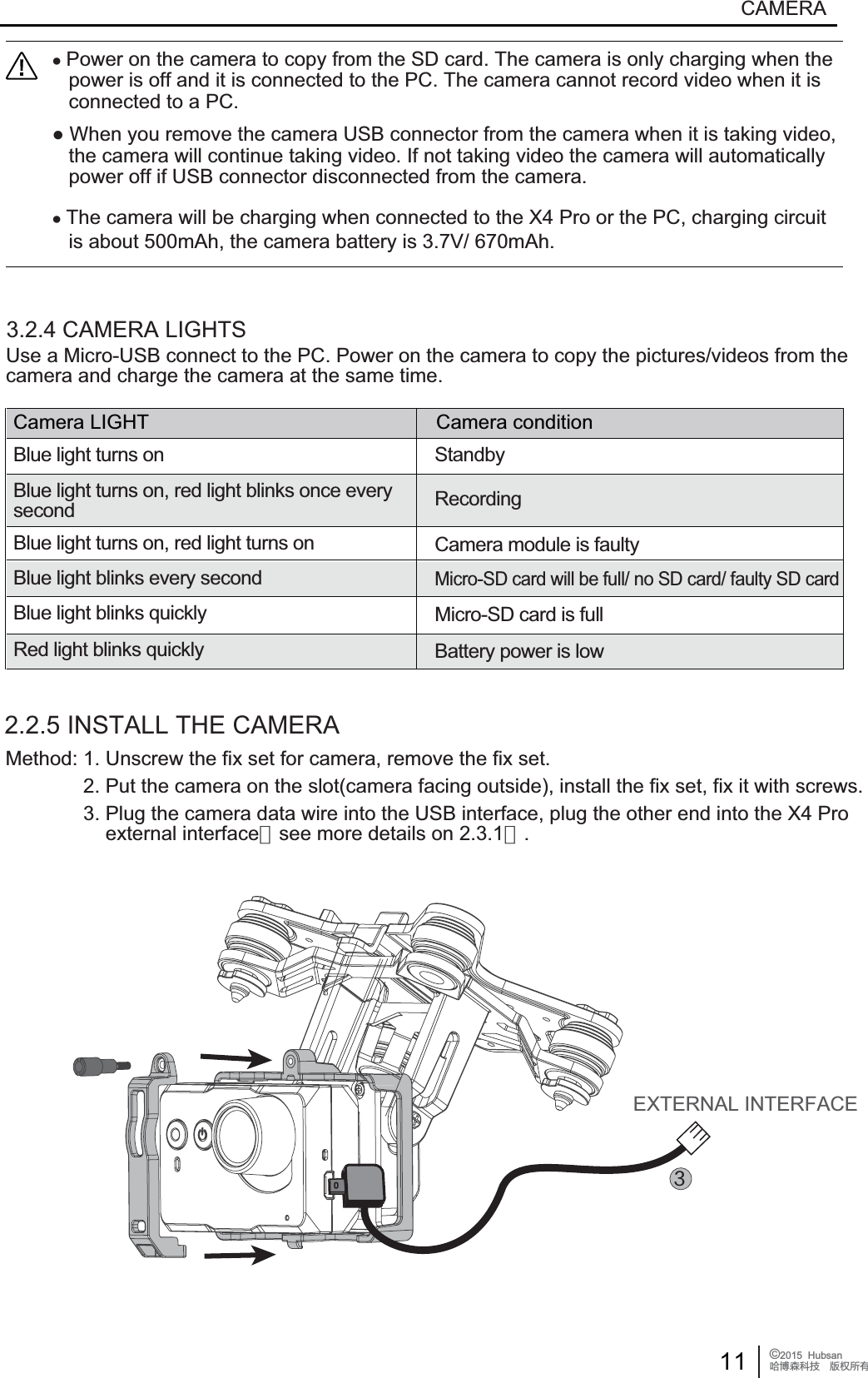
11 ©2015  HubsanֻӰ೨ሙ੿Njྠిਫ਼దCAMERAMethod: 1. Unscrew the fix set for camera, remove the fix set.              2. Put the camera on the slot(camera facing outside), install the fix set, fix it with screws.              3. Plug the camera data wire into the USB interface, plug the other end into the X4 Pro                   external interface(see more details on 2.3.1).2.2.5 INSTALL THE CAMERAEXTERNAL INTERFACE3.2.4 CAMERA LIGHTSƔPower on the camera to copy from the SD card. The camera is only charging when the   power is off and it is connected to the PC. The camera cannot record video when it is   connected to a PC.ƔWhen you remove the camera USB connector from the camera when it is taking video,   the camera will continue taking video. If not taking video the camera will automatically   power off if USB connector disconnected from the camera.ƔThe camera will be charging when connected to the X4 Pro or the PC, charging circuit   is about 500mAh, the camera battery is 3.7V/ 670mAh.Camera LIGHT Camera conditionBlue light turns on StandbyBlue light turns on, red light blinks once everysecond RecordingCamera module is faultyBlue light turns on, red light turns onBlue light blinks every secondMicro-SD card will be full/ no SD card/ faulty SD cardBlue light blinks quicklyRed light blinks quicklyMicro-SD card is fullBattery power is lowUse a Micro-USB connect to the PC. Power on the camera to copy the pictures/videos from the camera and charge the camera at the same time.
12 ©2015  HubsanֻӰ೨ሙ੿Njྠిਫ਼ద3.3 PREPARE THE 1-AXIS STABLE GIMBALPREPARE THE 1 AXIS STABLE GIMBALFeatures of the gimbalControl accuracy ±0.03°Control range Pitch angle:+90°~~ -90°Stabilized design Rotate automatically when the X4 Pro tilted to ensure stable shooting3.3.1 INSTALL THE 1-AXIS GIMBALStep 1: Take out the 1-axis gimbal from the box, position and connect the vibration damperwith its mate.Step 2: Insert the gimbal signal wire into the right slot.Step 3: Insert the camera signal plug into the left slot.After the installation, power on the X4 Pro on a level surface. The 1-axis gimbal will power onand adjust automatically. The Transmitter's side rotary switch will control the gimbal rotation.Gimbal signal wireCamera image transmission wireƔ$EQRUPDOJLPEDORSHUDWLRQFDQEHFDXVHGE\LQLWLDOL]LQJWKHSRZHURQDQXQOHYHOVXUIDFH   an impact, or from a crash. Put the X4 Pro on a level surface before powering on and flight.   Do not cause impact to, or immobilize the gimbal after it is powered on.Ɣ)O\LQJLQIRJRUFORXGVZLOOFDXVHGHZIRUPDWLRQZKLFKFDQFDXVHIDXOW\JLPEDORSHUDWLRQ   The gimbal will operate normally again after it is dry.3.3.2 GIMBAL INSPECTION AND ABNORMAL OPERATION
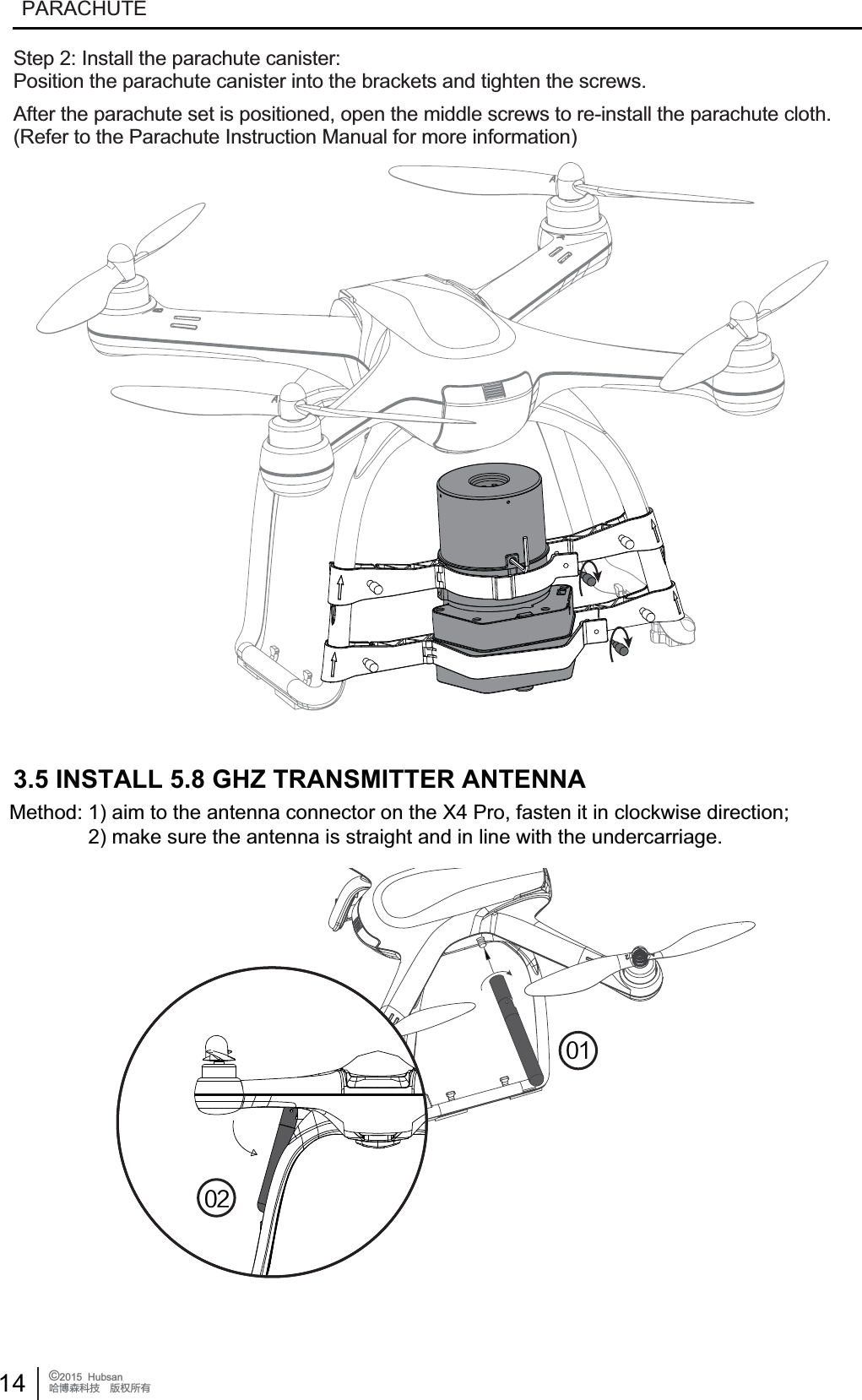
13 ©2015  HubsanֻӰ೨ሙ੿Njྠిਫ਼దPARACHUTE[turn buckle][screw][slot][direction arrow]3.4 PREPARE THE PARACHUTERefer to THE PARACHUTE INSTRUCTION MANUALThe Hubsan X4 Pro has an optional automatic parachute system. The parachute is self-powered which means even when the X4 Pro Li-Po battery power is low, the parachute will still work. There is a sensor inside the parachute system that detects when the X4 Pro goes into an abnormal attitude and then immediately commands the parachute to open. Potentially the X4 Pro can then land safely and avoid causing damages.Step 1: Install the bracket:Take the parachute set from the box, remove the screws from the bracket and open the buckle.Make sure the direction of the bracket is up as the arrows show. Put the bracket onto the landinggear until it is positioned in the slot. Tighten the screws to the brackets as the picture shows.3.4.1 INSTALL THE PARACHUTE SYSTEM (OPTIONAL PURCHASE FROM HUBSAN)Ɣ3D\DWWHQWLRQWRWKHGLUHFWLRQRIEUDFNHWV'RQRWLQVWDOOWKHPLQFRUUHFWO\7KHDUURZRQWKH   brackets should be up!Ɣ0DNHVXUHWKHEUDFNHWVDUHLQWKHVORWSRVLWLRQEHIRUHWLJKWHQLQJWKHVFUHZVRUWKH   parachute system will be unstable during flight.
14 ©2015  HubsanֻӰ೨ሙ੿Njྠిਫ਼దPARACHUTE3.5 INSTALL 5.8 GHZ TRANSMITTER ANTENNAMethod: 1) aim to the antenna connector on the X4 Pro, fasten it in clockwise direction;              2) make sure the antenna is straight and in line with the undercarriage.Step 2: Install the parachute canister:Position the parachute canister into the brackets and tighten the screws.After the parachute set is positioned, open the middle screws to re-install the parachute cloth.(Refer to the Parachute Instruction Manual for more information)
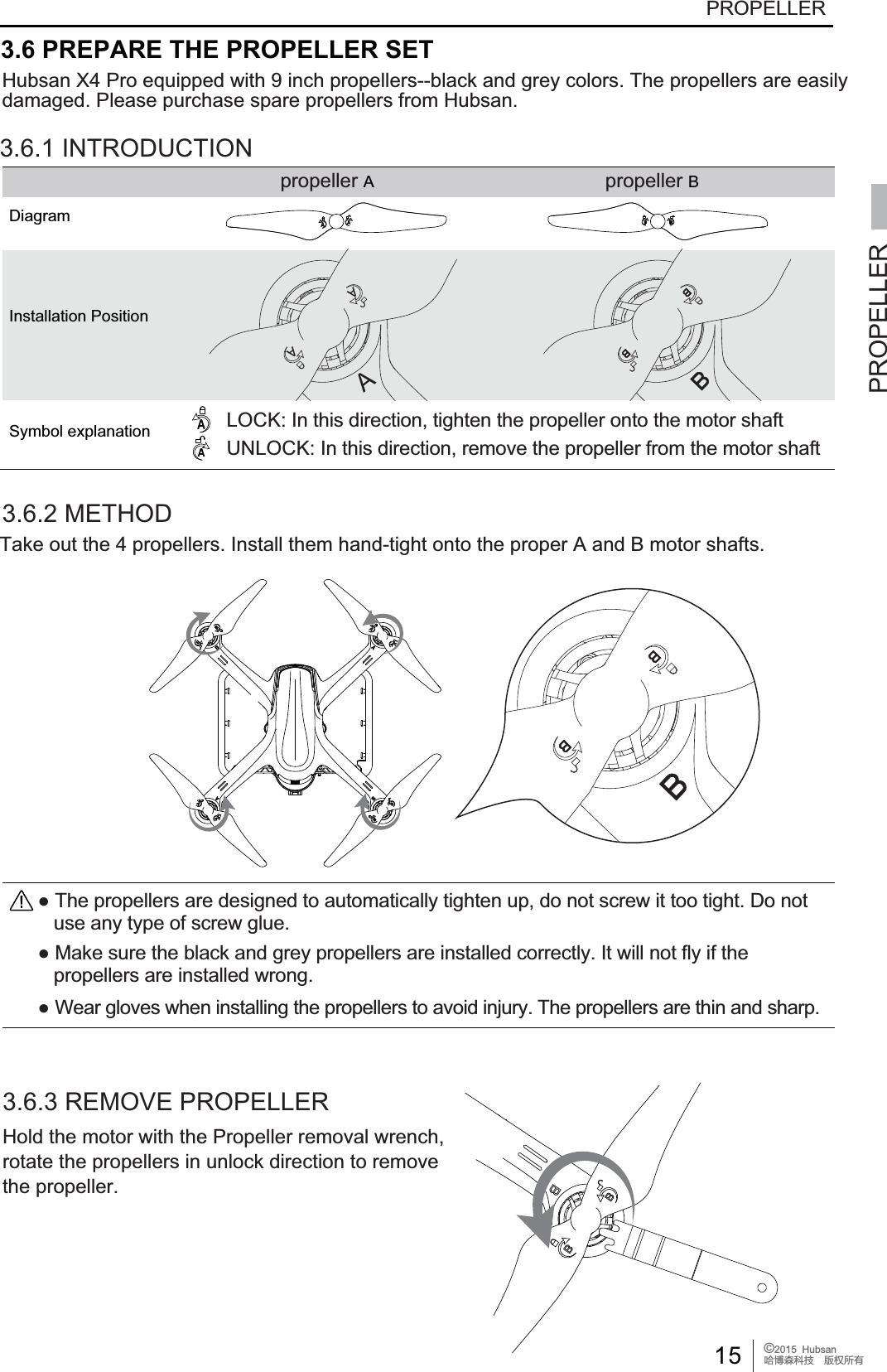
15 ©2015  HubsanֻӰ೨ሙ੿Njྠిਫ਼దPROPELLERPROPELLERƔ7KHSURSHOOHUVDUHGHVLJQHGWRDXWRPDWLFDOO\WLJKWHQXSGRQRWVFUHZLWWRRWLJKW'RQRW   use any type of screw glue.Ɣ0DNHVXUHWKHEODFNDQGJUH\SURSHOOHUVDUHLQVWDOOHGFRUUHFWO\,WZLOOQRWIO\LIWKH   propellers are installed wrong.ƔWear gloves when installing the propellers to avoid injury. The propellers are thin and sharp.3.6 PREPARE THE PROPELLER SETHubsan X4 Pro equipped with 9 inch propellers--black and grey colors. The propellers are easilydamaged. Please purchase spare propellers from Hubsan.3.6.1 INTRODUCTION propeller A propeller BDiagramInstallation PositionSymbol explanation LOCK: In this direction, tighten the propeller onto the motor shaftUNLOCK: In this direction, remove the propeller from the motor shaft3.6.2 METHOD3.6.3 REMOVE PROPELLERHold the motor with the Propeller removal wrench,rotate the propellers in unlock direction to removethe propeller.AAATake out the 4 propellers. Install them hand-tight onto the proper A and B motor shafts.
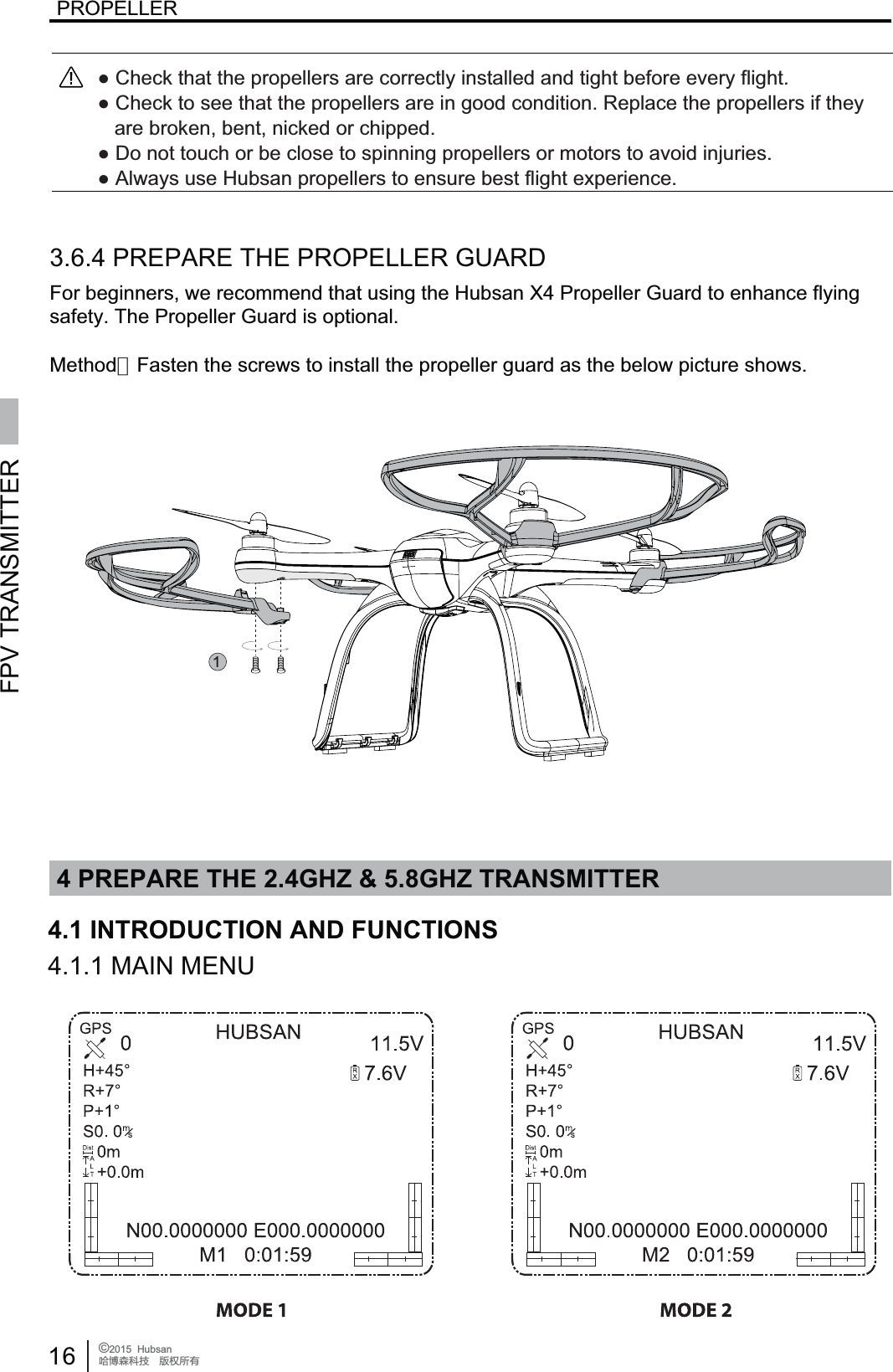
4 PREPARE THE 2.4GHZ & 5.8GHZ TRANSMITTERFPV TRANSMITTER16 ©2015  HubsanֻӰ೨ሙ੿Njྠిਫ਼దPROPELLER4.1 INTRODUCTION AND FUNCTIONS14.1.1 MAIN MENU3.6.4 PREPARE THE PROPELLER GUARDFor beginners, we recommend that using the Hubsan X4 Propeller Guard to enhance flyingsafety. The Propeller Guard is optional.Ɣ&KHFNWKDWWKHSURSHOOHUVDUHFRUUHFWO\LQVWDOOHGDQGWLJKWEHIRUHHYHU\IOLJKWƔ&KHFNWRVHHWKDWWKHSURSHOOHUVDUHLQJRRGFRQGLWLRQ5HSODFHWKHSURSHOOHUVLIWKH\DUHEURNHQEHQWQLFNHGRUFKLSSHGƔ'RQRWWRXFKRUEHFORVHWRVSLQQLQJSURSHOOHUVRUPRWRUVWRDYRLGLQMXULHVƔ$OZD\VXVH+XEVDQSURSHOOHUVWRHQVXUHEHVWIOLJKWH[SHULHQFHMethod:Fasten the screws to install the propeller guard as the below picture shows.

Navigation menu