HUSQVARNA HQ-BHH-BMS Rechargeable Li-Ion Battery with BLE User Manual

HUSQVARNA AB Rechargeable Li-Ion Battery with BLE

User Manual

BLi100C, BLi200C, BLi300CEN Operator's manual 2-10
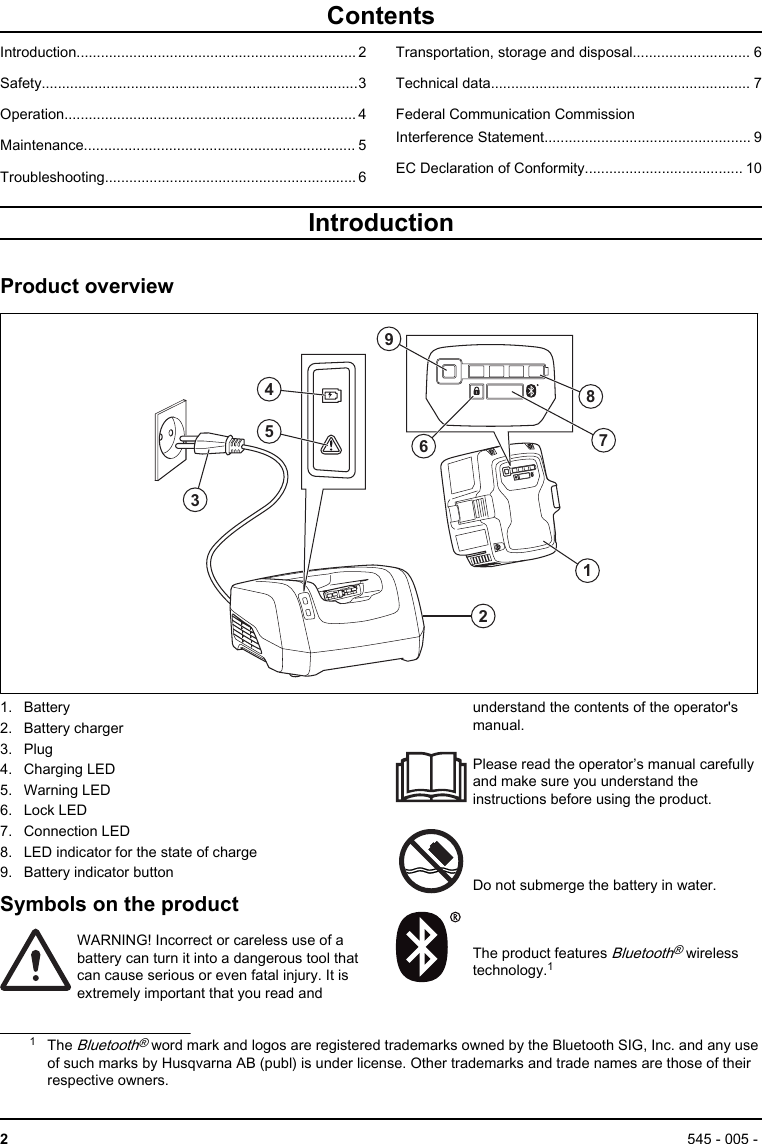
ContentsIntroduction..................................................................... 2Safety..............................................................................3Operation........................................................................ 4Maintenance................................................................... 5Troubleshooting.............................................................. 6Transportation, storage and disposal............................. 6Technical data................................................................ 7Federal Communication CommissionInterference Statement................................................... 9EC Declaration of Conformity....................................... 10IntroductionProduct overview35412 96871. Battery2. Battery charger3. Plug4. Charging LED5. Warning LED6. Lock LED7. Connection LED8. LED indicator for the state of charge9. Battery indicator buttonSymbols on the productWARNING! Incorrect or careless use of abattery can turn it into a dangerous tool thatcan cause serious or even fatal injury. It isextremely important that you read andunderstand the contents of the operator'smanual.Please read the operator’s manual carefullyand make sure you understand theinstructions before using the product.Do not submerge the battery in water.The product features Bluetooth® wirelesstechnology.11The Bluetooth® word mark and logos are registered trademarks owned by the Bluetooth SIG, Inc. and any useof such marks by Husqvarna AB (publ) is under license. Other trademarks and trade names are those of theirrespective owners.2545 - 005 -
Symbols on the product or its packagingindicate that this product cannot be handledas domestic waste. This product must bedeposited at an appropriate recycling facility.The product agrees with the applicable ECdirectives.The type plate shows the Husq-varna ID.Article number Factory andproduction lineProductiondateSerial number/Batch IDControl num-berXXXXXXXXX XXX XXXXXXX XXXXX XOther symbols/decals on the product refer to specialcertification requirements for certain markets.SafetySafety definitionsWarnings, cautions and notes are used to point outspecially important parts of the manual.WARNING: Used if there is a risk of injury ordeath for the operator or bystanders if theinstructions in the manual are not obeyed.CAUTION: Used if there is a risk of damageto the product, other materials or theadjacent area if the instructions in themanual are not obeyed.Note: Used to give more information that is necessary ina given situation.Battery safety(1) to (9) refer to Product overview on page 2.WARNING: Read all safety warnings and allinstructions. Failure to follow the warningsand instructions may result in electric shock,fire and/or serious injury.Note: Save all warnings and instructions for futurereference.Only use Husqvarna original batteries for Husqvarnaproducts and only charge them in original QC330 orQC500 battery charger from Husqvarna. The batteriesare software encrypted.The rechargeable BLi100C, BLi200C, BLi300C battery(1), is exclusively used as a power supply for therelevant Husqvarna cordless appliances. To avoid injury,the battery must not be used as a power source forother devices.• Do not dismantle, open or shred batteries.• Do not expose cells or batteries to heat or fire. Avoidstorage in direct sunlight.• Regulary check that the battery charger and thebattery are intact. Damaged or modified batteriesmay exhibit unpredictable behaviour resulting in fire,explosion or risk of injury.• Never use a battery or appliance that is faulty,modified or damaged.• Never attempt to modify or repair the battery. Entrustall repairs to your authorized dealer only.• Do not subject batteries to mechanical shock.• Do not remove a battery from its original packaginguntil required for use.• In the event of leaking, do not allow the liquid tocome in contact with the skin or eyes. If contact hasbeen made, wash the affected area with copiousamounts of water and seek medical advice.• Keep batteries out of the reach of children.• Keep battery clean and dry.• Wipe the battery terminals with a clean dry cloth ifthey become dirty.• Batteries need to be charged before use. Always useHusqvarna QC330 or QC500 battery charger.• Do not leave a battery on prolonged charge whennot in use.• Remove the battery from the equipment when not inuse.• When battery is not in use, keep it away from othermetal objects, like paper clips, coins, keys, nails,screws or other small metal objects, that can make aconnection from one terminal to another. Shortingthe battery terminals together may cause burns or afire.545 - 005 -  3
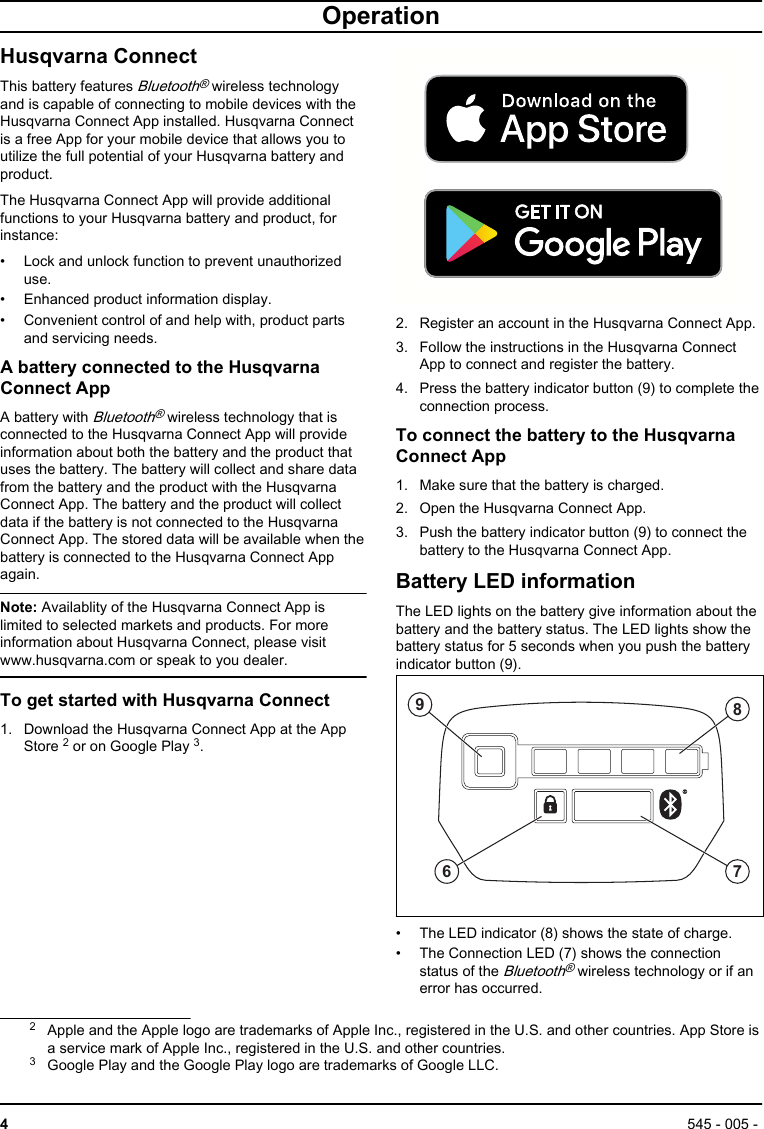
OperationHusqvarna ConnectThis battery features Bluetooth® wireless technologyand is capable of connecting to mobile devices with theHusqvarna Connect App installed. Husqvarna Connectis a free App for your mobile device that allows you toutilize the full potential of your Husqvarna battery andproduct.The Husqvarna Connect App will provide additionalfunctions to your Husqvarna battery and product, forinstance:• Lock and unlock function to prevent unauthorizeduse.• Enhanced product information display.• Convenient control of and help with, product partsand servicing needs.A battery connected to the HusqvarnaConnect AppA battery with Bluetooth® wireless technology that isconnected to the Husqvarna Connect App will provideinformation about both the battery and the product thatuses the battery. The battery will collect and share datafrom the battery and the product with the HusqvarnaConnect App. The battery and the product will collectdata if the battery is not connected to the HusqvarnaConnect App. The stored data will be available when thebattery is connected to the Husqvarna Connect Appagain.Note: Availablity of the Husqvarna Connect App islimited to selected markets and products. For moreinformation about Husqvarna Connect, please visitwww.husqvarna.com or speak to you dealer.To get started with Husqvarna Connect1. Download the Husqvarna Connect App at the AppStore 2 or on Google Play 3.2. Register an account in the Husqvarna Connect App.3. Follow the instructions in the Husqvarna ConnectApp to connect and register the battery.4. Press the battery indicator button (9) to complete theconnection process.To connect the battery to the HusqvarnaConnect App1. Make sure that the battery is charged.2. Open the Husqvarna Connect App.3. Push the battery indicator button (9) to connect thebattery to the Husqvarna Connect App.Battery LED informationThe LED lights on the battery give information about thebattery and the battery status. The LED lights show thebattery status for 5 seconds when you push the batteryindicator button (9).6879• The LED indicator (8) shows the state of charge.• The Connection LED (7) shows the connectionstatus of the Bluetooth® wireless technology or if anerror has occurred.2Apple and the Apple logo are trademarks of Apple Inc., registered in the U.S. and other countries. App Store isa service mark of Apple Inc., registered in the U.S. and other countries.3Google Play and the Google Play logo are trademarks of Google LLC.4545 - 005 -
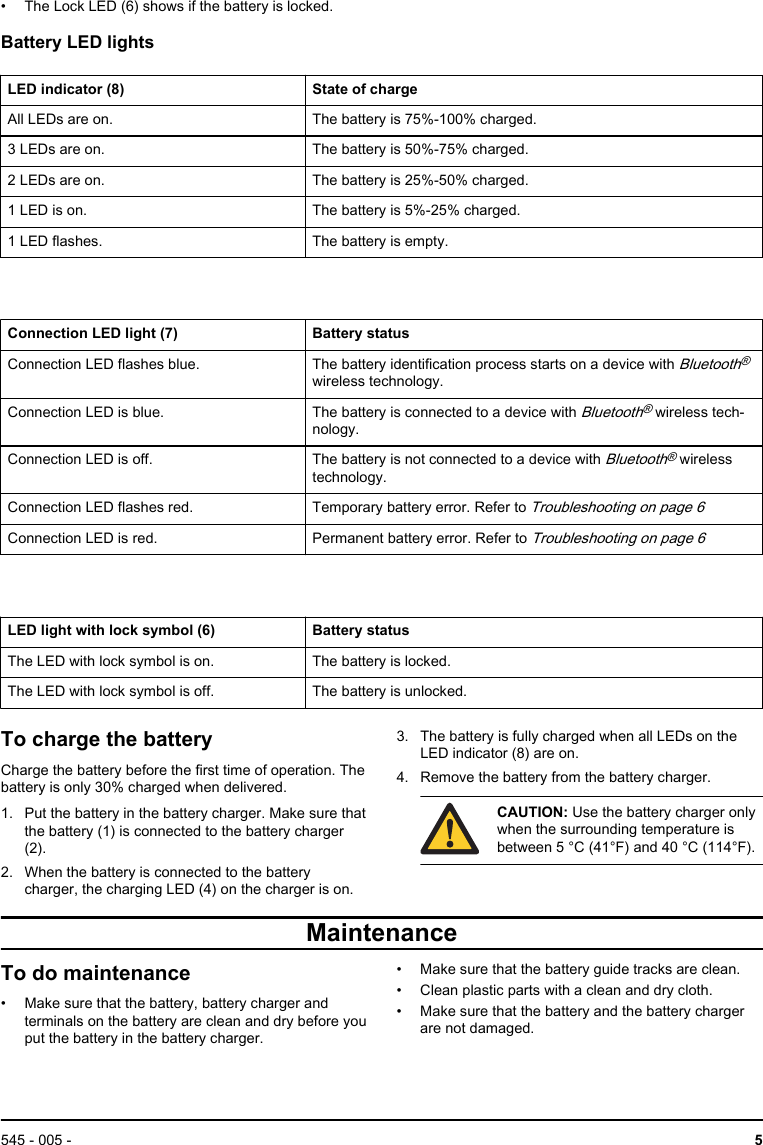
• The Lock LED (6) shows if the battery is locked.Battery LED lightsLED indicator (8) State of chargeAll LEDs are on. The battery is 75%-100% charged.3 LEDs are on. The battery is 50%-75% charged.2 LEDs are on. The battery is 25%-50% charged.1 LED is on. The battery is 5%-25% charged.1 LED flashes. The battery is empty.Connection LED light (7) Battery statusConnection LED flashes blue. The battery identification process starts on a device with Bluetooth®wireless technology.Connection LED is blue. The battery is connected to a device with Bluetooth® wireless tech-nology.Connection LED is off. The battery is not connected to a device with Bluetooth® wirelesstechnology.Connection LED flashes red. Temporary battery error. Refer to Troubleshooting on page 6Connection LED is red. Permanent battery error. Refer to Troubleshooting on page 6LED light with lock symbol (6) Battery statusThe LED with lock symbol is on. The battery is locked.The LED with lock symbol is off. The battery is unlocked.To charge the batteryCharge the battery before the first time of operation. Thebattery is only 30% charged when delivered.1. Put the battery in the battery charger. Make sure thatthe battery (1) is connected to the battery charger(2).2. When the battery is connected to the batterycharger, the charging LED (4) on the charger is on.3. The battery is fully charged when all LEDs on theLED indicator (8) are on.4. Remove the battery from the battery charger.CAUTION: Use the battery charger onlywhen the surrounding temperature isbetween 5 °C (41°F) and 40 °C (114°F).MaintenanceTo do maintenance• Make sure that the battery, battery charger andterminals on the battery are clean and dry before youput the battery in the battery charger.• Make sure that the battery guide tracks are clean.• Clean plastic parts with a clean and dry cloth.• Make sure that the battery and the battery chargerare not damaged.545 - 005 -  5
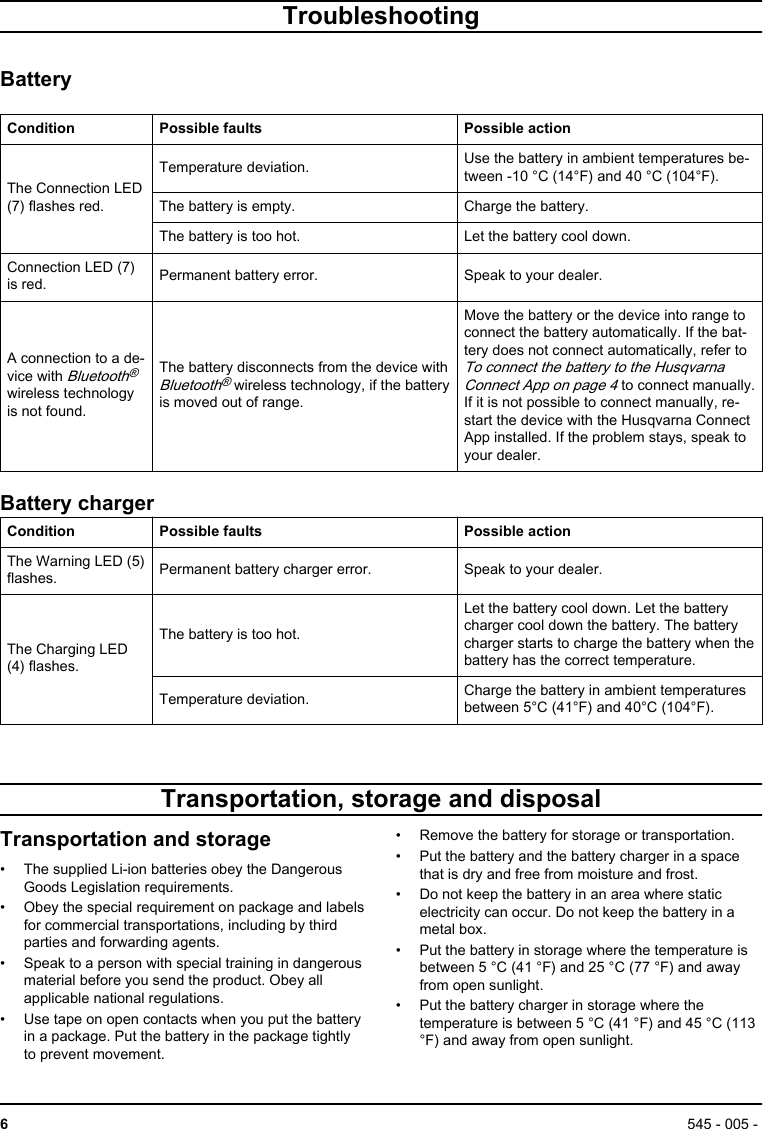
TroubleshootingBatteryCondition Possible faults Possible actionThe Connection LED(7) flashes red.Temperature deviation. Use the battery in ambient temperatures be-tween -10 °C (14°F) and 40 °C (104°F).The battery is empty. Charge the battery.The battery is too hot. Let the battery cool down.Connection LED (7)is red. Permanent battery error. Speak to your dealer.A connection to a de-vice with Bluetooth®wireless technologyis not found.The battery disconnects from the device withBluetooth® wireless technology, if the batteryis moved out of range.Move the battery or the device into range toconnect the battery automatically. If the bat-tery does not connect automatically, refer to To connect the battery to the HusqvarnaConnect App on page 4 to connect manually.If it is not possible to connect manually, re-start the device with the Husqvarna ConnectApp installed. If the problem stays, speak toyour dealer.Battery chargerCondition Possible faults Possible actionThe Warning LED (5)flashes. Permanent battery charger error. Speak to your dealer.The Charging LED(4) flashes.The battery is too hot.Let the battery cool down. Let the batterycharger cool down the battery. The batterycharger starts to charge the battery when thebattery has the correct temperature.Temperature deviation. Charge the battery in ambient temperaturesbetween 5°C (41°F) and 40°C (104°F).Transportation, storage and disposalTransportation and storage• The supplied Li-ion batteries obey the DangerousGoods Legislation requirements.• Obey the special requirement on package and labelsfor commercial transportations, including by thirdparties and forwarding agents.• Speak to a person with special training in dangerousmaterial before you send the product. Obey allapplicable national regulations.• Use tape on open contacts when you put the batteryin a package. Put the battery in the package tightlyto prevent movement.• Remove the battery for storage or transportation.• Put the battery and the battery charger in a spacethat is dry and free from moisture and frost.• Do not keep the battery in an area where staticelectricity can occur. Do not keep the battery in ametal box.• Put the battery in storage where the temperature isbetween 5 °C (41 °F) and 25 °C (77 °F) and awayfrom open sunlight.• Put the battery charger in storage where thetemperature is between 5 °C (41 °F) and 45 °C (113°F) and away from open sunlight.6545 - 005 -
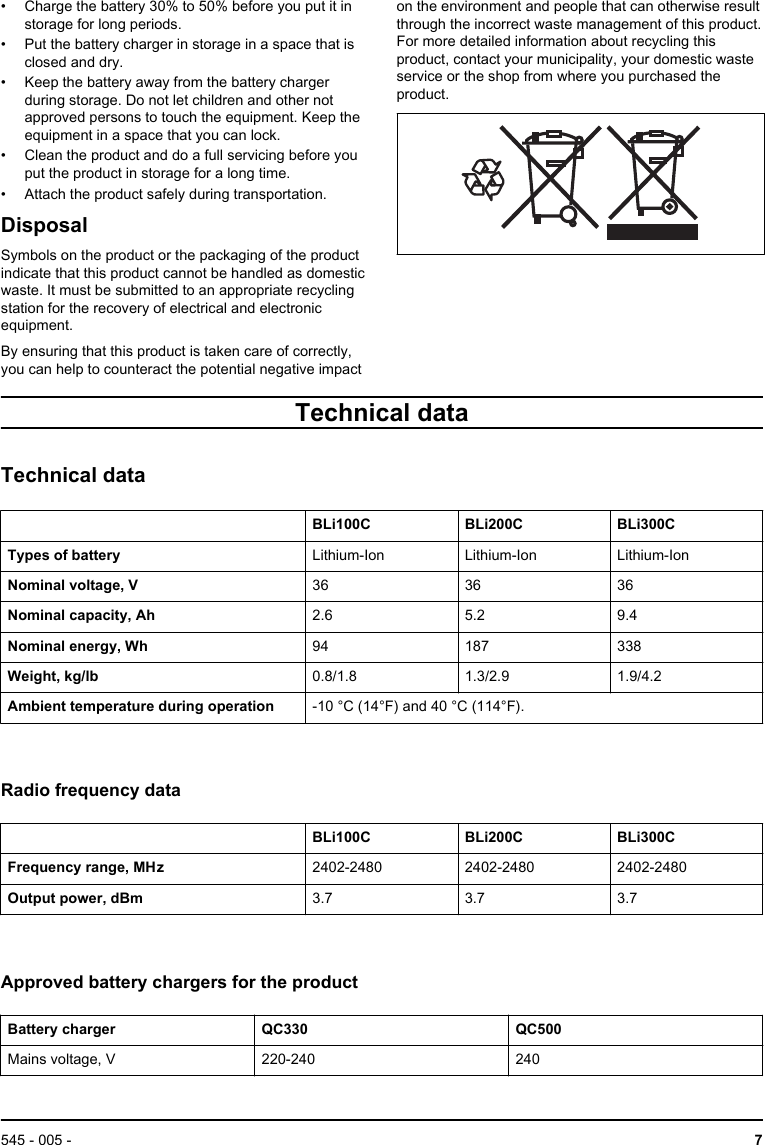
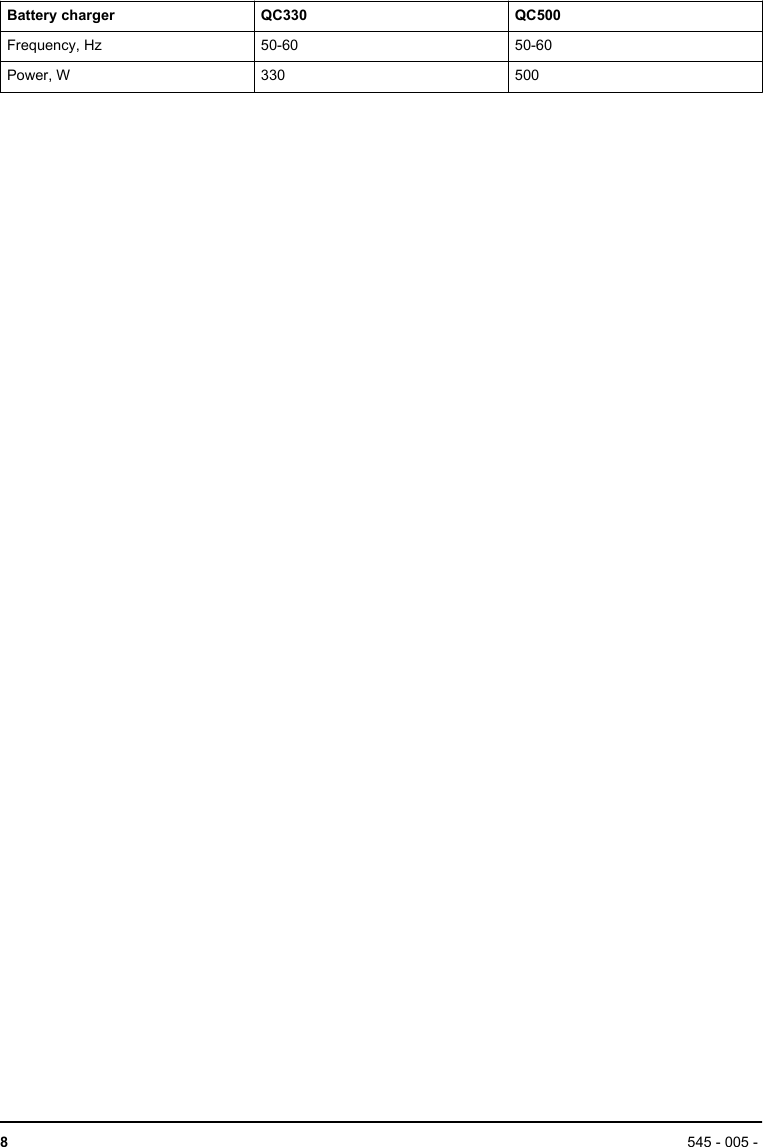
• Charge the battery 30% to 50% before you put it instorage for long periods.• Put the battery charger in storage in a space that isclosed and dry.• Keep the battery away from the battery chargerduring storage. Do not let children and other notapproved persons to touch the equipment. Keep theequipment in a space that you can lock.• Clean the product and do a full servicing before youput the product in storage for a long time.• Attach the product safely during transportation.DisposalSymbols on the product or the packaging of the productindicate that this product cannot be handled as domesticwaste. It must be submitted to an appropriate recyclingstation for the recovery of electrical and electronicequipment.By ensuring that this product is taken care of correctly,you can help to counteract the potential negative impacton the environment and people that can otherwise resultthrough the incorrect waste management of this product.For more detailed information about recycling thisproduct, contact your municipality, your domestic wasteservice or the shop from where you purchased theproduct.Technical dataTechnical dataBLi100C BLi200C BLi300CTypes of battery Lithium-Ion Lithium-Ion Lithium-IonNominal voltage, V 36 36 36Nominal capacity, Ah 2.6 5.2 9.4Nominal energy, Wh 94 187 338Weight, kg/lb 0.8/1.8 1.3/2.9 1.9/4.2Ambient temperature during operation -10 °C (14°F) and 40 °C (114°F).Radio frequency dataBLi100C BLi200C BLi300CFrequency range, MHz 2402-2480 2402-2480 2402-2480Output power, dBm 3.7 3.7 3.7Approved battery chargers for the productBattery charger QC330 QC500Mains voltage, V 220-240 240545 - 005 -  7
Battery charger QC330 QC500Frequency, Hz 50-60 50-60Power, W 330 5008545 - 005 -
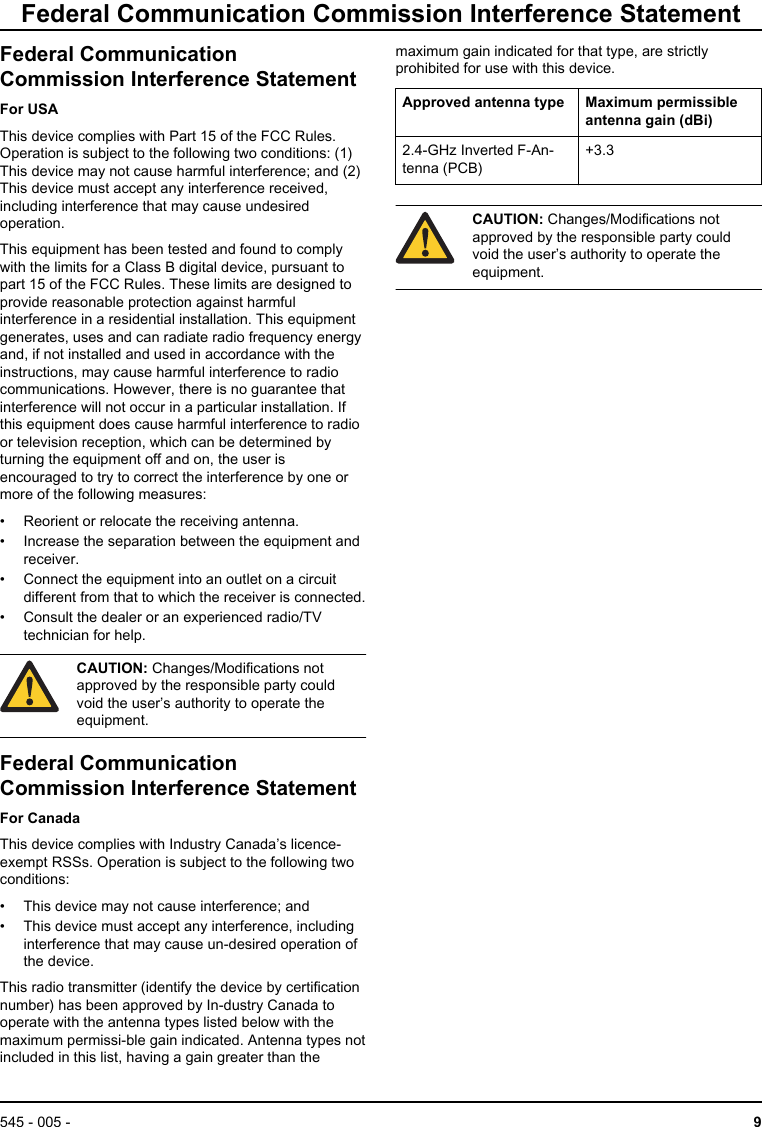
Federal Communication Commission Interference StatementFederal CommunicationCommission Interference StatementFor USAThis device complies with Part 15 of the FCC Rules.Operation is subject to the following two conditions: (1)This device may not cause harmful interference; and (2)This device must accept any interference received,including interference that may cause undesiredoperation.This equipment has been tested and found to complywith the limits for a Class B digital device, pursuant topart 15 of the FCC Rules. These limits are designed toprovide reasonable protection against harmfulinterference in a residential installation. This equipmentgenerates, uses and can radiate radio frequency energyand, if not installed and used in accordance with theinstructions, may cause harmful interference to radiocommunications. However, there is no guarantee thatinterference will not occur in a particular installation. Ifthis equipment does cause harmful interference to radioor television reception, which can be determined byturning the equipment off and on, the user isencouraged to try to correct the interference by one ormore of the following measures:• Reorient or relocate the receiving antenna.• Increase the separation between the equipment andreceiver.• Connect the equipment into an outlet on a circuitdifferent from that to which the receiver is connected.• Consult the dealer or an experienced radio/TVtechnician for help.CAUTION: Changes/Modifications notapproved by the responsible party couldvoid the user’s authority to operate theequipment.Federal CommunicationCommission Interference StatementFor CanadaThis device complies with Industry Canada’s licence-exempt RSSs. Operation is subject to the following twoconditions:• This device may not cause interference; and• This device must accept any interference, includinginterference that may cause un-desired operation ofthe device.This radio transmitter (identify the device by certificationnumber) has been approved by In-dustry Canada tooperate with the antenna types listed below with themaximum permissi-ble gain indicated. Antenna types notincluded in this list, having a gain greater than themaximum gain indicated for that type, are strictlyprohibited for use with this device.Approved antenna type Maximum permissibleantenna gain (dBi)2.4-GHz Inverted F-An-tenna (PCB)+3.3CAUTION: Changes/Modifications notapproved by the responsible party couldvoid the user’s authority to operate theequipment.545 - 005 -  9
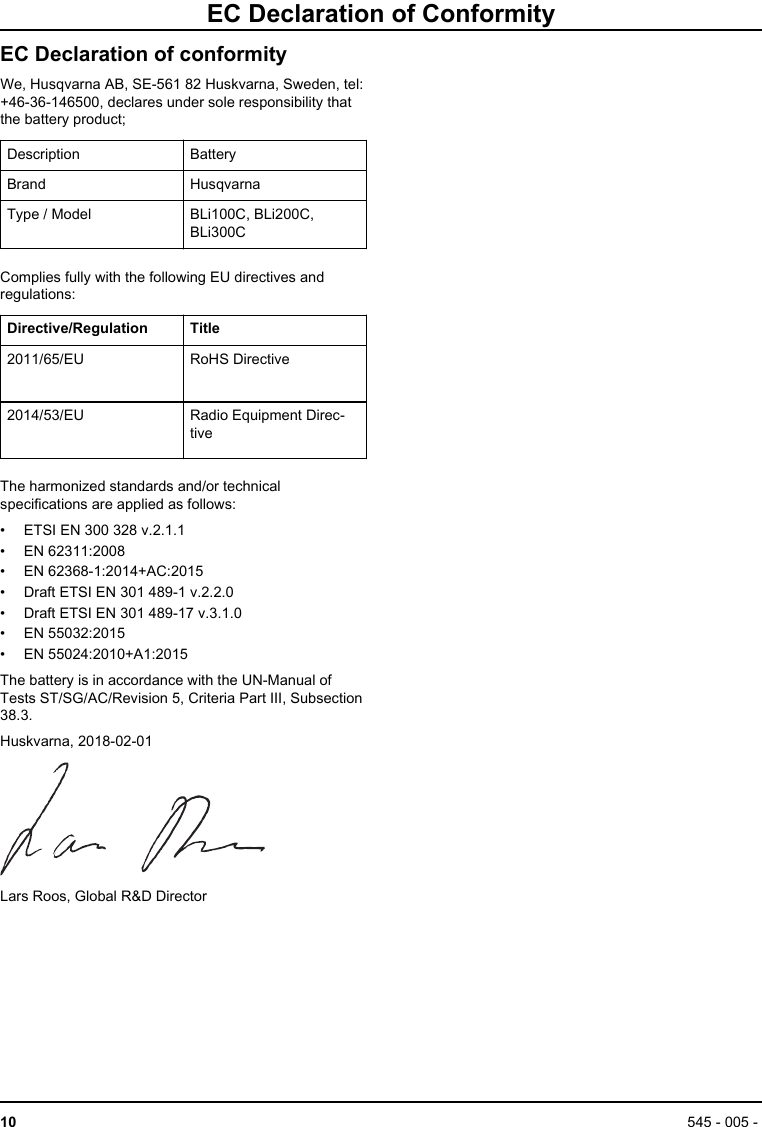
EC Declaration of ConformityEC Declaration of conformityWe, Husqvarna AB, SE-561 82 Huskvarna, Sweden, tel:+46-36-146500, declares under sole responsibility thatthe battery product;Description BatteryBrand HusqvarnaType / Model BLi100C, BLi200C,BLi300CComplies fully with the following EU directives andregulations:Directive/Regulation Title2011/65/EU RoHS Directive2014/53/EU Radio Equipment Direc-tiveThe harmonized standards and/or technicalspecifications are applied as follows:• ETSI EN 300 328 v.2.1.1• EN 62311:2008• EN 62368-1:2014+AC:2015• Draft ETSI EN 301 489-1 v.2.2.0• Draft ETSI EN 301 489-17 v.3.1.0• EN 55032:2015• EN 55024:2010+A1:2015The battery is in accordance with the UN-Manual ofTests ST/SG/AC/Revision 5, Criteria Part III, Subsection38.3.Huskvarna, 2018-02-01Lars Roos, Global R&D Director10 545 - 005 -
545 - 005 -  11
www.husqvarna.comOriginal instructions1159656-382018-09-07

Navigation menu