Hanchett Entry Systems K100620IA Electronic Cabinet Lock System User Manual Installation Manual

Hanchett Entry Systems, Inc. Electronic Cabinet Lock System Installation Manual

Installation Manual

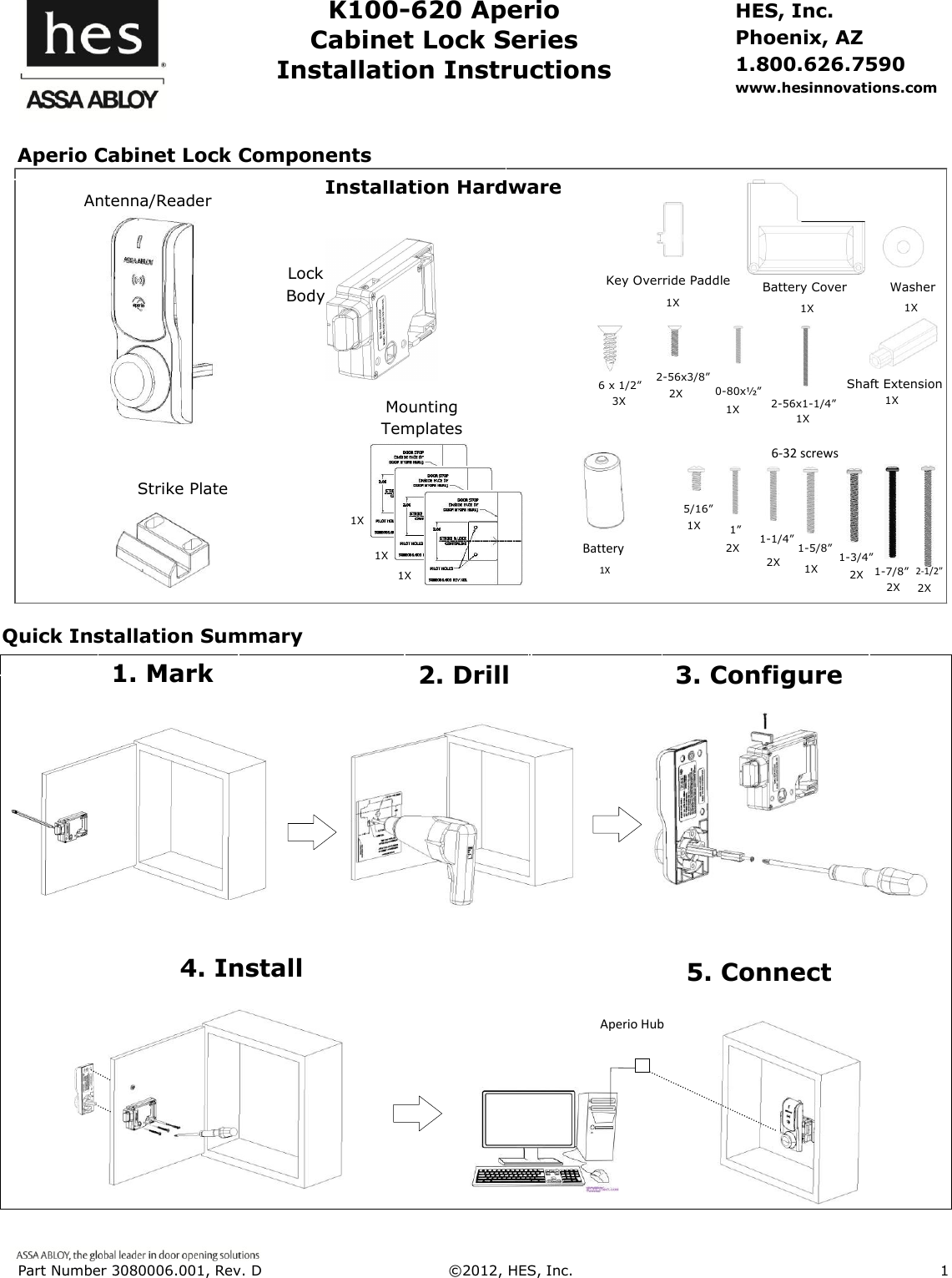
 Part Number 3080006.001, Rev. D  ©2012, HES, Inc.                      1      K100-620 Aperio Cabinet Lock Series Installation Instructions HES, Inc. Phoenix, AZ 1.800.626.7590 www.hesinnovations.com                                                                                                                                                                                        Machine screw with washer Card Reader Template Installation Hardware Strike Plate Antenna/Reader 6-32 screws 2X 5/16” 1” 1-5/8” 1-1/4” 1-3/4” 2-1/2” 2X 1X 1X 2X 2X Shaft Extension Battery Cover Washer 0-80x½” 2-56x3/8” 2-56x1-1/4” Battery Key Override Paddle 1X 1X 1X 1X 2X 1X 1X 1X Mounting Templates 1X 1X 1X 6 x 1/2” 3X Aperio Cabinet Lock Components Quick Installation Summary Lock Body 5. Connect 2. Drill 3. Configure 1. Mark 4. Install Aperio Hub 1-7/8”  2X
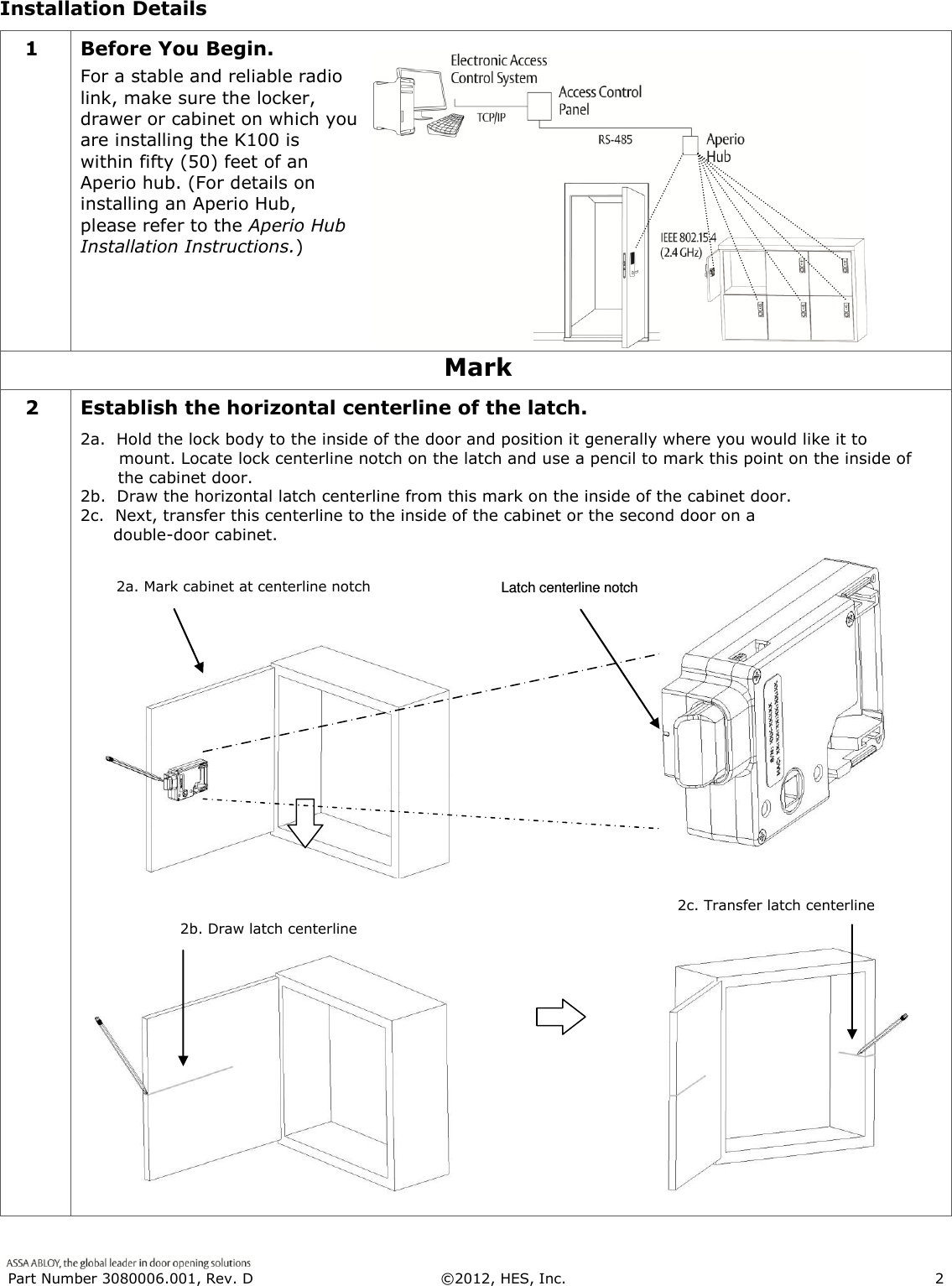
 Part Number 3080006.001, Rev. D  ©2012, HES, Inc.                      2   Installation Details 1 Before You Begin. For a stable and reliable radio link, make sure the locker, drawer or cabinet on which you are installing the K100 is within fifty (50) feet of an Aperio hub. (For details on installing an Aperio Hub, please refer to the Aperio Hub Installation Instructions.)  Mark 2 Establish the horizontal centerline of the latch. 2a.  Hold the lock body to the inside of the door and position it generally where you would like it to         mount. Locate lock centerline notch on the latch and use a pencil to mark this point on the inside of the cabinet door. 2b.  Draw the horizontal latch centerline from this mark on the inside of the cabinet door.  2c.  Next, transfer this centerline to the inside of the cabinet or the second door on a        double-door cabinet.    2b. Draw latch centerline  2c. Transfer latch centerline  2a. Mark cabinet at centerline notch  Latch centerline notch
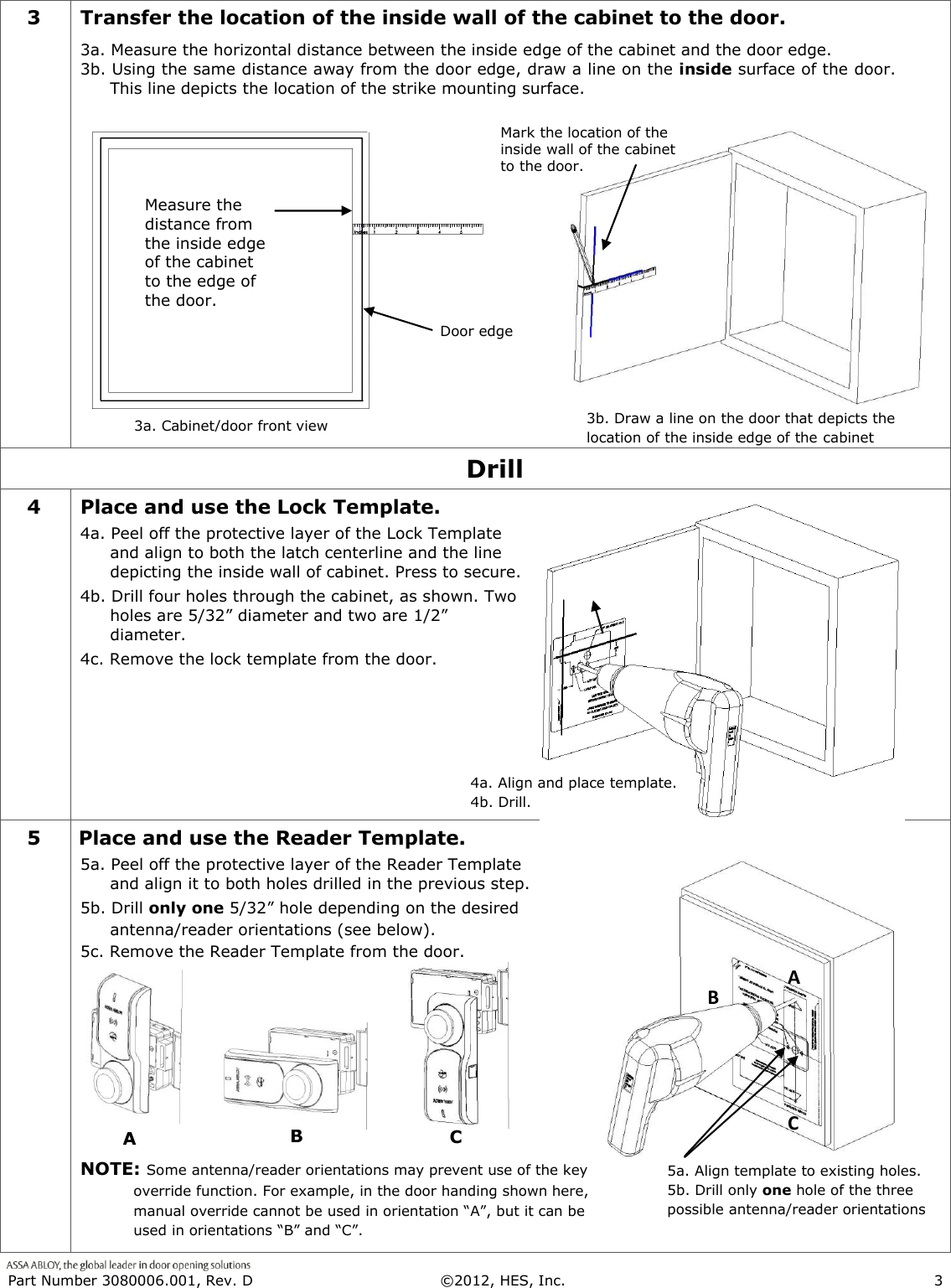
 Part Number 3080006.001, Rev. D  ©2012, HES, Inc.                      3   3 Transfer the location of the inside wall of the cabinet to the door. 3a. Measure the horizontal distance between the inside edge of the cabinet and the door edge.  3b. Using the same distance away from the door edge, draw a line on the inside surface of the door.  This line depicts the location of the strike mounting surface.   Drill 4 Place and use the Lock Template. 4a. Peel off the protective layer of the Lock Template and align to both the latch centerline and the line depicting the inside wall of cabinet. Press to secure. 4b. Drill four holes through the cabinet, as shown. Two holes are 5/32” diameter and two are 1/2” diameter.  4c. Remove the lock template from the door. 5 Place and use the Reader Template. 5a. Peel off the protective layer of the Reader Template and align it to both holes drilled in the previous step.  5b. Drill only one 5/32” hole depending on the desired antenna/reader orientations (see below).  5c. Remove the Reader Template from the door.      NOTE: Some antenna/reader orientations may prevent use of the key override function. For example, in the door handing shown here, manual override cannot be used in orientation “A”, but it can be used in orientations “B” and “C”.  3a. Cabinet/door front view when 3.b 4a. Align and place template. 4b. Drill. 5a. Align template to existing holes.            5b. Drill only one hole of the three possible antenna/reader orientations A when B when C when Door edge  Measure the distance from the inside edge of the cabinet to the edge of the door. 3b. Draw a line on the door that depicts the location of the inside edge of the cabinet when Mark the location of the inside wall of the cabinet to the door.  A when B when C when
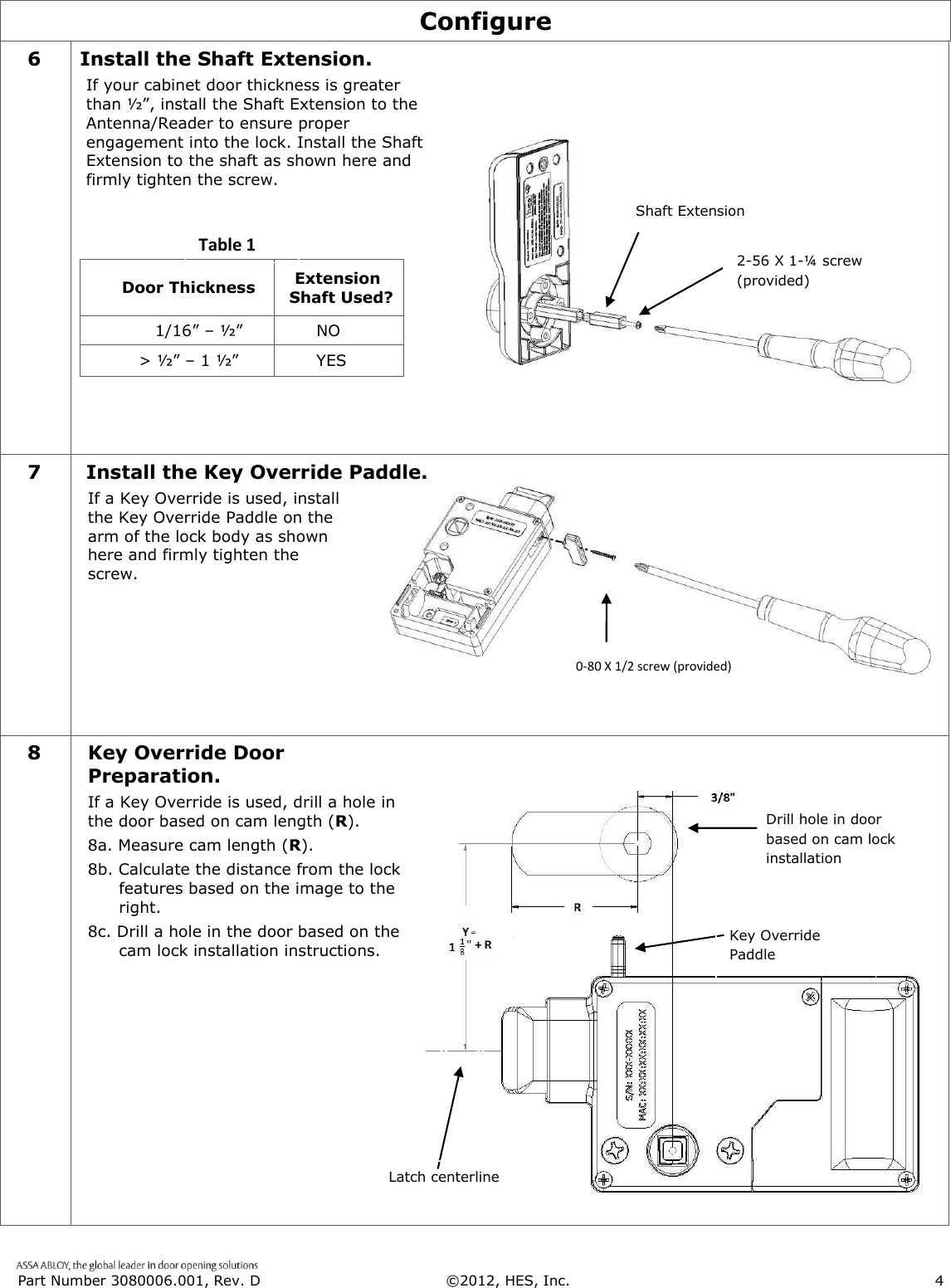
 Part Number 3080006.001, Rev. D  ©2012, HES, Inc.                      4   Configure 6 Install the Shaft Extension. If your cabinet door thickness is greater than ½”, install the Shaft Extension to the Antenna/Reader to ensure proper engagement into the lock. Install the Shaft Extension to the shaft as shown here and firmly tighten the screw.                                 Door Thickness    Extension  Shaft Used?             1/16” – ½”       NO          > ½” – 1 ½”       YES    7 Install the Key Override Paddle. If a Key Override is used, install the Key Override Paddle on the arm of the lock body as shown here and firmly tighten the screw.  8 Key Override Door Preparation. If a Key Override is used, drill a hole in the door based on cam length (R).  8a. Measure cam length (R). 8b. Calculate the distance from the lock     features based on the image to the  right. 8c. Drill a hole in the door based on the   cam lock installation instructions.  Shaft Extension 2-56 X 1-¼ screw (provided) 0-80 X 1/2 screw (provided) Table 1 Latch centerline Drill hole in door based on cam lock installation instructions. = Key Override Paddle
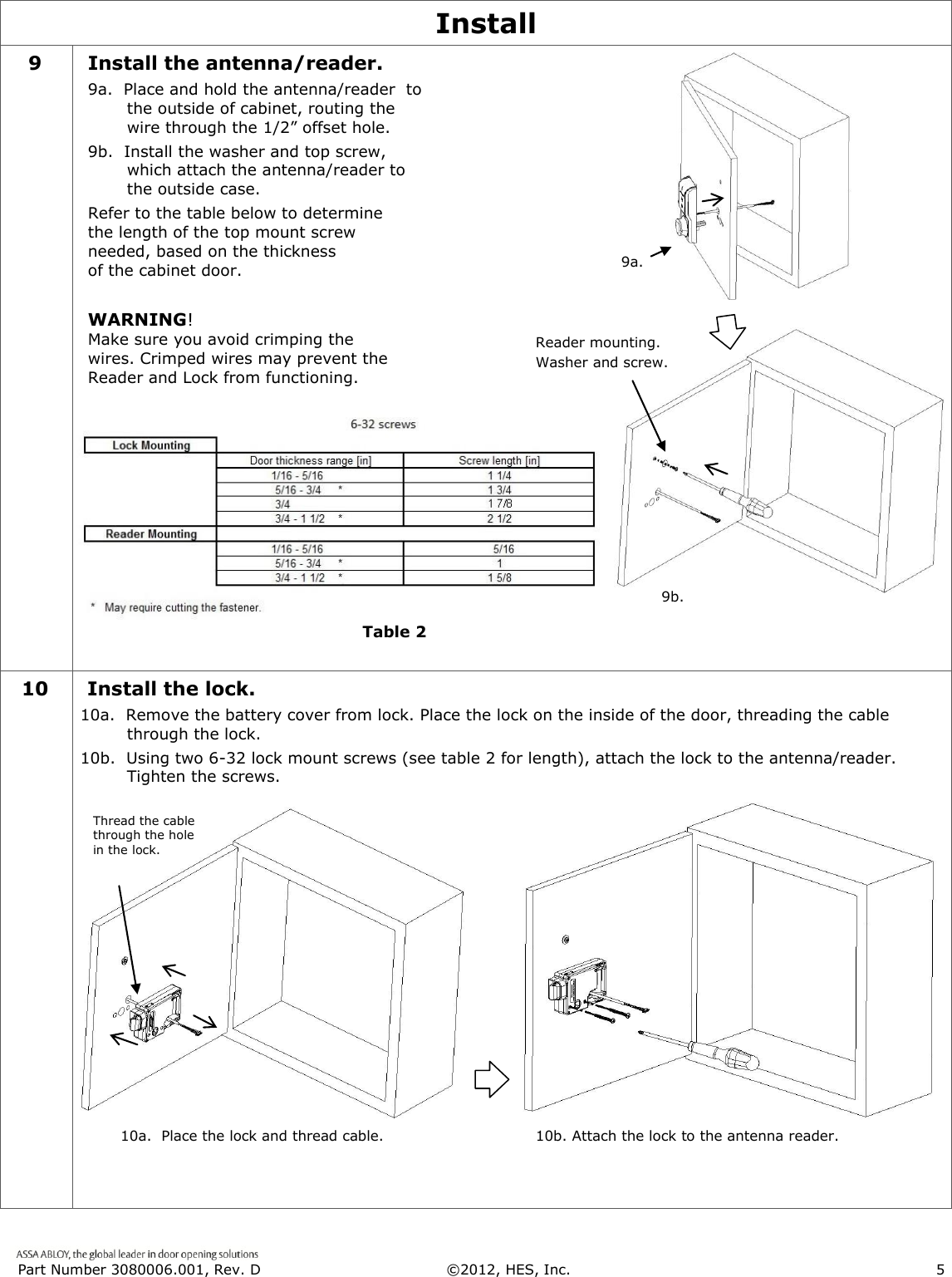
 Part Number 3080006.001, Rev. D  ©2012, HES, Inc.                      5   Install 9 Install the antenna/reader. 9a.  Place and hold the antenna/reader  to the outside of cabinet, routing the wire through the 1/2” offset hole.  9b.  Install the washer and top screw, which attach the antenna/reader to the outside case. Refer to the table below to determine the length of the top mount screw needed, based on the thickness  of the cabinet door.  WARNING!  Make sure you avoid crimping the wires. Crimped wires may prevent the Reader and Lock from functioning.         Table 2.   10   Install the lock. 10a.  Remove the battery cover from lock. Place the lock on the inside of the door, threading the cable through the lock. 10b.  Using two 6-32 lock mount screws (see table 2 for length), attach the lock to the antenna/reader.  Tighten the screws.    Reader mounting. Washer and screw. 9a. 9b. Thread the cable through the hole in the lock. 10a.  Place the lock and thread cable. 10b. Attach the lock to the antenna reader. Table 2
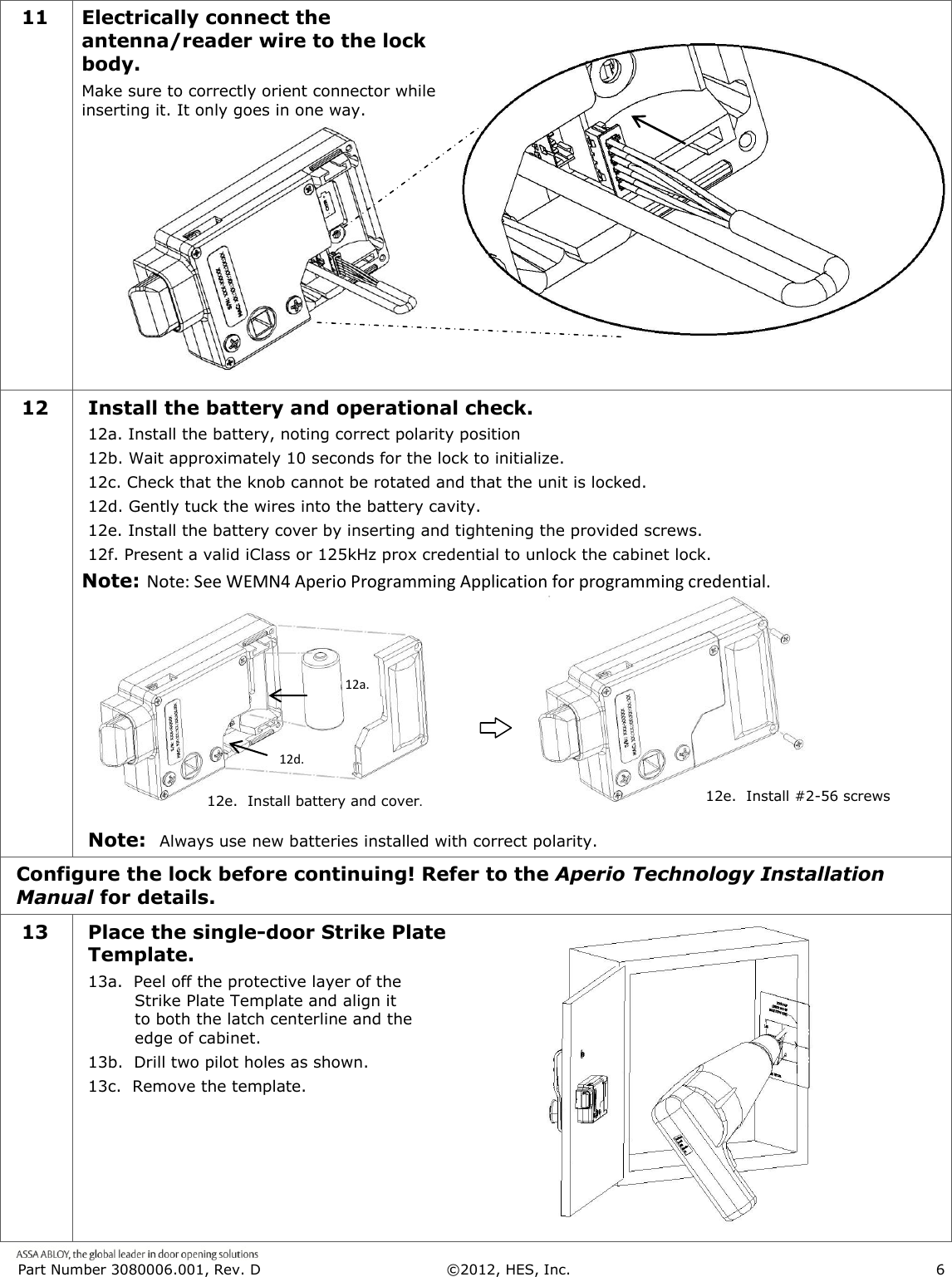
 Part Number 3080006.001, Rev. D  ©2012, HES, Inc.                      6   11 Electrically connect the antenna/reader wire to the lock body. Make sure to correctly orient connector while inserting it. It only goes in one way.       12  Install the battery and operational check. 12a. Install the battery, noting correct polarity position 12b. Wait approximately 10 seconds for the lock to initialize. 12c. Check that the knob cannot be rotated and that the unit is locked. 12d. Gently tuck the wires into the battery cavity. 12e. Install the battery cover by inserting and tightening the provided screws. 12f. Present a valid iClass or 125kHz prox credential to unlock the cabinet lock. Note: Note: See WEMN4 Aperio Programming Application for programming credential.        Note:  Always use new batteries installed with correct polarity.      Configure the lock before continuing! Refer to the Aperio Technology Installation Manual for details. 13 Place the single-door Strike Plate Template. 13a.  Peel off the protective layer of the Strike Plate Template and align it to both the latch centerline and the edge of cabinet. 13b.  Drill two pilot holes as shown.  13c.  Remove the template.  12d. 12a. 12e.  Install battery and cover. 12e.  Install #2-56 screws.
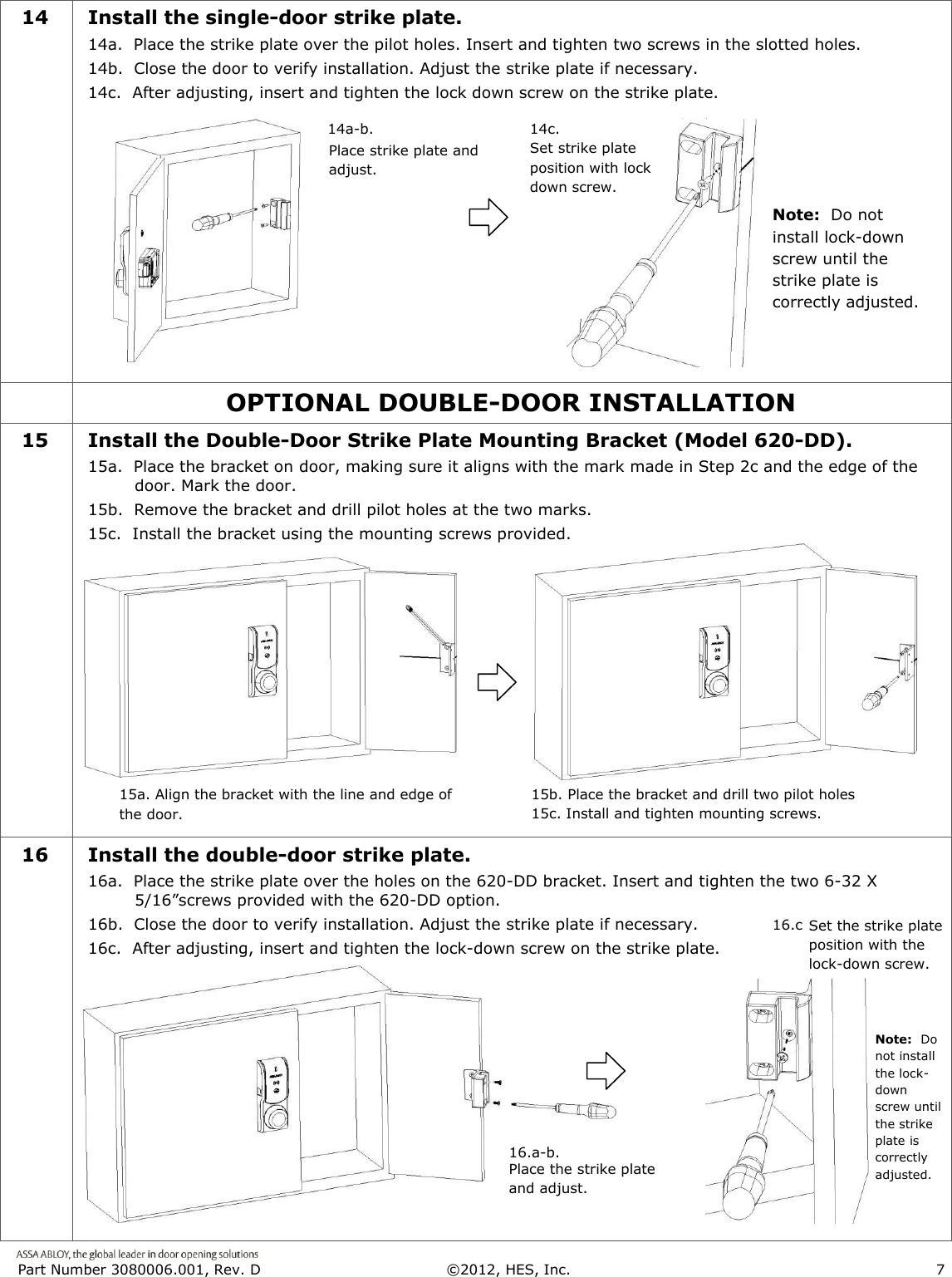
 Part Number 3080006.001, Rev. D  ©2012, HES, Inc.                      7   14 Install the single-door strike plate. 14a.  Place the strike plate over the pilot holes. Insert and tighten two screws in the slotted holes. 14b.  Close the door to verify installation. Adjust the strike plate if necessary. 14c.  After adjusting, insert and tighten the lock down screw on the strike plate.             OPTIONAL DOUBLE-DOOR INSTALLATION  15 Install the Double-Door Strike Plate Mounting Bracket (Model 620-DD). 15a.  Place the bracket on door, making sure it aligns with the mark made in Step 2c and the edge of the door. Mark the door.  15b.  Remove the bracket and drill pilot holes at the two marks.  15c.  Install the bracket using the mounting screws provided.  16 Install the double-door strike plate. 16a.  Place the strike plate over the holes on the 620-DD bracket. Insert and tighten the two 6-32 X 5/16”screws provided with the 620-DD option. 16b.  Close the door to verify installation. Adjust the strike plate if necessary. 16c.  After adjusting, insert and tighten the lock-down screw on the strike plate.  Place strike plate and adjust. 14a-b. 14c.  Set strike plate position with lock down screw.   15a. Align the bracket with the line and edge of the door. Place the bracket and drill two pilot holes 16.a-b. 16.c.  Set the strike plate position with the lock-down screw. Place the strike plate and adjust. Note:  Do not install lock-down screw until the strike plate is correctly adjusted. Note:  Do not install the lock-down screw until the strike plate is correctly adjusted. 15b. Place the bracket and drill two pilot holes 15c. Install and tighten mounting screws.
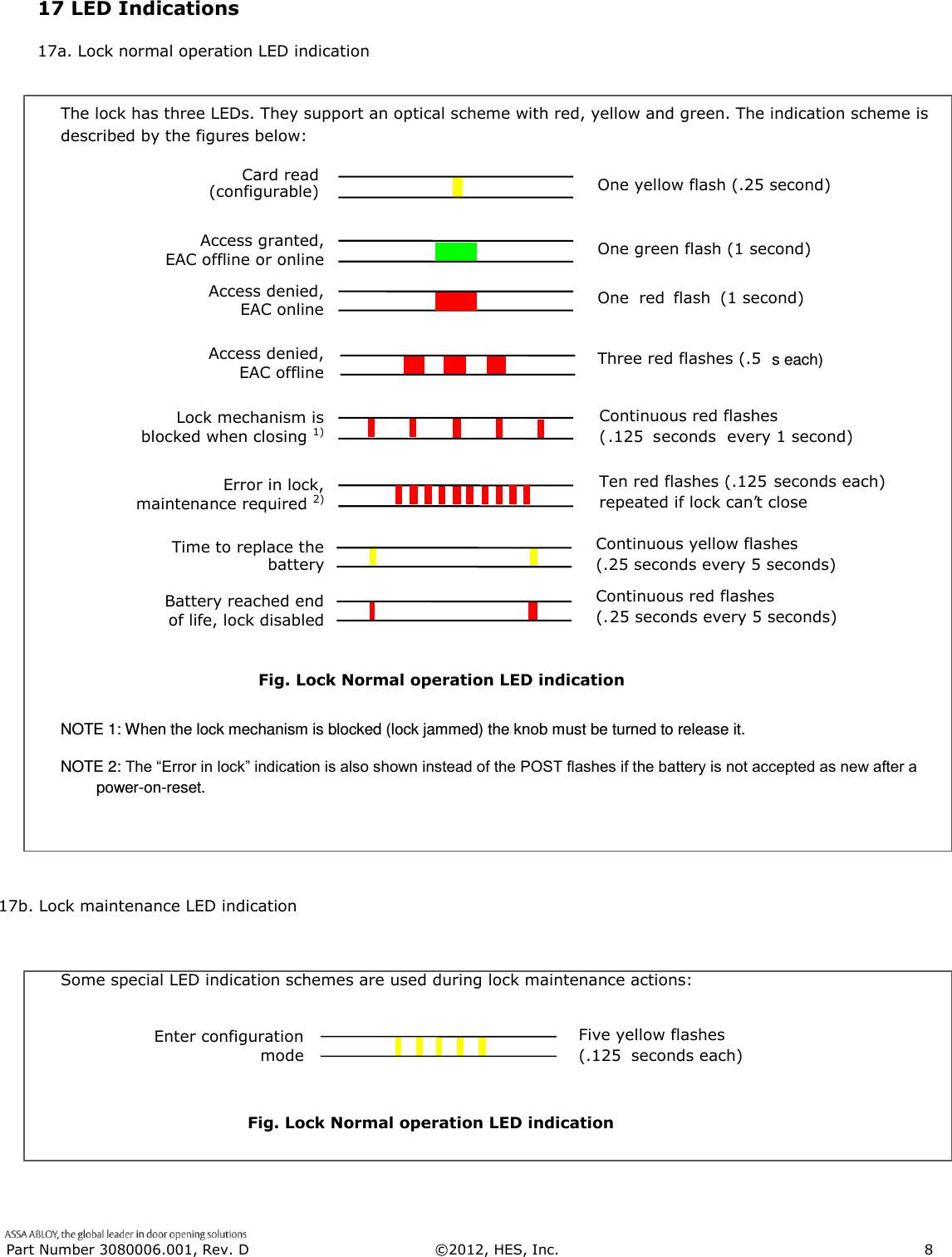
 Part Number 3080006.001, Rev. D  ©2012, HES, Inc.                      8      The lock has three LEDs. They support an optical scheme with red, yellow and green. The indication scheme is described by the figures below:              Fig. Lock Normal operation LED indication NOTE 1: When the lock mechanism is blocked (lock jammed) the knob must be turned to release it. NOTE 2: The “Error in lock” indication is also shown instead of the POST flashes if the battery is not accepted as new after a power-on-reset.            17b. Lock maintenance LED indication  Some special LED indication schemes are used during lock maintenance actions:          Fig. Lock Normal operation LED indication   Access denied, EAC offline Three red flashes (.5  s each) Access granted, EAC offline or online  One  red flash (1 second) One green flash (1 second) Access denied, EAC online Lock mechanism is  blocked when closing 1)  Continuous red flashes  ( .125 s econds every 1 second) Card read  (configurable) One yellow flash (.25 second) Error in lock,  maintenance required 2) Ten red flashes (.125  seconds each) repeated if lock can ’ t close Battery reached end  of life, lock disabled Continuous red flashes flashes (. 25 seconds every 5 seconds) Time to replace the  battery Continuous yellow flashes (.25 seconds every 5 seconds)   Enter configuration  mode Five yellow flashes   (.125  seconds each)   17 LED Indications 17a. Lock normal operation LED indication
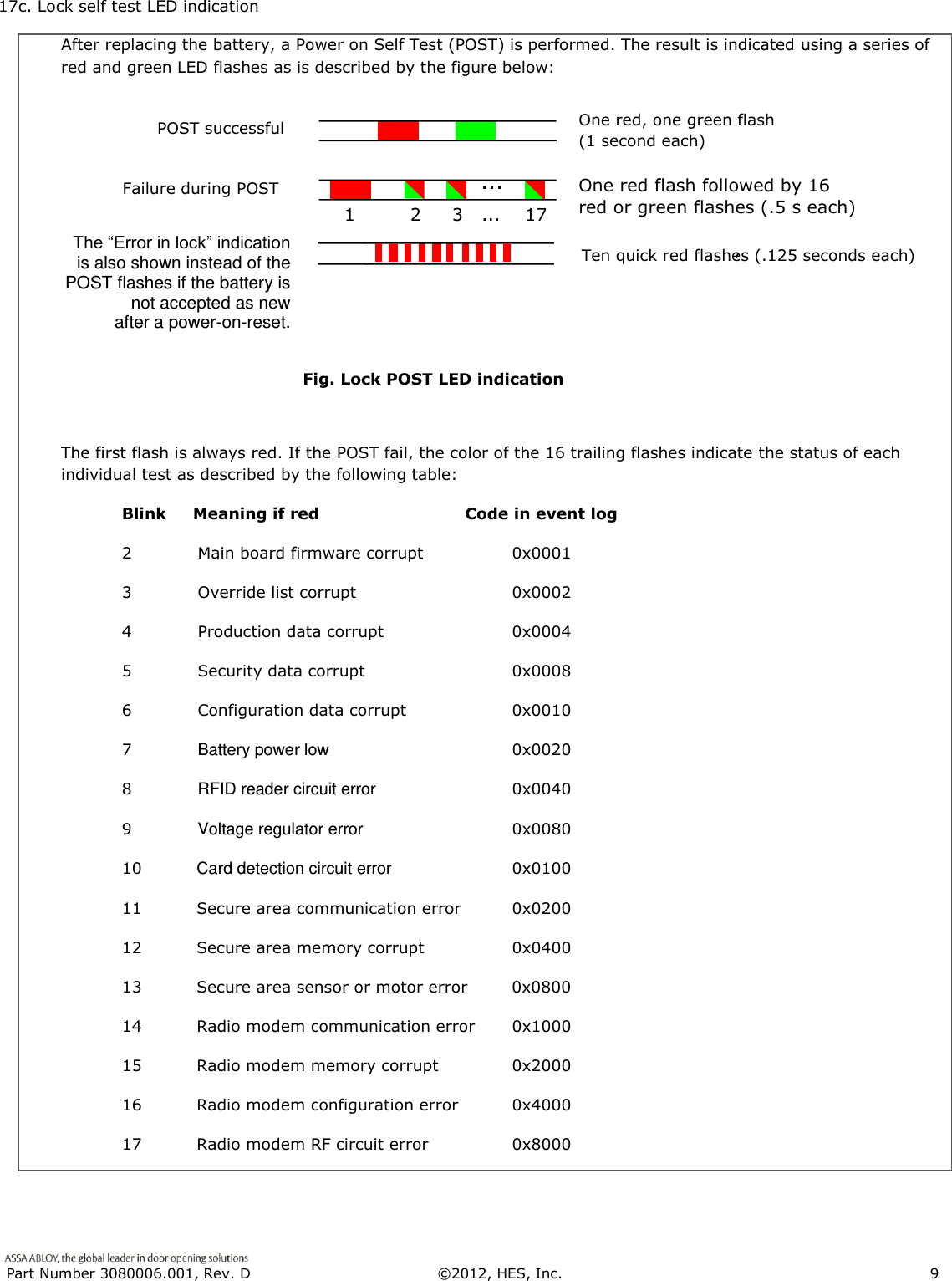
 Part Number 3080006.001, Rev. D  ©2012, HES, Inc.                      9   17c. Lock self test LED indication  After replacing the battery, a Power on Self Test (POST) is performed. The result is indicated using a series of red and green LED flashes as is described by the figure below:                       Fig. Lock POST LED indication  The first flash is always red. If the POST fail, the color of the 16 trailing flashes indicate the status of each individual test as described by the following table:   Blink     Meaning if red  Code in event log   2            Main board firmware corrupt  0x0001     3            Override list corrupt    0x0002   4            Production data corrupt  0x0004   5            Security data corrupt  0x0008   6            Configuration data corrupt  0x0010   7            Battery power low  0x0020   8            RFID reader circuit error  0x0040   9            Voltage regulator error  0x0080  10          Card detection circuit error  0x0100   11          Secure area communication error  0x0200   12          Secure area memory corrupt  0x0400   13          Secure area sensor or motor error  0x0800    14          Radio modem communication error  0x1000   15          Radio modem memory corrupt  0x2000   16          Radio modem configuration error  0x4000   17          Radio modem RF circuit error  0x8000     1         2     3   ...    17   ...   Failure during POST   One red flash followed by 16 red or green flashes (.5 s each)   POST successful   One red, one green flash   (1 second each)   The “Error in lock” indication is also shown instead of the POST flashes if the battery is not accepted as new  after a power-on-reset. Ten quick red flashes (.125 seconds each) ’
 Part Number 3080006.001, Rev. D  ©2012, HES, Inc.                      10   WARNING FCC Statement This equipment has been tested and found to comply with the limits for a class B digital device, pursuant to part 15 of the FCC Rules.  These limits are designed to provide reasonable protection against harmful interference in a residential installation.  This equipment generates, uses, and can radiate radio frequency energy and if not installed and used in accordance with the instructions, may cause harmful  interference  to  radio  communications.    However,  there  is  no  guarantee  that  interference  will  not  occur  in  a  particular installation. If this equipment does cause harmful interference to radio or television reception, which can be determined by turning the equipment off and on, the user is encouraged to try to correct the interference by one or more of the following measures:  Reorient or relocate the receiving antenna.  Increase the separation between the equipment and receiver.  Connect the equipment into an outlet on a circuit different from that to which the receiver is connected.  Consult the dealer or an experienced radio/TV technician for help. Operation  with  non-approved  equipment  is  likely  to  result  in  interference  to  radio  and  TV  reception.    The  user  is  cautioned  that changes and modifications made to the equipment without the approval of manufacturer could void the user’s authority to operate this equipment. IC Statement This device complies with Industry Canada license-exempt RSS standards(s).                                                                              Operation is subject to the following two conditions:   (1) this device may not cause interference, and   (2) this device must accept any interference, including interference that may cause undesired operation. Conformité aux normes FCC  Cet équipement a été testé et trouvé conforme aux limites pour un dispositif numérique de classe B, conformément à la Partie  15 des règlements de la FCC. Ces limites sont conçues pour fournir une protection raisonnable contre les interférences nuisibles dans une installation résidentielle. Cet équipement génère, utilise et peut émettre des fréquences radio et, s'il n'est pas installé et utilisé conformément  ment  aux  instructions  du  fabricant,  peut  causer  des  interferences  nuisibles  aux  communications  radio.  Rien  ne garantit  cependant  que  l'interférence  ne  se  produira  pas  dans  une  installation  particulière.  Si  cet  équipement  provoque  des interférences nuisibles à la réception radio ou de télévision, qui peut être déterminé en comparant et en l'éteignant, l'utilisateur est encouragé à essayer de corriger les interférence par une ou plusieurs des mesures suivantes:   Réorienter ou déplacer l'antenne de réception.  Augmenter la distance entre l'équipement et le récepteur.   Branchez l'appareil dans une prise sur un circuit différent de celui auquel le récepteur est connecté.   Consultez votre revendeur ou un technicien radio / TV pour assistance.Avertissement  Les changements ou modififications à cet appareil sans expressément approuvée par la partie responsable de conformité pourraient annuler l'autorité de l'utilisateur de faire fonctionner cet équipement. Conformité aux normes IC Cet appareil est confrome avec Industrie Canada exempt de license RSS standard(s).                                                                  Son fonctionnement est souimes aux deux conditions suivantes: (1) cet appareil ne peut causer d’interférences, et (2) cet appareil doit accepter toute interference, y compris des interférences qui peuvent provoquer un fonctionnement indésirable du périphérique.

Navigation menu