HandyWave SMT100 DIGITAL WIRELESS MICROPHONE User Manual SMT 100 Manual REV
HandyWave Co., Ltd. DIGITAL WIRELESS MICROPHONE SMT 100 Manual REV
USERS MANUAL

User’s Manual Digital Wireless Microphone Swany
Introduction
1/5
202-4, Yatap-dong, Bundang-gu, Seongnam-si, Gyeonggi-do, 463-070, Korea
Tel: 82-31-709-8900, Fax: 82-31-708-9455
http://www.handywave.com
Introduction
HandyWave, an expertise in digital wireless connectivity solution, launches a wireless
microphone named Swany for teaching. The Swany is designed mainly for the female teacher
who has relatively weak vital force in teaching long time. It provides a sound optimized to
classroom environments and pleasure to the students who see it everyday The Swany, an
output of HandyWave’s accumulated technology, will advance in that trend.
Features
z Highly advanced 2.4GHz ISM band digital wireless technology
z Ultra small and multi-functional Transmitter
z Dynamic clear sound
z Practicable Hi-Fi design
Specifications
Sound RF
Output: Nominal 20W/4Ω load Frequency: 2.402~2480MHz
THD+N: 0.1W at 10W Tx power: +7dBm
SNR: 80dB at 10W Rx sensitivity: -75dBm
SPL: 95±2dB(1W/0.5m) Service range: 30m
Dimension Current consumption: 110mA@3.3V(Tx)/
Transmitter: 50(W)×85(H)×21(D) mm/55g 95mA@3.3V(Rx)
Speaker: 130(W)×124(H)×130(D) mm/410g Battery
Charger Li-ion/3.7V 1,150mA
USB to mini plug cable
(2 hours) Status Indication
Temperature Transmitter: Power/Link/Charge(3 LED's)
Operational temperature: 0~40℃ Speaker: Power/Link(2 LED's)
Charger: Charge(2 Color LED)
Contents
Transmitter/Speaker/Transmitter Neck Band/Stick Mic/Head Mic/Speaker Charger/Transmitter
Charging Cable/Audio Cable/Portable Bag/Manual/Speaker Foot Rubber/Mic Wind Screen
User’s Manual Digital Wireless Microphone Swany
Usage
HandyWave Co., Ltd. www.handywave.com 2/5
Usage
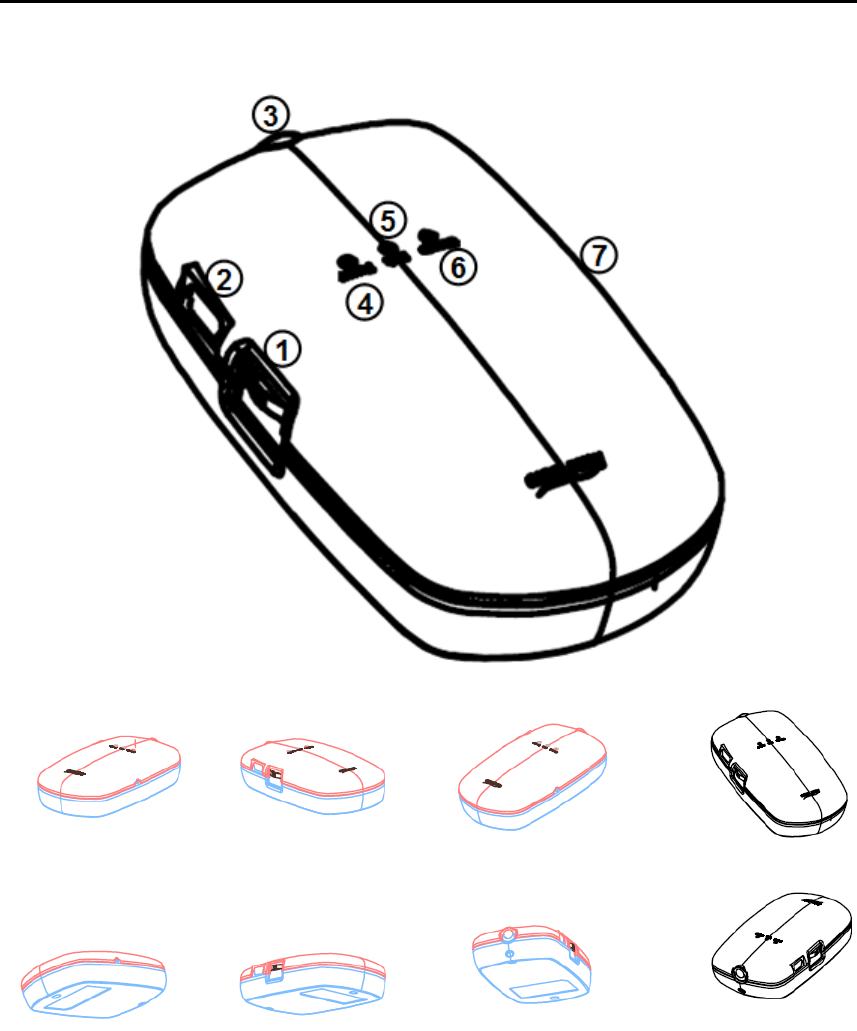
Transmitter
Transmitter Organization
① Jog Switch
② Charger Jack
③ Mic Input
④ Power LED
⑤ Link LED
⑥ Charging LED
⑦ Pairing Switch
User’s Manual Digital Wireless Microphone Swany
Usage
HandyWave Co., Ltd. www.handywave.com 3/5
Power On/Off
To operate the Transmitter, push the jog switch. When the Transmitter is powered on, PWR
LED turns to green color. When speaker is also powered on, the LNK LED turns to blue
color. If you push the jog switch one more, the Transmitter will be powered off.
MIC Connection
Connect stick Mic or head Mic into the MIC jack. By connecting audio devices such as MP3,
you can listen to the music (use audio cable provided).
Volume Control
If you full the jog switch with finger clockwise, the volume will become high and become low
when turn counterclockwise. You can also control the speaker volume with the volume knob.
Charging
When using the Transmitter, if the battery becomes weak, the PWR LED turns to orange
color. Use after charging the Transmitter using the charging cable provided. Turn off the
Transmitter when charging. Charging can be done with the USB port of the speaker or PC
that is powered on. During the charging the CHG LED is in red color and turns to green
color when finished.
Pairing
When you replace one of the unit between the Transmitter and speaker, you should make
pair the units prior to use. Push the PAIR switch of the units using a sharp thing such as
point of a pencil in few seconds by turns. When paired, the LNK LED of the units turn to
blue color.

User’s Manual Digital Wireless Transmitter Swany
Notice
HandyWave Co., Ltd. www.handywave.com 4/5
Notice
Notice
z When using, do not locate the speaker near the ear.
z Do not use the product when charging.
z Do not disassemble and assemble the product spontaneously.
z Keep the product out of the direct rays of the sun and heating. When storing long in
high temperature, the battery might be blown up.
z Do not bend the power cord in a hasty and make the charger being damaged. It may
cause a fire or electric shock.
z Store the products in well ventilated and safe place.
Before Using
z Confirm the charging status.
z The product may not operate if battery is weak.
z Connect a stick or head mic provided into the MIC input jack, turn on the power and
control the volume of Transmitter and speaker.
z Turn off the product when do not use long time.
z When using an external device simultaneously, control the volume properly.
Service Policy
Please register the product in our homepage before using. Describe information correctly for
smooth A/S and support. Request A/S in our home page or the store you purchased. The
service will be charged in the following cases.
① In the case that we cannot confirm the warranty period as the product has not been
registered.
② In the case of failure due to the user’s carelessness.
③ In the case of failure due to the user’s alteration or repair.
④ In the case of failure due to the natural disaster.
⑤ When the warranty is over.
⑥ The failure of consumption goods excluding the Transmitter and speaker.
User’s Manual Digital Wireless Transmitter Swany
Notice
HandyWave Co., Ltd. www.handywave.com 5/5
FCC Information to User
This equipment has been tested and found to comply with the limits for a Class B digital
device, pursuant to Part 15 of the FCC Rules. These limits are designed to provide
reasonable protection against harmful interference in a residential installation. This
equipment generates, uses and can radiate radio frequency energy and, if not installed and
used in accordance with the instructions, may cause harmful interference to radio
communications. However, there is no guarantee that interference will not occur in a
particular installation. If this equipment does cause harmful interference to radio or
television reception, which can be determined by turning the equipment off and on, the user
is encouraged to try to correct the interference by one of the following measures:
• Reorient or relocate the receiving antenna.
• Increase the separation between the equipment and receiver.
• Connect the equipment into an outlet on a circuit different from that to which the receiver is
con-nected.
• Consult the dealer or an experienced radio/TV technician for help.
Caution
Modifications not expressly approved by the party responsible for compliance could void the
user’s authority to operate the equipment.
FCC Compliance Information : This device complies with Part 15 of the FCC
Rules. Operation is subject to the following two conditions: (1) This device may not cause
harmful interference, and (2) this device must accept any interference received, including
interference that may cause undesired operation
IMPORTANT NOTE:
FCC RF Radiation Exposure Statement:
This equipment complies with FCC RF radiation exposure limits set forth for an uncontrolled
environment. This equipment should be installed and operated with a minimum distance of
20 centimeters between the radiator and your body.This transmitter must not be co-located
or operating in conjunction with any other antenna or transmitter.