Hangzhou Ezviz Network T9 Home Sense Siren with Strobe Light User Manual

Hangzhou Ezviz Network Co., Ltd Home Sense Siren with Strobe Light

User Manual

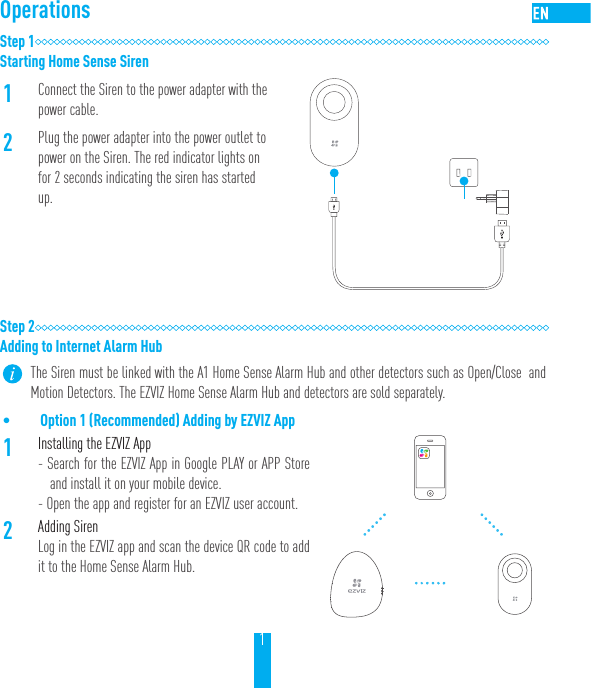
1OperationsStep 1Starting Home Sense Siren1Connect the Siren to the power adapter with the power cable.2Plug the power adapter into the power outlet to power on the Siren. The red indicator lights on for 2 seconds indicating the siren has started up.Step 2Adding to Internet Alarm HubThe Siren must be linked with the A1 Home Sense Alarm Hub and other detectors such as Open/Close  and Motion Detectors. The EZVIZ Home Sense Alarm Hub and detectors are sold separately.• Option 1 (Recommended) Adding by EZVIZ App1Installing the EZVIZ App- Search for the EZVIZ App in Google PLAY or APP Store and install it on your mobile device. - Open the app and register for an EZVIZ user account.2Adding SirenLog in the EZVIZ app and scan the device QR code to add it to the Home Sense Alarm Hub.
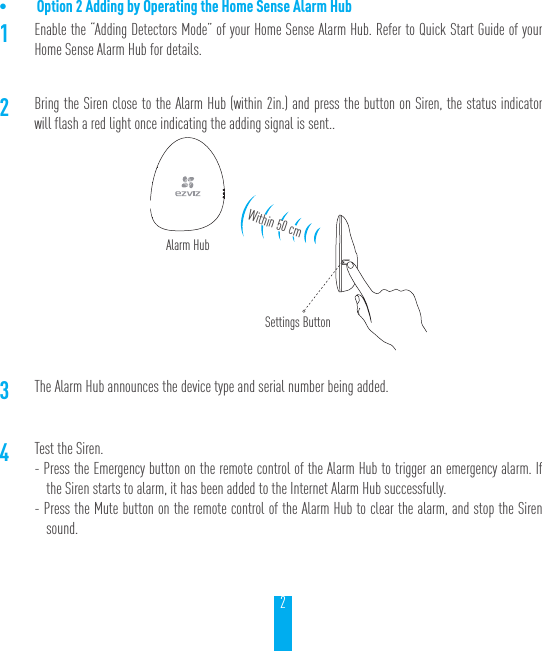
2• Option 2 Adding by Operating the Home Sense Alarm Hub1Enable the “Adding Detectors Mode” of your Home Sense Alarm Hub. Refer to Quick Start Guide of your Home Sense Alarm Hub for details.2Bring the Siren close to the Alarm Hub (within 2in.) and press the button on Siren, the status indicator will flash a red light once indicating the adding signal is sent..3The Alarm Hub announces the device type and serial number being added.4Test the Siren.- Press the Emergency button on the remote control of the Alarm Hub to trigger an emergency alarm. If the Siren starts to alarm, it has been added to the Internet Alarm Hub successfully.- Press the Mute button on the remote control of the Alarm Hub to clear the alarm, and stop the Siren sound.Alarm HubSettings ButtonWithin 50 cm
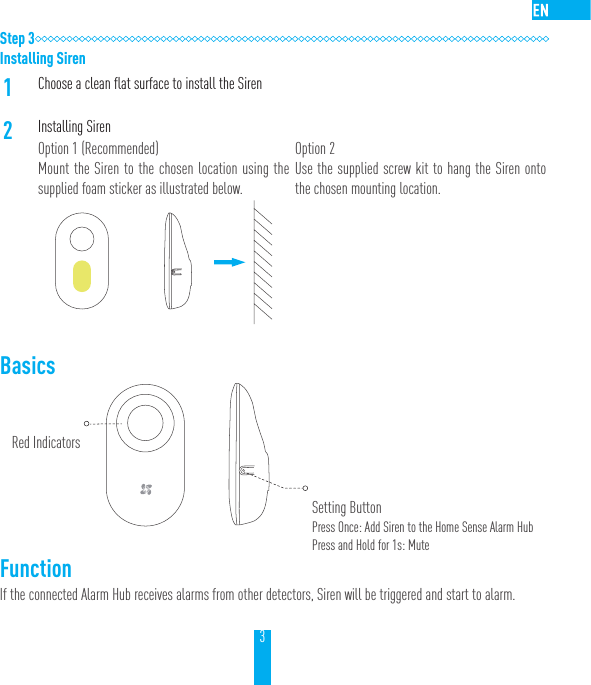
3Step 3Installing Siren1Choose a clean flat surface to install the Siren2Installing SirenOption 1 (Recommended)Mount the Siren to the chosen location using the supplied foam sticker as illustrated below.Option 2Use the supplied screw kit to hang the Siren onto the chosen mounting location.Basics    FunctionIf the connected Alarm Hub receives alarms from other detectors, Siren will be triggered and start to alarm.Red IndicatorsSetting ButtonPress Once: Add Siren to the Home Sense Alarm HubPress and Hold for 1s: Mute
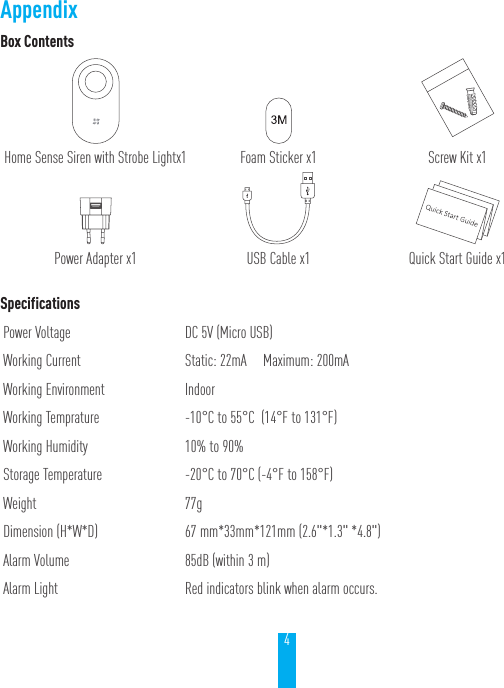
4Box ContentsHome Sense Siren with Strobe Lightx1 Foam Sticker x1 Screw Kit x1Power Adapter x1 USB Cable x1 Quick Start Guide x1SpecificationsPower Voltage DC 5V (Micro USB)Working Current  Static: 22mA     Maximum: 200mAWorking Environment IndoorWorking Temprature -10°C to 55°C  (14°F to 131°F)Working Humidity 10% to 90%Storage Temperature -20°C to 70°C (-4°F to 158°F)Weight 77gDimension (H*W*D) 67 mm*33mm*121mm (2.6"*1.3" *4.8")Alarm Volume 85dB (within 3 m)Alarm Light Red indicators blink when alarm occurs. Appendix
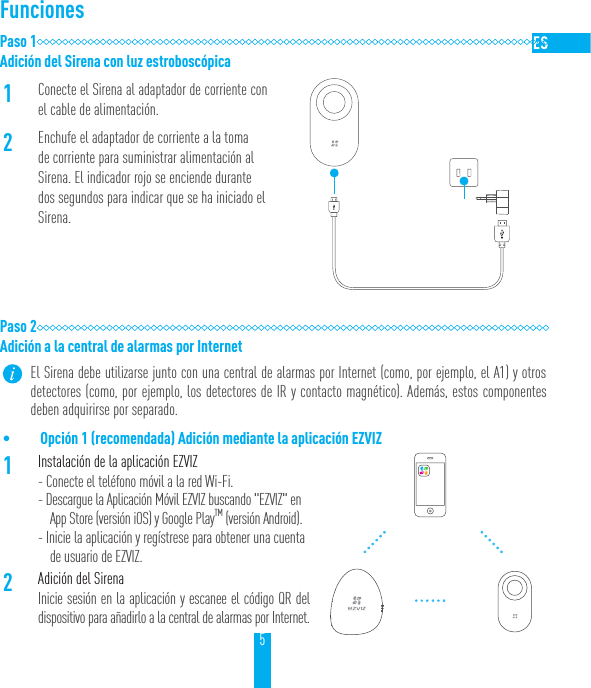
5FuncionesPaso 1Adición del Sirena con luz estroboscópica1Conecte el Sirena al adaptador de corriente con el cable de alimentación.2Enchufe el adaptador de corriente a la toma de corriente para suministrar alimentación al Sirena. El indicador rojo se enciende durante dos segundos para indicar que se ha iniciado el Sirena.Paso 2Adición a la central de alarmas por Internet El Sirena debe utilizarse junto con una central de alarmas por Internet (como, por ejemplo, el A1) y otros detectores (como, por ejemplo, los detectores de IR y contacto magnético). Además, estos componentes deben adquirirse por separado.• Opción 1 (recomendada) Adición mediante la aplicación EZVIZ1Instalación de la aplicación EZVIZ - Conecte el teléfono móvil a la red Wi-Fi.- Descargue la Aplicación Móvil EZVIZ buscando "EZVIZ" en App Store (versión iOS) y Google PlayTM (versión Android).- Inicie la aplicación y regístrese para obtener una cuenta de usuario de EZVIZ.2Adición del SirenaInicie sesión en la aplicación y escanee el código QR del dispositivo para añadirlo a la central de alarmas por Internet.
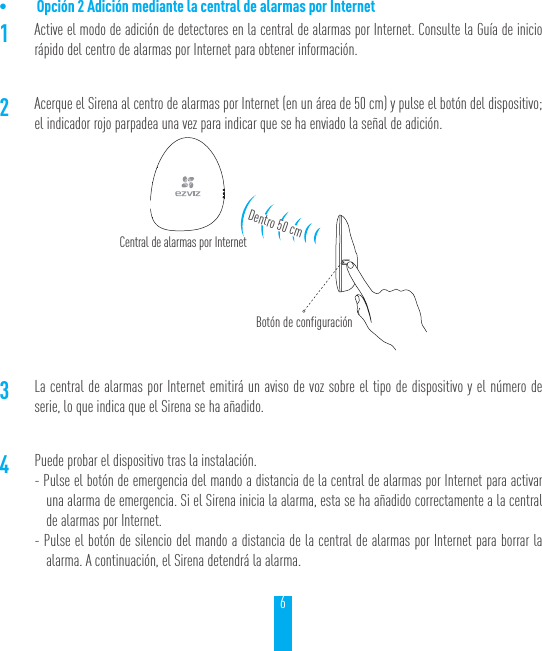
6• Opción 2 Adición mediante la central de alarmas por Internet 1Active el modo de adición de detectores en la central de alarmas por Internet. Consulte la Guía de inicio rápido del centro de alarmas por Internet para obtener información.2Acerque el Sirena al centro de alarmas por Internet (en un área de 50 cm) y pulse el botón del dispositivo; el indicador rojo parpadea una vez para indicar que se ha enviado la señal de adición.3La central de alarmas por Internet emitirá un aviso de voz sobre el tipo de dispositivo y el número de serie, lo que indica que el Sirena se ha añadido.4Puede probar el dispositivo tras la instalación.- Pulse el botón de emergencia del mando a distancia de la central de alarmas por Internet para activar una alarma de emergencia. Si el Sirena inicia la alarma, esta se ha añadido correctamente a la central de alarmas por Internet.- Pulse el botón de silencio del mando a distancia de la central de alarmas por Internet para borrar la alarma. A continuación, el Sirena detendrá la alarma.Central de alarmas por InternetBotón de configuraciónDentro 50 cm
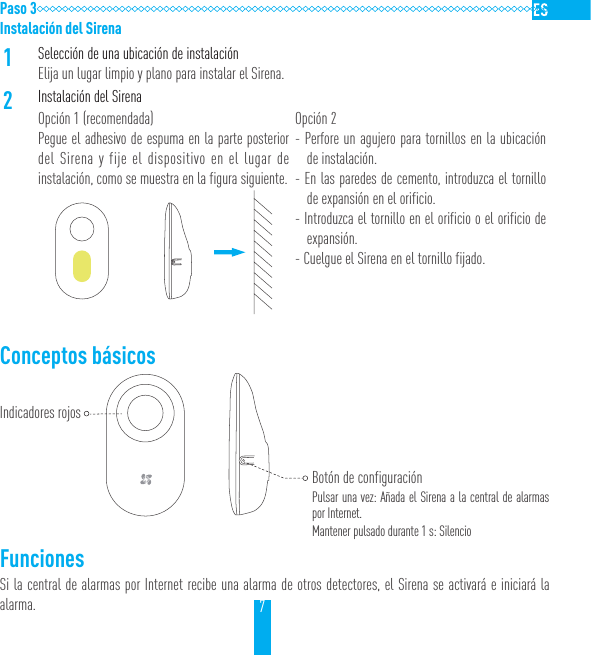
7Paso 3Instalación del Sirena1Selección de una ubicación de instalaciónElija un lugar limpio y plano para instalar el Sirena.2Instalación del SirenaOpción 1 (recomendada)Pegue el adhesivo de espuma en la parte posterior del Sirena y fije el dispositivo en el lugar de instalación, como se muestra en la figura siguiente.Opción 2- Perfore un agujero para tornillos en la ubicación de instalación.- En las paredes de cemento, introduzca el tornillo de expansión en el orificio.- Introduzca el tornillo en el orificio o el orificio de expansión.- Cuelgue el Sirena en el tornillo fijado.Conceptos básicos    FuncionesSi la central de alarmas por Internet recibe una alarma de otros detectores, el Sirena se activará e iniciará la alarma.Indicadores rojosBotón de configuraciónPulsar una vez: Añada el Sirena a la central de alarmas por Internet.Mantener pulsado durante 1 s: Silencio
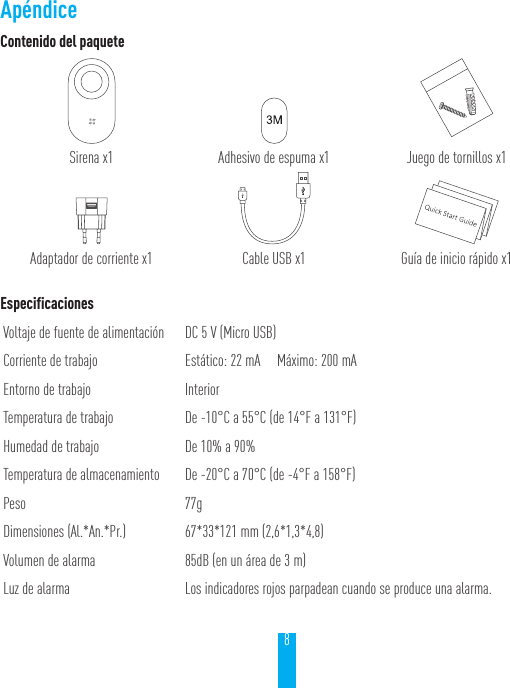
8Contenido del paqueteSirena x1 Adhesivo de espuma x1 Juego de tornillos x1Adaptador de corriente x1 Cable USB x1 Guía de inicio rápido x1EspecificacionesVoltaje de fuente de alimentación DC 5 V (Micro USB)Corriente de trabajo Estático: 22 mA     Máximo: 200 mAEntorno de trabajo InteriorTemperatura de trabajo De -10°C a 55°C (de 14°F a 131°F)Humedad de trabajo De 10% a 90%Temperatura de almacenamiento De -20°C a 70°C (de -4°F a 158°F)Peso 77gDimensiones (Al.*An.*Pr.) 67*33*121 mm (2,6*1,3*4,8)Volumen de alarma 85dB (en un área de 3 m)Luz de alarma Los indicadores rojos parpadean cuando se produce una alarma.Apéndice
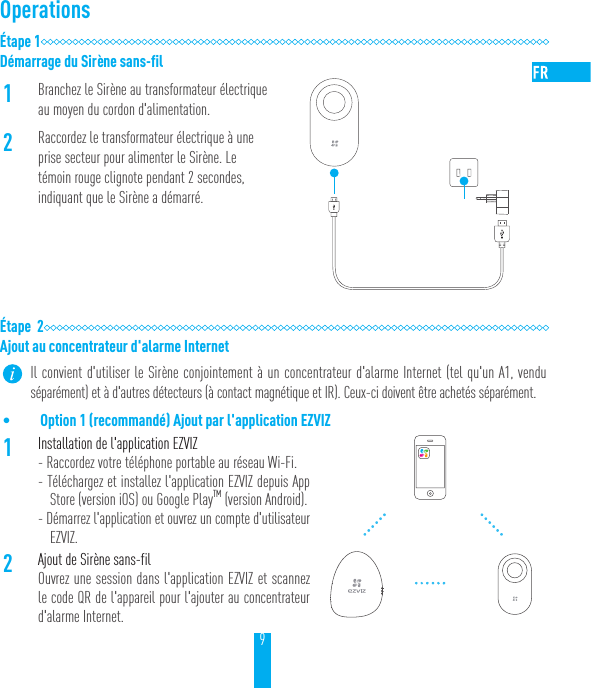
9OperationsÉtape 1Démarrage du Sirène sans-fil1Branchez le Sirène au transformateur électrique au moyen du cordon d'alimentation.2Raccordez le transformateur électrique à une prise secteur pour alimenter le Sirène. Le témoin rouge clignote pendant 2secondes, indiquant que le Sirène a démarré.Étape  2Ajout au concentrateur d'alarme Internet Il convient d'utiliser le Sirène conjointement à un concentrateur d'alarme Internet (tel qu'un A1, vendu séparément) et à d'autres détecteurs (à contact magnétique et IR). Ceux-ci doivent être achetés séparément.• Option 1 (recommandé) Ajout par l'application EZVIZ1Installation de l'application EZVIZ- Raccordez votre téléphone portable au réseau Wi-Fi.- Téléchargez et installez l'application EZVIZ depuis App Store (version iOS) ou Google PlayTM (version Android).- Démarrez l'application et ouvrez un compte d'utilisateur EZVIZ.2Ajout de Sirène sans-filOuvrez une session dans l'application EZVIZ et scannez le code QR de l'appareil pour l'ajouter au concentrateur d'alarme Internet.
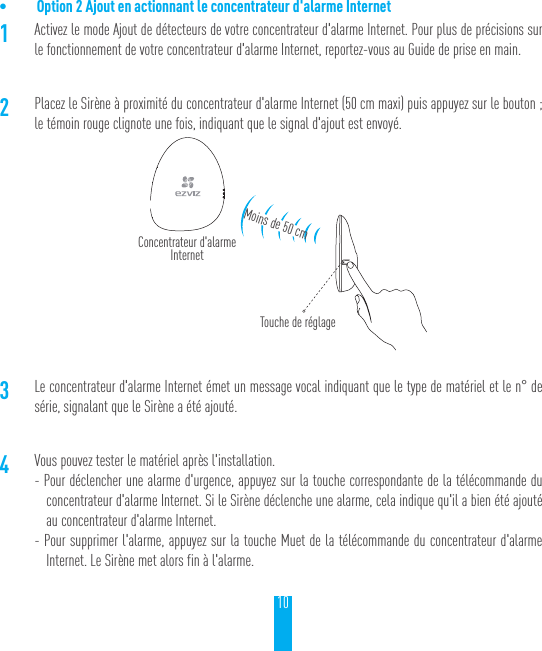
10• Option 2 Ajout en actionnant le concentrateur d'alarme Internet1Activez le mode Ajout de détecteurs de votre concentrateur d'alarme Internet. Pour plus de précisions sur le fonctionnement de votre concentrateur d'alarme Internet, reportez-vous au Guide de prise en main.2Placez le Sirène à proximité du concentrateur d'alarme Internet (50cm maxi) puis appuyez sur le bouton; le témoin rouge clignote une fois, indiquant que le signal d'ajout est envoyé.3Le concentrateur d'alarme Internet émet un message vocal indiquant que le type de matériel et le n° de série, signalant que le Sirène a été ajouté.4Vous pouvez tester le matériel après l'installation.- Pour déclencher une alarme d'urgence, appuyez sur la touche correspondante de la télécommande du concentrateur d'alarme Internet. Si le Sirène déclenche une alarme, cela indique qu'il a bien été ajouté au concentrateur d'alarme Internet.- Pour supprimer l'alarme, appuyez sur la touche Muet de la télécommande du concentrateur d'alarme Internet. Le Sirène met alors fin à l'alarme.Concentrateur d'alarme InternetTouche de réglageMoins de 50cm
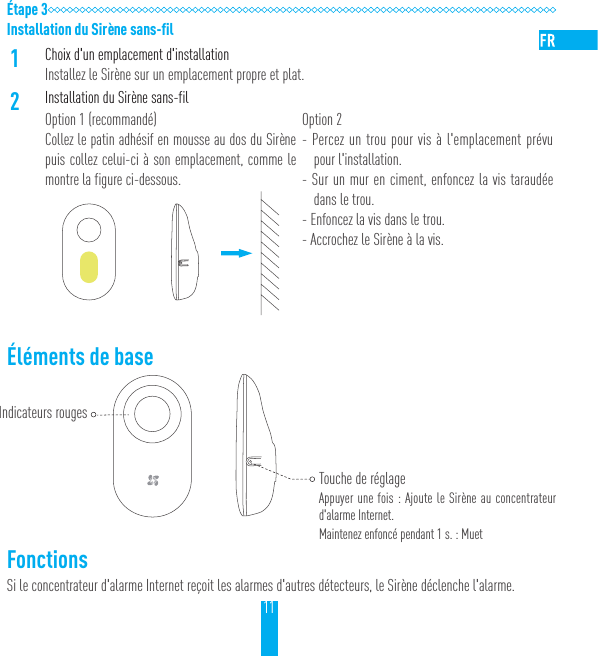
11Étape 3Installation du Sirène sans-fil1Choix d'un emplacement d'installationInstallez le Sirène sur un emplacement propre et plat.2Installation du Sirène sans-filOption 1 (recommandé)Collez le patin adhésif en mousse au dos du Sirène puis collez celui-ci à son emplacement, comme le montre la figure ci-dessous.Option 2- Percez un trou pour vis à l'emplacement prévu pour l'installation.- Sur un mur en ciment, enfoncez la vis taraudée dans le trou.- Enfoncez la vis dans le trou.- Accrochez le Sirène à la vis.Éléments de base     FonctionsSi le concentrateur d'alarme Internet reçoit les alarmes d'autres détecteurs, le Sirène déclenche l'alarme.Indicateurs rougesTouche de réglageAppuyer une fois: Ajoute le Sirène au concentrateur d'alarme Internet.Maintenez enfoncé pendant 1s. : Muet
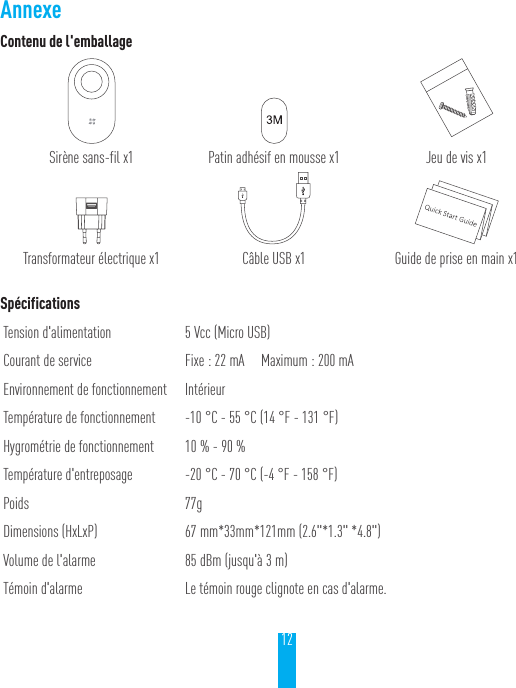
12Contenu de l'emballageSirène sans-fil x1 Patin adhésif en mousse x1 Jeu de vis x1Transformateur électrique x1 Câble USB x1 Guide de prise en main x1SpécificationsTension d'alimentation 5Vcc (Micro USB)Courant de service Fixe: 22mA     Maximum: 200mAEnvironnement de fonctionnement IntérieurTempérature de fonctionnement -10 °C - 55 °C (14 °F - 131 °F)Hygrométrie de fonctionnement 10% - 90%Température d'entreposage -20 °C - 70 °C (-4 °F - 158 °F)Poids 77gDimensions (HxLxP) 67 mm*33mm*121mm (2.6"*1.3" *4.8")Volume de l'alarme 85dBm (jusqu'à 3m)Témoin d'alarme Le témoin rouge clignote en cas d'alarme.Annexe
UD05541B
LIMITED WARRANTYThank you for purchasing EZVIZ products. This limited warranty gives you, the original purchaser of the EZVIZ product, specific legal rights. You may also have other legal rights that vary by state, province or jurisdiction. The disclaimers, exclusions, and limitations of liability under this limited warranty will not apply to the extent prohibited by applicable law. No distributor, reseller, agent, or employee is authorized to make any medication, extension, or addition to this limited warranty.Your EZVIZ product is warranted for a period of one (1) year from the date of purchase against defects in materials and workmanship, or such longer period as may be required by law in the country or state where this product is sold, when used normally in accordance with EZVIZ’s user manual.You can request warranty service emailing us at service@ezvizlife.com.  For any defective EZVIZ products under warranty, EZVIZ, Inc. will, at its option, (i) repair or replace your product free of charge; (ii) exchange your product with a functional equivalent product; (iii) or refund the original purchase price, provided you provide the original purchase receipt or copy, brief explanation of the defect, and return the product in its original packaging. At EZVIZ’s sole discretion, repair or replacement may be made with a new or refurbished product or components. This warranty does not cover the postal cost, insurance and any other incidental charges incurred by you in returning the product.Except where prohibited by applicable law, this is your sole and exclusive remedy for breach of this limited warranty. Any product that has either been repaired or replaced under this limited warranty will be covered by the terms of this limited warranty for the longer of ninety (90) days from the date of delivery or the remaining original warranty period.This warranty does not apply and is void:• If the warranty claim is made outside the warranty period or if the proof of purchase is not provided.• For any malfunction, defect or failure caused by or resulting from the evidence of impact, mishandling, tampering, use contrary to the applicable instruction manual, incorrect power line voltage, accident, loss, theft, fire, flood or other Acts of God, shipping damage or damage resulting from repairs performed by unauthorized personnel.• For any consumable parts, such as batteries, where the malfunction is due to the normal aging of the product.• Cosmetic damage, including but not limited to scratches, dents and broken plastic on ports.• Any software, even if packaged or sold with EZVIZ hardware.• For any other damages free from defects in material or workmanship.• Routine cleaning, normal cosmetic and mechanical wear and tear.DISCLAIMER OF WARRANTIESEXCEPT AS STATED ABOVE IN THIS LIMITED WARRANTY, AND TO THE MAXIMUM EXTENT PERMITTED BY APPLICABLE LAW, EZVIZ DISCLAIMS ALL EXPRESS, IMPLIED, AND STATUTORY WARRANTIES AND CONDITIONS WITH RESPECT TO THE PRODUCT, INCLUDING THE IMPLIED WARRANTIES OF MERCHANTABILITY AND FITNESS FOR A PARTICULAR PURPOSE, THE DURATION OF ANY APPLICABLE IMPLIED WARRANTIES OR CONDITIONS TO THE DURATION OF THIS LIMITED WARRANTY, THE SECURITY OF THE PRODUCT, OR AVAILABILITY AND RELIABILITY OF PRODUCT INFORMATION OR DATA.LIMITATION OF DAMAGES
IN NO EVENT WILL EZVIZ BE LIABLE FOR ANY CONSEQUENTIAL, INCIDENTAL, EXEMPLARY, OR SPECIAL DAMAGES, INCLUDING ANY DAMAGES FOR LOST DATA OR LOST PROFITS, ARISING FROM OR RELATING TO THIS LIMITED WARRANTY OR THE PRODUCT, AND EZVIZ’S TOTAL CUMULATIVE LIABILITY ARISING FROM OR RELATED TO THIS LIMITED WARRANTY OR THE PRODUCT WILL NOT EXCEED THE AMOUNT ACTUALLY PAID FOR THE PRODUCT BY THE ORIGINAL PURCHASER. SOME STATES DO NOT ALLOW THE EXCLUSION OR LIMITATION OF INCIDENTAL OR CONSEQUENTIAL DAMAGES, SO THE ABOVE LIMITATION OR EXCLUSION MAY NOT APPLY TO YOU.LIMITATION OF LIABILITYALL PRODUCT INFORMATION AND DATA IS PROVIDED FOR YOUR CONVENIENCE, “AS IS”, AND “AS AVAILABLE”. EZVIZ DOES NOT REPRESENT, WARRANT, OR GUARANTEE THAT PRODUCT INFORMATION AND DATA WILL BE AVAILABLE, ACCURATE, OR RELIABLE OR THAT PRODUCT INFORMATION AND DATA OR USE OF THE PRODUCT WILL PROVIDE SAFETY IN YOUR HOME. YOU USE ALL PRODUCT INFORMATION, DATA, AND THE PRODUCT AT YOUR OWN DISCRETION AND RISK. YOU WILL BE SOLELY RESPONSIBLE FOR (AND EZVIZ DISCLAIMS) ANY AND ALL LOSS, LIABILITY, OR DAMAGES, INCLUDING TO YOUR WIRING, FIXTURES, ELECTRICITY, HOME, PRODUCT, PRODUCT PERIPHERALS, COMPUTER, MOBILE DEVICE, AND ALL OTHER ITEMS AND PETS, RESULTING FROM YOUR USE OF THE PRODUCT INFORMATION, DATA, OR PRODUCT. PRODUCT INFORMATION AND DATA PROVIDED BY EZVIZ IS NOT INTENDED AS A SUBSTITUTE FOR DIRECT MEANS OF OBTAINING THE INFORMATION. FOR EXAMPLE, A NOTIFICATION PROVIDED THROUGH THE PRODUCT IS NOT INTENDED AS A SUBSTITUTE FOR AUDIBLE AND VISIBLE INDICATIONS IN THE HOME AND ON THE PRODUCT, NOR FOR A THIRD PARTY MONITORING SERVICE.Please do not hesitate to contact your seller, or send e-mails to us service@ezvizlife.com, with any questions.COPYRIGHT ©2017 EZVIZ Inc. ALL RIGHTS RESERVED.About the DocumentsThe documents include instructions for using and managing the product. Pictures, charts, images and all other information hereinafter are for description and explanation only. The information contained in the documents is subject to change, without notice, due to firmware updates or other reasons. Please find the latest version in the website (http://www.ezvizlife.com).Any and all information, including, among others, wordings, pictures, graphs are the properties of EZVIZ Inc. or its subsidiaries (hereinafter referred to be “EZVIZ”). The documents cannot be reproduced, changed, translated, or distributed, partially or wholly, by any means, without the prior written permission of EZVIZ. Unless otherwise stipulated, EZVIZ does not make any warranties, guarantees or representations, express or implied, regarding to the documents.Trademarks Acknowledgement™,  ™, and other EZVIZ’s trademarks and logos are the properties of EZVIZ in various jurisdictions. Other trademarks and logos mentioned in the documents are the properties of their respective owners.Legal Disclaimer
IN NO EVENT WILL EZVIZ BE LIABLE FOR ANY CONSEQUENTIAL, INCIDENTAL, EXEMPLARY, OR SPECIAL DAMAGES, INCLUDING ANY DAMAGES FOR LOST DATA OR LOST PROFITS, ARISING FROM OR RELATING TO THIS LIMITED WARRANTY OR THE PRODUCT, AND EZVIZ’S TOTAL CUMULATIVE LIABILITY ARISING FROM OR RELATED TO THIS LIMITED WARRANTY OR THE PRODUCT WILL NOT EXCEED THE AMOUNT ACTUALLY PAID FOR THE PRODUCT BY THE ORIGINAL PURCHASER. SOME STATES DO NOT ALLOW THE EXCLUSION OR LIMITATION OF INCIDENTAL OR CONSEQUENTIAL DAMAGES, SO THE ABOVE LIMITATION OR EXCLUSION MAY NOT APPLY TO YOU.LIMITATION OF LIABILITYALL PRODUCT INFORMATION AND DATA IS PROVIDED FOR YOUR CONVENIENCE, “AS IS”, AND “AS AVAILABLE”. EZVIZ DOES NOT REPRESENT, WARRANT, OR GUARANTEE THAT PRODUCT INFORMATION AND DATA WILL BE AVAILABLE, ACCURATE, OR RELIABLE OR THAT PRODUCT INFORMATION AND DATA OR USE OF THE PRODUCT WILL PROVIDE SAFETY IN YOUR HOME. YOU USE ALL PRODUCT INFORMATION, DATA, AND THE PRODUCT AT YOUR OWN DISCRETION AND RISK. YOU WILL BE SOLELY RESPONSIBLE FOR (AND EZVIZ DISCLAIMS) ANY AND ALL LOSS, LIABILITY, OR DAMAGES, INCLUDING TO YOUR WIRING, FIXTURES, ELECTRICITY, HOME, PRODUCT, PRODUCT PERIPHERALS, COMPUTER, MOBILE DEVICE, AND ALL OTHER ITEMS AND PETS, RESULTING FROM YOUR USE OF THE PRODUCT INFORMATION, DATA, OR PRODUCT. PRODUCT INFORMATION AND DATA PROVIDED BY EZVIZ IS NOT INTENDED AS A SUBSTITUTE FOR DIRECT MEANS OF OBTAINING THE INFORMATION. FOR EXAMPLE, A NOTIFICATION PROVIDED THROUGH THE PRODUCT IS NOT INTENDED AS A SUBSTITUTE FOR AUDIBLE AND VISIBLE INDICATIONS IN THE HOME AND ON THE PRODUCT, NOR FOR A THIRD PARTY MONITORING SERVICE.Please do not hesitate to contact your seller, or send e-mails to us service@ezvizlife.com, with any questions.COPYRIGHT ©2017 EZVIZ Inc. ALL RIGHTS RESERVED.About the DocumentsThe documents include instructions for using and managing the product. Pictures, charts, images and all other information hereinafter are for description and explanation only. The information contained in the documents is subject to change, without notice, due to firmware updates or other reasons. Please find the latest version in the website (http://www.ezvizlife.com).Any and all information, including, among others, wordings, pictures, graphs are the properties of EZVIZ Inc. or its subsidiaries (hereinafter referred to be “EZVIZ”). The documents cannot be reproduced, changed, translated, or distributed, partially or wholly, by any means, without the prior written permission of EZVIZ. Unless otherwise stipulated, EZVIZ does not make any warranties, guarantees or representations, express or implied, regarding to the documents.Trademarks Acknowledgement™,  ™, and other EZVIZ’s trademarks and logos are the properties of EZVIZ in various jurisdictions. Other trademarks and logos mentioned in the documents are the properties of their respective owners.Legal DisclaimerTO THE MAXIMUM EXTENT PERMITTED BY APPLICABLE LAW, THE PRODUCT DESCRIBED, WITH ITS HARDWARE, SOFTWARE AND FIRMWARE, IS PROVIDED “AS IS”, WITH ALL FAULTS AND ERRORS, AND EZVIZ MAKES NO WARRANTIES, EXPRESS OR IMPLIED, INCLUDING WITHOUT LIMITATION, MERCHANTABILITY, SATISFACTORY QUALITY, FITNESS FOR A PARTICULAR PURPOSE, AND NON-INFRINGEMENT OF THIRD PARTY. IN NO EVENT WILL EZVIZ, ITS DIRECTORS, OFFICERS, EMPLOYEES, OR AGENTS BE LIABLE TO YOU FOR ANY SPECIAL, CONSEQUENTIAL, INCIDENTAL, OR INDIRECT DAMAGES, INCLUDING, AMONG OTHERS, DAMAGES FOR LOSS OF BUSINESS PROFITS, BUSINESS INTERRUPTION, OR LOSS OF DATA OR DOCUMENTATION, IN CONNECTION WITH THE USE OF THIS PRODUCT, EVEN IF EZVIZ HAS BEEN ADVISED OF THE POSSIBILITY OF SUCH DAMAGES.TO THE MAXIMUM EXTENT PERMITTED BY APPLICABLE LAW, IN NO EVENT SHALL EZVIZ’S TOTAL LIABILITY FOR ALL DAMAGES EXCEED THE PURCHASE PRICE THE PRODUCT.EZVIZ does not undertake any liability for personal injury or property damage, as the result of product interruption or service termination cause by: a) improper installation or usage other than as requested; b) the protection of national or public interests; c) Force Majeure; d) yourself or the third party, including not limitation, using any third party’s products, software, applications, and among others.REGARDING TO THE PRODUCT WITH INTERNET ACCESS, THE USE OF PRODUCT SHALL BE WHOLLY AT YOUR OWN RISKS. EZVIZ SHALL NOT TAKE ANY RESPONSIBILITES FOR ABNORMAL OPERATION, PRIVACY LEAKAGE OR OTHER DAMAGES RESULTING FROM CYBER ATTACK, HACKER ATTACK, VIRUS INSPECTION, OR OTHER INTERNET SECURITY RISKS; HOWEVER, EZVIZ WILL PROVIDE TIMELY TECHNICAL SUPPORT IF REQUIRED.The purpose of the Products is to provide an adequate warning in the event of illegal encroachment in certain area; however, the proper installation of the Products will not eliminate, but only reduce, that accidents will not occur or that there will be no personal injury or property loss as a result. You are highly recommended to raise your vigilance and strengthen the safety awareness in the daily life.SURVEILLANCE LAWS VARY BY JURISDICTION. PLEASE CHECK ALL RELEVANT LAWS IN YOUR JURISDICTION BEFORE USING THIS PRODUCT IN ORDER TO ENSURE THAT YOUR USE CONFORMS TO THE APPLICABLE LAW. YOU FUTHER AGREE THAT THIS PRODUCT IS ONLY FOR CIVIL USE, AND EZVIZ SHALL NOT BE LIABLE IN THE EVENT THAT THIS PRODUCT IS USED WITH ILLEGITIMATE PURPOSES, SUCH AS THIRD PARTY RIGHTS INFRINGEMENT, MEDICAL TREATMENT, SAFETY EQUIPMENT OR OTHER SITUATIONS WHERE THE PRODUCT FAILURE COULD LEAD TO DEATH OR PERSONAL INJURY, OR WEAPON OF MASS DESTRUCTION, CHEMINCAL AND BIOLOGICAL WEAPON, NUCLEAR EXPLOSION, AND ANY UNSAFE NUCLEAR ENERGY USES OR ANTI-HUMANITY USAGES. YOU SHOULD UNDERTAKE ALL RESPONSIBILITIES FOR LOSSES OR DAMAGES RESULTING FROM THE ABOVE USAGES WHATSOEVER. IN THE EVENT OF ANY CONFLICTS BETWEEN THE ABOVE AND THE APPLICABLELAW, THE LATER PREVAILS.Regulatory InformationFCC InformationThis device complies with Part 15 of the FCC Rules. Operation is subject to the following two conditions: (1) This device may not cause harmful interference, and (2) This device must accept any interference received, including interference that may cause undesired operation.
Note: This product has been tested and found to comply with the limits for a Class B digital device, pursuant to Part 15 of the FCC Rules. These limits are designed to provide reasonable protection against harmful interference in a residential installation. This product generates, uses, and can radiate radio frequency energy and, if not installed and used in accordance with the instructions, may cause harmful interference to radio communications. However, there is no guarantee that interference will not occur in a particular installation. If this product does cause harmful interference to radio or television reception, which can be determined by turning the equipment off and on, the user is encouraged to try to correct the interference by one or more of the following measures: —Reorient or relocate the receiving antenna. —Increase the separation between the equipment and receiver. —Connect the equipment into an outlet on a circuit different from that to which the receiver is connected. —Consult the dealer or an experienced radio/TV technician for help.Please take  attention that changes or modification not expressly approved by the party responsible for compliance could void the user’s authority to operate the equipment.This equipment should be installed and operated with a minimum distance 20cm between the radiator and your body CAN ICES-3 (B)/NMB-3(B)This device complies with Industry Canada licence-exempt RSS standard(s). Operation is subject to the following two conditions: (1) this device may not cause interference, and(2) this device must accept any interference, including interference that may cause undesired operation of the device.Le présent appareil est  conforme aux  CNR d'Industrie Canada applicables aux appareils radioexempts de licence. L'exploitation est autorisée aux deux conditions suivantes :(1) l'appareil ne doit pas produire de brouillage, et(2) l'utilisateur de l'appareil doit accepter tout brouillage radioélectrique subi, même si le brouillage est susceptible d'en compromettre le fonctionnement.Under Industry Canada regulations, this radio transmitter may only operate using an antenna of a type and maximum (or lesser) gain approved for the transmitter by Industry Canada. To reduce potential radio interference to other users, the antenna type and its gain should be so chosen that the equivalent isotropically radiated power (e.i.r.p.) is not more than that necessary for successful communication.Conformément à la réglementation d'Industrie Canada, le présent émetteur radio peutfonctionner avec une antenne d'un type et d'un gain maximal (ou inférieur) approuvé pour l'émetteur par Industrie Canada. Dans le but de réduire les risques de brouillage radioélectrique à l'intention des autres utilisateurs, il faut choisir le type d'antenne et son gain de sorte que la puissance isotrope rayonnée équivalente (p.i.r.e.) ne dépasse pas l'intensité nécessaire à l'établissement d'une communication satisfaisante.Cet équipement doit être installé et utilisé à une distance minimale de 20 cm entre le radiateur et votre corps

Navigation menu