Hangzhou Gubei Electronics Technology E-REMOTE e-Remote User Manual RM en

Hangzhou Gubei Electronics Technology Co.,Ltd e-Remote RM en

Users Manual

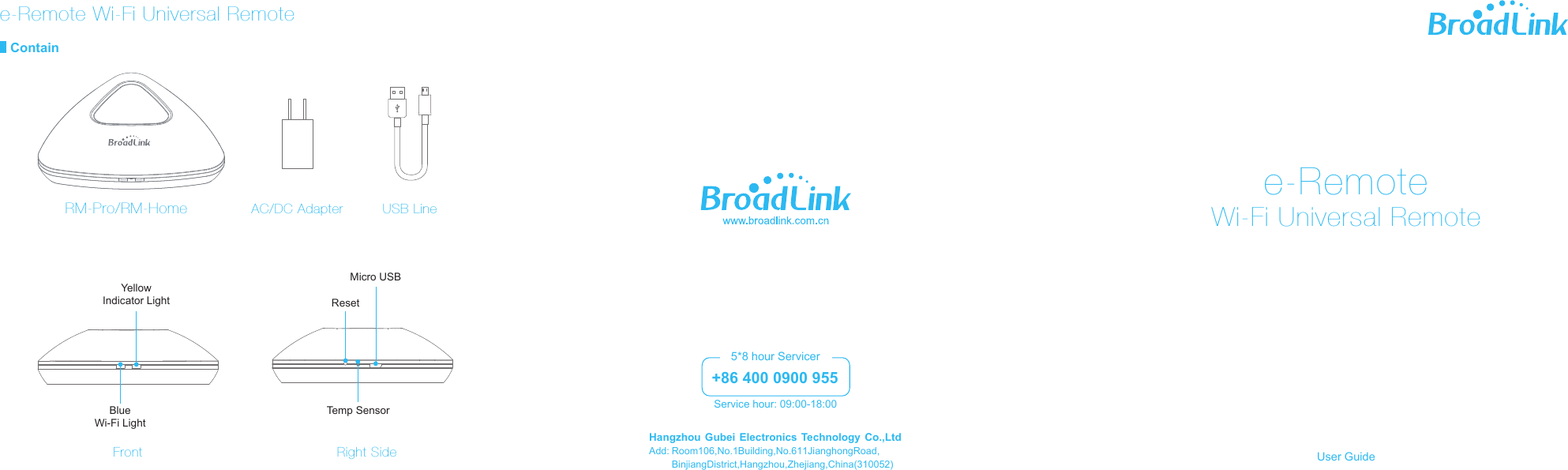
e-RemoteWi-Fi Universal RemoteContain USB LineAC/DC AdapterResetTemp SensorBlueWi-Fi LightYellowIndicator LightMicro USBFront Right SideRM-Pro/RM-HomeAdd: Room 106, No.1 Building, No.611 Jianghong Road, Binjiang District, Hangzhou, Zhejiang , China(310052)Hangzhou Gubei Electronics Technology Co.,Ltd+86 400 0900 955Service hour: 09:00-18:005*8 hour Servicere-Remote Wi-Fi Universal RemoteUser Guide
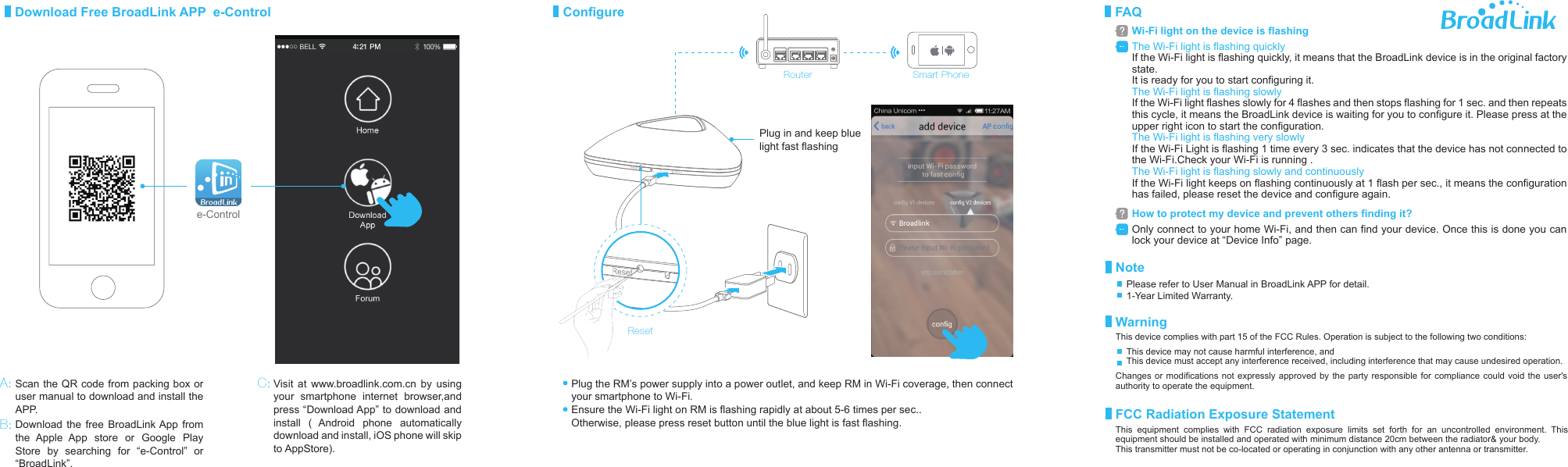
RouterPlug the RM’s power supply into a power outlet, and keep RM in Wi-Fi coverage, then connect your smartphone to Wi-Fi.Ensure the Wi-Fi light on RM is flashing rapidly at about 5-6 times per sec..Otherwise, please press reset button until the blue light is fast flashing.ResetPlug in and keep blue light fast flashingDownload Free BroadLink APP  e-Control ConfigureVisit at www.broadlink.com.cn by using your smartphone internet browser,and press “Download App” to download and install ( Android phone automatically download and install, iOS phone will skip to AppStore).e-ControlScan the QR code from packing box or user manual to download and install the APP.Download the free BroadLink App from the Apple App store or Google Play Store by searching for “e-Control” or “BroadLink”. A:B:C:Smart PhoneThe Wi-Fi light is flashing quicklyIf the Wi-Fi light is flashing quickly, it means that the BroadLink device is in the original factory state. It is ready for you to start configuring it. The Wi-Fi light is flashing slowlyIf the Wi-Fi light flashes slowly for 4 flashes and then stops flashing for 1 sec. and then repeats this cycle, it means the BroadLink device is waiting for you to configure it. Please press at the upper right icon to start the configuration.The Wi-Fi light is flashing very slowlyIf the Wi-Fi Light is flashing 1 time every 3 sec. indicates that the device has not connected to the Wi-Fi.Check your Wi-Fi is running .The Wi-Fi light is flashing slowly and continuouslyIf the Wi-Fi light keeps on flashing continuously at 1 flash per sec., it means the configuration has failed, please reset the device and configure again.FAQWi-Fi light on the device is flashingOnly connect to your home Wi-Fi, and then can find your device. Once this is done you can lock your device at “Device Info” page.How to protect my device and prevent others finding it?NoteWarningFCC Radiation Exposure StatementPlease refer to User Manual in BroadLink APP for detail.1-Year Limited Warranty.This device complies with part 15 of the FCC Rules. Operation is subject to the following two conditions: Changes or modifications not expressly approved by the party responsible for compliance could void the user's authority to operate the equipment.This device may not cause harmful interference, andThis device must accept any interference received, including interference that may cause undesired operation.This equipment complies with FCC radiation exposure limits set forth for an uncontrolled environment. This equipment should be installed and operated with minimum distance 20cm between the radiator& your body.  This transmitter must not be co-located or operating in conjunction with any other antenna or transmitter.

Navigation menu