Hangzhou Gubei Electronics Technology RMMINI3-RM Universal Remote User Manual RM mini 3 3en

Hangzhou Gubei Electronics Technology Co.,Ltd Universal Remote RM mini 3 3en

User Manual

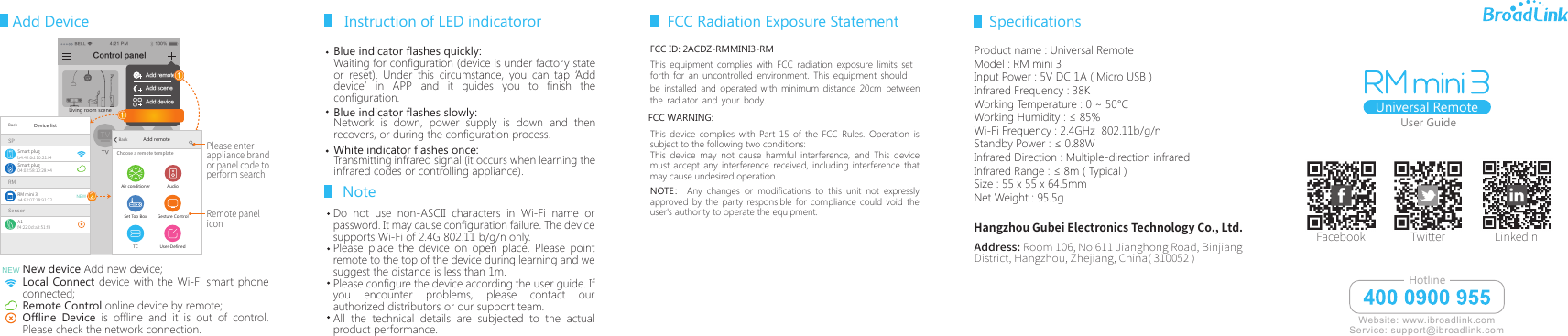
Add Device User GuideBELL 4:21 PM 100%客厅空调 TVRMSPRM mini 3a4:62:07:18:91:22A1f4:22:0d:a3:51:f8Smart plugBackDevice listb4:42:0d:10:21:f4Smart plug04:02:58:10:28:44SensorNEWNew device Add new device;Local Connect device with the Wi-Fi smart phone connected;Remote Control online device by remote;Offline Device is offline and it is out of control. Please check the network connection.NEWRemote paneliconPlease enter appliance brand or panel code to perform searchAdd remoteAir conditionerTCGesture ControlUser-DefinedAudioSet Top BoxBackChoose a remote templateAdd remoteAdd sceneAdd deviceDevice list①①Living room sceneControl panel②Blue indicator flashes quickly:Waiting for configuration (device is under factory state or reset). Under this circumstance, you can tap ‘Add device’ in APP and it guides you to finish the configuration.Network is down, power supply is down and then recovers, or during the configuration process. Transmitting infrared signal (it occurs when learning the infrared codes or controlling appliance).Instruction of LED indicatororUniversal RemoteAddress: Room 106, No.611 Jianghong Road, Binjiang District, Hangzhou, Zhejiang, China( 310052 )Facebook Twitter LinkedinHangzhou Gubei Electronics Technology Co., Ltd.Blue indicator flashes slowly: White indicator flashes once:Do not use non-ASCII characters in Wi-Fi name or password. It may cause configuration failure. The device supports Wi-Fi of 2.4G 802.11 b/g/n only.Please place the device on open place. Please point remote to the top of the device during learning and we suggest the distance is less than 1m. Please configure the device according the user guide. If you encounter problems, please contact our authorized distributors or our support team.All the technical details are subjected to the actual product performance.Note Website: www.ibroadlink.comService: support@ibroadlink.comHotlineFCC ID: 2ACDZ-RMMINI3-RMThis device complies with Part 15 of the FCC Rules. Operation is subject to the following two conditions:This device may not cause harmful interference, and This device must accept any interference received, including interference that may cause undesired operation.NOTE :  Any changes or modifications to this unit not expressly approved by the party responsible for compliance could void the user's authority to operate the equipment. FCC Radiation Exposure StatementProduct name : Universal RemoteModel : RM mini 3Input Power : 5V DC 1A ( Micro USB ) Infrared Frequency : 38KWorking Temperature : 0 ~ 50°CWorking Humidity : ≤ 85%Wi-Fi Frequency : 2.4GHz  802.11b/g/n Standby Power : ≤ 0.88W Infrared Direction : Multiple-direction infraredInfrared Range : ≤ 8m ( Typical )Size : 55 x 55 x 64.5mmNet Weight : 95.5gSpecificationsThis equipment complies with FCC radiation exposure limits setforth for an uncontrolled environment. This equipment should be installed and operated with minimum distance 20cm betweenthe radiator and your body.FCC WARNING:
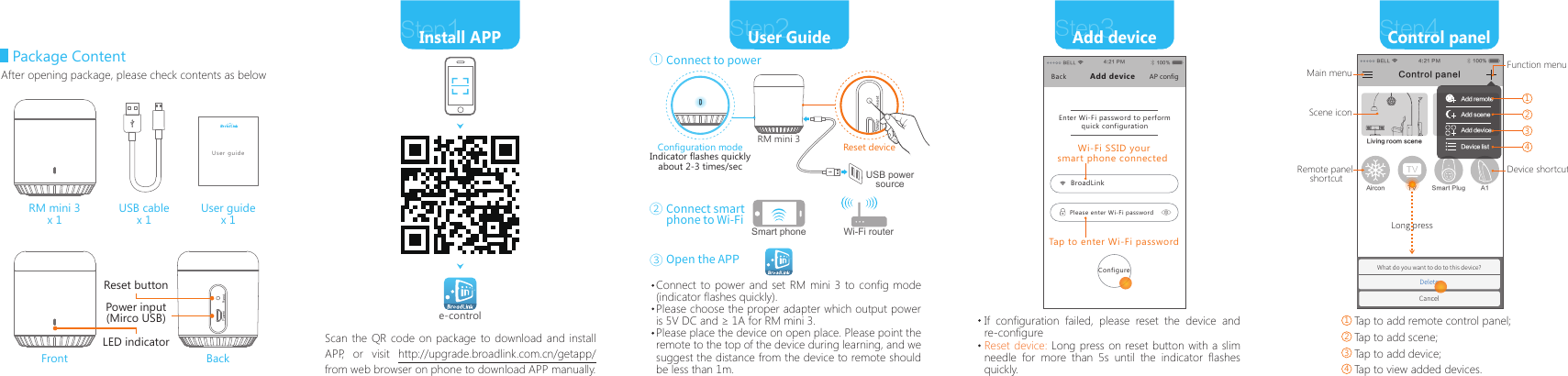
Package ContentUSB cablex 1User guidex 1RM mini 3x 1Front BackLED indicatorReset buttonPower input(Mirco USB)After opening package, please check contents as belowStep2User GuideStep1Install APPScan the QR code on package to download and install APP, or visit http://upgrade.broadlink.com.cn/getapp/  from web browser on phone to download APP manually.Configuration modeIndicator flashes quicklyabout 2-3 times/secOpen the APPRM mini 3e-controlStep3Add deviceStep4Control panelIf configuration failed, please reset the device and re-configureUser guideTap to add remote control panel;Tap to add scene;Tap to add device;Tap to view added devices.Reset device: Long press on reset button with a slim needle for more than 5s until the indicator flashes quickly.Reset deviceConnect to power①Connect smart phone to Wi-Fi②③Connect to power and set RM mini 3 to config mode (indicator flashes quickly).Please choose the proper adapter which output power is 5V DC and ≥ 1A for RM mini 3. Please place the device on open place. Please point the remote to the top of the device during learning, and we suggest the distance from the device to remote should be less than 1m. Wi-Fi routerSmart phoneUSB power sourceBELL 4:21 PM 100%Enter Wi-Fi password to perform quick configurationBackBroadLinkPlease enter Wi-Fi passwordAdd device AP configTap to enter Wi-Fi passwordConfigureWi-Fi SSID yoursmart phone connected BELL 4:21 PM 100%What do you want to do to this device?DeleteCancelLiving room sceneA1Aircon TV Smart PlugControl panelAdd remoteAdd sceneAdd deviceDevice listMain menuScene iconDevice shortcutFunction menu1Remote panel shortcutLong press2341234

Navigation menu