Harmony Technology HNBT Tower BT speaker User Manual CHT910

Shenzhen Harmony Technology Co., Ltd Tower BT speaker CHT910

Users Manual

BLUETOOTH TOWER INSTRUCTION MANUALMODEL: SP217PLEASE READ CAREFULLY BEFORE OPERATING THIS EQUIPMENT
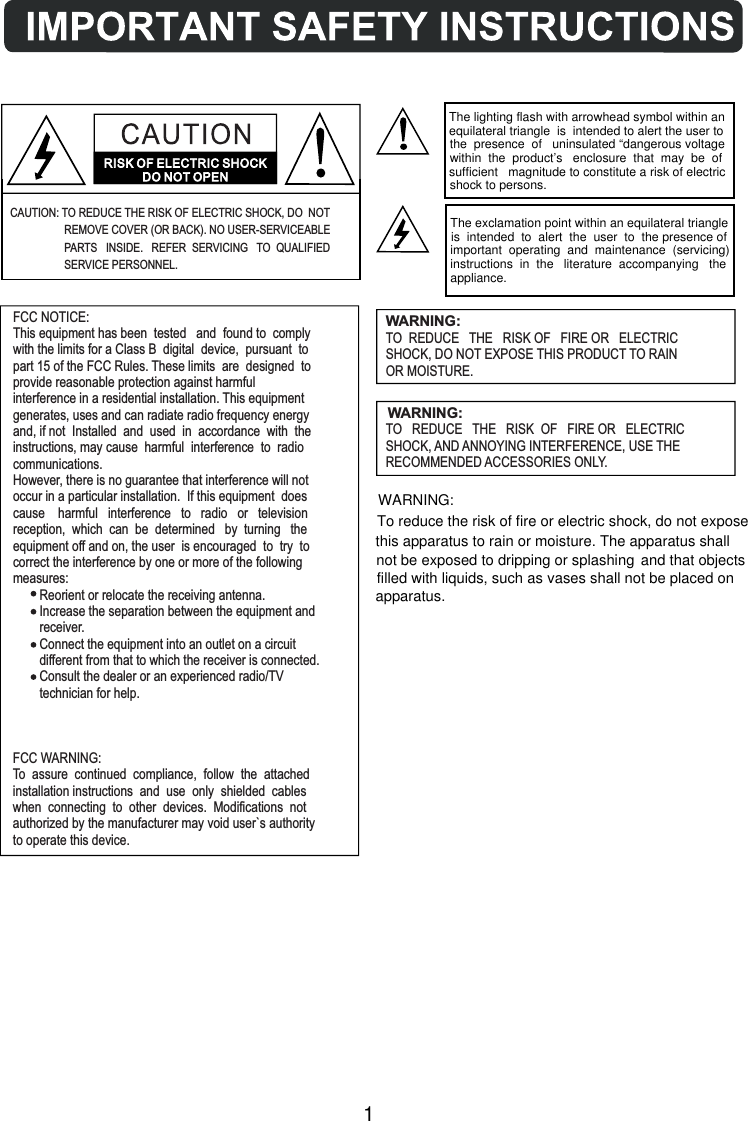
WARNING:TO  REDUCE THE   RISK OF   FIRE OR   ELECTRICSHOCK, DO NOT EXPOSE THIS PRODUCT TO RAINOR MOISTURE.WARNING:TO   REDUCE THE   RISK  OF   FIRE OR   ELECTRICSHOCK, AND ANNOYING INTERFERENCE, USE THERECOMMENDED ACCESSORIES ONLY.FCC NOTICE:This equipment has been  tested   and  found to  complywith the limits for a Class B  digital  device,  pursuant  topart 15 of the FCC Rules. These limits  are  designed  toprovide reasonable protection against harmfulinterference in a residential installation. This equipmentgenerates, uses and can radiate radio frequency energyand, if not  Installed  and  used  in  accordance  with  theinstructions, may cause  harmful  interference  to  radiocommunications.However, there is no guarantee that interference will notoccur in a particular installation.  If this equipment  doescause    harmful   interference   to   radio   or   televisionreception,  which  can  be  determined   by  turning   theequipment off and on, the user  is encouraged  to  try  tocorrect the interference by one or more of the followingmeasures:        Reorient or relocate the receiving antenna.        Increase the separation between the equipment and        receiver.        Connect the equipment into an outlet on a circuit        different from that to which the receiver is connected.        Consult the dealer or an experienced radio/TV        technician for help.FCC WARNING:To  assure  continued  compliance,  follow  the  attachedinstallation instructions  and  use  only  shielded  cableswhen  connecting  to  other  devices.  Modifications  notauthorized by the manufacturer may void user`s authorityto operate this device.CAUTION: TO REDUCE THE RISK OF ELECTRIC SHOCK, DO  NOT                   REMOVE COVER (OR BACK). NO USER-SERVICEABLE                   PARTS   INSIDE.   REFER  SERVICING TO  QUALIFIED                    SERVICE PERSONNEL.1WARNING:To reduce the risk of fire or electric shock, do not exposethis apparatus to rain or moisture. The apparatus shall not be exposed to dripping or splashing  and that objects filled with liquids, such as  vases shall not be placed on apparatus.The lighting flash with arrowhead symbol within an equilateral triangle  is  intended to alert the user to the  presence  of   uninsulated “dangerous voltage within  the  product’s   enclosure  that  may  be  of sufficient   magnitude to constitute a risk of electric shock to persons. The exclamation point within an equilateral triangle is  intended  to  alert  the  user  to  the presence of important  operating  and  maintenance  (servicing) instructions  in  the   literature  accompanying   the appliance.
Before using the unit, be sure to read all operating instructions carefully. Please note that theseare general precautions and may not pertain to your unit. 1) Read these instructions.   All the safety and operating instructions should be read before the product is operated.2) Keep these instructions.    The safety and operating instructions should be retained for future reference.3) Heed all warnings.   All warnings on the product and in the operating instructions should be adhered to.4) Follow all instructions.   All operating and use instructions should be followed.5) Do not use this apparatus near water.   Do not use this product near water and moisture, for example: near a bathtub, washbowl, kitchen   sink or laundry tub; in a wet basement; or near a swimming pool.6) Clean only with dry cloth.   Unplug this product from the wall outlet before cleaning. Do not use liquid cleaners or aerosol   cleaners. Use a dry cloth for cleaning.7) Do not block any ventilation openings. Install in accordance with the manufacturer's   instructions.   Slots and openings in the cabinet and in the back or bottom are provided for ventilation, to ensure   reliable operation of the product and to protect it from overheating. These openings must not be   blocked or covered. The openings should never be blocked by placing the product on a bed, sofa,   rug or other similar surface. This product should never be placed near or over a radiator or heat   source. This product should not be placed in a built-in installation such as a bookcase or rack   unless proper ventilation is provided or the manufacturer's instructions have been adhered to.8) Do not install near any heat sources such as radiators, heat registers, stoves, or other   apparatus(including amplifiers) that produce heat.9) Do not defeat the safety purpose of the polarized or grounding-type plug. A polarized plug   has two blades with one wider than the other. A grounding type plug has two blades and a   third grounding prong. The wide blade or the third prong are provided for your safety. If the   provided plug does not fit into your outlet, consult an electrician for replacement of the   obsolete outlet.10)Protect the power cord from being walked on or pinched particularly at plugs, convenience   receptacles, and the point where they exit from the apparatus.11)Only use attachments/accessories specified by the manufacturer.12)Use only with the cart, stand, tripod, bracket, or table specified by the manufacturer, or sold   with the apparatus. When a cart is used, use caution when moving the cart/apparatus   combination to avoid injury from tip-over.   An appliance and cart combination should be moved with care.   Quick stop, excessive force and uneven surfaces may cause the   appliance and cart combination to overturn.13) Unplug this apparatus during lightning storms or when unused for long periods of time.    To protect your product from a lightning storm, or when it is left unattended and unused for long    periods of time, unplug it from the wall outlet and disconnect the antenna or cable system. This    will prevent damage to the product due to lightning and power-line surges.14) Refer all servicing to qualified service personnel. Servicing is required when the apparatus    has been damaged in any way, such as power-supply cord or plug is damaged, liquid has    been spilled or objects have fallen into the apparatus, the apparatus has been exposed to rain    or moisture does not operate normally, or has been dropped.15) Power source    This product should be operated only from the type of power source indicated on the marking label.    If you are not sure of the type of power supply to your home, consult your appliance dealer or local    power company. For products intended to operate from battery power, or other source, refer to the    operation instructions.For  example,  this  unit  may  not  have  the  capability  to  be  connected  to  an  outdoor  antenna.2
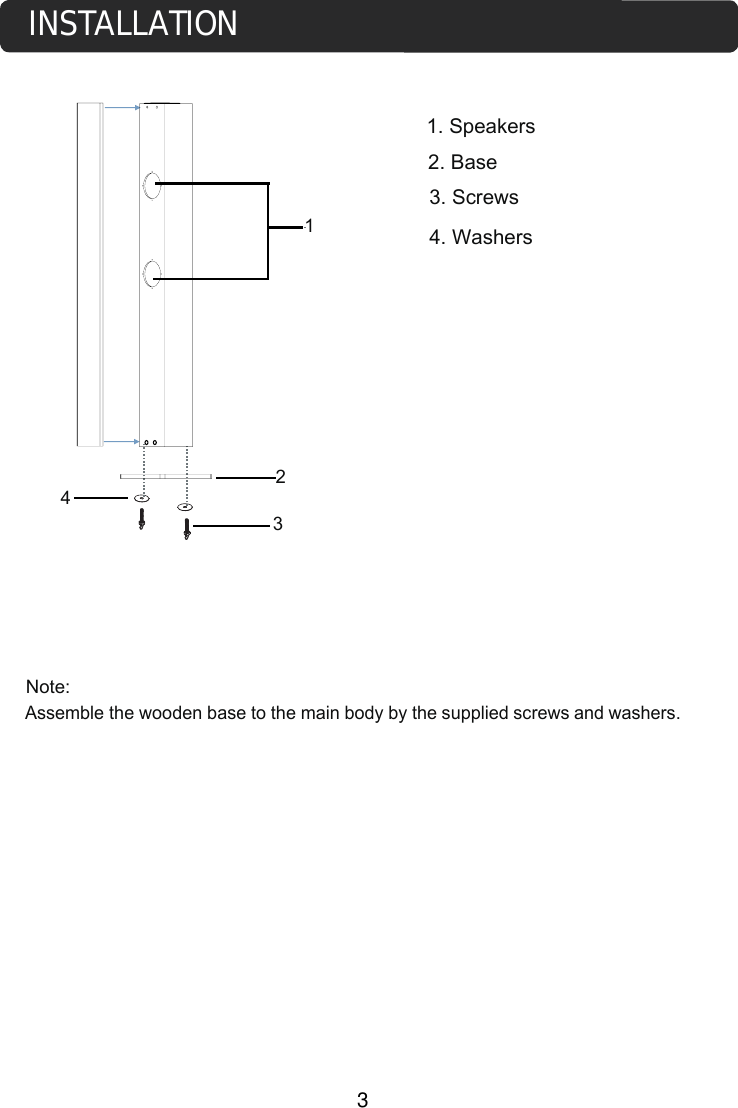
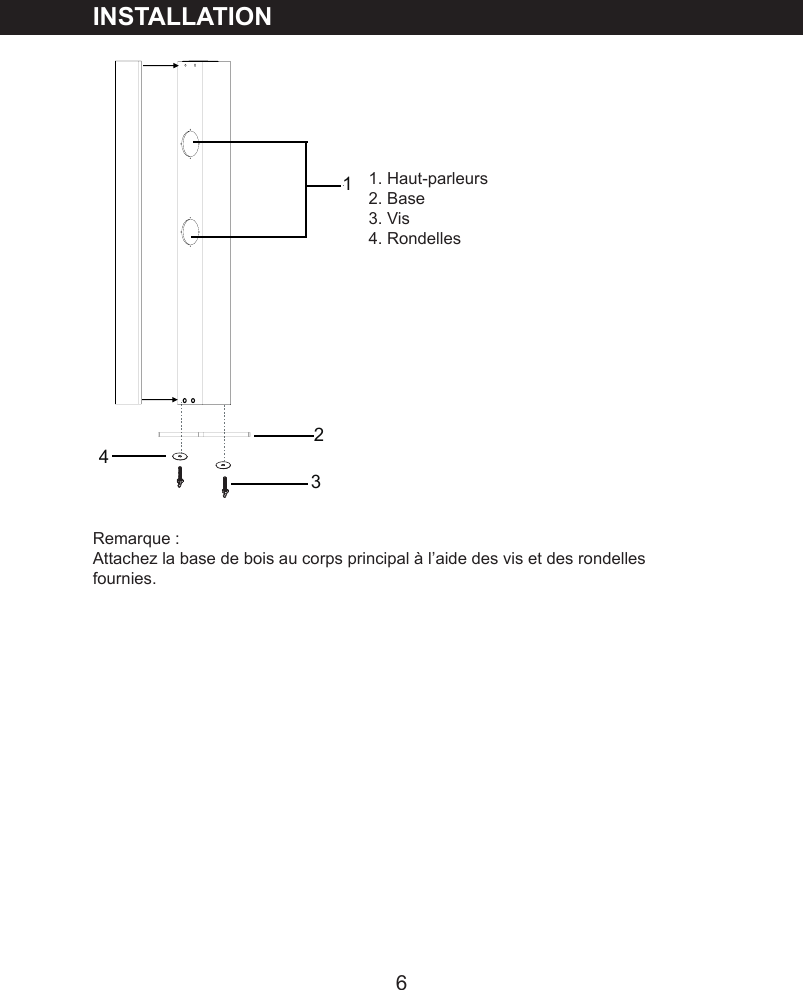
INSTALLATION3Assemble the wooden base to the main body by the supplied screws and washers. 1. Speakers2. Base3. Screws4. WashersNote:2134
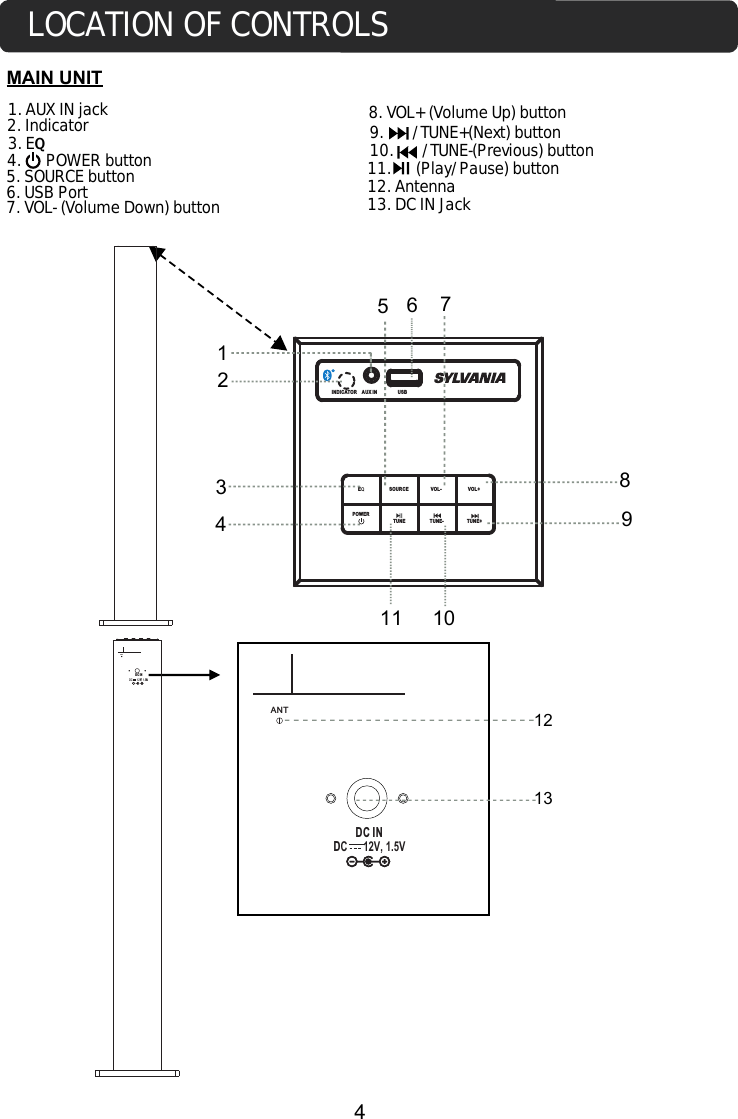
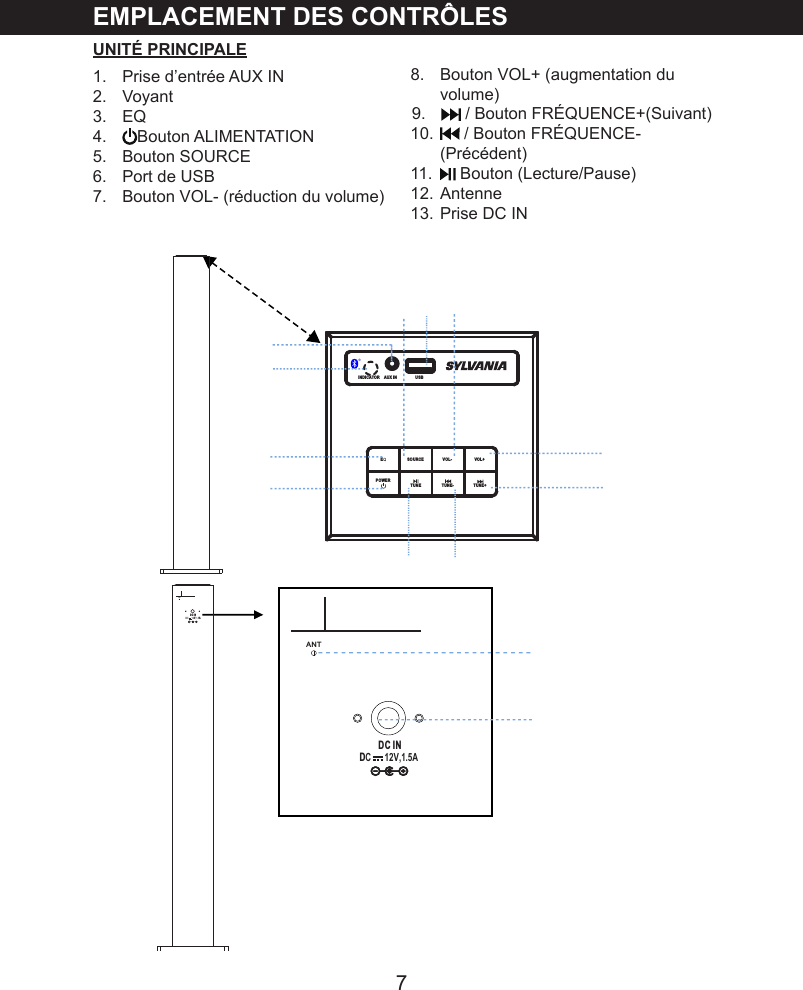
MAIN UNIT123. EQ5. SOURCE button7. VOL- (Volume Down) button8. VOL+ (Volume Up) button1. AUX IN jack 9.       /TUNE+(Next) button10.       /TUNE-(Previous) button11.      (Play/Pause) button 4.      POWER button 2. Indicator12. AntennaLOCATION OF CONTROLS4 DC INANT DC INDC      12V, 1.5AANT1313. DC IN Jack6. USB PortINDICATOR AUX IN EQSOURCE VOL- VOL+TUNE- TUNE+POWERUSB 1118792345610TUNEDC      12V, 1.5V
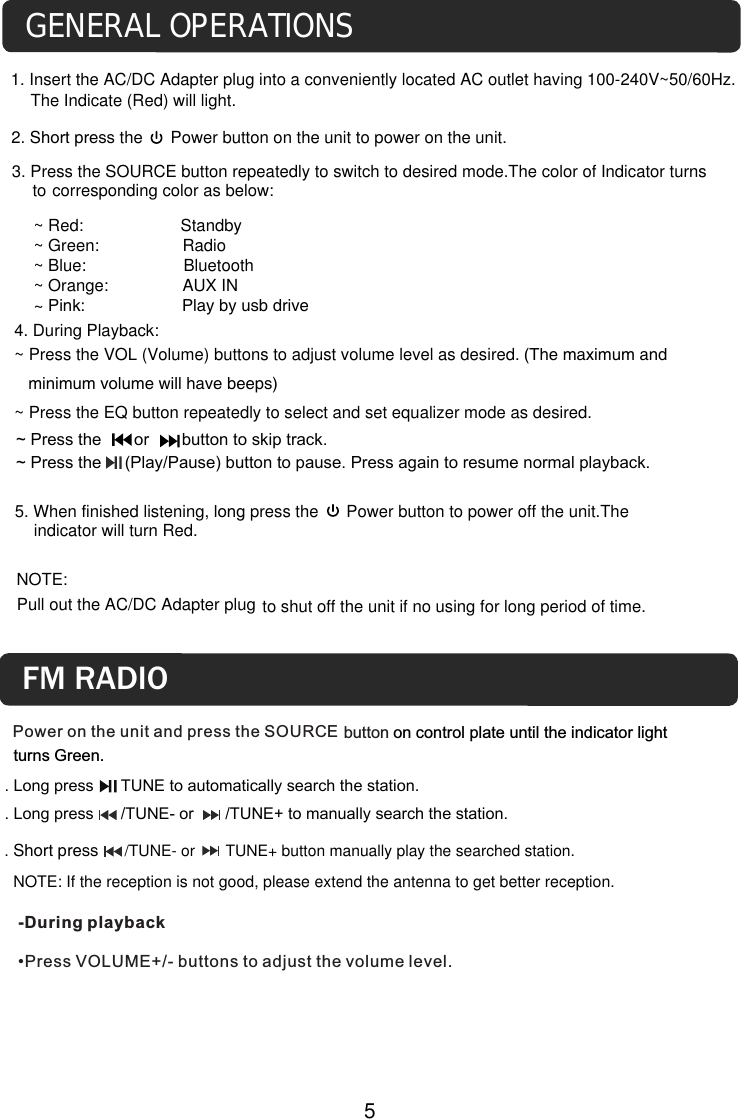
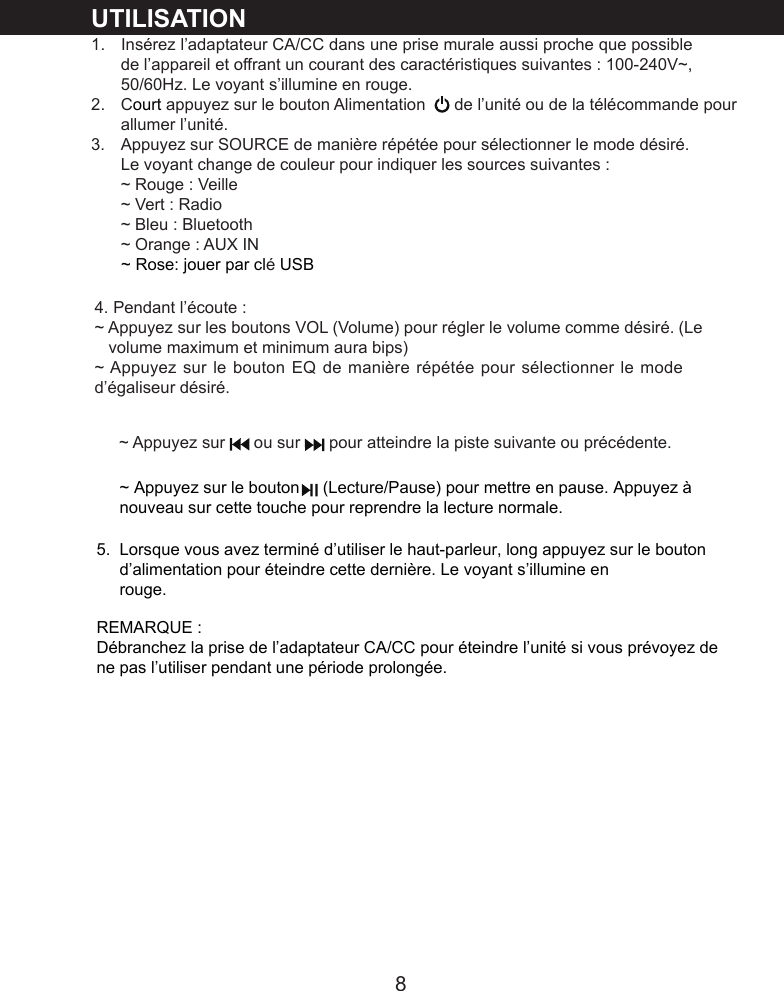
4. During Playback:~ Press the VOL (Volume) buttons to adjust volume level as desired. (The maximum and    minimum volume will have beeps)~ Press the EQ button repeatedly to select and set equalizer mode as desired.to shut off the unit if no using for long period of time. NOTE: Pull out the AC/DC Adapter plugGENERAL OPERATIONS1. Insert the AC/DC Adapter plug into a conveniently located AC outlet having 100-240V~50/60Hz.The Indicate (Red) will light.2. Short press the      Power button on the unit to power on the unit.corresponding color as below:3. Press the SOURCE button repeatedly to switch to desired mode.The color of Indicator turns to 5. When finished listening, long press the      Power button to power off the unit.The indicator will turn Red. 5~ Press the       or       button to skip track. ~ Press the     (Play/Pause) button to pause. Press again to resume normal playback.~ Red:                     Standby~ Green:                  Radio~ Blue:                     Bluetooth~ Orange:                AUX IN~ Pink:                     Play by usb drivePower on the unit and press the SOURCE-During playback •Press VOLUME+/- buttons to adjust the volume level.button on control plate until the indicator light turns Green.FM RADIO. Short press      /TUNE- or       TUNE+ button manually play the searched station.   NOTE: If the reception is not good, please extend the antenna to get better reception.. Long press      TUNE to automatically search the station.. Long press      /TUNE- or       /TUNE+ to manually search the station.
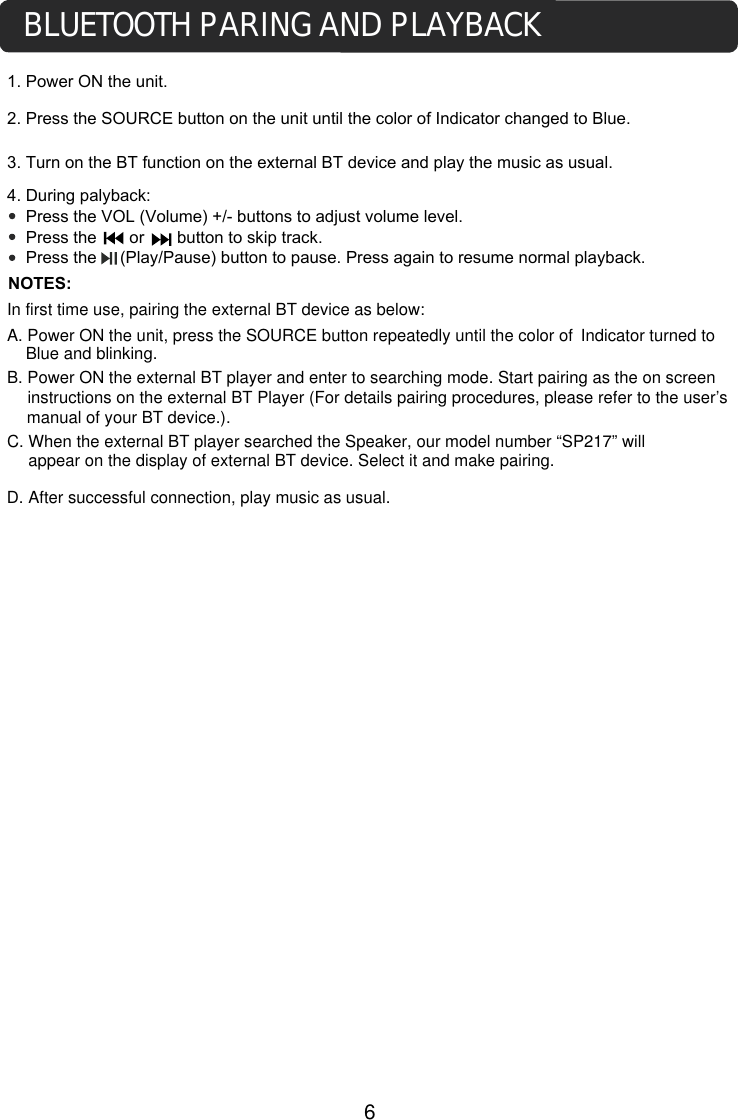
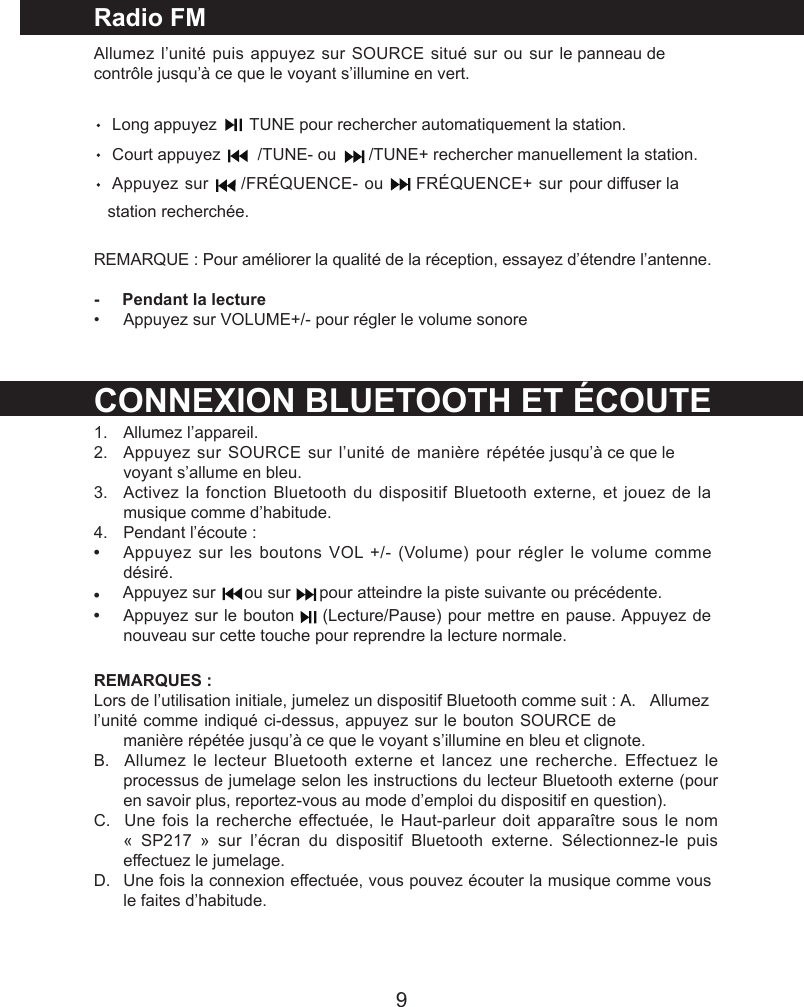
1. Power ON the unit.3. Turn on the BT function on the external BT device and play the music as usual. 4. During palyback:    Press the VOL (Volume) +/- buttons to adjust volume level.    Press the       or       button to skip track.    Press the     (Play/Pause) button to pause. Press again to resume normal playback.NOTES:BLUETOOTH PARING AND PLAYBACKIn first time use, pairing the external BT device as below:A. Power ON the unit, press the SOURCE button repeatedly until the color ofB. Power ON the external BT player and enter to searching mode. Start pairing as the on screen instructions on the external BT Player (For details pairing procedures, please refer to the user’s manual of your BT device.).C. When the external BT player searched the Speaker, our model number “SP217” will 2. Press the SOURCE button on the unit until the color of Indicator changed to Blue. Indicator turned to Blue and blinking.6appear on the display of external BT device. Select it and make pairing.  D. After successful connection, play music as usual.
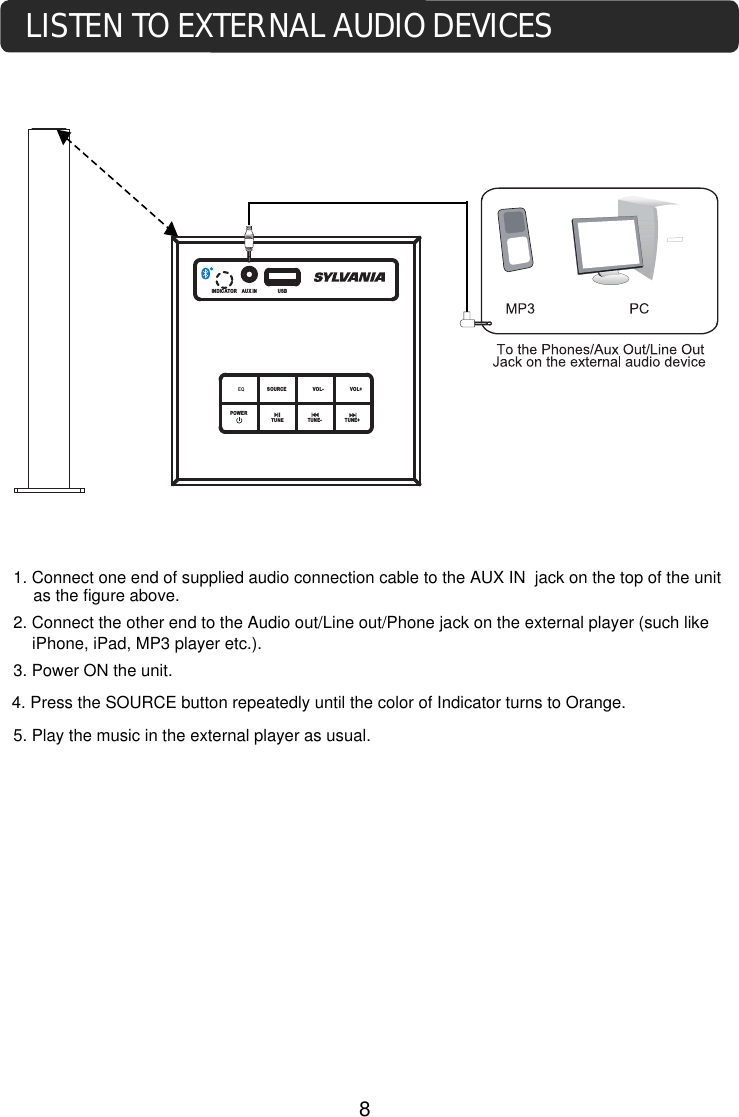
4. Press the SOURCE button repeatedly until the color of Indicator turns to Orange.3. Power ON the unit.1. Connect one end of supplied audio connection cable to the AUX IN  jack on the top of the unit2. Connect the other end to the Audio out/Line out/Phone jack on the external player (such like iPhone, iPad, MP3 player etc.).5. Play the music in the external player as usual. LISTEN TO EXTERNAL AUDIO DEVICES     as the figure above.8INDICATOR AUX IN EQ SOURCE VOL- VOL+TUNE- TUNE+POWERUSBX ITUNE
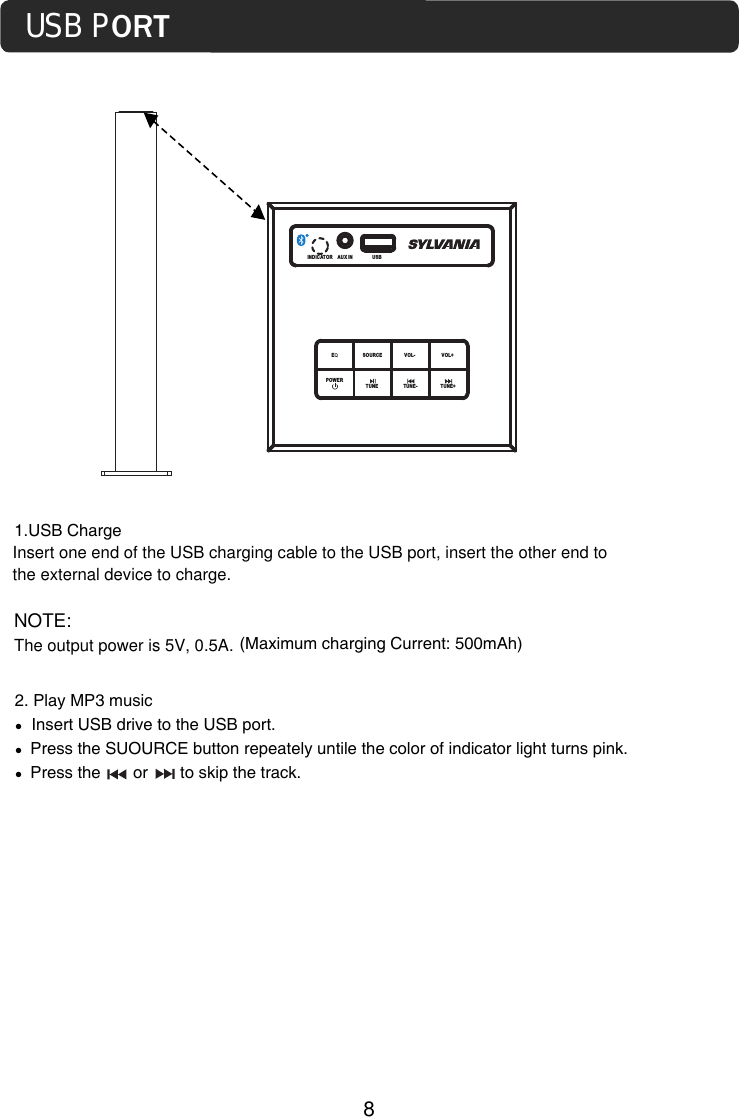
USB PORT81.USB ChargeInsert one end of the USB charging cable to the USB port, insert the other end to the external device to charge. NOTE:The output power is 5V, 0.5A.INDICATOR AUX IN EQSOURCE VOL- VOL+TUNE- TUNE+POWER     USB TUNE(Maximum charging Current: 500mAh)2. Play MP3 music󰳐  Insert USB drive to the USB port.󰳐  Press the SUOURCE button repeately untile the color of indicator light turns pink.󰳐  Press the       or       to skip the track.
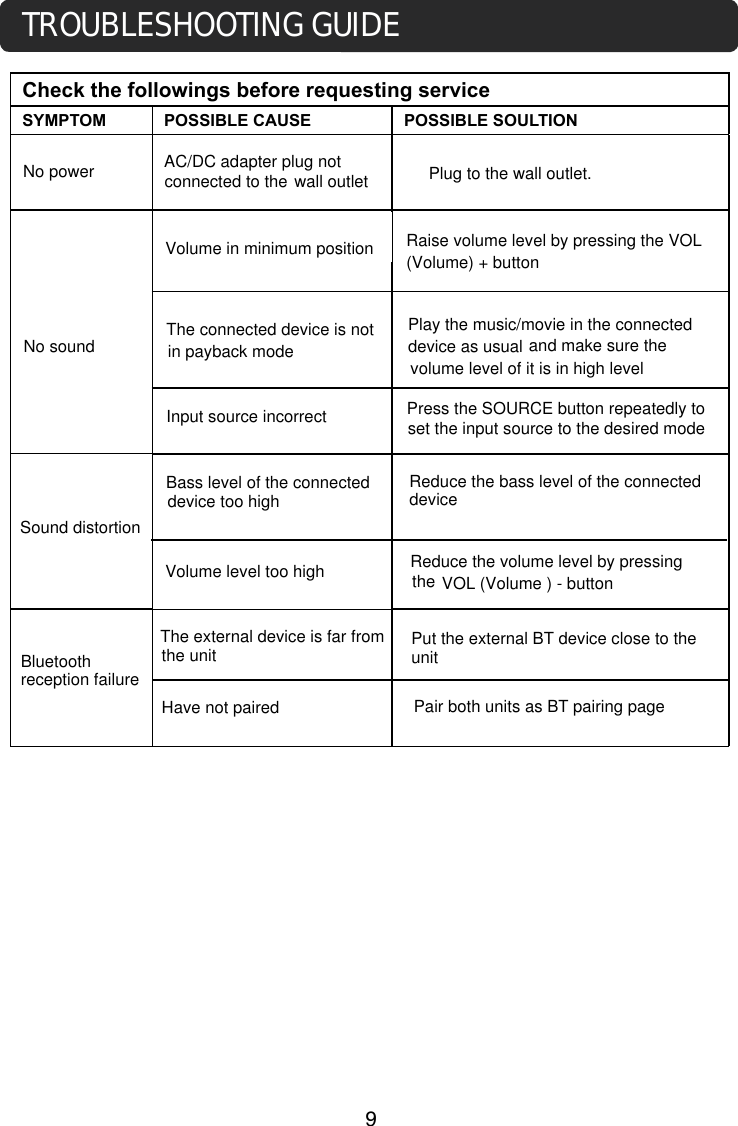
Check the followings before requesting serviceSYMPTOM  POSSIBLE CAUSE POSSIBLE SOULTION desired mode.Press the SOURCE button repeatedly to set the input source to the desired modeTROUBLESHOOTING GUIDENo powerNo soundSound distortionBluetooth reception failureHave not pairedThe external device is far fromthe unitVolume level too highBass level of the connected device too highInput source incorrectThe connected device is not in payback modeVolume in minimum positionwall outlet Plug to the wall outlet.Raise volume level by pressing the VOL (Volume) + buttonPlay the music/movie in the connected device as usual and make sure the volume level of it is in high levelReduce the bass level of the connecteddeviceVOL (Volume ) - buttonReduce the volume level by pressing the  Put the external BT device close to theunitPair both units as BT pairing pageAC/DC adapter plug not connected to the      9
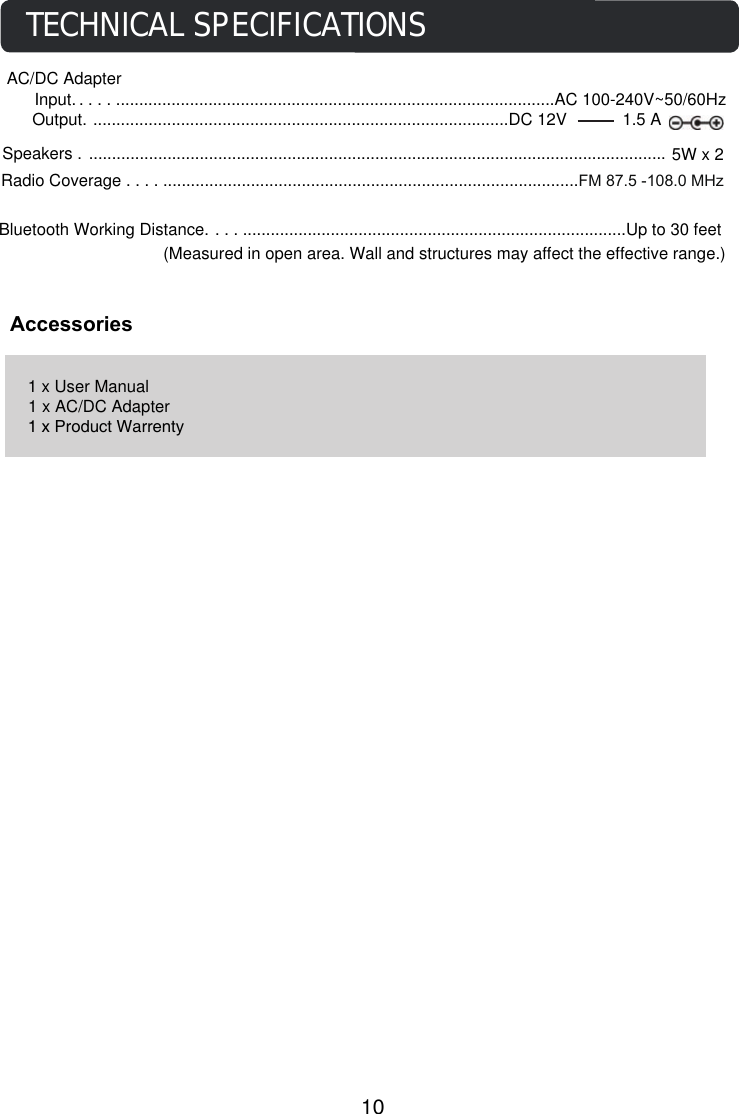
Speakers . ............................................................................................................................. 5W x 2Bluetooth Working Distance. ......................................................................................Up to 30 feet (Measured in open area. Wall and structures may affect the effective range.)AccessoriesTECHNICAL SPECIFICATIONS1 x User Manual1 x AC/DC Adapter1 x Product WarrentyAC/DC Adapter     Input. ...................................................................................................AC 100-240V~50/60HzOutput. ..........................................................................................DC 12V            1.5 A10           Radio Coverage . .............................................................................................FM 87.5 -108.0 MHz
TOUR BLUETOOTHMODE D’EMPLOILISEZ CE MODE D’EMPLOI AVEC ATTENTION AVANT D’UTILISER CET APPAREILMODÈLE : SP217
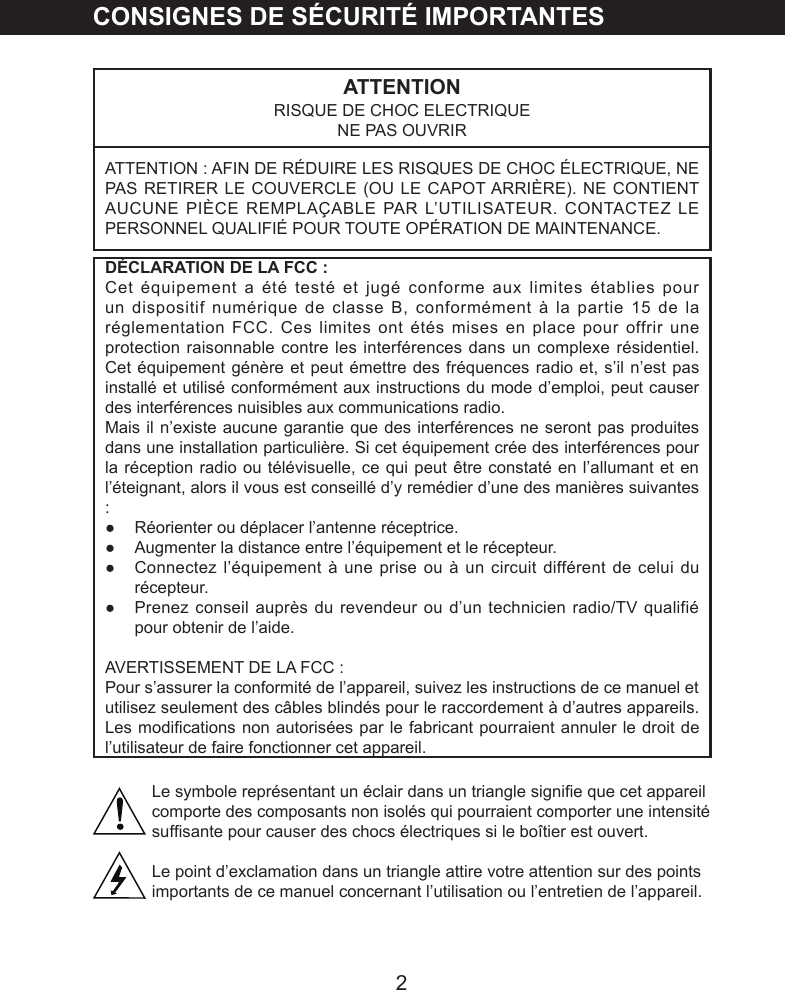
2CONSIGNES DE SÉCURITÉ IMPORTANTESATTENTIONRISQUE DE CHOC ELECTRIQUENE PAS OUVRIRATTENTION : AFIN DE RÉDUIRE LES RISQUES DE CHOC ÉLECTRIQUE, NE PAS RETIRER LE COUVERCLE (OU LE CAPOT ARRIÈRE). NE CONTIENT AUCUNE PIÈCE REMPLAÇABLE PAR L’UTILISATEUR. CONTACTEZ LE PERSONNEL QUALIFIÉ POUR TOUTE OPÉRATION DE MAINTENANCE.DÉCLARATION DE LA FCC :Cet équipement a été testé et jugé conforme aux limites établies pour un dispositif numérique de classe B, conformément à la partie 15 de la réglementation FCC. Ces limites ont étés mises en place pour offrir une protection raisonnable contre les interférences dans un complexe résidentiel. Cet équipement génère et peut émettre des fréquences radio et, s’il n’est pas installé et utilisé conformément aux instructions du mode d’emploi, peut causer des interférences nuisibles aux communications radio. Mais il n’existe aucune garantie que des interférences ne seront pas produites dans une installation particulière. Si cet équipement crée des interférences pour la réception radio ou télévisuelle, ce qui peut être constaté en l’allumant et en l’éteignant, alors il vous est conseillé d’y remédier d’une des manières suivantes :●  Réorienter ou déplacer l’antenne réceptrice.●  Augmenter la distance entre l’équipement et le récepteur.●  Connectez l’équipement à une prise ou à un circuit différent de celui du récepteur.●  Prenez conseil auprès du revendeur ou d’un technicien radio/TV qualifié pour obtenir de l’aide.AVERTISSEMENT DE LA FCC :Pour s’assurer la conformité de l’appareil, suivez les instructions de ce manuel et utilisez seulement des câbles blindés pour le raccordement à d’autres appareils. Les modications non autorisées par le fabricant pourraient annuler le droit de l’utilisateur de faire fonctionner cet appareil.Le symbole représentant un éclair dans un triangle signie que cet appareil comporte des composants non isolés qui pourraient comporter une intensité sufsante pour causer des chocs électriques si le boîtier est ouvert.Le point d’exclamation dans un triangle attire votre attention sur des points importants de ce manuel concernant l’utilisation ou l’entretien de l’appareil.
3AVERTISSEMENT :POUR RÉDUIRE LE RISQUE D’INCENDIE OU DE CHOC ÉLECTRIQUE, NE PAS EXPOSER CET APPAREIL À LA PLUIE OU À L’HUMIDITÉ.AVERTISSEMENT :POUR RÉDUIRE LE RISQUE D’INCENDIE OU DE CHOC ÉLECTRIQUE ET PARASITES, UTILISER UNIQUEMENT LES ACCESSOIRES RECOMMANDÉS.AVERTISSEMENT :Afin de réduire le risque d’incendie ou de choc électrique, ne pas exposer cet appareil à la pluie ou à l’humidité. L’appareil ne doit pas être mis en contact avec des égouttements ou des éclaboussures, et ne placez jamais de conteneurs de liquides sur le dessus de l’appareil.Avant d’utiliser l’appareil, veuillez vous assurer de lire attentivement les instructions. Remarquez que ce sont des précautions générales et pourraient ne pas s’appliquer à votre appareil. Par exemple, cet appareil pourrait ne pas avoir la capacité d’être branché à une antenne extérieure.1.  LISEZ ces instructionsToutes les instructions concernant la sécurité et le mode d’emploi doivent être lues avant de faire fonctionner ce produit.2.  Conserver ces instructionsLes instructions concernant la sécurité et le mode d’emploi doivent être conservés pour référence future.3.  Respecter tous les avertissementsTous les avertissements sur le produit et dans le mode d’emploi doivent être respectés.4.  Suivre toutes les instructionsToutes les instructions d’utilisation doivent être suivies.5.  Ne pas utiliser cet appareil à proximité de l’eauNe pas déposer l’appareil près de l’eau - par exemple à proximité d’un bain, d’un bol de liquide, d’un évier, d’une machine à laver, dans un sous-sol humide, près d’une piscine, etc.6.  Nettoyer avec un chiffon secDébranchez cet appareil avant de le nettoyer. Ne pas utiliser de nettoyant liquide ou en aérosol. Utiliser un chiffon sec pour le nettoyer.7.  Ne pas obstruer les ouvertures de ventilation. Suivez les instructions d’installation données par le fabriquant.Les fentes et les ouvertures dans le boîtier, sur l’arrière ou dans le fond sont présentes pour la ventilation, afin de s’assurer du fonctionnement continu de
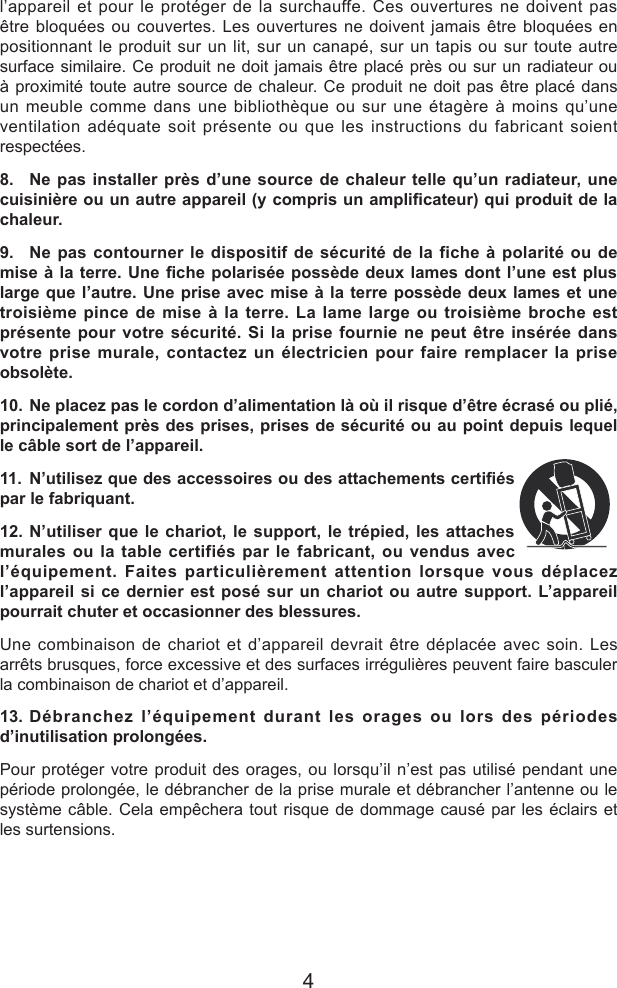
4l’appareil et pour le protéger de la surchauffe. Ces ouvertures ne doivent pas être bloquées ou couvertes. Les ouvertures ne doivent jamais être bloquées en positionnant le produit sur un lit, sur un canapé, sur un tapis ou sur toute autre surface similaire. Ce produit ne doit jamais être placé près ou sur un radiateur ou à proximité toute autre source de chaleur. Ce produit ne doit pas être placé dans un meuble comme dans une bibliothèque ou sur une étagère à moins qu’une ventilation adéquate soit présente ou que les instructions du fabricant soient respectées.8.  Ne pas installer près d’une source de chaleur telle qu’un radiateur, une cuisinière ou un autre appareil (y compris un amplicateur) qui produit de la chaleur.9.  Ne pas contourner le dispositif de sécurité de la fiche à polarité ou de mise à la terre. Une che  polarisée possède deux  lames dont l’une  est plus large que l’autre. Une prise avec mise à la terre possède deux lames et une troisième pince de mise à la terre. La lame large ou troisième broche est présente pour votre sécurité. Si la prise fournie ne peut être insérée dans votre prise murale, contactez un électricien pour faire remplacer la prise obsolète.10. Ne placez pas le cordon d’alimentation là où il risque d’être écrasé ou plié, principalement près des prises, prises de sécurité ou au point depuis lequel le câble sort de l’appareil.11. N’utilisez que des accessoires ou des attachements certiés par le fabriquant.12. N’utiliser que le chariot, le support, le trépied, les attaches murales ou la table certifiés par le fabricant, ou vendus avec l’équipement. Faites particulièrement attention lorsque vous déplacez l’appareil si ce dernier est posé sur un chariot ou autre support. L’appareil pourrait chuter et occasionner des blessures.Une combinaison de chariot et d’appareil devrait être déplacée avec soin. Les arrêts brusques, force excessive et des surfaces irrégulières peuvent faire basculer la combinaison de chariot et d’appareil.13. Débranchez l’équipement durant les orages ou lors des périodes d’inutilisation prolongées.Pour protéger votre produit des orages, ou lorsqu’il n’est pas utilisé pendant une période prolongée, le débrancher de la prise murale et débrancher l’antenne ou le système câble. Cela empêchera tout risque de dommage causé par les éclairs et les surtensions.
514. Faites appel au personnel qualifié pour tout besoin de réparation. Une réparation est nécessaire lorsque l’appareil a été endommagé de quelque manière que ce soit. Par exemple, le cordon d’alimentation ou la fiche endommagé, du liquide à été renversé sur l’appareil. Contactez un professionnel également si des objets ont chuté sur l’appareil, si l’appareil a été exposé à la pluie ou à l’humidité, si vous constatez une défaillance ou si l’appareil a subi une chute.15. Source d’alimentationCe produit devrait être alimenté seulement à partir de la source d’alimentation spécifiée sur l’étiquette. Si vous n’êtes pas certain de la source d’alimentation, veuillez contacter le vendeur ou la compagnie d’électricité locale. Pour les produits conçus pour fonctionner avec des piles ou d’autres sources, se référer au mode d’emploi.
6INSTALLATION1. Haut-parleurs2. Base3. Vis4. Rondelles Remarque :Attachez la base de bois au corps principal à l’aide des vis et des rondelles fournies.2134
7EMPLACEMENT DES CONTRÔLESUNITÉ PRINCIPALE1. Prise d’entrée AUX IN2. Voyant3. EQ4.   Bouton ALIMENTATION5. Bouton SOURCE6. Port de USB7. Bouton VOL- (réduction du volume)9.    / Bouton FRÉQUENCE+(Suivant)10.    / Bouton FRÉQUENCE-(Précédent)11.    Bouton (Lecture/Pause)12.    Antenne13. Prise DC IN8.   Bouton VOL+ (augmentation du volume)12DC IN       ANTDC INDC     12V, 1.5AANT13INDICATOR AUX IN EQSOURCE VOL- VOL+TUNE- TUNE+POWER        USB 1118792345610TUNEDC      12V,1.5A
8UTILISATION1.   Insérez l’adaptateur CA/CC dans une prise murale aussi proche que possible de l’appareil et offrant un courant des caractéristiques suivantes : 100-240V~, 50/60Hz. Le voyant s’illumine en rouge.2.   Court appuyez sur le bouton Alimentation   de l’unité ou de la télécommande pour allumer l’unité.3.   Appuyez sur SOURCE de manière répétée pour sélectionner le mode désiré. Le voyant change de couleur pour indiquer les sources suivantes :~ Rouge : Veille~ Vert : Radio~ Bleu : Bluetooth~ Orange : AUX IN4. Pendant l’écoute :~ Appuyez sur les boutons VOL (Volume) pour régler le volume comme désiré. (Le     volume maximum et minimum aura bips)~ Appuyez sur le bouton EQ de manière répétée pour sélectionner le mode d’égaliseur désiré.~ Rose: jouer par clé USB~ Appuyez sur   ou sur   pour atteindre la piste suivante ou précédente. ~ Appuyez sur le bouton     (Lecture/Pause) pour mettre en pause. Appuyez à nouveau sur cette touche pour reprendre la lecture normale. 5.  Lorsque vous avez terminé d’utiliser le haut-parleur, long appuyez sur le bouton        d’alimentation pour éteindre cette dernière. Le voyant s’illumine en      rouge.REMARQUE :Débranchez la prise de l’adaptateur CA/CC pour éteindre l’unité si vous prévoyez de ne pas l’utiliser pendant une période prolongée.
9Radio FMAllumez l’unité puis appuyez sur SOURCE situé sur ou sur le panneau de contrôle jusqu’à ce que le voyant s’illumine en vert.        Long appuyez       TUNE pour rechercher automatiquement la station.    Court appuyez        /TUNE- ou       /TUNE+ rechercher manuellement la station.    Appuyez sur   /FRÉQUENCE- ou   FRÉQUENCE+ sur pour diffuser la    station recherchée.REMARQUE : Pour améliorer la qualité de la réception, essayez d’étendre l’antenne.-     Pendant la lecture•  Appuyez sur VOLUME+/- pour régler le volume sonoreCONNEXION BLUETOOTH ET ÉCOUTE1.   Allumez l’appareil.2.   Appuyez sur SOURCE sur l’unité de manière répétée jusqu’à ce que le voyant s’allume en bleu.3.   Activez la fonction Bluetooth du dispositif Bluetooth externe, et jouez de la musique comme d’habitude.4. Pendant l’écoute :•Appuyez sur les boutons VOL +/- (Volume) pour régler le volume comme désiré.••Appuyez sur le bouton   (Lecture/Pause) pour mettre en pause. Appuyez de nouveau sur cette touche pour reprendre la lecture normale.REMARQUES :Lors de l’utilisation initiale, jumelez un dispositif Bluetooth comme suit : A.   Allumez l’unité comme indiqué ci-dessus, appuyez sur le bouton SOURCE de manière répétée jusqu’à ce que le voyant s’illumine en bleu et clignote.B.   Allumez le lecteur  Bluetooth externe  et lancez une  recherche. Effectuez le processus de jumelage selon les instructions du lecteur Bluetooth externe (pour en savoir plus, reportez-vous au mode d’emploi du dispositif en question).C.   Une fois la recherche effectuée, le Haut-parleur doit apparaître  sous le  nom «  SP217  »  sur  l’écran  du  dispositif  Bluetooth  externe.  Sélectionnez-le  puis effectuez le jumelage.D. Une fois la connexion effectuée, vous pouvez écouter la musique comme vous le faites d’habitude.Appuyez sur   ou sur   pour atteindre la piste suivante ou précédente.
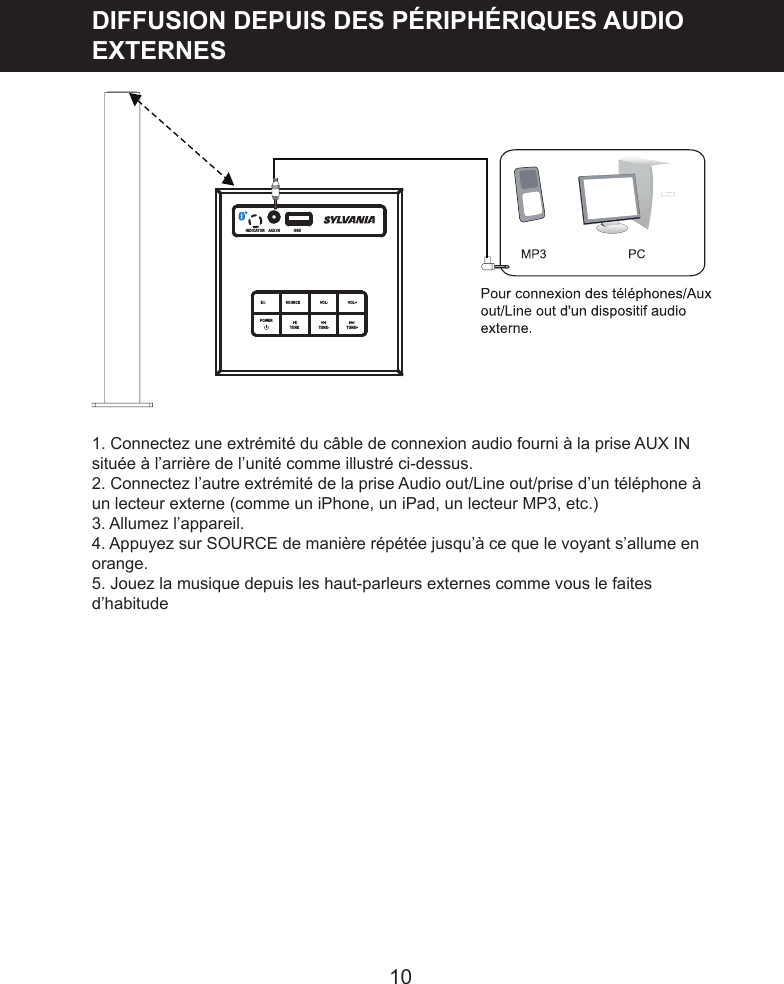
10DIFFUSION DEPUIS DES PÉRIPHÉRIQUES AUDIO EXTERNES1. Connectez une extrémité du câble de connexion audio fourni à la prise AUX IN située à l’arrière de l’unité comme illustré ci-dessus.2. Connectez l’autre extrémité de la prise Audio out/Line out/prise d’un téléphone à un lecteur externe (comme un iPhone, un iPad, un lecteur MP3, etc.)3. Allumez l’appareil.4. Appuyez sur SOURCE de manière répétée jusqu’à ce que le voyant s’allume en orange.5. Jouez la musique depuis les haut-parleurs externes comme vous le faites d’habitudeINDICATOR AUX IN EQ     SOURCE VOL- VOL+USB                            TUNE                  TUNE- TUNE+POWER
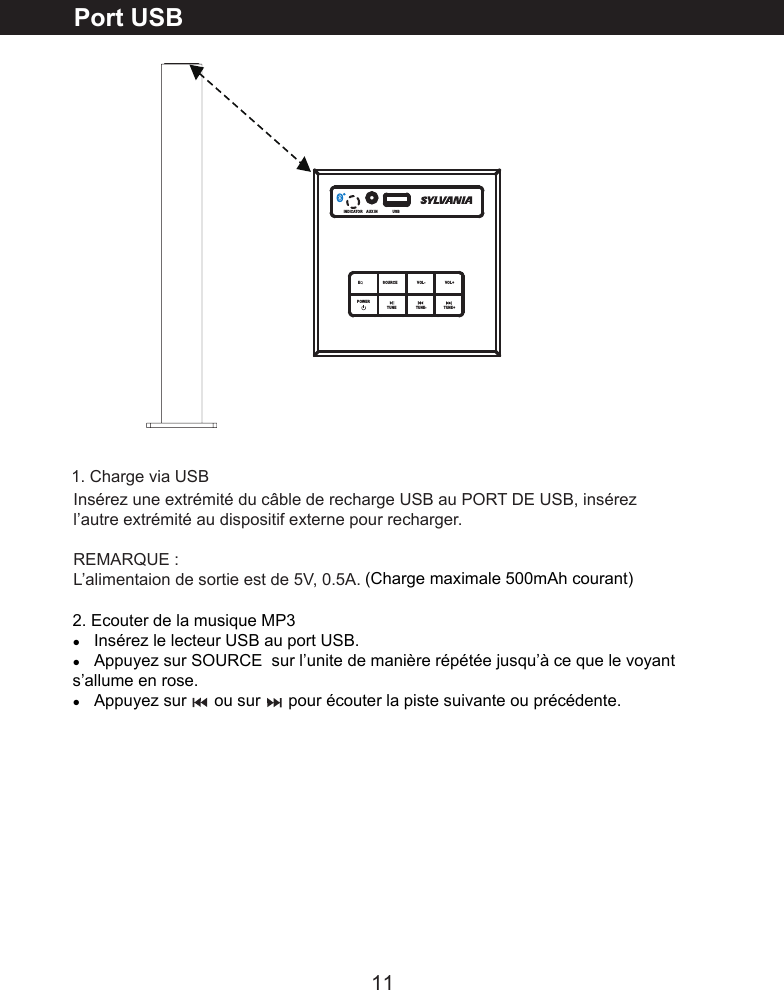
11Port USBInsérez une extrémité du câble de recharge USB au PORT DE USB, insérez l’autre extrémité au dispositif externe pour recharger.REMARQUE :L’alimentaion de sortie est de 5V, 0.5A.INDICATOR AUX IN          USB EQ     SOURCE VOL- VOL+                           TUNE                  TUNE- TUNE+POWER  1. Charge via USB(Charge maximale 500mAh courant)2. Ecouter de la musique MP3󰳐   Insérez le lecteur USB au port USB.󰳐   Appuyez sur SOURCE  sur l’unite de manière répétée jusqu’à ce que le voyant   s’allume en rose.󰳐   Appuyez sur      ou sur      pour écouter la piste suivante ou précédente.
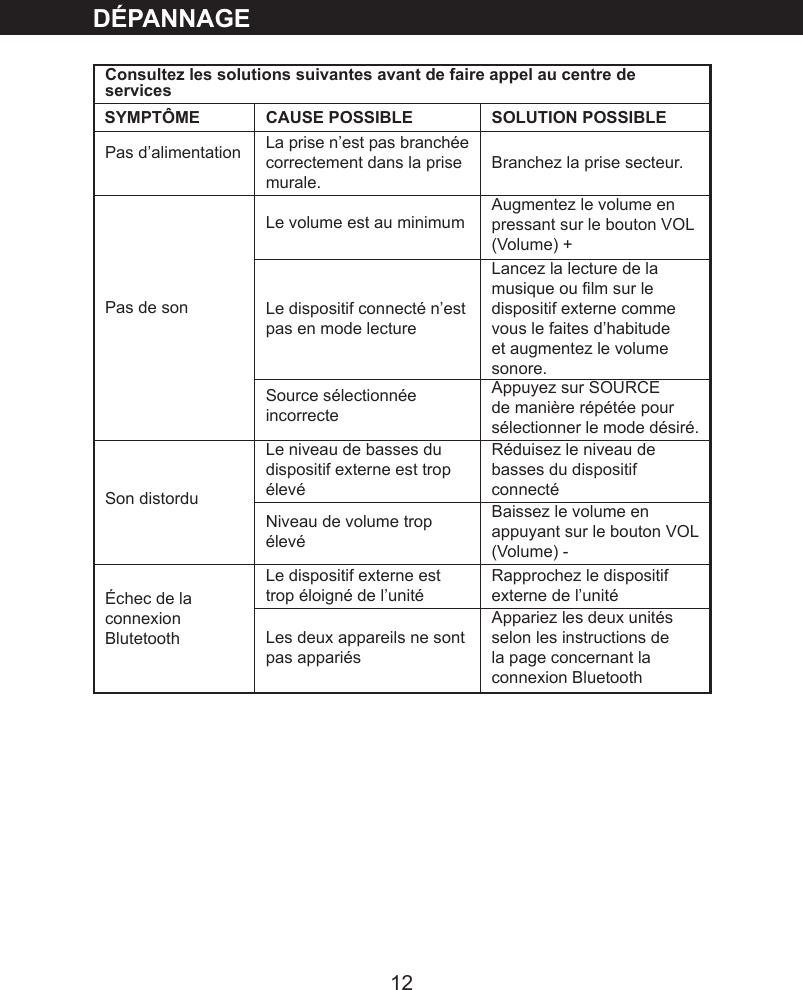
12DÉPANNAGEConsultez les solutions suivantes avant de faire appel au centre de servicesCAUSE POSSIBLE SOLUTION POSSIBLEPas d’alimentation La prise n’est pas branchée correctement dans la prise murale.Branchez la prise secteur.Pas de sonLe volume est au minimum  Augmentez le volume en pressant sur le bouton VOL (Volume) +Le dispositif connecté n’est pas en mode lectureLancez la lecture de la musique ou lm sur le dispositif externe comme vous le faites d’habitude et augmentez le volume sonore.Source sélectionnée incorrecte Appuyez sur SOURCE de manière répétée pour sélectionner le mode désiré.Son distorduLe niveau de basses du dispositif externe est trop élevéRéduisez le niveau de basses du dispositif connectéNiveau de volume trop élevéBaissez le volume en appuyant sur le bouton VOL (Volume) -Échec de la connexion BlutetoothLe dispositif externe est trop éloigné de l’unitéRapprochez le dispositif externe de l’unité Les deux appareils ne sont pas appariésAppariez les deux unités selon les instructions de la page concernant la connexion BluetoothSYMPTÔME
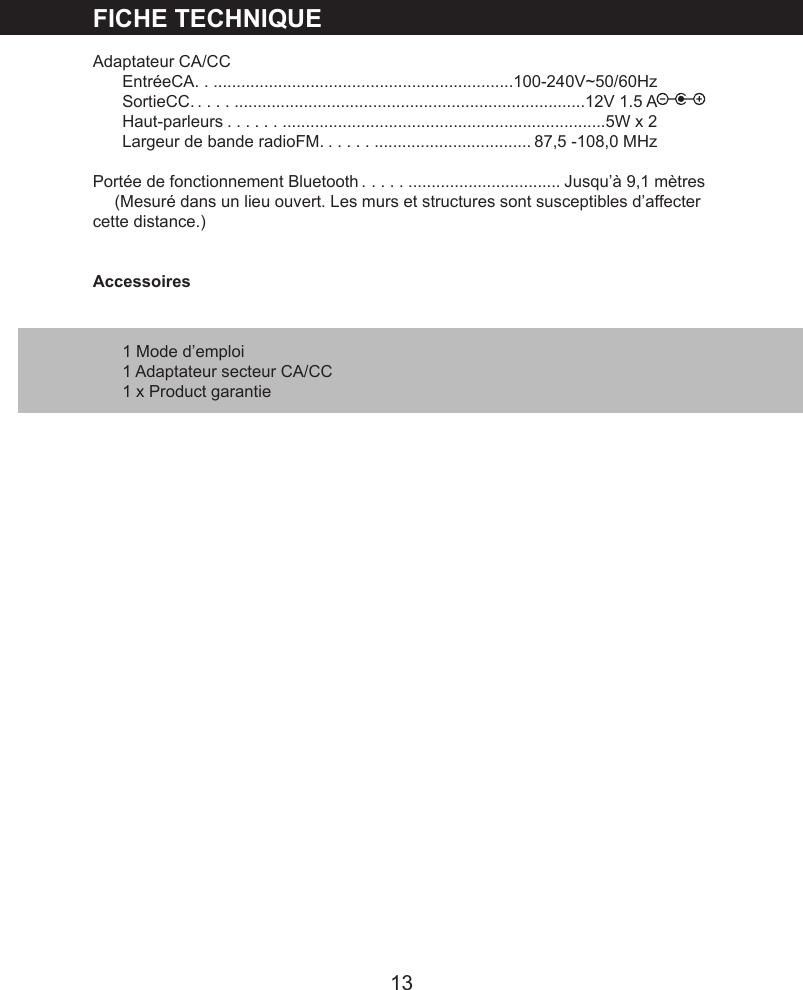
13FICHE TECHNIQUEAdaptateur CA/CCEntréeCA . ..................................................................100-240V~50/60HzSortieCC . ................................................................................12V 1.5 AHaut-parleurs . ...........................................................................5W x 2Largeur de bande radioFM . ....................................... 87,5 -108,0 MHzPortée de fonctionnement Bluetooth . ..................................... Jusqu’à 9,1 mètres(Mesuré dans un lieu ouvert. Les murs et structures sont susceptibles d’affecter cette distance.)Accessoires1 Mode d’emploi1 Adaptateur secteur CA/CC1 x Product garantie

Navigation menu