Headline Systems HL-1521 HL-1521 UHF Transmitter User Manual HL1511 1521 manual Page 1 2

Headline Systems, INC HL-1521 UHF Transmitter HL1511 1521 manual Page 1 2

Users Manual

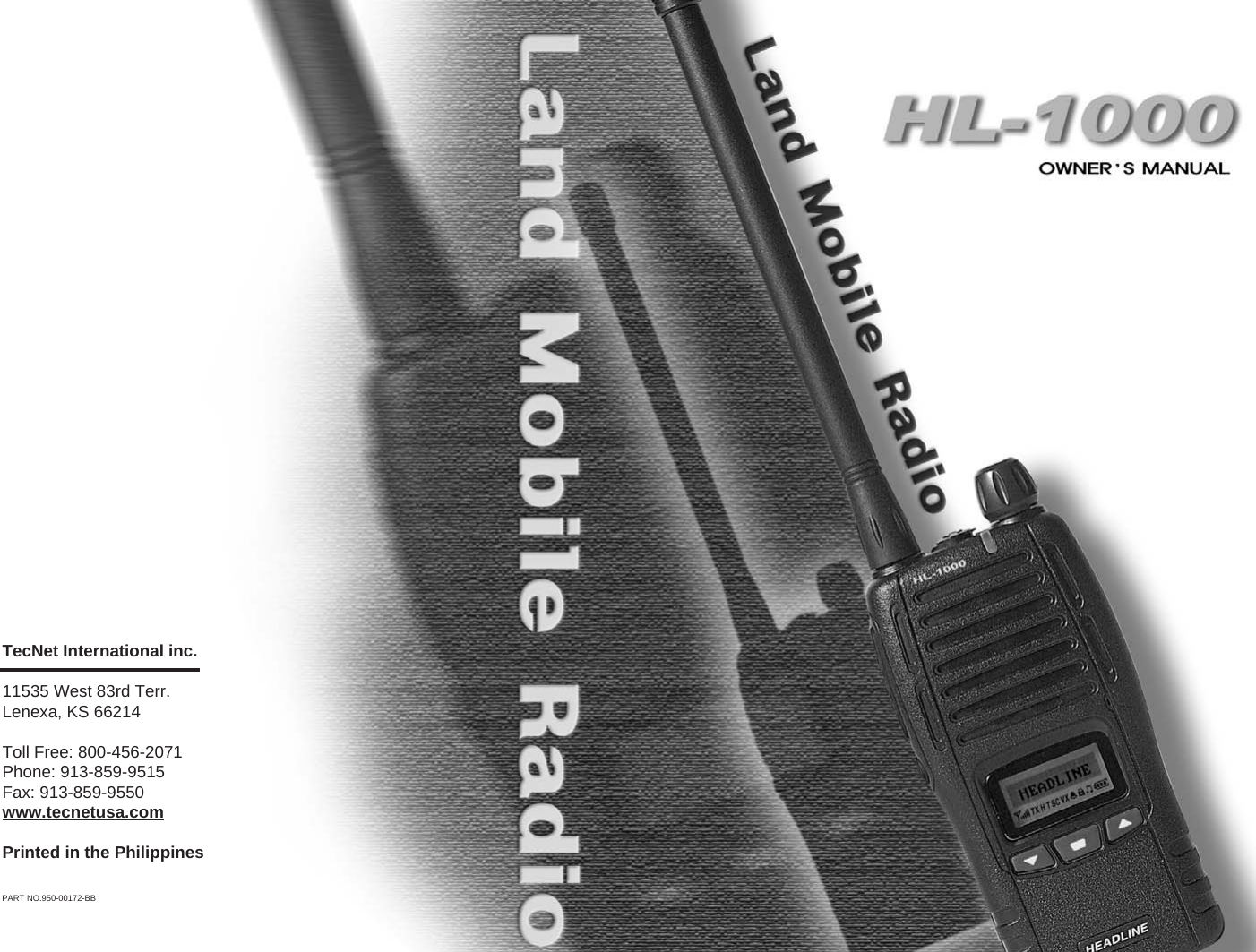
TecNet International inc. 11535 West 83rd Terr.Lenexa, KS 66214Toll Free: 800-456-2071Phone: 913-859-9515Fax: 913-859-9550www.tecnetusa.comPrinted in the PhilippinesPART NO.950-00172-BB
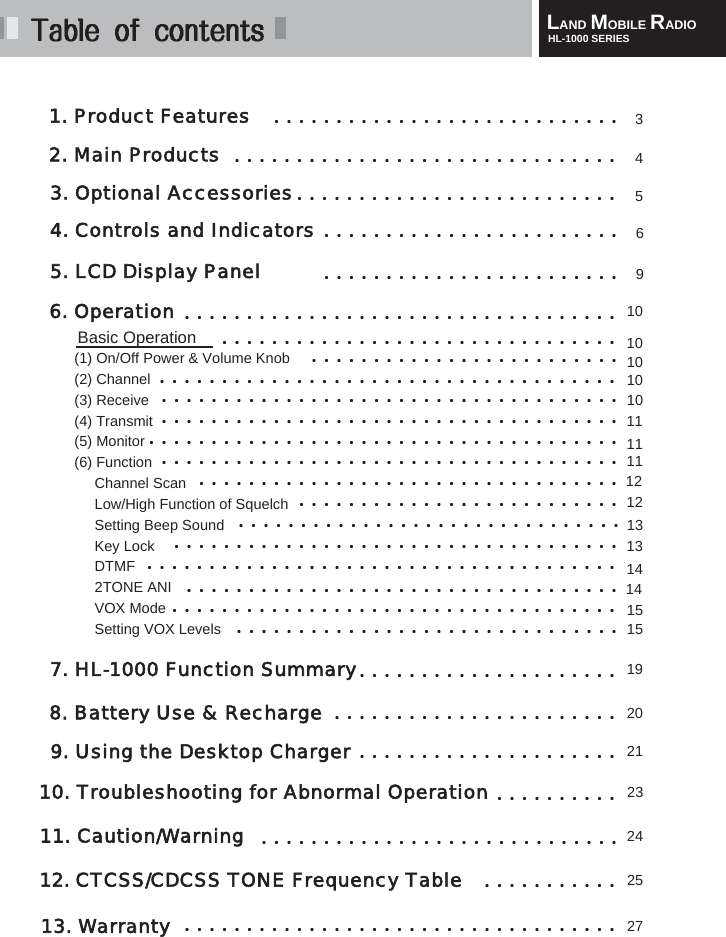
LAND MOBILE RADIOHL-1000 SERIES1. Product Features2. Main Products3. Optional Accessories6. Operation4. Controls and IndicatorsBasic Operation(1) On/Off Power & Volume Knob(2) Channel(3) Receive(4) Transmit(5) Monitor(6) FunctionChannel ScanLow/High Function of SquelchSetting Beep SoundKey LockDTMF2TONE ANIVOX ModeSetting VOX Levels 7. HL-1000 Function Summary8. Battery Use & Recharge9. Using the Desktop Charger10. Troubleshooting for Abnormal Operation11. Caution/Warning12. CTCSS/CDCSS TONE Frequency Table3413. Warranty56101010101011111112131314151519202123242527145. LCD Display Panel912
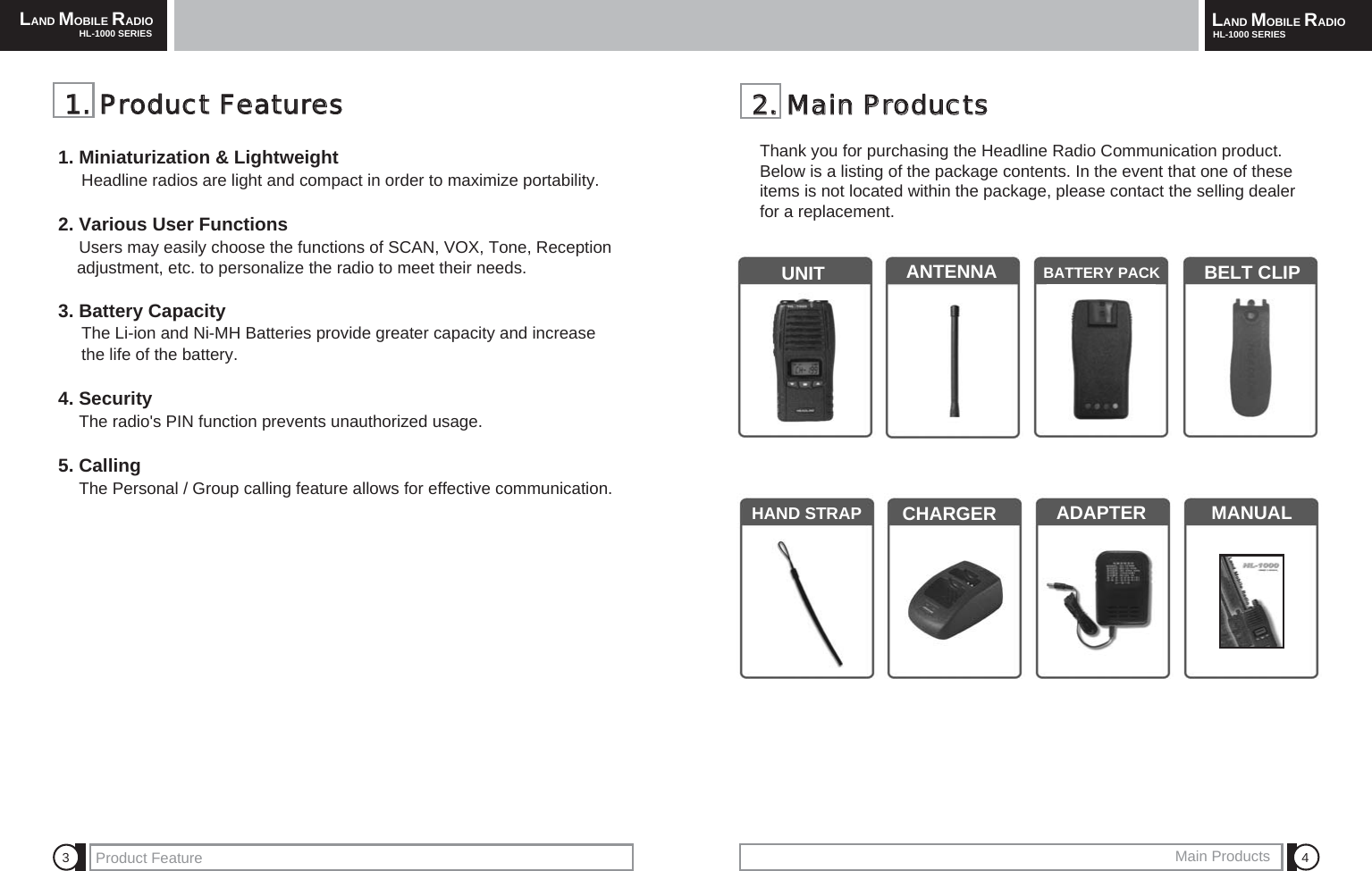
LAND MOBILE RADIOHL-1000 SERIES LAND MOBILE RADIOHL-1000 SERIESProduct Feature Main Products 4322..  MMaaiinn  PPrroodduuccttssThank you for purchasing the Headline Radio Communication product.Below is a listing of the package contents. In the event that one of theseitems is not located within the package, please contact the selling dealerfor a replacement.UNIT ANTENNA BATTERY PACK BELT CLIPHAND STRAP CHARGER  ADAPTER MANUAL11..  PPrroodduucctt  FFeeaattuurreess1. Miniaturization & LightweightHeadline radios are light and compact in order to maximize portability.2. Various User FunctionsUsers may easily choose the functions of SCAN, VOX, Tone, Reception adjustment, etc. to personalize the radio to meet their needs. 3. Battery CapacityThe Li-ion and Ni-MH Batteries provide greater capacity and increase the life of the battery.4. SecurityThe radio's PIN function prevents unauthorized usage.5. CallingThe Personal / Group calling feature allows for effective communication.
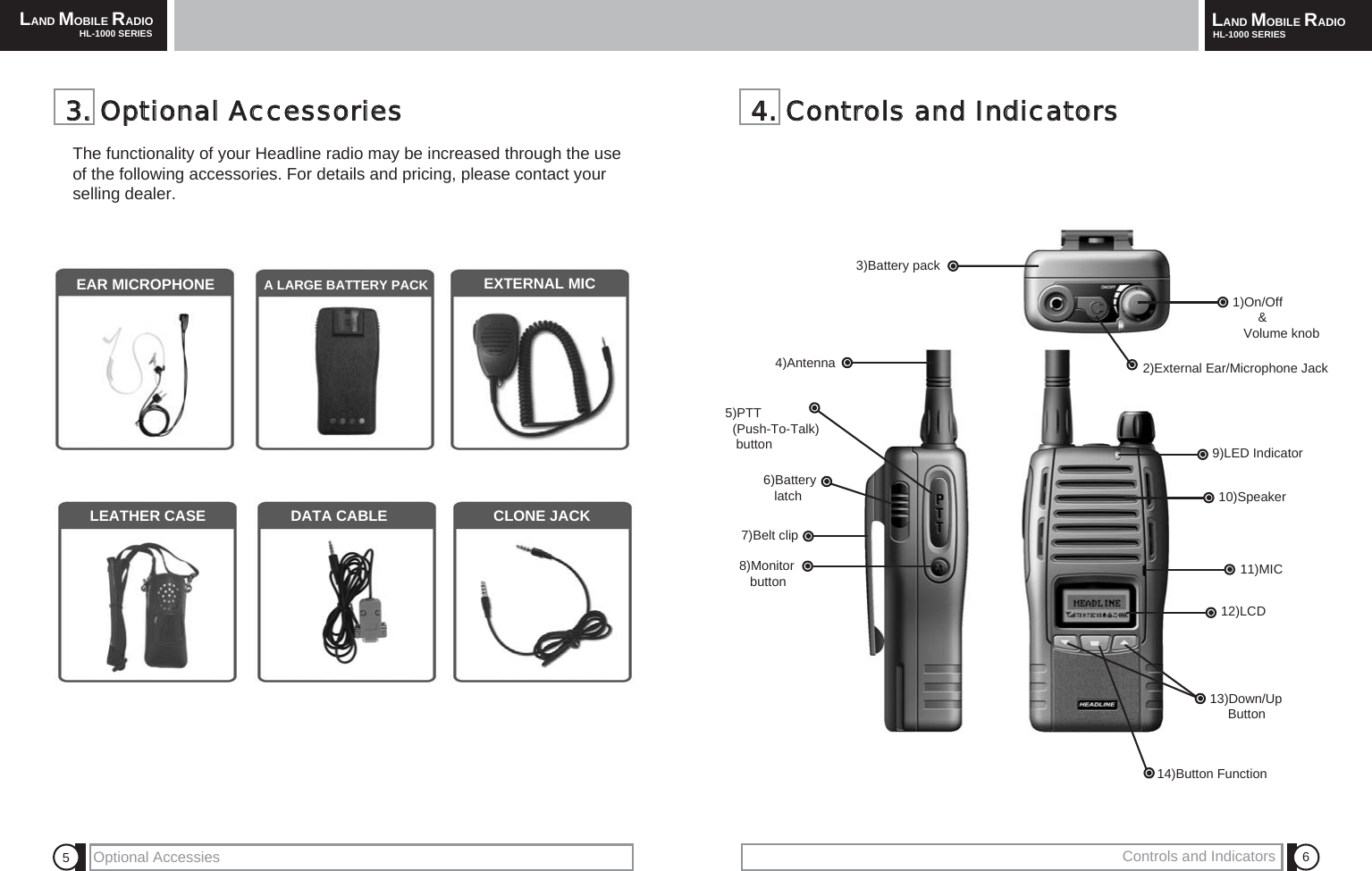
LAND MOBILE RADIOHL-1000 SERIES LAND MOBILE RADIOHL-1000 SERIESOptional Accessies Controls and Indicators 6544..  CCoonnttrroollss  aanndd  IInnddiiccaattoorrss1)On/Off& Volume knob2)External Ear/Microphone Jack3)Battery pack9)LED Indicator 10)Speaker11)MIC12)LCD13)Down/UpButton14)Button Function4)Antenna5)PTT(Push-To-Talk)       button6)Battery  latch7)Belt clip8)Monitor button33..  OOppttiioonnaall  AAcccceessssoorriieessThe functionality of your Headline radio may be increased through the useof the following accessories. For details and pricing, please contact yourselling dealer.EAR MICROPHONE A LARGE BATTERY PACK EXTERNAL MICLEATHER CASE DATA CABLE CLONE JACK
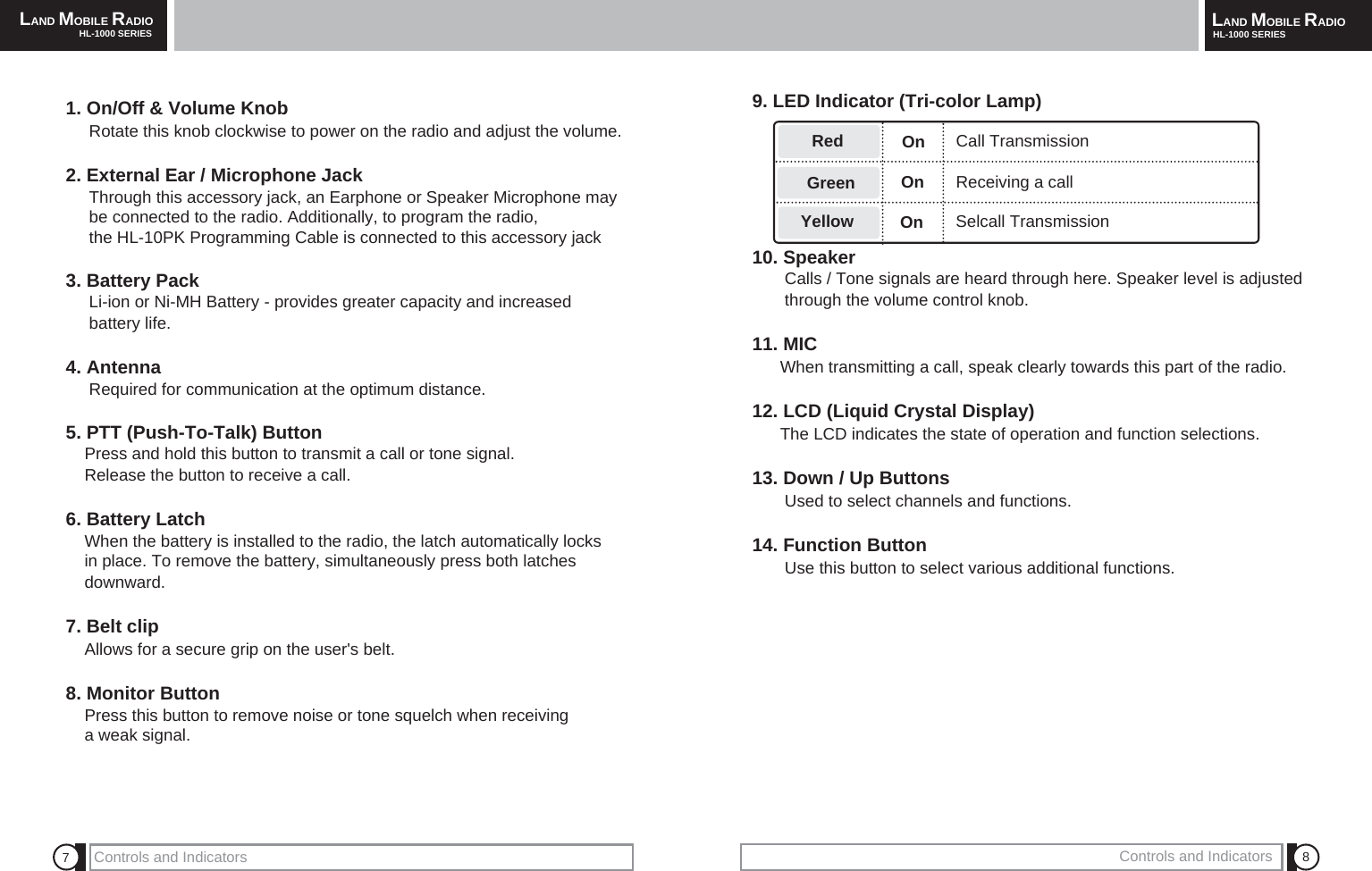
LAND MOBILE RADIOHL-1000 SERIES LAND MOBILE RADIOHL-1000 SERIES879. LED Indicator (Tri-color Lamp)10. SpeakerCalls / Tone signals are heard through here. Speaker level is adjusted through the volume control knob.11. MICWhen transmitting a call, speak clearly towards this part of the radio.12. LCD (Liquid Crystal Display)The LCD indicates the state of operation and function selections.13. Down / Up ButtonsUsed to select channels and functions.14. Function ButtonUse this button to select various additional functions.GreenRedYellowOnReceiving a callSelcall TransmissionCall Transmission1. On/Off & Volume KnobRotate this knob clockwise to power on the radio and adjust the volume. 2. External Ear / Microphone JackThrough this accessory jack, an Earphone or Speaker Microphone may be connected to the radio. Additionally, to program the radio, the HL-10PK Programming Cable is connected to this accessory jack3. Battery PackLi-ion or Ni-MH Battery - provides greater capacity and increased battery life.4. AntennaRequired for communication at the optimum distance.5. PTT (Push-To-Talk) ButtonPress and hold this button to transmit a call or tone signal. Release the button to receive a call.6. Battery LatchWhen the battery is installed to the radio, the latch automatically locks in place. To remove the battery, simultaneously press both latches downward. 7. Belt clipAllows for a secure grip on the user's belt.8. Monitor ButtonPress this button to remove noise or tone squelch when receiving a weak signal.Controls and Indicators Controls and IndicatorsOnOn
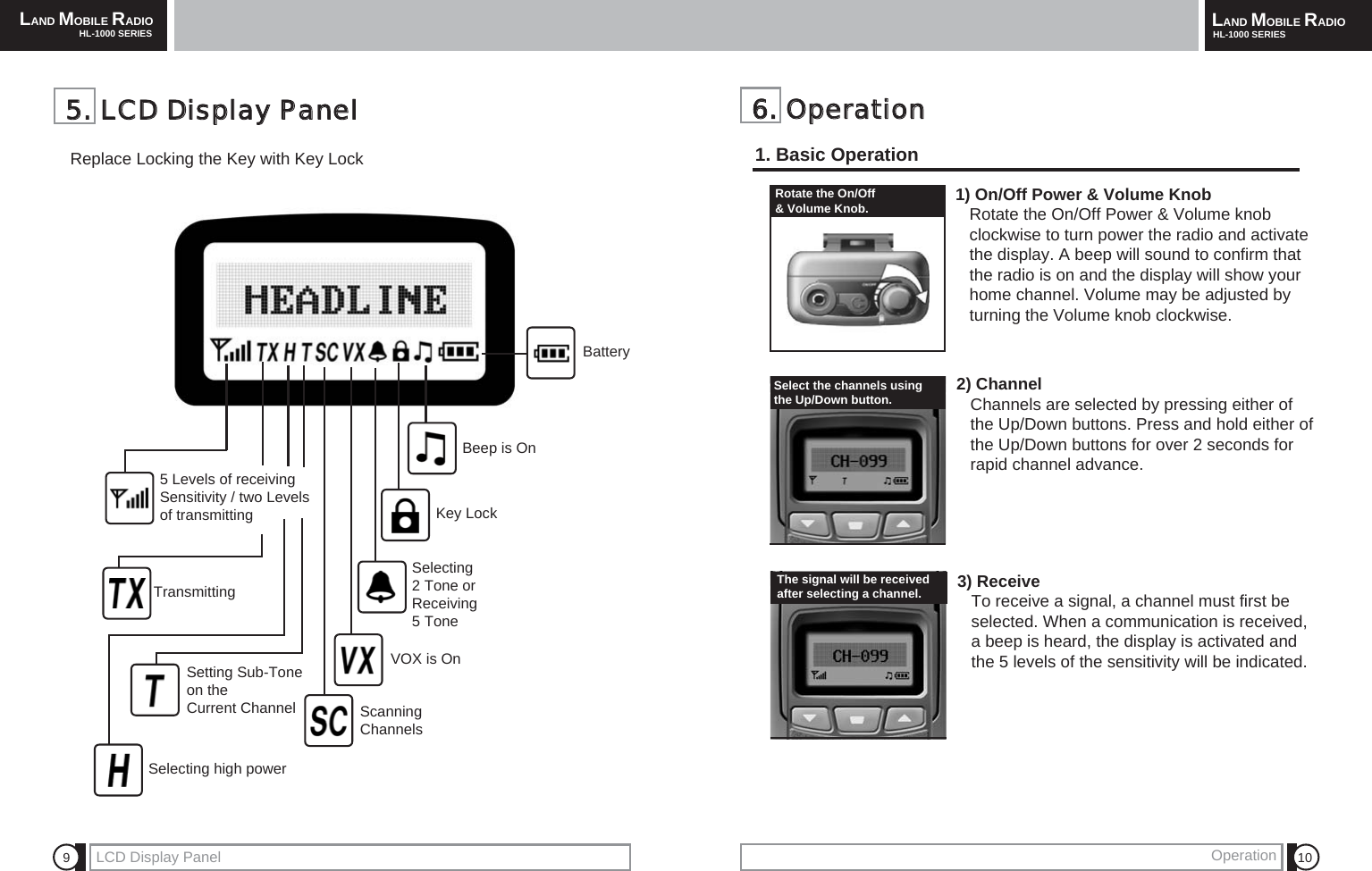
LAND MOBILE RADIOHL-1000 SERIES LAND MOBILE RADIOHL-1000 SERIESOperation 10966..  OOppeerraattiioonn1. Basic OperationLCD Display PanelRotate the On/Off & Volume Knob.Select the channels using the Up/Down button. The signal will be receivedafter selecting a channel.Battery 55..  LLCCDD  DDiissppllaayy  PPaanneellReplace Locking the Key with Key Lock3) Receive To receive a signal, a channel must first be selected. When a communication is received,     a beep is heard, the display is activated and the 5 levels of the sensitivity will be indicated. 1) On/Off Power & Volume KnobRotate the On/Off Power & Volume knob        clockwise to turn power the radio and activate the display. A beep will sound to confirm that the radio is on and the display will show your home channel. Volume may be adjusted by turning the Volume knob clockwise.2) ChannelChannels are selected by pressing either of the Up/Down buttons. Press and hold either of the Up/Down buttons for over 2 seconds for rapid channel advance.Beep is OnKey LockSelecting2 Tone orReceiving 5 Tone 5 Levels of receivingSensitivity / two Levelsof transmittingTransmittingScanning ChannelsSetting Sub-Tone on theCurrent Channel VOX is OnSelecting high power
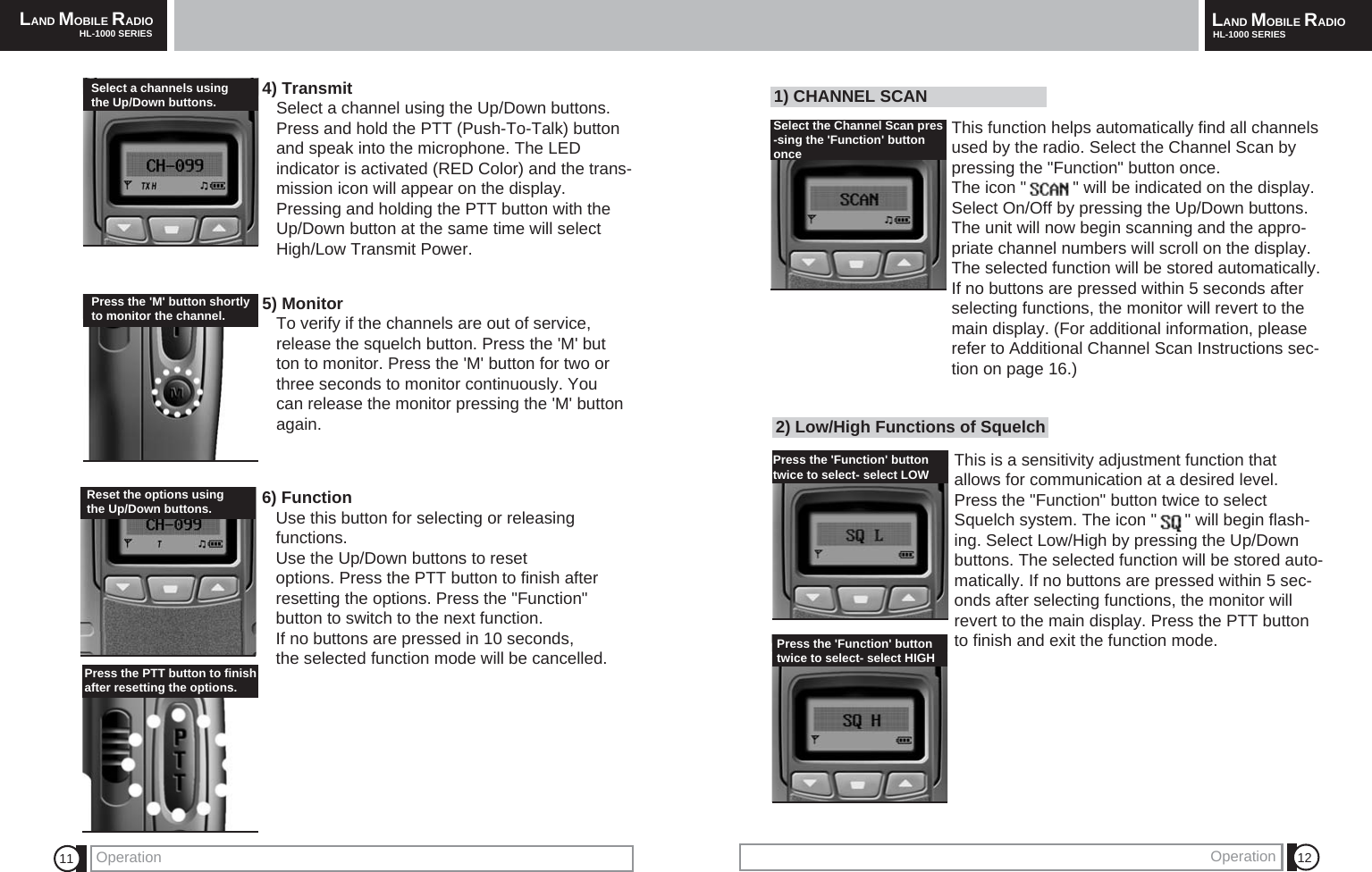
LAND MOBILE RADIOHL-1000 SERIES LAND MOBILE RADIOHL-1000 SERIESOperation Operation 12112) Low/High Functions of SquelchThis is a sensitivity adjustment function thatallows for communication at a desired level.Press the "Function" button twice to selectSquelch system. The icon "      " will begin flash-ing. Select Low/High by pressing the Up/Downbuttons. The selected function will be stored auto-matically. If no buttons are pressed within 5 sec-onds after selecting functions, the monitor willrevert to the main display. Press the PTT buttonto finish and exit the function mode.4) TransmitSelect a channel using the Up/Down buttons.     Press and hold the PTT (Push-To-Talk) button and speak into the microphone. The LEDindicator is activated (RED Color) and the trans-mission icon will appear on the display. Pressing and holding the PTT button with the Up/Down button at the same time will select High/Low Transmit Power.5) Monitor To verify if the channels are out of service,    release the squelch button. Press the 'M' button to monitor. Press the 'M' button for two or three seconds to monitor continuously. You can release the monitor pressing the 'M' button again.6) FunctionUse this button for selecting or releasing functions.Use the Up/Down buttons to reset options. Press the PTT button to finish after resetting the options. Press the "Function" button to switch to the next function. If no buttons are pressed in 10 seconds,the selected function mode will be cancelled.Reset the options usingthe Up/Down buttons.Press the 'Function' button twice to select- select LOW Select a channels using the Up/Down buttons. Press the 'M' button shortlyto monitor the channel.Press the PTT button to finishafter resetting the options.Press the 'Function' buttontwice to select- select HIGH 1) CHANNEL SCANThis function helps automatically find all channelsused by the radio. Select the Channel Scan bypressing the "Function" button once. The icon "          " will be indicated on the display.Select On/Off by pressing the Up/Down buttons.The unit will now begin scanning and the appro-priate channel numbers will scroll on the display.The selected function will be stored automatically.If no buttons are pressed within 5 seconds afterselecting functions, the monitor will revert to themain display. (For additional information, pleaserefer to Additional Channel Scan Instructions sec-tion on page 16.)Select the Channel Scan pres-sing the 'Function' buttononce
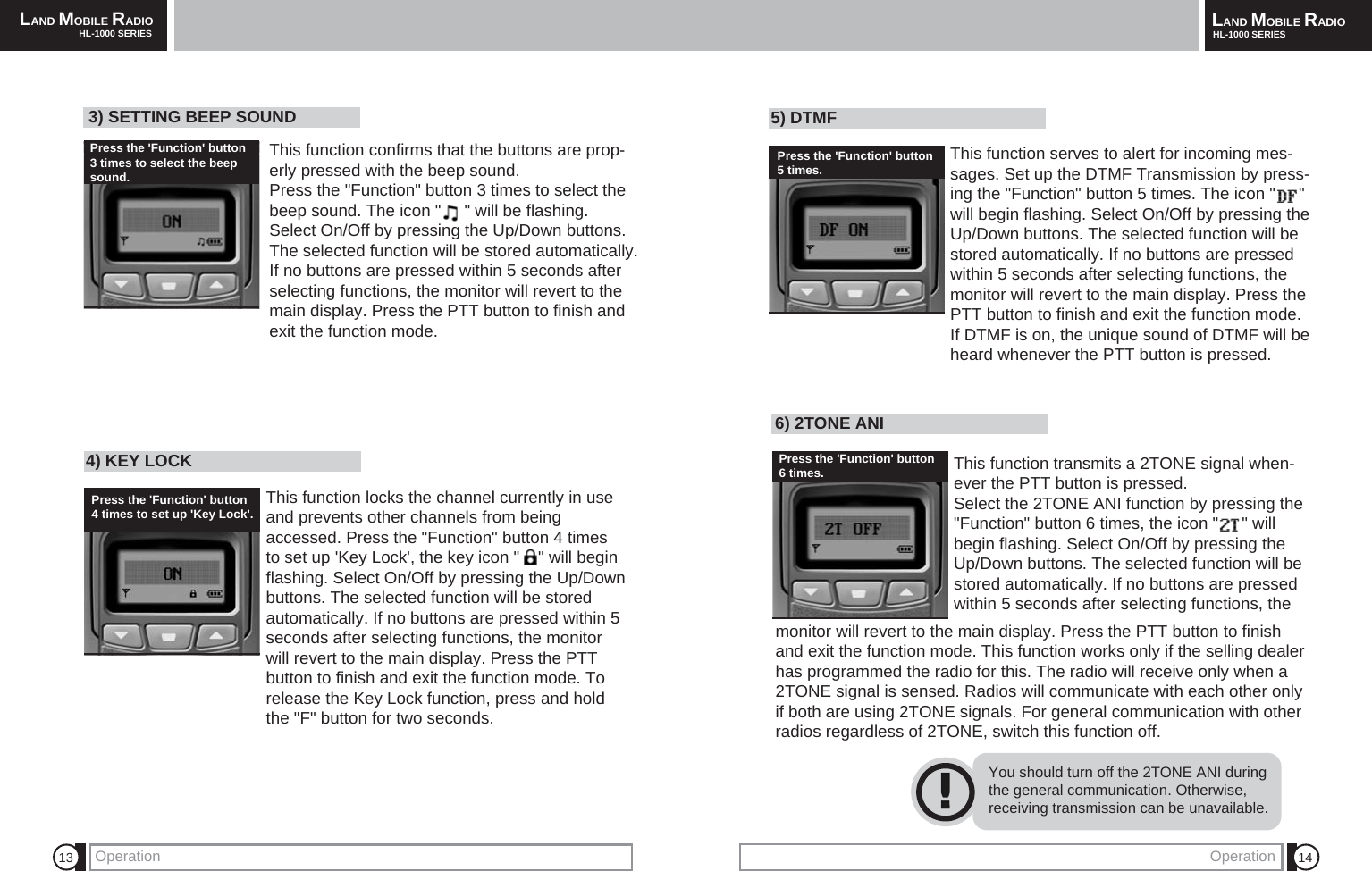
LAND MOBILE RADIOHL-1000 SERIES LAND MOBILE RADIOHL-1000 SERIESOperation 14136) 2TONE ANI This function transmits a 2TONE signal when-ever the PTT button is pressed.Select the 2TONE ANI function by pressing the"Function" button 6 times, the icon "     " willbegin flashing. Select On/Off by pressing theUp/Down buttons. The selected function will bestored automatically. If no buttons are pressedwithin 5 seconds after selecting functions, theYou should turn off the 2TONE ANI duringthe general communication. Otherwise,receiving transmission can be unavailable.monitor will revert to the main display. Press the PTT button to finishand exit the function mode. This function works only if the selling dealerhas programmed the radio for this. The radio will receive only when a2TONE signal is sensed. Radios will communicate with each other onlyif both are using 2TONE signals. For general communication with otherradios regardless of 2TONE, switch this function off.4) KEY LOCK This function locks the channel currently in useand prevents other channels from beingaccessed. Press the "Function" button 4 timesto set up 'Key Lock', the key icon "    " will beginflashing. Select On/Off by pressing the Up/Downbuttons. The selected function will be storedautomatically. If no buttons are pressed within 5seconds after selecting functions, the monitorwill revert to the main display. Press the PTTbutton to finish and exit the function mode. Torelease the Key Lock function, press and holdthe "F" button for two seconds.5) DTMF This function serves to alert for incoming mes-sages. Set up the DTMF Transmission by press-ing the "Function" button 5 times. The icon "     "will begin flashing. Select On/Off by pressing theUp/Down buttons. The selected function will bestored automatically. If no buttons are pressedwithin 5 seconds after selecting functions, themonitor will revert to the main display. Press thePTT button to finish and exit the function mode. If DTMF is on, the unique sound of DTMF will beheard whenever the PTT button is pressed. OperationPress the 'Function' button5 times.Press the 'Function' button6 times.3) SETTING BEEP SOUND This function confirms that the buttons are prop-erly pressed with the beep sound. Press the "Function" button 3 times to select thebeep sound. The icon "     " will be flashing.Select On/Off by pressing the Up/Down buttons.The selected function will be stored automatically. If no buttons are pressed within 5 seconds afterselecting functions, the monitor will revert to themain display. Press the PTT button to finish andexit the function mode.Press the 'Function' button 3 times to select the beepsound.Press the 'Function' button4 times to set up 'Key Lock'.
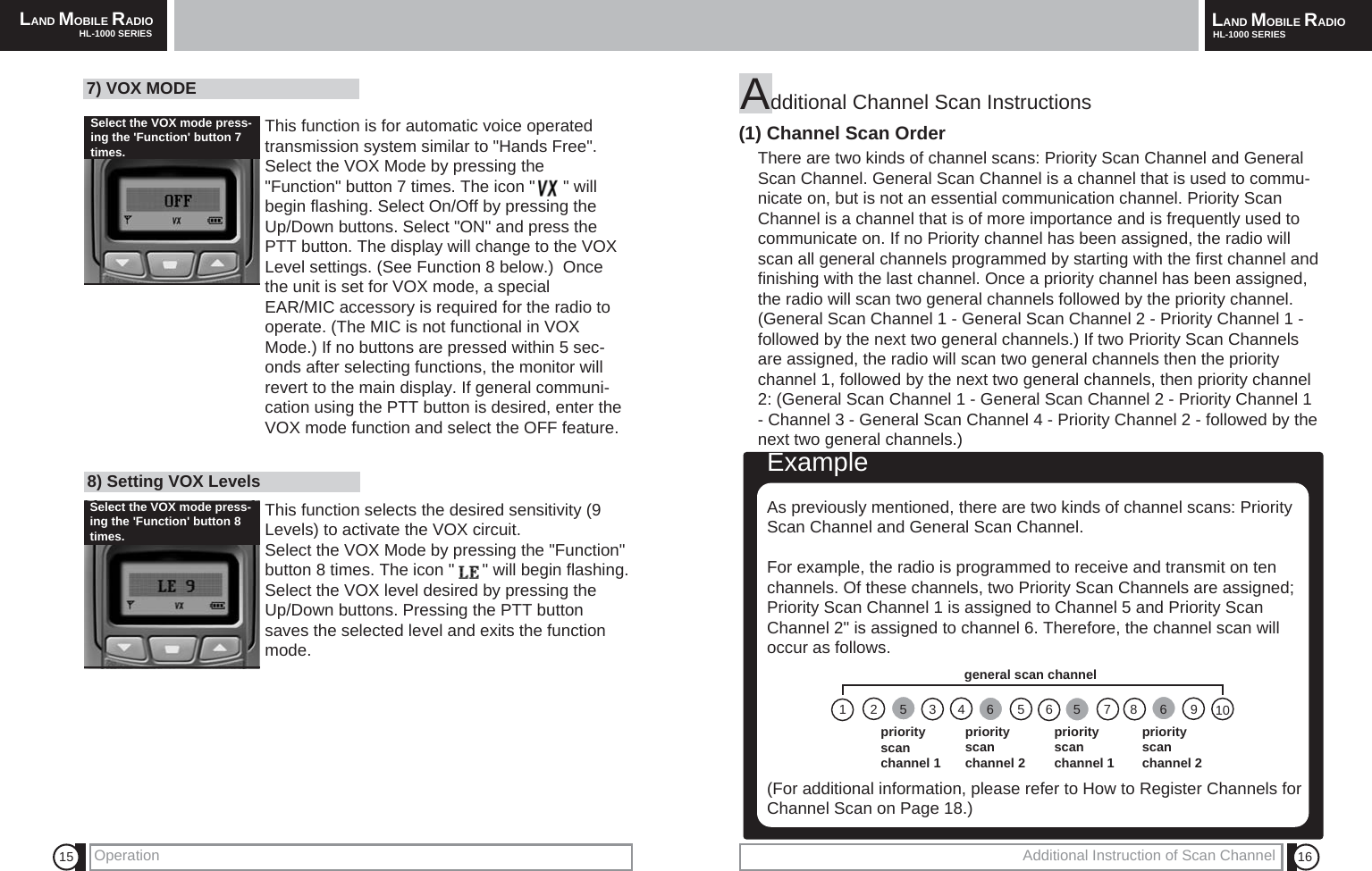
LAND MOBILE RADIOHL-1000 SERIES LAND MOBILE RADIOHL-1000 SERIES1615Additional Channel Scan Instructions (1) Channel Scan OrderThere are two kinds of channel scans: Priority Scan Channel and GeneralScan Channel. General Scan Channel is a channel that is used to commu-nicate on, but is not an essential communication channel. Priority ScanChannel is a channel that is of more importance and is frequently used tocommunicate on. If no Priority channel has been assigned, the radio willscan all general channels programmed by starting with the first channel andfinishing with the last channel. Once a priority channel has been assigned,the radio will scan two general channels followed by the priority channel.(General Scan Channel 1 - General Scan Channel 2 - Priority Channel 1 -followed by the next two general channels.) If two Priority Scan Channelsare assigned, the radio will scan two general channels then the prioritychannel 1, followed by the next two general channels, then priority channel2: (General Scan Channel 1 - General Scan Channel 2 - Priority Channel 1- Channel 3 - General Scan Channel 4 - Priority Channel 2 - followed by thenext two general channels.)ExampleAs previously mentioned, there are two kinds of channel scans: PriorityScan Channel and General Scan Channel. For example, the radio is programmed to receive and transmit on tenchannels. Of these channels, two Priority Scan Channels are assigned;Priority Scan Channel 1 is assigned to Channel 5 and Priority ScanChannel 2" is assigned to channel 6. Therefore, the channel scan willoccur as follows. (For additional information, please refer to How to Register Channels forChannel Scan on Page 18.) priority scan channel 1priority scan channel 2priority scan channel 1priority scan channel 2general scan channel7) VOX MODE This function is for automatic voice operatedtransmission system similar to "Hands Free".Select the VOX Mode by pressing the"Function" button 7 times. The icon "      " willbegin flashing. Select On/Off by pressing theUp/Down buttons. Select "ON" and press thePTT button. The display will change to the VOXLevel settings. (See Function 8 below.)  Oncethe unit is set for VOX mode, a specialEAR/MIC accessory is required for the radio tooperate. (The MIC is not functional in VOXMode.) If no buttons are pressed within 5 sec-onds after selecting functions, the monitor willrevert to the main display. If general communi-cation using the PTT button is desired, enter theVOX mode function and select the OFF feature.8) Setting VOX Levels This function selects the desired sensitivity (9Levels) to activate the VOX circuit.Select the VOX Mode by pressing the "Function"button 8 times. The icon "      " will begin flashing.Select the VOX level desired by pressing theUp/Down buttons. Pressing the PTT buttonsaves the selected level and exits the functionmode.Operation Additional Instruction of Scan Channel Select the VOX mode press-ing the 'Function' button 7times. Select the VOX mode press-ing the 'Function' button 8times. 125346565 786910
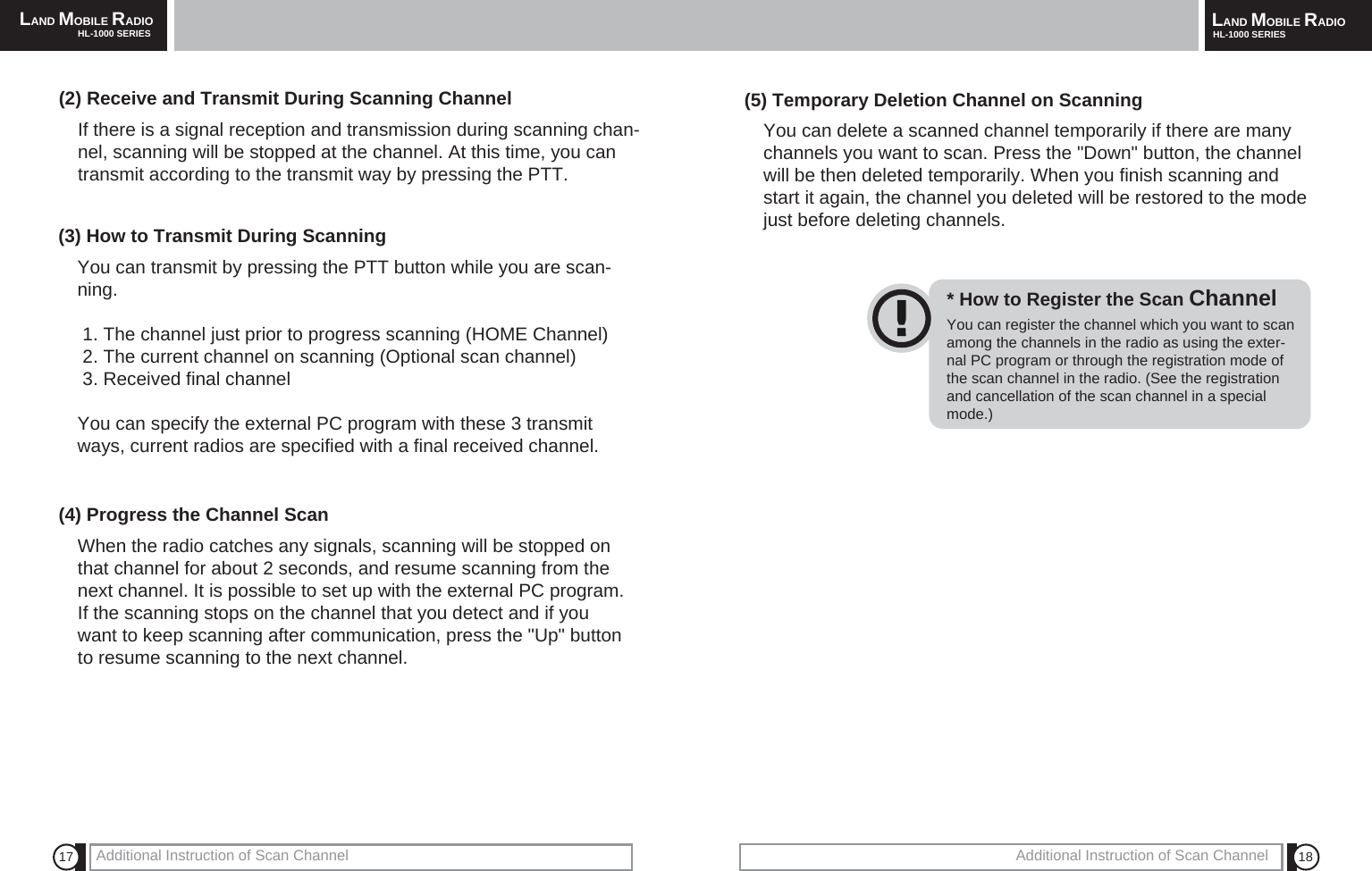
18Additional Instruction of Scan ChannelLAND MOBILE RADIOHL-1000 SERIES17 Additional Instruction of Scan ChannelLAND MOBILE RADIOHL-1000 SERIES(2) Receive and Transmit During Scanning ChannelIf there is a signal reception and transmission during scanning chan-nel, scanning will be stopped at the channel. At this time, you cantransmit according to the transmit way by pressing the PTT.(3) How to Transmit During ScanningYou can transmit by pressing the PTT button while you are scan-ning.1. The channel just prior to progress scanning (HOME Channel)2. The current channel on scanning (Optional scan channel)3. Received final channelYou can specify the external PC program with these 3 transmitways, current radios are specified with a final received channel.(4) Progress the Channel ScanWhen the radio catches any signals, scanning will be stopped onthat channel for about 2 seconds, and resume scanning from thenext channel. It is possible to set up with the external PC program.If the scanning stops on the channel that you detect and if youwant to keep scanning after communication, press the "Up" buttonto resume scanning to the next channel.(5) Temporary Deletion Channel on ScanningYou can delete a scanned channel temporarily if there are manychannels you want to scan. Press the "Down" button, the channelwill be then deleted temporarily. When you finish scanning andstart it again, the channel you deleted will be restored to the modejust before deleting channels.You can register the channel which you want to scanamong the channels in the radio as using the exter-nal PC program or through the registration mode ofthe scan channel in the radio. (See the registrationand cancellation of the scan channel in a specialmode.)* How to Register the Scan Channel
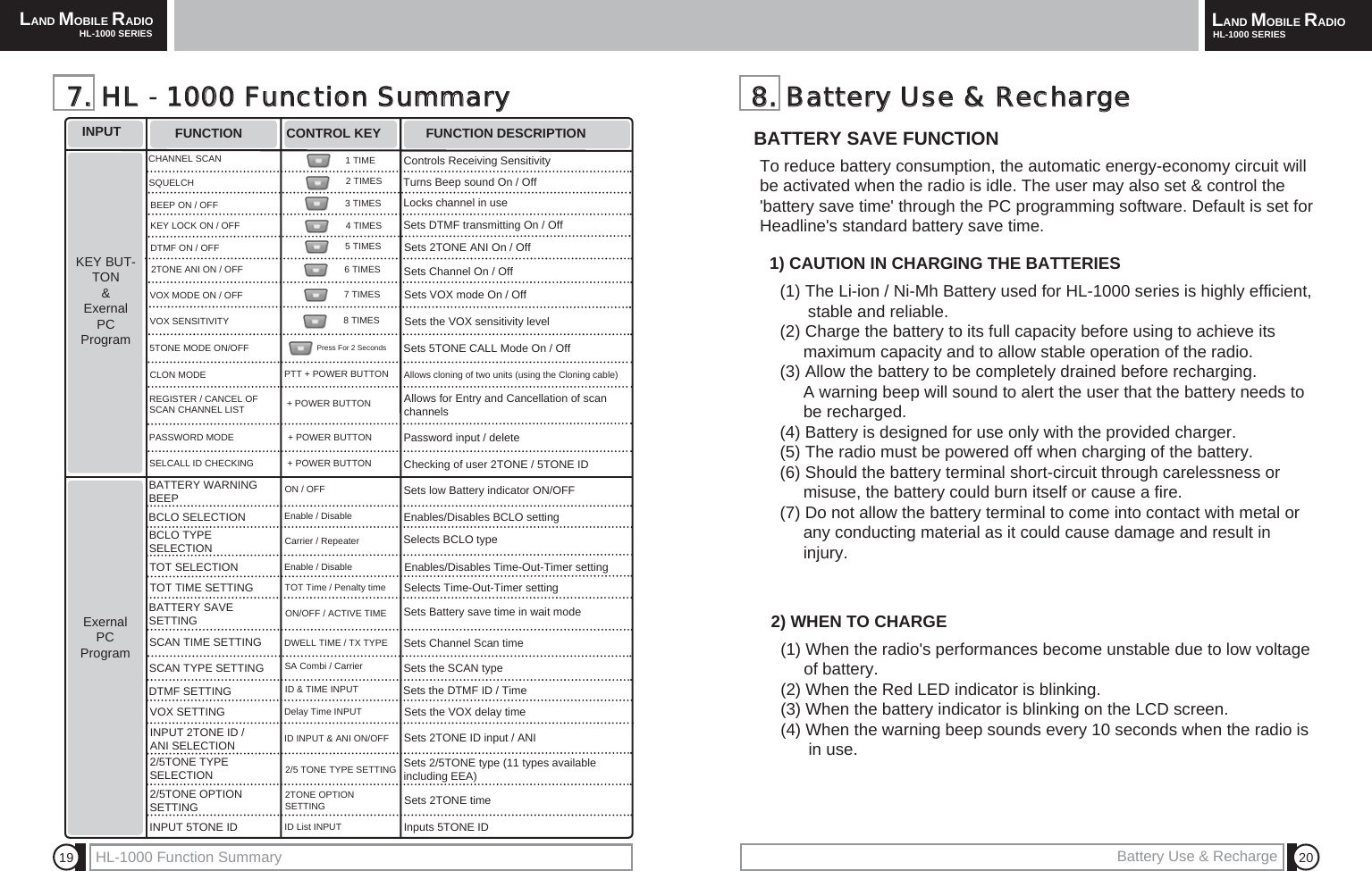
LAND MOBILE RADIOHL-1000 SERIES LAND MOBILE RADIOHL-1000 SERIESHL-1000 Function Summary 201988..  BBaatttteerryy  UUssee  &&  RReecchhaarrggeeTo reduce battery consumption, the automatic energy-economy circuit willbe activated when the radio is idle. The user may also set & control the'battery save time' through the PC programming software. Default is set forHeadline's standard battery save time.  BATTERY SAVE FUNCTION (1) The Li-ion / Ni-Mh Battery used for HL-1000 series is highly efficient, stable and reliable.(2) Charge the battery to its full capacity before using to achieve its maximum capacity and to allow stable operation of the radio.(3) Allow the battery to be completely drained before recharging. A warning beep will sound to alert the user that the battery needs to be recharged.(4) Battery is designed for use only with the provided charger.(5) The radio must be powered off when charging of the battery.(6) Should the battery terminal short-circuit through carelessness or misuse, the battery could burn itself or cause a fire.(7) Do not allow the battery terminal to come into contact with metal or  any conducting material as it could cause damage and result in injury.1) CAUTION IN CHARGING THE BATTERIES(1) When the radio's performances become unstable due to low voltage of battery.(2) When the Red LED indicator is blinking.(3) When the battery indicator is blinking on the LCD screen.(4) When the warning beep sounds every 10 seconds when the radio is in use.2) WHEN TO CHARGE77..  HHLL  -  11000000  FFuunnccttiioonn  SSuummmmaarryyINPUT FUNCTION CONTROL KEY FUNCTION DESCRIPTIONKEY BUT-TON &Exernal PCProgramExernal PCProgramSQUELCHBEEP ON / OFFDTMF ON / OFF2TONE ANI ON / OFFCHANNEL SCANVOX MODE ON / OFFVOX SENSITIVITY5TONE MODE ON/OFFKEY LOCK ON / OFFCLON MODEREGISTER / CANCEL OFSCAN CHANNEL LISTPASSWORD MODESELCALL ID CHECKINGBATTERY WARNING BEEPBCLO SELECTIONTOT SELECTIONTOT TIME SETTINGBATTERY SAVE SETTINGSCAN TIME SETTINGSCAN TYPE SETTINGDTMF SETTINGBCLO TYPE SELECTIONVOX SETTING2/5TONE TYPESELECTION2/5TONE OPTION SETTINGINPUT 2TONE ID /ANI SELECTION INPUT 5TONE ID Controls Receiving SensitivityTurns Beep sound On / OffLocks channel in useSets DTMF transmitting On / OffSets 2TONE ANI On / OffSets Channel On / OffSets VOX mode On / OffSets the VOX sensitivity levelSets 5TONE CALL Mode On / OffAllows cloning of two units (using the Cloning cable)Allows for Entry and Cancellation of scanchannelsPassword input / deleteChecking of user 2TONE / 5TONE IDSets low Battery indicator ON/OFFEnables/Disables BCLO settingSelects BCLO typeEnables/Disables Time-Out-Timer settingSelects Time-Out-Timer settingSets Battery save time in wait modeSets Channel Scan timeSets the SCAN typeSets the DTMF ID / TimeSets 2/5TONE type (11 types availableincluding EEA)Sets 2TONE timeInputs 5TONE IDSets the VOX delay timeSets 2TONE ID input / ANI1 TIME2 TIMES3 TIMES4 TIMES5 TIMES6 TIMES7 TIMES8 TIMESPress For 2 Seconds+ POWER BUTTONPTT + POWER BUTTONON / OFFEnable / DisableCarrier / RepeaterEnable / DisableTOT Time / Penalty timeON/OFF / ACTIVE TIMEDWELL TIME / TX TYPESA Combi / CarrierID & TIME INPUTDelay Time INPUTID INPUT & ANI ON/OFF2/5 TONE TYPE SETTING2TONE OPTION SETTINGID List INPUT+ POWER BUTTON+ POWER BUTTONBattery Use & Recharge
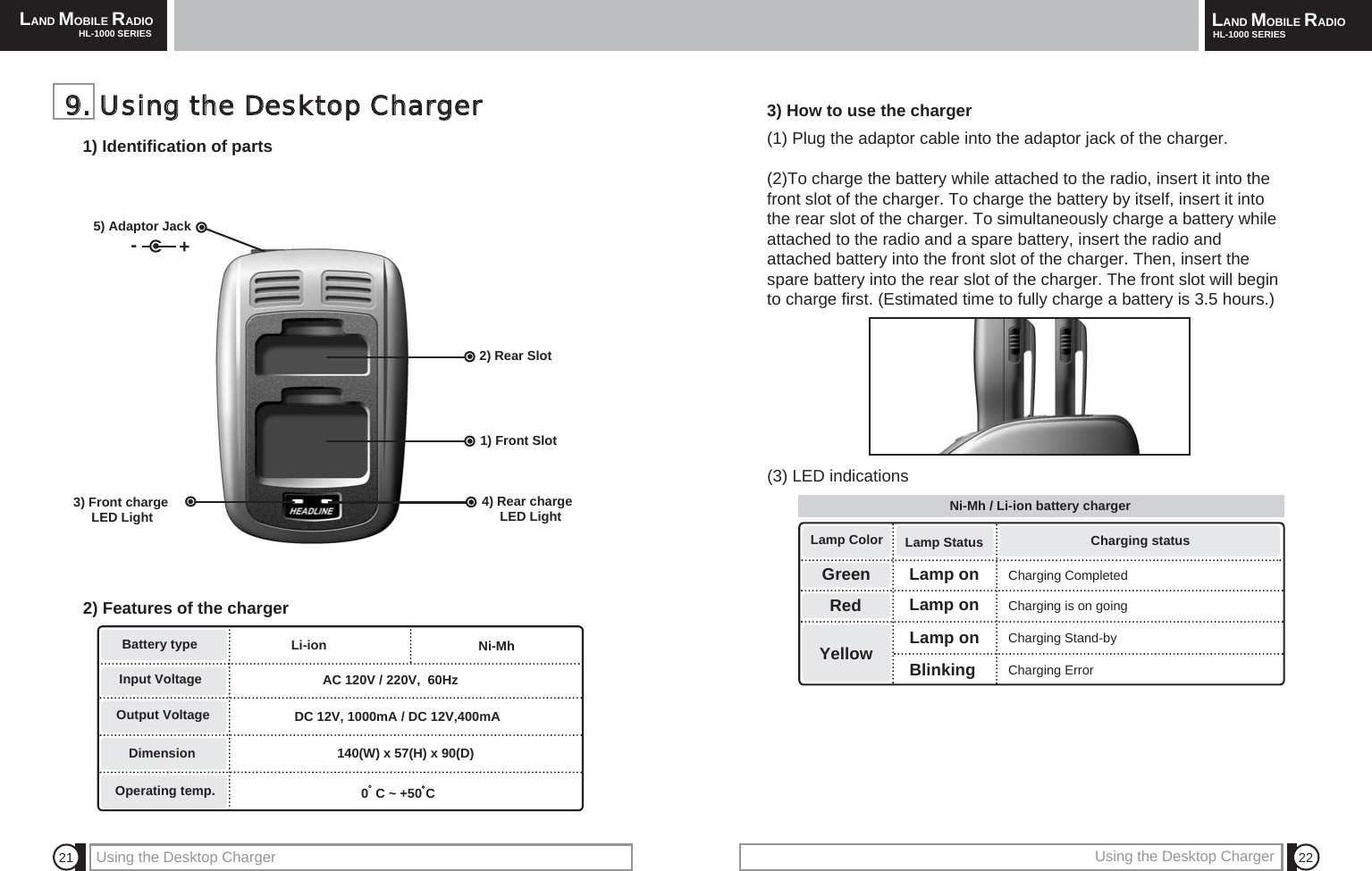
LAND MOBILE RADIOHL-1000 SERIES LAND MOBILE RADIOHL-1000 SERIESUsing the Desktop Charger 22213) How to use the charger(1) Plug the adaptor cable into the adaptor jack of the charger.(2)To charge the battery while attached to the radio, insert it into thefront slot of the charger. To charge the battery by itself, insert it intothe rear slot of the charger. To simultaneously charge a battery whileattached to the radio and a spare battery, insert the radio andattached battery into the front slot of the charger. Then, insert thespare battery into the rear slot of the charger. The front slot will beginto charge first. (Estimated time to fully charge a battery is 3.5 hours.)GreenLamp ColorYellowLamp Status Charging statusLamp onLamp onLamp onBlinkingCharging CompletedCharging is on goingCharging Stand-by99..  UUssiinngg  tthhee  DDeesskkttoopp  CChhaarrggeerr1) Identification of parts5) Adaptor Jack  -+2) Rear Slot1) Front Slot4) Rear chargeLED Light3) Front chargeLED Light 2) Features of the chargerBattery typeInput VoltageOutput VoltageDimensionOperating temp.Li-ion AC 120V / 220V,  60HzDC 12V, 1000mA / DC 12V,400mA140(W) x 57(H) x 90(D)Using the Desktop Charger0  C ~ +50 C Ni-Mh (3) LED indications Ni-Mh / Li-ion battery chargerRedCharging Error
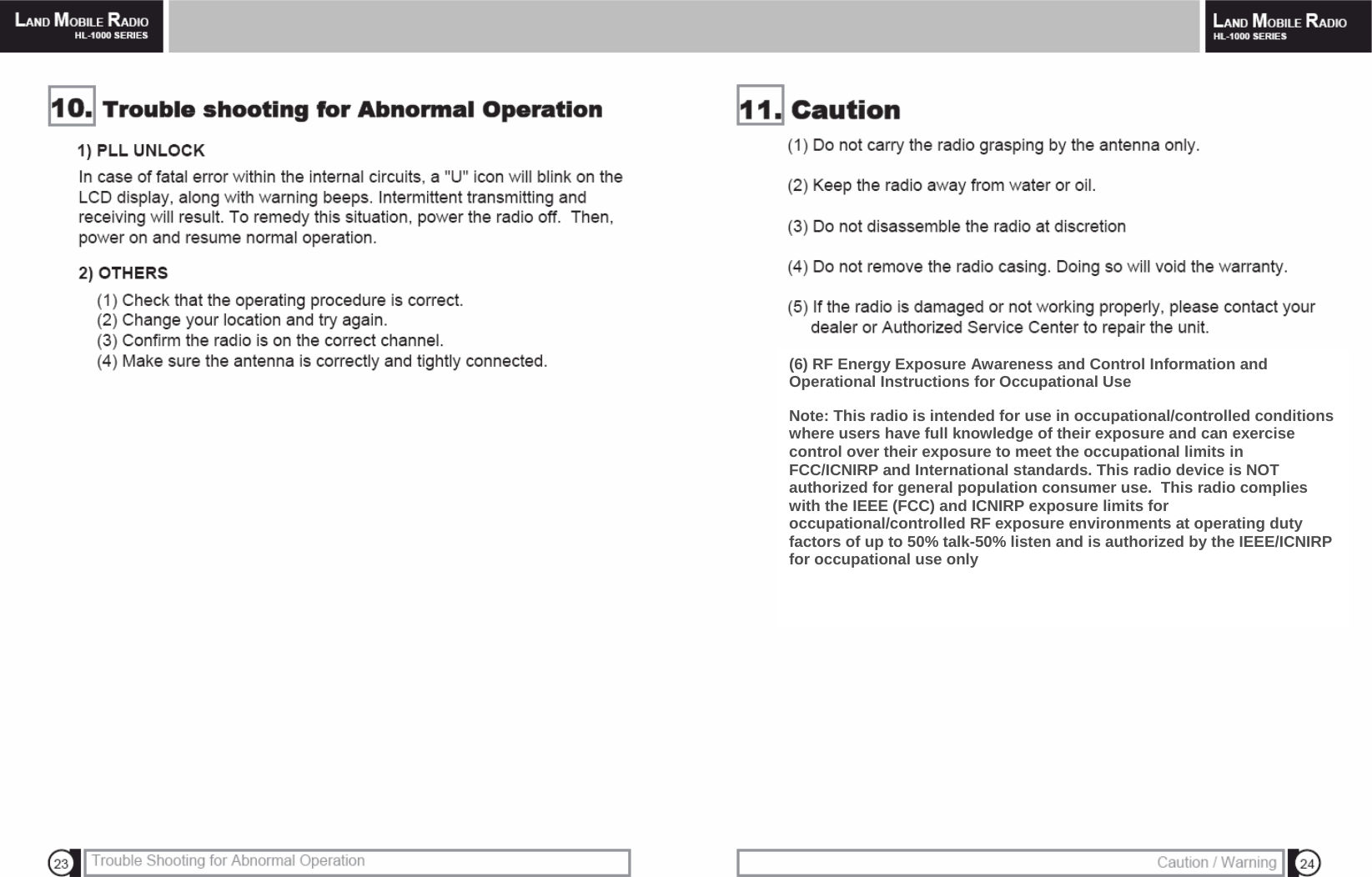
 (6) RF Energy Exposure Awareness and Control Information and Operational Instructions for Occupational Use  Note: This radio is intended for use in occupational/controlled conditions where users have full knowledge of their exposure and can exercise control over their exposure to meet the occupational limits in FCC/ICNIRP and International standards. This radio device is NOT authorized for general population consumer use.  This radio complies with the IEEE (FCC) and ICNIRP exposure limits for occupational/controlled RF exposure environments at operating duty factors of up to 50% talk-50% listen and is authorized by the IEEE/ICNIRP for occupational use only
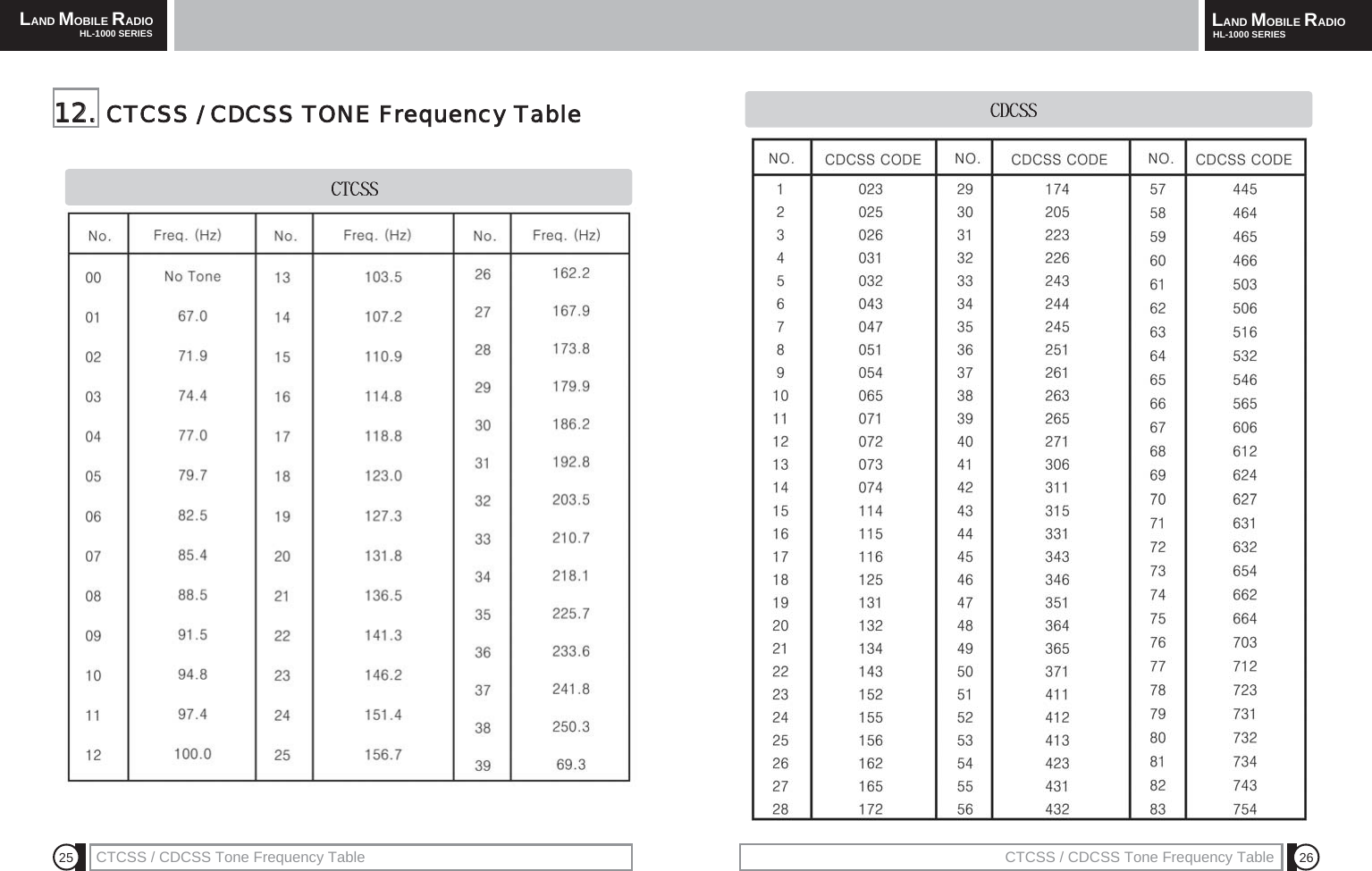
LAND MOBILE RADIOHL-1000 SERIES LAND MOBILE RADIOHL-1000 SERIESCTCSS / CDCSS Tone Frequency Table 26251122..  CTCSS  /  CDCSS  TONE  Frequency  TableCTCSS / CDCSS Tone Frequency Table
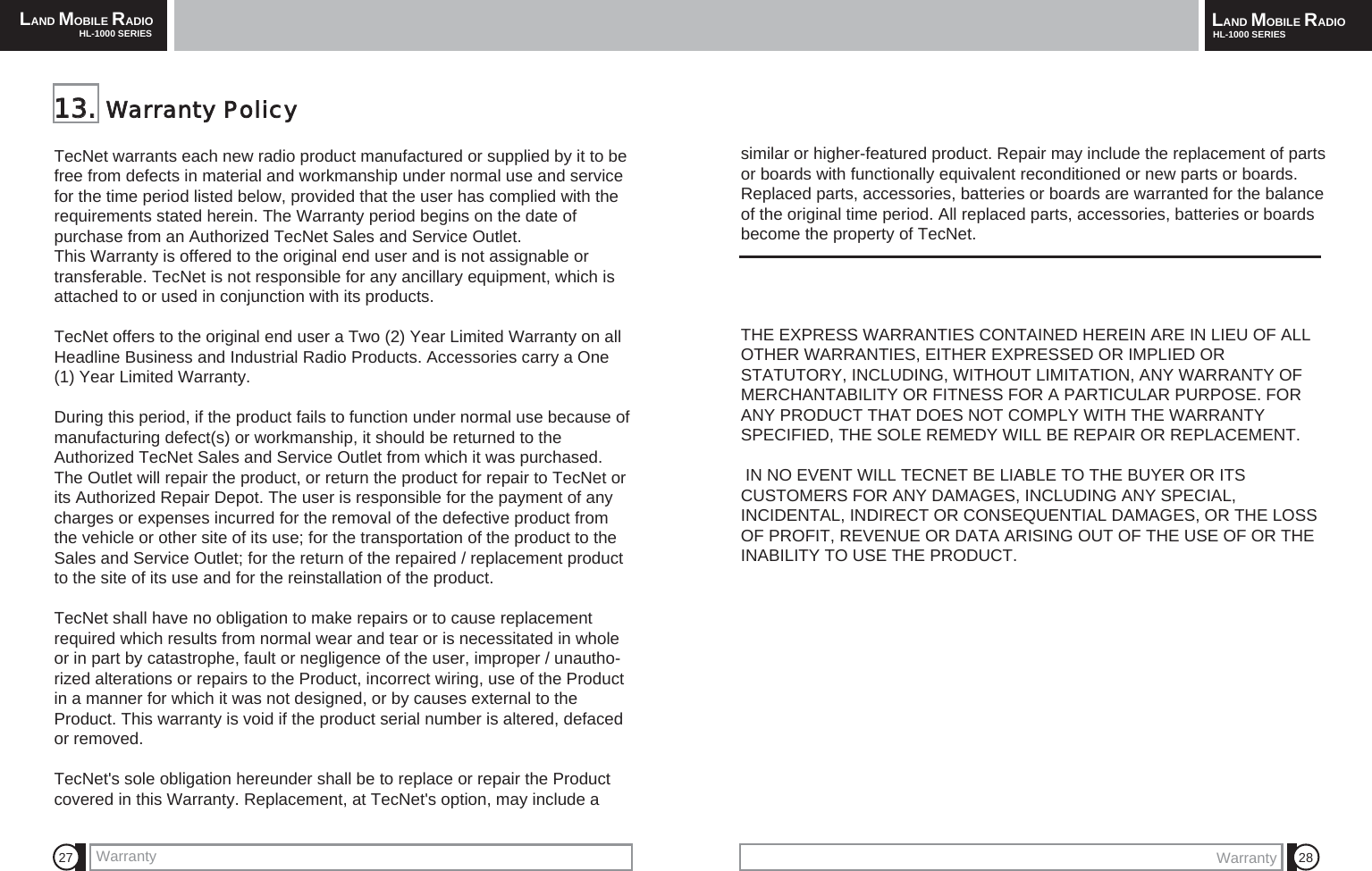
LAND MOBILE RADIOHL-1000 SERIES LAND MOBILE RADIOHL-1000 SERIESWarranty27 28TecNet warrants each new radio product manufactured or supplied by it to befree from defects in material and workmanship under normal use and servicefor the time period listed below, provided that the user has complied with therequirements stated herein. The Warranty period begins on the date ofpurchase from an Authorized TecNet Sales and Service Outlet. This Warranty is offered to the original end user and is not assignable ortransferable. TecNet is not responsible for any ancillary equipment, which isattached to or used in conjunction with its products. TecNet offers to the original end user a Two (2) Year Limited Warranty on allHeadline Business and Industrial Radio Products. Accessories carry a One(1) Year Limited Warranty.During this period, if the product fails to function under normal use because ofmanufacturing defect(s) or workmanship, it should be returned to theAuthorized TecNet Sales and Service Outlet from which it was purchased.The Outlet will repair the product, or return the product for repair to TecNet orits Authorized Repair Depot. The user is responsible for the payment of anycharges or expenses incurred for the removal of the defective product fromthe vehicle or other site of its use; for the transportation of the product to theSales and Service Outlet; for the return of the repaired / replacement productto the site of its use and for the reinstallation of the product.TecNet shall have no obligation to make repairs or to cause replacementrequired which results from normal wear and tear or is necessitated in wholeor in part by catastrophe, fault or negligence of the user, improper / unautho-rized alterations or repairs to the Product, incorrect wiring, use of the Productin a manner for which it was not designed, or by causes external to theProduct. This warranty is void if the product serial number is altered, defacedor removed.TecNet's sole obligation hereunder shall be to replace or repair the Productcovered in this Warranty. Replacement, at TecNet's option, may include a 1133..  Warranty  Policysimilar or higher-featured product. Repair may include the replacement of partsor boards with functionally equivalent reconditioned or new parts or boards.Replaced parts, accessories, batteries or boards are warranted for the balanceof the original time period. All replaced parts, accessories, batteries or boardsbecome the property of TecNet.THE EXPRESS WARRANTIES CONTAINED HEREIN ARE IN LIEU OF ALLOTHER WARRANTIES, EITHER EXPRESSED OR IMPLIED ORSTATUTORY, INCLUDING, WITHOUT LIMITATION, ANY WARRANTY OFMERCHANTABILITY OR FITNESS FOR A PARTICULAR PURPOSE. FORANY PRODUCT THAT DOES NOT COMPLY WITH THE WARRANTYSPECIFIED, THE SOLE REMEDY WILL BE REPAIR OR REPLACEMENT.IN NO EVENT WILL TECNET BE LIABLE TO THE BUYER OR ITSCUSTOMERS FOR ANY DAMAGES, INCLUDING ANY SPECIAL,INCIDENTAL, INDIRECT OR CONSEQUENTIAL DAMAGES, OR THE LOSSOF PROFIT, REVENUE OR DATA ARISING OUT OF THE USE OF OR THEINABILITY TO USE THE PRODUCT.Warranty
MEMO MEMO

Navigation menu