HeartSine Technologies TRNRMT1 Remote control User Manual

HeartSine Technologies Remote control

User Manual

HeartSine PAD 350P Trainer User Manual                                                    1HeartSine®HeartSine®HeartSine samaritan®  PAD  350P Trainer User Manualmodel TRN-350-1
2   www.heartsine.comHeartSine samaritan® PAD 350P Trainer, model TRN-350-1 This User Manual provides instructions on how to operate the HeartSine PAD 350P Trainer. The HeartSine PAD 350P Trainer is a non-medical device intended to be used for the training of emergency responders in the proper use of the HeartSine PAD 350P automated external debrillator. The Trainer has no therapeutic capabilities and must not be used in real life rescue situations. IMPORTANT: In order to avoid confusion in the event of a real life rescue, do not store or    leave the Trainer near the HeartSine PAD automated external debrillator.To allow quick and easy identication the HeartSine PAD 350P Trainer incorporates a yellow front user interface membrane whereas the HeartSine PAD 350P automated external debrillator has a navy blue/black front membrane. HeartSine  recommends  that  responders  who  may  use  one  of  its  debrillators  should  be  trained  in Cardiopulmonary  Resuscitation  with  debrillator  use  (CPR-D).  The  HeartSine  PAD  350P  Trainer  is intended to be used by approved CPR-D training providers for this purpose. The HeartSine PAD 350P Trainer is factory congured to operate in accordance with the joint American Heart Association/European Resuscitation Council 2010 guidelines for CPR. The device comes with six preprogrammed scenarios based on these guidelines. Should the CPR guidelines change, software will be available to upgrade the HeartSine PAD 350P Trainer to comply. Please contact your HeartSine authorized distributor or HeartSine Technologies direct.Once turned on the HeartSine PAD 350P Trainer will play audible voice prompts with accompanying visual indicators. The Trainer can also be manually controlled using the accompanying Remote Control included with the device. Please contact your authorized HeartSine distributor for a list of replacement accessories.!
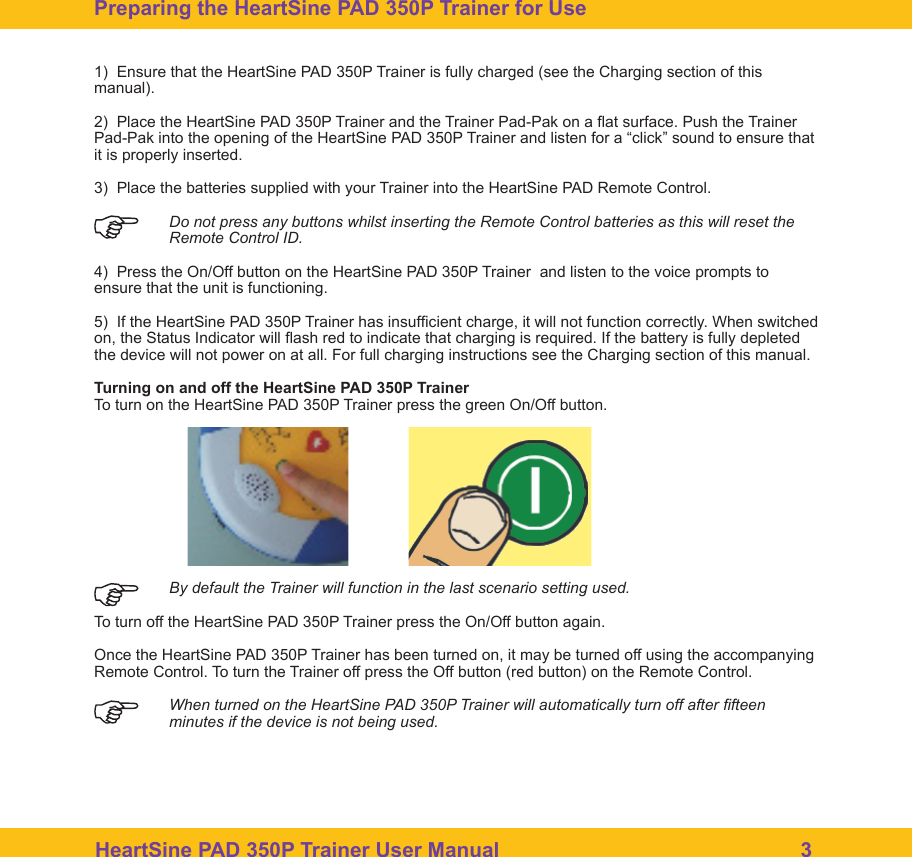
HeartSine PAD 350P Trainer User Manual                                                    31)  Ensure that the HeartSine PAD 350P Trainer is fully charged (see the Charging section of this manual).2)  Place the HeartSine PAD 350P Trainer and the Trainer Pad-Pak on a at surface. Push the Trainer Pad-Pak into the opening of the HeartSine PAD 350P Trainer and listen for a “click” sound to ensure that it is properly inserted.3)  Place the batteries supplied with your Trainer into the HeartSine PAD Remote Control. Do not press any buttons whilst inserting the Remote Control batteries as this will reset the    Remote Control ID.4)  Press the On/Off button on the HeartSine PAD 350P Trainer  and listen to the voice prompts to ensure that the unit is functioning.5)  If the HeartSine PAD 350P Trainer has insufcient charge, it will not function correctly. When switched on, the Status Indicator will ash red to indicate that charging is required. If the battery is fully depleted the device will not power on at all. For full charging instructions see the Charging section of this manual. Turning on and off the HeartSine PAD 350P TrainerTo turn on the HeartSine PAD 350P Trainer press the green On/Off button.  By default the Trainer will function in the last scenario setting used.To turn off the HeartSine PAD 350P Trainer press the On/Off button again.Once the HeartSine PAD 350P Trainer has been turned on, it may be turned off using the accompanying Remote Control. To turn the Trainer off press the Off button (red button) on the Remote Control.  When turned on the HeartSine PAD 350P Trainer will automatically turn off after fteen minutes if the device is not being used. Preparing the HeartSine PAD 350P Trainer for Use
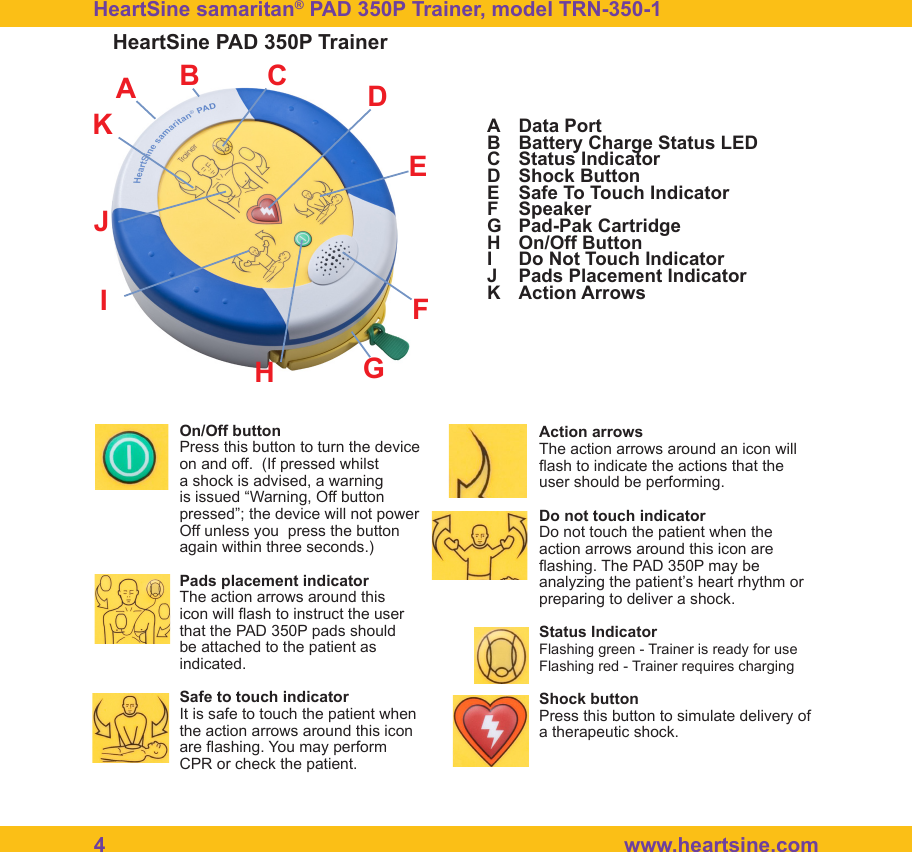
4   www.heartsine.comABCDEFGHIJKData PortBattery Charge Status LEDStatus IndicatorShock ButtonSafe To Touch IndicatorSpeakerPad-Pak CartridgeOn/Off ButtonDo Not Touch IndicatorPads Placement IndicatorAction ArrowsACDIFGHEJKHeartSine samaritan® PAD 350P Trainer, model TRN-350-1 HeartSine PAD 350P TrainerBOn/Off buttonPress this button to turn the device on and off.  (If pressed whilst a shock is advised, a warning is issued “Warning, Off button pressed”; the device will not power Off unless you  press the button again within three seconds.)Pads placement indicatorThe action arrows around this icon will ash to instruct the user that the PAD 350P pads should be attached to the patient as indicated.Safe to touch indicatorIt is safe to touch the patient when the action arrows around this icon are ashing. You may perform CPR or check the patient.Action arrowsThe action arrows around an icon will ash to indicate the actions that the user should be performing.Do not touch indicatorDo not touch the patient when the action arrows around this icon are ashing. The PAD 350P may be analyzing the patient’s heart rhythm or preparing to deliver a shock.Status IndicatorFlashing green - Trainer is ready for useFlashing red - Trainer requires chargingShock buttonPress this button to simulate delivery of a therapeutic shock.
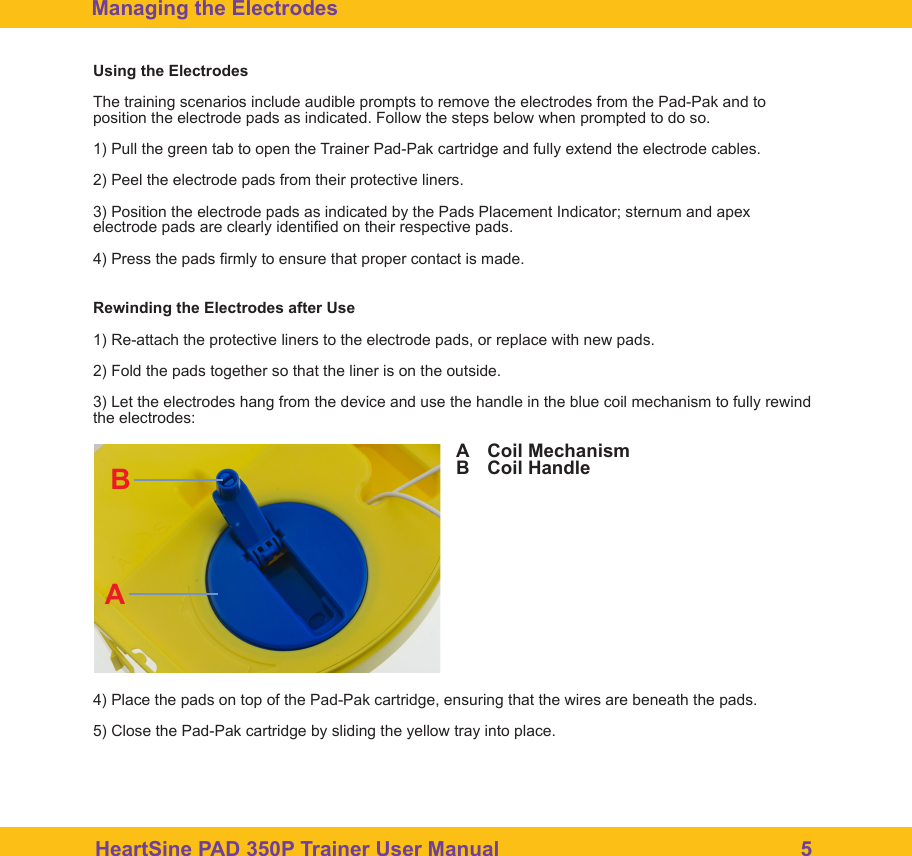
HeartSine PAD 350P Trainer User Manual                                                    5Managing the ElectrodesUsing the ElectrodesThe training scenarios include audible prompts to remove the electrodes from the Pad-Pak and to position the electrode pads as indicated. Follow the steps below when prompted to do so.1) Pull the green tab to open the Trainer Pad-Pak cartridge and fully extend the electrode cables.2) Peel the electrode pads from their protective liners.3) Position the electrode pads as indicated by the Pads Placement Indicator; sternum and apex electrode pads are clearly identied on their respective pads.4) Press the pads rmly to ensure that proper contact is made.Rewinding the Electrodes after Use1) Re-attach the protective liners to the electrode pads, or replace with new pads.2) Fold the pads together so that the liner is on the outside.3) Let the electrodes hang from the device and use the handle in the blue coil mechanism to fully rewind the electrodes:4) Place the pads on top of the Pad-Pak cartridge, ensuring that the wires are beneath the pads.5) Close the Pad-Pak cartridge by sliding the yellow tray into place.ABCoil MechanismCoil HandleBA
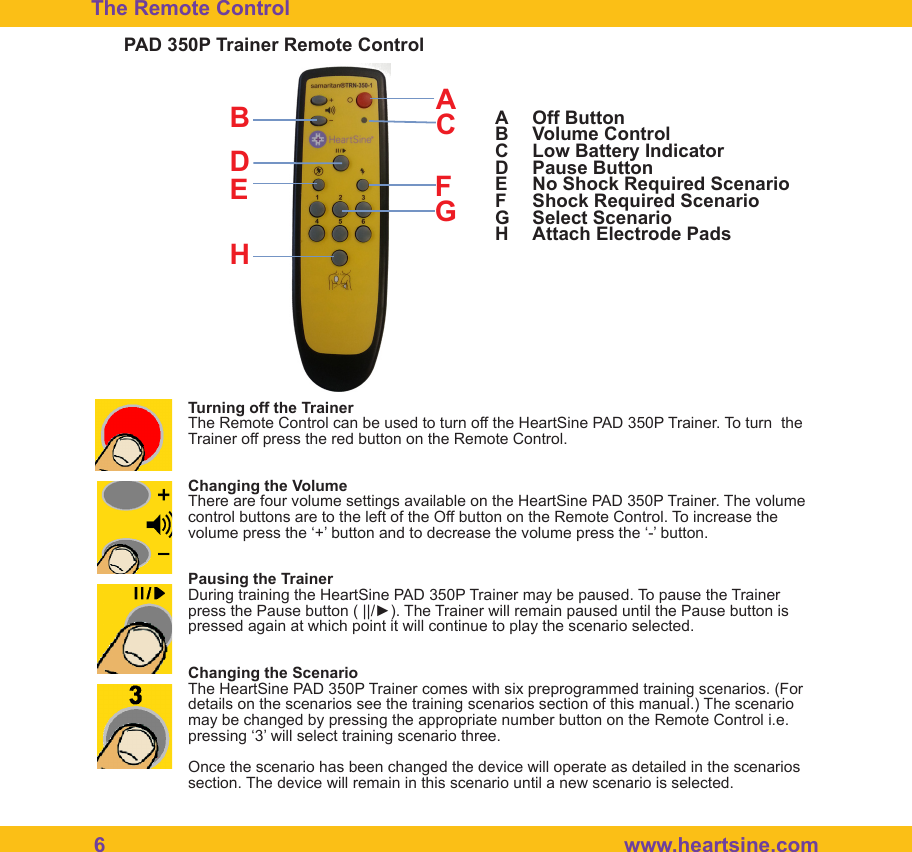
6   www.heartsine.comTurning off the TrainerThe Remote Control can be used to turn off the HeartSine PAD 350P Trainer. To turn  the Trainer off press the red button on the Remote Control. Changing the VolumeThere are four volume settings available on the HeartSine PAD 350P Trainer. The volume control buttons are to the left of the Off button on the Remote Control. To increase the volume press the ‘+’ button and to decrease the volume press the ‘-’ button.Pausing the TrainerDuring training the HeartSine PAD 350P Trainer may be paused. To pause the Trainer press the Pause button ( ||/►). The Trainer will remain paused until the Pause button is pressed again at which point it will continue to play the scenario selected. Changing the ScenarioThe HeartSine PAD 350P Trainer comes with six preprogrammed training scenarios. (For details on the scenarios see the training scenarios section of this manual.) The scenario may be changed by pressing the appropriate number button on the Remote Control i.e. pressing ‘3’ will select training scenario three.Once the scenario has been changed the device will operate as detailed in the scenarios section. The device will remain in this scenario until a new scenario is selected.The Remote Control PAD 350P Trainer Remote ControlABCDEFGH Off ButtonVolume ControlLow Battery IndicatorPause ButtonNo Shock Required ScenarioShock Required ScenarioSelect ScenarioAttach Electrode PadsABDEFGHC
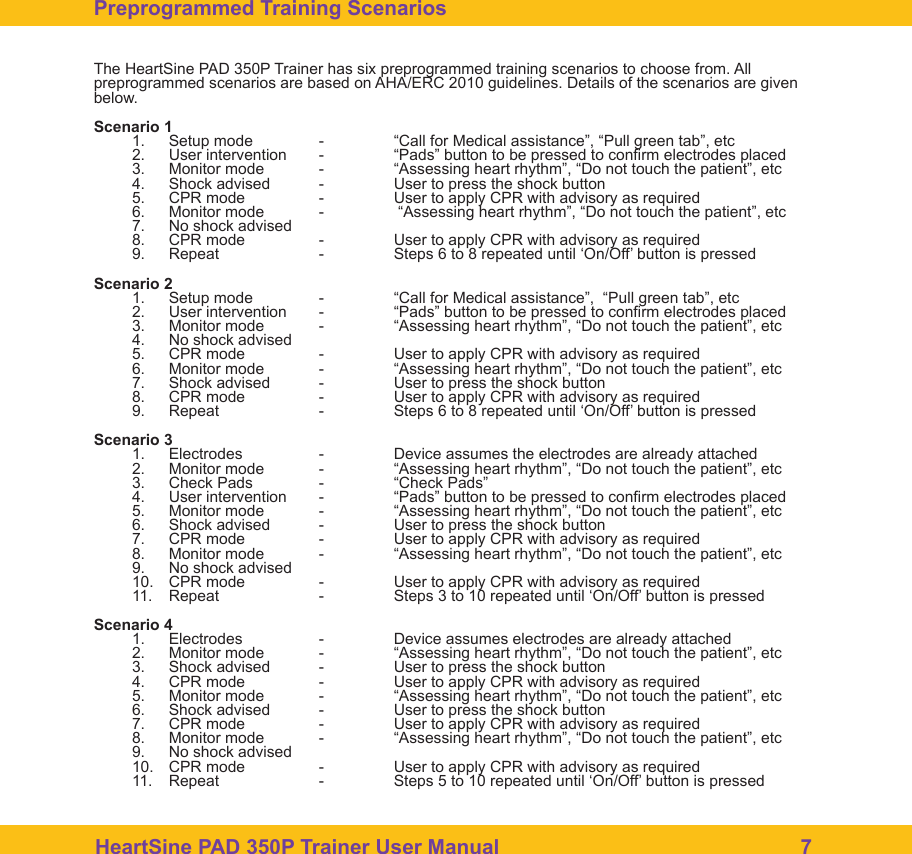
HeartSine PAD 350P Trainer User Manual                                                    7The Remote Control The HeartSine PAD 350P Trainer has six preprogrammed training scenarios to choose from. All preprogrammed scenarios are based on AHA/ERC 2010 guidelines. Details of the scenarios are given below.Scenario 11.  Setup mode  -  “Call for Medical assistance”, “Pull green tab”, etc2.  User intervention  -  “Pads” button to be pressed to conrm electrodes placed3.  Monitor mode  -  “Assessing heart rhythm”, “Do not touch the patient”, etc4.  Shock advised  -  User to press the shock button5.  CPR mode  -  User to apply CPR with advisory as required6.  Monitor mode  -   “Assessing heart rhythm”, “Do not touch the patient”, etc7.  No shock advised8.  CPR mode  -  User to apply CPR with advisory as required9.  Repeat    -  Steps 6 to 8 repeated until ‘On/Off’ button is pressed Scenario 21.  Setup mode  -  “Call for Medical assistance”,  “Pull green tab”, etc2.  User intervention  -  “Pads” button to be pressed to conrm electrodes placed3.  Monitor mode  -  “Assessing heart rhythm”, “Do not touch the patient”, etc4.  No shock advised5.  CPR mode  -  User to apply CPR with advisory as required6.  Monitor mode  -  “Assessing heart rhythm”, “Do not touch the patient”, etc7.  Shock advised  -  User to press the shock button8.  CPR mode  -  User to apply CPR with advisory as required9.  Repeat    -  Steps 6 to 8 repeated until ‘On/Off’ button is pressed Scenario 31.  Electrodes   -  Device assumes the electrodes are already attached2.  Monitor mode  -  “Assessing heart rhythm”, “Do not touch the patient”, etc3.  Check Pads  -  “Check Pads”4.  User intervention  -  “Pads” button to be pressed to conrm electrodes placed5.  Monitor mode  -  “Assessing heart rhythm”, “Do not touch the patient”, etc6.  Shock advised  -  User to press the shock button7.  CPR mode  -  User to apply CPR with advisory as required8.  Monitor mode  -  “Assessing heart rhythm”, “Do not touch the patient”, etc9.  No shock advised10.  CPR mode  -  User to apply CPR with advisory as required11.  Repeat    -  Steps 3 to 10 repeated until ‘On/Off’ button is pressedScenario 41.  Electrodes   -  Device assumes electrodes are already attached2.  Monitor mode  -  “Assessing heart rhythm”, “Do not touch the patient”, etc3.  Shock advised  -  User to press the shock button4.  CPR mode  -  User to apply CPR with advisory as required5.  Monitor mode  -  “Assessing heart rhythm”, “Do not touch the patient”, etc6.  Shock advised  -  User to press the shock button7.  CPR mode  -  User to apply CPR with advisory as required8.  Monitor mode  -  “Assessing heart rhythm”, “Do not touch the patient”, etc9.  No shock advised10.  CPR mode  -  User to apply CPR with advisory as required11.  Repeat    -  Steps 5 to 10 repeated until ‘On/Off’ button is pressedPreprogrammed Training Scenarios
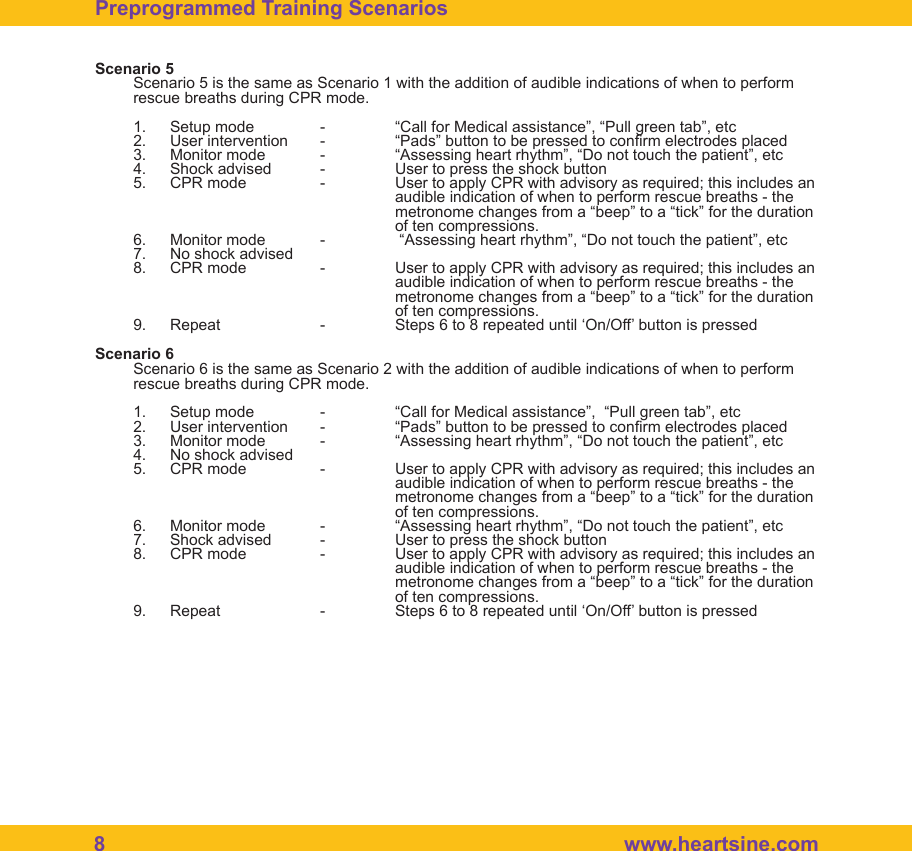
8   www.heartsine.comScenario 5Scenario 5 is the same as Scenario 1 with the addition of audible indications of when to perform rescue breaths during CPR mode.1.  Setup mode  -  “Call for Medical assistance”, “Pull green tab”, etc2.  User intervention  -  “Pads” button to be pressed to conrm electrodes placed3.  Monitor mode  -  “Assessing heart rhythm”, “Do not touch the patient”, etc4.  Shock advised  -  User to press the shock button5.  CPR mode  -  User to apply CPR with advisory as required; this includes an          audible indication of when to perform rescue breaths - the          metronome changes from a “beep” to a “tick” for the duration      of ten compressions.6.  Monitor mode  -   “Assessing heart rhythm”, “Do not touch the patient”, etc7.  No shock advised8.  CPR mode  -  User to apply CPR with advisory as required; this includes an          audible indication of when to perform rescue breaths - the          metronome changes from a “beep” to a “tick” for the duration      of ten compressions.9.  Repeat    -  Steps 6 to 8 repeated until ‘On/Off’ button is pressed Scenario 6Scenario 6 is the same as Scenario 2 with the addition of audible indications of when to perform rescue breaths during CPR mode.1.  Setup mode  -  “Call for Medical assistance”,  “Pull green tab”, etc2.  User intervention  -  “Pads” button to be pressed to conrm electrodes placed3.  Monitor mode  -  “Assessing heart rhythm”, “Do not touch the patient”, etc4.  No shock advised5.  CPR mode  -  User to apply CPR with advisory as required; this includes an          audible indication of when to perform rescue breaths - the          metronome changes from a “beep” to a “tick” for the duration      of ten compressions.6.  Monitor mode  -  “Assessing heart rhythm”, “Do not touch the patient”, etc7.  Shock advised  -  User to press the shock button8.  CPR mode  -  User to apply CPR with advisory as required; this includes an          audible indication of when to perform rescue breaths - the          metronome changes from a “beep” to a “tick” for the duration      of ten compressions.9.  Repeat    -  Steps 6 to 8 repeated until ‘On/Off’ button is pressed Preprogrammed Training Scenarios
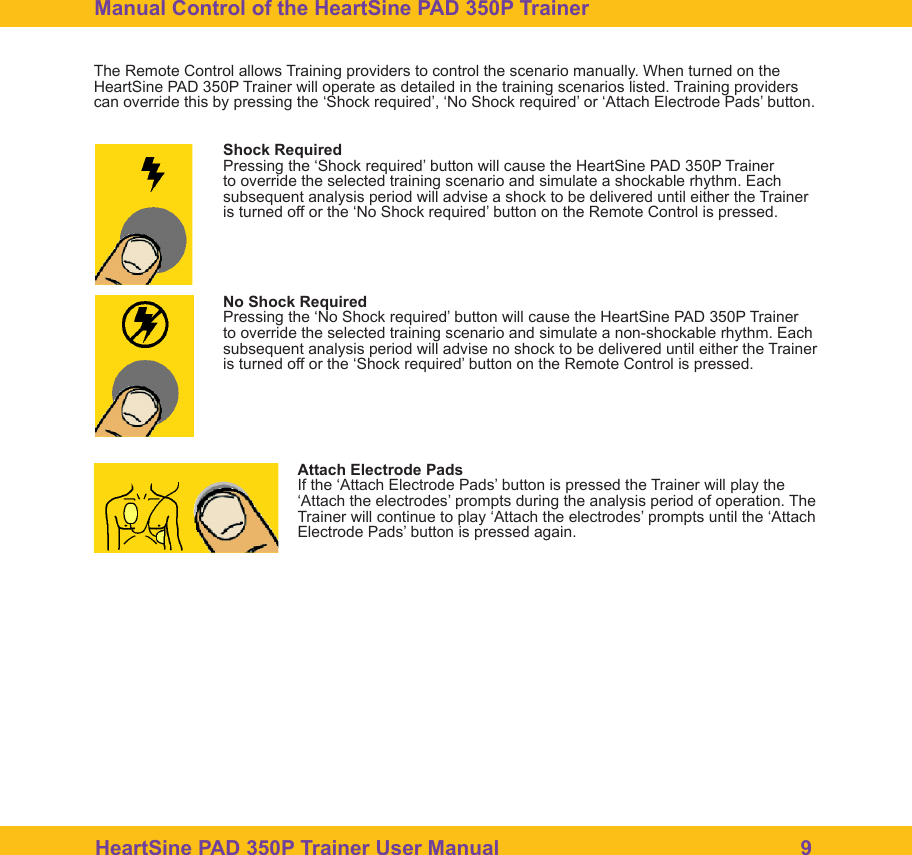
HeartSine PAD 350P Trainer User Manual                                                    9Manual Control of the HeartSine PAD 350P Trainer The Remote Control allows Training providers to control the scenario manually. When turned on the HeartSine PAD 350P Trainer will operate as detailed in the training scenarios listed. Training providers can override this by pressing the ‘Shock required’, ‘No Shock required’ or ‘Attach Electrode Pads’ button.Shock RequiredPressing the ‘Shock required’ button will cause the HeartSine PAD 350P Trainer to override the selected training scenario and simulate a shockable rhythm. Each subsequent analysis period will advise a shock to be delivered until either the Trainer is turned off or the ‘No Shock required’ button on the Remote Control is pressed.  No Shock RequiredPressing the ‘No Shock required’ button will cause the HeartSine PAD 350P Trainer to override the selected training scenario and simulate a non-shockable rhythm. Each subsequent analysis period will advise no shock to be delivered until either the Trainer is turned off or the ‘Shock required’ button on the Remote Control is pressed.  Attach Electrode PadsIf the ‘Attach Electrode Pads’ button is pressed the Trainer will play the ‘Attach the electrodes’ prompts during the analysis period of operation. The Trainer will continue to play ‘Attach the electrodes’ prompts until the ‘Attach Electrode Pads’ button is pressed again.
10  www.heartsine.comHeartSine PAD 350P Trainer Battery ManagementThe HeartSine PAD 350P Trainer contains a rechargeable battery. It is recommended that you ensure the HeartSine PAD 350P Trainer is fully charged prior to commencing training activities.When fully charged the HeartSine PAD 350P Trainer will give you approximately seven hours of usage before it needs to be recharged.The HeartSine PAD 350P Trainer will monitor the capacity of the battery as it approaches depletion. A minimum of one hour prior to the battery becoming depleted the Trainer will play the following message:         “Warning. Low battery”If this warning is heard you may continue to use your HeartSine PAD 350P Trainer for a limited period of time. If the battery becomes completely depleted the Trainer device will shut itself down. At this point the Trainer should be recharged. Charging and Recharging the HeartSine PAD 350P TrainerTo safely charge or recharge the HeartSine PAD 350P Trainer follow the instructions given below. 1)  Insert the charger adaptor into the socket on the side of the HeartSine PAD 350P Trainer. Ensure that the adaptor is fully inserted.2)  Plug the charger into the mains electricity supply.3)  Leave the Trainer to charge. The Battery Charge Status LED (located beside the socket) will be red when fast charging and will ash when charging is almost complete. Once charging is complete the LED light will switch off. To charge a depleted HeartSine PAD 350P Trainer will take a maximum of six hours.4)  Remove the  adaptor  from  the  HeartSine  PAD  350P Trainer.  Turn on  the Trainer to  ensure that  the device is working.If the HeartSine PAD 350P Trainer is switched on during charging the charger should be switched off then on again to restart fast charging.The HeartSine PAD 350P Trainer must only be charged with the charger supplied with it. Use of any other charging device will nullify the warranty and may result in damage to the HeartSine PAD 350P Trainer.The HeartSine PAD 350P Trainer and charger are designed for indoor use only.  Do not use in wet or damp environments.There are no user serviceable parts inside your HeartSine PAD 350P Trainer, Trainer Pad-Pak or charger.  These  products  should  not  be  opened.    In  the  unlikely  event  of  a  malfunction,  please  contact  your distributor immediately.Maintenance
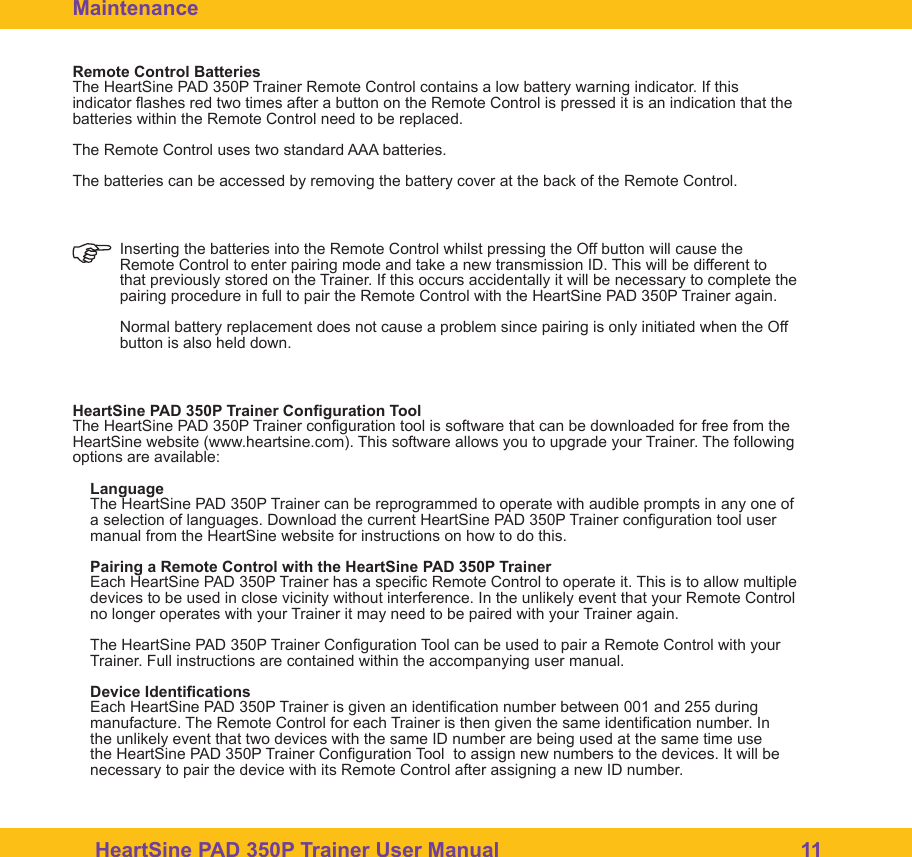
HeartSine PAD 350P Trainer User Manual                                                    11Remote Control BatteriesThe HeartSine PAD 350P Trainer Remote Control contains a low battery warning indicator. If this indicator ashes red two times after a button on the Remote Control is pressed it is an indication that the batteries within the Remote Control need to be replaced. The Remote Control uses two standard AAA batteries.The batteries can be accessed by removing the battery cover at the back of the Remote Control. Inserting the batteries into the Remote Control whilst pressing the Off button will cause the Remote Control to enter pairing mode and take a new transmission ID. This will be different to that previously stored on the Trainer. If this occurs accidentally it will be necessary to complete the pairing procedure in full to pair the Remote Control with the HeartSine PAD 350P Trainer again.Normal battery replacement does not cause a problem since pairing is only initiated when the Off button is also held down.  HeartSine PAD 350P Trainer Conguration ToolThe HeartSine PAD 350P Trainer conguration tool is software that can be downloaded for free from the HeartSine website (www.heartsine.com). This software allows you to upgrade your Trainer. The following options are available:Language The HeartSine PAD 350P Trainer can be reprogrammed to operate with audible prompts in any one of a selection of languages. Download the current HeartSine PAD 350P Trainer conguration tool user manual from the HeartSine website for instructions on how to do this. Pairing a Remote Control with the HeartSine PAD 350P TrainerEach HeartSine PAD 350P Trainer has a specic Remote Control to operate it. This is to allow multiple devices to be used in close vicinity without interference. In the unlikely event that your Remote Control no longer operates with your Trainer it may need to be paired with your Trainer again.The HeartSine PAD 350P Trainer Conguration Tool can be used to pair a Remote Control with your Trainer. Full instructions are contained within the accompanying user manual. Device IdenticationsEach HeartSine PAD 350P Trainer is given an identication number between 001 and 255 during manufacture. The Remote Control for each Trainer is then given the same identication number. In the unlikely event that two devices with the same ID number are being used at the same time use the HeartSine PAD 350P Trainer Conguration Tool  to assign new numbers to the devices. It will be necessary to pair the device with its Remote Control after assigning a new ID number. Maintenance
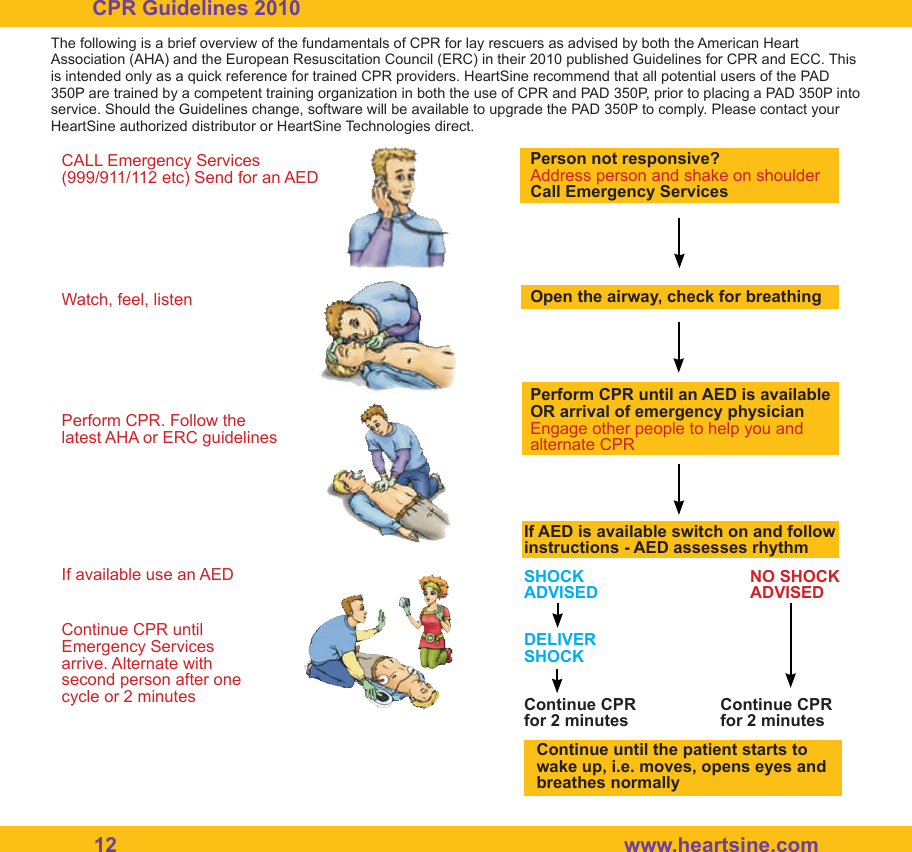
12  www.heartsine.comCPR Guidelines 2010The following is a brief overview of the fundamentals of CPR for lay rescuers as advised by both the American Heart Association (AHA) and the European Resuscitation Council (ERC) in their 2010 published Guidelines for CPR and ECC. This is intended only as a quick reference for trained CPR providers. HeartSine recommend that all potential users of the PAD 350P are trained by a competent training organization in both the use of CPR and PAD 350P, prior to placing a PAD 350P into service. Should the Guidelines change, software will be available to upgrade the PAD 350P to comply. Please contact your HeartSine authorized distributor or HeartSine Technologies direct.CALL Emergency Services (999/911/112 etc) Send for an AEDWatch, feel, listenPerform CPR. Follow the latest AHA or ERC guidelinesIf available use an AEDContinue CPR until Emergency Services arrive. Alternate with second person after one cycle or 2 minutesPerson not responsive?Address person and shake on shoulderCall Emergency ServicesOpen the airway, check for breathingPerform CPR until an AED is available OR arrival of emergency physicianEngage other people to help you and alternate CPRIf AED is available switch on and follow instructions - AED assesses rhythmSHOCKADVISEDNO SHOCKADVISEDDELIVERSHOCKContinue CPR for 2 minutesContinue CPR for 2 minutesContinue until the patient starts to wake up, i.e. moves, opens eyes and breathes normally
HeartSine PAD 350P Trainer User Manual                                                    13Disposal InstructionsThe HeartSine PAD 350P Trainer is a reusable device. If maintained in accordance with the instructions in this manual it has a warranty period of two years from the date of manufacture. The year of manufac-ture of the device is indicated by the rst two digits of the serial number.If you wish to dispose of the HeartSine PAD 350P Trainer unit, it should be disposed of at an appropriate recycling facility according to national, state and local requirements. Alternatively return the unit to your local distributor or HeartSine Technologies for disposal.Disposal within the European Union:Do not dispose of the HeartSine PAD 350P Trainer unit as unsorted municipal waste: keep the HeartSine PAD 350P Trainer separate, to be reused or recycled in accordance with Directive 2002/96/EEC of the European Parliament and the Council of the European Union on Waste Electronic and Electrical Equip-ment (WEEE), or return to your local distributor or HeartSine Technologies for disposal.Warranty ExclusionHeartSine Technologies or the authorized distributors are not obliged to carry out service/repairs under warranty if:a. Unauthorized modications have been made to the device.b. Non-standard components are used.c. The user has not used the device in accordance with the indications for use or the instructions pro-vided in this manual.d. The serial number of the apparatus is removed, defaced, misused or altered.e. The device, electrodes or batteries are stored or used operationally outside of environmental speci-cations.f. The device has been tested using unapproved methods or inappropriate equipment (see the Mainte-nance section of this manual).Any claims made under warranty must be directed via your distributor from whom the device was origi-nally purchased. Before carrying out service under warranty, HeartSine Technologies require evidence of purchase. The product must be used in accordance with the user manual and for the purpose for which it was intended. If you have a query please contact support@heartsine.com for assistance. HeartSine samaritan® PAD 350P Trainer, model TRN-350-1
14  www.heartsine.comFCC and IC ComplianceThis device complies with Part 15 of the FCC Rules and with Licence exempt RSS standards of Industry Canada.Operation is subject to the following two conditions:(1) This device may not cause harmful interference, and(2) This device must accept any interference received, including interference that may causeundesired operation.Le présent appareil est conforme aux CNR d’Industrie Canada applicables aux appareils radioexempts de licence. L’exploitation est autorisée aux deux conditions suivantes:(1) l’appareil ne doit pas produire de brouillage, et(2) l’utilisateur de l’appareil doit accepter tout brouillage radioélectrique subi, même si lebrouillage est susceptible d’en compromettre le fonctionnement.WARNING: Changes or modications not expressively approved by the party responsible forcompliance could void the user’s authority to operate the equipment. The term “IC:” before theradio certication number only signies that Industry Canada technical specications were met.
HeartSine PAD 350P Trainer User Manual                                                    15Notes
16  www.heartsine.comAuthorized DistributorEnglishH036-019-100-1  December  2015Worldwide Headquarters:HeartSine Technologies Inc121 Friends LaneSuite 400Newtown, PA 18940Tel: 1.215.860.8100Fax: 1.215.860.8192Manufactured by:HeartSine Technologies LtdCanberra House203 Airport Road WestBelfast BT3 9EDNorthern IrelandTel: +44 (0)28 9093 9400www.heartsine.comwww.heartsine.eusupport@heartsine.comHeartSine®

Navigation menu