Heat Factory USA THS01 KEYFOB FOR HEATED INSOLES User Manual
The Schawbel Corporation KEYFOB FOR HEATED INSOLES Users Manual
Users Manual
Package Contents
The ThermaCELL® Heated Insoles box contains two Heated Insoles, one Remote
Control Unit, one Global Charger, and one Drawstring Travel Bag.
Getting Started
Instructions for Cutting Insoles to Size:
Insoles may be trimmed to t shoes or boots if needed. Be sure to follow the
WARNING statement printed on the bottom of the Insoles! The two cutting lines are
for reference only.
When sizing the Heated Insole be certain to take into consideration the thickness of
socks that you will use with your footwear.
Caution: Do not cut beyond the solid line or excessively bend the Insoles. This will
cause damage to the heating elements and the product.
Charging and Recharging:
The ON/OFF Switch and Recharge Port for the Insoles are located at the back or heel
of each Insole. A soft plastic black cap protects the recharge port.
To begin the charging process, the ON/OFF Switches located at the heel of each
Insole must be in the left (OFF) position.
Plug the charger into an electrical outlet. The LED light on the charger will glow green.
Insert each of the two charging cables into each Insole Recharging Port. The LED light
on the charger will glow red while the Insoles are charging. The LED light on the
charger will change from red to green when the charging for both Insoles is complete.
The ThermaCELL Heated Insoles must be fully charged before the rst use. A full
charge is indicated when the LED light on the charger glows continuously green. This
may take up to 6 hours for the rst charge. In some situations, the initial charge time
may be less than 6 hours. Subsequent charges will take about 3 hours.
After the charging process is complete, the green LED light glows continuously,
disconnect the charger from the Insoles.
How to Charge and Recharge Insoles
1. Set the ON/OFF Switch on each Insole to the left (OFF) position.
2. Plug the Global Charger into an electrical outlet.
3. Plug the Global Charger cables into each Insole Recharge Port, which are found
at the heel of each Insole. Once connections are established the LED light on the
Global Charger will glow red indicating that the charging process is ongoing. The
LED light will turn green continuously indicating that the Insoles are fully charged.
4. Unplug the Global Charger and remove the cables from each Insole. The
ThermaCELL Heated Insoles are now ready for use.
To Activate the Insoles
1. Turn each Heated Insole on by moving the ON/OFF Switch at the heel of the Insole
to the right position (ON). The red LED light on each Insole will ash intermittently
and Insoles will default to the No Heat setting on the Remote Control Unit. Note: If
no specic heat setting is selected, the Insoles do not generate heat and use minimal
battery power.
2. Unpack the Remote Control Unit and remove the protective tab to enable the
already installed replaceable battery to activate.
3. Select a setting on the Remote by using the buttons indicating: High (111°F),
Medium (100°F) or No Heat.
4. Insert the Insoles into shoes or boots by following directions located at the bottom of
the Insoles. Trim Insoles to t if needed. Insert into shoes with fabric side up.
5. Use the Remote Control unit to operate the Insoles while shoes or boots are on
feet. The LED light on the remote will ash once to conrm a heat setting has been
transmitted to the Insole.
6. Remote works best when used between 2 feet to 7 feet from insoles.
7. Note: The heating element in each Insole extends from the toe area to the ball of the
feet. The arch and heel areas are not heated.
Two Ways to Turn Off the Insoles
1. When Insoles are being used in a shoe, remove the Insole and turn the ON/OFF
Switch at the heel of the Insoles to the left position (OFF). The Remote Control Unit
will turn off automatically when Insoles are switched off.
2. When Insoles are seated in the shoe and one does not wish to remove them from the
shoe, use the Remote Control Unit’s No Heat setting.
Remote Control Battery Replacement
The Remote Control Unit comes equipped with one Lithium Cell # CR2032.
The battery should last approximately two years under normal usage. However, to
insure uninterrupted service from the remote replace the battery annually. To replace
the battery:
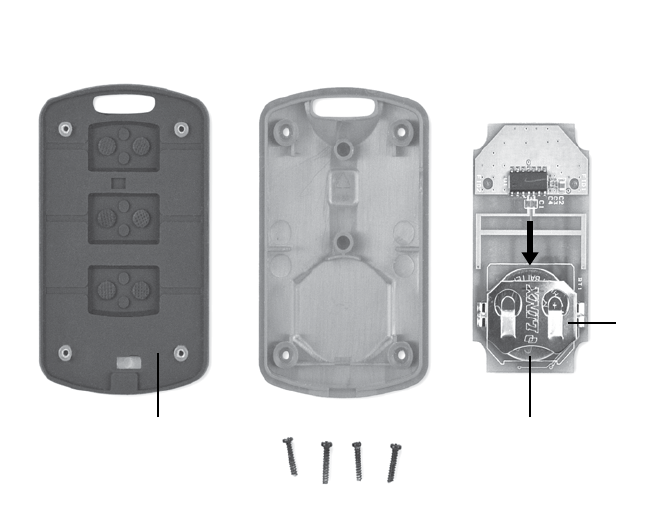
1. Remove the four small Phillips screws on the underside of the Remote Control Unit.
2. Lay both sides of the Remote Control Unit open on a table. Remove the green
printed circuit board and turn the board over so the battery holder is face up. Using
a coin, push the battery out from under the battery holder.
3. Replace the battery by inserting the new battery back into the holder making certain
that the positive (+) side of the battery is face up.
4. Return the green circuit board to its original position making certain the battery is
located on the underside of the printed circuit board. Now place the housing front
with the black rubber spacer piece over the circuit board.
5. With the two sides of the Remote Control Unit together, secure the two side panels
by replacing the four small Phillips screws.
ThermaCELL® Heated Insoles Instructions
The Integrated Lithium-Ion Polymer
Batteries Embedded in the Insoles
The high-quality Lithium-Ion Polymer batteries (no memory effect) can be re-charged
approximately 500 times.
The batteries are embedded in the Insole material and cannot be accessed.
For best performance occasionally drain the batteries of both Insoles completely
before re-charging. To do this, turn the Insoles ON using the ON/OFF Switch at the
heel of the Insole, use the Remote Control Unit to put the Insoles on the high setting,
and then run the Insoles until the LED lights on the Insoles turn off.
If Insoles are not used for a prolonged period, charge the Insoles completely before
using them again.
Battery Disposal Information: battery must be disposed of in accord with local laws
and regulations.
General Comments to Assist in Enjoying
the Use Of the Heated Insoles
If needed, remove any existing Insoles from shoes or boots to assist in making
additional space available to insure a perfect t for the ThermaCELL Heated Insoles.
The tabs at the end of the ThermaCELL Heated Insoles will assist in easy removal of
the Insoles from shoes or boots after use.
Once the Heated Insoles have been charged, depending on the outside temperature
234
HOUSING FRONT
RUBBER SPACER BATTERY
BATTERY
HOLDER
PUSH
BATTERY
OUT TO
REMOVE
HOUSING BACK CIRCUIT BOARD
Remote Control Battery Replacement

and quality of the shoes or boots, the Insoles will operate for approximately 5 hours
on the Medium setting.
It is recommended that the Insoles be in no heat mode when the user is engaged in
strenuous work, power walking, snowshoeing, or cross-country skiing activities. At
high exertion levels, the body generates enough heat to keep the feet warm.
Maintaining a comfortable heat level and warmth while using the Heated Insoles
depends upon not only proper installation and activation of the Insoles, but upon
the type, t and dryness of the footwear and/or socks being worn.
It is recommended that a medium weight sock be worn that wicks away moisture
and keeps feet dry.
Care Instructions
• Turn off the Insoles when not in use.
• Store the Insoles and Global Charger in a clean and dry place.
• Only use the ThermaCELL Heated Insoles Global Charger to charge the Insoles.
• Only charge the Insoles when they are outside of shoes or boots.
• Do not damage the heating elements by bending the Insoles.
• Cut the Insoles to size only as indicted in instructions.
• Clean with a damp cloth only.
• Do not submerge in water. Insoles are water resistant, not waterproof. If Insoles
become submerged in water, air dry before using.
• Air-dry the Insoles only. Do not place them on radiators or any other hot surface.
• Let the Insoles dry completely before charging again.
• The switch on the Heated Insoles must be set to the OFF (left) position when
charging the Insoles.
Helpful Information if Insoles are Not
Heating Correctly
Perform the following actions if the Insoles are not heating correctly:
1. Charge the Insoles completely.
2. Disconnect the charger.
3. Now turn ON the Insoles (switch to the right) and the LED light on the Insoles
will ash once every few seconds. Using the Remote Control Unit, press the High
button. Now the LED light on each Insole will ash in groups of three.
4. Place the Insoles in the refrigerator for 5 – 10 minutes.
5. After taking the Insoles out of the refrigerator, again check the LED lights of both
Insoles. The LED lights should be ashing in groups of three.
6. If the light is ashing in groups of three, then the Insoles are in the heating mode
and you should feel the warmth on the upper and lower sides of the Insoles with
your hands or your cheek.
If with the above actions the Insoles still are not heating correctly, drain the batteries
of both Insoles completely before re-charging. To do this, turn the Insoles ON using
the ON/OFF Switch at the heel of the Insole, use the Remote Control Unit to put the
Insoles on the high setting, and then run the Insoles until the LED lights on the Insoles
turn off. Now repeat the re-charging process.
Heated Insole Accessories
Accessories available for the ThermaCELL Heated Insole system include: the Remote
Control, a Car Charger, the Global Charger, and, a Deluxe Travel Bag. Contact
ThermaCELL Customer Service at 866-753-3837 or visit www.ThermaCELL.com for
the location of a retail outlet stocking these items in your area.
Cautions: Be Aware of Burn Possibilities
• Properly use ThermaCELL Heated Insoles according to instructions.
• Users of Heated Insoles need to be aware of early sensations of a burn including
when an area of a foot becomes hot; or, when any area of your foot feels like you are
standing on a small pebble or pointed object and may or may not feel hot.
• If you feel the early warning of a foot burn, immediately discontinue use of the
Insole and make certain your foot is not at risk of being burned. See a physician
immediately if you think you have a burn.
RADIO AND TELEVISION INTERFERENCE
This equipment has been tested and found to comply with the limits for a Class B digital device, pursuant
to Part 15 of the FCC rules. These limits are designed to provide reasonable protection against harmful
interference in a residential installation. This equipment generates, uses and can radiate radio frequency
energy and, if not installed and used in accordance with the instructions, may cause harmful interference
to radio communications. However, there is no guarantee that interference will not occur in a particular
installation. If this equipment does cause harmful interference to radio or television reception, which
can be determined by turning the equipment off and on, the user is encouraged to try to correct the
interference by one or more of the following measures:
- Reorient or relocate the receiving antenna.
- Increase the separation between the equipment and the receiver.
- Connect the equipment into an outlet on a circuit different from that to which the receiver is connected.
- Consult the dealer or an experienced radio/TV technician for help.
This device complies with Part 15 of the FCC Rules. Operation is subject to the following two conditions:
(1) this device may not cause harmful interference, and (2) this device must accept any interference
received, including interference that may cause undesired operation.
Changes and Modications not expressly approved by The Schawbel Corporation can void your authority to
operate this equipment under Federal Communications Commission’s rules.
This device complies with Industry Canada license-exempt RSS standard(s). Operation is subject to the
following two conditions: (1) this device may not cause interference, and (2) this device must accept any
interference, including interference that may cause undesired operation of the device.
The Schawbel Corporation
26 Crosby Drive
Bedford, MA 01730
www.ThermaCELL.com
Welcome to ThermaCELL® Technology
Dear ThermaCELL® Heated Insoles Purchaser:
We are pleased that you made the decision to purchase
ThermaCELL Heated Insoles, featuring wireless remote control
and rechargeable embedded Lithium-Ion Polymer batteries. Your
purchase features patented rechargeable Heated Insoles with
Remote Control ON/OFF heat operation.
The ThermaCELL self-contained advanced heat technology
is great for cold weather activities. The technology enables
purchasers to control temperature adjustments remotely while
wearing shoes or boots. Operating Instructions included within
this document provide clear and concise directions on how to
set up your Insoles for remote control temperature operation.
ThermaCELL products, including the ThermaCELL mosquito
repellent product line, enable outdoor enthusiasts to enjoy
their activities (hunting, fishing, camping, etc) with confidence
and in comfort. We thank you for your purchase of ThermaCELL
Heated Insoles and are confident your cold weather activities
will be more comfortable and enjoyable.
Enjoy your purchase.
The ThermaCELL Product Group
5 6
Patent Pending
Made in China