Heui Xint Technology M7001 MULTIFUNCTIONAL BLUETOOTH SPEAKER User Manual
Shenzhen Heui Xint Technology Co., Ltd MULTIFUNCTIONAL BLUETOOTH SPEAKER
User Manual
前言:preface
尊敬的用户:
非常感谢您选用 NBA 品牌智能语音蓝牙音响,请您在使用前,详细阅读本说明书,
正确操作,更好的发挥产品优越的性能。NBA 品牌智能语音蓝牙音响外观设计时尚、音质纯
美、功能强大,采用了行业领先的电声技术,使您在居家使用、户外旅行、户外运动中能够
随时随地的享受到卓越的音乐效果。为您的手机、笔记本电脑、数码音乐播放器等广泛的视
听产品提供完美超值的音质。
下面就让 NBA 品牌智能语音蓝牙音响带您走进不一样的音乐世界!
Dear Users,
Thanks for choosing NBA intelligent voice bluetooth speakers, before use
please read this manual for correct operating and in order to bring the best
quality of our product for you. NBA multifunction speakers has fashion design,
pure sound, strong function and adopt the best electronic technical to let
you enjoy the best sound effect anywhere. Also it is the best partner for
your mobile phone, laptop and digital player to play the perfect music.
Below please find the different feeling from our NBA brand Bluetooth product!
温馨提示:notice
1.第一次使用本产品若开不了机,可能电池电量不足,请先充满电后再开机;
2.为了延长电池使用寿命,使用完请记得关机,充电时请用随机配备的专用设备;
3.首次使用请先对电池充电不小于 4小时,以后使用大约 2~3 小时饱和;
4.长时间不使用本机请先对电池充电;
5.请勿将本机置于潮湿或有雨水处;
6.请勿将本机置于暴晒处和大于 45 度高温附近,更不能置于火中,以免电池发生事故;
7.非专业人士请勿自行拆卸本机;
8.本播放器输入电压过高会损坏播放器,电压太低播放器将不能正常工作,注意请不要接错
“+/‐”极;
1.ifyoucan’topentheproductinthefirsttimeusingit’sperhapsnotenoughpowerforthe
batteryplstrytochargethebatterythenopenagain
2.plsclosethemachinewhenthebatterycharging,it’sgoodforthelifeofbattery,alsoplsuse
thededicatedequipmentforbatterycharginginthepackageattached.
3.plschargeatleast4hoursinthefirsttimeusing,nexttimecouldbe2‐3hours.
4.longtimenousingproductplsremembertochargethebatteryfirstly
5.plsdon’tputtheproductonwetandrainingside.
6.plsdon’tputproductunderhotsunshine,nearthetemperature45’candnorcanfire,incase
thedamagehappened.
7.plsdon’ttearopenthemachineifyouarenotprofessionalforthismachine
8.inputvoltageofplayeriftoohighwillbedamagedtheproduct,toolowwillnotwork,plsuse
“+/‐”correctly
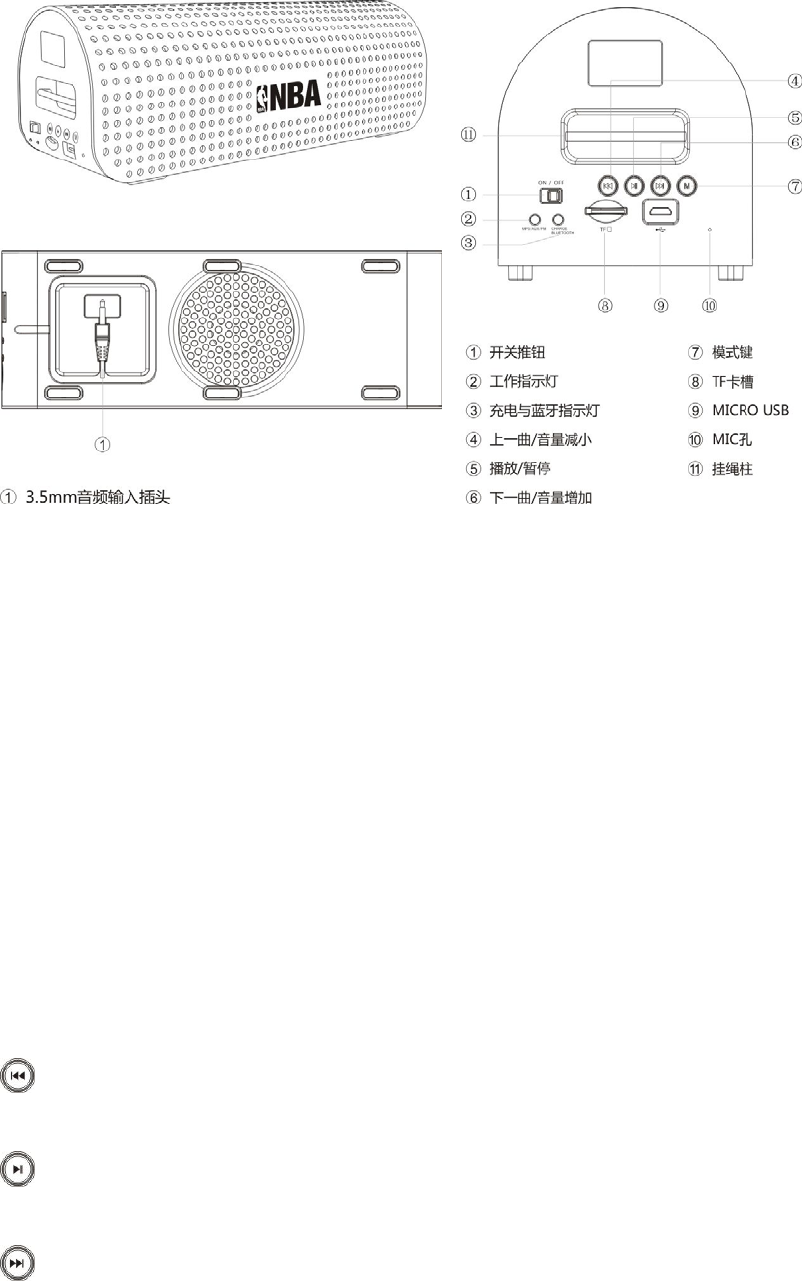
外形及功能按键:appearanceandfunctionkey
3.5mm 音频输入插头:3.5mmaudioinputjack
1. on/off
2. indicator
3. chargeandBluetoothindicator
4. lastsong/volumedecrease
5. play/pause
6. nextsong/volumeincrease
7. mode
8. TFcardslot
9. microUSB
10. MIC
11. hangbeltsetuplocation
使用方法:introduction
短按:上一曲,FM 状态中为上一个电台,长按:音量减小
Shortpress:lastsong,lastchannelinFMmode,longpress:decreasevolume
播放/暂停,FM 状态中为自动搜索电台
Play/pause,researchchannelautomaticallywhenFMmode
短按:下一曲,FM 状态中为下一个电台,长按:音量增加
Shortpress:nextsong,nextchannelinFMmode,longpress:increasevolume
模式键,在 PALY、AUX、FM、BLUETOOTH 模式中切换modekey,exchangemode:PALY、
AUX、FM、BLUETOOTH
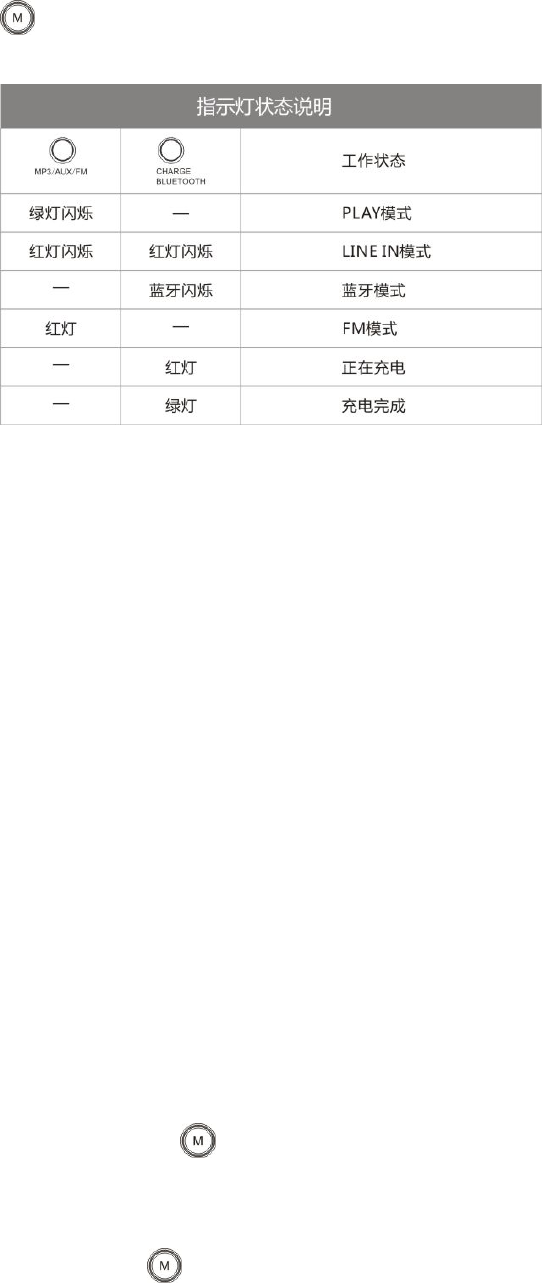
Indicatorstatusintroduction:
工作状态:workingstatus
绿灯闪烁:blinkinggreen
Play 模式:playmode
红灯闪烁:blinkingred
Linein模式:lineinmode
蓝灯闪烁:blinkingblue
蓝牙模式:bluetoothmode
红灯:redindicator
FM模式:FMmode
正在充电:charging
绿灯:greenindicator
充电完成:finishcharging
有TF 卡时,默认开机自动切换至 PLAY 播放状态
InsertTFcard,opendefaultandtobeplaystatusautomatically
无TF 卡时,默认开机自动切换至蓝牙对码模式
NoTFcard,opendefaultandtobeBluetoothstatus
开机状态下,插入 TF 卡会自动切换到 PLAY 播放状态
“open”status,insertcardwillbeplayedstatusautomatically
1、[蓝牙功能]:按键切换至蓝牙模式,HHXT‐201 会自动打开蓝牙对码功能,请打开你
的数码设备,进行蓝牙搜索,可搜索到 HHXT‐N201 进行配对,并输入 PIN 码(0000),即可
完成配对。
Bluetooth:press exchangetobluetoohmode,plsopenyourmobilephonetosearch
bluetooth,youwillfindHHXT‐N201tomatch,insertPIN(0000),thenmatchisok.

2、[蓝牙免提功能]:在蓝牙模式,且已经与你的手机配对成功的状态下,有来电时,按一
下便可以进行免提接听电话状态。再次按下可以挂断电话。
Bluetoothhandfree:inBluetoothmode,andhasbeenalreadymatchwithyourphone,havea
comingcall,youjustpressthenyoucouldpickupyourphonebyspeaker.Press
againcallisfinished.
3、[智能语音提示]:切换为不同的状态,NZ‐201 都会自动播放语音提示,带给你不一样的
使用体验。
Intelligentvoicenotice:exchangetodifferentstatus,NZ‐201willplayvoicenoticetospeakhow
tousethespeaker
4、[TF 卡播放]:支持 TF 卡,可自动播放 TF 卡中的 MP3、WMA 格式的音频文件
TFcardplay:supportTFcard,playMP3,WMAfile
5、[AUX 音源输入]:自带 3.5mm 音频线,轻松连接电脑、MP3/MP4、IPOD/iphone等视听
产品的各类音源。
AUXLINEIN:attached3.5mmaudiocable,connectwithPC,MP3/MP4、IPOD/iphoneeasily
6、FM 调频收音机(76‐108MHZ)FMradio(76‐108MHZ)
7、[USB 充电]:通过 MICROUSB连上电脑 USB 接口或者 USB 电源适配器进行充电;
USBcharge:microUSBcableconnectPCUSBjackotherUSBadaptorforcharging,andthemicro
USBinterfacedoesnotsupportdatatransmissionwithcomputer.
8、[内置大容量锂电池]:2000MA 大容量锂电,全新设计,无需外接电源即可播放;
Build‐InLi‐battery:buildin2000mAhLI‐battery,noneedoutletpower
使用参数:technicaldata
特点advantage
耳机输出 earphone
LINE输入linein
信号标准输入强度 signal
inputstandard:
充电电压 chargevoltage
充电电流 chargecurrent
充电时间 chargetime
移动电源电池容量
Batteryvolume
电池正常使用时间
Normalusetime
工作温度
Worktemperature
储存温度
双解码 MP3,WMA 格式芯片doubledecodeMP3,WMAdataIC
3.5MM 立体声插头 stereojack
3.5MM 立体声插头stereojack
550mV±15mV
5V(USB 连接),智能充电管理
5V(USBconnection),intelligentchargemanagement
从2000MA/7.4V(不够电状态)往下递减,充满时为零
from2000MA(notenoughpowerstatus)downdecreasing,enough
showzero
3小时3hours
2000MA(3.7V)
2000MA(3.7V)
最大音量 4小时
Max.volume4hours
‐5℃至 50℃
‐5℃to50℃
‐25℃至 70℃

Storetemperature
防磁高效全频/低频喇叭
Magneticresistance/bass
speaker
最大输出功率 max.power
总谐波失真 Distortion
频率响应 Frequency
response
信噪比 S/N
动态范围 Dynamicrange
蓝牙范围 distance
支持操作系统 system
‐25℃to70℃
4Ω3WX2/3Ω10WX1
6.6W
0.01%
20Hzto20KHz
>75dB
80dB
>10M
WINDOWS2000oraboveto或以上至 WIN7
使用电源:poweruse
本机内置高容量锂离子电池,通过 MICROUSB外接 USB 电源进行充电。
Build‐inhighvolumelithiumbattery,chargepowerjustfrommicroUSBtoconnectwithUSB
power
系统组成:content
1.背带hangbe
2.USB 数据线USBcable
3.说明书/保修卡manual/warrantycard
NOTE:ThemanufacturerisnotresponsibleforanyradioorTVinterferencecausedby
unauthorizedmodificationstothisequipment.Suchmodificationscouldvoidtheuser’sauthority
tooperatetheequipment.
NOTE:ThisequipmenthasbeentestedandfoundtocomplywiththelimitsforaClassBdigital
device,pursuanttopart15oftheFCCRules.Theselimitsaredesignedtoprovidereasonable
protectionagainstharmfulinterferenceinaresidentialinstallation.Thisequipmentgenerates
usesandcanradiateradiofrequencyenergyand,ifnotinstalledandusedinaccordancewiththe
instructions,maycauseharmfulinterferencetoradiocommunications.However,thereisno
guaranteethatinterferencewillnotoccurinaparticularinstallation.Ifthisequipmentdoes
causeharmfulinterferencetoradioortelevisionreception,whichcanbedeterminedbyturning
theequipmentoffandon,theuserisencouragedtotrytocorrecttheinterferencebyoneor
moreofthefollowingmeasures:
‐Reorientorrelocatethereceivingantenna.
‐Increasetheseparationbetweentheequipmentandreceiver.
‐Connecttheequipmentintoanoutletonacircuitdifferentfromthattowhichthereceiveris
connected.
‐Consultthedealeroranexperiencedradio/TVtechnicianforhelp