Hiro H50317 wifi adapter User Manual H50316 7 8 QIG

Hiro Inc. wifi adapter H50316 7 8 QIG

User Manual

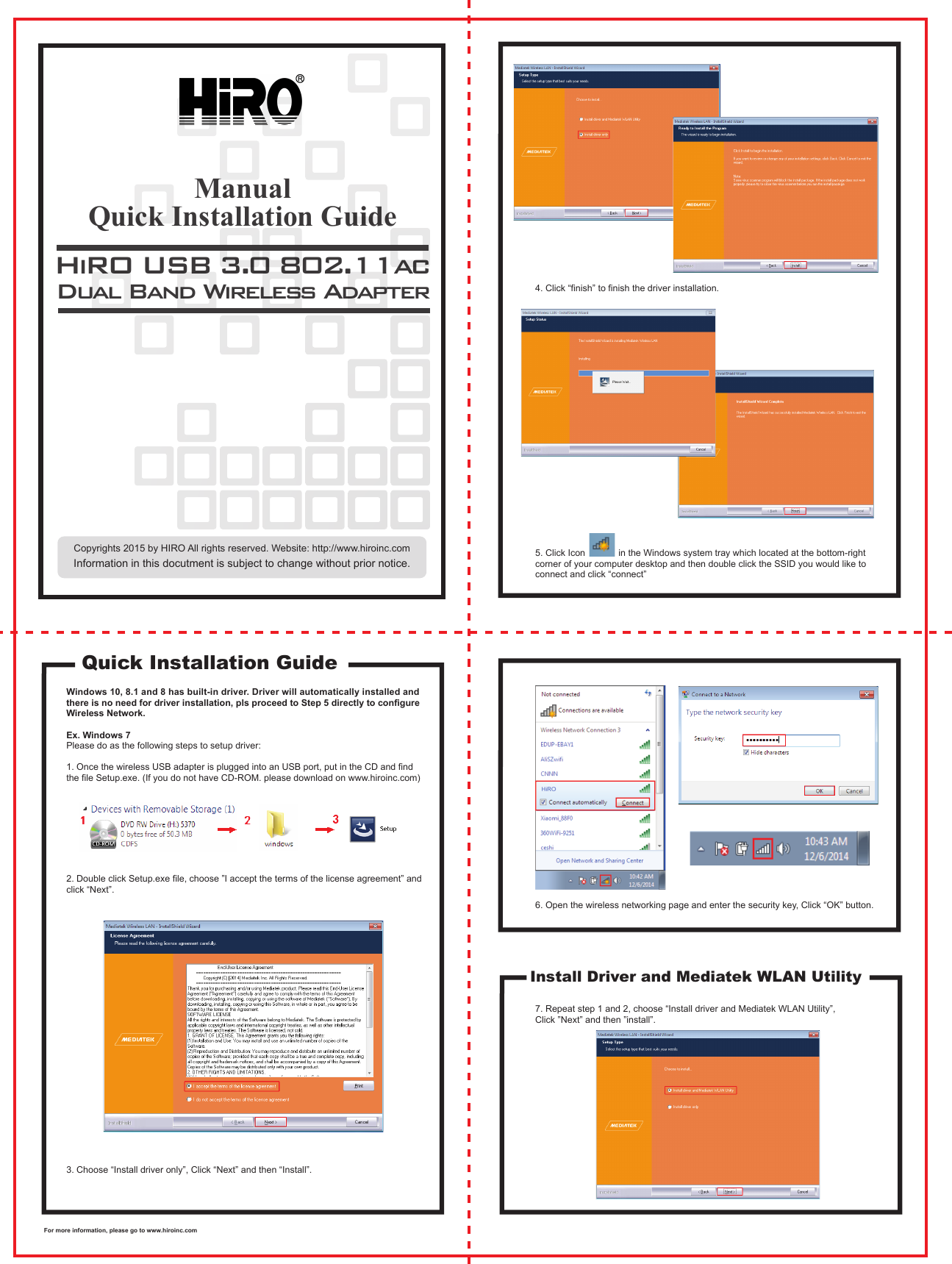
Windows 10, 8.1 and 8 has built-in driver. Driver will automatically installed and there is no need for driver installation, pls proceed to Step 5 directly to configure Wireless Network.Ex. Windows 7Please do as the following steps to setup driver:1. Once the wireless USB adapter is plugged into an USB port, put in the CD and find the file Setup.exe. (If you do not have CD-ROM. please download on www.hiroinc.com)2. Double click Setup.exe file, choose ”I accept the terms of the license agreement” and click “Next”.3. Choose “Install driver only”, Click “Next” and then “Install”. 4. Click “finish” to finish the driver installation.5. Click Icon             in the Windows system tray which located at the bottom-right corner of your computer desktop and then double click the SSID you would like to connect and click “connect”6. Open the wireless networking page and enter the security key, Click “OK” button. 7. Repeat step 1 and 2, choose “Install driver and Mediatek WLAN Utility”, Click ”Next” and then ”install”.HiRO USB 3.0 802.11acDual Band Wireless AdapterQuick Installation GuideInstall Driver and Mediatek WLAN UtilityQuick Installation GuideManualInformation in this docutment is subject to change without prior notice.For more information, please go to www.hiroinc.comCopyrights 2015 by HIRO All rights reserved. Website: http://www.hiroinc.com
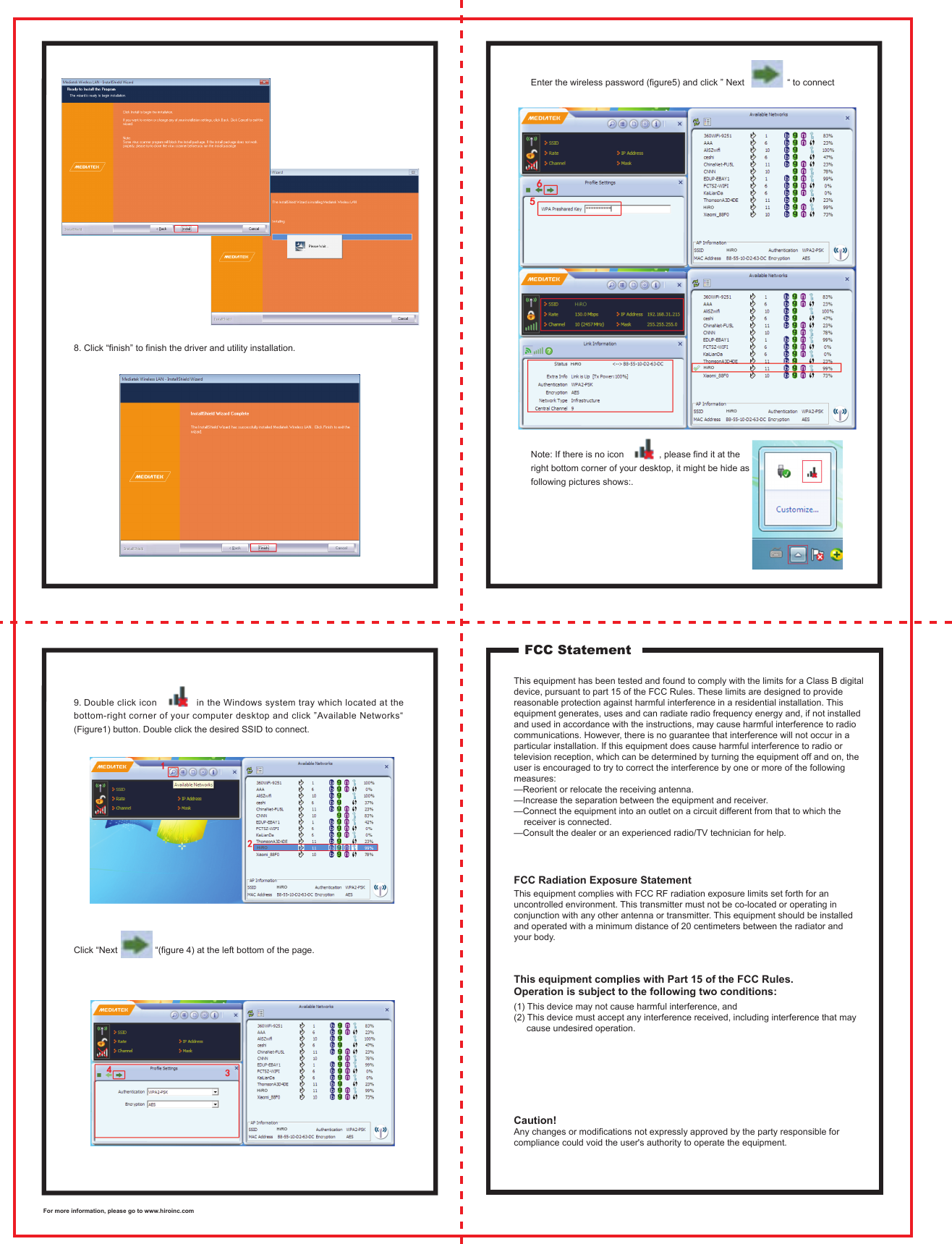
8. Click “finish” to finish the driver and utility installation. Enter the wireless password (figure5) and click ” Next                 “ to connectNote: If there is no icon              , please find it at the right bottom corner of your desktop, it might be hide as following pictures shows:.9. Double click icon              in the Windows system tray which located at the bottom-right corner of your computer desktop and click ”Available Networks“ (Figure1) button. Double click the desired SSID to connect. Click “Next               “(figure 4) at the left bottom of the page. FCC StatementThis equipment has been tested and found to comply with the limits for a Class B digital device, pursuant to part 15 of the FCC Rules. These limits are designed to provide reasonable protection against harmful interference in a residential installation. This equipment generates, uses and can radiate radio frequency energy and, if not installed and used in accordance with the instructions, may cause harmful interference to radio communications. However, there is no guarantee that interference will not occur in a particular installation. If this equipment does cause harmful interference to radio or television reception, which can be determined by turning the equipment off and on, the user is encouraged to try to correct the interference by one or more of the following measures: —Reorient or relocate the receiving antenna. —Increase the separation between the equipment and receiver. —Connect the equipment into an outlet on a circuit different from that to which the     receiver is connected. —Consult the dealer or an experienced radio/TV technician for help.This equipment complies with FCC RF radiation exposure limits set forth for an uncontrolled environment. This transmitter must not be co-located or operating in conjunction with any other antenna or transmitter. This equipment should be installed and operated with a minimum distance of 20 centimeters between the radiator and your body.(1) This device may not cause harmful interference, and (2) This device must accept any interference received, including interference that may     cause undesired operation.Caution! Any changes or modifications not expressly approved by the party responsible for compliance could void the user's authority to operate the equipment. FCC Radiation Exposure StatementThis equipment complies with Part 15 of the FCC Rules. Operation is subject to the following two conditions:For more information, please go to www.hiroinc.com

Navigation menu