Hiro H50334 USB Wireless Adapter User Manual

Hiro Inc. USB Wireless Adapter

User manual

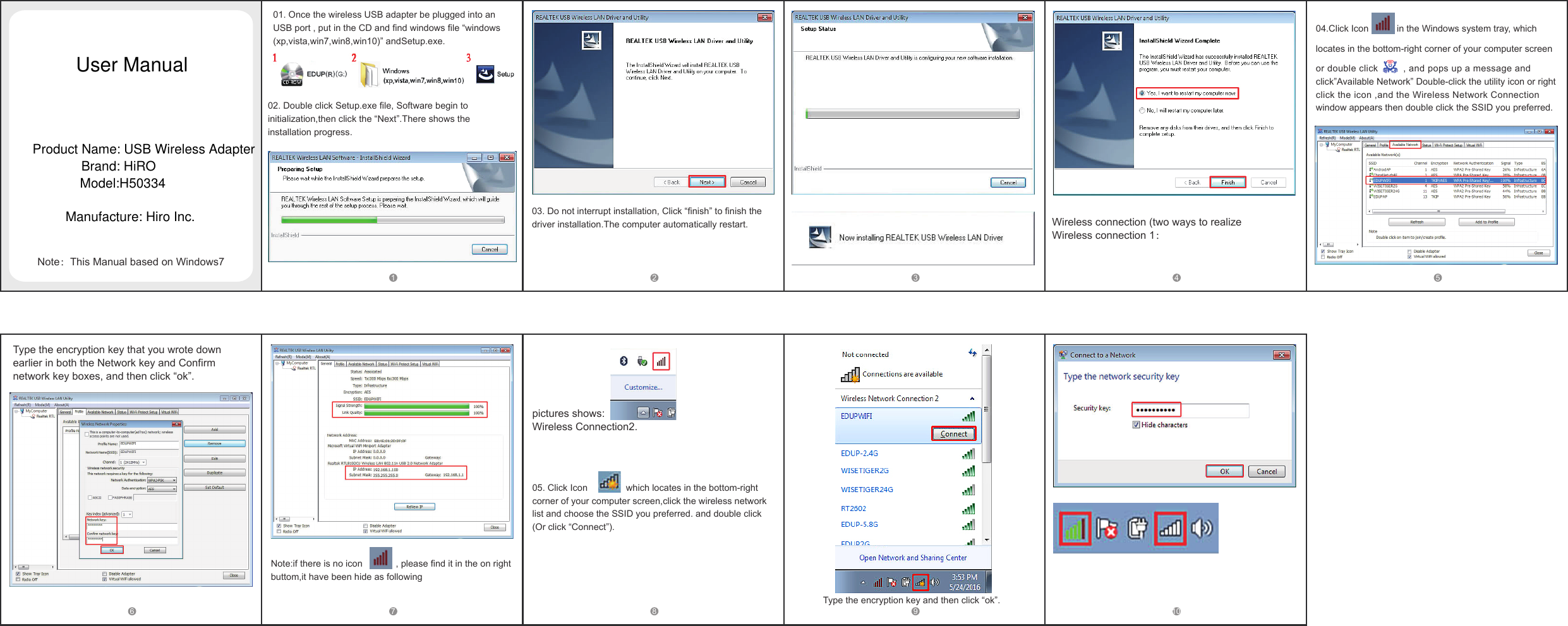
01. Once the wireless USB adapter be plugged into an USB port , put in the CD and find windows file “windows(xp,vista,win7,win8,win10)” andSetup.exe.02. Double click Setup.exe file, Software begin to initialization,then click the “Next”.There shows the installation progress.03. Do not interrupt installation, Click “finish” to finish the driver installation.The computer automatically restart. Wireless connection (two ways to realizeWireless connection 1:04.Click Icon           in the Windows system tray, which locates in the bottom-right corner of your computer screen or double click         , and pops up a message and click”Available Network” Double-click the utility icon or right click the icon ,and the Wireless Network Connection window appears then double click the SSID you preferred. 1 2 3 4 5Note:This Manual based on Windows76 7 8 9 10Note:if there is no icon             , please find it in the on right buttom,it have been hide as following pictures shows: Wireless Connection2.05. Click Icon               which locates in the bottom-right corner of your computer screen,click the wireless network list and choose the SSID you preferred. and double click(Or click “Connect”). Type the encryption key and then click “ok”.Type the encryption key that you wrote down earlier in both the Network key and Confirm network key boxes, and then click “ok”.User ManualProduct Name: USB Wireless AdapterBrand: HiROModel:H50334Manufacture: Hiro Inc.
FCC Caution.  This  device  complies  with  part  15  of  the  FCC  Rules. Operation is  subject to  the  following  two conditions:   (1) This device may not cause harmful interference, and   (2)  this  device  must  accept  any  interference  received,  including  interference  that  may  cause undesired operation.  Any  Changes or  modifications  not  expressly  approved  by  the  party responsible for compliance could void the user's authority to operate the equipment.  Note: This equipment has been tested and found to comply with the limits for a Class B digital device, pursuant  to part  15 of  the  FCC Rules.  These  limits  are  designed to provide reasonable protection  against  harmful  interference  in  a  residential  installation.  This  equipment  generates uses and can radiate radio frequency energy and, if not installed and used in accordance with the instructions,  may  cause  harmful  interference  to  radio  communications.  However,  there  is  no guarantee  that  interference  will  not  occur  in  a  particular  installation.  If  this  equipment  does cause harmful interference to radio or television reception, which can be determined by turning the equipment off  and on, the  user is encouraged to try to correct the  interference by one or more of the following measures: -Reorient or relocate the receiving antenna. -Increase the separation between the equipment and receiver. -Connect the equipment into an outlet on a circuit different from that to which the  receiver is connected. -Consult the dealer or an experienced radio/TV technician for help.  The device has been evaluated to meet general RF exposure requirement. The device can be used in portable exposure condition without restriction.                  For 5150-5250 frequency band, add below statement for indoor use warning statement on manual,Operations in the 5.15-5.25GHz band are restricted to indoor usage only.

Navigation menu