Honda R and D 74110-QAB IC Tele-Interaction Card User Manual IC Card UsersGuide v12

Honda R&D; Co., Ltd. IC Tele-Interaction Card IC Card UsersGuide v12

Users Manual

      IC Tele-Interaction Card / Sensor User’s Guide  74110-QAB 32410-QAB      Preliminary Revision September 01 2006     Honda Motor Co., Ltd.
 IC Tele-Interaction Card / Sensor User’s Guide   Warning FCC WARNING  This equipment has been tested and found to comply with the limits for a Class B digital device, pursuant to Part 15 of the FCC rules. These limits are designed to provide reasonable protection against harmful interference in a residential installation. This equipment generates, uses, and can radiate radio frequency energy and, if not installed and used in accordance with the instructions, may cause harmful interference to radio communications. However, there is no guarantee that interference will not occur in a particular installation. If this equipment does cause harmful interference to radio or television reception, which can be determined by turning the equipment off and on, the user is encouraged to try to correct the interference by one or more of the following measures:   • Reorient or relocate the receiving antenna.   • Increase the separation between the equipment and receiver.   • Connect the equipment into an outlet on a circuit different from that to which the receiver is connected.   • Consult the dealer or an experienced radio/TV technician for help.      This device complies with Part 15 of the FCC Rules. Operation is subject to the following two conditions:    (1) This device may not cause harmful interference, and    (2) This device must accept any interference received, including interference that may cause undesired operation.    Caution:  Any changes or modifications not expressly approved by the party responsible for product compliance could void the user's authority to operate the equipment.
 IC Tele-Interaction Card / Sensor User’s Guide   Labeling [IC Tele-Interaction Card] The IC Tele-Interaction Card 74110-QAB is labeled as below. FCC ID: T4S-74110-QAB  [Sensor] The Sensor 32410-QAB is labeled as below. FCC ID: T4S-32410-QAB The proposed FCC ID label format is to be placed on the module. If FCC ID is not visible when the module is installed into the host, "Contains FCC ID: T4S-32410-QAB" shall be placed on the outside of final host.
 IC Tele-Interaction Card / Sensor User’s Guide   Safety Information  WARNING •  Opening the unit, for whatever reason, could read to damages that are not covered by the warranty. •  Do not touch the device or accessories during thunder storms. Electrical shock could result. •  For indoor use only. •  Do not use this equipment on hospital premises. Doing so many cause medical devices to malfunction. •  If using the equipment near a pacemaker, make sure it is at least 9inches (22cm) away from the pacemaker. •  Do not use this equipment in an aircraft, as doing so could cause the aircraft’s equipment to malfunction. •  While using the IC Tele-Interaction Card or Sensor, do not cover it or turn it on its side. Do not cover the IC Tele-Interaction Card or Sensor with objects such as magazines or newspapers or use it in confined, enclosed places, such as the spaces between walls and furniture. Further, do not turn the IC Tele-Interaction Card or Sensor on its side while using it. Either situation could cause heat to build up inside the IC Tele-Interaction Card or Sensor, leading to overheating and possible fire. •  Avoid locations that are directly exposed to sunlight or heaters. •  Internal overheating could result in fire or damage to the unit. •  Make sure connectors are properly connected. -  Do not insert any metallic objects inside the connectors. Short-circuiting then pins could cause fire or damage to the unit. -  Be careful to insert connectors squarely. Crooked insertion could cause pins to short-circuit, possibly causing fire or damage to the unit.
 IC Tele-Interaction Card / Sensor User’s Guide   Precautions  Safety Do not drop the IC Tele-Interaction Card and Sensor. Careful handling will help prevent damage.  Installation Do not place the IC Tele-Interaction Card or Sensor where it will be exposed to the following conditions : • Unstable surface. •  High humidity or poor ventilation. • Excessive dust. •  Direct sunlight or extreme heat. • Closed cars. •  Magnetized location (near magnet, speakers, or televisions). •  Locations exposed to frequent vibration. •  Locations where the transmission of radio waves may be obstructed by metal plates or concrete walls.  Operation Exposure to cold-to hot temperature extremes or very damp environments may cause moisture to condense on internal parts. This may prevent the IC Tele-Interaction Card or Sensor from operating properly. If this should happen, unplug the power cable and let the IC Tele-Interaction Card or Sensor sit for two to three hours or until the moisture evaporates.  Cleaning Clean the casing with a soft cloth lightly moistened with water or a mild detergent solution. Do not use any type of abrasive pad, scouring powder or solvent such as alcohol or benzene. This may damage the finish of the casing.
 IC Tele-Interaction Card / Sensor User’s Guide   Contents 1. PACKAGE CONTENTS .................................................................................................... 1 2. HARDWARE DESCRIPTION ........................................................................................... 1 3. DEVICE INSTALLATION................................................................................................. 2 3.1 PREPARATION: IC TELE-INTERACTION CARD ................................................................. 2 3.2 PREPARATION: SENSOR................................................................................................... 2 3.3 COMMUNICATION BETWEEN IC TELE-INTERACTION CARD AND SENSOR ....................... 2 4. SPECIFICATIONS ............................................................................................................ 3
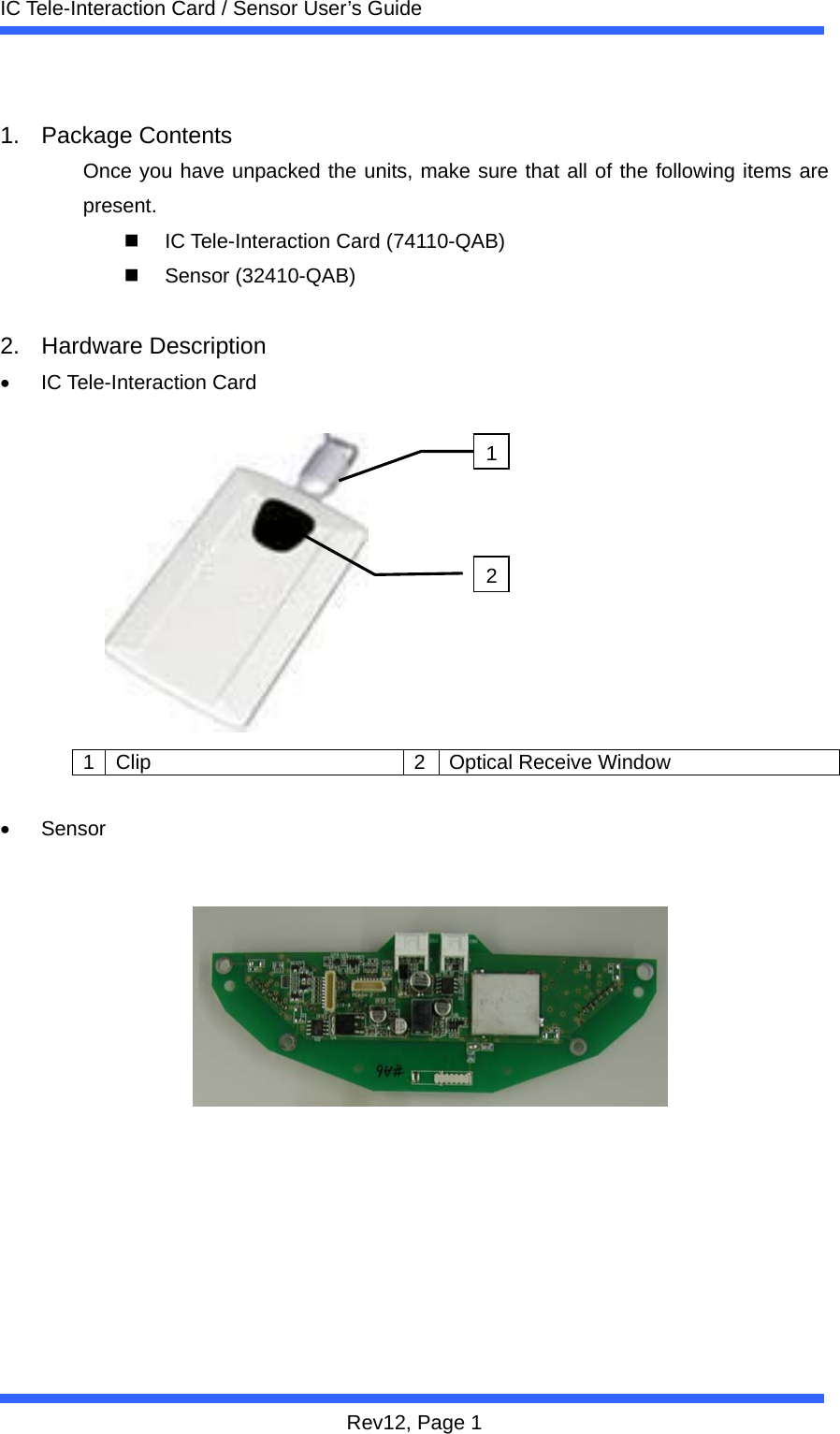
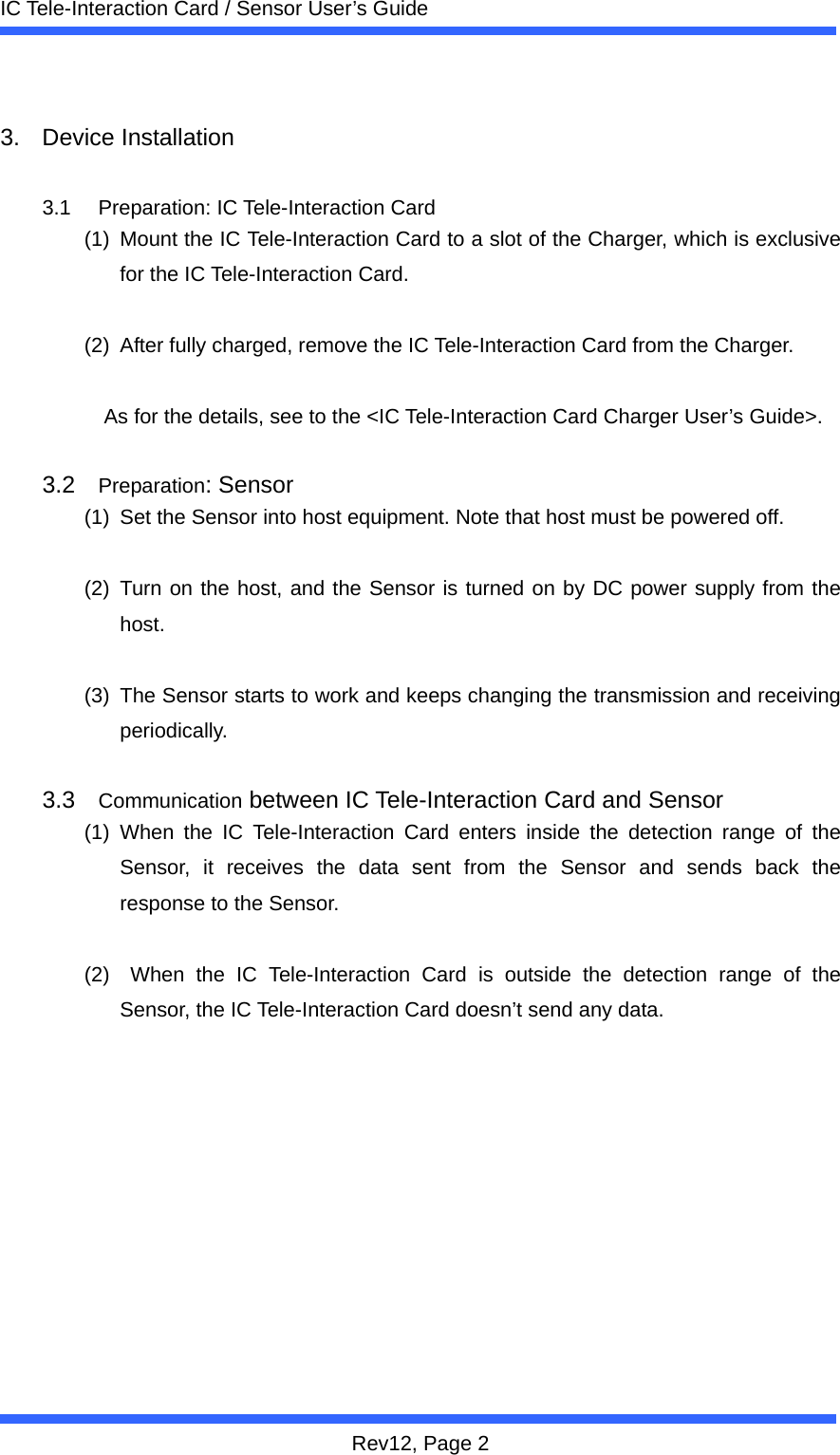
 IC Tele-Interaction Card / Sensor User’s Guide Rev12, Page 1  1. Package Contents Once you have unpacked the units, make sure that all of the following items are present.   IC Tele-Interaction Card (74110-QAB)  Sensor (32410-QAB)  2. Hardware Description • IC Tele-Interaction Card           1  Clip  2 Optical Receive Window  • Sensor             12
 IC Tele-Interaction Card / Sensor User’s Guide Rev12, Page 2  3. Device Installation  3.1 Preparation: IC Tele-Interaction Card (1)  Mount the IC Tele-Interaction Card to a slot of the Charger, which is exclusive for the IC Tele-Interaction Card.    (2)  After fully charged, remove the IC Tele-Interaction Card from the Charger.  As for the details, see to the <IC Tele-Interaction Card Charger User’s Guide>.  3.2  Preparation: Sensor (1)  Set the Sensor into host equipment. Note that host must be powered off.  (2) Turn on the host, and the Sensor is turned on by DC power supply from the host.   (3)  The Sensor starts to work and keeps changing the transmission and receiving periodically.  3.3  Communication between IC Tele-Interaction Card and Sensor (1) When the IC Tele-Interaction Card enters inside the detection range of the Sensor, it receives the data sent from the Sensor and sends back the response to the Sensor.    (2)  When the IC Tele-Interaction Card is outside the detection range of the Sensor, the IC Tele-Interaction Card doesn’t send any data.
 IC Tele-Interaction Card / Sensor User’s Guide Rev12, Page 3  4. Specifications  Category  IC Tele-Interaction Card Sensor Size(W x H x D)  55 x 8 x 89 [mm]  140 x 15 x 49 [mm] Input Voltage  Rechargeable Li-ion Battery 3.7[V]  DC 12[V] Operating Temperature  0 to 50 [degree Celsius] Storage Temperature  -22 to 85[degree Celsius] Weight 42[g] 25[g]

Navigation menu