Honeywell Rth2410 Operating Manual 69 2420ES—01 RTH2510/RTH2410 Programmable Thermostat
2015-08-26
: Honeywell Honeywell-Rth2410-Operating-Manual-803409 honeywell-rth2410-operating-manual-803409 honeywell pdf
Open the PDF directly: View PDF  .
.
Page Count: 48
- Need Help?
- 69-2420S_A.pdf
- 1) Afloje el tornillo en la base del termostato. Observe que el tornillo está retenido y no se podrá retirar de la placa mural.
- 2) Separe el termostato de la placa mural, como se indica en la figura de la derecha.
- 3) Anote el número de modelo y el código de la fecha que figuran en la placa mural del termostato.
- ¿Asistencia?
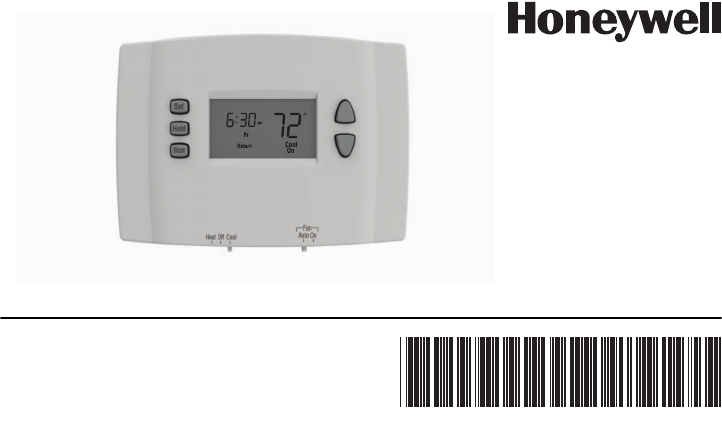
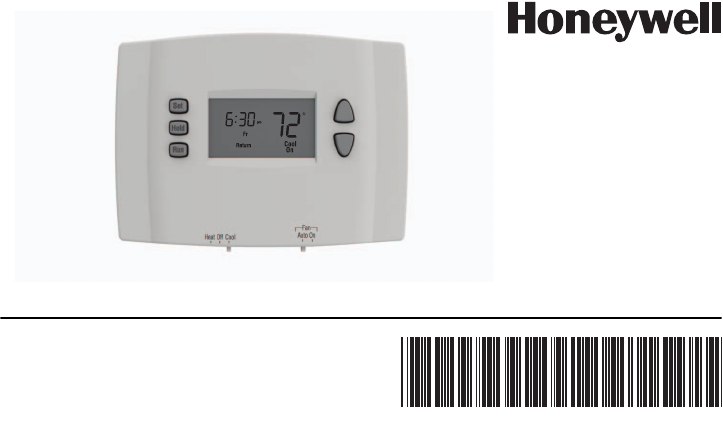
RTH2510/RTH2410
Programmable Thermostat
Operating
Manual
69-2420ES-01
69-2420E_A.fm Page -1 Thursday, March 18, 2010 9:49 AM

This manual covers the RTH2510 and RTH2410 models.
Read and save these instructions.
CAUTION: EQUIPMENT DAMAGE HAZARD
To prevent possible compressor damage, do not use Cooling mode when the
outdoor temperature is below 50 °F (10 °C).
Need Help?
For assistance with this product please visit http://yourhome.honeywell.com
or call Honeywell Customer Care toll-free at 1-800-468-1502.
69-2420E_A.fm Page 0 Thursday, March 18, 2010 9:49 AM
Programmable Thermostat RTH2510/RTH2410
Overview
Thermostat features ..............................2
Quick start .............................................3
Quick reference to controls ...................4
Quick reference to display.....................5
Programming & Operation
Setting the clock....................................6
System switch (Heat/Cool)....................7
Fan switch (Auto/On).............................8
Using the schedule.......................... 9-12
Temporary schedule override..............13
Permanent schedule override .............14
Early start ............................................15
Compressor protection........................15
Appendices
Battery replacement ........................... 16
In case of difficulty .............................. 17
Customer assistance .......................... 18
One-year limited warranty .................. 19
Table of contents
Your new thermostat is pre-programmed
and ready to go!
See page 3 for quick start.
69-2420E_A.fm Page 1 Thursday, March 18, 2010 9:49 AM

Operating Manual
69-2420ES—01 2
Your new thermostat has been designed to give you many years of reliable service and
easy-to-use, push-button climate control.
Features
• Backlit display is easy to read
• Displays ambient (measured) temperature at all times
• One-touch access to setpoint temperature
• Separate programmable daily schedules (7-day programming)
• Temporary and permanent override of schedule
• Early start ensures the right temperature at the right time
• Built-in compressor protection
About your new thermostat
69-2420E_A.fm Page 2 Thursday, March 18, 2010 9:49 AM

RTH2510/RTH2410 Programmable Thermostat
3 69-2420ES—01
Simply perform the three steps below and the thermostat is in operation:
Set the clock ................................................................................................ See page 6
Select whether to heat or cool...................................................................... See page 7
Select whether to run the fan continuously or only when needed................ See page 8
Your thermostat is pre-programmed with energy saving settings. If you do not wish to use
these settings, you can:
Modify the schedule (RTH2510) .................................................................See page 11
Modify the schedule (RTH2410) ................................................................ See page 12
Temporarily override the schedule ............................................................. See page 13
Permanently override the schedule............................................................ See page 14
This thermostat is ready to go
69-2420E_A.fm Page 3 Thursday, March 18, 2010 9:49 AM
Operating Manual
69-2420ES—01 4
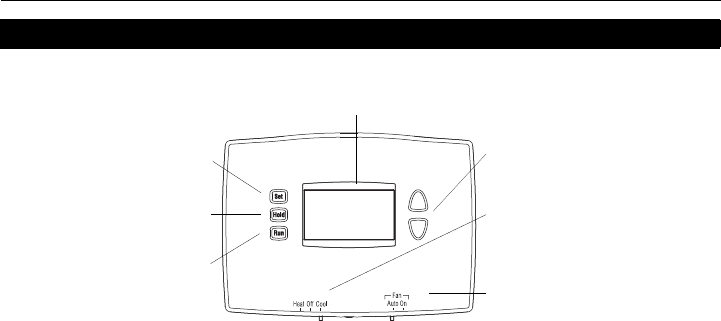
Quick reference to controls
System switch (see page 7)
•Cool: System is in Cooling mode.
•Off: System is off.
•Heat: System is in Heating mode.
Fan switch (see page 8)
•On: Fan runs continuously.
•Auto: Fan runs only when
heating or cooling is activated.
Up/Down buttons
Press to adjust temperature.
Screen
Lit for 12 seconds when
you press any button.
Press to set clock, day or schedule
(see pages 6 & 11/12).
Press to override schedule and
hold temperature (see page 14).
Press to run (follow) schedule
(see page 9).
69-2420E_A.fm Page 4 Thursday, March 18, 2010 9:49 AM
RTH2510/RTH2410 Programmable Thermostat
5 69-2420ES—01
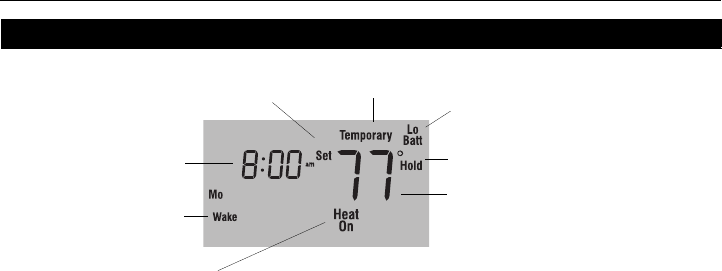
Quick reference to display
* When Heat On or Cool On is flashing, compressor protection is engaged (see page 15).
Temperature
The ambient (measured) temperature is
normally displayed. To view the setpoint
temperature, press the Up or Down
button once. The setpoint temperature
will appear for five seconds.
System status
• Cool On: Cooling is activated. *
• Heat On: Heating is activated. *
• Aux On: Auxiliary heat is activated.
Low-battery warning
(see page 16)
Setpoint indicator
Appears when the setpoint
temperature is displayed.
Clock
Schedule period
Permanent schedule override
(see page 14)
Temporary schedule override
(see page 13)
69-2420E_A.fm Page 5 Thursday, March 18, 2010 9:49 AM
Operating Manual
69-2420ES—01 6
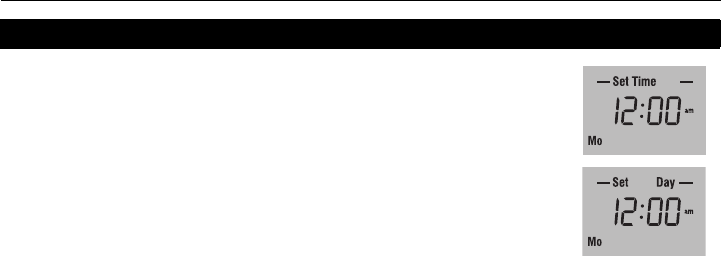
Press the Set button. Set Time will appear on the screen and the
time display will flash.
Press the Up or Down button to set the time.
Press the Set button again. Set Day will flash on the screen.
Press the Up or Down button to select the day of the week.
Press the Run button to save the changes & exit. (The changes
are also saved if you do not press any button for 60 seconds.)
NOTE: The clock has lost its settings when the time display flashes. If the thermostat is
following the schedule, it will use the temperature settings programmed for the Wake
period for Monday until you readjust the clock.
Set the clock
69-2420E_A.fm Page 6 Thursday, March 18, 2010 9:49 AM
RTH2510/RTH2410 Programmable Thermostat
7 69-2420ES—01
System switch (Heat/Cool)
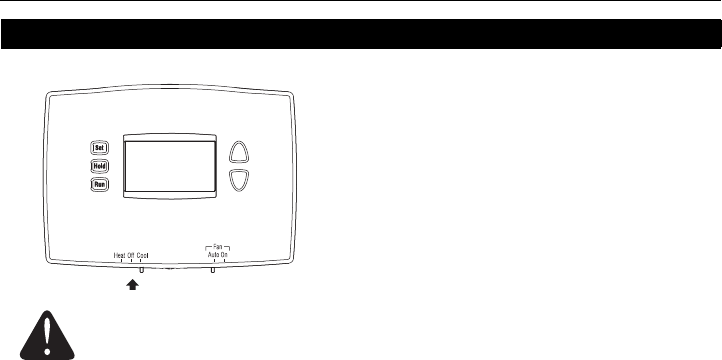
Use the System switch to place the system in
one of the following modes:
•Cool: System is in Cooling mode.
•Off: System is off.
•Heat: System is in Heating mode.
CAUTION: EQUIPMENT DAMAGE HAZARD.
Do not use Cooling mode when the outdoor temperature is below 50°F (10°C).
69-2420E_A.fm Page 7 Thursday, March 18, 2010 9:49 AM
Operating Manual
69-2420ES—01 8
Fan switch (Auto/On)
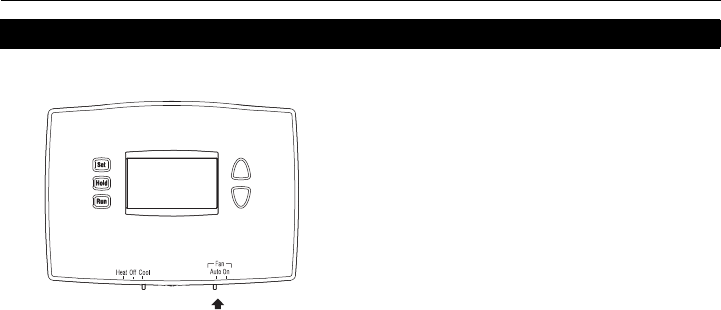
Use the Fan switch to select the fan operation.
•Auto: The fan runs only when heating or
cooling is activated (commonly used setting).
•On: The fan runs continuously.
69-2420E_A.fm Page 8 Thursday, March 18, 2010 9:49 AM
RTH2510/RTH2410 Programmable Thermostat
9 69-2420ES—01
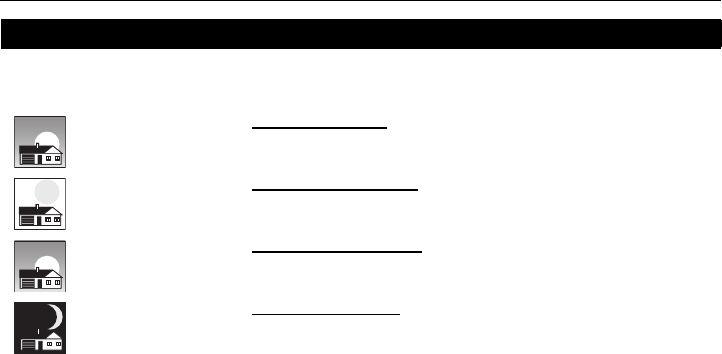
It’s easy to program your system for maximum energy savings. You can program four time
periods each day, with different settings for weekdays and weekends.
Save money by setting program schedules
WAKE
6:00 am
70 º
Set to the time you awaken and the temperature you want
during the morning, until you leave for the day.
LEAVE
8:00 am
62 º
Set to the time you leave home and the temperature you
want while you are away (usually an energy-saving level).
RETURN
6:00 pm
70 º
Set to the time you return home and the temperature you
want during the evening, until bedtime.
SLEEP
10:00 pm
62 º
Set to the time you go to bed and the temperature you want
overnight (usually an energy-saving level).
69-2420E_A.fm Page 9 Thursday, March 18, 2010 9:49 AM
Operating Manual
69-2420ES—01 10
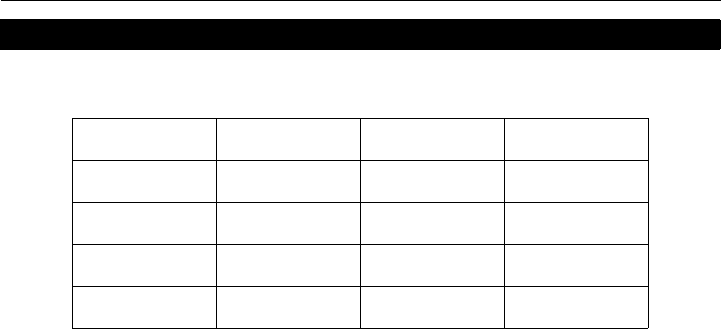
The thermostat is preset with energy saving program settings. See the next two pages if
you wish to modify the settings.
Energy saving settings
Period Start time Heat Cool
Wake 6:00 AM 70°F (21°C) 78°F (25.5°C)
Leave 8:00 AM 62°F (16.5°C) 85°F (29.5°C)
Return 6:00 PM 70°F (21°C) 78°F (25.5°C)
Sleep 10:00 PM 62°F (16.5°C) 82°F (27.5°C)
69-2420E_A.fm Page 10 Thursday, March 18, 2010 9:49 AM
RTH2510/RTH2410 Programmable Thermostat
11 69-2420ES—01
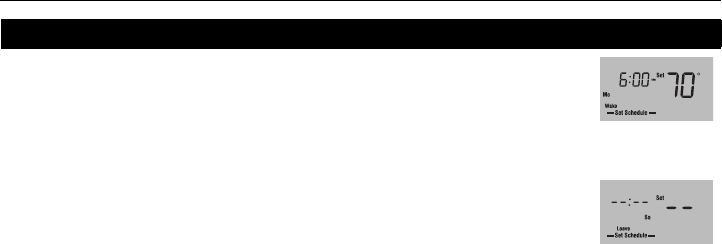
Press the Set button 3 times until Set Schedule appears. The Wake period is
displayed.
NOTE: To set another period, press the Set button as many times as needed until the
desired period and the desired day are displayed and its time or temperature is flashing.
When the time flashes, press the Up or Down button to set the time.
Press the Set button.
To set the temperature for cooling mode, first place the System switch in Cool. To
set the temperature for heating mode, first place the System switch in Heat.
When the temperature flashes, press the Up or Down button to set the temperature.
Press the Set button.
Repeat steps 2 through 6 to set each of the remaining periods.
Once all changes are made, press the Run button to save them and return to
normal display. (The changes will automatically be saved if you do not press any
button for 60 seconds.)
Modifying the schedule (RTH2510)
To skip a period
(except Wake),
press the Hold
button for 4 seconds
while that period is
displayed.
Wake period for
Monday is set to 6
a.m. and 70°F
69-2420E_A.fm Page 11 Thursday, March 18, 2010 9:49 AM
Operating Manual
69-2420ES—01 12
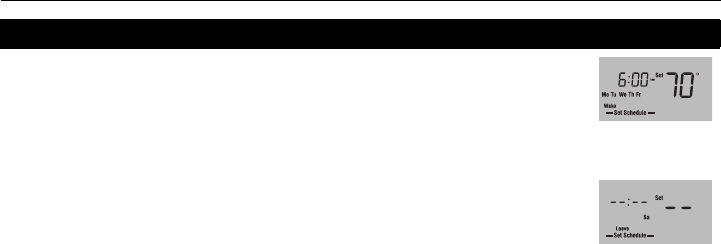
Press the Set button 3 times until Set Schedule appears. The Wake period is
displayed.
NOTE: To set another period, press the Set button as many times as needed until the
desired period and the desired day are displayed and its time or temperature is flashing.
When the time flashes, press the Up or Down button to set the time.
Press the Set button.
To set the temperature for cooling mode, first place the System switch in Cool. To
set the temperature for heating mode, first place the System switch in Heat.
When the temperature flashes, press the Up or Down button to set the temperature.
Press the Set button.
Repeat steps 2 through 6 to set each of the remaining periods.
Once all changes are made, press the Run button to save them and return to
normal display. (The changes will automatically be saved if you do not press any
button for 60 seconds.)
Modifying the schedule (RTH2410)
To skip a period
(except Wake),
press the Hold
button for 4 seconds
while that period is
displayed.
Wake period for the
weekdays is set to
6 a.m. and 70°F
69-2420E_A.fm Page 12 Thursday, March 18, 2010 9:49 AM
RTH2510/RTH2410 Programmable Thermostat
13 69-2420ES—01
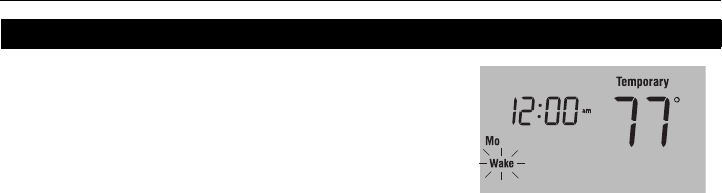
To temporarily ignore the schedule, press the Up or
Down button until the desired temperature is displayed.
The word Temporary will appear on the screen and the
period display will flash to indicate that the current period
has been overridden. The new temperature will be used
until the next period begins.
NOTE: Pressing the Up or Down button once will display the setpoint temperature. To
change the setpoint temperature, press either button more than once.
Press the Run button if you wish to cancel the temporary setting before the beginning of
the next period.
Temporary override of schedule
69-2420E_A.fm Page 13 Thursday, March 18, 2010 9:49 AM
Operating Manual
69-2420ES—01 14
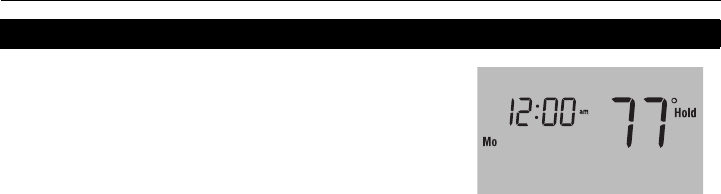
To permanently ignore the schedule, press the Up or
Down button until the desired temperature is displayed.
Then, press the Hold button to maintain the new
temperature indefinitely. The word Hold will appear on
the screen.
Press the Run button if you wish to cancel the override
and resume the schedule. The word Hold will disappear
and the thermostat will be set to the temperature
programmed for the current period.
Permanent override of schedule
69-2420E_A.fm Page 14 Thursday, March 18, 2010 9:49 AM

RTH2510/RTH2410 Programmable Thermostat
15 69-2420ES—01
Early start allows the thermostat to “learn” how long your furnace or air conditioner takes to
reach the set temperature. Simply program the desired times and desired temperatures
into the schedule. The thermostat will determine when to activate heating or cooling so that
the desired temperature is attained at the desired time.
Example: If you set the Wake time to 6 a.m. and the temperature to 70 °F (21 °C), the heat will
come on before the set time, so the temperature is 70 °F (21 °C) by the time you wake at 6 a.m.
Your thermostat has a feature that helps prevent damage to the compressor of your air
conditioning or heat pump system. Because damage can occur if the compressor is
restarted too soon after shutdown, this feature forces the compressor to wait 5 minutes
before restarting. During the wait time, the message Cool On or Heat On flashes on the
screen. When the safe wait time has elapsed, the message stops flashing and the
compressor turns on.
Early start
Built-in compressor protection
69-2420E_A.fm Page 15 Thursday, March 18, 2010 9:49 AM
Operating Manual
69-2420ES—01 16
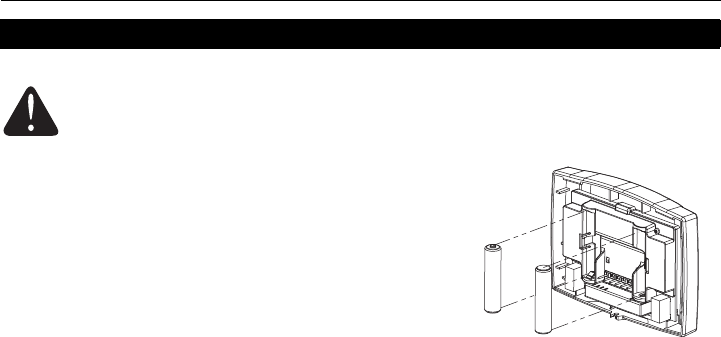
Install two fresh AAA batteries when Lo Batt flashes on
the screen. Lo Batt appears for 60 days before the
batteries are depleted.
Replace batteries once a year, or when you will be away
for more than a month.
Most settings are stored in non-volatile (permanent)
memory. Only the clock and the day must be set after you
replace the batteries.
Battery replacement
Set the System switch to Off before removing the batteries. Otherwise, the
heating/cooling system could remain activated even when batteries are
removed.
69-2420E_A.fm Page 16 Thursday, March 18, 2010 9:49 AM

RTH2510/RTH2410 Programmable Thermostat
17 69-2420ES—01
In case of difficulty
Screen is blank. • Ensure two fresh AAA alkaline batteries are correctly installed.
Temperature settings cannot be
changed.
• The System switch is off.
• You are setting the temperature outside its allowable range:
• Heat: 40°F to 90°F (4.5°C to 32°C)
• Cool: 50°F to 99°F (10°C to 37°C)
Cool On or Heat On is flashing. • The compressor protection delay is underway. Wait for the delay
to end (maximum of 5 minutes).
HI appears on the screen. • The ambient (measured) temperature is above 122°F (50°C).
LO appears on the screen. • The ambient (measured) temperature is below 32°F (0°C).
E1 appears on the screen. • The temperature sensor circuit is opened. Replace the thermostat.
E2 appears on the screen. • The temperature sensor circuit is shorted. Replace the thermostat.
69-2420E_A.fm Page 17 Thursday, March 18, 2010 9:49 AM
Operating Manual
69-2420ES—01 18
For assistance with this product, please visit http://yourhome.honeywell.com.
Or call Honeywell Customer Care toll-free at 1-800-468-1502.
To save time, before calling, proceed as follows:
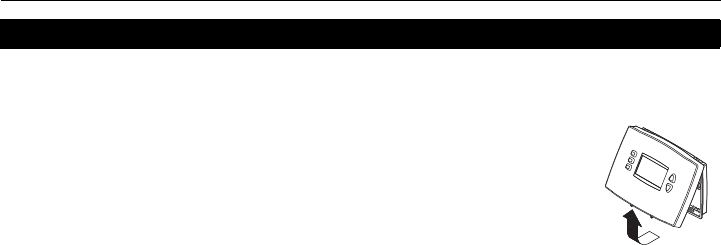
1) Loosen the locking screw at the bottom of the thermostat. Note that
the screw is captive and cannot be removed from the wallplate.
2) Separate the thermostat from the wallplate as per figure on the right.
3) Note your model number and date code on the thermostat’s
wallplate.
Customer assistance
69-2420E_A.fm Page 18 Thursday, March 18, 2010 9:49 AM

RTH2510/RTH2410 Programmable Thermostat
19 69-2420ES—01
Honeywell warrants this product, excluding battery, to be free from defects in the workmanship or
materials, under normal use and service, for a period of one (1) year from the date of purchase by the
consumer. If at any time during the warranty period the product is determined to be defective or
malfunctions, Honeywell shall repair or replace it (at Honeywell’s option).
If the product is defective,
(i) return it, with a bill of sale or other dated proof of purchase, to the place from which you purchased
it; or
(ii) call Honeywell Customer Care at 1-800-468-1502. Customer Care will make the determination
whether the product should be returned to the following address: Honeywell Return Goods, Dock 4
MN10-3860, 1885 Douglas Dr. N., Golden Valley, MN 55422, or whether a replacement product
can be sent to you.
This warranty does not cover removal or reinstallation costs. This warranty shall not apply if it is shown
by Honeywell that the defect or malfunction was caused by damage which occurred while the product
was in the possession of a consumer.
One-year limited warranty
69-2420E_A.fm Page 19 Thursday, March 18, 2010 9:49 AM

Operating Manual
69-2420ES—01 20
Honeywell’s sole responsibility shall be to repair or replace the product within the terms stated above.
HONEYWELL SHALL NOT BE LIABLE FOR ANY LOSS OR DAMAGE OF ANY KIND, INCLUDING
ANY INCIDENTAL OR CONSEQUENTIAL DAMAGES RESULTING, DIRECTLY OR INDIRECTLY,
FROM ANY BREACH OF ANY WARRANTY, EXPRESS OR IMPLIED, OR ANY OTHER FAILURE OF
THIS PRODUCT. Some states do not allow the exclusion or limitation of incidental or consequential
damages, so this limitation may not apply to you.
THIS WARRANTY IS THE ONLY EXPRESS WARRANTY HONEYWELL MAKES ON THIS
PRODUCT. THE DURATION OF ANY IMPLIED WARRANTIES, INCLUDING THE WARRANTIES OF
MERCHANTABILITY AND FITNESS FOR A PARTICULAR PURPOSE, IS HEREBY LIMITED TO THE
ONE-YEAR DURATION OF THIS WARRANTY.
Some states do not allow limitations on how long an implied warranty lasts, so the above limitation may
not apply to you. This warranty gives you specific legal rights, and you may have other rights which
vary from state to state.
If you have any questions concerning this warranty, please write to Honeywell Customer Relations,
1985 Douglas Dr, Golden Valley, MN 55422 or call 1-800-468-1502. In Canada, write to Retail
Products ON15-02H, Honeywell Limited/Honeywell Limitée, 35 Dynamic Drive, Toronto, Ontario M1V
4Z9.
69-2420E_A.fm Page 20 Thursday, March 18, 2010 9:49 AM

RTH2510/RTH2410 Programmable Thermostat
21 69-2420ES—01
69-2420E_A.fm Page 21 Thursday, March 18, 2010 9:49 AM

Automation and Control Solutions
Honeywell International Inc.
1985 Douglas Drive North
Golden Valley, MN 55422
Honeywell Limited
35 Dynamic Drive
Toronto, Ontario M1V 4Z9
http://yourhome.honeywell.com
® U.S. Registered Trademark
© 2010 Honeywell International Inc.
Printed in U.S.A.
69-2420ES—01 M.S. 03-10
69-2420E_A.fm Page 22 Thursday, March 18, 2010 9:49 AM
69-2420ES-01
RTH2510/RTH2410
Termostato programable
Manual del
usuario
69-2420S_A.fm Page -1 Thursday, March 18, 2010 9:58 AM

Este manual cubre los modelos RTH2410 y RTH2510.
Lea y conserve estas instrucciones
ADVERTENCIA: PELIGRO DE DAÑAR EL EQUIPO
Para evitar posibles daños en el compresor, el termostato no se debe utilizar en
Modo Enfriamiento cuando la temperatura exterior sea inferior a 50°F (10°C).
¿Asistencia?
Para obtener asistencia relacionada con este producto, se recomienda visitar
http://yourhome.honeywell.com
o llamar al número sin cargo del Servicio de Atención al Cliente de Honeywell:
1-800-468-1502
.
69-2420S_A.fm Page 0 Thursday, March 18, 2010 9:58 AM
Termostato programable RTH2510/RTH2410
Generalidades
Características del termostato...............2
Puesta en marcha rápida ......................3
Referencia rápida para los controles.....4
Referencia rápida para la pantalla ........5
Programación y funcionamiento
Ajuste del reloj.......................................6
Conmutador del sistema (Heat/Cool)....7
Conmutador del ventilador (Auto/On)....8
Uso del horario................................ 9-12
Cancelación temporaria del horario ....13
Cancelación permanente del horario ..14
Encendido anticipado..........................15
Protección del compresor....................15
Apéndices
Reemplazo de las pilas ...................... 16
En caso de dificultades....................... 17
Asistencia al cliente ............................ 18
Garantía limitada de un año ............... 19
Índice
El termostato está preprogramado y
listo para funcionar.
Referirse a la página 3 para un
encendido rápido.
69-2420S_A.fm Page 1 Thursday, March 18, 2010 9:58 AM

Manual del usuario
69-2420ES—01 2
Este nuevo termostato ha sido diseñado para brindar muchos años de funcionamiento
fiable y permitir un control climático fácil de usar con sólo apretar un botón.
Características
• Pantalla con luz de fondo de lectura fácil.
• Indica la temperatura ambiente (medida) en todo momento.
• Un sólo botón permite ver la temperatura del punto de ajuste.
• Horarios programables separados para cada día (programación de 7 días).
• Cancelación temporaria y permanente del horario.
• El encendido anticipado garantiza la temperatura adecuada en el momento adecuado.
• Protección del compresor incorporada.
Información sobre el termostato
69-2420S_A.fm Page 2 Thursday, March 18, 2010 9:58 AM

Termostato programable RTH2510/RTH2410
3 69-2420ES—01
Basta con llevar a cabo las tres etapas siguientes para poner el termostato en marcha:
Ajustar el reloj...................................................................................................página 6
Seleccionar calefacción o enfriamiento.............................................................página 7
Seleccionar el modo de funcionamiento del ventilador.....................................página 8
Su termostato viene preprogramado con configuraciones para ahorro de energía. Si no
desea usarlas, se puede:
Modificar el horario (RTH2510)....................................................................... página 11
Modificar el horario (RTH2410).......................................................................página 12
Cancelar el horario de manera temporaria .....................................................página 13
Cancelar el horario de manera permanente ...................................................página 14
El termostato está listo para funcionar
69-2420S_A.fm Page 3 Thursday, March 18, 2010 9:58 AM
Manual del usuario
69-2420ES—01 4
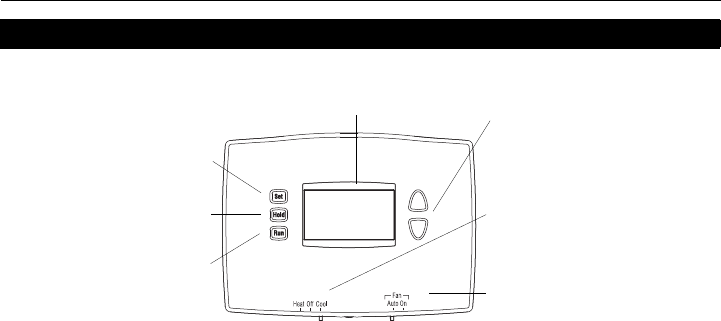
Referencia rápida para los controles
Conmutador del sistema
(ver la página 7).
•Cool: Modo Enfriamiento.
•Off: apagado.
•Heat: Modo Calefacción.
Conmutador del ventilador
(ver la página 8).
•On: el ventilador funciona
continuamente.
•Auto: el ventilador funciona sólo
cuando la calefacción o el
enfriamiento están encendidos.
Botones Arriba/Abajo
Presione para ajustar
la temperatura.
Pantalla
Se ilumina durante 12 segundos
cuando se presiona cualquier botón.
Presione para ajustar el
reloj, el día o el horario
(ver las páginas 6 y 11/12).
Presione para cancelar el
horario y mantener la
temperatura (ver la página 14).
Presione para activar (seguir)
el horario (ver la página 9).
69-2420S_A.fm Page 4 Thursday, March 18, 2010 9:58 AM
Termostato programable RTH2510/RTH2410
5 69-2420ES—01
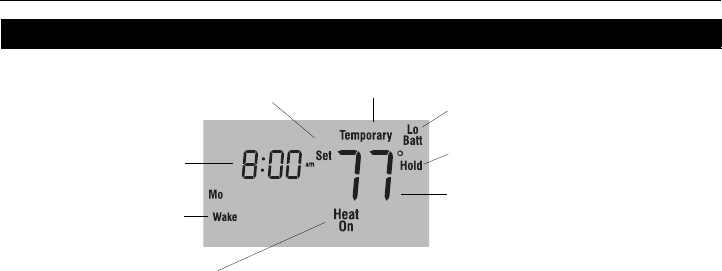
Referencia rápida para la pantalla
* Cuando Heat On o Cool On parpadean, la protección del compresor está activada (ver la página 15).
Temperatura
Indica normalmente la temperatura
ambiente (medida). Para ver la
temperatura del punto de ajuste, presione
el botón Arriba o Abajo una vez. La
temperatura del punto de ajuste.
aparecerá durante 5 segundos.
Estado del sistema
• Cool On: está activado el enfriamiento*.
• Heat On: está activada la calefacción*.
• Aux On: está activada la calefacción auxiliar.
Indicador de pilas débiles
(ver la página 16).
Indicador de punto de ajuste
Aparece cuando se visualiza el punto de
ajuste de la temperatura.
Reloj
Período del horario
Cancelación permanente del horario
(ver la página 14).
Cancelación temporaria del horario (ver
la página 13).
69-2420S_A.fm Page 5 Thursday, March 18, 2010 9:58 AM
Manual del usuario
69-2420ES—01 6
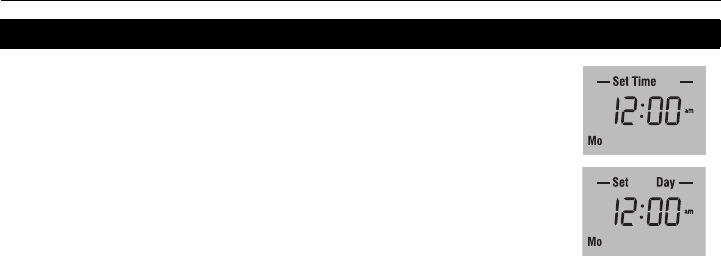
Presione el botón Set. En la pantalla aparecerá Set Time y la
hora parpadeará.
Presione el botón Arriba o Abajo para ajustar la hora.
Presione el botón Set otra vez. En la pantalla parpadeará
Set Day.
Presione el botón Arriba o Abajo para elegir el día de la
semana.
Presione el botón Run para guardar los cambios y salir. (Las
modificaciones se guardan también si no se presiona ningún
botón durante 60 segundos).
NOTA: el reloj ha perdido la configuración cuando la pantalla de la hora parpadea. Si el
termostato está siguiendo el horario, usará la configuración de temperatura programada
para el período Despertar de los lunes hasta que se vuelva a configurar el reloj.
Ajuste del reloj
69-2420S_A.fm Page 6 Thursday, March 18, 2010 9:58 AM
Termostato programable RTH2510/RTH2410
7 69-2420ES—01
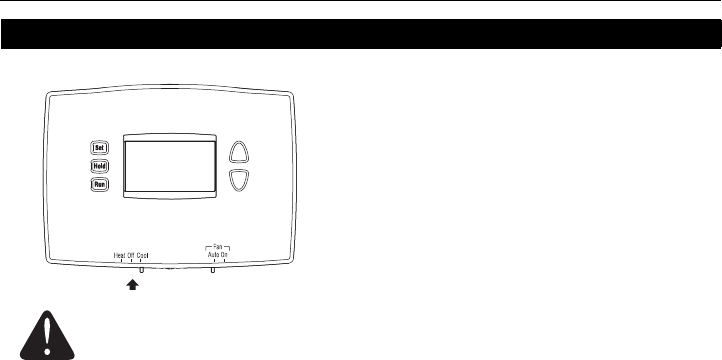
Conmutador del sistema (Calor/frío)
Utilice el conmutador del sistema para poner el
termostato en uno de los modos siguientes:
•Cool: el sistema está en Modo Enfriamiento.
•Off: el sistema está apagado.
•Heat: el sistema está en Modo Calefacción.
ADVERTENCIA: PELIGRO DE DAÑAR EL EQUIPO
No se debe usar el Modo Enfriamiento cuando la temperatura exterior es
inferior a los 50°F (10°C).
69-2420S_A.fm Page 7 Thursday, March 18, 2010 9:58 AM
Manual del usuario
69-2420ES—01 8
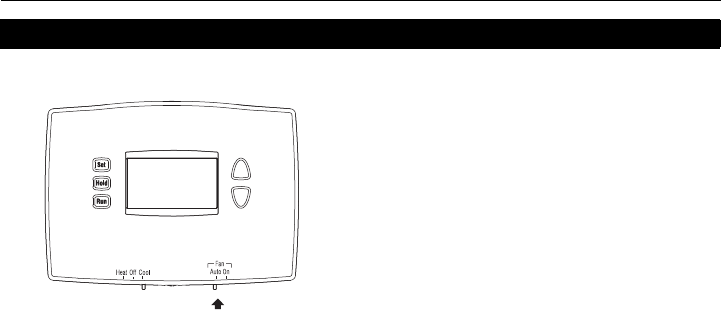
Conmutador del ventilador (Auto/On)
Use el conmutador del ventilador (Fan) para
escoger el funcionamiento del ventilador.
•Auto: el ventilador funciona únicamente cuando
la calefacción o el enfriamiento están activados
(ajuste más común).
•On: el ventilador funciona continuamente.
69-2420S_A.fm Page 8 Thursday, March 18, 2010 9:58 AM
Termostato programable RTH2510/RTH2410
9 69-2420ES—01
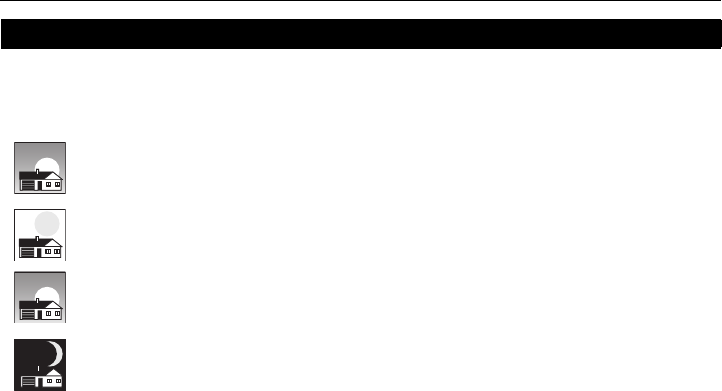
Es fácil programar su sistema que permite un ahorro máximo de energía. Usted puede
programar cuatro períodos de tiempo por día, con diferentes configuraciones para los días
de semana y los fines de semana.
Ahorre dinero con el ajuste de los horarios de programas
WAKE
6:00 am
70 º
Programe la hora en que se despierta y la temperatura que quiere
durante la mañana, hasta que usted se va de su casa.
LEAVE
8:00 am
62 º
Programe la hora en que usted se va de su casa y la temperatura
que quiere mientras no esté en su casa (por lo general, un nivel de
ahorro de energía).
RETURN
6:00 pm
70 º
Programe la hora en que regresa a su casa y la temperatura que
quiere durante la tarde hasta que se va a dormir.
SLEEP
10:00 pm
62 º
Programe la hora en que usted se va a dormir y la temperatura que
quiere durante toda la noche (por lo general, un nivel de ahorro de
energía).
69-2420S_A.fm Page 9 Thursday, March 18, 2010 9:58 AM
Manual del usuario
69-2420ES—01 10
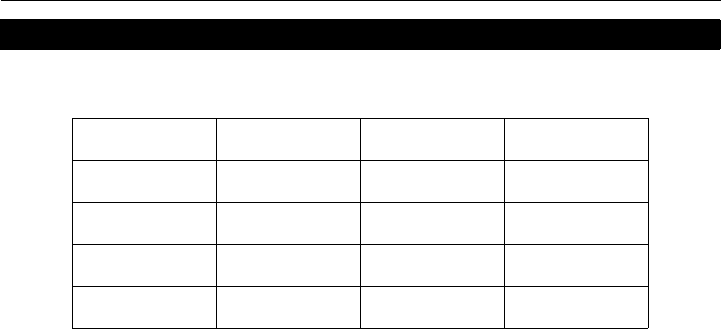
El termostato viene predeterminado con configuraciones para un programa de ahorro de
energía. Refiérase a las dos páginas siguientes si desea modificar la configuración.
Configuraciones para ahorro de energía
Período Hora de inicio Calefacción Enfriamiento
Despertar 6:00 AM 70°F (21°C) 78°F (25,5°C)
Salir 8:00 AM 62°F (16,5°C) 85°F (29,5°C)
Regresar 6:00 PM 70°F (21°C) 78°F (25,5°C)
Dormir 10:00 PM 62°F (16,5°C) 82°F (27,5°C)
69-2420S_A.fm Page 10 Thursday, March 18, 2010 9:58 AM
Termostato programable RTH2510/RTH2410
11 69-2420ES—01
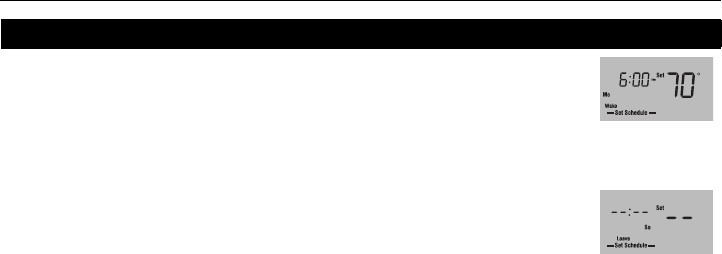
Presione el botón
Set
3 veces hasta que se vea
Set Schedule
. Aparece el
período Despertar
.
NOTA: para fijar otro período, presione el botón Set las veces necesarias hasta que
el período y el día deseados aparezcan y sus horas y temperaturas parpadeen.
Cuando la hora parpadee, presione Arriba o Abajo para ajustarla.
Presione el botón Set.
Para programar los ajustes de temperatura para el Modo Enfriamiento,
coloque primero el conmutador del sistema en Cool; para el Modo
Calefacción, coloque primero el conmutador del sistema en Heat.
Cuando la temperatura parpadee, presione Arriba o Abajo para ajustarla.
Presione el botón Set.
Repeta los pasos 2 a 6 para cada uno de los períodos siguientes.
Una vez hechas las modificaciones, presione Run para guardar y volver a la
pantalla normal. (Los cambios se guardan también automáticamente si no se
oprime ningún botón durante 60 segundos).
Modificación del horario (RTH2510)
Para saltear un
período (excepto
Despertar), presione
Hold por cuatro
segundos mientras
se visualiza el
período que se
desea saltear.
El período Despertar
está configurado los
lunesa las 6 a.m. y a
70°F.
69-2420S_A.fm Page 11 Thursday, March 18, 2010 9:58 AM
Manual del usuario
69-2420ES—01 12
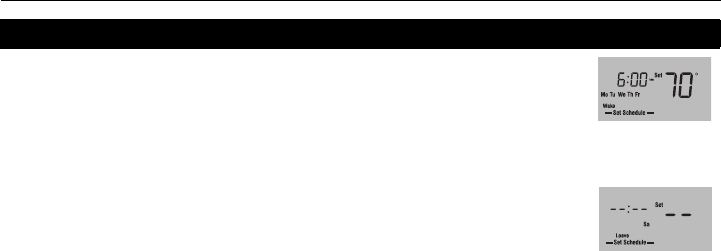
Presione el botón
Set
3 veces hasta que se vea
Set Schedule
. Aparece el
período Despertar
.
NOTA: para fijar otro período, presione el botón Set las veces necesarias hasta que
el período y el día deseados aparezcan y sus horas y temperaturas parpadeen.
Cuando la hora parpadee, presione Arriba o Abajo para ajustarla.
Presione el botón Set.
Para programar los ajustes de temperatura para el Modo Enfriamiento,
coloque primero el conmutador del sistema en Cool; para el Modo
Calefacción, coloque primero el conmutador del sistema en Heat.
Cuando la temperatura parpadee, presione Arriba o Abajo para ajustarla.
Presione el botón Set.
Repeta los pasos 2 a 6 para cada uno de los períodos siguientes.
Una vez hechas las modificaciones, presione Run para guardar y volver a la
pantalla normal. (Los cambios se guardan también automáticamente si no se
oprime ningún botón durante 60 segundos).
Modificación del horario (RTH2410)
Para saltear un
período (excepto
Despertar), presione
Hold por cuatro
segundos mientras
se visualiza el
período que se
desea saltear.
El período Despertar
está configurado los
días de semana a
las 6 a.m. y a 70°F.
69-2420S_A.fm Page 12 Thursday, March 18, 2010 9:58 AM
Termostato programable RTH2510/RTH2410
13 69-2420ES—01
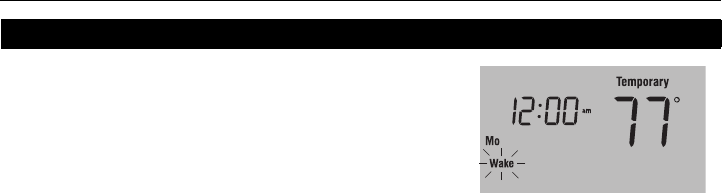
Para ignorar temporariamente el horario, presione el
botón Arriba o Abajo hasta que se vea la temperatura
deseada en pantalla. Aparecerá el mensaje Temporary
y el período en curso parpadeará para indicar que ha
sido cancelado. La nueva temperatura estará vigente
hasta que comience el próximo período.
NOTA: Al presionar el botón Arriba o Abajo una vez se visualizará el punto de ajuste de la
temperatura. Para cambiarlo, presione cualquiera de los dos botones más de una vez.
Presione el botón Run si se desea cancelar el ajuste temporario antes de comenzar el
período siguiente.
Cancelación temporaria del horario
69-2420S_A.fm Page 13 Thursday, March 18, 2010 9:58 AM
Manual del usuario
69-2420ES—01 14
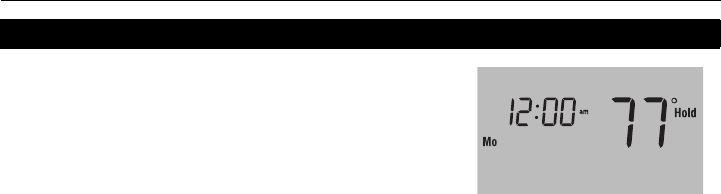
Para cancelar el horario de manera permanente,
presione el botón Arriba o Abajo hasta que aparezca
en pantalla la temperatura deseada. Presione entonces
el botón Hold para mantener la nueva temperatura de
manera indefinida. La palabra Hold aparecerá en la
pantalla.
Presione el botón Run si se desea anular la cancelación y retomar el horario. La palabra
Hold desaparecerá y el termostato retomará la temperatura programada para el período
corriente.
Cancelación permanente del horario
69-2420S_A.fm Page 14 Thursday, March 18, 2010 9:58 AM

Termostato programable RTH2510/RTH2410
15 69-2420ES—01
El encendido anticipado le permite al termostato "aprender" cuánto tiempo le toma a su sistema
de calefacción o aire acondicionado alcanzar la temperatura establecida. Sólo hay que
programar las horas y las temperaturas deseadas en el horario. El termostato determinará
cuándo activar la calefacción o el enfriamiento para que la temperatura deseada se alcance a la
hora establecida.
Ejemplo: si se fija la hora de Despertar a las 6 a.m. y la temperatura a 70 °F (21 °C), la calefacción
se encenderá antes de la hora fijada, para alcanzar los 70 °F (21 °C) al despertar a las 6 a.m.
El termostato tiene una función que protege el compresor del sistema de aire acondicionado o
de bomba de calor. El compresor puede dañarse si vuelve a encenderse inmediatamente
después de apagarse. Esta función lo fuerza a esperar 5 minutos antes de volver a entrar en
funcionamiento. Durante este tiempo, en la pantalla parpadeará el mensaje de Cool On o Heat
On. Una vez transcurridos los 5 minutos de seguridad, el mensaje dejará de parpadear y el
compresor se pondrá en marcha.
Encendido anticipado
Protección del compresor incorporada
69-2420S_A.fm Page 15 Thursday, March 18, 2010 9:58 AM
Manual del usuario
69-2420ES—01 16
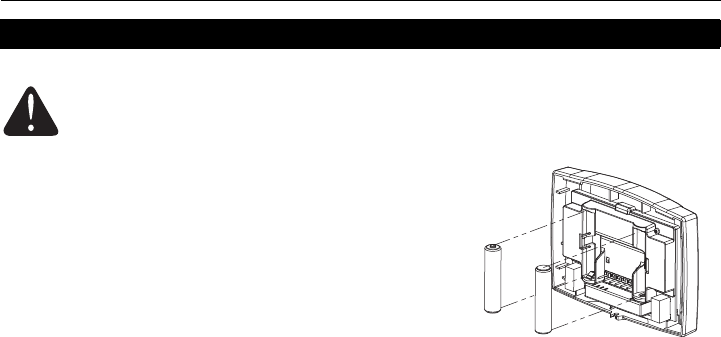
Instale dos pilas AAA nuevas cuando Lo Batt parpadee
en la pantalla. El icono aparecerá 60 días antes de que
las pilas estén completamente descargadas.
Reemplace las pilas una vez por año o luego de una
ausencia de más de un mes.
La mayor parte de los datos de la configuración están
almacenados en la memoria no volátil (permanente).
Sólo el reloj y la fecha deben ajustarse después del
reemplazo de las pilas.
Reemplazo de las pilas
Ponga el conmutador del sistema en OFF antes de retirar las pilas. De lo
contrario, el sistema de calefacción/enfriamiento puede permanecer activado
aun cuando se hayan sacado las baterías.
69-2420S_A.fm Page 16 Thursday, March 18, 2010 9:58 AM

Termostato programable RTH2510/RTH2410
17 69-2420ES—01
En caso de dificultades
No aparece nada en la pantalla. • Verifique que las dos pilas AAA estén cargadas y correctamente instaladas.
No puede modificarse la
temperatura.
• El conmutador del sistema está apagado (Off).
• La temperatura está fuera del margen permitido:
• Calefacción: 40 °F a 90 °F (4,5 °C a 32 °C)
• Enfriamiento: 50 °F a 99 °F (10 °C a 37 °C)
Cool On o Heat On parpadean. • El lapso de protección del compresor está en curso y hay que esperar que
termine (máximo de 5 minutos).
HI aparece en la pantalla. • La temperatura ambiente (medida) es superior a 122 °F (50 °C).
LO aparece en la pantalla • La temperatura ambiente (medida) es inferior a 32 °F ( 0 °C).
E1 aparece en la pantalla. • El circuito de temperatura de la sonda está abierto. Reemplace el
termostato
E2 aparece en la pantalla. • La sonda de temperatura está en corto circuito. Reemplace el termostato.
69-2420S_A.fm Page 17 Thursday, March 18, 2010 9:58 AM
Manual del usuario
69-2420ES—01 18
Para obtener asistencia con este producto, se recomienda visitar el sitio
http://yourhome.honeywell.com o llamar al Servicio de Asistencia
al Cliente de Honeywell al número sin cargo 1-800-468-1502.
Para ahorrar tiempo, proceda de la siguiente manera antes de llamar:
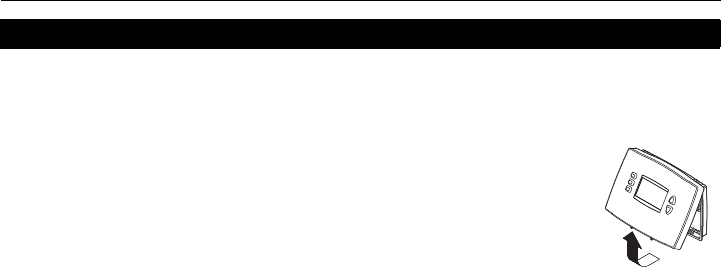
1) Afloje el tornillo en la base del termostato. Observe que el tornillo
está retenido y no se podrá retirar de la placa mural.
2) Separe el termostato de la placa mural, como se indica en la figura
de la derecha.
3) Anote el número de modelo y el código de la fecha que figuran en la
placa mural del termostato.
Asistencia al cliente
69-2420S_A.fm Page 18 Thursday, March 18, 2010 9:58 AM

Termostato programable RTH2510/RTH2410
19 69-2420ES—01
Honeywell garantiza este producto, a excepción de la batería, por el término de un (1) año contra cualquier
defecto de fabricación o de los materiales, a partir de la fecha de compra por parte del consumidor, en
condiciones normales de uso y servicio. Si en cualquier momento durante el período de garantía se verifica
que el producto tiene un defecto o mal funcionamiento, Honeywell lo reparará o reemplazará (a elección de
Honeywell).
Si el producto tiene defectos,
(i) devuélvalo, con la factura de venta u otra prueba de compra fechada, al lugar donde lo compró; o
(ii) comuníquese con el Centro de atención al cliente de Honeywell al 1-800-468-1502. El servicio de
atención al cliente decidirá si se debe devolver el producto a la siguiente dirección: Devolución de
mercaderías de Honeywell, Dock 4 MN10-3860, 1885 Douglas Dr. N., Golden Valley, MN 55422, o si se le
puede enviar un producto en reemplazo.
Esta garantía no cubre los costos de extracción o reinstalación. Esta garantía no se aplicará si Honeywell
demuestra que el defecto o mal funcionamiento estaba causado por daños ocurridos mientras el producto
estaba en posesión de un consumidor.
Garantía limitada de un año
69-2420S_A.fm Page 19 Thursday, March 18, 2010 9:58 AM

Manual del usuario
69-2420ES—01 20
La única responsabilidad de Honeywell será reparar o reemplazar el producto dentro de los plazos
establecidos anteriormente. HONEYWELL NO RESPONDERÁ POR LA PÉRDIDA O DAÑO DE NINGÚN
TIPO, INCLUIDO EL DAÑO INCIDENTAL O INDIRECTO DERIVADO, DIRECTA O INDIRECTAMENTE,
DEL INCUMPLIMIENTO DE LAS GARANTÍAS, EXPRESAS O IMPLÍCITAS, O DE OTRAS FALLAS DE
ESTE PRODUCTO. Algunos estados no permiten la exclusión o limitación del daño incidental o indirecto,
entonces, esta limitación puede no resultar aplicable a su caso.
LA PRESENTE GARANTÍA ES LA ÚNICA GARANTÍA EXPRESA QUE HONEYWELL PROPORCIONA
RESPECTO DE ESTE PRODUCTO. LA DURACIÓN DE LAS GARANTÍAS IMPLÍCITAS, INCLUIDAS LAS
GARANTÍAS DE COMERCIABILIDAD Y APTITUD PARA UN OBJETIVO PARTICULAR, ESTA LIMITADA A
LA DURACIÓN DE UN AÑO DE LA PRESENTE GARANTÍA.
Algunos estados no permiten las limitaciones sobre la duración del período de una garantía implícita,
entonces la limitación anterior puede no resultar aplicable a su caso. Esta garantía le brinda derechos
legales específicos, y usted podrá tener otros derechos que varían según el estado.
Si tiene preguntas sobre la presente garantía, sírvase escribir a Honeywell Customer Relations, 1985
Douglas Dr, Golden Valley, MN 55422 o llamar al 1-800-468-1502. En Canadá, escriba a Retail Products
ON15-02H, Honeywell Limited/Honeywell Limitée, 35 Dynamic Drive, Toronto, Ontario M1V 4Z9.
69-2420S_A.fm Page 20 Thursday, March 18, 2010 9:58 AM

Termostato programable RTH2510/RTH2410
21 69-2420ES—01
69-2420S_A.fm Page 21 Thursday, March 18, 2010 9:58 AM

.
Soluciones para automatización y control
Honeywell International Inc.
1985 Douglas Drive North
Golden Valley, MN 55422
Honeywell Limited
35 Dynamic Drive
Toronto, Ontario M1V 4Z9
http://yourhome.honeywell.com
® Marca Registrada en los E.U.A
© 2010 Honeywell International Inc.
Impreso en EE.UU.
69-2420ES—01 M.S. 03-10
69-2420S_A.fm Page 22 Thursday, March 18, 2010 9:58 AM
