Hongnanke Communication Equipment H-680 Bluetooth Stereo Headset User Manual H 680
Shenzhen Hongnanke Communication Equipment Co., Ltd. Bluetooth Stereo Headset H 680
User Manual

www.oricore.com
H-680
蓝牙立体声耳机
USER GUIDE

Thank you for selecting Bluetooth headset H-680
The H-680 lets you listen to stereo music through your Bluetooth - enabled mobile
phone or music player,while ensuring you never miss a call.
Use the 2.5mm music cable for wired music listening from your MP3 or PC.
Folding style is more fashionable and convenient.
H-680 Bluetooth headset with stylish patent design, perfect construction, stereo
R, L model, Let you enjoy the wonderful music.
H-680 Bluetooth headset is compliant with Bluetooth Version 2.1 +EDR
specification,and is compatible with latest mobile phones supporting Bluetooth
headset or handsfree profiles.
Getting Started H-680
Charging Your Headset
Turning Your Headset On and Off
Paring Your Headset
Wearing Your Headset
Using Your Headset
Transferring a Call
Connected With the Last Paired Device
Use the 2.5mm Stereo Music Cable
Troubleshooting
Safety Information
Care and Maintenance
Products Specifications
Contents
...................................................................................
................................................................................
...................................................................
.....................................................................................
..................................................................................
....................................................................................
........................................................................................
..........................................................
................................................................
...........................................................................................
.......................................................................................
..................................................................................
................................................................................
3
3
3
4
5
5
7
8
8
8
9
10
11
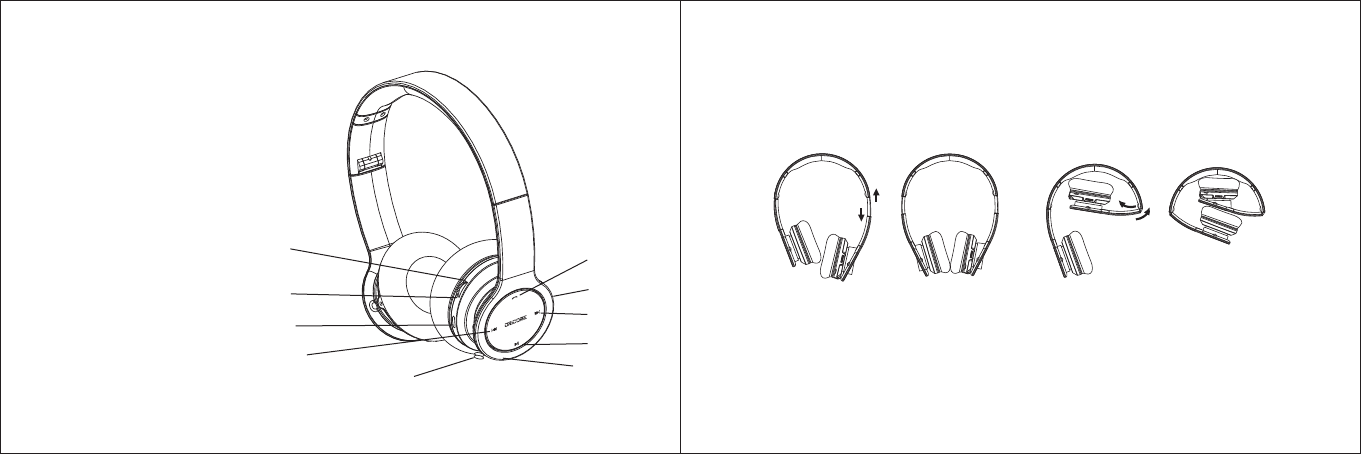
- 1 - - 2 -
1、
2、
3、
4、
5、Charging Jack
6、
7、Play/Pause
8、
9、Microphone
10、Music Cable Faucet
Volume “+”
Volume “-”
Multi-function Button (MFB)
Indicator
Next track key
Last track key
4
9
7
8
3
10
1
25
6
H-680 Chart
Familiar with Your Bluetooth Headset
Tensile Display Folding Display

Getting Started H-680
To use your H-680 Stereo Bluetooth headset,please follow the steps below,
1.Ensure your Bluetooth headset is fully charged.
2.Pair your charged Bluetooth headset with a Bluetooth-enable mobile phone prior
to use Bluetooth headset first time,it is suggested that you fully recharge the
battery first.
Charging Your Headset
Rechargeable battery with Micro-USB charging option from AC power supply,
PC via USB cable, The battery indicator will turn red when charging.
Turning on the headset
Press and hold the MFB for 3 seconds until a "beep" is heard.About paring
function, please refer to "Paring Your Headset".
Pairing Your Headset
The headset works with Bluetooth-enable phones, prior to using and pairing your
headset for the first time ,please check if your mobile phone is Bluetooth-enable.
The pairing instructions for typical Bluetooth-enable mobile phone are explained
on the next page.The headset pairing procedure may vary depending on the
setting of your mobile phone.Please contact the manufacture of your mobile
phone or its agent further information.
Pairing Your Headset
1. Press the headset and the mobile phone where they are easily viewable and
no more than one meter apart.
2. Ensure the headset is turned off.
3. Please press the MFB 2 second until you hear“Beep”Tone,the blue led long
show,the headset being pariing,
4. Activate your mobile phones's Bluetooth function,please refer to your mobile
phone user guide for details.
5. Set the mobile phone to search for Bluetooth devices within range and select
“H-680”from the list of devices shown.
6. Enter password “0000”and press“ok”to pair your headset with
mobile phone ,when the pairing is completed , the headset enters in standby
- 3 - - 4 -

mode.
If your phone’s Bluetooth version is 2.1, it is no need to enter the passkey
when pairing.
7. Now you can use your Bluetooth headset to listen to the music and make a call.
Some mobile phone ,when they are re-started ,the headset will be connected
with the mobile phone automatically.
Wearing Your Headset
Please note the Left / Right wearing indicator inside the headband.
Alternatively always wear the H-680 with the MFB on your right.
Using Your Headset
Answering a Call
When a call is coming,the ring tone will be heard by headset, Press the MFB once
to accept the call or answer the call via your mobile phone in normal way.
Rejecting a Call
Press the MFB for 2 seconds to reject the incoming call.
Ending a Call
While speaking,Press the MFB once to end the call or hang up on your mobile
phone.
Adjusting the Volume
(Being calling or playing music) Turn up the volume Wheel to raise up the
volume,each turning up on wheel,the volume will be up,until to the MAX and
you will hear "DU" alarm,Turn down the volume Wheel to raise down the
volume,each turning up on wheel,the volume will be down,until to the bottom and
you will hear “DU” alarm,
Play/Pause Music
When the Bluetooth headset was connected with stereo mobile phone , press
Play/Pause once to play music and press it once again to pause music .
(Attention:your mobile phone must support A2DP profile.)
- 5 - - 6 -
Stopping the Music
While playing music,press the "Play/Pause” for 2 seconds to stop the music.
Last Track
Connected with stereo mobile phone, Be playing, press the "Last Track " key
to select the last track.
Next Track
Connected with stereo mobile phone, Be playing, press the "Next Track " key
to select the next track.
Transferring a Call
While speaking,long press the "Play/Pause” to transfer the call from your
headset toyour mobile phone(Please check if your mobile phone has this
function),
repeat the above procedure to transfer the call from mobile phone to your
headset.
Connected With the Last Paired Device
The headset will connect with the last paired device,if the pairing is successful ,it
enters the standby status, if the pairing can not be completed within 5 minutes
after the paring mode has been activated, the headset will turn off automatically.
Use the 2.5mm Stereo Music Cable
Your Bluetooth headset connected with the mobile phone,you also can listen to
music from PC from via 2.5mm stereo music cable when a call is coming,the music
and call will automatically switch,then press the MFB once to answer the call.
Troubleshooting
If you are unable to connect your headset and mobile phone, please try the
following:
Ensure your headset is turned on and is fully charged.
Ensure the headset is paired with your mobile phone.
Ensure your mobile phone's Bluetooth feature is activated. Please refer to your
mobile phone used guide for specific instruction.
- 7 - - 8 -
Ensure the headset is within a 10 meter range of your mobile headset and there
are no obstructions, such as walls or other electronic devices in between.
If the above steps do not solve your problem, please recharge the headset and
remove your mobile phone battery for a short time.
Safety Information
Check local laws regarding the use of mobile phones and headsets while
driving. If you use the headset while driving, ensure your attention and
focus remains on the road and you drive in a responsible and safe manner.
Never allow children play with the headset small parts may be a choking hazard.
Observe all signs that require an electrical device or RF radio product to be
switched off in designated areas.
(These could include hospitals, blasting areas, and potentially explosive environments.)
Turn off your headset prior to boarding an aircraft. Do not use your headset
in an aircraft.
Never mount or store your headset over any air bag development area as
serious injury may result when the air bag deploys.
No not open or mutilate the built-in battery.
Dispose of batteries according to local regulations. Do not dispose as
household waste.
Care and Maintenance Headset
Consider turning your headset off before placing it in your pocket or bag. If
the MBF is accidentally activated., your mobile phone may place an unintended
call.
Do not expose the headset to liquid, moisture or humidity as it is not
waterproof.
Do not use abrasive cleaning solvents to clean the headset.
Do not expose the headset to extreme temperature conditions. The best store
temperature range is from -10 to +60, otherwise the life of the headset will be
influenced.
Do not dispose of the headset is a fire as it this may result in an explosion.
Do not bring your headset into contact with sharp objects as this will cause
scratched and damage.
Do not attempt to disassemble the headset as it dose not contain serviceable
components..
- 9 - - 10 -
Do not attempt to Disassemble the headset.
If you do not use the headset for long periods, be sure to store it in a dry
place, free form extreme temperature conditions and dust.
Product Specifications
Bluetooth Version: V2.1+EDR
Frequency: 2400.0-2483.5MHz
Bluetooth Supported: Headset,Handsfree, A2DP and AVRCP
Chipset: CSR
Operation Range: 10m
Talk Time: Up to 10 Hour
Music Playing Time: Up to 7 hour
Stand-by Time: Up to 250 hours
Weight: 127 g
May vary due to the user's habit,different modes of operation,and mobile
phone settings.
This manual is just for reference. If the specification and design of the product need to be
changed, we will do it without notification. If there is some tiny difference between the picture and
the real product, please take the real product as correct.
- 11 -
FCC ID: XELH-680
IMPORTANT REGULATORY INFORMATION
This device complies with Part 15 of the FCC Rules: Operation is subject to the
following two conditions:
1. This device may not cause harmful interference
and
2. This device must accept any interference that is received, including
any interference that may cause undesired operation.
WARNING:
Changes or modifications to this unit not expressly approved by the party
responsible for compliance could void the user’s authority to operate the
equipment.