Hopkins BB002 SPREAD SPECTRUM TRANSMITTER User Manual USERS MANUAL

Hopkins Manufacturing Corporation SPREAD SPECTRUM TRANSMITTER USERS MANUAL

USERS MANUAL

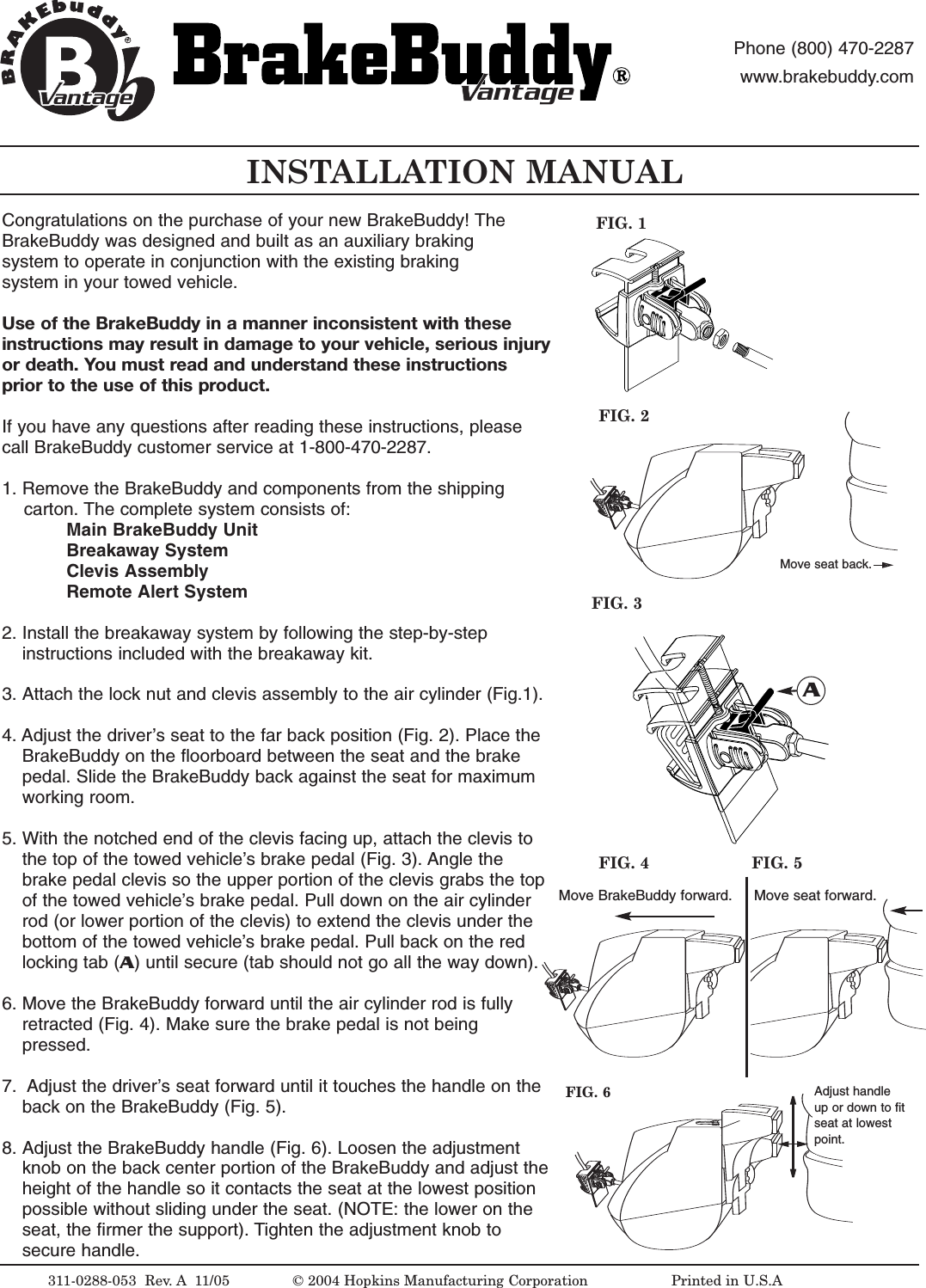
INSTALLATION MANUAL311-0288-053  Rev. A 11/05FIG. 2FIG. 1©2004 Hopkins Manufacturing Corporation                   Printed in U.S.AMove seat back.antageantagePhone (800) 470-2287www.brakebuddy.comantageantageCongratulations on the purchase of your new BrakeBuddy! The BrakeBuddy was designed and built as an auxiliary braking system to operate in conjunction with the existing braking system in your towed vehicle.Use of the BrakeBuddy in a manner inconsistent with these instructions may result in damage to your vehicle, serious injuryor death. You must read and understand these instructionsprior to the use of this product. If you have any questions after reading these instructions, pleasecall BrakeBuddy customer service at 1-800-470-2287.1. Remove the BrakeBuddy and components from the shipping carton. The complete system consists of:Main BrakeBuddyUnitBreakaway SystemClevis AssemblyRemote Alert System2. Install the breakaway system by following the step-by-step instructions included with the breakaway kit.3. Attach the lock nut and clevis assembly to the air cylinder (Fig.1). 4. Adjust the driver’s seat to the far back position (Fig. 2). Place the BrakeBuddy on the floorboard between the seat and the brake pedal. Slide the BrakeBuddy back against the seat for maximum working room.5. With the notched end of the clevis facing up, attach the clevis to the top of the towed vehicle’s brake pedal (Fig. 3). Angle the brake pedal clevis so the upper portion of the clevis grabs the top of the towed vehicle’s brake pedal. Pull down on the air cylinder rod (or lower portion of the clevis) to extend the clevis under the bottom of the towed vehicle’s brake pedal. Pull back on the red locking tab (A)until secure (tab should not go all the way down). 6. Move the BrakeBuddy forward until the air cylinder rod is fully retracted (Fig. 4). Make sure the brake pedal is not being pressed. 7. Adjust the driver’s seat forward until it touches the handle on the back on the BrakeBuddy (Fig. 5).8. Adjust the BrakeBuddy handle (Fig. 6). Loosen the adjustment knob on the back center portion of the BrakeBuddy and adjust theheight of the handle so it contacts the seat at the lowest position possible without sliding under the seat. (NOTE: the lower on the seat, the firmer the support). Tighten the adjustment knob to secure handle. FIG. 3AMove BrakeBuddy forward. Move seat forward.FIG. 4 FIG. 5FIG. 6 Adjust handleup or down to fitseat at lowestpoint.
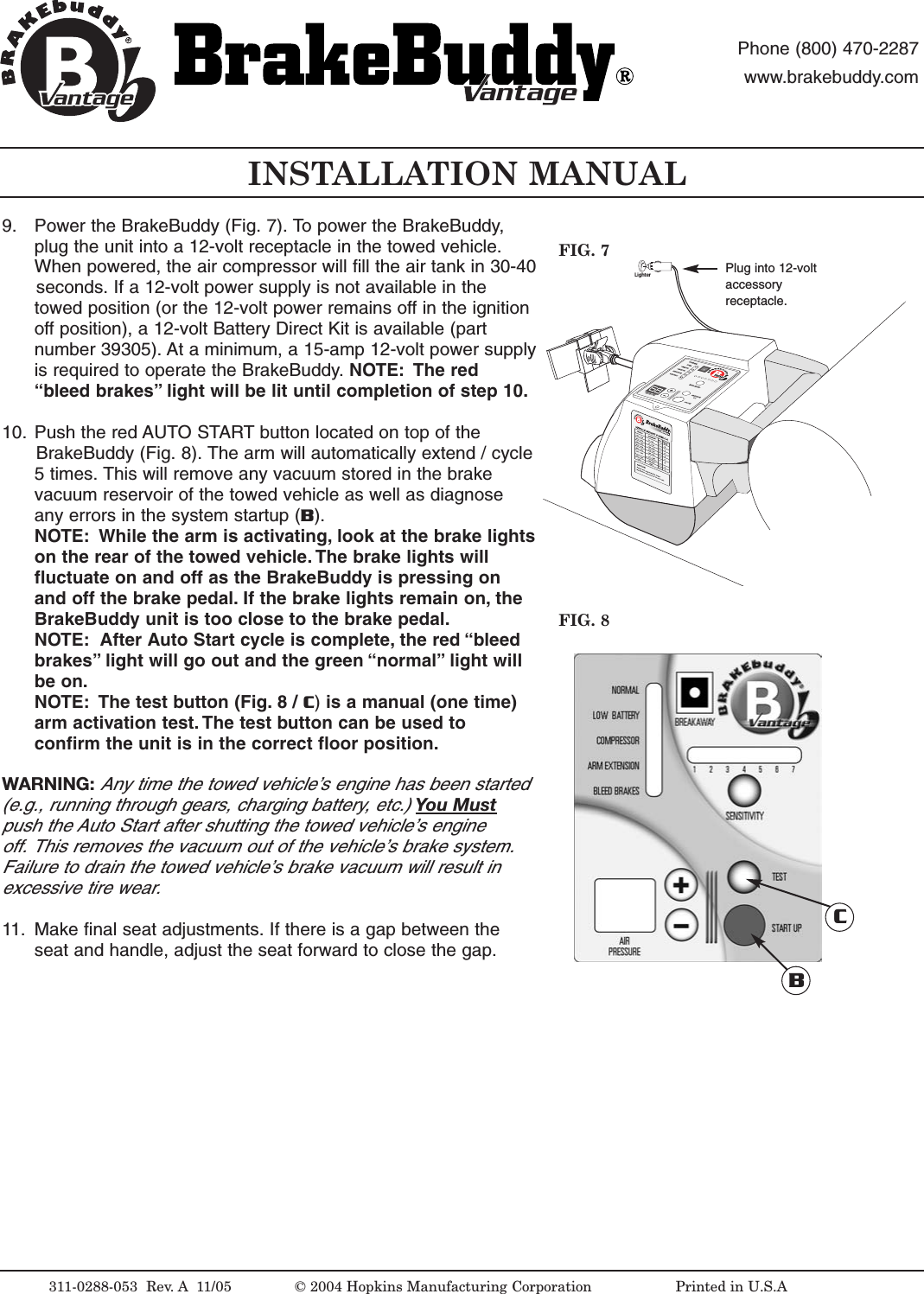
LighterINSTALLATION MANUALFIG. 8FIG. 7311-0288-053  Rev. A 11/05 © 2004 Hopkins Manufacturing Corporation                   Printed in U.S.APlug into 12-voltaccessoryreceptacle.antageantagePhone (800) 470-2287www.brakebuddy.comantageantage9. Power the BrakeBuddy (Fig. 7). To power the BrakeBuddy,plug the unit into a 12-volt receptacle in the towed vehicle.When powered, the air compressor will fill the air tank in 30-40seconds. If a 12-volt power supply is not available in thetowed position (or the 12-volt power remains off in the ignitionoff position), a 12-volt Battery Direct Kit is available (partnumber 39305). At a minimum, a 15-amp 12-volt power supplyis required to operate the BrakeBuddy. NOTE: The red“bleed brakes” light will be lit until completion of step 10.10. Push the red AUTO START button located on top of the BrakeBuddy (Fig. 8). The arm will automatically extend / cycle5times. This will remove any vacuum stored in the brakevacuum reservoir of the towed vehicle as well as diagnoseany errors in the system startup (B). NOTE: While the arm is activating, look at the brake lightson the rear of the towed vehicle. The brake lights willfluctuate on and off as the BrakeBuddy is pressing onand off the brake pedal. If the brake lights remain on, theBrakeBuddy unit is too close to the brake pedal.NOTE: After Auto Startcycle is complete, the red “bleedbrakes” light will go out and the green “normal” light willbe on.NOTE: The test button (Fig. 8 / C)is a manual (one time)arm activation test. The test button can be used toconfirm the unit is in the correct floor position.WARNING:Any time the towed vehicle’sengine has been started (e.g., running through gears, charging battery, etc.) You Mustpush the Auto Start after shutting the towed vehicle’s engine off. This removes the vacuum out of the vehicle’s brake system. Failure to drain the towed vehicle’s brake vacuum will result in excessive tire wear.11. Make final seat adjustments. If there is a gap between theseat and handle, adjust the seat forward to close the gap.BC
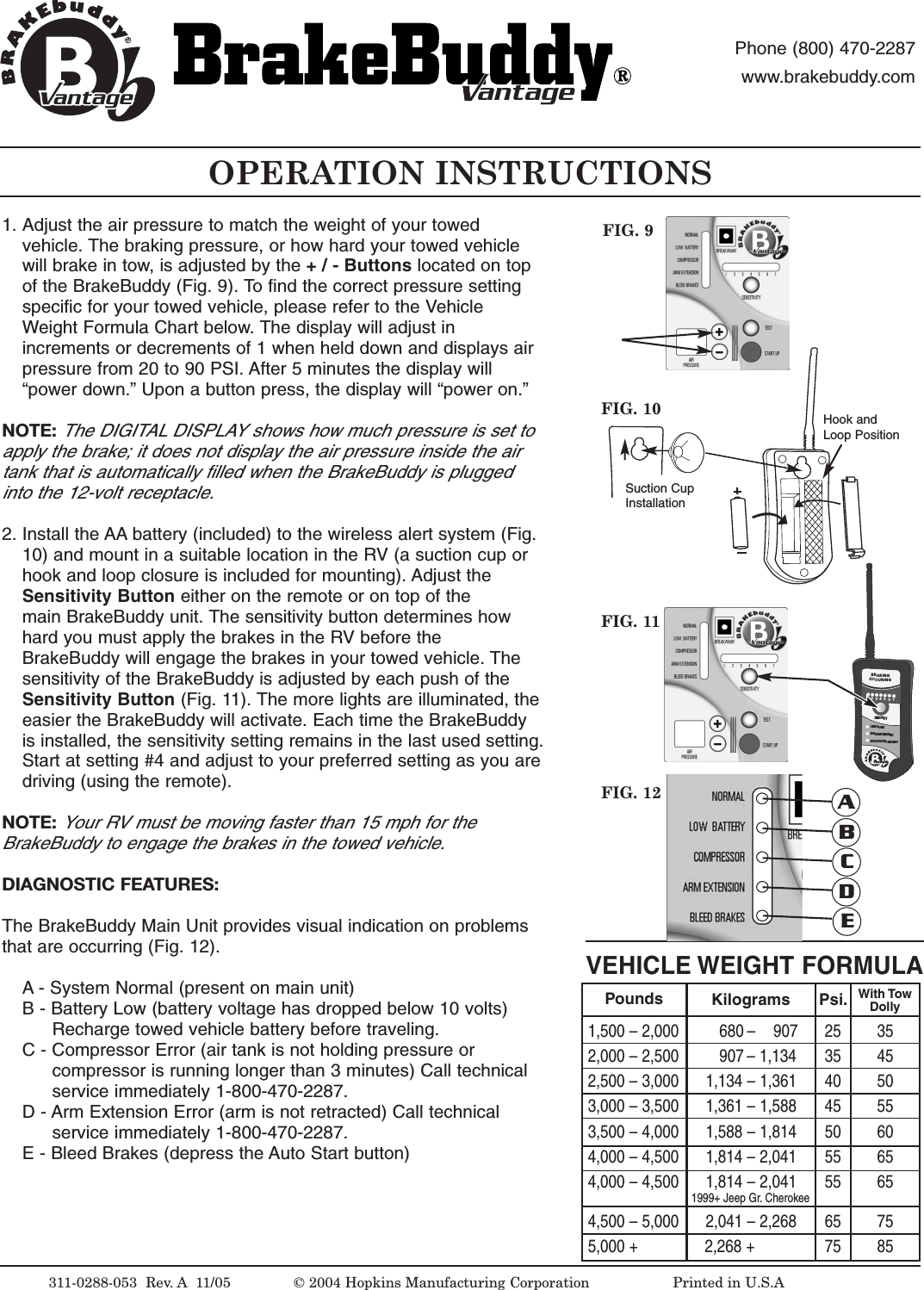
OPERATION INSTRUCTIONSFIG. 9VEHICLE WEIGHT FORMULA1,500 – 2,000         680 –    907 25  352,000 – 2,500         907 –1,134 35 452,500 – 3,000      1,134 – 1,361 40 503,000 – 3,500      1,361 – 1,588 45 553,500 – 4,000      1,588 – 1,814 50 604,000 – 4,500      1,814 – 2,041 55 654,000 – 4,500      1,814 – 2,041 55 651999+ Jeep Gr. Cherokee4,500 – 5,000      2,041 – 2,268 65 755,000 +               2,268 + 75 85Pounds Kilograms Psi. With TowDolly311-0288-053  Rev.A 11/05 ©2004 Hopkins Manufacturing Corporation                   Printed in U.S.AantageantagePhone (800) 470-2287www.brakebuddy.comantageantage1. Adjust the air pressure to match the weight of your towed vehicle. The braking pressure, or how hard your towed vehicle will brake in tow, is adjusted by the +/-Buttons located on top of the BrakeBuddy (Fig. 9). To find the correct pressure setting specific for your towed vehicle, please refer to the Vehicle Weight Formula Chart below. The display will adjust in increments or decrements of 1 when held down and displays air pressure from 20 to 90 PSI. After 5 minutes the display will “power down.” Upon a button press, the display will “power on.”NOTE:The DIGITAL DISPLAY shows how much pressure is set toapply the brake; it does not display the air pressure inside the airtank that is automatically filled when the BrakeBuddy is pluggedinto the 12-volt receptacle.2. Install the AA battery (included) to the wireless alert system (Fig. 10) and mount in a suitable location in the RV (a suction cup or hook and loop closure is included for mounting). Adjust the Sensitivity Button either on the remote or on top of the main BrakeBuddy unit. The sensitivity button determines how hard you must apply the brakes in the RVbefore the BrakeBuddy will engage the brakes in your towed vehicle. The sensitivity of the BrakeBuddy is adjusted by each push of the Sensitivity Button (Fig. 11). The more lights are illuminated, theeasier the BrakeBuddy will activate. Each time the BrakeBuddy is installed, the sensitivity setting remains in the last used setting.Start at setting #4 and adjust to your preferred setting as you aredriving (using the remote).NOTE:Your RV must be moving faster than 15 mph for the BrakeBuddy to engage the brakes in the towed vehicle.DIAGNOSTIC FEATURES:The BrakeBuddy Main Unit provides visual indication on problemsthat are occurring (Fig. 12).A - System Normal (present on main unit)B-Battery Low (battery voltage has dropped below 10 volts) Recharge towed vehicle battery before traveling.C-Compressor Error (air tank is not holding pressure or compressor is running longer than 3 minutes) Call technical service immediately 1-800-470-2287.D - Arm Extension Error (arm is not retracted) Call technical service immediately 1-800-470-2287.E-Bleed Brakes (depress the Auto Start button)FIG. 10FIG. 111234BRAKINGOCCURINGSENSITIVITYCHECK BB UNITBREAKAWAY EMERGENCYREPLACEBATTERYON REMOTE567VantageFIG. 12 ABCDESuction CupInstallationHook andLoop Position
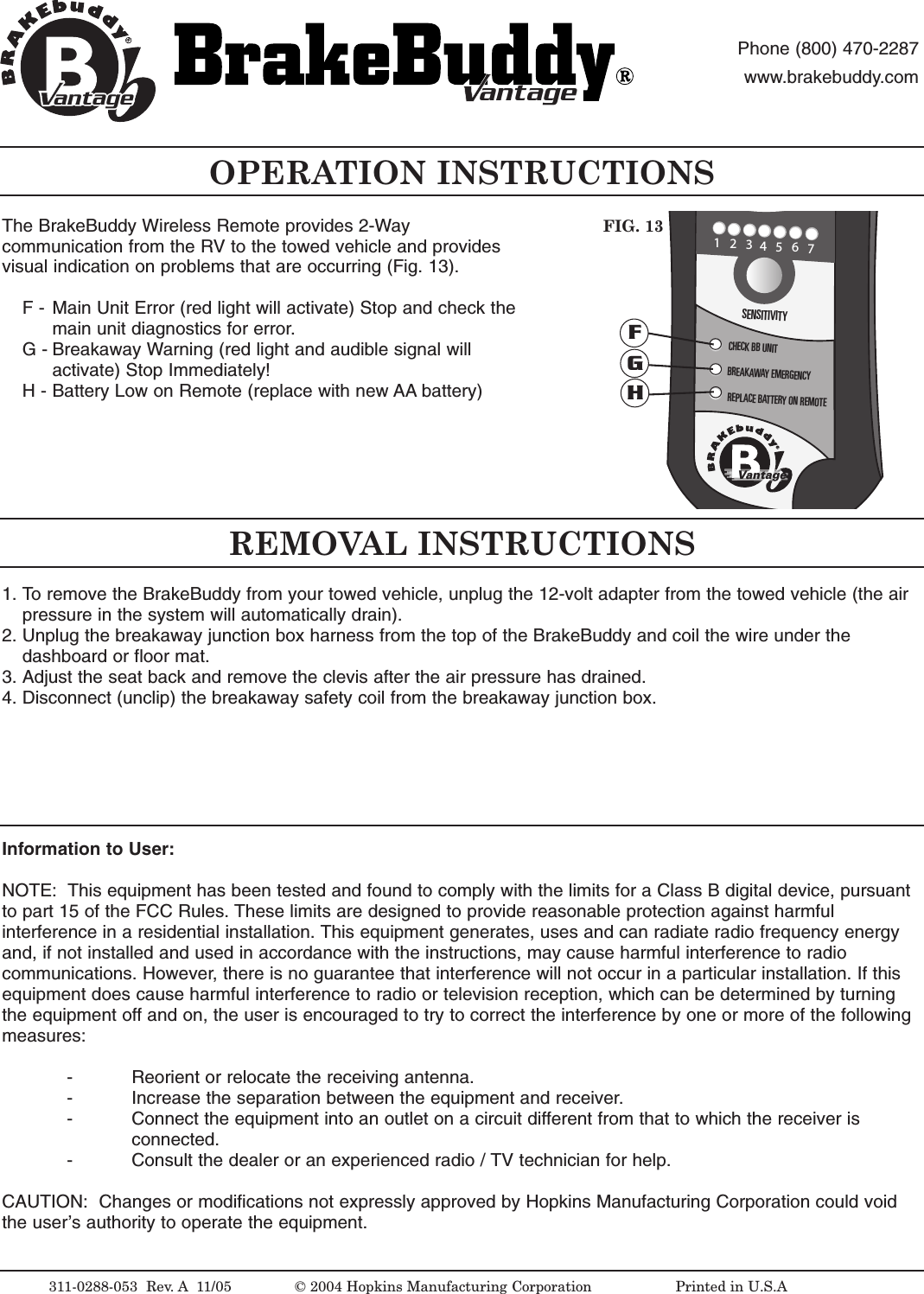
The BrakeBuddy Wireless Remote provides 2-Waycommunication from the RV to the towed vehicle and providesvisual indication on problems that are occurring (Fig. 13).F - Main Unit Error (red light will activate) Stop and check the main unit diagnostics for error.G- Breakaway Warning (red light and audible signal will activate) Stop Immediately!H- Battery Low on Remote (replace with new AA battery)OPERATION INSTRUCTIONS311-0288-053  Rev. A 11/05 © 2004 Hopkins Manufacturing Corporation                   Printed in U.S.AantageantagePhone (800) 470-2287www.brakebuddy.comantageantageREMOVAL INSTRUCTIONSInformation to User:NOTE:  This equipment has been tested and found to comply with the limits for a Class B digital device, pursuantto part 15 of the FCC Rules. These limits are designed to provide reasonable protection against harmfulinterference in a residential installation. This equipment generates, uses and can radiate radio frequency energyand, if not installed and used in accordance with the instructions, may cause harmful interference to radiocommunications. However,there is no guarantee that interference will not occur in a particular installation. If thisequipment does cause harmful interference to radio or television reception, which can be determined by turningthe equipment off and on, the user is encouraged to try to correct the interference by one or more of the followingmeasures:-Reorient or relocate the receiving antenna.- Increase the separation between the equipment and receiver.- Connect the equipment into an outlet on a circuit different from that to which the receiver is connected.- Consult the dealer or an experienced radio / TV technician for help.CAUTION:  Changes or modifications not expressly approved by Hopkins Manufacturing Corporation could voidthe user’sauthority to operate the equipment.1234BRAKINGOCCURINGSENSITIVITYCHECK BB UNITBREAKAWAY EMERGENCYREPLACEBATTERY ON REMOTE567VantageFIG. 13FGH1. To remove the BrakeBuddy from your towed vehicle, unplug the 12-volt adapter from the towed vehicle (the air pressure in the system will automatically drain).2. Unplug the breakaway junction box harness from the top of the BrakeBuddy and coil the wire under the dashboard or floor mat.3. Adjust the seat back and remove the clevis after the air pressure has drained.4. Disconnect (unclip) the breakaway safety coil from the breakaway junction box.
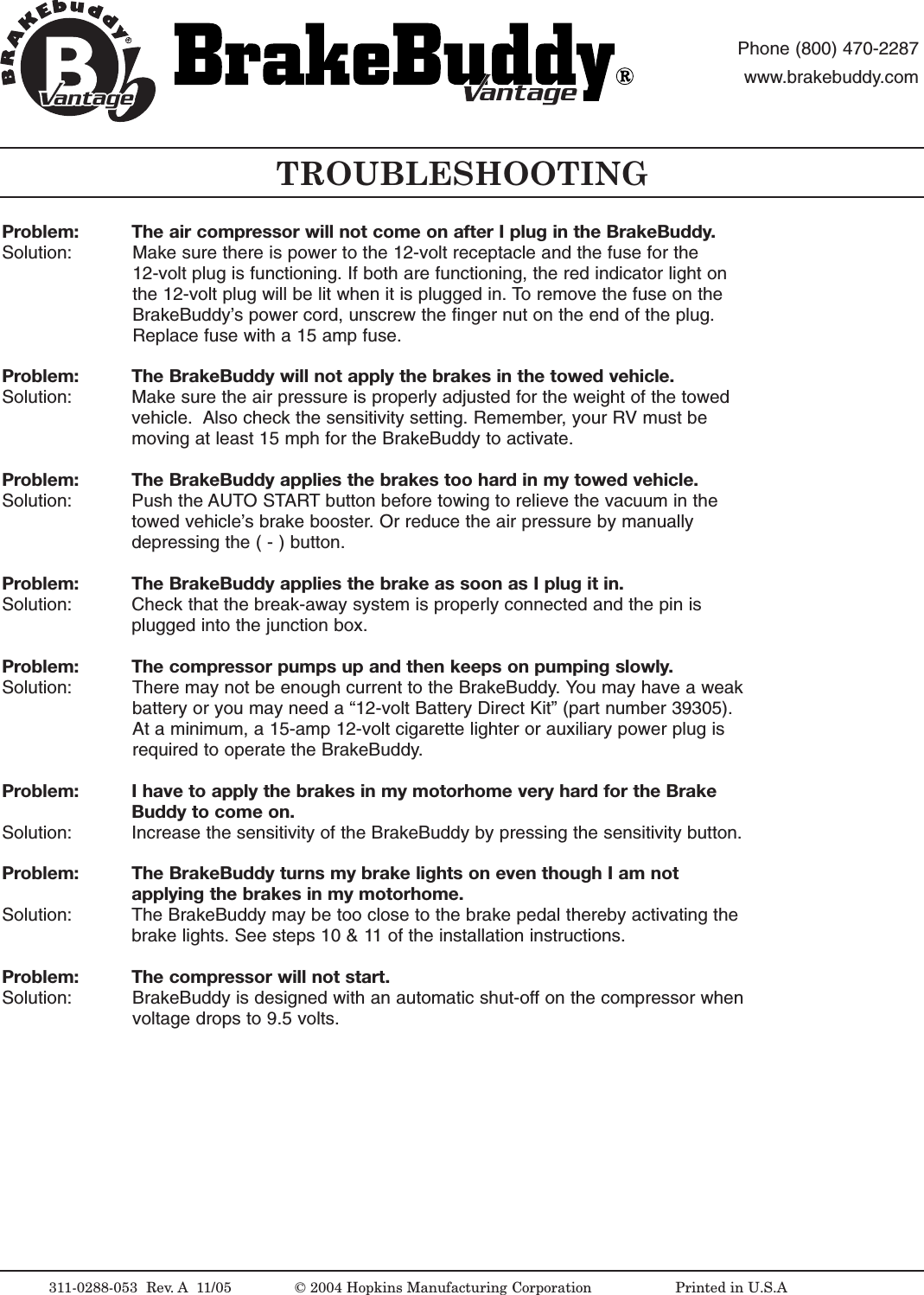
Problem:  The air compressor will not come on after I plug in the BrakeBuddy.Solution:  Make sure there is power to the 12-volt receptacle and the fuse for the 12-volt plug is functioning. If both are functioning, the red indicator light onthe 12-volt plug will be lit when it is plugged in. To remove the fuse on theBrakeBuddy’s power cord, unscrew the finger nut on the end of the plug.Replace fuse with a 15 amp fuse.Problem: The BrakeBuddy will not apply the brakes in the towed vehicle.Solution:  Make sure the air pressure is properly adjusted for the weight of the towedvehicle.  Also check the sensitivity setting. Remember, your RV must bemoving at least 15 mph for the BrakeBuddy to activate.Problem: The BrakeBuddy applies the brakes too hard in my towed vehicle.Solution:  Push the AUTO START button before towing to relieve the vacuum in thetowed vehicle’sbrake booster.Or reduce the air pressure by manuallydepressing the ( - ) button.Problem: The BrakeBuddy applies the brake as soon as I plug it in.Solution:  Check that the break-away system is properly connected and the pin isplugged into the junction box. Problem: The compressor pumps up and then keeps on pumping slowly.Solution:  There may not be enough current to the BrakeBuddy. You may have a weakbattery or you may need a “12-volt Battery Direct Kit” (part number 39305).At a minimum, a 15-amp 12-volt cigarette lighter or auxiliary power plug isrequired to operate the BrakeBuddy.Problem: I have to apply the brakes in my motorhome very hard for the Brake Buddy to come on.Solution:  Increase the sensitivity of the BrakeBuddy by pressing the sensitivity button.Problem: The BrakeBuddy turns my brake lights on even though I am not applying the brakes in my motorhome.Solution:  The BrakeBuddy may be too close to the brake pedal thereby activating thebrake lights. See steps 10 & 11of the installation instructions. Problem: The compressor will not start.Solution:  BrakeBuddy is designed with an automatic shut-off on the compressor whenvoltage drops to 9.5 volts.TROUBLESHOOTING311-0288-053  Rev.A 11/05 ©2004 Hopkins Manufacturing Corporation                   Printed in U.S.AantageantagePhone (800) 470-2287www.brakebuddy.comantageantage
Hopkins Manufacturing Corporation thanks you for purchasing BrakeBuddy. A 3-year limitedwarranty and a 30-day money back guarantee apply to your BrakeBuddy and BrakeBuddyaccessories. An additional 2-year extended warranty is also available (part number 39307).We wish you safe and happy travels.WHAT IS COVERED AND FOR HOW LONG?We are confident our product will perform well and therefore warrant to you, as the originalretail purchaser, for a period of three years from the date of original purchase, that your newproduct will be free of mechanical and electrical defects in material and workmanship.WHAT WILL BRAKEBUDDY DO? HOW DO I GET SERVICE?During the warranty period, we will repair or replace your new product (at our option) withoutcost to you, which will be your exclusive remedy under this warranty. Please do not returnthis product to the place of purchase. Doing so may delay the processing of yourclaim and our repair of your product. Call BrakeBuddy Technical Service for returninstructions 1-800-470-2287.WHAT IS NOT COVERED?Our warranty for your product will not cover damage resulting from neglect or misuse of theproduct, use of improper voltage or current, use contrary to operating instructions, ordisassembly,repair,or alteration by any person other than an authorized service station.Any implied warranty of merchantability or fitness for a particular purpose of your product islimited to the duration of this written warranty. We shall not be liable for any incidental orconsequential damages for breach of any expressed or implied warranty on your product.HOW YOUR STATE'S LAWS MAY APPLY:Some states do not allow limitations on how long an implied warranty lasts or the exclusionor limitation of incidental or consequential damages, so the above limitation may not applyto you. This warranty gives you specific legal rights, and you may also have other rights,which vary from state to state.LIMITED THREE-YEAR WARRANTY311-0288-053  Rev.A 11/05 ©2004 Hopkins Manufacturing Corporation                   Printed in U.S.AantageantagePhone (800) 470-2287www.brakebuddy.comantageantage

Navigation menu