Hopkins BB003 SPREAD SPECTRUM TRANSMITTER User Manual USERS MANUAL

Hopkins Manufacturing Corporation SPREAD SPECTRUM TRANSMITTER USERS MANUAL

USERS MANUAL

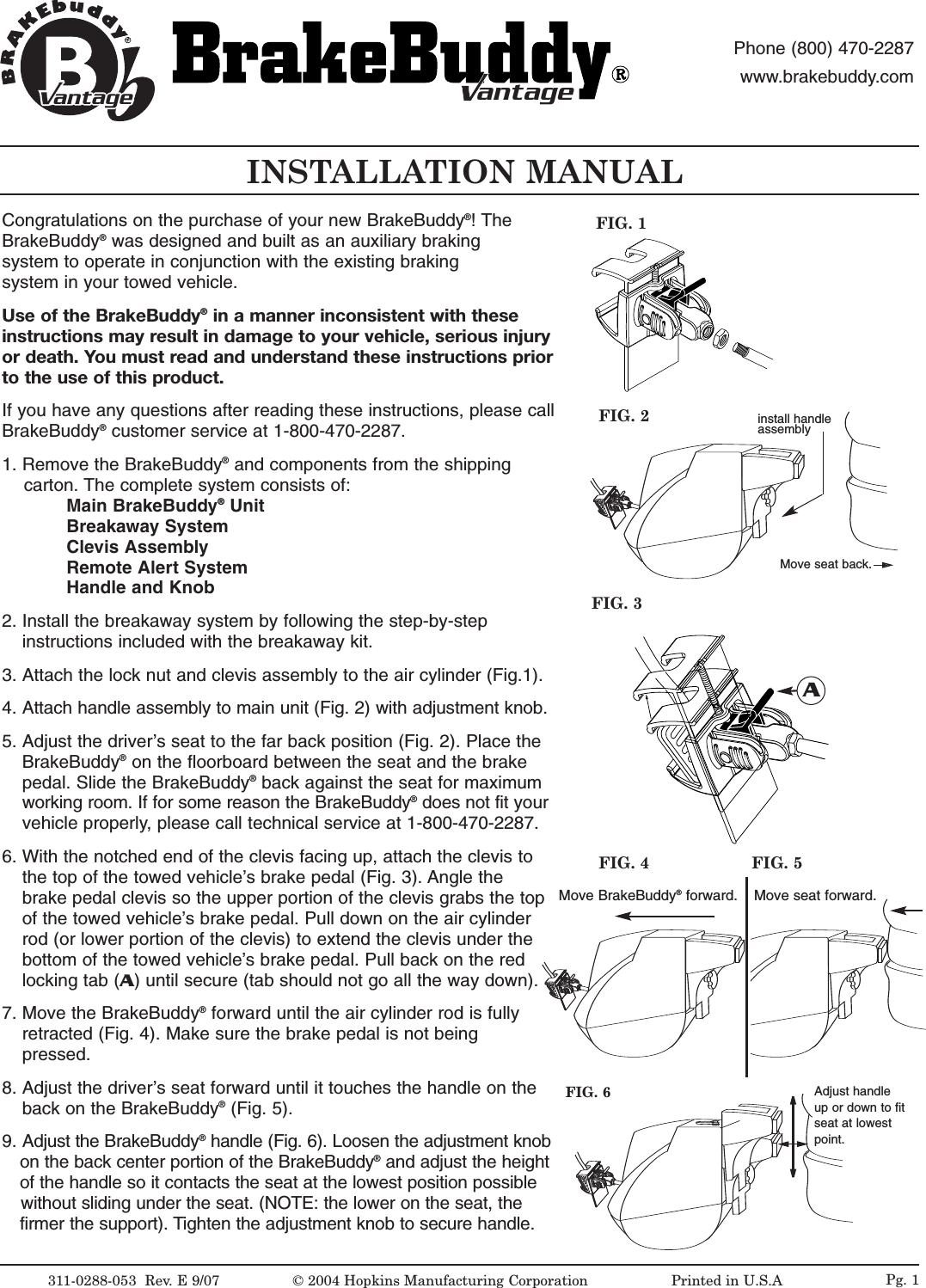
INSTALLATION MANUAL311-0288-053  Rev. E 9/07FIG. 2FIG. 1©2004 Hopkins Manufacturing Corporation                   Printed in U.S.AMove seat back.antageantagePhone (800) 470-2287www.brakebuddy.comantageantageCongratulations on the purchase of your new BrakeBuddy®!The BrakeBuddy®was designed and built as an auxiliary braking system to operate in conjunction with the existing braking system in your towed vehicle.Use of the BrakeBuddy®in a manner inconsistent with these instructions may result in damage to your vehicle, serious injuryor death. You must read and understand these instructions priorto the use of this product. If you have any questions after reading these instructions, please callBrakeBuddy®customer service at 1-800-470-2287.1. Remove the BrakeBuddy®and components from the shipping carton. The complete system consists of:Main BrakeBuddy®UnitBreakaway SystemClevis AssemblyRemote Alert SystemHandle and Knob2. Install the breakaway system by following the step-by-step instructions included with the breakaway kit.3. Attach the lock nut and clevis assembly to the air cylinder (Fig.1).4. Attach handle assembly to main unit (Fig. 2) with adjustment knob.5. Adjust the driver’sseat to the far back position (Fig. 2). Place the BrakeBuddy®on the floorboard between the seat and the brake pedal. Slide the BrakeBuddy®back against the seat for maximum working room. If for some reason the BrakeBuddy®does not fit your  vehicle properly, please call technical service at 1-800-470-2287.6. With the notched end of the clevis facing up, attach the clevis to the top of the towed vehicle’s brake pedal (Fig. 3). Angle the brake pedal clevis so the upper portion of the clevis grabs the top of the towed vehicle’s brake pedal. Pull down on the air cylinder rod (or lower portion of the clevis) to extend the clevis under the bottom of the towed vehicle’s brake pedal. Pull back on the red locking tab (A)until secure (tab should not go all the way down). 7. Move the BrakeBuddy®forward until the air cylinder rod is fully retracted (Fig. 4). Make sure the brake pedal is not being pressed. 8. Adjust the driver’sseat forward until it touches the handle on the back on the BrakeBuddy®(Fig. 5).9. Adjust the BrakeBuddy®handle (Fig. 6). Loosen the adjustment knobon the back center portion of the BrakeBuddy®and adjust the height of the handle so it contacts the seat at the lowest position possible without sliding under the seat. (NOTE: the lower on the seat, the firmer the support). Tighten the adjustment knob to secure handle. FIG. 3AMove BrakeBuddy®forward. Move seat forward.FIG. 4 FIG. 5FIG. 6 Adjust handleup or down to fitseat at lowestpoint.Pg. 1install handle assembly
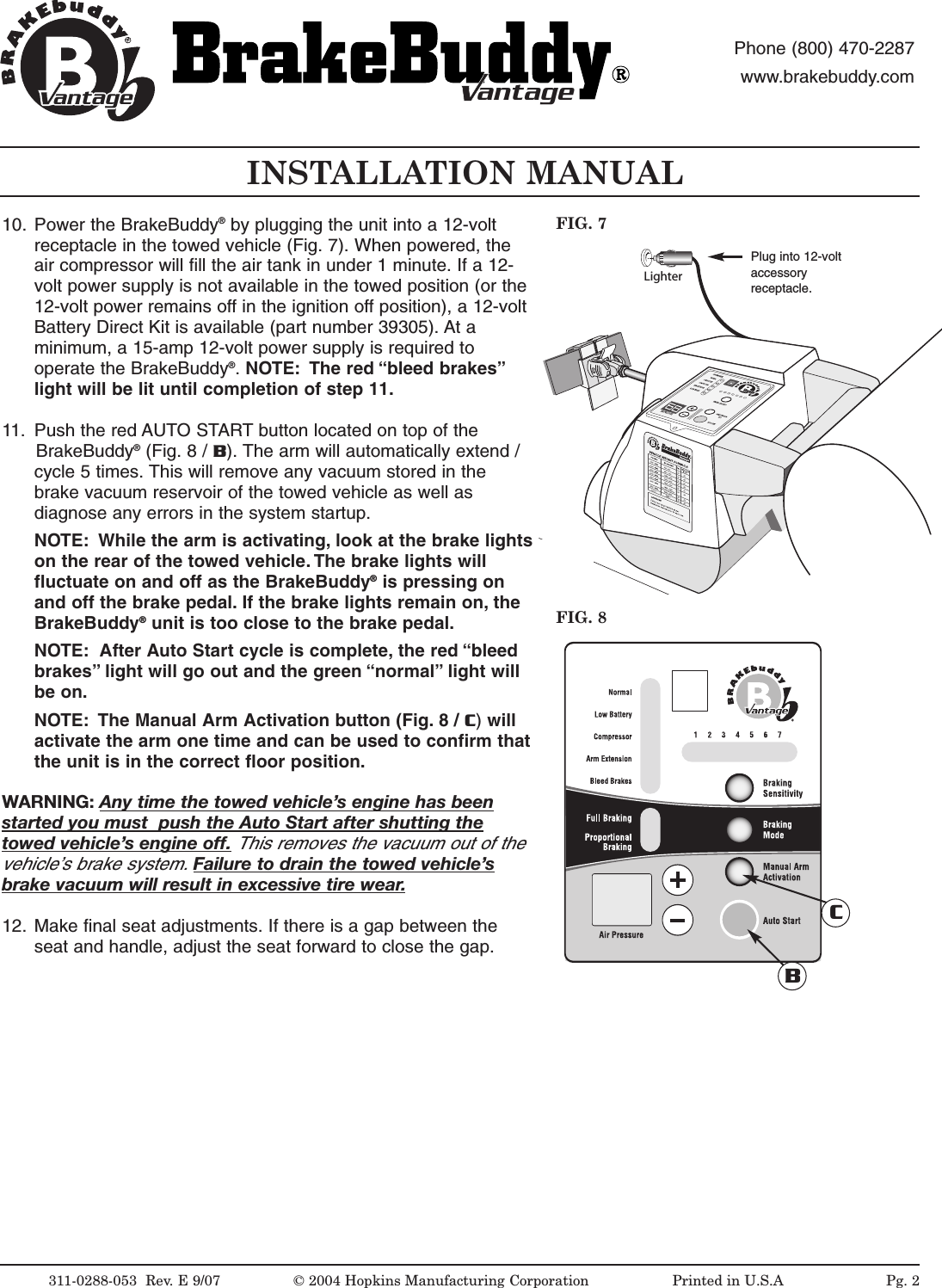
LighterINSTALLATION MANUALFIG. 8FIG. 7311-0288-053  Rev. E 9/07 © 2004 Hopkins Manufacturing Corporation                   Printed in U.S.APlug into 12-voltaccessoryreceptacle.antageantagePhone (800) 470-2287www.brakebuddy.comantageantage10. Power the BrakeBuddy®by plugging the unit into a 12-voltreceptacle in the towed vehicle (Fig. 7). When powered, theair compressor will fill the air tank in under 1 minute. If a 12-volt power supply is not available in the towed position (or the12-volt power remains off in the ignition off position), a 12-voltBattery Direct Kit is available (part number 39305). At aminimum, a 15-amp 12-volt power supply is required tooperate the BrakeBuddy®.NOTE: The red “bleed brakes”light will be lit until completion of step 11.11. Push the red AUTO START button located on top of the BrakeBuddy®(Fig. 8 / B). The arm will automatically extend /cycle 5 times. This will remove any vacuum stored in thebrake vacuum reservoir of the towed vehicle as well asdiagnose any errors in the system startup.NOTE: While the arm is activating, look at the brake lightson the rear of the towed vehicle. The brake lights willfluctuate on and off as the BrakeBuddy®is pressing onand off the brake pedal. If the brake lights remain on, theBrakeBuddy®unit is too close to the brake pedal.NOTE: After Auto Start cycle is complete, the red “bleedbrakes” light will go out and the green “normal” light willbe on.NOTE: The Manual Arm Activation button (Fig. 8 / C)willactivate the arm one time and can be used to confirm thatthe unit is in the correct floor position.WARNING: Any time the towed vehicle’sengine has beenstarted you must  push the Auto Startafter shutting thetowed vehicle’sengine off.This removes the vacuum out of thevehicle’sbrake system. Failureto drain the towed vehicle’sbrake vacuum will result in excessive tirewear.12. Make final seat adjustments. If there is a gap between theseat and handle, adjust the seat forward to close the gap.BCPg. 2
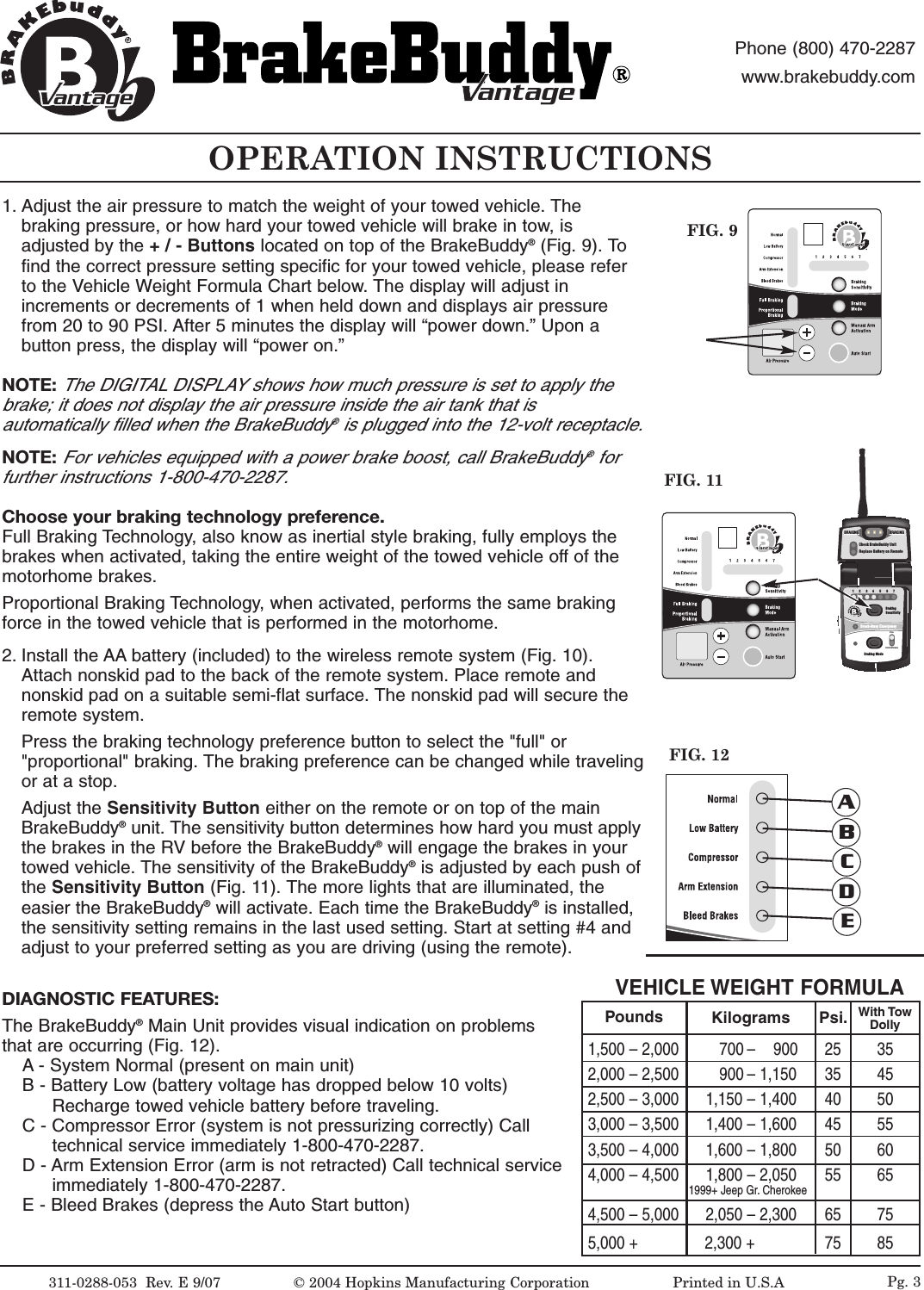
OPERATION INSTRUCTIONSFIG. 9311-0288-053  Rev.E9/07 ©2004 Hopkins Manufacturing Corporation                   Printed in U.S.AantageantagePhone (800) 470-2287www.brakebuddy.comantageantageFIG. 111234567BrakingSensitivityBraking ModeBreak-Away EmergencyFULLPROPORTIONALantageCheck BrakeBuddy UnitReplace Battery on RemoteBRAKINGBRAKINGBRAKINGBRAKINGBRAKINGBRAKINGFIG. 12ABCDEPg. 31. Adjust the air pressure to match the weight of your towed vehicle. Thebraking pressure, or how hard your towed vehicle will brake in tow, isadjusted by the +/-Buttons located on top of the BrakeBuddy®(Fig. 9). Tofind the correct pressure setting specific for your towed vehicle, please referto the Vehicle Weight Formula Chart below. The display will adjust inincrements or decrements of 1 when held down and displays air pressurefrom 20 to 90 PSI. After 5 minutes the display will “power down.” Upon abutton press, the display will “power on.”NOTE:The DIGITAL DISPLAY shows how much pressure is set to apply thebrake; it does not display the air pressure inside the air tank that isautomatically filled when the BrakeBuddy®is plugged into the 12-volt receptacle.NOTE:For vehicles equipped with a power brake boost, call BrakeBuddy®forfurther instructions 1-800-470-2287.Choose your braking technology preference. Full Braking Technology,also know as inertial style braking, fully employs thebrakes when activated, taking the entire weight of the towed vehicle offof themotorhome brakes.Proportional Braking Technology, when activated, performs the same brakingforce in the towed vehicle that is performed in the motorhome. 2. Install the AA battery (included) to the wireless remote system (Fig. 10).Attach nonskid pad to the back of the remote system. Place remote andnonskid pad on a suitable semi-flat surface. The nonskid pad will secure theremote system.Press the braking technology preference button to select the "full" or"proportional" braking. The braking preference can be changed while travelingor at a stop.Adjust the Sensitivity Button either on the remote or on top of the mainBrakeBuddy®unit. The sensitivity button determines how hard you must applythe brakes in the RV before the BrakeBuddy®will engage the brakes in yourtowed vehicle. The sensitivity of the BrakeBuddy®is adjusted by each push ofthe Sensitivity Button (Fig. 11). The more lights that are illuminated, theeasier the BrakeBuddy®will activate. Each time the BrakeBuddy®is installed,the sensitivity setting remains in the last used setting. Start at setting #4 andadjust to your preferred setting as you are driving (using the remote).DIAGNOSTIC FEATURES:The BrakeBuddy®Main Unit provides visual indication on problemsthat are occurring (Fig. 12).A - System Normal (present on main unit)B-Battery Low (battery voltage has dropped below 10 volts) Recharge towed vehicle battery before traveling.C-Compressor Error (system is not pressurizing correctly) Call technical service immediately 1-800-470-2287.D - Arm Extension Error (arm is not retracted) Call technical service immediately 1-800-470-2287.E-Bleed Brakes (depress the Auto Start button)VEHICLE WEIGHT FORMULA1,500 – 2,000         700 –    900 25  352,000 – 2,500         900 – 1,150 35 452,500 – 3,000      1,150 – 1,400 40 503,000 – 3,500      1,400 – 1,600 45 553,500 – 4,000      1,600 – 1,800 50 604,000 – 4,500      1,800 – 2,050 55 651999+ Jeep Gr. Cherokee4,500 – 5,000      2,050 – 2,300 65 755,000 +               2,300 + 75 85Pounds Kilograms Psi. With TowDolly
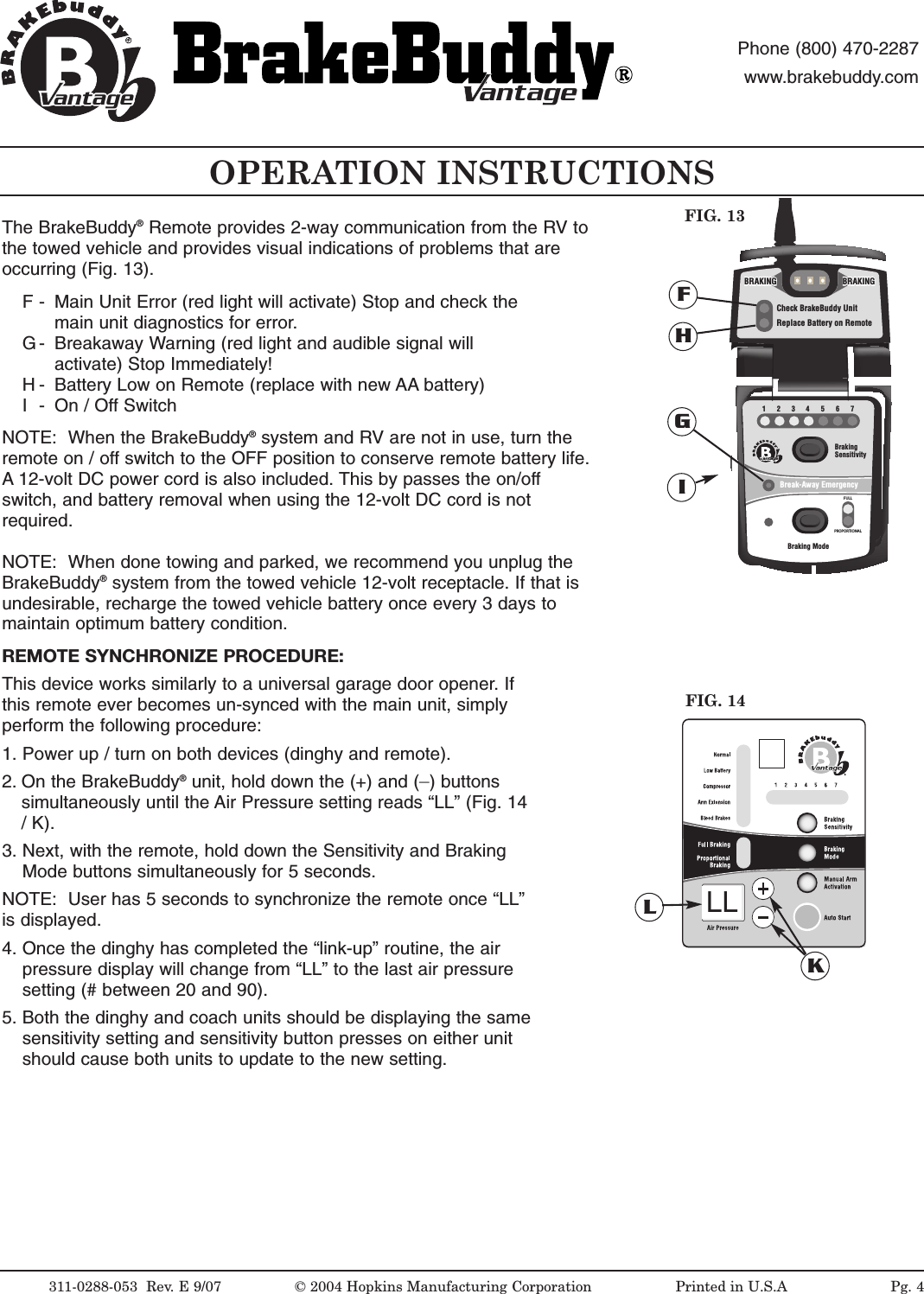
OPERATION INSTRUCTIONS311-0288-053  Rev. E 9/07 © 2004 Hopkins Manufacturing Corporation                   Printed in U.S.AantageantagePhone (800) 470-2287www.brakebuddy.comantageantage1234567BrakingSensitivityBraking ModeBreak-Away EmergencyFULLPROPORTIONALantageCheck BrakeBuddy UnitReplace Battery on RemoteBRAKINGBRAKINGBRAKINGBRAKINGBRAKINGBRAKINGFIG. 13FGHINOTE:  When the BrakeBuddy®system and RV are not in use, turn theremote on / off switch to the OFF position to conserve remote battery life.A 12-volt DC power cord is also included. This by passes the on/offswitch, and battery removal when using the 12-volt DC cord is notrequired.NOTE:  When done towing and parked, we recommend you unplug theBrakeBuddy®system from the towed vehicle 12-volt receptacle. If that isundesirable, recharge the towed vehicle battery once every 3 days tomaintain optimum battery condition.REMOTE SYNCHRONIZE PROCEDURE:This device works similarly to a universal garage door opener. Ifthis remote ever becomes un-synced with the main unit, simplyperform the following procedure:1. Power up / turn on both devices (dinghy and remote).2. On the BrakeBuddy®unit, hold down the (+) and (_)buttonssimultaneously until the Air Pressure setting reads “LL” (Fig. 14/K).3. Next, with the remote, hold down the Sensitivity and Braking Mode buttons simultaneously for 5 seconds. NOTE:  User has 5 seconds to synchronize the remote once “LL”is displayed. 4. Once the dinghy has completed the “link-up” routine, the air pressure display will change from “LL” to the last air pressure setting (# between 20 and 90).5. Both the dinghy and coach units should be displaying the same sensitivity setting and sensitivity button presses on either unit should cause both units to update to the new setting.FIG. 14KLLLPg. 4The BrakeBuddy®Remote provides 2-way communication from the RV tothe towed vehicle and provides visual indications of problems that areoccurring (Fig. 13).F - Main Unit Error (red light will activate) Stop and check the main unit diagnostics for error.G - Breakaway Warning (red light and audible signal will activate) Stop Immediately!H - Battery Low on Remote (replace with new AA battery)I- On / Off Switch
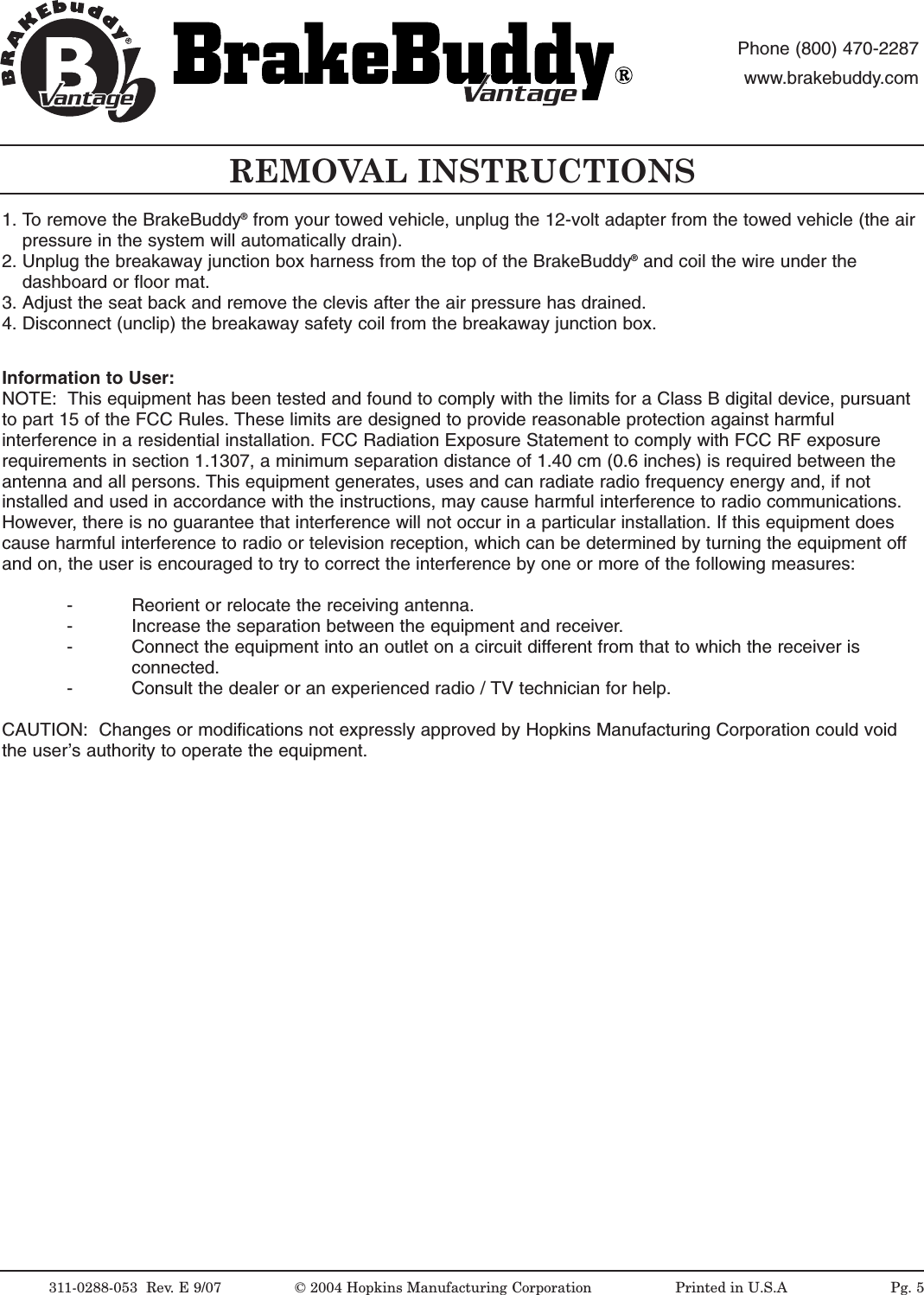
311-0288-053  Rev.E9/07 ©2004 Hopkins Manufacturing Corporation                   Printed in U.S.AantageantagePhone (800) 470-2287www.brakebuddy.comantageantageREMOVAL INSTRUCTIONSInformation to User:NOTE:  This equipment has been tested and found to comply with the limits for a Class B digital device, pursuantto part 15 of the FCC Rules. These limits are designed to provide reasonable protection against harmfulinterference in a residential installation. FCC Radiation Exposure Statement to comply with FCC RF exposurerequirements in section 1.1307, a minimum separation distance of 1.40 cm (0.6 inches) is required between theantenna and all persons. This equipment generates, uses and can radiate radio frequency energy and, if notinstalled and used in accordance with the instructions, may cause harmful interference to radio communications.However, there is no guarantee that interference will not occur in a particular installation. If this equipment doescause harmful interference to radio or television reception, which can be determined by turning the equipment offand on, the user is encouraged to try to correct the interference by one or more of the following measures:- Reorient or relocate the receiving antenna.- Increase the separation between the equipment and receiver.- Connect the equipment into an outlet on a circuit different from that to which the receiver is connected.- Consult the dealer or an experienced radio / TV technician for help.CAUTION:  Changes or modifications not expressly approved by Hopkins Manufacturing Corporation could voidthe user’s authority to operate the equipment.1. To remove the BrakeBuddy®from your towed vehicle, unplug the 12-volt adapter from the towed vehicle (the air pressure in the system will automatically drain).2. Unplug the breakaway junction box harness from the top of the BrakeBuddy®and coil the wire under the dashboard or floor mat.3. Adjust the seat back and remove the clevis after the air pressure has drained.4. Disconnect (unclip) the breakaway safety coil from the breakaway junction box.Pg. 5
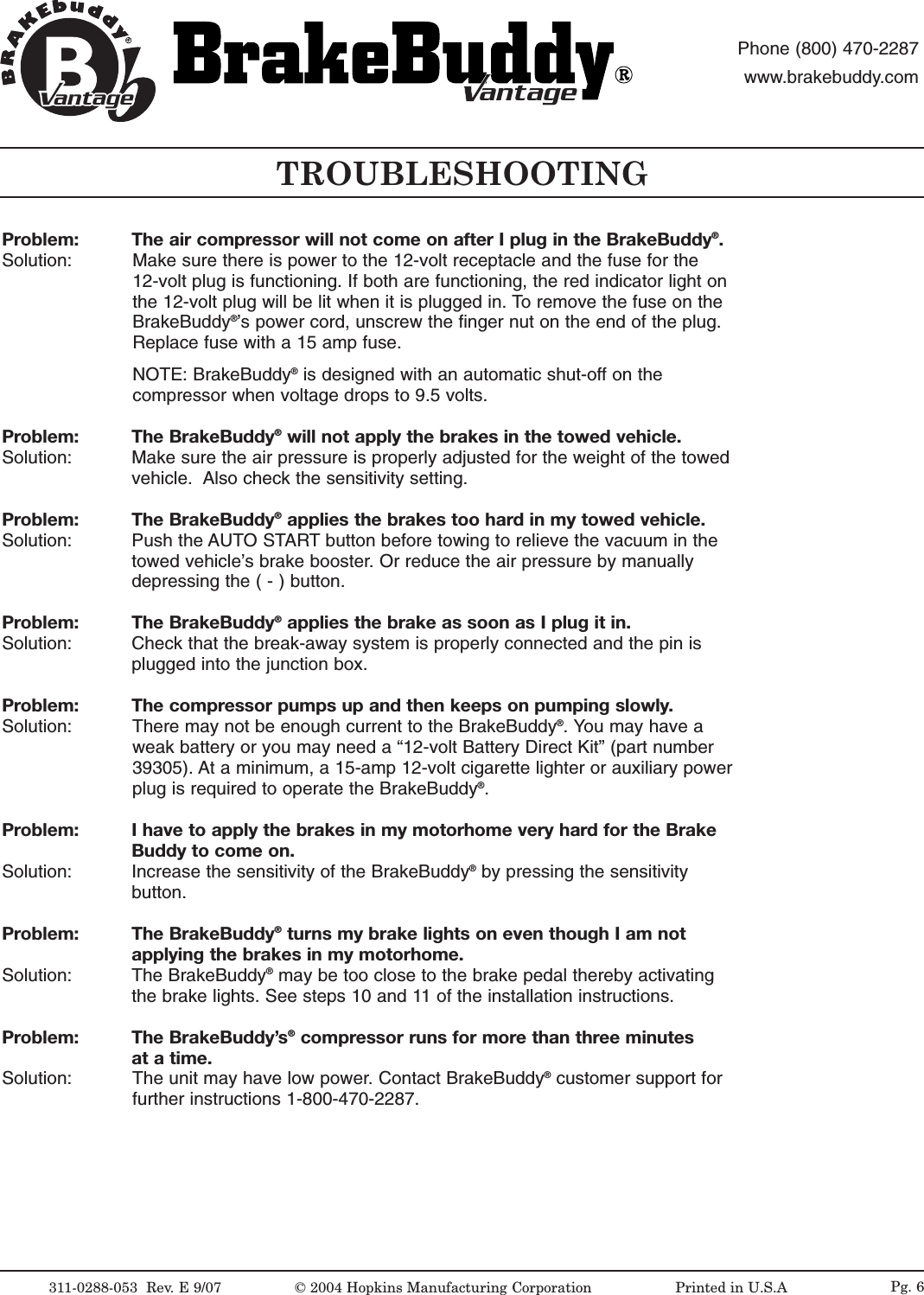
TROUBLESHOOTING311-0288-053  Rev.E9/07 ©2004 Hopkins Manufacturing Corporation                   Printed in U.S.AantageantagePhone (800) 470-2287www.brakebuddy.comantageantagePg. 6Problem:  The air compressor will not come on after I plug in the BrakeBuddy®.Solution:  Make sure there is power to the 12-volt receptacle and the fuse for the 12-volt plug is functioning. If both are functioning, the red indicator light onthe 12-volt plug will be lit when it is plugged in. To remove the fuse on theBrakeBuddy®’s power cord, unscrew the finger nut on the end of the plug.Replace fuse with a 15 amp fuse.NOTE: BrakeBuddy®is designed with an automatic shut-off on thecompressor when voltage drops to 9.5 volts.Problem: The BrakeBuddy®will not apply the brakes in the towed vehicle.Solution:  Make sure the air pressure is properly adjusted for the weight of the towedvehicle.  Also check the sensitivity setting. Problem: The BrakeBuddy®applies the brakes too hard in my towed vehicle.Solution:  Push the AUTO START button before towing to relieve the vacuum in thetowed vehicle’s brake booster. Or reduce the air pressure by manuallydepressing the ( - ) button.Problem: The BrakeBuddy®applies the brake as soon as I plug it in.Solution:  Check that the break-away system is properly connected and the pin isplugged into the junction box. Problem: The compressor pumps up and then keeps on pumping slowly.Solution:  There may not be enough current to the BrakeBuddy®.You may have aweak battery or you may need a “12-volt Battery Direct Kit” (part number39305). At a minimum, a 15-amp 12-volt cigarette lighter or auxiliary powerplug is required to operate the BrakeBuddy®.Problem: Ihave to apply the brakes in my motorhome veryhardfor the Brake Buddy to come on.Solution:  Increase the sensitivity of the BrakeBuddy®by pressing the sensitivity button.Problem: The BrakeBuddy®turns my brake lights on even though I am not applying the brakes in my motorhome.Solution: The BrakeBuddy®may be too close to the brake pedal thereby activatingthe brake lights. See steps 10 and 11 of the installation instructions. Problem: The BrakeBuddy’s®compressor runs for more than three minutes at a time.Solution:  The unit may have low power. Contact BrakeBuddy®customer support forfurther instructions 1-800-470-2287.
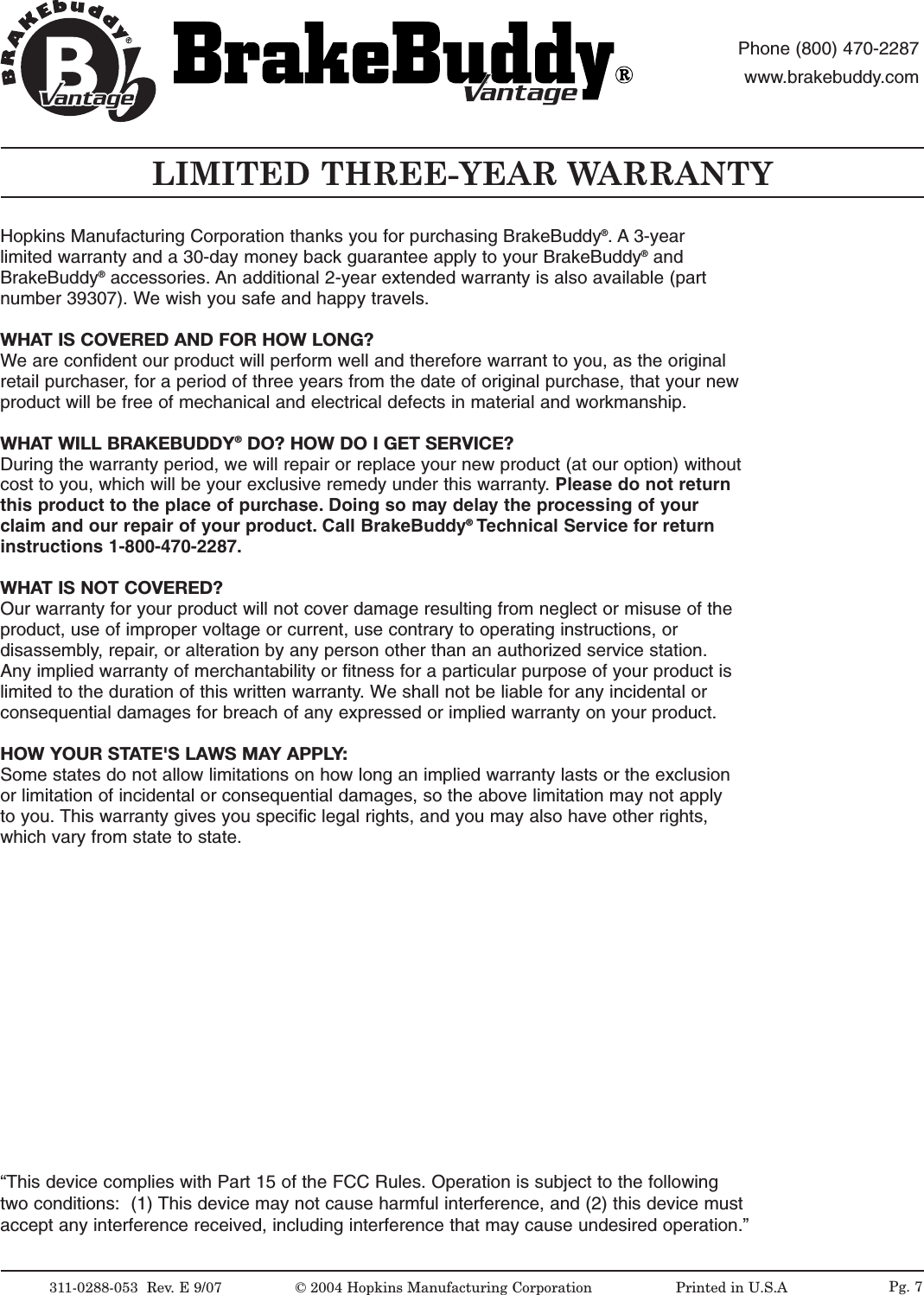
LIMITED THREE-YEAR WARRANTY311-0288-053  Rev.E9/07 ©2004 Hopkins Manufacturing Corporation                   Printed in U.S.AantageantagePhone (800) 470-2287www.brakebuddy.comantageantage“This device complies with Part 15 of the FCC Rules. Operation is subject to the followingtwo conditions:  (1) This device may not cause harmful interference, and (2) this device mustaccept any interference received, including interference that may cause undesired operation.”Pg. 7Hopkins Manufacturing Corporation thanks you for purchasing BrakeBuddy®.A 3-yearlimited warranty and a 30-day money back guarantee apply to your BrakeBuddy®andBrakeBuddy®accessories. An additional 2-year extended warranty is also available (partnumber 39307). We wish you safe and happy travels.WHAT IS COVERED AND FOR HOW LONG?We are confident our product will perform well and therefore warrant to you, as the originalretail purchaser, for a period of three years from the date of original purchase, that your newproduct will be free of mechanical and electrical defects in material and workmanship.WHAT WILL BRAKEBUDDY®DO? HOW DO I GET SERVICE?During the warranty period, we will repair or replace your new product (at our option) withoutcost to you, which will be your exclusive remedy under this warranty. Please do not returnthis product to the place of purchase. Doing so may delay the processing of yourclaim and our repair of your product. Call BrakeBuddy®Technical Service for returninstructions 1-800-470-2287.WHATIS NOT COVERED?Our warranty for your product will not cover damage resulting from neglect or misuse of theproduct, use of improper voltage or current, use contrary to operating instructions, ordisassembly,repair,or alteration by any person other than an authorized service station.Any implied warranty of merchantability or fitness for a particular purpose of your product islimited to the duration of this written warranty. Weshall not be liable for any incidental orconsequential damages for breach of any expressed or implied warranty on your product.HOW YOUR STATE'S LAWS MAY APPLY:Some states do not allow limitations on how long an implied warranty lasts or the exclusionor limitation of incidental or consequential damages, so the above limitation may not applyto you. This warranty gives you specific legal rights, and you may also have other rights,which vary from state to state.

Navigation menu