Hopkins CWL623 wireless management system User Manual

Tiger Accessory Group LLC wireless management system Users Manual

user manual

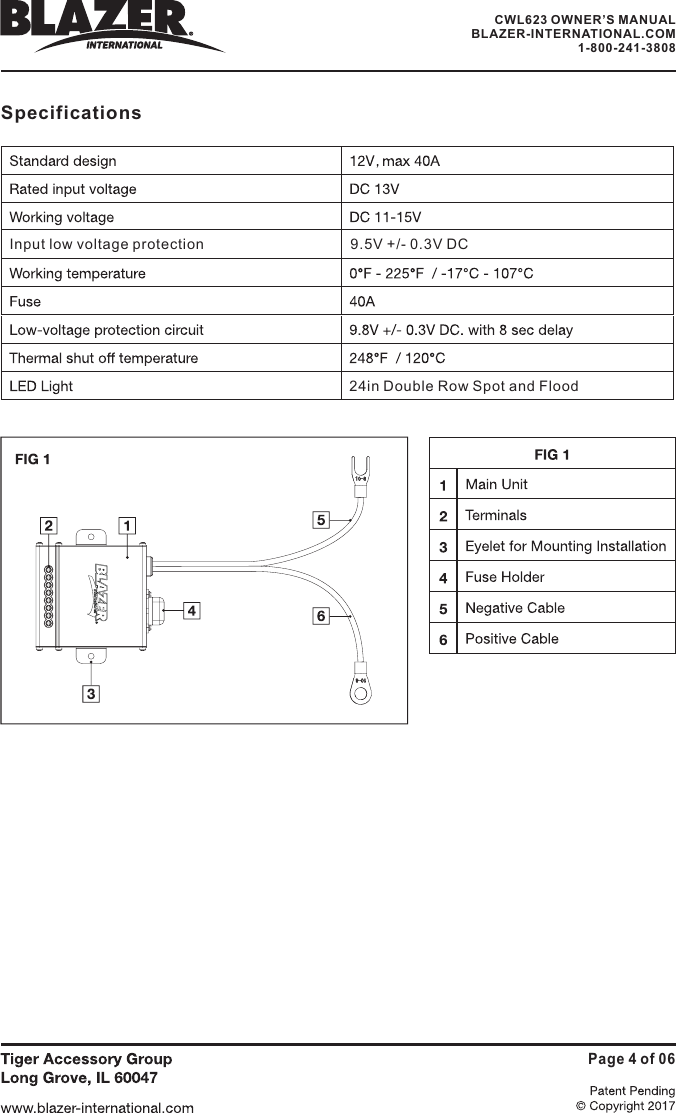
OverviewThis product is a professional wire management system that is linked to yoursmartphone. The WMS is designed for operating accessories (including lights, horns,warning beacons, etc.) typically used on work or off-road vehicles (trucks, jeeps,ATV/UTV, boats, heavy equipment, farm equipment, etc.).The unit works on 12V DC and provides output to four terminals which are protectedby a 40A fuse.Please note that before you can operate this system, you need to download and installBLAZER LINK app for your smartphone.Installation1. Please read these instructions carefully before installing this product. It isrecommended to consult a professional installer to prevent damage to vehicleand/or system.2. Do not connect to 24V DC or higher voltage system, as this product is designed fora 12V DC battery system. In case you have a larger than 12V DC system, checkvehicle owner’s manual to determine if a 12V DC output is available and how toconnect in order to use it safely, otherwise, the product will be damaged.3. Find a suitable flat surface near the battery, clean the surface free of dirt and oiland then affix the unit using provided adhesive strips and/or mounting holes.4. Remove the 40A fuse from the holder and disconnect the vehicle battery.5. Securely attach the positive (red) cable of the WMS unit to the positive terminal ofthe battery (or battery cable) and the negative (black) cable of the WMS to thenegative battery cable or chassis.6. Attach the auxiliary lights/equipment following correct polarity on the terminals andnot exceeding the maximum amperage of the channels (amperage printed on WMSand corresponds to amperage printed on the remote control for each terminal).See FIG 17. Reconnect battery cables.8. Insert the 40A fuse back into its holders and snap the cover closed.Main UnitPage 1 of 06CWL623 OWNER’S MANUALBLAZER-INTERNATIONAL.COM1-800-241-3808
App Instructions9. Download and install BLAZER WMS app for your smartphone operating system.Available on app stores.10. For initial setup, tap the "radio" icon         to go to the "Connect" screen.Simply select the module and enter the appropriate numerical password.11. Once connected, hit the back button to return to the main screen.12. Now, select your vehicle type by tapping on the arrow to the right of the initialschematic.13. Next, select Light Position setup to assign lights to different locations on yourvehicle. Tap on the terminal and then tap on the desired location. Repeat this forthe remaining terminals and then hit enter to return to the main screen.14. You are now set up to operate your Lights.15. Activate the system by tapping the power icon        It will turn green to indicateis powered on       .16. Now, select a light. The light icon will turn blue to indicate it is the active selection.17. You can turn on and off the light via the "individual Terminal ON/OFF" switch.18. Note, terminal 2A is used in conjunction with a warning light with different strobepatterns built into it. Turning on and off this terminal advances the flash to the nextflash pattern. In absence of a warning light, this terminal can be used just like theother terminals in order to power on and off lights etc..a. Most warning lights with strobe function will have three wires. Black, red andBlack is to be connected to negative of 18A, red to positive terminal ofyellow is for advancing the strobe patterns. Consult with thelight to determine if yellow is on the negative side of theand connect it to the appropriate polarity ofterminal 2A .19. Terminal 2B has been specifically designated for additional light controls.With applicable lights, you may use the respective sliders to adjust bothand flash speed..that ityellow.18A andmanufacturer of thecircuit or on the positive sidebrightnessPage 2 of 06CWL623 OWNER’S MANUALBLAZER-INTERNATIONAL.COM1-800-241-3808
20.Once the lights have been set up as desired, the whole system can turned on andoff by the master power button       . When this master power icon is grayed out,lights will be off.21. Additional features can be found in the settings tab        indicated by the gear icon.b. The Low Voltage Alarm - If the Blazer Link detects that your battery level islower than the set voltage, it will notify you via the alarm.c. Timing Shutdown - allows you to set time period when you want your lights toautomatically turn off to prevent unnecessary battery draining.d. You can also rename your device and set a new password.22. Back on the main screen, select the Battery icon to view readout of your batterylevel and voltage standing. Additionally, this is the icon that will turn red and notifyyou when your battery level has reached the low voltage level you defined earlierin the settings tab. It is also possible to pick one of the five audible sounds orvibrator, which will alert you.23. Once set up, try to manipulate each light to ensure that the system is workingwithout issue.all the,Page 3 of 06CWL623 OWNER’S MANUALBLAZER-INTERNATIONAL.COM1-800-241-3808
Input low voltage protection 9.5V +/- 0.3V DC24in Double Row Spot and FloodSpecificationsPage 4 of 06CWL623 OWNER’S MANUALBLAZER-INTERNATIONAL.COM1-800-241-3808
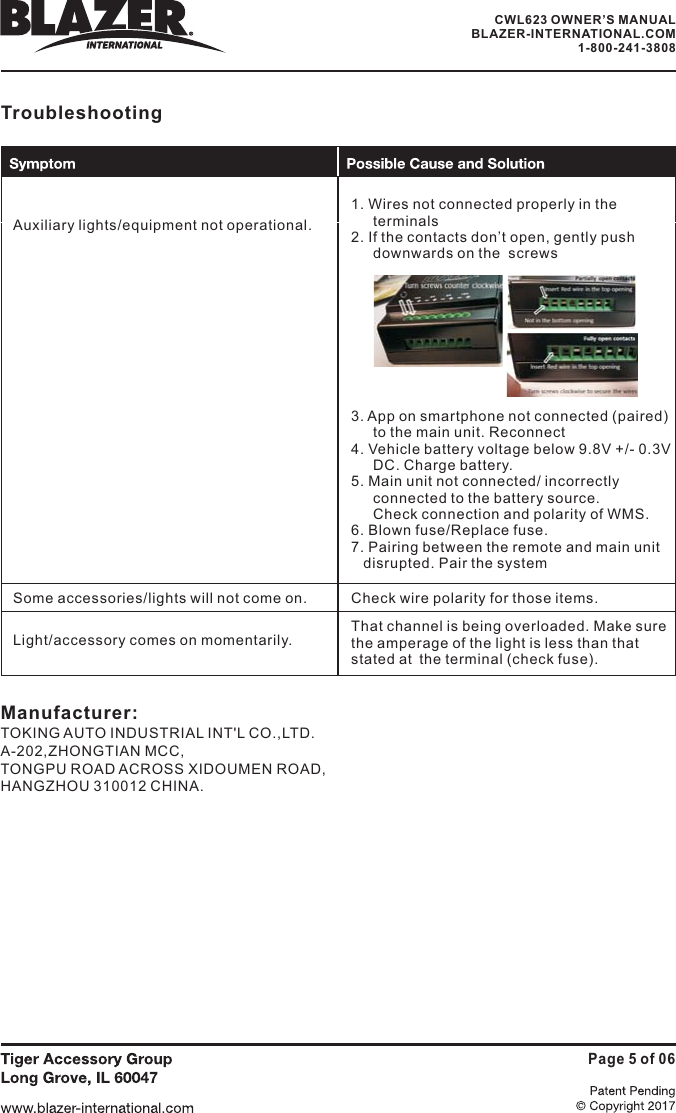
TroubleshootingAuxiliary lights/equipment not operational.1. Wires not connected properly in theterminals2. If the contacts don’t open, gently pushdownwards on the  screws3. App on smartphone not connected (paired)to the main unit. Reconnect4. Vehicle battery voltage below 9.8V +/- 0.3VDC. Charge battery.5. Main unit not connected/ incorrectlyconnected to the battery source.Check connection and polarity of WMS.6. Blown fuse/Replace fuse.7. Pairing between the remote and main unitdisrupted. Pair the systemSome accessories/lights will not come on.Light/accessory comes on momentarily.Check wire polarity for those items.That channel is being overloaded. Make surethe amperage of the light is less than thatstated at the terminal (check fuse).Page 5 of 06Manufacturer:TOKING AUTO INDUSTRIAL INT'L CO.,LTD.A-202,ZHONGTIAN MCC,TONGPU ROAD ACROSS XIDOUMEN ROAD,HANGZHOU 310012 CHINA.CWL623 OWNER’S MANUALBLAZER-INTERNATIONAL.COM1-800-241-3808
CWL623 OWNER’S MANUALBLAZER-INTERNATIONAL.COM1-800-241-3808Page 6 of 06changes or modifications not expressly approved by the party responsible for compliance couldvoid the user’s authority to operate the equipment.This device complies with Part 15 of the FCC Rules. Operation is subject to the following twoconditions:(1) this device may not cause harmful interference, and(2) this device must accept any interference received, including interference that may causeundesired operationNote: This equipment has been tested and found to comply with the limits for a Class B digital device,pursuant to Part 15 of the FCC Rules. These limits are designed to provide reasonable protectionagainst harmful interference in a residential installation. This equipment generates, uses, and canradiate radio frequency energy, and if not installed and used in accordance with the instructions,may cause harmful interference to radio communications. However, there is no guarantee thatinterference will not occur in a particular installation. If this equipment does cause harmfulinterference to radio or television reception, which can be determined by turning the equipmentoff and on, the user is encouraged to try to correct the interference by one or more of the followingmeasures:– Reorient or relocate the receiving antenna.– Increase the separation between the equipment and receiver.– Connect the equipment into an outlet on a circuit different from that to which the receiver isconnected.– Consult the dealer or an experienced radio/TV technician for help.This equipment complies with FCC radiation exposure limits set forth for an uncontrolledenvironment. This equipment should be installed and operated with a minimum distance of 20cmbetween the radiator & your body. This transmitter must not be co-located or operating inconjunction with any other antenna or transmitter.This device complies with Industry Canada license-exempt RSS standard(s). Operation is subject tothe following two conditions: (1) this device may not cause interference, and (2) this device mustaccept any interference, including interference that may cause undesired operation of the device.Cet appareil est conforme aux CNR exempts de licence d'Industrie Canada. Le fonctionnement estsoumis aux deux conditions suivantes:(1) Cet dispositif ne peut causer des interférences; et(2) Cet appareil doit accepter toute interférence, y compris les interférences qui peuvent causer unmauvais fonctionnement de l'appareil.The device meets the exemption from the routine evaluation limits in section 2.5 of RSS 102 andcompliance with RSS-102 RF exposure, users can obtain Canadian information on RF exposure andcompliance.Le dispositif rencontre l'exemption des limites courantes d'évaluation dans la section 2.5 de RSS102 etla conformité à l'exposition de RSS-102 rf, utilisateurs peut obtenir l'information canadiennesurl'exposition et la conformité de rf.This transmitter must not be co-located or operating in conjunction with any other antenna ortransmitter. This equipment should be installed and operated with a minimum distance of 20centimeters between the radiator and your body.Cet émetteur ne doit pas être Co-placé ou ne fonctionnant en même temps qu'aucune autre antenneouémetteur. Cet équipement devrait être installé et actionné avec une distance minimum de20 centimètres entre le radiateur et votre corps.

Navigation menu