Horizon EX 56 User Manual ELLIPTICAL Manuals And Guides L0801629
HORIZON Elliptical Manual L0801629 HORIZON Elliptical Owner's Manual, HORIZON Elliptical installation guides
User Manual: Horizon EX-56 EX-56 HORIZON ELLIPTICAL - Manuals and Guides View the owners manual for your HORIZON ELLIPTICAL #EX56. Home:Fitness Equipment Parts:Horizon Parts:Horizon ELLIPTICAL Manual
Open the PDF directly: View PDF  .
.
Page Count: 31
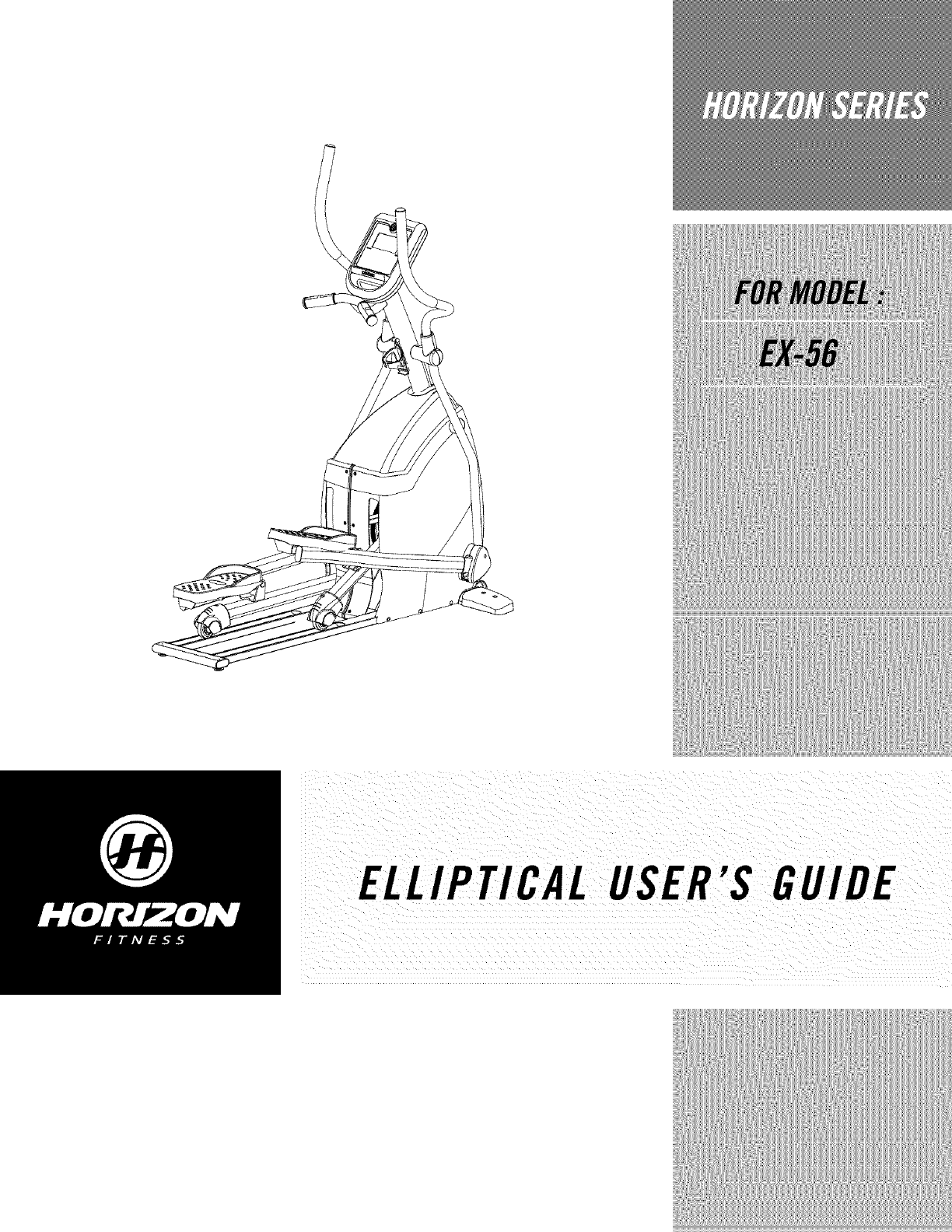
ELLIPTICAL USER'S GUIDE
CONGRATULATIONSand THANKYOUforyourpurchaseof this HorizonSerieselliptical!
Whetheryour goal is to win races or simply enjoy a fufler, healthier fifestyle, a Horizon Series efliptical
can help you attain it- adding club-quafity performance to your at-home workouts, with the ergonomics
and innovative features you need to get stronger and healthier, faster. Because we're committed to
designing fitness equipment from the inside out, we use only the highest quality components. It's a
commitment we back with one of the strongest frame-to-brake warranty packages in the industry.
Youwant exerciseequipment that offers the most comfort, the best reliability and the highest quality
in its class.
TheHorizonSeries delivers.
Important Precautions
Assembly
Before You Begin
Elliptical Operation
4
5
14
15
Conditioning Guidelines 21
Troubleshooting & Maintenance 27
Limited Warranty 31
CONTACTINFORMATION Back Panel

SAVETHESEINSTRUCTIONS
Read all instructions before using this elliptical. When using an electrical product, basic precautions
should always be followed, including the following- Read aft instructions before using this elliptical It is the
responsibility of the owner to ensure that aft users of this elliptical are adequately informed of aft warnings
and precautions. If you have any questions after reading this manual, contact Customer TechSupport at the
number listed on the back panel of this manual
•If you experience any kind of pain, including, but not limited to chest pains, nausea, dizziness, or
shortness of breath, stop exercising immediately and consult your physician before continuing.
• Maintain a comfortable pace. Do not sprint above 80 rpms on this machine.
• Tomaintain balance, it is recommended to keep a grip on the handlebars while exercising, mounting or
dismounting the machine.
• Do not wear clothes that might catch on any part of the elliptical
• Do not turn pedal arms by hand.
• Make sure handlebars are secure before each use.
• Do not insert or drop any object into any opening.
• Unplug elliptical before moving or cleaning it. Toclean, wipe surfaces down with soap and slightly damp
cloth only, never use solvents. (SeeMAINTENANCE)
• This elliptical should not be used by persons weighing more than 250 pounds. Failure to comply will void
the warranty.
• This elliptical is intended for in-home use only. Do not use this efliptical in any commercial, rental, school
or institutional setting. Failure to comply will void the warranty.
• Do not use a elliptical in any location that is not temperature controlled, such as, but not limited
to garages, porches, pool rooms, bathrooms, car ports or outdoors. Failure to comply may void the
warranty.
• Use the efliptical only as described in this manual
•Keep the topside of the foot support clean and dry.
• Care should be taken when mounting or dismounting the equipment. Before mounting or dismounting,
move the pedal on the mounting or dismounting side to its lowest position and bring the machine to a
complete stop.
• Disconnect all power before servicing the equipment.
tNO ;e;hou;_ ;ts;_hildre_ nde_thea ;;ii b_i;to;ie;lli ;_alti_n _0
At;m p u g 2 e L ;pt
At NOtimeshould ChildrenUndertheageof ;2 usethe ellipticaL
i i!_...................__I'T _i_¸ _':_ :I
ilt is essential that your e/lipticai is used only indoors, in a Climate controlled roomi lf your eilipficai has been
iexposed to coider tem_eraiures o_high mo;sture Climates, it is strongly recomme_ded that the ellipficai
warmed uP tO r°°m temperatu re before first time use. Failure to do SOmay cause Premature electronic fai!ure.
IMPORTANT..READTHESESAFETYINSTRUCTIONSBEFOREUSE!
Thereareseveralareasduring theassemblyprocessof a elfipfical that specialattention must bepaid. It is
veryimportant to followtheassemblyinstructions correctlyand to makesureaft parts are firmly tightened.
If the assemblyinstructions are not followedcorrectly,the elliptical could have frame,oaRsthat are not
tightened and will seemloose and may cause irritating noises. Toprevent damage to the eflipticaL the
assemblyinstructions must bereviewedand correctiveactionsshouldbe taken.
UNPACKING
Unpacktheproduct whereyou will be using it. Placetheproduct ona level flat surface.It is recommended
that you place a protective coveringonyour floor. During each assemblystep, ensurethat ALLnuts and
bolts arein place and partially threadedin beforecompletelytightening any ONEbolt.
NOTE:A light application of greasemay aid in the installation of hardware.Any grease,such as lithium
bikegreaseis recommended.
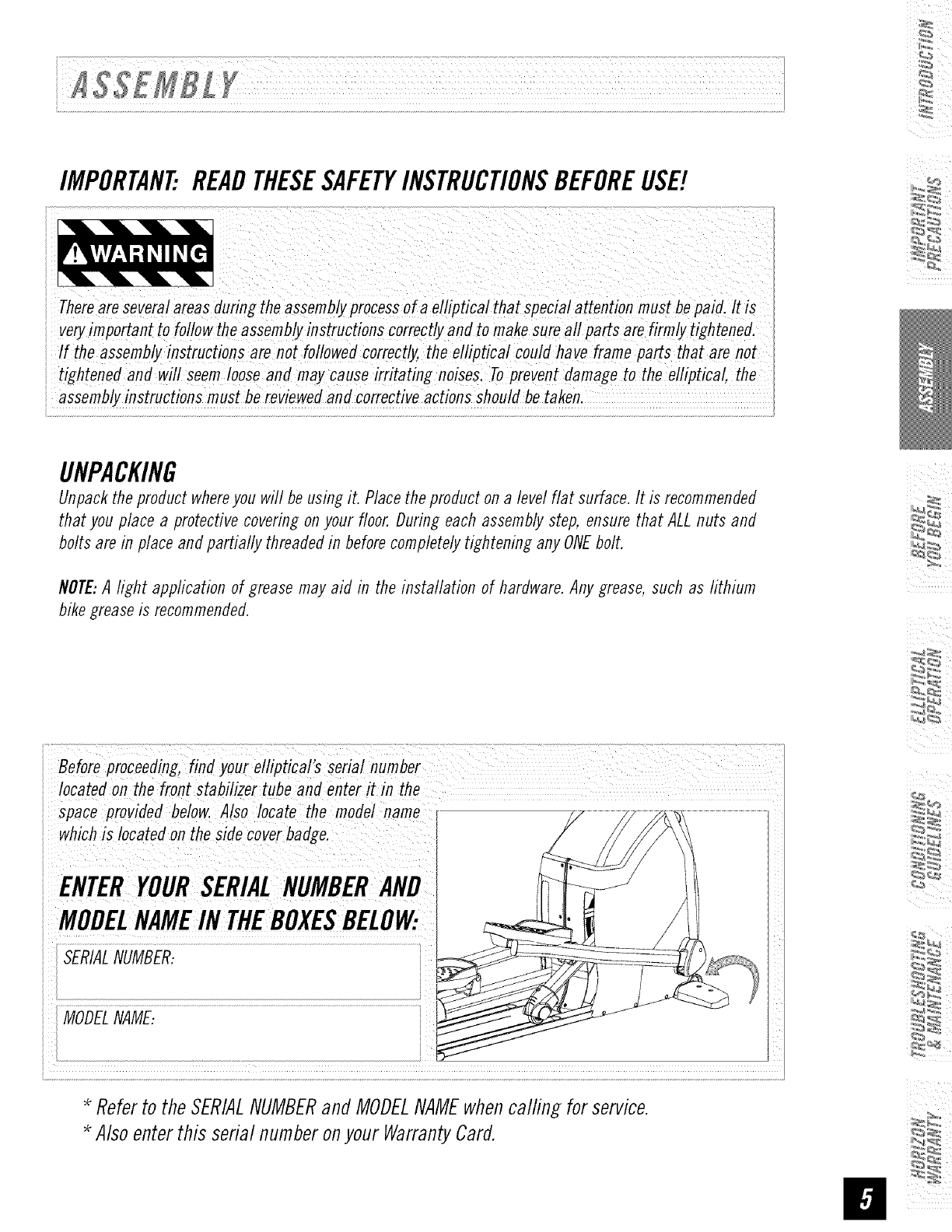
Befo_p_oceed_.g,_ayo,_ei_/'_ ¸¸seMi.,mber ;
iiocated on the front stabilizer tube and enter it in the
ispace provided below. Also locate the model name[
is located on theside coverbadge.
i i
i i
ENTERYOURSERIALNUMBERAND
i[
MOOEL INTHEBOXESBEL0W:
MODELNAME:
E
I
* Referto theSERIALNUMBERand MODELNAMEwhencalfing for service.
* Alsoenterthis serial numberonyourWarrantyCard.
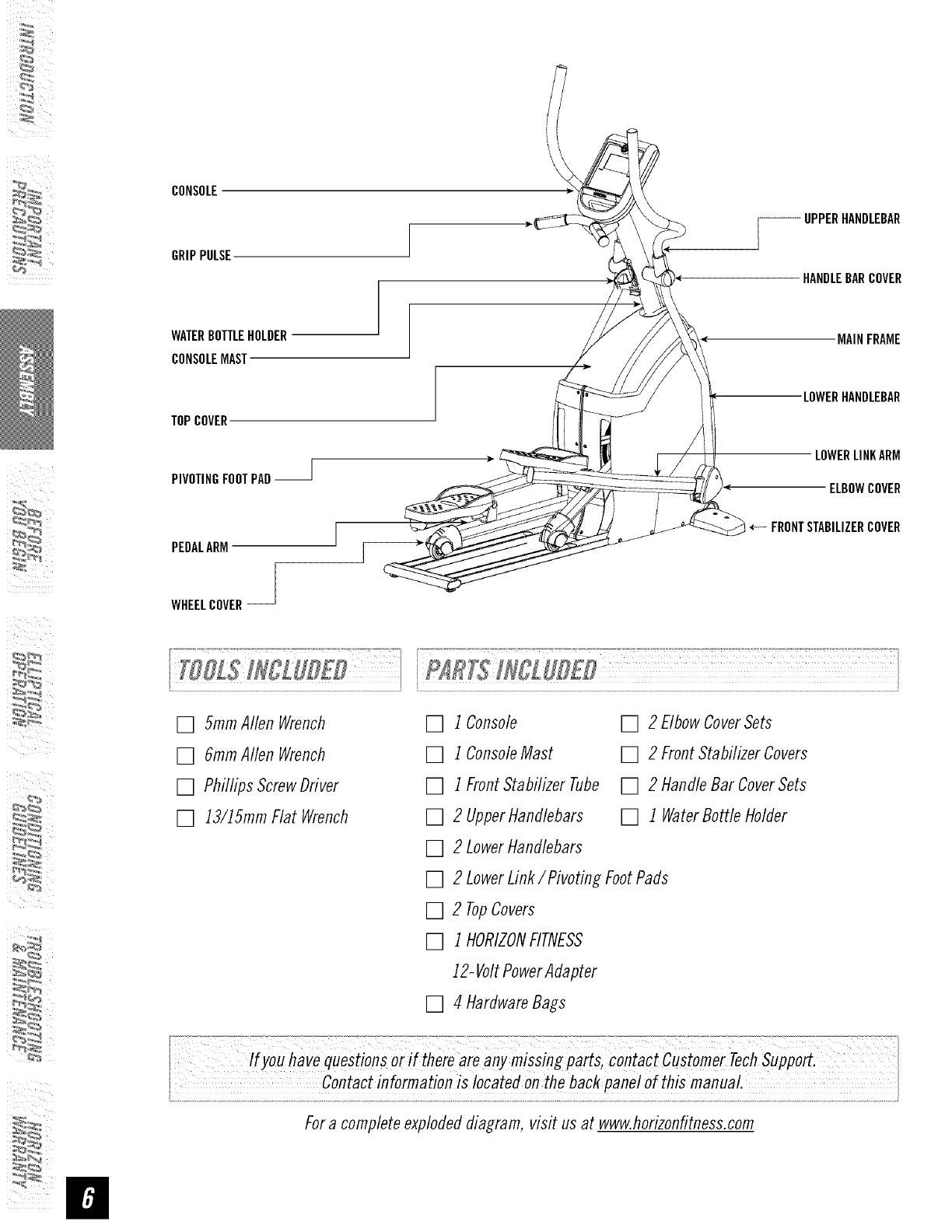
CONSOLE
GRIPPULSE
WATERBOTTLEHOLDER
CONSOLEMAST
TOPCOVER
PIVOTINGFOOTPAD--
PEDALARM
WHEELCOVER--
UPPERHANDLEBAR
HANDLEBARCOVER
MAINFRAME
LOWERHANDLEBAR
LOWERLINKARM
ELBOWCOVER
FRONTSTABILIZERCOVER
[] 5ramAllen Wrench
[] 6ramAllen Wrench
[] Phillips ScrewDriver
[] 13/15mmFlat Wrench
[] 1Console
[] 1ConsoleMast
[] 1FrontStabilizer Tube
[] 2 UpperHandlebars
[] 2 LowerHandlebars
[] 2 EIbowCoverSets
[] 2 FrontStabilizer Covers
[] 2 HandleBar CoverSets
[] 1 WaterBottleHolder
[] 2 LowerLink/Pivoting FootPads
[] 2 TopCovers
[] 1HORIZONFITNESS
12-VoltPowerAdapter
[] 4 HardwareBags
i havequestionsoriftherearean missingpa s,co"tactc,stomerTechSuppo .
contact information is locaiedonthe backpane! o! this manuaI.
Fora completeexplodeddiagram, visit us at www.horizonfitness.com
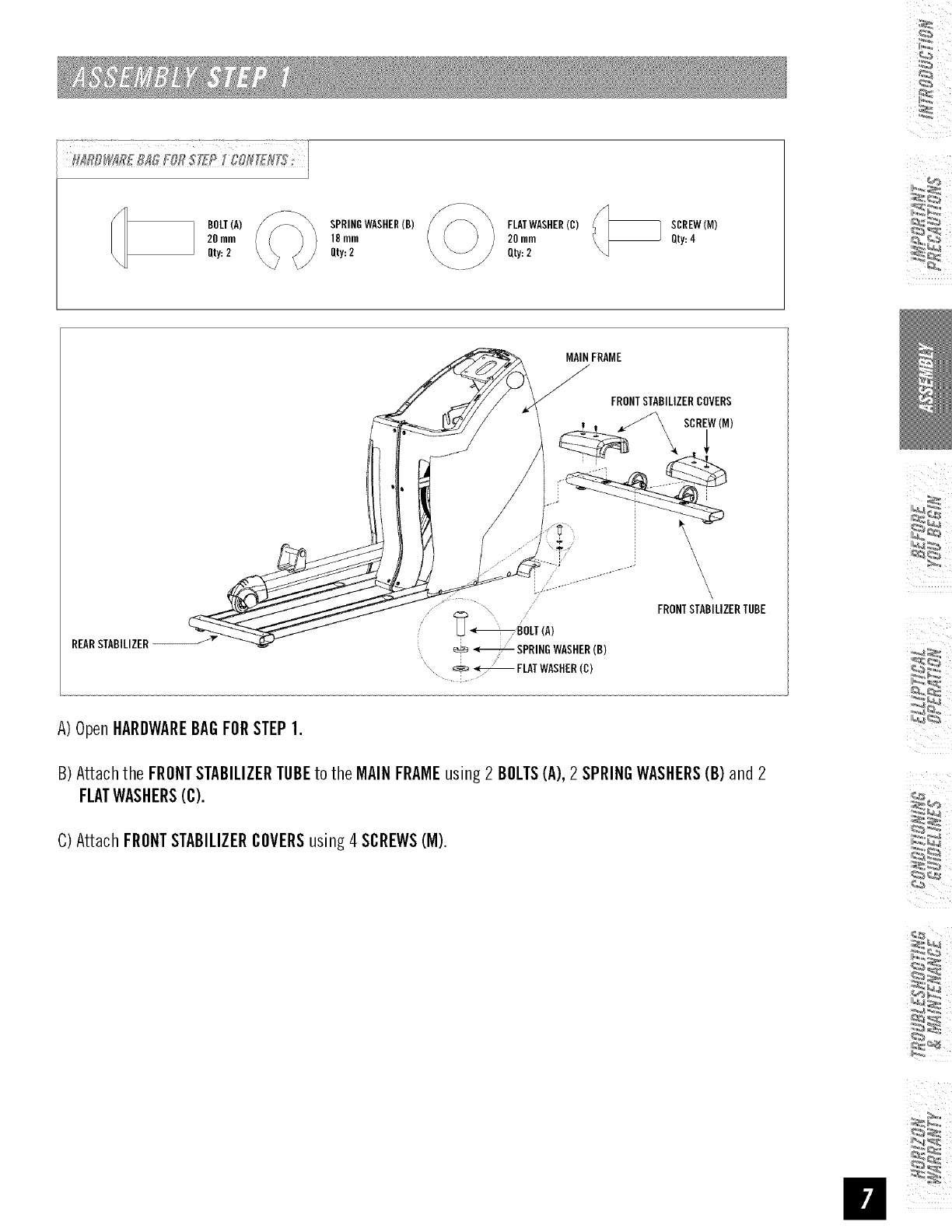
E
BOLT(A)
20ram
Qty:2
SPRINGWASHER(B)
18mm
Qty:2
FLATWASHER(C)
20ram
Qty:2
SCREW(M)
Qty:4
REARSTABILIZER
MAINFRAME
J
\
_BOLT_A)
÷ _ SRR,NOWAS,ER_B)
_FLATWASHER(C)
i
A)OpenHARDWAREBAGFORSTEP1.
B) Attachthe FRONTSTABILIZERTUBEto the MAINFRAMEusing2 BOLTS(A),2SPRINGWASHERS(B)and 2
FLATWASHERS(C).
C) Attach FRONTSTABILIZERCOVERSusing4 SCREWS(M).
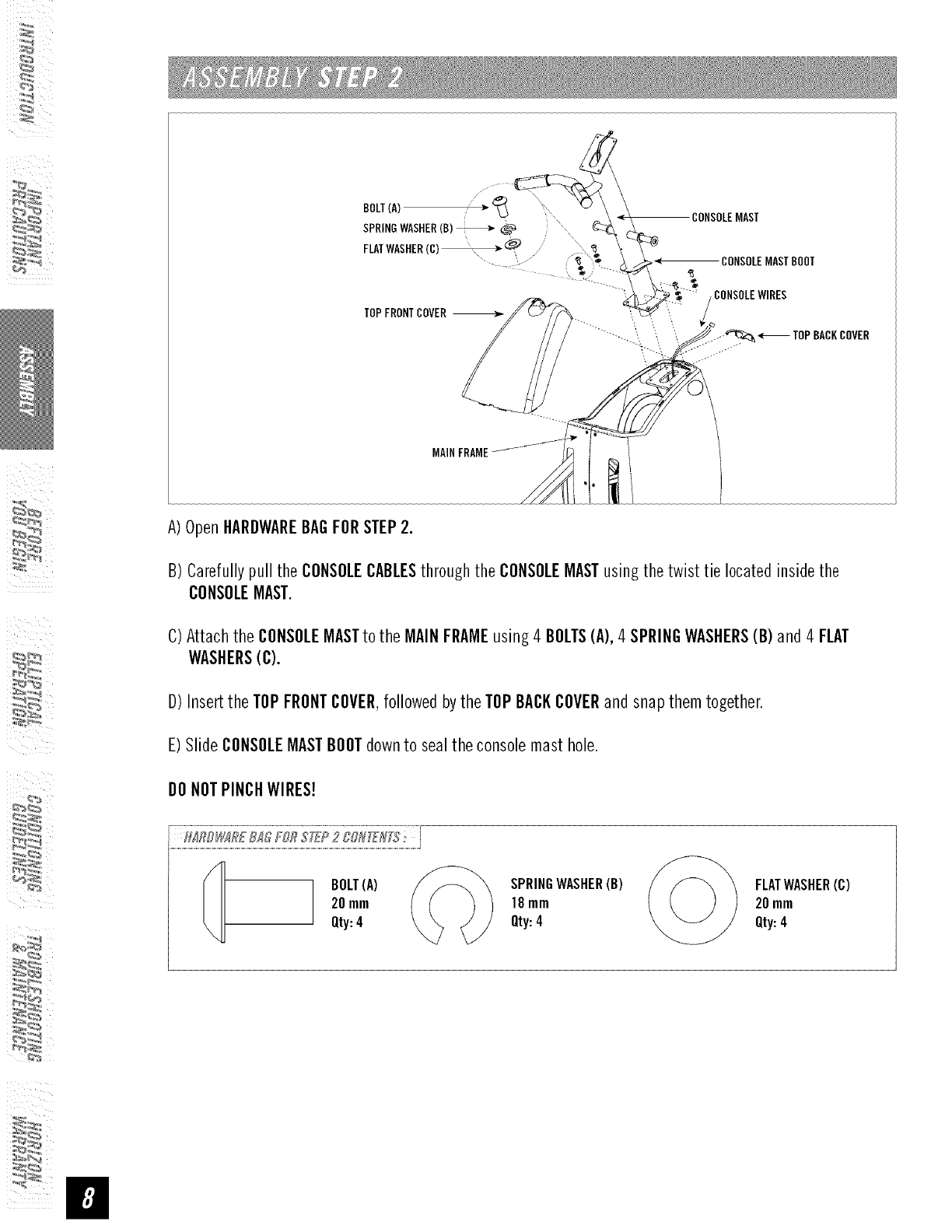
CO,SOLEOAS,
A) OpenHARDWAREBAGFORSTEP2.
B) Carefullypull the CONSOLECABLESthroughthe CONSOLEMASTusingthe twist tie locatedinsidethe
CONSOLEMAST.
C)Attachthe CONSOLEMASTto the MAINFRAMEusing4 BOLTS(A),4SPRINGWASHERS(B) and 4 FLAT
WASHERS(C).
D)Insertthe TOPFRONTCOVER,followedbythe TOPBACKCOVERandsnapthem together.
E)Slide CONSOLEMASTBOOTdownto sealthe consolemast hole.
DONOTPINCHWIRES!
BOLT(A)
20mm
Qty:4
SPRINGWASHER(B) /S_ \
18mm
Qty:4
FLATWASHER(C)
20mm
Qty:4
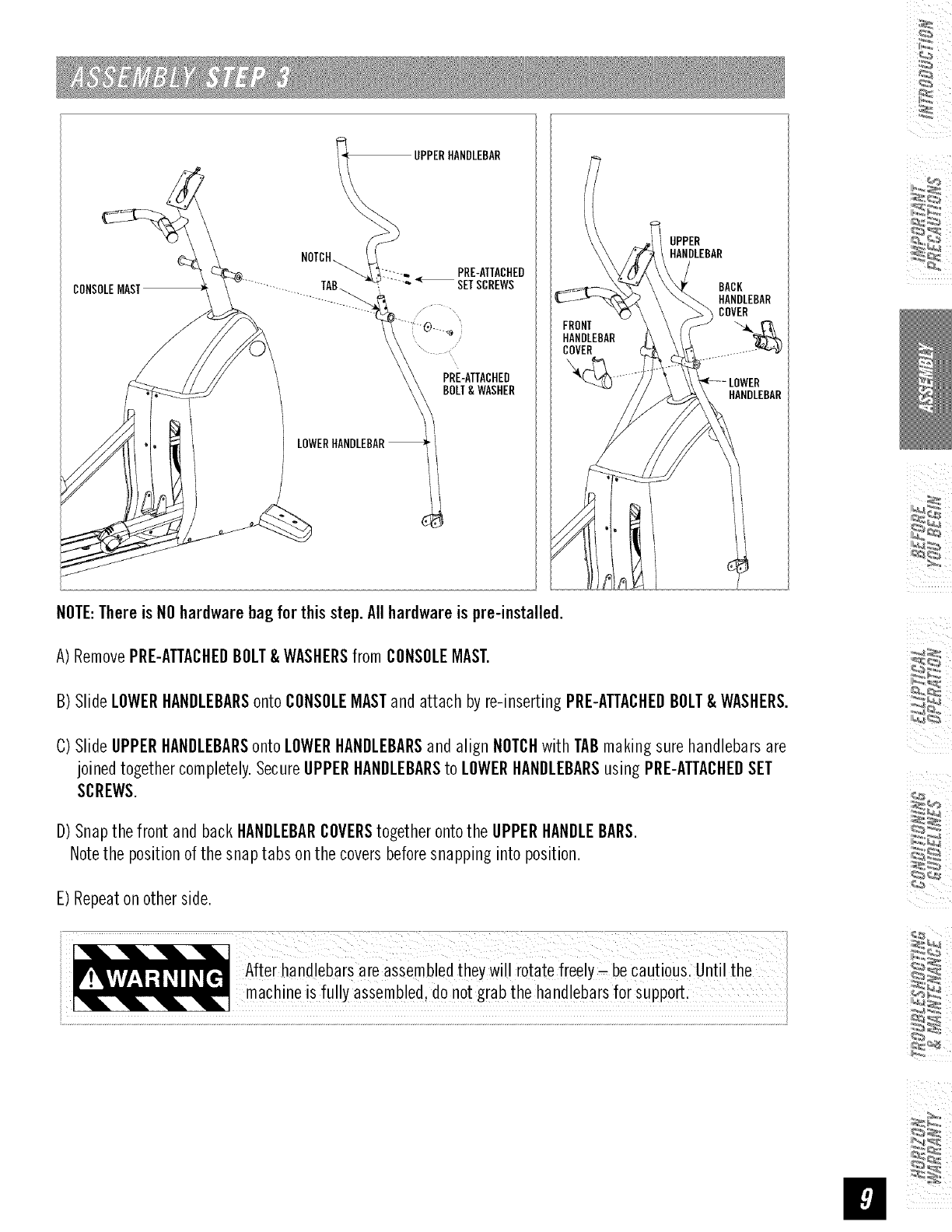
__ UPPERHANDLEBAR
NOTCH_y. PRE-ATTACHED
"_-L_......~ _ SETSCREWS
PRE-ATTACHED
BOLT& WASHER
LOWERHANDLEBAR
UPPER
HANDLEBAR
BACK
HANDLEBAR
COVER
HANDLEBAR
NOTE:Thereis NOhardwarebag for this step. All hardwareis pre-installed.
A) RemovePRE-ATTACHEDBOLT&WASHERSfrom CONSOLEMAST.
B) Slide LOWERHANDLEBARSonto CONSOLEMASTandattach byre-insertingPRE-ATTACHEDBOLT&WASHERS.
C)Slide UPPERHANDLEBARSonto LOWERHANDLEBARSand align NOTCHwith TABmaking sure handlebarsare
joinedtogethercompletely.SecureUPPERHANDLEBARSto LOWERHANDLEBARSusing PRE-ATTACHEDSET
SCREWS.
D)Snapthe front and backHANDLEBARCOVERStogetherontothe UPPERHANDLEBARS.
Notethe positionof the snaptabs on the coversbeforesnapping into_osition.
E) Repeaton otherside.
44_
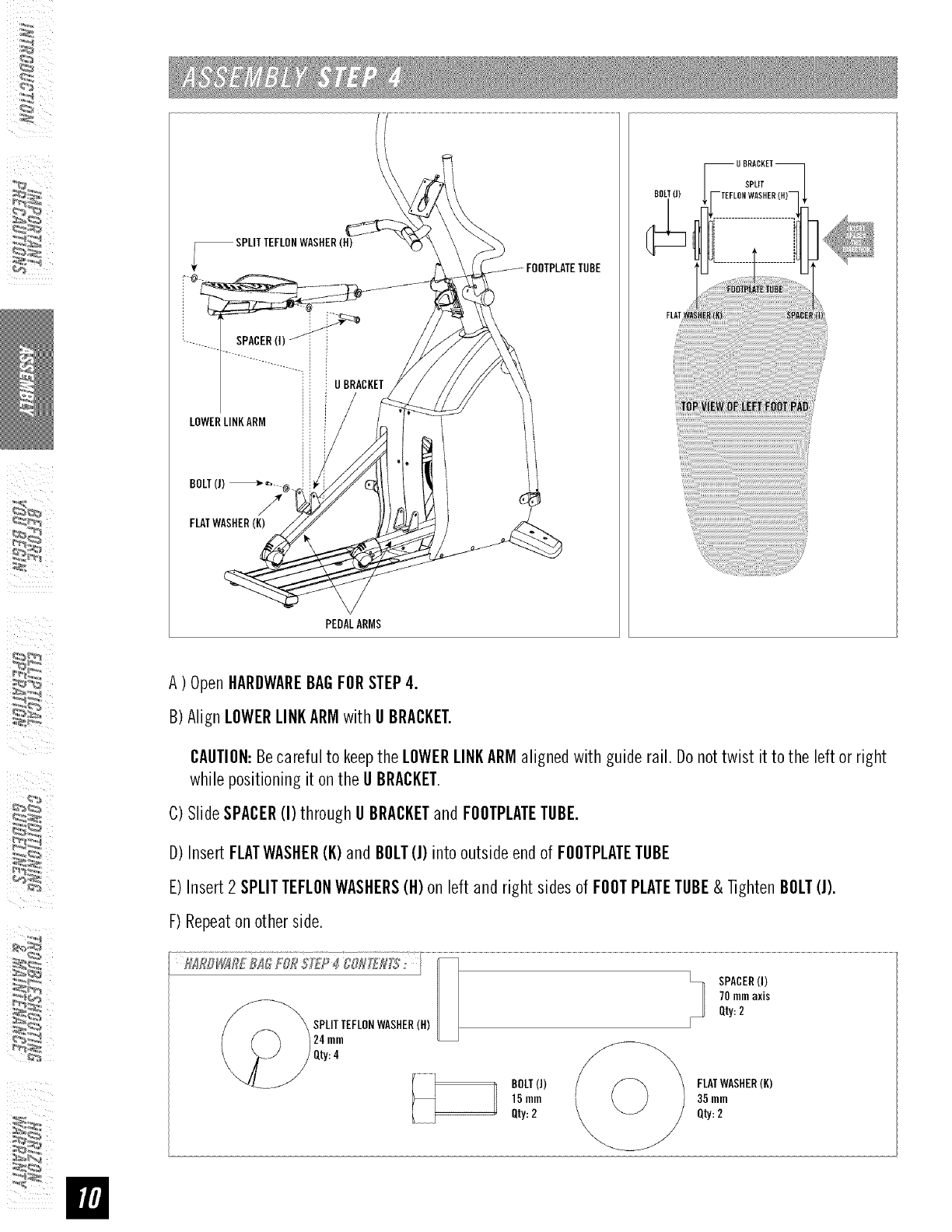
_SPLITTEFLONWASHER(H)
SPACER(I)
ii i UBRACKET
LOWERLINKARM
BOLT(J) _ _.,_@.
/
FLMWASHER(K)
PEDALARMS
BOLT(J) SPLIT
-TEFLONWASHER
A) OpenHARDWAREBAGFORSTEP4.
B)Align LOWERLINKARMwithU BRACKET.
CAUTION:Becareful to keepthe LOWERLINKARMaligned with guide rail. Donottwist it to the leftor right
whilepositioningit on the U BRACKET.
C)SlideSPACER(I) through U BRACKETand FOOTPLATETUBE.
D)InsertFLATWASHER(K)and BOLT(J)into outsideendof FOOTPLATETUBE
E)Insert2SPLITTEFLONWASHERS(H)on leftand right sides of FOOTPLATETUBE& TightenBOLT(J).
F)Repeatonother side.
BOLT(J)
15 mm
Qty:2
FLATWASHER(K)
35 mm
Qty:2
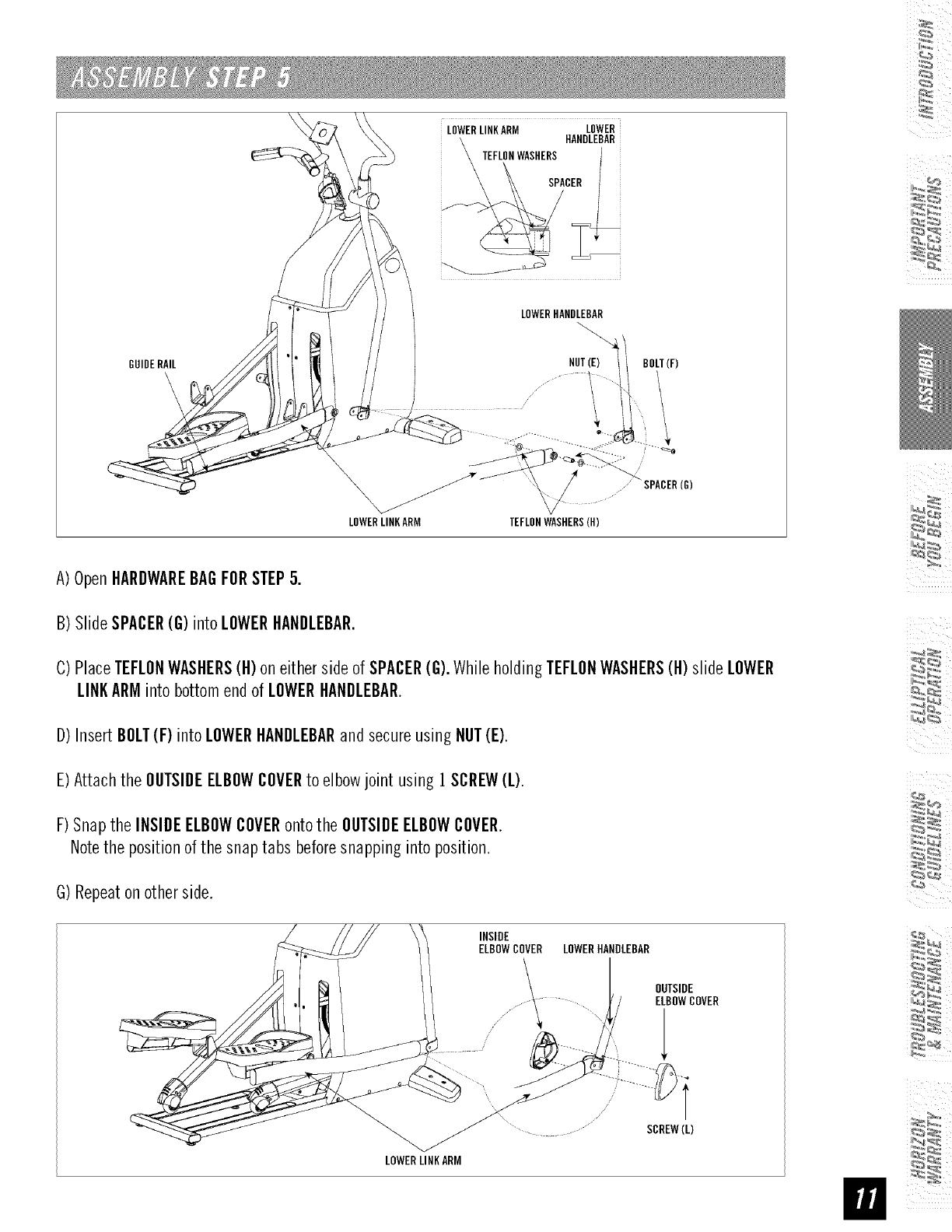
GUIDERAIL
iLOWERLINKARM LOWERI
HANULEBARi
LOWERHANDLEBAR
\
NUT(E) BOLT(F)
/
_ ......_ SPACER(G)
LOWERLINKARM TEFLONWASHERS(H)
A) OpenHARDWAREBAGFORSTEP5.
B) SlideSPACER(G) intoLOWERHANDLEBAR.
C)PlaceTEFLONWASHERS(H)on eitherside of SPACER(G).Whileholding TEFLONWASHERS(H)slide LOWER
LINKARMintobottom endof LOWERHANDLEBAR.
D)InsertBOLT(F) intoLOWERHANDLEBARand secureusing NUT(E).
E)Attach the OUTSIDEELBOWCOVERto elbowjoint using 1SCREW(L).
F) Snapthe INSIDEELBOWCOVERontothe OUTSIDEELBOWCOVER.
Notethe positionof the snaptabs beforesnapping intoposition.
G)Repeaton otherside.
INSIDE
ELBOWCOVER LOWERHANDLEBAR
LOWERLINKARM
OUTSIDE
ELBOWCOVER
T
SCREW(L)
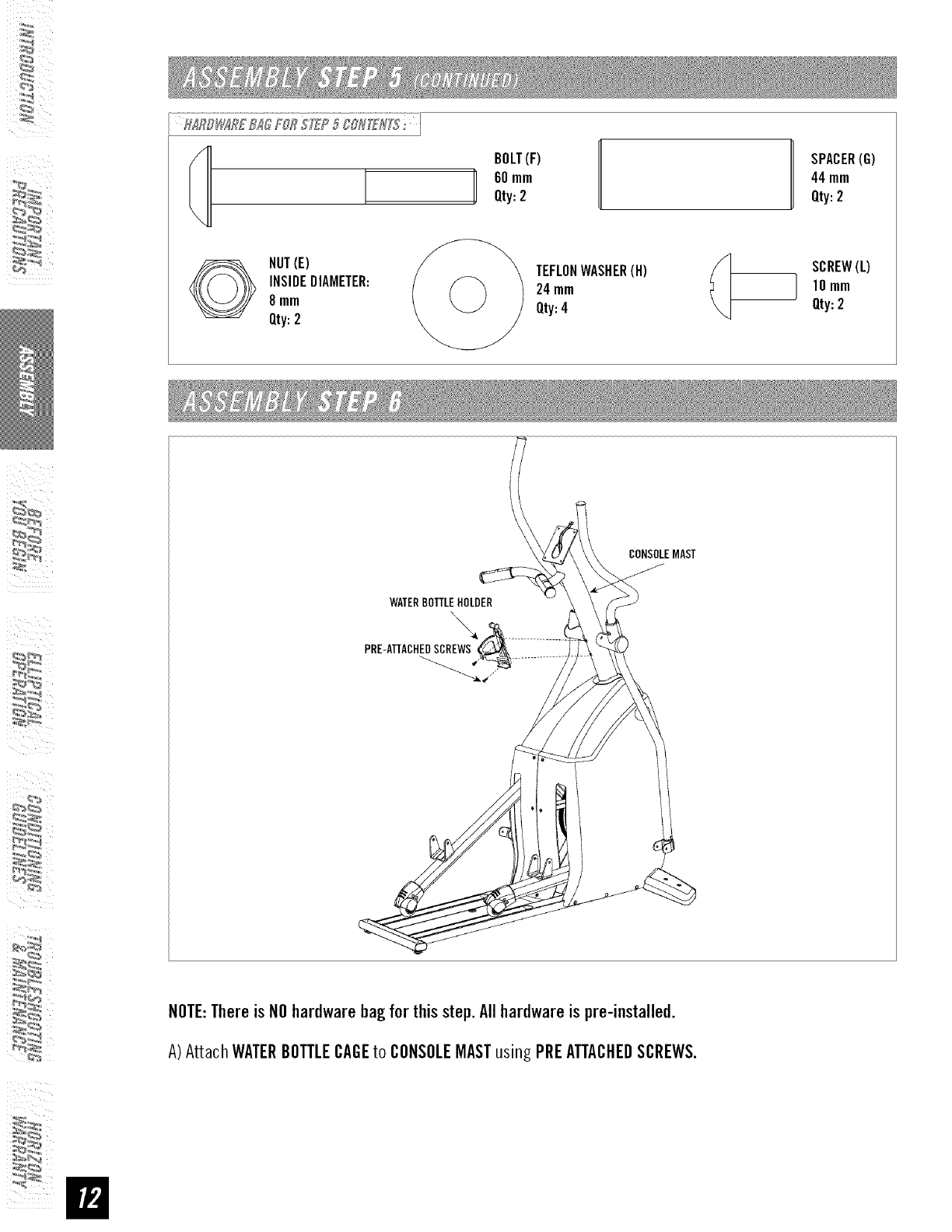
BOLT(F)
60 mm
Qty:2 H SPACER(G)
44mm
Qty:2
NUT(E)
INSIDEDIAMETER:
8mm
Qty:2
TEFLONWASHER(H)
24mm
Qty:4
SCREW(L)
I10 mm
Qty:2
WATERBOTTLEHOLDER
PRE-ATTACHEOSCREWS
CONSOLEMAST
NOTE:Thereis NOhardwarebag for thisstep.Allhardwareis pre-installed.
A)Attach WATERBOTTLECAGEto CONSOLEMASTusing PREATTACHEDSCREWS.
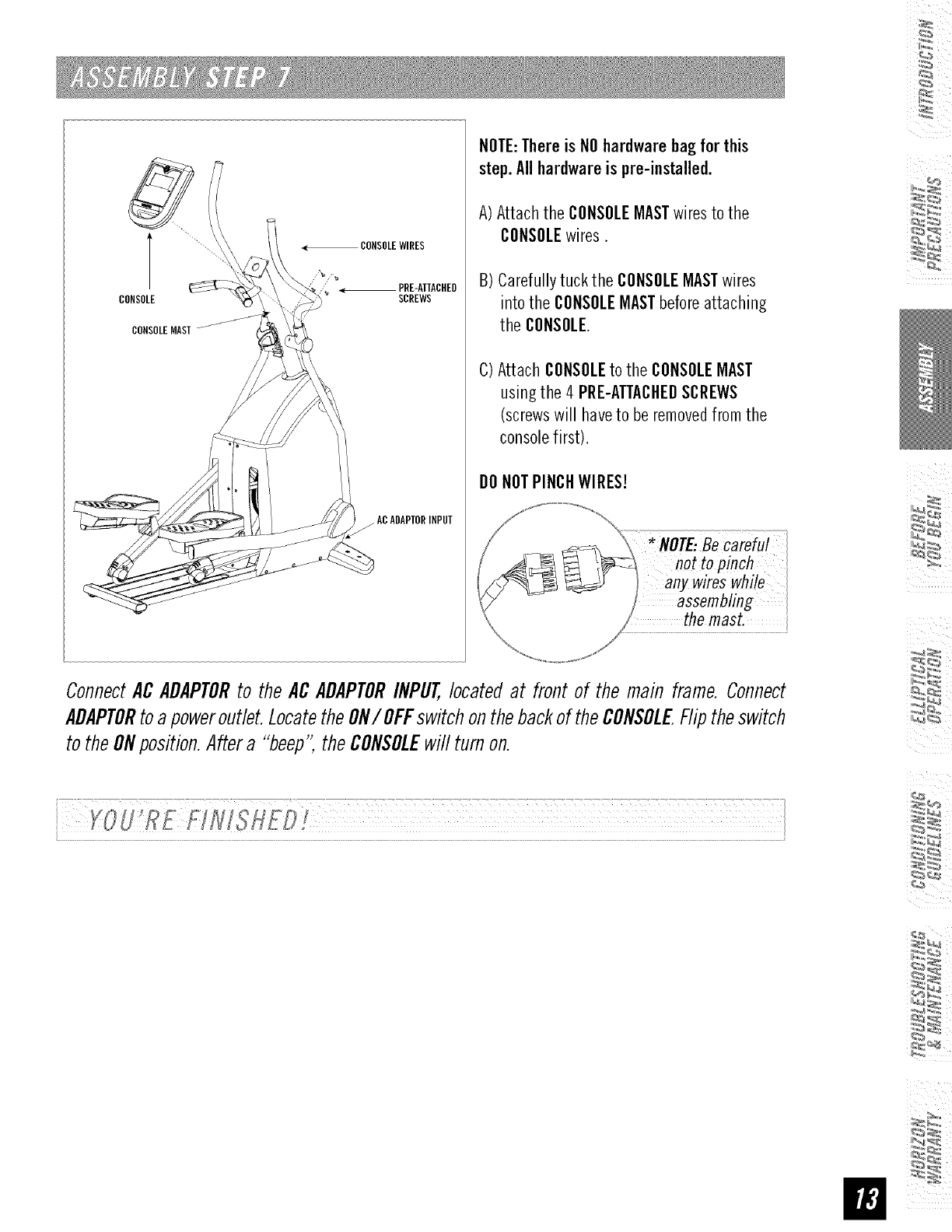
CONSOLE
CONSOLEMAST
PRE-ATTACHED
SCREWS
jACADAPTORINPUT
NOTE:Thereis NOhardwarebagfor this
step.Allhardwareis pre-installed.
A) Attach the CONSOLEMASTwiresto the
CONSOLEwires.
B) Carefullytuck the CONSOLEMASTwires
intothe CONSOLEMASTbeforeattaching
the CONSOLE.
C)Attach CONSOLEto the CONSOLEMAST
using the 4 PRE-ATTACHEDSCREWS
(screwswill haveto beremovedfrom the
consolefirst).
O0NOTPINCHWIRES!
MOTE:ee
not to pinch
any wireswhile
_assembling
the mast. .........
ConnectACADAPTORto theACADAPTORINPUT,locatedat front of the main frame. Connect
ADAPTORtoapoweroutlet.LocatetheON/OFFswitchonthebackof theCONSOLEFliptheswitch
to theONposition.Aftera "beep",theCONSOLEwill turnon.
CONGRATULATIONS!onchoosingyourelliptical.You'vetakenanimportantstepindevelopingand
sustaining an exercise program! Your elliptical is a tremendously effective tool for achieving your personal
fitness goals. Regular use of your elliptical can improve the quality of your life in so many ways.
HEREAREJUSTA FEWOFTHEHEALTHBENEFITSOFEXERCISE:
•Weight Loss
• A Healthier Heart
• Improved Muscle Tone
• Increased Daily Energy Levels
The key to reaping these benefits is to develop an exercise habit. Your new
elliptical wifl help you eliminate obstacles that prevent you from exercising.
Inclement weather and darkness won't interfere with your workout when you
use your elliptical in the comfort of your home. This guide provides you with
basic information for using and enjoying your new machine.
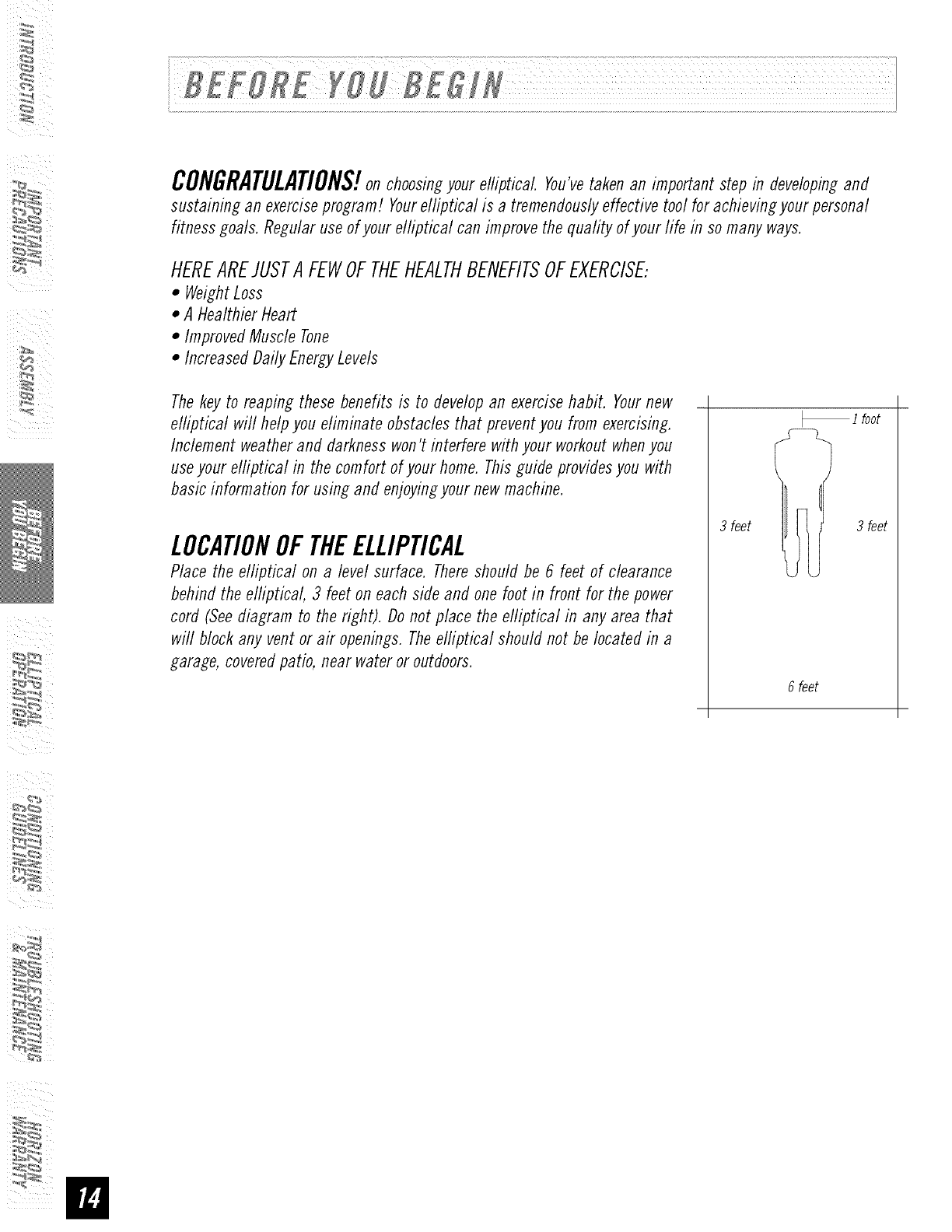
LOCATIONOFTHEELLIPTICAL
Place the elliptical on a level surface. There should be 6 feet of clearance
behind the elliptical, 3 feet on each side and one foot in front for the power
cord (See diagram to the right). Do not place the efliptical in any area that
will block any vent or air openings. The elliptical should not be located in a
garage, covered patio, near water or outdoors.
ifoot
3 feet Ii 3 feet
6feet
POWER
Yourprogrammableelliptical is poweredby apowersupply. Thepowermust beplugged into the powerjack,
whichis located in the front of the machinenear the STABILIZERTUBE.Makesure the consolepowerswitch is
in the ONposition. Note-Notaft units havean ON/OFFswitch on the console.
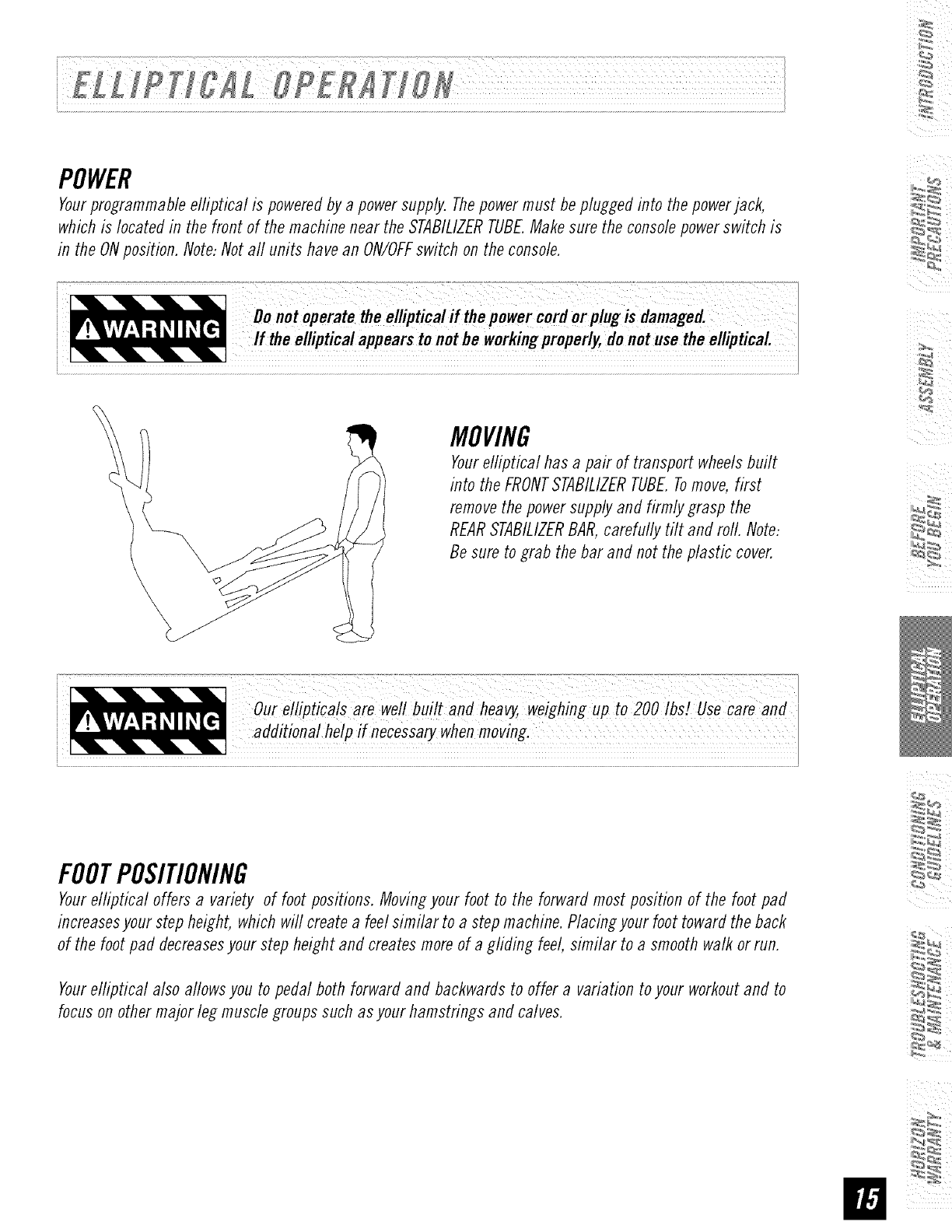
MOVING
Yourelliptical has a pair of transport wheelsbuilt
into the FRONTSTABILIZERTUBE.Tomove,first
removethe powersupplyand firmly grasp the
REARSTABILIZERBAR,carefully tilt and roll. Note:
Besure to grab the barand not the plastic cover.
pa _ g g p :
FOOTPOSITIONING
Yourelliptical offers a variety of foot positions. Movingyour foot to the forward mostposition of the foot pad
increasesyour step height, which will createa feelsimilar to a step machine.Placingyour foot towardthe back
of the foot pad decreasesyourstep heightand createsmoreof a gliding feel, similar to a smoothwalk or run.
Yourelliptical also allows you to pedal both forward and backwardsto offer a variation to your workoutand to
focuson othermajor leg musclegroups such asyour hamstrings and calves.
/
/
0
I N S T R U C T I O N S To Adjust PROGRAM SETTINGS
/U_: UP and DOWN Arr_ Keys.
ToSelectPROGRAM _/ToAdv._ p_ ENTER.
Use; UP and DOWN A_ow Keys.
To Advance press ENTER. _._ _ _ Press START to begin p_og_am.
I,
LEVEL
OMANUAL O R_ERSETRAIN_1
0WEIGHT LOSS 0 CUSTOM 2
OS,A.TIIEN,ERJlOS'OP
PAUSE.e_oTo ._s_ J
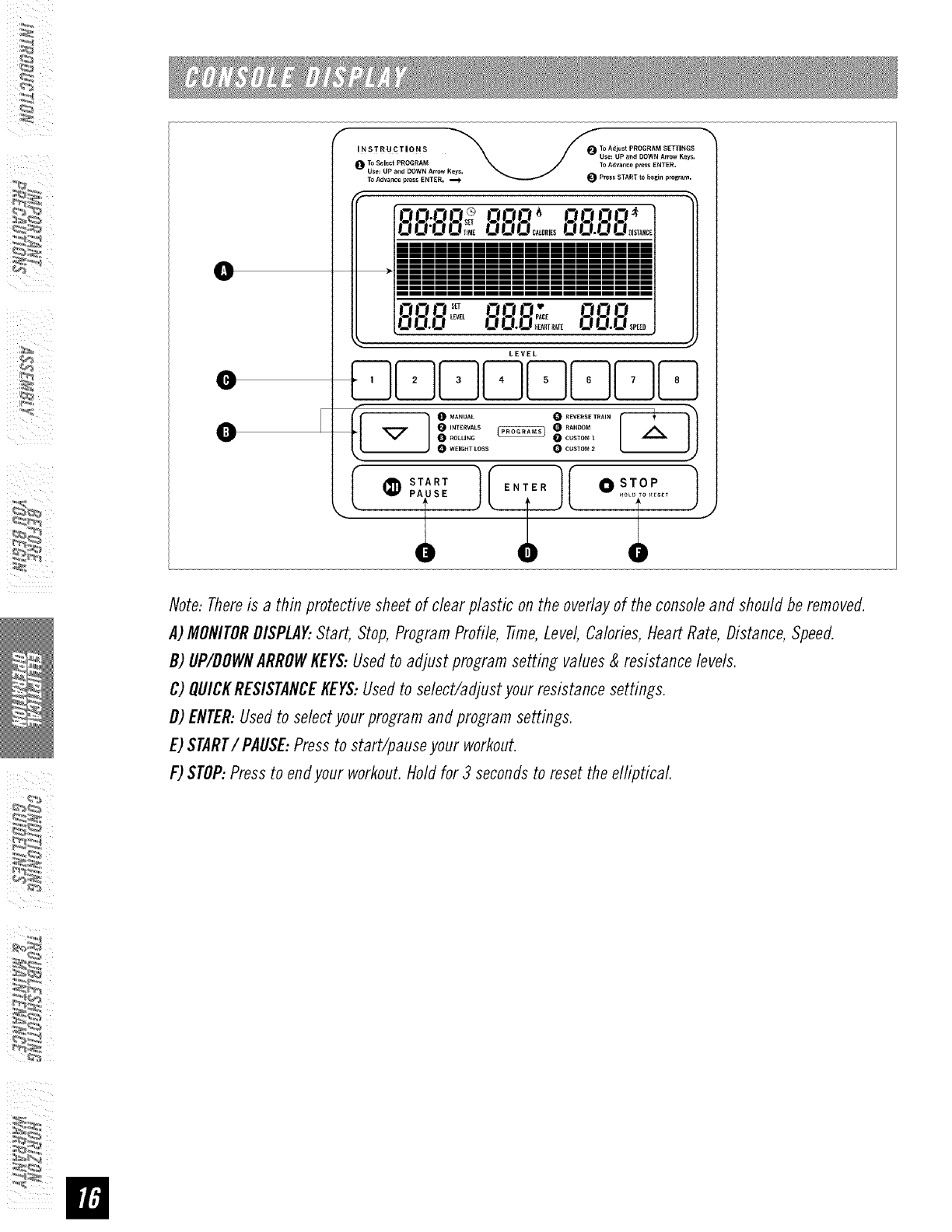
Note: There is a thin protective sheet of clear plastic on the overlay of the console and should be removed.
A) MONITORDISPLAY..Start, Stop, Program Profile, Time, Level, Calories, Heart Rate, Distance, Speed.
D) _P/DDWN ARRDWKEY$-Used to adjust pro_ram setting values &resistance levels.
_) _ICK RE$1$TAN_EKEYS.Used to select/adjust your resistance settings.
D) ENTER.Used to select your program and program settings.
E) START/PAUSE. Press to start/pause your workout.
F) STOP-Press to end your workout. Hold for 3 seconds to reset the elliptical
:_ E_
I) TurnonElliptical
2) PressSTARTbuttonand beginexercising.
3) Programwill automaticallydefault to MANUAL(P]), the time will countup from 0:00,and
the resistancewill default to level 1.
4) Theresistancelevelcanbeadjustedduringthe workout.
PULSEGRIPS
Placethe palm of your hands directlyon the grip pulsehandlebars.Both hands must grip the bars foryour
heart rate to register. It takes 5 consecutive heart beats (15-20 seconds) for your heart rate to register. When
gripping the pulse handlebars, do not grip tightly. Holding the grips tightly may elevate your blood pressure.
Keep a loose, cupping hold. Youmay experience an erratic readout if consistently holding the grip pulse
handlebars. Make sure to clean the pulse sensors to ensure proper contact can be maintained.
P1:MANUAL
Allowsyoutoadjusttheresistanceleveltoyourpreference,withouta presetprogram.
P2:INTERVALS
Walkor runa seriesof alternating RESISTANCElevels. Timebasedgoal with JOdifficulty levels to choosefrom
P3:ROLLING
Challengeswith differentcombinationsof RESISTANCE.Time-basedgoal with 7difficulty levelsto choosefrom.
P4:WEIGHTLOSS
Challengeswith variouscombinationsof hills and RESISTANCE.Time-basedgoal with JOdifficulty levelsto
choosefrom.
P5:REVERSETRAIN
Programcuesyou to pedal forward (F)and backwards(R)for an exciting andchallenging workout
(RESISTANCElevels). Time-basedgoal with 6 difficulty levelsto choosefrom.
P6:RANDOM
Providesevenmoreworkoutvarietybymixing upyour RESISTANCElevels. Time-based
goal with 7difficulty levelsto choosefrom.
P7:CUSTOMI
Designand storeyour own customexerciseprogram.
P8:CUSTOM2
Design and store your own custom exercise program.
i =;71 F FRO ?RA/I) IIRIII
Allows 'OnTheFly' manual RESISTANCEchanges,time-basedgoal.
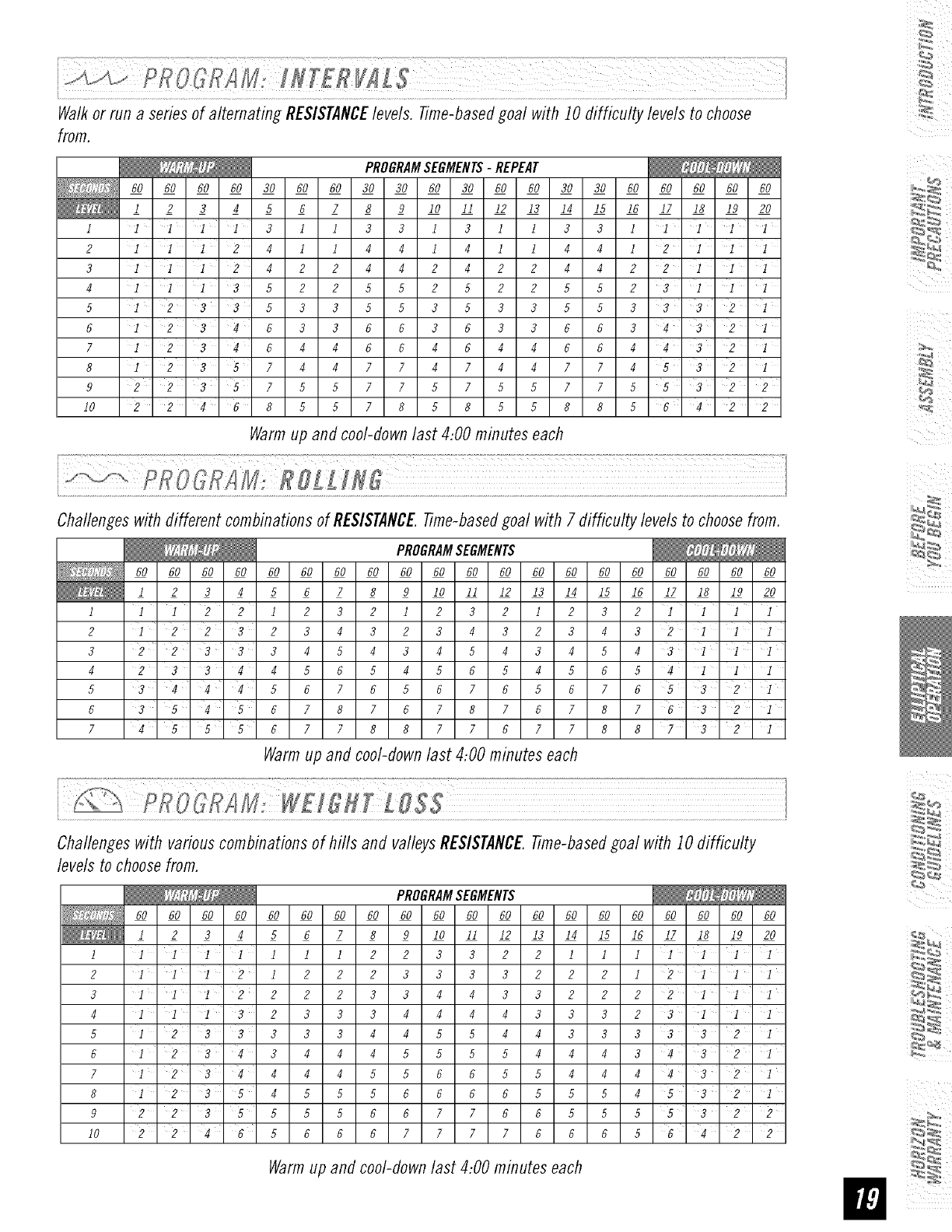
Walk or run a series of alternating RESISTANCElevels. Time-based goal with 10 difficulty levels to choose
from.
PROGRAMSEGMENTS-REPEAT
60 60 60 60 30 60 60 30 30 60 30 60 60 30 30 60 60 60 60 60
1 2 3 4 5 6 7 8 9 I0 II 12 13 14 15 16 17 18 19 20
I I I i i 3 1 I 3 3 1 3 I 1 3 3 I I I i I
2 1112 4114414114412111
3 11124224424224422111
4 11135225525225523111
5 I2 33 533 553533 5533 32I
6 I 234 633663633663432I
7 I 234644664644664432I
8 I 2357447747447745321
9 2' 2' 3 5 7 5 5 7 7 5 7 5 5 7 7 5 5 3 '2' 2
10 22468557858558856422
Warmup and cool-downlast 4:00 minutes each
Challengeswith different comb&ationsof RESISTANCETime-basedgoal with 7 difficulty levels to choosefrom.
PROGRAMSEGMENTS
60 60 60 60 60 60 60 60 60 60 60 60 60 60
1 2 3 4 5 6 7 8 9 I0 II 12 13 14
I I I 2 2 I 2 3 2 I 2 3 2 I 2
2 I 2232 3432 3432 3
3 2 2 3 ' 3 3 4 5 4 3 4 5 4 3 4
4 23344565456545
5 3 4 4 '4 5676567656
6 3 5 4' 5 6 7 8 7 6 7 8 7 6 7
7 45 6778877677
Warm up and cool-down last 4:00 minutes each
60 60 60 60 60 60
15 16 17 18 19 20
iii
3 2 I I 1 1
4 3 2 I i i
5 4 3' I 'i' i
6 5 4 1 I I
7 6 5 3 2 i
87632i
88732 i
Challengeswith variouscomb&ations of hills and valleysRESISTANCETime-basedgoal with 10 difficulty
levels to choosefrom.
60 60 60 60 60 60 60
1234567
1 I I I I 1 1 I
2III212 2
3I I 2 2 2 2
4I I i 3 2 3 3
5I233333
6I2 3 4 3 4 4
7 1 2 3 4 4 4 4
8 1 2 3 5 4 5 5
9 2 2 3 5 5 5 5
10 2 2 4 '6 5 6 6
PROGRAMSEGMENTS
60 60 60 60 60 60 60 60 60 60 60 60 60
8 9 I0 II 12 13 14 15 16 17 18 19 20
2 2 3 3 2 2 1 I I I I I I
2 3 3 3 3 2 2 2 I 2 I I I
3344332222'I'i'I
3444433323'1'1'1
4455443333321
4555544434'3' 2 1
5566554444'32I
566665554532I
6677665555322
6777766656'4' 2 2
Warmup and cool-downlast 4:00 m&utes each
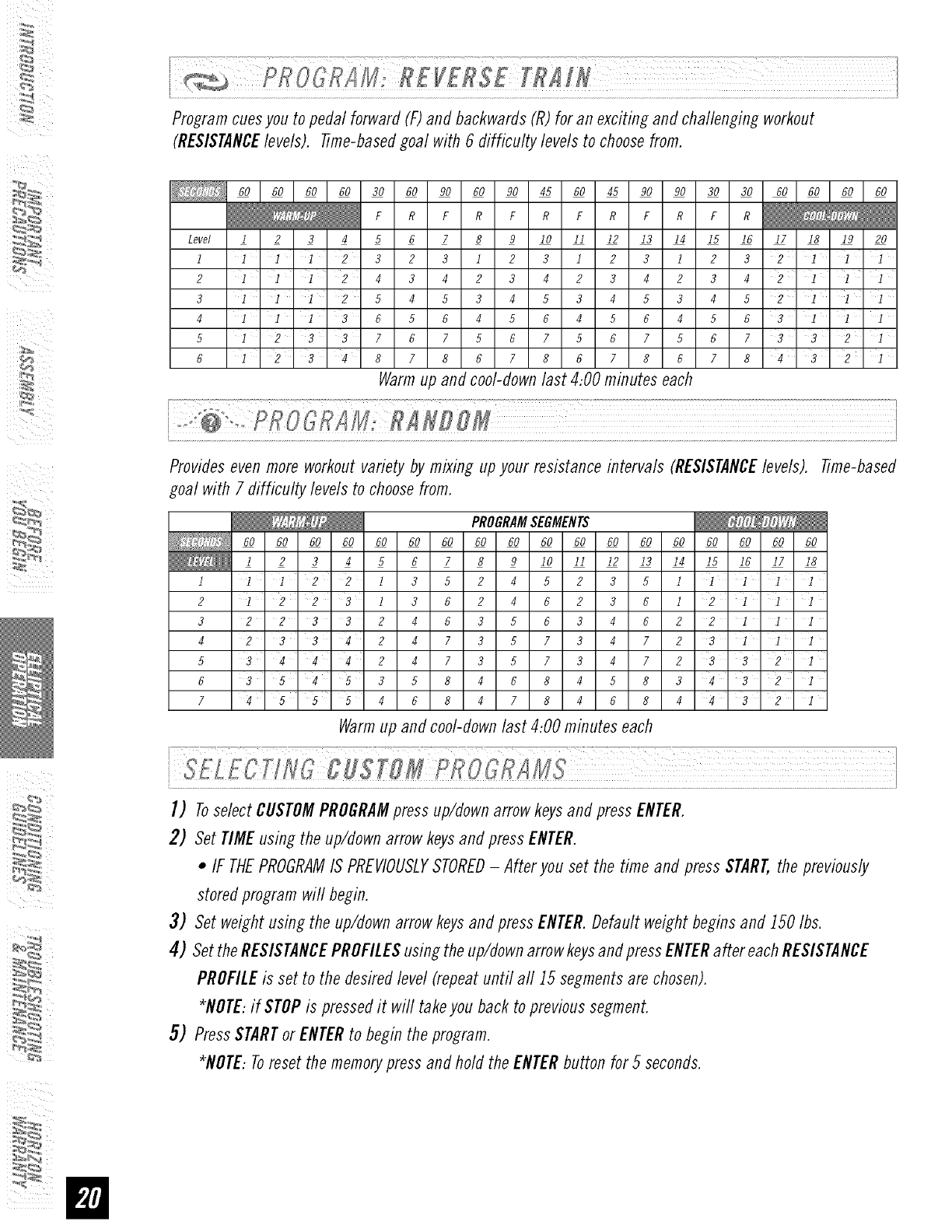
%
60 60 60 60 30 60 90 60 90 45 60 45 90 90 30 30 60 60 60 60
F R F R F R F R F R F R
1 2 3 4 5 6 7 8 9 I0 II 12 13 14 15 16 17 18 19 20
I I 1 2 3 2 3 I 2 3 I 2 3 I 2
I'I'1'2 4 3 4 2 3 4 2 3 4 2 3
1 1 1 2 5 4 5 3 4 5 3 4 5 3 4
III 3 6 5 6 4 5 6 4 5 6 4 5
I 2 3 3 7 6 7 5 6 7 5 6 7 5 6
I 2 3 4 8 7 8 6 7 8 6 7 8 6 7
Level
I
2
3
4
5
6
3 2 I' i' I
42I'i'I
5 2 I I I
6 3 1 I I
7332I
8 4 3 2 I
Providesevenmoreworkout variety by mixing upyour resistanceintervals RESISTANCElevels). Time-based
goal with 7 difficulty levelsto choosefrom.
I
2
3
4
5
6
7
PROGRAMSEGMENTS
60 60 60 60 60 60 60 60 60 60 60 60 60 60 60 60 60 60
I 2 3 4 5 6 7 8
I I 2 2 I 3 5 2 4 5 2
I 2 2 3 I 3 6 2 4 6 2
22332463563
23342473573
3 4 4 '4 2473573
354'53584684
45 4684784
9 I0 I1 12 13 14 15 16 17 18
3 5 1 I I
3 6 1 2 i I I
4622I 11
4 7 2 3 I I I
4 7 2 3 3 2 'I
583432I
6844321
Warmup and cool-downlast 4:00 minutes each
(_iiii
I) ToselectCUSTOMPROGRAMpress up/downarrowkeysand pressENTER.
2) Set TIMEusing the up/downarrow keysand pressENTER.
•IF THEPROGRAMIS PREVIOUSLYSTORED-Afteryou set the time and pressSTART,the previously
storedprogram will begin.
3) Set weightusing the up/downarrowkeysandpressENTER.Default weightbeginsand 150Ibs.
4) SettheRESISTANCEPROFILESusing theup/downarrowkeysandpressENTERafter eachRESISTANCE
PROFILEis set to the desiredlevel(repeatuntil all 15 segmentsarechosen).
*NOTE:if STOPis pressedit will takeyou back to previoussegment.
5) PressSTARTor ENTERto begin the program.
*NOTE:Toreset the memorypressand hold the ENTERbutton for 5 seconds.
ALWAYSCONSULTYOURPHYSICIANBEFOREBEGINNINGANEXERCISEPROGRAM.
HOWOFTEN?(Frequencyof Workouts)
The American Heart Association recommends that you exercise at least 3 to 4 days per week to maintain
cardiovascular fitness. If you have other goals such as weight or fat loss, you wifl achieve your goal faster with
more frequent exercise. Whether it's 3 days or 6 days, remember that your ultimate goal should be to make
exercise a fifetime habit. Many people are successful staying with a fitness program if they set aside a specific
time of day to exercise. It doesn't matter whether it's in the morning before breakfast, during lunch hour or while
watching the evening news. What's more important is that it's a time that allows you to keep a schedule, and a
time when you won't be interrupted. Tobe successful with your fitness program, you have to make it a priority in
your life. So decide on a time, puff out your day planner and pencil in your exercise times for the next month!
HOWLONG?(Durationof Workouts)
For aerobic exercise benefits, it's recommended that you exercise from between 24 and 60 minutes per session.
But start slowly and gradually increase your exercise times. If you've been sedentary during the past year, it may
be a good idea to keepyour exercise times to as little as five minutes initially. Yourbody will need time to adjust
to the new activity. If your goal is weight loss, a longer exercise session at lower intensities has been found to
be most effective. A workout time of 48 minutes or more is recommended for best weight loss results.
HOWHARD?(Intensityof Workouts)
How hard you workout is also determined by your goals. If you use your machine to prepare for a 5K workout,
you will probably work out at a higher intensity than if your goal is general fitness. Regardless of your long
term goals, always begin an exercise program at low intensity. Aerobic exercise does not have to be painful to
be beneficial! There are two ways to measure your exercise intensity. The first is by monitoring your heart rate
using the grip pulse handlebars and the second is by evaluating your perceived exertion level (this is simpler
than it sounds!).
PERCEIVEDEXERTIONLEVEL
A simple way to gauge your exercise intensity is to evaluate your perceived exertion level. While exercising, if you
are too winded to maintain a conversation without gasping, you are working out too hard. A good rule of thumb
is to work to the point of exhilaration, not exhaustion. If you cannot catch your breath, it's time to slow down.
Always be aware of these warning signs of overexertion.
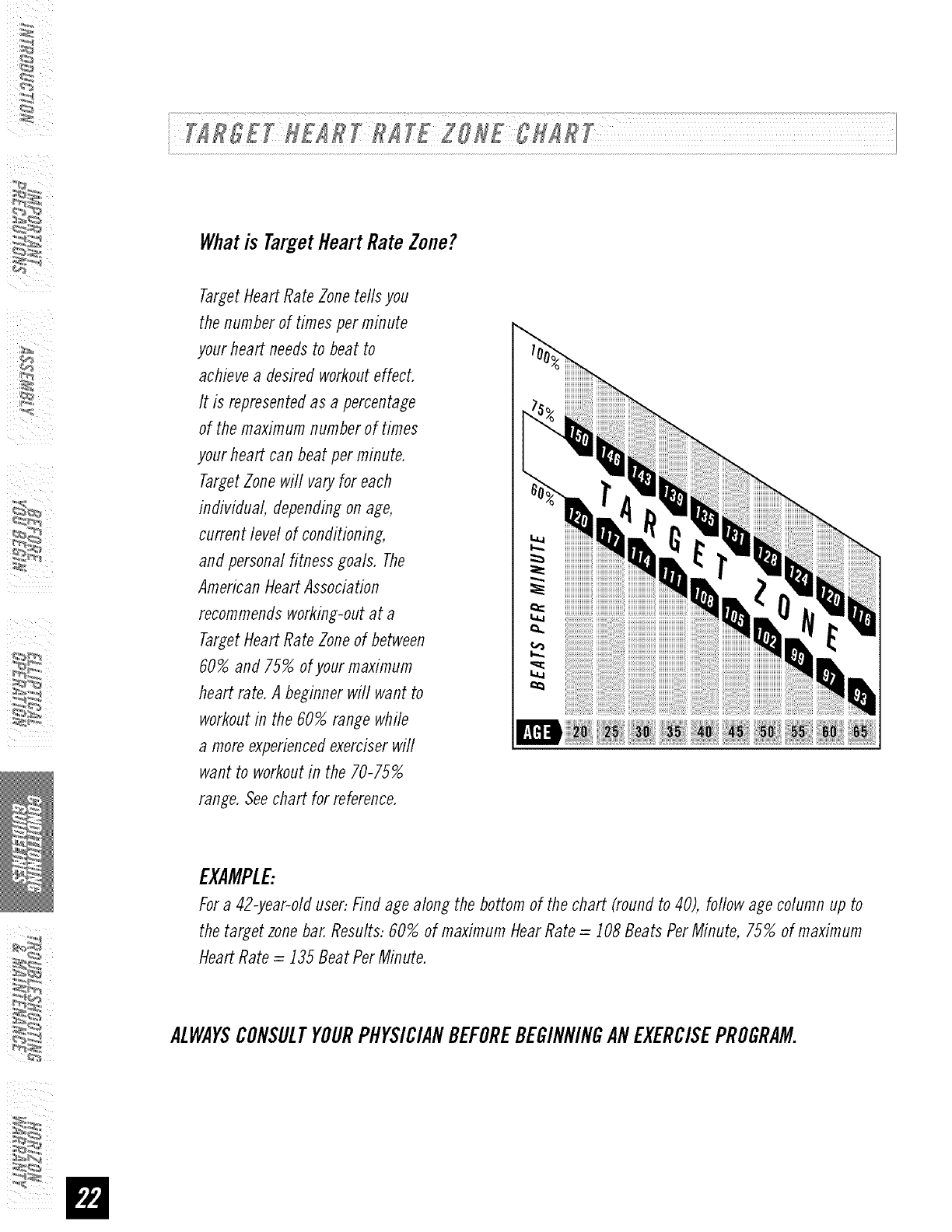
Whatis TargetHeartRateZone?
Target Heart Rate Zone tells you
the number of times per minute
your heart needs to beat to
achieve a desired workout effect.
It is represented as a percentage
of the maximum number of times
your heart can beat per minute.
Target Zone will vary for each
individual, dependin_ on age,
current level of conditioning,
and personal fitness _oals. The
American Heart Association
recommends working-out at a
Target Heart Rate Zone of between
60% and 75% of your maximum
heart rate. A beginner will want to
workout in the 60% range while
a more experienced exerciser will
want to workout in the 70-75%
range. See chart for reference.
EXAMPLE:
For a 42-year-old user: Find age alon_ the bottom of the chart (round to 40), follow a_e column up to
the target zone bar. Results: 60% of maximum Hear Rate = _08 Beats Per Minute, 75% of maximum
Heart Rate = _35 Beat Per Minute.
ALWAYSCONSULTYOURPHYSICIANBEFOREBEGINNINGANEXERCISEPROGRAM.
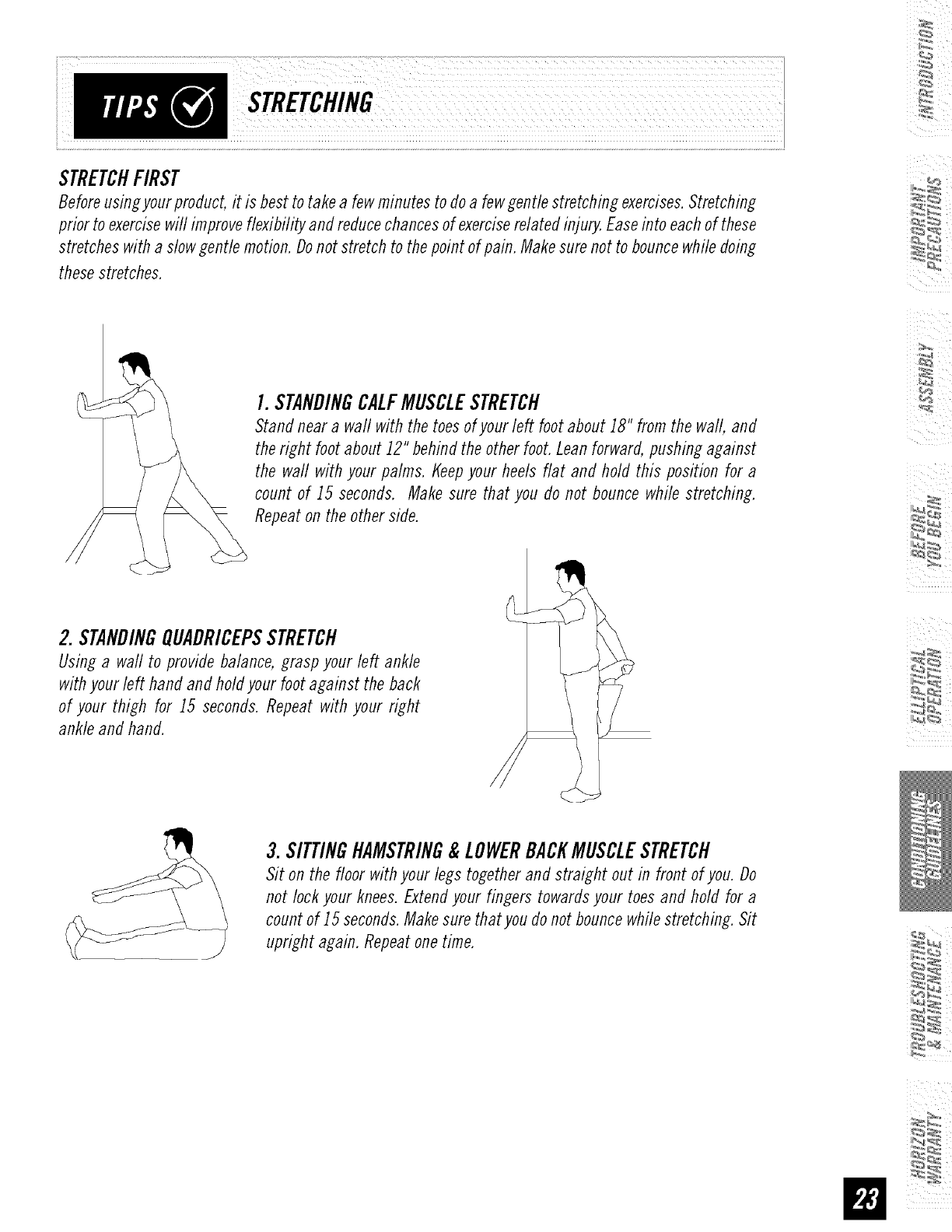
STRETCHFIRST
Before using your product, it is best to take a few minutes to do a few gentle stretching exercises. Stretching
prior to exercise will improve flexibility and reduce chances of exercise related injury. Ease into each of these
stretches with a slow gentle motion. Do not stretch to the point of pain. Make sure not to bounce while doing
these stretches.
I. STANDINGCALFMUSCLESTRETCH
Stand near a wall with the toes of your left foot about iS" from the wall, and
the right foot about J2" behind the other foot. Lean forward, pushing against
the waft with your palms, t_eepyour heels flat and hold this position for a
count of J5 seconds. Make sure that you do not bounce while stretching.
Repeat on the other side.
2. STANDINGQUADRICEPSSTRETCH
Using a wall to provide balance, grasp your left ankle
with your left hand and hold your foot against the back
of your thigh for J5 seconds. Repeat with your right
ankle and hand.
3. SITTINGHAMSTRING&LOWERBACKMUSCLESTRETCH
Sit on the floor with your legs together and straight out in front of you. Do
not lock your knees. Extend your fingers towards your toes and hold for a
count of J5 seconds. Make sure that you do not bounce while stretching. Sit
upright again. Repeat one time.
WARMUP
The first 2 to 5 minutes of a workout should be devoted to A_armingup. The warm-up will limber your
muscles and prepare them for more strenuous exercise. Make sure that vou warm-up on your product at a
slow pace. The warm up should gradually bring your heart rate into your Target Heart Rate Zone.
COOLDOWN
Never stop exercising suddenly! A cool-down period of 3-5 minutes allows your heart to readjust to the
decreased demand. Make sure that your cool down period consists of a very slow pace to allow your heart
rate to lower. After the cool-down, repeat the stretching exercises listed above to loosen and relax your
muscles.
ACHIEVINGYOURFITNESSGOALS
An important step in developing a long term fitness program is to determine your goals. Is your primary
goal for exercising to lose weight? Improve muscle? Reduce stress? Prepare for the spring racing schedule?
Knowing what your goals are will help you develop a more successful exercise program. Below are some
commonexercisegoals:
•WeightLoss-lowerintensity, longerduration workouts
• ImproveBodyShapeand Tone-interval workouts,alternate betweenhi and low intensities
• IncreasedEnergyLevel-morefrequentdaily workouts
• ImprovedSportsPerformance-high intensity workouts
• ImprovedCardiovascularEndurance-moderateintensity, longerduration workouts
If possible try to define your personal goals in precise, measurable terms, and then putyour goals in writing.
The more specific you can be, the easier it will be to track your progress. If your goals are long term, divide
them up into monthly and weekly segments. Longer term goals can lose some of the immediate motivation
benefits. Short term goals are easier to achieve. Your console provides you with several readouts that can
be used to record your progress. Youcan track Distance, Calories or Time.
KEEPINGANEXERCISEDIARY
Tomake your personal exercise log book, photocopy the weekly and monthly log sheets, which are located
on the following pages, or you can print them off of your computer bygoing to:
www.horizonfitness,com/ uifles/week!vlo ,pflf
www.horizonfitness,com/ uides/monthlvIo ,pflf
As your fitness improves, you can look back and see how far you've come!
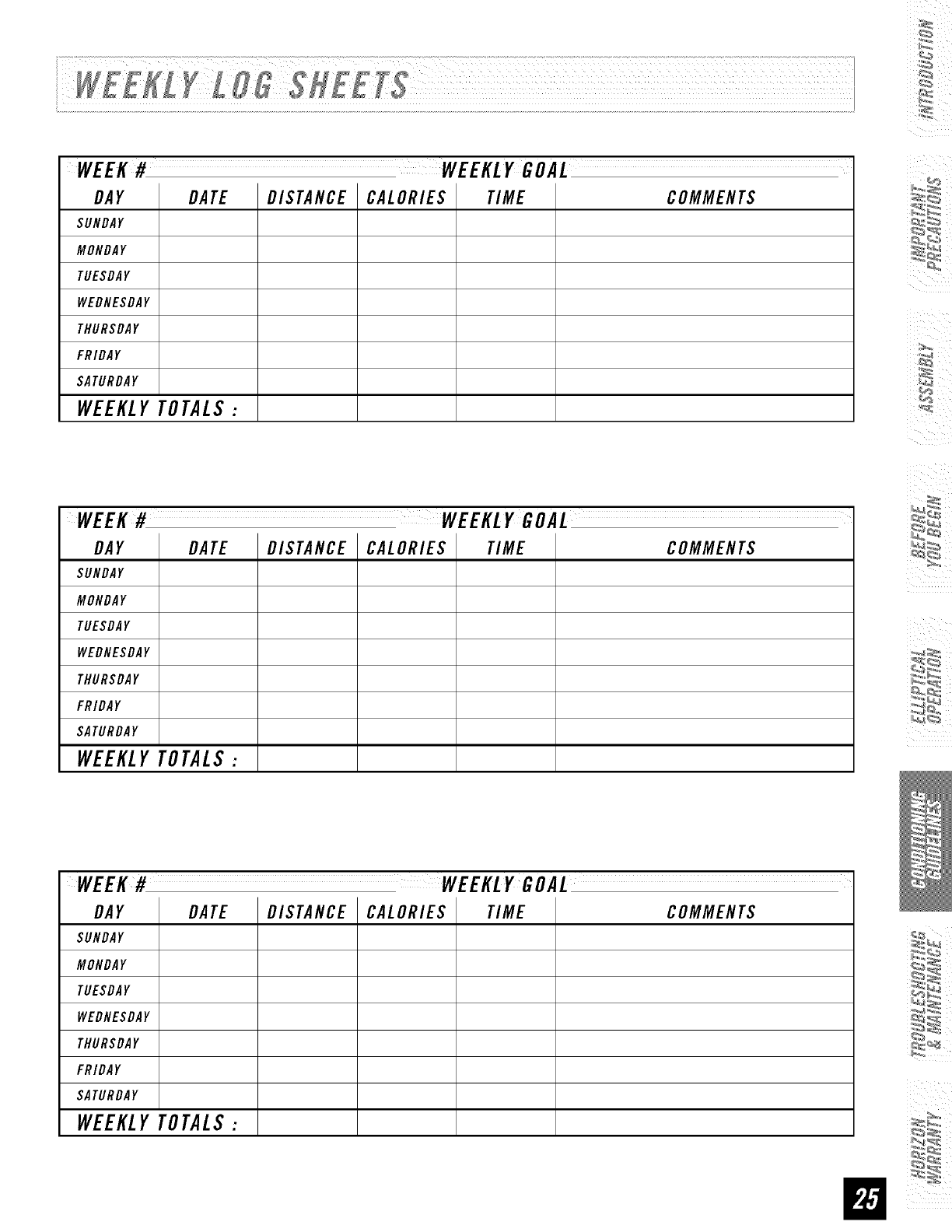
DAY DATE DISTANCE CALORIES TIME COMMENTS
SUNDAY
MONDAY
TUESDAY
WEDNESDAY
THURSDAY
FRIDAY
SATURDAY
WEEKLY TOTALS :
DAY DATE DISTANCE CALORIES TIME COMMENTS
SUNDAY
MONDAY
TUESDAY
WEDNESDAY
THURSDAY
FRIDAY
SATURDAY
WEEKLY TOTALS :
WEEK# WEEKLYGOAL
DAY DATE DISTANCE CALORIES TIME COMMENTS
SUNDAY
MONDAY
TUESDAY
WEDNESDAY
THURSDAY
FRIDAY
SATURDAY
WEEKLY TOTALS :
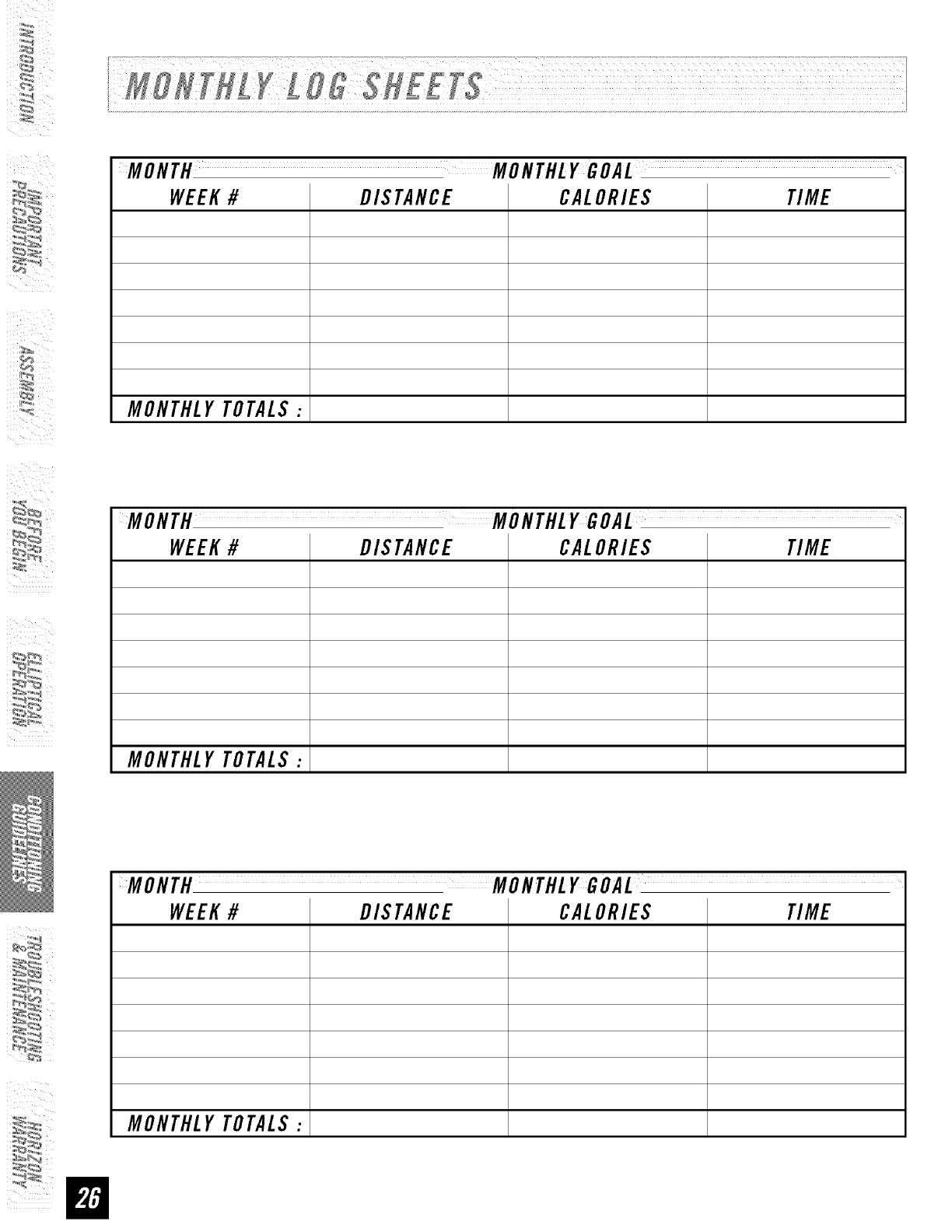
WEEK#DIS TANCE CALORIES TIME
MONTHLYTOTALS:
WEEK#DIS TANCE CALORIES TIME
MONTHLYTOTALS:
WEEK#
MONTHLYTOTALS:
DISTANCE CALORIES TIME
i............................................................................................................................................................................................................................................................................................................................................................................................................................................................................................................................................................
YourHorizonSeries elliptical is designed to be reliable. However,if you do experienceproblems with your
elliptical, pleasereferencethe troubleshootingguide listed below.
PROBLEM:Theconsoledoesnot turn on.
$OLITIOR:Verifythe following:
•Theoutlet the machine is plugged into is functional Doublecheck that the breaker has not tripped.
•Thecorrect adapter is being used. Onlyuse the adapterprovided or authorizedby HorizonFitness.
•Theadapter is not pinched or damagedand is properlyplugged into the outlet ANDthe machine.
•Thepower switch is turned to the ONposition (maynot apply to aft models).
•Turnoff the machine and unphlg power cord. Removethe consoleand check that aft connectionsto the console
are secureand not damaged or pinched.
NOTE:If your consoleusesbatteries, they mayneedto be replaced.
PROBLEM:Theconsoleturns onbut the fime/RPM'sdo not count.
SOLUTION: Verifythe following:
•Turnoff machine and unplug power cord.Removethe consoleand check that aft connections to the consoleare
secureand not damaged or pinched.
• If doing the above does not fix the problem, the speed sensor and/or magnet may have become dislodged or
damaged.
PROBLEM:Theresistance levelsseem to be incorrect, seemingtoo hard or too easy.
$OL UTIOH,: Verifythe following:
• Thecorrect adapter is being used. Onlyuse the adapter provided or authorizedby HorizonFitness.
• Reset the consoleand allow the resistance toreset to the default position. Restart and retry the resistance levels.
PROBLEM:Theroller wheelsappear to be leaving particles on the guide rails.
SOLUTION: Thisis considerednormal wear of the elliptical wheels.
Toremove,simply wipe off the roller wheelsand guide rails with a damp cloth.
PROBLEM:Theelliptical makes a squeaking or chirping noise.
$OL UTIOH: Verifythe following:
• Theelliptical is on a level surface.
• Loosenaft bolts attached durmg the assemblyprocess,grease the threads, and tighten again.
]
Ib_N
PROBLEM:Thereis no heart rate reading.
$OLUTZON: Remove the console and verify that the heart rate cables are attached properly, making
sure that the cables are securely inserted into the console.
YOUMAYEXPERIENCEANERRATICHEARTRATEREADOUTUNDERTHEFOLLOWINGCONDITIONS:
•Gripping the heart rate handlebars too tight. Tryto maintain moderate pressure while holding onto the
heart rate handlebars.
• Constant movement and vibration due to constantly holding the heart rate grips while exercising.
• Whenyou are breathing heavily during a workout.
• Whenyour hands are constricted by wearing a ring.
• Whenyour hands are dry or cold. Trymoisteningyour palms or rubbing them together to warm.
• Anyone with heavy arrhythmia.
• Anyone with arteriosclerosis or peripheral circulation disorder.
• Anyone whose skin on the measuring palms is especially thick.
NOTE:Check your exercise environment for sources of interference such as high power lines, large motors,
etc. Outside interference sources such as computers, motors and fluorescent lights may cause the heart rate
reading to be erratic.
If the above troubleshooting section does not remedy the problem, discontinue use and turn the power off.
The following information may be asked of you when you call Please have these items readily available:
• Model Name
• Serial Number
• Date of Purchase (receipt or credit card statement)
In order for Customer TechSupport to service your elliptical they may need to ask detailed questions about the
symptoms that are occurring. Some troubleshooting questions that may be asked are:
• How long has this problem been occurring?
• Does this problem occur with every use? With every user?
• If you are hearing a noise, does fl come from the front, back or inside? What kind of noise is it (thumping,
grinding, squeaking, chirping etc.)?
• If you are having a resistance problem what is occurring? Is the resistance always too hard or too easy?
Does the resistance respond when pushing the buttons on the console? Does the resistance constantly cycle
through the levels during the workout?
• Has the machine been maintained per the maintenance schedule?
• Does the problem occur when using the handlebars? Without using the handlebars?
Answeringtheseand otherquestionswill give the techniciansthe ability to sendproperreplacementparts and
the servicenecessaryto getyou andyourHorizonFitnesselliptical running again!

ARETHESOUNDSMYELLIPTICALMAKESNORMAL?
Our ellipticals are some of the quietest available because they use belt drives and friction free magnetic
resistance. Weuse the highest grade bearings and belts to minimize noise. However, because the resistance
system itself is so quiet, you wifl occasionally hear other slight mechanical noises. Unlike older, louder
technologies, there are no fans, friction belts, or alternator noises to mask these sounds on our ellipticals.
Thesemechanical noises, which may or may not be intermittent, are normal and are caused by the transfer
of significant amounts of energy to a rapidly spinning flywheel Aft bearings, belts and other rotating parts
will generate some noise which wifl transmit through the casing and frame. It is also normal for these
sounds to change slightly during a workout and over time because of thermal expansion of the parts.
WHYIS THEELLIPTICALI HADDELIVEREDLOUDERTHANTHEONEATTHESTORE?
All fitness products seem quieter in a large store showroom because there is generally more background
noise than in your home. Also, there will be less reverberation on a carpeted concrete floor than on a wood
overlay floor. Sometimes a heavy rubber mat will help reduce reverberation through the floor. If a fitness
product is placed close to a wall, there will be more reflected noise.
HOWLONGWILLTHEDRIVEBELTLAST?
The computer modeling we have done indicated virtually thousands of maintenance free hours. Belts are
now commonly used in far more demanding applications such as motorcycle drives.
CANI MOVETHETRAINEREASILYONCEIT ISASSEMBLED?
Yourelliptical has a pair of transport wheels built into the front legs. It is easy to move your elliptical by
rolling it on the front transport wheels. It is important that you place your elliptical in a comfortable and
in viting room. Yourefliptical is designed to use minimal floor space. Many people will place their eflipticals
facing the TVor a picture window. If at aft possible, avoid putting your elliptical in a unfinished basement.
Tomake exercise a desirable daily activity for you, the elliptical should be in a comfortable setting.
CANI PEDALBACKWARDSONMYELLIPTICAL?
Yourelliptical allows you to pedal both forward and backwards to exercise and strengthen a wider range
of muscles.
WHATKINDOFROUTINEMAINTENANCEISREQUIRED?
We use sealed bearings throughout our ellipticals so lubrication is not needed. The most important
maintenance steps are to tighten aft assembly bolts and simply wipe your perspiration off the trainer after
each use.
HOWDOICLEANMYELLIPTICAL?
Clean with soap and water cleaners only. Never use solvents on plastic parts.
Cleanlinessof your elliptical and its operating environment will keep maintenance problems
and servicecalls to a minimum. Forthis reason,HorizonFitness recommendsthat the following
preventivemaintenanceschedulebe followed.
AFTEREACHUSE(DALLY)
•Turn off the elliptical by unplugging the power cord from the wall outlet.
• Wipe down the efliptical with a damp cloth. Never use solvents, as they can cause damage
to the eflipticaL
• Inspect the power cord. If the power cord is damaged, contact Horizon Fitness.
• Make sure the power cord is not underneath the elliptical or in any other area where it can become
pinched or cut.
WEEKLY
Clean underneath the elliptical, following these steps:
• Turn off the efliptical
• Move the efliptical to a remote location.
• Wipe or vacuum any dust particles or other objects that may have accumulated underneath the
elliptical.
• Return the elliptical to its previous position.
EVERYMONTH
• Inspect all assembly bolts and pedals on the machine for proper tightness.
• Clean any debris off of the pedal arm wheels and guide rails.
WEIGHTCAPACITY=250Ibs.
FRAME•LIFETIME
HorizonFitness warrants the frame
against defects in workmanship and
materials for the lifetime of the original
owner (The frame is defined as the
weldedmetal base of the unit and
does not include any parts that can be
removed.)
BRAKE• 20 YEARS
HorizonFitness warrants the brake
against defects in workmanship and
materials for the period of twentyyears
of the original owner
ELECTRONICS& PARTS• I YEAR
HorizonFitness warrants the electronic
components and all original parts for
a period ofoneyear from the date
of original purchase, so long as the
device remains in the possessionof the
original owner
LABOR• I YEAR
HorizonFitness shall cover the labor
cost for the repair of the device for
a period ofoneyear from the date of
the original purchase, so long as the
device remains in the possessionof the
original owner
EXCLUSIONSANDLIMITATIONS
WhoIScovered:
• Theoriginalownerand is not
transferable.
WhatIScovered:
•Repair orreplacementof a defective
motor,electroniccomponent,or defective
part and is thesole remedyof the
warranty.
EXCLUSIONSANDLIMITATIONS
Whois covered:
• Theoriginal ownerand is not transferable.
What IScovered:
•Repair orreplacementof a defectivemotor,electroniccomponent,or defective
part and is thesole remedyof the warranty
What ISNOTcovered:
• Normal wearand tear,improper assemblyor maintenance,or installation of
parts or accessoriesnot originally intendedorcompatible with the equipment
as sold.
• Damageor failure clueto accident, abuse,corrosion,discolorationof paint
or plastic, neglect,theft, vandalism,fire, flood, wind, lightning, freezing,or
other natural disasters of any kind, powerreduction,fluctuation or failure from
whatevercause,unusual atmosphericconditions,collision, introductionof
foreignobjectsinto the coveredunit, or modifications that are unauthorizedor
not recommendedbyHorizonFitness.
• Incidental or consequentialdamages.HorizonFitnessis notresponsible
or liable for indirect, specialor consequentialdamages,economicloss,
loss ofproperty,orprofits, lossof enjoymentor use,or otherconsequential
damages of whatsoevernature in connectionwith the purchase,use,repair or
maintenanceof theproducL
• Equipmentused for commercialpurposesor anyuseother than a single family
or Household,unlessendorsedbyHorizonFitnessfor coverage.
• Equipmentowneror operatedoutside theUSand Canada.
• Defive_ assembly,installation, setup for original orreplacementunits or labor
or othercosts associatedwith removal orreplacementof the covereduniL
•Anyattempt to repair this equipmentcreatesa risk of injury,HorizonFitness
is not responsibleor liable for anydamage,lossor liability arising fromany
personalinjury incurredduring thecourseof, or as a result of anyrepair
or attempted repair ofyour fitness equipmentby otherthan an authorized
servicetechnician. Aft repairs attempted byyou onyour fitness equipmentare
undertakenATYOUROWNRISKand HorizonFitnessshall have no liability for
anyinjury to the personorpropertyarising fromsuch repairs.
SERVICE/RETURNS
•In-homeserviceis avai/ab/e within ]50 miles of the nearestauthorizedrepair
center (Mileagebeyond]50 miles from an authorizedservicecenteris the
responsibilityof the consumer).
•AIIreturns must bepre-authorizeflbyHorizonFitness.
•Horizon Fitness' obligation under this warranty is limited to replacing or
repairing, at HorizonFitness' option, thesame or comparablemodel at oneof
its authorizedservicecenters.
•A HorizonFitness authorizedservicecentermust receiveall equipmentfor which
a warranty claim is made. This equipment must be received with all freight
and other transportationcharges prepaid, accompaniedby sufficient proof of
purchase.
•Replacementunits, parts and electronic componentsreconditioned to As-new
Condition by Horizon Fitness or its vendorsmay sometimes be supplied as
warrantyreplacementand constitute fulfillment of warranty terms.
•This warranty gives you specific legal rights, and your rights may vary from
state to state.

Forfast and friendly service,please contact oneof our
trainedcustomertechnicians via phone,email or our website.
Customer Tech Support Hotline: 1-800-244-4192
Emaih comments@horizonfitness.com
Website: www.horizonfitness, corn
Everyemployeeat HorizonFitnesstakespride in providingyou with a high qualityproduct.
[
[
[
[
Wewant to knowif you havea problemand we want to havean opportunitytocorrectit foryou.
NOTE:Pleaseread the TROUBLESHOOTINGsectionbeforecontacting CustomerTechSupport.
Toreceiveadditional product information, visit us at www.horizonfitness.com [
[
EX-56Elhptical.Re_ 1.21©2007HorizonFitnessProductsIDesigned& Engineeredin the U.S.A.[Madein China
