Hotpoint Bu82 Bu72 Bu71 Instruction Manual ManualsLib Makes It Easy To Find Manuals Online!
2014-12-11
: Hotpoint Hotpoint-Bu82-Bu72-Bu71-Instruction-Manual-120191 hotpoint-bu82-bu72-bu71-instruction-manual-120191 hotpoint pdf
Open the PDF directly: View PDF  .
.
Page Count: 40

Instructions
BU82
BU72
BU71

Introduction 3
CONTENTS
2
For Your Safety – Always 4
For Your Safety – Never 5
Features 6
Controls 7
Oven Timer Operation 8
Know Your Timer 9
Electronic Clock & Automatic Oven Timer Operation
10
Using The Top Oven for Grilling
14
Grill Pan and Handle 15
Using The Top Oven for Solarplus Grilling 16
Guide To Grilling 18
Using the Top Oven as a Convection Oven 19
Using the Main Oven as a Fan Oven 21
Using the Main Oven for Other Functions 22
Temperature Conversion Scale 24
Oven Temperature Charts 25
Cooking Results Not Satisfactory 27
Care & Cleaning 28
Installation 32
Something Wrong? 36
Key Contacts Back Cover
To the Installer
Before installation fill in the product details on the back cover of this booklet.
The information can be found on the rating plate.
To the User
You must read the instructions prior to installing and using the appliance and then
retain them for future reference.
INTRODUCTION
Your new cooker is guaranteed* and will give lasting service. This guarantee is only applicable if
the appliance has been installed in accordance with the installation instructions detailed in this
booklet.
To help make best use of your cooking equipment,
please read this booklet carefully.
The cooker is designed specifically for domestic use and responsibility will not be accepted for
use in any other installation.
To help remove the 'new' smell, heat up the empty ovens to maximum temperature for a
minimum of two to three hours keeping the oven doors closed. Ensure that the room is well
ventilated (e.g. open a window or use an extractor fan) and that persons who may be sensitive
to the odour avoid any fumes. It is suggested that any pets be removed from the room until the
smell has ceased.
This odour is due to any temporary finish on oven linings and elements and also any moisture
absorbed by the insulation.
Note: When the cooker is first used, an odour may be emitted - this will cease after a short
period of use.
* The guarantee is subject to the provisions that the appliance:
(a) Has been used solely in accordance with the Users Instruction Book.
(b) Has been properly connected to a suitable supply voltage as stated on the rating
plate attached to this equipment.
(c) Has not been subjected to misuse or accident or been modified or repaired by
any person other than the manufacturers authorised employee or agent.
(d) Has been correctly installed.
This appliance conforms to the following EEC Directives:
Low Voltage Equipment
73/23/EEC
93/68/EEC
Electromagnetic Compatibility
89/336/EEC
92/31/EEC
93/68/EEC 3

FOR YOUR SAFETY
●Always make sure you remove all packaging and literature from inside the oven and
grill compartments before switching on for the first time.
●Always make sure you understand the controls prior to using the appliance.
●Always keep children away from the appliance when in use as the surfaces will get
extremely hot during and after cooking.
●Always make sure all controls are turned off when you have finished cooking and
when not in use.
●Always stand back when opening an oven door to allow any build up of steam
or heat to disperse.
●Always use dry, good quality oven gloves when removing items from the
oven/grill.
●Always take care to avoid heat/steam burns when operating the controls.
●Always turn off the electricity supply at the wall switch before cleaning and
allow the appliance to cool.
●Always make sure the shelves are in the correct position before switching on the oven.
●Always keep the oven and grill doors closed when the appliance is not in use.
●Always take care when removing utensils from the top oven when the main
oven is in use as the contents may be hot.
●Always keep the appliance clean as a build up of grease or fat from cooking can cause
a fire.
●Always follow the basic principles of food handling and hygiene to prevent
the possibility of bacterial growth.
●Always keep ventilation slots clear of obstructions.
●Always refer servicing to a qualified appliance service engineer.
SAFETY ADVICE
IN THE EVENT OF A CHIP PAN OR ANY OTHER PAN FIRE:
1. TURN OFF THE COOKER APPLIANCE AT THE WALL SWITCH.
2. COVER THE PAN WITH A FIRE BLANKET OR DAMP CLOTH, this will smother the flames
and extinguish the fire.
3. LEAVE THE PAN TO COOL FOR AT LEAST 60 MINUTES BEFORE MOVING IT.
Injuries are often caused by picking up a hot pan and rushing outside with it.
NEVER USE A FIRE EXTINGUISHER TO PUT OUT A PAN FIRE as the force of the
extinguisher is likely to tip the pan over. Never use water to extinguish oil or fat fires.
4
When used properly your appliance is completely safe but as with any electrical product
there are certain precautions that must be observed.
PLEASE READ THE PRECAUTIONS BELOW BEFORE USING YOUR APPLIANCE.
Always

FOR YOUR SAFETY
●Never leave children unsupervised where a cooking appliance is installed as all
cooking surfaces will be hot during and after use.
●Never allow anyone to sit or stand on any part of the appliance.
●Never store items above the appliance that children may attempt to reach.
●Never remove the oven shelves whilst the oven is hot.
●Never heat up unopened food containers as pressure can build up causing
the container to burst.
●Never store chemicals, food stuffs or pressurised containers in or on the
appliance, or in cabinets immediately above or next to the appliance.
●Never operate the grill with the door closed as this will cause the appliance to
overheat.
●Never use the appliance as a room heater.
●Never use the grill to warm plates.
●Never dry any items on the oven doors.
●Never install the appliance next to curtains or other soft furnishings.
●Never allow children to play with the appliance controls.
●Never use steam cleaners.
5
Never
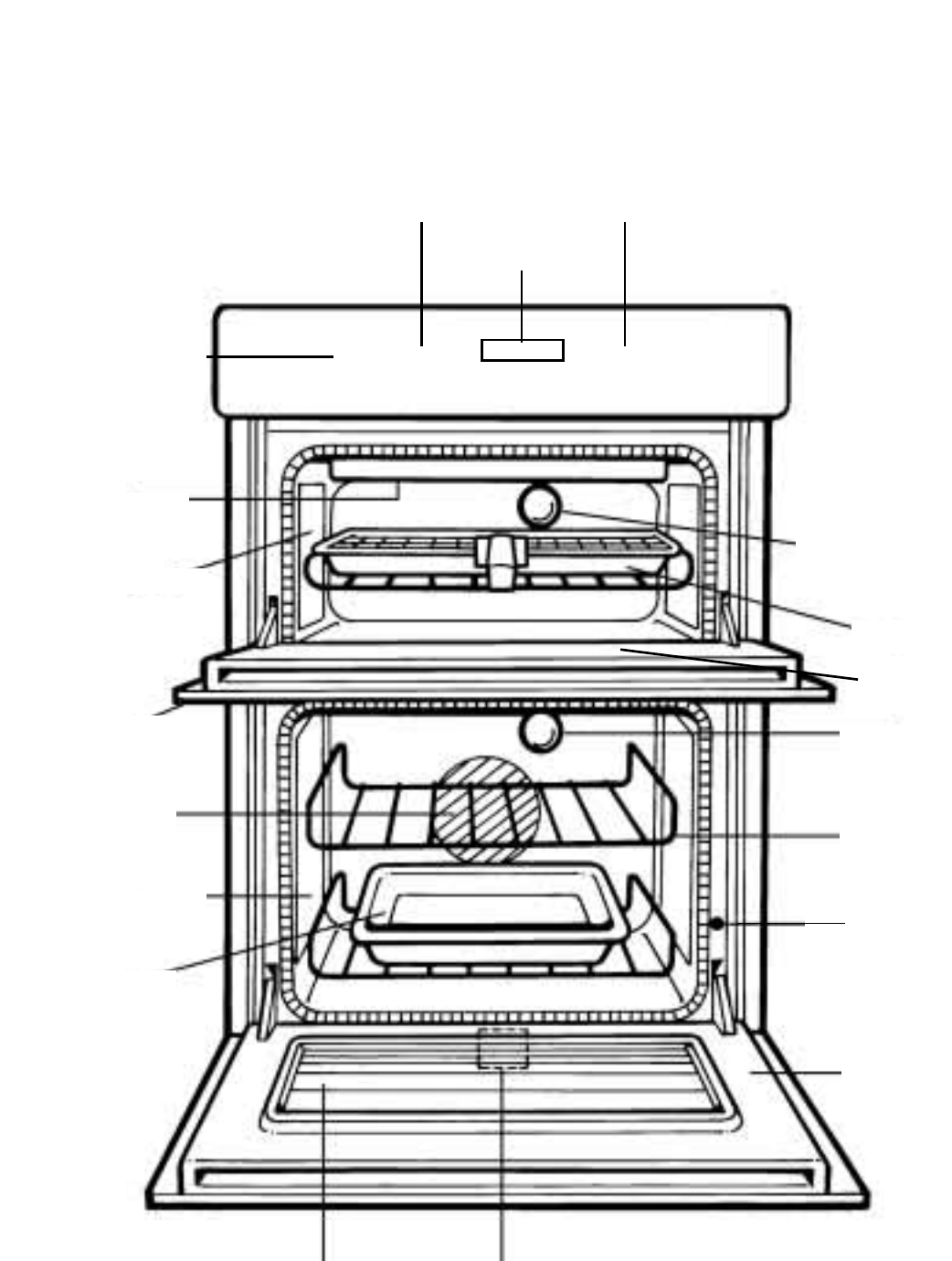
FEATURES
6
TOP OVEN TEMPERATURE
& GRILL SELECTION CONTROL MAIN OVEN TEMPERATURE
& FUNCTION CONTROL
CLOCK & OVEN TIMER
OVEN LIGHT
GRILL PAN
TOP OVEN
DOOR OVEN LIGHT
INNER DOOR
GLASS
OVEN SHELF
DOOR
SWITCH
RATING PLATE –
Record the Model No. and the Serial No. on KEY
CONTACTS, back page.
GRILL SETTING
CONTROL
GRILL ELEMENT
STAY CLEAN LINER
OVEN FAN
STAY CLEAN LINER
MEAT PAN
INNER DOOR GLASS
MAIN OVEN
DOOR
❍❍❍
Cooling Fan: A gentle flow of air will be blown below the control panel when any selector
switch is used.
Note: Whenever the appliance has been used, the cooling fan may run on or restart
itself after all the controls have been turned off. This indicates that the appliance is
still warm.
Oven Interior The oven lights are operated when their respective oven control is used.
Lights (N.B. Not all models have a top oven interior light).
The main oven has a light only position.
Slow Cooking The main oven has a “Slow Cook Setting” this can be used for slow cooking,
keeping food warm and warming plates for a short period.
Element and The oven is fitted with a safety device which disconnects the heating element and
Fan Cut Off oven fan when the door is opened.
The heating element and oven fan will not operate until the oven door is closed.
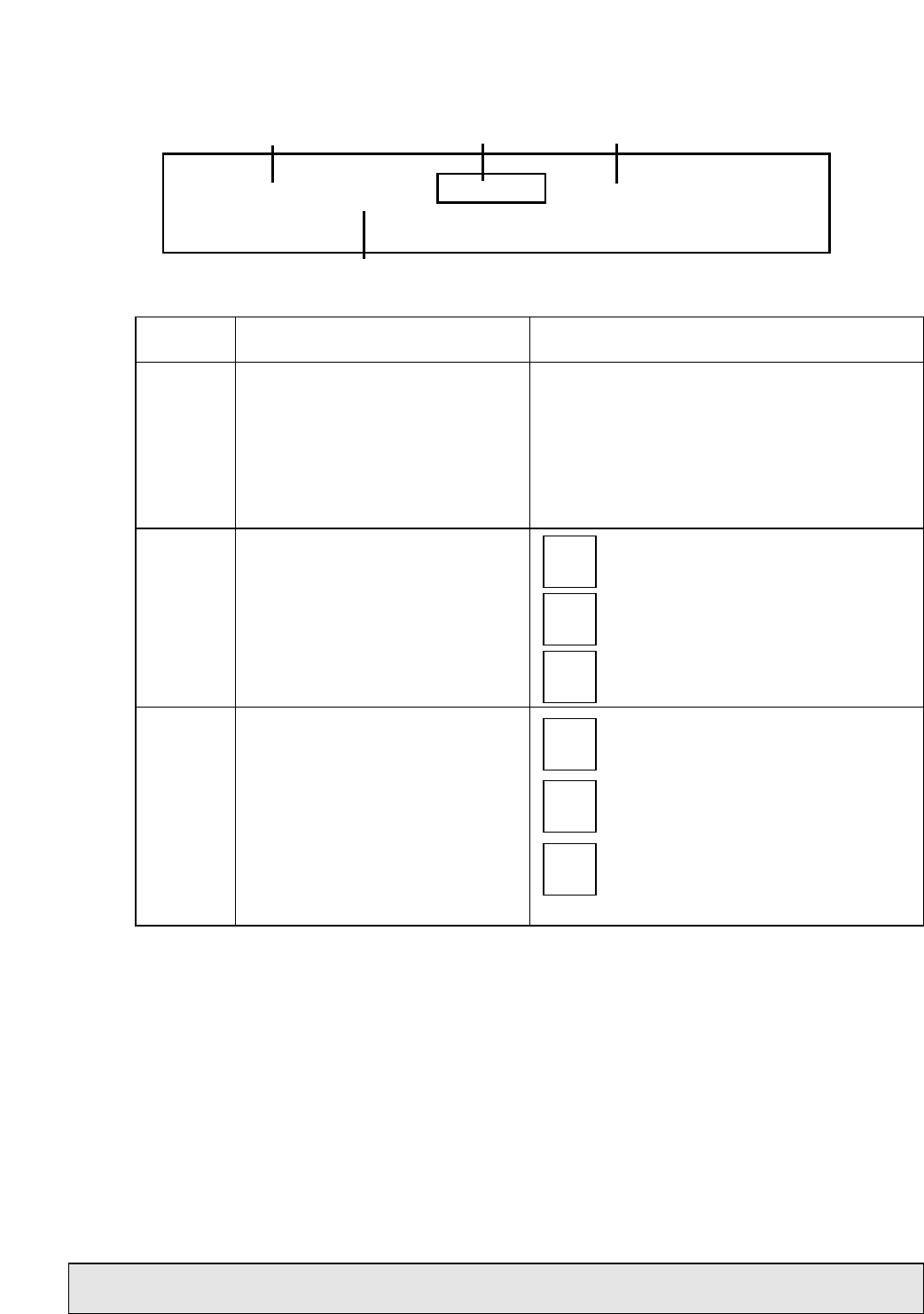
CONTROLS
CONTROL MARKINGS
Note: It is advisable to check that all oven controls have been switched off when you have
finished using the appliance.
7
Control
Knob Description
Grill Setting Control
Top Oven Temperature &
Grill Selection Control
Main Oven Temperature &
Function Control
A
B
C
Function
Selects the heat at which the grill will cook the
food.
1 – 6 Grill Settings Control:
1 = Low, 6 = High
Note: To grill you must first select a grill
function using control (B).
Selects the cooking temperature
(Degrees Centigrade) when using the top
oven as a conventional oven.
Switches the top oven to “Half Grill”
mode.
Switches the top oven to “Full Grill”
mode.
Fan Only Setting
- This is used to decrease the amount
of
time required to defrost food items.
Oven Light Only
- Switches on the Main Oven Interior
Light Only.
Main Oven Temperature Scale (In
Degrees Centigrade).
- When cooking select the required
cooking temperature.
100 -
220
Half
Grill
Full
Grill
Fan
Only
Oven
Light
80 -
230
GRILL SETTING CONTROL MAIN OVEN TEMPERATURE AND FUNCTION CONTROL
TOP OVEN TEMPERATURE AND GRILL SELECTION CONTROL
TIMER
❍❍❍
ABC

OVEN TIMER OPERATION
AUTOMATIC COOKING
The Top Oven and Main Oven can be controlled by the automatic timer. When the timer
control has been set for one oven, it is possible to use the other oven only during the same
automatic cooking programme.
HINTS ON AUTOMATIC COOKING
1. Select foods which will require the same cooking time and temperature.
2. To ensure food does not cool down and require reheating, set the end time so the
food is ready when you require it.
3. Always ensure that meat and poultry is defrosted before placing in the oven.
4. Whenever possible, take food out of the refrigerator and keep it as cool as possible.
5. If cooking food that requires frying before placing in the oven for auto cooking,
keep the delay start time to a minimum.
6. Never place hot or warm food in the oven for delay start cooking as it could cause
the oven to be warm and produce harmful bacteria in the food.
7. We advise that dishes containing left-over cooked poultry or meat, e.g.
Shepherd's Pie, should not be cooked automatically if there is to be a delay period.
8. Ensure that delay start times are kept to a minimum to prevent bacterial growth in
food.
9. Wine or beer may ferment and cream may curdle during the delay period so it is
best to add these ingredients just before serving.
10. Foods which discolour should be protected by coating in fat or tossing in water to
which lemon juice has been added, prior to placing food in the oven.
11. Dishes containing liquid should not be filled too full to prevent boiling over.
12. Food should be well sealed (but not airtight) in a container to prevent the loss of
liquid during cooking. Aluminium foil gives a good seal.
13. Always ensure that food is piping hot and cooked thoroughly before serving.
14. Only reheat food once.
8
Note: Timer must be set to ‘Time of Day’ and ‘Manual’ before the ovens
can be used.
NEVER operate the grill when the ovens are set to cook automatically because
the oven cavity can become warm and this may cause
bacterial growth in food.
9
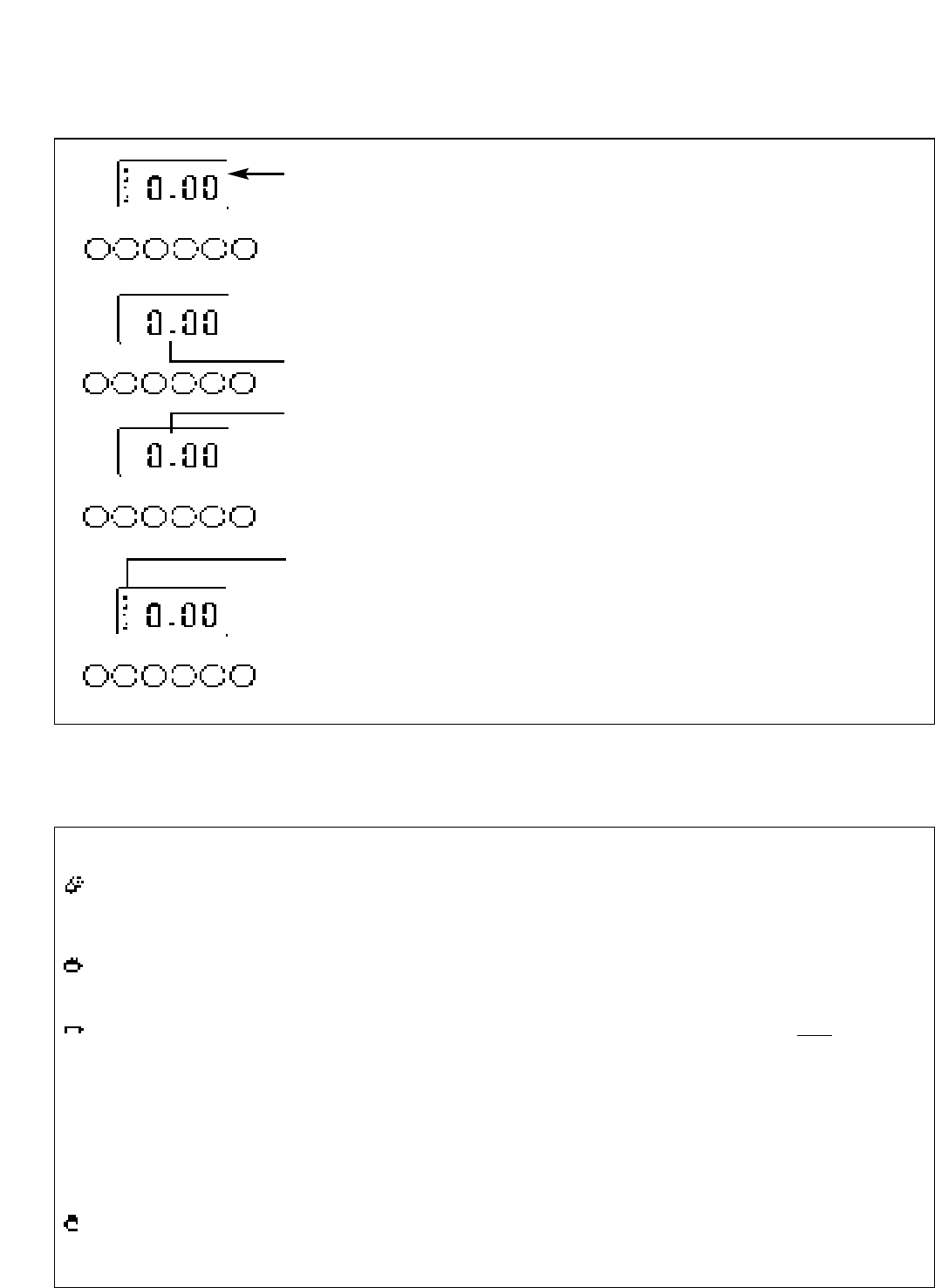
KNOW YOUR TIMER
CLOCKFACE
The timer incorporates a 24 hour clock.
Ensure the correct time of day is always set, before using your cooker.
SYMBOLS
A ‘bell’ symbol will light up when you select a Minute Minder Period and will
remain lit for the period set.
At the end of the Minute Minder Period, the timer will emit an audible tone and
the ‘bell’ symbol will disappear.
The ‘cookpot’ symbol will light up either:–
– When the timer is in manual mode, or
– During the actual Cook Period.
‘AUTO’ will light up:–
– When the timer is first turned on it will flash. It will go out when a time of day
is set or when the timer is set to manual.
The ‘AUTO’ symbol will flash at the end of an Auto Cooking programme to indi-
cate that the programme has finished.
(When the ‘AUTO’ symbol is flashing, to return the oven to Manual operation,
turn the oven controls off, ensure that the correct time of day is set, and press
the “Manual” button – The ‘AUTO’ symbol will go out).
Here you can set a time period of up to 23 hours 59 minutes, that will count down.
When it reaches zero, the timer will emit an audible tone.
For Example: If you set 20 minutes, the audible tone will occur 20 minutes later.
Cook Period is the actual length of time for which, the timer will switch the oven(s)
on as part of an “Auto Cooking” programme.
(e.g. If you set 2 hours, the food will be cooked for 2 hours).
The time of day at which you want an “Auto Cooking” programme to end.
For Example: If you set a “Cook Period” for 2 hours, and “End Time” of 11:00. The
timer will switch the oven(s) on at 9:00 and turn the oven(s) off at 11:00. You will hear
a audible tone at 11:00, to indicate that the Auto Cooking Programme has finished.
Notes:
- When setting an Auto Cooking programme you will need to set the oven
control(s) to the required temperature(s) when you set the timer.
- If an Auto Cooking programme has been set the oven(s) will only operate during
the pre-programmed time.
Needs to be pressed to cancel an Auto Cooking programme and return the oven(s) to
Manual operation.
Used to adjust the various timer function settings.
Minute Minder
Button
Cook Period Button
End Time Button
Manual Button
“+” and “–” Buttons
TIMER FUNCTION BUTTONS
AUTO COOKING PROGRAMME
ELECTRONIC CLOCK & AUTOMATIC OVEN
TIMER OPERATION
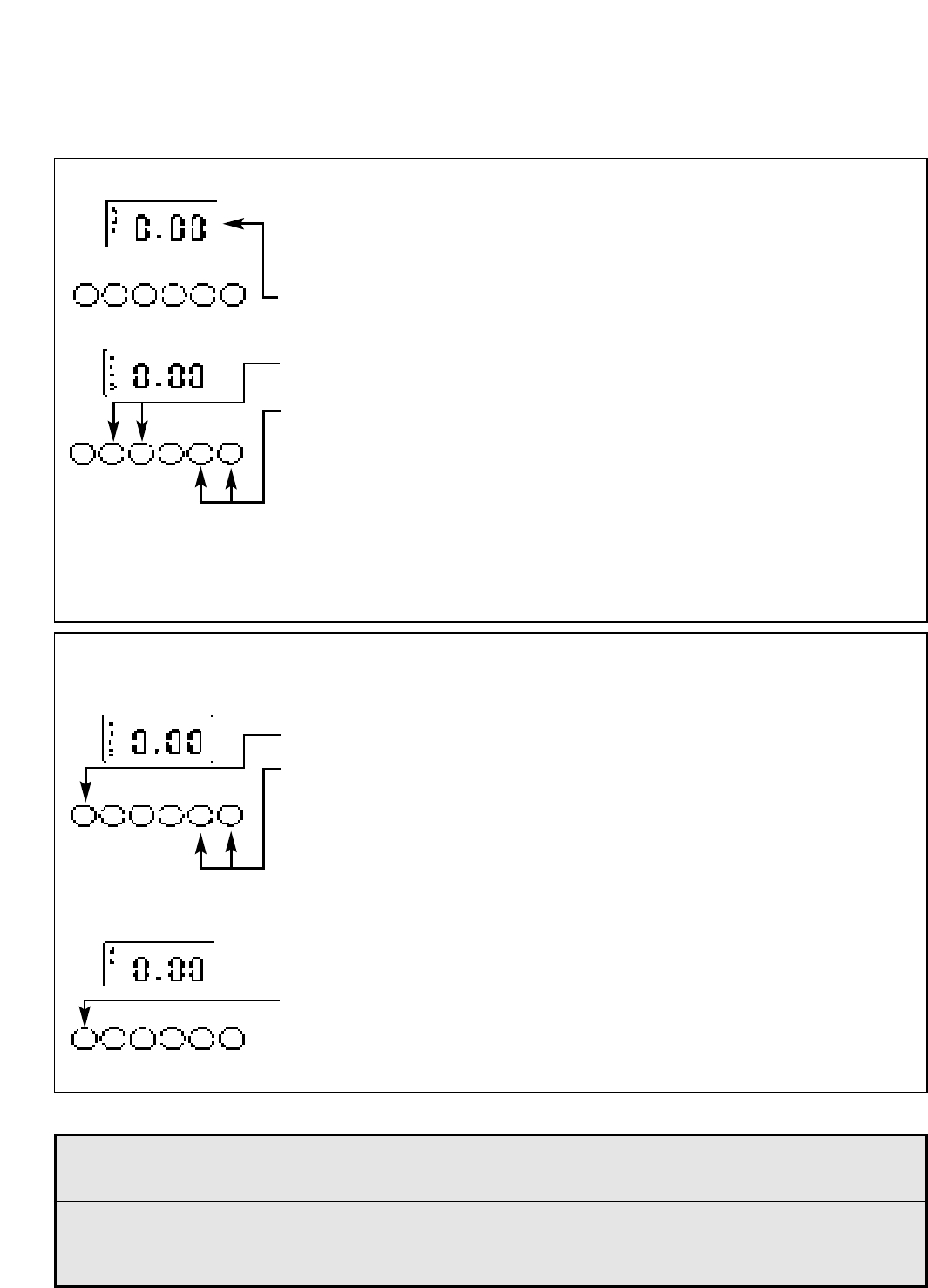
SETTING THE TIME OF DAY
Step 1 Make sure all oven controls are turned Off.
Step 2 Check the electricity supply to the cooker is turned on.
Step 3 When switched on the display will show 0.00 and the Auto symbol,
flashing intermittently.
Step 4 Press & hold in both the Cook Period & End Time buttons together.
Step 5 With the Cook Period & End Time buttons still held in, press either the “+”
or “–” buttons to set the correct time of day.
Step 6 Release all the buttons simultaneously.
THE TIME OF DAY IS NOW SET.
To change the time of day repeat Steps 4, 5 & 6 above.
Note: You cannot adjust the time of day if the timer has been set for an
Auto Cooking Programme.
SETTING THE MINUTE MINDER
Step 1 Ensure the time of day is set correctly.
Step 2 Press and hold the Minute Minder button.
Step 3 With the Minute Minder button held in, set the required Minute Minder
period using the “+” and “–” buttons. A ‘bell’ symbol will light up.
Release all buttons and the timer display will revert back to the time of day.
The ‘bell’ symbol will remain lit to signify that a Minute Minder period has been
set.
At the end of the set time an audible tone will be heard, and the ‘bell’ symbol will
disappear.
Step 4 To cancel the audible tone press the Minute Minder button.
Note 1 When the Minute Minder has been set, the time remaining can be checked at any
time by simply pressing the Minute Minder button.
Note 2 If necessary the Minute Minder can be cancelled before the tone sounds by
pressing and holding the Minute Minder button and then at the same time
pressing the “–” button until 0.00 appears in the display window.
10
ELECTRONIC CLOCK & AUTOMATIC OVEN
TIMER OPERATION
11
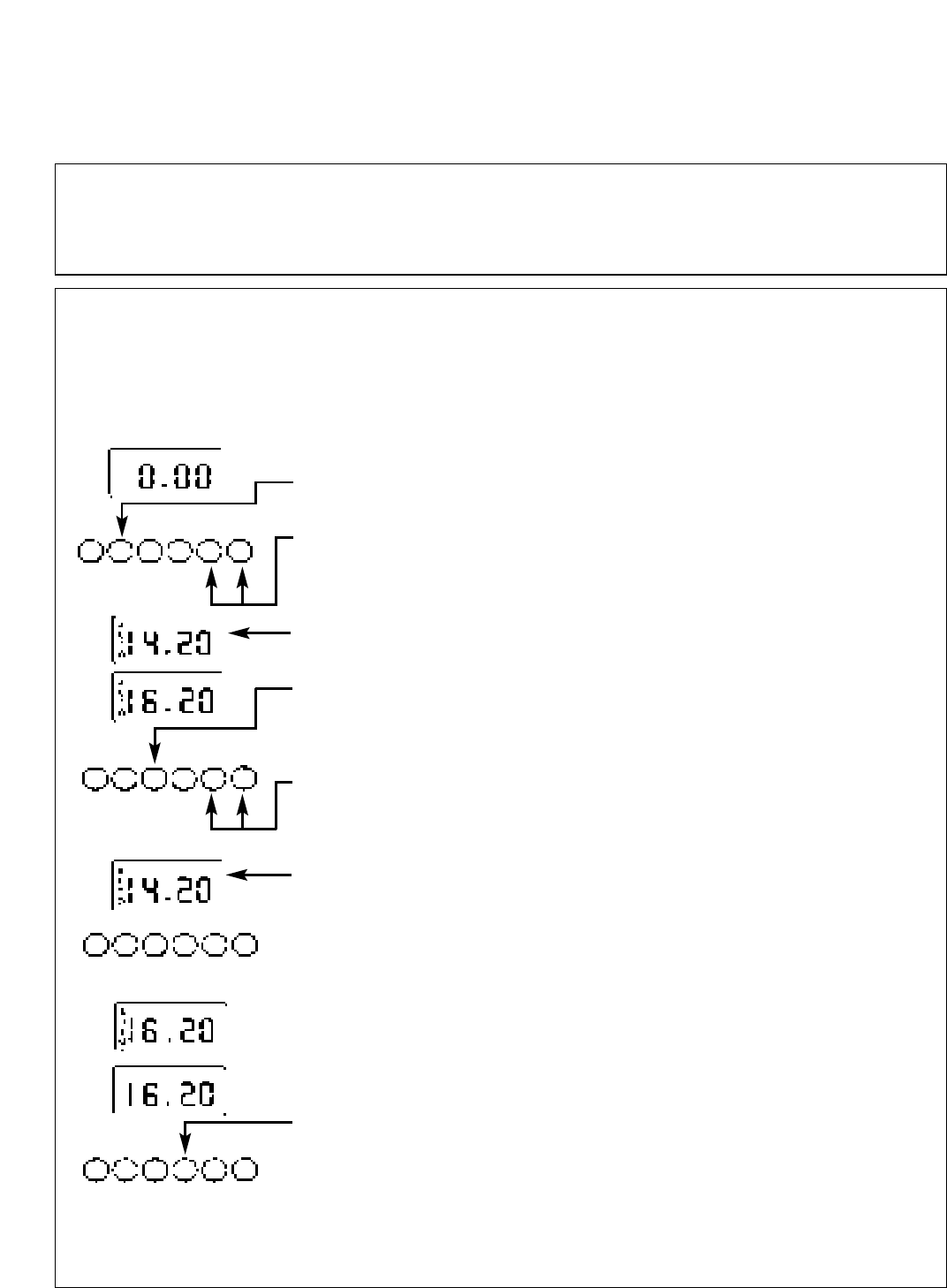
Step 3 Press and hold in the Cook Period button.
The display will read 0.00 with the ‘cookpot’ symbol lit.
Step 4 With the Cook Period button still held in, set the required Cook Period
using the “+” and “–” buttons.
Release the buttons and the timer display will revert to the time of day with the
‘Auto’ symbol and ‘cookpot’ symbol lit.
Step 5 Press and hold in the End Time button.
The display will read the earliest possible end time for the Cook Period
that you have set above.
The ‘Auto’ symbol and ‘cookpot’ symbol will be lit.
Step 6 With the End Time button still held in, use the “+” and “–” buttons to set
the ‘End Time’ (i.e. The time you require the oven to switch off).
Release all the buttons and the timer will revert back to the time of day.
The ‘Auto’ symbol will remain lit to signify that an Auto Cooking Programme has
been set. The ‘cookpot’ symbol will go out.
Step 7 Turn the oven control(s) to the required temperature, and if necessary
select the appropriate oven function.
At the end of the Automatic Cook Period the Auto Symbol will flash and an
intermittent bleeping sound will be heard.
The audible tone will continue unless cancelled.
The ‘Auto’ symbol will continue to flash until the timer is returned to Manual
operation (see below).
Step 8 Press the Manual button, the audible tone will be cancelled and the
oven(s) will be returned to Manual.
Step 9 Turn the oven control(s) to the OFF position.
AUTO COOKING PROGRAMMES
There are two Auto Cooking programmes that can be selected using your timer:–
(a) To set the timer to switch the oven(s) On and Off Automatically
(b) To set timer to switch on immediately and OFF automatically after a set cook period.
a) TO SET THE TIMER TO SWITCH THE OVEN(S) ON AND OFF AUTOMATICALLY
This allows you to cook at a specified time for a chosen period before the oven switches
off Automatically.
Step 1 Check that the correct time of day is set, if not follow instructions for setting the time of day.
Step 2 Place food onto the correct shelf position in the oven and close the oven door(s).
ELECTRONIC CLOCK & AUTOMATIC OVEN
TIMER OPERATION
12
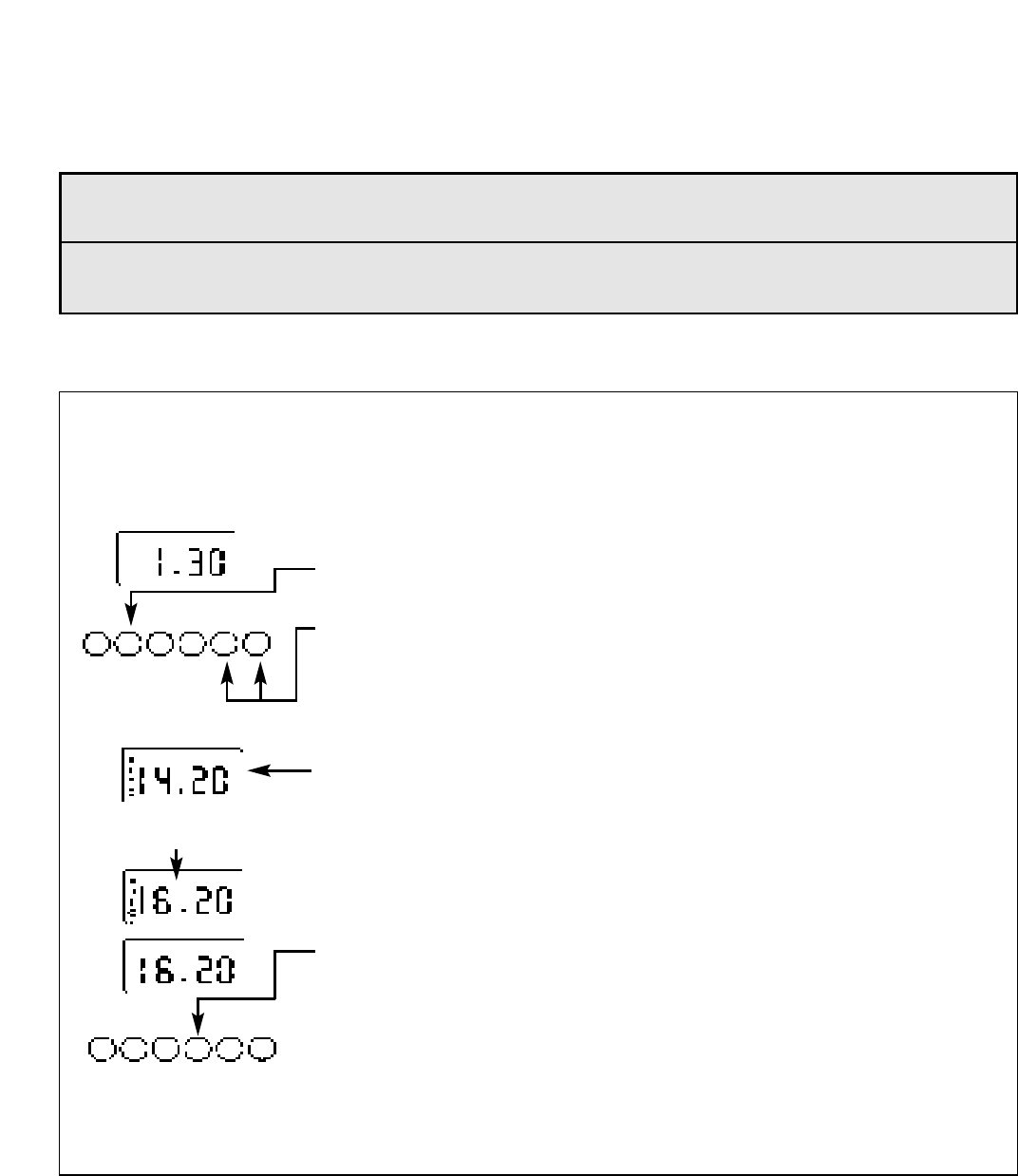
Step 4 Press & hold in the Cook Period button, the display will read 0.00 and the
‘cookpot’ symbol will light up.
With the Cook Period button still held in set the required Cook Period using the
“+” and “–” buttons. Example: 1hr 30 minutes (as shown).
Note: Cook Period is the length of time the food requires to cook.
Step 5 Release all buttons.
The timer display will revert to the time of day with the ‘Auto’ symbol lit &
‘cookpot‘ symbol remaining lit.
At the end of the Cook Period the ‘Auto’ symbol will flash and an intermittent
audible tone will be heard.
The audible tone will continue until cancelled. The ‘Auto’ symbol will continue to
flash until the timer is returned to Manual operation (see below).
Step 6 Press the Manual button. The audible tone will be cancelled and the
oven(s) will be returned to Manual.
Step 7 Turn the oven control(s) to the OFF position.
b) TO SET TIMER TO SWITCH ON IMMEDIATELY AND OFF AUTOMATICALLY AFTER A SET COOK
PERIOD
Step 1 Check that the correct time of day is set, if not follow instructions for setting the time of day.
Step 2 Place food onto the correct shelf position in the oven and close the oven door(s).
Step 3 Turn the oven control(s) to the required temperature, and if necessary select the appropriate oven
function.
Note 1 When cooking automatically the Cook Period can be checked at any time by simply
pressing the Cook Period button.
Note 2 When cooking automatically the End Time can be checked at any time by simply
pressing the End Time button.
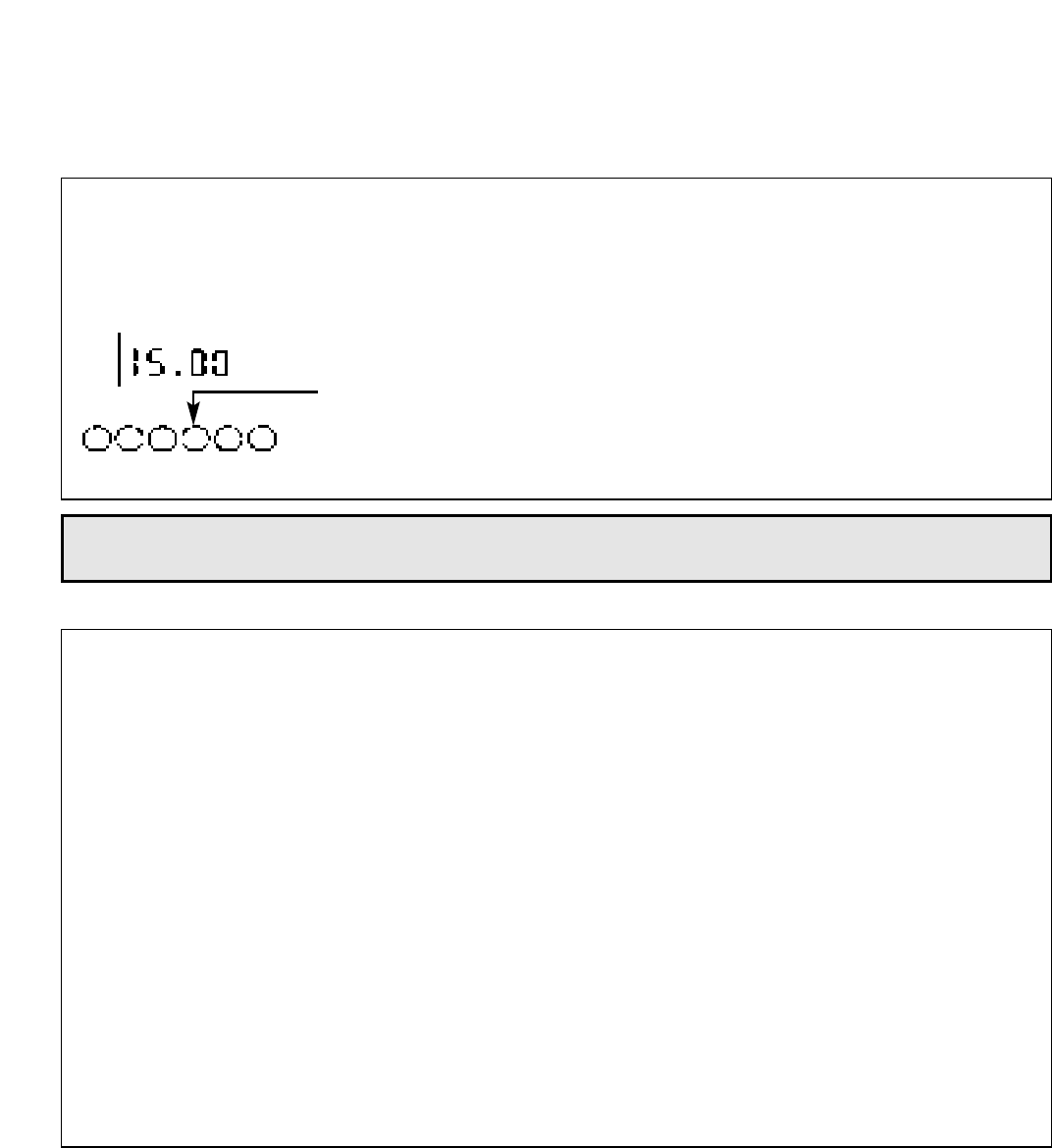
NOTE: The Cookpot symbol disappears
ELECTRONIC CLOCK & AUTOMATIC OVEN
TIMER OPERATION
13
OTHER NOTES ON TIMER OPERATION
1. When cooking Automatically the Cook Period can be checked at any time simply by pressing the Cook
Period button.
2. When cooking Automatically the End Time can be checked at any time by simply pressing the End Time
button.
3. Having set a Cook Period and End Time an electronic device stores the information. The device within the
timer will switch the oven(s) on and off at the required times.
4. When setting an Auto Cooking Programme and a mistake is made, to clear:–
(a) Press & release the Manual button.
(b) Start the sequence again.
5. If at any time the display shows three flashing zero’s 0.00 and ‘Auto’, it is likely that the electricity supply to
the oven has been interrupted. Reset the timer to the correct time of day.
Food in the oven may, therefore, not have been cooked, before serving check food is thoroughly heated
and completely cooked.
6. To set each function always press and hold the required function button and at the same time press “+” or
“–” buttons.
TO CANCEL AN AUTO COOKING PROGRAMME BEFORE
THE COOK PERIOD HAS FINISHED.
Step 1 Turn the oven control(s) to the OFF position.
Step 2 Press the Manual button to return the oven(s) to “Manual” operation.
The ‘Auto’ symbol will go out.
Note 1 When cooking automatically the Cook Period can be checked at any time by simply pressing
the Cook Period button.
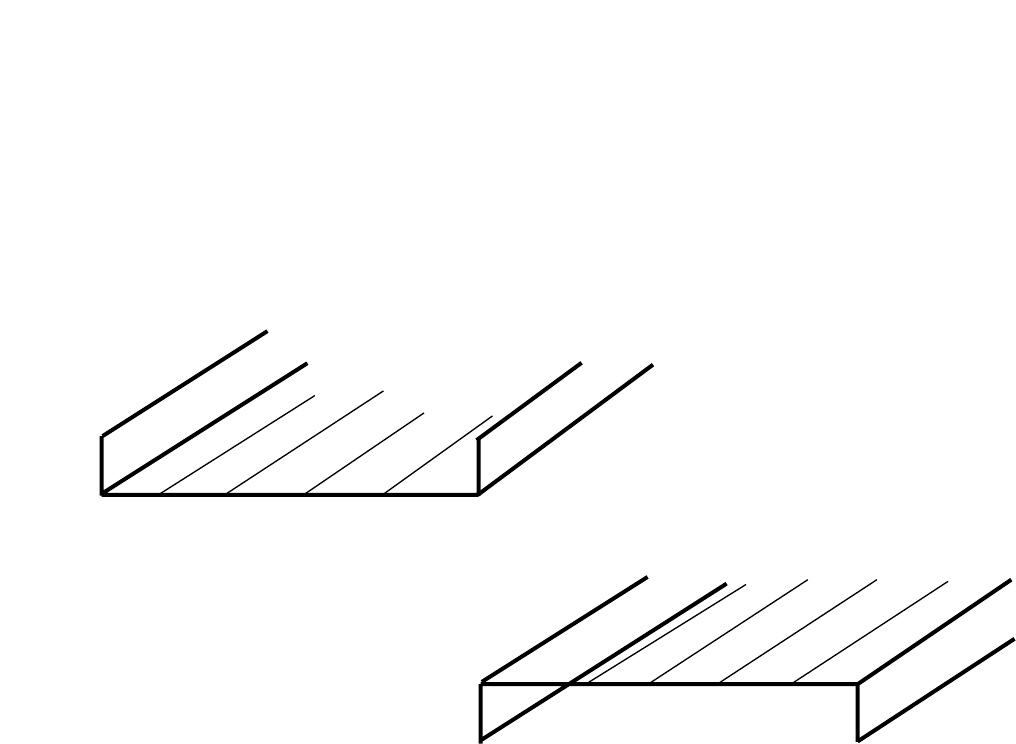
Top Oven Shelf Positioning for Grilling
The shelf can be inserted in two different ways for grilling. The grilling chart will
indicate the correct orientation.
Note
There should always be at least 25mm (1 inch) between the top of the food and the grill
element.
USING THE TOP OVEN FOR GRILLING
14
Orientation A
Orientation B
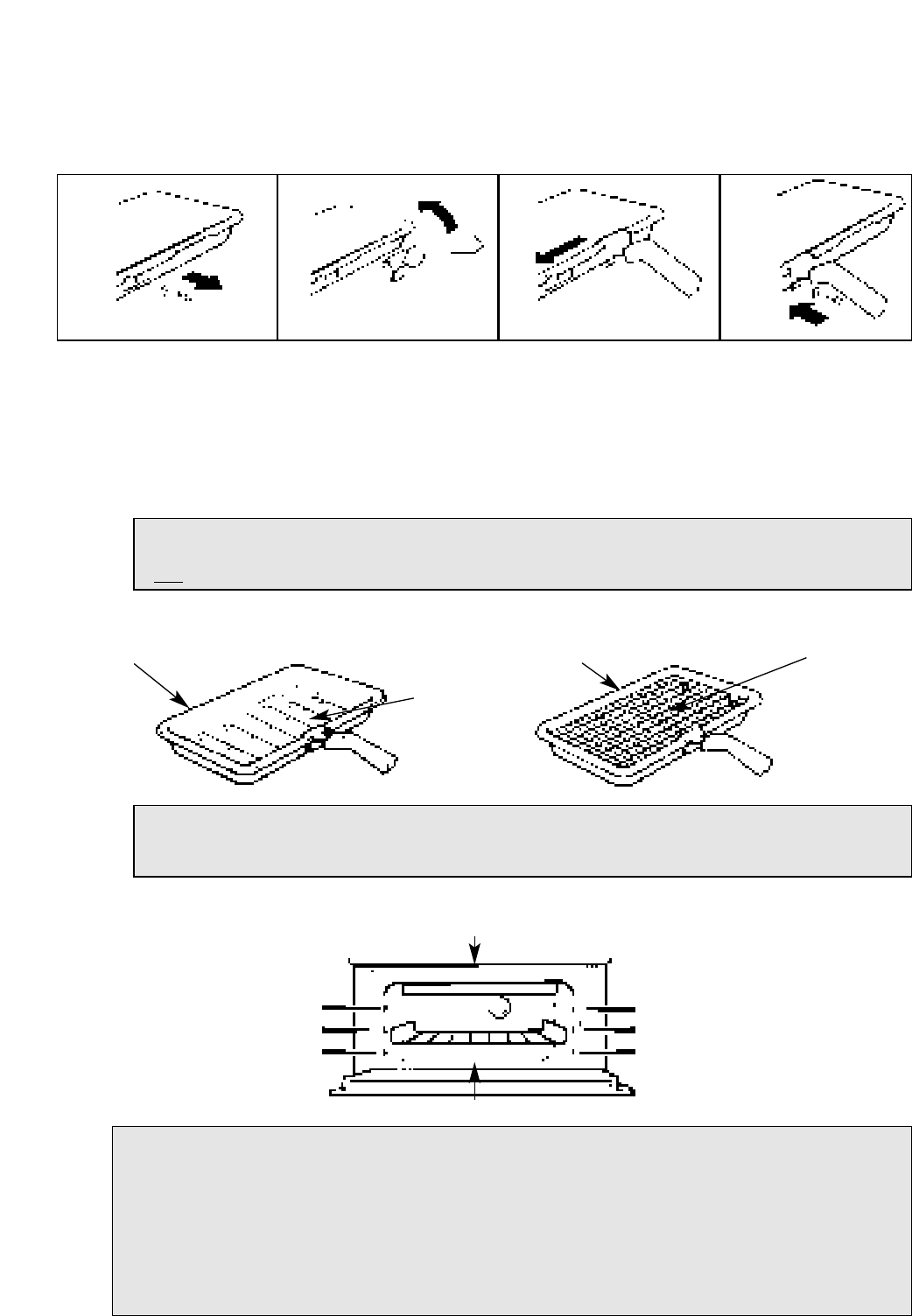
The grill pan handle is detachable from the pan, to facilitate cleaning and storage.
The grill pan handle can be fixed as follows:
Step 1 Remove screw & washers from the grill pan bracket (a).
Step 2 Tilt the handle over the recess (b).
Step 3 Slide it towards the centre of the pan (c).
Step 4 Locate the handle over the bracket (d).
For a fixed handle, replace screw & washers and ensure they are fully
tightened up. If a detachable handle is required, do not replace screw &
washers.
Grill Pan Food Grid and Anti-Splash Tray
Top Oven Shelf Positioning for Grilling
GRILL PAN & HANDLE
15
Note: If a fixed handle is required, the grill pan cannot be kept in the main oven with the
door closed but may be stored in the top oven with the door closed, when the top oven is
not in use.
Note: To stop fat splashing onto the grill mesh, it is important to use the anti-splash tray
as shown in the grilling chart. Always clean the grill pan, anti-splash tray and food grid
after each use.
Step 1 Step 2 Step 3 Step 4
GRILL PANGRILL PAN FOOD GRID
ANTI-SPLASH
TRAY
(a)
(b) (c)
(d)
NOTE: Ensure oven timer is set to Manual.
Preheat the grill if indicated on grill chart.
The grill pan must be placed on the correct shelf and positioned centrally under the grill
element.
Leave the control at 6 for toast, and for fast cooking of foods.
For thicker foods requiring longer cooking, turn the switch to a lower setting after the
initial sealing on both sides at 6. The thicker the food, the lower the control should be set.
DO NOT line the grill pan with aluminium foil, as this increases the amount of fat spitting
which can cause a fire.
After use always return both controls to their OFF (0) position.
ENSURE SHELVES ARE FITTED CORRECT WAY UP.
DO NOT PLACE FOOD/UTENSILS DIRECTLY ON THE OVEN FLOOR
3
2
1
3
2
1

Your cooker is not fitted with a conventional grill. We have developed a Solarplus high
speed grill which is designed to reduce your grilling times. It is quicker because it takes
less time to warm up from cold. Conventional grills require 5 minutes pre-heat before food
is placed beneath them, but for normal grilling the Solarplus grill can be used directly from
cold without any pre-heat.
However, when toasting, optimum performance is achieved by pre-heating the grill for
about 1 minute.
During use the mesh may become soiled. DO NOT attempt to clean it while the grill is still
on. Turn off at the control and allow to cool before cleaning. Care must be taken to ensure
the grill mesh is not distorted - DO NOT store the grill pan handle on the food grid when
the shelf is in the highest position.
IMPORTANT
GRILLING SHOULD NEVER BE UNDERTAKEN WITH THE GRILL/TOP OVEN DOOR
CLOSED.
16
Note: You will notice that the grill elements are protected by a wire mesh. This stops you
from touching the glass tubes.
DO NOT under any circumstances insert objects into the grill mesh as this could break the
glass tubes and expose live parts.
USING THE TOP OVEN FOR SOLARPLUS
GRILLING
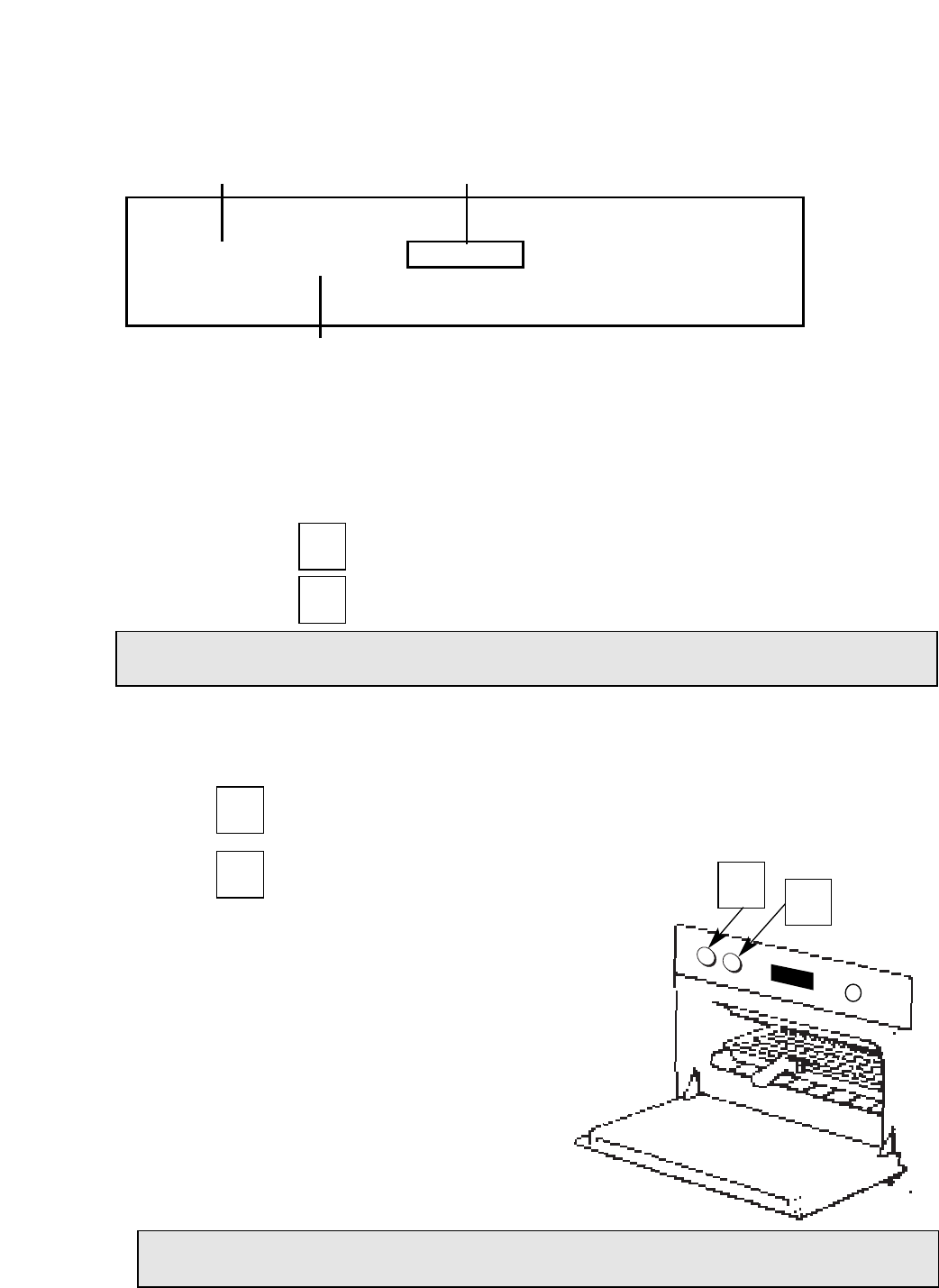
Step 1 Ensure oven timer is set to manual.
Place the shelf in the correct position (see Grilling Guide).
Place the food/grill pan on the shelf, positioned centrally under the grill element.
Leave the top oven door fully open.
Step 2 Turn knob (B) clockwise to select grill function setting:
Set to: For Half Grill (Left hand side only).
For Full Grill.
Step 3 Turn knob (A) clockwise to select the Grill Setting (1–6). (1=Low, 6=High).
Grill Controls Example:
= Full Grill Function
= High Grill Setting
NOTE: Do not grill with the grill/top
oven door closed.
Step 4 After use, turn both controls A & B
anti clockwise to their off (0) position.
OPERATION WHEN USING THE TOP
OVEN FOR GRILLING
17
NOTE: As you turn past the end of the oven temperature scale you will feel resistance on the
knob – continue turning clockwise until the grill setting position is selected.
Half
Grill
Full
Grill
Full
Grill
6
DOOR POSITION
FOR GRILLING.
6Full
Grill
DO NOT allow young children near to the appliance when the grill is in use as the surfaces
get extremely hot.
GRILL SETTING CONTROL
TOP OVEN TEMPERATURE
AND GRILL SELECTION CONTROL
TIMER
❍❍❍
ABC
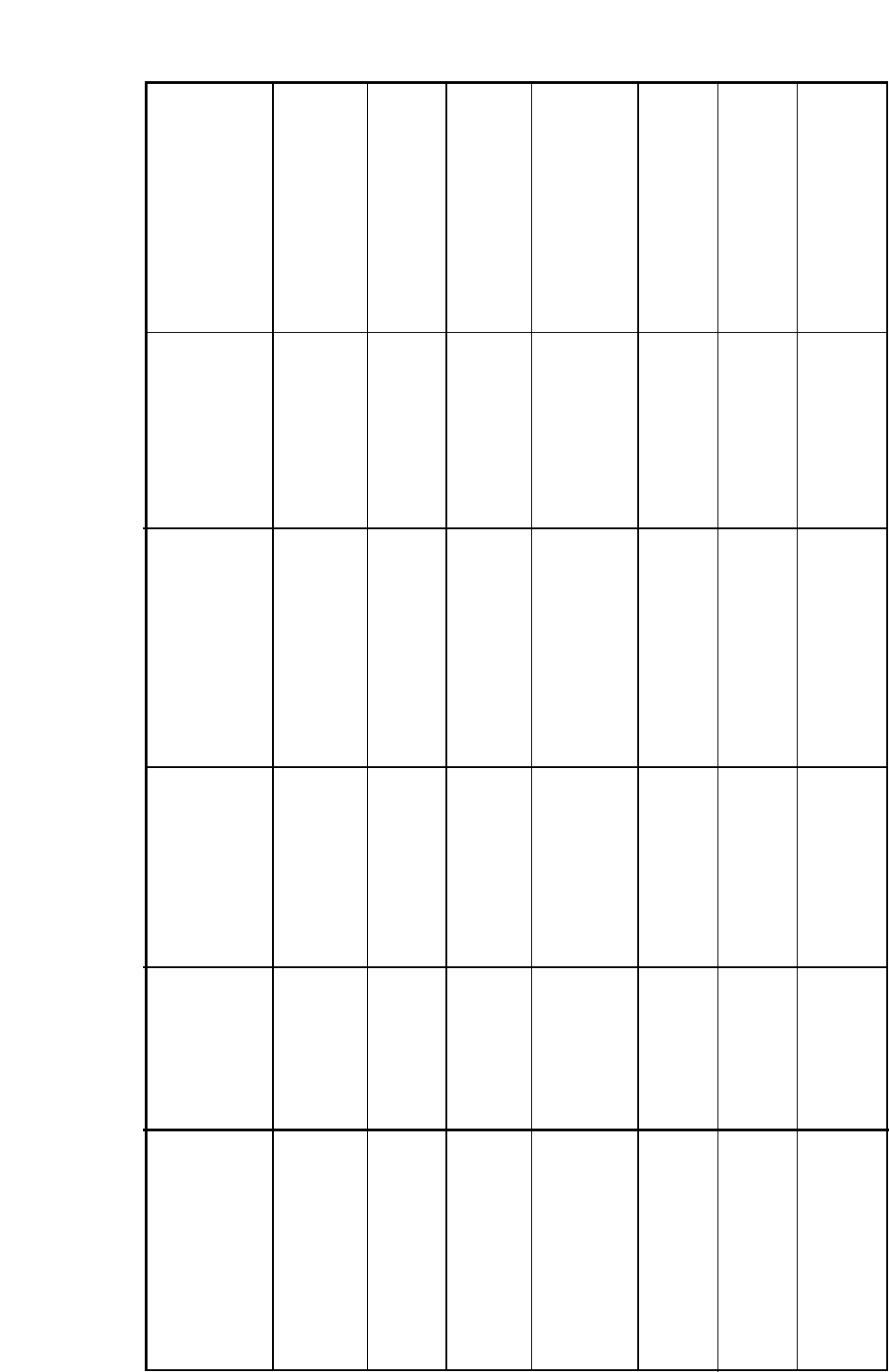
GUIDE TO GRILLING
18
FOOD
Toasting of Bread
Products
Small cuts of meat,
Sausage, Bacon
Chops etc.
Gammon steaks
Fish: Whole
Fillets
Fingers
None
None
None
6 - 8 minutes
10 - 15 minutes
10 - 15 minutes
Pre-cooked potato
products
Pizzas
Browning of food
eg. Cauliflower Cheese
SETTING APPROXIMATE
COOKING TIME PAN TO BE USED
PREHEAT FOR 1
MINUTE
SHELF POSITION
FROM THE BASE
OF THE OVEN
Setting 6 Setting 6 3 - 5 minutes Grill pan and food
support
Grill pan, anti-splash tray
and grid
Grill pan, anti-splash
trivet and food support
Grill pan and food
support
Grill pan and food
support
Grill pan and grid
Dish placed directly on
the shelf
10 - 15 minutes
25 - 30 minutes
10 - 12 minutes
10 - 12 minutes
5 - 10 minutes
Setting 6 for 4 minutes
then reduce to
Setting 5
Setting 6 for 6-8 minutes
then reduce to
Setting 4 or 5
Setting 6
Setting 4
Setting 4
Setting 6
2B
2B
2B
2B
1A
2A
2A
Setting 6
None
None
None
None
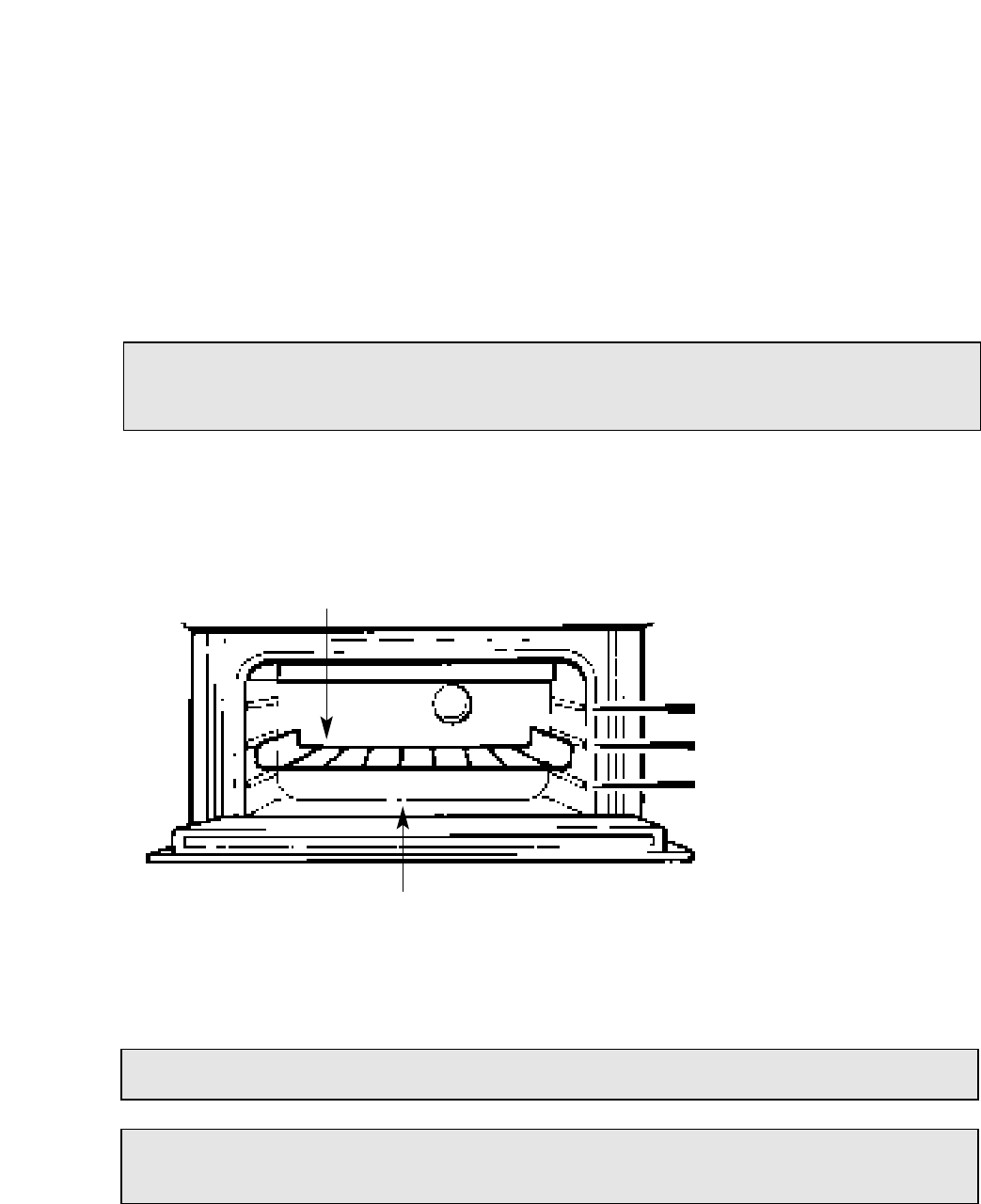
The top oven should be used to cook small quantities of food. The oven is designed so that
the grill element operates at a reduced heat output, this is combined with a heating
element situated underneath the floor of the oven. To ensure even cooking of the food it is
important that cooking utensils are positioned correctly on the oven shelf so that the
element is directly above. As a guide, the front of the utensil should be approx. 100mm (4”)
from the front of the shelf.
SHELF POSITIONING
There should always be at least 25mm (1 inch) between the top of the food and
the grill element.
DO NOT PLACE FOOD/UTENSILS DIRECTLY ON THE OVEN FLOOR
3
2
1
ENSURE SHELVES ARE FITTED THE CORRECT WAY UP
USING THE TOP OVEN AS A
CONVECTION OVEN
Note: Charts are a guide only, to suit personal taste and requirements, it may be
necessary to increase or decrease temperatures by 10oC. It may also be necessary to increase
or decrease cooking times.
WARNING: Items stored in the top oven will get hot when the main oven is in use.
DO NOT allow young children near to the appliance when the top oven is in use as the surfaces
get extremely hot.
19
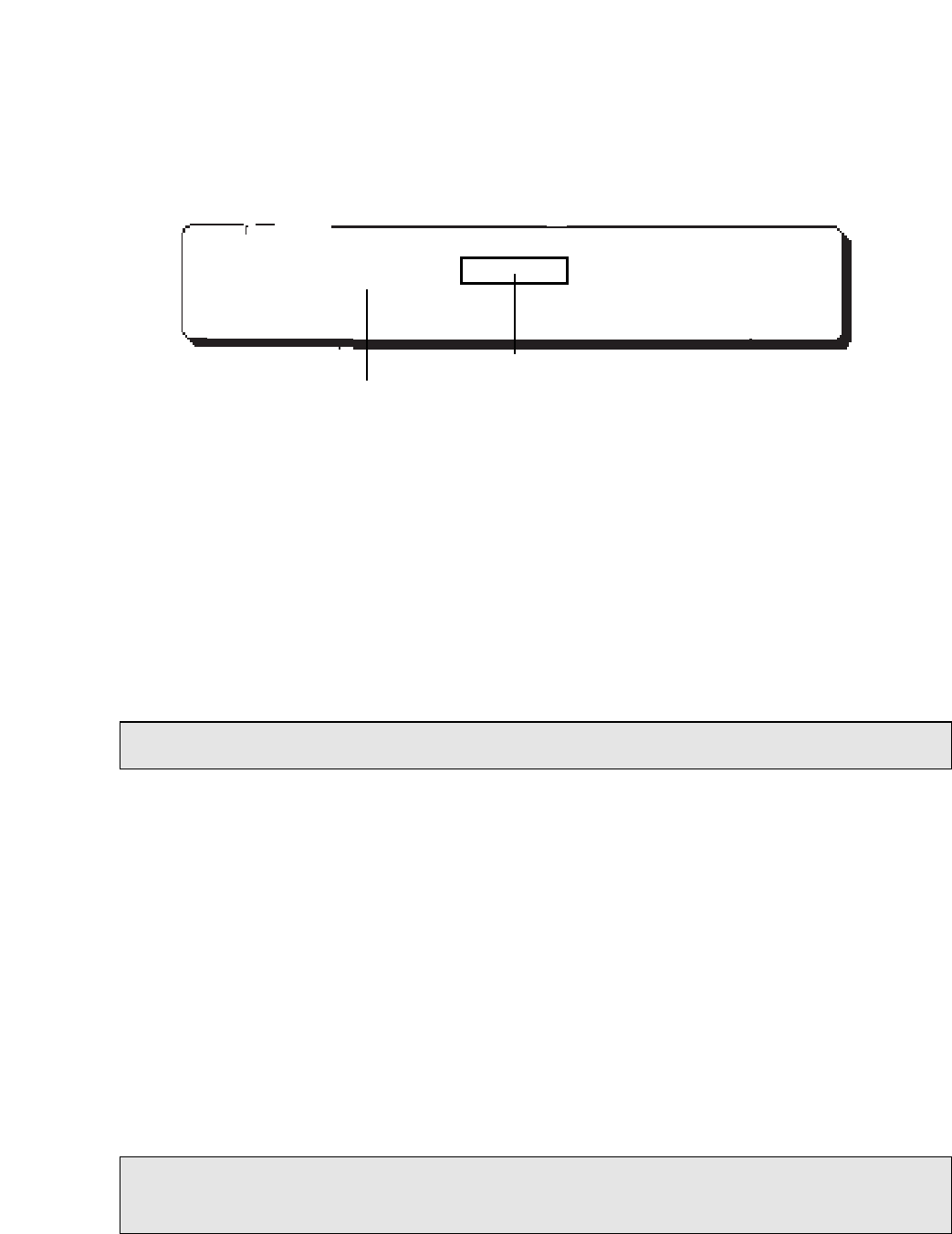
Step 1 Check that the timer is in manual.
Step 2 Place the shelf in the correct position (see Oven Temperature Charts).
Step 3 Select the required cooking temperature (100–220oC) using control (B)
(see Top Oven Temperature Charts).
The pilot light ( ● ) will immediately come on, and remain on until the oven
reaches the required temperature. The light will then automatically go off and
on during cooking as the oven thermostat maintains the correct temperature.
Step 4 Place the food on the shelf directly below the element ensuring the oven
door is closed.
B
PLATE WARMING
Place the plates/dishes on shelf position 1 from the base of the top oven, and turn
top oven temperature and grill selection control (B) to 100oC for 10-15 minutes.
Never use the grill setting control (A) when warming plates.
TOP OVEN UTENSILS
Do Not use: Meat Pans and Baking Trays larger than – 225mm x 300mm (9”x12”)
OPERATION WHEN USING THE TOP OVEN AS
A CONVECTION OVEN
DO NOT use the grill pan or main oven meat pan as a meat pan in the top oven, as the
air circulation will be seriously restricted.
TOP OVEN TEMPERATURE & GRILL SELECTION CONTROL
20
NOTE: At the end of your cooking, always return control (B) to the OFF (O) position.
TIMER
❍❍❍
ABC
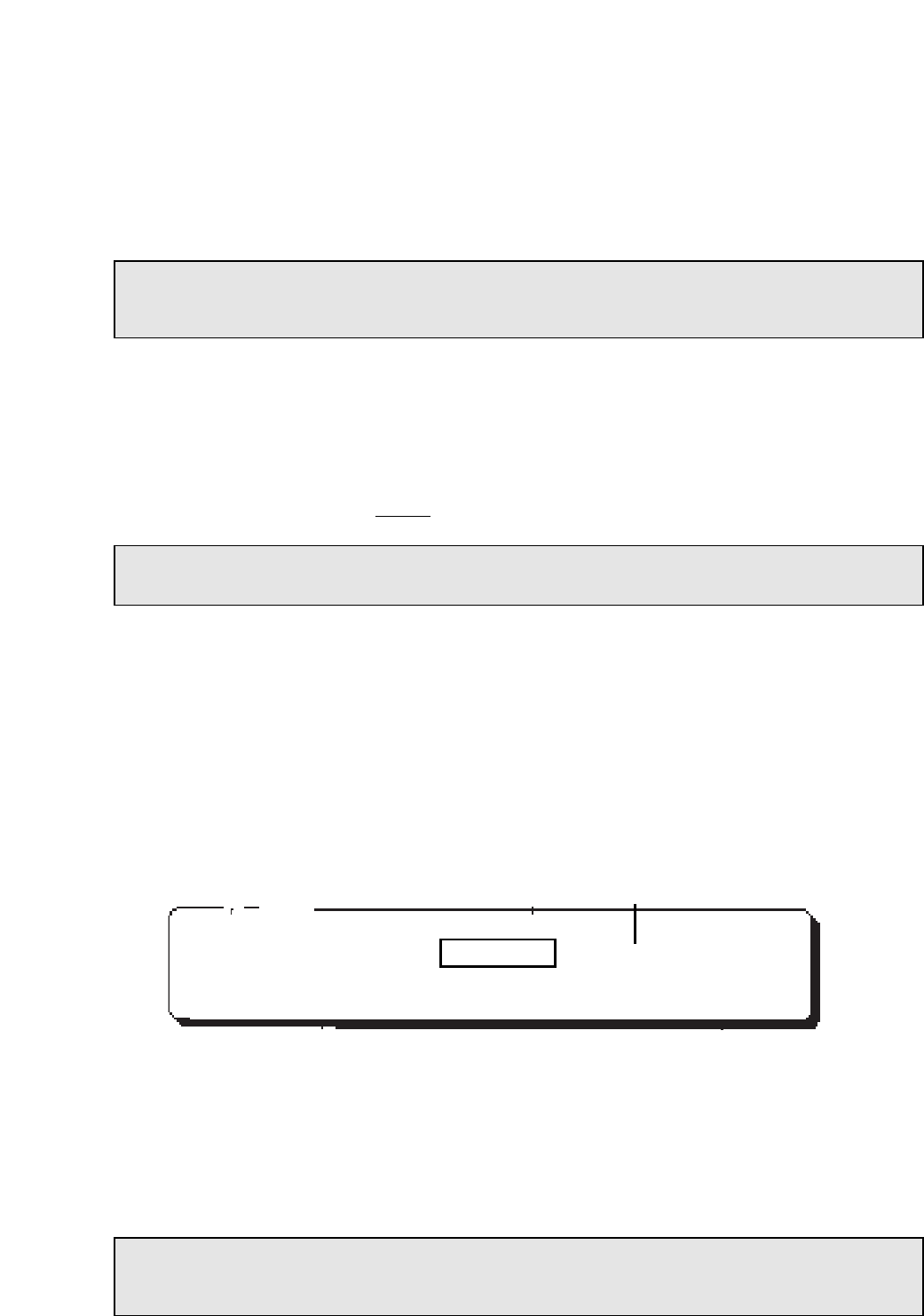
Step 1 Check that the timer is in manual.
Step 2 Place the shelf/shelves in the correct position (see Main Oven Temperature Charts.
Step 3 Place the food centrally on the shelf ensuring the oven door is fully closed.
Step 4 Select the required cooking temperature (80 to 230oC) by turning control (C) clockwise.
The pilot light ( ● ) will immediately come on, and remain on until the oven reaches the
required temperature. The light will then automatically go off and on during cooking as
the oven thermostat maintains the correct temperature.
USING THE MAIN OVEN FOR FAN COOKING
Since a circulaire fan oven heats up more quickly and generally cooks food at a
lower temperature than a conventional oven, pre-heating is often unnecessary. For
guides on “pre-heating”, “cooking temperatures” and “cooking times” see “Oven
Temperature Charts” later in book.
MAIN OVEN SHELF POSITIONING FOR FAN OVEN
Most foods will cook satisfactorily on any shelf position, due to even distribution of
heat in the main oven, but the shelves must be evenly spaced.
The top oven rod shelf can be used in the main oven when cooking large quantities
of food. (N.B. Maximum 3 shelves in the main oven).
Food or utensils should never be placed directly on the floor of the oven
for cooking.
MAIN OVEN UTENSILS
Do Not Use: Meat Pans larger than – 375mm x 300mm (15”x12”)
Baking Trays larger than – 325mm x 250mm (13”x10”)
TEMPERATURE & TIME
When all three shelves are in use to cook large quantities of food, it may be
necessary to increase the cooking times given in the temperature charts by a few
minutes, to allow for the loss of heat due to extra time taken to load the oven, and the
larger mass of food. Baking trays should have an even gap around the oven.
MAIN FAN OVEN OPERATION
Note: Charts are a guide only, to suit personal taste and requirements, it may
be necessary to increase or decrease temperatures by 10oC. It may also be
necessary to increase or decrease cooking times.
DO NOT allow young children near to the appliance when the main oven is in use as the
surfaces get extremely hot.
Note: When you have finished using your cooker, always return the controls to their OFF (O) position.
At the end of the cooking period there may be a momentary puff of steam when the door is opened.
This will disperse in a few seconds and is a perfectly normal characteristic of an oven with a good door
seal.
MAIN OVEN TEMPERATURE & FUNCTION CONTROL
21
C
TIMER
❍❍❍
C

FAN ONLY SETTING
DEFROSTING FROZEN MEAT & POULTRY
Joints of meat and whole birds should be defrosted slowly, preferably in a refrigerator
(allowing 5-6 hours per lb.) or at room temperature (allowing 2-3 hours per lb.).
Frozen meat or poultry must be completely defrosted before cooking in the oven.
However, to decrease the amount of time required to defrost food items, a non-heating
fan only setting may be selected for the main oven only.
OPERATION: TO ASSIST IN DEFROSTING:
Place food in the oven and close the oven door.
Turn the Main Oven Temperature and Function Control (C) clockwise to the
setting.
This defrosts by circulating the air around the food, time to defrost will depend on type
and size of the food.
NOTES: DO NOT defrost meat and poultry by warming the food through.
Foods ideally suited to defrosting using the fan only setting are cream/cream cakes,
butter cream filled cakes, gateaux, cheese cakes, iced cakes, quiches, pastries, biscuits,
bread, croissants, fruit and many delicate frozen foods.
If fish, meat and poultry are to be defrosted using the fan only setting, where possible it
is recommended that the food should be small & thin.
The items should be placed so that the maximum amount of surface area is exposed to
the circulating air, and that they are turned regularly to ensure even defrosting.
Larger cuts of meat and poultry may be defrosted by using the fan only setting up
to a maximum weight of 2 kg (4lb 8oz).
It is important to wash both meat and poultry and cooking utensils immediately after
defrosting and before cooking. Food should be cooked immediately after defrosting.
LIGHT ONLY SETTING
When the Main Oven Temperature & Function Control (C) is turned clockwise to
the setting, the main oven light only will illuminate.
USING THE MAIN OVEN FOR OTHER
FUNCTIONS
22
It is very important to strictly adhere to the basic principles of food handling and hygiene to
prevent the possibility of bacterial growth.
Fan
Only
Oven
Light
Oven
Light
Fan
Only

‘S’ SLOW COOK SETTING
This is used for slow cooking, keeping food warm and warming plates for short periods.
Extra care should be taken when warming bone china, as it may be damaged in a hot
oven.
ADVANTAGES OF SLOW COOKING ARE:
The oven stays cleaner because there is less splashing.
Timing of food is not as critical, so there is less fear of overcooking.
Inexpensive joints of meat are tenderised.
Fully loading the oven can be economical.
Cooking times can be extended in some cases by up to 2 hours.
OPERATION:
1. Place the prepared food in the main oven and ensure the door is fully closed.
2. Select Slow Cooking Temperature ‘S’ by turning Main Oven Temperature &
Function Control (C) clockwise.
STORAGE & RE-HEATING OF FOOD:
1. If food is to be frozen or not used immediately, place it in a clean container
and cool as soon as possible.
2. Always thaw frozen food completely in the refrigerator before re-heating.
3. Always reheat food thoroughly and ensure it is piping hot before serving.
4. Only re-heat food once.
POINTS TO CONSIDER WHEN PREPARING FOOD FOR SLOW COOKING
1. Make sure that the dishes to be used will fit into the oven ensuring enough room
for air to circulate.
2. All dishes cooked on the slow setting will require a minimum of 6 hours, however,
it they are cooked for 1-2 hours longer then deterioration in their appearance may
be noticed.
3. Never cook joints of meat over 2.7kg (6 lb) or poultry over 2.0kg (4lb 8oz).
We do not recommend that joints of meat or poultry are stuffed before cooking on
the slow setting.
4. To seal in the meat juices, always cook meat or poultry at 170oC for 30 minutes before
wrapping in foil and placing on a rack over a tin (to allow good air circulation) before
turning the control to the slow setting and cooking immediately.
5. Always ensure that joints of pork and poultry are thoroughly cooked by checking with a
meat thermometer before serving.
6. Always thaw frozen foods completely before cooking. We do not recommend placing
frozen food in the oven to cook.
7. Always bring soups, liquids and casseroles to the boil before placing in the oven.
8. Ensure that casserole dishes have a good seal (not airtight) and cover to the top with foil
to prevent loss of moisture.
9. Ensure that fruit and vegetables are cut into even sized small pieces to cook properly.
10. Always adjust seasoning before serving.
11. If using dried red kidney beans it is important that the beans are soaked and then
boiled for a minimum of 10 minutes before using in any dish to destroy any toxins.
12. When cooking fish or egg dishes it may be necessary to check during cooking to
avoid overcooking.
USING THE MAIN OVEN FOR OTHER
FUNCTIONS
23
DO NOT place food or plates directly on the oven floor as this could damage both the
oven lining and the plates which are being warmed.

oF
Gas
Mark
1/2
1
250 100
120
130
140
160
170
180
200
210
220
120
140
150
160
180
190
200
220
–
–
275
300
325
350
375
400
425
450
475
2
3
4
5
6
7
8
9
Main
Conventional
Oven
Main
Fan
Oven
TEMPERATURE CONVERSION SCALE
24
25
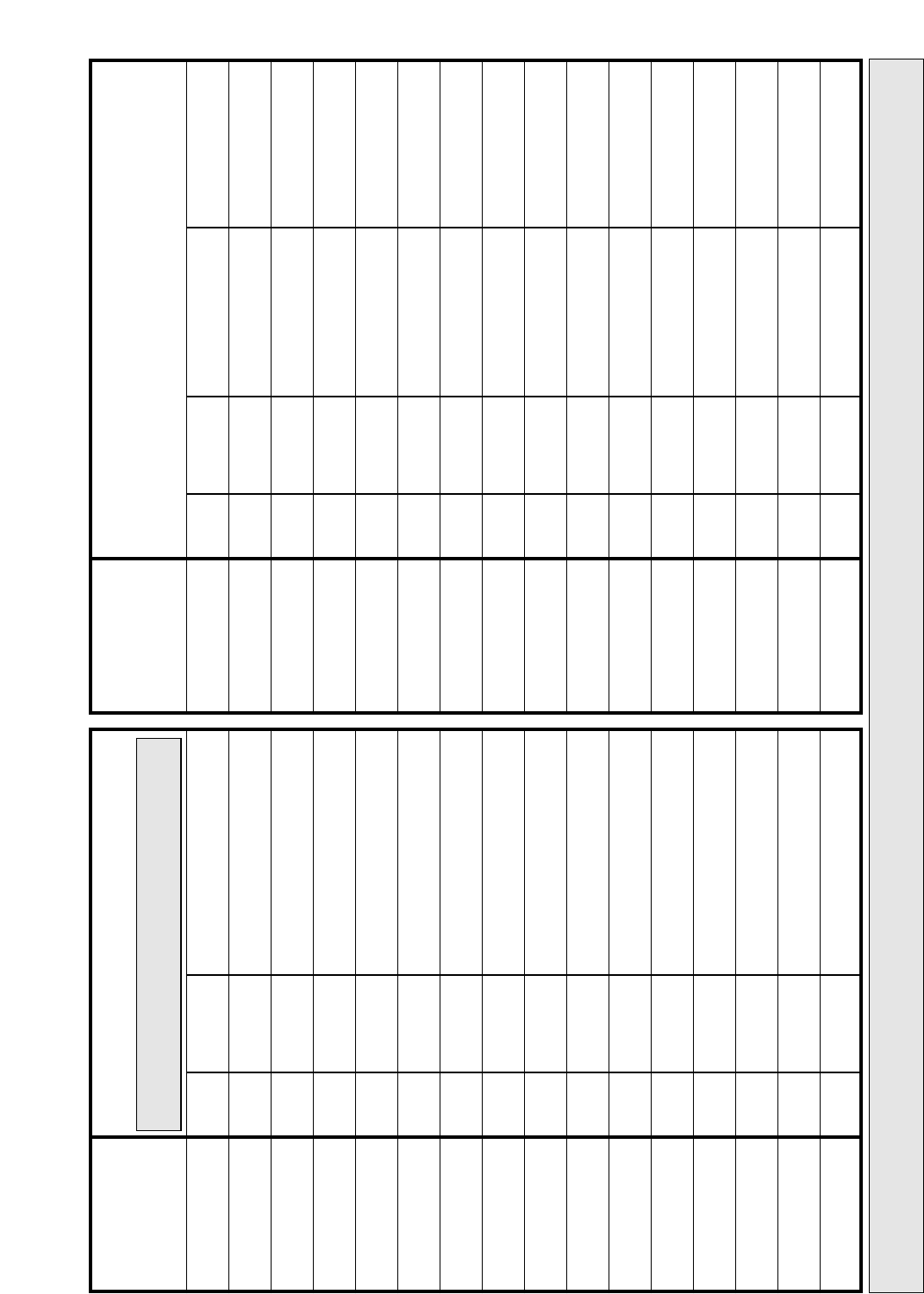
Main Fan Oven Cooking
Meat
Beef
Lamb
Pork
Chicken/Turkey
up to 4kg (8lb)
Turkey up to 5.5kg
(12lb)
Turkey over 5.5kg
(12lb)
Casserole Stews
Food
Temperature
oC
Time
(approx.)
Pre-
heat
No 160/180 20-25 mins per 450g (1lb)
+ 20 mins extra
20-30 mins per 450g (1lb)
+ 25 mins extra
20-30 mins per 450g (1lb)
+ 25 mins extra
15-20 mins per 450g (1lb)
+ 20 mins extra
12-14 mins per 450g (1lb)
+12 mins extra
10 mins per 450g (1lb) e.g.
10kg (22lb) = 264 mins
11⁄2- 2 hours
160/180
160/180
160/180
150/160
150
140
No
No
No
No
No
No
Note: Up to two shelves may be used in this oven. The position
of
these is not important providing they are evenly spaced.
Top Oven Convection Cooking
Meat
Beef/Lamb
(Slow Roasting)
Beef/Lamb
(Foil Covered)
Pork
(Slow Roasting)
Pork
(Foil Covered)
Poultry/Game
(Slow Roasting)
Poultry/Game
(Foil Covered)
Casserole Cooking
Food
Temperature
oC
Time
(approx.)
Position from
Base of Oven
Pre-
heat
Yes
Yes
Yes
Yes
Yes
Yes
Yes
170/180 35 mins per 450g
(1lb) + 35 mins over 1 A
1 A
1 A
1 A
1 A
1 A
1 A
35 mins per 450g (1lb)
40 mins per 450g (1lb)
+ 40 mins over
40 mins per 450g (1lb)
25-30 mins per 450g (1lb)
+ 25 mins over
25-30 mins per 450g (1lb)
2 -21⁄2hours
180/190
170/180
190/200
170/180
195/200
150
OVEN TEMPERATURE CHARTS – MEAT
COOKING MEAT/POULTRY IN THE TOP OVEN
Small joints of meat up to 1.5Kg (3 lbs) and poultry up to 3.6Kg (8lbs) can be roasted in a small meat pan in the top oven.
IF USING ALUMINIUM FOIL
1. Never allow foil to touch sides of oven. 2. Never cover interior with foil. 3. Never cover shelves with foil.
The most accurate method of testing the readiness of joints of meat or whole poultry is to insert a meat thermometer into
the thickest part of a joint of meat, or the thickest part of poultry thighs, during the cooking period. The meat
thermometer will indicate when the required internal temperature has been reached.
Beef
Rare 60OC Medium 70OC90
OC80
OC90
OC
Well Done 70OC
Pork Lamb Poultry
26
Main Fan Oven Cooking
Food
Scones
Small Cakes
Victoria Sandwich
Sponge Sandwich
(Fatless)
Swiss Roll
Semi-rich
Fruit Cake
Rich Fruit Cakes
Shortcrust
Pastry
Puff Pastry
Yorkshire Pudding
Individual Yorkshire
Pudding
Milk Pudding
Baked Custard
Bread
Meringues
Baking
Temperature
oC
Time
Pre-
heat
Yes 210 9-12 mins
15-25 mins approx
20-30 mins
15-20 mins
10-15 mins
1-11⁄4hours
Depending on size
Depending on use
Depending on use
30-45 mins
20-25 mins
11⁄4-11⁄2hours
40-50 mins
30-35 mins
3-31⁄2hours
170
160
180
190
150
130
180/190
195/200
180
190
140
130
200
80/90
No
No
Yes
Yes
No
No
No
yes
Yes
Yes
No
No
Yes
No
Note: Up to two shelves may be used in this oven. The position
of
these is not important providing they are evenly spaced.
Top Oven Convection Cooking
Food
Scones
Small Cakes
Victoria Sandwich
Sponge Sandwich
(Fatless)
Swiss Roll
Semi-rich
Fruit Cake
Rich Fruit Cakes
Shortcrust
Pastry
Puff Pastry
Yorkshire Pudding
Individual Yorkshire
Pudding
Milk Pudding
Baked Custard
Bread
Meringues
Baking
Temperature
oC
Time (approx) Position from Base
of Oven
Pre-
heat
Yes
Yes
Yes
Yes
Yes
Yes
Yes
Yes
Yes
Yes
Yes
Yes
Yes
Yes
Yes
200 10-15 mins
20-25 mins
20-30 mins
20-25 mins
10-15 mins
75-90 mins
21⁄2 - 3 hrs
Depending
on use
Depending
on use
30-45 mins
20-30 mins
11⁄2- 2 hrs
40-50 mins
30-40 mins
3 - 31⁄2hrs
1 A
1 A
1 A
1 A
1 A
1 A
1 A
1 A
1 A
1 A
1 A
1 A
1 A
1 A
1 A
180
170
190
200
150
130/140
190/200
200/210
180/190
190/200
150
150
200
100
OVEN TEMPERATURE CHARTS – BAKING
Note: If soft tub margarine is being used for cake making, we would recommend using the all in one method and to reduce the
temperature by 10OC. Temperatures recommended in this chart refer to cakes made with block margarine or butter only.

COOKING RESULTS NOT SATISFACTORY
GRILL
Uneven cooking front to back Ensure that the grill pan is positioned centrally below
the grill element.
Fat splattering Ensure that the grill pan is not lined with foil.
Ensure that the grill setting control (A) is not set too high.
If Solarplus grill – use anti-splash tray supplied under the
food support.
BAKING GENERAL
Uneven rising of cakes Ensure that the oven shelves are level.
Sinking of cakes The following may cause cakes to sink:
1. Pre-heating of fan ovens – not always necessary.
2. Cooking at too high a temperature – reduce standard
temperatures by 25oC for fan ovens.
3. Using normal creaming method with a soft margarine.
If using soft margarine, use an all in one method
instead of the traditional creaming of the margarine
and sugar. Remember when using a food mixer or
processor not to over-cream soft margarine.
Over/undercooking Refer to the cooking times and temperatures given in the
Oven Temperature Charts provided, however, it may be
necessary to increase or decrease temperatures by 10°C
to suit personal taste.
Do not use utensils greater than 56mm (2l⁄4'') in height for
roasting.
TOP OVEN BAKING
Uneven cooking front to back Ensure that the cooking utensil is at least 100mm (4")
from the front of the shelf.
Uneven rising Ensure that the shelf is level (as above) and that the food
is positioned correctly in the oven.
Overcooking Remember to reduce cooking temperatures by 10°C
from standard recipes when using the top oven.
Food is taking too long to cook
Ensure that the cooking utensil used in the top oven is
not larger than 300mm x 225mm (12"x 9"), e.g. Do Not
use the main oven meat pan.
Only cook one item at a time to avoid overloading the
oven.
27
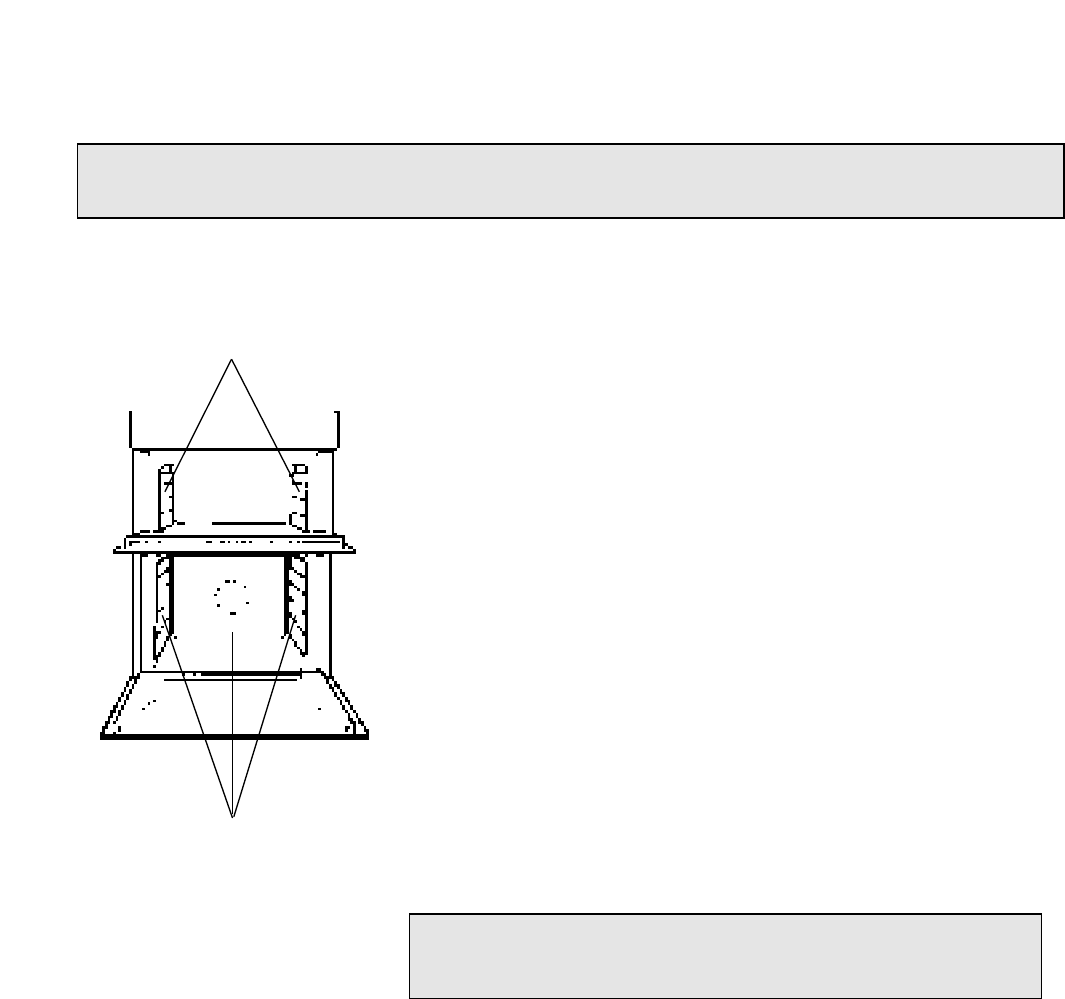
1. “STAYCLEAN” OVEN LINERS
(a) How "Stayclean" works.
The surfaces of the "Stayclean" oven liners are treated
with a special vitreous enamel which absorbs cooking
soils. At temperatures of 220°C (425°F) or above, the
special surface enables these soils to be slowly destroyed.
The higher the temperature the more effective it is.
(b) Cleaning.
In most cases normal cooking operations at 220°C
(425°F) will permit this cleaning operation to proceed
during cooking. However if higher cooking temperatures
are not used regularly, it may be necessary, in order to
prevent heavy soiling, to run the ovens without shelves or
meat pan, at a maximum setting for a couple of hours.
It should not normally be necessary to clean the
"Stayclean" panels with water. If the user feels it is
desirable to do so, wipe them over with a clean, soapy
cloth, followed by a wipe with a clean damp cloth.
CARE AND CLEANING
28
Warning: Before cleaning, please ensure that the electricity supply to the appliance is switched off and
the appliance is fully cold.
DO NOT use biological washing powder, harsh abrasives or
chemical oven cleaners of any kind as this could damage
the “Stayclean” oven liners.
TOP OVEN SIDE LINERS
MAIN OVEN SIDE LINERS
AND REAR PANEL
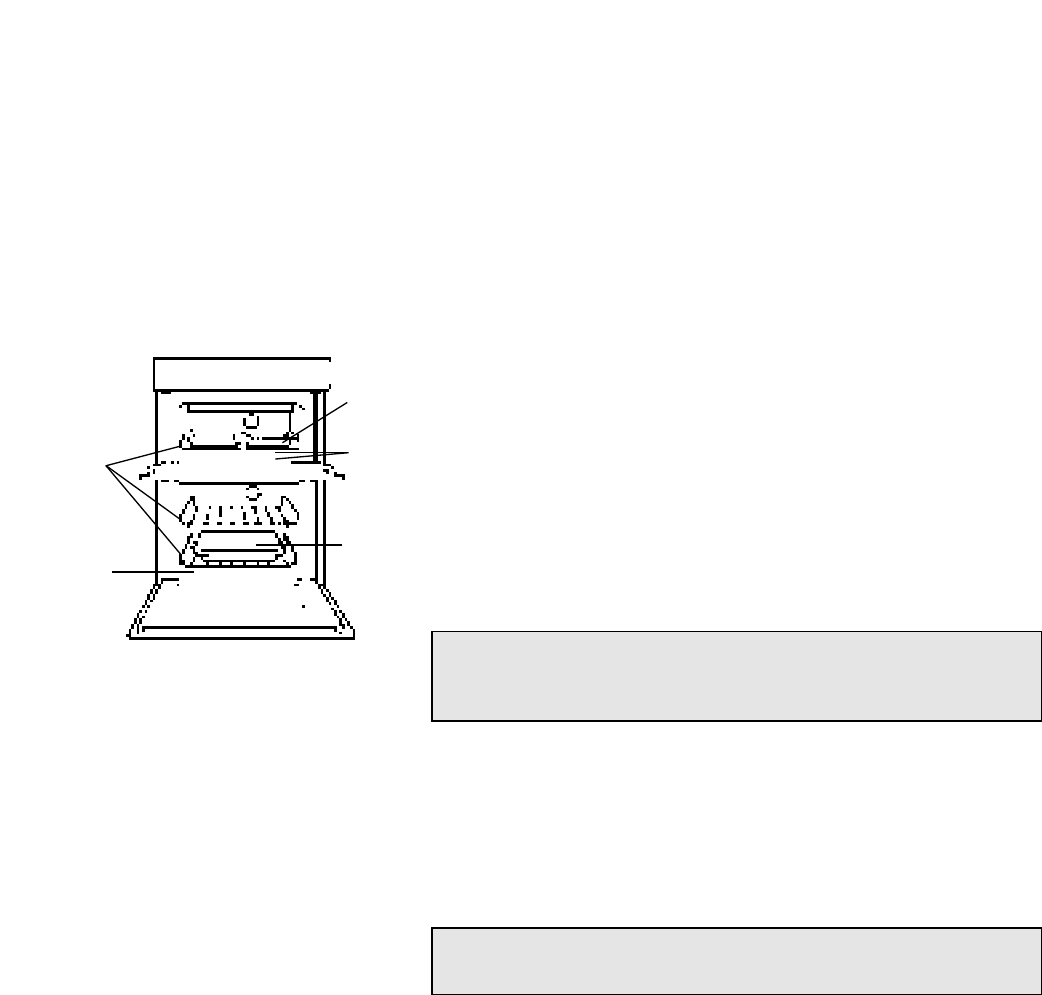
2. CLEANING GRILL, TOP OVEN AND MAIN OVEN
(a) Base & Rear of Top Oven and Base of Main Oven.
Wipe out the oven with a damp soapy cloth. For more
stubborn stains on the base of the oven use a well
soaped fine steel wool soap pad.
(b) Grill Pan, Meat Pans & Oven Shelves.
To prevent stains from being burnt on to the grill pan,
food support and rod shelf, always wash immediately
after use in warm soapy water.
Use a well soaped fine steel wool soap pad to remove
stubborn stains from the rod shelves, grill pan, meat pan
and the base of the oven.
(c) Solarplus Grill .
To clean the Solarplus grill, use a clean, damp, soapy cloth and
wipe over. If stubborn stains remain, gently clean with a well
soaped nylon scouring pad and wipe over with a damp cloth.
CARE AND CLEANING
29
DO NOT use aerosol cleaners on this oven as they could
adversely affect the fan motor unit, and cannot be wiped off
the fan blade.
DO NOT use metal cleaning utensils, wire wool or proprietary
oven cleaners on the grill element mesh
OVEN
SHELVES
GRILL
PAN
BASE &
REAR
MEAT
PAN
MAIN
OVEN
BASE
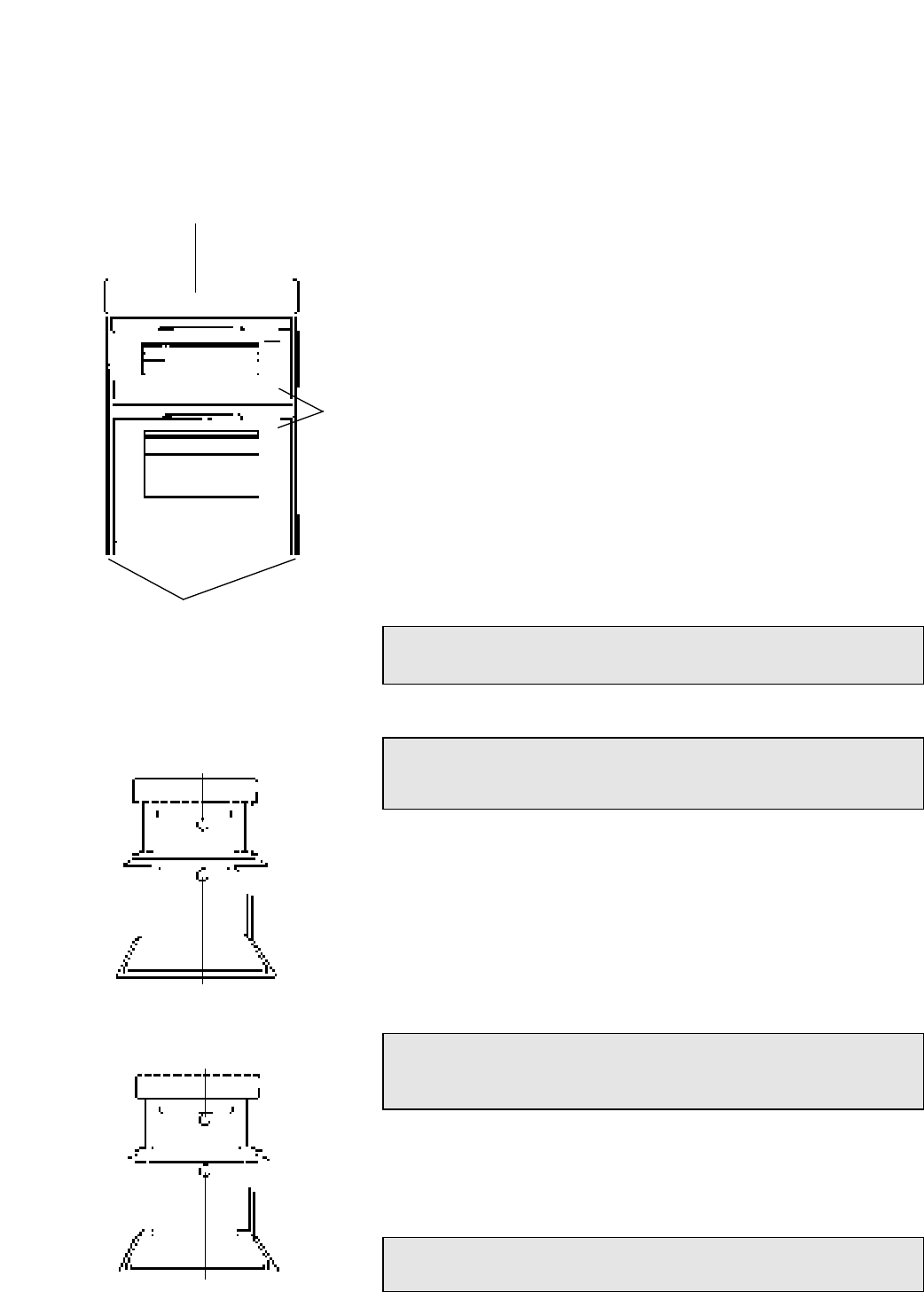
3. OVEN DOORS
(a) Control Panel
Regularly wipe with a clean, damp cloth and polish with a clean,
dry cloth.
(b) Trims
It is advisable to clean the trims regularly to prevent any build up
of soiling which may detract from the appearance of the cooker.
The recommended method of cleaning is to wipe over the trims
with a clean, soft cloth wrung out in warm water, or mild non
abrasive cleaner. (If in doubt try the cleaner on a small area of
trim which is not noticeable in normal use), then after wiping
with a cloth wrung out in clear water, dry with a clean, soft cloth.
(c) Inner Door Panels & Glass
Open the door fully. The glass panel may now be washed.
Stubborn stains can be removed by using a well soaped, fine
steel wool soap pad.
(d) Door trims (BU82 only)
Regularly wipe with a clean, damp cloth and polish with a
clean dry cloth.
4. REPLACEMENT OF THE OVEN LAMP
Open the oven door and remove the oven shelves.
Using a thick cloth, grip the lamp lens, unscrew anti-
clockwise and remove the lens.
Carefully unscrew the bulb anti-clockwise. Fit
replacement bulb (15W 300°C SES). Fit replacement
bulb and refit lens.
5. HOW TO CLEAN THE LAMP LENS
Open the oven door and remove the oven shelves.
Using a thick cloth, grip the lamp lens, unscrew anti-
clockwise and remove.
Clean with a non-abrasive cleansing cream and refit
lamp lens.
CARE AND CLEANING
30
DO NOT use scouring pads, or abrasive powder, which will
scratch the glass.
Warning: To avoid electric shocks - please ensure that the
electricity supply to the appliance is switched off and the
appliance is fully cold, before removing the lamp lens.
Warning: To avoid electric shocks - please ensure that the
electricity supply to the appliance is switched off and the
appliance is fully cold, before cleaning lamp lens.
DO NOT use scouring pads, or abrasive powder, which will
scratch the glass lens
CONTROL PANEL
TRIMS
OVEN
DOORS
TOP OVEN LAMP
MAIN OVEN LAMP
TOP OVEN LAMP
MAIN OVEN LAMP
CARE AND CLEANING
31
Warning: Always switch your appliance OFF at the mains supply and allow to cool before cleaning.
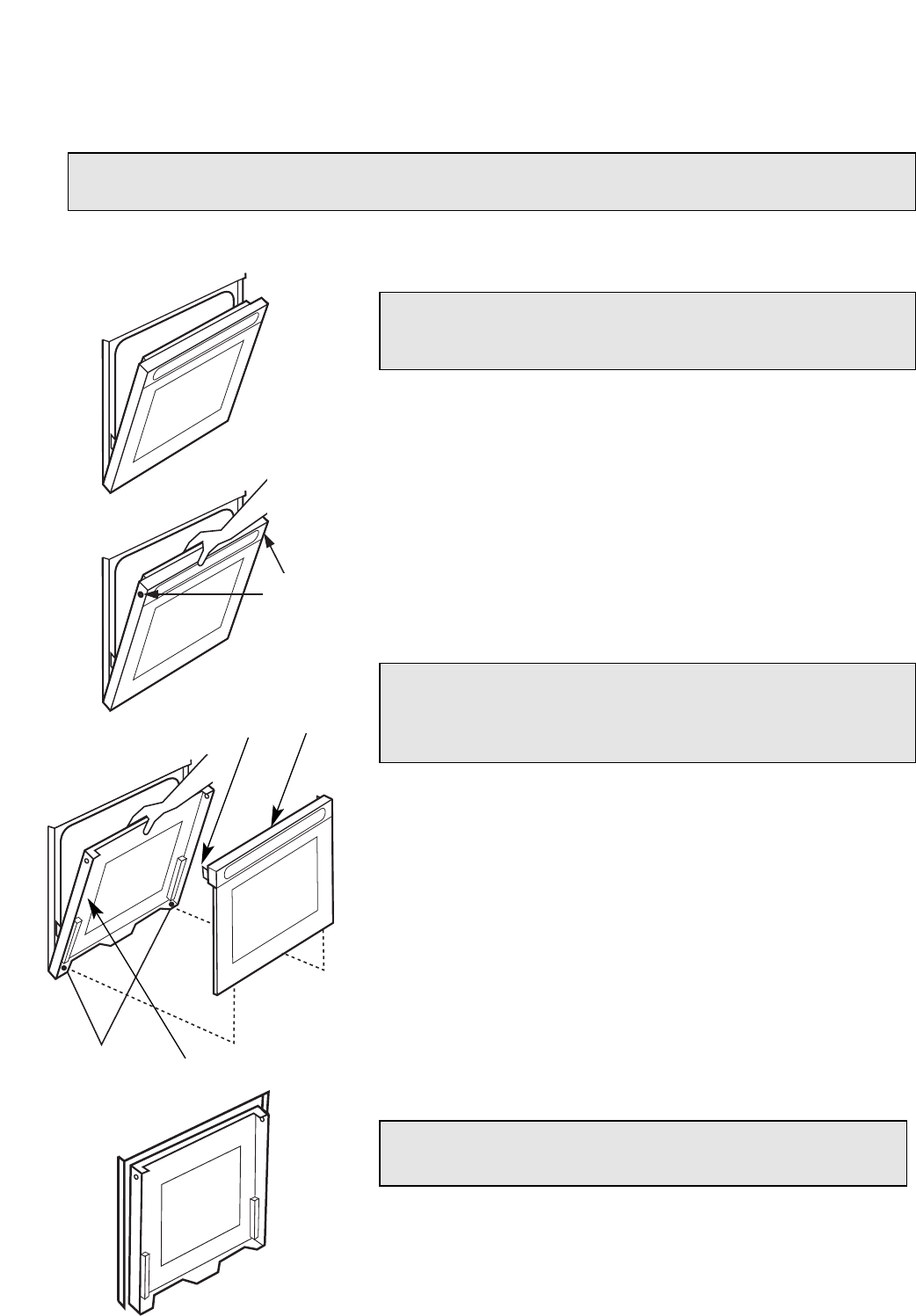
Note: The door can be wedged open using a towel between
the door and the side trim thus leaving your hands free.
Warning: Care must be taken when closing the door inner
panel as the door will attempt to snatch shut, without the
weight of the handle/outer glass assembly avoid trapping
your fingers.
Never operate the ovens without the outer glass panels cor-
rectly refitted.
Fig. 1
Fig. 2
Fig. 3
TWO SCREWS/
WASHERS
DOOR
FIXING
TAG
DOOR
OUTER
GLASS &
HANDLE
DOOR
INNER
PANEL
RUBBER
GROMMETS
Fig. 4
TO CLEAN THE INSIDE OF OUTER AND INNER GLASS PANELS
1. Position top or main oven door as shown in fig. 1.
2. Grip inner door panel and handle/outer glass assembly.
Remove two screws and fibre washers (put to one side)
as shown in fig. 2.
3. Pull handle/outer glass assembly at the top outwards
while still holding the inner door panel and unhook
handle/outer glass assembly at the bottom by lifting
handle/outer glass assembly upwards as shown in fig. 3.
Take care not to dislodge rubber grommets in bottom
of door.
4. Return the inner door panel to the closed position as
shown in fig. 4.
5. The inside of inner and outer door glass can now be
cleaned using a clean, damp cloth and polished using
a clean, dry cloth.
6. Refit the handle/outer glass assembly by opening the
oven door and hold taking care not to trap your fingers,
see fig. 3. Hook the handle/outer glass assembly back into
the rubber grommets at the bottom of the inner door
panel, see fig. 3.
Fit the handle/outer glass assembly back in position
at the top ensuring the fixing tags on the handle/outer
glass assembly fit inside the door inner panel. While still
holding door together, refit the two screws and washers,
see fig. 2.

ELECTRICAL REQUIREMENTS
For your own safety, we recommend that your cooker is installed by a competent
person such as one who is registered with NICEIC (National Inspection Council for
Electrical Installation Contracting). The cooker should be installed in
accordance with the latest edition of the IEE Regulations.
Warning: This appliance must be earthed.
ELECTRICAL CONNECTIONS
The installer must check that the voltage shown at the rating plate corresponds
with the house electricity supply.
The cooker must be supplied via a suitable double pole isolating switch, having a
contact separation of at least 3mm in all poles placed in a readily accessible
position adjacent to the cooker.
If the cooker is to be wired into a connector unit, this may be positioned behind
the cooker providing the following requirements are met:
i) The connector unit must not project from the wall more than 25mm.
ii) The top of the connector must not be more than 130mm above floor level.
Remove the terminal cover at the rear base of the cooker. Pass the cable through
the cable clamp and connect to the appropriate terminals provided.
Allow sufficient cable for any future servicing.
Tighten the screws on the cable clamp and replace the cover.
Make main connections in the connector unit or cooker control unit.
This appliance conforms to B.S. EN 55014 regarding suppression of Radio and
Television reception interference.
A double Pole control switch having a minimum rating of 32 amps should be used
to feed the cooker using a suitably rated cable.
Where a hob is fitted adjacent to or over the cooker, a 45 amp Double Pole control
switch should be used to feed both units via separate suitably rated cables.
We recommend a minimum of 4mm2PVC insulated twin and earth cable
conforming to B.S. 6004 for connection of each appliance.
Where a hob is fitted above the cooker the cable connecting the hob to the cooker
control unit must be of 2.5mm2 85o C heat resistant cable to BS6141 table 15
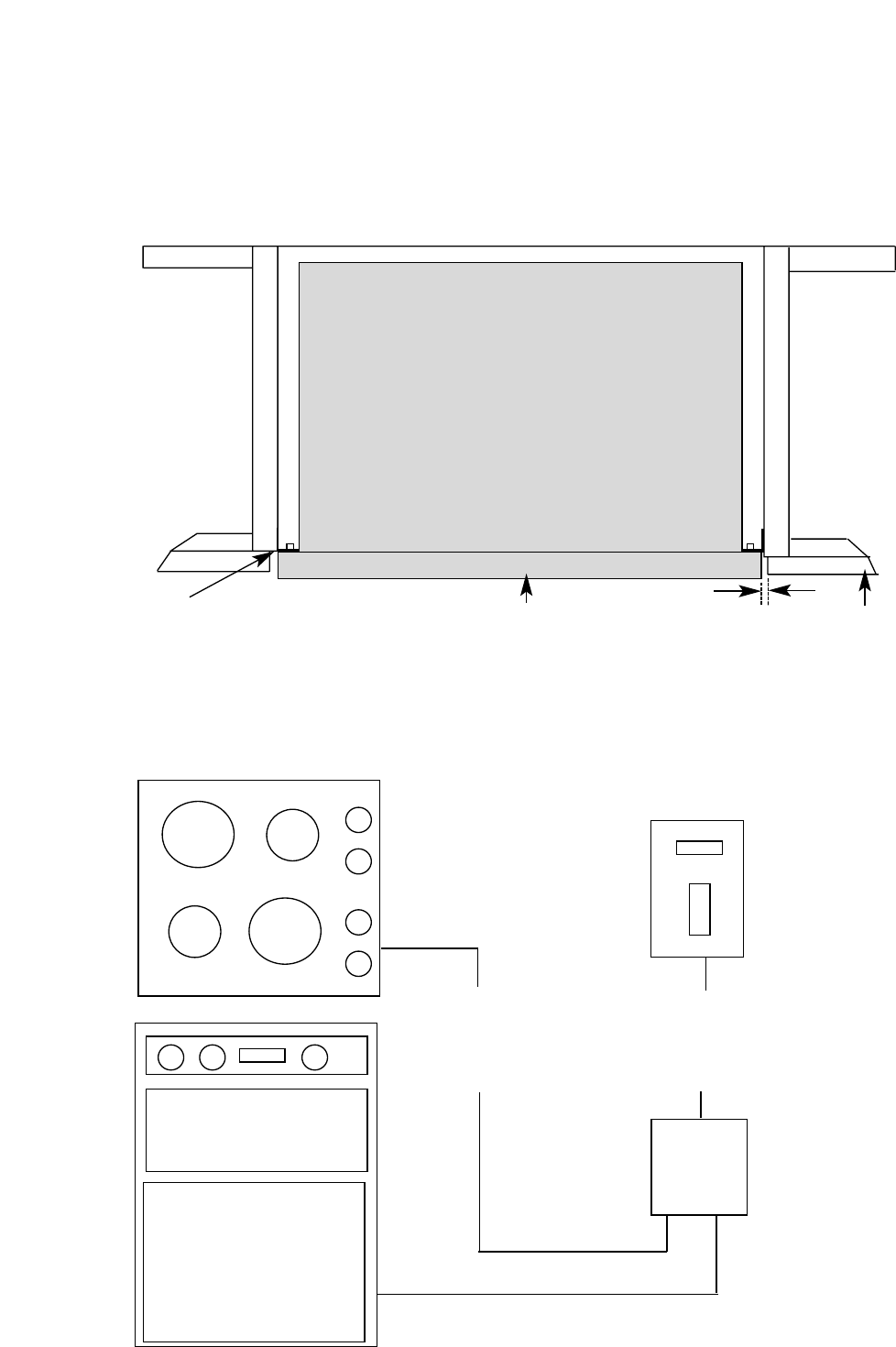
In all cases adhere to routing details (see fig. 5).
This appliance must not be installed over any other appliance that generates heat
such as a plinth heater
INSTALLATION
32
Note: Due to many different types of installation, a mains cable is not supplied
with this product. The installer will fit the correct type and length of cable.
1. GENERAL
The appliance is designed to be mounted on a floor between two adjacent cabinets.
The cabinets must be securely fixed to the wall and the cooker securely fixed to the
cabinets.
This cooker must not be used free standing.
Note; This cooker must not be fitted on a platform.
3. FINAL INSTALLATION
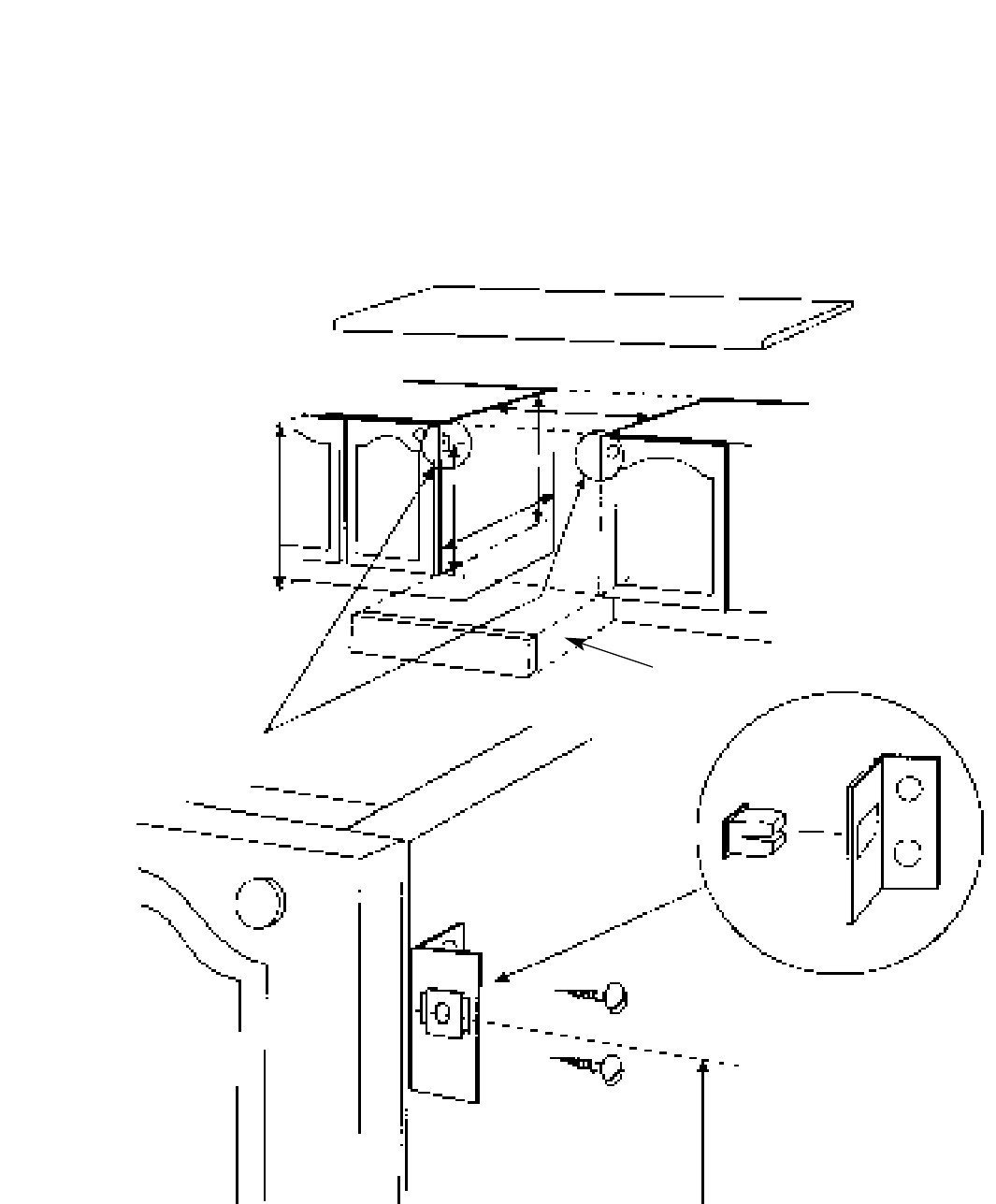
a. Ensure that the adjacent cabinets and the gap between them have dimensions
in accordance with the diagram.
b. Assemble the plastic plugs provided into the fixing brackets. See diagram.
c. Fix the fixing brackets to the sides of the adjacent cabinets so that the centre
line of the brackets are 565mm above the top of the plinth line and the front
face of the plastic plug is level with the front face of the cabinet sides. See diagram.
d. Adjust the feet on the cooker to their minimum position, i.e. fully screwed in.
e. Slide the cooker centrally into the space between the cabinets ensuring the
following:
i) The gap between the cabinet sides and the cooker is even along the length
of the cabinet sides.
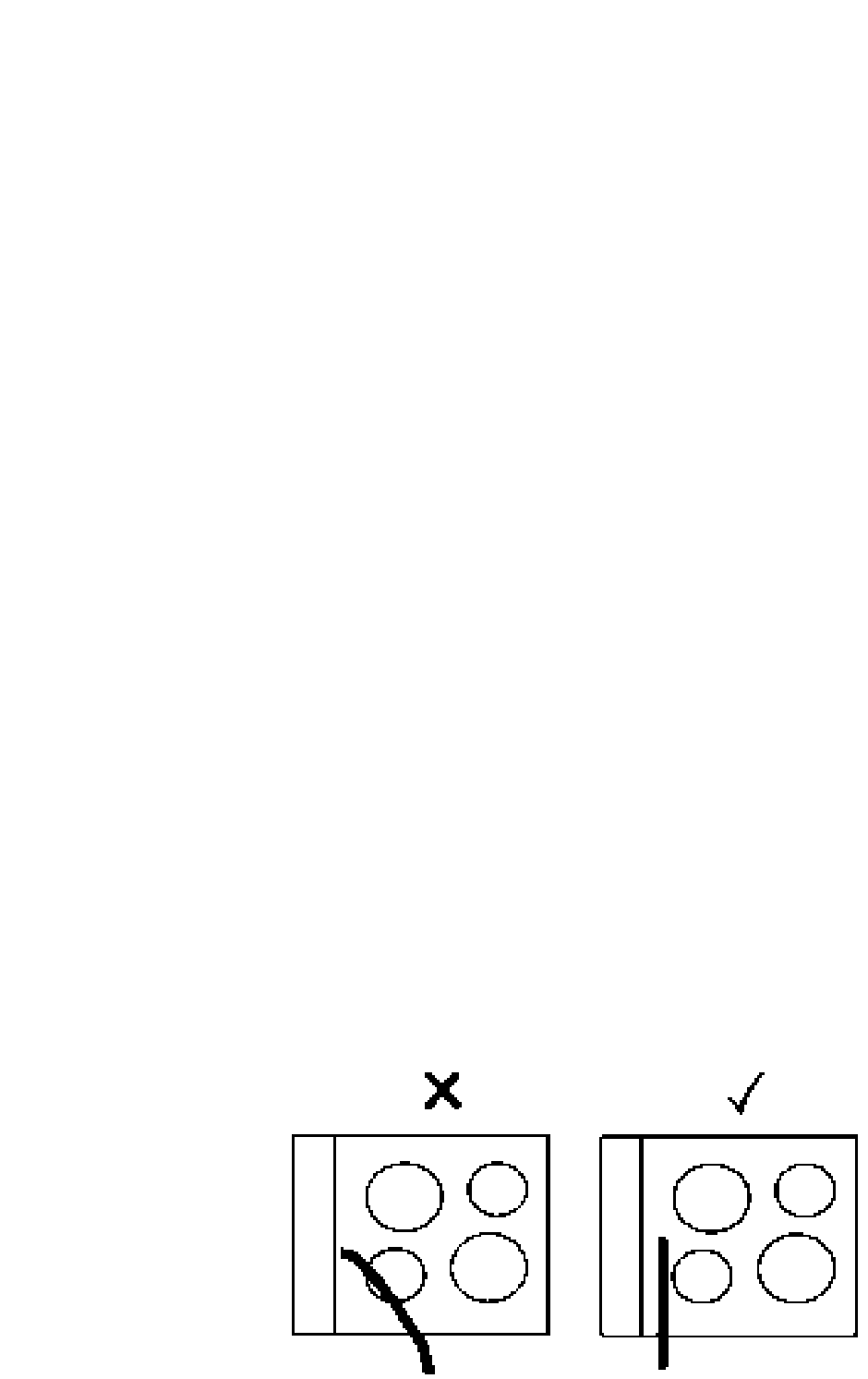
ii) The cable is routed away from any vents in the rear panel and is not
trapped between the cooker and the wall, adjacent cabinets or under the
feet
f. Adjust the feet using an open ended spanner until the bottom of the cooker door is
in line with the top of the plinth. Using a spirit level, check that the cooker is level in
all directions.
g. Check that the plinth can be fitted. If necessary re - adjust the feet and check that
the cooker is level. Then lock the feet into position by tightening the lock nut using
an open ended spanner.
h. Open the top oven door and fix the cooker to the brackets through the holes in
the side trims.
i. Fix the plinth in position.
j. Ensure that there is a minimum gap of 1mm between the cooker side trim and
the adjacent cabinet doors or drawer fronts.
k. If a hob is to be installed directly above the cooker it must not project downwards
more than 20mm below the underside of the work top. Any projection of more than
10mm must not project more than 500mm from the wall.
INSTALLATION
33
Fig. 5
INSTALLATION
34
890mm Max
870mm Min
597mm min
720mm min
150mm min
170mm max
565mm
to top of plinth
570 min
565mm
A minimum distance of 25mm should be maintained between the front face of the cabinet
side and the front face of the plinth.
INSTALLATION
Wall
Fixing Bracket Cabinet Doors
Cooker
2.5mm2 85o C
heat resistant cable
to
BS 6141 Table 15
Cable size to suit
current
rating of
appliance/s
Hob Cable
Double pole control
switch
Connector
box
4mm2 Cable
Top View
1mm min
35
36
Before calling a Service Engineer, please check through the following lists.
THERE MAY BE NOTHING WRONG.
SOMETHING WRONG?
Problem
Nothing works.
Display shows 0.00 AUTO.
Main & Top Ovens do not work,
but the Grill works.
Top Ovens and Grill do not work,
but the Main Oven works.
Grill does not work.
Grill keeps turning on and off.
Can not set an “Auto Cook”
programme
Draught from beneath control
panel.
Timer buzzer/bleeper operates
continually
Check
(a) Check
If you find :-
Display is blank.
Then it is likely that there is no electricity supply to your oven.
Check: (i) That the main cooker wall switch is turned on.
(ii) Check other appliances to see if you have a power cut.
(iii) Check the main circuit breaker for the property.
The power supply to your oven has possibly been interrupted, but has
now come back on again. Reset the timer to the correct time of day and
"Manual" operation using instructions given in the timer section of the
book.
Check the following to ensure that the timer is in Manual Mode:
Check that the Auto Symbol is not lit up and is not flashing.
See timer section for instructions on how to return timer to
"Manual".
Operating the cooker under the following conditions may cause a safety
device to operate.
(a) Grilling with the door closed - always grill with the door open
to the correct position - see grilling.
(b) Grilling for an excessively long period at maximum setting -
see grilling guide.
(c) Grilling with inadequate ventilation in the cabinet - see
installation instructions.
Check that you have selected :- "Grill" function on the "Top Oven / Grill
Select" knob (B) and a Grill setting on the "Grill" knob (A) - see grilling
page.
When the "Grill" control (A) is operating at less than "6", the grill will cycle
on and off, this is normal and is not a fault.
Remember: "Cook Period" is the actual length of time for which, the
timer will switch the oven(s) on as part of an "Auto Cooking" programme.
A gentle flow of air will be blown from beneath the control panel when
the appliance is used. If the appliance is still warm, this cooling fan may
run on, or restart itself after all of the controls have been turned off.
The fan will stop once the appliance has been cooled.
This is normal and not a fault.
Buzzer/Bleeper should stop automatically after 2 minutes. If not,
press minute minder button to silence.
If you have been through the above list and there is still a problem, contact Service
(see KEY CONTACTS, back page).

37
To minimise the risk of injury to children please dispose of your product carefully and safely.
Remove all doors and lids. Remove the mains cable (where fitted) by cutting off flush with the
appliance and always ensure that no plug is left in a condition where it could be connected to
the electricity supply.
To help the environment, Local Authority instructions should be followed for the disposal of
your product.
Disposal of your product
Disposal of old electrical appliances
The European Directive 2002/96/EC on Waste Electrical and Electronic Equipment (WEEE),
requires that old household electrical appliances must not be disposed of in the normal unsorted
municipal waste stream. Old appliances must be collected separately in order to optimise the
recovery and recycling of the materials they contain and reduce the impact on human health
and the environment.
The crossed out “wheeled bin” symbol on the product reminds you of your obligation,
that when you dispose of the appliance it must be separately collected.
Consumers should contact their local authority or retailer for information concerning the
correct disposal of their old appliance.



PRINTED BY SIMLEX .FOUR ASHES, WOLVERHAMPTON. 05/2005 Part no. 195044175.02
Key Contacts
After Sales Service
Over 1100 trained specialists, directly employed by us, ensure that you can have
complete confidence in both the appliances and services we offer.
Repair Service and Information Help Desk
UK: 08709 066 066
Monday to Friday, 8am to 7.30pm
Saturday, 8.30am to 5.30pm
Sunday, 9.30am to 3.30pm
www.hotpointservice.co.uk
Republic of Ireland: 1850 302 200
Note: Our operators will require the following information:
Model number
Serial number
Extended Warranties
UK: 08709 088 088
Monday to Sunday, 8am to 8pm
www.hotpointservice.co.uk
Republic of Ireland: 1850 502 200
Genuine Parts and Accessories
UK: 08709 077 077
Monday to Friday, 8.30am to 5pm
Saturday, 8.30am to 12noon
www.hotpointservice.co.uk
Republic of Ireland: (01) 842 6836
www.hotpoint.co.uk
Indesit Company UK Limited, Morley Way, Peterborough, PE2 9JB
