Hp M1522 Mfp Users Manual
2015-02-09
: Hp Hp-M1522-Mfp-Users-Manual-549218 hp-m1522-mfp-users-manual-549218 hp pdf
Open the PDF directly: View PDF  .
.
Page Count: 4
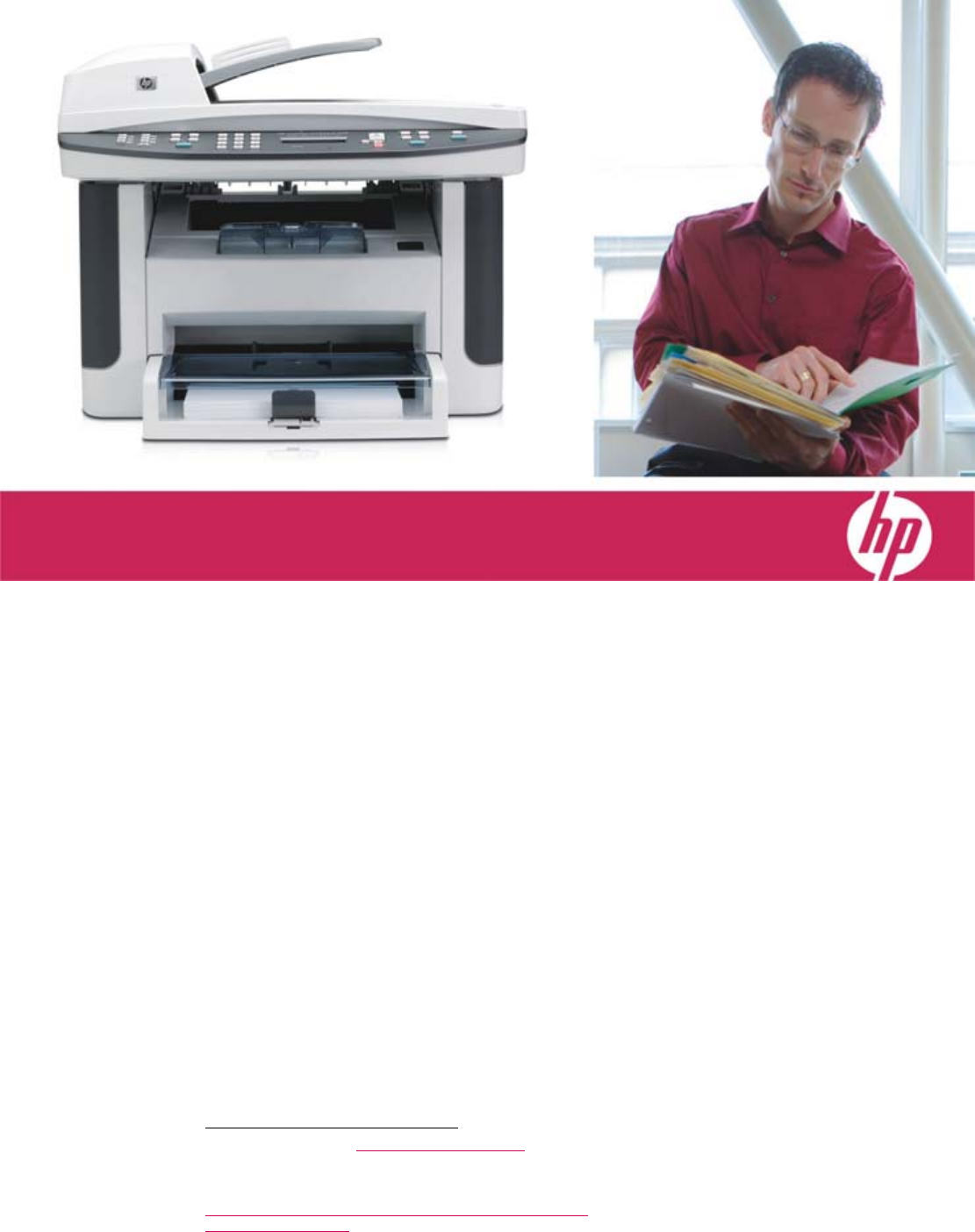
A great value
Want an affordable MFP that takes care of business?
Now you can get the professional print quality and
time-saving features typically only available with HP’s
robust workgroup and department LaserJets. It’s all in the
innovative design of our easy-to-use, all-in-one print
cartridge: featuring built-in intelligence and new, patented
spherically shaped toner that delivers bold, crisp text and
sharp images at fast speeds. Boost workteam efficiency
with built-in networking. Count on broad compatibility,
proven reliability, improved security, IPv6 support, and
exceptional device management tools.
Powerful features
Experience worry-free operation and refresh your MFP
with Original HP print cartridges. They communicate with
the MFP to automatically optimize print quality, provide
alerts when supplies run low, and facilitate convenient
supplies reordering.
Order at the first alert, click Snooze to postpone ordering,
or shop anytime with the new Shop for Supplies desktop
icon that links to HP SureSupply.1
Designed to fit seamlessly into your office environment,
the MFP supports Windows VistaTM and numerous other
operating systems. Easily print complex documents with
high-end printer languages, including PCL5e, PCL6, and
HP postscript level 3 emulation.
Fax documents at up to 33.6 kbps and enjoy digital
storage for up to 300 pages. Use private receive to
securely store faxes on the device until you are ready to
print them. And with Fax/Tel, your MFP will determine if
the call is a voice or a fax call, eliminating the need for a
separate fax line.2
Fast multi-tasker
Do more—three times more—with one compact device
that prints, scans, copies, and faxes.2 The MFP features
print and copy speeds of up to 24 pages per minute
(ppm). Other MFPs need time to warm up before printing
the first page, but with Instant-on Technology3, typical
office jobs print up to two times faster from Powersave
than devices without Instant-on Technology. And Instant-
on Copy with LED-based technology delivers your first
copy in seconds—even first thing in the morning.
1 For more information, visit www.hp.com/learn/suresupply.
2 Fax capabilities are included on the HP LaserJet M1522nf MFP model only. A handset is required to use the FaxTel feature.
3 Instant-on Technology uses cutting-edge fuser technology to produce the first page faster when a printer is coming out of Powersave mode so
your print job is done sooner. An InfoTrends study shows the typical office print job is three to five pages long:
www.infotrends.com/public/Content/Presentations/officeprinteruse.pdf. See HP average print times versus competition:
www.hp.com/go/whywait.
Multiple users can do more with this reliable,
easy-to-use MFP—at just the right price.
HP LaserJet M1522 MFP series
M1522n • M1522nf
HP LaserJet M1522 MFP series
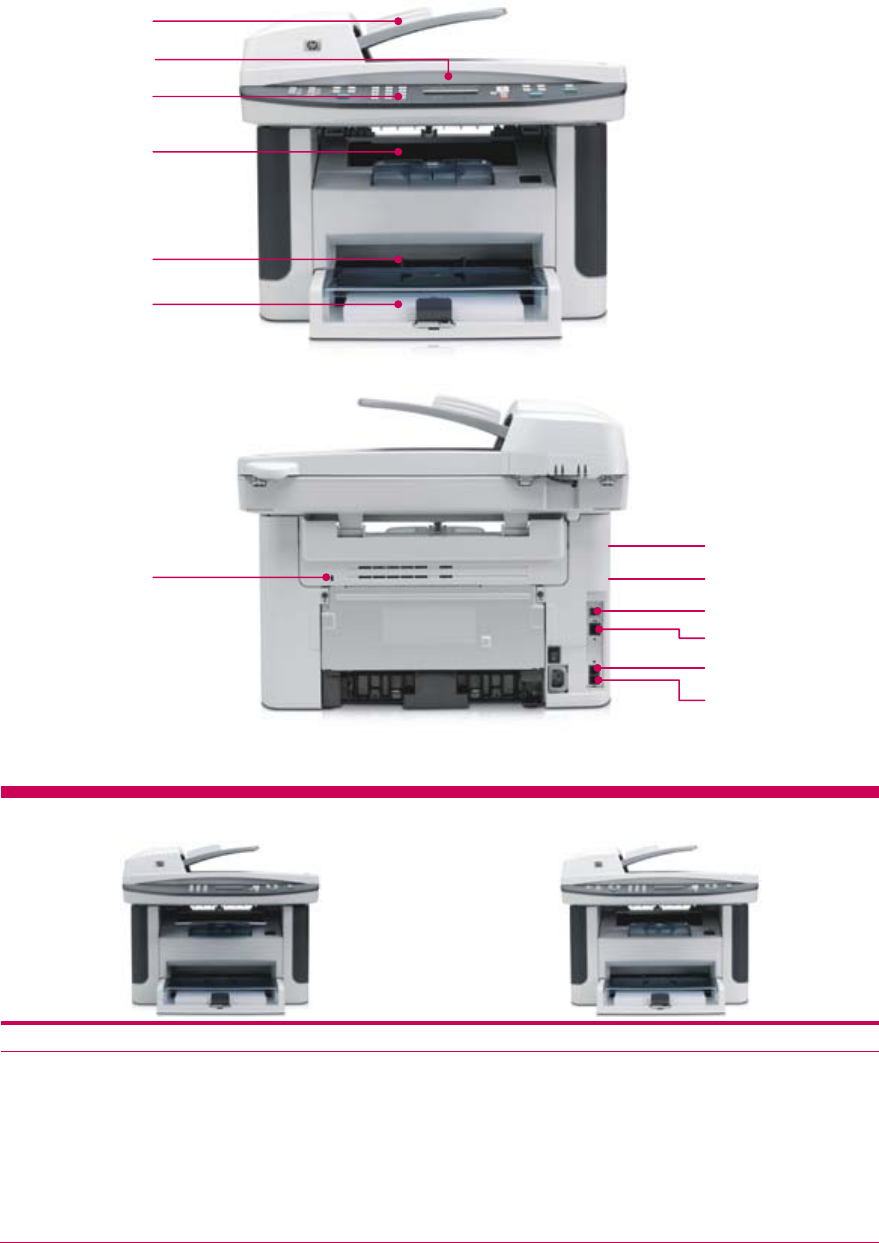
Series at a glance
HP LaserJet M1522n MFP HP LaserJet M1522nf MFP
Base model:
• 50-sheet ADF, 250-sheet multipurpose input tray,
10-sheet priority input tray, and 125-sheet output bin
• Hi-Speed USB 2.0 port and Ethernet port
• Color flatbed scanner
• 64 MB RAM and 264 MHz processor
• Kensington Lock
All the features of the base model, plus:
• Faxing with digital storage of up to 300 pages
• Two RJ-11 ports
1 50-sheet ADF quickly
processes documents
2 Flatbed color scanner for
books or documents up
to letter-size
3 Control panel provides
effortless interaction with
each of the MFP’s
functions
4 125-sheet face-down
output bin
5 10-sheet priority input
tray
6 250-sheet multipurpose
input tray
7 Kensington Lock slot for
securing the MFP with a
cable lock (available for
purchase via a third-
party vendor)
8 64 MB device memory
and a powerful
450 MHz processor
quickly and easily
handle complex print
jobs
9 4 MB Flash memory for
fax storage (up to 300
pages)
10 Hi-Speed USB 2.0 port
11 10/100 wired Ethernet
network port
12 RJ-11 fax port
13 RJ-11 line-out telephone
port
HP LaserJet M1522nf MFP shown
1
3
5
4
10
11
2
12
6
7 9
13
8

Simplify your office environment with an MFP that’s easy to
use and maintain.
Saves valuable time
The HP LaserJet M1522 MFP series is designed to save
you time and effort with powerful management tools:
• Included with the product installation CD,
HP ToolboxFX lets you interact with your MFP from
the comfort of your desk, with configuration, status,
and support for every feature.
• HP Easy Printer Care Software is a tool that helps
smaller businesses manage up to 15 HP printers or
MFPs.4
• HP Web Jetadmin is a simple fleet management
utility for remotely installing, configuring, monitoring,
and managing a wide variety of HP and non-HP
printing and imaging devices from anywhere on the
network.5
• The HP Embedded Web Server provides a universal
interface to the device that anyone with a network-
connected computer and a standard Web browser
can easily access.
Legendary reliability and support
Reliable devices lower your overall labor costs by
minimizing downtime. PC Magazine (September
2007) recently gave HP the Reader’s Choice award
in its annual service and reliability survey for the
16th year in a row. No other printer vendor can
claim this record.
Award-winning customer service and support backs
your MFP with a one-year limited warranty,
knowledgeable online support available 24/7 at
www.hp.com/support, and phone support provided
by trained HP agents. Plus, you can enhance your
warranty protection with affordable HP Care Pack
Services.
Meets users needs
The HP Universal Print Driver for Windows is the
single driver that gives users instant access to
virtually any HP LaserJet printer or MFP, without
downloading separate drivers.6 Count on plug-and-
play ease, effortlessness printer discovery,
customized printing, and broad compatibility.
Product Number
HP LaserJet M1522n MFP CC372A
HP LaserJet M1522nf MFP CB534A
Cables
Hi-Speed USB A to B printer cable (1.8-meter)
Hi-Speed USB A to B printer cable (3-meter)
HP Kensington Security Lock
Q6264A
C6520A
PC766A
Supplies
Replacement HP LaserJet Print Cartridge. Average cartridge
yield 2,000 standard pages.7
CB436A
Service and support
2-year or 1-time replacement
3-year return to depot service
3-year next business day exchange service
3-year next business day onsite service
On-site installation and network configuration
UE173E
U9809E
U9810E
U9811E
H3110E
Paper
North America: www.hp.com/go/paper
USA: 1-800-477-5010
Solutions
www.hp.com/go/gsc
Get the most out of your MFP with
HP accessories, supplies, and services.
CB436A
HP’s all-in-one print cartridges
and toner are specifically
designed with the printer to
deliver consistent quality and
reliable, trouble-free printing.
Choose from a selection of
HP papers to create
impressive, professional
marketing materials.
PC766A
Protect your investment with
the exceptionally strong HP
Kensington Security Lock.
4 Easy Printer Care Software is free and may be downloaded at www.hp.com/go/easyprintercare, where you can also find a detailed printer compatibility
matrix.
5 Find more information and download HP Web Jetadmin free at www.hp.com/go/webjetadmin.
6 The HP Universal Print Driver comes on a CD and is available in 35 languages. Download this free software and find more information at
www.hp.com/go/upd.
7 Declared yield value in accordance with ISO/IEC 19752. Actual yields vary considerably based on images printed and other factors. Please visit
www.hp.com/go/learnaboutsupplies.

HP LaserJet M1522 MFP series
Technical specifications HP LaserJet M1522n MFP (CC372A) HP LaserJet M1522nf MFP (CB534A)
Print and copy speed8 Up to 24 ppm letter
First page out, print and copy Less than 9.5 seconds from PowerSave mode
Resolution, enhancement technologies Up to 600 by 600; REt, HP FastRes, HP TrueRes
Features
Control panel 2-line LCD text display, alphanumeric buttons, navigational buttons plus 2
LEDs, Copy buttons, Scan buttons
Same control panel as M1522 MFP plus Fax buttons
Copying 1 to 99 multiple copies; settings: contrast (lighter/darker), resolution copy quality (text, mixed, film photo, and picture), draft quality (on/off), multipage (on/off),
reduce/enlarge 25 to 400%, copy collation, number of copies, paper size, paper type, restore default
Scanning Resolution: up to 1200 by 1200 dpi 24 bit (up to 19,200 dpi enhanced); interfaces: walk-up scanning via front control panel with Scan-to button (software
preconfiguration required), remote scanning via HP LaserJet Scan, TWAIN- or WIA-compliant software; supported file types: JPEG, TIF, BMP, GIF, PDF, PNG
Faxing Not available Version 34 Super G3 fax modem (up to 33.6 kbps) fax modem: 3 seconds per
page;9 resolution best mode: 300 by 300 dpi; digital storage for up to 300
pages, fax forwarding, delayed sending, ring detection, fax polling,
broadcasting to up to 119 locations, speed-dial to up to 120 numbers (119
group dials), auto fax reduction, junk barrier, PC interface, auto redialing, fax
phone TAM interface, fax telephone mode
Processor 450 MHz
Memory/storage 64 MB RAM, 4 MB Flash fax memory; Memory Enhancement technology (MEt)
Recommended monthly page volume10 250 to 2,000 pages
Maximum monthly duty cycle11 Up to 8,000 pages
Languages and fonts HP PCL 6, HP PCL 5, HP postscript level 3 emulation; 45 scalable TrueType, 35 PostScript
Paper
Handling 10-sheet priority input tray, 250-sheet multipurpose input tray, 50-sheet automatic document feeder (ADF); 125 sheet face-down output bin; manual two-sided
printing
Sizes Priority tray, 250-sheet tray: 3 by 5 in to 8.5 by 14 in; letter, legal, envelopes (No. 5 1/2 Baronial through No. 11), index cards, postcards
ADF: 5.5 by 5.5 in to 8.5 by 15 in; letter, legal
Weights Priority tray, 250-sheet tray: 16 to 43 lb; ADF: 16 to 24 lb
Types Paper (plain, preprinted, prepunched, bond, color, letterhead, light, heavy, recycled, rough), envelopes, transparencies, labels, cardstock
Connectivity
Interfaces Hi-Speed USB 2.0 port, TCP/IP Ethernet network port Hi-Speed USB 2.0 port, TCP/IP Ethernet network port,
RJ-11 fax port, RJ-11 line-out telephone port
Client operating systems Microsoft® Windows® Vista, 2000, XP® Home, XP Professional, Mac OS X v10.3, v10.4 and higher (full solution)
Windows Server 2003 (print and scan only via USB port, print only via network)
Network operating systems Via built-in 10/100 TCP/IP Ethernet connection: Windows Vista, 2000, XP, XP 64-Bit, Server 2003; Novell NetWare NDPS services via TCP/IP only on 3.2, 4.2,
5.x, 6.x; HP Gateway (TCP/IP raw only) and Novell LPD gateway; Apple Mac OS X v10.3, v10.4 and later; Bonjour discovery supported; Red Hat Linux 6.x and
later; SuSE Linux 6.x and later; HP-UX 10.20, 11.x; Solaris 2.5x, 2.6, 7, 8, 9, 10 (SPARC systems only); IBM AIX 3.2.5 and later; MPE-iX; Citrix MetaFrame;
Windows Terminal Services
Security SNMP v1 (community name); control panel, embedded Web server, HP Toolbox (password-protected); Kensington Lock
Dimensions (W by D by H) 19.5 by 16.0 by 15.8 in
Weight 24.2 lb
What’s in the box HP LaserJet 1522n MFP, power cord(s), introductory HP LaserJet Print
Cartridge,12 Getting Started Guide, support flyer, software and documentation
CDs, control panel faceplate, Readiris PRO Text Recognition Software, 250-
sheet input tray, ADF input support
HP LaserJet 1522nf MFP, power cord(s), introductory HP LaserJet Print
Cartridge,12 Getting Started Guide, support flyer, software and documentation
CDs, control panel faceplate, Readiris PRO Text Recognition Software, 250-sheet
input tray, ADF input support, phone cord(s)
Warranty One-year limited warranty
Environmental ranges Acoustics14
Recommended temperature 59 to 90.5 degrees F Sound power Active: 6.5 B(A) printing, 6.8 B(A) copying; Ready: inaudible
Storage temperature -4 to 104 degrees F
Operating relative humidity 10 to 80 percent, non-condensing
Bystander sound
pressure
Active: 52 dB(A) printing, 53.7 dB(A) copying; Ready: inaudible
Storage relative humidity 0 to 95 percent, non-condensing Certifications
Altitude 0 to 10,000 ft
Power specifications13
Required input voltage 110-volt models: 110 to 127 volts (± 10 percent),
50/60 Hz (±2 Hz), 4.5 amp
220-volt models: 220 to 240 volts (± 10 percent),
50/60 Hz (±2 Hz), 2.6 amp
Power consumption Printing: 410 watts; Copying: 325 watts; Ready:
10.5 watts; Sleep: 10.5 watts; Off: 0 watts
Typical Electricity Consumption (TEC): 2.283 kWh/Week
ENERGY STAR® qualified models; see www.hp.com/go/energystar
Safety
EMC
Telecom
HP SureSupply enabled
IEC 60950-1: 2001/EN 60950-1: 2001+A11; IEC 60825-1: 1993+A1: 1997+A2:
2001/EN 60825-1: 1994+A1: 2002+A2: 2001 (Class 1 Laser/LED Product);
GB4943-1995.
CISPR 22: 2005/EN 55022: 2006-Class B; EN 61000-3-2: 2000+A2; EN 61000-3-
3: 1995+A1; EN 55024: 1998+A1+A2; FCC Title 47 CFR, Part 15 Class B 2/ICES-
003, Issue 3; GB9254-1998
ES 203 021, FCC Part 68, Industry Canada CS03,
To learn more, please visit www.hp.com/go/suresupply
8 Exact speed varies depending on system configuration, software program, and document complexity. Copy speed measured by a single page on flatbed glass, multiple copies. ADF copy speed: up to 15.5 cpm letter.
9 Based on ITU-T test image #1 at standard resolution. More complicated pages or higher resolution will take longer and use more memory.
10 HP recommends that the number of printed pages per month be within the stated range for optimum device performance, based on factors including supplies replacement intervals and device life over an extended warranty period.
11 Duty cycle is defined as the maximum number of pages per month of imaged output. This value provides a comparison of product robustness in relation to other HP LaserJet or HP Color LaserJet devices, and enables appropriate
deployment of printers and MFPs to satisfy the demands of connected individuals or groups.
12 Average introductory cartridge yield 1,000 standard pages. HP CB436A replacement print cartridge yields approximately 2,000 pages. (Average cartridge yield 2,000 standard pages. Declared yield values in accordance with
ISO/IEC 19752). Actual yields vary considerably based on images printed and other factors. Please visit www.hp.com/go/learnaboutsupplies.
13 Values subject to change. See www.hp.com/support for current information. Power numbers are the highest value measured for all models using all standard voltages.
14 Acoustic values are subject to change. See www.hp.com/support for current information. Configuration tested: M1522nf model, simplex printing or copying, A4-size at average print speed of 27 ppm.
© Copyright 2008 Hewlett-Packard Development Company, L.P.
The information contained herein is subject to change without notice. The only warranties for HP products and services are set forth in the express warranty statements accompanying such products and services. Nothing herein should be
construed as constituting an additional warranty. HP shall not be liable for technical or editorial errors or omissions contained herein.
ENERGY STAR and the ENERGY STAR mark are U.S. registered marks. Microsoft, Windows, and Windows XP are U.S. registered trademarks of Microsoft Corporation. Windows Vista is either
a registered trademark or trademark of Microsoft Corporation in the United States and/or other countries. Linux is a U.S. registered trademark of Linus Torvalds.
To learn more, visit www.hp.com
4AA1-6966ENUC, January 2008, Rev. 1
