Hp Pavilion 4550Z Desktop Pc Us Can Product Manual U10.bk
HP Pavilion PCs - (English) Seagate Hard Drive U Series 10 Manual bph06774
ULTRA ATA ST315323A bph06774
ULTRA ATA ST320423A u10pma
2015-01-05
: Hp Hp-Pavilion-4550Z-Desktop-Pc-Us-Can-Product-Manual-150286 hp-pavilion-4550z-desktop-pc-us-can-product-manual-150286 hp pdf
Open the PDF directly: View PDF  .
.
Page Count: 42
. . . . . . . . . . . . . . . . . . . . . . . . . . . . . . . . . . . . . . . . . . . . .
U10 Family
. . . . . . . . . . . . . . . . . . . . . . . . . . . . . . . . . . . . . . . . . . . . .
ST320423A, ST315323A,
. . . . . . . . . . . . . . . . . . . . . . . . . . . . . . . . . . . . . . . . . . . . .
ST310212A
. . . . . . . . . . . . . . . . . . . . . . . . . . . . . . . . . . . . . . . . . . . . .
Ultra ATA Interface Drives
. . . . . . . . . . . . . . . . . . . . . . . . . . . . . . . . . . . . . . . . . . . . .
Product Manual
. . . . . . . . . . . . . . . . . . . . . . . . . . . . . . . . . . . . . . . . . . . . .


. . . . . . . . . . . . . . . . . . . . . . . . . . . . . . . . . . . . . . . . . . . . .
U10 Family
. . . . . . . . . . . . . . . . . . . . . . . . . . . . . . . . . . . . . . . . . . . .
ST320423A, ST315323A,
. . . . . . . . . . . . . . . . . . . . . . . . . . . . . . . . . . . . . . . . . . . . .
ST310212A
. . . . . . . . . . . . . . . . . . . . . . . . . . . . . . . . . . . . . . . . . . . . .
Ultra ATA Interface Drives
. . . . . . . . . . . . . . . . . . . . . . . . . . . . . . . . . . . . . . . . . . . . .
Product Manual
. . . . . . . . . . . . . . . . . . . . . . . . . . . . . . . . . . . . . . . . . . . . .

2000 Seagate Technology, Inc. All rights reserved
Publication Number: SG35336-001, Rev. A, January 2000
Seagate, Seagate Technology, the Seagate logo and U10 are either
registered trademarks or trademarks of Seagate Technology, Inc. Other
product names are registered trademarks or trademarks of their owners.
Seagate reserves the right to change, without notice, product offerings
or specifications. No part of this publication may be reproduced in any
form without written permission from Seagate Technology, Inc.

U10 Family Product Manual, Rev. A iii
Contents
Introduction . . . . . . . . . . . . . . . . . . . . . . . . . . . . . . . . . . . . . . . . . . . 1
Specification summary table . . . . . . . . . . . . . . . . . . . . . . . . . . . . . . 2
1.0 Drive specifications . . . . . . . . . . . . . . . . . . . . . . . . . . . . . . . . . 5
1.1 Formatted capacity . . . . . . . . . . . . . . . . . . . . . . . . . . . . . . . . . 5
1.1.1 Default logical geometry . . . . . . . . . . . . . . . . . . . . . . . . . 5
1.2 Physical organization . . . . . . . . . . . . . . . . . . . . . . . . . . . . . . . 5
1.3 Recording and interface technology . . . . . . . . . . . . . . . . . . . . 6
1.4 Physical characteristics . . . . . . . . . . . . . . . . . . . . . . . . . . . . . 6
1.5 Seek time . . . . . . . . . . . . . . . . . . . . . . . . . . . . . . . . . . . . . . . . 7
1.6 Start/stop times . . . . . . . . . . . . . . . . . . . . . . . . . . . . . . . . . . . . 7
1.7 Power specifications . . . . . . . . . . . . . . . . . . . . . . . . . . . . . . . . 7
1.7.1 Power consumption . . . . . . . . . . . . . . . . . . . . . . . . . . . . 8
1.7.2 Conducted noise . . . . . . . . . . . . . . . . . . . . . . . . . . . . . . 10
1.7.3 Voltage tolerance . . . . . . . . . . . . . . . . . . . . . . . . . . . . . 10
1.7.4 Power-management modes . . . . . . . . . . . . . . . . . . . . . 10
1.8 Environmental tolerances . . . . . . . . . . . . . . . . . . . . . . . . . . . 11
1.8.1 Ambient temperature . . . . . . . . . . . . . . . . . . . . . . . . . . 11
1.8.2 Temperature gradient . . . . . . . . . . . . . . . . . . . . . . . . . . 11
1.8.3 Humidity . . . . . . . . . . . . . . . . . . . . . . . . . . . . . . . . . . . . 12
1.8.4 Altitude . . . . . . . . . . . . . . . . . . . . . . . . . . . . . . . . . . . . . 12
1.8.5 Shock . . . . . . . . . . . . . . . . . . . . . . . . . . . . . . . . . . . . . . 12
1.8.6 Vibration . . . . . . . . . . . . . . . . . . . . . . . . . . . . . . . . . . . . 12
1.9 Drive acoustics . . . . . . . . . . . . . . . . . . . . . . . . . . . . . . . . . . . 13
1.10 Electromagnetic susceptibility . . . . . . . . . . . . . . . . . . . . . . . 14
1.11 Reliability . . . . . . . . . . . . . . . . . . . . . . . . . . . . . . . . . . . . . . 14
1.12 Agency certification . . . . . . . . . . . . . . . . . . . . . . . . . . . . . . . 14
1.12.1 Safety certification . . . . . . . . . . . . . . . . . . . . . . . . . . . . 14
1.12.2 Electromagnetic compatibility . . . . . . . . . . . . . . . . . . . 14

iv U10 Family Product Manual, Rev. A
1.12.3 FCC verification . . . . . . . . . . . . . . . . . . . . . . . . . . . . . 15
2.0 Configuring and mounting the drive . . . . . . . . . . . . . . . . . . . 17
2.1 Handling and static-discharge precautions . . . . . . . . . . . . . . 17
2.2 Jumper settings . . . . . . . . . . . . . . . . . . . . . . . . . . . . . . . . . . 18
2.2.1 Master/slave configuration . . . . . . . . . . . . . . . . . . . . . . 18
2.2.2 Cable-select option . . . . . . . . . . . . . . . . . . . . . . . . . . . . 19
2.2.3 Ultra ATA/66 cable . . . . . . . . . . . . . . . . . . . . . . . . . . . . 19
2.3 Drive mounting . . . . . . . . . . . . . . . . . . . . . . . . . . . . . . . . . . . 19
3.0 ATA interface . . . . . . . . . . . . . . . . . . . . . . . . . . . . . . . . . . . . . . 21
3.1 ATA interface signals and connector pins . . . . . . . . . . . . . . 21
3.1.1 Supported ATA commands . . . . . . . . . . . . . . . . . . . . . . 23
3.1.2 Identify Drive command . . . . . . . . . . . . . . . . . . . . . . . . 24
3.1.3 Set Features command . . . . . . . . . . . . . . . . . . . . . . . . . 29
3.1.4 S.M.A.R.T. commands . . . . . . . . . . . . . . . . . . . . . . . . . 30

U10 Family Product Manual, Rev. A v
Figures
Figure 1. Typical startup and operation current profile . . . . . . . . . . . . 9
Figure 2. Master/slave jumper settings . . . . . . . . . . . . . . . . . . . . . . . 18
Figure 3. Mounting dimensions—top, side and end view . . . . . . . . . 20
Figure 4. I/O pins and supported ATA signals. . . . . . . . . . . . . . . . . . 22

vi U10 Family Product Manual, Rev. A

U10 Family Product Manual, Rev. A 1
Introduction
This manual describes the functional, mechanical and interface specifi-
cations for the ST320423A, ST315323A and the ST310212A. These
drives provide the following key features:
•Low power consumption
•Quiet operation
•High instantaneous (burst) data-transfer rates (up to 66.6 Mbytes per
second) using Ultra DMA mode 4
•8.9 msec seek time, 5,400-RPM and 512-Kbyte buffer combine for
excellent desktop performance
•350 Gs nonoperating shock
•GMR recording heads and EPRML technology, which provide the
drives with increased areal density
•State-of-the-art cache and on-the-fly error-correction algorithms
•Full-track multiple-sector transfer capability without local processor
intervention
•Support for S.M.A.R.T. drive monitoring and reporting
•Support for Read Multiple and Write Multiple commands
•Support for autodetection of master/slave drives that use cable select
(CSEL)
•SeaShield® innovative, shock-absorbing cover shields the drive
against electrostatic discharge (ESD) and other handling damage. It
also includes installation instructions and jumper settings.
2 U10 Family Product Manual, Rev. A
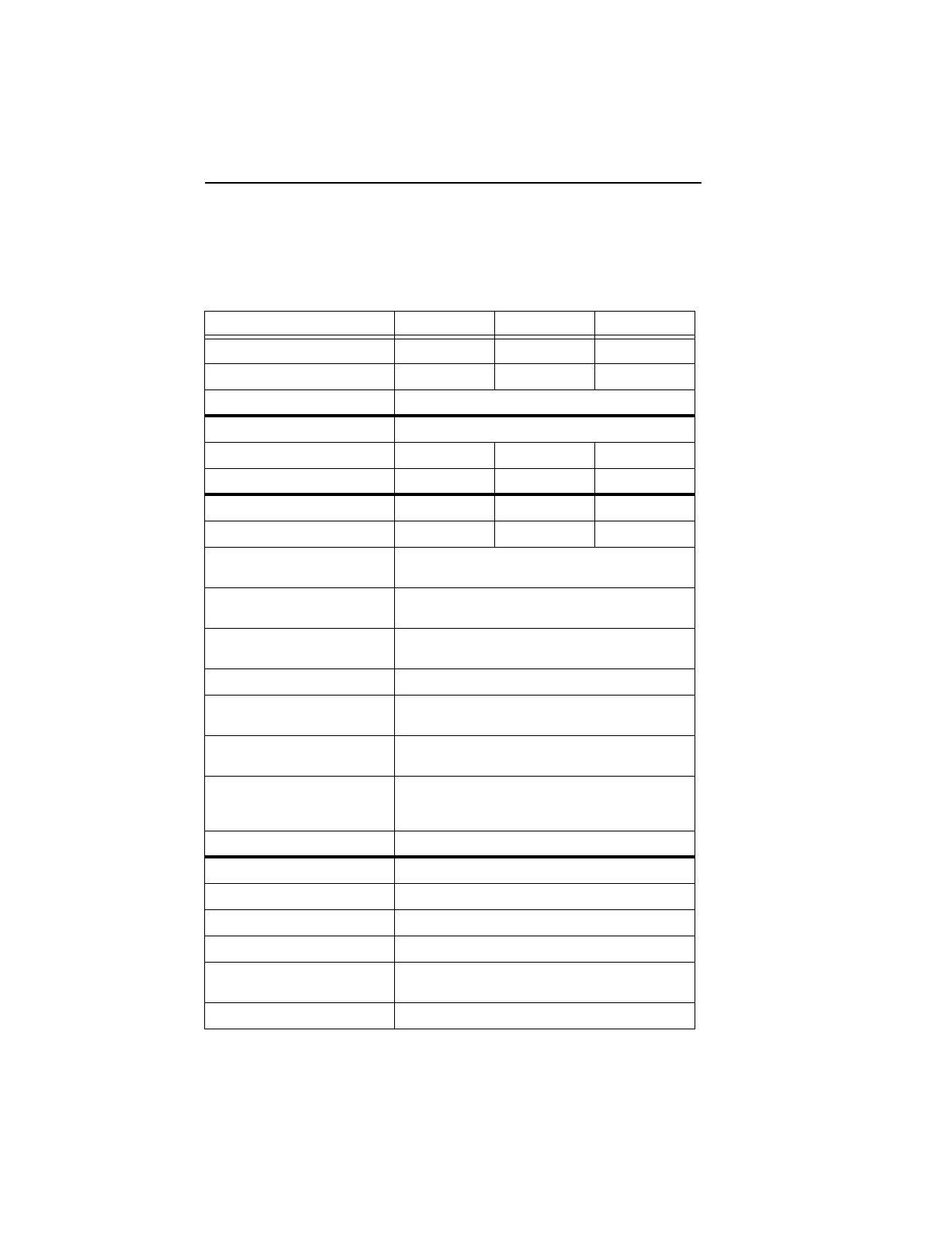
Specification summary table
The specifications listed in this table are for quick reference. For details
on specification measurement or definition, see the appropriate section
of this manual.
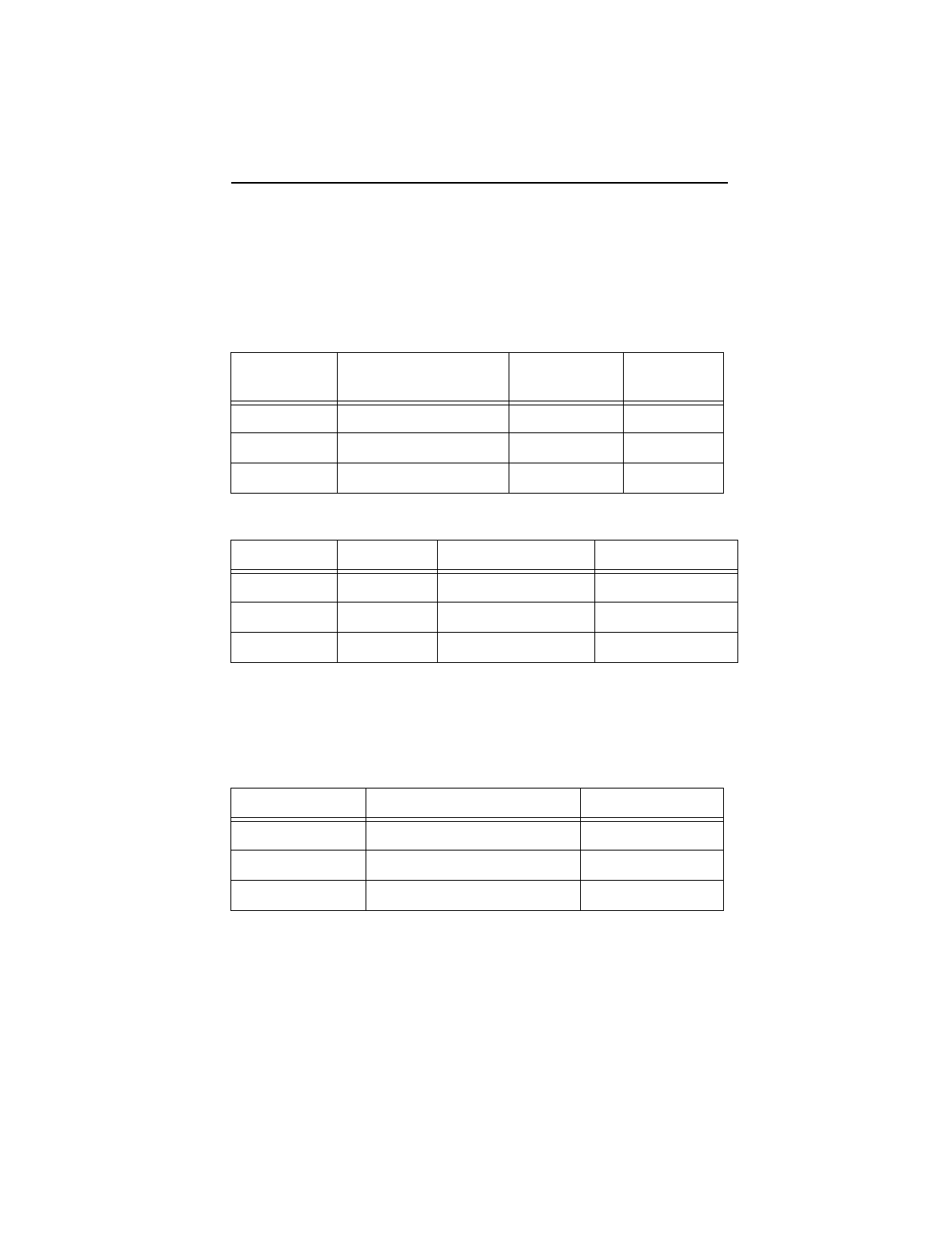
Drive Specification ST320423A ST315323A ST310212A
Guaranteed Mbytes (×106 bytes) 20,485 15,364 10,242
Guaranteed sectors 40,011,300 30,008,475 20,005,650
Bytes per sector 512
Default sectors per track 63
Default read/write heads 16 16 16
Default cylinders 16,383 16,383 16,383
Physical read/write heads 4 3 2
Discs 221
Recording density
BPI (bits/inch max) 396,067
Track density
TPI (tracks/inch) 20,107
Areal density
(Mbits/inch2 max) 7,964
Spindle speed (RPM) 5,400
Internal data-transfer rate (Mbits/
sec max)
308
I/O data-transfer rate (Mbytes/
sec max)
66.6
ATA data-transfer modes
supported PIO modes 0–4
Multiword DMA modes 0–2
Ultra DMA modes 0–4
Cache buffer (Kbytes) 512
Height (mm max) 26.1
Width (mm max) 101.85
Length (mm max) 147.0
Weight (typical) 544 grams (1.2 lb)
Track-to-track seek time
(msec typical) 1.5 (read) 2.1 (write)
Average seek time (msec typical) 8.9
U10 Family Product Manual, Rev. A 3
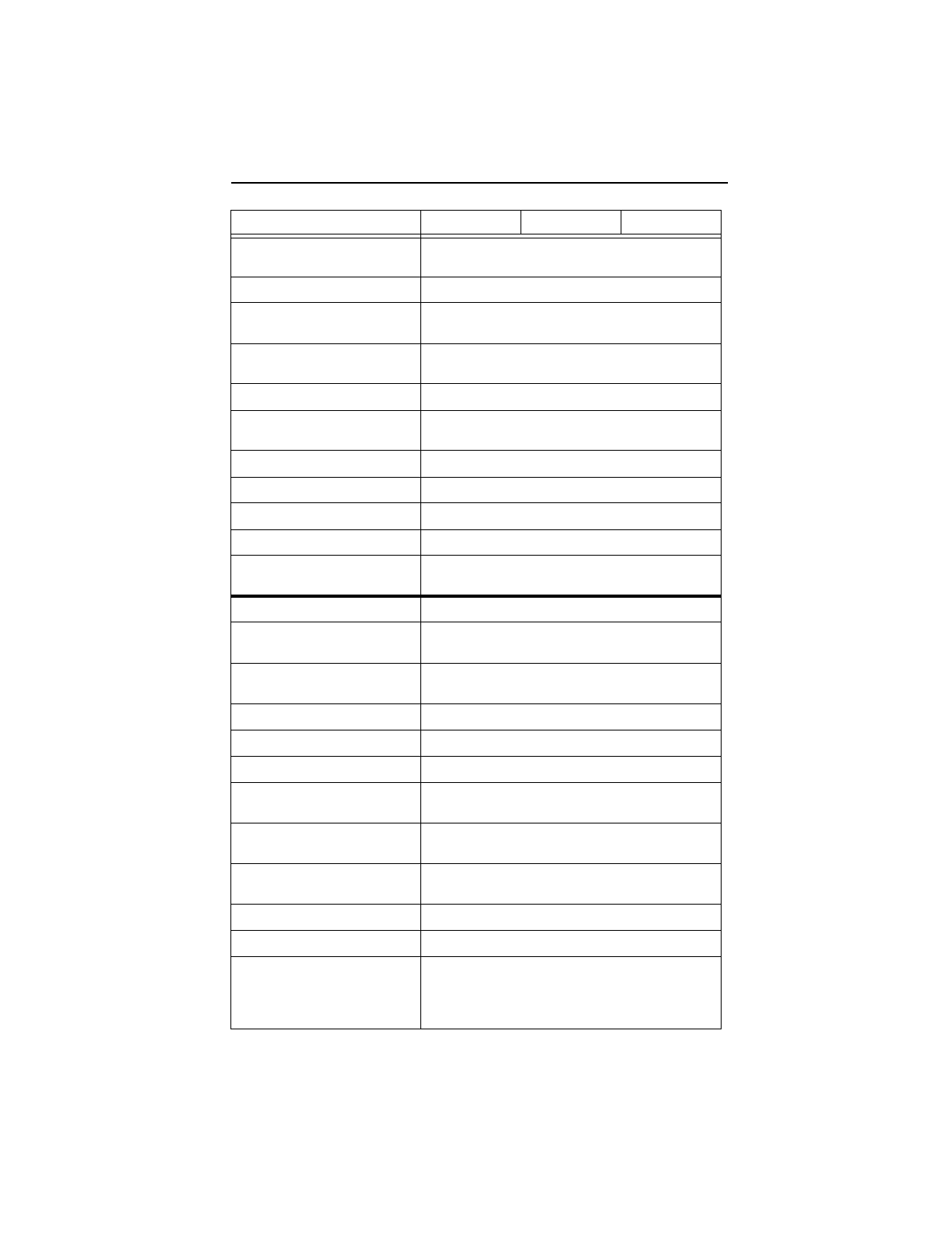
Full-stroke seek time
(msec typical) 23.0 (read) 25.0 (write)
Average latency (msec) 5.56 msec
Power-on to ready
(sec typical) 10 sec
Standby to ready
(sec typical) 10 sec
Spindown (sec typical) 10 sec
Startup current
(typical) 12V (peak) 1.5 amps
Seek power (typical) 7.0 watts
Read/Write power 6.5 watts
Idle mode (typical) 3.5 watts
Standby/Sleep mode (typical) 0.8 watts
Voltage tolerance
(including noise) 5V ± 5%, 12V ± 10%
Ambient temperature 0° to 60°C (op.), –40° to 70°C (nonop.)
Temperature gradient
(°C per hour max) 20°C
Relative humidity
(op. and nonop.) 5% to 90% (op.)
5% to 95% (nonop.)
Relative humidity, gradient 30% per hour max
Wet bulb temperature (°C max) 29.4 (op.), 40.0 (nonop.)
Altitude, operating –61 m to 3,048 m (–200 ft to 10,000+ ft)
Altitude (meters below mean sea
level, max) –122 m to 12,192 m (–400 ft to 40,000+ ft)
Shock, operating
(Gs max at 2 msec) 63
Shock, nonoperating
(Gs max at 2 msec) 350 Gs
Vibration, operating 0.5 Gs (0 to peak, 5–350 Hz)
Vibration, nonoperating 5 Gs (0 to peak, 5–350 Hz)
Drive acoustics
Sound power in bels (10.5 msec)
Idle mode
Seek mode
3.2 (typical), 3.6 (max)
3.5 (typical), 3.9 (max)
Drive Specification ST320423A ST315323A ST310212A
4 U10 Family Product Manual, Rev. A
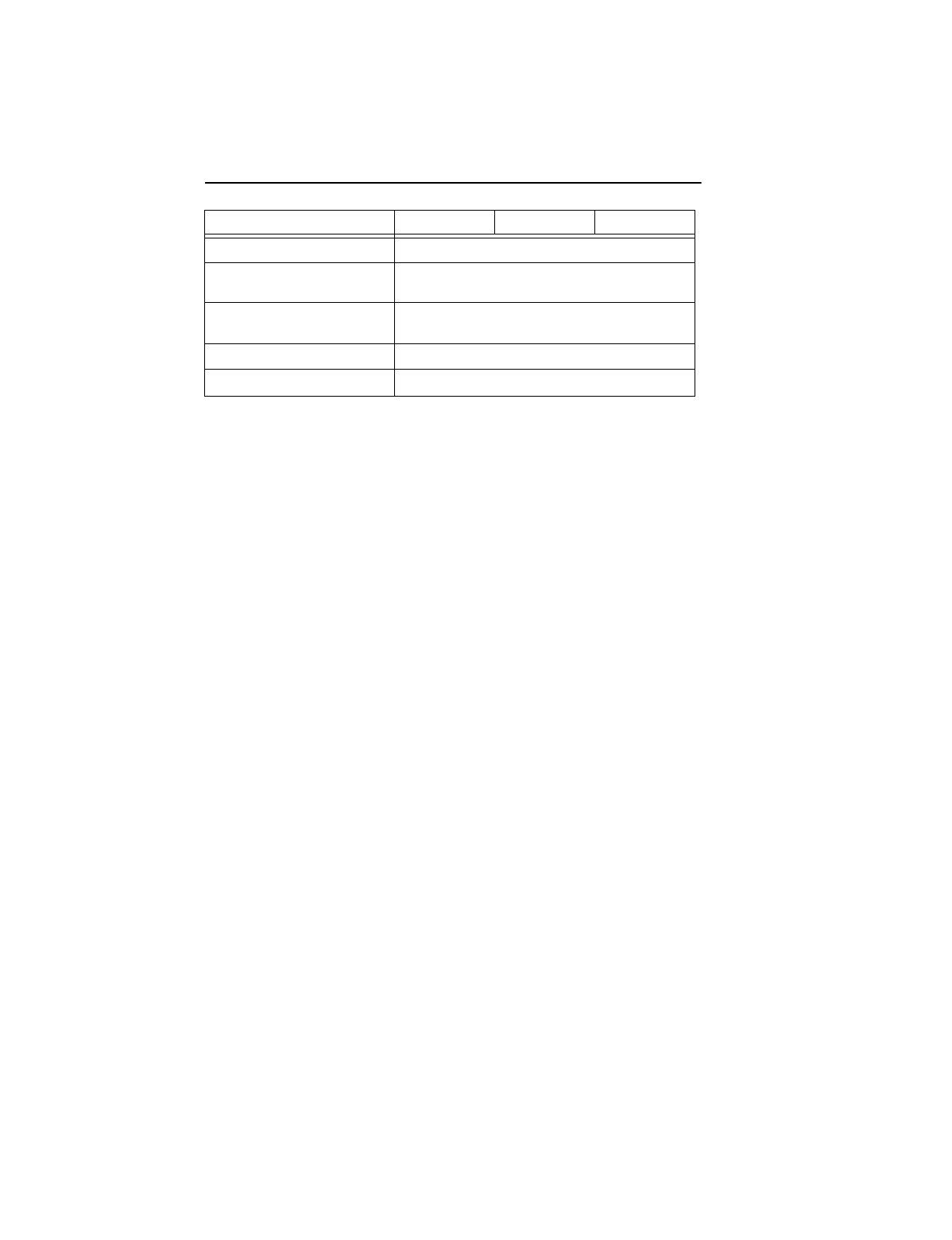
Nonrecoverable read errors 1 per 1013 bits read
Mean time between
failures (power-on hours) 500,000
Contact start-stop cycles (25°C,
40% relative humidity) 50,000
Service life (years) 5
SeaShield Yes
Drive Specification ST320423A ST315323A ST310212A
U10 Family Product Manual, Rev. A 5
1.0 Drive specifications
Unless otherwise noted, all specifications are measured under ambient
conditions, at 25°C, and nominal power. For convenience, the phrases
the drive
and
this drive
are used throughout this manual to indicate the
ST320423A, ST315323A and the ST310212A.
1.1 Formatted capacity
1.1.1 Default logical geometry
LBA Mode
When addressing these drives in LBA mode, all blocks (sectors) are
consecutively numbered from 0 to
n–1,
where
n
is
the number of
guaranteed sectors as defined above
.
1.2 Physical organization
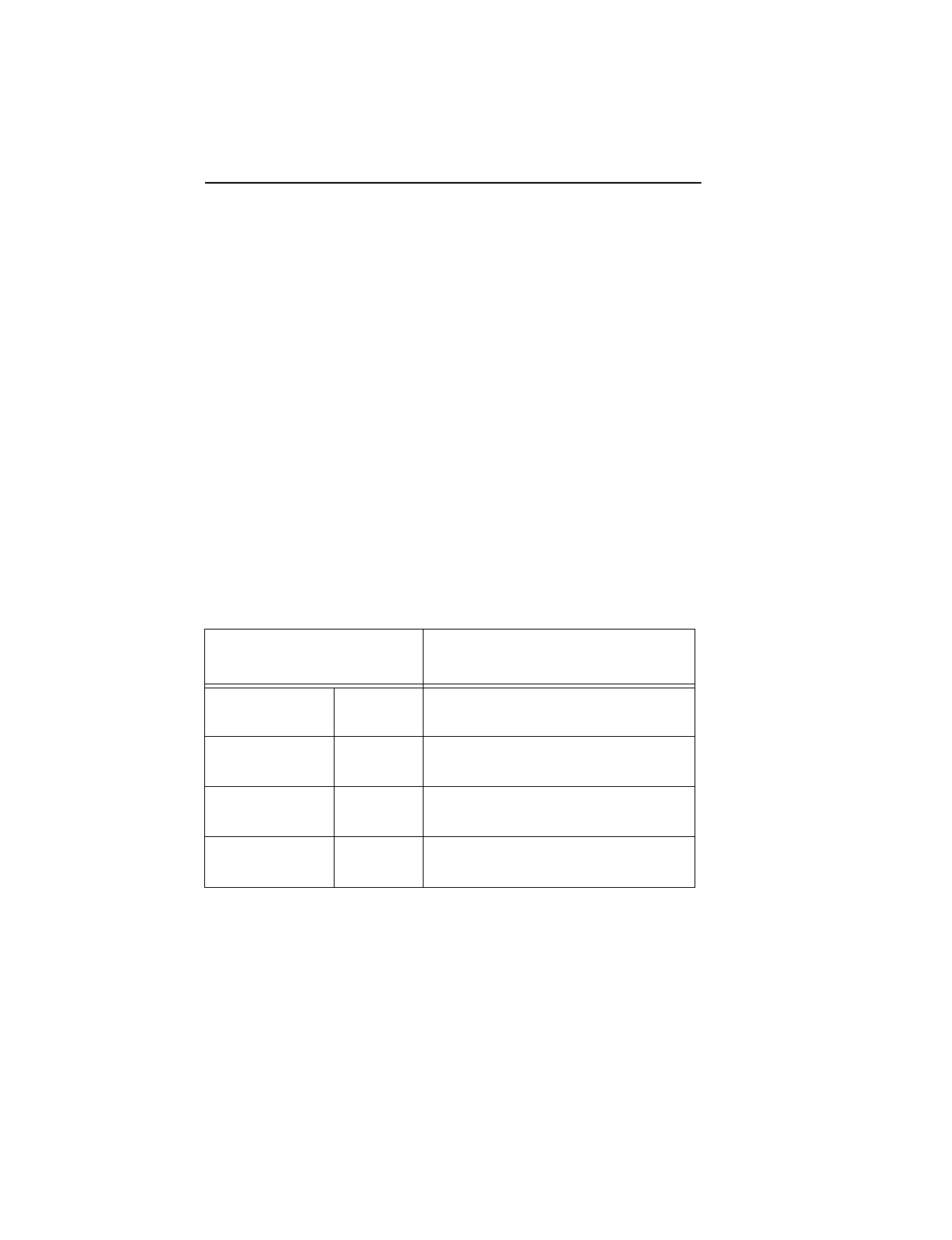
Drive Model Guaranteed Mbytes
(1 Mbyte = 106 bytes) Guaranteed
sectors Bytes per
sector
ST320423A 20,485 40,011,300 512
ST315323A 15,364 30,008,475 512
ST310212A 10,242 20,005,650 512
CHS Mode Cylinders Read/Write heads Sectors per track
ST320423A 16,383 16 63
ST315323A 16,383 16 63
ST310212A 16,383 16 63
Drive Model Read/Write heads (GMR) Number of discs
ST320423A 4 2
ST315323A 3 2
ST310212A 2 1
6 U10 Family Product Manual, Rev. A
1.3 Recording and interface technology
1.4 Physical characteristics
Interface ATA
Recording method 24/26 EPRML
Recording density BPI (bits/inch) 396,067
Track density TPI (tracks/inch) 20,107
Areal density (Mbits/inch2 max) 7,964
Spindle speed (RPM) (± 0.2%) 5,400
Internal data-transfer rate
(Mbits/sec max) 308
I/O data-transfer rate
(Mbytes/sec max) 16.6 (PIO mode 4)
66.6 (Ultra DMA mode 4)
Interleave 1:1
Cache buffer (Kbytes) 512
Drive Specification ST320423A, ST315323A
ST310212A
Maximum height (mm)
(inches) 26.1
1.028
Maximum width (mm)
(inches) 101.85
4.00
Maximum length (mm)
(inches) 147.0
5.78
Typical weight (grams)
(pounds) 544
1.2
U10 Family Product Manual, Rev. A 7
1.5 Seek time
Seek measurements are taken with nominal power at 25°C ambient
temperature. All times are measured using drive diagnostics. The spec-
ifications in the table below are defined as follows:
•Track-to-track seek time is an average of all possible single-track
seeks in both directions.
•Average seek time is a true statistical random average of at least 5,000
measurements of seeks between random tracks, less overhead.
•Full-stroke seek time is one-half the time needed to seek from the first
data cylinder to the maximum data cylinder and back to the first data
cylinder. The full-stroke typical value is determined by averaging 100
full-stroke seeks in both directions.
Note. These drives are designed to consistently meet the seek times rep-
resented in this manual. Physical seeks, regardless of mode (such as
track-to-track and average) are expected to meet or exceed the noted
values. However, due to the manner in which these drives are format-
ted, benchmark tests that include command overhead or measure
logical seeks may produce results that vary from these specifications.
1.6 Start/stop times
1.7 Power specifications
The drive receives DC power (+5V or +12V) through a four-pin standard
drive power connector.
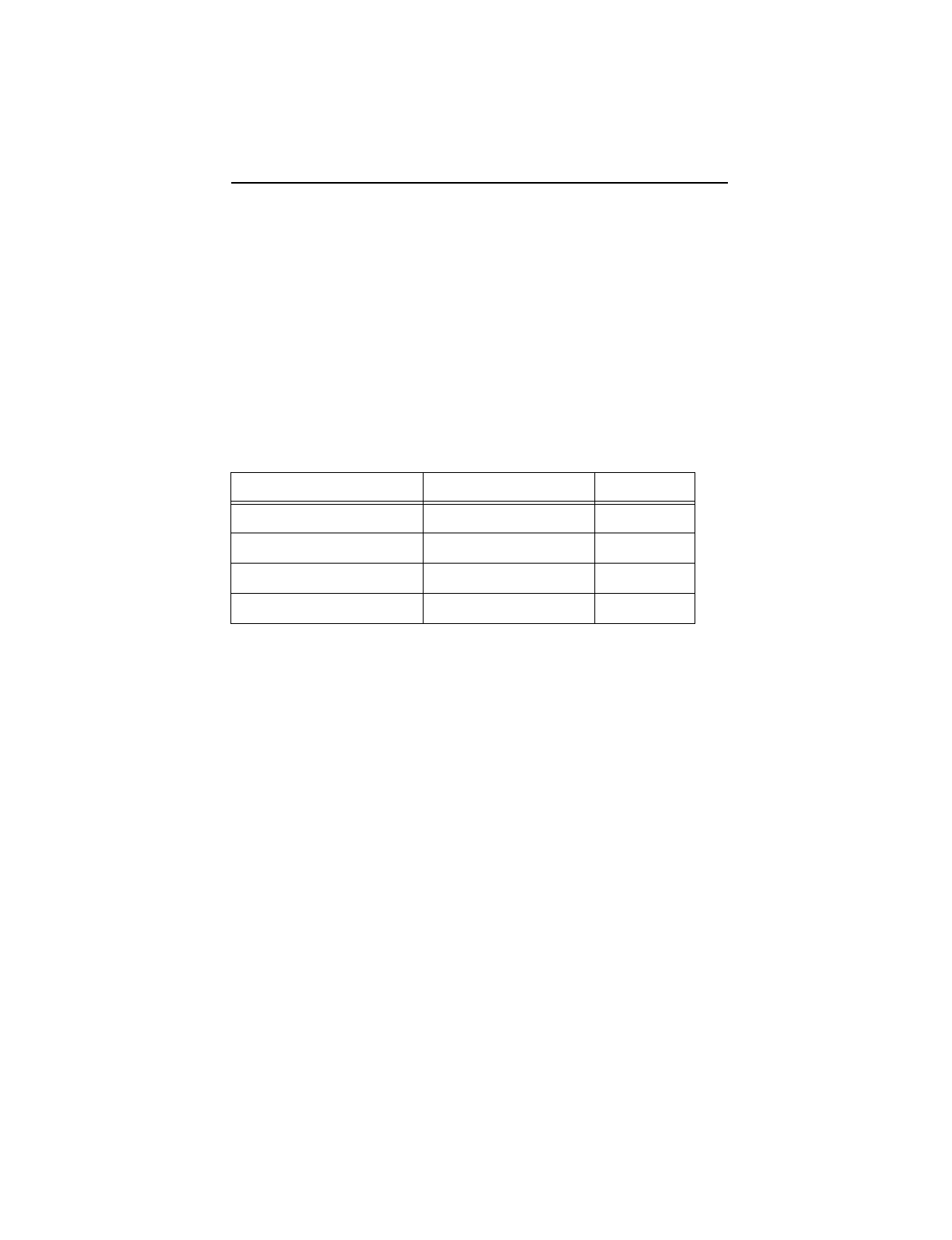
Typical seek times (msec) Read Write
Track-to-track 1.5 2.1
Average 10.5 11.5
Full-stroke 23.0 25.0
Average latency: 5.56 msec — —
Power-on to Ready (sec) 10 (typical)
Standby to Ready (sec) 10 (typical)
Ready to spindle stop (sec) 10 (typical)

8 U10 Family Product Manual, Rev. A
1.7.1 Power consumption
Power requirements for the drives are listed in the table on page 9.
Typical power measurements are based on an average of drives tested,
under nominal conditions, using 5.0V input voltage at 25°C ambient
temperature.
•Spinup power
Spinup power is measured from the time of power-on to the time that
the drive spindle reaches operating speed.
•Seek Mode
During seek mode, the read/write actuator arm moves toward a
specific position on the disc surface and does not execute a read or
write operation. Servo electronics are active. Seek mode power rep-
resents the worst-case power consumption, using only random seeks
with read or write latency time. This mode is not typical and is provided
for worst-case information.
•Read/Write power and current
Read/write power is measured with the heads on track, based on a
16-sector write followed by a 32-msec delay, then a 16-sector read
followed by a 32-msec delay.
•Operating power and current
Operating power is measured using 40 percent random seeks, 40
percent read/write mode (1 write for each 10 reads) and 20 percent
drive inactive.
•Idle mode power
Idle mode power is measured with the drive up to speed, with servo
electronics active and with the heads in a random track location.
•Standby mode
During Standby mode, the drive accepts commands, but the drive is
not spinning, and the servo and read/write electronics are in power-
down mode.
U10 Family Product Manual, Rev. A 9
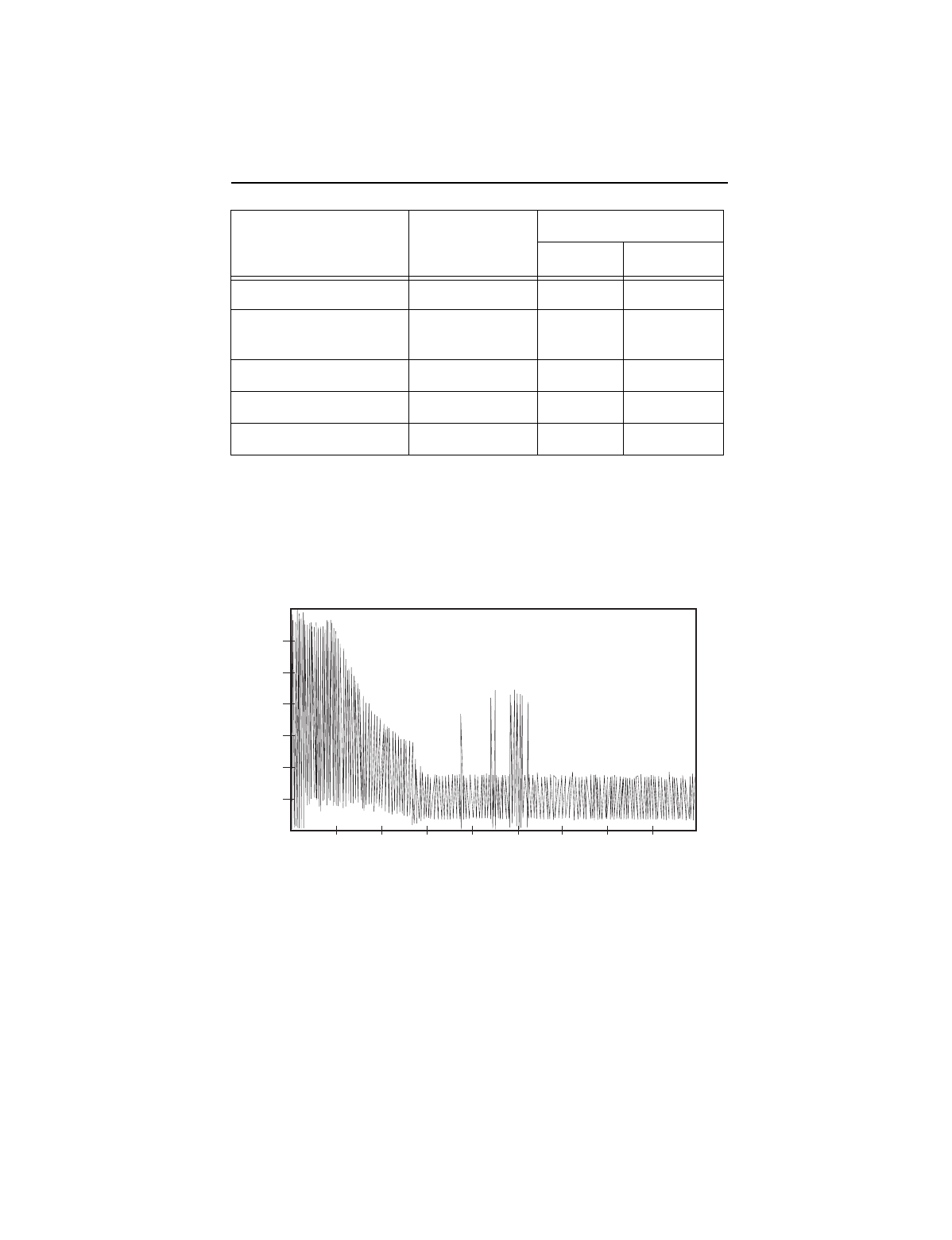
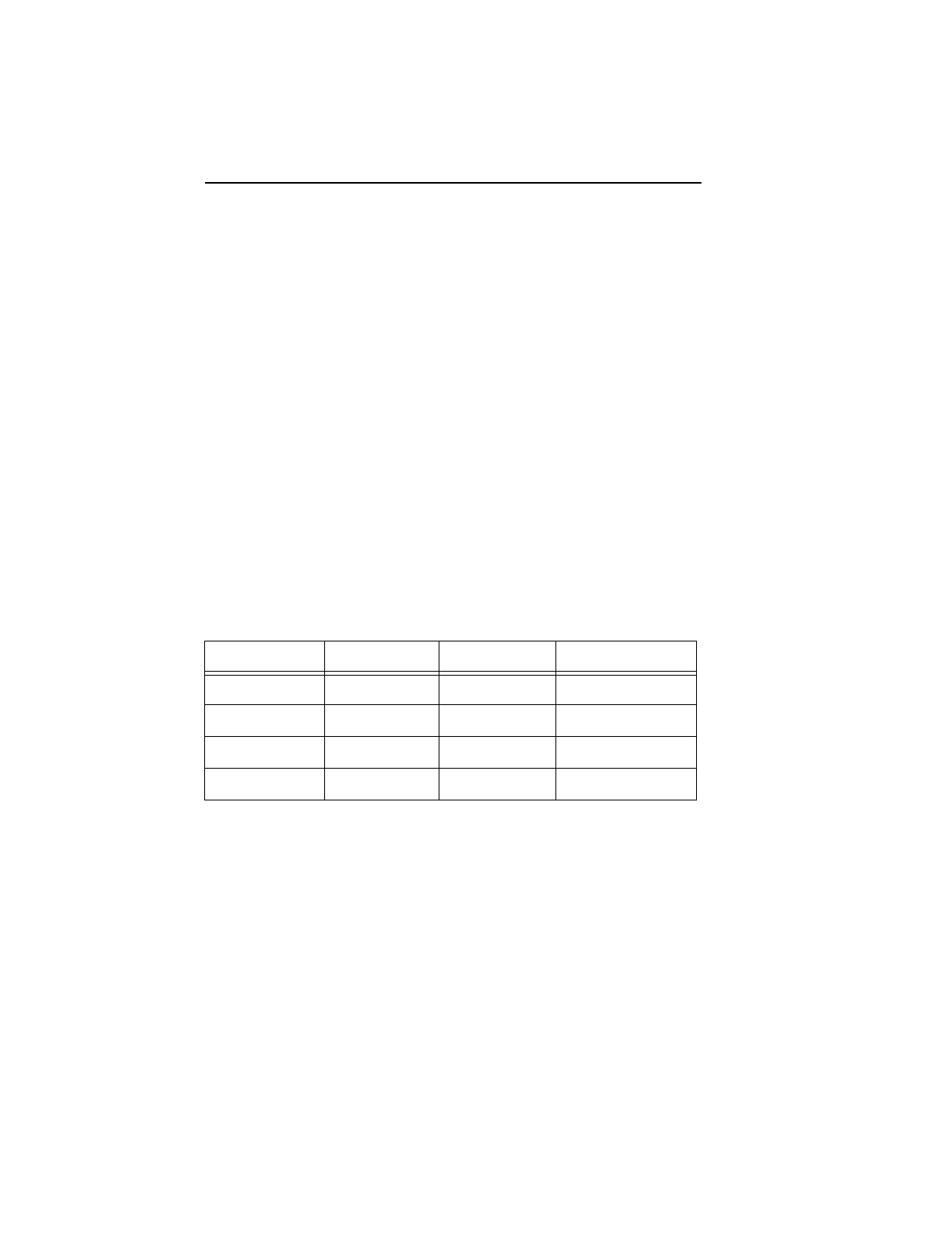
1.7.1.1 Typical current profile
Figure 1. Typical startup and operation current profile
Power Mode Typical Watts
RMS
Typical Amps RMS
5V 12V
Spinup — 0.65 1.5
Seeking (Random,
no read/write) 7.0 0.4 0.42
Operating (read/write) 6.5 0.46 0.350
Idle 3.5 0.28 0.170
Standby/Sleep 0.8 0.123 0.015
1.4
1.2
1.0
0.8
0.6
0.4
0.2
00123456789
Current (amps)
Time (seconds)
10 U10 Family Product Manual, Rev. A
1.7.2 Conducted noise
Input noise ripple is measured at the host system power supply across
an equivalent 80-ohm resistive load on the +12 volt line or an equivalent
15-ohm resistive load on the +5 volt line.
•Using 12-volt power, the drive is expected to operate with a maximum
of 120 mV peak-to-peak square-wave injected noise at up to 10 MHz.
•Using 5-volt power, the drive is expected to operate with a maximum
of 100 mV peak-to-peak square-wave injected noise at up to 10 MHz.
Note. Equivalent resistance is calculated by dividing the nominal volt-
age by the typical RMS read/write current.
1.7.3 Voltage tolerance
Voltage tolerance (including noise): 5V ± 5% and 12V ± 10%
1.7.4 Power-management modes
The drive provides programmable power management to provide great-
er energy efficiency. In most systems, you can control power manage-
ment through the system setup program. The drive features the following
power-management modes:
•Active mode
The drive is in Active mode during the read/write and seek operations.
•Idle mode
The buffer remains enabled, and the drive accepts all commands and
returns to Active mode any time disc access is necessary.
•Standby mode
The drive enters Standby mode when the host sends a Standby
Immediate command. If the host has set the standby timer, the drive
can also enter Standby mode automatically after the drive has been
inactive for a specifiable length of time. The standby timer delay is
Power Modes Heads Spindle Buffer
Active Tracking Rotating Enabled
Idle Tracking Rotating Enabled
Standby Parked Stopped Enabled
Sleep Parked Stopped Disabled

U10 Family Product Manual, Rev. A 11
established using a Standby or Idle command. In Standby mode, the
drive buffer is enabled, the heads are parked and the spindle is at rest.
The drive accepts all commands and returns to Active mode any time
disc access is necessary.
•Sleep mode
The drive enters Sleep mode after receiving a Sleep command from
the host. In Sleep mode, the drive buffer is disabled, the heads are
parked and the spindle is at rest. The drive leaves Sleep mode after
it receives a Hard Reset or Soft Reset from the host. After receiving a
reset, the drive exits Sleep mode and enters Active mode with all
current translation parameters intact.
•Idle and Standby timers
Each time the drive performs an Active function (read, write or seek), the
standby timer is reinitialized and begins counting down from its specified
delay times to zero. If the standby timer reaches zero before any drive
activity is required, the drive makes a transition to Standby mode. In both
Idle and Standby mode, the drive accepts all commands and returns to
Active mode when disc access is necessary.
1.8 Environmental tolerances
1.8.1 Ambient temperature
Ambient temperature is defined as the temperature of the environment
immediately surrounding the drive. Actual drive case temperature should
not exceed 65°C (149°F) within the operating ambient conditions. Rec-
ommended measurement locations are shown in Figure 3 on page 20.
Above 1,000 feet (305 meters), the maximum temperature is derated
linearly to 112°F (44°C) at 10,000 feet (3,048 meters).
1.8.2 Temperature gradient
Operating 0° to 60°C (32° to 131°F)
Nonoperating –40° to 70°C (–40° to 158°F)
Operating/Nonoperating 20°C/hr (36°F/hour) max,
without condensation

12 U10 Family Product Manual, Rev. A
1.8.3 Humidity
1.8.3.1 Relative Humidity
1.8.3.2 Wet bulb temperature
1.8.4 Altitude
1.8.5 Shock
All shock specifications assume that the drive is mounted securely with
the input shock applied at the drive mounting screws. Shock may be
applied in the X, Y or Z axis.
1.8.5.1 Operating shock
These drives comply with the performance levels specified in this docu-
ment when subjected to a maximum operating shock of 63 Gs (based
on half-sine shock pulses of 2 msec). Shocks should not be repeated
more than two times per second.
1.8.5.2 Nonoperating shock
The nonoperating shock level that the drive can experience without
incurring physical damage or degradation in performance when subse-
quently put into operation is 350 Gs (based on nonrepetitive half-sine
shock pulses of 2 msec duration).
1.8.6 Vibration
All vibration specifications assume that the drive is mounted securely
with the input vibration applied at the drive mounting screws. Vibration
may be applied in the X, Y or Z axis.
Operating 5% to 90% noncondensing (30% per hour max)
Nonoperating 5% to 95% noncondensing (30% per hour max)
Operating 29.4°C (84°F) max
Nonoperating 40.0°C (104°F) max
Operating –61 m to 3,048 m (–200 ft to 10,000+ ft)
Nonoperating –122 m to 12,192 m (–400 ft to 40,000+ ft)

U10 Family Product Manual, Rev. A 13
1.8.6.1 Operating vibration
The following table lists the maximum vibration levels that the drive may expe-
rience while meeting the performance standards specified in this document.
1.8.6.2 Nonoperating vibration
The following table lists the maximum nonoperating vibration that the
drive may experience without incurring physical damage or degradation
in performance when subsequently put into operation.
1.9 Drive acoustics
Drive acoustics are measured as overall A-weighted acoustic sound
power levels (no pure tones). All measurements are generally consistent
with ISO document 7779. Sound power measurements were taken
under essentially free-field conditions over a reflecting plane. For all
tests, the drive was oriented with the cover facing upward.
Note. For seek mode tests, the drive was placed in seek mode only.
The number of seeks per second is defined by the following
equation:
(Number of seeks per second = 0.4 / (average latency + average access time)
5–21 Hz 0.02-inch displacement (peak to peak)
22–350 Hz 0.5 Gs acceleration (zero to peak)
351–500 Hz 0.25 Gs acceleration (zero to peak)
5–21 Hz 0.2-inch displacement (peak to peak)
22–350 Hz 5.0 Gs acceleration (zero to peak)
351–500 Hz 1.0 Gs acceleration (zero to peak)
Acoustic mode Idle mode Seek mode
Sound power (bels) 3.2 (typ) 3.6 (max) 3.5 (typ) 3.9 (max)

14 U10 Family Product Manual, Rev. A
1.10 Electromagnetic susceptibility
The drive operates without errors when subjected to the following:
1.11 Reliability
1.12 Agency certification
1.12.1 Safety certification
The drives are recognized in accordance with UL 1950 and CSA C22.2
(950) and meet all applicable sections of IEC950 and EN 60950 as tested
by TUV North America.
1.12.2 Electromagnetic compatibility
Hard drives that display the CE marking comply with European Union
requirements specified in Electromagnetic Compatibility Directives.
Testing is performed to standards EN 50082-1 and EN 55022-B.
Seagate uses an independent laboratory to confirm compliance with the
EC directives specified in the previous paragraph. Drives are tested in
representative end-user systems. Although CE-marked Seagate drives
Radiated noise ≤ 3 volt/meter, 30 Hz to 500 MHz
Electrostatic discharge* ≤ 10 KVolts
Magnetic field strength ≤ 5 Gauss
* Electrostatic discharge susceptibility is measured with the drive
mounted in a representative computer system (mounted to a ground
plane with an earth ground). Discharges are applied to the bezel or
other external surfaces on the ground plane.
Nonrecoverable read errors 1 per 1013 bits read, max
Mean time between failures 500,000 power-on hours
(nominal power, 25°C ambient tem-
perature)
Contact start-stop cycles 50,000 cycles
(at nominal voltage and temperature,
with 60 cycles per hour and a 50%
duty cycle)
Preventive maintenance None required

U10 Family Product Manual, Rev. A 15
comply with the directives when used in the test systems, we cannot
guarantee that all systems will comply with the directives. The drive is
designed for operation inside a properly designed enclosure, with prop-
erly shielded I/O cable (if necessary) and terminators on all unused I/O
ports. Computer manufacturers and system integrators should confirm
EMC compliance and provide CE marking for their products.
Australian CE-Tick (N176)
If these models have the C-Tick marking, they comply with the Australia/
New Zealand Standard AS/NZS3548 1995 and meet the Electromag-
netic Compatibility (EMC) Framework requirements of Australia’s Spec-
trum Management Agency (SMA).
1.12.3 FCC verification
These drives are intended to be contained solely within a personal
computer or similar enclosure (not attached as an external device). As
such, each drive is considered to be a subassembly even when it is
individually marketed to the customer. As a subassembly, no Federal
Communications Commission verification or certification of the device is
required.
Seagate Technology, Inc. has tested this device in enclosures as de-
scribed above to ensure that the total assembly (enclosure, disc drive,
motherboard, power supply, etc.) does comply with the limits for a Class
B computing device, pursuant to Subpart J, Part 15 of the FCC rules.
Operation with noncertified assemblies is likely to result in interference
to radio and television reception.
Radio and television interference. This equipment generates and
uses radio frequency energy and if not installed and used in strict
accordance with the manufacturer’s instructions, may cause interfer-
ence to radio and television reception.
This equipment is designed to provide reasonable protection against
such interference in a residential installation. However, there is no
guarantee that interference will not occur in a particular installation. If
this equipment does cause interference to radio or television, which can
be determined by turning the equipment on and off, you are encouraged
to try one or more of the following corrective measures:
•Reorient the receiving antenna.
•Move the device to one side or the other of the radio or TV.
•Move the device farther away from the radio or TV.
•Plug the computer into a different outlet so that the receiver and
computer are on different branch outlets.

16 U10 Family Product Manual, Rev. A
If necessary, you should consult your dealer or an experienced radio/
television technician for additional suggestions. You may find helpful the
following booklet prepared by the Federal Communications Commis-
sion:
How to Identify and Resolve Radio-Television Interference Prob-
lems
. This booklet is available from the Superintendent of Documents,
U.S. Government Printing Office, Washington, DC 20402. Refer to pub-
lication number 004-000-00345-4.

U10 Family Product Manual, Rev. A 17
2.0 Configuring and mounting the drive
This section contains the specifications and instructions for configuring
and mounting the drive.
2.1 Handling and static-discharge precautions
After unpacking, and before installation, the drive may be exposed to
potential handling and electrostatic discharge (ESD) hazards. Observe the
following standard handling and static-discharge precautions:
Caution:
•The SeaShell™ replaces electrostatic discharge (ESD) bags. The
SeaShell package is a shock-ribbed, transparent clamshell enclosure
that limits a drive’s exposure to ESD and also protects against external
shocks and stresses. The design permits attaching cables, software
loading and label/barcode scanning without removing the drive from
the SeaShell. This minimizes handling damage. Keep the drive in the
SeaShell package until you are ready for installation.
•The drive is enclosed in a black, flexible cover called a SeaShield®. Do
not remove this permanent cover—it protects the drive from electro-
static discharge (ESD) and minor impact damage. The soft SeaShield
cover also includes installation instructions and jumper settings. Re-
moving the SeaShield voids the warranty.
•Before handling the drive, put on a grounded wrist strap, or ground
yourself frequently by touching the metal chassis of a computer that
is plugged into a grounded outlet. Wear a grounded wrist strap
throughout the entire installation procedure.
•Handle the drive by its edges or frame
only
.
•The drive is extremely fragile—handle it with care. Do not press down
on the drive top cover.
•Always rest the drive on a padded, antistatic surface until you mount
it in the computer.
•Do not touch the connector pins or the printed circuit board.
•Do not remove the factory-installed labels from the drive or cover them
with additional labels. Removal voids the warranty. Some factory-
installed labels contain information needed to service the drive. Other
labels are used to seal out dirt and contamination.
18 U10 Family Product Manual, Rev. A
2.2 Jumper settings
2.2.1 Master/slave configuration
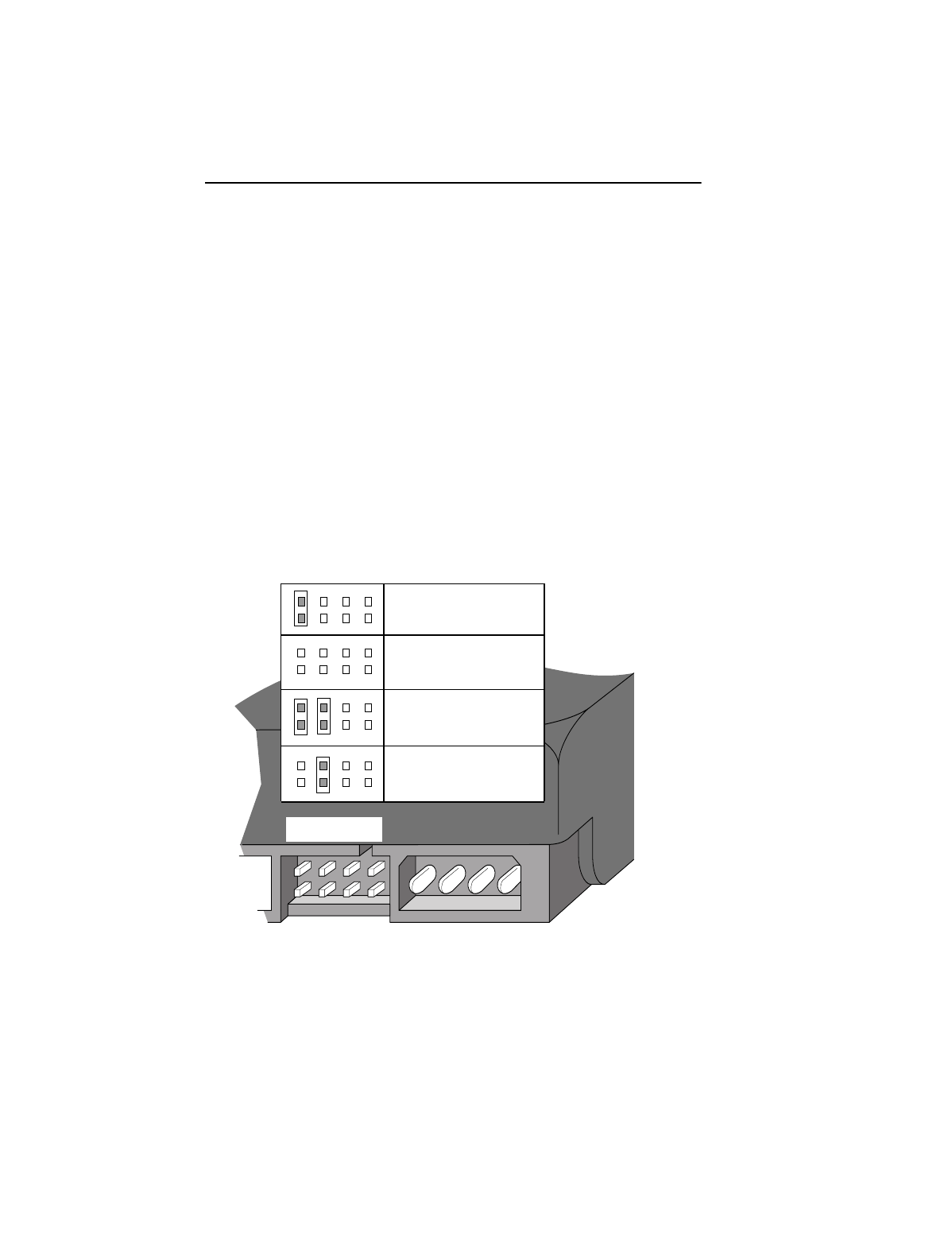
The options jumper block shown in Figure 2 is used to configure the drive
for operation. It is the 6-pin dual header between the interface connector
and the power connector. Use the following settings to configure the
drive as a master or a slave.
Master or single drive. The drive is configured at the factory for a master
or single-drive operation with a jumper set on pins 7 and 8.
Drive as slave. Remove all jumpers.
Drive as master with a non-ATA-compatible slave.
Set a jumper on pins 5 and 6 and a jumper on pins 7 and 8. Use this
jumper setting
only
if the drive does not work as a master with no jumpers
installed.
Figure 2. Master/slave jumper settings
Options jumper block (J8)
Drive is slave
Cable select
Master with a non-ATA-
compatible slave
Master or single drive
2
684
1753

U10 Family Product Manual, Rev. A 19
2.2.2 Cable-select option
Computers that use cable-select determine the master and slave drives
by selecting or deselecting pin 28, CSEL, on the interface bus. Master
and slave drives are determined by their physical position on the cable.
To enable cable select, set a jumper on pins 5 and 6 as shown in Figure
2. Refer to your computer manual to determine whether your computer
supports this option.
2.2.3 Ultra ATA/66 cable
An 80-conductor 40-pin cable is required to run Ultra DMA mode 3 and
4. This cable uses even-numbered conductors connected to the ground
pins to improve signal integrity.
Note. The drive supports both host and drive cable detection. The host
detects the 80-conductor cable by sampling pin 34, CBLID–, on
the interface bus. The drive detects the 80-conductor cable by
sensing a capacitor at the host side through the CBLID– signal.
The result is reported in a Fast Rise Detected bit (bit 13 of word
93 in the Identify drive parameter block).
2.3 Drive mounting
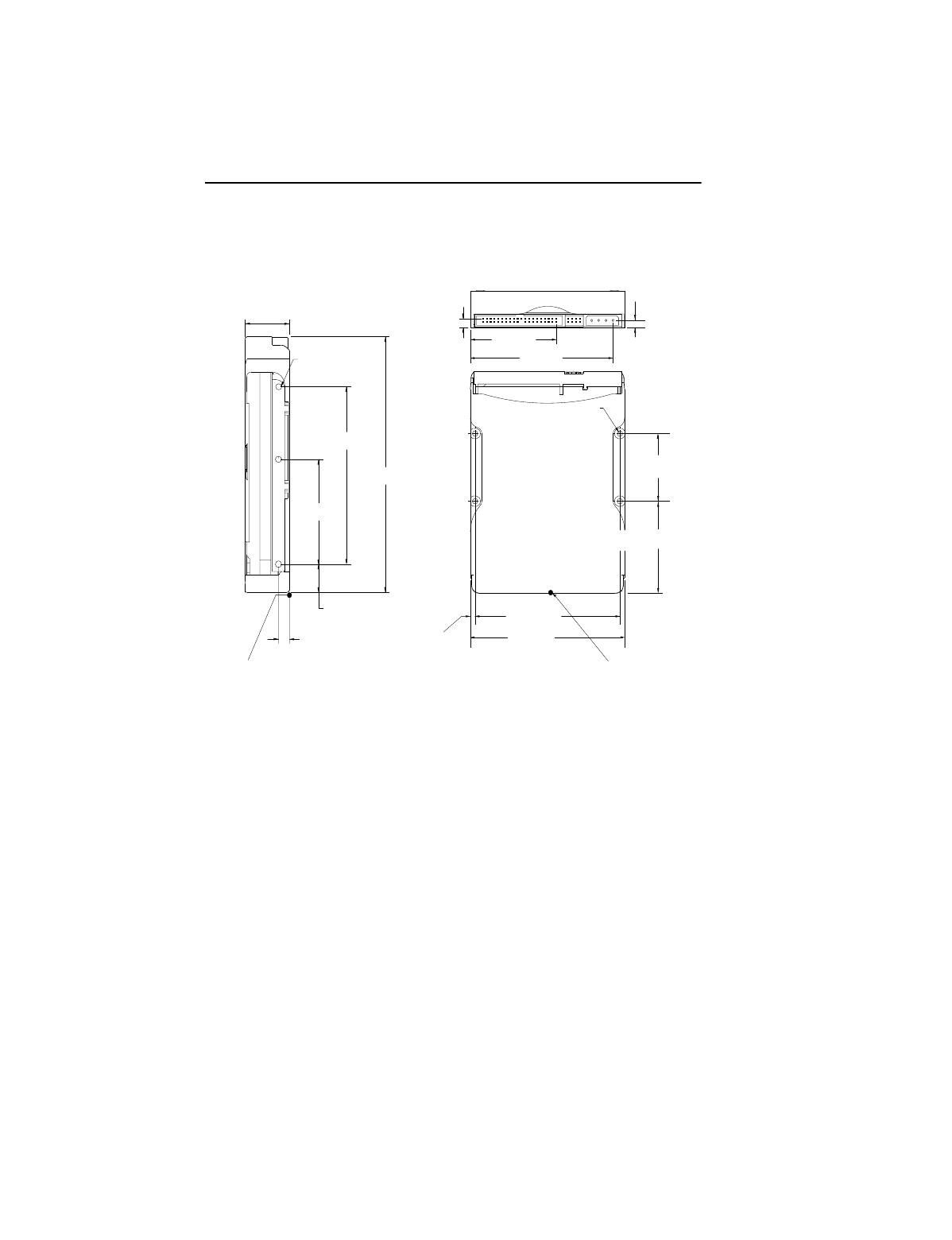
You can mount the drive in any orientation using four screws in the side-
mounting holes or four screws in the bottom-mounting holes. See Figure
4 on page 20 for drive mounting dimensions. Follow these important
mounting precautions when mounting the drive:
•Allow a minimum clearance of 0.030 inches (0.76 mm) around the
entire perimeter of the drive for cooling.
•Use only 6-32 UNC mounting screws.
•The screws should be inserted no more than 0.20 inch (5.08 mm) into
the bottom mounting holes and no more than 0.14 inch (3.55 mm) into
the side mounting holes.
•Do not overtighten the mounting screws (maximum torque: 6 inch-lb).
•Do not use a drive interface cable that is more than 18 inches long.
20 U10 Family Product Manual, Rev. A
Figure 3. Mounting dimensions—top, side and end view
1.00 ± 0.028
(25.4 ± 0.7)
3.72 ± 0.03
(94.5 ± 0.8)
4.00 ± 0.02
(101.6 ± 0.5)
3.750 ± 0.010
(95.25 ± 0.25)
5.75 ± 0.03
(146.1 ± 0.8)
4.000 ± 0.010
(101.60 ± 0.25)
3X.250 ± .015
(6.35 ± 0.38)
(both sides)
2.23 ± 0.03
(56.6 ± 0.8)
0.230 ± 0.015
(5.84 ± 0.38) 0.180 ± 0.015
(4.57 ± 0.38)
2.362 ± 0.010
(59.99 ± 0.25)
1.750 ± 0.010
(44.45 ± 0.25)
3X 6-32 UNC-2B
max. insertion depth
0.14 (3.6) both sides
4X 6-32 UNC-2B
max. insertion
depth 0.22 (5.6)
0.125 +0.030, –0.005
(3.18 +0.76, –0.13)
0.630 +0.030, –0.005
(16.00 +0.76, –0.13)
Note: Dimensions are shown in inches (mm).
2.375 +0.030, –0.005
(60.33 +0.76, –0.13)
Recommended
case temperature
measurement location
Recommended
case temperature
measurement location

U10 Family Product Manual, Rev. A 21
3.0 ATA interface
These drives use the industry-standard ATA task file interface that
supports 16-bit data transfers. It supports ATA programmed input/output
(PIO) modes 0–4; multiword DMA modes 0–2, and Ultra DMA modes
0–4. The drive also supports the use of the IORDY signal to provide
reliable high-speed data transfers.
You can use a daisy-chain cable to connect two drives to a single AT
host bus. For detailed information about the ATA interface, refer to the
draft of
AT Attachment with Packet Interface Extension (ATA/ATAPI-5),
NCITS T13 1153D,
subsequently referred to as the
Draft ATA-5 Stan-
dard
.
3.1 ATA interface signals and connector pins
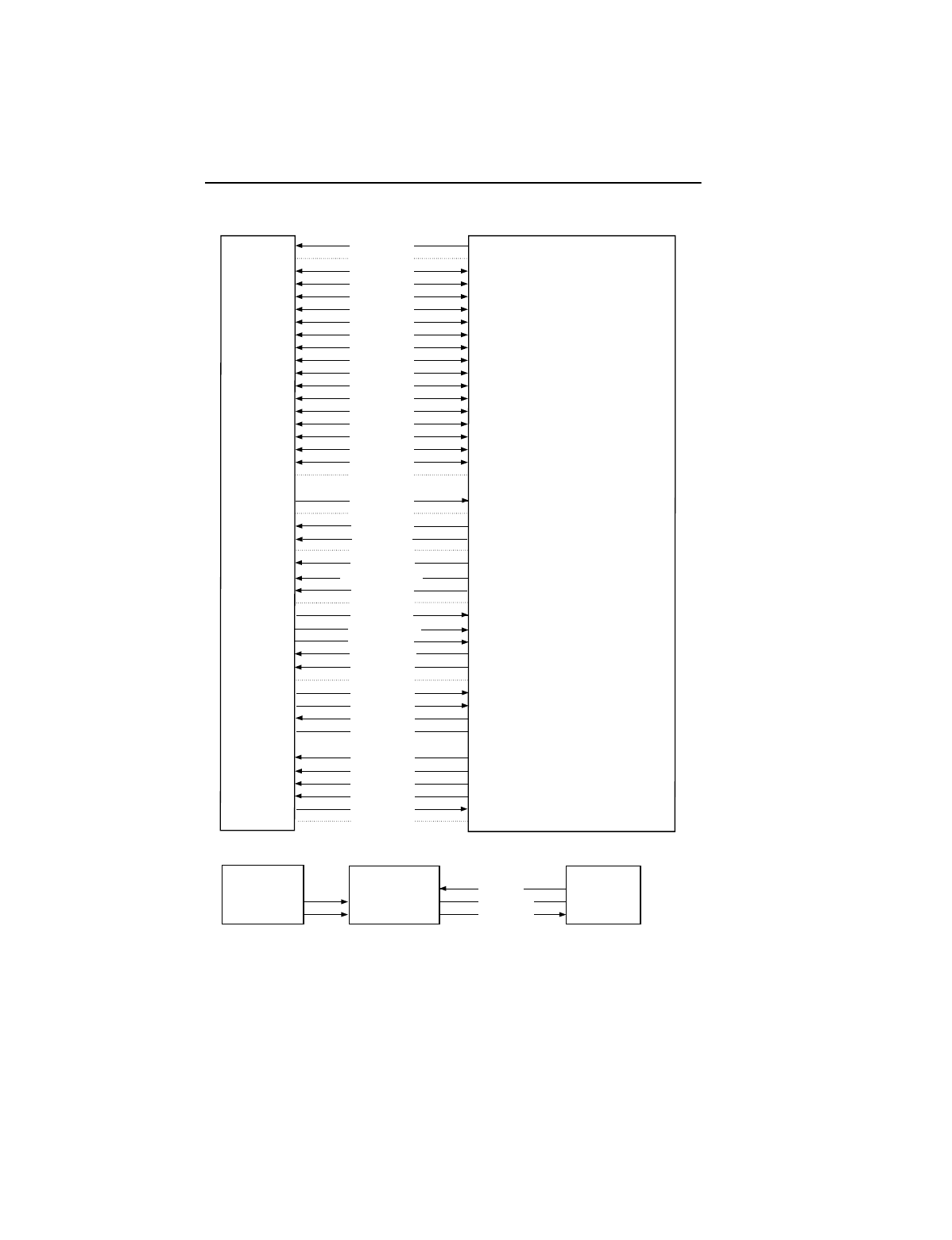
Figure 4 on page 22 summarizes the signals on the ATA interface
connector that the drive supports. For a detailed description of these
signals, refer to the
Draft ATA-5 Standard.
22 U10 Family Product Manual, Rev. A
Figure 4. I/O pins and supported ATA signals
Reset–
Ground
DD7
DD8
DD6
DD9
DD5
DD10
DD4
DD11
DD3
DD12
DD2
DD13
DD1
DD14
DD0
DD15
Ground
(removed)
DMARQ
Ground
DIOW–
STOP
Ground
DIOR–
HDMARDY–
HSTROBE
Ground
IORDY
DDMARDY–
DSTROBE
CSEL
DMACK–
Ground
INTRQ
IOCS16–
DA1
PDIAG–
CBLID–
DA0
DA2
CS0–
CS1–
DASP–
Ground
1
2
3
4
5
6
7
8
9
10
11
12
13
14
15
16
17
18
19
20
21
22
23
24
25
26
27
28
29
30
31
32
33
34
35
36
37
38
39
40
Hardware Reset
Ground
Host Data Bus Bit 7
Host Data Bus Bit 8
Host Data Bus Bit 6
Host Data Bus Bit 9
Host Data Bus Bit 5
Host Data Bus Bit 10
Host Data Bus Bit 4
Host Data Bus Bit 11
Host Data Bus Bit 3
Host Data Bus Bit 12
Host Data Bus Bit 2
Host Data Bus Bit 13
Host Data Bus Bit 1
Host Data Bus Bit 14
Host Data Bus Bit 0
Device Data (15:0)
Ground
(No Pin)
DMA Request
Ground
Device I/O Write:
Stop Ultra DMA Burst
Ground
Device I/O Read:
Host Ultra DMA Ready:
Host Ultra DMA Data Strobe
Ground
I/O Channel Ready
Device Ultra DMA Ready
Device Ulta DMA Data Strobe
Cable Select
DMA Acknowledge
Ground
Device Interrupt
Reserved
Host Address Bus Bit 1
Passed Diagnostics
Cable Assembly Type Identifier
Device Address (2:0)
Device Address (2:0)
Chip Select (1:0)
Chip Select (1:0)
Drive Active/Slave Present
Ground
Host pin # and signal description
1
2
3
4
5
6
7
8
9
10
11
12
13
14
15
16
17
18
19
20
21
22
23
24
25
26
27
28
29
30
31
32
33
34
35
36
37
38
39
40
Drive pin # Signal name
Pins 28, 34 and 39 are used for master-slave communication (details shown below).
Host
28
34
39
Drive 0 (master)Drive 1 (slave) 28
34
39
28
34
39
CSEL
PDIAG–
DASP–
U10 Family Product Manual, Rev. A 23
3.1.1 Supported ATA commands
The following table lists ATA-standard commands that the drive sup-
ports. For a detailed description of the ATA commands, refer to the
Draft
ATA-5 Standard.
See Section 3.2.4 on page 30 for details and subcom-
mands used in the S.M.A.R.T. implementation.
Command name Command code (in hex)
ATA-standard commands
Download Microcode 92H
Execute Device Diagnostics 90H
Flush Cache E7H
Format Track 50H
Identify Device ECH
Initialize Device Parameters 91H
Read Buffer E4H
Read DMA C8H, C9H
Read Multiple C4H
Read Sectors 20H, 21H
Read Verify Sectors 40H, 41H
Read Native Max Address F8H
Recalibrate 10H
Seek 70H
Set Features EFH
Set Multiple Mode C6H
Set Max Address F9H
S.M.A.R.T. B0H
Write Buffer E8H
Write DMA CAH, CBH
24 U10 Family Product Manual, Rev. A
3.1.2 Identify Drive command
The Identify Drive command (command code ECH) transfers information
about the drive to the host following power up. The data is organized as
a single 512-byte block of data, whose contents are shown in the table
on page 25. All reserved bits or words should be set to zero. Parameters
listed with an “x” are drive-specific or vary with the state of the drive. See
Section 1 of this manual for default parameter settings.
The following commands contain drive-specific features that may not be
included in the
Draft ATA-5 Standard.
Write Multiple C5H
Write Sectors 30H, 31H
ATA-standard power-management commands
Check Power Mode 98H or E5H
Idle 97H or E3H
Idle Immediate 95H or E1H
Sleep 99H or E6H
Standby 96H or E2H
Standby Immediate 94H or E0H
ATA-standard security commands
Security Set Password F1H
Security Unlock F2H
Security Erase Prepare F3H
Security Erase Unit F4H
Security Freeze Lock F5H
Security Disable Password F6H
Command name Command code (in hex)
U10 Family Product Manual, Rev. A 25
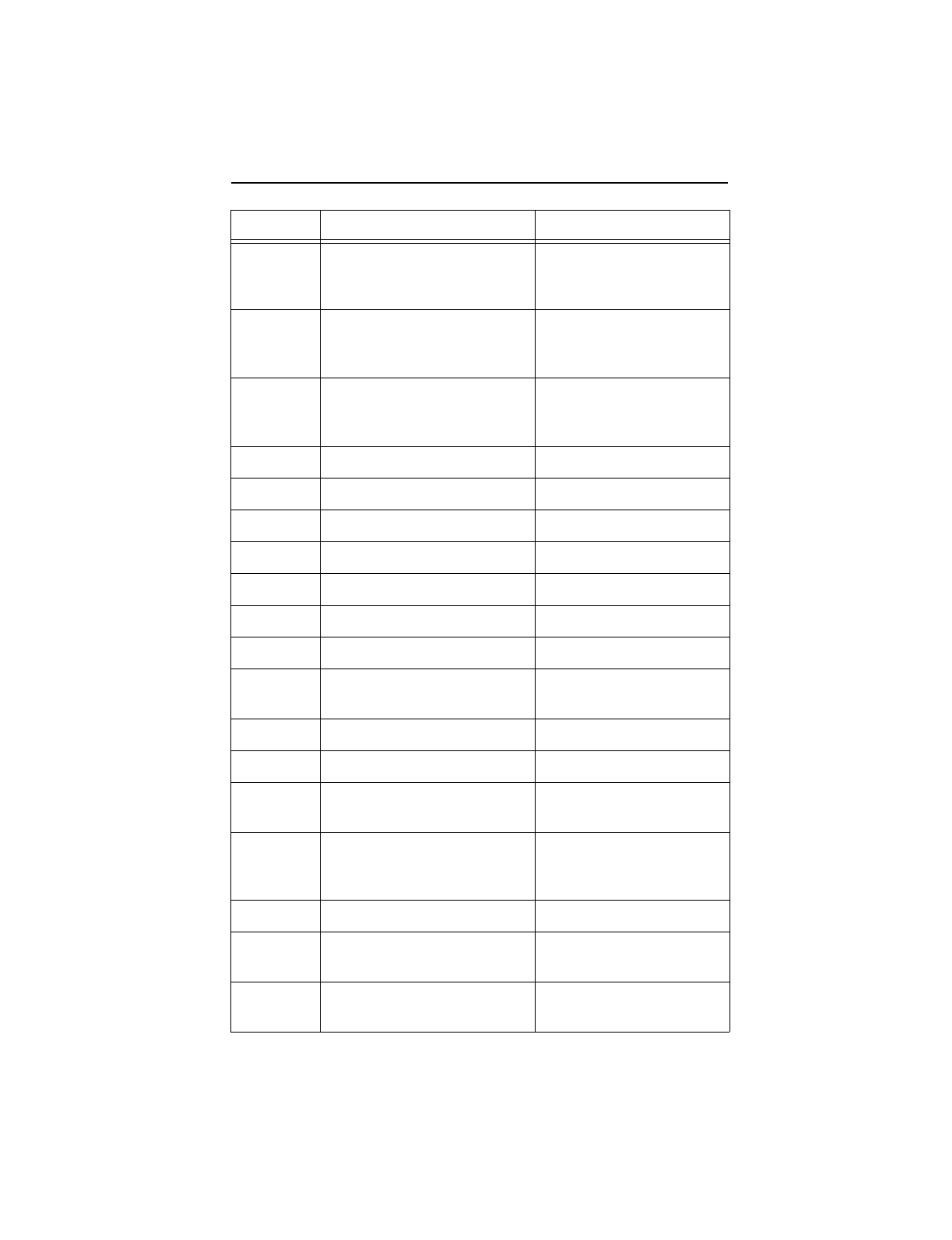
Word Description Value
0
Configuration information:
• Bit 15: 0 = ATA; 1 = ATAPI
• Bit 7: removable media
• Bit 6: removable controller
• Bit 0: reserved
0C5AH
1 Number of logical cylinders ST320423A, ST315323A,
ST310212A = 16,383
2 ATA-reserved 0000H
3 Number of logical heads ST320423A, ST315323A,
ST310212A = 16
4 Retired 0000H
5 Retired 0000H
6 Number of logical sectors per
logical track: 63 003FH
7–9 Retired 0000H
10–19 Serial number: (20 ASCII
characters, 0000H = none) ASCII
20 Retired 0000H
21 Retired 0400H
22 Obsolete 0004H
23–26 Firmware revision (8 ASCII
character string, padded with
blanks to end of string)
x.xx
27–46 Drive model number: (40
ASCII characters, padded
with blanks to end of string)
ST320423A
ST315323A
ST310212A
47 Maximum sectors per inter-
rupt on Read multiple and
Write multiple (32) 8020H
48 Reserved 0000H
26 U10 Family Product Manual, Rev. A
49 Standard Standby timer,
IORDY supported and may
be disabled 2F00H
50 Device-specific standby
timer value 0000H
51 PIO data-transfer cycle
timing mode 0200H
52 Retired 0200H
53 Words 54–58, 64–70 and 88
are valid 0007H
54 Number of current logical
cylinders
xxxx
H
55 Number of current logical
heads
xxxx
H
56 Number of current logical
sectors per logical track
xxxx
H
57–58 Current capacity in sectors
xxxx
H
59 Number of sectors trans-
ferred during a Read Multiple
or Write Multiple command
xxxx
H
60–61 Total number of user-addres-
sable LBA sectors available
ST320423A = 40,011,300
ST315323A = 30,008,475
ST310212A = 20,005,650
62 Retired 0000H
63 Multiword DMA active and
modes supported (see note
following this table)
xx
07H
64 Advanced PIO modes sup-
ported (modes 3 and 4 sup-
ported) 0003H
65 Minimum multiword DMA
transfer cycle time per word
(120 nsec) 0078H
Word Description Value
U10 Family Product Manual, Rev. A 27
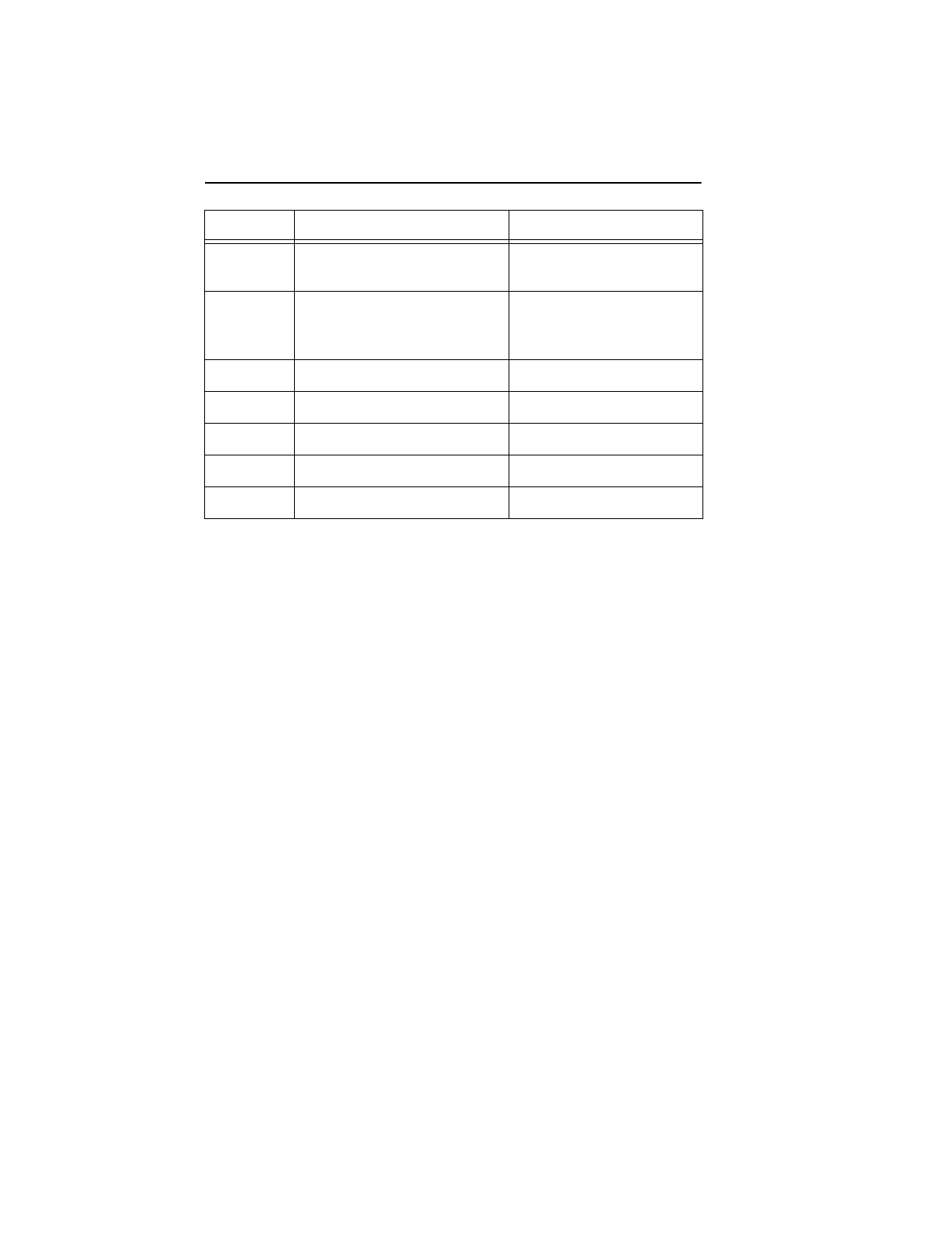
66 Recommended multiword
DMA transfer cycle time per
word (120 nsec) 0078H
67 Minimum PIO cycle time
without IORDY flow control
(240 nsec) 00F0H
68 Minimum PIO cycle time with
IORDY flow control (120
nsec) 0078H
69–74 ATA-reserved 0000H
75 Queue depth 0000H
76–79 ATA-reserved 0000H
80 Major version number 003EH
81 Minor version number 0000H
82 Command sets supported 346BH
83 Command sets supported 4009H
84 Command sets support
extension 4000H
85 Command sets enabled
xxxx
H
86 Command sets enabled
xxxx
H
87 Command sets enable
extension
xxxx
H
88 Ultra DMA support and
current mode
(see note following this table)
xx
1FH
89 Security erase time 0000H
90 Enhanced security erase
time 0000H
91 Advanced Power Manage-
ment value 0040H
Word Description Value
28 U10 Family Product Manual, Rev. A
92 Master Password Revision
code FFFEH
93 Hardware Reset Value
(see description following
this table)
xxxx
H
94–127 ATA-reserved 0000H
128 Security Status 0001H
129–159 Seagate-reserved
xxxx
H
160–254 ATA-reserved 0000H
255 Integrity word
xx
A5H
Note. See the bit descriptions below for words 63, 88 and 93 of the
Identify Drive data:
Description (if bit is set to 1)
Bit Word 63
0 Multiword DMA mode 0 is supported.
1 Multiword DMA mode 1 is supported.
2 Multiword DMA mode 2 is supported.
8 Multiword DMA mode 0 is currently active.
9 Multiword DMA mode 1 is currently active.
10 Multiword DMA mode 2 is currently active.
Bit Word 88
0 Ultra DMA mode 0 is supported.
1 Ultra DMA mode 1 is supported.
2 Ultra DMA mode 2 is supported.
3 Ultra DMA mode 3 is supported.
4 Ultra DMA mode 4 is supported.
8 Ultra DMA mode 0 is currently active.
Word Description Value

U10 Family Product Manual, Rev. A 29
3.1.3 Set Features command
This command controls the implementation of various features that the
drive supports. When the drive receives this command, it sets BSY,
checks the contents of the Features register, clears BSY and generates
an interrupt. If the value in the register does not represent a feature that
the drive supports, the command is aborted. Power-on default has the
read look-ahead and write caching features enabled. The acceptable
values for the Features register are defined as follows:
9 Ultra DMA mode 1 is currently active.
10 Ultra DMA mode 2 is currently active.
11 Ultra DMA mode 3 is currently active.
12 Ultra DMA mode 4 is currently active.
Bit Word 93
13 1=80-conductor cable detected, CBLID above VIH
0=40-conductor cable detected, CBLID below VIL
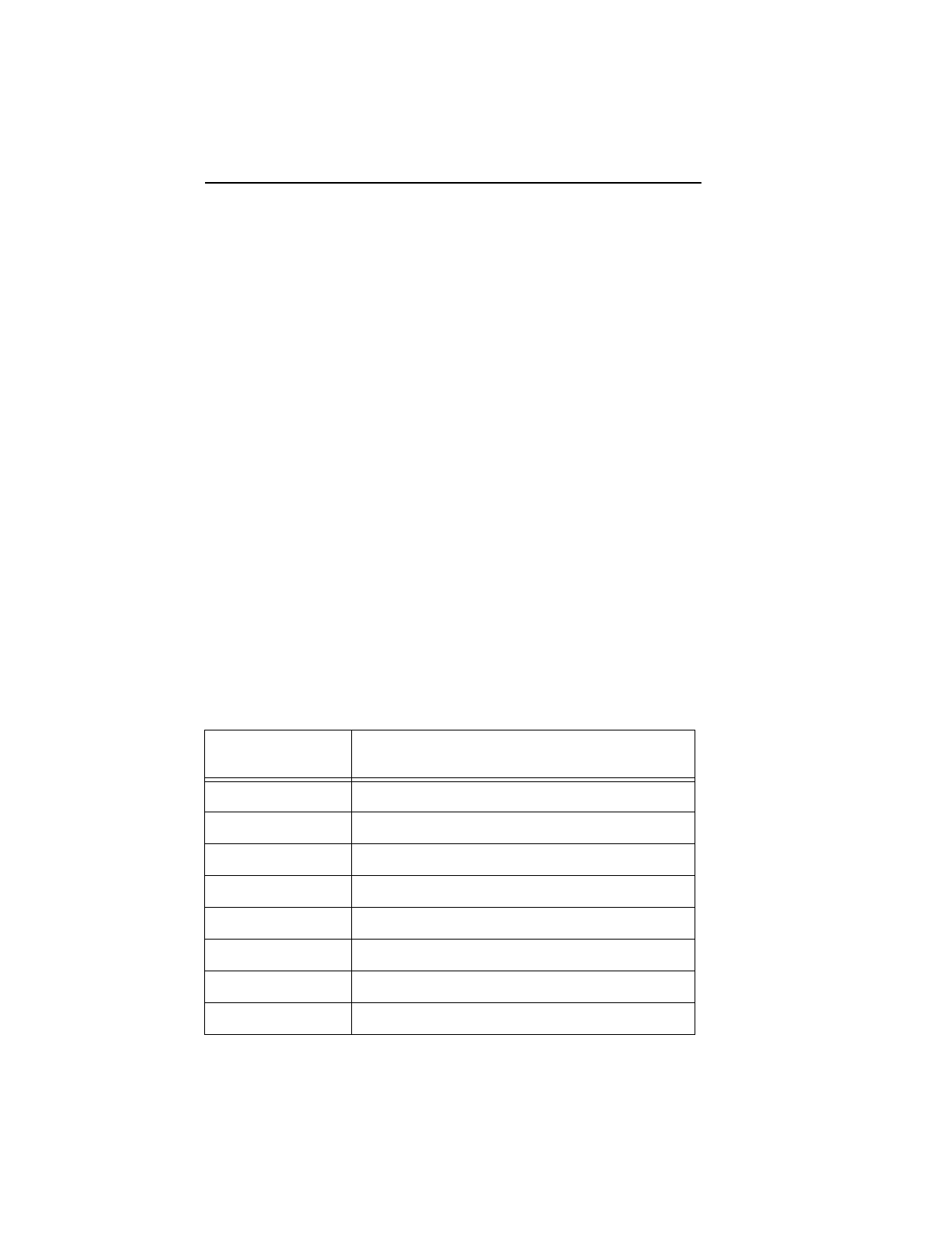
02HEnable write cache
(default).
03HSet transfer mode (based on value in Sector Count register).
Sector Count register values:
00HSet PIO mode to default (PIO mode 2).
01HSet PIO mode to default and disable IORDY
(PIO mode 2).
08HPIO mode 0
09HPIO mode 1
0AHPIO mode 2
0BHPIO mode 3
0CHPIO mode 4
(default)
20HMultiword DMA mode 0
21HMultiword DMA mode 1
22HMultiword DMA mode 2
40HUltra DMA mode 0
41HUltra DMA mode 1
30 U10 Family Product Manual, Rev. A
Note. At power-on, or after a hardware or software reset, the default
values of the features are as indicated above.
3.1.4 S.M.A.R.T. commands
S.M.A.R.T. provides near-term failure prediction for disc drives. When
S.M.A.R.T. is enabled, the drive monitors predetermined drive attributes
that are susceptible to degradation over time. If self-monitoring determines
that a failure is likely, S.M.A.R.T. makes a status report available to the
host. Not all failures are predictable. S.M.A.R.T. predictability is limited to
the attributes the drive can monitor. For more information on S.M.A.R.T.
commands and implementation, see the
Draft
ATA-5 Standard.
This drive is shipped with S.M.A.R.T. features disabled. You must have
a recent BIOS or software package that supports S.M.A.R.T. to enable
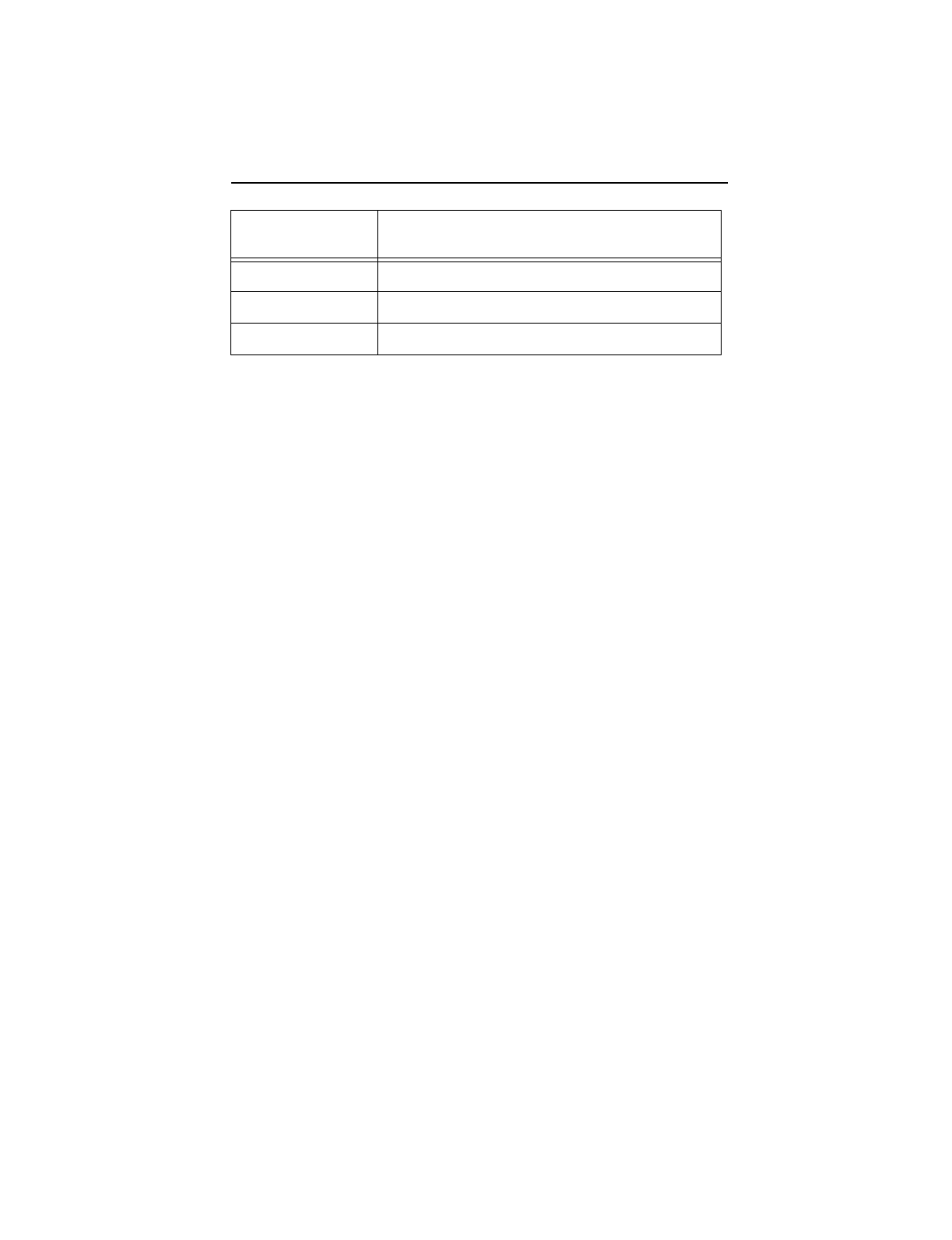
this feature. The table below shows the S.M.A.R.T. command codes that
the drive uses.
42HUltra DMA mode 2
43HUltra DMA mode 3
44HUltra DMA mode 4
05HEnable advanced power management.
55HDisable read look-ahead (read cache) feature.
82HDisable write cache.
AAHEnable read look-ahead (read cache) feature
(default).
Code in Features
Register S.M.A.R.T. Command
D0HS.M.A.R.T. Read Data
D1HObsolete
D2HS.M.A.R.T. Enable/Disable Attribute Autosave
D3HS.M.A.R.T. Save Attribute Values
D4HS.M.A.R.T. Execute Off-line Immediate
D5HS.M.A.R.T. Read Log Sector
D6HS.M.A.R.T. Write Log Sector
D7HObsolete
U10 Family Product Manual, Rev. A 31
Note. If an appropriate code is not written to the Features Register, the
command is aborted and 0x04 (abort) is written to the Error
register.
D8HS.M.A.R.T. Enable Operations
D9HS.M.A.R.T. Disable Operations
DAHS.M.A.R.T. Return Status
Code in Features
Register S.M.A.R.T. Command

32 U10 Family Product Manual, Rev. A

U10 Family Product Manual, Rev. A 33
34 U10 Family Product Manual, Rev. A
Seagate Technology, Inc.
920 Disc Drive, Scotts Valley, California 95066, USA
Publication Number: SG35336-001, Rev. A, Printed in USA
