Humaneyes Technologies HETVZ-P VUZE+ Camera User Manual
Humaneyes Technologies Ltd. VUZE+ Camera
Contents
- 1. User Manual
- 2. Users Manual
User Manual
Table of Content
Proprietary. Humaneyes Technologies 1
3D 360 VR Camera
User Manual

Table of Content
2 Proprietary. Humaneyes Technologies
Table of Content
Table of Content .............................................................................................. 2
ENGLISH ...................................................................................................................... 3
Safety ............................................................................................................... 4
Package Contents ........................................................................................... 7
Description ...................................................................................................... 8
Operation ....................................................................................................... 10
Indications ..................................................................................................... 15
Capturing with Your Camera ....................................................................... 16
Specifications ................................................................................................ 18
Warranty ........................................................................................................ 19
Regulations and Disposal ............................................................................ 22
ENGLISH
Proprietary. Humaneyes Technologies 3
ENGLISH
Welcome,
Humaneyes VR Camera is a 3D 360 VR camera – it captures full spherical videos and photos in stereoscopic
3D. The footage is stitched to a spherical format using proprietary stitching technology developed for use
with the camera.
The camera is provided together with Vuze Camera App and Humaneyes VR Studio.
Vuze Camera App is designed to control the camera remotely and manage media stored on the internal SD
card.
Humaneyes VR Studio edits captured media using spherical editing tools and renders and stitches media
using proprietary stitching technology.
Support and Contact Information
Should you have technical issues concerning the camera please contact us directly:
Humaneyes Technologies
Email to: support@vuze.camera
www.vuze.camera
Proprietary. Humaneyes Technologies
Safety
4 Proprietary. Humaneyes Technologies
Safety
Please read the following safety information before using your camera. Attention to these warnings will help
prevent personal injuries and damage to the product.
This camera should be used in a responsible manner for its intended purpose. Humaneyes Technologies
shall not assume responsibility for damages caused by disregarding these safety guidelines.
Before use, please check there are no signs of damage to the camera. If the camera appears damaged, do
not operate it and contact customer service at www.vuze.camera/contact/
The basic safety instructions and the product documentation should be kept in a safe place and passed on
to subsequent users.
The following safety signs and symbols are used in the manual:
Storage, Service, Cleaning and Caring
The camera should be stored at an ambient temperature between -20 to 60 °C (-5 to 140 °F) and relative
humidity under 95%.
Indicates a hazardous situation which, if not avoided, may result in death or injury.
Indicates the possibility of incorrect operation which can result in damage to the product.
Indicates information related to safety or system proper use.
• The camera should be kept out of the reach of children, infants and pets. A strap
or cord wound around a child’s neck may result in asphyxiation.
• Care should be taken of possible loose or broken parts that could cause injury. If
internal components become exposed as a result of damage to the camera do
not touch them and contact customer support immediately.
Safety
Proprietary. Humaneyes Technologies 5
Charger Electrical Safety
We recommend you charge the camera in an ambient temperature from 0° to 30°C
(30 to 85 °F) while the camera is off. We recommend to use the original camera charger under the suggested
operating conditions for optimal charging time.
• When not in use, avoid placing or storing the product in the following places or
under the following conditions:
o Exposed to direct sunlight.
o Inside a car.
o In a humid environment or exposed to dust.
• Before cleaning the camera disconnect it completely from the power supply and
make sure the interface panel cover is closed. Use a soft, non-linting cloth to
clean the product. Never use chemical cleaning agents such as alcohol, acetone
or diluents for cellulose lacquers.
• This camera does not contain any user replaceable or serviceable parts. Do not
take apart or attempt to service the camera yourself. The internal battery is not
user replicable. Never remove the cover or any part of the housing of the camera.
In the event of an equipment malfunction, all repairs must be performed either by
Humaneyes Technologies or by an authorized agent. For service information
contact Humaneye
s Technologies customer support at
www.vuze.camera/contact
• Be careful not to subject the camera to high impact. If the camera was subject to
a fall or other high impact, check the camera carefully for any damage. If any
damage is visible the use of the camera must be stopped immediately.
• This product contains an internal non-replaceable Li-ion polymer battery.
• The following information on electrical safety must be observed, failing to follow these
instructions may lead to electric shock, fire and/or serious personal injury or death.
• Never use the charger if the power cable is damaged. Check the power cable on a
regular basis to ensure that it is in proper operating condition.
• Before charging the camera and plugging the charger into the main power supply,
always ensure that the nominal voltage setting on the charger matches the nominal
voltage of the AC supply network.
• Do not insert the charger plug into electrical outlets that are dusty or dirty. Insert the
plug firmly and all the way into the outlet. Otherwise, sparks that result may lead to fire
and/or injuries.
• Do not insert any metallic or wet objects into the camera interfaces. Only the intended
cable and memory cards should be inserted in the camera interfaces.
Safety
6 Proprietary. Humaneyes Technologies
Operation
The camera operating ambient temperature is 0 to 40 °C (30 to 100 °F) and relative humidity under 95%.
The camera may be operated only under the operating conditions as specified by Humaneyes Technologies.
The camera should not be operated in extreme conditions.
The camera should not be used near dangerous or flammable gasses or in any location where instructed not
to use cameras or connective devices.
When the camera is used for an extended period and/or at high ambient temperature and/or exposed to
direct sunlight it is normal for the camera body to feel warm. Take care when placing the camera on elevated
surfaces and avoid placing it on unstable surfaces.
• Do not overload any outlets, extension cords or connector strips; doing so can cause
a fire or electric shocks.
• Do not insert or remove the plug with wet hands.
• Never remove the cover or any part of the housing of the charger, doing so will expose
circuits and components and can lead to electric shock, injuries, fire or damage to the
product.
• Stop using the camera immediately if it emits smoke or a strange smell, or otherwise
behaves abnormally.
• Avoid overheating the camera. Do not cover or obstruct the airflow around the camera
while operating. Use the camera in ambient temperatures as a
dvised in the
specifications only.
• Do not place the camera on heat-generating surfaces, or near heat emitting devices
or direct flame. Verify that there is sufficient clearance between the product and any
other warm air exhaust.
• Disregarding these guidelines could lead to overheating, possibly resulting in burns or
damage to your camera.
• The camera adheres to the IP64 protection standard and as such is dust tight and
splash proof. This splash protection does not hold if the interface panel cover is open.
If the interface panel cover is open, take extra care to avoid damp environments or
possible liquid penetration and keep clear of dust or other elements that could
penetrate your camera.
• Even when the cover is closed, it is recommended to avoid using the camera in
extremely wet environments.
• If the necessary precautions are not taken you may suffer electric shock or the camera
itself may be damaged, which can also lead to personal injury.
Package Contents
Proprietary. Humaneyes Technologies 7
Package Contents
Check the package contents for damage. If any item is damaged, do not use the
camera and contact support at www.vuze.camera/contact
Description
8 Proprietary. Humaneyes Technologies
Description
3D 360 Camera
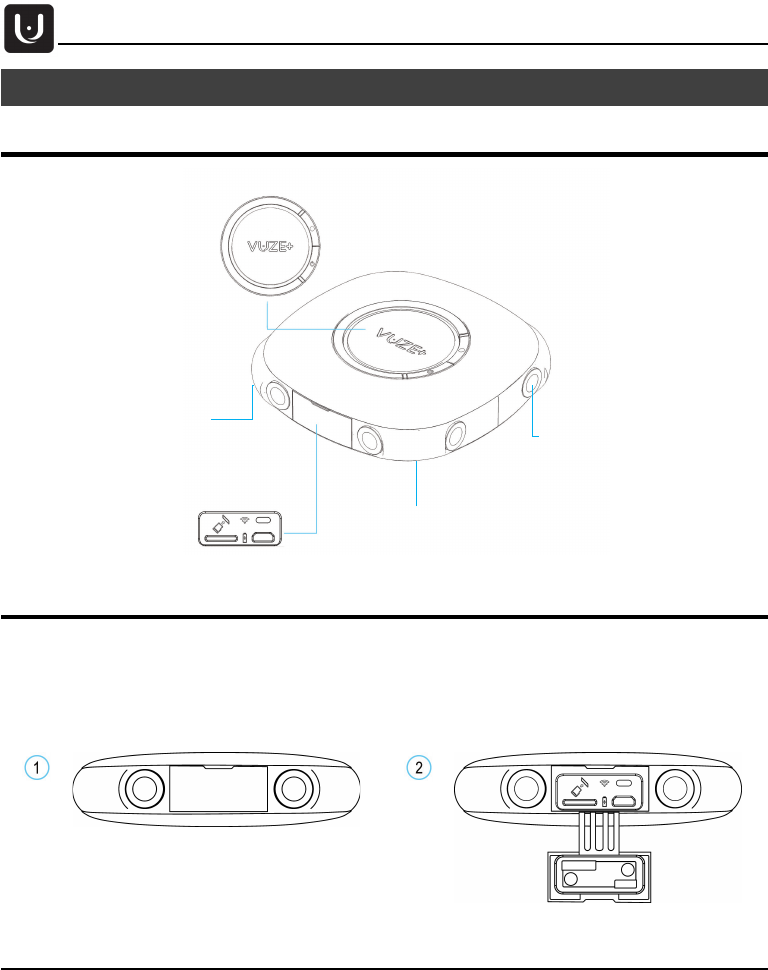
Interface Panel
The camera’s Interface Panel, hidden behind the cover, has various interfaces and indicators. These
interfaces are intended for connection to various external devices.
Open the cover to reveal the interface panel.
Standard ¼”-20
tripod socket
Capture button
On/Off button
Interfaces Panel
Lens x8
Microphone x4
Description
Proprietary. Humaneyes Technologies 9
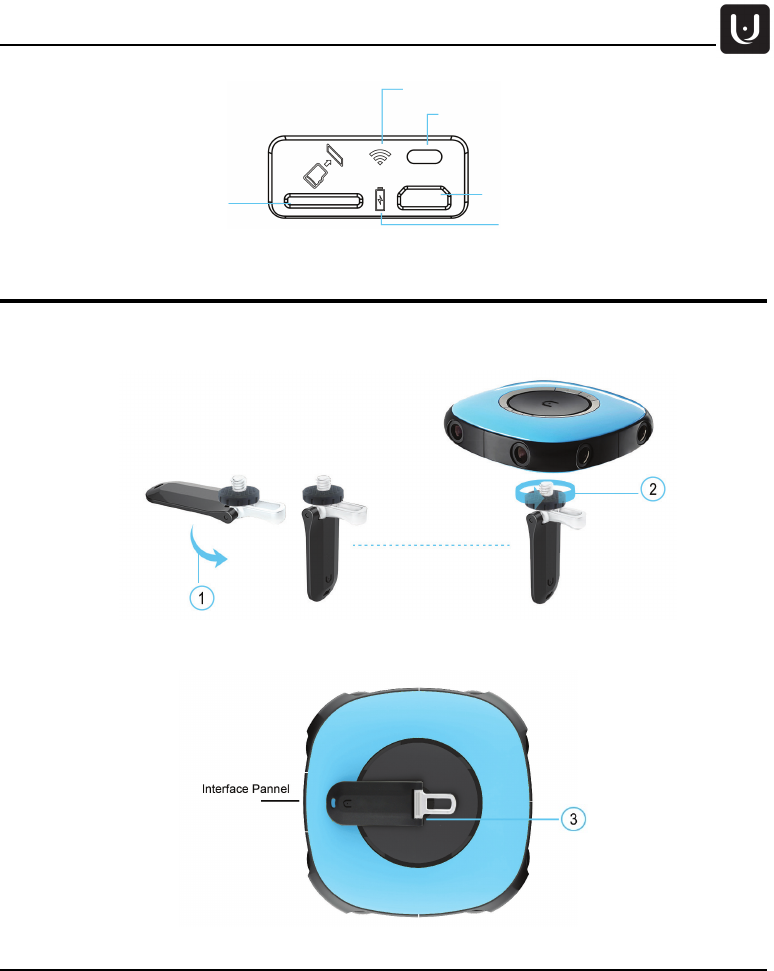
Handle
1. Fold the handle to the open position.
2. Screw the handle to the tripod socket, place the metal finger-support opposite to the interface panel.
Tight the black nut for best stability.
3. For storage and when not in use, fold the handle flat against the camera.
WiFi On/Off button
Micro SD card slot Micro USB interface Charging/PC
Battery charge status LED
WiFi status LED

Operation
10 Proprietary. Humaneyes Technologies
Operation
Before Using Your Camera
Before you use your camera, make sure it is fully charged and the internal clock is synced with the Vuze
Camera App. Please follow the recommendations below:
• The camera should be fully charged before use. Make sure you charge it about 3 hours.
• The camera has an internal clock. This clock affects the time-stamp on the footage captured. Your time
zone will be automatically updated when the Camera is connected to your mobile device through the
Vuze Camera App. To ensure the correct time zone connect your camera to the Vuze Camera App as
instructed below.
Power On / Off
• On – Press the On/Off button. You will hear 3 beeps and the indication light will blink.
• Off - Press the On/Off button for 2 seconds. You will hear 3 beeps and the indication light will blink.
Operation Modes
You can use the camera for recording videos and for taking photos.
The LED
color of the On/Off button indicates the operation mode, as follows:
Video Mode
Photo Mode
Streaming mode
To change between modes press the On/Off button. Two beeps will confirm the change and the On/Off
button will blink twice and change color
.
Capture
•
Start / Stop Video – Press Capture button (in Video Mode). You will hear a single beep when
beginning and two beeps when ending a recording.
When switching between operation modes the camera must be in standby mode.
Camera will switch automatically to streaming mode when plugged to a computer using
USB cable.
Operation
Proprietary. Humaneyes Technologies 11
• Take a Photo – Press Capture button (in Photo mode). You will hear a single beep before and after
and the indication light will blink once.
Please make sure that the camera lenses are clean before recording videos or taking
photos.
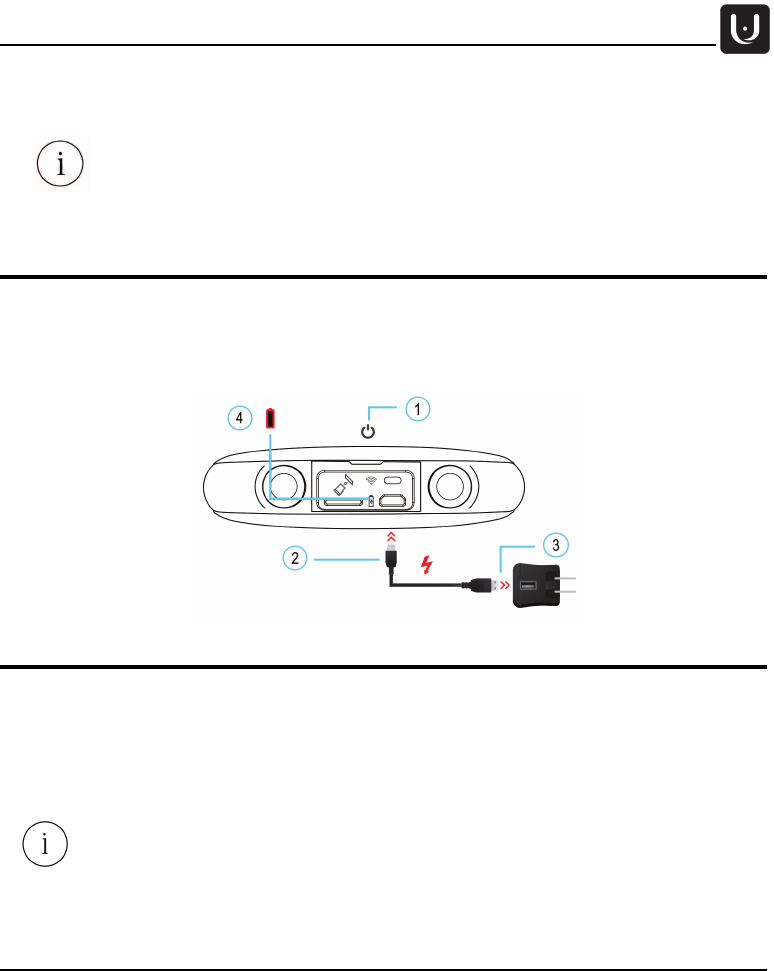
Charging the Camera
1. Turn off the camera.
2. Connect the USB cable to the Micro USB camera interface.
3. Connect the other end of the cable to the charger.
4. Plug the charger into an electrical outlet. Charging indication appears. It should take about 3 hours to
fully charge your camera.
Using the Camera with an External Power Source
To extend battery life, you can use an external power bank while capturing with your camera. Note that you
need to hide the power bank under your camera to avoid interfering with the cameras field of view.
1. Connect the USB cable to the Micro USB camera interface.
2. Connect the other end of the cable to the external power bank.
3. Turn the camera on.
Use a special USB connector with a folded neck to avoid interference with the recording.
Use high power USB hub for charging and live streaming simultaneously.
Operation
12 Proprietary. Humaneyes Technologies
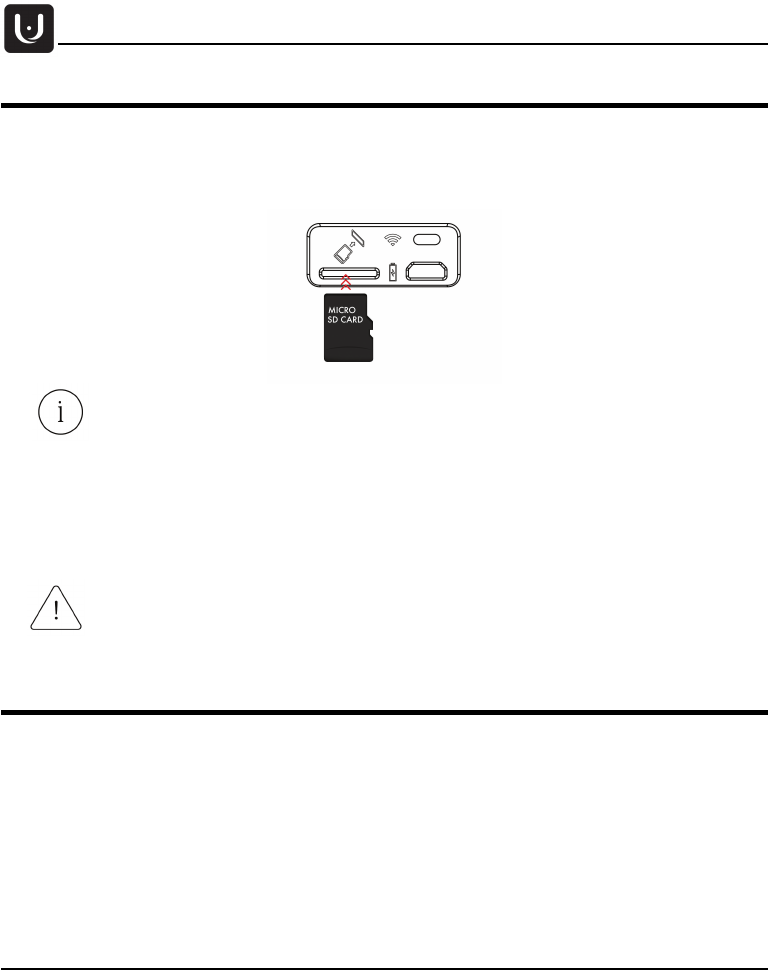
SD Card Replacement
• Insert the SD card into the micro SD slot and press it into place.
• To remove the card, press on it and then remove it. Place a new SD card into the slot and press
into place.
The camera will support micro SD cards with UHS-I (Ultra High Speed) speed class and
above.
The camera allows two bit rate settings for recording- 120MB and 80MB (set through the
mobile app). When recording at 120MB bit rate we recommend to use UHS-I (U3) – Ultra
High Speed Class with U3 Speed Class Mark. When recording 80MB bit rate we
recommend to use UHS-I (U1) (Ultra High Speed Class with U1 Speed Class Mark) SD
cards.
We tested and validated SD cards types from different vendors. You can find the
recommended SD card list on our website www.vuze.camera/support
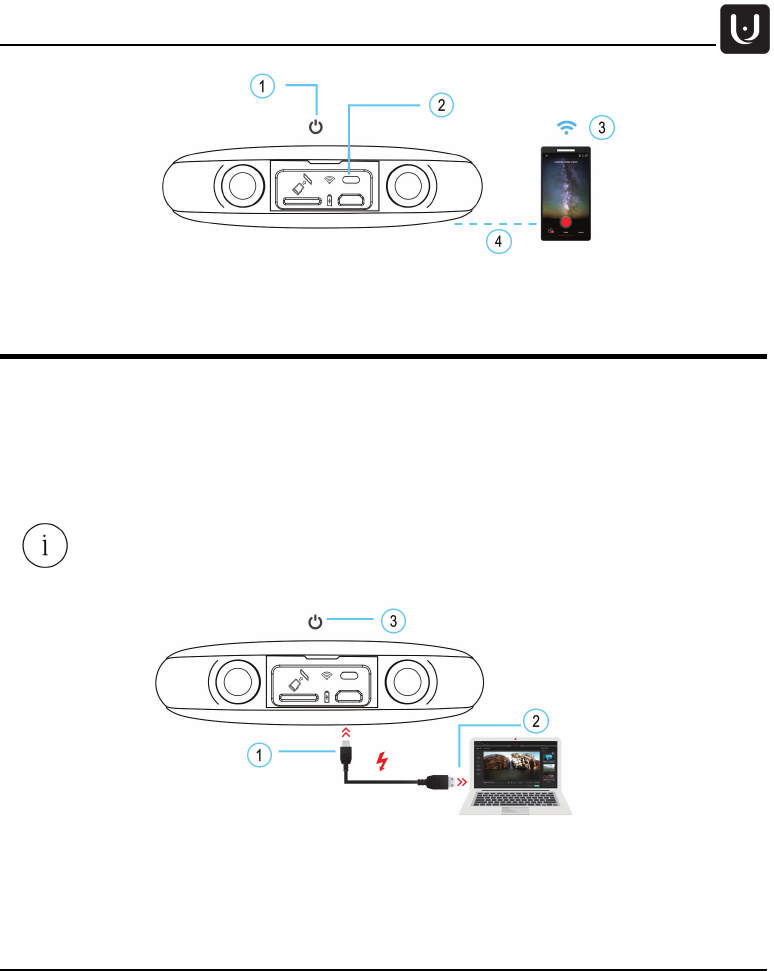
Connect to Vuze Camera App – WiFi On/Off
Vuze Camera App allows you to control your camera remotely using your mobile device. You can download
Vuze Camera App from Google Play or Apple Store and follow the steps below to connect to your camera:
1. Turn the camera on.
2. Push the WiFi button. Blue LED starts to blink.
3. Connect your mobile device to the camera’s WiFi. Your camera’s WiFi SSID is its Serial Number, as
appears on the bottom of the camera. The default password for your WiFi is 12345678. The WiFi name
and password can be changed through the App’s settings after the first connection. Once connected the
blue LED will turn on.
4. Operate the camera via the Vuze Camera App.
Do not remove the SD card while capturing with your camera or while the camera is
connected to a computer.
Operation
Proprietary. Humaneyes Technologies 13
Connect to Computer & Studio
Humaneyes VR Studio allows you to edit the media you capture and generates your VR content. It can be
installed from our website at www.vuze.camera/vr-software . Once you’ve installed Humaneyes VR Studio
connect your camera as follows:
1. Connect the USB cable to the Micro USB camera interface.
2. Connect the other end of the cable to the computer.
3. Turn the camera on.
You can also use Humaneyes VR Studio by removing the SD card from your camera and
inserting it directly into an SD slot in your computer.

Operation
14 Proprietary. Humaneyes Technologies
Camera and WiFi Reset
Press and hold the On/Off button for 16 seconds when the camera is on. This can be used in a situation
where the camera is not responding.
To reset the camera’s WiFi to the default password and SSID press and hold the WiFi button for 3 seconds.
Firmware Upgrade
See our support page for updates regarding Firmware updates. www.vuze.camera/support.
1. Turn the camera off.
2. Download firmware from www.vuze.camera/vr-software
3. Copy the firmware.bin file to the SD card root folder.
4. Insert the SD card into the camera’s micro SD slot and press it into place.
5. Turn the camera on.
6. The camera will boot normally.
7. The Firmware upgrade starts when the orange LED starts to blink.
8. When Firmware upgrade is complete the camera will reboot and go into standby mode.
9. You can check your camera’s firmware version through the Vuze Camera App’s settings.
Indications
Proprietary. Humaneyes Technologies 15
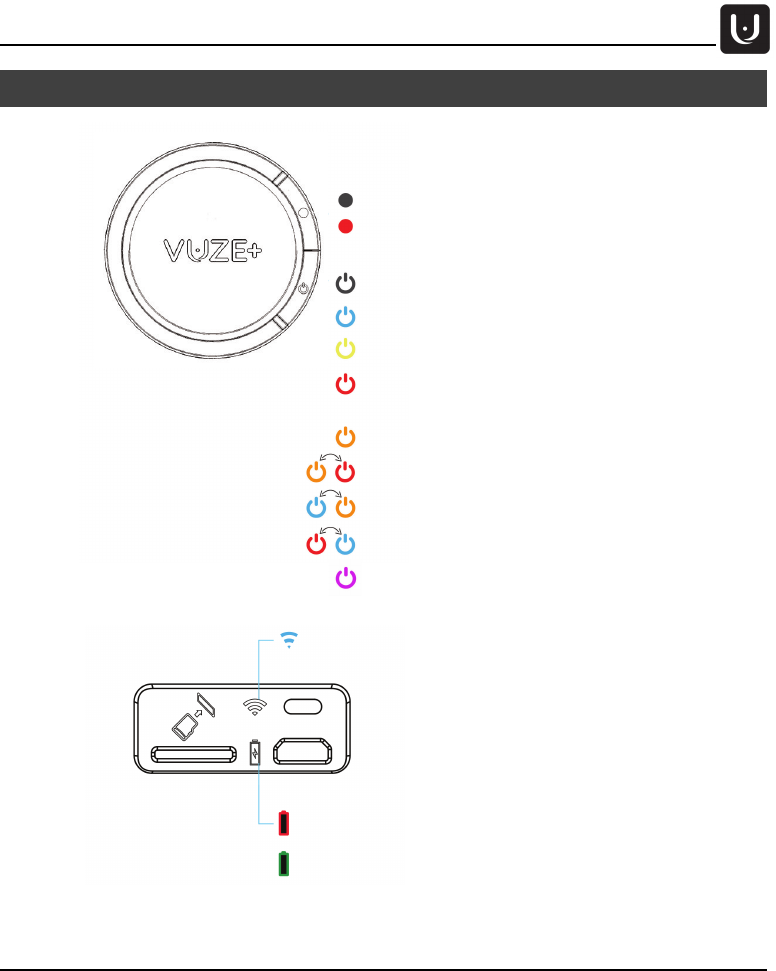
Indications
Battery is charging or connected to power bank
Blinking - Charging error
Battery is charged
Camera is not recording
Blinking – Camera is recording
Single blink – Photo capture
Camera is off
Video mode / Standby, Blinking while booting
Blinking, 4 beeps - Memory full / No memory card
Alternating, 3 beeps - High temperature
Alternating - Low memory
Alternating - Low battery
Photo mode / Standby
Critical error!
4 blinks and beeps – Battery empty
On – WiFi is connected
Blinking – WiFi is on but not connected
Purple – Live streaming
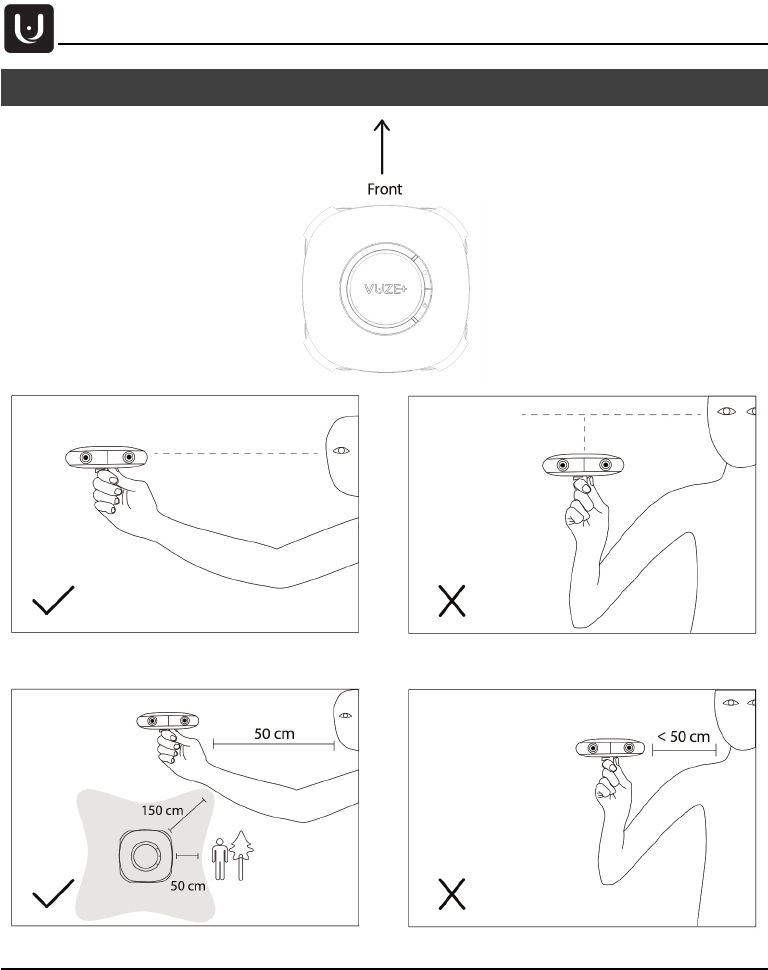
Capturing with Your Camera
16 Proprietary. Humaneyes Technologies
Capturing with Your Camera
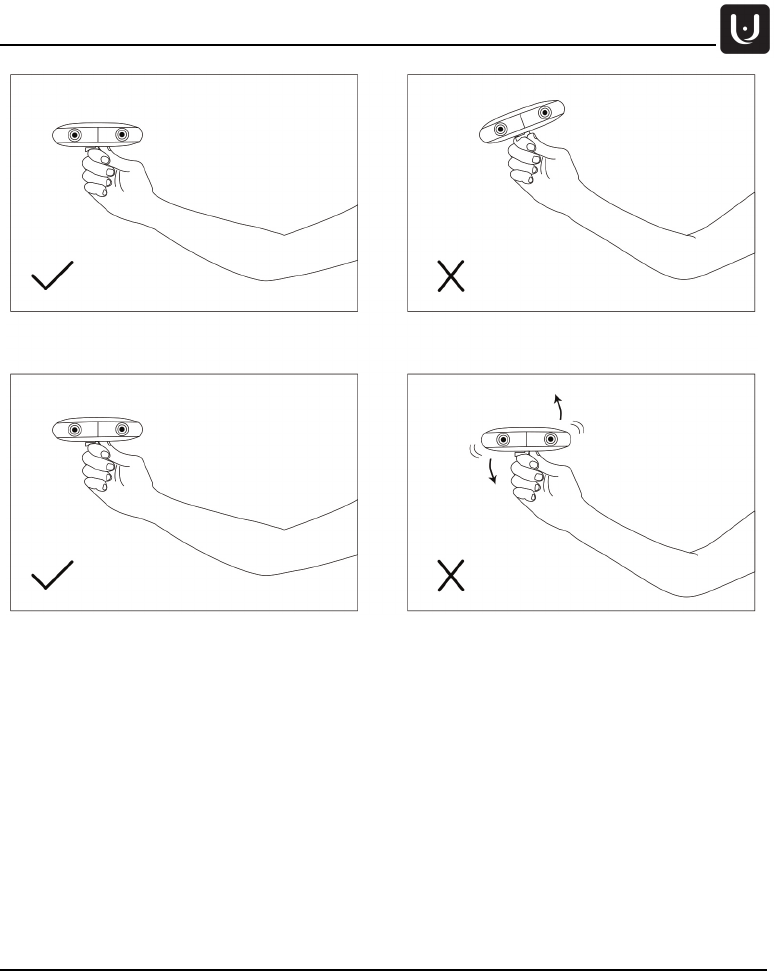
Capturing with Your Camera
Proprietary. Humaneyes Technologies 17

Specifications
18 Proprietary. Humaneyes Technologies
Specifications
Optics
Sensors
8 Sony FHD image sensors imx408
Lenses (Lens modules)
8x F/2.4 fisheye lenses
Media FOV
360⁰x180⁰ (Full Spherical)
ISO
100-1600
Operation
Processors
Two Ambarella A9 video processors
Controls
One button operation, remote-control mobile application
Indications
Colorful LED indications
IP rating
IP65 (Dust tight, water resistant)
Operating temperature
0 - 40⁰C
Operating Humidity
Under 95% RH
Battery type
Li-ion 3,700 mAh (3.8V)
Battery life
About 2 hours operation
Motion tracking
Inertial measurement units (IMU): Accelerometer, Gyroscope, Compass
WiFi
IEEE 802.11b/g/n 2.4 GHZ
Bluetooth
Version 2.1 + EDR (Class1), 2.4GHz
USB port
USB 2 (for charging and data connection)
Memory
Replaceable Micro SD card, compatible with UHS 1 and above.
Video/Image
Spherical Resolution
4K (per eye)
Frame rate
30 fps 3D – 60 fps 2D
Bit rate
120 MB/sec or 80MB/sec (configurable by app)
360 Video Format
mp4
Video Compression
H.264
360 Photo Format
JPEG
Audio
Microphones
Four MEMS 48Hz microphones
Format
Four ACC or PCM audio tracks depending on firmware version
General
Camera weight
~ 450 g
Camera dimensions
~ 120x120x30 mm
Package dimensions
240x160x60 mm
Camera colors
Black
Camera model
HETVZ-P
Included Accessories
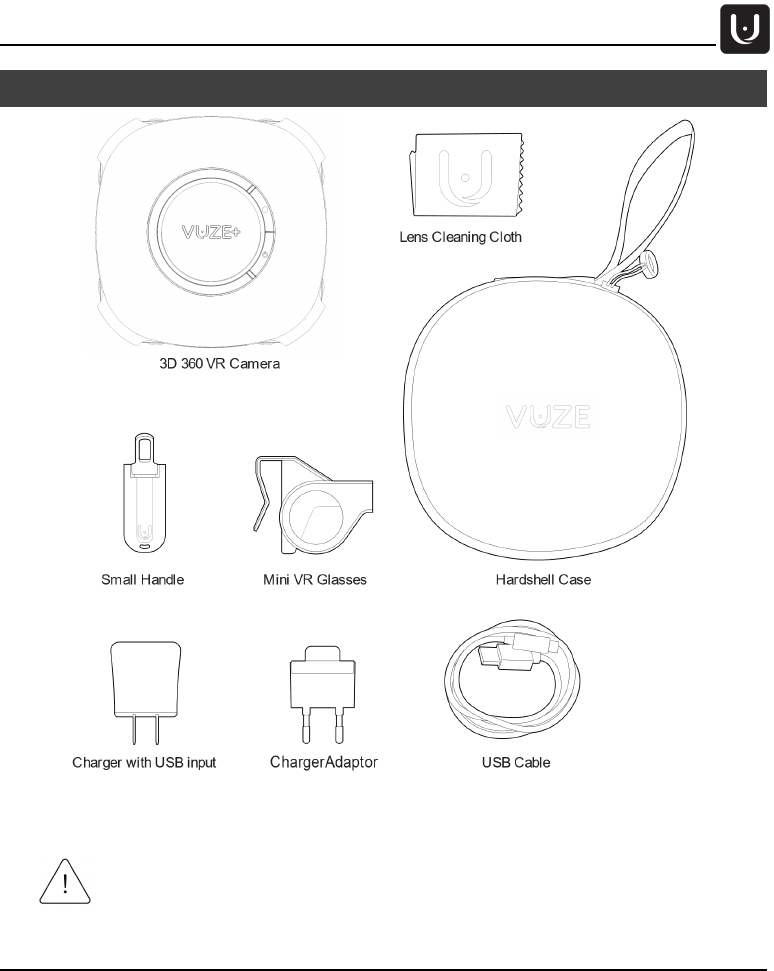
Hardshell case, Mini-handle, Mini glasses, USB cable, Power adaptor
(model KSA29B0500200D5), Lens cleaning cloth

Warranty
Proprietary. Humaneyes Technologies 19
Warranty
THE CAMERA LIMITED CONSUMER WARRANTY
Who is this Warranty from? This limited consumer warranty (herein the “Warranty”) is granted by
Humaneyes Technologies Ltd. (herein the “Company,” “Us,” or “We”).
What are the products as defined in this Warranty? The Product/s refers to any new hardware devices
purchased from Us, directly or through our authorized distribution channels.
Who is this Warranty to? This Warranty is issued to You as an original purchaser (herein “You”) of a new
Product from the Company or an authorized retailer. This Warranty cannot be transferred or reassigned to
any other user.
What does this Warranty do? This Warranty gives You specific legal rights in case there is a problem with
the Product. You may have additional rights based on Your location. This Warranty does not affect any
rights you have under the laws in your jurisdiction regarding the sale of consumer goods. By using Your
Product, You are agreeing to the terms of this Warranty. If You do not agree to these terms, please do not
use the Product.
What does this Warranty cover? This Warranty covers the Products in the event of defects in materials
and workmanship when the Products are used normally and for their intended use in accordance with
Company's published guidelines. The Company’s published guidelines include but are not limited to
information contained in technical specifications, user manuals and service communications.
How long does this Warranty last? This Warranty lasts for period of ONE (1) YEAR from the date of Your
original date of purchase (the “Warranty Period”). Your location may provide You a longer period of
protection.
What will We do if there is a problem that is covered under this Warranty? If during the Warranty Period
You submit a claim to the Company, the Company may, at its option, subject to applicable law, either: (i)
repair the Product using new or previously used parts that are equivalent to new in performance and reliability;
(ii) replace the Product with the same model (or with Your consent a product with similar functionality) formed
from new and/or previously used parts that are equivalent to new in performance and reliability; or (iii)
exchange the Product for a refund of the price for which You purchased the Product (Collectively herein, the
"Warranty Service".)
What do You have to do prior to requesting Warranty Service?
Subject to the Terms of Use of the Product available at http://vuze.camera/terms-of-use/, You are required
to register the Product in Our system following your purchase of certain Products (herein the "Registration").
This Registration must be completed before You can make a Warranty claim and receive the Warranty
Service. Additionally please note that Your order number serves also as Your warranty number for the
Product and it is Your responsibility to retain this number.
Before Submitting a Warranty claim the first thing You should do if You suspect a problem is contact Us
through Our Customer Support Team at http://vuze.camera/contact/ to see if We can help You.

Warranty
20 Proprietary. Humaneyes Technologies
How can You claim this Warranty and how will the Company provide the Warranty Service?
After a Warranty claim is made, the Company will provide the Warranty Service, subject to applicable law
and the Company policy, as follows: Our Customer Support Team will instruct You on how and where to
return Your Product. The Company may send You waybills and if applicable, packaging material and
instructions on how to properly pack and address the Product, so that You may ship the Product to an
authorized service provider location. Instructions may be sent via email or in hard copy with the packaging
material. Once the Warranty Service is complete, the authorized service provider will return a repaired or
replacement Product, or refund therefor, to You.
NOTE: Before returning or replacing any Product or part of a Product for Warranty Service, be sure to back
up all data and remove any confidential, proprietary information from the Product's memory. It is likely that
during the repair process the contents of the Product will be completely erased and We are not responsible
for damage to or loss of any data, images and/or personal information that may be stored on the Product.
How long is the Warranty following repair or replacement of a Product?
A replacement part installed by the Company, assumes the remaining term of the Limited Warranty or ninety
(90) days from the date of replacement or repair, whichever provides longer coverage. When a part is
replaced or a refund provided, any replacement item becomes the Customer’s property and the replaced or
refunded item becomes the Company's property.
The Company reserves the right to change the method by which We may provide the Warranty Service.
Warranty Service will be limited and subject to, and adjusted per, the options available by law in the country
where service is requested. Warranty Service options, parts availability and response times may vary
according to country. You may be responsible for shipping and handling charges if the Product cannot be
serviced in the country it is in. If You seek Warranty Service in a country that is not the original country of
purchase, You will comply with all applicable import and export laws and regulations and be responsible for
all custom duties, V.A.T. and other associated taxes and charges. Where international service is available,
the Company may repair or replace parts with comparable parts that comply with local standards.
What does this Warranty not cover? To the extent permitted by applicable law, this Warranty does not
apply: (a) to software (including but not limited to online software and mobile apps) and accessories (b) to
consumable parts, such as batteries or protective coatings that are designed to diminish over time, unless
failure has occurred due to a defect in materials or workmanship; (c) to cosmetic damage, including but not
limited to scratches, dents and broken plastic on ports unless failure has occurred due to a defect in materials
or workmanship; (d) to damage caused by use with a third party component or product that does not meet
the Product’s specifications; (e) to damage caused by accident, abuse, misuse, neglect, improper shipping
or installation, fire, earthquake or other external cause; (f) to damage caused by operating the Product
through irresponsible or improper use, including not in accordance with the Company’s published guidelines
or any non-recommended practices; (g) to damage caused by service (including upgrades and expansions)
performed by anyone who is not a representative of the Company or an authorized service provider; (h) to
a Product that has been modified to alter functionality or capability without the written permission of the
Company; (i) to defects caused by normal wear and tear or otherwise due to the normal aging of the Product;
(j) if any serial number has been removed or defaced from the Product; or (k) if the Company receives
information from relevant public authorities that the Product has been stolen.

Warranty
Proprietary. Humaneyes Technologies 21
Limitation of Liability. THE COMPANY DOES NOT ACCEPT ANY LIABILITY BEYOND THE REMEDIES
SET FORTH HEREIN, INCLUDING BUT NOT LIMITED TO ANY LIABILITY FOR A PRODUCT NOT BEING
AVAILABLE FOR USE, LOST PROFITS, LOSS OF BUSINESS OR FOR LOST OR CORRUPTED DATA
OR SOFTWARE, OR THE PROVISION OF SERVICES AND SUPPORT. EXCEPT AS EXPRESSLY
PROVIDED HEREIN, THE COMPANY WILL NOT BE LIABLE FOR ANY CONSEQUENTIAL, SPECIAL,
INDIRECT OR PUNITIVE DAMAGES, EVEN IF ADVISED OF THE POSSIBILITY OF SUCH DAMAGES OR
FOR ANY CLAIM BY ANY THIRD PARTY. THE CUSTOMER AGREES THAT FOR ANY LIABILITY
RELATED TO THE PURCHASE OF A PRODUCT, THE COMPANY IS NOT LIABLE OR RESPONSIBLE
FOR ANY AMOUNT OF DAMAGES ABOVE THE AMOUNT INVOICED FOR THE APPLICABLE PRODUCT.
SOME JURISDICTIONS MAY NOT ENFORCE ALL OF THESE LIMITATIONS, AND ONLY THE
LIMITATIONS THAT ARE LAWFULLY APPLIED TO THE CUSTOMER IN HIS/HER JURISDICTION WILL
APPLY.
What additional terms govern this Warranty?
Additional terms may be provided on our website at vuze.camera, including in our terms of service, terms of
sale and EULA.
What laws govern this Warranty? To the extent permitted by applicable law, the terms of this Warranty
shall be construed in accordance with and governed for all purposes by the substantive laws of the State of
Israel without regard to conflicts of law provisions.
How can You contact Us to request Support?
In addition to our online Customer Support form at www.vuze.camera/contact, you may also contact Our
Customer Support team at: support@vuze.camera.

Regulations and Disposal
22 Proprietary. Humaneyes Technologies
Regulations and Disposal
The Camera contains components which should not be treated as household waste. For more detailed
information about recycling of this product see: www.vuze.camera/support
Federal Communications Commission Declaration of
Conformity
This equipment has been tested and found to comply with the limits for a Class B digital device, pursuant to
part 15 of the FCC Rules. These limits are designed to provide reasonable protection against harmful
interference in a residential installation. This equipment generates, uses and can radiate radio frequency
energy and, if not installed and used in accordance with the instructions, may cause harmful interference to
radio communications. However, there is no guarantee that interference will not occur in a particular
installation. If this equipment does cause harmful interference to radio or television reception, which can be
determined by turning the equipment off and on, the user is encouraged to try to correct the interference by
one or more of the following measures:
• Reorient or relocate the receiving antenna.
• Increase the separation between the equipment and receiver.
• Connect the equipment into an outlet on a circuit different from that to which the receiver is connected.
• Consult the dealer or an experienced radio/ TV technician for help.
CAUTION:
Any changes or modifications not expressly approved by the grantee of this device could void the user's
authority to operate the equipment.
This device complies with Part 15 of the FCC Rules. Operation is subject to the following two conditions:
(1) this device may not cause harmful interference, and
(2) this device must accept any interference received, including interference that may cause undesired
operation.
RF Exposure Information (SAR)
This device meets the government’s requirements for exposure to radio waves. This device is designed and
manufactured not to exceed the emission limits for exposure to radio frequency (RF) energy set by the
Federal Communications Commission of the U.S. Government.
The exposure standard employs a unit of measurement known as the Specific Absorption Rate, or SAR. The
SAR limit set by the FCC is 1.6 W/kg. Tests for SAR are conducted using standard operating positions
accepted by the FCC with the EUT transmitting at the specified power level in different channels.
The FCC has granted an Equipment Authorization for this device with all reported SAR levels evaluated as
in compliance with the FCC RF exposure guidelines. SAR information on this device is on file with the FCC

Regulations and Disposal
Proprietary. Humaneyes Technologies 23
and can be found under the Display Grant section of www.fcc.gov/eot/ea/fccid after searching on FCC ID:
2AKDRHETVZ-P
Canada, Industry Canada (IC) Notices
This device complies with Industry Canada’s license-exempt RSSs. Operation is subject to the following
two conditions:
(1) This device may not cause interference; and
(2) This device must accept any interference, including interference that may cause undesired operation
of the device.
Canada, avis d'Industry Canada (IC)
Le présent appareil est conforme aux CNR d'Industrie Canada applicables aux appareils radio exempts de
licence. L'exploitation est autorisée aux deux conditions suivantes :
(1) l'appareil ne doit pas produire de brouillage, et
(2) l'utilisateur de l'appareil doit accepter tout brouillage radioélectrique subi, même si le brouillage est
susceptible d'en compromettre le fonctionnement
Radio Frequency (RF) Exposure Information
The radiated output power of the Wireless Device is below the Industry Canada (IC) radio frequency
exposure limits. The Wireless Device should be used in such a manner such that the potential for human
contact during normal operation is minimized.
This device has been evaluated for and shown compliant with the IC Specific Absorption Rate (“SAR”)
limits when operated in portable exposure conditions.
Informations concernant l'exposition aux fréquences
radio (RF)
La puissance de sortie émise par l’appareil de sans fil est inférieure à la limite d'exposition aux fréquences
radio d'Industry Canada (IC). Utilisez l’appareil de sans fil de façon à minimiser les contacts humains lors
du fonctionnement normal.
Ce dispositif a été évalué pour et démontré conforme à la Taux IC d'absorption spécifique ("SAR") des
limites lorsqu'il est utilisé dans des conditions d'exposition portatifs
For more information regarding regulation compliance and certification see:
www.vuze.camera/support
Hereby, Humaneyes Technologies Ltd. declares that this 3D 360 VR camera is in compliance with the
essential requirements and other relevant provisions of Directive 1999/5/EC.

October 16, 2017
DOC00004A Rev_A01