HySky Communications HS-100101 Intelligent Transceiver Unit User Manual FCC Part 15
HySky Communications, LLC Intelligent Transceiver Unit FCC Part 15
Manual

5015 B.U. Bowman Drive Buford, GA 30518 USA Voice: 770-831-8048 Fax: 770-831-8598
Certification Exhibit
FCC ID: W6E-HS-100101
FCC Rule Part: Part 90, DA-02-545
ACS Report Number: 09-0058 - LD
Manufacturer: HySky Communications
Model: AD20-100101
Manual

Intelligent Transceiver Unit (ITU)
Quick Start Guide
DC10-100101 Rev 4

Intelligent Transceiver Unit – Quick Start Guide
AGENCYCERTIFICATIONS
FCC Certification
NOTE: This equipment has been tested and found to comply with the limits for a Class B
digital device, pursuant to Part 15 of the FCC Rules. These limits are designed to provide
reasonable protection against harmful interference in a residential installation. This
equipment generates, uses, and can radiate radio frequency energy and, if not
installed and used in accordance with the instructions, may cause harmful interference
to radio communications. However, there is no guarantee that interference will not
occur
in a particular installation. If this equipment does cause harmful interference to radio or
television reception, which can be determined by turning the equipment off and on,
the user is encouraged to try to correct the interference by one or more of the following
measures:
• Reorient or relocate the receiving antenna.
• Increase the separation between the equipment and receiver.
• Connect the equipment into an outlet on a circuit different from that to which
the receiver is connected.
• Consult the dealer or an experienced radio/TV technician for help.
Warnings:
1. Changes or modifications to this device not expressly approved by HySky
Communications could void the user’s authority to operate the equipment.
2. The ITU may only be used with antennas that have been tested and approved for
use. Changes or modifications to supplied antenna(s) not expressly approved by HySky
Communications could void the user’s authority to operate the equipment. Contact
HySky Communications for a list of approved equipment.
2 HySky Communications

Intelligent Transceiver Unit – Quick Start Guide
ZIGBEEOPTION
The ITU has the option of being supplied with a Zigbee transceiver module. This module
is pre-certified by the manufacturer for FCC compliance. The FCC ID’s for the two
options are:
1. Zigbee low power option - FCC ID:OUR-XBEE2
2. Zigbee high power option - FCC ID: MCQ-XBEEPRO2
You will find the FCC ID of the Zigbee module (if so equipped) located at the top of the
FCC Part 15 compliance sticker.
Warning
The Zigbee modules may only be used with antennas that have been tested and
approved for use. Changes or modifications to supplied antenna(s) not expressly
approved by HySky Communications could void the user’s authority to operate the
equipment. Contact HySky Communications for a list of approved equipment.
3 HySky Communications
Intelligent Transceiver Unit – Quick Start Guide
Getting Started
The HySky Intelligent Transceiver Unit (ITU) is a sophisticated two-way communication
device that is designed to be easily setup and simple to operate. This guide provides
step-by-step instructions for the initial setup. This one-time operation only needs to be
performed when the unit is first installed at a new site.
Parts List
Ensure that you have all the required parts listed below before installation begins:
Intelligent Transceiver Unit (1)
DC Power Cable (1)
GPS Antenna/Cable (1)
RF Antenna/Cable (1)
RF Antenna Mounting Bracket (1)
Installation Software (ITUCharacterization.exe)
In addition to the parts supplied, you will need a PC with Windows XP (or later) and a
standard serial cable (9-pin).
Installation and Configuration
Install the ITU, antennas, and power supply at the site as needed. Ensure access to the
serial port connection on the ITU is available when installed. Once installed, follow the
steps below:
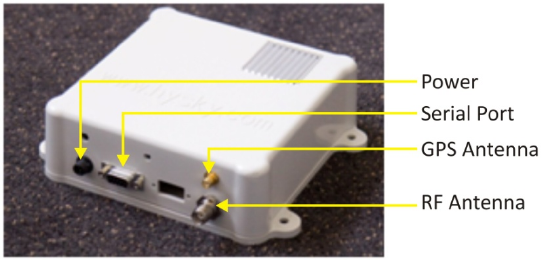
1. Connect the GPS antenna cable
2. Connect RF Antenna cable
3. Connect the Power Cable (power needs to be provided before the next step)
4. Connect the Serial Cable attached to the PC
5. Run the ITU Characterization application on the PC (see Configuration section
below)
4 HySky Communications
Intelligent Transceiver Unit – Quick Start Guide
Figure 1 – Connection Ports
5 HySky Communications
Intelligent Transceiver Unit – Quick Start Guide
Configuration
Configuration of the ITU optimization the performance of the unit and needs to be
performed once whenever the unit is moved to a new location. The following steps will
complete the installation process and will allow the ITU to operate on the HySky
network:
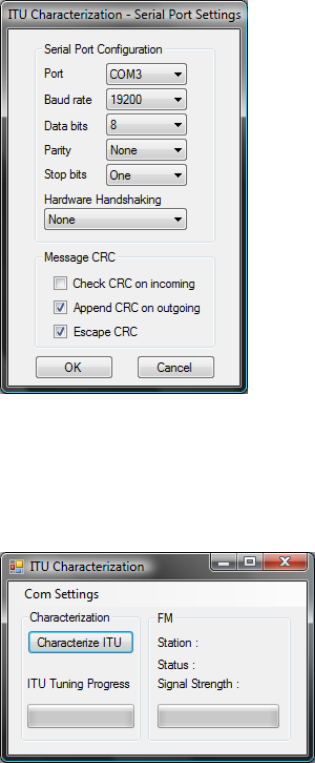
1. Configure the serial port
Click the “Com Settings” button and select COM port that is connected to the
serial cable. All other setting should be configured as displayed below. Once set,
click OK.
2. Characterize the ITU
Click on the “Characterize ITU” button and wait for the ITU Tuning to complete.
During characterization you will hear the ITU chattering. This behavior is normal
and will take approximately one minute to complete.
3. FM Lock
When the characterization is complete, the FM Station section will start scanning
for the best HySky station available. Once found, the Status field will change to
“Locked” and the ITU will begin normal operation.
6 HySky Communications
Intelligent Transceiver Unit – Quick Start Guide
7 HySky Communications
At this point, installation and configuration are complete. Disconnect the PC serial
cable and connect the device to be monitored. This operation only needs to be
performed once per site installation.