I Link Technology I-LINK BLUETOOTH MUSIC RECEIVER User Manual Manual

Shenzhen I-Link Technology Co., Ltd. BLUETOOTH MUSIC RECEIVER Manual

User Manual

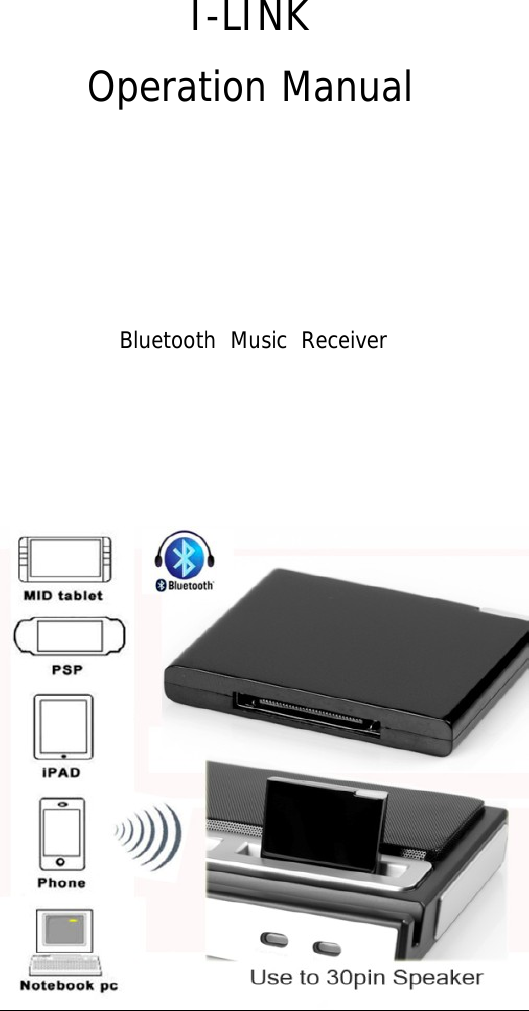
 I-LINK Operation Manual                    Bluetooth  Music  Receiver
 Preface Thank you for the purchase of our products! Please read this manual carefully to get the details how to operate the device correctly. Finally, save it properly for future use!   Notes 1. Keep it far away from high temperature and damp environment; place it in ventilated and dry environment.  Exposure to rain and severe shock is forbidden!  2. Do not open the cover at will in case of electrical shock or any other accidents. For repairs, ask help from maintenance stations of our company or professional personnels.  3. If any metal part or liquor drops into it, switch off the power at once.  It can be used only after examination by professional personnels.  4. Pull it out when you do not use it.   Operation Steps z Logo:I-LINK 1. Bluetooth music receiver connects directly to iPod speaker 30-pin dock, and then the red LED lamp and the blue LED lamp will flicker alternately until they enter paring mode, which means the device starts to work normally. Perform bluetooth paring operations after it is on for 30 seconds. 2. After it enters paring mode, enable the bluetooth function for the devices such as iPad, iPhone, bluetooth PC, cell phone and any other digital products with bluetooth function. Search bluetooth devices or new devices to find      I-LINK and connect it. Password input for paring is needed, and the default password is: 0000.  3. After successful paring, the red LED lamp will turn off and the blue LED lamp will flicker slowly, which means it has been connected already. Then we can play music by player.  4. To change the play device during normal operation, disconnect the connected bluetooth PC and cell phone, and then perform paring connection for other bluetooth devices.  Accessories 1. Bluetooth Music Receiver           1
Technical Specification | Complies with Bluetooth 2.0+EDR | Support A2DP V1.2  | Powered from 30-pin dock | Transmission distance: not less than 10 meters | Dimension:43.5 * 35.5 * 7 mm  | 2 indicators flicker alternately when there is no connection. Blue light flicker slowly  after successful connection
 FCC WARNING  This device complies with Part 15 of the FCC Rules. Operation is subject to the following two conditions: (1) This device may not cause harmful interference, and (2) this device must accept any interference received, including interference that may cause undesired operation.  NOTE 1: Any changes or modifications to this unit not expressly approved by the party responsible for compliance could void the user's authority to operate the equipment.

Navigation menu