IAdea IAD16002 Digital Signage Media Appliance User Manual
IAdea Corporation Digital Signage Media Appliance
IAdea >
User Manual
X
O
H
a
O
P‐73
0
a
rdwa
0
0(IA
reUs
e
D‐16
0
e
rM
a
0
02)
a
nual
i
Contents
XOP‐7300(IAD‐16002)HardwareUserManual0
1.Introduction1
1.1.Features1
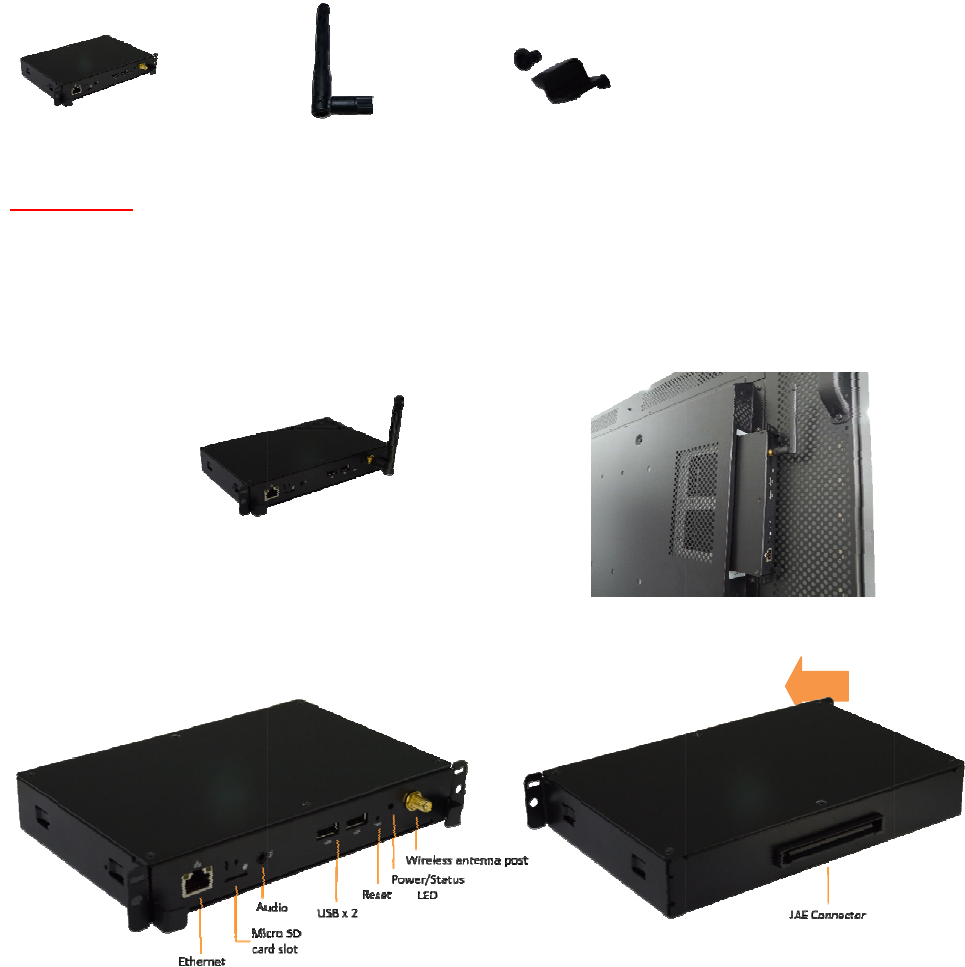
1.2.Packagecontents1
1.3.Mounting1
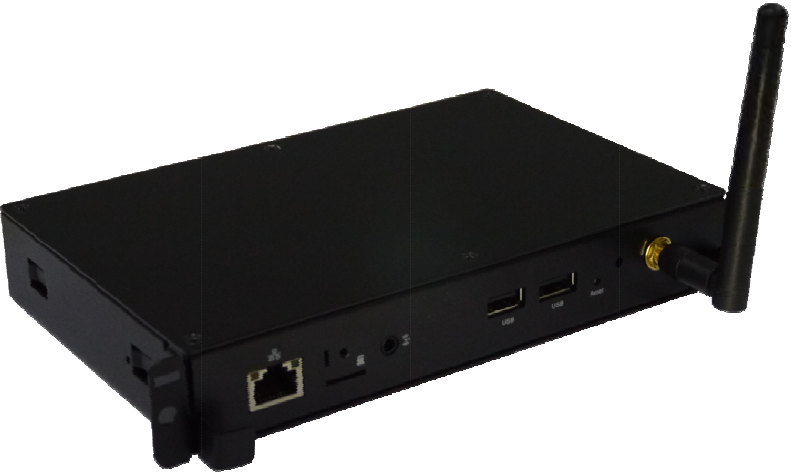
1.4.Physicalview1
1.5.TroubleshootingTips2
2.TechnicalData3
2.1.Specifications3
i
1. Intr
o
Thisd
o
1.1.
P
NOTI
N
1.2.
M
ATTA
C
PLUG
t
secur
e
1.3.
P
Ph
y
Med
o
ductio
n
o
cumentdes
c
P
ackage
c
N
CLUDED
:A
U
M
ountin
g
C
Hthewirele
s
t
heplayerint
e
lypluggedin
P
hysical
v
y
sicalfeatur
Poweran
d
3.5mmco
m
Ethernetp
Wirelessa
MicroSD
c
USBports
f
S/WReset
JAEConne
iaPlayerUnit
n
c
ribesthehar
c
ontents
U
SBmouseis
g
s
santennaas
otheOPSslo
thedisplay.
v
ie
w
es
d
StatusLEDi
n
m
positeAudi
o
p
ortfornetw
o
ntennapost
c
ardslotwith
f
orUSBcont
e
buttontope
ctorfordispl
a
dwarespecifi
requiredfor
s
showninfig
u
tofthemoni
t
n
dicator
o
output
o
rkcontentu
p
SDcardcove
r
e
ntupdatean
rformfactory
a
ymounting
Wi‐FiAnten
n
cationofthe
s
ystemsetup
u
rebelow,scr
e
t
or,andpush
p
date
r
dconfigurati
o
reset
n
a
XOP‐7300(I
A
ewantenna
c
untilitis
o
n
MicroSDcar
A
D‐16002)
c
lockwiseont
o
dcover
o
thepost.
i
1.4. TroubleshootingTips
Theoperationindicatorslightup,butnovideoisdisplayedonscreen
Ensurethatyourplayerissecurelyplugged
Checkifyourmonitoristurned‐on
Nosoundisheard
Checkvolume(mute)settingsonmonitor
CheckaudiosourceofmonitorissettoOPS

i
2. TechnicalData
2.1. Specifications
XOP‐7300(IAD‐16002)
VideoformatsupportH.264/AVCupto2160p@24fps(3840x2160)
MPEG‐4upto1080p@60fps(1920x1080)
MPEG‐2upto1080p@24fps(1920x1080)
MPEG‐1upto1080p@60fps(1920x1080)
VC‐1upto1080p@30fps(1920x1080)
H.265/HEVC:4k@60fps(4096x2160)upto100Mbpsbitrate
ImageformatsupportJPEG
GIF
PNG
BMP
AudiocodecsupportMPEGAudio(MP3)
DynamiccontentW3CHTML5(HTML,CSS,JavaScript)
W3CSMIL3.0instructions(sub‐set)
PhysicalI/OconnectorsJAEConnector
3.5mmaudioout
Wi‐Fiantennaport
RJ45Ethernet
USB2.0
Localstorage8GBeMMC
MicroSDcardexpansionslot
AccessoriesWi‐Fiantenna
MicroSDcardslotbracket/screwx1
PowerrequirementDC12–19V
Powerconsumption*Approximate10.5wattsmax
EnvironmentalOperatingtemperature:0–50°C/32–122°F
Humidity:5–85%@45°C/32–113°Fnon‐condensing
Dimensions180mmx119mmx30mm
(7.08"x4.68"x1.18")
Weight332g(0.73lbs)
CertificationsCE/FCC/IC/RoHS
WarrantyOne‐yearlimitedparts&labor

i
Fi
r
Fir
Me
r
mw
a
mwa
r
diaPl
a
XMP
XOP‐
7
(IAD‐
1
a
re
U
r
ever
s
a
yers:
‐6200
7
300
1
6002)
U
ser
M
s
ion
–
M
M
an
u
–
1.2
M
BR‐110
0
u
al
0
(
XMP‐73
0
(
IAD‐160
0
0
0
0
1)
1
3. Introduction
Thisdocumentdescribesthebasicoperationoftheplayerandfrequentlyaskedquestions.
3.1. Features
ThisisaFullHD1080phighdefinitiondigitalsignageplayerfeaturingindustrialgrademechanicaldesignand
versatileopen‐standardHTML5andSMILprogrammability.
SupportforHTML5widgetsfordynamiccontent(W3CWidgetsstandard)
IndustryleadingW3CSMILsupportfordevelopers
FullHD1080phardwaredecodingofMPEG1/2/4,H.264,andVC‐1mediaformats
SupportsfullPOPAIScreenMediaFormatsStandardsprofilesS1toS12,andE1toE8
Multiple3rdpartysoftwaresolutioncompatibility
4. ConfiguringthePlayer
4.1. Systemconnections
Ifitisamediaplayer,connectittoamonitorviaanHDMIcable.
Ifitisasignboard(withbuilt‐inscreen),nomonitorisrequired.However,asignboardplayercanstillbe
connectedtoamonitorviaHDMIforlargerdisplayarea.
WhenusinganHDMIconnection,audioissentalongwithvideoovertheHDMIcable,sonoadditionalcablesare
required.
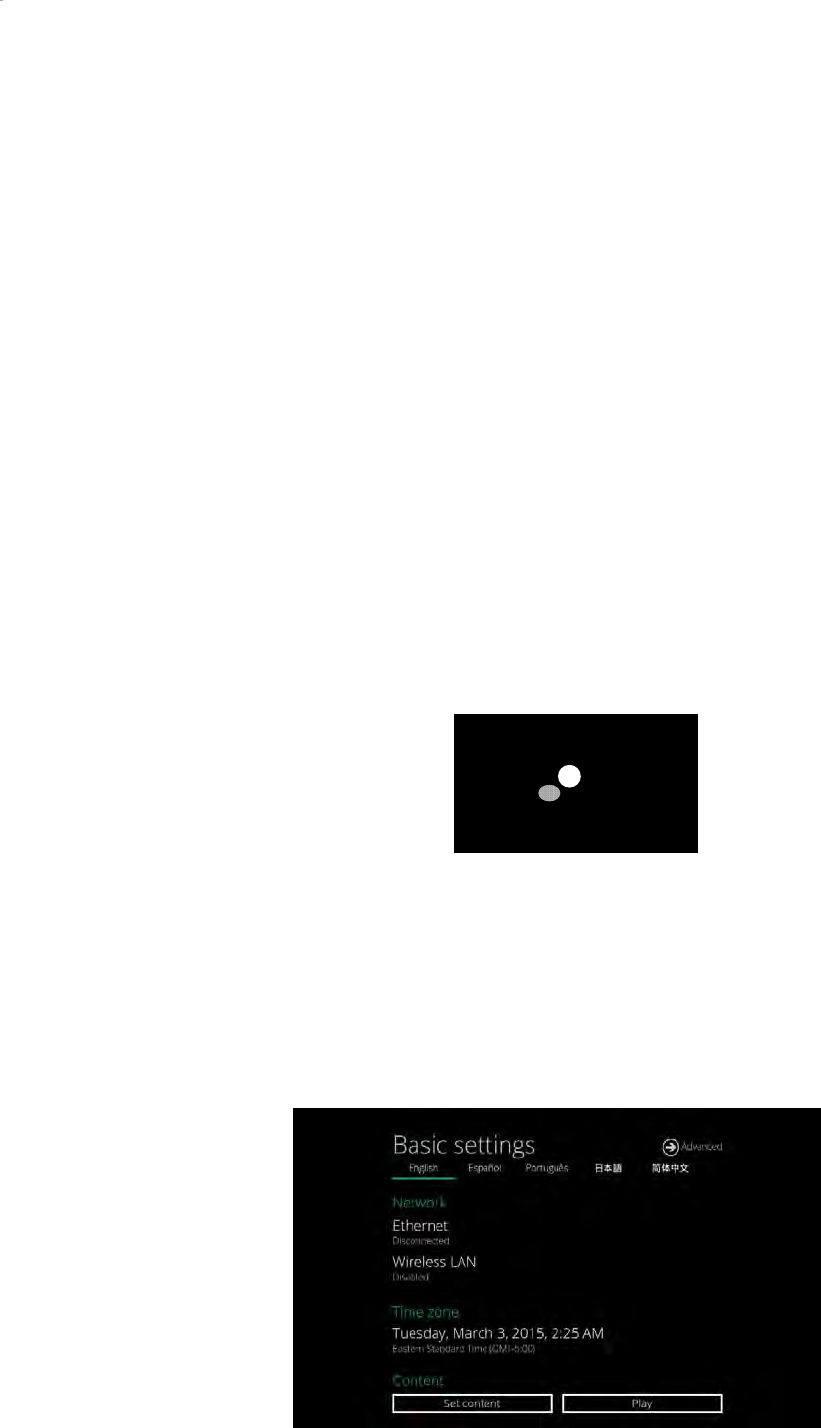
1 AttachtheACpoweradaptertopowerontheunit.Afterapproximately15seconds,thebootinganimation
willbedisplayedonscreenasshownbelow:
2 Theboot‐upprocesstakesapproximately40secondstocomplete.
TroubleshootingTipsformediaplayers
Theoperationindicatorslightup,butnovideoisdisplayedonscreen
Ensurethatyourvideocable(HDMI)issecurelyconnected.WhenusinganHDMIconnection,
choosehighquality,certifiedHDMIcablesortryusingshorterlengthcables
Checkif
y
ourmonitoristurnedonandthecorrectvideoin
p
utsourceisselected

2
Afterboot‐upcompletes,playerwillstayinBasicsettingsmenuifnocontentservicehasbeenconfigured(i.e.
firstboot‐upforbrandnewunitorafterafactoryreset).Ifyouhavealreadysetcontentintotheplayer,contents
willplaybackautomaticallyafter15secondsafterboot‐up.
4.2. Basicsettings
YoumustattachaUSBmousetotheplayertoconfiguresettings.Iftheplayerhastouchscreen,thentheUSB
mouseisnotrequired,andalltheclickactioncanbereplacedbytapaction.
(Fig.2.2.1)
Basicsettings:
–Network,TimezoneandContent.
EachtimetheBasicsettingsmenuisentered,playbackwillautomaticallybeginafter15secondsifcontent
serviceshavebeenpreviouslyset.Autoplaybackcanbecanceledbyclickingonthebuttonbeforethecountdown
ends.
UserisabletoenterAdvancedSettingsbyclickingtheAdvancedbutton.
Toenterthemenusystematanytimeduringplayback,pluginaUSBmouseandholdtheleftmousekeyinthe
cornerareaasshownbelowfor10seconds.Iftheplayerhastouchscreen,thentappingandholdinginthe
cornerareasfor10secondswouldalsobringyoutothemenu.
*Playerwillaskforpasswordifpasswordhasbeenconfigured.

3
4.3. Connecttheplayertoyournetwork
Wirelessconnection
1 ClicktheWirelessLANsettingtolaunchthewirelessconfigurationUI.
(Fig.2.3.1)
2 ClicktheON/OFFbuttonasindicatedbelowtoturnONWirelessinterface(network).
(Fig.2.3.2)
3 Theplayerwillscanforwirelesssignalsnearbyandavailableaccesspointswillbelisted.
(Fig.2.3.3)
4
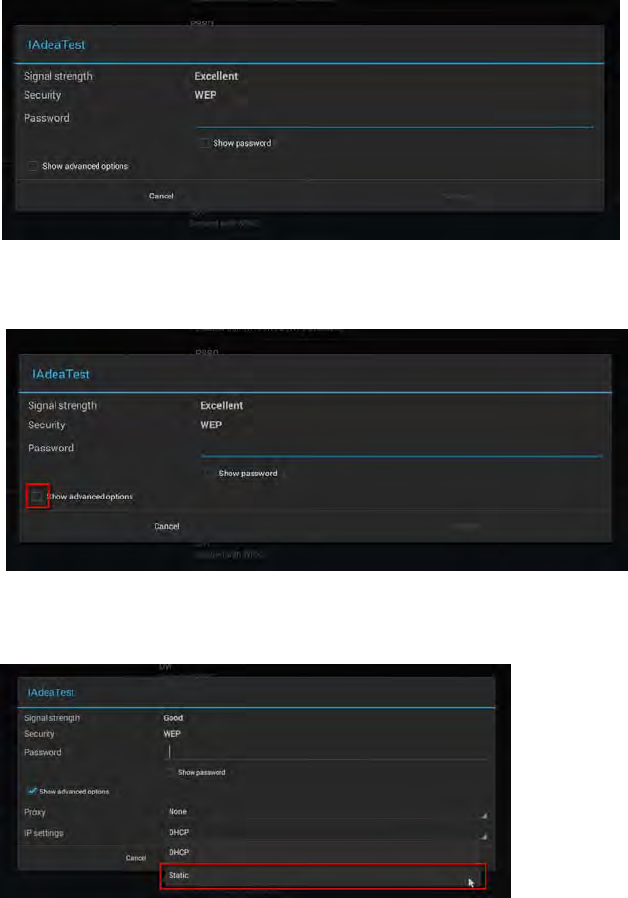
4 ClickonthenetworkIDtoconnect.Ifthenetworkrequiresauthentication,youwillbeaskedtoprovidea
password.
(Fig.2.3.4)
StaticIP–manuallyassignnetworkIPaddress
1 Checktheboxthatsays"Showadvancedoptions"
(Fig.2.3.5)
Clickdownarrowtohidekeyboardifneeded.
Youcanalsoscrolldown/swipetoseetherestofthemenu.
2 UnderIPsettings,changeDHCPtoStatic.
(Fig.2.3.6)
3 FilltheformandclickConnecttocompletethesetting.
(Scrolldown/swipetoseetherestofthemenuifneeded)

5
(Fig.2.3.7)
Wiredconnection
TousethewiredEthernetconnection,connectanEthernetcable.Ethernetconnectiontakeshigherpriority.
DHCP–automaticallyassignnetworkIPaddress
1 TurnonEthernet.IfusingDHCP,nofurtheractionisrequired.
(Fig.2.3.8)
StaticIP–manuallyassignnetworkIPaddress
1 ClickStaticIPSettingstoconfigurestaticIPaddress.
(Fig.2.3.9)
Proxysettings
1 InBasicsettings,clicktheAdvancedbutton,advancedconfigurationmenuwillbelaunched.
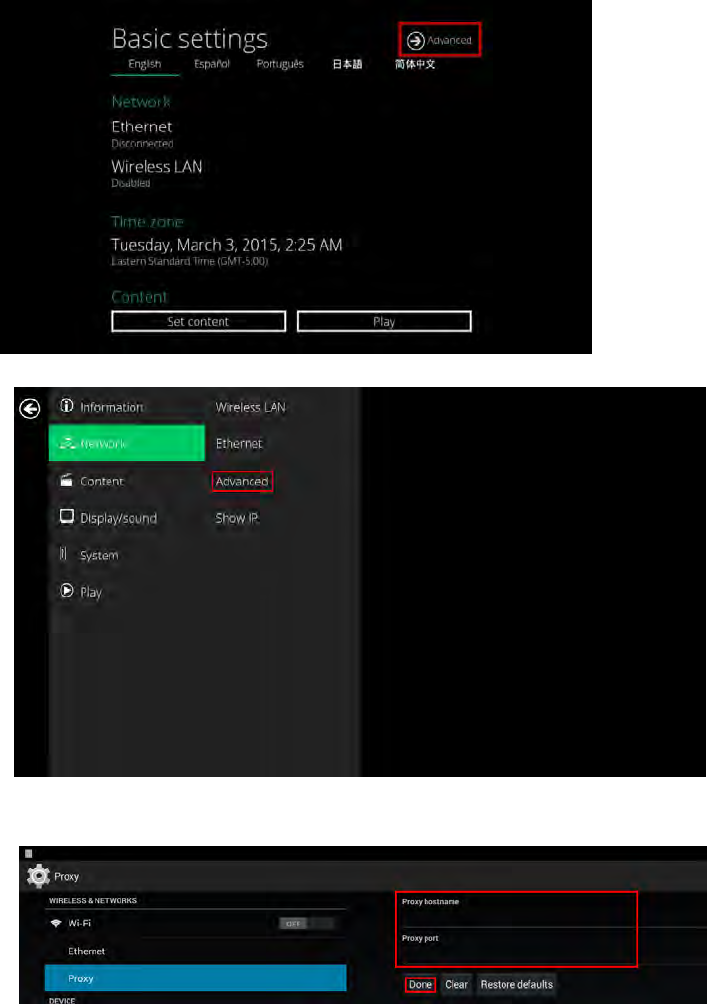
6
(Fig.2.3.10)
2 ClickNetwork,andthenclickAdvanced.
(Fig.2.3.11)
3 Proxysettingmenuwillbelaunched,inputproxyhostnameandport,thenclickDonetofinish
configuration.
(Fig.2.3.12)
ShowIPsettings
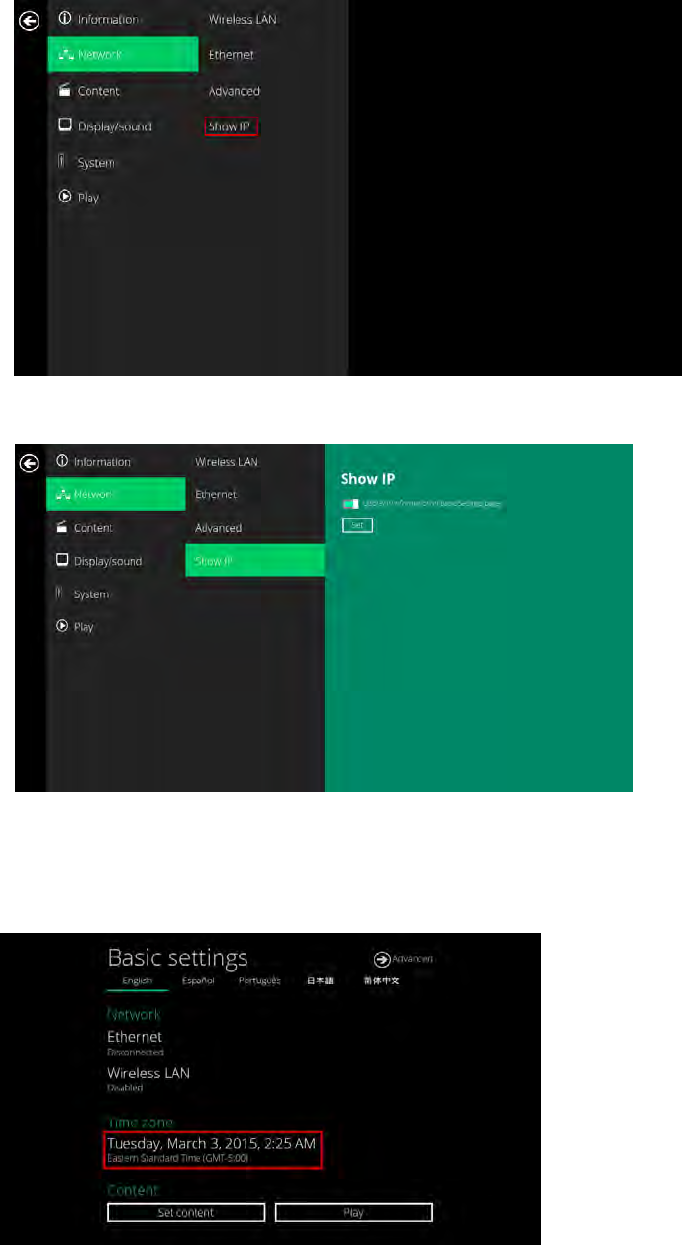
1 InBasicsettings,clicktheAdvancedbutton,advancedconfigurationmenuwillbelaunched.(Fig.2.3.10)
2 ClickNetwork,andthenclickShowIP.
7
(Fig.2.3.13)
3 ThisfeatureistocontrolwhethertheIPaddressbeingdisplayedinBasicsettingsmenu.Thisisdefault
enabled.Whendisabled,Basicsettingswilldisplay“connected”insteadofIPaddress.
(Fig.2.3.14)
4.4. Timezonesettings
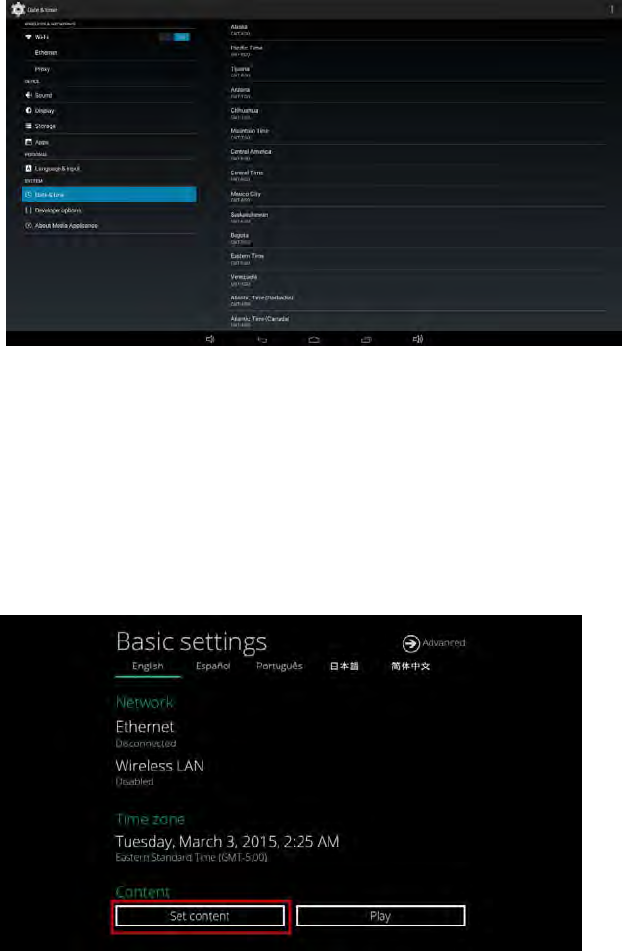
1 ClickTimezone.
(Fig.2.4.1)
2 Choosethecorrecttimezonefromtheavailableoptions.
8
(Fig.2.4.2)
4.5. Contentsettings
1 ClicktheSetcontentbutton.
(Fig.2.5.1)
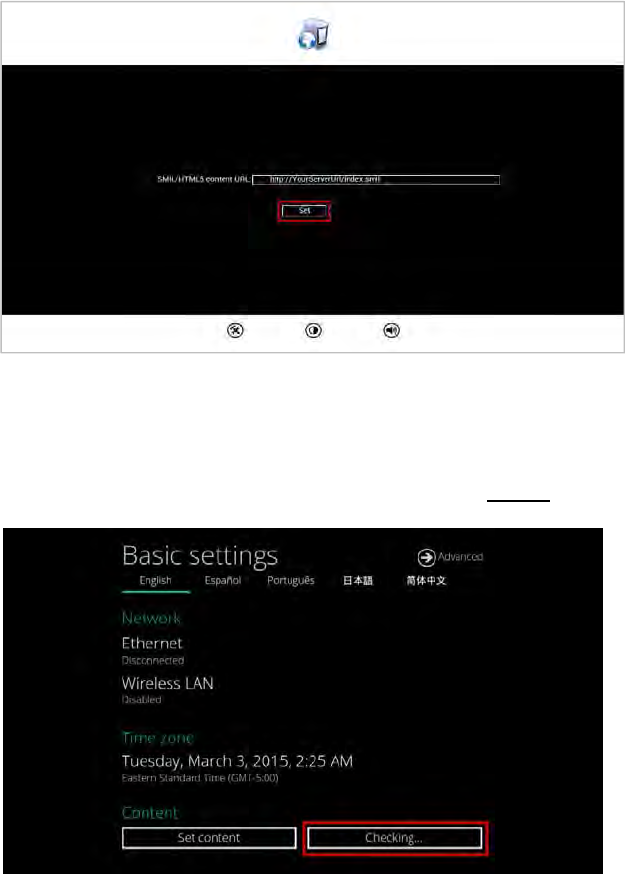
2 InputtheSMIL/HTML5contentURLandclickSet.ItwillreturntoBasicSettingsautomatically.
9
(Fig.2.5.2)
3 TheplayerwillchecktheavailabilityofSMIL/HTML5contentURL,withthePlaybuttonshowingChecking…
ThecheckingactioncanbecanceledbyclickingChecking…button,itwillchangebacktoPlay.
NOTE:
ItishighlyrecommendedtolettheplayerchecktheavailabilityofthecontentURL.ClickingPlaybuttonwith
abad/invalidURLsetwouldcausetheplayertoreboot,iftheFailSafefunctionisnotconfigured.
(Fig.2.5.3)
4 IftheSMIL/HTML5contentURLisavailable,thePlaybuttonwillchangetoa15‐secondcountdownandthe
playbackwillstartafterthecountdown.Thecountdowncanbecanceledbyclickingthebutton.
IfitkeepsshowingChecking…foralongtime,pleasegobacktoSetcontenttocheckthecorrectnessofthe
URL.

10
(Fig.2.5.4)
4.6. PlayerInformation
Usercanchecktheplayer’sbasicinformationincludingtheHealthstatus,Firmwareversion,andPlayerID.
1 ClicktheAdvancedbutton,advancedconfigurationmenuwillbelaunched.
(Fig.2.6.1)
2 ClickonInformation.ThedefinitionsoftheHealthStatus:
Green–Normal.ThedeviceisconnectedtotheURLserver.
Blue–Local.ThedeviceisplayingcontentfromtheUSBdriveorSDcard.
Gray–Disconnected.Thedeviceisdisconnected.

11
(Fig.2.6.2)
4.7. Contentconfiguration–AppStart
UsercanassigntheURLandAPPforexecutionrightafterthesystemstartsup.
1 ClicktheAdvancedbutton.(Fig.2.6.1)
2 ClickonContent,andthenclickonAppStart.
3 EnterthevalidURLofHTML/SMILinAppStart(Fig.2.7.1).IfyoualreadyconfiguredSMIL/HTML5content
URLvia”Setcontent”(Fig.2.5.2),theURLwouldbeshowedhere.
4 TheAdvancedoptionisusedfor3rd‐partyAppconfigurationonly.
(Fig.2.7.1)
4.8. Contentconfiguration–FailSafe
UsercanassigntheURLandAPPforexecutionwhilethesystemhasfailedtoplaytheassignedcontent.
1 ClicktheAdvancedbutton,advancedconfigurationmenuwillbelaunched.(Fig.2.6.1)
2 ClickonContent,andthenclickonFailSafe.
3 EntertheURLofHTML/SMILinFailSafe.
4 TheAdvancedoptionisusedfor3rd‐partyAppconfigurationonly.
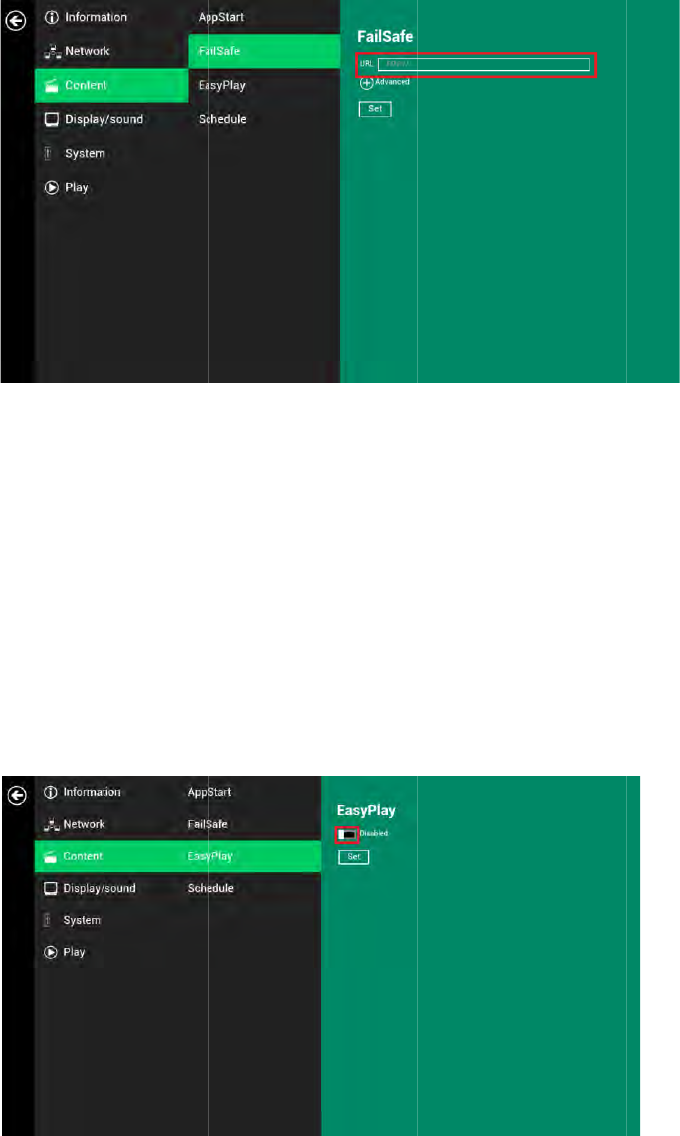
12
4.9. Co
Thef
e
Pleas
e
notb
e
When
topla
y
1
In
2
Cl
3
Cl
4
Cl
M
Confi
g
1
Cl
di
2
Cl
ntentco
n
e
atureEasyPl
a
e
notemedia
f
e
removed.
EasyPlayise
n
y
contentfro
m
sertUSBdriv
e
ickthe
Adva
n
ickon
Conte
n
ick
Disabled/
odeandMo
v
g
urePhoto
M
ickonPhoto
f
rectoriesfor
p
ick
Set
butto
n
n
figurati
o
a
yallowsthe
p
f
ilesdoesnot
n
abled,thep
l
m
theURLse
r
e
orMicroSD
n
ced
button.(
n
t
,andthenc
Enabled
butt
o
v
ieMode.
M
ode
f
orchoosing
p
p
hotosandm
n
afterselecti
n
o
n
–Easy
P
p
layertoplay
copiedtopla
l
ayerwillpla
y
r
verconfigure
cardcontain
i
Fig.2.6.1)
lickon
EasyPl
o
ntoenable
E
p
hotosandm
usicfromth
e
n
gthedirect
o
P
lay
mediaconte
n
yer’sinternal
y
content
onl
y
dvia”
Setco
n
i
ngmediaco
n
ay
.
E
asyPlay,and
usic.Clickon
e
USBdrive.
o
ries.
n
tfromtheU
storage,so
U
y
fromtheUS
B
n
tent
”,
EasyP
l
n
tentthatyo
u
choosefrom
thebuttons
a
SBflashdriv
e
U
SBflashdriv
e
B
drive(orMi
l
ay
mustbed
u
wanttopla
y
2availableo
p
a
smarkedinr
(Fig.2.
8
e
(orMicroSD
e
(orMicroS
D
croSDcard).
isabled.
y
.
p
erationmod
(Fig.2.9.1)
edbelow,an
d
8
.1)
card)directl
y
D
card)must
Ifuserwants
es,Photo
d
selectthe
y
.

13
Confi
g
1
Cl
d
r
2
Cl
3
T
h
m
Easy
P
1
Cl
2
Cl
3
Cl
T
g
ureMovie
M
ick
on
Movie
.
r
ive.
ick
Set
butto
n
h
efilesinthe
enu.
P
lay
Schedu
l
ick
theAdva
n
ickon
Conte
n
ickonthebu
t
T
ypethesch
e
USBkeyboar
d
M
ode
.
Clickonthe
b
n
afterthefol
d
selectedfold
e
l
econfigura
t
n
cedbutton.(
n
t
,andthenc
t
tonsmarked
e
duledtimei
n
d
.
b
uttonasma
r
d
erisselecte
d
e
rswillbepla
t
ion
Fig.2.6.1)
lickon
Sched
u
inredbelow
n
thedialogu
e
r
kedinredb
e
d
.
yedafterclic
k
u
le
.
toenable/di
s
e
boxesmark
e
e
low,andsel
e
k
ingthePlay
b
s
abletheEas
y
e
dinbluebel
o
e
ctthedirect
o
b
uttoninthe
y
Playschedul
e
o
wbyusingt
h
(Fig.2.9.2)
o
ryformovie
s
BasicorAdv
a
(Fig.2.9.3)
e
foreachtim
h
epop‐upke
y
s
fromtheUS
B
a
ncedsetting
s
eslots.
y
boardorthe
B
s
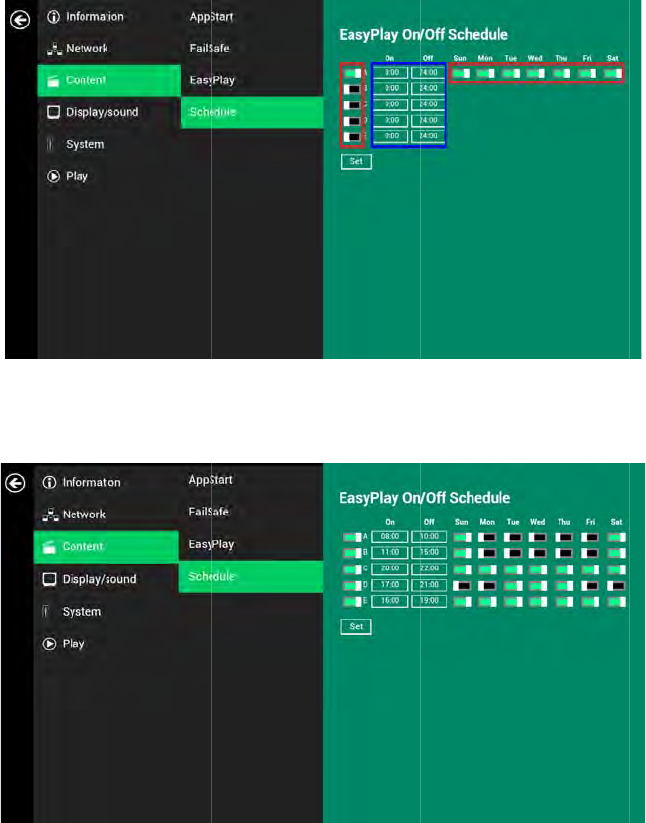
14
4
T
h
b
e
(
T
a
h
e"On"time
s
e
low:
(
Fig.2.9.5)
T
heexactpla
y
a
retheoverl
a
s
assignedint
y
backtimew
i
a
ptimeofC/
D
hetimeslots
i
llbethetim
e
D
andD/E.
A‐Eare
inclu
s
e
slotsmarke
d
s
ive
.Forexa
m
d
inblueassh
m
ple,asched
u
owninfigure
(Fig.2.9.4)
u
leassigneda
2.9.6.Thed
a
stheexampl
e
a
rkblueparts
e
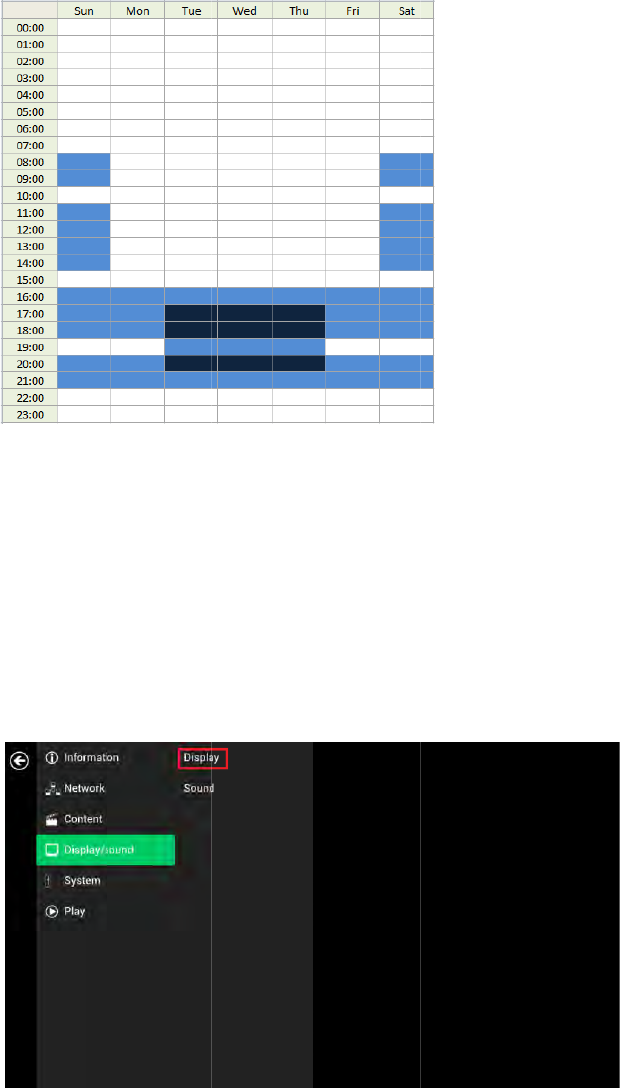
15
4.10.
D
Reso
l
Forb
e
blur.
Ifyou
forop
t
1
Cl
2
Cl
3
Cl
D
e
D
isplayse
t
l
utionsettin
g
e
stquality,se
t
areconnecti
n
t
imalsetting
s
ickthe
Adva
n
ickthe
Displ
a
ick
on
Resolu
e
tect,player
w
t
tings
gs
(formed
i
t
theoutputr
e
n
ganLCDco
m
s
.
n
ced
button,
a
a
y/sound
but
t
tion
,andsel
e
w
illautodete
i
aplayers)
e
solutionto
m
m
putermonit
o
a
dvancedcon
f
t
on,andthen
e
ctsuitablere
ctanduseth
e
m
atchyourdi
s
o
r,projector,
f
igurationm
e
clickon
Displ
solutionfro
m
e
bestoptimi
z
(Fig.2.9.6)
s
play’snative
orplasmadi
s
e
nuwillbela
u
ay
.TheDispl
a
m
thepopup
m
z
edresolutio
n
resolutiont
o
s
play,referto
u
nched.(Fig.
2
a
ySettingsp
a
(
m
enu.Default
n
thatyourdi
s
o
avoidimage
thedevices
p
2
.6.1)
a
gewillbelau
(
Fig.2.10.1)
configuratio
n
s
playsupport
s
scalingand
p
ecifications
nched.
n
isAuto
s
.
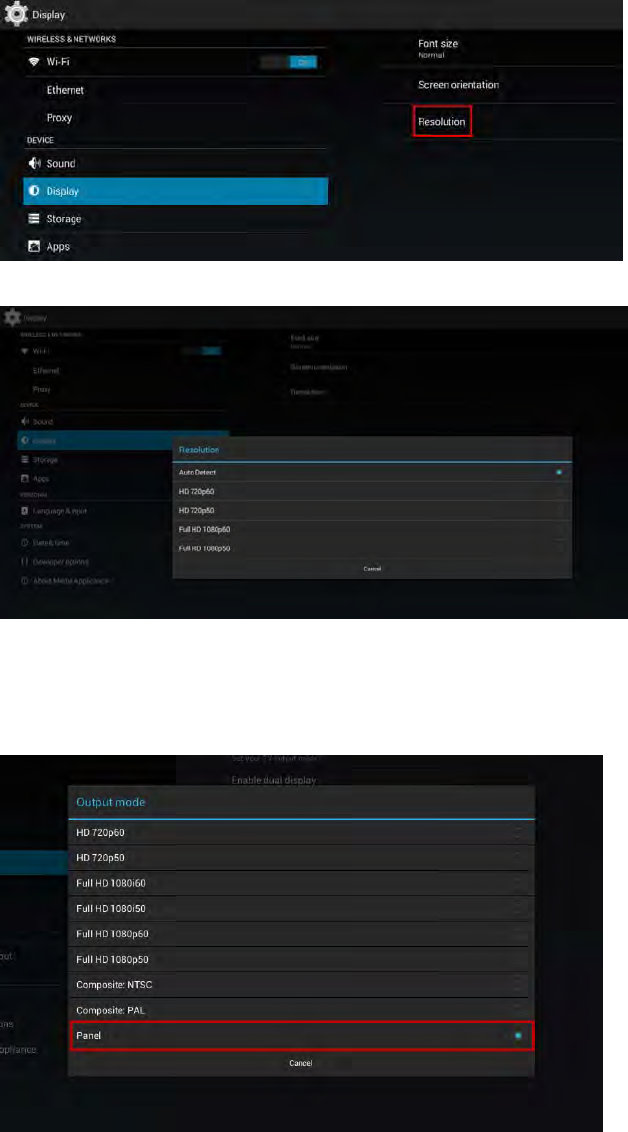
16
(Fig.2.10.2)
(Fig.2.10.3)
ResolutionandDualDisplay(forsignboards)
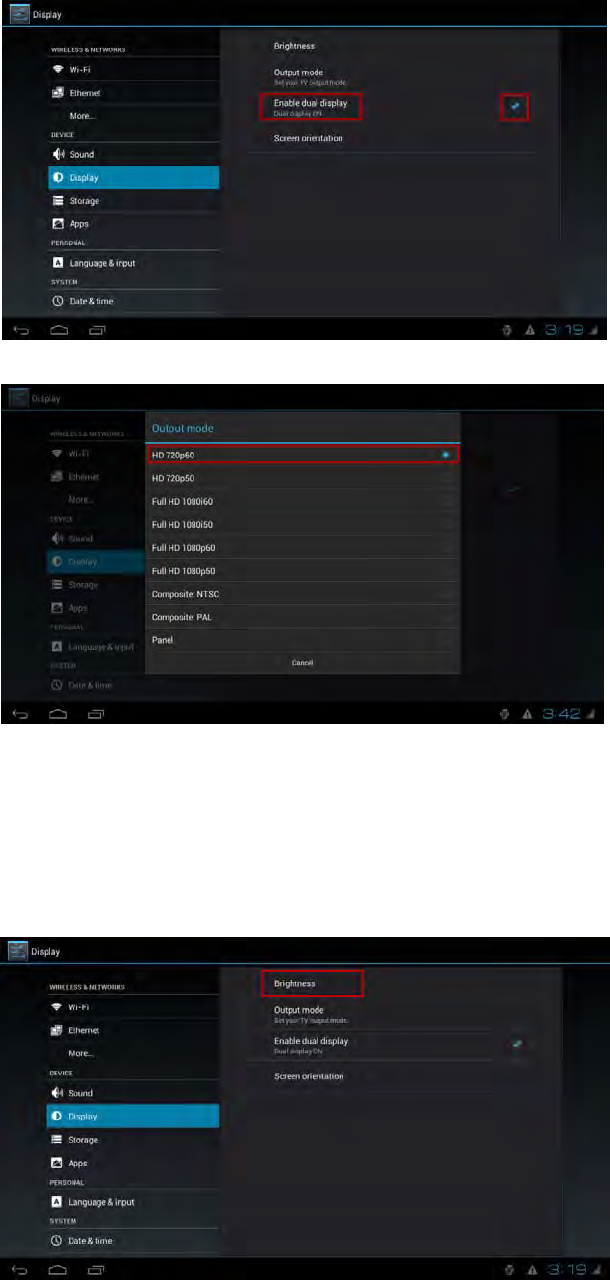
ThedefaultOutputmodeissetto"Panel".(Fig.2.10.4)WithOutputmodesetto“Panel”,thesignboardisONLY
displayingimageonthepanel.
(Fig.2.10.4)
Signboardssupportoutputtopanelandexternalmonitoratthesametime,tousethisfunction,please:
1 Check“Enabledualdisplay”intheDisplaymenu.(Fig.2.10.5)
2 ConnectsignboardtoamonitorviaHDMIport
3 SettheOutputmodetoasettingwhichbestmatchesthemonitor’sspecification.(Fig.2.10.6)
17
(Fig.2.10.5)
(Fig.2.10.6)
PanelBrightness(forsignboards)
Thedefaultpanelbrightnessissettomaximum,anditcanbeadjustedintheDisplaysettings.
1 ClicktheAdvancedbutton,advancedconfigurationmenuwillbelaunched.(Fig.2.6.1)
2 ClicktheDisplay/soundbutton,andthenclickonDisplay.TheDisplaySettingspagewillbelaunched.
(Fig.2.10.1)
3 ClickonBrightness.
(Fig.2.10.7)
4 Dragthebluedotmarkedinredbelowtoadjustthebrightness.ClickonOKtosavetheconfiguration.

18
(Fig.2.10.8)
Screenorientation
Screenorientationistosetthedisplaytorotate90/180/270degrees.
1 ClicktheAdvancedbutton,advancedconfigurationmenuwillbelaunched.(Fig.2.6.1)
2 ClicktheDisplay/soundbutton,andthenclickonDisplay.TheDisplaySettingspagewillbelaunched.
(Fig.2.10.1)
3 ClickontheScreenorientationmarkedinredbelow.
(Fig.2.10.9)
4 Clickonthepreferredanglefromthemenu.
(Fig.2.10.10)
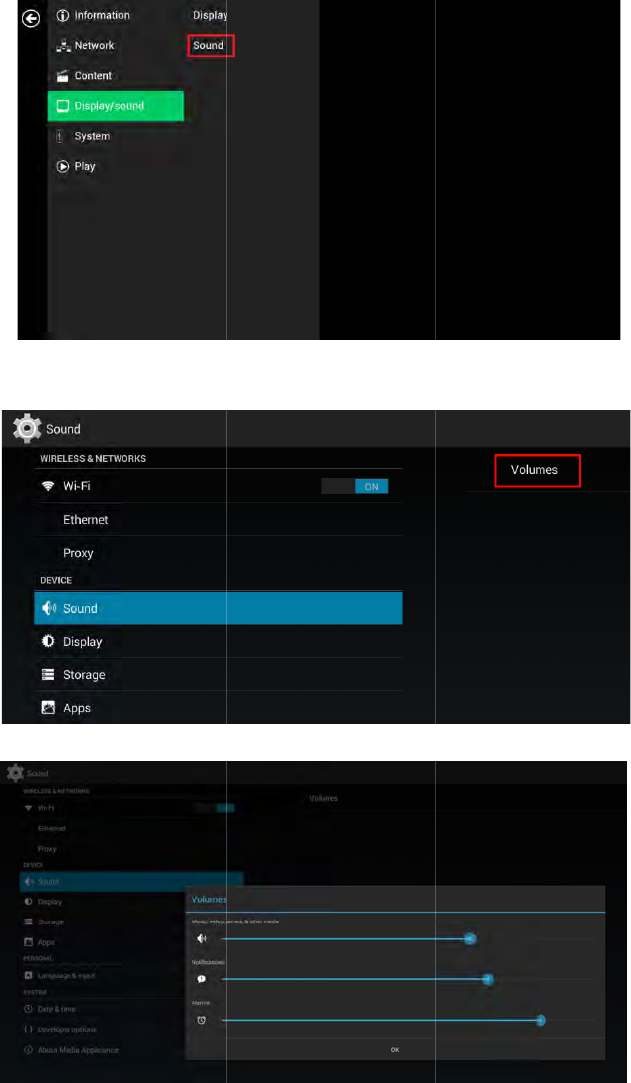
4.11. Soundsettings
Tocontroltheoutputsoundvolumesandtouchsounds:
1 ClicktheAdvancedbutton,advancedconfigurationmenuwillbelaunched.(Fig.2.6.1)
19
2
Cl
3
Cl
t
h
4.12. S
y
Thepl
(Man
a
1
Cl
2
Cl
ickthe
Displ
a
ickon
Volum
e
h
eselectedo
p
y
stemco
n
ayer’sname
c
a
gementsoft
w
ickthe
Adva
n
ickon
Syste
m
a
y/sound
but
t
e
s,
theVolu
m
p
tions,andth
e
n
figurati
o
c
anbespecifi
e
w
aresupport
n
ced
button,
a
m
,andclicko
n
t
on,andthen
m
essettingsp
a
e
nclickonO
K
o
n
–Play
e
e
dsothepla
y
isrequired)
a
dvancedcon
f
n
Playernam
e
clickon
Sou
n
a
gewillbela
u
K
tosavethe
n
e
r
name
y
ercanbeea
s
f
igurationm
e
e
.
n
d
.TheSound
u
nched.Drag
n
ewsettings.
s
ilyrecognize
d
e
nuwillbela
u
Settingspag
e
(Fig
theblueslid
e
(Fi
g
(Fi
g
d
intheman
a
u
nched.(Fig.
2
e
willbelaun
c
.2.11.1)
e
rstoadjustt
h
g
.2.11.2)
g
.2.11.3)
a
gementsoft
w
2
.6.1)
c
hed.
h
evolumesf
o
w
are.
o
r

20
3 InputanameforthefieldandclickSet.
(Fig.2.12.1)
4.13. Systemconfiguration–Security
Apasswordcanbesettoprovideauthenticationforplayeraccess.Ifthepasswordisset,apasswordpromptwill
appearifauseristryingtoentertheBasicsettingsmenufromplayback.
1 ClicktheAdvancedbutton,advancedconfigurationmenuwillbelaunched.(Fig.2.6.1)
2 ClickonSystem,andclickonSecurity.
3 InputapasswordinthefieldandclickSet.
(Fig.2.13.1)
4.14. Systemconfiguration–TimeServer
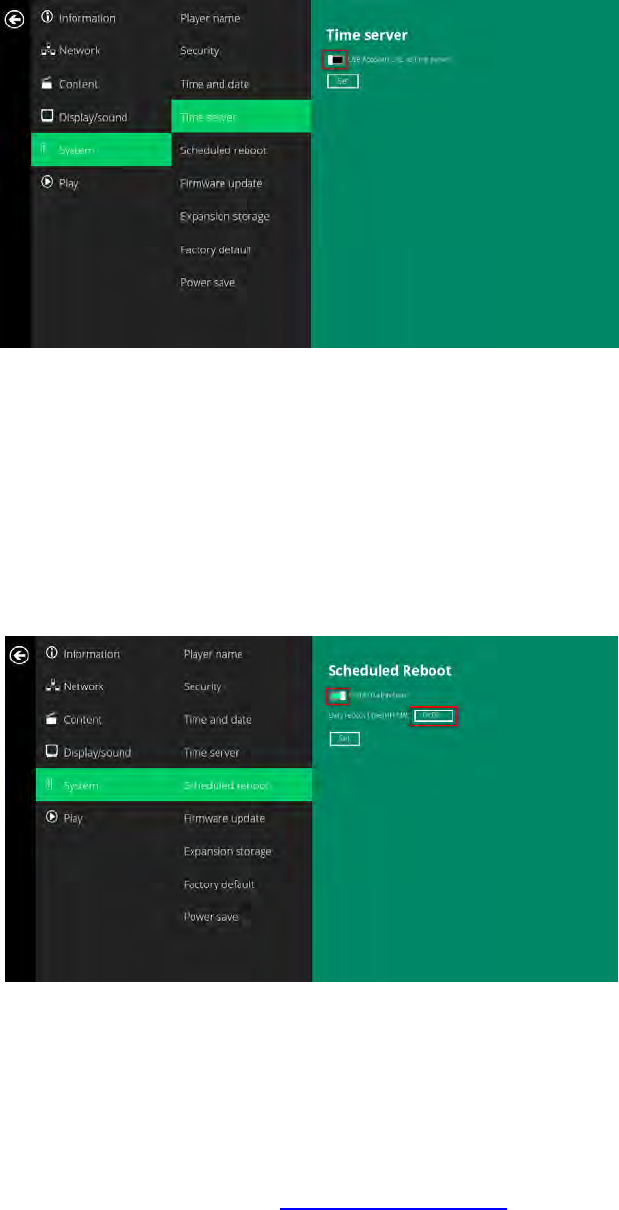
Thefeatureallowsusertosynchronizeplayer’stimewiththewebserverwheretheappStartURLhosted,
disabledbydefault.
Whendisabled,playersynchronizeit’stimewithAndroiddefaulttimeserver(ntp.pool.org),thisrequires
internetconnection.
Whenenabled,playersynchronizeit’stimewiththewebserverwheretheappStartURLhosted(basedonhttp
responseheader’stime)
1 ClicktheAdvancedbutton,advancedconfigurationmenuwillbelaunched.(Fig.2.6.1)
2 ClickonSystem,andclickonTimeserver.
3 ClicktheUseAppStartURLastimeserverbuttonasmarkedinredbelowtoenable/disablethetimeserver
function.
21
4 ClickonSettosavethesetting.
(Fig.2.14.1)
4.15. Systemconfiguration–Scheduledreboot
ThefeatureScheduledRebootallowstheplayertorebootontheassignedtimeautomaticallyeveryday.
1 ClicktheAdvancedbutton,advancedconfigurationmenuwillbelaunched.(Fig.2.6.1)
2 ClickonSystem,andclickonScheduledReboot.
3 ClicktheEnabledailyrebootbuttonasmarkedinredbelowtoenable/disablethedailyrebootfunction.
Clickonthedialogueboxtosetthetime.Thevaluecanbeinputtedwiththepop‐upkeyboardortheUSB
keyboard.
4 ClickonSettosavethesetting.
(Fig.2.15.1)
4.16. SystemconfigurationFirmwareupdate
FirmwareupdatescanbeperformedbyusingaUSBflashdrive.Pleasereadthereleasenotesregardingthe
changesthatwillbemadetoyourplayerbeforeapplyingtheupgrade.
IMPORTANT:DONOTunplugtheUSBdriveorpowerdowntheplayerwhilethesystemisperformingthe
firmwareupdate.
5 Downloadthelatestfirmwarefromhttp://www.digisignage.comandcopyittotherootdirectoryofaUSB
drive
6 Pluginthepowercordintothedevice.

22
7 Aftertheboot‐upcompletes,clicktheAdvancedbuttonontheBasicsettingsmenu.(Fig.2.6.1)
8 ClickonSystem,thenclickFirmwareupdate.
9 ClickonOKtobeginthefirmwareupdate.
(Fig.2.16.1)
10 PlugintheUSBdrivewhilethescreenshows“ScanningUSBdrivesforfirmwarepackage”.
(Fig.2.16.2)
4.17. Systemconfiguration–Expansionstorage
UsercanaddextraMicroSDcardtoreplaceitsinternalstorage,pleasenotewheninternalstoragebeing
replaced,playeruseonlytheextraMicroSDcardasmainstorage,internalstoragewillnotbeused.
ManualExpansion
11 Poweroffdevice.
12 InsertMicroSDcardandthenpluginpowercordtopoweron.
13 IntheBasicsettingsmenu,clicktheAdvancedbutton,advancedconfigurationmenuwillbelaunched.
(Fig.2.6.1)
14 ClickonSystem,clickonExpansionstorageandclickInitialize,playerwillformatMicroSDcardthenreboot
byitself.

23
(Fig.2.17.1)
(Fig.2.17.2)
15 Afterbootup,checkplayerinformationandnewcapacitywillbedisplayed.
(Fig.2.17.3)
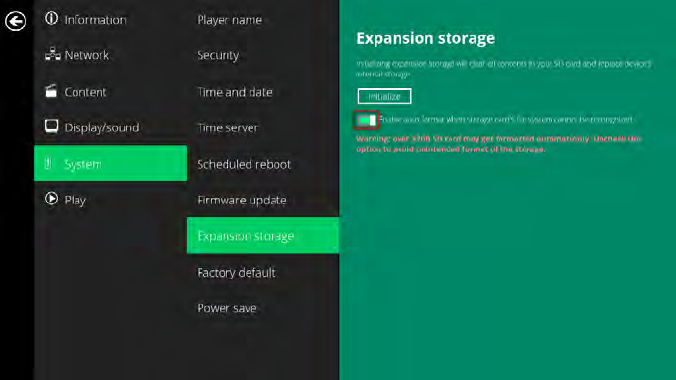
AutoExpansion
16 IntheBasicsettingsmenu,clicktheAdvancedbutton,advancedconfigurationmenuwillbelaunched.
(Fig.2.6.1)
17 ClickonSystem,clickonExpansionstorageandenableauto‐format.
24
(Fig.2.17.4)
18 Poweroffdevice.
19 InsertMicroSDcardandthenpluginpowercordtopoweron.
20 Afterbootup,checkplayerinformationandnewcapacitywillbedisplayed.(Fig2.17.3)
4.18. SystemconfigurationFactoryreset
Ifyouforgetthesystempasswordyouhaveset,youmustresetthesystemtoregainaccesstotheplayer.
Usingtheresetbutton
21 PRESSandHOLDtheresetbuttonwithapin.
22 RE‐CONNECTthepowercord.
23 WAITuntilthestatusLEDflashes.
24 RELEASEresetbuttonandwaitforsystemtoinitialize.
UsingaUSBmouse
Systemresetwillre‐initializethesystem,clearpasswords,andreturnsettingstotheirdefaultvalues.Performthe
following:
25 CONNECTaUSBmouseorusingtouchscreenforinput.
2 ClicktheAdvancedbutton,advancedconfigurationmenuwillbelaunched.(Fig.2.6.1)
3 ClickonSystemconfiguration,andchooseFactorydefault.
4 ClickonOKbuttontoperformthesystemreset.
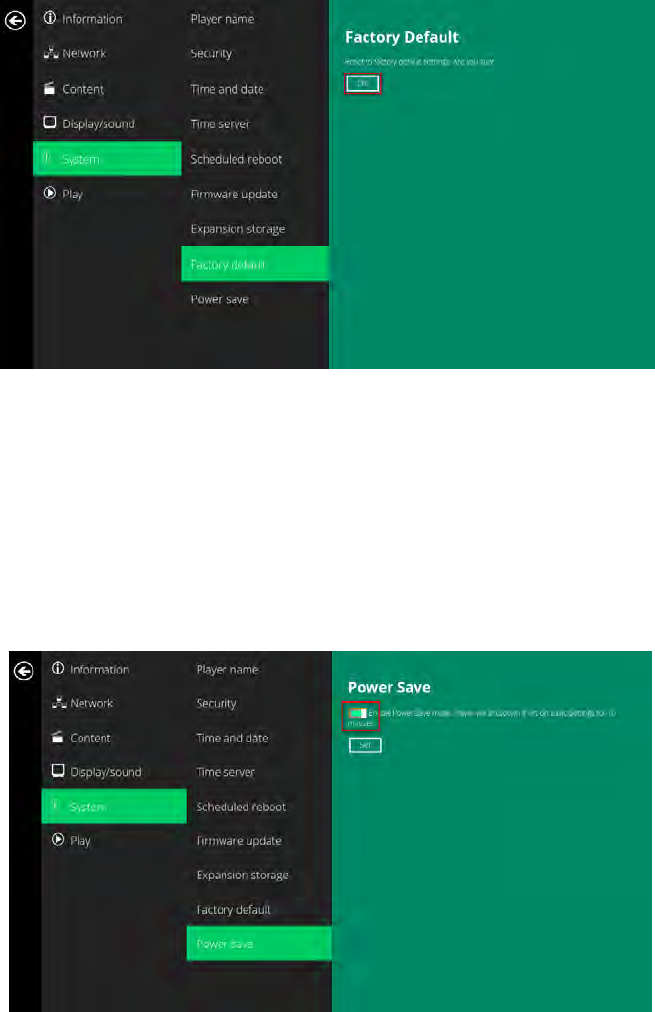
25
(Fig.2.18.1)
4.19. Systemconfiguration–Powersave
ThePowersavefeatureallowstheplayertopoweroffautomaticallywhilestayingattheBasicsettingsmenu
withoutanyactiontakenfor10minutes.
1 ClicktheAdvancedbutton,advancedconfigurationmenuwillbelaunched.(Fig.2.6.1)
2 ClickonSystem,andclickonPowersave.
3 ClicktheEnablePowerSavemodebuttonasmarkedinredbelowtoenable/disablethepowersavefunction.
4 ClickonSettosavethesetting.
(Fig.2.19.1)
5. ContentManagement
Theplayerisdesignedtoworkwith3rdpartymanagementsolutions.Pleaserefertotheprintedguideforrelated
setupinstructions.
6. AuthoringinHTML5

26
Amaj
o
infor
m
Tofin
d
7. Wo
r
Thepl
mean
s
invest
7.1. In
t
Using
playe
r
andR
e
signa
g
hard
w
7.2. w
w
Them
custo
m
visit
w
8. Ap
p
Wha
t
Video
video
Thep
Wi‐Fi
a
Tryre
l
Ifbot
h
Ifbot
h
Wha
t
Pleas
e
Uset
h
thepl
a
How
d
Them
SMIL
o
Coul
d
Thepl
o
radvancem
e
m
ation.
d
outmorea
b
r
kingwi
t
ayerusesop
e
s
predictable
r
mentsarene
v
t
roductio
SMIL(prono
u
r
understands
e
alNetworks.
g
enetworks,
o
w
aredownth
e
w
w.asmi
l
ediaplayero
m
izationtoy
o
w
ww.a‐smil.or
g
p
endix:F
t
videoform
a
filesencode
d
isnotplayed
layerispla
c
a
ppliancesin
l
ocatingthea
h
Ethernet
&
h
connections
t
shouldIdo
i
e
performafa
h
eS/WRESET
a
yer’spassw
o
d
oImanage
ediaapplian
c
o
penstandar
d
d
theplayer
d
ayerfeatures
e
ntinthepla
y
b
outusingHT
t
hSMIL
e
ncommunic
a
r
esultsacross
v
erobsolete.
n
u
nced“smile”
)
thelanguag
e
Whatthism
e
o
peningupa
v
e
road.
l
.orgfor
d
peratingsyst
e
o
urprojectm
a
g
.
AQ
a
tcanIplay
?
d
inMPEG‐4
A
asscheduled
,
c
ednearmy
W
generalshou
l
ccesspointf
u
&
W
i
Fiarec
o
areavailable
i
fIforgotm
y
ctoryreset.
buttonlocat
e
o
rd.
theplaybac
k
c
eisdesigned
d
commands.
d
isplayFlas
h
limitedPow
e
y
eristheabili
ML5fordigit
a
a
tionsprotoc
o
multipledev
)
,thelangua
g
e
“spoken”by
e
ansisquick
e
v
enuesofsoft
d
evelope
r
e
mutilizesW
3
a
nagementn
e
?
A
VCupto192
0
,
orifitplays
p
W
iFiaccess
l
dbeplaced
1
u
rtherawayf
r
o
nnected,w
h
,Ethernetwil
y
password
?
e
datthebac
k
k
ofcontent
s
tobeintero
p
h
orMicroso
f
e
rPointsuppo
tytoplaybac
k
a
lsignage,vis
i
o
lsforconte
n
ices,andSMI
g
ecreatedby
professional
e
r,easier,and
warecontrol
s
r
s
3
CSMILasth
e
e
eds.Forres
o
0
x1080resol
u
p
oorly,pleas
e
point,yett
h
1
0feet(3met
r
omtheplaye
h
ichonewil
l
lbeused.
?
k
ofthemedi
a
s?
p
erablewithl
e
f
tPowerPoi
n
rt,butnotFl
a
k
HTML5con
t
i
thttp://ww
w
n
tpresentatio
L’snon‐propr
W3Cformul
t
toolsfromco
betterinteg
r
s
andrealizin
g
e
underlying
s
o
urces,downl
o
u
tionsandbit
e
searchthes
h
econnectio
n
ers)fromthe
rtoimprove
c
l
takeprece
d
a
playertore
s
e
ading3
rd
par
n
tpresentat
i
a
shsupport.
t
entwhichca
n
w
.digisignage.
c
nandplayba
c
ietarynature
t
imediacom
m
mpaniessuc
h
ationofyour
g
thefullpote
s
criptinglang
u
o
ads,andco
m
ratesshould
p
upportsitef
o
n
isunrelia
b
Wi‐Fiaccess
c
onnection.
d
ence
?
s
torefactory
s
tymanagem
e
i
ons
?
n
containdyn
c
om/
c
kcontrol.S
M
meansthaty
m
unications,t
h
h
asAdobe,A
p
playersinto
y
ntialofyour
p
u
age,whichl
e
m
munitysup
p
p
layperfectly
o
r“transcode
”
b
le.
pointforreli
a
s
ettings.This
w
e
ntsoftware
s
amic
M
IL‐complianc
our
h
emedia
p
ple,Microso
y
ourdigital
p
layer
e
ndswellto
p
ort,please
.Ifacertain
”
instructions
.
a
bleoperatio
n
w
illalsoclear
s
olutionsorvi
e
ft,
.
n
.
a

27
WhilePCscanplaymanyformatswithvaryingdegreesofsuccess,RISC‐basedmediaplayersaredesignedto
reliablyplayspecificvideoformats(seespecfordetails).WhileMicrosoftPowerPointnativefilescannotplay
directlyonaRISC‐basedplayer,thefilecanbeconverted(i.e.ManagerExpress)intoanimageformattobe
playedasanimageslideshow.
Whywon’tsomemediafilesplayproperly?
Thevideodatabit‐rateusedmayhaveexceededtherecommendedbitrate.
Thevideodatabit‐rateistheamountofvideooraudiodatausedpersecondtostoreorplaythecontents,
usuallyexpressedinMbps(mega‐bitspersecond).Videoencodedwithexcessivebit‐rateswillnotplayback
smoothlyinthemediaplayer,likelyduetostorageI/Obottleneck.
Visithttp://www.digisignage.comforcompatiblemediaformatpresets.
ThemediaplaybacklooksdifferentonaPCcomparedtothemediaplayer’sscreen.(Wrongaspect
ratio)
Thereare2majoraspectratios(width‐to‐heightratios)forvideocontent,butmanykindsofdisplays.Ifyouplay
4:3videoona16:9display(orviceversa),acirclebecomesoval,andthepicturetakesonasqueezedor
stretchedlook.Toavoidthisdistortedlook,addingblackbarsareacommontechnique.
TheNetworkMediaPlayercanbeconfiguredtoautomaticallyaddblackbarsforcertaintypesofdisplays.You
cansettheoutputresolutionintheplayer’sconfigurationmenutomatchthenativeresolutionofyourdisplay.
SomeJPEGimagescannotbeplayedinthemediaplayer.
ProgressiveJPEGfilesarenotsupported.PleaseconverttobaselineJPEGformaximumcompatibility.
JPEGimagescanbeeitherof2types:baselineorprogressivecompression.BaselineJPEGoffersgreatest
compatibility,whileprogressiveJPEGsaresuitableforwebsiteimages.Progressiveimagesaredownloadedand
displayed“progressively,”beingrenderedmoreclearlyasmoredataisreceivedovertheinternet.Progressive
imagesareprimarilysupportedonPCs.Formediaappliances,makesuretosaveimagesasbaselineJPEGinyour
photoeditor,orresavethemasbaselineJPEGsusingfreetoolssuchasIrfanView(http://www.irfanview.com/).
Doesthemediaplayersupportvideostreaming?
No.Mediaplayersplayfilesfromlocalstorageanddonotsupportreal‐timevideostreamingoverthenetwork.
Thisdeliversanoptimumviewingexperiencefreeofplaybackqualityissuessuchasstuttering,blocking,orblue‐
screens.
Theplayerisnotplaying.WhatshouldIdo?
Playlisterrorsandschedulingissuesaretwomajorcausesofplaybackproblems.Todetermineiftheproblemis
causedbyabadplaylist,justdeletetheplaylistandrestarttheplayer.Theplayershouldloopthroughallmedia
files,indicatingafaultwiththeplaylist.
Iftheplaybackisscheduledtoplayatspecifictime,checktoseeifthedeviceissettotherighttimezoneonthe
worldclock.Ifnothingseemswrong,thetimezonesettingisoftenthereasontheprogramisnotplayed.
ThevideoisplayingbutIcan’thearanysound,whatshouldIdo?
Checkvolume(mute)settingsonmonitor.
28
FederalCommunicationsCommission(FCC)Statement
15.21
Youarecautionedthatchangesormodificationsnotexpresslyapprovedbythepartresponsibleforcompliance
couldvoidtheuser’sauthoritytooperatetheequipment.
15.105(b)
ThisequipmenthasbeentestedandfoundtocomplywiththelimitsforaClassBdigitaldevice,pursuanttopart
15oftheFCCrules.Theselimitsaredesignedtoprovidereasonableprotectionagainstharmfulinterferenceina
residentialinstallation.
Thisequipmentgeneratesusesandcanradiateradiofrequencyenergyand,ifnotinstalledandusedin
accordancewiththeinstructions,maycauseharmfulinterferencetoradiocommunications.However,thereisno
guaranteethatinterferencewillnotoccurinaparticularinstallation.Ifthisequipmentdoescauseharmful
interferencetoradioortelevisionreception,whichcanbedeterminedbyturningtheequipmentoffandon,the
userisencouragedtotrytocorrecttheinterferencebyoneormoreofthefollowingmeasures:
‐Reorientorrelocatethereceivingantenna.
‐Increasetheseparationbetweentheequipmentandreceiver.
‐Connecttheequipmentintoanoutletonacircuitdifferentfromthattowhichthereceiverisconnected.
‐Consultthedealeroranexperiencedradio/TVtechnicianforhelp.
Thisdevicecomplieswithpart15oftheFCCRules.Operationissubjecttothefollowingtwoconditions:
1)thisdevicemaynotcauseinterferenceand
2)thisdevicemustacceptanyinterference,includinginterferencethatmaycauseundesiredoperationofthe
device.
FCCRFRadiationExposureStatement:
1. ThisTransmittermustnotbeco‐locatedoroperatinginconjunctionwithanyotherantennaortransmitter.
ThisequipmentcomplieswithFCCRFradiationexposurelimitssetforthforanuncontrolledenvironment.Thisequipment
shouldbeinstalledandoperatedwithaminimumdistanceof20centimetersbetweentheradiatorandyourbody
29
Canadian Notice
This device complies with Industry Canada license-exempt RSS standard(s). Operation is subject to
The following two conditions: (1) this device may not cause interference, and (2) this device must
accept any interference, including interference that may cause undesired operation of the device.
This device complies with the Canadian ICES-003 Class B specifications and RSS-247 of Industry
Canada.
This Class B digital apparatus meets all requirements of the Canadian Interference-Causing Equipment
Regulations. Wireless operation is subject to 2 conditions. The first is that the wireless device may not
cause interference. The second is that the wireless device must accept any interference, including
interference that may cause undesired operation of the device.
To comply with the Canadian RF exposure compliance requirements, this device and its antenna
must not be co-located or operating in conjunction with any other antenna or transmitter.
Avis Canadien
Le présent appareil est conforme aux CNR d'Industrie Canada applicables aux appareils radio
exempts
de licence. L'exploitation est autorisée aux deux conditions suivantes : (1) l'appareil ne doit pas
produire
de brouillage, et (2) l'utilisateur de l'appareil doit accepter tout brouillage radioélectrique subi, même si
le brouillage est susceptible d'en compromettre le fonctionnement.
Cet appareil est conforme à la norme canadienne NMB-003 classe B et CNR-247 d'Industrie Canada.
Ce dispositif numérique de classe B respecte toutes les exigences du Règlement canadien matériel brouilleur.
Fonctionnement sans fil est soumis à deux conditions. La première est que l'appareil sans fil peut ne pas
provoquer des interférences. La seconde est que le dispositif sans fil doit accepter toute interférence,
y compris les interférences qui peuvent causer un mauvais fonctionnement de l'appareil.
Pour se conformer aux exigences de conformité RF canadienne l'exposition, cet appareil et son antenne
ne doivent pas être co-localisés ou fonctionnant en conjonction avec une autre antenne ou transmetteur.
ThisradiotransmitterhasbeenapprovedbyIndustryCanadatooperatewiththeantennatypeslisted
belowwiththemaximumpermissiblegainindicated.Antennatypesnotincludedinthislist,havinga
gaingreaterthanthemaximumgainindicatedforthattype,arestrictlyprohibitedforusewiththis
device.
AntennaType:DipoleAntenna
Maximumpermissiblegain:3.92dBi